

Page 1
NSS pro User Manual
NSS pro
User Manual
Rev. 0.2 February 2012 Nokia Service Suite Professional 1
Page 2
NSS pro User Manual
Table of Contents
1. Introduction 3
2. Features 4
3. Nokia for dummies 5
4. Nokia BB5 SL3 unlock 6
5. Contact 12
Rev. 0.2 February 2012 Nokia Service Suite Professional 2
Page 3
NSS pro User Manual
Introduction
NSS pro is a software program intended to help end users doing simple repairs of their Nokia mobile
phones. It is re-written from scratch, revamped version of the popular NSS. I had to do this as NSS
grew to big, it was dependent on old, not supported code. NSS pro in it's current form is very flexible
and easy to update, extend and track bugs.
Designed with simplicity in mind, NSS pro looks simple on the outside and all complicated
functionality is hidden underneath. My other goal was to provide solutions for old, long discontinued
models, which laid on my back up hard drivers, unused for years.
As the time goes by, more and more functionality is added. This guide is to be accordingly updated as
new features are added. Please keep in mind that the description of certain features and screen shots in
this guide might not reflect the latest released version of NSS pro because changes are made regularly
and updating the user manual takes longer.
Rev. 0.2 February 2012 Nokia Service Suite Professional 3
Page 4
NSS pro User Manual
Features
• Reading phone details
• Detecting phone power mode and generation
• Read and write of product details – eg Product Code
• Reading of the StartUp self tests
• Executing single self test
• Reading of the phone Permanent Memory (PM) to a file
• Writing of the phone Permanent Memory from a file
• Reading of simlock details and auto backup
• Restore of the simlock from backup
• Reset code unlock counters
• Delete stored unlock code in phone memory
• Read stored unlock code from the phone
• Upload unlock code via USB/FBUS interface
• Submit of SL3 data for server unlock
• Phone mode change over USB
• Full FBUS support via appropriate interface
• Phone power control (FBUS only)
• Direct unlock of SL2 type of BB5 phones
• Unlock code generation for SL2 type of BB5 phones
• Lock to any network for SL2 type of BB5 phones
• USB read of log file for the purpose of SL3 bruteforce unlock(Infineon,
Broadcomm, RAPU and RAPIDO processors)
• SL3 Bruteforce Server, client and monitor to provide expandable bruteforce cluster
• Standalone .COD file to SL3 unlock codes calculator with any SX-5 SN
• DCT4 standalone RPL file calculator
Rev. 0.2 February 2012 Nokia Service Suite Professional 4
Page 5
NSS pro User Manual
Nokia for dummies
If you are new to Nokia internals this section might be useful for you. Let's assume you come from the
iPhone world and think that mobile phone is an Application processor that runs the phone operating
system, and there is small, slave processor connected on its COM port – the baseband. So you want to
do any changes on the phone part – you talk to the application processor via USB, and then your
commands are somehow redirected to the baseband. That has not been the case always, not for Nokia
anyway. In Nokia world, the baseband is the main CPU, application processor is the slave (Symbian
phones) or all code is run on the same baseband CPU – phone main OS (Symbian + NokiaOS).
Different Nokia phones have used different processors, starting with MAD2 processor in early DCT3
models, then UPP (early OMAP version) in DCT4 and DCT4PLUS generation,
RAP3/RAPIDO/RAPUYAMA in latest BB5. Finally Broadcomm and Quallcom, also Infineon.
Regardless of the CPU and generation we have a generic interface and communication protocol that
was kept rather consistent in the last 12 years.
Two main interfaces could be identified – the FBUS and the USB. FBUS is a generic term that can
refer to the hardware interface that has two possible communication modes – UART type of
asynchronous mode (115 – N – 8) and SPI mode, with some modified sub modes of operation (like
dual rate mode). FBUS can also refer to actual data frames sent to the phone via UART hardwired
mode (service battery) or over USB layer. To simplify things – look at two possible operating modes
of the phone – booted via own OS and in Normal/Test/Local mode – this is FBUS communication
mode. If phone is booted from ROM(mean CPU internal ROM), then loader in RAM – this is FLASH
mode. All this apply upto WP7 models (Lumia), where we have completely new situation.
Unlocking could vary in methods based on generation. DCT3 and early DCT4 models were locked
using symmetric algorithm so unlock was pretty trivial. DCT4PLUS introduced some extra protection,
so flash patching was used, although lately RSA exponent 3 exploit was used to generate faked
simlock data. Latest DCT4PLUS models with different than TI processors will be running SL3
simlock server and together as all BB5 current models will require bruteforce unlock – unlock code
search on external hardware, then permanent unlock. It is worth mentioning that first BB5 models also
used symmetric algorithm for its simlock and allowed relatively easy Unlock/Lock.
Rev. 0.2 February 2012 Nokia Service Suite Professional 5
Page 6
NSS pro User Manual
Nokia BB5 SL3 unlock
Unlocking of the previous generation of Nokia phone involves reading and decoding of a SHA hash
from the phone permanent memory, then performing extensive bruteforce search on a keyspace of a 1
quadrillion possible values using powerful, multiprocessor ATI video cards. When I have developed
this solution in the summer of 2009, the most powerful, off the shelf video card was NVIDIA
GTX295. Water cooled cluster, built with four of those was taking 4 days to do full keyspace search
while consuming constant 1300 kWh. Much later ATI released the HD5970, a single card, with air
cooling was outperforming this first, very expensive cluster machine. The current NSS pro
implementation allows to massively distribute the task to big number of crunching machines, each
running 1-4 ATI multiprocessor cards (eg ATI5970) and split the task to much smaller chunks, while
keeping control of the total process.
The actual process is:
1. Run server
2. Run at least one instance of the client
3. Run another version of NSS pro, connect the phone via Usb, click Submit to Server
4. From now on, you can check regularly with Check button to see the progress of the job.
Processing is fully automated. When the code is found, it will be displayed after clicking
Check. You can simply copy it from the screen and using the Upload code button just load it to
the phone to unlock.
NSS pro allows to run in Server, Client or Monitor mode. In theory you can run all on a single PC.
Best is to have 3 computers minimum - one for server, one for a cluster(BF machine) and one
to monitor, do administration, load jobs, etc. It is good to mention that you can run client, server and
monitor at the same time in one instance – the server at least require to be run as a separate process.
Lets assume you have 3 PCs, put NSS pro on all of them.
Setup of a Server PC
1. Make sure this copy is with annual subscription (get license via Activate)
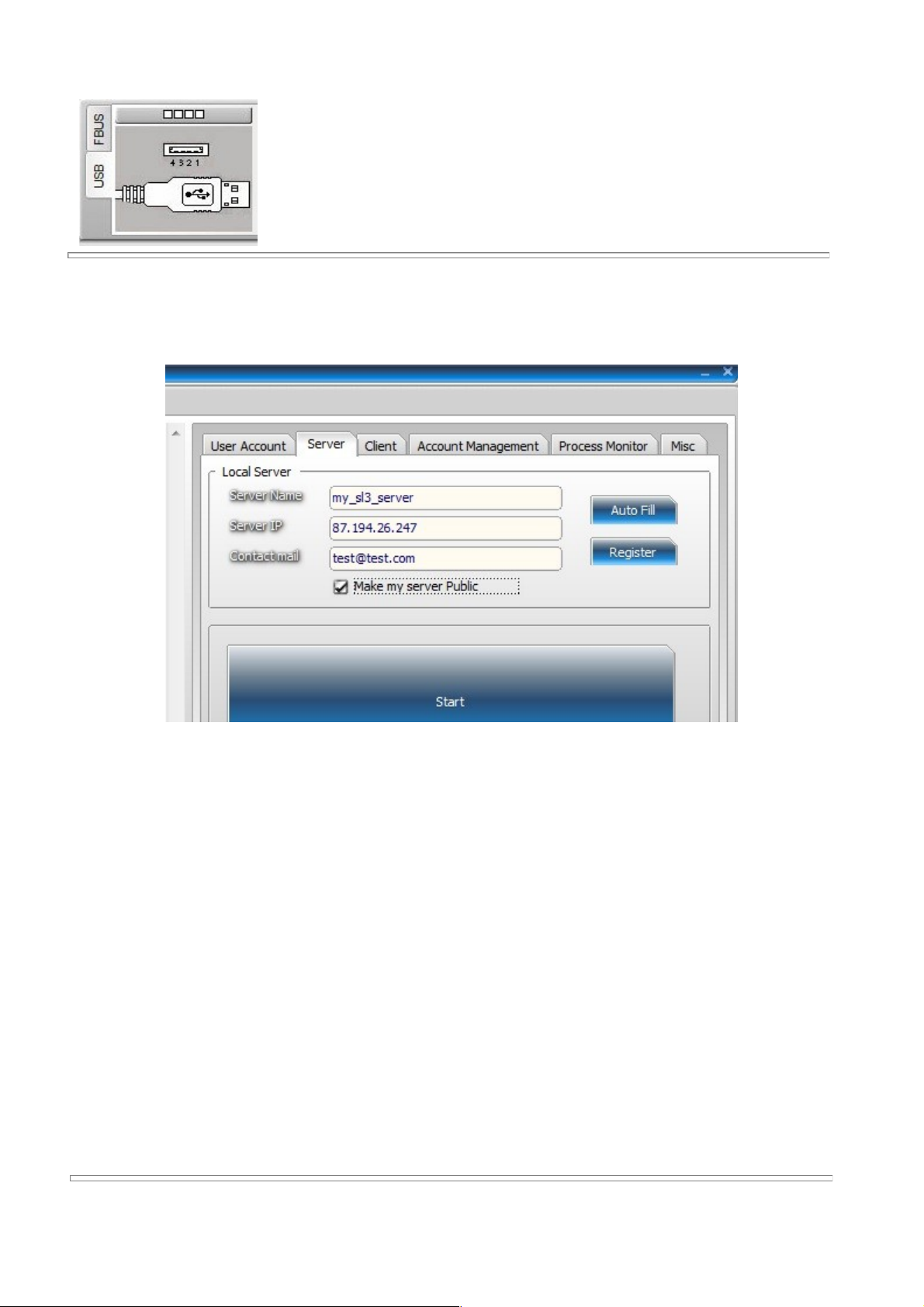
2. Go to the Simlocks Tab, then click the SL3 BF tab, then the Server tab
2. Press auto fill, if you don't like the server name - change it, if you can't
see external IP, enter by hand, put contact e-mail or ICQ, etc in third box.
Press Register
Rev. 0.2 February 2012 Nokia Service Suite Professional 6
Page 7
NSS pro User Manual
4. Press Start
5. If your server needs to be accessed from outside, do SLL server port forward
on your router
Notes:
• External IP is your internet visible address, not LAN address of the PC that runs the
server instance of NSS pro
• If you tick 'Make my server Public' and click on register, all NSS pro users will see your
server
• Do not run Skype or other soft on same pc that register SSL server on port 443. If you
really have to, make sure you close the offending software, start the server, then launch
the software again. For example Team Viewer likes to use port 443, but happily will
move to another port if 443 is in use
Rev. 0.2 February 2012 Nokia Service Suite Professional 7
Page 8
NSS pro User Manual
Setup of a Client PC
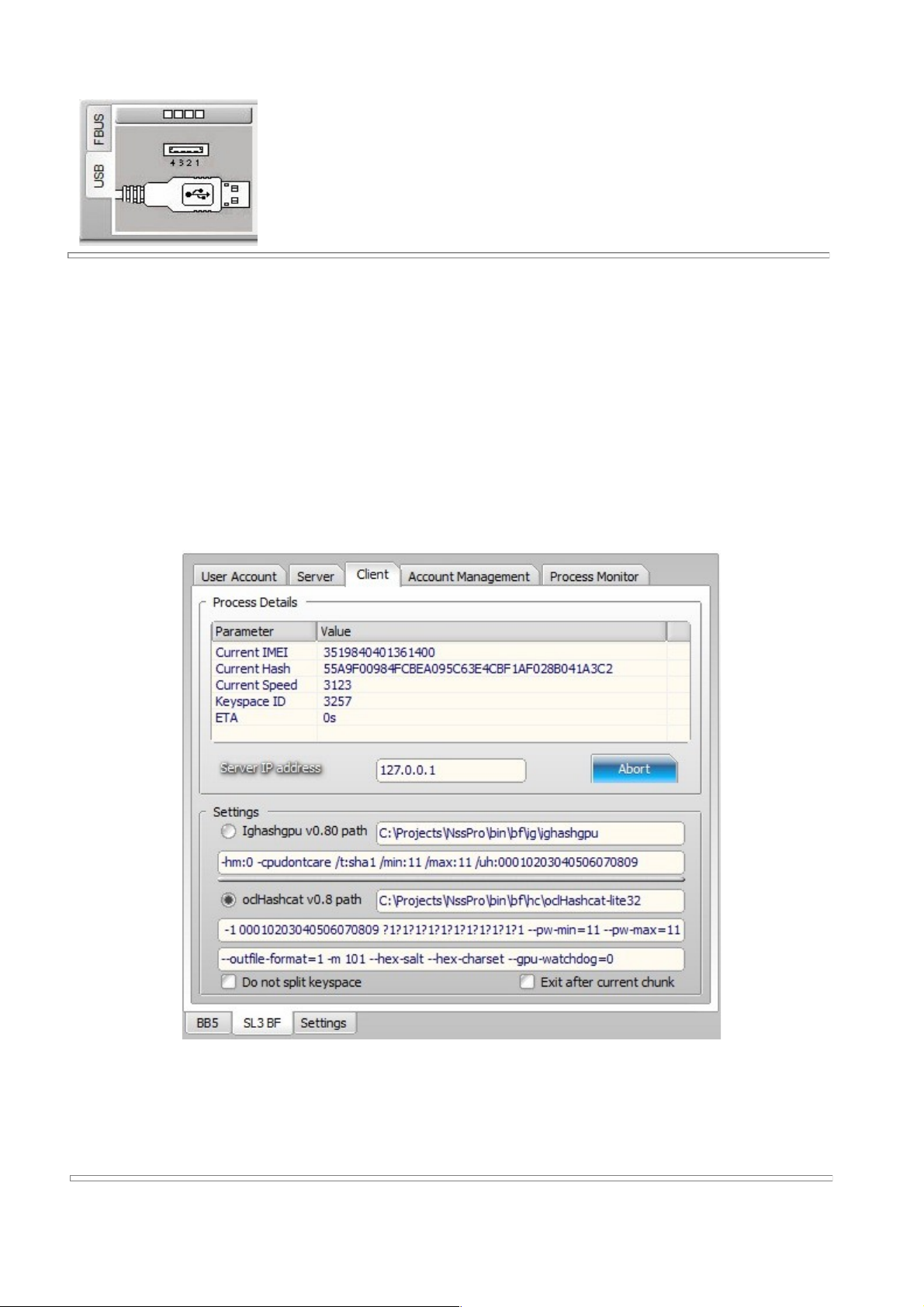
1. Copy ighashgpu and hashcat files to bf corresponding directories
2. Click the Simlocks Tab, then click the SL3 BF tab, then the Client tab
3. Enter IP of your server, if your client machine is on LAN, you can put
local address, if remote, use external address
4. Adjust what soft you will call, arguments, etc
5. Click Start
Notes: It is expected that you have some video card on this machine, compatible with
supported BF soft
Rev. 0.2 February 2012 Nokia Service Suite Professional 8
Page 9
NSS pro User Manual
Running the Monitor instance
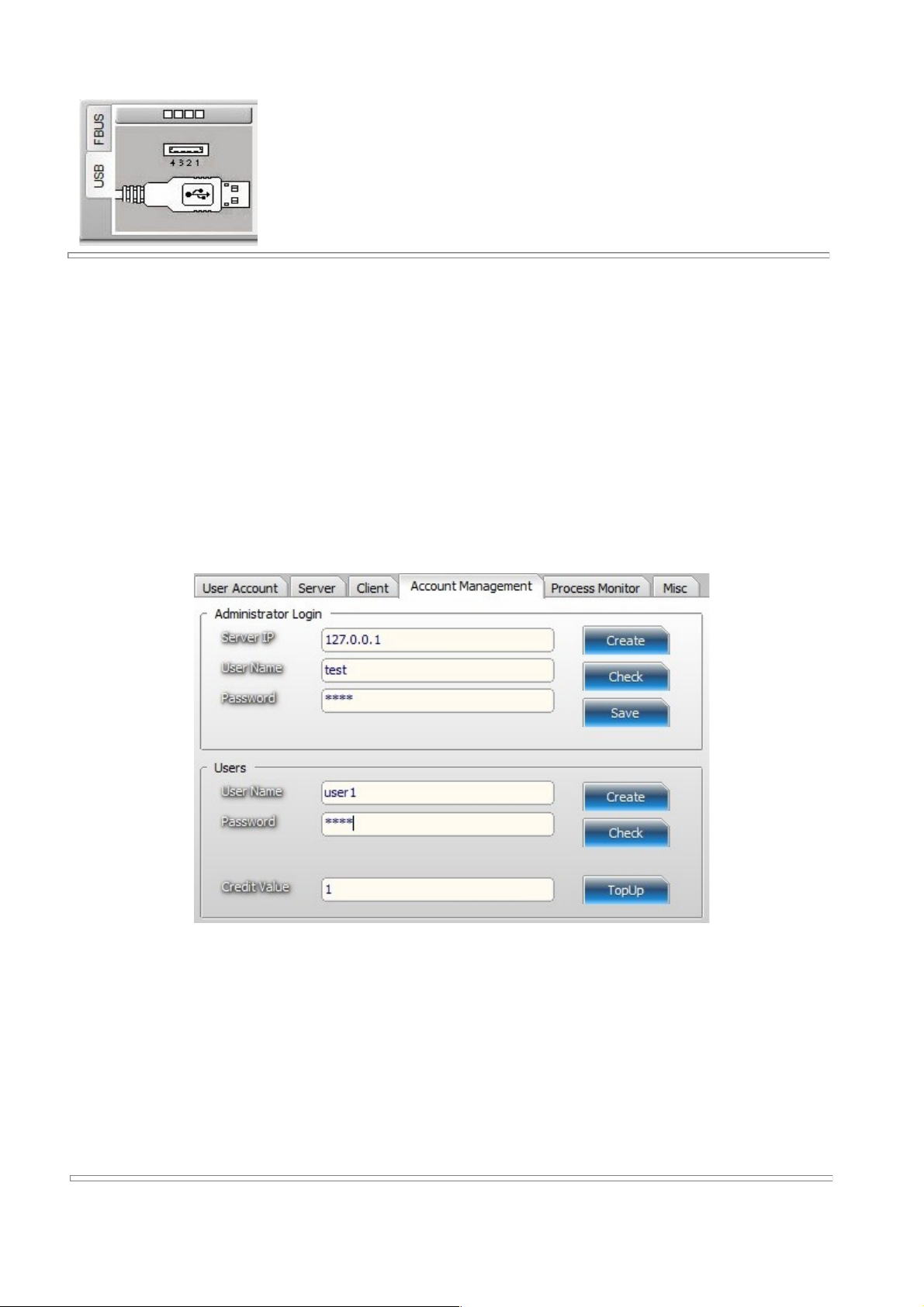
1. Go to the Simlocks Tab, then click the SL3 BF tab, then the Account Management tab
2. Enter server IP, enter your desired user name and password as admin and press Create
3. Press Check to see if admin account is ok (we assume the server is already running)
4. Create one test user by filling the UN and PW and clicking on Create in the Users group
5. If all successful the newly created user should have 1 credit
6. You can create as many as you want, top up their credits, or delete them by putting
zero in the credit value box, then press TopUp
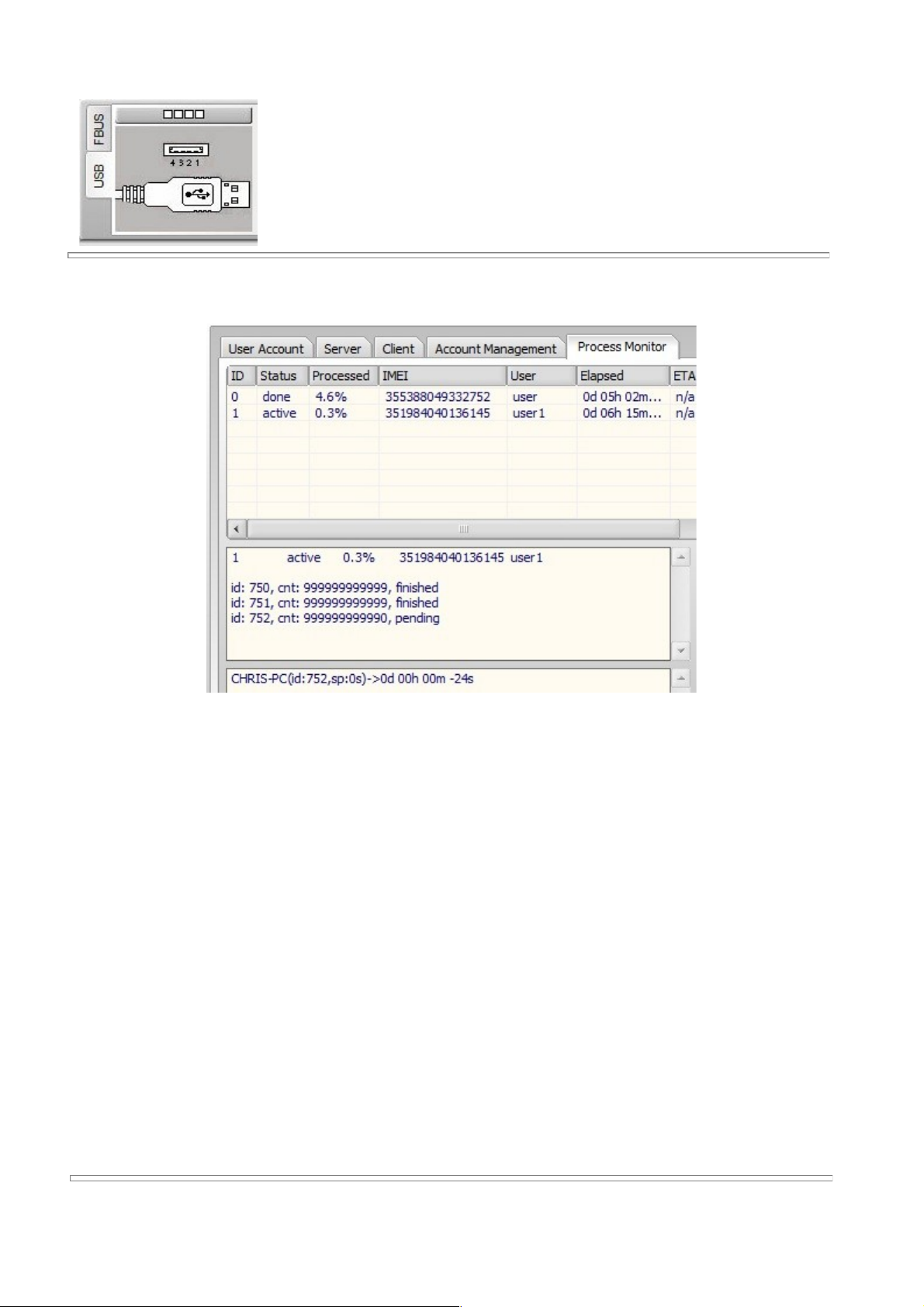
Notes: The Process Monitor tab will give status of jobs on the server, clusters, nodes, etc
You can also remove jobs(except active ones). Use the Refresh button to get status. Now is
possible to re-arrange idle jobs by moving them up and changing the order of the waiting jobs
Rev. 0.2 February 2012 Nokia Service Suite Professional 9
Page 10
NSS pro User Manual
To unlock a phone
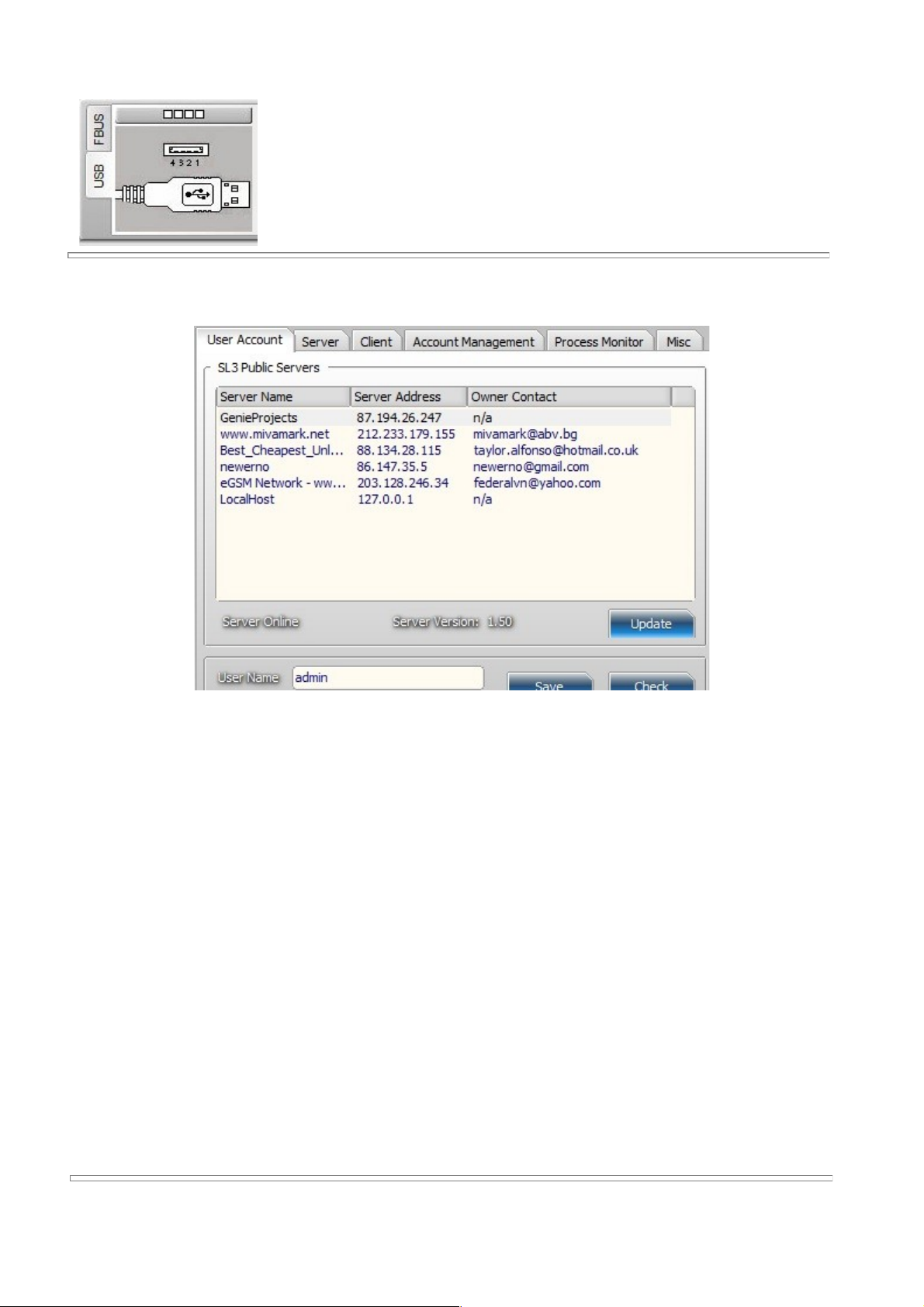
1. Go to the Simlocks tab, then click the SL3 BF tab, then the User Account tab
2. Press Update to get the servers list
3. Select yours from the list, then enter user name and pass created (not admin!)
4. Press Save, then you can use Check - to see credits
5. You can upload log file via Upload Log
6. You can submit phone directly via BB5 tab, Submit to Server button
7. You can also cancel idle jobs via the Cancel button, need to put IMEI first
Notes: Now is possible to enter server IP in the box, and use it instead of the public servers
list. This is useful in case you run your own server on a private LAN and you don't want to list
it for everyone's use
Rev. 0.2 February 2012 Nokia Service Suite Professional 10
Page 11
NSS pro User Manual
After a job is finished - you can get the code via the Check button in the
User Account tab.
Rev. 0.2 February 2012 Nokia Service Suite Professional 11
Page 12

NSS pro User Manual
Contact Information
How to contact me:
Email: chris at genieprojects.co.uk ( type by hand please, replace at with @)
Twitter: @bphreaks
Web: http://www.genieprojects.co.uk
All names and trademarks mentioned in this document are property of their
respective owners.
Rev. 0.2 February 2012 Nokia Service Suite Professional 12
 Loading...