

Genie S-100, Genie S-105, Genie S-120, Genie S-125, Genie S-100HD Quick Reference Manual
...Page 1
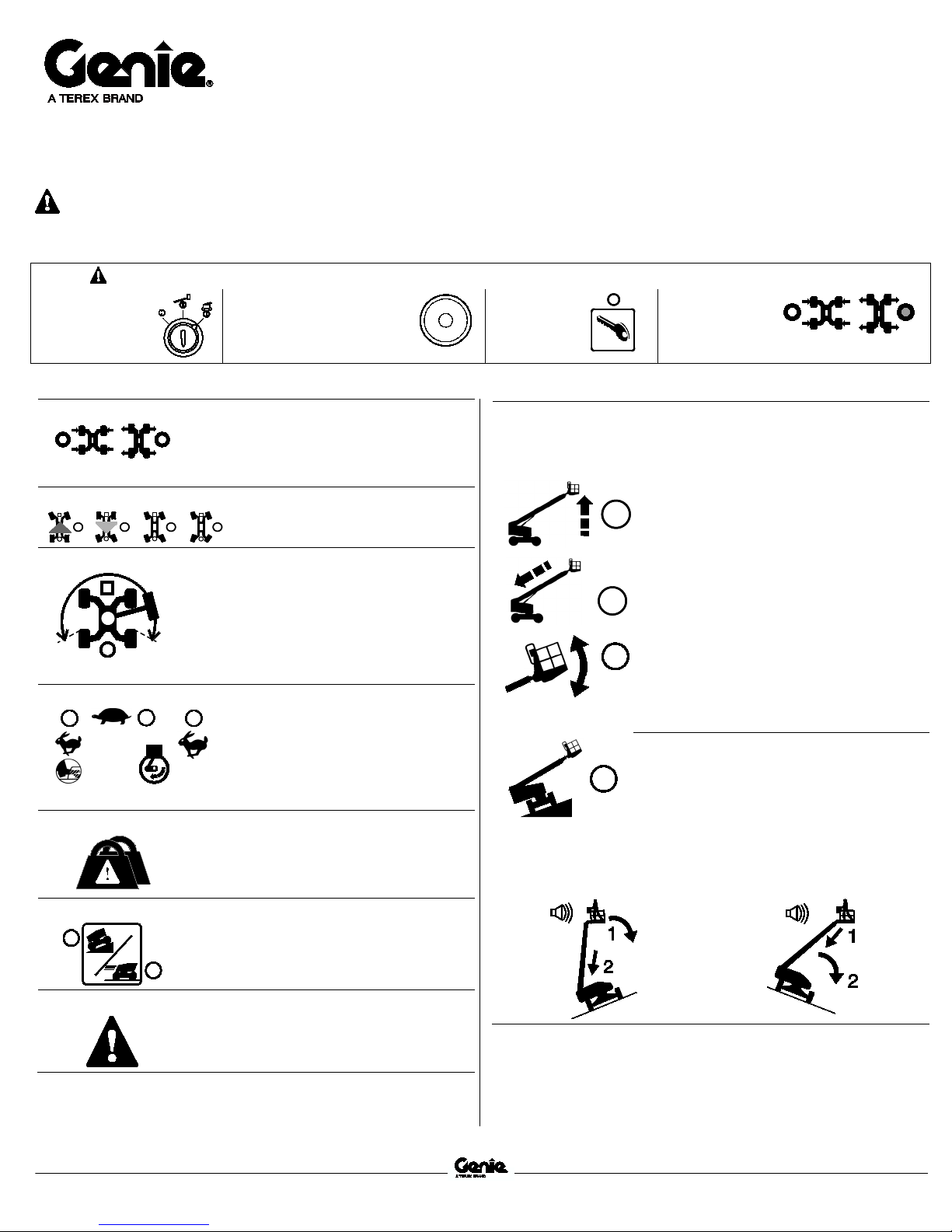
Quick Reference Guide
January 2017
Genie S-100 • Genie S-105 • Genie S-120
Genie S-125 • Genie S-100HD • Genie S-120HD
Rev A
S
S
S
S
S
S
Step 2
Step 3
Step 4
Step 5
Axle Extend
indicator light will stay on when the axles are
Steer Mode
Drive Enable
end tire and the drive function has
Engine idle select
indicates foot switch activated high idle
light on indicates low idle
Platform Overload
Drive Select
Fault Indicator Light
that exist due to component failure or system
Operating Envelope Indicator Lights
extending the boom, raise the boom until the
lowering the boom, retract the boom until the
S
Quick Refer enc e Gui d e January 2017 Genie S
S-120HD
Rev A
-100 from SN 15D-1001
-105 from SN 15D-983
-120 from SN 15D-1012
-125 from SN 15D-984
-100HD from SN S100HD15D-212
-120HD from SN S120HD15D-208
This Quick Reference Guide is intended for operators who are properly trained to safely operate the machine.
Getting Started:
Step 1: Read the Operators Manual and Perform the pre-operation inspections and tests.
Turn to platform
position.
Controls and Indicators:
Axle extend and retract indicator lights will
flash while the axles are moving. Axle extend
fully extended. Axle retract indicator light will
stay on when the axles are fully retracted.
Light on indicates that the boom has moved
past a circlebeen interrupted. To drive, push the drive
enable button and slowly move the drive/steer
control handle off center. Use the color-coded
direction arrows on the platform box and drive
chassis to identify the direction the machine
will travel.
Light flashing indicates the platform is
overloaded. The engine will stop and no
functions will operate. Remove weight from
the platform until the light goes off and then
restart the engine.
Machine on incline symbol
Pull out Red Emergency
Stop buttons.
The indicator light next to the current
steer mode will be on.
Rabbit and foot switch symbol light on
is selected.
Rabbit symbol light on indicates high
idle is selected.
Turtle symbol
is selected.
: Low range
Start
Engine.
The operating envelope indicator lights will come on to notify the
operator that a function has been interrupted and/or an action is
required by the operator.
Uphill Position Downhill Position
Verify axles
are extended.
Raise Boom light flashing
indicator light is off.
Retract Boom light flashing
indicator light is off.
Platform Not Level light flashing
alarm will be sounding when this light is
flashing. The Platform Level toggle switch
will only work in the direction that will level
the platform. Level the platform until the
indicator light is off.
achine Not Level Light Flashing
M
alarm sounds when the platform is raised, the
Not Level indicator light will come on and the
drive function in one or both directions will not
operate.
Follow the correct boom lowering sequence
below based on the platform position. Do not
rotate the boom while lowering.
operation for inclines.
Machine on level surface symbol
: High
range operation for maximum drive speed.
Light on indicates the machine has one or
more faults. Faults are abnormal conditions
S-100 • S-105 • S-120 • S-125 • S-100HD • S-120HD
misuse. See the appropriate service manual.
-100 • S-105 • S- 120 • S-125 • S-100HD • S-120H D
-100 • Geni e S-10 5 • Geni e S-1 20 G eni e S-125 • Genie S-100HD • Geni e
: To continue
: To continue
: The tilt
: If the tilt
 Loading...