

Page 1
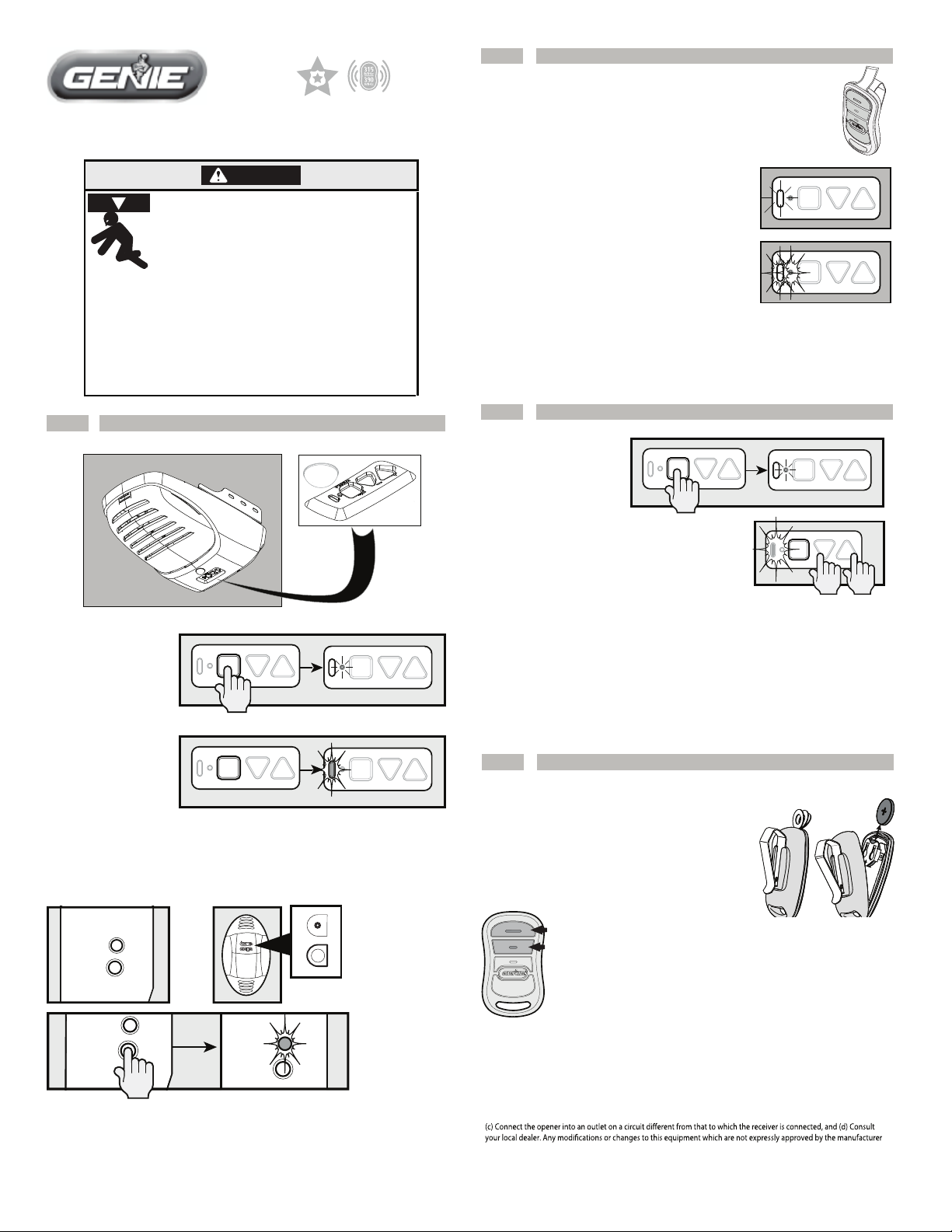
Programming a Remote to your Opener
2
NOTE: Once in programming mode, you will have
approximately 30 seconds to perform this step.
L
L
U
P
3 Button Remote
Programming Instructions
WARNING
Moving Door can cause serious injury
or death.
• Wall Console must be mounted in sight
of door, at least 5 feet above fl oor and
• Keep people clear of opening while door is moving.
• Do NOT allow children to play with the Remote or
door opener.
If safety reverse does not work properly:
• Close door then disconnect opener using the
manual release handle.
• Do NOT use Remote or door opener.
• Refer to Door and Door Opener Owner’s Manuals
before attempting any repairs.
Putting Opener into Programming Mode
1
New Genie® Openers
clear of moving door parts.
1. Pull protective battery tab from remote.
Note: While programing remote buttons, stand
at least 5 feet away from the opener. This ensures
you have proper communication between the
remote and the opener.
2. Slowly press and release the remote button
PROGRAM
SET
PROGRAM
+
–
of your choice two times. The opener LEDs will
ash and go o, indicating you have successfully
SET
+
–
programmed your remote.
3. Press and release the same button a third time and door will open or
close. It is possible to press the remote button too quickly or lightly. If
the LEDs do not go OFF, press the remote button several more times to
achieve conrmation.
Lost or Stolen Remote/Erasing all Remotes
3
New Genie® Openers
1. Press and hold the
program button until the
round LED turns blue,
PROGRAM
SET
+
–
PROGRAM
SET
+
–
then release.
2. Press and hold the Up(+) Down (-) buttons at
the same time, until the both LEDs ash blue
and go OFF.
PROGRAM
SET
+
–
1. Press and hold the
program button until
the round LED turns
blue, then release.
2. The round LED will
go out and the long
LED will begin ashing purple.
PROGRAM
SET
PROGRAM
SET
PROGRAM
+
–
+
–
SET
PROGRAM
SET
+
–
+
–
Proceed to step 2.
-OR-
Genie® Openers and External Receivers Manufactured between 1995 to 2011
OPEN
RADIO
SIGNAL
LEARN
CODE
RADIO
SIGNAL
LEARN
CODE
or
LEARN LIMITMANUAL
RADIO
SIGNAL
LEARN
CODE
SET
FORCE
SET
CLOSECODE
1. Press & Release Learn Code button once. The red LED will begin to
ash.
Proceed to step 2.
LEARN
CODE
Genie® Openers and External Receivers Manufactured between 1995 to 2011
• To erase all remote devices from all other types of Genie® openers,
Press and hold the Learn Code Button until the LED stops blinking.
Start at step 1 to reprogram your remotes.
NOTE: Clearing remote control memory from the power head will clear ALL programmed remotes and keypads. Your opener will no longer recognize any signal
from any remote device, including a missing remote device.
Battery Replacement
4
Replace remote battery with CR2032 coin cell battery.
1. Open the remote case using a washer or
coin that ts into the slot at the top of the
remote.
2. Replace battery. Match battery polarity
symbols inside battery housing.
3. Align components and snap case closed.
NOTE: For openers
NOTE: For openers
manufactured between
manufactured between
1995-1997,
1995-1999,
use the two upper
use the two upper
buttons on the remote.
buttons on the remote
Made after 1997? Use any
button for programming.
FCC and IC CERTIFIED
This device complies with FCC Part 15 and Industry Canada license exempt RSS standard(s). Operation is subject to the
following two conditions: (1) this device may not cause interference, and (2) this device must accept any interference,
including interference that may cause undesired operation of the device.
radio frequency energy and, if not installed and used in accordance with the instructions, may cause harmful interference
to radio communications. However, there is no guarantee that interference will not occur in a particular situation. If this
equipment does cause harmful interference to radio or television reception, which may be determined by turning the
equipment OFF and ON, the user is encouraged to try and correct the interference by one or more of the following
measures: (a) Re-orient or relocate the receiver antenna, (b) Increase the separation between the opener and receiver,
could void the users authority to operate the equipment.
For additional information or help
contact customer service:
Call 1-800-35-Genie or write:
GMI Holdings INC.
d/b/a The Genie Company
1 Door Drive
Mount Hope Ohio 44660
This equipment generates, uses and can radiate
For more information, please visit www.devancocanada.com or call toll free at 855-931-3334
Page 2

HOW TO ORDER
REPAIR PARTS
DEVANCO CANADA
19192 HAY ROAD, UNIT Q
SUMMERSTOWN, ON K0C 2E0
TOLL FREE: 855-931-3334
www.devancocanada.com
WHEN ORDERING REPAIR PARTS
PLEASE SUPPLY THE
FOLLOWING INFORMATION:
3 PART NUMBER
3 DESCRIPTION
3 MODEL NUMBER
 Loading...