

Page 1

Professional Mixer
Mezclador para el profesional
Operations Manual
English.................................................................Page 2
Manual de funcionamiento
Español...............................................................Page 3
Page 1
Page 2
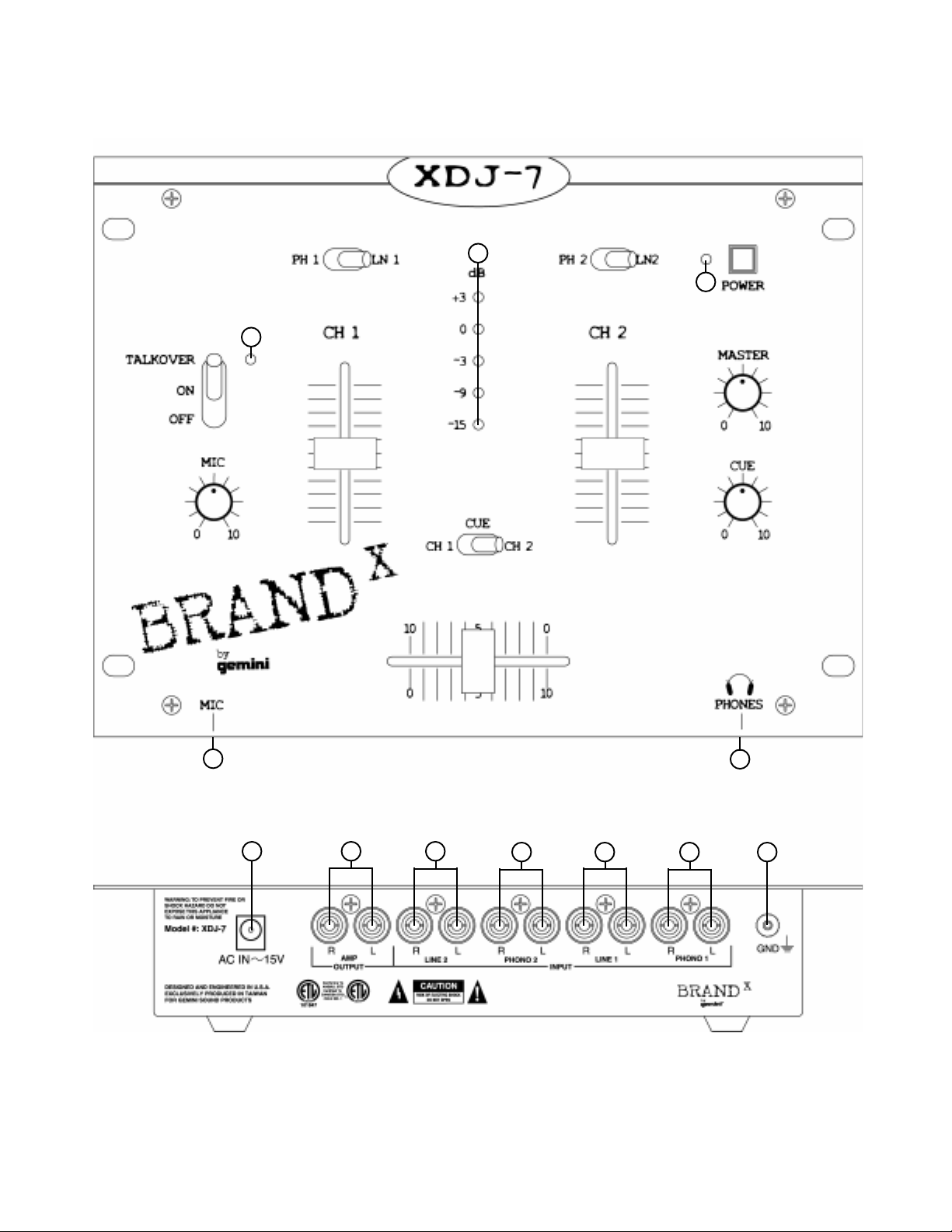
5
7
10
13
12
2
1
14
611
3
15
8
9
4
16
17 18 19
Page 2
20
21
22
23
Page 3

Introduction
Congratulations on purchasing the Brand X by Gemini XDJ-7 mixer. This
state of the art mixer includes the latest features and is backed by a
three year warranty, excluding crossfader and channel slides. Prior to
use, we suggest that you carefully read all the instructions.
Cautions
1. All operating instructions should be read before using this equipment.
2. To reduce the risk of electrical shock, do not open the unit. There are
NO USER REPLACEABLE PARTS INSIDE. Please refer servicing to
a qualified service technician.
In the U.S.A., if you have any problems with this unit,
call 1-732-738-9003 for customer service. Do not return
equipment to your dealer.
3. Do not expose this unit to direct sunlight or to a heat source such as
a radiator or stove.
4. This unit should be cleaned only with a damp cloth. Avoid solvents or
other cleaning detergents.
5. When moving this equipment, it should be placed in its original
carton and packaging. This will reduce the risk of damage during
transit.
6. DO NOT EXPOSE THIS UNIT TO RAIN OR MOISTURE.
7. DO NOT USE ANY SPRAY CLEANER OR LUBRICANT ON ANY
CONTROLS OR SWITCHES.
Connections
1. This unit comes supplied with a 15 volt AC adaptor. Plug the male
pin of the adaptor into the rear panel POWER JACK (17). Then plug
the adaptor into a proper power source.
2. Make sure that the POWER (13) switch is in the off position. The
POWER LED (12) will be off.
3. To connect the mixer to your amplifier, use the OUTPUT AMP (18)
jacks on the rear panel.
4. The unit is equipped with one microphone input. The MIC (4) jack is
a 1/4" (6.35 mm) and is located on the front panel.
5. On the rear panel are 2 stereo PHONO (20, 22) inputs and 2 stereo
LINE (19, 21) inputs. The PHONO (20, 22) inputs will accept
turntable inputs only. A GROUND (23) screw for you to ground your
turntables is located on the rear panel. The stereo LINE (19, 21)
inputs will accept any line level input like a CD player or a cassette
player.
6. Headphones can be plugged into the front panel mounted
HEADPHONE (16) jack.
4. CROSSFADER SECTION: The CROSSF ADER (9) allows the mixing of
one source into another. The left side of the CROSSFADER (9) is
channel 1 and the right side is channel 2.
5. OUTPUT CONTROL SECTION: The level of the AMP OUT (18) is
controlled by the MASTER (14) control.
6. TALKOVER SECTION: The purpose of the talkover section is to
allow the program playing to be muted so that the mic can be heard
above the music. The MIC/TALKOVER (1) switch has three settings.
When the MIC/TALKOVER (1) switch is in the bottom position, the
mic and talkover are both off. When the MIC/TALKOVER (1) switch
is in the center position the mic is on, the MIC INDICATOR (2) will
glow, but talkover is off. When the MIC/TALKOVER (1) switch is in
the top position, the mic and talkover will be on and the volume of all
sources except the Mic input are lowered by 16 dB. The MIC LEVEL
(3) controls the microphone volume.
7. CUE SECTION: By connecting a set of headphones to the
HEADPHONE (16) jack, you can monitor either channel 1 or channel
2. Select Channel 1 by moving the CUE SWITCH (8) to the left or
Channel 2 by moving the CUE SWITCH (8) to the right. Use the
CUE LEVEL (15) control to adjust the headphone volume without
effecting the overall mix.
8. DISPLAY: The DISPLAY (7) indicates the MASTER (18) output.
Specifications
INPUTS:
Mic................................................................1.5 mV 2 kOhm unbalanced
Phono.................................................................................3 mV 47 kOhm
Line................................................................................150 mV 27 kOhm
OUTPUTS:
Amp.....................................................................0 dB 775 mV 400 Ohm
Max............................10V Peak to Peak
GENERAL:
Frequency Response.......................................20 Hz - 20 kHz +/- 2 dB
Distortion..........................................................................................0.02%
S/N Ratio........................................................................better than 80 dB
Talkover Attenuation.......................................................................-16 dB
Headphone Impedance..................................................................16 Ohm
Power Source..........................................................115V/15V AC 7.5 W
or 230V/15V AC 7.5 W
Dimensions.............................10" x 7.50" x 1.96" (254 x 192 x 50 mm)
Weight............................................................................2.76 lbs. (1.26 kg)
Operation
1. POWER ON: Once you have made all the equipment connections to
your mixer, press the POWER SWITCH (13). The power will turn on
and the POWER LED (12) will glow RED.
2. CHANNEL 1: The CHANNEL LEVEL SLIDE (6) allows you to fully
adjust the level of the selected source. The PHONO/LINE (5) switch
allows you to select either Line 1 or Phono 1 to play through
channel 1.
3. CHANNEL 2: The CHANNEL LEVEL SLIDE (11) allows you to fully
adjust the level of the selected source. The PHONO/LINE (10) switch
allows you to select either Line 2 or Phono 2 to play through
channel 2.
Page 3
Page 4

Introducción
Felicitaciones por su compra de un mezclador Brand X por Gemini
modelo XDJ-7. Este mezclador de la más avanzada tecnología está
dotado de características ultramodernas y está respaldado por una
garantía de tres años, salvo el crossfader y los mandos corredizos de
canal. Antes de usarlo, le recomendamos leer cuidadosamente todas
las instrucciones.
Precauciones
1. Leanse leerse todas las instrucciones de operación antes de usar el
equipo.
2. Para reducir el riesgo de shock eléctrico, no abra esta unidad. No
contiene PIEZAS REEMPLAZABLES POR EL USADOR. Por favor,
refiera el servicio a un técnico de servicio calificado.
3. No exponga la unidad a la luz solar directa ni a una fuente de calor,
por ejemplo, un radiador o estufa.
4. Esta unidad sólo deberá limpiarse con un paño húmedo. Evite el uso
de disolventes u otros detergentes de limpieza.
5. Para mover este equipo, colóquelo en la caja y empaque original, a
fin de reducir el riesgo de daños durante el transporte.
6. NO DEJE ESTA UNIDAD EXPUESTA A LLUVIA O HUMEDAD.
7. NO USE LIMPIADORES DE ROCÍO O LUBRICANTES EN
CUALQUIERA DE LOS CONTROLES O INTERRUPTORES.
Conexiones
1. Esta unidad se suministra con un adaptador CA de 15 voltios.
Enchufe la clavija macho del adaptador en el JACK DE ENERGÍA -
POWER JACK (17) del panel trasero. Luego enchufe el adaptador
en una fuente de energía apropiada.
2. Cerciórese de que el interruptor de ENERGÍA - POWER (13) esté en
la posición apagada. El LED de ENERGÍA - POWER LED (12)
estará apagado.
3. Para conectar el mezclador a su amplificador, use los jacks de
AMPLIFICADOR DE SALIDA - OUTPUT AMP (18) en el panel
trasero.
4. La unidad está dotada de una entrada de micrófono. El jack de
MICRÓFONO - MIC (4) es un enchufe de 1/4" (6,35mm) y está
situado en el panel delantero.
5. En el panel trasero se encuentran dos entradas estereofónicas de
FONÓGRAFO - PHONO (20, 22) y 2 entradas estereofónicas de
LÍNEA - LINE (19, 21). Las entradas de FONÓGRAFO - PHONO
(20, 22) aceptarán entradas de giradiscos solamente. En el panel
trasero se incluye un tornillo de TIERRA - GROUND (23) para la
conexión a tierra del giradiscos. Las entradas estereofónicas de
LÍNEA (19, 21) aceptarán cualquier entrada de nivel de línea por
ejemplo, un tocadisco de discos compactos o casetera.
6. Los audífonos se enchufan en el jack de AUDÍFONOS -
HEADPHONE (16) montado en el panel delantero.
Funcionamiento
1. ENCENDIDO: Una vez que haya efectuado todas las conexiones de
los equipos a su mezclador, oprima el interruptor de ENERGÍA -
POWER (13). Se encenderá la unidad y el LED ROJO de ENERGÍA
- POWER LED (12).
2. CANAL 1: La REGLETA DE NIVEL DE CANAL - CHANNEL LEVEL
SLIDE (6) le permite ajustar plenamente el nivel de la fuente
seleccionada. El conmutador de FONÓGRAFO/LÍNEA - PHONO/
LINE (5) le permite seleccionar la línea 1 o el fonógrafo 1 para
reproducir en el canal 1.
3. CANAL 2: La REGLET A DE NIVEL DE CANAL - CHANNEL LEVEL
SLIDE (11) le permite ajustar plenamente el nivel de la fuente
seleccionada. El conmutador de FONÓGRAFO/LÍNEA - PHONO/
LINE (10) le permite seleccionar la línea 2 o el fonógrafo 2 para
reproducir en el canal 2.
4. SECCIÓN DE ATENUADOR DE TRANSFERENCIA: El
ATENUADOR DE TRANSFERENCIA - CROSSFADER (9) le permite
mezclar una de las fuentes en otra. El lado izquierdo del
ATENUADOR DE TRANSFERENCIA se encuentra en el canal 1 y el
lado derecho se encuentra en el canal 2.
5. SECCIÓN DE CONTROL DE SALIDA: El nivel de la SALIDA DEL
AMPLIFICADOR - AMP OUT (18) se regula con el control
MAESTRO - MASTER (14).
6. SECCIÓN TALKOVER: El propósito de la sección talkover es de
permitir al programa de ponerse sordina para que se pueda oír el
mensaje del micrófono por encima de la música. El interruptor MIC/
TALKOVER (1) tiene tres arreglos. Cuando el interruptor MIC/
TALKOVER (1) ocupa la posición inferior, el MIC y la función talkover
están ambos apagados. Cuando el interruptor MIC/TALKOVER (1)
ocupa la posición central, el mic está activado, el INDICADOR MIC -
MIC INDICATOR (2) se prenderá pero la función talkover está
apagada. Cuando el interruptor MIC/TALKOVER (1) ocupa la
posición superior, el MIC y la función talkover estarán prendidos y el
volumen de todas las fuentes salvo las entradas Mic serán reducidas
por 16 dB. El CONTROL DE NIVEL DE MICRÓFONO - MIC LEVEL
(3) regula el volumen del micrófono.
7. SECCION DE REFERENCIA: Al conectar audífonos al jack de
HEADPHONE (16), se puede monitorear sea el Canal 1 sea el Canal
2. Seleccione el canal I al deslizar el mando CUE SWITCH (8) a la
izquierda o el canal II al deslizar el mando CUE SWITCH (8) a la
derecha. Haga uso del mando CUE LEVEL (15) para ajustar el
volumen del audífono sin afectar la mezcla global.
8. PRESENTACIÓN: La PRESENTACIÓN - DISPLAY (7) indica los
niveles de salida del control MAESTRO - MASTER (18).
Especificaciones
ENTRADAS:
Micrófono.......................................................1,5 mV 2 KOhmios, equilibrar
Fonógrafo.....................................................................3 mV, 47 KOhmios
Línea........................................................................150 mV 27 KOhmios
SALIDAS:
Amplificador.......................................................0 dB 775mV 400 Ohmios
Máx. 10V pico a pico
GENERALES:
Respuesta de frecuencia.....................................20 Hz - 20 kHz +/- 2dB
Distorsión.......................................................................................0.02%
Razón de sonido/ruido..................................................better than 80 dB
Atenuación de función de anuncio................................................-16 dB
Impedancia de audífonos...........................................................16 Ohmios
Fuente de alimentación........................................115V/15V AC 7.5W
o 230V/15V AC 7.5W
Dimensiones................................................................254 x 192 x 50 mm
Peso...............................................................................................1.26 kg
Page 4
Page 5

In the USA: If you experience problems with this unit,
call 1-732-738-9003 for Gemini Customer Service.
Do not attempt to return this equipment to your dealer.
Parts of the design of this product may be protected by worldwide patents.
Information in this manual is subject to change without notice and does not
represent a commitment on the part of the vendor. Gemini Sound Products Corp.
shall not be liable for any loss or damage whatsoever arising from the use of
information or any error contained in this manual.
No part of this manual may be reproduced, stored in a retrieval system or
transmitted, in any form or by any means, electronic, electrical, mechanical, optical,
chemical, including photocopying and recording, for any purpose without the
express written permission of Gemini Sound Products Corp.
It is recommended that all maintenance and service on this product is performed
by Gemini Sound Products Corp. or its authorized agents.
Gemini Sound Products Corp. will not accept liability for loss or damage caused
by maintenance or repair performed by unauthorized personnel.
Worldwide Headquarters • 120 Clover Place, Edison, NJ 08818 • USA
T el: (732) 738-9003 • Fax: (732) 738-9006
France • G.S.L. France • 11, A venue Leon Harmel, Z.I. Antony, 92160 Antony, France
Tel: + 33 (0) 1 55 59 04 70 • Fax: + 33 (0) 1 55 59 04 80
Germany • Gemini Sound Products GmbH • Ottostrasse 6, 85757 Karlsfeld, Germany
Tel: 08131 - 39171-0 • Fax: 08131 - 39171-9
UK • Gemini Sound Products • Unit C4 Hazleton Industrial Estate, Waterlooville, UK P08 9JU
Tel: 087 087 00880 • Fax: 087 087 00990
Spain • Gemini Sound Products S.A. • Mino, 112, Nave 1, 08223 Terrassa, Barcelona, Spain
Tel: 011-34-93-736-34-00 • Fax: 011-34-93-736-34-01
© Gemini Sound Products Corp. 2001 All Rights Reserved
Page 5
8/00
 Loading...