

Page 1
SD Card Reader Module
The SD Card module allows you to add data storage capability to your Arduino
from a regular memory card.
The module has a holder for regular size SD cards, a voltage regulator,
capacitors and resistors for SPI-bus.
Here you will learn how to initialize, write to and read from your SD Card using
SD- and SPI-libraries.
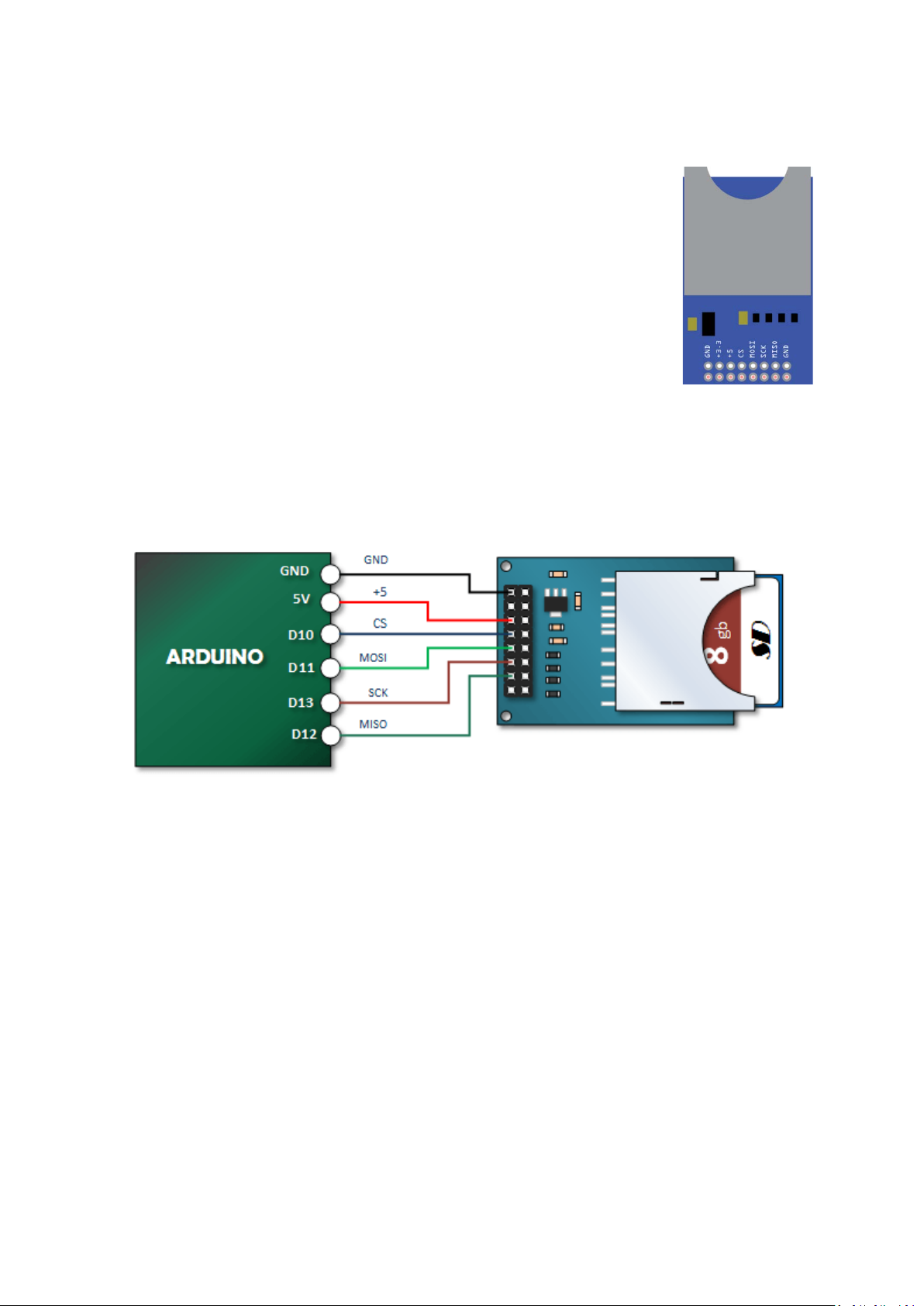
Pinout and Connection to Arduino
Format Your SD Card
You will need an SD Card. Mine is 8 GB. Format that SD Card using Windows. I formatted mine as a
FAT32 volume.
Connect the Arduino SD Card Module to your Arduino
The good news here is that you’re only going to require one set up to play with the various functions.
Page 2

Initializing your SD Card
Before you can do any cool stuff with your SD Card you will need to:
• Have an SD Card in your module.
• Establish an instance of the card in your code.
• And tell it begin
#include <SD.h>
#include <SPI.h>
int cs = 10; // Set Chip Select to pin ten
void setup()
{
// Open serial communications and wait for port to open:
Serial.begin(9600);
while (!Serial) {
}
Serial.println("Initializing SD card...");
Serial.println();
pinMode(cs, OUTPUT);
// Documentation says you're supposed to do this
// even if you don't use it:
pinMode(SS, OUTPUT);
// see if the card is present and can be initialized:
if (!SD.begin(cs)) {
Serial.println("SD did not initiliaze");
while (1) ;
}
Serial.println("SD initialized.");
}
void loop()
{
}
Test the Initializing Sample Sketch
Open your serial monitor. If the SD card is inserted, it should initialize.
If it does initialize, try removing your removing your SD card and notice that it will fail to initialize.
Creating an SD Card File and Writing to It
In this next sample sketch, you’re going to create a file if it doesn’t already exists and write your first
line of text to it. If it does exist, you will open it and add another line.
Notice the flush() command. It saves your file.
Page 3

#include <SD.h>
#include <SPI.h>
int cs = 10; // Set Chip Select to pin ten
File myFile; // a File Object
void setup()
{
char myFileName[] = "MyFile.txt"; // The name of the file we will create
Serial.begin(9600); // Open serial communications and wait for port to open:
while (!Serial) {
}
Serial.println("Initializing SD card...");
Serial.println();
pinMode(cs, OUTPUT);
// Documentation says you're supposed to do this even if you don't use it:
pinMode(SS, OUTPUT);
// see if the card is present and can be initialized:
if (!SD.begin(cs)) {
Serial.println("SD did not initiliaze");
while (1) ;
}
Serial.println("SD initialized.");
// Lets check to make sure that the SD card doesn't already have our file
if (! SD.exists(myFileName)){
// This next statement will open a file for writing if it exists
// If it does not exist, it will create that file. That's what we're doing here.
myFile = SD.open(myFileName, FILE_WRITE);
// This next statement checks to see if the file
myFile.println("My 1st Line of Data"); // Send Your First Line to that file
myFile.flush(); // Save it.
}
else {
// We got here because the file already exists.
// Therefore we're simple opening the file and writing to it. We will add another line
at the end.
myFile = SD.open(myFileName, FILE_WRITE);
myFile.println("Another Line of Data"); // Send Your First Line to that file
myFile.flush();
}
Serial.println("Done Writing");
}
void loop()
{
}
Page 4

Test your Creating and Writing to SD Card Sketch
1. Start with a clear SD card
2. Open your serial monitor and close it when it is done
3. Remove your SD Card and insert into your computer
4. Navigate to the SD card and find “MyFile.txt”
5. Open the text file and see that it contains “My 1st Line of Data”
6. Remove the SD Card from your computer and reinsert into your SD Card Module
7. Repeat steps 2, 3 and 4
8. Open the text file and see that it now also contains “Another Line of Data”
Reading an SD Card File Sample Sketch
In this example, we’re going to use the file we just created and read the information.
#include <SD.h>
#include <SPI.h>
int cs = 10; // Set Chip Select to pin ten
File myFile; // a File Object
void setup()
{
char myFileName[] = "MyFile.txt"; // The name of the file we will create
String LineString = "";
Serial.begin(9600); // Open serial communications and wait for port to open:
while (!Serial) { }
Serial.println("Initializing SD card...");
Serial.println();
pinMode(cs, OUTPUT);
pinMode(SS, OUTPUT);
if (!SD.begin(cs)) { // see if the card is present and can be initialized:
Serial.println("SD did not initiliaze");
while (1) ;
}
Serial.println("SD initialized.");
Serial.println();
Serial.println("Reading MyFile.txt...");
Serial.println();
myFile = SD.open(myFileName, FILE_READ); // Open our File for Reading
while (myFile.available() != 0) { // Keep Reading String until there are no more
LineString = myFile.readStringUntil('\n');
Serial.println(LineString);
}
myFile.close();
Serial.println();
Serial.println("Done");
}
void loop() { }
 Loading...