

Page 1

en
SERVICE DOCUMENTATION
A300-A1000/S700/SB1200/MYTICO
5 Troubleshooting
Page 2

Page 3

Franke Kaffeemaschinen AG Table of contents
TABLE OF CONTENTS
1
1.1
1.2
1.3
1.4
1.5
1.6
1.7
1.8
1.9
1.10
1.11
1.12
1.13
1.14
2
2.1
Error codes 4
Brewing unit 4
Fluid system 5
Milk system 7
Powder system 8
Accounting system 8
Telemetry 9
Electronics/communication 10
Operation 15
Heating system 17
Grinder 23
Water/hot water/steam system 23
Warnings/notices/status messages 26
Cold media 33
Icemaker 41
Instructions 43
Address RFID modules 43
Service documentation A300-A1000/S700/SB1200/Mytico iii
Page 4

1 | Error codes Franke Kaffeemaschinen AG
1 ERROR CODES
When an error occurs, the machine displays an error message which provides instructions on how to rectify the issue. Additional information regarding troubleshooting can be found via the error codes in the table below. Event messages are not displayed but recorded in the error history log. Individual components
(heating, valves, brewing unit, etc.) can be checked using the relevant test menu.
1.1 Brewing unit
Error code Short text Error message Notes on troubleshooting
009 Brewing unit motor
timeout
010 Brewing unit motor
timeout
011 Brewing unit motor
timeout
012 Brewing unit motor
timeout
013 Brewing unit motor
timeout
014 Brewing unit incre-
mental sensor
015 Brewing unit motor
timeout
027 Brewing unit locking
mechanism
028 Brewing unit miss-
ing
The number of increments registered
while the brewing chamber was moving is too small. Please restart the system.
The number of increments registered
while the brewing chamber was moving is too small. Please restart the system.
The number of increments registered
while the brewing chamber was moving is too small. Please restart the system.
The number of increments registered
while the brewing chamber was moving is too small. Please restart the system.
The number of increments registered
while the brewing chamber was moving is too small. Please restart the system.
More than one negative increment was
registered. The brewing chamber is
moving in the wrong direction. Please
check the wiring of the incremental
sensor.
A motor timeout occurred during
cleaning.
The brewing unit is not locked.
Brewing unit missing.
– Restart the system
– Check the incremental
sensor
– Check the motor
– Clean the brewing unit
with a brush
– Restart the system
– Check the incremental
sensor
– Check the motor
– Clean the brewing unit
with a brush
– Restart the system
– Check the incremental
sensor
– Check the motor
– Clean the brewing unit
with a brush
– Restart the system
– Check the incremental
sensor
– Check the motor
– Clean the brewing unit
with a brush
– Restart the system
– Check the incremental
sensor
– Check the motor
– Clean the brewing unit
with a brush
– Restart the system
– Check the incremental
sensor
– Check the motor
– Clean the brewing unit
with a brush
– Restart the system
– Repeat the cleaning cycle
4 Service documentation A300-A1000/S700/SB1200/Mytico
Page 5

Franke Kaffeemaschinen AG Error codes | 1
Error code Short text Error message Notes on troubleshooting
030 Initializing brewing
unit
048 Brewing unit brew-
ing chamber open
049 Brewing unit brew-
ing chamber open
1.2 Fluid system
During initialization, an error occurred
when the brewing unit was being recalibrated.
The brewing process was canceled because the brewing chamber was able
to be opened up too far. Please select a
new product or restart the system to
recalibrate the brewing unit.
The brewing chamber could not be
closed. Please check the grind quantity
and select a new product.
– Restart the system
– Check the incremental
sensor
– Check the motor
– Clean the brewing unit
with a brush
– Select a new drink (the
brewing unit will be recali-
brated)
– If this occurs more than
once, check the values,
see Programming, Menu
item 5.2 Brewing unit
– Select a new drink (the
brewing unit will be recali-
brated)
– Check the grind quantity
– Check the calibration of
the grinders, see Program-
ming, Grinder 1-3
Error code Short text Error message Notes on troubleshooting
060 Fill Boiler 1 The boiler with heater 1 could not be
filled. Please restart the system.
061, 062 Fill Boiler 2 The boiler with heater 2 could not be
filled during operation. The heater will
be switched off. Please restart the system. Please restart the system.
079 Flow meter error 1 The brew boiler's water flow is dis-
rupted. The flow meter receives too
few or no impulses. Please restart the
system or select a different product.
– Restart the system
– Check pump pressure,
Commissioning, Menu
item 0.3 Set pressure
– Check boiler 1 (coffee)
pressure relief valve for
leakage (water flows into
drip tray)
– Check water supply (leak-
tightness and supply)
– Restart the system
– Check boiler 2 (hot water)
pressure relief valve for
leakage (water flows into
drip tray)
– Check the continuous level
sensor (connection/
limescale formation), Pro-
gramming, Menu item 5.10
Individual inputs
– Check water supply (leak-
tightness and supply)
– Check the grind coarse-
ness (must not be too fine)
– Check the product set-
tings
– Select another product
– Check the flow meter
Service documentation A300-A1000/S700/SB1200/Mytico 5
Page 6

1 | Error codes Franke Kaffeemaschinen AG
Error code Short text Error message Notes on troubleshooting
080 Flow meter error 2 The water flow of the tea boiler is dis-
rupted. The flow meter receives too
few or no impulses. Please restart the
system or try a different product.
081 Flow meter error 3 The water flow of the cold water by-
pass is disrupted. The flow meter receives too few or no impulses. Please
restart the system or try a different
product.
082 Flow meter error 4 The water flow in the Iced Coffee Mod-
ule is disrupted. The flow meter receives too few or no impulses. Please
restart the system or try a different
product.
083 Flow meter error 5 The cold water flow is impaired. The
flow meter receives too few or no impulses. Please restart the system or try
a different product.
087 Initializing water line No 100 ml could be dosed through the
brewing valve and the bypass valve
within 25 s during initialization. Please
check the water supply and restart the
system.
088 Initializing steam
boiler level
090 iQFlow needle valve The iQFlow needle valve is not working
091 iQFlow needle valve The iQFlow needle valve is not working
092 Needle valve/brew-
ing unit tightness
093 iQFlow initialization iQFlow has been initialized.
094 Brewing module
may be leaking
096 Steam boiler A/D
value
During initialization, the minimum
steam boiler level could not be
achieved within 25 sec. The steam
boiler continues filling. If the level still
has not been reached after 4 minutes,
another error message appears. In this
case, please check the water supply
and the level sensor.
properly.
properly.
The iQFlow needle valve cannot be
closed or the brewing unit is not completely tight.
The brewing module may be leaking.
Check the brewing module.
Water hardness A/D steam boiler
– Check the product set-
tings
– Select another product
– Check the flow meter
– Open the shut-off valve
– Check the product set-
tings
– Select another product
– Check the flow meter
– Open the shut-off valve
– Check the product set-
tings
– Select another product
– Check the flow meter
– Open the shut-off valve
– Check the flow meter
– Open the shut-off valve
– Restart the system
– Check water supply (leak-
tightness and supply)
– Check the water circuit for
leakage
– Wait at least 4 minutes
– Check the continuous level
sensor and replace if nec-
essary
– Check water supply (leak-
tightness and supply)
– Check the water circuit for
leakage
Restart the system
Restart the system
Error message E92 appears if
the leak-tightness test during
initialization and the two subsequent coffee rinses was not
successful
Check the brewing module for
leakage
6 Service documentation A300-A1000/S700/SB1200/Mytico
Page 7

Franke Kaffeemaschinen AG Error codes | 1
1.3 Milk system
Error code Short text Error message Notes on troubleshooting
099 Duration of coffee
circuit rinsing
101 Hardware error on
the FoamMaster
102 FoamMaster soft-
ware out of date
104 Milk flow affected The flow meter receives too few or no
105 Thermoblock Heating tendency recorded.
106 Milk flow meter The milk flow meter (B11) was measured
107 FM milk pump cali-
bration
108 MS milk pump cali-
bration
109 Duration of milk sys-
tem rinsing
110 Temperature sensor
interruption
111 Water hardness AD
steam boiler
112 Temperature sensor
interruption
113 Water hardness AD
steam boiler
115 Steam thermoblock Heating tendency recorded.
116 Milk thermoblock
regeneration
117 Milk thermoblock
regeneration
During rinsing
A hardware error (short circuit) has occurred on the FoamMaster controller.
The FoamMaster software is out of
date. Please update the FoamMaster
software to the current version using
the service tool.
impulses. Prepare another product.
Restart the system.
during rinsing with the cold water flow
meter (B8).
The milk pump was measured during
cleaning.
The milk pump was measured during
cleaning.
During rinsing
The right temperature sensor in the
cooling unit has been interrupted.
The right temperature sensor in the
cooling unit has been interrupted.
The left temperature sensor in the cooling unit has been interrupted.
A short circuit has occurred at the left
temperature sensor in the cooling unit.
Milk thermoblock high-temperature regeneration: heating time
Milk thermoblock high-temperature regeneration: cycle time
– Check the power cord
– Check connection to other
CAN nodes, programming,
Menu item 5.9 Individual
outputs (CAN bus test
menu)
Update the FoamMaster software to the current version using the Franke Service Tool
The minimum required version
will be displayed. The exported
out-of-date software version of
the milk control can be displayed in menu item 0.10 Sys-
tem information.
– Select a new product
– Restart the system
Service documentation A300-A1000/S700/SB1200/Mytico 7
Page 8
1 | Error codes Franke Kaffeemaschinen AG
Error code Short text Error message Notes on troubleshooting
118 High-temperature
regeneration failed
1.4 Powder system
Error code Short text error message Notes on troubleshooting
120 Clean agitator Water flow of the powder system is dis-
659 Mixing chamber
locking
1.5 Accounting system
Error code Short text Error message Notes on troubleshooting
The high-temperature regeneration of
the milk thermoblock has failed.
rupted. Please clean coffee machine
and restart the system if necessary.
The mixing chamber is not locked.
– Check the water circuit for
the powder system
– Cleaning the mixing cham-
ber
– Clean the coffee machine
with cleaning program
The door must remain open for
at least 20seconds for the
message to disappear
206 Accounting CAN The accounting unit has not sent a sta-
tus report within the specified time.
207 Accounting CAN A communication error has occurred at
the accounting unit (interface).
208 Accounting An error has occurred at the accounting
unit (interface or payment system).
Please check the accounting unit and
restart the system.
209 Communication er-
ror CS
210 Communication er-
ror CS
211 Communication er-
ror CS
212 Communication er-
ror CS
The accounting unit is not responding.
Please check whether the accounting
unit is switched on.
No data was received within the specified time (data timeout).
The checksum of a data packet was incorrect.
The accounting unit is reporting an error. Please check the power supply to
the accounting unit and the connection
to the coffee machine.
– Check the power supply to
the accounting unit
– Check the connection be-
tween the accounting unit
and the coffee machine
– Check the power supply to
the accounting unit
– Check the connection be-
tween the accounting unit
and the coffee machine
– Check the power supply to
the accounting unit
– Check the connection be-
tween the accounting unit
and the coffee machine
– Restart the system
– Check the connection be-
tween the accounting unit
and the coffee machine
– Switch the devices on
8 Service documentation A300-A1000/S700/SB1200/Mytico
Page 9

Franke Kaffeemaschinen AG Error codes | 1
Error code Short text Error message Notes on troubleshooting
213 Accounting CAN
timeout
214 Payment not ready The initialization of the accounting unit
215 Accounting unit er-
ror
216 Accounting inter-
face error
217 Accounting The number of decimals in the machine
1.6 Telemetry
Error code Short text Error message Notes on troubleshooting
The accounting unit has not returned a
status response within the specified
time.
is still running or has failed.
An error has been reported by the ac-
counting unit during a status update.
An error has been reported by the ac-
counting interface during a status update.
configuration does not match the number of decimals in the accounting unit.
The price information may be invalid.
Please configure the decimals in the
coffee machine and the accounting
unit consistently.
Check the decimal places both
on the coffee machine and the
accounting unit and adjust if
necessary
230 Telemetry error The network is not ready.
231 Telemetry error The connection between the coffee
machine and the telemetry module
cannot be established.
232 Telemetry error The connection to the telemetry server
cannot be established.
233 Telemetry error The connection to the telemetry server
cannot be established.
234 Telemetry error The connection to the telemetry server
cannot be established.
235 Telemetry error Registration at the telemetry server
failed.
236 Telemetry error Logon to the telemetry server has been
denied.
237 Telemetry error The connection to the telemetry server
cannot be established.
238 Telemetry event The IoT SAS token is renewed.
239 Telemetry event The connection was established.
240 Telemetry error The download has failed due to the in-
tegrity check.
241 Telemetry error The download failed
242 Telemetry event The download/installation was can-
celled by the user at the coffee ma-
chine
Service documentation A300-A1000/S700/SB1200/Mytico 9
Page 10

1 | Error codes Franke Kaffeemaschinen AG
Error code Short text Error message Notes on troubleshooting
243 Telemetry event The download/installation was
restarted by the coffee machine.
244 Telemetry event Low transmission quality on download
245 Telemetry event The PKT has been imported via teleme-
try.
246 Telemetry error The remote test production failed.
247 License expires
soon
248 License invalid The license is invalid.
The license will expire soon.
1.7 Electronics/communication
Error code Short text Error message Notes on troubleshooting
149 Fault on the add-on
unit
280 Cause for reset of
FoamMaster module process PCA
281 FoamMaster mod-
ule restart
282 Memory allocation
failed
283 Stack overflow in
FoamMaster module
284 Validation check
failed
285 Cause for reset of
barista module
process PCA
286 Barista module
restart
287 Memory allocation
failed
288 Stack overflow in
barista module
289 Validation check
failed
290 RFID module com-
munication
291 Error on the touch-
screen
292 Error on the touch-
screen fixed
Please observe the error message on
the display of the add-on unit.
Cause for reset of FoamMaster module
process PCA
The FoamMaster module has been
restarted automatically.
The allocation of additional memory in
the FoamMaster module failed.
A stack overflow has occurred in the
FoamMaster module.
The validation check of the FoamMas-
ter module failed.
Cause for reset of barista module
process PCA
The barista module has been automati-
cally restarted.
The allocation of additional memory in
the barista module failed.
A stack overflow has occurred in the
barista module.
The validation check of the barista
module failed.
The coffee machine's connection to the
RFID module has been interrupted or
the RFID module is malfunctioning.
The touchscreen does not function.
The touchscreen can be operated
again.
See
Address RFID modules
[
}
43]
10 Service documentation A300-A1000/S700/SB1200/Mytico
Page 11

Franke Kaffeemaschinen AG Error codes | 1
Error code Short text Error message Notes on troubleshooting
293 Error on the touch
screen
294 No audio files found The search for audio files failed
295 Event 295 Event 295
302 Communication
UPC
306 Old software for
process PCA
307 Software version
conflict
308 Communication
P3C
309 Automatic restart The machine is restarted automatically.
320 Spout motor incre-
mental sensor
321 Spout motor incre-
mental sensor
322 Unknown hardware
version
332 I2C iQFlow commu-
nication
333 Flavor Station com-
munication
335 Cooling unit com-
munication error
336 Communication
Foam Master
Hardware or software error on the
touchscreen. There is no driver for the
touchscreen.
The process PCA has not responded
within the specified time.
The software version of the process
PCA is out-of-date. The process PCA
remains in the Reset state.
The software version of the process
PCA is not compatible with the machine type.
The PIC has not responded within the
specified time.
No signals have been received by the
spout motor incremental sensor.
No signals have been received by the
spout motor incremental sensor.
Hardware versions are not compatible
with one another.
I2C communication between the coffee machine and iQFlow is not working
correctly.
The Flavor controller is not responding.
Please check the connections between
the coffee machine and the Flavor Station and make sure that the correct
CAN ID is set.
Cooling unit does not respond. Please
check the connections between the
coffee machine and cooling unit and
make sure that the correct CAN ID is
set.
The milk controller did not respond
within 10 s. Please check the connections to the Foam Master and the CAN
ID.
– Check the power cord
– Check connection to other
CAN nodes, programming,
Menu item 5.9 Individual
outputs
– Check the power cord
– Check connection to other
CAN nodes, programming,
Menu item 5.9 Individual
outputs
– Check the power cord
– Check connection to other
CAN nodes, programming,
Menu item 5.9 Individual
outputs
Service documentation A300-A1000/S700/SB1200/Mytico 11
Page 12

1 | Error codes Franke Kaffeemaschinen AG
Error code Short text Error message Notes on troubleshooting
337 Communication
Foam Master
338 Communication
Foam Master
342 Coffee machine on
power supply
357 Integrity test has
failed
359 Wrong machine
type
360 Configuration errorFMThe milk system has been configured
361 Configuration errorFMType and position of the milk system
362 Water tank sensor
communication
363 Drip tray sensor
communication
366 Data backup im-
ported successfully
367 Converter event Converter event
368 Telemetry error Telemetry error
The milk controller is not responding.
The milk cleaning is canceled and the
machine switches to energy saver
mode. Please check the connections to
the Foam Master and the CAN ID.
The FoamMaster controller has performed a reset while preparing a milk
product. The milk product is canceled.
Coffee machine has been connected to
the power supply.
The integrity test failed during the software update.
An error occurred when importing the
machine type
incorrectly. Please check the configuration of the milk system (service menu,
menu item 0.1). Check the wiring of the
cooling unit.
are already assigned. Please check the
configuration of the milk system in the
service menu under menu item 0.1 Set
machine.
No valid message received from the
water tank sensor. The connection is interrupted.
No valid message received from the
drip tray sensor. The connection is interrupted.
The data backup has been imported
successfully.
– Check the power cord
– Check connection to other
CAN nodes, programming,
Menu item 5.9 Individual
outputs
A running milk system cleaning cycle is interrupted. The
coffee machine switches to
energy-saving mode.
– Check the power cord
– Check connection to other
CAN nodes, programming,
Menu item 5.9 Individual
outputs
A running milk system cleaning cycle is interrupted. The
coffee machine switches to
energy-saving mode.
– Check the wiring
– Fill the freshwater tank
– Empty the wastewater
tank
– Check the position of the
continuous level sensors
– Check the wiring
– Fill the freshwater tank
– Empty the wastewater
tank
– Check the position of the
continuous level sensors
12 Service documentation A300-A1000/S700/SB1200/Mytico
Page 13

Franke Kaffeemaschinen AG Error codes | 1
Error code Short text Error message Notes on troubleshooting
369 Automatic adjust-
ment of the XML
schema
370 MMK import failed The MMK import has failed.
377 Application started Application started
378 FPC import failed The FPC import has failed.
379 PKT import failed The PKT import has failed.
380 FPC missing No FPC available.
381 Main application
memory usage
382 Incorrect PIN en-
tered
383 Event 383 Ack/Nak for product query too late.
384 Event 384 No data after Ack (no Product Running
385 Event 385 The product preparation exceeds the
386 Event 386 Communication package was rejected
387 Telemetry memory
usage
388 Event 388 Short Response not received. The drink
389 Data backup Data backup failed
390 Data import Importing of data backup failed
391 Event 391 Touchscreen error
392 Main application
memory usage
393 Telemetry memory
usage
394 Application stopped Application UI stopped
395 Communication er-
ror, process PCA
396 Product preparation
suspended
397 Process PCA reset The process PCA has been reset.
398 Rinsing stopped Rinsing was stopped.
403 Descaling failed The last descaling cycle could not be
405 RFID tag written
successfully
The XML schema of the MachineData.xml file is adjusted automatically.
RSS main application memory usage
(actual usage)
Incorrect PIN entered
(Timeout 1.5 s)
registered after Prod. was started.)
time limit.
by the process PCA.
RSS telemetry memory usage (actual
usage)
is prepared despite this.
VM main application memory usage
(virtual)
VM telemetry memory usage (virtual)
A communication error has occurred
on the process PCA.
Product preparation was stopped.
completed.
The descaling information was suc-
cessfully written to the RFID tag on the
descaling cartridge.
No products can be prepared
Service documentation A300-A1000/S700/SB1200/Mytico 13
Page 14

1 | Error codes Franke Kaffeemaschinen AG
Error code Short text Error message Notes on troubleshooting
408 Dates for descaling
cartridge
410 Not enough
descaler
700 CleanMaster com-
munication – CAN
bus time-out
701 CleanMaster com-
munication
702 RFID tag communi-
cation error
703 RFID tag communi-
cation error
704 CleanMaster soft-
ware
705 Flavor Station soft-
ware
706 Milk system config-
uration
707 Icemaker communi-
cation
708 POP missing No POP available. Install POP and restart the ma-
709 Camera not working The cup detection camera is not work-
710 Wrong machine
type
711 I2C communication
error of BLDC PCA
712 Barista module CAN
communication
Date of production and first use of installed descaling cartridge
The descaling cartridge ran out of
descaler during operation. Therefore
not enough descaler could be added.
The CleanMaster has not responded
within 10 seconds. Please check the
connections to the cooling unit and the
CAN ID.
The CleanMaster has not responded
within 10 seconds during a cleaning
process. Cleaning is interrupted. The
machine switches to energy-saving
mode. Check the connections to the
CleanMaster and the CAN ID.
Communication between the CleanMaster and the RFID module is not
working correctly.
Communication between the UT40
and the RFID module is not working
correctly.
The CleanMaster software version is
out-of-date.
The Flavor Station software version is
out-of-date.
The milk system configuration is faulty.
Adjust the milk system configuration in
the service menu and restart the coffee
machine.
CAN bus timeout. The icemaker did not
respond within 10 s. Check the connections to the icemaker and the CAN ID.
ing correctly.
An error occurred when importing the
machine type. Disconnect the machine
from the power grid and check the cable connection to the processor PCA
and to the power I/O PCA. Then restart
the machine.
The I2C communication between the
coffee machine and the BLDC motor is
not working correctly.
The barista module did not respond
within 10 s. Please check the connection to the FoamMaster and the CAN ID.
– Check the power cord
– Check the connection to
the other node ID
– Check the power cord
– Check the connection to
the other node ID
– Check the power cord
– Check the connection to
the other node ID
chine
14 Service documentation A300-A1000/S700/SB1200/Mytico
Page 15
Franke Kaffeemaschinen AG Error codes | 1
Error code Short text Error message Notes on troubleshooting
713 Memory allocation
failed
714 Stack overflow A stack overflow has occurred.
715 Auto-addressing
I2C failed
720 BAM software ver-
sion outdated/in-
compatible
721 Process PCA hard-
ware version out-
dated
1.8 Operation
Error code Short text Error message Notes on troubleshooting
406 Descaling cartridge
unknown
407 Descaler run out The descaler inserted has run out. In-
411 Descaling system is
rinsed
412 Cleaning container
full
413 Cleaning container
full
416 Cleaner expired The cleaning agent in the pump mod-
417 Cleaner expired The cleaning agent in the Flavor Station
418 Pump module in-
stallation date
420 Flavor Station vali-
dation started
425 Brewing unit miss-
ing
426 Internal water tank
missing
427 Grounds container
missing
The allocation of additional memory
failed.
Unable to perform auto-addressing of
the I2C bus.
The software version of the barista
module is outdated or incompatible.
The hardware version of the process
PCA is out-of-date. Mytico requires
hardware version 500 or higher.
The version of the installed descaling
cartridge is not known in the current
software.
sert a new descaling cartridge.
The descaling system is rinsed. This
process lasts around 3 minutes.
Empty the cleaning container of the
pump module CleanMaster.
Empty the cleaning container of the
Flavor Station CleanMaster.
ule CleanMaster has expired. Insert a
new cleaning agent cartridge.
CleanMaster has expired. Insert a new
cleaning agent cartridge.
The pump module installation date has
not been set. Please confirm the installation date.
The validation of the Flavor Station has
started.
The brewing unit is missing or is not installed correctly.
The internal water tank is missing or is
not installed correctly.
The grounds container is missing or is
not installed correctly.
Service documentation A300-A1000/S700/SB1200/Mytico 15
Page 16

1 | Error codes Franke Kaffeemaschinen AG
Error code Short text Error message Notes on troubleshooting
428 Drip tray missing The drip tray is missing or is not in-
serted correctly. Insert the drip tray
properly.
431 Coffee bean or
powder container
missing
433 Cooling unit clean-
ing container miss-
ing
434 Flavor Station
cleaning container
missing
435 Remove the spout
cleaning device
436 Spout cleaning de-
vice not in position
437 Pump module vali-
dation started
438 Pump module vali-
dation completed
439 PIN code correct The login to the menu was successful.
441 Coffee machine
switched on
442 Coffee machine
switched off
443 Cleaning started Cleaning of the coffee machine has
444 Flavor Station
cleaning started
445 Descaling started Descaling of the coffee machine has
446 Descaling complete Descaling of the coffee machine has
447 Descaling inter-
rupted
451 Flavor Station
cleaning canceled
452 Flavor Station
cleaning canceled
The coffee bean or powder hopper is
missing or is not installed/locked correctly.
The cooling unit cleaning container is
missing or is not locked correctly.
The Flavor Station cleaning container is
missing or is not locked correctly.
Remove the spout cleaning device.
The spout cleaning device is not positioned under the spout. Position it under the spout.
The validation of the pump module has
started.
The validation of the pump module has
been completed.
The coffee machine was switched on.
Trigger: 0 = On/Off button; 1 = Switch
on again after power failure; 2 = Timer
The coffee machine was switched on.
Trigger of the event: 0 = On/Off button,
1 = Timer
been started.
The cleaning of the Flavor Station has
been started.
been started.
been completed.
Descaling of the coffee machine has
been interrupted.
The cleaning of the Flavor Station was
canceled because the coffee machine
door was opened.
The cleaning of the Flavor Station was
canceled because the CAN communication was interrupted.
Insert bean or powder hopper
correctly and lock it in place
Close door
Status of the flavor control is
saved in the event log
Status of the flavor control is
saved in the event log
16 Service documentation A300-A1000/S700/SB1200/Mytico
Page 17
Franke Kaffeemaschinen AG Error codes | 1
Error code Short text Error message Notes on troubleshooting
453 Flavor Station
cleaning canceled
455 Second machine is
being cleaned
456 Cleaning canceled Cleaning was canceled because the
457 Cleaning canceled The cleaning was canceled because
458 Cleaning canceled The cleaning was canceled because
459 Cleaning canceled The cleaning was canceled by the ser-
460 Flavor Station vali-
dation completed
461 Doors open The grounds container door is open.
462 Grounds door
closed
469 Flavor Station
cleaning ended
470 Cleaning ended Cleaning of the coffee machine has
471 Spout drawer not
detected
472 Restart required The configuration has been changed.
The cleaning of the Flavor Station was
canceled because the coffee machine
was switched off.
Cleaning of the second coffee machine
has been started.
door was opened.
the grounds door was not kept open
long enough (less than 1 s).
the door was not opened within 20s of
prompting.
vice technician via a service code.
The validation of the Flavor Station has
been completed.
Please close door.
The door has been closed.
The cleaning of the Flavor Station has
been ended.
been ended.
No spout drawer could be detected.
The machine must be restarted for the
changes to take effect.
– Empty the grounds con-
tainer and close the door
– If necessary, check func-
tion of magnetic switch,
programming, Menu item
5.10 Individual inputs
The current product is canceled. The grounds cake
counter is reset to 0 after 5s.
1.9 Heating system
Error code Short text Error message Notes on troubleshooting
419 Heating timeout for
cleaning
Service documentation A300-A1000/S700/SB1200/Mytico 17
The desired temperature was not
reached within the specified time. Resuming cleaning.
Page 18

1 | Error codes Franke Kaffeemaschinen AG
Error code Short text Error message Notes on troubleshooting
489 Thermoblock tem-
perature sensor
short circuit
490 Thermoblock tem-
perature sensor in-
terrupt
491 Thermoblock tem-
perature difference
492 Thermoblock
overtemperature
493 Thermoblock time-
out
494 Thermoblock post-
heating
497 Thermoblock tem-
perature sensor
499 Thermoblock post-
heating
501 Steam boiler tem-
perature sensor
502 Interruption to
steam boiler tem-
perature sensor
A short circuit has occurred on the thermoblock temperature sensor. Please
restart the system.
The temperature sensor in the thermoblock is missing or has an open circuit. Restart the system.
No temperature increase of at least 3°C
was detected on the temperature sensor of the thermoblock within 60 s during heating. Restart the system.
The temperature in the thermoblock
has risen more than 15 °C above the set
point. Restart the system.
The heating element of the thermoblock was switched on for too long.
Restart the system.
The thermoblock has not reached the
target temperature. The products are
blocked until the setpoint is reached.
Please wait.
The thermoblock temperature sensor
(water and media) has a short circuit.
Please restart the system.
The thermoblock (water and media) has
not reached the set temperature. The
products are blocked until the setpoint
is reached. Please wait.
The temperature sensor on heater 2
has a short circuit. Please restart the
system.
The temperature sensor on heater 2 is
missing or has a short circuit. Please
restart the system.
– Check the NTC tempera-
ture sensor and replace if
necessary
– Check the power cord and
the connection plug of the
temperature sensor
– Restart the system
– Check the NTC tempera-
ture sensor and replace if
necessary
– Check the power cord and
the connection plug of the
temperature sensor
– Restart the system
18 Service documentation A300-A1000/S700/SB1200/Mytico
Page 19

Franke Kaffeemaschinen AG Error codes | 1
Error code Short text Error message Notes on troubleshooting
503 Steam temperature
difference
504 Steam over temper-
ature
505 Steam boiler time-
out
507 Steam post-heating The boiler on heater 2 has not reached
509 Brew boiler temper-
ature sensor
510 Interruption to brew
boiler temperature
sensor
No temperature increase of at least 2°C
was detected on the NTC temperature
sensor of heater 2 within 60 sec. during
heating. Please restart the system.
The temperature on heater 2 has risen
to more than 150°C or 25°C above the
nominal value. Please restart the system.
Heater 2 was switched on for too long.
Please restart the system.
the target temperature. The products
are blocked until the setpoint is
reached. Please wait.
The NTC temperature sensor on heater
1 has a short circuit. Please restart the
system.
The temperature sensor (NTC B1) on
heater 1 (K1) is missing or interrupted.
Please restart the system.
– Check the electrical circuit
– Check the Klixon
– Check the NTC tempera-
ture sensor and replace if
necessary
– Check heating element 2
– Check the power cord and
the connection plug of the
temperature sensor
– Restart the system
– Check the electrical circuit
– Check the Klixon
– Check the NTC tempera-
ture sensor and replace if
necessary
– Check heating element 2
– Check the power cord and
the connection plug of the
temperature sensor
– Restart the system
– Check the electrical circuit
– Check the Klixon
– Check the NTC tempera-
ture sensor and replace if
necessary
– Check heating element 2
– Check the power cord and
the connection plug of the
temperature sensor
– Restart the system
– The error occurs when the
heating element has been
switched on continuously
for 3 minutes
– The error will be cleared
once the set temperature
is reached
– Check the NTC tempera-
ture sensor and replace if
necessary
– Check the power cord and
the connection plug of the
temperature sensor
– Restart the system
– Check the NTC tempera-
ture sensor and replace if
necessary
– Check the power cord and
the connection plug of the
temperature sensor
– Restart the system
Service documentation A300-A1000/S700/SB1200/Mytico 19
Page 20

1 | Error codes Franke Kaffeemaschinen AG
Error code Short text Error message Notes on troubleshooting
511 Brew boiler temper-
ature difference
512 Brew boiler
overtemperature
513 Brew boiler time-
out
515 Brew boiler re-heat-
ing
517 Thermoblock tem-
perature sensor
518 Thermoblock tem-
perature sensor interrupt
No temperature increase of at least 2°C
was detected on the NTC temperature
sensor of heater 1 within 60 s during
heating. Please restart the system.
The temperature in boiler 1 has increased to more than 150°C or is 25°
above the nominal value. Please restart
the system.
Heater 1 was switched on for too long.
Please restart the system.
The boiler on heater 1 has not reached
the target temperature. The products
are blocked until the setpoint is
reached. Please wait.
A short circuit was detected on the
NTC temperature sensor in the thermoblock. Please restart the system.
An interruption was detected on the
NTC temperature sensor in the thermoblock. Please restart the system.
– Check the electrical circuit
– Check the Klixon
– Check the NTC tempera-
ture sensor and replace if
necessary
– Check heating element 2
– Check the connections
– Restart the system
– Check the electrical circuit
– Check the Klixon
– Check the NTC tempera-
ture sensor and replace if
necessary
– Check heating element 2
– Check the connections
– Restart the system
– Check the electrical circuit
– Check the Klixon
– Check the NTC tempera-
ture sensor and replace if
necessary
– Check heating element 2
– Check the connections
– Restart the system
– The error occurs when the
heating element has been
switched on continuously
for 6 minutes
– The error will be cleared
once the set temperature
is reached
– Check the NTC tempera-
ture sensor and replace if
necessary
– Check the power cord and
the connection plug of the
temperature sensor
– Restart the system
– Check the NTC tempera-
ture sensor and replace if
necessary
– Check the power cord and
the connection plug of the
temperature sensor
– Restart the system
20 Service documentation A300-A1000/S700/SB1200/Mytico
Page 21

Franke Kaffeemaschinen AG Error codes | 1
Error code Short text Error message Notes on troubleshooting
519 Thermoblock tem-
perature difference
520 Thermoblock over
temperature
521 Thermoblock time-
out
523 Thermoblock post-
heating
524 Heating request
waiting response
528 Thermoblock
overtemperature
532 Thermoblock time-
out
537 Thermoblock tem-
perature difference
538 Steam boiler pres-
sure sensor
No temperature increase of at least 3°C
was detected on the temperature sensor of the Thermoblock within 60 s during heating. Please restart the system.
The temperature in the thermoblock
has increased to 15° above the setpoint.
Please restart the system.
The thermoblock heater was switched
on for too long. Please restart the system.
The Thermoblock has not reached the
target temperature. The products are
blocked until the setpoint is reached.
Please wait.
The heater in question can only be
switched back on after a few seconds.
The temperature in the thermoblock
(water and milk) has risen 15°C above
the setpoint. Please restart the system.
The thermoblock heater (water and
media) was switched on for too long.
Please restart the system.
The thermoblock temperature sensor
(water and media) has not detected a
temperature increase of at least 3°C
during heating within 60s. Please
restart the system.
The pressure sensor on the steam
boiler (H2) has a short circuit. Please
restart the system.
– Check the electrical circuit
– Check the Klixon
– Check the NTC tempera-
ture sensor and replace if
necessary
– Check heating element 2
– Check the connections
– Restart the system
– Check the electrical circuit
– Check the Klixon
– Check the NTC tempera-
ture sensor and replace if
necessary
– Check heating element 2
– Check the connections
– Restart the system
– Check the electrical circuit
– Check the Klixon
– Check the NTC tempera-
ture sensor and replace if
necessary
– Check heating element 2
– Check the connections
– Restart the system
– The error occurs when the
heating element has been
switched on continuously
for 3 minutes
– The error will be cleared
once the set temperature
is reached
– Check the NTC tempera-
ture sensor and replace if
necessary
– Check the connections
– Restart the system
Service documentation A300-A1000/S700/SB1200/Mytico 21
Page 22

1 | Error codes Franke Kaffeemaschinen AG
Error code Short text Error message Notes on troubleshooting
539 Steam boiler pres-
sure sensor
544 Hot water boiler
temperature sensor
545 Hot water boiler
temperature sensor
546 Hot water boiler
temperature difference
547 Hot water boiler
overtemperature
548 Hot water boiler
timeout
549 Hot water boiler re-
heating
The pressure sensor on the steam
boiler (H2) is missing or has been interrupted. Please restart the system.
The temperature sensor (NTC) on
heater 3 has a short circuit. Please
restart the system.
The temperature sensor (NTC) on
heater 3 is missing or has an interruption. Please restart the system.
No temperature increase of at least 2°C
was detected on heater 3 within 60s
during heating. Please restart the system.
The temperature on heater 3 has risen
to more than 150°C or 25°C above the
setpoint. Please restart the system.
Heater 3 was switched on for too long.
Please restart the system.
The boiler on heater 3 has not reached
the target temperature. The products
are blocked until the setpoint is
reached. Please wait.
– Check the NTC tempera-
ture sensor and replace if
necessary
– Check the connections
– Restart the system
– Check the NTC tempera-
ture sensor and replace if
necessary
– Check the connections
– Restart the system
– Check the NTC tempera-
ture sensor and replace if
necessary
– Check the connections
– Restart the system
– Check the electrical circuit
– Check the Klixon
– Check the NTC tempera-
ture sensor and replace if
necessary
– Check heating element 2
– Check the connections
– Restart the system
– Check the electrical circuit
– Check the Klixon
– Check the NTC tempera-
ture sensor and replace if
necessary
– Check heating element 2
– Check the connections
– Restart the system
– Check the electrical circuit
– Check the Klixon
– Check the NTC tempera-
ture sensor and replace if
necessary
– Check heating element 2
– Check the connections
– Restart the system
– The error occurs when the
heating element has been
switched on continuously
for 6 minutes
– The error will be cleared
once the set temperature
is reached
22 Service documentation A300-A1000/S700/SB1200/Mytico
Page 23

Franke Kaffeemaschinen AG Error codes | 1
1.10 Grinder
Error code Short text error message Notes on troubleshooting
551 Grinder left pulse
error
552 Grinder right pulse
error
569 Grinder pos.1
blocked
576 Grinder pos.4
blocked
953 Error in BLDC con-
trol pos.1
958 Communication er-
ror in module2
BLDC control
Pulse error on left grinder
Pulse error on right grinder
The grinder in position1 is temporarily
blocked.
The grinder in position 4 is permanently
blocked. Clear the blockage by hand.
An error occurred in the BLDC control
at position1.
A communication error occurred in the
BLDC control in module2.
1.11 Water/hot water/steam system
Error code Short text Error message Notes on troubleshooting
578 Hot water tempera-
ture sensor
579 Hot water tempera-
ture sensor
580 Autosteam temper-
ature sensor
581 Autosteam temper-
ature sensor interruption
584 Steam thermoblock Heating tendency recorded.
585 Heater temperature
sensor
The NTC temperature sensor in the hot
water pipe (B84) has a short circuit.
The NTC temperature sensor in the hot
water pipe (B84) has an open circuit.
A short circuit has been detected on
the temperature sensor for Autosteam
(UI Print) during the drawing of steam.
Please select the product once again.
The temperature sensor for Autosteam
(UI Print) is interrupted. Please restart
the system.
The NTC B75 (heater input) has a short
circuit.
– Check the temperature
sensor and replace if nec-
essary
– Check the power cord and
the connection plug of the
temperature sensor
– Restart the system
– Select product
– Check the temperature
sensor and replace if nec-
essary
– Check the power cord and
the connection plug of the
temperature sensor
– Restart the system
– Select product
– Check the temperature
sensor and replace if nec-
essary
– Check the power cord and
the connection plug of the
temperature sensor
– Restart the system
Service documentation A300-A1000/S700/SB1200/Mytico 23
Page 24

1 | Error codes Franke Kaffeemaschinen AG
Error code Short text Error message Notes on troubleshooting
586 Heater temperature
sensor
587 Heater temperature
sensor
588 Heater temperature
sensor
589 Heater temperature
sensor
590 Heater temperature
sensor
591 Heater temperature
difference
The NTC B75 temperature sensor
(heating input) is interrupted.
The NTC B76 (heater output) has a
short circuit.
The NTC B76 temperature sensor
(heating output) is interrupted.
The NTC B77 (heater surface) has a
short circuit.
The NTC B77 temperature sensor
(heating surface) is interrupted.
Insufficiently high temperature increase was recorded on the surface of
the heater.
– Check the temperature
sensor and replace if nec-
essary
– Check the power cord and
the connection plug of the
temperature sensor
– Restart the system
– Select product
– Check the temperature
sensor and replace if nec-
essary
– Check the power cord and
the connection plug of the
temperature sensor
– Restart the system
– Select product
– Check the temperature
sensor and replace if nec-
essary
– Check the power cord and
the connection plug of the
temperature sensor
– Restart the system
– Select product
– Check the temperature
sensor and replace if nec-
essary
– Check the power cord and
the connection plug of the
temperature sensor
– Restart the system
– Select product
– Check the temperature
sensor and replace if nec-
essary
– Check the power cord and
the connection plug of the
temperature sensor
– Restart the system
– Select product
– Check the temperature
sensor and replace if nec-
essary
– Check the power cord and
the connection plug of the
temperature sensor
– Restart the system
– Select product
24 Service documentation A300-A1000/S700/SB1200/Mytico
Page 25

Franke Kaffeemaschinen AG Error codes | 1
Error code Short text Error message Notes on troubleshooting
592 Heater overtemper-
ature
593 Heater timeout The heater stayed on continuously for
594 Heating A temperature deviation was recorded.
595 Heating The temperature deviation is outside
596 Heating Heater H1 check was successful.
597 Heating Heater H1 check failed
Wait a while until the system has
cooled down. Restart the machine if the
error message is still displayed after 10
min.
too long.
the valid range.
– Check the temperature
sensor and replace if nec-
essary
– Check the power cord and
the connection plug of the
temperature sensor
– Restart the system
– Select product
– Check the temperature
sensor and replace if nec-
essary
– Check the power cord and
the connection plug of the
temperature sensor
– Restart the system
– Select product
– Check the temperature
sensor and replace if nec-
essary
– Check the power cord and
the connection plug of the
temperature sensor
– Restart the system
– Select product
– Check the temperature
sensor and replace if nec-
essary
– Check the power cord and
the connection plug of the
temperature sensor
– Restart the system
– Select product
– Check the temperature
sensor and replace if nec-
essary
– Check the power cord and
the connection plug of the
temperature sensor
– Restart the system
– Select product
– Check the temperature
sensor and replace if nec-
essary
– Check the power cord and
the connection plug of the
temperature sensor
– Restart the system
– Select product
Service documentation A300-A1000/S700/SB1200/Mytico 25
Page 26

1 | Error codes Franke Kaffeemaschinen AG
Error code Short text Error message Notes on troubleshooting
598 Heating Heater H2 check was successful.
599 Heating Heater H2 check failed.
944 B4.1 temperature
sensor short circuit
945 B4.1 temperature
sensor open circuit
946 B4.2 temperature
sensor short circuit
947 B4.2 temperature
sensor open circuit
950 CFM cold water ad-
mixture temperature sensor
951 CFM cold water ad-
mixture temperature sensor
The B4.1 Autosteam NTC temperature
sensor has a short circuit. Restart the
system.
The B4.1 Autosteam NTC temperature
sensor is missing or has an open circuit.
Restart the system.
The B4.2 Autosteam NTC temperature
sensor has a short circuit. Restart the
system.
The B4.2 Autosteam NTC temperature
sensor is missing or has an open circuit.
Restart the system.
The CFM cold water admixture temperature sensor has a short circuit.
The CFM cold water admixture temperature sensor has an open circuit.
– Check the temperature
sensor and replace if nec-
essary
– Check the power cord and
the connection plug of the
temperature sensor
– Restart the system
– Select product
– Check the temperature
sensor and replace if nec-
essary
– Check the power cord and
the connection plug of the
temperature sensor
– Restart the system
– Select product
1.12 Warnings/notices/status messages
Error code Short text Error message Notes on troubleshooting
409 Unable to add
descaler
414 Cleaning agent dos-
ing incorrect
415 Cleaning agent dos-
ing incorrect
26 Service documentation A300-A1000/S700/SB1200/Mytico
Check the descaling cartridge and
restart the operation.
Check the cleaning agent cartridge in
the pump module CleanMaster and
restart the operation.
Check the cleaning agent cartridge in
the Flavor Station CleanMaster and
restart the operation.
Page 27

Franke Kaffeemaschinen AG Error codes | 1
Error code Short text Error message Notes on troubleshooting
600 Maintenance nec-
essary
601 System calcified The average water hardness measured
602 Water filter The water filter is used up and must be
603 Grounds container
full
604 Emptying the
grounds container
606 Fill rear left con-
tainer (pos. 1)
607 No coffee in the
brewing chamber
608 Fill rear right con-
tainer (pos. 2)
609 Fill front LH con-
tainer (pos. 3)
610 Fill front RH con-
tainer (pos. 4)
613 Fill front left con-
tainer (pos. 3)
614 Powder lid open The manual insertion flap is required for
Maintenance must be carried out in accordance with the maintenance plan.
by the level sensor for the hot water/
steam boiler has been too high for an
extended period. There is a risk of
limescale deposits on the sensor and
boiler.
replaced.
The grounds container is full. Please
empty the grounds container.
The grounds container is full. Only a
few more coffee cycles are possible.
Please empty the grounds container.
The left-hand bean hopper is empty
(pos. 1). Please refill with coffee beans.
The brewing chamber is empty. Please
refill with coffee beans or fill ground
coffee into the manual insertion flap.
Check that the bean and powder hoppers are locked correctly.
The right-hand bean hopper is empty
(pos. 2). Please refill with coffee beans.
The front LH container is empty (pos. 3).
Depending on the machine configuration, please fill with powder for automatic coffee makers or with coffee
beans.
Front right container (pos. 4) of the double powder dosing unit is empty. Please
refill with powder suitable for automatic
coffee makers.
The front LH container is empty (pos. 3).
Please refill with coffee beans.
cleaning and for the use of ground coffee. Please close the manual insertion
flap.
– Perform maintenance ac-
cording to the mainte-
nance schedule
– Reset the maintenance
counter
Replace the water filter and reset the counter, Programming,
Water filter
– Remove, empty and clean
and replace the grounds
container
– The door must remain
open for at least 5 seconds
– Check the ground coffee
chute and clean it with a
paint brush
– Check the photoelectric
sensor of the bean monitor
– Add coffee beans or
ground coffee
– Select a product
Service documentation A300-A1000/S700/SB1200/Mytico 27
Page 28

1 | Error codes Franke Kaffeemaschinen AG
Error code Short text Error message Notes on troubleshooting
617 Add cold milk in the
container [Color]
618 Add cold milk in the
container [Color]
619 Add cold milk in the
container [Color]
620 Milk type [Milk type]
empty
621 Add cold milk in the
container [Color]
622 Milk type [Milk type]
empty
623 Milk temperatureMSThe milk temperature in the milk sys-
624 Milk temperature
FoamMaster
625 Left-hand reversible
adapter missing or
not inserted correctly
626 Product cancel due
to missing milk 1
[Milk type]
627 Product cancel -
milk 2 [Milk type] is
missing
628 Milk system could
not be prepared
629 Prepare the milk
system
630 Clean solution
empty
Milk type [Milk type] is used up. All affected products are blocked. Please fill
fresh, pre-cooled milk in container
[Color].
Milk type [Milk type] is used up. All affected products are blocked. Please fill
fresh, pre-cooled milk in container
[Color].
Milk type [Milk type] is used up. All affected milk products are blocked.
Please fill fresh, pre-cooled milk in container [Color].
Milk type [Milk type] is almost used up.
Please fill fresh, pre-cooled milk in container [Color].
Milk type [Milk type] is used up. All affected milk products are blocked.
Please fill fresh, pre-cooled milk in container [Color].
Milk type [Milk type] is almost used up.
Please fill fresh, pre-cooled milk in container [Color].
tem is greater than 8° C.
The milk temperature in the FoamMas-
ter is greater than 8°C.
Drinks with milk cannot be prepared as
the left-hand reversible adapter in the
cooling unit is missing or has not been
inserted correctly. Insert the reversible
adapter or reverse it if you have just finished a cleaning process.
Milk type 1 [Milk type] is used up, the
product [Product name] was canceled.
Please fill fresh, pre-cooled milk in container [Color].
Milk type 2 [Milk type] is used up, the
product [Product name] was canceled.
Please fill fresh, pre-cooled milk in container [Color].
The milk system could not be prepared.
Milk blocked.
The milk system must be prepared.
The milk system cleaning agent is
empty. Please insert a full cleaning
agent cartridge and perform a cleaning
cycle.
– Check the suction hose
– Check foam portion of all
cold foam products
– Check the suction hose
– Check foam portion of all
cold foam products
– Check the suction hose
– Check foam portion of all
cold foam products
– Check the suction hose
– Check foam portion of all
cold foam products
28 Service documentation A300-A1000/S700/SB1200/Mytico
Page 29
Franke Kaffeemaschinen AG Error codes | 1
Error code Short text Error message Notes on troubleshooting
631 Clean solution al-
most empty
632 FM cleaning con-
tainer present
633 FM cleaning con-
tainer not present
634 Right-hand switch
in Drink preparation
position
635 Cleaning process
complete - Set the
right-hand switch to
Drink preparation
637 Reversible adapter
missing or not inserted correctly
638 Milk system could
not be prepared
639 Prepare milk system
Milk 2 [Milk type]
640 Syrup type 1 empty Syrup type 1 is empty.
641 Syrup type 1 almost
empty
642 Syrup type 2 empty Syrup type 2 is empty.
643 Syrup type 2 almost
empty
644 Syrup type 3 empty Syrup type 3 is empty.
645 Syrup type 3 almost
empty
646 Syrup type 4 empty Syrup type 4 is empty.
647 Syrup type 4 almost
empty
648 Syrup type 5 empty Syrup type 5 is empty.
649 Syrup type 5 almost
empty
650 Syrup type 6 empty Syrup type 6 is empty.
651 Syrup type 6 almost
empty
653 Clean Flavor Station Please clean the Flavor Station soon. Appears 7 days after the last
The clean solution for the milk system
is almost empty. Please insert a full
clean solution bottle and perform
cleaning.
Remove cleaning container from cooling unit and insert the milk container.
Insert the cleaning container into the
cooling unit.
The right-hand switch in the cooling
unit must be switched from Drink
preparation to Cleaning.
Cleaning is complete. Set the righthand switch in the cooling unit from the
Cleaning position to the Drink preparation position.
Drinks with milk cannot be prepared as
the right-hand reversible adapter in the
cooling unit is missing or has not been
inserted correctly. Insert the reversible
adapter or reverse it if you have just finished a cleaning process.
The milk system could not be prepared.
The [Milk type] is blocked.
The milk system Milk 2 [Milk type] must
be prepared.
Syrup type 1 is almost empty.
Syrup type 2 is almost empty.
Syrup type 3 is almost empty.
Syrup type 4 is almost empty.
Syrup type 5 is almost empty.
Syrup type 6 is almost empty.
cleaning
Service documentation A300-A1000/S700/SB1200/Mytico 29
Page 30

1 | Error codes Franke Kaffeemaschinen AG
Error code Short text Error message Notes on troubleshooting
654 Clean Flavor Station Please clean your Flavor Station. Appears 9 days after the last
cleaning
655 Preparing the Flavor
Station
658 Cleaning of the milk
system has failed
660 Internal water tank
almost empty
661 Check external
fresh water tank/
wastewater tank
662 Internal water tank
empty
663 Drip tray full The drip tray is full. Please empty the
664 External fresh water
tank empty
665 External wastewater
tank full
666 Descaling cartridge
empty
667 Descaling cartridge
empty
669 Descaling obligation Your coffee machine must be
670 Descaling required Your coffee machine must be descaled
Please prepare your Flavor Station. Go
to the "Cleaning and maintenance"
menu.
Cleaning of the milk system has been
interrupted due an internal error.
The internal water tank is almost
empty. Please fill the internal water
tank.
The external fresh water tank is empty
or the external waste water tank is full.
Please check the connected tanks.
The internal water tank is empty. Please
fill the internal water tank.
drip tray.
The external fresh water tank is empty.
Please fill the fresh water tank.
The external wastewater tank is full.
Please empty the wastewater tank.
The descaling cartridge is empty. Insert
a full original descaling cartridge.
The descaling cartridge is empty. Insert
a full original descaling cartridge.
descaled.
soon.
– Check the milk section of
the fluid system. It is possible that the cleaning tank
may not be emptied by
suction
– . Perform cleaning again
– Check the wiring
– Filling the water tank
– Empty the wastewater
tank
– Check the position of the
sensors
– Check the wiring
– Filling the water tank
– Check the position of the
sensors
– Check the wiring
– Empty the drip tray
– Check the position of the
sensors
– Check the wiring
– Filling the water tank
– Empty the wastewater
tank
– Check the position of the
sensors
– Check the wiring
– Filling the water tank
– Empty the wastewater
tank
– Check the position of the
sensors
30 Service documentation A300-A1000/S700/SB1200/Mytico
Page 31

Franke Kaffeemaschinen AG Error codes | 1
Error code Short text Error message Notes on troubleshooting
674 Left-hand switch in
Drink preparation
position
675 Cleaning process
complete - Set the
left-hand switch to
Drink preparation
676 Cleaning complete -
refill with milk and
confirm
677 Cleaning complete -
refill with milk and
confirm
678 Fill bean hopper
pos.3
679 Fill bean hopper
pos.4
680 Cleaning required Your coffee machine must be cleaned
681 Cleaning necessary Your coffee machine must be cleaned.
682 Descaling cartridge
missing
683 Descaling cartridge
missing
684 RFID tag could not
be described
685 Cooling unit clean-
ing agent cartridge
empty
686 Cooling unit clean-
ing agent cartridge
missing
687 Flavor Station
cleaning agent cartridge empty
688 Flavor Station
cleaning agent cartridge missing
689 RFID tag communi-
cation error
The left-hand switch in the cooling unit
must be switched from Drink preparation to Cleaning.
Cleaning is complete. Set the left-hand
switch in the cooling unit from the
Cleaning position to the Drink preparation position.
Cleaning is complete. Refill [milk type 1]
([color]) and confirm.
Cleaning is complete. Refill [milk type
2] ([color]) and confirm.
The bean hopper pos.3 is empty.
Please fill with coffee beans.
The bean hopper pos.4 is empty.
Please fill with coffee beans.
soon. Please clean your coffee machine.
Please clean your coffee machine.
Unable to detect a descaling cartridge.
Please insert a full original descaling
cartridge.
Unable to detect a descaling cartridge.
Please insert a full original descaling
cartridge.
The descaling information could not be
written to the RFID tag on the descaling
cartridge.
The cooling unit cleaning agent cartridge is empty. Insert a full cleaning
agent cartridge.
The cooling unit cleaning agent cartridge is missing. Insert a cleaning
agent cartridge.
The Flavor Station cleaning agent cartridge is empty. Insert a full cleaning
agent cartridge.
The Flavor Station cleaning agent cartridge is missing. Insert a cleaning
agent cartridge.
The RFID tag for the cooling unit cleaning agent cartridge could not be written
on.
Service documentation A300-A1000/S700/SB1200/Mytico 31
Page 32

1 | Error codes Franke Kaffeemaschinen AG
Error code Short text Error message Notes on troubleshooting
690 RFID tag communi-
cation error
691 RFID tag communi-
cation successful
692 RFID tag communi-
cation successful
693 Flavor Station
cleaner used up
696 General error Test error development
697 General error Test error development
698 General error Test error development
699 General error Test error development
807 Fill front LH con-
tainer (pos. 3)
808 Fill front RH con-
tainer (pos. 4)
809 Fill front LH con-
tainer (pos. 3)
810 Fill front RH con-
tainer (pos. 4)
817 Fill cold milk into the
container [color]
818 Fill cold milk into the
container [color]
820 Milk type 1 empty Milk type %1 is almost used up. Please
822 Milk type 2 empty Milk type %2 is almost used up. Please
The RFID tag for the Flavor Station
cleaning agent cartridge could not be
written on.
The RFID tag for the cooling unit cleaning agent cartridge was successfully
written on.
The RFID tag for the Flavor Station
cleaning agent cartridge was successfully written on.
The Flavor Station cleaner is used up.
Please insert a full cleaning agent cartridge and perform a cleaning cycle.
The front LH powder hopper is almost
empty (pos. 3). Please refill with powder
[ResourceName] suitable for automatic
beverage dispensers.
The front RH powder hopper is almost
empty (pos. 4). Please refill with powder
[ResourceName] suitable for automatic
beverage dispensers.
The front LH powder hopper is empty
(pos. 3). Please refill with powder [ResourceName] suitable for automatic
beverage dispensers.
The front RH powder hopper is empty
(pos. 4). Please refill with powder [ResourceName] suitable for automatic
beverage dispensers.
Milk type 1 [milk type] is used up. All affected milk products are blocked.
Please fill fresh, pre-cooled milk into
the container [color].
Milk type 2 [milk type] is used up. All affected milk products are blocked.
Please fill fresh, pre-cooled milk into
the container [color].
fill fresh, pre-cooled milk [milk type]
into the container [color].
fill fresh, pre-cooled milk [milk type]
into the container [color].
– Check the suction hose
– Check foam portion of all
cold foam products
– Check the suction hose
– Check foam portion of all
cold foam products
32 Service documentation A300-A1000/S700/SB1200/Mytico
Page 33

Franke Kaffeemaschinen AG Error codes | 1
1.13 Cold media
Error code Short text Error message Notes on troubleshooting
725 Product canceled –
resource missing
726 Product canceled –
resource missing
727 Product canceled –
resource missing
728 Product canceled –
resource missing
729 Product canceled –
resource missing
730 Product canceled –
resource missing
731 Product canceled –
resource missing
732 Product canceled –
resource missing
733 Fill [Sorte] in M1A [Sorte] in M1A is used up. All affected
734 Fill [Sorte] in M2A [Sorte] in M2A is used up. All affected
735 Fill [Sorte] in M3A [Sorte] in M3A is used up. All affected
736 Fill [Sorte] in M4A [Sorte] in M4A is used up. All affected
737 Fill [Sorte] in M1B [Sorte] in M1B is used up. All affected
738 Fill [Sorte] in M2B [Sorte] in M2B is used up. All affected
[Sorte] in M1A is used up. The [product
name] product has been canceled. Refill M1A with precooled medium.
[Sorte] in M2A is used up. The [product
name] product has been canceled. Refill M2A with precooled medium.
[Sorte] in M3A is used up. The [product
name] product has been canceled. Refill M3A with precooled medium.
[Sorte] in M4A is used up. The [product
name] product has been canceled. Refill M4A with precooled medium.
[Sorte] in M1B is used up. The [product
name] product has been canceled. Refill M1B with precooled medium.
[Sorte] in M2B is used up. The [product
name] product has been canceled. Refill M2B with precooled medium.
[Sorte] in M3B is used up. The [product
name] product has been canceled. Refill M3B with precooled medium.
[Sorte] in M4B is used up. The [product
name] product has been canceled. Refill M4B with precooled medium.
products are blocked. Refill M1A with
precooled medium [Sorte].
products are blocked. Refill M2A with
precooled medium [Sorte].
products are blocked. Refill M3A with
precooled medium [Sorte].
products are blocked. Refill M4A with
precooled medium [Sorte].
products are blocked. Refill M1B with
precooled medium [Sorte].
products are blocked. Refill M2B with
precooled medium [Sorte].
– Check the suction hose
– Check foam portion of all
cold foam products
– Check the suction hose
– Check foam portion of all
cold foam products
– Check the suction hose
– Check foam portion of all
cold foam products
– Check the suction hose
– Check foam portion of all
cold foam products
– Check the suction hose
– Check foam portion of all
cold foam products
– Check the suction hose
– Check foam portion of all
cold foam products
Service documentation A300-A1000/S700/SB1200/Mytico 33
Page 34
1 | Error codes Franke Kaffeemaschinen AG
Error code Short text Error message Notes on troubleshooting
739 Fill [Sorte] in M3B [Sorte] in M3B is used up. All affected
products are blocked. Refill M3B with
precooled medium [Sorte].
740 Fill [Sorte] in M4B [Sorte] in M4B is used up. All affected
products are blocked. Refill M4B with
precooled medium [Sorte].
741 [Sorte] M1A almost
empty
742 [Sorte] M2A almost
empty
743 [Sorte] M3A almost
empty
744 [Sorte] M4A almost
empty
745 [Sorte] M1B almost
empty
746 [Sorte] M2B almost
empty
747 [Sorte] M3B almost
empty
748 [Sorte] M4B almost
empty
749 [Type] could not be
prepared
750 [Type] could not be
prepared
751 [Type] could not be
prepared
752 [Type] could not be
prepared
753 [Type] could not be
prepared
754 [Type] could not be
prepared
755 [Type] could not be
prepared
756 [Type] could not be
prepared
757 M1 cold media flow
meter error
758 M2 cold media flow
meter error
[Sorte] in M1A is almost used up. Refill
[Sorte] in M1A.
[Sorte] in M2A is almost used up. Refill
[Sorte] in M2A.
[Sorte] in M3A is almost used up. Refill
[Sorte] in M3A.
[Sorte] in M4A is almost used up. Refill
[Sorte] in M4A.
[Sorte] in M1B is almost used up. Refill
[Sorte] in M1B.
[Sorte] in M2B is almost used up. Refill
[Sorte] in M2B.
[Sorte] in M3B is almost used up. Refill
[Sorte] in M3B.
[Sorte] in M3B is almost used up. Refill
[Sorte] in M3B.
[Sorte] in M1A could not be prepared.
The [Sorte] resource remains blocked.
[Sorte] in M2A could not be prepared.
The [Sorte] resource remains blocked.
[Sorte] in M3A could not be prepared.
The [Sorte] resource remains blocked.
[Sorte] in M4A could not be prepared.
The [Sorte] resource remains blocked.
[Sorte] in M1B could not be prepared.
The [Sorte] resource remains blocked.
[Sorte] in M2B could not be prepared.
The [Sorte] resource remains blocked.
[Sorte] in M3B could not be prepared.
The [Sorte] resource remains blocked.
[Sorte] in M4B could not be prepared.
The [Sorte] resource remains blocked.
The flow in M1 has been disrupted. The
flow meter receives too few or no impulses.
The flow in M2 has been disrupted. The
flow meter receives too few or no impulses.
– Check the suction hose
– Check foam portion of all
cold foam products
– Check the suction hose
– Check foam portion of all
cold foam products
34 Service documentation A300-A1000/S700/SB1200/Mytico
Page 35

Franke Kaffeemaschinen AG Error codes | 1
Error code Short text Error message Notes on troubleshooting
759 M3 cold media flow
meter error
760 M4 cold media flow
meter error
761 M1 temperature
sensor open circuit
762 M2 temperature
sensor open circuit
763 M3 temperature
sensor open circuit
764 M4 temperature
sensor open circuit
765 M1 temperature
sensor short circuit
766 M2 temperature
sensor short circuit
The flow in M3 has been disrupted. The
flow meter receives too few or no impulses.
The flow in M4 has been disrupted. The
flow meter receives too few or no impulses.
The temperature sensor in M1 is missing or has an open circuit. Restart the
system.
The temperature sensor in M2 is missing or has an open circuit. Restart the
system.
The temperature sensor in M3 is missing or has an open circuit. Restart the
system.
The temperature sensor in M4 is missing or has an open circuit. Restart the
system.
The temperature sensor in M1 has a
short circuit. Restart the system.
The temperature sensor in M2 has a
short circuit. Restart the system.
– Check the temperature
sensor and replace if nec-
essary
– Check the power cord and
the connection plug of the
temperature sensor
– Restart the system
– Check the temperature
sensor and replace if nec-
essary
– Check the power cord and
the connection plug of the
temperature sensor
– Restart the system
– Check the temperature
sensor and replace if nec-
essary
– Check the power cord and
the connection plug of the
temperature sensor
– Restart the system
– Check the temperature
sensor and replace if nec-
essary
– Check the power cord and
the connection plug of the
temperature sensor
– Restart the system
– Check the temperature
sensor and replace if nec-
essary
– Check the power cord and
the connection plug of the
temperature sensor
– Restart the system
– Check the temperature
sensor and replace if nec-
essary
– Check the power cord and
the connection plug of the
temperature sensor
– Restart the system
Service documentation A300-A1000/S700/SB1200/Mytico 35
Page 36

1 | Error codes Franke Kaffeemaschinen AG
Error code Short text Error message Notes on troubleshooting
767 M3 temperature
sensor short circuit
768 M4 temperature
sensor short circuit
769 [Sorte] in M1A too
warm
770 [Sorte] in M2A too
warm
771 [Sorte] in M3A too
warm
772 [Sorte] in M4A too
warm
773 [Sorte] in M1B too
warm
774 [Sorte] in M2B too
warm
775 [Sorte] in M3B too
warm
776 [Sorte] in M4B too
warm
777 M1 missing M1 is missing or not installed correctly.
778 M2 missing M2 is missing or not installed correctly.
779 M3 missing M3 is missing or not installed correctly.
780 M4 missing M4 is missing or not installed correctly.
781 M1A primed suc-
cessfully
782 M2A primed suc-
cessfully
783 M3A primed suc-
cessfully
784 M4A primed suc-
cessfully
785 M1B primed suc-
cessfully
786 M2B primed suc-
cessfully
The temperature sensor in M3 has a
short circuit. Restart the system.
The temperature sensor in M4 has a
short circuit. Restart the system.
The temperature of the [Sorte] resource in M1A is higher than 8 °C.
The temperature of the [Sorte] resource in M2A is higher than 8 °C.
The temperature of the [Sorte] resource in M3A is higher than 8 °C.
The temperature of the [Sorte] resource in M4A is higher than 8 °C.
The temperature of the [Sorte] resource in M1B is higher than 8 °C.
The temperature of the [Sorte] resource in M2B is higher than 8 °C.
The temperature of the [Sorte] resource in M3B is higher than 8 °C.
The temperature of the [Sorte] resource in M4B is higher than 8 °C.
M1A has been primed successfully.
M2A has been primed successfully.
M3A has been primed successfully.
M4A has been primed successfully.
M1B has been primed successfully.
M2B has been primed successfully.
– Check the temperature
sensor and replace if necessary
– Check the power cord and
the connection plug of the
temperature sensor
– Restart the system
– Check the temperature
sensor and replace if nec-
essary
– Check the power cord and
the connection plug of the
temperature sensor
– Restart the system
36 Service documentation A300-A1000/S700/SB1200/Mytico
Page 37

Franke Kaffeemaschinen AG Error codes | 1
Error code Short text Error message Notes on troubleshooting
787 M3B primed suc-
cessfully
788 M4B primed suc-
cessfully
789 Fill [Sorte] in M1A The resource [Sorte] is used up. Fill
790 Fill [Sorte] in M2A The resource [Sorte] is used up. Fill
791 Fill [Sorte] in M3A The resource [Sorte] is used up. Fill
792 Fill [Sorte] in M4A The resource [Sorte] is used up. Fill
793 Fill [Sorte] in M1B The resource [Sorte] is used up. Fill
794 Fill [Sorte] in M2B The resource [Sorte] is used up. Fill
795 Fill [Sorte] in M3B The resource [Sorte] is used up. Fill
796 Fill [Sorte] in M4B The resource [Sorte] is used up. Fill
797 Temperature sensor
open circuit
798 Temperature sensor
short circuit
900 Temperature
[Sorte] in M1A too
high
M3B has been primed successfully.
M4B has been primed successfully.
[Sorte] (fresh, precooled) in M1A.
[Sorte] (fresh, precooled) in M2A.
[Sorte] (fresh, precooled) in M3A.
[Sorte] (fresh, precooled) in M4A.
[Sorte] (fresh, precooled) in M1B.
[Sorte] (fresh, precooled) in M2B.
[Sorte] (fresh, precooled) in M3B.
[Sorte] (fresh, precooled) in M4B.
The temperature sensor in the cooling
unit is missing or has an open circuit.
Restart the system.
A short circuit has occurred on the temperature sensor inside the cooling unit.
Restart the system.
The temperature of resource [Sorte] in
M1A is higher than [Limit] °C.
– Check the suction hose
– Check foam portion of all
cold foam products
– Check the suction hose
– Check foam portion of all
cold foam products
– Check the suction hose
– Check foam portion of all
cold foam products
– Check the suction hose
– Check foam portion of all
cold foam products
– Check the suction hose
– Check foam portion of all
cold foam products
– Check the suction hose
– Check foam portion of all
cold foam products
– Check the suction hose
– Check foam portion of all
cold foam products
– Check the suction hose
– Check foam portion of all
cold foam products
– Check the temperature
sensor and replace if nec-
essary
– Check the power cord and
the connection plug of the
temperature sensor
– Restart the system
– Check the temperature
sensor and replace if nec-
essary
– Check the power cord and
the connection plug of the
temperature sensor
– Restart the system
– Refill resource with correct
temperature
– Check the temperature
sensor and replace if nec-
essary
Service documentation A300-A1000/S700/SB1200/Mytico 37
Page 38

1 | Error codes Franke Kaffeemaschinen AG
Error code Short text Error message Notes on troubleshooting
901 Temperature
[Sorte] in M2A too
high
902 Temperature
[Sorte] in M3A too
high
903 Temperature
[Sorte] in M4A too
high
904 Temperature
[Sorte] in M1B too
high
905 Temperature
[Sorte] in M2B too
high
906 Temperature
[Sorte] in M3B too
high
907 Temperature
[Sorte] in M4B too
high
908 Temperature
[Sorte] in M1A too
low
909 Temperature
[Sorte] in M2A too
low
910 Temperature
[Sorte] in M3A too
low
911 Temperature
[Sorte] in M4A too
low
The temperature of resource [Sorte] in
M2A is higher than [Limit] °C.
The temperature of resource [Sorte] in
M3A is higher than [Limit] °C.
The temperature of resource [Sorte] in
M4A is higher than [Limit] °C.
The temperature of resource [Sorte] in
M1B is higher than [Limit] °C.
The temperature of resource [Sorte] in
M2B is higher than [Limit] °C.
The temperature of resource [Sorte] in
M3B is higher than [Limit] °C.
The temperature of resource [Sorte] in
M4B is higher than [Limit] °C.
The temperature of resource [Sorte] in
M1A is lower than [Limit] °C.
The temperature of resource [Sorte] in
M2A is lower than [Limit] °C.
The temperature of resource [Sorte] in
M3A is lower than [Limit] °C.
The temperature of resource [Sorte] in
M4A is lower than [Limit] °C.
– Refill resource with correct
temperature
– Check the temperature
sensor and replace if nec-
essary
– Refill resource with correct
temperature
– Check the temperature
sensor and replace if nec-
essary
– Refill resource with correct
temperature
– Check the temperature
sensor and replace if nec-
essary
– Refill resource with correct
temperature
– Check the temperature
sensor and replace if nec-
essary
– Refill resource with correct
temperature
– Check the temperature
sensor and replace if nec-
essary
– Refill resource with correct
temperature
– Check the temperature
sensor and replace if nec-
essary
– Refill resource with correct
temperature
– Check the temperature
sensor and replace if nec-
essary
– Refill resource with correct
temperature
– Check the temperature
sensor and replace if nec-
essary
– Refill resource with correct
temperature
– Check the temperature
sensor and replace if nec-
essary
– Refill resource with correct
temperature
– Check the temperature
sensor and replace if nec-
essary
– Refill resource with correct
temperature
– Check the temperature
sensor and replace if nec-
essary
38 Service documentation A300-A1000/S700/SB1200/Mytico
Page 39

Franke Kaffeemaschinen AG Error codes | 1
Error code Short text Error message Notes on troubleshooting
912 Temperature
[Sorte] in M1B too
low
913 Temperature
[Sorte] in M2B too
low
914 Temperature
[Sorte] in M3B too
low
915 Temperature
[Sorte] in M4B too
low
916 Temperature of re-
source [Sorte] in
M1A too high
917 Temperature of re-
source [Sorte] in
M2A too high
918 Temperature of re-
source [Sorte] in
M3A too high
919 Temperature of re-
source [Sorte] in
M4A too high
920 Temperature of re-
source [Sorte] in
M1B too high
921 Temperature of re-
source [Sorte] in
M2B too high
The temperature of resource [Sorte] in
M1B is lower than [Limit] °C.
The temperature of resource [Sorte] in
M2B is lower than [Limit] °C.
The temperature of resource [Sorte] in
M3B is lower than [Limit] °C.
The temperature of resource [Sorte] in
M4B is lower than [Limit] °C.
The resource [Sorte] in M1A could not
be prepared due to too high a temperature of the resource (limit: [Limit] °C).
The resource [Sorte] remains blocked.
The resource [Sorte] in M2A could not
be prepared due to too high a temperature of the resource (limit: [Limit] °C).
The resource [Sorte] remains blocked.
The resource [Sorte] in M3A could not
be prepared due to too high a temperature of the resource (limit: [Limit] °C).
The resource [Sorte] remains blocked.
The resource [Sorte] in M4A could not
be prepared due to too high a temperature of the resource (limit: [Limit] °C).
The resource [Sorte] remains blocked.
The resource [Sorte] in M1B could not
be prepared due to too high a temperature of the resource (limit: [Limit] °C).
The resource [Sorte] remains blocked.
The resource [Sorte] in M2B could not
be prepared due to too high a temperature of the resource (limit: [Limit] °C).
The resource [Sorte] remains blocked.
– Refill resource with correct
temperature
– Check the temperature
sensor and replace if nec-
essary
– Refill resource with correct
temperature
– Check the temperature
sensor and replace if nec-
essary
– Refill resource with correct
temperature
– Check the temperature
sensor and replace if nec-
essary
– Refill resource with correct
temperature
– Check the temperature
sensor and replace if nec-
essary
– Refill resource with correct
temperature
– Check the temperature
sensor and replace if nec-
essary
– Refill resource with correct
temperature
– Check the temperature
sensor and replace if nec-
essary
– Refill resource with correct
temperature
– Check the temperature
sensor and replace if nec-
essary
– Refill resource with correct
temperature
– Check the temperature
sensor and replace if nec-
essary
– Refill resource with correct
temperature
– Check the temperature
sensor and replace if nec-
essary
– Refill resource with correct
temperature
– Check the temperature
sensor and replace if nec-
essary
Service documentation A300-A1000/S700/SB1200/Mytico 39
Page 40

1 | Error codes Franke Kaffeemaschinen AG
Error code Short text Error message Notes on troubleshooting
922 Temperature of re-
source [Sorte] in
M3B too high
923 Temperature of re-
source [Sorte] in
M4B too high
924 Temperature of re-
source [Sorte] in
M1A too low
925 Temperature of re-
source [Sorte] in
M2A too low
926 Temperature of re-
source [Sorte] in
M3A too low
927 Temperature of re-
source [Sorte] in
M4A too low
928 Temperature of re-
source [Sorte] in
M1B too low
929 Temperature of re-
source [Sorte] in
M2B too low
930 Temperature of re-
source [Sorte] in
M3B too low
931 Temperature of re-
source [Sorte] in
M4B too low
932 Prepare [Sorte] in
M1A
933 Prepare [Sorte] in
M2A
The resource [Sorte] in M3B could not
be prepared due to too high a temperature of the resource (limit: [Limit] °C).
The resource [Sorte] remains blocked.
The resource [Sorte] in M4B could not
be prepared due to too high a temperature of the resource (limit: [Limit] °C).
The resource [Sorte] remains blocked.
The resource [Sorte] in M1A could not
be prepared due to too low a temperature of the resource (limit: [Limit] °C).
The resource [Sorte] remains blocked.
The resource [Sorte] in M2A could not
be prepared due to too low a temperature of the resource (limit: [Limit] °C).
The resource [Sorte] remains blocked.
The resource [Sorte] in M3A could not
be prepared due to too low a temperature of the resource (limit: [Limit] °C).
The resource [Sorte] remains blocked.
The resource [Sorte] in M4A could not
be prepared due to too low a temperature of the resource (limit: [Limit] °C).
The resource [Sorte] remains blocked.
The resource [Sorte] in M1B could not
be prepared due to too low a temperature of the resource (limit: [Limit] °C).
The resource [Sorte] remains blocked.
The resource [Sorte] in M2B could not
be prepared due to too low a temperature of the resource (limit: [Limit] °C).
The resource [Sorte] remains blocked.
The resource [Sorte] in M3B could not
be prepared due to too low a temperature of the resource (limit: [Limit] °C).
The resource [Sorte] remains blocked.
The resource [Sorte] in M4B could not
be prepared due to too low a temperature of the resource (limit: [Limit] °C).
The resource [Sorte] remains blocked.
[Sorte] in M1A must be prepared.
[Sorte] in M2A must be prepared.
– Refill resource with correct
temperature
– Check the temperature
sensor and replace if nec-
essary
– Refill resource with correct
temperature
– Check the temperature
sensor and replace if nec-
essary
– Refill resource with correct
temperature
– Check the temperature
sensor and replace if nec-
essary
– Refill resource with correct
temperature
– Check the temperature
sensor and replace if nec-
essary
– Refill resource with correct
temperature
– Check the temperature
sensor and replace if nec-
essary
– Refill resource with correct
temperature
– Check the temperature
sensor and replace if nec-
essary
– Refill resource with correct
temperature
– Check the temperature
sensor and replace if nec-
essary
– Refill resource with correct
temperature
– Check the temperature
sensor and replace if nec-
essary
– Refill resource with correct
temperature
– Check the temperature
sensor and replace if nec-
essary
– Refill resource with correct
temperature
– Check the temperature
sensor and replace if nec-
essary
40 Service documentation A300-A1000/S700/SB1200/Mytico
Page 41
Franke Kaffeemaschinen AG Error codes | 1
Error code Short text Error message Notes on troubleshooting
934 Prepare [Sorte] in
M3A
935 Prepare [Sorte] in
M4A
936 Prepare [Sorte] in
M1B
937 Prepare [Sorte] in
M2B
938 Prepare [Sorte] in
M3B
939 Prepare [Sorte] in
M4B
1.14 Icemaker
Error code Short text Error message Notes on troubleshooting
851 Water supply dis-
ruption
852 Drainage malfunc-
tion
853 Geared motor mal-
function
854 Disruption of ice
cube production.
855 Motor fan malfunc-
tion
856 Maintenance nec-
essary
857 Maintenance com-
plete
858 Cleaning necessary Your icemaker must be cleaned. Please
859 Cleaning complete Cleaning of the icemaker completed
860 Ambient tempera-
ture too low
861 Ambient tempera-
ture too high
862 Condenser temper-
ature too high
863 Evaporator temper-
ature too low
[Sorte] in M3A must be prepared.
[Sorte] in M4A must be prepared.
[Sorte] in M1B must be prepared.
[Sorte] in M2B must be prepared.
[Sorte] in M3B must be prepared.
[Sorte] in M4B must be prepared.
The water supply is impaired. Check
the mains water connection.
The drainage is impaired. Check the
wastewater connection.
Malfunction of the geared motor.
The production of ice cubes is impaired. The storage container could not
be filled within 2 hours.
Malfunction of the motor fan.
According to the maintenance schedule, maintenance work is required.
Maintenance was completed successfully.
clean the icemaker.
successfully.
The ambient temperature is [Temper-
atur] and below the minimum temperature [Limit].
The ambient temperature is [Temperatur] and exceeds the maximum allowed temperature of [Limit].
The condenser temperature exceeds
the limit.
The evaporator temperature is below
the limit.
Service documentation A300-A1000/S700/SB1200/Mytico 41
Page 42

1 | Error codes Franke Kaffeemaschinen AG
Error code Short text Error message Notes on troubleshooting
864 Icemaker software
out of date
The icemaker software is outdated. Performing a software update
42 Service documentation A300-A1000/S700/SB1200/Mytico
Page 43
Franke Kaffeemaschinen AG Instructions | 2
2 INSTRUCTIONS
2.1 Address RFID modules
The number of LED flashes indicates the currently selected address number.
RFID modules enable contactless identification of parts of a coffee machine or system. For this, the RFID
modules must be correctly addressed - this is already done during production. Manual addressing is
therefore only necessary in the case of defective RFID modules.
Currently, RFID modules are used for SB1200 and A300. However, the latter contains only a single copy.
Since each replacement RFID module is factory-programmed for address 1, the A300 does not require
manual addressing in the event of an RFID defect.
Assembly/appliance Number of RFID
modules
CleanMaster (CM) 2
UT40 cooling unit 4
SU12 FM CM 2OM cooling unit
Number of
LED flashes
1 1 0x70 0x71
2 2 0x72 0x73
3 3 0x74 0x75
4 4 0x76 0x77
5 5 0x78 0x79
6 6 0x7A 0x7B
7 7 0x7C 0x7D
8 8 0x7E 0x7F
Address number
1
Set I2C address (for writing) Set I2C address (for reading)
Addressed Manual addressing nec-
– UT40
– FSU60 CM
– Pump module 1
– Pump module 2
– Pump module 3
– Pump module 4
– Cleaner 1
essary
Yes
Yes
No
Service documentation A300-A1000/S700/SB1200/Mytico 43
Page 44
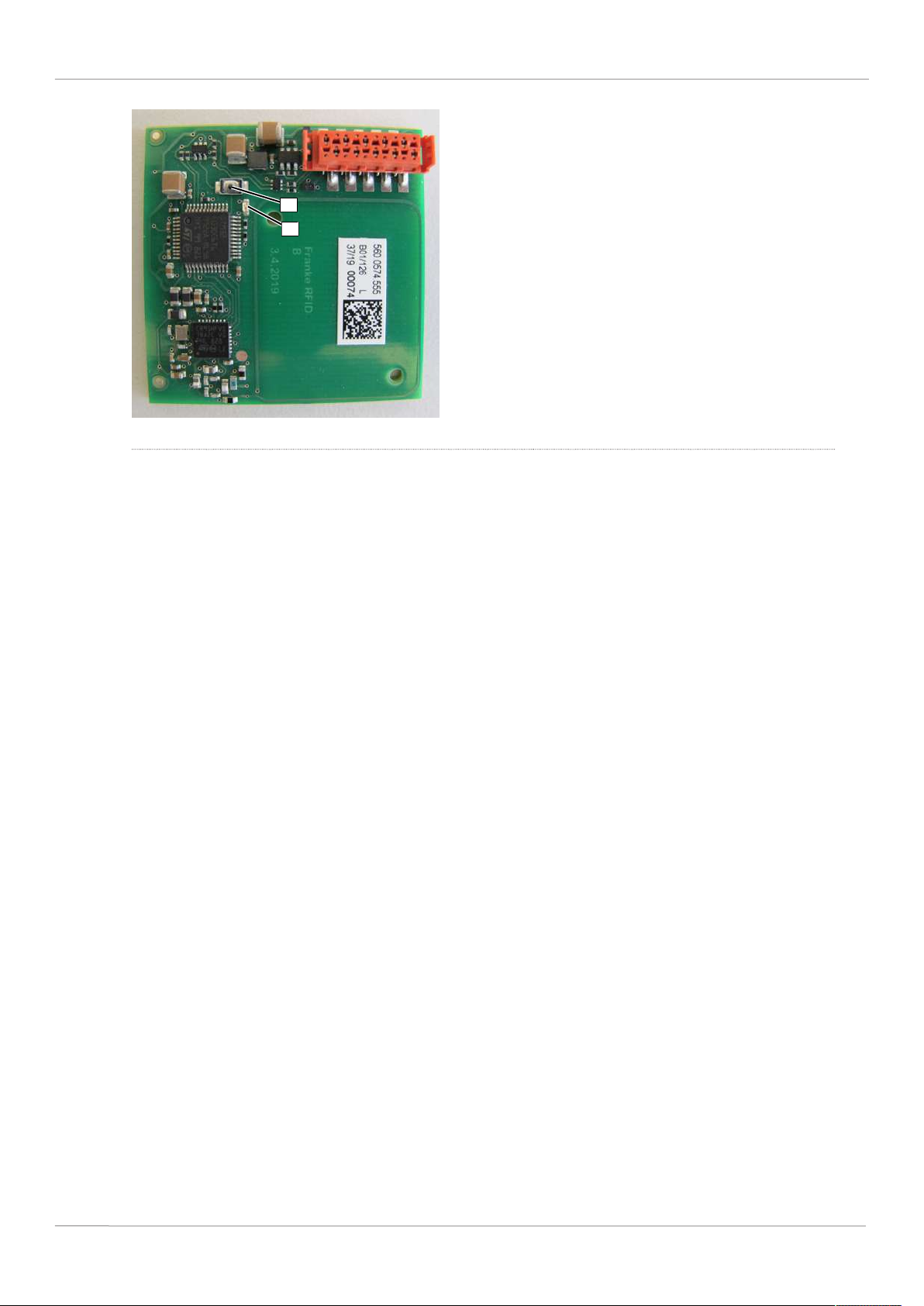
2 | Instructions Franke Kaffeemaschinen AG
1
2
1 Switch for RFID addressing 2 LED
ü The SB1200 is connected to the power grid.
ü The affected assembly or appliance is disconnected from the power grid.
1. Connect the affected assembly or appliance to the power grid and simultaneously hold down the
switch [1].
ð The switch produces a clicking sound.
ð The RFID module starts the addressing mode.
ð The LED [2] flashes once every 5 s.
2. Briefly press the switch [1] for a higher address number (max. 1 s) or press and hold (2 s) for a lower address number.
ð The address number increases or decreases by the value 1.
ð The LED [2] generates a flashing signal every 5 s corresponding to the currently selected address
number.
3. Press switch [1] briefly or hold it until the desired address number is reached.
4. Disconnect the affected assembly or appliance from the power grid.
ð The RFID module exits the addressing mode.
5. Connect the affected assembly or appliance to the power grid.
6. Perform all work steps for the remaining RFID modules.
44 Service documentation A300-A1000/S700/SB1200/Mytico
Page 45

Page 46

Page 47

Page 48
Service documentation • 20105906 • 06 • 12/11/2023 • 20105906 •
Franke Kaffeemaschinen AG
Franke-Str. 9
CH-4663 Aarburg
Switzerland
Tel. +41 62 787 31 31
www.franke.com
Franke Coffee Systems GmbH
Franke Strasse 1
97947 Grünsfeld
Deutschland
Tel.: +49 9346 9278 0
Fax: +49 9346 9278 100
www.franke.de
Franke Coffee Systems
UK Limited
6A Handley Page Way,
Old Parkbury Lane,
Colney Street,
St Albans,
Hertfordshire, AL2 2DQ
England
Tel.: +44 1923 635700
Fax: +44 1923 635701
www.franke.com
Franke Coffee Systems
Americas
800 Aviation Parkway
Smyrna, TN 37167
USA
Tel.: +1 615 462 4265
Fax: +1 615 462 4400
www.franke.com
coffee.franke.com
 Loading...