

Page 1

FortiOS™ Handbook
for FortiOS 5.0
Page 2

FortiOS™ Handbook for FortiOS 5.0
December 9, 2013
01-500-99686-20131209
Copyright© 2013 Fortinet, Inc. All rights reserved. Fortinet®, FortiGate®, and FortiGuard®, are
registered trademarks of Fortinet, Inc., and other Fortinet names herein may also be trademarks
of Fortinet. All other product or company names may be trademarks of their respective owners.
Performance metrics contained herein were attained in internal lab tests under ideal conditions,
and performance may vary. Network variables, different network environments and other
conditions may affect performance results. Nothing herein represents any binding commitment
by Fortinet, and Fortinet disclaims all warranties, whether express or implied, except to the
extent Fortinet enters a binding written contract, signed by Fortinet’s General Counsel, with a
purchaser that expressly warrants that the identified product will perform according to the
performance metrics herein. For absolute clarity, any such warranty will be limited to
performance in the same ideal conditions as in Fortinet’s internal lab tests. Fortinet disclaims in
full any guarantees. Fortinet reserves the right to change, modify, transfer, or otherwise revise
this publication without notice, and the most current version of the publication shall be
applicable.
Technical Documentation docs.fortinet.com
Knowledge Base kb.fortinet.com
Customer Service & Support support.fortinet.com
Training Services training.fortinet.com
FortiGuard fortiguard.com
Document Feedback [email protected]
Page 3

Contents Quick Look
Change Log..................................................................................................... 83
Introduction..................................................................................................... 84
Chapter 1: What’s New for FortiOS 5.0 ........................................................................... 86
New features in FortiOS 5.0 Patch 5............................................................. 87
New features in FortiOS 5.0 Patch 4........................................................... 100
New features in FortiOS 5.0 Patch 3........................................................... 110
New features in FortiOS 5.0 Patch 2........................................................... 121
Security Features ......................................................................................... 127
Authentication: users and devices.............................................................. 150
FortiOS and BYOD........................................................................................ 165
Client Reputation.......................................................................................... 173
Wireless......................................................................................................... 179
IPv6 ................................................................................................................ 192
Logging and reporting ................................................................................. 205
Firewall .......................................................................................................... 209
WAN optimization and Web Caching.......................................................... 223
Usability enhancements .............................................................................. 236
SSL VPN ........................................................................................................ 244
Other new features....................................................................................... 246
Chapter 2: Install and System Administration for FortiOS 5.0 .................................... 261
Differences between Models and Firmware.............................................. 262
Using the web-based manager................................................................... 263
Using the CLI ................................................................................................ 281
Basic Administration.................................................................................... 302
Best practices............................................................................................... 332
FortiGuard ..................................................................................................... 337
FortiCloud...................................................................................................... 350
Interfaces ...................................................................................................... 356
Central management.................................................................................... 377
Monitoring..................................................................................................... 382
VLANs ............................................................................................................ 399
PPTP and L2TP............................................................................................. 431
Advanced concepts...................................................................................... 444
Page 3
Page 4

Session helpers ............................................................................................ 478
Chapter 3: IPv6 for FortiOS 5.0 ...................................................................................... 488
IPv6 Features ................................................................................................ 490
IPv6 Configuration........................................................................................ 515
Chapter 4: Firewall for FortiOS 5.0 ................................................................................ 541
Firewall concepts ......................................................................................... 544
Firewall objects ............................................................................................ 562
Security policies ........................................................................................... 604
Network defense .......................................................................................... 625
GUI & CLI - What You May Not Know......................................................... 634
Building firewall objects and policies......................................................... 640
Multicast forwarding .................................................................................... 681
Chapter 5: Logging and Reporting ................................................................................ 715
Logging and reporting overview ................................................................. 716
Logging and reporting for small networks ................................................ 741
Logging and reporting for large networks................................................. 746
Advanced logging......................................................................................... 753
Troubleshooting and logging ...................................................................... 770
Appendix: FortiGate report charts.............................................................. 774
Chapter 6: Troubleshooting for FortiOS 5.0.................................................................. 780
Life of a Packet............................................................................................. 781
Verifying FortiGate admin access security ................................................ 794
Troubleshooting resources ......................................................................... 799
Troubleshooting tools.................................................................................. 801
Troubleshooting methodologies................................................................. 833
Technical Support Organization Overview ................................................ 837
Chapter 7: Unified Threat Management for FortiOS 5.0.............................................. 848
UTM overview ............................................................................................... 849
Client Reputation.......................................................................................... 855
AntiVirus ........................................................................................................ 862
Email filter ..................................................................................................... 878
Intrusion protection...................................................................................... 891
Custom Application & IPS Signatures........................................................ 907
Web filter ....................................................................................................... 917
Data leak prevention .................................................................................... 954
Fortinet Technologies Inc. Page 4 FortiOS™ Handbook - FortiOS 5.0
Page 5

Application control....................................................................................... 976
ICAP............................................................................................................... 988
Other UTM considerations .......................................................................... 993
Chapter 8: Authentication for FortiOS 5.0................................................................... 1013
Introduction to authentication .................................................................. 1014
Authentication servers............................................................................... 1023
Users and user groups............................................................................... 1045
Managing Guest Access............................................................................ 1066
Configuring authenticated access............................................................ 1071
Certificate-based authentication .............................................................. 1089
SSO using a FortiAuthenticator unit......................................................... 1107
Single Sign-On to Windows AD................................................................. 1111
Agent-based FSSO..................................................................................... 1120
SSO using RADIUS accounting records................................................... 1159
Monitoring authenticated users................................................................ 1166
Examples and Troubleshooting ................................................................ 1170
Chapter 9: Managing Devices for FortiOS 5.0 ............................................................ 1188
Managing “bring your own device” .......................................................... 1189
Endpoint Protection ................................................................................... 1196
Vulnerability Scan....................................................................................... 1204
Chapter 10: IPsec VPN for FortiOS 5.0.......................................................................... 1211
IPsec VPN concepts................................................................................... 1213
IPsec VPN Overview................................................................................... 1219
IPsec VPN in the web-based manager..................................................... 1224
Auto Key phase 1 parameters .................................................................. 1237
Phase 2 parameters .................................................................................. 1253
Defining VPN security policies .................................................................. 1259
Gateway-to-gateway configurations ....................................................... 1265
Hub-and-spoke configurations................................................................. 1279
Dynamic DNS configuration ...................................................................... 1295
FortiClient dialup-client configurations.................................................... 1309
FortiGate dialup-client configurations .................................................... 1325
Supporting IKE Mode config clients......................................................... 1333
Internet-browsing configuration............................................................... 1338
Redundant VPN configurations................................................................. 1342
Transparent mode VPNs............................................................................ 1367
Fortinet Technologies Inc. Page 5 FortiOS™ Handbook - FortiOS 5.0
Page 6

Manual-key configurations ....................................................................... 1373
IPv6 IPsec VPNs ......................................................................................... 1376
L2TP and IPsec (Microsoft VPN)............................................................... 1390
GRE over IPsec (Cisco VPN)...................................................................... 1402
Protecting OSPF with IPsec ...................................................................... 1412
Hardware offloading and acceleration..................................................... 1420
Monitoring and troubleshooting ............................................................... 1426
Chapter 11: SSL VPN for FortiOS 5.0............................................................................. 1432
Introduction to SSL VPN............................................................................ 1433
Basic Configuration.................................................................................... 1438
The SSL VPN client..................................................................................... 1462
Setup examples .......................................................................................... 1464
Chapter 12: Advanced Routing...................................................................................... 1476
Advanced Static routing ............................................................................ 1477
Dynamic Routing Overview ....................................................................... 1512
Routing Information Protocol (RIP) .......................................................... 1527
Border Gateway Protocol (BGP) ............................................................... 1566
Open Shortest Path First (OSPF) .............................................................. 1604
Intermediate System to Intermediate System Protocol (IS-IS) .............. 1646
Chapter 13: Virtual Domains .......................................................................................... 1667
Virtual Domains .......................................................................................... 1668
Virtual Domains in NAT/Route mode........................................................ 1697
Virtual Domains in Transparent mode...................................................... 1716
Inter-VDOM routing.................................................................................... 1736
Troubleshooting Virtual Domains ............................................................. 1776
Chapter 14: High Availability for FortiOS 5.0 ................................................................ 1781
Solving the High Availability problem....................................................... 1782
An introduction to the FGCP ..................................................................... 1786
Configuring and connecting HA clusters................................................. 1815
Virtual clusters............................................................................................ 1880
Full mesh HA............................................................................................... 1902
Operating a cluster..................................................................................... 1915
HA and failover protection......................................................................... 1950
HA and load balancing............................................................................... 2001
HA with third-party products..................................................................... 2018
Fortinet Technologies Inc. Page 6 FortiOS™ Handbook - FortiOS 5.0
Page 7

VRRP............................................................................................................ 2021
FortiGate Session Life Support Protocol (FGSP)..................................... 2027
Chapter 15: Traffic Shaping for FortiOS 5.0.................................................................. 2034
The purpose of traffic shaping.................................................................. 2035
Traffic shaping methods............................................................................ 2044
Examples..................................................................................................... 2059
Troubleshooting ......................................................................................... 2066
Chapter 16: FortiOS Carrier............................................................................................ 2070
Overview of FortiOS Carrier features ....................................................... 2071
Carrier web-based manager settings....................................................... 2096
MMS Security features............................................................................... 2136
Message flood protection.......................................................................... 2155
Duplicate message protection.................................................................. 2166
Configuring GTP on FortiOS Carrier......................................................... 2173
GTP message type filtering ....................................................................... 2180
GTP identity filtering................................................................................... 2187
Troubleshooting ......................................................................................... 2195
Chapter 17: Deploying Wireless Networks for FortiOS 5.0 ......................................... 2202
Introduction to wireless networking......................................................... 2203
Configuring a WiFi LAN.............................................................................. 2212
Access point deployment .......................................................................... 2228
Wireless Mesh............................................................................................. 2240
WiFi-Ethernet Bridge Operation................................................................ 2247
Protecting the WiFi Network ..................................................................... 2257
Wireless network monitoring .................................................................... 2260
Configuring wireless network clients....................................................... 2265
Wireless network examples ...................................................................... 2276
Using a FortiWiFi unit as a client .............................................................. 2292
Support for location-based services ........................................................ 2294
Reference.................................................................................................... 2296
WiFi Controller Reference ......................................................................... 2300
Chapter 18: VoIP Solutions: SIP for FortiOS 5.0........................................................... 2313
FortiGate VoIP solutions: SIP .................................................................... 2314
Chapter 19: WAN Optimization, Web Cache, Explicit Proxy, and WCCP for FortiOS 5.0..
Fortinet Technologies Inc. Page 7 FortiOS™ Handbook - FortiOS 5.0
Page 8

2402
Example network topologies..................................................................... 2405
Configuring WAN optimization.................................................................. 2415
Peers and authentication groups.............................................................. 2435
Configuration examples............................................................................. 2441
Web caching and SSL offloading.............................................................. 2468
FortiClient WAN optimization.................................................................... 2486
The FortiGate explicit web proxy.............................................................. 2489
The FortiGate explicit FTP proxy .............................................................. 2513
FortiGate WCCP ......................................................................................... 2527
Storage........................................................................................................ 2540
Diagnose commands ................................................................................. 2543
Chapter 20: Load Balancing for FortiOS 5.0 ................................................................. 2552
Configuring load balancing ....................................................................... 2553
Load balancing configuration examples.................................................. 2583
Index ............................................................................................................ 2600
Fortinet Technologies Inc. Page 8 FortiOS™ Handbook - FortiOS 5.0
Page 9

Table of Contents
Change Log..................................................................................................... 83
Introduction..................................................................................................... 84
Chapter 1: What’s New for FortiOS 5.0 ........................................................................... 86
New features in FortiOS 5.0 Patch 5............................................................. 87
Improvements to Endpoint Control ....................................................................... 87
New menu options........................................................................................... 87
Default profile................................................................................................... 88
FortiClient Monitor ........................................................................................... 88
FortiAP LAN port support ...................................................................................... 88
Bridging with the FortiAP’s SSID(s) ................................................................. 88
Bridging with the WAN port ............................................................................. 89
Configuring bridging ........................................................................................ 89
Restrictions ...................................................................................................... 90
Automatically allowing basic applications ............................................................. 90
Pre-authorizing a FortiAP unit................................................................................ 91
Preventing IP fragmentation of packets in CAPWAP tunnels................................ 92
Limiting access for unauthenticated users............................................................ 93
Use case - allowing limited access for unathenticated users.......................... 93
Use case - multiple levels of authentication .................................................... 94
LDAP browser to import users into a user group .................................................. 94
Dedicated management CPU................................................................................ 94
Improvements to the Traffic History and Threat History widgets.......................... 95
Assigning an IP address to a dynamic IPsec VPN interface ................................. 95
SSL VPN History widget........................................................................................ 95
Port Block Allocation (PBA) for CGN to reduce logs............................................. 96
Neighbor cache table for IPv6 ............................................................................... 96
Improved HA diagnose commands ....................................................................... 96
Secure disk erasing ............................................................................................... 97
Anonymize user names in logs .............................................................................. 97
VLAN interface traffic statistics.............................................................................. 97
Preserving the Class of Service bit........................................................................ 97
Front panel illustration ........................................................................................... 97
USB entropy token support................................................................................... 97
Station locate for FortiWiFi units............................................................................ 98
Switch Controller added to FortiGate models 200D, 240D, 600C, 800C, and 1000C
98
Page 9
Page 10

Diagnose command for 5000 series FortiGate units ............................................. 99
New platforms for FortiGate-VM............................................................................ 99
Supported RFCs.................................................................................................... 99
New features in FortiOS 5.0 Patch 4........................................................... 100
FortiSandbox ....................................................................................................... 100
Wireless Health Dashboard ................................................................................. 100
IPsec VPN............................................................................................................ 101
Dial-up IPsec VPN Creation Wizard............................................................... 101
Show or Hide policy-based IPsec VPN ......................................................... 101
Managing FortiAP units ....................................................................................... 101
Units remain online when their WiFi Controller goes offline .......................... 102
Assigning the same profile to multiple FortiAP units ..................................... 102
Dynamic VLANs for SSIDs................................................................................... 102
NAT46 & NAT64................................................................................................... 103
Enhancements to Tables ..................................................................................... 103
Policy Table.................................................................................................... 103
Member Display............................................................................................. 103
Fortinet Top Bar................................................................................................... 104
FortiAnalyzer and FortiManager log encryption................................................... 104
FortiToken Mobile................................................................................................ 104
Load balancing for explicit web proxy forwarding server groups ....................... 104
Server load balancing enhancements ................................................................. 105
SNMP traps.................................................................................................... 105
HTTP redirects............................................................................................... 105
Additional filters for IPS and Application Control ................................................ 106
Blocking IPv6 packets by extension headers...................................................... 106
Distinguishing between HTTP GET and POST in DLP ........................................ 106
RADIUS Accounting............................................................................................. 107
H3C Compatibility................................................................................................ 107
Web filter administrative overrides ...................................................................... 107
Configurable idle timeout for console admin login sessions ............................... 107
TCP reset............................................................................................................. 108
Log Volume Monitor ............................................................................................ 108
Invalid Packet log................................................................................................. 108
Server limits ......................................................................................................... 108
PoE Power Management display......................................................................... 108
Other new features .............................................................................................. 109
New features in FortiOS 5.0 Patch 3........................................................... 110
Security Features................................................................................................. 111
Exempting IP addresses from IPS....................................................................... 111
DLP Watermarking Client .................................................................................... 111
Fortinet Technologies Inc. Page 10 FortiOS™ Handbook - FortiOS 5.0
Page 11

Predefined Device Groups................................................................................... 111
Client Reputation Configuration .......................................................................... 111
Feature Select...................................................................................................... 111
Changes to Endpoint Control .............................................................................. 111
Endpoint control for Android ......................................................................... 111
Assigning endpoint profiles to specific users and user groups..................... 112
Endpoint profile portal pages......................................................................... 112
Managing FortiAP units ....................................................................................... 112
Firmware Auto-detection ............................................................................... 112
Wireless Device Locating Service.................................................................. 112
More Wireless Controller MIB Support.......................................................... 113
Normal or Remote WTP mode parameter ..................................................... 114
FortiGuard Subscription Services........................................................................ 114
Adding Explicit Web Proxy services .................................................................... 114
SSO Authentication failover for the Explicit Web Proxy ...................................... 115
User Creation Wizard........................................................................................... 116
FortiClient Registration ........................................................................................ 116
DSS and ECDSA Certificates for FortiGate SSL-related features ....................... 116
LDAP Servers....................................................................................................... 116
User Monitor ........................................................................................................ 116
Web Filter Profiles................................................................................................ 116
CAPWAP Administrative Access ......................................................................... 117
IPS Algorithms ..................................................................................................... 117
NAC-Quarantine Traffic Logs .............................................................................. 117
New System Report Charts ................................................................................. 117
Memory Logging.................................................................................................. 117
URL-based Web Proxy Forwarding..................................................................... 117
Changes to Routing............................................................................................. 118
RADIUS Support for Dynamic VLANs.................................................................. 118
Dedicated Management Port............................................................................... 118
URL Filtering ........................................................................................................ 118
URL Source Tracking........................................................................................... 118
IPv6 Denial of Service Policies ............................................................................ 119
Support for NAT46, VIP64 and VIP46.................................................................. 119
Packet Capture Filters ......................................................................................... 119
Configure hosts in an SNMP v1/2c community to send queries or receive traps 119
IP in IP tunneling support (RFC 1853) ................................................................. 120
GTP-u acceleration on FortiGate units with SP3 processors.............................. 120
New features in FortiOS 5.0 Patch 2........................................................... 121
Endpoint Profile Changes.................................................................................... 121
Client Reputation Changes.................................................................................. 121
Fortinet Technologies Inc. Page 11 FortiOS™ Handbook - FortiOS 5.0
Page 12

Changes to logging in security policies............................................................... 121
Configuring the FortiGate unit to be an NTP Server............................................ 122
Customizing and viewing the local FortiGate UTM Security Analysis Report..... 122
Wireless changes: Custom mesh downlink SSIDs and new identifier for local bridge
SSIDs................................................................................................................. 123
SSL-VPN Realm Support (multiple custom SSL VPN logins).............................. 124
Automatically add devices found by device identification to the vulnerability scanner
configuration...................................................................................................... 125
The SIP ALG can receive SIP traffic on multiple TCP and UDP ports................. 126
IPv6 PIM sparse mode multicast routing............................................................. 126
Wireless RADIUS-Based MAC Authentication .................................................... 126
Security Features ......................................................................................... 127
FortiSandbox ....................................................................................................... 127
Configuration ................................................................................................. 127
Sending files to FortiSandbox........................................................................ 128
Tracking submitted files................................................................................. 128
Botnet and phishing protection ........................................................................... 128
Windows file sharing (CIFS) flow-based antivirus scanning................................ 129
Advanced Application Control and IPS sensor creation ..................................... 131
Custom Application Control signatures and IPS signatures ............................... 132
Exempting IP addresses from IPS....................................................................... 133
Flow-based inspection improvements ................................................................ 134
Configuring SSL inspection for flow-based and proxy protection ...................... 134
Explicit web Proxy Extensions – SSL inspection, IPS, Application Control, and
flow-based antivirus, web filtering and DLP...................................................... 135
Replacement messages for flow-based web filtering of HTTPS traffic............... 135
DNS web filtering................................................................................................. 135
FortiGuard Web Filter quotas can be set based on traffic volume...................... 137
Customizing the authentication replacement message for a FortiGuard web filter
category............................................................................................................. 137
YouTube Education Filter implemented in Web Filtering Profiles ....................... 137
IPS hardware acceleration................................................................................... 138
New SIP ALG features ......................................................................................... 139
Inspecting SIP over SSL/TLS (secure SIP) .................................................... 139
Opening and closing SIP via and record-route pinholes............................... 142
Adding the original IP address and port to the SIP message header after NAT ..
142
DLP watermarking ............................................................................................... 143
Fortinet watermarking utility .......................................................................... 143
SSH inspection .................................................................................................... 146
Optimizing SSL encryption/decryption performance .......................................... 148
Fortinet Technologies Inc. Page 12 FortiOS™ Handbook - FortiOS 5.0
Page 13

Authentication: users and devices.............................................................. 150
User authentication menu changes..................................................................... 150
User identity policy changes................................................................................ 150
Authentication-based routing .............................................................................. 151
Secondary and tertiary RADIUS, LDAP, and TACAS+ servers............................ 152
FortiToken two-factor authentication and FortiToken Mobile ............................. 153
Configuring FortiToken mobile soft token support........................................ 154
SSO using a FortiAuthenticator unit .................................................................... 155
User’s view of FortiAuthenticator SSO authentication .................................. 156
Administrator’s view of FortiAuthenticator SSO authentication .................... 156
SSO with Windows AD or Novell......................................................................... 157
Citrix Agent support for Single Sign On............................................................... 157
Installing Citrix/Terminal Service Support Agent (TS Agent) ......................... 158
Installing the FSSO collector ......................................................................... 158
To enable single sign-on using polling mode ................................................ 159
Verifying the configuration ............................................................................. 159
Configuring guest access .................................................................................... 159
User’s view of guest access .......................................................................... 159
Administrator’s view of guest access ............................................................ 159
Creating guest management administrators ................................................. 159
Creating guest user groups ........................................................................... 160
Creating guest user accounts........................................................................ 161
Batch guest account creation........................................................................ 162
Vulnerability Scanning ......................................................................................... 162
Running and configuring scans and viewing scan results............................. 162
FortiOS and BYOD........................................................................................ 165
Device monitoring................................................................................................ 165
Device Groups ............................................................................................... 167
Creating a custom device group.................................................................... 167
Controlling access with a MAC Address Access Control List............................. 168
Device policies..................................................................................................... 168
Device policy portal options ................................................................................ 170
Creating the WiFi SSID ........................................................................................ 170
Configuring Internet access for guests with mobile devices............................... 171
Client Reputation.......................................................................................... 173
Setting the client reputation profile/definition...................................................... 174
Applying client reputation monitoring to your network........................................ 175
Viewing client reputation results.......................................................................... 176
Expanding client reputation to include more types of behavior .......................... 176
Client reputation execute commands.................................................................. 178
Client reputation diagnose commands................................................................ 178
Fortinet Technologies Inc. Page 13 FortiOS™ Handbook - FortiOS 5.0
Page 14

Wireless......................................................................................................... 179
Wireless IDS......................................................................................................... 179
WiFi performance improvements......................................................................... 182
FortiAP web-based manager and CLI ................................................................. 182
WiFi guest access provisioning ........................................................................... 184
Adding guest access to a WiFi network ........................................................ 185
FortiAP local bridging (Private Cloud-Managed AP)............................................ 185
WiFi data channel encryption .............................................................................. 187
Configuring DTLS on the FortiGate unit ........................................................ 187
Configuring encryption on the FortiAP unit ................................................... 187
Wireless client load balancing for high-density deployments ............................. 188
Access point hand-off.................................................................................... 188
Frequency hand-off or band-steering............................................................ 188
Configuration ................................................................................................. 189
Bridge SSID to FortiGate wired network ............................................................. 190
IPv6 ................................................................................................................ 192
IPv6 Policy routing............................................................................................... 192
IPv6 security policies ........................................................................................... 193
IPv6 Explicit web proxy ....................................................................................... 194
Restricting the IP address of the explicit IPv6 web proxy............................. 195
Restricting the outgoing source IP address of the IPv6 explicit web proxy.. 195
IPv6 NAT – NAT64, DNS64, NAT66..................................................................... 196
NAT64 and DNS64......................................................................................... 196
NAT66 ............................................................................................................ 199
NAT66 destination address translation.......................................................... 200
IPv6 Forwarding Policies - IPS, Application Control, and flow-based antivirus, web
filtering and DLP................................................................................................ 200
New Fortinet FortiGate IPv6 MIB fields ............................................................... 201
New OIDs....................................................................................................... 202
EXAMPLE SNMP get/walk output ................................................................. 203
IPv6 Per-IP traffic shaper..................................................................................... 203
DHCPv6 relay ...................................................................................................... 203
FortiGate interfaces can get IPv6 addresses from an IPv6 DHCP server ........... 204
Logging and reporting ................................................................................. 205
Log message reorganization ............................................................................... 205
Log Viewer Improvements................................................................................... 205
The FortiGate Security Analysis Report............................................................... 206
Viewing the current report ............................................................................. 207
Viewing the saved (historical) security analysis reports................................. 207
Customizing the security analysis report....................................................... 207
Converting compact log format........................................................................... 208
Fortinet Technologies Inc. Page 14 FortiOS™ Handbook - FortiOS 5.0
Page 15

Firewall .......................................................................................................... 209
Choosing the policy type ..................................................................................... 209
Creating a basic security policy..................................................................... 209
Creating a security policy to authenticate users............................................ 210
Creating a security policy to authenticate devices for BYOD........................ 211
Creating a policy-based IPsec VPN security policy ...................................... 211
Creating a route-based IPsec VPN security policy........................................ 212
Creating an SSL VPN security policy............................................................. 213
Reorganized Firewall Services............................................................................. 214
Editing and deleting services......................................................................... 215
Adding an address to a service ..................................................................... 216
Adding a new service..................................................................................... 216
Adding a new service category...................................................................... 216
Local in policies ................................................................................................... 216
Multicast Policies................................................................................................. 217
Adding DoS Anomaly protection to a FortiGate interface ................................... 218
Changes to security proxy options...................................................................... 220
Protocol port mapping................................................................................... 220
Common options, web options and email options........................................ 220
SSL and SSH inspection ..................................................................................... 221
SSL inspection options.................................................................................. 221
SSH inspection options ................................................................................. 222
WAN optimization and Web Caching.......................................................... 223
Configuring WAN optimization profiles................................................................ 223
Dynamic data chunking for WAN optimization byte caching .............................. 226
Policy-based WAN optimization configuration changes summary ..................... 227
On the client side........................................................................................... 227
On the server side.......................................................................................... 227
Client side configuration summary ................................................................ 228
Server Side configuration summary............................................................... 230
Combining web caching for HTTP traffic with WAN optimization....................... 231
Turning on web caching and SSL offloading for HTTPS traffic........................... 231
Changing the ports on which to look for HTTP and HTTPS traffic to cache....... 233
Web proxy URL debugging ................................................................................. 233
Debugging caching of a specific web page................................................... 233
Debugging caching of multiple web pages ................................................... 235
FortiOS Web Caching now caches Windows/MS-Office software updates ....... 235
Usability enhancements .............................................................................. 236
Feature Select...................................................................................................... 236
Security Features Presets.............................................................................. 237
Improved list editing ............................................................................................ 237
Dynamic comment fields ..................................................................................... 238
Setup Wizard enhancements............................................................................... 238
Fortinet Technologies Inc. Page 15 FortiOS™ Handbook - FortiOS 5.0
Page 16

Fortinet Top Bar................................................................................................... 238
VDOM Mode GUI changes .................................................................................. 239
Enhanced Top Sessions dashboard widget........................................................ 239
Top Sources................................................................................................... 239
Top Destinations............................................................................................ 240
Top Applications............................................................................................ 241
Identifying Skype sessions ............................................................................ 241
Customizing the Top Sessions dashboard widget ........................................ 242
Improved CLI syntax for multi-value fields .......................................................... 242
SSL VPN ........................................................................................................ 244
New default SSL VPN portals.............................................................................. 244
SSL VPN user groups no longer required............................................................ 244
SSL VPN policy interface name change.............................................................. 244
Support SSL VPN push configuration of DNS suffix ........................................... 244
Other new features....................................................................................... 246
New FortiGuard features ..................................................................................... 246
FortiGate Auto-config using DHCP ..................................................................... 247
FortiGate Session Life Support Protocol (FGSP)................................................. 247
HA failover supports more features..................................................................... 248
New HA mode: Fortinet redundant UTM protocol (FRUP) .................................. 248
ICAP and the explicit web proxy ......................................................................... 249
Example ICAP sequence for an ICAP server performing web URL filtering on web
proxy HTTP requests................................................................................... 249
Example ICAP configuration.......................................................................... 249
Adding ICAP to a web proxy security policy - web-based manager............. 250
Adding ICAP to a web proxy security policy - CLI ........................................ 250
New interface features - DHCP server and authentication.................................. 251
Adding a DHCP server to an interface........................................................... 251
Reserving, assigning and blocking MAC addresses ..................................... 252
Authentication - Captive Portal...................................................................... 252
Replacement Message Improvements ................................................................ 253
Acceleration of Inter-VDOM Traffic (by NP4)....................................................... 254
Virtual Hardware Switch ...................................................................................... 255
FortiExplorer for iOS devices............................................................................... 256
Connecting to and logging into a FortiGate unit............................................ 257
Updating firmware and configuring network settings.................................... 257
Inter-VDOM links between NAT mode and Transparent mode VDOMs.............. 257
About inter-VDOM links between NAT and Transparent mode VDOMs ....... 258
Sniffer modes: one-armed and normal................................................................ 258
Configuring an interface to operate as a one-arm sniffer.............................. 258
Integrated switch fabric (ISF) access control list (ACL) short-cut path ............... 259
Generalized TTL Security Mechanism (GTSM) support ...................................... 260
Fortinet Technologies Inc. Page 16 FortiOS™ Handbook - FortiOS 5.0
Page 17

Firewall services................................................................................................... 260
Chapter 2: Install and System Administration for FortiOS 5.0 .................................... 261
Differences between Models and Firmware.............................................. 262
Differences between Models ............................................................................... 262
Differences between Firmware Versions ............................................................. 262
Using the web-based manager................................................................... 263
Web-based manager overview............................................................................ 263
Web-based manager menus and pages ............................................................. 263
Using information tables................................................................................ 264
Using column settings ................................................................................... 265
Entering text strings............................................................................................. 265
Entering text strings (names) ......................................................................... 265
Entering numeric values................................................................................. 266
Enabling or disabling options ........................................................................ 266
Dashboard ........................................................................................................... 266
Adding dashboards and widgets................................................................... 267
System Information widget............................................................................ 267
License Information widget............................................................................ 273
FortiGate unit Operation widget .................................................................... 275
System Resources widget ............................................................................. 275
Alert Message Console widget ...................................................................... 275
CLI Console widget........................................................................................ 275
Session History widget .................................................................................. 276
Top Sessions widget...................................................................................... 276
USB Modem widget....................................................................................... 276
Advanced Threat Protection Statistics widget .............................................. 276
Features widget ............................................................................................. 276
RAID monitor widget...................................................................................... 277
Basic configurations ............................................................................................ 278
Changing your administrator password......................................................... 278
Changing the web-based manager language................................................ 279
Changing administrative access.................................................................... 279
Changing the web-based manager idle timeout............................................ 279
Switching VDOMs.......................................................................................... 279
Connecting to the CLI from the web-based manager ................................... 279
Logging out.................................................................................................... 280
Using the CLI ................................................................................................ 281
Connecting to the CLI.......................................................................................... 281
Connecting to the CLI using a local console ................................................. 281
Enabling access to the CLI through the network (SSH or Telnet) ................. 282
Connecting to the CLI using SSH.................................................................. 283
Connecting to the CLI using Telnet ............................................................... 284
Command syntax................................................................................................. 285
Fortinet Technologies Inc. Page 17 FortiOS™ Handbook - FortiOS 5.0
Page 18

Terminology ................................................................................................... 285
Indentation ..................................................................................................... 286
Notation ......................................................................................................... 286
Sub-commands ................................................................................................... 288
Example of table commands ......................................................................... 290
Permissions ......................................................................................................... 291
Tips ...................................................................................................................... 292
Help................................................................................................................ 292
Shortcuts and key commands....................................................................... 292
Command abbreviation ................................................................................. 293
Adding and removing options from lists........................................................ 293
Environment variables.................................................................................... 294
Special characters ......................................................................................... 294
Using grep to filter get and show command output...................................... 295
Language support and regular expressions .................................................. 296
Screen paging................................................................................................ 298
Baud rate ....................................................................................................... 299
Editing the configuration file on an external host .......................................... 299
Using Perl regular expressions ...................................................................... 299
Basic Administration.................................................................................... 302
Connecting to the FortiGate unit ......................................................................... 302
Connecting to the web-based manager ........................................................ 302
Connecting to the CLI.................................................................................... 303
System configuration........................................................................................... 303
Setting the time and date............................................................................... 303
Configuring FortiGuard .................................................................................. 304
Passwords ........................................................................................................... 305
Password considerations............................................................................... 305
Password policy............................................................................................. 306
Lost Passwords.............................................................................................. 307
Administrators...................................................................................................... 307
Adding administrators.................................................................................... 307
LDAP Admin Access and Authorization......................................................... 308
Monitoring administrators.............................................................................. 309
Administrator profiles..................................................................................... 310
Regular (password) authentication for administrators................................... 311
Management access...................................................................................... 311
Security Precautions...................................................................................... 312
General Settings .................................................................................................. 317
Administrative port settings ........................................................................... 317
Password policies.......................................................................................... 317
Feature Select................................................................................................ 317
Configuration backups ........................................................................................ 318
Backup and restore a configuration file using SCP....................................... 319
Fortinet Technologies Inc. Page 18 FortiOS™ Handbook - FortiOS 5.0
Page 19

Restoring a configuration............................................................................... 321
Configuration revisions .................................................................................. 322
Restore factory defaults................................................................................. 322
Firmware .............................................................................................................. 322
Downloading firmware ................................................................................... 323
Testing new firmware before installing .......................................................... 323
Upgrading the firmware - web-based manager............................................. 325
Upgrading the firmware - CLI ........................................................................ 325
Installing firmware from a system reboot using the CLI ................................ 326
Reverting to a previous firmware version - web-based manager.................. 328
Reverting to a previous firmware version - CLI ............................................. 328
Configuration Revision................................................................................... 329
Backup and Restore from a USB key............................................................ 329
Backup and Restore an encrypted config file from a USB key ..................... 330
Controlled upgrade........................................................................................ 330
Best practices............................................................................................... 332
Hardware ............................................................................................................. 332
Environmental specifications ......................................................................... 332
Grounding ...................................................................................................... 333
Rack mount instructions................................................................................ 333
Shutting down...................................................................................................... 334
Performance ........................................................................................................ 334
Firewall................................................................................................................. 334
Intrusion protection.............................................................................................. 335
Antivirus ............................................................................................................... 335
Web filtering......................................................................................................... 336
Antispam.............................................................................................................. 336
Security................................................................................................................ 336
FortiGuard ..................................................................................................... 337
FortiGuard Services............................................................................................. 337
Next Generation Firewall................................................................................ 337
Advanced Threat Protection .......................................................................... 338
Other Services ............................................................................................... 338
Support Contract and FortiGuard Subscription Services.............................. 339
FortiCloud ...................................................................................................... 339
Antivirus and IPS ................................................................................................. 339
Detection during update ................................................................................ 339
Antivirus and IPS Options.............................................................................. 340
Manual updates ............................................................................................. 340
Automatic updates......................................................................................... 341
Push updates................................................................................................. 341
Push IP override............................................................................................. 342
Web filtering......................................................................................................... 343
Fortinet Technologies Inc. Page 19 FortiOS™ Handbook - FortiOS 5.0
Page 20

Web Filtering and Email Filtering Options...................................................... 344
URL verification.............................................................................................. 344
Email filtering ....................................................................................................... 345
Security tools....................................................................................................... 345
URL lookup .................................................................................................... 345
IP and signature lookup................................................................................. 345
Online virus scanner ...................................................................................... 346
Malware removal tools................................................................................... 346
FortiSandbox ................................................................................................. 346
Troubleshooting................................................................................................... 346
Web-based manager verification................................................................... 346
CLI verification ............................................................................................... 348
Port assignment............................................................................................. 348
FortiCloud...................................................................................................... 350
Simplified central management for your FortiGate network.......................... 350
Hosted log retention with large default storage allocated............................. 350
Monitoring and alerting in real time ............................................................... 350
Customized or pre-configured reporting and analysis tools ......................... 350
Maintain important configuration information uniformly................................ 350
Service security.............................................................................................. 350
Registration and Activation.................................................................................. 351
Registering with Support ............................................................................... 351
Registering and Activating your FortiCloud account..................................... 351
Enabling logging to FortiCloud ...................................................................... 352
Logging into the FortiCloud portal................................................................. 353
Upgrading to a 200Gb subscription .............................................................. 353
The FortiCloud Portal........................................................................................... 354
Dashboards.................................................................................................... 354
Using FortiCloud.................................................................................................. 355
Interfaces ...................................................................................................... 356
Physical................................................................................................................ 356
Interface settings ................................................................................................. 358
Interface configuration and settings .............................................................. 359
Software switch ................................................................................................... 362
Soft switch example ...................................................................................... 363
Virtual Switch....................................................................................................... 364
Loopback interfaces ............................................................................................ 365
Redundant interfaces........................................................................................... 365
One-armed sniffer................................................................................................ 366
Aggregate Interfaces ........................................................................................... 367
DHCP addressing mode on an interface ............................................................. 368
PPPoE addressing mode on an interface............................................................ 369
Administrative access.......................................................................................... 371
Fortinet Technologies Inc. Page 20 FortiOS™ Handbook - FortiOS 5.0
Page 21

Wireless ............................................................................................................... 371
Interface MTU packet size................................................................................... 372
Secondary IP addresses to an interface.............................................................. 373
Virtual domains .................................................................................................... 373
Virtual LANs ......................................................................................................... 374
Zones................................................................................................................... 375
Central management.................................................................................... 377
Adding a FortiGate to FortiManager.................................................................... 377
FortiGate configuration .................................................................................. 377
FortiManager configuration............................................................................ 378
Configuration through FortiManager ................................................................... 379
Global objects................................................................................................ 379
Locking the FortiGate web-based manager .................................................. 379
Firmware updates................................................................................................ 379
FortiGuard............................................................................................................ 380
Backup and restore configurations ..................................................................... 380
Administrative domains ....................................................................................... 380
Monitoring..................................................................................................... 382
Dashboard ........................................................................................................... 382
Widgets.......................................................................................................... 382
FortiClient software........................................................................................ 383
sFlow.................................................................................................................... 383
Configuration ................................................................................................. 384
Monitor menus..................................................................................................... 384
Logging................................................................................................................ 384
FortiCloud ...................................................................................................... 385
FortiGate memory.......................................................................................... 385
FortiGate hard disk ........................................................................................ 385
Syslog server ................................................................................................. 386
FortiAnalyzer .................................................................................................. 386
Sending logs using a secure connection....................................................... 387
Packet Capture.................................................................................................... 388
Alert email ............................................................................................................ 389
SNMP................................................................................................................... 390
SNMP configuration settings......................................................................... 391
Gigabit interfaces........................................................................................... 393
SNMP agent................................................................................................... 393
SNMP community.......................................................................................... 394
Enabling on the interface ............................................................................... 395
Fortinet MIBs ................................................................................................. 396
SNMP get command syntax................................................................................ 397
Fortinet Technologies Inc. Page 21 FortiOS™ Handbook - FortiOS 5.0
Page 22

VLANs ............................................................................................................ 399
VLAN ID rules....................................................................................................... 400
VLAN switching and routing ................................................................................ 400
VLAN layer-2 switching.................................................................................. 400
VLAN layer-3 routing...................................................................................... 403
VLANs in NAT mode ............................................................................................ 406
Adding VLAN subinterfaces........................................................................... 406
Configuring security policies and routing ...................................................... 408
Example VLAN configuration in NAT mode......................................................... 409
General configuration steps........................................................................... 410
Configure the FortiGate unit .......................................................................... 411
Configure the VLAN switch............................................................................ 416
Test the configuration .................................................................................... 417
VLANs in transparent mode................................................................................. 417
VLANs and transparent mode........................................................................ 417
Example of VLANs in transparent mode........................................................ 420
General configuration steps........................................................................... 420
Configure the FortiGate unit .......................................................................... 421
Configure the Cisco switch and router .......................................................... 424
Test the configuration .................................................................................... 426
Troubleshooting VLAN issues.............................................................................. 426
Asymmetric routing........................................................................................ 426
Layer-2 and Arp traffic................................................................................... 427
Forward-domain solution............................................................................... 428
NetBIOS......................................................................................................... 429
STP forwarding .............................................................................................. 429
Too many VLAN interfaces ............................................................................ 430
PPTP and L2TP............................................................................................. 431
How PPTP VPNs work......................................................................................... 431
FortiGate unit as a PPTP server........................................................................... 433
Configuring user authentication for PPTP clients.......................................... 433
Enabling PPTP and specifying the PPTP IP address range ......................... 434
Adding the security policy ............................................................................ 435
Configuring the FortiGate unit for PPTP VPN...................................................... 436
Configuring the FortiGate unit for PPTP pass through........................................ 436
Configuring a virtual IP address..................................................................... 436
Configuring a port-forwarding security policy ............................................... 437
Testing PPTP VPN connections .......................................................................... 438
Logging VPN events ............................................................................................ 438
Configuring L2TP VPNs....................................................................................... 438
Network topology ......................................................................................... 440
L2TP infrastructure requirements ................................................................. 440
L2TP configuration overview .............................................................................. 440
Fortinet Technologies Inc. Page 22 FortiOS™ Handbook - FortiOS 5.0
Page 23

Authenticating L2TP clients .......................................................................... 441
Enabling L2TP and specifying an address range ......................................... 441
Defining firewall source and destination addresses ..................................... 441
Adding the security policy ................................................................................... 442
Configuring a Linux client ............................................................................. 442
Monitoring L2TP sessions ............................................................................. 443
Testing L2TP VPN connections ..................................................................... 443
Logging L2TP VPN events............................................................................. 443
Advanced concepts...................................................................................... 444
Dual internet connections (redundant Internet connections)............................... 444
Redundant interfaces..................................................................................... 444
Load sharing .................................................................................................. 447
Link redundancy and load sharing................................................................. 447
Single firewall vs. multiple virtual domains .......................................................... 447
Single firewall vs. vdoms ............................................................................... 448
Modem................................................................................................................. 450
USB modem port........................................................................................... 450
Modes ............................................................................................................ 450
Additional modem configuration.................................................................... 452
Modem interface routing................................................................................ 452
DHCP servers and relays..................................................................................... 453
DHCP Server configuration............................................................................ 453
DHCP in IPv6 ................................................................................................. 454
Service ........................................................................................................... 454
Lease time...................................................................................................... 454
DHCP options ................................................................................................ 455
Exclude addresses in DHCP a range............................................................. 455
DHCP Monitor................................................................................................ 455
Breaking a address lease............................................................................... 456
Assigning IP address by MAC address ............................................................... 456
DNS services ....................................................................................................... 456
DNS settings.................................................................................................. 456
Additional DNS CLI configuration.................................................................. 457
DNS server..................................................................................................... 457
Recursive DNS............................................................................................... 458
Dynamic DNS ...................................................................................................... 459
FortiClient discovery and registration.................................................................. 459
FortiClient discovery ...................................................................................... 460
FortiClient Registration .................................................................................. 460
IP addresses for self-originated traffic................................................................. 460
Administration for schools................................................................................... 461
Security policies............................................................................................. 461
DNS................................................................................................................ 462
Encrypted traffic (HTTPS) .............................................................................. 462
Fortinet Technologies Inc. Page 23 FortiOS™ Handbook - FortiOS 5.0
Page 24

FTP................................................................................................................. 462
Example security policies .............................................................................. 462
UTM security profiles..................................................................................... 463
Logging .......................................................................................................... 464
Tag management................................................................................................. 465
Adding and removing tags............................................................................. 465
Reviewing tags............................................................................................... 466
Tagging guidelines......................................................................................... 466
Replacement messages list................................................................................. 467
Replacement message images...................................................................... 467
Adding images to replacement messages..................................................... 467
Modifying replacement messages................................................................. 468
Replacement message tags .......................................................................... 468
Administration replacement message ........................................................... 470
Alert Mail replacement messages.................................................................. 471
Authentication replacement messages.......................................................... 471
Captive Portal Default replacement messages.............................................. 472
Device Detection Portal replacement message............................................. 472
Email replacement messages........................................................................ 472
Endpoint Control replacement message ....................................................... 472
FTP replacement messages .......................................................................... 472
FortiGuard Web Filtering replacement messages ......................................... 472
HTTP replacement messages........................................................................ 472
IM replacement messages............................................................................. 473
NNTP replacement messages ....................................................................... 473
Spam replacement messages ....................................................................... 473
NAC quarantine replacement messages ....................................................... 473
SSL VPN replacement message.................................................................... 473
Web Proxy replacement messages ............................................................... 473
Traffic quota control replacement messages ................................................ 474
MM1 replacement messages......................................................................... 474
MM3 replacement messages......................................................................... 474
MM4 replacement messages......................................................................... 474
MM7 replacement messages......................................................................... 474
MMS replacement messages ........................................................................ 474
Replacement message groups ...................................................................... 474
Disk...................................................................................................................... 475
Formatting the disk........................................................................................ 475
Setting space quotas..................................................................................... 475
CLI Scripts ........................................................................................................... 475
Uploading script files ..................................................................................... 476
Rejecting PING requests ..................................................................................... 476
Opening TCP 113 ................................................................................................ 477
Obfuscate HTTP responses................................................................................. 477
Fortinet Technologies Inc. Page 24 FortiOS™ Handbook - FortiOS 5.0
Page 25

Session helpers ............................................................................................ 478
Viewing the session helper configuration ............................................................ 478
Changing the session helper configuration ......................................................... 479
Changing the protocol or port that a session helper listens on..................... 479
Disabling a session helper ............................................................................. 481
DCE-RPC session helper (dcerpc)....................................................................... 482
DNS session helpers (dns-tcp and dns-udp) ...................................................... 482
File transfer protocol (FTP) session helper (ftp)................................................... 482
H.245 session helpers (h245I and h245O)........................................................... 482
H.323 and RAS session helpers (h323 and ras) .................................................. 483
Alternate H.323 gatekeepers ......................................................................... 483
Media Gateway Controller Protocol (MGCP) session helper (mgcp)................... 483
ONC-RPC portmapper session helper (pmap) .................................................... 484
PPTP session helper for PPTP traffic (pptp)........................................................ 484
Remote shell session helper (rsh)........................................................................ 485
Real-Time Streaming Protocol (RTSP) session helper (rtsp) ............................... 486
Session Initiation Protocol (SIP) session helper (sip)........................................... 486
Trivial File Transfer Protocol (TFTP) session helper (tftp) .................................... 486
Oracle TNS listener session helper (tns).............................................................. 487
Chapter 3: IPv6 for FortiOS 5.0 ...................................................................................... 488
IPv6 packet structure........................................................................................... 488
Jumbograms and jumbo payloads ................................................................ 489
Fragmentation and reassembly ..................................................................... 489
Benefits of IPv6.................................................................................................... 489
IPv6 Features ................................................................................................ 490
IPv6 policies......................................................................................................... 490
IPv6 policy routing ......................................................................................... 491
IPv6 security policies ..................................................................................... 491
IPv6 explicit web proxy.................................................................................. 492
VIP64.............................................................................................................. 493
VIP46.............................................................................................................. 496
IPv6 Network Address Translation ...................................................................... 498
NAT64 and DNS64 (DNS proxy) .................................................................... 498
NAT66 ............................................................................................................ 501
NAT64 and NAT66 session failover ............................................................... 502
NAT46 ............................................................................................................ 503
ICMPv6 ................................................................................................................ 503
ICMPv6 Types and Codes............................................................................. 504
IPv6 in dynamic routing ....................................................................................... 507
Dual stack routing................................................................................................ 507
IPv6 tunnelling ..................................................................................................... 508
Fortinet Technologies Inc. Page 25 FortiOS™ Handbook - FortiOS 5.0
Page 26

Tunnel configuration ...................................................................................... 508
Tunnelling IPv6 through IPsec VPN ............................................................... 509
SIP over IPv6 ....................................................................................................... 509
New Fortinet FortiGate IPv6 MIB fields ............................................................... 510
New OIDs....................................................................................................... 511
EXAMPLE SNMP get/walk output ................................................................. 512
IPv6 Per-IP traffic shaper..................................................................................... 512
DHCPv6 ............................................................................................................... 512
DHCPv6 relay................................................................................................. 512
IPv6 forwarding—Policies, IPS, Application Control, flow-based antivirus, web filter-
ing, and DLP...................................................................................................... 513
FortiGate interfaces can get IPv6 addresses from an IPv6 DHCP server ........... 513
IPv6 Configuration........................................................................................ 515
IPv6 address groups............................................................................................ 515
IPv6 firewall addresses ........................................................................................ 516
Scenario: Mail Server..................................................................................... 516
Scenario: First Floor Network ........................................................................ 517
ICMPv6 ................................................................................................................ 517
IPv6 IPsec VPN.................................................................................................... 519
Overview of IPv6 IPsec support..................................................................... 519
Configuring IPv6 IPsec VPNs......................................................................... 520
Site-to-site IPv6 over IPv6 VPN example ...................................................... 521
Site-to-site IPv4 over IPv6 VPN example ...................................................... 525
Site-to-site IPv6 over IPv4 VPN example ...................................................... 528
BGP and IPv6 ...................................................................................................... 531
RIPng — RIP and IPv6......................................................................................... 532
Network layout and assumptions .................................................................. 533
Configuring the FortiGate units system information...................................... 534
Configuring RIPng on FortiGate units............................................................ 537
Configuring other network devices................................................................ 538
Testing the configuration ............................................................................... 538
Debugging IPv6 on RIPng.............................................................................. 538
IPv6 IPS ............................................................................................................... 539
Blocking IPv6 packets by extension headers...................................................... 539
IPv6 Denial of Service policies............................................................................. 539
Configure hosts in an SNMP v1/2c community to send queries or receive traps 540
IPv6 PIM sparse mode multicast routing............................................................. 540
Chapter 4: Firewall for FortiOS 5.0 ................................................................................ 541
FortiGate Firewall Components........................................................................... 541
How does a FortiGate Protect Your Network...................................................... 542
Firewall concepts ......................................................................................... 544
What is a Firewall?............................................................................................... 544
Fortinet Technologies Inc. Page 26 FortiOS™ Handbook - FortiOS 5.0
Page 27

Network Layer or Packet Filter Firewalls ....................................................... 544
Application Layer Firewalls ............................................................................ 545
Proxy Servers................................................................................................. 545
Unified Threat Management .......................................................................... 546
IPv6...................................................................................................................... 547
What is IPv6? ................................................................................................. 547
IPv6 in FortiOS............................................................................................... 549
Dual Stack routing configuration ................................................................... 549
IPv6 Tunnelling............................................................................................... 550
Tunnelling IPv6 through IPSec VPN............................................................... 551
NAT...................................................................................................................... 551
What is NAT? ................................................................................................. 551
The Origins of NAT......................................................................................... 551
Static NAT...................................................................................................... 552
Dynamic NAT ................................................................................................. 552
Benefits of NAT.............................................................................................. 554
NAT in Transparent Mode.............................................................................. 555
Central NAT Table.......................................................................................... 555
NAT 64 ........................................................................................................... 556
NAT 66 ........................................................................................................... 556
How Packets are handled by FortiOS ................................................................. 557
FortiGate Modes.................................................................................................. 558
NAT/Route Mode ........................................................................................... 558
Transparent Mode.......................................................................................... 559
Quality of Service................................................................................................. 559
Traffic policing ............................................................................................... 559
Traffic Shaping............................................................................................... 559
Queuing.......................................................................................................... 560
Interfaces and Zones ........................................................................................... 560
Firewall objects ............................................................................................ 562
Addresses............................................................................................................ 562
IPv4 Address and Net Mask .......................................................................... 563
FQDN Addressing.......................................................................................... 564
Geography Based Addressing....................................................................... 564
Address Groups............................................................................................. 565
Wildcard Addressing...................................................................................... 566
Virtual IP Addresses....................................................................................... 567
Virtual IP Groups............................................................................................ 568
IP Pools.......................................................................................................... 568
Fixed Port....................................................................................................... 570
Match-VIP ...................................................................................................... 570
Services and TCP ports....................................................................................... 570
Categories...................................................................................................... 571
Protocol Types............................................................................................... 572
Fortinet Technologies Inc. Page 27 FortiOS™ Handbook - FortiOS 5.0
Page 28

Service Groups .............................................................................................. 587
Example Scenario: Using FortiGate services to support Audio/Visual Conferencing
588
VIP.................................................................................................................. 588
Creating an address for the subnet ............................................................... 589
Configuring the services ................................................................................ 589
Creating the Service Group ........................................................................... 591
Creating the IPS Security Profile ................................................................... 592
Policies........................................................................................................... 593
Firewall schedules ............................................................................................... 594
Schedule Groups ........................................................................................... 595
Schedule Expiration....................................................................................... 596
UTM profiles ........................................................................................................ 596
AntiVirus......................................................................................................... 597
Web Filtering.................................................................................................. 597
Application Control ........................................................................................ 597
Intrusion Protection (IPS) ............................................................................... 597
Email Filtering................................................................................................. 598
Data Leak Prevention (DLP)........................................................................... 598
VoIP................................................................................................................ 598
ICAP............................................................................................................... 598
EndPoint Control............................................................................................ 598
UTM Proxy Option Components ................................................................... 599
The use of different UTM proxy profiles and profile options ......................... 599
SSL/SSH Inspection ............................................................................................ 602
Creating a new SSL/SSH Inspection profile.................................................. 602
Security policies ........................................................................................... 604
Firewall policies ................................................................................................... 604
What is not expressly allowed is denied........................................................ 605
Policy order.................................................................................................... 606
Viewing Firewall Policies................................................................................ 608
How “Any” policy can remove the Section View ........................................... 609
Security policy configuration extensions ....................................................... 609
Identity Based Policies ........................................................................................ 610
Identity-based policy positioning................................................................... 610
Identity-based sub-policies ........................................................................... 611
Device Identity Policies........................................................................................ 611
VPN Policies ........................................................................................................ 611
IPSec Policies ................................................................................................ 612
SSL VPN Policies........................................................................................... 612
Interface Policies ................................................................................................. 612
DoS Protection............................................................................................... 613
One-Arm IDS.................................................................................................. 616
IPv6 IPS ......................................................................................................... 617
Fortinet Technologies Inc. Page 28 FortiOS™ Handbook - FortiOS 5.0
Page 29

Traffic Destined to the FortiGate unit............................................................. 617
Dropped, Flooded, Broadcast, Multicast and L2 packets............................. 617
GUI and CLI ................................................................................................... 617
Local-In Policies .................................................................................................. 618
Security Policy 0 .................................................................................................. 619
Deny Policies ....................................................................................................... 619
Accept Policies .................................................................................................... 619
IPv6 Policies ........................................................................................................ 620
Fixed Port ............................................................................................................ 620
Endpoint Security ................................................................................................ 620
Traffic Logging..................................................................................................... 621
Quality of Service................................................................................................. 622
Queuing.......................................................................................................... 622
Policy Monitor...................................................................................................... 623
Upper Pane.................................................................................................... 623
Lower Pane.................................................................................................... 624
Network defense .......................................................................................... 625
Monitoring............................................................................................................ 625
Blocking external probes..................................................................................... 625
Address sweeps ............................................................................................ 625
Port scans...................................................................................................... 626
Probes using IP traffic options....................................................................... 626
Evasion techniques........................................................................................ 627
Defending against DoS attacks ........................................................................... 630
The “three-way handshake” .......................................................................... 630
SYN flood....................................................................................................... 630
SYN spoofing................................................................................................. 631
DDoS SYN flood ............................................................................................ 631
Configuring the SYN threshold to prevent SYN floods.................................. 632
SYN proxy...................................................................................................... 632
Other flood types ........................................................................................... 632
DoS policies................................................................................................... 633
GUI & CLI - What You May Not Know......................................................... 634
Mouse Tricks ....................................................................................................... 634
Changing the default column setting on the policy page .................................... 635
Example: ........................................................................................................ 636
Naming Rules and Restrictions ........................................................................... 636
Character Restrictions ......................................................................................... 636
Length of Fields Restrictions ............................................................................... 637
Object Tagging and Coloring............................................................................... 637
Tags ............................................................................................................... 638
Coloring.......................................................................................................... 638
Fortinet Technologies Inc. Page 29 FortiOS™ Handbook - FortiOS 5.0
Page 30

Numeric Values.................................................................................................... 638
Selecting options from a list ................................................................................ 639
Enabling or disabling options .............................................................................. 639
To Enable or Disable Optionally Displayed Features........................................... 639
Building firewall objects and policies......................................................... 640
IPv4 Firewall Addresses....................................................................................... 641
Scenario: Mail Server..................................................................................... 641
Scenario: First Floor Network ........................................................................ 641
Scenario: Marketing Department................................................................... 642
Verification ..................................................................................................... 643
IPv6 Firewall Addresses....................................................................................... 643
Scenario: Mail Server..................................................................................... 643
Scenario: First Floor Network ........................................................................ 644
Verification ..................................................................................................... 644
FQDN address ..................................................................................................... 645
Verification ..................................................................................................... 645
Changing the TTL of a FQDN address ................................................................ 646
New Geography-based Address ......................................................................... 646
Wildcard Address ................................................................................................ 647
IPv4 Address Group ............................................................................................ 648
IPv6 Address Group ............................................................................................ 649
Multicast Address................................................................................................ 649
Service Category ................................................................................................. 650
TCP/UDP/SCTP Service...................................................................................... 651
ICMP Service ....................................................................................................... 653
ICMPv6 Service ................................................................................................... 654
Service Group...................................................................................................... 655
Virtual IP address................................................................................................. 657
VIP Group....................................................................................................... 658
IP Pool ................................................................................................................. 659
Central NAT Table................................................................................................ 660
Firewall Schedule - Recurring.............................................................................. 661
Firewall Schedule - One-time .............................................................................. 663
Schedule Group................................................................................................... 664
UTM Proxy Option ............................................................................................... 664
Oversized Files............................................................................................... 669
Firewall Address Policy........................................................................................ 670
Firewall User Identity Policy................................................................................. 672
Firewall Device Identity Policy ............................................................................. 675
DoS Policy ........................................................................................................... 677
Fortinet Technologies Inc. Page 30 FortiOS™ Handbook - FortiOS 5.0
Page 31

Multicast forwarding .................................................................................... 681
Sparse mode ....................................................................................................... 681
Dense mode......................................................................................................... 682
Multicast IP addresses ........................................................................................ 682
PIM Support......................................................................................................... 683
Multicast forwarding and FortiGate units ............................................................ 684
Multicast forwarding and RIPv2..................................................................... 684
Configuring FortiGate multicast forwarding......................................................... 685
Adding multicast security policies ................................................................. 685
Enabling multicast forwarding ....................................................................... 686
Multicast routing examples.................................................................................. 688
Example FortiGate PIM-SM configuration using a static RP......................... 688
FortiGate PIM-SM debugging examples ....................................................... 695
Example multicast destination NAT (DNAT) configuration ............................ 701
Example PIM configuration that uses BSR to find the RP............................. 703
Chapter 5: Logging and Reporting ................................................................................ 715
Logging and reporting overview ................................................................. 716
What is logging? .................................................................................................. 716
How the FortiGate unit records log messages .............................................. 717
FortiOS features available for logging ................................................................. 717
Traffic ............................................................................................................. 717
Other Traffic ................................................................................................... 718
Event .............................................................................................................. 718
Traffic Shaping............................................................................................... 719
Data Leak Prevention..................................................................................... 719
NAC Quarantine............................................................................................. 719
Media Access Control (MAC) Address .......................................................... 719
Application control......................................................................................... 720
Antivirus ......................................................................................................... 720
Web Filter....................................................................................................... 721
IPS (attack)..................................................................................................... 721
Packet logs .................................................................................................... 721
Email filter ...................................................................................................... 721
Archives (DLP)................................................................................................ 722
Network scan................................................................................................. 722
Log messages...................................................................................................... 722
Explanation of a debug log message ............................................................ 724
Viewing log messages and archives.............................................................. 725
Log files and types............................................................................................... 728
Log database and datasets ................................................................................. 729
How to view datasets .................................................................................... 730
How to create datasets (advanced)............................................................... 730
Notifications about network activity .................................................................... 731
Fortinet Technologies Inc. Page 31 FortiOS™ Handbook - FortiOS 5.0
Page 32

How to configure email notifications ............................................................. 732
Log devices.......................................................................................................... 732
FortiGate unit’s system memory and hard disk............................................. 733
FortiAnalyzer unit ........................................................................................... 734
Syslog server ................................................................................................. 734
WebTrends server.......................................................................................... 734
How to choose a log device for your network topology................................ 735
How to create a backup solution for logging................................................. 735
Reports ................................................................................................................ 736
What are FortiOS reports?............................................................................. 737
The parts of a FortiOS report......................................................................... 737
What you can do with the default FortiOS report .......................................... 737
How to modify the default FortiOS report...................................................... 738
How to create a FortiOS report...................................................................... 738
Best Practices: Log management ....................................................................... 739
Logging and reporting for small networks ................................................ 741
Modifying default log device settings.................................................................. 741
Modifying the FortiGate unit’s system memory default settings ................... 741
Modifying the FortiGate unit’s hard disk default settings.............................. 742
Testing sending logs to the log device .......................................................... 742
Configuring the backup solution.......................................................................... 743
Configuring logging to a FortiCloud server.................................................... 743
Configuring uploading logs to the FortiAnalyzer unit..................................... 744
Testing uploading logs to a FortiAnalyzer unit............................................... 744
Modifying the default FortiOS report ................................................................... 745
Logging and reporting for large networks................................................. 746
Modifying default log device settings.................................................................. 746
Modifying multiple FortiGate units’ system memory default settings............ 746
Modifying multiple FortiGate units’ hard disk default log settings ................ 747
Testing the modified log settings................................................................... 748
Configuring the backup solution.......................................................................... 748
Configuring logging to multiple FortiAnalyzer units....................................... 749
Configuring logging to the FortiCloud server................................................. 750
Modifying the default FortiOS report ................................................................... 750
Creating datasets........................................................................................... 751
Creating charts for the datasets .................................................................... 751
Uploading the corporate images ................................................................... 752
Adding a new report cover and page ............................................................ 752
Advanced logging......................................................................................... 753
Configuring logging to multiple Syslog servers ................................................... 753
Using Automatic Discovery to connect to a FortiAnalyzer unit ........................... 754
Activating a FortiCloud account for logging purposes........................................ 755
Viewing log storage space................................................................................... 755
Fortinet Technologies Inc. Page 32 FortiOS™ Handbook - FortiOS 5.0
Page 33

Customizing and filtering log messages.............................................................. 756
Viewing logs from the CLI.................................................................................... 757
Configuring NAC quarantine logging................................................................... 757
Logging local-in policies...................................................................................... 758
Tracking specific search phrases in reports........................................................ 760
Creating a dataset containing attack name instead of attack ID......................... 761
Reverting modified report settings to default settings......................................... 761
Customizing FortiOS reports with CLI................................................................. 761
Configuring a style ......................................................................................... 761
Configuring a theme ...................................................................................... 765
Configuring charts ......................................................................................... 767
Adding a chart................................................................................................ 769
Troubleshooting and logging ...................................................................... 770
Using log messages to help in troubleshooting issues ....................................... 770
Using IPS packet logging in diagnostics ....................................................... 770
Using HA log messages to determine system status.................................... 771
Connection issues between FortiGate unit and logging devices ........................ 771
Unable to connect to a supported log device ............................................... 771
FortiGate unit has stopped logging ............................................................... 771
Log database issues............................................................................................ 771
SQL statement syntax errors ......................................................................... 772
Connection problems .................................................................................... 772
SQL database errors...................................................................................... 772
Appendix: FortiGate report charts.............................................................. 774
Traffic charts........................................................................................................ 774
Web filter charts................................................................................................... 775
IPS (or attack) charts ........................................................................................... 776
Antivirus charts .................................................................................................... 777
Email filter charts ................................................................................................. 777
VPN charts........................................................................................................... 778
Chapter 6: Troubleshooting for FortiOS 5.0.................................................................. 780
Life of a Packet............................................................................................. 781
Stateful inspection ............................................................................................... 781
Connections over connectionless.................................................................. 782
What is a session?......................................................................................... 782
Differences between connections and sessions ........................................... 782
Flow inspection.................................................................................................... 783
Proxy inspection .................................................................................................. 784
Comparison of inspection layers ......................................................................... 784
FortiOS functions and security layers.................................................................. 785
Packet flow .......................................................................................................... 785
Fortinet Technologies Inc. Page 33 FortiOS™ Handbook - FortiOS 5.0
Page 34

Packet inspection (Ingress)............................................................................ 786
Interface ......................................................................................................... 786
DoS sensor .................................................................................................... 787
IP integrity header checking .......................................................................... 787
IPsec .............................................................................................................. 787
Destination NAT (DNAT)................................................................................. 787
Routing........................................................................................................... 787
Policy lookup ................................................................................................. 787
Session tracking ............................................................................................ 788
User authentication........................................................................................ 788
Management traffic........................................................................................ 788
SSL VPN traffic .............................................................................................. 788
ICAP traffic..................................................................................................... 788
Session helpers.............................................................................................. 788
Flow-based inspection engine....................................................................... 789
Proxy-based inspection engine ..................................................................... 789
IPsec .............................................................................................................. 789
Source NAT (SNAT) ....................................................................................... 789
Routing........................................................................................................... 789
Egress ............................................................................................................ 789
Example 1: client/server connection.................................................................... 789
Example 2: Routing table update ........................................................................ 791
Example 3: Dialup IPsec VPN with application control ....................................... 792
Verifying FortiGate admin access security ................................................ 794
Install the FortiGate unit in a physically secure location...................................... 794
Add new administrator accounts......................................................................... 794
Change the admin account name and limit access to this account.................... 795
Only allow administrative access to the external interface when needed........... 795
When enabling remote access, configure Trusted Hosts and Two-factor Authentica-
tion..................................................................................................................... 796
Configuring Trusted Hosts............................................................................. 796
Configuring Two-factor Authentication.......................................................... 796
Change the default administrative port to a non-standard port .......................... 797
Enable Password Policy ...................................................................................... 797
Maintain short login timeouts .............................................................................. 797
Modify administrator account Lockout Duration and Threshold values.............. 797
Administrator account Lockout Duration....................................................... 798
Administrator account Lockout Threshold .................................................... 798
Disable auto installation via USB......................................................................... 798
Auditing and Logging........................................................................................... 798
Troubleshooting resources ......................................................................... 799
Technical Documentation .................................................................................... 799
Fortinet Video Library .......................................................................................... 799
Fortinet Technologies Inc. Page 34 FortiOS™ Handbook - FortiOS 5.0
Page 35

Release Notes...................................................................................................... 799
Knowledge Base.................................................................................................. 799
Fortinet Technical Discussion Forums................................................................. 799
Fortinet Training Services Online Campus .......................................................... 800
Fortinet Customer Support.................................................................................. 800
Troubleshooting tools.................................................................................. 801
FortiOS diagnostics ............................................................................................. 801
Check date and time...................................................................................... 801
Resource usage ............................................................................................. 802
Proxy operation.............................................................................................. 804
Hardware NIC ................................................................................................ 807
Traffic trace.................................................................................................... 809
Session table ................................................................................................. 809
Firewall session setup rate ............................................................................ 813
Finding object dependencies......................................................................... 814
Flow trace ...................................................................................................... 815
Packet sniffing and packet capture ............................................................... 818
FA2 and NP2 based interfaces ...................................................................... 822
Debug command ........................................................................................... 823
The execute tac report command.................................................................. 825
Other commands ........................................................................................... 825
FortiOS ports ....................................................................................................... 826
FortiAnalyzer/FortiManager ports ........................................................................ 828
FortiGuard troubleshooting.................................................................................. 828
Troubleshooting process for FortiGuard updates ......................................... 828
FortiGuard server settings ............................................................................. 829
FortiGuard URL rating.................................................................................... 831
Troubleshooting methodologies................................................................. 833
Establish a baseline ............................................................................................. 833
Define the problem .............................................................................................. 834
Gathering Facts ................................................................................................... 835
Create a troubleshooting plan ............................................................................. 835
Providing Supporting Elements ..................................................................... 836
Obtain any required additional equipment .......................................................... 836
Ensure you have administrator level access to required equipment................... 836
Contact Fortinet customer support for assistance.............................................. 836
Technical Support Organization Overview ................................................ 837
Fortinet Global Customer Services Organization ................................................ 837
Creating an account ............................................................................................ 838
Registering a device ............................................................................................ 839
Reporting problems ............................................................................................. 841
Logging online tickets.................................................................................... 841
Fortinet Technologies Inc. Page 35 FortiOS™ Handbook - FortiOS 5.0
Page 36

Following up on online tickets ....................................................................... 842
Telephoning a technical support center ........................................................ 843
Assisting technical support.................................................................................. 844
Support priority levels.......................................................................................... 844
Priority 1......................................................................................................... 844
Priority 2......................................................................................................... 844
Priority 3......................................................................................................... 844
Priority 4......................................................................................................... 845
Return material authorization process................................................................. 845
Chapter 7: Unified Threat Management for FortiOS 5.0.............................................. 848
UTM overview ............................................................................................... 849
Traffic inspection ................................................................................................. 849
IPS signatures................................................................................................ 849
Suspicious traffic attributes ........................................................................... 850
Application control......................................................................................... 850
Content inspection and filtering........................................................................... 850
AntiVirus......................................................................................................... 851
FortiGuard Web Filtering................................................................................ 851
Email filter ...................................................................................................... 851
DLP ................................................................................................................ 852
UTM components ................................................................................................ 852
AntiVirus......................................................................................................... 852
Intrusion Protection System (IPS) .................................................................. 852
Web filtering................................................................................................... 852
Email filtering.................................................................................................. 853
Data Leak Prevention (DLP)........................................................................... 853
Application Control ........................................................................................ 853
ICAP............................................................................................................... 853
UTM Security Profiles/lists/sensors..................................................................... 853
Client Reputation.......................................................................................... 855
Applying client reputation monitoring to your network........................................ 856
Viewing client reputation results.......................................................................... 856
Changing the client reputation reporting window and database size ........... 857
Client reputation data update and maintenance intervals............................. 857
Setting the client reputation profile/definition...................................................... 858
Expanding client reputation to include more types of behavior .......................... 859
Client reputation execute commands.................................................................. 861
Client reputation diagnose commands................................................................ 861
AntiVirus ........................................................................................................ 862
Antivirus concepts ............................................................................................... 862
How antivirus scanning works ....................................................................... 862
Antivirus scanning order ................................................................................ 863
Fortinet Technologies Inc. Page 36 FortiOS™ Handbook - FortiOS 5.0
Page 37

Antivirus databases........................................................................................ 865
Antivirus techniques....................................................................................... 866
FortiGuard Antivirus....................................................................................... 866
Enable antivirus scanning.................................................................................... 866
Antivirus Profiles ............................................................................................ 866
Changing the default antivirus database ....................................................... 867
Configuring the scan buffer size .................................................................... 868
Configuring archive scan depth..................................................................... 868
Configuring a maximum allowed file size ...................................................... 869
Configuring client comforting ........................................................................ 870
Enable the file quarantine .................................................................................... 870
Viewing and downloading quarantined files .................................................. 871
Grayware scanning .............................................................................................. 871
Windows file sharing (CIFS) flow-based antivirus scanning................................ 871
Advanced Persistent Threat (APT) protection...................................................... 873
Botnet and phishing protection ..................................................................... 873
FortiGuard Analytics (in the cloud sandboxing, zero day threat analysis and
submission).................................................................................................. 873
Testing your antivirus configuration..................................................................... 874
Antivirus examples............................................................................................... 875
Configuring simple antivirus protection ......................................................... 875
Protecting your network against malicious email attachments ..................... 876
Email filter ..................................................................................................... 878
Email filter concepts ............................................................................................ 878
Email filter techniques.................................................................................... 878
Order of spam filtering ................................................................................... 880
Enable email filtering............................................................................................ 881
Configure email traffic types to inspect............................................................... 881
Configure the spam action .................................................................................. 881
Configure the tag location ................................................................................... 882
Configure the tag format...................................................................................... 882
Configure FortiGuard email filters........................................................................ 883
Configure local email filters ................................................................................. 884
Enabling IP address and email address black/white list checking................ 884
Enabling HELO DNS lookup .......................................................................... 886
Enabling return email DNS checking ............................................................. 886
Enabling banned word checking ................................................................... 887
How content is evaluated .............................................................................. 887
Email filter examples............................................................................................ 888
Configuring simple antispam protection........................................................ 888
Blocking email from a user ............................................................................ 889
Intrusion protection...................................................................................... 891
IPS concepts ....................................................................................................... 891
Fortinet Technologies Inc. Page 37 FortiOS™ Handbook - FortiOS 5.0
Page 38

Anomaly-based defense................................................................................ 891
Signature-based defense............................................................................... 891
Enable IPS scanning............................................................................................ 893
General configuration steps........................................................................... 893
Creating an IPS sensor .................................................................................. 893
Creating an IPS filter...................................................................................... 893
Updating predefined IPS signatures.............................................................. 895
Viewing and searching predefined IPS signatures ........................................ 895
IPS processing in an HA cluster .......................................................................... 896
Active-passive................................................................................................ 896
Active-active .................................................................................................. 896
Configure IPS options.......................................................................................... 897
Configuring the IPS engine algorithm............................................................ 897
Configuring the IPS engine-count.................................................................. 897
Configuring fail-open ..................................................................................... 897
Configuring the session count accuracy ....................................................... 897
Configuring the IPS buffer size ...................................................................... 898
Configuring protocol decoders...................................................................... 898
Configuring security processing modules ..................................................... 898
IPS signature rate count threshold ................................................................ 899
Enable IPS packet logging................................................................................... 899
IPS examples....................................................................................................... 900
Configuring basic IPS protection................................................................... 900
Using IPS to protect your web server............................................................ 901
Create and test a packet logging IPS sensor ................................................ 903
Configuring a Fortinet Security Processing module ...................................... 904
IPS Sensor ..................................................................................................... 905
Custom Application & IPS Signatures........................................................ 907
Creating a custom IPS signature ................................................................... 907
Custom signature syntax and keywords ....................................................... 907
Creating a custom signature to block access to example.com .................... 913
Creating a custom signature to block the SMTP “vrfy” command................ 915
Web filter ....................................................................................................... 917
Web filter concepts.............................................................................................. 917
Different ways of controlling access.............................................................. 919
Order of web filtering ..................................................................................... 919
Inspections Modes .............................................................................................. 919
Proxy.............................................................................................................. 919
Flow-based .................................................................................................... 919
DNS................................................................................................................ 920
FortiGuard Web Filtering Service......................................................................... 920
FortiGuard Web Filter and your FortiGate unit .............................................. 920
Enabling FortiGuard Web Filter...................................................................... 922
General configuration steps........................................................................... 922
Fortinet Technologies Inc. Page 38 FortiOS™ Handbook - FortiOS 5.0
Page 39

Configuring FortiGuard Web Filter settings ................................................... 922
To configure the FortiGuard Web Filter categories ....................................... 923
Configuring FortiGuard Web Filter usage quotas .......................................... 923
Overriding FortiGuard website categorization..................................................... 924
The different methods of override.................................................................. 925
Using Alternate Categories............................................................................ 925
Using Alternate Profiles ................................................................................. 926
SafeSearch .......................................................................................................... 930
YouTube Education Filter .................................................................................... 931
Enabling YouTube Education Filter in CLI ..................................................... 931
Deep Scanning Restrictions ................................................................................ 931
Enable HTTPS URL Scan Only ...................................................................... 931
Categories Exempt from Deep Scanning ...................................................... 931
Web Site Filter ..................................................................................................... 932
Web Site Filter actions................................................................................... 933
Status............................................................................................................. 934
Configuring a Web Site Filter......................................................................... 935
Configuring a URL filter list............................................................................ 935
Web content filter ................................................................................................ 935
General configuration steps........................................................................... 936
Creating a web filter content list .................................................................... 936
How content is evaluated .............................................................................. 936
Enabling the web content filter and setting the content threshold................ 937
Advanced web filter configurations ..................................................................... 938
Allow websites when a rating error occurs.................................................... 938
ActiveX filter ................................................................................................... 938
Block HTTP redirects by rating...................................................................... 938
Block Invalid URLs......................................................................................... 938
Cookie filter.................................................................................................... 939
Provide Details for Blocked HTTP 4xx and 5xx Errors .................................. 939
HTTP POST action......................................................................................... 939
Java applet filter............................................................................................. 939
Rate Images by URL...................................................................................... 939
Rate URLs by Domain and IP Address.......................................................... 940
Web resume download block ........................................................................ 940
Working with the Interface................................................................................... 940
Profile page.................................................................................................... 940
New Web Filter Profile page .......................................................................... 941
Profile............................................................................................................. 941
Browser cookie-based FortiGuard Web Filtering overrides .......................... 946
URL Filter ....................................................................................................... 947
Web filtering example .......................................................................................... 950
School district................................................................................................ 950
Fortinet Technologies Inc. Page 39 FortiOS™ Handbook - FortiOS 5.0
Page 40

Data leak prevention .................................................................................... 954
Data leak prevention concepts............................................................................ 954
DLP sensor .................................................................................................... 954
DLP filter ........................................................................................................ 954
Fingerprint...................................................................................................... 955
File filter.......................................................................................................... 955
File size .......................................................................................................... 955
Regular expression ........................................................................................ 955
Watermark...................................................................................................... 955
Using the FortiExplorer Watermark tool ........................................................ 956
Installation of the watermark utility on Linux ................................................. 957
Enable data leak prevention ................................................................................ 958
General configuration steps........................................................................... 958
Creating a DLP sensor......................................................................................... 959
Adding filters to a DLP sensor ....................................................................... 959
DLP document fingerprinting............................................................................... 963
Fingerprinted Documents .............................................................................. 963
File filter ............................................................................................................... 964
General configuration steps........................................................................... 965
Creating a file filter list ......................................................................................... 965
Creating a file pattern .................................................................................... 966
Creating a file type......................................................................................... 966
Preconfigured sensors......................................................................................... 967
DLP archiving....................................................................................................... 968
DLP examples...................................................................................................... 969
Blocking content with credit card numbers................................................... 969
Blocking emails larger than 15 MB and logging emails from 5 MB to 15 MB 970
Selective blocking based on a finger print..................................................... 971
Create policies and attach DLP sensors........................................................ 974
Application control....................................................................................... 976
Application control concepts............................................................................... 976
Application considerations .................................................................................. 977
IM applications............................................................................................... 977
Skype ............................................................................................................. 977
Application traffic shaping ................................................................................... 977
Direction of traffic shaping............................................................................. 978
Shaper re-use ................................................................................................ 978
Application control monitor ................................................................................. 979
Application Control monitor........................................................................... 979
Enable application control ................................................................................... 980
General configuration steps........................................................................... 980
Creating an application sensor ...................................................................... 980
Adding applications to an application sensor................................................ 980
Fortinet Technologies Inc. Page 40 FortiOS™ Handbook - FortiOS 5.0
Page 41

Viewing and searching the application list..................................................... 983
Creating a New Custom Application Signature ............................................. 984
Enabling application traffic shaping............................................................... 984
Application control examples .............................................................................. 984
Blocking all instant messaging ...................................................................... 984
Allowing only software updates..................................................................... 985
ICAP............................................................................................................... 988
The Protocol ........................................................................................................ 988
Offloading using ICAP ......................................................................................... 989
Configuration Settings ......................................................................................... 989
Servers........................................................................................................... 989
Profiles ........................................................................................................... 990
Example ICAP sequence ..................................................................................... 990
Example Scenerio................................................................................................ 991
Other UTM considerations .......................................................................... 993
Profile Groups...................................................................................................... 993
Creating a new group .................................................................................... 994
UTM and Virtual domains (VDOMs)..................................................................... 996
Conserve mode ................................................................................................... 996
The AV proxy.................................................................................................. 996
Entering and exiting conserve mode ............................................................. 996
Conserve mode effects.................................................................................. 996
Configuring the av-failopen command .......................................................... 997
SSL content scanning and inspection................................................................. 997
Setting up certificates to avoid client warnings............................................. 998
SSL content scanning and inspection settings ............................................. 999
Monitoring UTM activity..................................................................................... 1002
Configuring packet logging options............................................................. 1004
Using wildcards and Perl regular expressions................................................... 1005
Monitor interface reference................................................................................ 1007
AV Monitor ................................................................................................... 1007
Intrusion Monitor.......................................................................................... 1008
Web Monitor ................................................................................................ 1009
Email Monitor............................................................................................... 1009
Archive & Data Leak Monitor ....................................................................... 1010
Application Monitor...................................................................................... 1010
FortiGuard Quota......................................................................................... 1011
Endpoint Monitor ......................................................................................... 1011
Chapter 8: Authentication for FortiOS 5.0................................................................... 1013
Introduction to authentication .................................................................. 1014
What is authentication? ..................................................................................... 1014
Methods of authentication................................................................................. 1014
Fortinet Technologies Inc. Page 41 FortiOS™ Handbook - FortiOS 5.0
Page 42

Local password authentication.................................................................... 1015
Server-based password authentication....................................................... 1015
Certificate-based authentication.................................................................. 1015
Two-factor authentication............................................................................ 1016
Types of authentication ..................................................................................... 1017
Firewall authentication (identity-based policies).......................................... 1017
VPN authentication ...................................................................................... 1018
Single Sign On authentication for users ............................................................ 1020
User’s view of authentication ............................................................................ 1020
Web-based user authentication................................................................... 1020
VPN client-based authentication ................................................................. 1021
FortiGate administrator’s view of authentication............................................... 1021
General authentication settings......................................................................... 1022
Authentication servers............................................................................... 1023
FortiAuthenticator servers ................................................................................. 1023
RADIUS servers ................................................................................................. 1023
Configuring the FortiGate unit to use a RADIUS server............................... 1027
LDAP servers ..................................................................................................... 1028
Components and topology .......................................................................... 1029
LDAP directory organization........................................................................ 1030
Configuring the FortiGate unit to use an LDAP server................................. 1031
Example — wildcard admin accounts - CLI ................................................ 1033
Example of LDAP to allow Dial-in through member-attribute - CLI............. 1035
Troubleshooting LDAP................................................................................. 1036
TACACS+ servers.............................................................................................. 1037
Configuring a TACACS+ server on the FortiGate unit ................................. 1038
SSO servers....................................................................................................... 1038
RSA ACE (SecurID) servers ............................................................................... 1040
Components ................................................................................................ 1040
Configuring the SecurID system.................................................................. 1040
Users and user groups............................................................................... 1045
Users.................................................................................................................. 1045
Local users................................................................................................... 1046
PKI or peer users ......................................................................................... 1050
Two-factor authentication............................................................................ 1051
FortiToken.................................................................................................... 1054
IM users ....................................................................................................... 1058
Monitoring users .......................................................................................... 1059
User groups ....................................................................................................... 1060
Firewall user groups..................................................................................... 1060
SSO user groups.......................................................................................... 1064
Configuring Peer user groups...................................................................... 1064
Viewing, editing and deleting user groups................................................... 1065
Fortinet Technologies Inc. Page 42 FortiOS™ Handbook - FortiOS 5.0
Page 43

Managing Guest Access............................................................................ 1066
Introduction........................................................................................................ 1066
User’s view of guest access ........................................................................ 1066
Administrator’s view of guest access .......................................................... 1066
Configuring guest user access .......................................................................... 1066
Creating guest management administrators ............................................... 1066
Creating guest user groups ......................................................................... 1067
Creating guest user accounts...................................................................... 1068
Guest access in a retail environment................................................................. 1069
Implementing email harvesting .................................................................... 1069
Configuring authenticated access............................................................ 1071
Authentication timeout....................................................................................... 1071
Security authentication timeout ................................................................... 1071
SSL VPN authentication timeout ................................................................. 1071
Password policy ................................................................................................ 1072
Authentication protocols.................................................................................... 1074
Authentication in security policies ..................................................................... 1074
Enabling authentication protocols ............................................................... 1075
Authentication replacement messages........................................................ 1075
Access to the Internet.................................................................................. 1077
Configuring authentication security policies................................................ 1078
Identity-based policy ................................................................................... 1080
NTLM authentication.................................................................................... 1081
Certificate authentication............................................................................. 1082
Restricting number of concurrent user logons ............................................ 1083
Limited access for unauthenticated users......................................................... 1083
Use case - allowing limited access for unathenticated users...................... 1084
Use case - multiple levels of authentication ................................................ 1084
VPN authentication ............................................................................................ 1085
Configuring authentication of SSL VPN users............................................. 1085
Configuring authentication of remote IPsec VPN users .............................. 1085
Configuring authentication of PPTP VPN users and user groups ............... 1087
Configuring authentication of L2TP VPN users/user groups....................... 1088
Certificate-based authentication .............................................................. 1089
What is a security certificate?............................................................................ 1089
Certificates overview ........................................................................................ 1090
Certificates and protocols............................................................................ 1090
IPsec VPNs and certificates......................................................................... 1091
Certificate types on the FortiGate unit......................................................... 1091
Certificate signing ........................................................................................ 1092
Managing X.509 certificates ............................................................................. 1092
Generating a certificate signing request...................................................... 1093
Generating certificates with CA software .................................................... 1095
Fortinet Technologies Inc. Page 43 FortiOS™ Handbook - FortiOS 5.0
Page 44

Obtaining and installing a signed server certificate from an external CA.... 1095
Installing a CA root certificate and CRL to authenticate remote clients ..... 1096
Troubleshooting certificates ........................................................................ 1097
Online updates to certificates and CRLs ..................................................... 1098
Backing up and restoring local certificates.................................................. 1099
Configuring certificate-based authentication ................................................... 1100
Authenticating administrators with security certificates ............................. 1101
Authenticating SSL VPN users with security certificates ............................ 1101
Authenticating IPsec VPN users with security certificates .......................... 1102
Example — Generate a CSR on the FortiGate unit ........................................... 1102
Example — Generate and Import CA certificate with private key pair on OpenSSL..
1103
Assumptions ................................................................................................ 1103
Generating and importing the CA certificate and private key...................... 1103
Example — Generate an SSL certificate in OpenSSL....................................... 1104
Assumptions ................................................................................................ 1105
Generating a CA signed SSL certificate ...................................................... 1105
Generating a self-signed SSL certificate ..................................................... 1105
Import the SSL certificate into FortiOS........................................................ 1106
SSO using a FortiAuthenticator unit......................................................... 1107
User’s view of FortiAuthenticator SSO authentication ...................................... 1107
Administrator’s view of FortiAuthenticator SSO authentication ........................ 1108
Configuring the FortiAuthenticator unit.............................................................. 1108
Configuring the FortiGate unit ........................................................................... 1109
Adding a FortiAuthenticator unit as an SSO agent...................................... 1109
Configuring an FSSO user group................................................................. 1109
Configuring security policies........................................................................ 1109
Configuring the FortiClient SSO Mobility Agent ................................................ 1110
Viewing SSO authentication events on the FortiGate unit................................. 1110
Single Sign-On to Windows AD................................................................. 1111
Introduction to Single Sign-On with Windows AD............................................. 1111
Configuring Single Sign On to Windows AD...................................................... 1111
Configuring LDAP server access ................................................................. 1112
Creating Fortinet Single Sign-On (FSSO) user groups ................................ 1114
Configuring the LDAP Server as a Single Sign-On server........................... 1114
Creating security policies............................................................................. 1114
Enabling guest access through FSSO security policies .............................. 1116
FortiOS FSSO log messages............................................................................. 1116
Enabling authentication event logging......................................................... 1116
Testing FSSO..................................................................................................... 1118
Troubleshooting FSSO ...................................................................................... 1118
General troubleshooting tips for FSSO........................................................ 1118
Users on a particular computer (IP address) can not access the network.. 1119
Fortinet Technologies Inc. Page 44 FortiOS™ Handbook - FortiOS 5.0
Page 45

Guest users do not have access to network ............................................... 1119
Agent-based FSSO..................................................................................... 1120
Introduction to agent-based FSSO.................................................................... 1120
Introduction to FSSO agents ....................................................................... 1121
FSSO for Windows AD................................................................................. 1122
FSSO for Citrix............................................................................................. 1124
FSSO for Novell eDirectory.......................................................................... 1125
FSSO security issues................................................................................... 1126
FSSO NTLM authentication support ................................................................. 1126
NTLM in a multiple domain environment..................................................... 1127
Agent installation ............................................................................................... 1128
Collector agent installation .......................................................................... 1129
DC agent installation.................................................................................... 1130
Citrix TS agent installation ........................................................................... 1132
Novell eDirectory agent installation ............................................................. 1132
Updating FSSO agents on Windows AD ..................................................... 1133
Configuring the FSSO Collector agent for Windows AD ................................... 1133
Configuring Windows AD server user groups.............................................. 1134
Configuring Collector agent settings ........................................................... 1134
Selecting Domain Controllers and working mode for monitoring................ 1137
Configuring Directory Access settings ........................................................ 1138
Configuring the Ignore User List.................................................................. 1139
Configuring FortiGate group filters .............................................................. 1140
Configuring FSSO ports............................................................................... 1141
Configuring alternate user IP address tracking ........................................... 1142
Viewing FSSO component status................................................................ 1142
Configuring the FSSO TS agent for Citrix.......................................................... 1143
Configuring the FSSO eDirectory agent for Novell eDirectory .......................... 1144
Configuring FSSO on FortiGate units ................................................................ 1146
Configuring LDAP server access ................................................................. 1146
Specifying your Collector agents or Novell eDirectory agents .................... 1147
Creating Fortinet Single Sign-On (FSSO) user groups ................................ 1148
Creating security policies............................................................................. 1148
Enabling guest access through FSSO security policies .............................. 1151
FortiOS FSSO log messages............................................................................. 1151
Enabling authentication event logging......................................................... 1151
Testing FSSO..................................................................................................... 1152
Troubleshooting FSSO ...................................................................................... 1153
General troubleshooting tips for FSSO........................................................ 1154
User status “Not Verified” on the Collector agent ....................................... 1154
After initial configuration, there is no connection to the Collector agent..... 1154
Collector Agent service freezing and shutting down ................................... 1155
FortiGate performance is slow on a large network with many users........... 1155
Users from the Windows AD network are not able to access the network . 1156
Fortinet Technologies Inc. Page 45 FortiOS™ Handbook - FortiOS 5.0
Page 46

Users on a particular computer (IP address) can not access the network.. 1156
Guest users do not have access to network ............................................... 1157
Can’t find the DCagent service.................................................................... 1157
User logon events not received by FSSO Collector agent .......................... 1157
User list from Windows AD is empty ........................................................... 1157
Mac OS X users can’t access external resources after waking from sleep mode
1158
SSO using RADIUS accounting records................................................... 1159
User’s view of RADIUS SSO authentication...................................................... 1159
Configuration Overview ..................................................................................... 1159
Configuring the RADIUS server ......................................................................... 1160
Creating the FortiGate RADIUS SSO agent....................................................... 1160
Selecting which RADIUS attributes are used for RSSO .............................. 1161
Configuring logging for RSSO ..................................................................... 1161
Defining local user groups for RADIUS SSO ..................................................... 1162
Creating security policies .................................................................................. 1162
Example: webfiltering for student and teacher accounts .................................. 1164
Monitoring authenticated users................................................................ 1166
Monitoring firewall users.................................................................................... 1166
Monitoring SSL VPN users ................................................................................ 1166
Monitoring IPsec VPN users.............................................................................. 1167
Monitoring banned users................................................................................... 1167
Monitoring IM users........................................................................................... 1168
Examples and Troubleshooting ................................................................ 1170
Firewall authentication example ........................................................................ 1170
Overview ...................................................................................................... 1170
Creating a locally-authenticated user account ............................................ 1171
Creating a RADIUS-authenticated user account......................................... 1171
Creating user groups ................................................................................... 1172
Defining policy addresses............................................................................ 1174
Creating security policies............................................................................. 1175
LDAP Dial-in using member-attribute................................................................ 1177
RADIUS SSO example....................................................................................... 1178
Assumptions ................................................................................................ 1178
Topology ...................................................................................................... 1179
General configuration................................................................................... 1179
Configuring RADIUS .................................................................................... 1179
Configuring FortiGate interfaces.................................................................. 1179
Configuring a RADIUS SSO Agent on the FortiGate unit ............................ 1181
Creating a RADIUS SSO user group............................................................ 1181
Configuring FortiGate regular and RADIUS SSO security policies.............. 1182
Testing ......................................................................................................... 1185
Troubleshooting................................................................................................. 1186
Fortinet Technologies Inc. Page 46 FortiOS™ Handbook - FortiOS 5.0
Page 47

Chapter 9: Managing Devices for FortiOS 5.0 ............................................................ 1188
Managing “bring your own device” .......................................................... 1189
Device monitoring.............................................................................................. 1189
Device Groups ................................................................................................... 1190
Creating a custom device group.................................................................. 1191
Controlling access with a MAC Address Access Control List........................... 1192
Device policies................................................................................................... 1192
Creating device policies............................................................................... 1194
Endpoint Protection ................................................................................... 1196
Endpoint Protection overview............................................................................ 1196
User experience........................................................................................... 1196
FortiGate endpoint registration limits .......................................................... 1197
Configuration overview ...................................................................................... 1198
Changing the FortiClient installer download location .................................. 1198
Creating a FortiClient profile.............................................................................. 1199
Enabling Endpoint Protection in security policies ............................................. 1201
Configuring endpoint registration over a VPN................................................... 1202
Endpoint registration on an IPsec VPN........................................................ 1202
Endpoint registration on the SSL VPN......................................................... 1202
Synchronizing endpoint registrations .......................................................... 1202
Monitoring endpoints......................................................................................... 1203
Modifying the Endpoint Protection replacement messages.............................. 1203
Vulnerability Scan....................................................................................... 1204
Configuring vulnerability scans.......................................................................... 1204
Running a vulnerability scan and viewing scan results ..................................... 1206
Requirements for authenticated scanning and ports scanned.......................... 1206
Microsoft Windows hosts - domain scanning ............................................. 1207
Microsoft Windows hosts - local (non-domain) scanning ........................... 1208
Windows firewall settings ............................................................................ 1208
Unix hosts .................................................................................................... 1208
Chapter 10: IPsec VPN for FortiOS 5.0.......................................................................... 1211
IPsec VPN concepts................................................................................... 1213
VPN tunnels ....................................................................................................... 1213
VPN gateways.................................................................................................... 1214
Clients, servers, and peers ................................................................................ 1215
Encryption.......................................................................................................... 1216
Authentication.................................................................................................... 1216
Preshared keys ............................................................................................ 1216
Additional authentication ............................................................................. 1217
Phase 1 and Phase 2 settings ........................................................................... 1217
Phase 1 ........................................................................................................ 1217
Fortinet Technologies Inc. Page 47 FortiOS™ Handbook - FortiOS 5.0
Page 48

Phase 2 ........................................................................................................ 1217
Security Association .......................................................................................... 1218
IPsec VPN Overview................................................................................... 1219
Types of VPNs ................................................................................................... 1219
Route-based VPNs ...................................................................................... 1219
Policy-based VPNs ...................................................................................... 1220
Comparing policy-based or route-based VPNs........................................... 1220
Planning your VPN ............................................................................................ 1220
Network topologies ..................................................................................... 1221
General preparation steps ................................................................................ 1222
How to use this guide to configure an IPsec VPN............................................. 1222
IPsec VPN in the web-based manager..................................................... 1224
Auto Key (IKE).................................................................................................... 1224
Phase 1 configuration .................................................................................. 1225
Phase 1 advanced configuration settings.................................................... 1226
Phase 2 configuration .................................................................................. 1229
Phase 2 advanced configuration settings.................................................... 1229
FortiClient VPN ............................................................................................ 1232
Manual Key ........................................................................................................ 1233
Manual key configuration settings............................................................... 1233
Concentrator ..................................................................................................... 1236
IPsec Monitor..................................................................................................... 1236
Auto Key phase 1 parameters .................................................................. 1237
Overview ............................................................................................................ 1237
Defining the tunnel ends.................................................................................... 1238
Choosing main mode or aggressive mode........................................................ 1238
Choosing the IKE version .................................................................................. 1239
Authenticating the FortiGate unit....................................................................... 1239
Authenticating the FortiGate unit with digital certificates ............................ 1239
Authenticating the FortiGate unit with a pre-shared key ............................. 1240
Authenticating remote peers and clients .......................................................... 1242
Enabling VPN access for specific certificate holders ................................. 1242
Enabling VPN access by peer identifier....................................................... 1244
Enabling VPN access with user accounts and pre-shared keys ................. 1245
Defining IKE negotiation parameters ................................................................. 1246
Generating keys to authenticate an exchange ........................................... 1247
Defining IKE negotiation parameters ........................................................... 1247
Using XAuth authentication ............................................................................... 1250
Using the FortiGate unit as an XAuth server................................................ 1251
Using the FortiGate unit as an XAuth client................................................. 1251
Phase 2 parameters .................................................................................. 1253
Basic phase 2 settings....................................................................................... 1253
Fortinet Technologies Inc. Page 48 FortiOS™ Handbook - FortiOS 5.0
Page 49

Advanced phase 2 settings ............................................................................... 1253
P2 Proposals................................................................................................ 1253
Replay detection.......................................................................................... 1254
Perfect forward secrecy (PFS) ..................................................................... 1254
Keylife .......................................................................................................... 1254
Auto-negotiate ............................................................................................. 1254
Autokey Keep Alive...................................................................................... 1254
DHCP-IPsec ................................................................................................ 1255
Quick mode selectors ................................................................................. 1255
Configure the phase 2 parameters .................................................................... 1256
Specifying the phase 2 parameters ............................................................ 1256
Defining VPN security policies .................................................................. 1259
Defining policy addresses.................................................................................. 1259
Defining VPN security policies........................................................................... 1260
Defining an IPsec security policy for a policy-based VPN........................... 1261
Defining security policies for a route-based VPN........................................ 1263
Gateway-to-gateway configurations ....................................................... 1265
Configuration overview ...................................................................................... 1265
General configuration steps............................................................................... 1267
Configuring the two VPN peers ......................................................................... 1267
Configuring Phase 1 and Phase 2 for both peers........................................ 1267
Creating security policies............................................................................. 1268
How to work with overlapping subnets ............................................................. 1272
Solution for route-based VPN...................................................................... 1273
Solution for policy-based VPN..................................................................... 1274
Testing ............................................................................................................... 1276
Hub-and-spoke configurations................................................................. 1279
Configuration overview ...................................................................................... 1279
Hub-and-spoke infrastructure requirements .............................................. 1280
Spoke gateway addressing ......................................................................... 1280
Authentication.............................................................................................. 1281
Configure the hub .............................................................................................. 1281
Define the hub-spoke VPNs......................................................................... 1281
Define the hub-spoke security policies........................................................ 1282
Configuring communication between spokes (policy-based VPN) ............. 1284
Configuring communication between spokes (route-based VPN)............... 1284
Configure the spokes ........................................................................................ 1285
Configuring security policies for hub-to-spoke communication.................. 1286
Configuring security policies for spoke-to-spoke communication.............. 1287
Dynamic spokes configuration example............................................................ 1289
Configure the hub (FortiGate_1)................................................................... 1289
Configure the spokes................................................................................... 1292
Fortinet Technologies Inc. Page 49 FortiOS™ Handbook - FortiOS 5.0
Page 50

Dynamic DNS configuration ...................................................................... 1295
Dynamic DNS over VPN concepts .................................................................... 1295
Dynamic DNS (DDNS).................................................................................. 1295
Dynamic DNS over VPN .............................................................................. 1296
Dynamic DNS topology ..................................................................................... 1297
Assumptions ................................................................................................ 1298
General configuration steps .............................................................................. 1298
Configure the dynamically-addressed VPN peer............................................... 1299
Configuring branch_2 VPN tunnel settings.................................................. 1299
Configuring branch_2 security policies........................................................ 1301
Configure the fixed-address VPN peer ............................................................. 1304
Configuring branch_1 VPN tunnel settings.................................................. 1304
Configuring branch_1 security policies........................................................ 1305
Testing ............................................................................................................... 1307
FortiClient dialup-client configurations.................................................... 1309
Configuration overview ...................................................................................... 1309
Peer identification ........................................................................................ 1310
Automatic configuration of FortiClient dialup clients................................... 1310
One button FortiGate - to - FortiClient Phase1 VPN ................................... 1311
Using virtual IP addresses ........................................................................... 1311
FortiClient dialup-client infrastructure requirements .................................. 1313
FortiClient-to-FortiGate VPN configuration steps ............................................. 1314
Configure the FortiGate unit .............................................................................. 1314
Configuring FortiGate unit VPN settings...................................................... 1314
Configuring the FortiGate unit as a VPN policy server ................................ 1317
Configuring DHCP service on the FortiGate unit......................................... 1317
Configure the FortiClient Endpoint Security application .................................. 1319
Configuring FortiClient................................................................................. 1319
Adding XAuth authentication ............................................................................. 1319
FortiClient dialup-client configuration example................................................. 1320
Configuring FortiGate_1............................................................................... 1320
Configuring the FortiClient Endpoint Security application........................... 1324
FortiGate dialup-client configurations .................................................... 1325
Configuration overview ...................................................................................... 1325
FortiGate dialup-client infrastructure requirements .................................... 1327
FortiGate dialup-client configuration steps ...................................................... 1328
Configure the server to accept FortiGate dialup-client connections................. 1328
Configure the FortiGate dialup client ................................................................ 1330
Supporting IKE Mode config clients......................................................... 1333
Automatic configuration overview ..................................................................... 1333
IKE Mode Config overview ................................................................................ 1333
Configuring IKE Mode Config............................................................................ 1333
Fortinet Technologies Inc. Page 50 FortiOS™ Handbook - FortiOS 5.0
Page 51

Configuring an IKE Mode Config client........................................................ 1334
Example: FortiGate unit as IKE Mode Config server ......................................... 1336
Example: FortiGate unit as IKE Mode Config client .......................................... 1337
Internet-browsing configuration............................................................... 1338
Configuration overview ...................................................................................... 1338
Creating an Internet browsing security policy ................................................... 1339
Routing all remote traffic through the VPN tunnel............................................. 1340
Configuring a FortiGate remote peer to support Internet browsing ............ 1340
Configuring a FortiClient application to support Internet browsing............. 1341
Redundant VPN configurations................................................................. 1342
Configuration overview ...................................................................................... 1342
General configuration steps......................................................................... 1343
Configure the VPN peers - route-based VPN.................................................... 1343
Redundant route-based VPN configuration example........................................ 1346
Configuring FortiGate_1............................................................................... 1346
Configuring FortiGate_2............................................................................... 1353
Partially-redundant route-based VPN example................................................. 1359
Configuring FortiGate_1............................................................................... 1360
Configuring FortiGate_2............................................................................... 1363
Creating a backup IPsec interface..................................................................... 1366
Transparent mode VPNs............................................................................ 1367
Configuration overview ...................................................................................... 1367
Transparent VPN infrastructure requirements ............................................ 1370
Configure the VPN peers .................................................................................. 1371
Manual-key configurations ....................................................................... 1373
Configuration overview ...................................................................................... 1373
Specify the manual keys for creating a tunnel .................................................. 1374
IPv6 IPsec VPNs ......................................................................................... 1376
Overview of IPv6 IPsec support......................................................................... 1376
Certificates................................................................................................... 1377
Configuring IPv6 IPsec VPNs ............................................................................ 1377
Phase 1 configuration .................................................................................. 1377
Phase 2 configuration .................................................................................. 1377
Security policies........................................................................................... 1378
Routing......................................................................................................... 1378
Site-to-site IPv6 over IPv6 VPN example .......................................................... 1378
Configure FortiGate A interfaces ................................................................. 1379
Configure FortiGate A IPsec settings .......................................................... 1379
Configure FortiGate A security policies ....................................................... 1380
Configure FortiGate A routing...................................................................... 1381
Configure FortiGate B.................................................................................. 1381
Site-to-site IPv4 over IPv6 VPN example .......................................................... 1382
Fortinet Technologies Inc. Page 51 FortiOS™ Handbook - FortiOS 5.0
Page 52

Configure FortiGate A interfaces ................................................................. 1383
Configure FortiGate A IPsec settings .......................................................... 1383
Configure FortiGate A security policies ....................................................... 1383
Configure FortiGate A routing...................................................................... 1384
Configure FortiGate B.................................................................................. 1384
Site-to-site IPv6 over IPv4 VPN example .......................................................... 1386
Configure FortiGate A interfaces ................................................................. 1386
Configure FortiGate A IPsec settings .......................................................... 1386
Configure FortiGate A security policies ....................................................... 1387
Configure FortiGate A routing...................................................................... 1387
Configure FortiGate B.................................................................................. 1388
L2TP and IPsec (Microsoft VPN)............................................................... 1390
Overview ............................................................................................................ 1390
Layer 2 Tunneling Protocol (L2TP)............................................................... 1390
Assumptions ...................................................................................................... 1391
Configuring the FortiGate unit ........................................................................... 1391
Configuring LT2P users and firewall user group.......................................... 1391
Configuring L2TP ......................................................................................... 1392
Configuring IPsec......................................................................................... 1393
Configuring security policies........................................................................ 1395
Configuring the Windows PC ............................................................................ 1397
Troubleshooting................................................................................................. 1398
Quick checks ............................................................................................... 1398
Mac OS X and L2TP .................................................................................... 1398
Setting up logging........................................................................................ 1398
Using the FortiGate unit debug commands................................................. 1399
GRE over IPsec (Cisco VPN)...................................................................... 1402
Overview ............................................................................................................ 1402
Configuring the FortiGate unit ........................................................................... 1403
Enabling overlapping subnets...................................................................... 1403
Configuring the IPsec VPN .......................................................................... 1403
Configuring the GRE tunnel ......................................................................... 1405
Configuring security policies........................................................................ 1406
Configuring routing ...................................................................................... 1408
Configuring the Cisco router.............................................................................. 1409
Troubleshooting................................................................................................. 1409
Quick checks ............................................................................................... 1409
Setting up logging........................................................................................ 1410
Protecting OSPF with IPsec ...................................................................... 1412
Overview ............................................................................................................ 1412
OSPF over IPsec configuration.......................................................................... 1413
Configuring the IPsec VPN .......................................................................... 1413
Configuring static routing ............................................................................ 1414
Fortinet Technologies Inc. Page 52 FortiOS™ Handbook - FortiOS 5.0
Page 53

Configuring OSPF........................................................................................ 1414
Creating a redundant configuration................................................................... 1418
Adding the second IPsec tunnel.................................................................. 1418
Adding the OSPF interface .......................................................................... 1419
Hardware offloading and acceleration..................................................... 1420
Overview ............................................................................................................ 1420
IPsec session offloading requirements........................................................ 1420
Packet offloading requirements................................................................... 1421
IPsec encryption offloading ......................................................................... 1421
HMAC check offloading............................................................................... 1421
IPsec offloading configuration examples........................................................... 1421
Accelerated route-based VPN configuration ............................................... 1422
Accelerated policy-based VPN configuration.............................................. 1424
Monitoring and troubleshooting ............................................................... 1426
Monitoring VPN connections............................................................................. 1426
Monitoring connections to remote peers..................................................... 1426
Monitoring dialup IPsec connections .......................................................... 1426
Testing VPN connections .................................................................................. 1427
LAN interface connection ............................................................................ 1427
Dialup connection ........................................................................................ 1428
Troubleshooting VPN connections .............................................................. 1428
Logging VPN events .......................................................................................... 1429
VPN troubleshooting tips................................................................................... 1430
The VPN proposal is not connecting ........................................................... 1430
Attempting hardware offloading beyond SHA1 ........................................... 1430
Check Phase 1 proposal settings................................................................ 1430
Check your routing ...................................................................................... 1430
Try enabling XAuth....................................................................................... 1430
General troubleshooting tips ............................................................................. 1430
A word about NAT devices .......................................................................... 1431
Chapter 11: SSL VPN for FortiOS 5.0............................................................................. 1432
Introduction to SSL VPN............................................................................ 1433
SSL VPN modes of operation............................................................................ 1434
Web-only mode .......................................................................................... 1434
Tunnel mode ............................................................................................... 1434
Port forwarding mode.................................................................................. 1435
Application support...................................................................................... 1436
SSL VPN and IPv6 ............................................................................................. 1436
Traveling and security........................................................................................ 1436
Host check................................................................................................... 1436
Cache cleaning ............................................................................................ 1437
Fortinet Technologies Inc. Page 53 FortiOS™ Handbook - FortiOS 5.0
Page 54

Basic Configuration.................................................................................... 1438
User accounts and groups ................................................................................ 1438
Authentication.............................................................................................. 1439
MAC host check .......................................................................................... 1439
IP addresses for users ................................................................................. 1439
Authentication of remote users.................................................................... 1440
Configuring SSL VPN web portals..................................................................... 1442
SSL connection configuration...................................................................... 1443
Portal configuration...................................................................................... 1443
Personal bookmarks .................................................................................... 1446
Custom login screen.................................................................................... 1446
Tunnel mode and split tunneling.................................................................. 1446
The Connection tool widget......................................................................... 1446
Configuring security policies ............................................................................. 1447
Firewall addresses ....................................................................................... 1447
Create an SSL VPN security policy.............................................................. 1447
Create a tunnel mode security policy ......................................................... 1449
Split tunnel Internet browsing policy ........................................................... 1451
Enabling a connection to an IPsec VPN ...................................................... 1452
Additional configuration options........................................................................ 1453
Routing in tunnel mode................................................................................ 1454
Changing the port number for web portal connections .............................. 1454
SSL offloading ............................................................................................. 1454
Customizing the web portal login page ...................................................... 1455
Host check................................................................................................... 1455
Creating a custom host check list ............................................................... 1456
Windows OS check...................................................................................... 1456
Configuring cache cleaning ......................................................................... 1457
Configuring virtual desktop.......................................................................... 1457
Configuring client OS Check ....................................................................... 1458
Adding WINS and DNS services for clients................................................. 1459
Setting the idle timeout setting ................................................................... 1459
SSL VPN logs............................................................................................... 1459
Monitoring active SSL VPN sessions........................................................... 1460
Troubleshooting................................................................................................. 1460
The SSL VPN client..................................................................................... 1462
FortiClient .......................................................................................................... 1462
Tunnel mode client configuration ...................................................................... 1463
Setup examples .......................................................................................... 1464
Secure internet browsing................................................................................... 1464
Creating an SSL VPN IP pool and SSL VPN web portal.............................. 1464
Creating the SSL VPN user and user group ................................................ 1464
Creating a static route for the remote SSL VPN user.................................. 1465
Creating security policies............................................................................. 1465
Fortinet Technologies Inc. Page 54 FortiOS™ Handbook - FortiOS 5.0
Page 55

Results ......................................................................................................... 1466
Split Tunnel........................................................................................................ 1466
Creating a firewall address for the head office server ................................. 1467
Results ......................................................................................................... 1469
Multiple user groups with different access permissions example..................... 1469
General configuration steps......................................................................... 1470
Creating the firewall addresses ................................................................... 1470
Creating the web portals.............................................................................. 1471
Creating the user accounts and user groups .............................................. 1472
Creating the security policies....................................................................... 1472
Create the static route to tunnel mode clients............................................. 1474
Chapter 12: Advanced Routing...................................................................................... 1476
Advanced Static routing ............................................................................ 1477
Routing concepts............................................................................................... 1477
Routing in VDOMs ....................................................................................... 1477
Default route ................................................................................................ 1478
Adding a static route.................................................................................... 1478
Routing table................................................................................................ 1478
Building the routing table............................................................................. 1485
Static routing security.................................................................................. 1485
Multipath routing and determining the best route ....................................... 1487
Route priority .............................................................................................. 1488
Troubleshooting static routing..................................................................... 1489
Static routing tips............................................................................................... 1491
Policy routing..................................................................................................... 1492
Adding a policy route................................................................................... 1493
Moving a policy route .................................................................................. 1495
Transparent mode static routing ....................................................................... 1495
Static routing example....................................................................................... 1496
Network layout and assumptions ................................................................ 1496
General configuration steps......................................................................... 1497
Get your ISP information such as DNS, gateway, etc. ................................ 1498
Configure FortiGate unit .............................................................................. 1498
Configure Admin PC and Dentist PCs......................................................... 1503
Testing network configuration ..................................................................... 1504
Advanced static example: ECMP failover and load balancing.......................... 1505
Equal-Cost Multi-Path (ECMP) .................................................................... 1505
Configuring interface status detection for gateway load balancing ............ 1506
Configuring spillover or usage-based ECMP............................................... 1508
Configuring weighted static route load balancing ....................................... 1510
Dynamic Routing Overview ....................................................................... 1512
What is dynamic routing? .................................................................................. 1512
Comparing static and dynamic routing........................................................ 1512
Fortinet Technologies Inc. Page 55 FortiOS™ Handbook - FortiOS 5.0
Page 56

Dynamic routing protocols........................................................................... 1513
Minimum configuration for dynamic routing................................................ 1515
Comparison of dynamic routing protocols ........................................................ 1515
Features of dynamic routing protocols........................................................ 1515
When to adopt dynamic routing .................................................................. 1518
Choosing a routing protocol .............................................................................. 1520
Dynamic routing terminology............................................................................. 1521
IPv6 in dynamic routing ..................................................................................... 1526
Routing Information Protocol (RIP) .......................................................... 1527
RIP background and concepts.......................................................................... 1527
Background ................................................................................................. 1527
Parts and terminology of RIP....................................................................... 1528
How RIP works ............................................................................................ 1533
Troubleshooting RIP .......................................................................................... 1538
Routing Loops.............................................................................................. 1538
Holddowns and Triggers for updates .......................................................... 1541
Split horizon and Poison reverse updates ................................................... 1541
Debugging IPv6 on RIPng............................................................................ 1542
Simple RIP example........................................................................................... 1542
Network layout and assumptions ................................................................ 1543
General configuration steps......................................................................... 1544
Configuring the FortiGate units system information.................................... 1544
Configuring FortiGate unit RIP router information ....................................... 1554
Configuring other networking devices......................................................... 1558
Testing network configuration ..................................................................... 1559
RIPng — RIP and IPv6....................................................................................... 1559
Network layout and assumptions ................................................................ 1559
Configuring the FortiGate units system information.................................... 1560
Configuring RIPng on FortiGate units.......................................................... 1563
Configuring other network devices.............................................................. 1564
Testing the configuration ............................................................................. 1564
Border Gateway Protocol (BGP) ............................................................... 1566
BGP background and concepts ........................................................................ 1566
Background ................................................................................................. 1566
Parts and terminology of BGP ..................................................................... 1566
How BGP works........................................................................................... 1575
Troubleshooting BGP ........................................................................................ 1578
Clearing routing table entries....................................................................... 1579
Route flap..................................................................................................... 1579
Dual-homed BGP example................................................................................ 1583
Network layout and assumptions ................................................................ 1584
Configuring the FortiGate unit ..................................................................... 1586
Configuring other networking devices......................................................... 1595
Testing this configuration............................................................................. 1595
Fortinet Technologies Inc. Page 56 FortiOS™ Handbook - FortiOS 5.0
Page 57

Redistributing and blocking routes in BGP ....................................................... 1597
Network layout and assumptions ................................................................ 1597
Configuring the FortiGate unit ..................................................................... 1598
Testing network configuration ..................................................................... 1603
Open Shortest Path First (OSPF) .............................................................. 1604
OSPF Background and concepts...................................................................... 1604
Background ................................................................................................. 1604
The parts and terminology of OSPF ............................................................ 1604
How OSPF works......................................................................................... 1611
Troubleshooting OSPF ...................................................................................... 1615
Clearing OSPF routes from the routing table............................................... 1616
Checking the state of OSPF neighbors ....................................................... 1616
Passive interface problems.......................................................................... 1616
Timer problems............................................................................................ 1617
Bi-directional Forwarding Detection (BFD) .................................................. 1617
Authentication issues................................................................................... 1617
DR and BDR election issues........................................................................ 1617
Basic OSPF example......................................................................................... 1618
Network layout and assumptions ................................................................ 1618
Configuring the FortiGate units.................................................................... 1620
Configuring OSPF on the FortiGate units .................................................... 1623
Configuring other networking devices......................................................... 1630
Testing network configuration ..................................................................... 1630
Advanced inter-area OSPF example ................................................................. 1631
Network layout and assumptions ................................................................ 1631
Configuring the FortiGate units.................................................................... 1633
Configuring OSPF on the FortiGate units .................................................... 1637
Configuring other networking devices......................................................... 1641
Testing network configuration ..................................................................... 1641
Controlling redundant links by cost................................................................... 1641
Adjusting the route costs............................................................................. 1643
Verifying route redundancy.......................................................................... 1645
Intermediate System to Intermediate System Protocol (IS-IS) .............. 1646
IS-IS background and concepts........................................................................ 1646
Background ................................................................................................. 1646
How IS-IS works .......................................................................................... 1647
Parts and terminology of IS-IS..................................................................... 1648
Troubleshooting IS-IS........................................................................................ 1653
Routing loops............................................................................................... 1653
Split horizon and Poison reverse updates ................................................... 1656
Simple IS-IS example ........................................................................................ 1656
Network layout and assumptions ................................................................ 1656
General configuration steps......................................................................... 1658
Configuring FortiGate hostnames, interfaces, and default routes............... 1658
Fortinet Technologies Inc. Page 57 FortiOS™ Handbook - FortiOS 5.0
Page 58

Configuring FortiGate unit IS-IS router information..................................... 1664
Configuring other networking devices......................................................... 1665
Testing network configuration ..................................................................... 1666
Chapter 13: Virtual Domains .......................................................................................... 1667
Virtual Domains .......................................................................................... 1668
Benefits of Virtual Domains ............................................................................... 1668
Improving Transparent mode configuration ................................................ 1668
Easier administration ................................................................................... 1668
Continued security....................................................................................... 1669
Savings in physical space and power.......................................................... 1669
More flexible MSSP configurations ............................................................. 1670
Enabling and accessing Virtual Domains........................................................... 1670
Enabling Virtual Domains............................................................................. 1670
Viewing the VDOM list ................................................................................. 1673
Global and per-VDOM settings.................................................................... 1674
Resource settings ........................................................................................ 1683
Virtual Domain Licensing ............................................................................. 1687
Logging in to VDOMs................................................................................... 1688
Configuring Virtual Domains .............................................................................. 1690
Creating a Virtual Domain ............................................................................ 1690
Disabling a Virtual Domain........................................................................... 1691
Deleting a VDOM ......................................................................................... 1692
Removing references to a VDOM ................................................................ 1692
Administrators in Virtual Domains................................................................ 1693
Virtual Domains in NAT/Route mode........................................................ 1697
Virtual domains in NAT/Route mode ................................................................. 1697
Changing the management virtual domain.................................................. 1697
Configuring interfaces in a NAT/Route VDOM............................................. 1698
Configuring VDOM routing........................................................................... 1701
Configuring security policies for NAT/Route VDOMs .................................. 1703
Configuring UTM profiles for NAT/Route VDOMs ....................................... 1704
Configuring VPNs for a VDOM..................................................................... 1704
Example NAT/Route VDOM configuration......................................................... 1704
Network topology and assumptions............................................................ 1705
General configuration steps......................................................................... 1706
Creating the VDOMs.................................................................................... 1706
Configuring the FortiGate interfaces............................................................ 1707
Configuring the vdomA VDOM .................................................................... 1709
Configuring the vdomB VDOM .................................................................... 1712
Testing the configuration ............................................................................. 1715
Virtual Domains in Transparent mode...................................................... 1716
Transparent operation mode ............................................................................. 1716
Broadcast domains...................................................................................... 1716
Fortinet Technologies Inc. Page 58 FortiOS™ Handbook - FortiOS 5.0
Page 59

Forwarding domains .................................................................................... 1716
Spanning Tree Protocol ............................................................................... 1717
Differences between NAT/Route and Transparent mode............................ 1718
Operation mode differences in VDOMs............................................................. 1718
Configuring VDOMs in Transparent mode......................................................... 1719
Switching to Transparent mode................................................................... 1719
Adding VLAN subinterfaces......................................................................... 1720
Creating security policies............................................................................. 1720
Example of VDOMs in Transparent mode ......................................................... 1720
Network topology and assumptions............................................................ 1721
General configuration steps......................................................................... 1722
Configuring common items.......................................................................... 1722
Creating virtual domains.............................................................................. 1723
Configuring the Company_A VDOM ............................................................ 1723
Configuring the Company_B VDOM............................................................ 1728
Configuring the VLAN switch and router ..................................................... 1733
Testing the configuration ............................................................................. 1735
Inter-VDOM routing.................................................................................... 1736
Benefits of inter-VDOM routing ......................................................................... 1736
Freed-up physical interfaces ....................................................................... 1736
More speed than physical interfaces........................................................... 1737
Continued support for secure firewall policies ............................................ 1737
Configuration flexibility ................................................................................ 1737
Getting started with VDOM links ....................................................................... 1737
Viewing VDOM links..................................................................................... 1738
Creating VDOM links.................................................................................... 1739
Deleting VDOM links .................................................................................... 1741
NAT to Transparent VDOM links.................................................................. 1741
Inter-VDOM configurations................................................................................ 1742
Standalone VDOM configuration ................................................................. 1743
Independent VDOMs configuration ............................................................. 1744
Management VDOM configuration .............................................................. 1745
Meshed VDOM configuration....................................................................... 1746
Dynamic routing over inter-VDOM links ............................................................ 1746
HA virtual clusters and VDOM links................................................................... 1747
Example of inter-VDOM routing......................................................................... 1749
Network topology and assumptions............................................................ 1749
General configuration steps......................................................................... 1750
Creating the VDOMs.................................................................................... 1750
Configuring the physical interfaces ............................................................. 1751
Configuring the VDOM links......................................................................... 1753
Configuring the firewall and UTM settings................................................... 1755
Testing the configuration ............................................................................. 1774
Fortinet Technologies Inc. Page 59 FortiOS™ Handbook - FortiOS 5.0
Page 60

Troubleshooting Virtual Domains ............................................................. 1776
VDOM admin having problems gaining access................................................. 1776
Confirm the admin’s VDOM......................................................................... 1776
Confirm the VDOM’s interfaces ................................................................... 1776
Confirm the VDOMs admin access.............................................................. 1776
FortiGate unit running very slowly ..................................................................... 1776
Too many VDOMs........................................................................................ 1777
One or more VDOMs are consuming all the resources ............................... 1777
Too many UTM features in use.................................................................... 1777
General VDOM tips and troubleshooting........................................................... 1777
Perform a sniffer trace ................................................................................. 1777
Debugging the packet flow.......................................................................... 1779
Chapter 14: High Availability for FortiOS 5.0 ................................................................ 1781
Solving the High Availability problem....................................................... 1782
FortiGate Cluster Protocol (FGCP) .................................................................... 1782
FortiGate Session Life Support Protocol (FGSP)............................................... 1783
VRRP.................................................................................................................. 1783
New HA mode: Fortinet redundant UTM protocol (FRUP) ................................ 1784
An introduction to the FGCP ..................................................................... 1786
About the FGCP................................................................................................. 1786
FGCP failover protection ............................................................................. 1788
Session Failover........................................................................................... 1788
Load Balancing ............................................................................................ 1788
Virtual Clustering.......................................................................................... 1788
Full Mesh HA................................................................................................ 1788
Cluster Management.................................................................................... 1789
Configuring a FortiGate unit for FGCP HA operation ........................................ 1789
Connecting a FortiGate HA cluster.............................................................. 1791
Active-passive and active-active HA ................................................................. 1792
Active-passive HA (failover protection)........................................................ 1792
Active-active HA (load balancing and failover protection)........................... 1793
Identifying the cluster and cluster units............................................................. 1793
Group name ................................................................................................. 1794
Password ..................................................................................................... 1794
Group ID....................................................................................................... 1794
Device failover, link failover, and session failover.............................................. 1795
Primary unit selection ........................................................................................ 1795
Primary unit selection and monitored interfaces ......................................... 1797
Primary unit selection and age .................................................................... 1797
Primary unit selection and device priority.................................................... 1800
Primary unit selection and FortiGate unit serial number.............................. 1802
Points to remember about primary unit selection........................................ 1802
Fortinet Technologies Inc. Page 60 FortiOS™ Handbook - FortiOS 5.0
Page 61

HA override........................................................................................................ 1803
Override and primary unit selection............................................................. 1804
Controlling primary unit selection using device priority and override.......... 1804
Points to remember about primary unit selection when override is enabled .......
1805
Configuration changes can be lost if override is enabled............................ 1805
Override and disconnecting a unit from a cluster........................................ 1806
FortiGate HA compatibility with PPPoE and DHCP........................................... 1806
Hard disk configuration and HA ........................................................................ 1807
High availability best practices .......................................................................... 1807
Heartbeat interfaces .................................................................................... 1808
Interface monitoring (port monitoring) ......................................................... 1808
Troubleshooting........................................................................................... 1809
FGCP HA terminology ....................................................................................... 1809
HA web-based manager options....................................................................... 1812
Configuring and connecting HA clusters................................................. 1815
About the procedures in this chapter ................................................................ 1815
Example: NAT/Route mode active-passive HA configuration........................... 1815
Example NAT/Route mode HA network topology ....................................... 1816
General configuration steps......................................................................... 1816
Configuring a NAT/Route mode active-passive cluster of two FortiGate-620B
units - web-based manager ...................................................................... 1817
Configuring a NAT/Route mode active-passive cluster of two FortiGate-620B
units - CLI .................................................................................................. 1821
Example: Transparent mode active-active HA configuration ............................ 1828
Example Transparent mode HA network topology...................................... 1828
General configuration steps......................................................................... 1829
Configuring a Transparent mode active-active cluster of two FortiGate-620B
units - web-based manager ...................................................................... 1830
Configuring a Transparent mode active-active cluster of two FortiGate-620B
units - CLI .................................................................................................. 1834
Example: advanced Transparent mode active-active HA configuration ........... 1840
Example Transparent mode HA network topology...................................... 1841
Configuring a Transparent mode active-active cluster of three
FortiGate-5005FA2 units - web-based manager....................................... 1841
Configuring a Transparent mode active-active cluster of three
FortiGate-5005FA2 units - CLI .................................................................. 1844
Example: converting a standalone FortiGate unit to a cluster........................... 1848
Example: adding a new unit to an operating cluster ......................................... 1850
Example: replacing a failed cluster unit............................................................. 1851
Example: HA and 802.3ad aggregated interfaces............................................. 1851
HA interface monitoring, link failover, and 802.3ad aggregation................. 1852
HA MAC addresses and 802.3ad aggregation ............................................ 1852
Link aggregation, HA failover performance, and HA mode ......................... 1852
Fortinet Technologies Inc. Page 61 FortiOS™ Handbook - FortiOS 5.0
Page 62

General configuration steps......................................................................... 1853
Configuring active-passive HA cluster that includes aggregated interfaces -
web-based manager ................................................................................. 1854
Configuring active-passive HA cluster that includes aggregate interfaces - CLI .
1858
Example: HA and redundant interfaces............................................................. 1863
HA interface monitoring, link failover, and redundant interfaces................. 1864
HA MAC addresses and redundant interfaces ............................................ 1864
Connecting multiple redundant interfaces to one switch while operating in
active-passive HA mode............................................................................ 1864
Connecting multiple redundant interfaces to one switch while operating in
active-active HA mode .............................................................................. 1864
General configuration steps......................................................................... 1864
Configuring active-passive HA cluster that includes redundant interfaces -
web-based manager ................................................................................. 1865
Configuring active-passive HA cluster that includes redundant interfaces - CLI.
1869
Troubleshooting HA clusters ............................................................................. 1875
Before you set up a cluster.......................................................................... 1875
Troubleshooting the initial cluster configuration.......................................... 1875
More troubleshooting information ............................................................... 1877
Virtual clusters............................................................................................ 1880
Virtual clustering overview ................................................................................. 1880
Virtual clustering and failover protection ..................................................... 1880
Virtual clustering and heartbeat interfaces .................................................. 1880
Virtual clustering and HA override ............................................................... 1881
Virtual clustering and load balancing or VDOM partitioning........................ 1881
Configuring HA for virtual clustering.................................................................. 1882
Example: virtual clustering with two VDOMs and VDOM partitioning ............... 1884
Example virtual clustering network topology............................................... 1884
General configuration steps......................................................................... 1885
Configuring virtual clustering with two VDOMs and VDOM partitioning -
web-based manager ................................................................................. 1886
Configuring virtual clustering with two VDOMs and VDOM partitioning - CLI......
1891
Example: inter-VDOM links in a virtual clustering configuration........................ 1899
Configuring inter-VDOM links in a virtual clustering configuration.............. 1900
Troubleshooting virtual clustering...................................................................... 1901
Full mesh HA............................................................................................... 1902
Full mesh HA overview ...................................................................................... 1902
Full mesh HA and redundant heartbeat interfaces ...................................... 1903
Full mesh HA, redundant interfaces and 802.3ad aggregate interfaces ..... 1903
Example: full mesh HA configuration................................................................. 1904
FortiGate-620B full mesh HA configuration................................................. 1905
Full mesh switch configuration .................................................................... 1905
Fortinet Technologies Inc. Page 62 FortiOS™ Handbook - FortiOS 5.0
Page 63

Full mesh network connections................................................................... 1905
How packets travel from the internal network through the full mesh cluster and
to the Internet ............................................................................................ 1905
Configuring FortiGate-620B units for HA operation - web-based manager 1906
Configuring FortiGate-620B units for HA operation - CLI ........................... 1910
Troubleshooting full mesh HA ........................................................................... 1914
Operating a cluster..................................................................................... 1915
Operating a cluster ............................................................................................ 1915
Operating a virtual cluster.................................................................................. 1916
Managing individual cluster units using a reserved management interface...... 1917
Configuring the reserved management interface and SNMP remote
management of individual cluster units..................................................... 1918
The primary unit acts as a router for subordinate unit management traffic ...... 1922
Cluster communication with RADIUS and LDAP servers ............................ 1923
Clusters and FortiGuard services ...................................................................... 1923
FortiGuard and active-passive clusters ....................................................... 1923
FortiGuard and active-active clusters.......................................................... 1923
FortiGuard and virtual clustering ................................................................. 1924
Clusters and logging.......................................................................................... 1924
Viewing and managing log messages for individual cluster units ............... 1924
HA log messages......................................................................................... 1925
Fortigate HA message "HA master heartbeat interface <intf_name> lost
neighbor information"................................................................................ 1925
Clusters and SNMP ........................................................................................... 1926
SNMP get command syntax for the primary unit ........................................ 1927
SNMP get command syntax for any cluster unit ......................................... 1928
Getting serial numbers of cluster units ........................................................ 1929
SNMP get command syntax - reserved management interface enabled.... 1930
Clusters and file quarantine ............................................................................... 1930
Cluster members list.......................................................................................... 1930
Virtual cluster members list ............................................................................... 1932
Viewing HA statistics ......................................................................................... 1933
Changing the HA configuration of an operating cluster .................................... 1935
Changing the HA configuration of an operating virtual cluster.......................... 1935
Changing the subordinate unit host name and device priority.......................... 1935
Upgrading cluster firmware ............................................................................... 1936
Changing how the cluster processes firmware upgrades ........................... 1937
Synchronizing the firmware build running on a new cluster unit................. 1937
Downgrading cluster firmware........................................................................... 1937
Backing up and restoring the cluster configuration........................................... 1938
Monitoring cluster units for failover ................................................................... 1939
Viewing cluster status from the CLI................................................................... 1939
Examples ..................................................................................................... 1941
Fortinet Technologies Inc. Page 63 FortiOS™ Handbook - FortiOS 5.0
Page 64

About the HA cluster index and the execute ha manage command........... 1944
Managing individual cluster units ................................................................ 1946
Disconnecting a cluster unit from a cluster ....................................................... 1947
Adding a disconnected FortiGate unit back to its cluster ................................. 1948
HA and failover protection......................................................................... 1950
About active-passive failover............................................................................. 1950
Device failure ............................................................................................... 1951
Link failure.................................................................................................... 1951
Session failover............................................................................................ 1951
Primary unit recovery................................................................................... 1951
About active-active failover ............................................................................... 1952
Device failover ................................................................................................... 1952
HA heartbeat and communication between cluster units.................................. 1953
Heartbeat interfaces .................................................................................... 1953
Connecting HA heartbeat interfaces............................................................ 1955
Heartbeat packets and heartbeat interface selection.................................. 1955
Interface index and display order ................................................................ 1956
HA heartbeat interface IP addresses........................................................... 1956
Heartbeat packet Ethertypes....................................................................... 1957
Modifying heartbeat timing .......................................................................... 1958
Enabling or disabling HA heartbeat encryption and authentication ............ 1959
Cluster virtual MAC addresses .......................................................................... 1960
Changing how the primary unit sends gratuitous ARP packets after a failover ...
1961
How the virtual MAC address is determined ............................................... 1962
Displaying the virtual MAC address............................................................. 1963
Diagnosing packet loss with two FortiGate HA clusters in the same broadcast
domain....................................................................................................... 1965
Synchronizing the configuration ........................................................................ 1967
Disabling automatic configuration synchronization..................................... 1967
Incremental synchronization........................................................................ 1968
Periodic synchronization.............................................................................. 1968
Console messages when configuration synchronization succeeds ............ 1969
Console messages when configuration synchronization fails ..................... 1969
Comparing checksums of cluster units ....................................................... 1971
How to diagnose HA out of sync messages................................................ 1973
Synchronizing routing table updates................................................................. 1974
Configuring graceful restart for dynamic routing failover ............................ 1974
Controlling how the FGCP synchronizes routing updates........................... 1976
Synchronizing IPsec VPN SAs........................................................................... 1977
Link failover........................................................................................................ 1978
If a monitored interface on the primary unit fails ......................................... 1979
If a monitored interface on a subordinate unit fails ..................................... 1980
How link failover maintains traffic flow ........................................................ 1980
Fortinet Technologies Inc. Page 64 FortiOS™ Handbook - FortiOS 5.0
Page 65

Recovery after a link failover........................................................................ 1981
Testing link failover ...................................................................................... 1982
Updating MAC forwarding tables when a link failover occurs..................... 1982
Multiple link failures ..................................................................................... 1982
Example link failover scenarios.................................................................... 1982
Subsecond failover ............................................................................................ 1983
Remote link failover ........................................................................................... 1984
Adding HA remote IP monitoring to multiple interfaces .............................. 1986
Changing the ping server failover threshold ................................................ 1987
Monitoring multiple IP addresses from one interface.................................. 1987
Flip timeout .................................................................................................. 1988
Detecting HA remote IP monitoring failovers............................................... 1988
Session failover (session pick-up) ..................................................................... 1988
Improving session synchronization performance ........................................ 1989
Session failover not supported for all sessions ........................................... 1990
IPv6, NAT64, and NAT66 session failover ................................................... 1991
SIP session failover...................................................................................... 1991
Explicit web proxy, WCCP, and WAN optimization session failover........... 1991
SSL offloading and HTTP multiplexing session failover .............................. 1991
IPsec VPN session failover .......................................................................... 1992
SSL VPN session failover and SSL VPN authentication failover ................. 1992
PPTP and L2TP VPN sessions .................................................................... 1992
UDP, ICMP, multicast and broadcast packet session failover.................... 1992
FortiOS Carrier GTP session failover........................................................... 1993
Active-active HA subordinate units sessions can resume after a failover... 1993
WAN optimization and HA ................................................................................. 1994
Failover and attached network equipment ........................................................ 1994
Monitoring cluster units for failover ................................................................... 1994
NAT/Route mode active-passive cluster packet flow........................................ 1994
Packet flow from client to web server ......................................................... 1995
Packet flow from web server to client ......................................................... 1995
When a failover occurs ................................................................................ 1996
Transparent mode active-passive cluster packet flow...................................... 1996
Packet flow from client to mail server.......................................................... 1997
Packet flow from mail server to client.......................................................... 1998
When a failover occurs ................................................................................ 1998
Failover performance......................................................................................... 1998
Device failover performance ........................................................................ 1999
Link failover performance ............................................................................ 1999
Reducing failover times ............................................................................... 2000
HA and load balancing............................................................................... 2001
Load balancing overview................................................................................... 2001
Load balancing schedules ........................................................................... 2002
Selecting which packets are load balanced ................................................ 2003
Fortinet Technologies Inc. Page 65 FortiOS™ Handbook - FortiOS 5.0
Page 66

More about active-active failover ................................................................ 2003
HTTPS sessions, active-active load balancing, and proxy servers............. 2003
Using FortiGate network processor interfaces to accelerate active-active HA
performance .............................................................................................. 2004
Configuring load balancing settings .................................................................. 2005
Selecting a load balancing schedule ........................................................... 2005
Load balancing UTM sessions, TCP sessions, and UDP sessions ............. 2005
Configuring weighted-round-robin weights................................................. 2006
Dynamically optimizing weighted load balancing according to how busy cluster
units are..................................................................................................... 2007
NAT/Route mode active-active cluster packet flow .......................................... 2011
Packet flow from client to web server ......................................................... 2012
Packet flow from web server to client ......................................................... 2013
When a failover occurs ................................................................................ 2014
Transparent mode active-active cluster packet flow......................................... 2014
Packet flow from client to mail server.......................................................... 2015
Packet flow from mail server to client.......................................................... 2016
When a failover occurs ................................................................................ 2016
HA with third-party products..................................................................... 2018
Troubleshooting layer-2 switches...................................................................... 2018
Forwarding delay on layer 2 switches ......................................................... 2018
Failover issues with layer-3 switches ................................................................ 2018
Changing spanning tree protocol settings for some switches .......................... 2019
Spanning Tree protocol (STP)...................................................................... 2019
Bridge Protocol Data Unit (BPDU) ............................................................... 2019
Failover and attached network equipment ........................................................ 2019
Ethertype conflicts with third-party switches .................................................... 2020
LACP, 802.3ad aggregation and third-party switches ...................................... 2020
VRRP............................................................................................................ 2021
Adding a VRRP virtual router to a FortiGate interface ................................. 2022
VRRP virtual MAC address.......................................................................... 2022
Configuring VRRP.............................................................................................. 2023
Example VRRP configuration: two FortiGate units in a VRRP group .......... 2023
Example VRRP configuration: VRRP load balancing two FortiGate units and two
VRRP groups............................................................................................. 2024
Optional VRRP configuration settings ......................................................... 2026
FortiGate Session Life Support Protocol (FGSP)..................................... 2027
Synchronizing the configuration ........................................................................ 2028
Synchronizing UDP and ICMP (connectionless) sessions................................. 2028
Synchronizing NAT sessions ............................................................................. 2028
Synchronizing expectation (asymmetric) sessions............................................ 2029
Notes and limitations ......................................................................................... 2029
Configuring FGSP HA........................................................................................ 2029
Fortinet Technologies Inc. Page 66 FortiOS™ Handbook - FortiOS 5.0
Page 67

Configuring the session synchronization link .................................................... 2030
Basic example configuration ............................................................................. 2030
Chapter 15: Traffic Shaping for FortiOS 5.0.................................................................. 2034
The purpose of traffic shaping.................................................................. 2035
Quality of Service............................................................................................... 2035
Traffic policing ................................................................................................... 2036
Bandwidth guarantee, limit, and priority interactions........................................ 2037
FortiGate traffic............................................................................................ 2037
Through traffic.............................................................................................. 2038
Important considerations................................................................................... 2042
Traffic shaping methods............................................................................ 2044
Traffic shaping options ...................................................................................... 2044
Shared policy shaping ....................................................................................... 2045
Per policy ..................................................................................................... 2045
All policies.................................................................................................... 2045
Maximum and guaranteed bandwidth......................................................... 2045
Traffic priority............................................................................................... 2045
VLAN, VDOM and virtual interfaces............................................................. 2046
Shared traffic shaper configuration settings................................................ 2046
Per-IP shaping ................................................................................................... 2048
Per-IP traffic shaping configuration settings ............................................... 2048
Application control shaping ............................................................................... 2049
Example ....................................................................................................... 2049
Enabling in the security policy ........................................................................... 2050
Reverse direction traffic shaping ................................................................. 2050
Setting the reverse direction only ................................................................ 2050
Application control shaper........................................................................... 2051
Type of Service priority...................................................................................... 2051
TOS in FortiOS............................................................................................. 2052
Differentiated Services....................................................................................... 2052
DSCP examples........................................................................................... 2053
Tos and DSCP mapping .................................................................................... 2057
Traffic Shaper Monitor ....................................................................................... 2058
Examples..................................................................................................... 2059
QoS using priority from security policies........................................................... 2059
Sample configuration................................................................................... 2060
QoS using priority from ToS or differentiated services...................................... 2061
Sample configuration................................................................................... 2062
Example setup for VoIP ..................................................................................... 2063
Creating the traffic shapers ......................................................................... 2063
Creating security policies............................................................................. 2065
Fortinet Technologies Inc. Page 67 FortiOS™ Handbook - FortiOS 5.0
Page 68

Troubleshooting ......................................................................................... 2066
Interface diagnosis............................................................................................. 2066
Shaper diagnose commands............................................................................. 2066
TOS command............................................................................................. 2066
Shared shaper.............................................................................................. 2067
Per-IP shaper............................................................................................... 2067
Packet loss with statistics on shapers......................................................... 2067
Packet lost with the debug flow ........................................................................ 2068
Session list details with dual traffic shaper........................................................ 2068
Additional Information........................................................................................ 2069
Chapter 16: FortiOS Carrier............................................................................................ 2070
Overview of FortiOS Carrier features ....................................................... 2071
Overview ............................................................................................................ 2071
MMS............................................................................................................. 2071
GTP.............................................................................................................. 2071
Registering FortiOS Carrier................................................................................ 2072
SCTP.................................................................................................................. 2072
Overview ...................................................................................................... 2072
SCTP Firewall............................................................................................... 2073
MMS background .............................................................................................. 2073
MMS content interfaces............................................................................... 2073
How MMS content interfaces are applied ................................................... 2074
How FortiOS Carrier processes MMS messages.............................................. 2076
FortiOS Carrier and MMS content scanning................................................ 2077
FortiOS Carrier and MMS duplicate messages and message floods.......... 2082
MMS protection profiles .................................................................................... 2084
Bypassing MMS protection profile filtering based on carrier endpoints ........... 2085
Applying MMS protection profiles to MMS traffic ............................................. 2085
GTP basic concepts .......................................................................................... 2085
PDP Context ................................................................................................ 2085
GPRS security.............................................................................................. 2087
Parts of a GTPv1 network............................................................................ 2088
Radio access ............................................................................................... 2089
Transport...................................................................................................... 2089
Billing and records ....................................................................................... 2092
GPRS network common interfaces ................................................................... 2093
Packet flow through the GPRS network............................................................ 2094
Carrier web-based manager settings....................................................... 2096
MMS profiles................................................................................................ 2096
MMS Content Checksum ............................................................................ 2109
Notification List ............................................................................................ 2110
Message Flood ............................................................................................ 2113
Fortinet Technologies Inc. Page 68 FortiOS™ Handbook - FortiOS 5.0
Page 69

Duplicate Message ...................................................................................... 2115
Carrier Endpoint Filter Lists ......................................................................... 2116
GTP Profile................................................................................................... 2118
MMS Security features............................................................................... 2136
Why scan MMS messages for viruses and malware?....................................... 2136
Example: COMMWARRIOR......................................................................... 2136
MMS virus scanning .......................................................................................... 2137
MMS virus monitoring.................................................................................. 2138
MMS virus scanning blocks messages (not just attachments).................... 2138
Scanning MM1 retrieval messages.............................................................. 2138
Configuring MMS virus scanning................................................................. 2138
Removing or replacing blocked messages.................................................. 2138
Carrier Endpoint Block................................................................................. 2139
MMS Content Checksum ............................................................................ 2141
Passing or blocking fragmented messages................................................. 2142
Client comforting ......................................................................................... 2142
Server comforting ........................................................................................ 2143
Handling oversized MMS messages ........................................................... 2143
MM1 sample messages............................................................................... 2143
MMS file filtering ................................................................................................ 2145
Built-in patterns and supported file types ................................................... 2146
MMS file filtering blocks messages (not just attachments) ......................... 2148
Configuring MMS file filtering ...................................................................... 2148
Sender notifications and logging....................................................................... 2148
MMS notifications........................................................................................ 2149
Replacement messages............................................................................... 2150
Logging and reporting ................................................................................. 2150
MMS logging options................................................................................... 2150
SNMP........................................................................................................... 2150
MMS content-based Antispam protection ........................................................ 2151
Overview ...................................................................................................... 2151
Scores and thresholds................................................................................. 2152
Configuring content-based antispam protection......................................... 2152
Configuring sender notifications.................................................................. 2152
MMS DLP archiving........................................................................................... 2153
Configuring MMS DLP archiving ................................................................. 2153
Viewing DLP archives .................................................................................. 2154
Message flood protection.......................................................................... 2155
Setting message flood thresholds ..................................................................... 2155
Example ....................................................................................................... 2156
Flood actions ............................................................................................... 2157
Notifying administrators of floods...................................................................... 2157
Example — three flood threshold levels with different actions for each threshold ....
2157
Fortinet Technologies Inc. Page 69 FortiOS™ Handbook - FortiOS 5.0
Page 70

Notifying message flood senders and receivers................................................ 2160
Responses to MM1 senders and receivers ................................................. 2160
Forward responses for MM4 message floods ............................................. 2161
Viewing DLP archived messages....................................................................... 2161
Order of operations: flood checking before duplicate checking ....................... 2161
Bypassing message flood protection based on user’s carrier endpoints ......... 2162
Configuring message flood detection................................................................ 2162
Sending administrator alert notifications ........................................................... 2163
Configuring how and when to send alert notifications ................................ 2163
Configuring who to send alert notifications to............................................. 2165
Duplicate message protection.................................................................. 2166
Using message fingerprints to identify duplicate messages ............................. 2166
Messages from any sender to any recipient...................................................... 2167
Setting duplicate message thresholds .............................................................. 2167
Duplicate message actions................................................................................ 2167
Notifying duplicate message senders and receivers......................................... 2168
Responses to MM1 senders and receivers ................................................. 2168
Forward responses for duplicate MM4 messages ...................................... 2169
Viewing DLP archived messages....................................................................... 2169
Order of operations: flood checking before duplicate checking ....................... 2170
Bypassing duplicate message detection based on user’s carrier endpoints.... 2170
Configuring duplicate message detection......................................................... 2170
Sending administrator alert notifications........................................................... 2170
Configuring how and when to send alert notifications ................................ 2171
Configuring who to send alert notifications to............................................. 2172
Select the duplicate thresholds at which to send alert notifications to the
MSISDN..................................................................................................... 2172
Configuring GTP on FortiOS Carrier......................................................... 2173
GTP support on the Carrier-enabled FortiGate unit .......................................... 2173
Packet sanity checking................................................................................ 2174
GTP stateful inspection................................................................................ 2174
Protocol anomaly detection and prevention................................................ 2174
HA ................................................................................................................ 2174
Virtual domain support................................................................................. 2175
Configuring General Settings on the Carrier-enabled FortiGate unit ................ 2175
Configuring Encapsulated Filtering in FortiOS Carrier....................................... 2175
Configuring Encapsulated IP Traffic Filtering .............................................. 2175
Configuring Encapsulated Non-IP End User Address Filtering ................... 2176
Configuring the Protocol Anomaly feature in FortiOS Carrier............................ 2177
Configuring Anti-overbilling in FortiOS Carrier .................................................. 2177
Overbilling in GPRS networks...................................................................... 2177
Anti-overbilling with FortiOS Carrier ............................................................ 2177
Fortinet Technologies Inc. Page 70 FortiOS™ Handbook - FortiOS 5.0
Page 71

Logging events on the Carrier-enabled FortiGate unit ...................................... 2178
GTP message type filtering ....................................................................... 2180
Common message types on carrier networks................................................... 2180
GTP-C messages......................................................................................... 2180
GTP-U messages......................................................................................... 2181
Unknown Action messages ......................................................................... 2182
Configuring message type filtering in FortiOS Carrier ....................................... 2182
Message Type Fields ................................................................................... 2183
GTP identity filtering................................................................................... 2187
IMSI on carrier networks.................................................................................... 2187
Other identity and location based information elements................................... 2187
When to use APN, IMSI, or advanced filtering ............................................ 2189
Configuring APN filtering in FortiOS Carrier ...................................................... 2190
Configuring IMSI filtering in FortiOS Carrier ...................................................... 2191
Configuring advanced filtering in FortiOS Carrier.............................................. 2192
Troubleshooting ......................................................................................... 2195
FortiOS Carrier diagnose commands ................................................................ 2195
GTP related diagnose commands ............................................................... 2195
Applying IPS signatures to IP packets within GTP-U tunnels ........................... 2196
GTP packets are not moving along your network ............................................. 2197
Attempt to identify the section of your network with the problem .............. 2197
Ensure you have an APN configured ........................................................... 2197
Check the logs and adjust their settings if required .................................... 2197
Check the routing table................................................................................ 2198
Perform a sniffer trace ................................................................................. 2199
Generate specific packets to test the network............................................ 2201
Chapter 17: Deploying Wireless Networks for FortiOS 5.0 ......................................... 2202
Introduction to wireless networking......................................................... 2203
Wireless concepts ............................................................................................. 2203
Bands and channels .................................................................................... 2203
Power........................................................................................................... 2203
Antennas...................................................................................................... 2204
Security.............................................................................................................. 2204
Whether to broadcast SSID......................................................................... 2204
Encryption.................................................................................................... 2204
Separate access for employees and guests................................................ 2205
Captive portal............................................................................................... 2205
Power........................................................................................................... 2205
Monitoring for rogue APs............................................................................. 2205
Authentication.................................................................................................... 2206
Wireless networking equipment ........................................................................ 2206
FortiWiFi units .............................................................................................. 2206
Fortinet Technologies Inc. Page 71 FortiOS™ Handbook - FortiOS 5.0
Page 72

FortiAP units ................................................................................................ 2207
Deployment considerations............................................................................... 2208
Types of wireless deployment ..................................................................... 2208
Deployment methodology............................................................................ 2208
Single access point networks...................................................................... 2210
Multiple access point networks ................................................................... 2210
Automatic Radio Resource Provisioning ........................................................... 2211
Configuring a WiFi LAN.............................................................................. 2212
Overview of WiFi controller configuration.......................................................... 2212
About SSIDs on FortiWiFi units ................................................................... 2213
About automatic AP profile settings ............................................................ 2213
Process to create a wireless network.......................................................... 2214
Setting your geographic location....................................................................... 2214
Creating a custom AP Profile............................................................................. 2214
Defining a wireless network interface (SSID)..................................................... 2215
Configuring DHCP for WiFi clients............................................................... 2217
Configuring security..................................................................................... 2217
Adding a MAC filter...................................................................................... 2220
Multicast enhancement................................................................................ 2221
Configuring user authentication......................................................................... 2221
WPA-Enterprise authentication.................................................................... 2221
MAC-based authentication.......................................................................... 2222
Authenticating guest WiFi users .................................................................. 2222
Configuring firewall policies for the SSID .......................................................... 2223
Customizing captive portal pages ..................................................................... 2225
Modifying the login page ............................................................................. 2225
Modifying the login failed page.................................................................... 2226
Configuring the built-in access point on a FortiWiFi unit................................... 2227
Access point deployment .......................................................................... 2228
Overview ............................................................................................................ 2228
Network topology for managed APs.................................................................. 2228
Discovering and authorizing APs....................................................................... 2229
Configuring the network interface for the AP unit........................................ 2230
Enabling a discovered AP............................................................................ 2230
Configuring a managed AP.......................................................................... 2231
Updating FortiAP unit firmware.................................................................... 2232
Advanced WiFi controller discovery .................................................................. 2233
Controller discovery methods...................................................................... 2233
Connecting to the FortiAP CLI..................................................................... 2235
Wireless client load balancing for high-density deployments ........................... 2235
Access point hand-off.................................................................................. 2235
Frequency hand-off or band-steering.......................................................... 2236
Configuration ............................................................................................... 2236
Fortinet Technologies Inc. Page 72 FortiOS™ Handbook - FortiOS 5.0
Page 73

LAN port options................................................................................................ 2237
Bridging a LAN port with a FortiAP SSID..................................................... 2237
Bridging a LAN port with the WAN port....................................................... 2237
Configuring FortiAP LAN ports .................................................................... 2237
Wireless Mesh............................................................................................. 2240
Overview of Wireless Mesh ............................................................................... 2240
Wireless mesh deployment modes.............................................................. 2241
Firmware requirements ................................................................................ 2241
Types of wireless mesh ............................................................................... 2241
Configuring a meshed WiFi network.................................................................. 2243
Creating custom AP profiles........................................................................ 2243
Configuring the mesh root AP ..................................................................... 2243
Configuring the mesh branches or leaves ................................................... 2245
Authorizing mesh branch/leaf APs............................................................... 2245
Viewing the status of the mesh network...................................................... 2246
Configuring a point-to-point bridge................................................................... 2246
WiFi-Ethernet Bridge Operation................................................................ 2247
Bridge SSID to FortiGate wired network ........................................................... 2247
VLAN configuration...................................................................................... 2250
Additional configuration............................................................................... 2250
FortiAP local bridging (Private Cloud-Managed AP).......................................... 2251
Continued FortiAP operation when WiFi controller connection is down ..... 2253
Using bridged FortiAPs to increase scalability .................................................. 2254
Dynamic VLAN assignment ............................................................................... 2254
Protecting the WiFi Network ..................................................................... 2257
Wireless IDS....................................................................................................... 2257
WiFi data channel encryption ............................................................................ 2259
Configuring encryption on the FortiGate unit .............................................. 2259
Configuring encryption on the FortiAP unit ................................................. 2259
Wireless network monitoring .................................................................... 2260
Monitoring wireless clients ................................................................................ 2260
Monitoring rogue APs........................................................................................ 2261
On-wire rogue AP detection technique ....................................................... 2261
Rogue AP scanning as a background activity ............................................. 2262
Configuring rogue scanning......................................................................... 2262
Using the Rogue AP Monitor ....................................................................... 2263
Suppressing rogue APs ..................................................................................... 2264
Monitoring wireless network health ................................................................... 2264
Configuring wireless network clients....................................................... 2265
Windows XP client............................................................................................. 2265
Windows 7 client................................................................................................ 2269
Mac OS client .................................................................................................... 2270
Fortinet Technologies Inc. Page 73 FortiOS™ Handbook - FortiOS 5.0
Page 74

Linux client......................................................................................................... 2272
Troubleshooting................................................................................................. 2274
Checking that the client has received IP address and DNS server information...
2274
Wireless network examples ...................................................................... 2276
Basic wireless network ...................................................................................... 2276
Configuring authentication for wireless users.............................................. 2276
Configuring the SSID ................................................................................... 2277
Configuring firewall policies......................................................................... 2278
Connecting the FortiAP units....................................................................... 2279
A more complex example.................................................................................. 2281
Scenario....................................................................................................... 2281
Configuration ............................................................................................... 2281
Configuring authentication for employee wireless users............................. 2282
Configuring authentication for guest wireless users.................................... 2282
Configuring the SSIDs ................................................................................. 2284
Configuring the custom AP profile............................................................... 2286
Configuring firewall policies......................................................................... 2287
Connecting the FortiAP units....................................................................... 2289
Using a FortiWiFi unit as a client .............................................................. 2292
Use of client mode............................................................................................. 2292
Configuring client mode..................................................................................... 2293
Support for location-based services ........................................................ 2294
Overview ............................................................................................................ 2294
Configuring location tracking............................................................................. 2294
Viewing device location data on the FortiGate unit ........................................... 2295
Reference.................................................................................................... 2296
Wireless radio channels..................................................................................... 2296
IEEE 802.11a/n channels ............................................................................. 2296
FortiAP CLI......................................................................................................... 2298
WiFi Controller Reference ......................................................................... 2300
WiFi Controller overview.................................................................................... 2300
WiFi Network ..................................................................................................... 2301
SSID list ....................................................................................................... 2301
SSID configuration settings ......................................................................... 2302
Rogue AP Settings....................................................................................... 2305
Custom AP Profiles...................................................................................... 2305
Custom AP Profile Settings ......................................................................... 2306
Managed access points..................................................................................... 2307
Local WiFi Radio configuration settings ...................................................... 2308
Managed FortiAP list.................................................................................... 2308
Managed FortiAP configuration settings ..................................................... 2309
Monitor............................................................................................................... 2310
Fortinet Technologies Inc. Page 74 FortiOS™ Handbook - FortiOS 5.0
Page 75

Client Monitor .............................................................................................. 2311
Rogue AP Monitor........................................................................................ 2312
Chapter 18: VoIP Solutions: SIP for FortiOS 5.0........................................................... 2313
FortiGate VoIP solutions: SIP .................................................................... 2314
SIP overview ...................................................................................................... 2314
Common SIP VoIP configurations ..................................................................... 2315
Peer to peer configuration ........................................................................... 2315
SIP proxy server configuration..................................................................... 2316
SIP redirect server configuration ................................................................. 2316
SIP registrar configuration ........................................................................... 2317
SIP with a FortiGate unit.............................................................................. 2318
SIP messages and media protocols.................................................................. 2320
SIP request messages ................................................................................. 2322
SIP response messages .............................................................................. 2323
SIP message start line ................................................................................. 2325
SIP headers.................................................................................................. 2325
The SIP message body and SDP session profiles....................................... 2327
Example SIP messages ............................................................................... 2329
The SIP session helper ...................................................................................... 2330
SIP session helper configuration overview.................................................. 2331
Configuration example: SIP session helper in Transparent Mode............... 2333
SIP session helper diagnose commands..................................................... 2336
The SIP ALG ...................................................................................................... 2337
SIP ALG configuration overview .................................................................. 2339
Conflicts between the SIP ALG and the session helper .............................. 2342
Stateful SIP tracking, call termination, and session inactivity timeout ........ 2343
SIP and RTP/RTCP...................................................................................... 2345
How the SIP ALG creates RTP pinholes...................................................... 2345
Configuration example: SIP in Transparent Mode....................................... 2347
RTP enable/disable (RTP bypass) ............................................................... 2350
Opening and closing SIP register, contact, via and record-route pinholes. 2351
Accepting SIP register responses................................................................ 2352
How the SIP ALG performs NAT ....................................................................... 2352
Source address translation.......................................................................... 2353
Destination address translation ................................................................... 2353
Call Re-invite messages .............................................................................. 2354
How the SIP ALG translates IP addresses in SIP headers .......................... 2354
How the SIP ALG translates IP addresses in the SIP body......................... 2356
SIP NAT scenario: source address translation (source NAT) ...................... 2357
SIP NAT scenario: destination address translation (destination NAT)......... 2359
SIP NAT configuration example: source address translation (source NAT) 2361
SIP NAT configuration example: destination address translation (destination
NAT)........................................................................................................... 2364
Additional SIP NAT scenarios...................................................................... 2367
Fortinet Technologies Inc. Page 75 FortiOS™ Handbook - FortiOS 5.0
Page 76

NAT with IP address conservation............................................................... 2369
Controlling how the SIP ALG NATs SIP contact header line addresses ..... 2370
Controlling NAT for addresses in SDP lines ................................................ 2371
Translating SIP session destination ports.................................................... 2371
Translating SIP sessions to multiple destination ports................................ 2373
Adding the original IP address and port to the SIP message header after NAT ..
2374
Enhancing SIP pinhole security ......................................................................... 2374
Hosted NAT traversal......................................................................................... 2377
Configuration example: Hosted NAT traversal for calls between SIP Phone A and
SIP Phone B .............................................................................................. 2378
Hosted NAT traversal for calls between SIP Phone A and SIP Phone C..... 2382
Restricting the RTP source IP...................................................................... 2382
SIP over IPv6 ..................................................................................................... 2383
Deep SIP message inspection........................................................................... 2383
Actions taken when a malformed message line is found ............................ 2384
Logging and statistics.................................................................................. 2385
Deep SIP message inspection best practices ............................................. 2385
Configuring deep SIP message inspection.................................................. 2385
Blocking SIP request messages........................................................................ 2388
SIP rate limiting.................................................................................................. 2390
Limiting the number of SIP dialogs accepted by a security policy.............. 2391
SIP logging and DLP archiving .......................................................................... 2392
Inspecting SIP over SSL/TLS (secure SIP) ........................................................ 2392
Adding the SIP server and client certificates............................................... 2393
Adding SIP over SSL/TLS support to a VoIP profile.................................... 2394
SIP and HA: session failover and geographic redundancy ............................... 2394
SIP geographic redundancy ........................................................................ 2395
Support for RFC 2543-compliant branch parameters................................. 2396
SIP and IPS........................................................................................................ 2397
SIP debugging ................................................................................................... 2397
SIP debug log format................................................................................... 2397
SIP-proxy filter per VDOM ........................................................................... 2398
SIP-proxy filter command............................................................................ 2399
SIP debug log filtering.................................................................................. 2399
SIP debug setting ........................................................................................ 2400
Display SIP rate-limit data ........................................................................... 2400
Chapter 19: WAN Optimization, Web Cache, Explicit Proxy, and WCCP for FortiOS 5.0..
2402
Before you begin................................................................................................ 2402
FortiGate models that support WAN optimization............................................. 2403
How this chapter is organized ........................................................................... 2403
Fortinet Technologies Inc. Page 76 FortiOS™ Handbook - FortiOS 5.0
Page 77

Example network topologies..................................................................... 2405
WAN optimization topologies ............................................................................ 2405
Basic WAN optimization topologies ............................................................ 2406
Out-of-path topology................................................................................... 2406
Topology for multiple networks ................................................................... 2408
WAN optimization with web caching ........................................................... 2408
WAN optimization and web caching with FortiClient peers......................... 2409
Explicit Web proxy topologies ........................................................................... 2410
Explicit FTP proxy topologies............................................................................ 2411
Web caching topologies .................................................................................... 2412
WCCP topologies .............................................................................................. 2413
Configuring WAN optimization.................................................................. 2415
Client/server architecture................................................................................... 2415
WAN optimization peers .................................................................................... 2417
Manual (peer-to-peer) and active-passive WAN optimization........................... 2417
Manual (peer to peer) configurations........................................................... 2417
Active-passive configurations...................................................................... 2419
WAN optimization profiles ................................................................................. 2420
Processing non-HTTP sessions accepted by a WAN optimization profile with
HTTP optimization ..................................................................................... 2422
Processing unknown HTTP sessions .......................................................... 2422
Protocol optimization......................................................................................... 2423
Protocol optimization and MAPI .................................................................. 2423
Byte caching...................................................................................................... 2423
Dynamic data chunking for byte caching .................................................... 2424
WAN optimization transparent mode ................................................................ 2424
FortiClient WAN optimization............................................................................. 2424
Operating modes and VDOMs........................................................................... 2425
WAN optimization tunnels ................................................................................. 2425
Tunnel sharing.............................................................................................. 2426
WAN optimization and NAT, user identity policies, load balancing and traffic shaping
2426
Traffic shaping ............................................................................................. 2427
WAN optimization and HA ................................................................................. 2427
WAN optimization, web caching and memory usage........................................ 2427
Monitoring WAN optimization performance ...................................................... 2428
Traffic Summary........................................................................................... 2428
Bandwidth Optimization .............................................................................. 2429
WAN optimization configuration summary ........................................................ 2429
client-side configuration summary............................................................... 2430
server-side configuration summary ............................................................. 2432
Best practices.................................................................................................... 2434
Fortinet Technologies Inc. Page 77 FortiOS™ Handbook - FortiOS 5.0
Page 78

Peers and authentication groups.............................................................. 2435
Basic WAN optimization peer requirements...................................................... 2435
Accepting any peers .................................................................................... 2435
How FortiGate units process tunnel requests for peer authentication.............. 2436
Configuring peers .............................................................................................. 2436
Configuring authentication groups .................................................................... 2437
Secure tunneling................................................................................................ 2440
Monitoring WAN optimization peer performance .............................................. 2440
Configuration examples............................................................................. 2441
Example: Basic manual (peer-to-peer) WAN optimization configuration .......... 2441
Network topology and assumptions............................................................ 2441
General configuration steps......................................................................... 2442
Configuring basic peer-to-peer WAN optimization - web-based manager. 2442
Configuring basic peer-to-peer WAN optimization - CLI............................. 2445
Testing and troubleshooting the configuration............................................ 2447
Example: Active-passive WAN optimization...................................................... 2450
Network topology and assumptions............................................................ 2450
General configuration steps......................................................................... 2451
Configuring basic active-passive WAN optimization - web-based manager .......
2451
Configuring basic active-passive WAN optimization - CLI.......................... 2455
Testing and troubleshooting the configuration............................................ 2457
Example: Adding secure tunneling to an active-passive WAN optimization configu-
ration................................................................................................................ 2459
Network topology and assumptions............................................................ 2459
General configuration steps......................................................................... 2460
Configuring WAN optimization with secure tunneling - web-based manager......
2460
Configuring WAN optimization with secure tunneling - CLI ........................ 2464
Web caching and SSL offloading.............................................................. 2468
Turning on web caching for HTTP traffic........................................................... 2469
Turning on web caching and SSL offloading for HTTPS traffic......................... 2469
Full mode SSL server configuration............................................................. 2470
Half mode SSL server configuration............................................................ 2471
Changing the ports on which to look for HTTP and HTTPS traffic to cache..... 2472
Web caching and HA......................................................................................... 2472
Web caching and memory usage...................................................................... 2473
Exempting web sites from web caching............................................................ 2473
Changing web cache settings ........................................................................... 2474
Monitoring Web caching performance .............................................................. 2476
Example: Web caching of HTTP and HTTPS Internet content for users on an internal
network............................................................................................................ 2477
Example: reverse proxy web caching and SSL offloading for an Internet web server
Fortinet Technologies Inc. Page 78 FortiOS™ Handbook - FortiOS 5.0
Page 79

using a static one-to-one virtual IP ................................................................. 2480
Network topology and assumptions............................................................ 2480
General configuration steps......................................................................... 2482
Configuration steps - web-based manager................................................. 2482
Configuration steps - CLI............................................................................. 2484
FortiClient WAN optimization.................................................................... 2486
Configuring FortiClient WAN optimization......................................................... 2486
FortiGate WAN optimization configuration steps ........................................ 2486
The FortiGate explicit web proxy.............................................................. 2489
Explicit web proxy configuration overview ........................................................ 2491
General configuration steps......................................................................... 2491
Proxy auto-config (PAC) configuration ........................................................ 2495
Unknown HTTP version ............................................................................... 2495
Authentication realm.................................................................................... 2496
Other explicit web proxy options................................................................. 2496
Restricting the IP address of the explicit web proxy ................................... 2496
Restricting the outgoing source IP address of the explicit web proxy........ 2496
IPv6 Explicit web proxy ..................................................................................... 2497
Restricting the IP address of the explicit IPv6 web proxy........................... 2498
Restricting the outgoing source IP address of the IPv6 explicit web proxy 2498
Proxy chaining (web proxy forwarding servers) ................................................ 2498
Adding a web proxy forwarding server........................................................ 2499
Web proxy forwarding server monitoring and health checking................... 2499
Adding proxy chaining to an explicit web proxy security policy.................. 2500
Explicit web proxy authentication...................................................................... 2501
IP-Based authentication .............................................................................. 2501
Per session authentication........................................................................... 2502
UTM features, client reputation, device identification, and the explicit web proxy....
2504
Web Proxy firewall services and service groups ............................................... 2505
Example: users on an internal network browsing the Internet through the explicit web
proxy with web caching, RADIUS authentication, web filtering and virus scanning
2505
General configuration steps......................................................................... 2506
Configuring the explicit web proxy - web-based manager.......................... 2506
Configuring the explicit web proxy - CLI ..................................................... 2508
Testing and troubleshooting the configuration............................................ 2509
Explicit proxy sessions and user limits.............................................................. 2510
The FortiGate explicit FTP proxy .............................................................. 2513
How to use the explicit FTP proxy to connect to an FTP server ....................... 2514
Explicit FTP proxy configuration overview......................................................... 2516
General configuration steps......................................................................... 2516
Restricting the IP address of the explicit FTP proxy ................................... 2520
Restricting the outgoing source IP address of the explicit FTP proxy ........ 2521
Fortinet Technologies Inc. Page 79 FortiOS™ Handbook - FortiOS 5.0
Page 80

UTM features client reputation, device identification, and the explicit FTP proxy .....
2521
Explicit FTP proxy sessions and protocol options ...................................... 2521
Explicit FTP proxy sessions and antivirus ................................................... 2521
Example: users on an internal network connecting to FTP servers on the Internet
through the explicit FTP with RADIUS authentication and virus scanning ..... 2522
General configuration steps......................................................................... 2522
Configuring the explicit FTP proxy - web-based manager.......................... 2522
Configuring the explicit FTP proxy - CLI...................................................... 2524
Testing and troubleshooting the configuration............................................ 2526
Explicit FTP proxy sessions and user limits ...................................................... 2526
FortiGate WCCP ......................................................................................... 2527
WCCP service groups, service numbers, service IDs and well known services 2528
Example WCCP server and client configuration for caching HTTP sessions
(service ID = 0)........................................................................................... 2528
Example WCCP server and client configuration for caching HTTPS sessions ....
2529
Example WCCP server and client configuration for caching HTTP and HTTPS
sessions..................................................................................................... 2530
Other WCCP service group options ............................................................ 2530
WCCP configuration overview........................................................................... 2531
Example: caching HTTP sessions on port 80 using WCCP .............................. 2532
Configuring the WCCP server (WCCP_srv) ................................................. 2532
Configuring the WCCP client (WCCP_client)............................................... 2534
Example: caching HTTP sessions on port 80 and HTTPS sessions on port 443 using
WCCP.............................................................................................................. 2535
Configuring the WCCP server (WCCP_srv) ................................................. 2535
Configuring the WCCP client (WCCP_client)............................................... 2536
WCCP packet flow............................................................................................. 2537
Configuring the forward and return methods and adding authentication ......... 2537
WCCP Messages............................................................................................... 2538
Troubleshooting WCCP..................................................................................... 2538
Real time debugging.................................................................................... 2538
Application debugging................................................................................. 2538
Storage........................................................................................................ 2540
Formatting the hard disk.................................................................................... 2540
Configuring WAN optimization and Web cache storage ................................... 2541
Changing the amount of space allocated for WAN optimization and Web cache
storage....................................................................................................... 2541
Adjusting the relative amount of disk space available for byte caching and web
caching ...................................................................................................... 2541
Diagnose commands ................................................................................. 2543
get test {wa_cs | wa_dbd | wad | wad_diskd | wccpd} <test_level>.................. 2543
Examples ..................................................................................................... 2543
Fortinet Technologies Inc. Page 80 FortiOS™ Handbook - FortiOS 5.0
Page 81

diagnose wad .................................................................................................... 2546
Example: diagnose wad tunnel list .............................................................. 2546
Example: diagnose wad webcache list........................................................ 2548
diagnose wacs................................................................................................... 2550
diagnose wadbd ................................................................................................ 2550
diagnose debug application {wa_cs | wa_dbd | wad | wad_diskd | wccpd}
[<debug_level>] ............................................................................................... 2550
Chapter 20: Load Balancing for FortiOS 5.0 ................................................................. 2552
Before you begin................................................................................................ 2552
How this chapter is organized ........................................................................... 2552
Configuring load balancing ....................................................................... 2553
Load balancing overview................................................................................... 2553
Load balancing, UTM, authentication, and other FortiOS features ............. 2554
Configuring load balancing virtual servers................................................... 2554
Load balancing methods ............................................................................. 2557
Session persistence..................................................................................... 2558
Real servers ................................................................................................. 2558
Health check monitoring.............................................................................. 2560
Monitoring load balancing ........................................................................... 2562
Load balancing get command ..................................................................... 2563
Load balancing diagnose commands.......................................................... 2563
Logging Diagnostics .................................................................................... 2564
Real server diagnostics................................................................................ 2565
Basic load balancing configuration example..................................................... 2565
HTTP and HTTPS load balancing, multiplexing, and persistence..................... 2569
HTTP and HTTPS multiplexing .................................................................... 2570
HTTP and HTTPS persistence..................................................................... 2570
HTTP host-based load balancing ................................................................ 2573
SSL/TLS load balancing .................................................................................... 2574
SSL offloading ............................................................................................. 2575
IP, TCP, and UDP load balancing...................................................................... 2582
Load balancing configuration examples.................................................. 2583
Example: HTTP load balancing to three real web servers................................. 2583
Web-based manager configuration ............................................................. 2584
CLI configuration.......................................................................................... 2587
Example: Basic IP load balancing configuration ............................................... 2589
Example: Adding a server load balance port forwarding virtual IP.................... 2589
Example: Weighted load balancing configuration ............................................. 2591
Web-based manager configuration ............................................................. 2591
CLI configuration.......................................................................................... 2594
Example: HTTP and HTTPS persistence configuration..................................... 2594
CLI configuration: adding persistence for a specific domain ...................... 2598
Fortinet Technologies Inc. Page 81 FortiOS™ Handbook - FortiOS 5.0
Page 82

Index ............................................................................................................ 2600
Fortinet Technologies Inc. Page 82 FortiOS™ Handbook - FortiOS 5.0
Page 83

Change Log
Date Change Description
December 9, 2013 New chapter: “IPv6 for FortiOS 5.0” on page 488.
September 27, 2013 New chapter: “Troubleshooting for FortiOS 5.0” on page 780.
July 11, 2013 New chapter: “FortiOS Carrier” on page 2070.
May 27, 2013 New FortiOS 5.0 release.
Updated for FortiOS 5.0 Patch 5
Updated for FortiOS 5.0 Patch 4
Updated for FortiOS 5.0 Patch 3
Page 83
Page 84

Introduction
This FortiOS™ Handbook is the definitive guide to configuring and operating FortiOS 5.0. It
contains concept and feature descriptions, as well as configuration examples worked out in
detail for the web-based manager and the CLI. This document also contains operating and
troubleshooting information.
This handbook contains the following chapters:
apter 1, What’s New for FortiOS 5.0 describes the new features in FortiOS 5.0.
• Ch
• Chapter 2, Install and System Administration for FortiOS 5.0 describes a number of
administrative tasks to configure and setup the FortiGate unit for the first time. It also
describes the best practices and sample configuration tips to secure your network and the
FortiGate unit itself.
• Chapter 4, Firewall for FortiOS 5.0 describes the concepts and techniques needed to
configure the FortiGate firewall on your FortiGate unit.
• Chapter 5, Logging and Reporting describes how to begin choosing a log device for your
logging requirements, the types of log files, how to configure your chosen log device,
including detailed explanations of each log type of log message.
• Chapter 7, Unified Threat Management for FortiOS 5.0 describes the Unified Threat
Management (UTM) features available on your FortiGate unit, including antivirus, intrusion
prevention system (IPS), anomaly protection (DoS), one-armed IPS (sniffer policies), web
filtering, email filtering, data leak prevention (DLP), and application control. The chapter
includes step-by-step instructions showing how to configure each feature. Example
scenarios are included, with suggested configurations.
• Chapter 8, Authentication for FortiOS 5.0 defines authentication and describes the FortiOS
options for configuring authentication for FortiOS.
• Chapter 9, Managing Devices for FortiOS 5.0 describes how to control network access for
different types of personal mobile devices and apply client reputation.
• Chapter 10, IPsec VPN for FortiOS 5.0 provides a general introduction to IPsec VPN
technology, explains the features available with IPsec VPN and gives guidelines to decide
what features you need to use, and how the FortiGate unit is configured to implement the
features.
• Chapter 11, SSL VPN for FortiOS 5.0 provides a general introduction to SSL VPN
technology, explains the features available with SSL VPN and gives guidelines to decide
what features you need to use, and how the FortiGate unit is configured to implement the
features.
• Chapter 12, Advanced Routing provides detailed information about FortiGate dynamic
routing including common dynamic routing features, troubleshooting, and each of the
protocols including RIP, BGP, and OSPF.
• Chapter 13, Virtual Domains describes FortiGate Virtual Domains (VDOMs) and is intended
for administrators who need guidance on solutions to suit different network needs and
information on basic and advanced configuration of VDOMs. Virtual Domains (VDOMs)
Page 84
Page 85

multiply the capabilities of your FortiGate unit by using virtualization to partition your
resources.
• Chapter 14, High Availability for FortiOS 5.0 describes FortiGate HA, the FortiGate
Clustering Protocol (FGCP), FortiGate support of VRRP, and FortiGate standalone TCP
session synchronization.
• Chapter 15, Traffic Shaping for FortiOS 5.0 describes how to configure FortiOS traffic
shaping.
• Chapter 16, FortiOS Carrier describes FortiOS Carrier Multimedia messaging service (MMS)
protection and GPRS Tunneling Protocol (GTP) protection.
• Chapter 17, Deploying Wireless Networks for FortiOS 5.0 describes how to configure
wireless networks with FortiWiFi, FortiGate, and FortiAP units.
• Chapter 18, VoIP Solutions: SIP for FortiOS 5.0 describes FortiOS SIP support.
• Chapter 19, WAN Optimization, Web Cache, Explicit Proxy, and WCCP for FortiOS 5.0
describes how FortiGate WAN optimization, web caching, and web proxy work and also
describes how to configure these features.
• Chapter 20, Load Balancing for FortiOS 5.0 describes firewall HTTP, HTTPS, SSL or generic
TCP/UDP or IP server load balancing.
Page 85 FortiOS™ Handbook - Load Balancing for FortiOS 5.0
Page 86

Chapter 1 What’s New for FortiOS 5.0
This FortiOS Handbook chapter contains the following sections:
• Ne
w features in FortiOS 5.0 Patch 5 highlights some of the changes in FortiOS 5.0 Patch 5.
• New features in FortiOS 5.0 Patch 4 highlights some of the changes in FortiOS 5.0 Patch 4.
• New features in FortiOS 5.0 Patch 3 highlights some of the changes in FortiOS 5.0 Patch 3.
• New features in FortiOS 5.0 Patch 2 highlights some of the changes in FortiOS 5.0 Patch 2.
• Security Features describes new Security features.
• Authentication: users and devices describes what’s new for FortiOS user authentication and
device management.
• FortiOS and BYOD outlines how to configure FortiOS device identification and BYOD
protection features.
• Client Reputation introduces the new client reputation feature.
• Wireless describes new wireless features.
• IPv6 describes new IPv6 features and how to configure many of them.
• Logging and reporting summarizes new FortiOS 5.0 logging and reporting features.
• Firewall describes the firewall features new to FortiOS 5.0.
• WAN optimization and Web Caching provides an overview and some examples that show
how you need to change your FortiOS 4.3 WAN optimization configuration to work with
FortiOS 5.0 WAN optimization, which is now policy-based.
• Usability enhancements describes some enhancements that make the web-based manager
easier to use and more effective.
• SSL VPN describes some new SSL VPN features
• Other new features lists other new features in FortiOS 5.0.
Page 86
Page 87

New features in FortiOS 5.0 Patch 5
This chapter provides a brief introduction to the following features that were added to Patch 5 of
FortiOS 5.0. See the release notes for a complete list of new features in this release.
• Impr
• FortiAP LAN port support
• Automatically allowing basic applications
• Pre-authorizing a FortiAP unit
• Preventing IP fragmentation of packets in CAPWAP tunnels
• Limiting access for unauthenticated users
• LDAP browser to import users into a user group
• Dedicated management CPU
• Improvements to the Traffic History and Threat History widgets
• Assigning an IP address to a dynamic IPsec VPN interface
• SSL VPN History widget
• Port Block Allocation (PBA) for CGN to reduce logs
• Neighbor cache table for IPv6
• Improved HA diagnose commands
• Secure disk erasing
• Anonymize user names in logs
• VLAN interface traffic statistics
• Preserving the Class of Service bit
• Front panel illustration
• USB entropy token support
• Station locate for FortiWiFi units
• Switch Controller added to FortiGate models 200D, 240D, 600C, 800C, and 1000C
• Diagnose command for 5000 series FortiGate units
• New platforms for FortiGate-VM
• Supported RFCs
ovements to Endpoint Control
Improvements to Endpoint Control
There have been several improvements made to Endpoint Control.
New menu options
Endpoint Control now has its own menu, which can be found at User & Device > Endpoint
Protection. This menu contains options for creating FortiClient profiles.
Page 87
Page 88
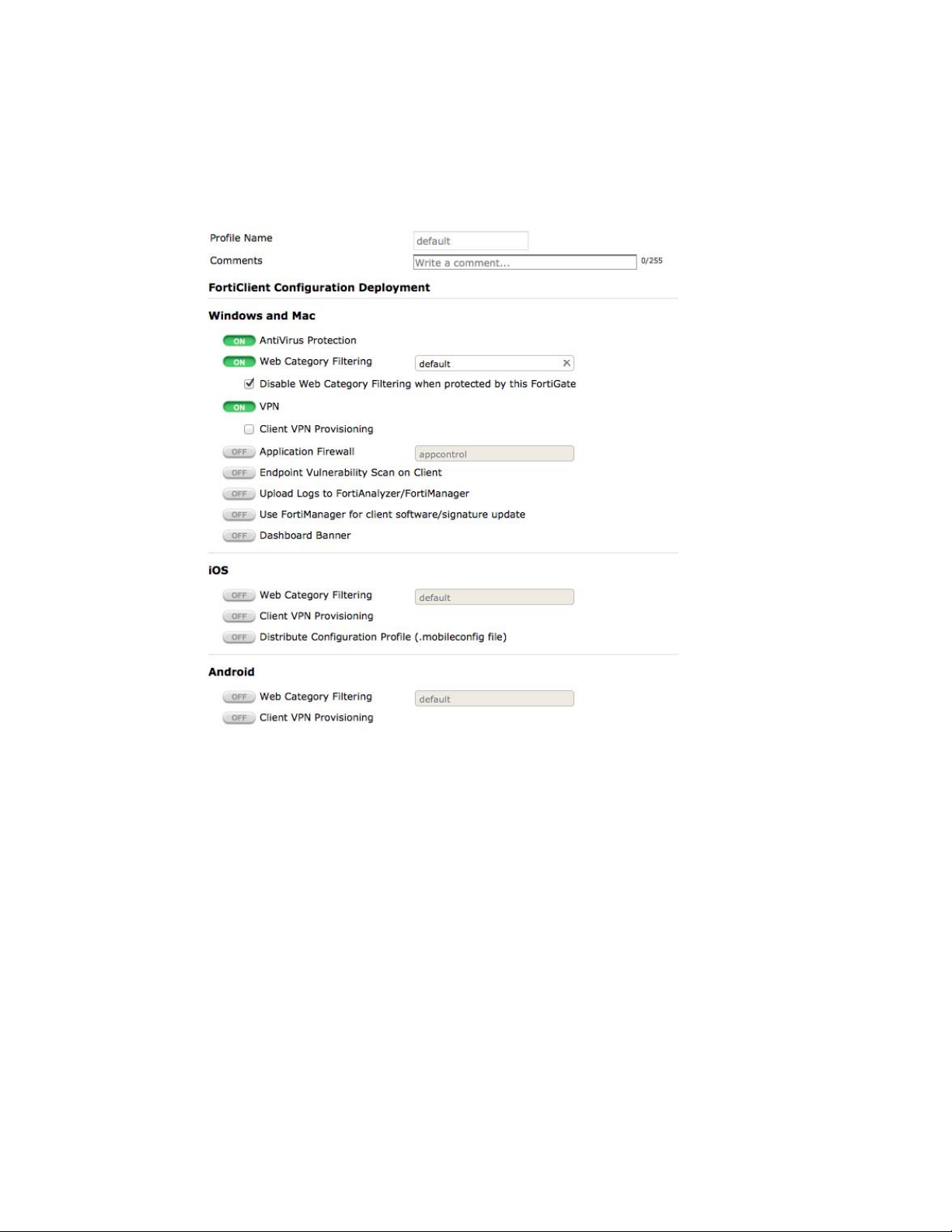
New features in FortiOS 5.0 Patch 5 Fortinet Technologies Inc.
Default profile
A default FortiClient profile has been added that enables AntiVirus, Web Filtering, and VPN for
Windows and Mac. All other features are disabled.
The profile creation screen has also been simplified to
Figure 1: The default FortiClient profile
allow for easier configuration.
FortiClient Monitor
The FortiClient Monitor displays a variety of information about FortiClient users, including
current status, device type, and FortiClient version. It can be found by going to User & Device >
Monitor > FortiClient.
FortiAP LAN port support
New functions are now available for FortiAP models that have LAN ports (currently the 11C,
14C, and 28C). The LAN port(s) can now be bridged to either an SSID or to the FortiAP unit’s
WAN port (bridging to the WAN port is the default setting).
LAN port bridging can be done with FortiAP units in either Bridge or Tunnel mode.
Bridging with the FortiAP’s SSID(s)
Bridging the LAN port with the FortiAP’s SSID(s) allows combines traffic from both sources to
provide a single broadcast domain for the wired and wireless users.
Fortinet Technologies Inc. Page 88 FortiOS Handbook - What’s New for FortiOS 5.0
Page 89
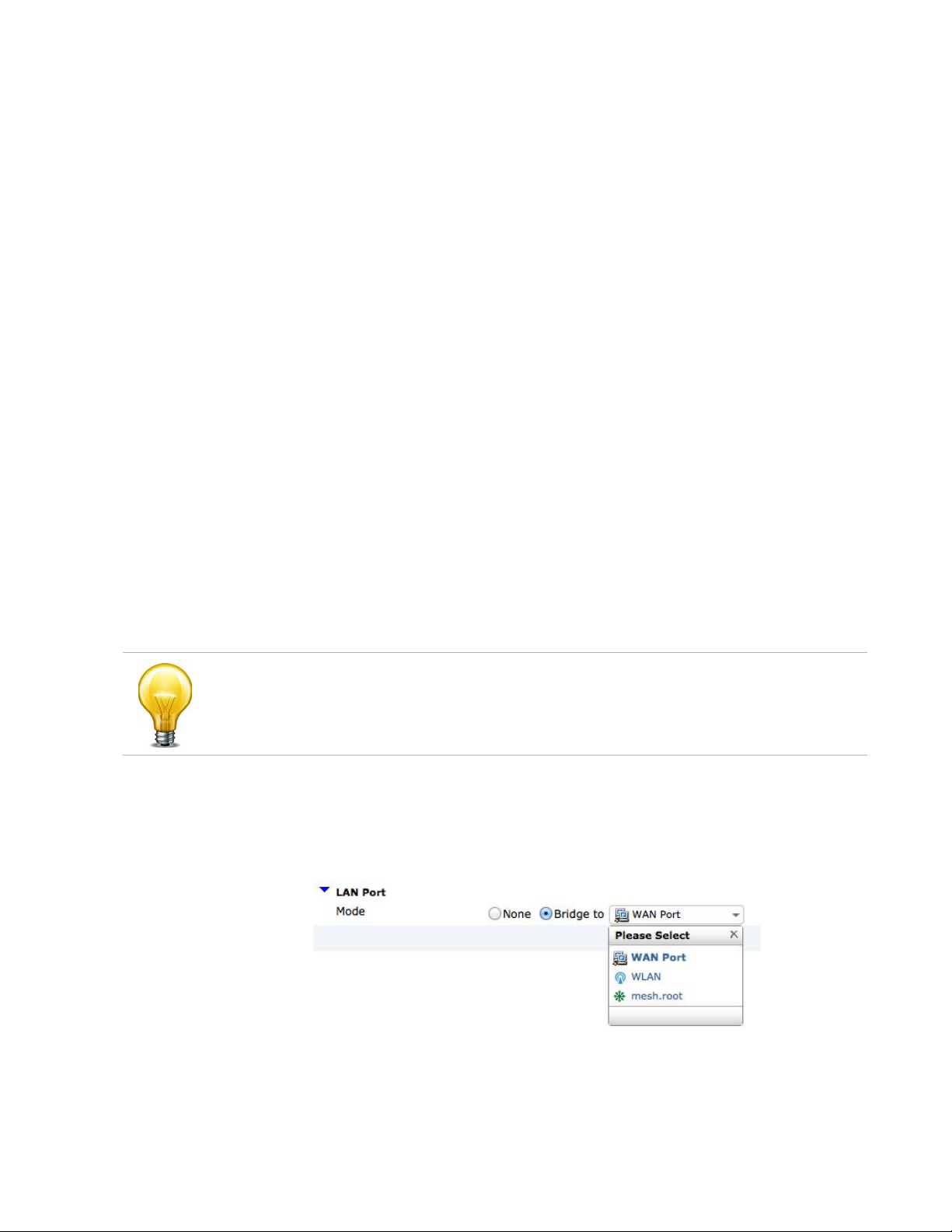
New features in FortiOS 5.0 Patch 5 Fortinet Technologies Inc.
This configuration has the following features:
• The IP addresses for LAN clients come from the DHCP server that is serving the wireless
clients.
•
Traffic from LAN clients is bridged to the VLAN used by the SSID to send traffic to the
controller.
• Wireless and LAN clients are on the same network and can communicate locally, via the
FortiAP.
Bridging with the WAN port
Bridging the LAN port with the WAN port allows the FortiAP unit to be used as a hub which is
also an access point.
This configuration has the
• The IP addresses for LAN clients come fr
same range as the AP itself.
• All LAN client traffic is bridged directly to the WAN interface.
• Communication between wireless and LAN clients can only occur if a policy on the
FortiGate unit allows it.
Configuring bridging
A FortiAP LAN port can be configured to bridge with an SSID from either the web-based
manager or the CLI.
Using the web-based manager
1. Go to WiFi Controller > WiFi Network > Custom AP Profiles.
On FortiGate models 100D, 200D, 240D, 600C, 800C, and 1000C, go to WiFi & Switch
Controller > WiFi Network > Custom AP Profiles.
2. Create a new custom profile or edit the default profile for your FortiAP model.
3. Under LAN Port, change Mode to Bridge to and select the appropriate option.
4. Select OK.
following features:
om the WAN directly and will typically be in the
Figure 2: Configuring bridging using the web-based manager
Fortinet Technologies Inc. Page 89 FortiOS Handbook - What’s New for FortiOS 5.0
Page 90

New features in FortiOS 5.0 Patch 5 Fortinet Technologies Inc.
Bridging can also be set up configured on a specific FortiAP unit, rather than through the use of
an AP profile by going to WiFi Controller > Managed Devices > Managed FortiAPs.
On FortiGate models 100D, 200D, 240D, 600C, 800C, and 1000C, go to WiFi & Switch
Controller > Managed Devices > Managed FortiAPs.
Using the CLI
In the example below, two ports on a FortiAP-28C
WAN port and port 2 bridged to the SSID(s):
config wireless-controller wtp-profile
edit FA
end
end
Bridging can also be set up configured on a specific FortiAP unit, rather than through the use of
AP profile:
an
config wireless-controller wtp
edit FA
end
end
P28C-default
config lan
set port1-mode bridge-to-wan
set port2-mode bridge-to-ssid
end
P28C0123456789
config lan
set port1-mode bridge-to-wan
set port2-mode bridge-to-ssid
end
are configured, with port 1 bridged to the
Restrictions
• While the FortiAP-14C has four physical LAN ports, these ports must share the same
configuration.
• Any host connected to a LAN port will be taken as authenticated.
• The use of dynamic VLANs for the host behind LAN port is not supported.
• RADIUS MAC authentication for the host behind LAN port is not supported.
Automatically allowing basic applications
Application control profiles can now be configured from the CLI to allow basic, commonly used
applications to go through without having to separately configure the profile each application.
This is useful when you wish to control the traffic to an entire category of applications without
affecting the traffic for basic applications that are required on a daily basis.
For example, an application sensor that blocks the Category "Network.Service" would normally
o block DNS service, causing Internet service issues. Using the new command, DNS can
als
now be allowed, eliminating this issue while still blocking other applications within the category.
Fortinet Technologies Inc. Page 90 FortiOS Handbook - What’s New for FortiOS 5.0
Page 91

New features in FortiOS 5.0 Patch 5 Fortinet Technologies Inc.
Basic traffic can also be allowed for ICMP, generic HTTP web browsing, and generic SSL
communication.
Syntax
config application
edit appcontrol
set options allow-dns allow-icmp allow-http allow-ssl
end
DNS is set to be allowed be default for all application control profiles, while the other settings
must be enabled to take effect.
list
Pre-authorizing a FortiAP unit
Users can now pre-authorize a FortiAP unit by before connecting the unit to the FortiGate unit.
To pre-authorize a FortiAP unit, do the following:
1. Go to WiFi Co
On FortiGate models 100D, 200D, 240D, 600C, 800C, and 1000C, go to WiFi & Switch
Controller > Managed Devices > Managed FortiAPs
2. Enter the serial number of the FortiAP unit.
3. Configure the Wireless Settings as required.
4. Select OK.
The new FortiAP now appear on the Managed FortiAPs list as authorized but off-line. The
F
ortiAP unit can now connect to the FortiGate unit.
ntroller > Managed Access Points > Managed FortiAPs and select Create New.
Fortinet Technologies Inc. Page 91 FortiOS Handbook - What’s New for FortiOS 5.0
Page 92
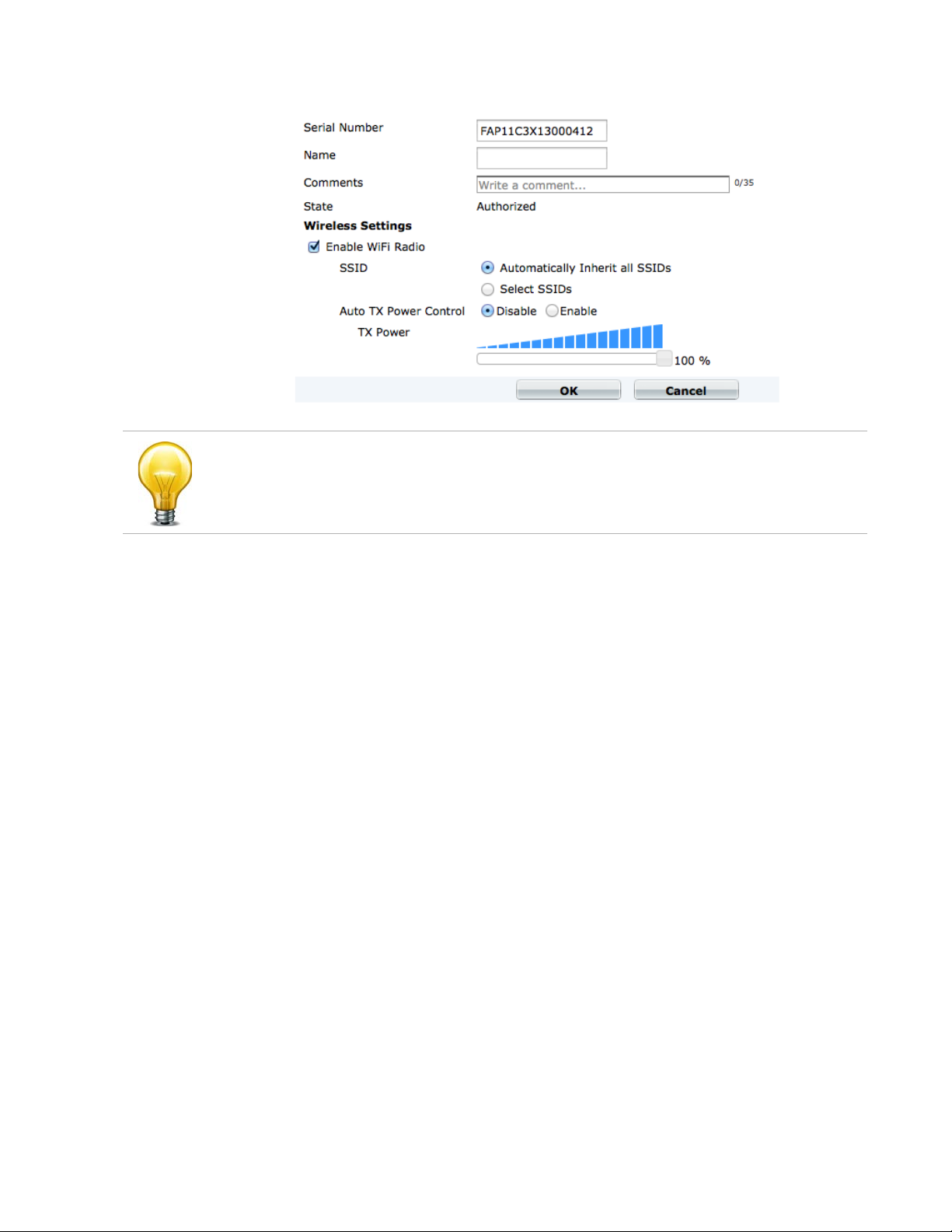
New features in FortiOS 5.0 Patch 5 Fortinet Technologies Inc.
Figure 3: Pre-authorizing a FortiAP unit
If the FortiAP unit will be connecting directly to one of the FortiGate unit’s ports, the port will still
need to have its Addressing mode set to Dedicate to FortiAP.
Preventing IP fragmentation of packets in CAPWAP tunnels
A common problem with controller-based WiFi networks is reduced performance due to IP
fragmentation of the packets in the CAPWAP tunnel.
Fragmentation can occur because of CAPWAP tunnel overhead increasing packet size. If the
o
riginal wireless client packets are close to the maximum transmission unit (MTU) size for the
network (usually 1500 bytes for Ethernet networks unless jumbo frames are used) the resulting
CAPWAP packets may be larger than the MTU, causing the packets to be fragmented.
Fragmenting packets can result in data loss, jitter, and decreased throughput.
The FortiOS/FortiAP solution to this problem is to
packets to FortiAP devices, resulting in1500-byte CAPWAP packets and no fragmentation. The
following options configure CAPWAP IP fragmentation control:
config wireless-controller wtp
edit new
set ip-fragment-preventing {tcp-mss-adjust | icmp-unreachable}
set tun-mtu-uplink {0 | 576 | 1500}
set tun-mtu-downlink {0 | 576 | 1500}
end
end
By default, tcp-mss-adjust is
tun-mtu-uplink and tun-mtu-downlink are set to 0.
-wtp
enabled, icmp-unreachable is disabled, and
cause wireless clients to send smaller
To s et tun-mtu-uplink an
This default configuration prevents packet fragmentation because the FortiAP unit limits the
size of TCP packets received from wireless clients so the packets don’t have to be fragmented
before CAPWAP encapsulation.
Fortinet Technologies Inc. Page 92 FortiOS Handbook - What’s New for FortiOS 5.0
d tun-mtu-downlink, use the default TCP MTU value of 1500.
Page 93

New features in FortiOS 5.0 Patch 5 Fortinet Technologies Inc.
The tcp-mss-adjust option causes the FortiAP unit to limit the maximum segment size
(MSS) of TCP packets sent by wireless clients. The FortiAP does this by adding a reduced MSS
value to the SYN packets sent by the FortiAP unit when negotiating with a wireless client to
establish a session. This results in the wireless client sending packets that are smaller than the
tun-mtu-uplink setting, so that when the CAPWAP headers are added, the CAPWAP
packets have an MTU that matches the tun-mtu-uplink size.
The icmp-un
the FortiAP unit. This option causes the FortiAP unit to drop packets that have the "Don't
Fragment" bit set in their IP header and that are large enough to cause fragmentation and then
send an ICMP packet -- type 3 "ICMP Destination unreachable" with code 4 "Fragmentation
Needed and Don't Fragment was Set" back to the wireless controller. This should cause the
wireless client to send smaller TCP and UDP packets.
reachable option affects all traffic (UDP and TCP) between wireless clients and
Limiting access for unauthenticated users
When configuring User Identity policies, if you select the option Skip this policy for
unauthenticated user the policy will only apply to users who have already authenticated with the
FortiGate unit. This feature is intended for networks with two kinds of users:
• Single sign-on users who have authenticated when their devices connected to their network
Other users who do not authenticate with the network so are “unauthenticated”
•
Sessions from authenticated users can match this policy and sessions from unauthenticated
us
ers will skip this policy and potentially be matched with policies further down the policy list.
Typically, you would arrange a policy with Skip this policy for unauthenticated user at the top of
a policy list.
You can also use the following CLI command to enable skipping policies for unauthenticated
ers:
us
config firewall policy
edit <id
set identity-based enable
set fall-through-unauthenticated enable
next
>
Use case - allowing limited access for unathenticated users
Consider an office with open use PCs in common areas. Staff and customers do not have to log
in to these PCs and can use them for limited access to the Internet. From their desks,
employees of this office log into PCs which are logged into the office network. The FortiGate
unit on the office network uses single sign-on to get user credentials from the network
authentication server.
The open use PCs have limited access to the Internet. Employee PCs can access internal
esources and have unlimited access to the Internet.
r
To support these different levels of access you can add a user identity policy to the top of the
polic
y list that allows authenticated users to access internal resources and to have unlimited
access to the Internet. In this policy, select Skip this policy for unauthenticated user.
Add a normal firewall policy below
Sessions from authenticated PCs will be accepted
unauthenticated PCs will skip the User Identity policy and be accepted by the normal firewall
policy.
Fortinet Technologies Inc. Page 93 FortiOS Handbook - What’s New for FortiOS 5.0
this policy that allows limited access to the Internet.
by the User Identity policy. Sessions from
Page 94
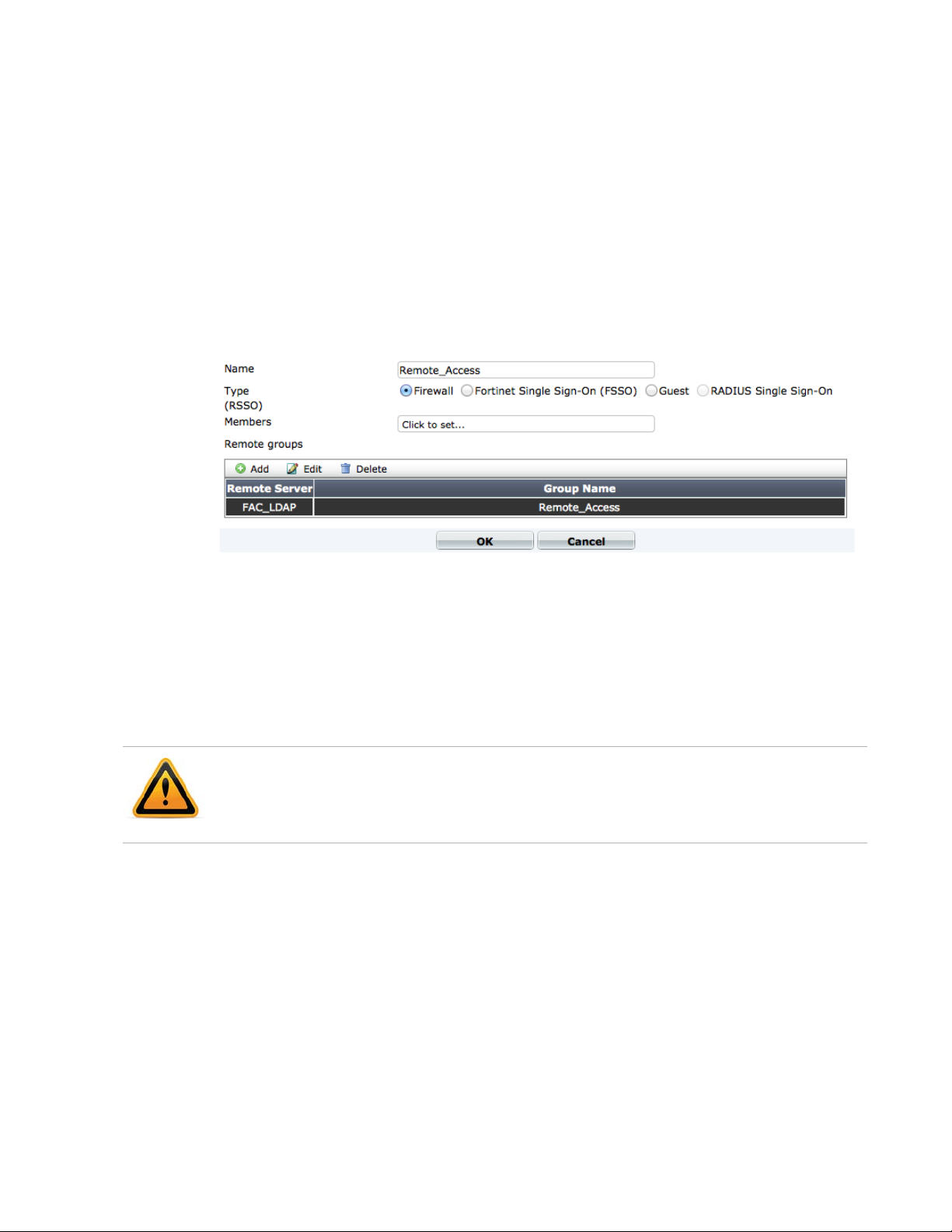
New features in FortiOS 5.0 Patch 5 Fortinet Technologies Inc.
Use case - multiple levels of authentication
As a variation of the above use case, Policy 2 could be a User Identity policy and Skip this
policy for unauthenticated user would not be selected. Sessions from unauthenticated users
that are accepted by Policy2 would now require users to authenticate before traffic can connect
through the FortiGate unit. The result is different levels of authentication: Single sign on for
some users and firewall authentication for others.
LDAP browser to import users into a user group
You can use the new LDAP browser to add LDAP users to a user group.
Figure 4: The LDAP browser
Dedicated management CPU
FortiGate units in the 2U or High-End categories (models 1000 and above) can now be
configured to have a dedicated management CPU. This reserves one CPU core, CPU 0, for
running management tasks such as the web GUI, as well as the CLI and related daemons. By
having a dedicated management CPU, access to the management GUI and CLI is guaranteed
even under when the unit is under a heavy traffic load.
Using a dedicated management CPU may have an impact on the overall performance of the
FortiGate unit.
The dedicated managem
configure system npu
set dedicated-management-cpu enable
end
ent CPU is enabled using the CLI:
Fortinet Technologies Inc. Page 94 FortiOS Handbook - What’s New for FortiOS 5.0
Page 95
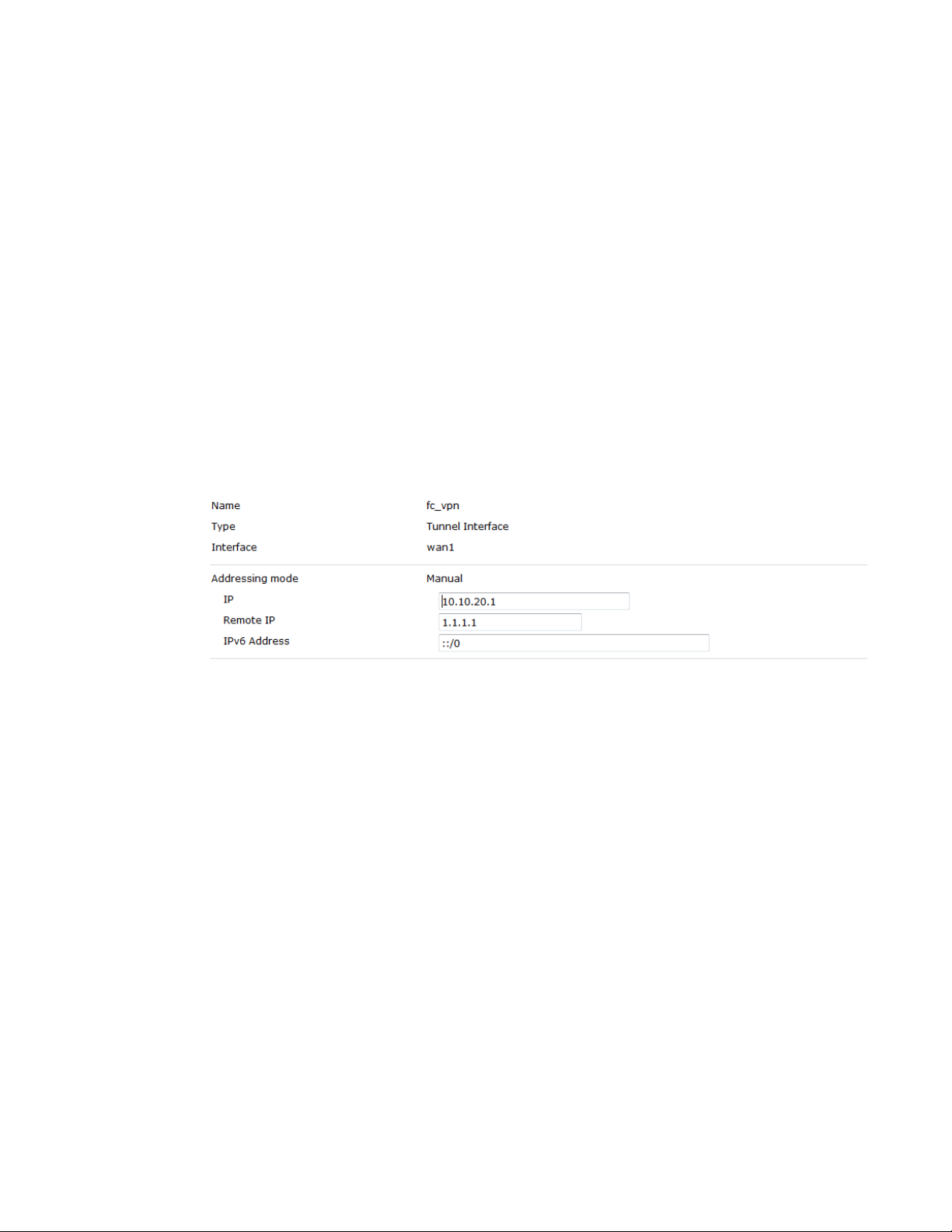
New features in FortiOS 5.0 Patch 5 Fortinet Technologies Inc.
Improvements to the Traffic History and Threat History widgets
Several changes have been made to the Traffic History and Threat History widgets:
•The Show Sessions an
improved to show more information about individual sessions or threats.
• The drilldown page for the Threat History widget has been improved by adding new
columns and adjusting field formats.
•The Threat History widget has replaced the Reputation Score monitor used for Client
Reputation, which has been removed.
d Show All Incidents (formerly Show Threats) options has been
Assigning an IP address to a dynamic IPsec VPN interface
An IP addresses can now be assigned to a dynamic IPsec VPN interface to be used for traffic
egressing over the IPsec interface, to avoid traffic being blocked due to an inappropriate
address. An IP address is assigned by going to System > Network > Interfaces and editing the
interface for the IPsec VPN.
Figure 5: Assigning an IP address to a dynamic IPsec VPN interface
SSL VPN History widget
Login history can now be added to the SSL VPN Portal, which shows a user their past logins.
The number of logins shown can be anywhere between 1 and 255 (the default is 5).
The login can be set by going to VPN
setting an appropriate Number of history entries.
It can also be set using the CLI:
config vpn ssl web portal
edit <portal>
config widget
edit <ID>
set type history
set display-limit <1-255>
end
end
end
end
> SSL > Portal, selecting Include Login History, and
Fortinet Technologies Inc. Page 95 FortiOS Handbook - What’s New for FortiOS 5.0
Page 96

New features in FortiOS 5.0 Patch 5 Fortinet Technologies Inc.
Port Block Allocation (PBA) for CGN to reduce logs
Port Block Allocation (PBA), a Carrier Grade NAT (CGN) feature, can reduces the number of log
messages generated by NAT operations.
PBA can be configured using by going to Firewall Objects
configured using the CLI.
config firewall ippool
edit ipp
set type port-block-allocation
set block-size <integer>
set num-blocks-per-user <integer>
end
end
You configure PBA by creating a private IP address range and assigning multiple port ranges (or
ks) to that IP address range. When a connection is received from the IP range, the source
bloc
port is translated to a ports in the first range. A log message is written when this happens.
As more connections are received from this IP address range they are assigned to other ports in
the first port block. Ev
is received, another block of ports is started and a log message is written.
So instead of writing a log message for every NAT event, log messages are only written when a
w block of ports is started and again when its used up.
ne
ool
entually all of the ports in the block will be used. When a new connection
Neighbor cache table for IPv6
> Virtual IPs > IP Pools. It can also be
A table has now been added to configure IPv6 neighbor cache entries and to save the entries
when the FortiGate unit reboots, using the command config system
ipv6-neighbor-cache.
In the following example, a neighbor cache entry is configured to use the DMZ interface:
config system ipv6-neighbor-cache
edit 1
set inte
set ipv6 6666::11
set mac 00:09:0f:01:02:03
end
end
rface dmz
Improved HA diagnose commands
The new command diagnose sys ha dump-by has replaced the command diagnose sys
ha dump. The new command has the following syntax:
diagnose sys ha dump-by {all-xdb | all-vcluster| rcache | all-group |
memory |
Each option displays different types of information about the cluster.
The following new HA diagnose commands have also been added:
debug-zone | vdom | kernel | device | stat| sesync}
diagnose sys ha sesync-stats
diagnos
Fortinet Technologies Inc. Page 96 FortiOS Handbook - What’s New for FortiOS 5.0
e sys ha extfile-sig
Page 97

New features in FortiOS 5.0 Patch 5 Fortinet Technologies Inc.
Secure disk erasing
All data on the FortiGate boot device and any hard disks installed in a FortiGate unit can now be
securely and permanently erased using the execute erase-disk command. This command
performs a low-level format and also overwrites every block on the device with random data
three times.
Anonymize user names in logs
Log messages can now be configured to replace user names with the word anonymous, so
that user names are not visible in log messages. This feature can be enabled from the CLI using
the following command:
config log setting
set user
end
-anonymize enable
VLAN interface traffic statistics
A VLAN accounting table has been added to the NP4 driver to poll accounting data from the
FortiGate unit in order to monitor traffic statistics from VLAN interfaces. The polling interval is
set to 1 second.
Preserving the Class of Service bit
FortiGate units can now preserve the value of the Class of Service (CoS) bit, also called Priority
Code Point (PCP), when a packet traverses a VLAN network.
Front panel illustration
An illustrated version of the FortiGate unit's front panel has been added above the list of
interfaces, found at System > Network > Interfaces. As with the panel found in the Unit
Operation widget, interfaces appears green when connected and further details are shown
when the mouse pointer hovers over a specific port.
USB entropy token support
Use of a USB entropy token during the boot process is now enabled by default when using a
FortiGate in Federal Information Processing Standards-Common Criteria (FIPS-CC) mode. If a
FortiGate unit in this mode does not have an USB entropy token inserted, it is unable to
complete the boot process will display the following message: Please insert entropy
token to continue boot process.
Entropy token use can be disabled from the CLI. It can also be enabled on a FortiGate unit in
rmal mode (by default, entropy tokens are disabled in normal mode).
no
Fortinet Technologies Inc. Page 97 FortiOS Handbook - What’s New for FortiOS 5.0
Page 98

New features in FortiOS 5.0 Patch 5 Fortinet Technologies Inc.
Syntax
config system fips
set entropy-token {enable | disable}
end
The entropy token must be present during boot process when a FortiGate unit is switched to
FIPS-CC mode.
Station locate for FortiWiFi units
Station locate allows a FortiWiFi unit to detect all wireless clients whether they are associated or
not. A record is kept of MAC address, statistical time interval and RSSI data.
Station locate is enabled using the following C
config wireless-controller wtp-profile
edit "FA
config radio-1
next
config radio-2
end
end
end
P220B-default"
set station-locate enable
set station-locate-interval 1
set station-locate enable
set station-locate-interval 1
LI command:
Switch Controller added to FortiGate models 200D, 240D, 600C, 800C, and 1000C
The Switch Controller, used to managed FortiSwitch units with a FortiGate unit, has been added
to the following models: 200D, 240D, 600C, 800C, and 1000C.
Because of this feature, there have been several web-based manager menu changes to these
un
its:
• WiFi Controller has changed to WiFi & Switch Controller.
• Managed Access Points has changed to Managed Devices and now contains the
Managed FortiSwitch option.
•The Switch Network menu has been added, which contains the Virtual Switch option.
Fortinet Technologies Inc. Page 98 FortiOS Handbook - What’s New for FortiOS 5.0
Page 99

New features in FortiOS 5.0 Patch 5 Fortinet Technologies Inc.
Diagnose command for 5000 series FortiGate units
A new diagnose command, diagnose test application ipmc_sensord, is available to
view chassis IPMC status from a 5000 series blade installed in a chassis. The command can
display:
• Power supply detection
IPMC sensor status detection
•
• Comlog enable/disable/info/read/clear
• Smc time set/get
•AMC info
• Microswitch status detection
•HACO info
Because of this change, the following obsolete commands have been removed:
• get system chassis
•
get system blades
• get chassis status
• diag hardware fruinfo
• exec bladekvm
New platforms for FortiGate-VM
FortiGate-VM is now supported for Microsoft Hyper-V and Kernel-based Virtual Machine (KVM).
Supported RFCs
The following RFCs are supported by the new features for FortiOS 5 Patch 5:
Tab le 1: Su
Number Title
2766 Network Address Translation - Protocol Translation (NAT-PT)
4787 Network Address Translation (NAT) Behavioral Requirements for Unicast
6691 TCP Options and Maximum Segment Size (MSS)
pported RFCs
UDP
Fortinet Technologies Inc. Page 99 FortiOS Handbook - What’s New for FortiOS 5.0
Page 100

New features in FortiOS 5.0 Patch 4
This chapter provides a brief introduction to the following features that were added to Patch 4 of
FortiOS 5.0. See the release notes for a complete list of new features in this release.
• F
ortiSandbox
• Wireless Health Dashboard
• IPsec VPN
• Managing FortiAP units
• Dynamic VLANs for SSIDs
• NAT46 & NAT64
• Enhancements to Tables
• FortiAnalyzer and FortiManager log encryption
• FortiToken Mobile
• Load balancing for explicit web proxy forwarding server groups
• Server load balancing enhancements
• Additional filters for IPS and Application Control
• Blocking IPv6 packets by extension headers
• Distinguishing between HTTP GET and POST in DLP
• RADIUS Accounting
• H3C Compatibility
• Web filter administrative overrides
• Configurable idle timeout for console admin login sessions
• TCP reset
• Log Volume Monitor
• Invalid Packet log
• Server limits
• PoE Power Management display
• Other new features
FortiSandbox
The new FortiSandbox unit can be used with a FortiGate unit for sandboxing suspicious files.
Sandboxing can also be done using Cloud Sandbox, which was previously known as
FortiGuard Analytics. For more information about this feature, see “FortiSandbox” on page 127.
Wireless Health Dashboard
The Wireless Health Dashboard provides an easy method for determining the health of your
network’s wireless infrastructure. The dashboard is used to display a variety of widgets, which
show information such as AP status, client count over time and login failures.
The dashboard can be found by going to WiFi
Controller > Monitor > Wireless Health.
Page 100
 Loading...