

Page 1

FORD FIESTA Owner's Manual
Page 2

Page 3

The information contained in this publication was correct at the time of going to print. In the interest of
continuous development, we reserve the right to change specifications, design or equipment at any time
without notice or obligation. No part of this publication may be reproduced, transmitted, stored in a
retrieval system or translated into any language in any form by any means without our written permission.
Errors and omissions excepted.
© Ford Motor Company 2020
All rights reserved.
Part Number: CG3654en 201909 20200128135830
Page 4

Page 5

Introduction
Acknowledgments ..........................................9
About This Manual ..........................................9
Symbols Glossary ............................................9
Data Recording .................................................11
REACH ................................................................15
Replacement Parts Recommendation
............................................................................15
Mobile Communications Equipment
...........................................................................16
Environment
Protecting the Environment .......................17
At a Glance
Instrument Panel - LHD ...............................18
Instrument Panel - RHD ..............................19
Child Safety
Installing Child Restraints ...........................21
Child Restraint Positioning ........................25
Child Safety Locks ........................................29
Seatbelts
Fastening the Seatbelts .............................30
Seatbelt Reminder .......................................30
Supplementary Restraints
System
Principle of Operation ..................................32
Driver Airbag ....................................................32
Passenger Airbag ...........................................33
Switching the Passenger Airbag On and
Off ...................................................................33
Side Airbags ....................................................34
Side Curtain Airbags ....................................35
Automatic Crash Notification
System
Emergency Assistance ................................36
Keys and Remote Controls
General Information on Radio
Frequencies .................................................39
Remote Control - Vehicles With: Keyless
Entry ...............................................................39
Remote Control - Vehicles With: Remote
Flip Key ..........................................................42
Replacing a Lost Key or Remote Control
..........................................................................43
Passive Key Backup Position ....................44
MyKey™
Principle of Operation .................................45
MyKey Settings - Excluding: ST ...............45
MyKey Settings - ST .....................................46
Creating a MyKey - Vehicles Without:
Push Button Start .....................................47
Creating a MyKey - Vehicles With: Push
Button Start .................................................47
Programming a MyKey ...............................48
Clearing All MyKeys ......................................50
Checking MyKey System Status ...............51
MyKey – Troubleshooting - Vehicles
Without: Push Button Start ..................52
MyKey – Troubleshooting - Vehicles
With: Push Button Start .........................52
Doors and Locks
Locking and Unlocking ................................54
Keyless Entry ...................................................57
Liftgate
Manual Liftgate .............................................60
Security
Passive Anti-Theft System .........................61
Anti-Theft Alarm - Vehicles With:
Integral Battery ...........................................61
Anti-Theft Alarm - Vehicles With:
Perimeter Alarm ........................................62
1
Fiesta (CE1) Vehicles Built From: 06-01-2020 Vehicles Built Up To: 19-04-2020, CG3654en enGBR, Edition date: 201909, Second-Printing
Table of Contents
Page 6

Door Edge Protection
Principle of Operation .................................64
Steering Wheel
Adjusting the Steering Wheel ..................65
Heated Steering Wheel ..............................65
Wipers and Washers
Windshield Wipers .......................................66
Autowipers ......................................................66
Windshield Washers ....................................68
Rear Window Wiper and Washers .........69
Lighting
General Information .....................................70
Lighting Control .............................................70
Autolamps ........................................................72
Instrument Lighting Dimmer .....................72
Headlamp Exit Delay ....................................73
Automatic High Beam Control .................73
Front Fog Lamps ...........................................74
Rear Fog Lamps .............................................75
Headlamp Leveling .......................................75
Cornering Lamps ...........................................76
Direction Indicators .......................................76
Interior Lamps - Vehicles With: Front
Interior Lamp With Map Reading
Lamps ............................................................77
Interior Lamps - Vehicles With: Front
Interior Lamp ..............................................78
Windows
Opening and Closing the Windows ........79
Global Opening and Closing .....................79
Window Bounce-Back ................................80
Locking the Rear Window Controls .........81
Interior Mirror
Adjusting the Interior Mirror ......................82
Auto-Dimming Interior Mirror ...................82
Exterior Mirrors
Adjusting the Exterior Mirrors ...................83
Folding the Exterior Mirrors - Vehicles
With: Manual Fold Exterior Mirrors
..........................................................................83
Folding the Exterior Mirrors - Vehicles
With: Power Fold Exterior Mirrors .......83
Moonroof
Opening and Closing the Sun Shade
..........................................................................84
Opening and Closing the Moonroof ......84
Venting the Moonroof .................................84
Moonroof Bounce-Back .............................84
Instrument Cluster
Gauges ..............................................................85
Warning Lamps and Indicators ...............86
Audible Warnings and Indicators ...........90
Information Displays
General Information ......................................91
Trip Computer ................................................92
Personalized Settings ..................................93
Information Messages ................................95
Climate Control
Air Vents .........................................................106
Manual Climate Control ...........................106
Automatic Climate Control ......................107
Hints on Controlling the Interior Climate
- Vehicles With: Automatic
Temperature Control .............................109
Hints on Controlling the Interior Climate
- Vehicles With: Manual Temperature
Control ..........................................................110
Heated Windshield ........................................111
Heated Rear Window - Vehicles With:
Automatic Temperature Control .........111
Heated Rear Window - Vehicles With:
Manual Temperature Control ...............111
Heated Exterior Mirrors ................................111
2
Fiesta (CE1) Vehicles Built From: 06-01-2020 Vehicles Built Up To: 19-04-2020, CG3654en enGBR, Edition date: 201909, Second-Printing
Table of Contents
Page 7

Remote Start ..................................................112
Seats
Sitting in the Correct Position ..................114
Head Restraints .............................................114
Manual Seats - 3-Door ...............................115
Manual Seats - 5-Door ...............................118
Rear Seats .......................................................119
Heated Seats ................................................120
Auxiliary Power Points
Auxiliary Power Points ................................121
Cigar Lighter ....................................................121
Storage Compartments
Cup Holders ...................................................122
Device Holder ................................................122
Starting and Stopping the
Engine
General Information ...................................123
Ignition Switch ..............................................123
Push Button Ignition Switch ....................124
Steering Wheel Lock - Vehicles Without:
Push Button Start ...................................126
Steering Wheel Lock - Vehicles With:
Push Button Start ....................................127
Starting a Gasoline Engine - Automatic
Transmission ..............................................127
Starting a Gasoline Engine - Manual
Transmission .............................................130
Starting a Diesel Engine ............................133
Switching Off the Engine ..........................135
Engine Block Heater ...................................135
Unique Driving Characteristics
Auto-Start-Stop - Automatic
Transmission .............................................137
Auto-Start-Stop - Manual Transmission
.........................................................................138
EcoSelect .......................................................140
Fuel and Refueling
Safety Precautions .......................................141
Fuel Quality - Gasoline ...............................141
Fuel Quality - Diesel ...................................142
Fuel Filler Funnel Location .......................142
Running Out of Fuel ....................................142
Refueling .........................................................144
Fuel Consumption ......................................146
Engine Emission Control
Catalytic Converter .....................................148
Gasoline Particulate Filter ........................148
Diesel Particulate Filter .............................150
Transmission
Manual Transmission - 5-Speed Manual
Transmission .............................................153
Manual Transmission - 6-Speed Manual
Transmission .............................................153
Automatic Transmission ...........................154
Brakes
General Information ....................................157
Hints on Driving With Anti-Lock Brakes
.........................................................................157
Parking Brake - Manual Transmission
.........................................................................157
Parking Brake - Automatic Transmission
.........................................................................158
Hill Start Assist .............................................158
Traction Control
Principle of Operation ...............................160
Using Traction Control ..............................160
Stability Control
Principle of Operation .................................161
Using Stability Control - Excluding: ST
..........................................................................161
3
Fiesta (CE1) Vehicles Built From: 06-01-2020 Vehicles Built Up To: 19-04-2020, CG3654en enGBR, Edition date: 201909, Second-Printing
Table of Contents
Page 8

Using Stability Control - ST ......................161
Parking Aids
Principle of Operation ................................163
Rear Parking Aid ...........................................163
Front Parking Aid .........................................165
Side Sensing System ..................................167
Active Park Assist ........................................169
Rear View Camera ........................................171
Cruise Control
Principle of Operation ................................175
Using Cruise Control ...................................175
Using Adaptive Cruise Control ................176
Driving Aids
Speed Limiter ................................................185
Intelligent Speed Limiter ..........................185
Driver Alert .....................................................188
Lane Keeping System ................................189
Blind Spot Information System .............193
Cross Traffic Alert ........................................195
Traffic Sign Recognition ...........................198
Speed Sign Recognition ..........................200
Eco ....................................................................201
Pre-Collision Assist ....................................202
Drive Control .................................................207
Current Highway Information
What Is Current Highway Information
.......................................................................208
Enabling Current Highway Information
.......................................................................208
Checking Current Highway Information
Status .........................................................208
Load Carrying
General Information ..................................209
Rear Under Floor Storage .......................209
Luggage Covers ............................................210
Roof Racks and Load Carriers - Vehicles
Without: Panoramic Roof Opening
Panel ............................................................210
Roof Racks and Load Carriers - Vehicles
With: Panoramic Roof Opening Panel
..........................................................................211
Towing
Towing a Trailer - Excluding: ST ..............212
Towing a Trailer - ST ...................................213
Tow Ball ...........................................................213
Towing the Vehicle on Four Wheels -
Manual Transmission .............................216
Towing the Vehicle on Four Wheels -
Automatic Transmission .......................217
Driving Hints
Economical Driving .....................................219
Cold Weather Precautions .......................219
Breaking-In .....................................................219
Driving Through Water ...............................219
Engine Overspeed ......................................220
Floor Mats .....................................................220
Roadside Emergencies
Hazard Flashers ...........................................222
First Aid Kit ....................................................222
Warning Triangle .........................................222
Fuel Shutoff ..................................................222
Jump Starting the Vehicle ........................223
Towing Points - Excluding: ST ................224
Towing Points - ST .....................................225
Fuses
Fuse Box Locations .....................................227
Fuse Specification Chart .........................228
Changing a Fuse ..........................................234
Maintenance
General Information ..................................236
4
Fiesta (CE1) Vehicles Built From: 06-01-2020 Vehicles Built Up To: 19-04-2020, CG3654en enGBR, Edition date: 201909, Second-Printing
Table of Contents
Page 9

Opening and Closing the Hood .............236
Under Hood Overview - 1.0L EcoBoost™,
LHD ..............................................................238
Under Hood Overview - 1.0L EcoBoost™,
RHD ..............................................................239
Under Hood Overview - 1.1L Duratec, LHD
........................................................................240
Under Hood Overview - 1.1L Duratec, RHD
.........................................................................241
Under Hood Overview - 1.5L
Duratorq-TDCi Diesel, LHD .................242
Under Hood Overview - 1.5L
Duratorq-TDCi Diesel, RHD ................243
Under Hood Overview - 1.5L EcoBoost™,
LHD ..............................................................244
Under Hood Overview - 1.5L EcoBoost™,
RHD ..............................................................245
Engine Oil Dipstick - 1.0L EcoBoost™/
1.1L Duratec ...............................................246
Engine Oil Dipstick - 1.5L Duratorq-TDCi
Diesel ..........................................................246
Engine Oil Dipstick - 1.5L EcoBoost™
........................................................................246
Engine Oil Check .........................................246
Oil Change Indicator Reset ......................247
Engine Cooling Fan - Gasoline ..............248
Engine Cooling Fan - Diesel ....................248
Engine Coolant Check ..............................248
Brake Fluid Check .......................................249
Clutch Fluid Check .....................................250
Changing the 12V Battery ........................250
Washer Fluid Check ...................................252
Checking the Wiper Blades .....................252
Changing the Front Wiper Blades ........252
Changing the Rear Wiper Blades ..........252
Removing a Headlamp .............................253
Removing a Rear Lamp ............................254
Changing a Bulb ..........................................255
Track Use
Track Use .......................................................262
Vehicle Care
Cleaning the Exterior .................................263
Cleaning the Interior ..................................264
Cleaning Leather Seats ............................266
Repairing Minor Paint Damage .............266
Cleaning the Wheels .................................266
Body Styling Kits .........................................267
Wheels and Tires
General Information ..................................268
Tire Sealant and Inflator Kit - Vehicles
With: Temporary Mobility Kit .............268
Tire Care ..........................................................272
Using Winter Tires .......................................273
Using Snow Chains .....................................273
Tire Pressure Monitoring System ..........274
Changing a Road Wheel - Vehicles With:
Spare Wheel .............................................278
Tire Pressures - 1.0L EcoBoost™, Manual
Transmission ............................................285
Tire Pressures - 1.0L EcoBoost™,
Automatic Transmission ......................287
Tire Pressures - 1.1L ....................................290
Tire Pressures - 1.5L Diesel ......................292
Tire Pressures - 1.5L EcoBoost™ ..........294
Lug Nuts .........................................................296
Capacities and Specifications
Vehicle Dimensions - Excluding: Active/
Van ...............................................................297
Vehicle Dimensions - Active ...................298
Vehicle Dimensions - Van .......................299
Towbar Dimensions ..................................300
Vehicle Identification Plate .....................302
Vehicle Identification Number ...............302
Capacities and Specifications - 1.0L
EcoBoost™ ..............................................303
Capacities and Specifications - 1.1L
Duratec .......................................................305
5
Fiesta (CE1) Vehicles Built From: 06-01-2020 Vehicles Built Up To: 19-04-2020, CG3654en enGBR, Edition date: 201909, Second-Printing
Table of Contents
Page 10

Capacities and Specifications - 1.5L
Duratorq-TDCi Diesel ............................307
Capacities and Specifications - 1.5L
EcoBoost™ ..............................................309
Bulb Specification Chart ............................311
Fuel Consumption Figures - 1.0L
EcoBoost™ ................................................313
Fuel Consumption Figures - 1.1L Duratec
.........................................................................314
Fuel Consumption Figures - 1.5L
Duratorq-TDCi Diesel .............................315
Fuel Consumption Figures - 1.5L
EcoBoost™ ................................................316
Fuel Consumption Figures ........................317
Connected Vehicle
Connected Vehicle Requirements ........318
Connected Vehicle Limitations ..............318
Connecting the Vehicle to a Mobile
Network ......................................................318
Connecting the Vehicle to a Wi-Fi
Network ......................................................318
Connected Vehicle – Troubleshooting -
Vehicles With: Modem ..........................319
Connected Vehicle – Troubleshooting -
Vehicles With: SYNC 3/SYNC 2.5 .....320
Vehicle Wi-Fi Hotspot
Creating a Vehicle Wi-Fi Hotspot ..........322
Changing the Vehicle Wi-Fi Hotspot
Name or Password .................................322
Audio System
Audio Unit - Vehicles Without: SYNC
........................................................................323
Audio Unit - Vehicles With: SYNC 3 ......325
Audio Unit - Vehicles With: SYNC 2.5
........................................................................326
AM/FM Radio - Vehicles Without: SYNC
.........................................................................327
AM/FM Radio - Vehicles With: SYNC 2.5
.........................................................................327
Digital Radio - Vehicles Without: SYNC
........................................................................328
Digital Radio - Vehicles With: SYNC 2.5
........................................................................328
Audio Unit Clock and Date Displays -
Vehicles Without: SYNC ......................329
Audio Unit Clock and Date Displays -
Vehicles With: SYNC 2.5 ......................329
Connecting a Bluetooth® Device -
Vehicles Without: SYNC ......................329
Connecting a Bluetooth® Device -
Vehicles With: SYNC 2.5 ......................330
Compact Disc Player - Vehicles Without:
SYNC ...........................................................330
Compact Disc Player - Vehicles With:
SYNC 2.5 ....................................................330
Streaming Bluetooth Audio - Vehicles
Without: SYNC .........................................331
Streaming Bluetooth Audio - Vehicles
With: SYNC 2.5 .........................................331
Playing Media From a USB Device -
Vehicles Without: SYNC .......................332
Playing Media From a USB Device -
Vehicles With: SYNC 2.5 ......................332
USB Port .........................................................333
Apps - Vehicles With: SYNC 2.5 ............333
Using Voice Recognition ..........................336
Audio System – Troubleshooting -
Vehicles With: SYNC 2.5 .......................337
SYNC™ 3
General Information ..................................339
Using Voice Recognition ...........................341
Entertainment ..............................................347
Climate ...........................................................349
Phone ..............................................................352
Navigation .....................................................354
Apps ................................................................358
Settings ..........................................................359
SYNC™ 3 Troubleshooting ......................361
6
Fiesta (CE1) Vehicles Built From: 06-01-2020 Vehicles Built Up To: 19-04-2020, CG3654en enGBR, Edition date: 201909, Second-Printing
Table of Contents
Page 11

Appendices
Electromagnetic Compatibility ...............371
End User License Agreement .................374
Declaration of Conformity ......................399
7
Fiesta (CE1) Vehicles Built From: 06-01-2020 Vehicles Built Up To: 19-04-2020, CG3654en enGBR, Edition date: 201909, Second-Printing
Table of Contents
Page 12

8
Fiesta (CE1) Vehicles Built From: 06-01-2020 Vehicles Built Up To: 19-04-2020, CG3654en enGBR, Edition date: 201909, Second-Printing
Page 13
ACKNOWLEDGMENTS
Your vehicle could have components that
use open source software. For additional
information, visit http://
corporate.ford.com/ford-open-source.html.
ABOUT THIS MANUAL
Thank you for choosing Ford. We
recommend that you take some time to
get to know your vehicle by reading this
manual. The more that you know about
your vehicle, the greater the safety and
pleasure you will get from driving it.
WARNING: Driving while
distracted can result in loss of vehicle
control, crash and injury. We strongly
recommend that you use extreme
caution when using any device that may
take your focus off the road. Your
primary responsibility is the safe
operation of your vehicle. We
recommend against the use of any
hand-held device while driving and
encourage the use of voice-operated
systems when possible. Make sure you
are aware of all applicable local laws
that may affect the use of electronic
devices while driving.
Note: This manual describes product
features and options available throughout
the range of available models, sometimes
even before they are generally available. It
may describe options not fitted to the
vehicle you have purchased.
Note: Some of the illustrations in this
manual may show features as used in
different models, so may appear different
to you on your vehicle.
Note: Always use and operate your vehicle
in line with all applicable laws and
regulations.
Note: Pass on this manual when selling
your vehicle. It is an integral part of your
vehicle.
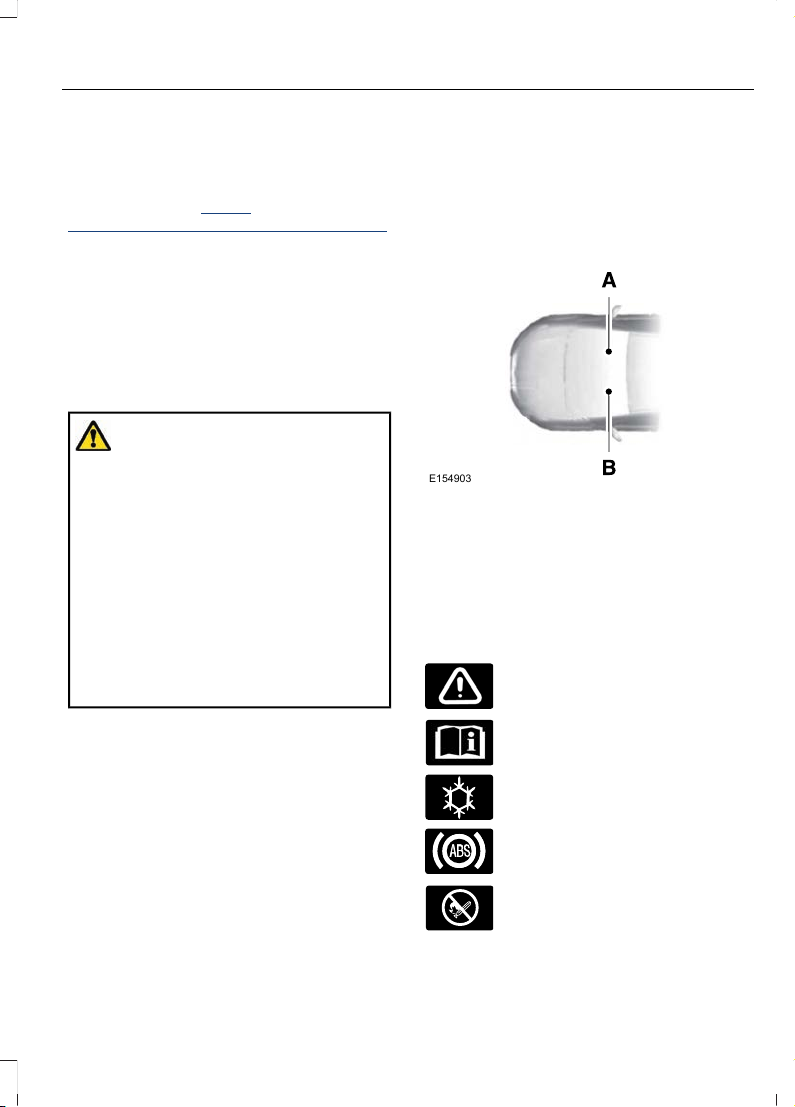
This manual may qualify the location of a
component as left-hand side or right-hand
side. The side is determined when facing
forward in the seat.
E154903
Right-hand side.A
Left-hand side.B
SYMBOLS GLOSSARY
These are some of the symbols you may
see on your vehicle.
Safety alert.
See the Owner's Manual.
Air conditioning system.
Anti-lock braking system.
Avoid smoking, flames or sparks.
9
Fiesta (CE1) Vehicles Built From: 06-01-2020 Vehicles Built Up To: 19-04-2020, CG3654en enGBR, Edition date: 201909, Second-Printing
Introduction
Page 14
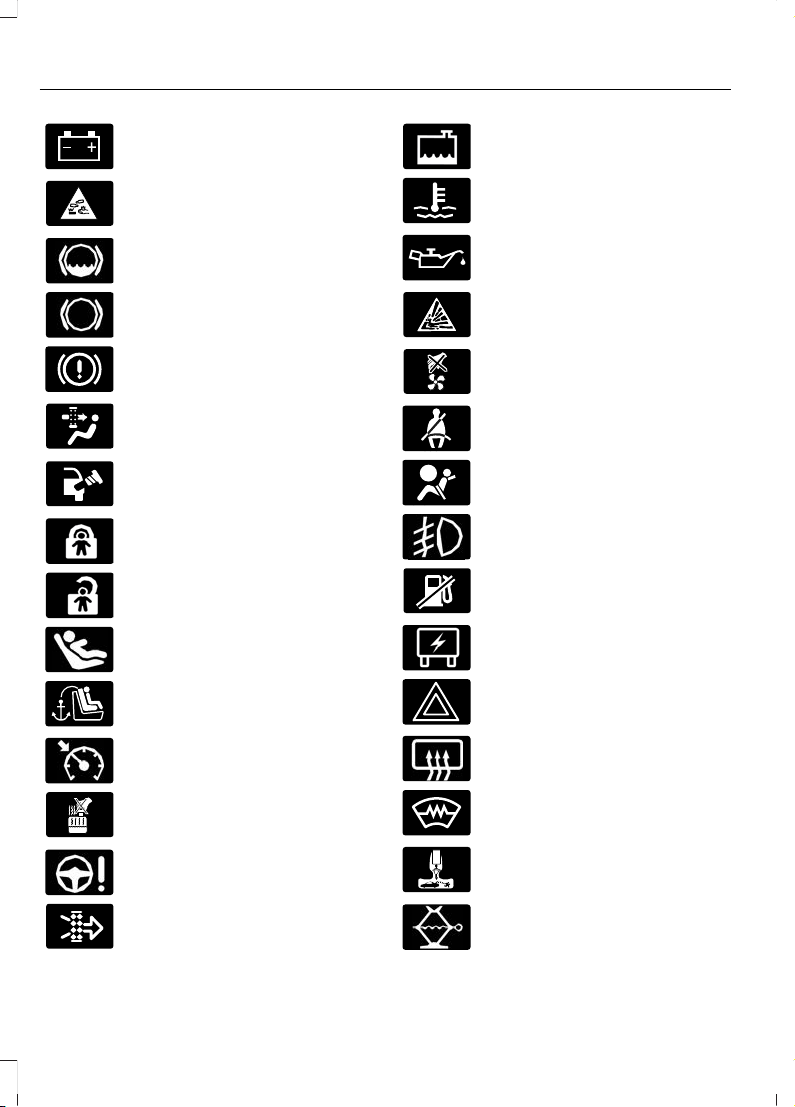
Battery.
Battery acid.
Brake fluid level.
Brake system.
Brake failure.
Cabin air filter.
Check fuel cap.
Child safety door lock.
Child safety door unlock.
Child seat lower anchor.
Child seat tether anchor.
Cruise control.
Do not open when hot.
Electronic power steering
malfunction.
Engine air filter.
Engine coolant.
Engine coolant temperature.
Engine oil.
Explosive gas.
Fan warning.
Fasten seatbelt.
Front airbag.
Front fog lamps.
Fuel pump reset.
Fuse compartment.
Hazard warning flashers.
Heated rear window.
Heated windshield.
Interior luggage compartment
release.
Jack.
10
Fiesta (CE1) Vehicles Built From: 06-01-2020 Vehicles Built Up To: 19-04-2020, CG3654en enGBR, Edition date: 201909, Second-Printing
Introduction
Page 15
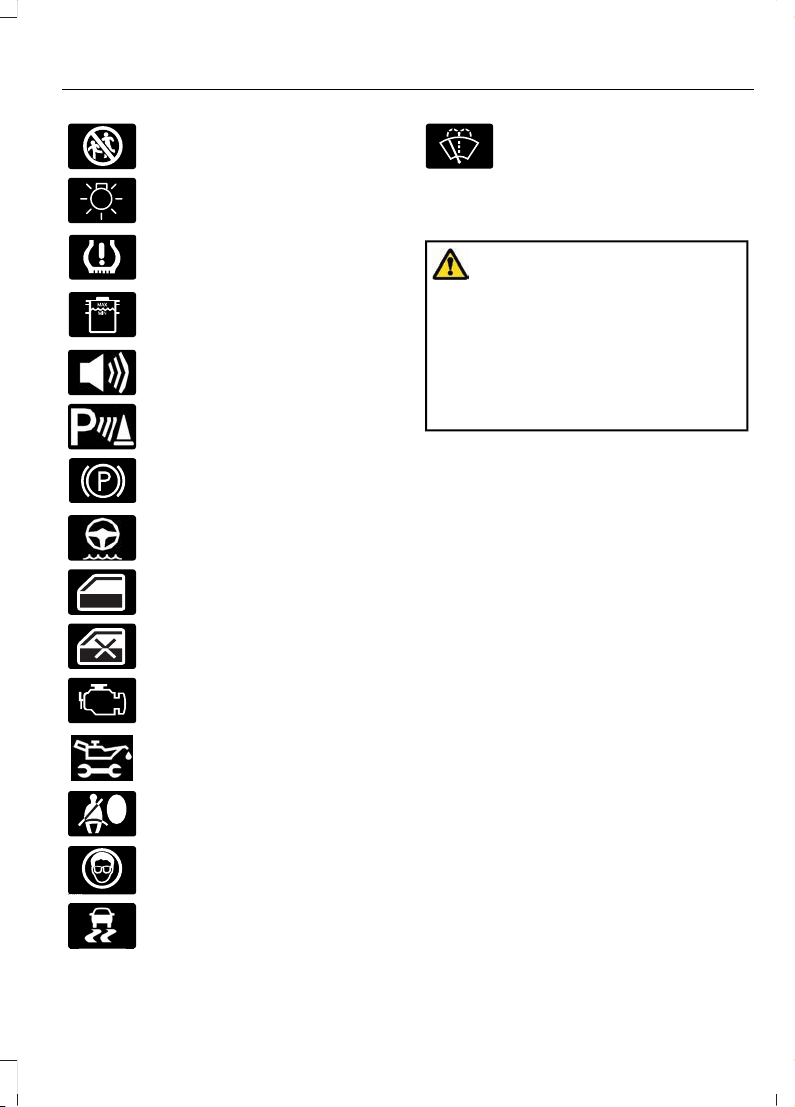
Keep out of reach of children.
Lighting control.
Low tire pressure warning.
Maintain correct fluid level.
Panic alarm.
Parking aid.
Parking brake.
Power steering fluid.
Power windows.
Power window lockout.
Check Engine.
Service engine soon.
Side airbag.
Shield the eyes.
E138639
Stability control.
Windshield wash and wipe.
DATA RECORDING
WARNING: Do not connect
wireless plug-in devices to the data link
connector. Unauthorized third parties
could gain access to vehicle data and
impair the performance of safety related
systems. Only allow repair facilities that
follow our service and repair instructions
to connect their equipment to the data
link connector.
We respect your privacy and are
committed to protecting it. The
information contained in this publication
was correct at the time of going to print
but as technology rapidly changes, we
recommend that you visit the local Ford
website for the latest information.
Your vehicle has electronic control units
that have data recording functionality and
the ability to permanently or temporarily
store data. This data could include
information on the condition and status of
your vehicle, vehicle maintenance
requirements, events and malfunctions.
The types of data that can be recorded are
described in this section. Some of the data
recorded is stored in event logs or error
logs.
Note: Error logs are reset following a service
or repair.
Note: We may provide information in
response to requests from law enforcement,
other government authorities and third
parties acting with lawful authority or
through a legal process. Such information
could be used by them in legal proceedings.
11
Fiesta (CE1) Vehicles Built From: 06-01-2020 Vehicles Built Up To: 19-04-2020, CG3654en enGBR, Edition date: 201909, Second-Printing
Introduction
Page 16

Data recorded includes, for example:
• Operating states of system
components, for example fuel level,
tire pressure and battery charge level.
• Vehicle and component status, for
example wheel speed, deceleration,
lateral acceleration and seatbelt
status.
• Events or errors in essential systems,
for example headlamps and brakes.
• System responses to driving situations,
for example airbag deployment and
stability control.
• Environmental conditions, for example
temperature.
Some of this data, when used in
combination with other information, for
example an accident report, damage to a
vehicle or eyewitness statements, could
be associated with a specific person.
Service Data
Our dealers collect service data through
the data link connector in your vehicle.
They use service data, for example error
logs, to help them if you take your vehicle
for repair. They share this data with our
technical team, if required, to help with
diagnosis. In addition to using the
information for diagnosis and repair, we
use and share service data with our service
providers, for example parts suppliers,
where required and where permitted by
law, for continuous improvement or with
other information that we have about you,
for example your contact information, to
offer you products and services that may
be of interest to you according to your
preferences and where allowed by law.
Our service providers are equally required
by law to protect your data and retain it in
accordance with data retention policies.
Note: Third party repair facilities can also
collect service data through the data link
connector.
Event Data
This vehicle is equipped with an event data
recorder. The main purpose of an event
data recorder is to record, in certain crash
or near crash-like situations, such as an
airbag deployment or hitting a road
obstacle; this data will assist in
understanding how a vehicle’s systems
performed. The event data recorder is
designed to record data related to vehicle
dynamics and safety systems for a short
period of time, typically 30 seconds or less.
The event data recorder in this vehicle is
designed to record such data as:
• How various systems in your vehicle
were operating;
• Whether or not the driver and
passenger seatbelts were
buckled/fastened;
• How far (if at all) the driver was
depressing the accelerator and/or the
brake pedal; and
• How fast the vehicle was traveling; and
• Where the driver was positioning the
steering wheel.
This data can help provide a better
understanding of the circumstances in
which crashes and injuries occur.
Note: Event data recorder data is recorded
by your vehicle only if a non-trivial crash
situation occurs; no data is recorded by the
event data recorder under normal driving
conditions and no personal data or
information (e.g., name, gender, age, and
crash location) is recorded. However,
parties, such as law enforcement, could
combine the event data recorder data with
the type of personally identifying data
routinely acquired during a crash
investigation.
12
Fiesta (CE1) Vehicles Built From: 06-01-2020 Vehicles Built Up To: 19-04-2020, CG3654en enGBR, Edition date: 201909, Second-Printing
Introduction
Page 17

To read data recorded by an event data
recorder, special equipment is required,
and access to the vehicle or the event data
recorder is needed. In addition to the
vehicle manufacturer, other parties, such
as law enforcement, that have such special
equipment, can read the information if they
have access to the vehicle or the event
data recorder.
Comfort, Convenience and
Entertainment Data
Your vehicle has electronic control units
that have the ability to store data based
on your personalized settings. The data is
stored locally in the vehicle or on devices
that you connect to it, for example, a USB
drive or digital music player. You can delete
some of this data and also choose whether
to share it through the services to which
you subscribe. See Settings (page 359).
Comfort and Convenience Data
Data recorded includes, for example:
• Seat and steering wheel position.
• Climate control settings.
• Radio presets.
Entertainment Data
Data recorded includes, for example:
• Music, videos or album art.
• Contacts and corresponding address
book entries.
• Navigation destinations.
Services That We Provide
If you use our services, we collect and use
data, for example account information,
vehicle location and driving characteristics,
that could identify you. We transmit this
data through a dedicated, protected
connection. We only collect and use data
to enable your use of our services to which
you have subscribed, with your consent or
where permitted by law. For additional
information, see the terms and conditions
of the services to which you have
subscribed.
For additional information about our
privacy policy, refer to the local Ford
website.
Services That Third Parties
Provide
We recommend that you review the terms
and conditions and data privacy
information for any services to which you
subscribe. We take no responsibility for
services that third parties provide.
Vehicles With a Modem (If Equipped)
The modem has a SIM. The
modem was enabled when your
vehicle was built and periodically
sends messages to stay connected to the
cell phone network, receive automatic
software updates and send vehicle-related
information to us, for example diagnostic
information. These messages could
include information that identifies your
vehicle, the SIM and the electronic serial
number of the modem. Cell phone network
service providers could have access to
additional information, for example cell
phone network tower identification. For
additional information about our privacy
policy, visit www.FordConnected.com or
refer to your local Ford website.
Note: The modem continues to send this
information unless you disable the modem
or stop the modem from sharing vehicle
data by changing the modem settings.
Note: The service can be unavailable or
interrupted for a number of reasons, for
example environmental or topographical
conditions and data plan coverage.
13
Fiesta (CE1) Vehicles Built From: 06-01-2020 Vehicles Built Up To: 19-04-2020, CG3654en enGBR, Edition date: 201909, Second-Printing
Introduction
Page 18

Note: To find out if your vehicle has a
modem, visit www.FordConnected.com.
Vehicles With SYNC
Mobile Device Data
If you connect a mobile device to your
vehicle, you can display data from your
device on the touchscreen for example,
music and album art. You can share your
vehicle data with mobile apps on your
device through the system. See Apps
(page 358).
The mobile apps function operates by your
connected device sending data to us in the
United States. The data is encrypted and
includes the vehicle identification number
of your vehicle, the SYNC module serial
number, odometer, enabled apps, usage
statistics and debugging information. We
retain it only as long as necessary to
provide the service, to troubleshoot, for
continuous improvement and to offer you
products and services that may be of
interest to you according to your
preferences and where allowed by law.
If you connect a cell phone to the system,
the system creates a profile that links to
that cell phone. The cell phone profile
enables more mobile features and efficient
operation. The profile contains, for
example data from your phonebook, read
and unread text messages and call history,
including history of calls when your cell
phone was not connected to the system.
If you connect a media device, the system
creates and retains a media device index
of supported media content. The system
also records a short diagnostic log of
approximately 10 minutes of all recent
system activity.
The cell phone profile, media device index
and diagnostic log remain in your vehicle
unless you delete them and are generally
accessible only in your vehicle when you
connect your cell phone or media device.
If you no longer plan to use the system or
your vehicle, we recommend you use the
master reset function to erase the stored
information. See Settings (page 359).
System data cannot be accessed without
special equipment and access to your
vehicle's module.
For additional information about our
privacy policy, refer to the local Ford
website.
Note: To find out if your vehicle has a
connectivity technology, visit
www.FordConnected.com.
Vehicles With an Emergency Call
System
When the emergency call system is active,
it may disclose to emergency services that
your vehicle has been in a crash involving
the deployment of an airbag or activation
of the fuel pump shut-off. Certain versions
or updates to the emergency call system
may also be capable of electronically or
verbally disclosing to emergency services
operators your vehicle location or other
details about your vehicle or crash to assist
emergency services operators to provide
the most appropriate emergency services.
If you do not want to disclose this
information, do not activate the emergency
call system.
Examples of data that the system
transmits are:
• Vehicle identification number.
• Vehicle fuel type.
• Current time.
• Vehicle location and direction.
14
Fiesta (CE1) Vehicles Built From: 06-01-2020 Vehicles Built Up To: 19-04-2020, CG3654en enGBR, Edition date: 201909, Second-Printing
Introduction
Page 19

• Whether the call was automatically or
manually initiated.
• Vehicle category.
Note: You cannot deactivate emergency
call systems that are required by law.
REACH
We are committed to promoting the
responsible manufacturing, handling and
use of our products and support the
underlying goals of REACH, a European
Union regulation that concerns the
registration, evaluation, authorisation and
restriction of chemicals.
We specifically support Regulation EC
1907/2006 Article 33(1) that relates to
substances of very high concern which
appear on the current list for authorisation.
If these substances do exist in a product,
it is important to guarantee their safe use
so the regulation is designed to enable you
to take any appropriate risk management
measures.
To find out more about the REACH
directive, search REACH on the local Ford
website.
Note: To find the local Ford website, visit
https://corporate.ford.com/
global-links.html#s0f0.
REPLACEMENT PARTS RECOMMENDATION
We have built your vehicle to the highest
standards using quality parts. We
recommend that you demand the use of
genuine Ford and Motorcraft parts
whenever your vehicle requires scheduled
maintenance or repair. You can clearly
identify genuine Ford and Motorcraft parts
by looking for the Ford, FoMoCo or
Motorcraft branding on the parts or their
packaging.
Scheduled Maintenance and
Mechanical Repairs
One of the best ways for you to make sure
that your vehicle provides years of service
is to have it maintained in line with our
recommendations using parts that
conform to the specifications detailed in
this Owner’s Manual.
Genuine Ford and Motorcraft parts meet
or exceed these specifications.
Collision Repairs
We hope that you never experience a
collision, but accidents happen sometimes.
Genuine Ford replacement collision parts
meet our stringent requirements for fit,
finish, structural integrity, corrosion
protection and dent resistance. During
vehicle development we validate that
these parts deliver the intended level of
protection as a whole system. A great way
to know for sure you are getting this level
of protection is to use genuine Ford
replacement collision parts.
Warranty on Replacement Parts
Genuine Ford and Motorcraft replacement
parts are the only replacement parts that
benefit from a Ford Warranty.
The Ford Warranty may not cover damage
caused to your vehicle as a result of failed
non-Ford parts.
For additional information, refer to the
terms and conditions of the Ford Warranty.
15
Fiesta (CE1) Vehicles Built From: 06-01-2020 Vehicles Built Up To: 19-04-2020, CG3654en enGBR, Edition date: 201909, Second-Printing
Introduction
Page 20

MOBILE COMMUNICATIONS EQUIPMENT
WARNING: Driving while
distracted can result in loss of vehicle
control, crash and injury. We strongly
recommend that you use extreme
caution when using any device that may
take your focus off the road. Your
primary responsibility is the safe
operation of your vehicle. We
recommend against the use of any
hand-held device while driving and
encourage the use of voice-operated
systems when possible. Make sure you
are aware of all applicable local laws
that may affect the use of electronic
devices while driving.
Using mobile communications equipment
is becoming increasingly important in the
conduct of business and personal affairs.
However, you must not compromise your
own or others’ safety when using such
equipment. Mobile communications can
enhance personal safety and security when
appropriately used, particularly in
emergency situations. Safety must be
paramount when using mobile
communications equipment to avoid
negating these benefits. Mobile
communication equipment includes, but
is not limited to, cellular phones, pagers,
portable email devices, text messaging
devices and portable two-way radios.
16
Fiesta (CE1) Vehicles Built From: 06-01-2020 Vehicles Built Up To: 19-04-2020, CG3654en enGBR, Edition date: 201909, Second-Printing
Introduction
Page 21

PROTECTING THE ENVIRONMENT
You should play your part in protecting the
environment. Correct vehicle usage and
the authorized disposal of waste, cleaning
and lubrication materials are significant
steps toward this aim.
For additional information about our
sustainability progress and initiatives, visit
www.sustainability.ford.com.
17
Fiesta (CE1) Vehicles Built From: 06-01-2020 Vehicles Built Up To: 19-04-2020, CG3654en enGBR, Edition date: 201909, Second-Printing
Environment
Page 22
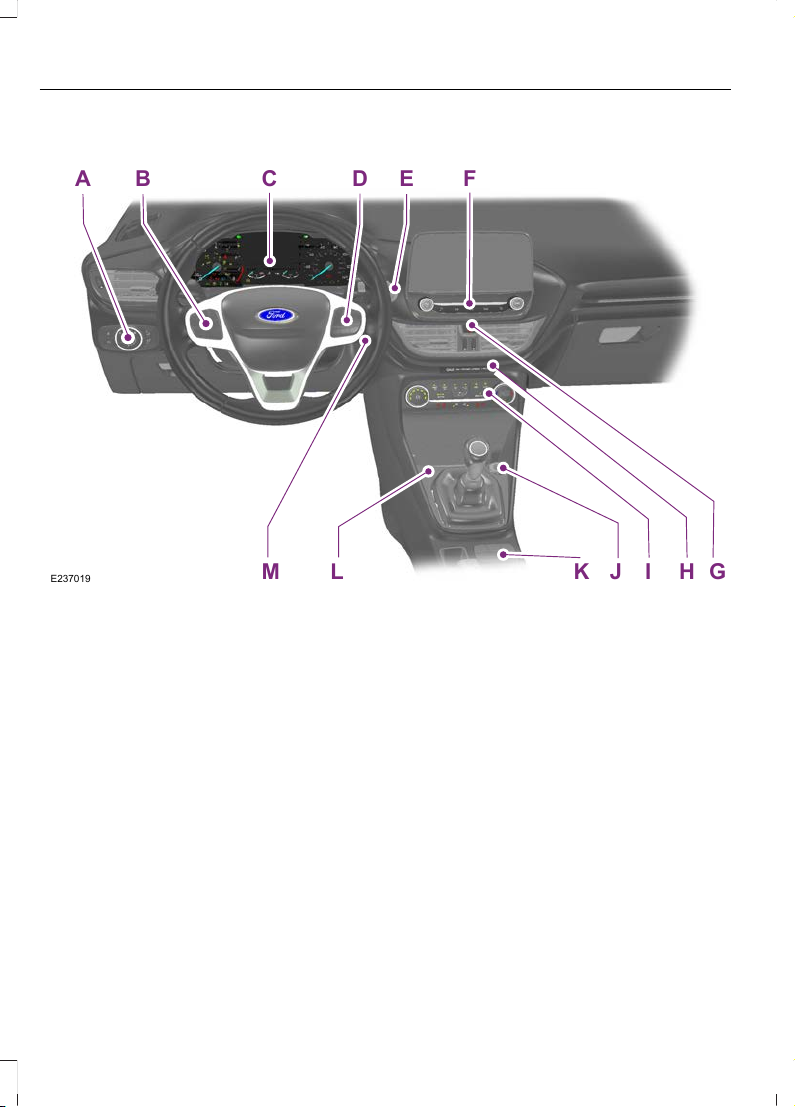
INSTRUMENT PANEL - LHD
B C D E F
GHI
J
KLM
A
E237019
Lighting control. See Lighting Control (page 70).A
Cruise control buttons. See Cruise Control (page 175).B
Instrument cluster. See Instrument Cluster (page 85).C
Information display controls. See Information Displays (page 91).D
Push button ignition switch. See Push Button Ignition Switch (page 124).E
Audio unit. See Audio System (page 323).F
Hazard flasher switch. See Hazard Flashers (page 222).G
Passenger airbag deactivation indicator. See Switching the Passenger Airbag
On and Off (page 33).
H
Climate control. See Climate Control (page 106).I
Auxiliary power point. See Auxiliary Power Points (page 121).J
EcoSelect button. See EcoSelect (page 140). Selectable drive modes button.
See Drive Control (page 207). Auto-Start-Stop button. See Unique Driving
Characteristics (page 137). Parking aid button. See Parking Aids (page 163).
K
18
Fiesta (CE1) Vehicles Built From: 06-01-2020 Vehicles Built Up To: 19-04-2020, CG3654en enGBR, Edition date: 201909, Second-Printing
At a Glance
Page 23
USB port. See USB Port (page 333).L
Ignition switch. See Ignition Switch (page 123).M
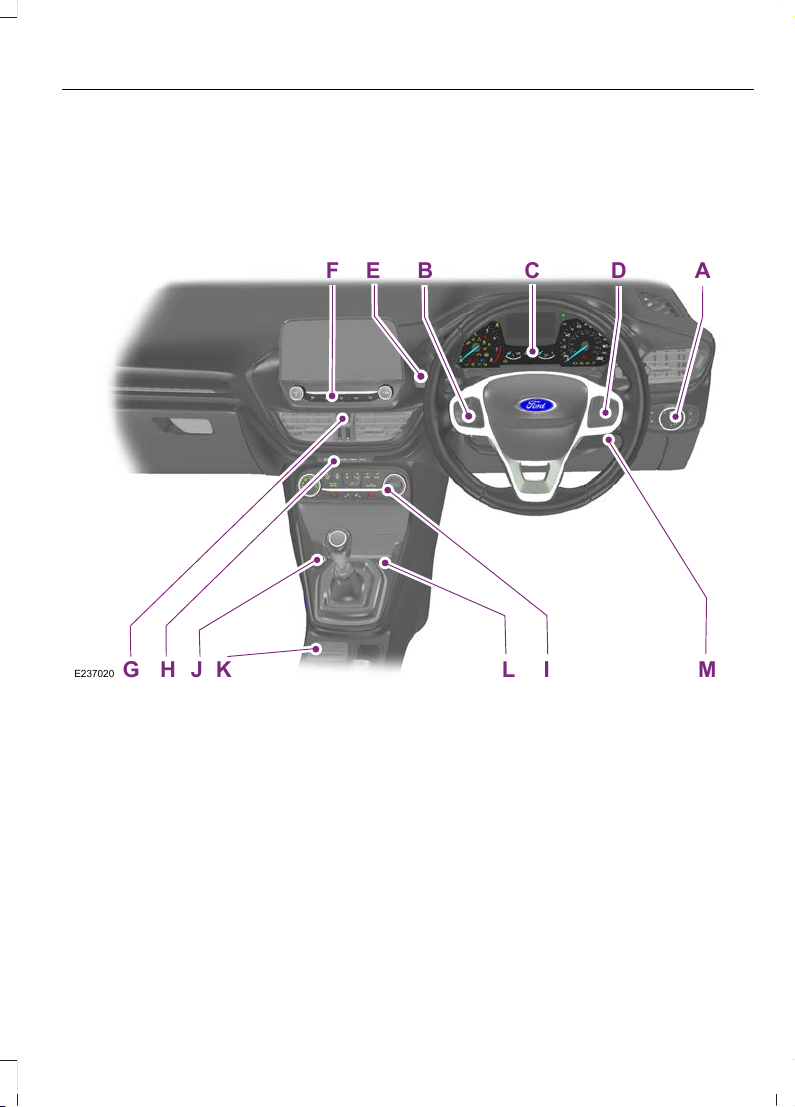
INSTRUMENT PANEL - RHD
DB ACE
G H IJ L
K
ME237020
F
Lighting control. See Lighting Control (page 70).A
Cruise control buttons. See Cruise Control (page 175).B
Instrument cluster. See Instrument Cluster (page 85).C
Information display controls. See Information Displays (page 91).D
Push button ignition switch. See Push Button Ignition Switch (page 124).E
Audio unit. See Audio System (page 323).F
Hazard flasher switch. See Hazard Flashers (page 222).G
Passenger airbag deactivation indicator. See Switching the Passenger Airbag
On and Off (page 33).
H
Climate control. See Climate Control (page 106).I
19
Fiesta (CE1) Vehicles Built From: 06-01-2020 Vehicles Built Up To: 19-04-2020, CG3654en enGBR, Edition date: 201909, Second-Printing
At a Glance
Page 24

Auxiliary power point. See Auxiliary Power Points (page 121).J
EcoSelect button. See EcoSelect (page 140). Selectable drive modes button.
See Drive Control (page 207). Auto-Start-Stop button. See Unique Driving
Characteristics (page 137). Parking aid button. See Parking Aids (page 163).
K
USB port. See USB Port (page 333).L
Ignition switch. See Ignition Switch (page 123).M
20
Fiesta (CE1) Vehicles Built From: 06-01-2020 Vehicles Built Up To: 19-04-2020, CG3654en enGBR, Edition date: 201909, Second-Printing
At a Glance
Page 25
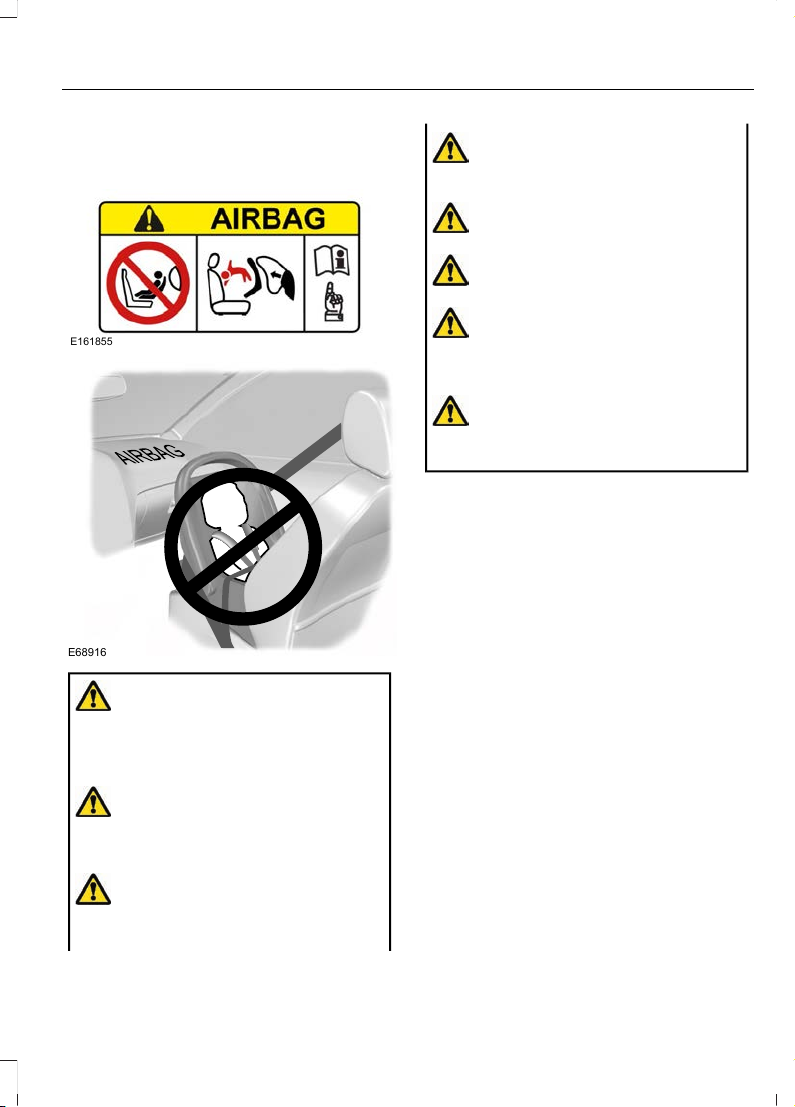
INSTALLING CHILD RESTRAINTS
E161855
E68916
WARNING: Extreme Hazard! Never
use a rearward facing child restraint on
a seat protected by an active airbag in
front of it. Death or serious injury to the
child can occur.
WARNING: You must switch the
passenger airbag off when using a
rearward facing child restraint on the
front seat.
WARNING: You must switch the
passenger airbag on following the
removal of the child restraint.
WARNING: Read and follow the
manufacturer's instructions when you
are installing a child restraint.
WARNING: Do not modify child
restraints in any way.
WARNING: Do not hold a child on
your lap when your vehicle is moving.
WARNING: Do not leave children
or pets unattended in your vehicle.
Failure to follow this instruction could
result in personal injury or death.
WARNING: If your vehicle has been
involved in a crash, have the child
restraints checked.
Only child restraints certified to ECE-R129
or ECE-R44.03 (or later) have been tested
and approved for use in your vehicle. A
choice of these are available from an
authorized dealer.
Note: Mandatory use of child restraints
varies from country to country.
When using a child restraint on a front seat,
follow these seat positioning guidelines:
• The child restraint must not be in
contact with the instrument panel.
• Position the passenger seat as far
rearward as possible and route the
seatbelt forward and downward from
the B-pillar ring to the child restraint.
• If it proves difficult to tighten the lap
section of the seatbelt without slack
remaining, adjust the seat backrest to
the fully upright position and raise the
height of the seat.
Note: When using a child restraint on a rear
seat, adjust the front seat to a position to
prevent contact with the child's feet or legs.
21
Fiesta (CE1) Vehicles Built From: 06-01-2020 Vehicles Built Up To: 19-04-2020, CG3654en enGBR, Edition date: 201909, Second-Printing
Child Safety
Page 26
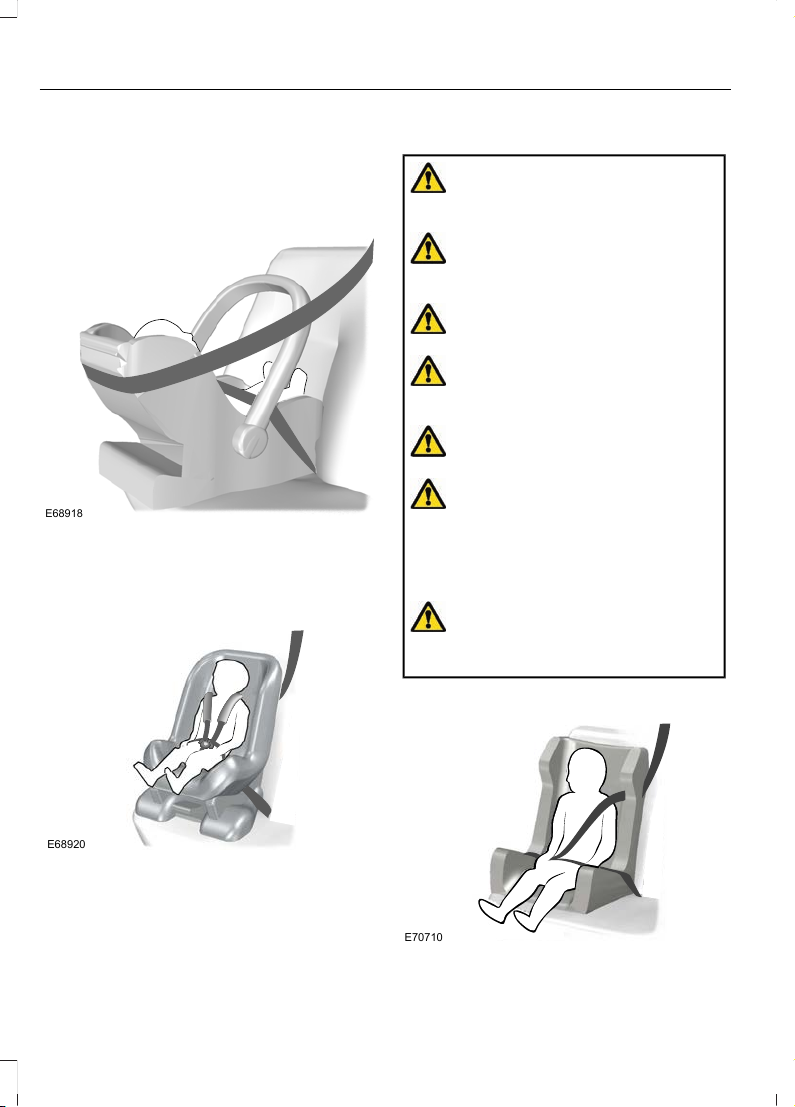
Child Restraints for Different Mass
Groups
Use the correct child restraint as follows:
Baby Safety Restraint (Group 0+)
E68918
Secure children that weigh less than 13 kg
(29 lb) in a rearward facing baby safety
restraint (Group 0+) on the rear seat.
Child Safety Restraint (Group 1)
E68920
Secure children that weigh between 13 kg
(29 lb) and 18 kg (40 lb) in a child safety
restraint (Group 1) on the rear seat.
Booster Seats
WARNING: Do not install a booster
seat or a booster cushion with only the
lap strap of the seatbelt.
WARNING: Do not install a booster
seat or a booster cushion with a seatbelt
that is slack or twisted.
WARNING: Do not put the seatbelt
under your child's arm or behind its back.
WARNING: Do not use pillows,
books or towels to boost your child's
height.
WARNING: Make sure that your
children sit in an upright position.
WARNING: Make sure the child
restraint rests tightly against the vehicle
seat. If necessary, adjust the seat
backrest to an upright position. It may
also be necessary to lift or remove the
head restraint.
WARNING: You must reinstall the
head restraint following the removal of
the child restraint.
Booster Seat (Group 2)
E70710
22
Fiesta (CE1) Vehicles Built From: 06-01-2020 Vehicles Built Up To: 19-04-2020, CG3654en enGBR, Edition date: 201909, Second-Printing
Child Safety
Page 27
Secure children that weigh greater than
15 kg (33 lb) but are less than 150 cm
(60 in) tall in a booster seat or on a
booster cushion.
We recommend that you use a booster
seat that combines a cushion with a
backrest instead of a booster cushion only.
The raised seating position will allow you
to position the shoulder strap of the adult
seatbelt over the center of your child's
shoulder and the lap strap tightly across
their hips.
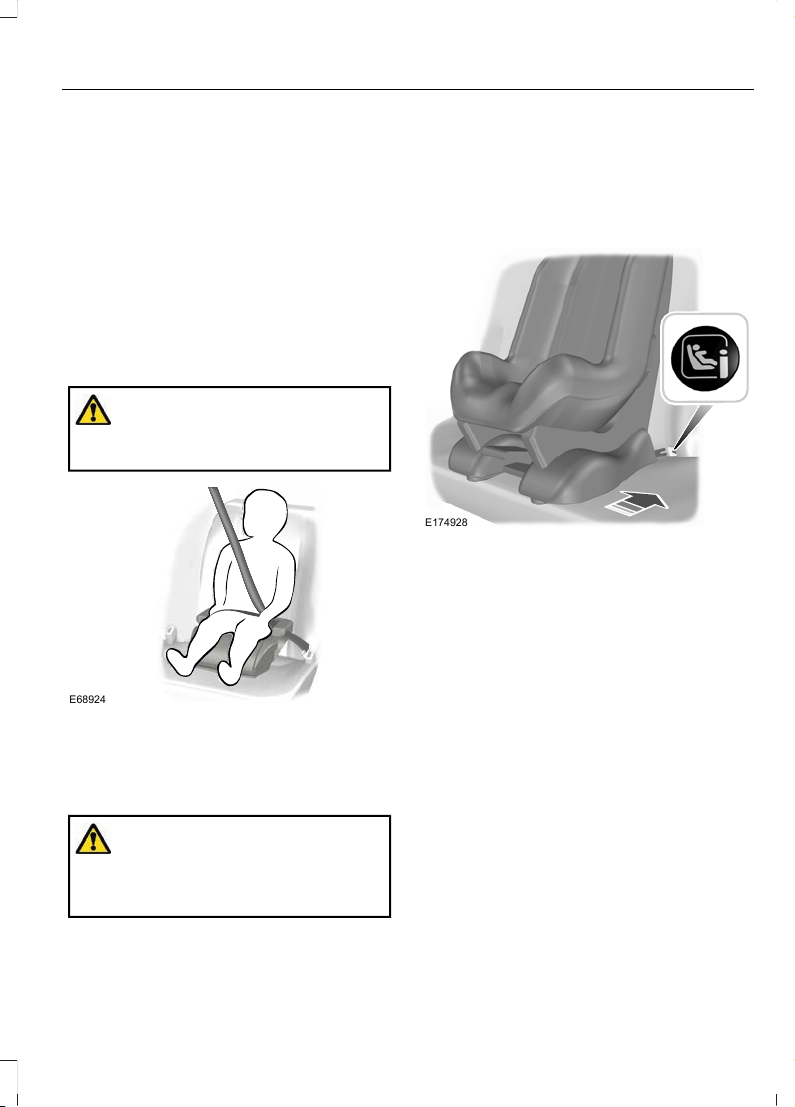
Booster Cushion (Group 3)
WARNING: When using a booster
cushion, make sure you adjust the vehicle
head restraint on that seating position.
E68924
Secure children that weigh greater than
22 kg (49 lb) but are less than 150 cm
(60 in) tall on a booster cushion.
ISOFIX Anchor Points
WARNING: Use an anti-rotation
device when using the ISOFIX system.
We recommend the use of a top tether
or support leg.
Your vehicle has ISOFIX anchor points that
accommodate universally approved
ISOFIX child restraints.
Always follow the manufacturer's
instructions for installing a child restraint
with a top tether.
E174928
The ISOFIX system has two rigid
attachment arms on the child restraint.
These attach to anchor points on the
outermost rear seats, where the cushion
and backrest meet.
Note: If you are purchasing an ISOFIX child
restraint, make sure that you know the
correct mass group and ISOFIX size class
for the intended seating locations. See
Child Restraint Positioning (page 25).
23
Fiesta (CE1) Vehicles Built From: 06-01-2020 Vehicles Built Up To: 19-04-2020, CG3654en enGBR, Edition date: 201909, Second-Printing
Child Safety
Page 28
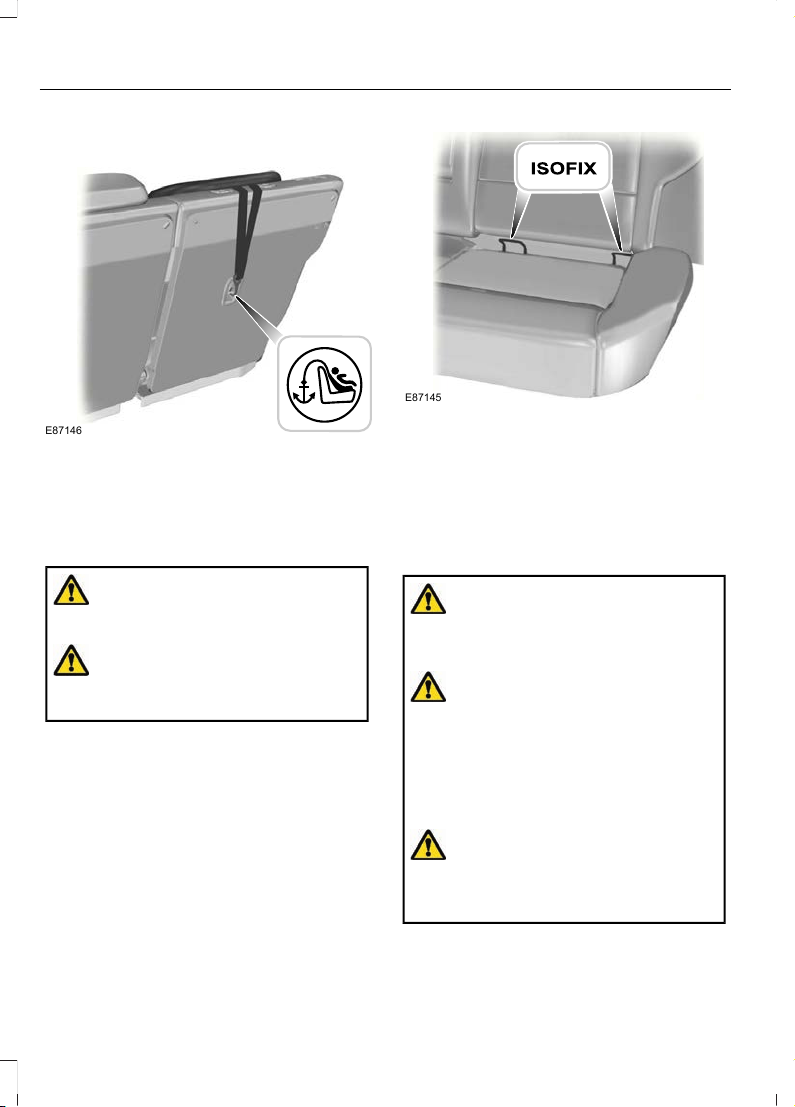
Top Tether Anchor Points
E87146
For child restraints with a top tether, tether
anchor points are on the rear of the second
row seats.
Attaching a Child Restraint With
Top Tethers
WARNING: Do not attach the top
tether strap to anything other than the
correct top tether strap anchor point.
WARNING: Make sure that the top
tether strap is not slack or twisted and
is properly located on the anchor point.
1. Attach the tether strap to the anchor
point.
Note: Where applicable, remove the
luggage cover to ease installation. See
Luggage Covers (page 210).
Note: You may need to lift or remove the
head restraint to ease installation. See
Head Restraints (page 114).
E87145
2. Push the child restraint back firmly to
engage the ISOFIX lower anchor points.
3. Tighten the tether strap in line with the
child restraint manufacturer's
instructions.
Attaching a Child Restraint With a
Support Leg
WARNING: If you use a child
restraint that has a support leg, make
sure the support leg rests securely on the
floor.
WARNING: Always make sure your
child is secured properly in a device that
is appropriate for their height, age and
weight. Child safety restraints must be
bought separately from your vehicle.
Failure to follow these instructions and
guidelines may result in an increased risk
of serious injury or death to your child.
WARNING: Make sure that the
child restraint manufacturer lists your
vehicle as suitable for use with this type
of child restraint.
24
Fiesta (CE1) Vehicles Built From: 06-01-2020 Vehicles Built Up To: 19-04-2020, CG3654en enGBR, Edition date: 201909, Second-Printing
Child Safety
Page 29
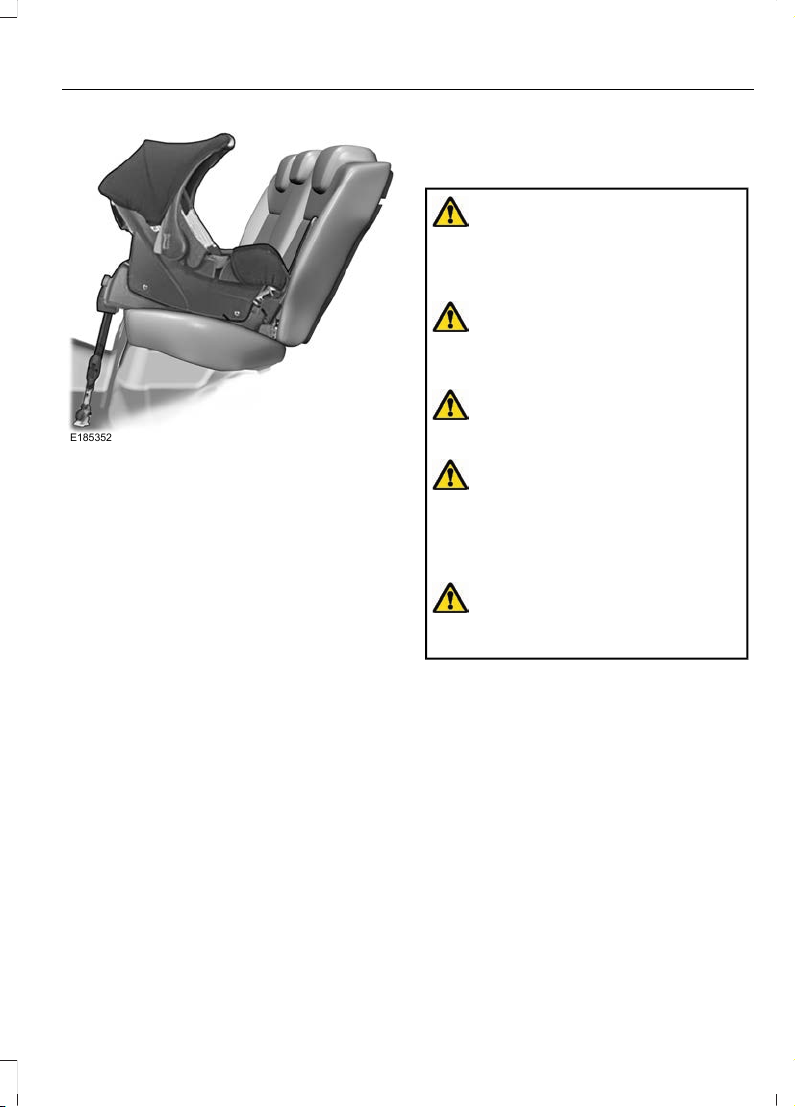
E185352
Always follow the manufacturer's
instructions for installing a child restraint
with a support leg.
CHILD RESTRAINT POSITIONING
WARNING: Extreme Hazard! Never
use a rearward facing child restraint on
a seat protected by an active airbag in
front of it. Death or serious injury to the
child can occur.
WARNING: If you use a child
restraint that has a support leg, make
sure the support leg rests securely on the
floor.
WARNING: If you use a child
restraint and a seatbelt, make sure that
the seatbelt is not slack or twisted.
WARNING: Make sure the child
restraint rests tightly against the vehicle
seat. If necessary, adjust the seat
backrest to an upright position. It may
also be necessary to lift or remove the
head restraint.
WARNING: You must reinstall the
head restraint following the removal of
the child restraint.
25
Fiesta (CE1) Vehicles Built From: 06-01-2020 Vehicles Built Up To: 19-04-2020, CG3654en enGBR, Edition date: 201909, Second-Printing
Child Safety
Page 30
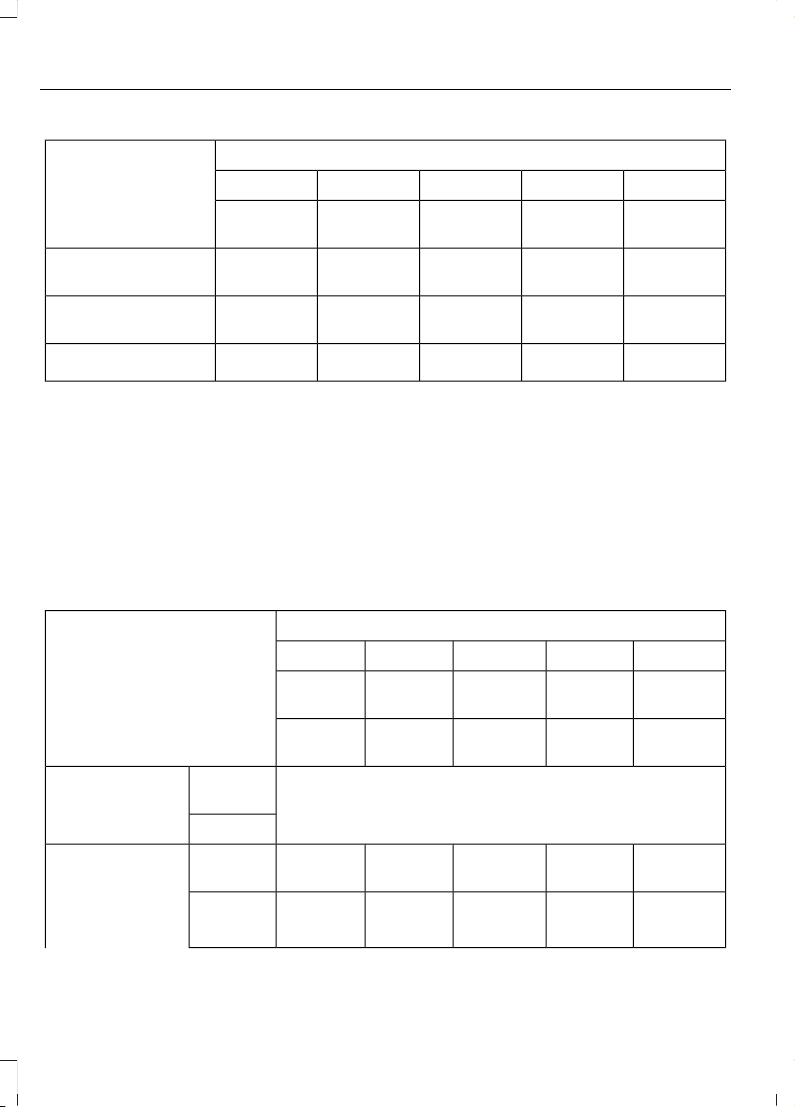
Mass Group Categories
Seating Positions
3210+0
22–36 kg
(49– 79 lb)
15–25 kg
(33–55 lb)
9–18 kg
(20–40 lb)
0–13 kg
(0–29 lb)
0–10 kg
(0–22 lb)
UF
1
UF
1
UF
1
XX
Front passenger seat
with airbag ON.
U
1
U
1
U
1
U
1
U
1
Front passenger seat
with airbag OFF.
UUUUU
Rear seats.
2
1
We recommend that you secure children in a government approved child restraint, on
the rear seat.
2
Do not use a child restraint with a support leg on the rear center seat unless stated as
suitable in the child restraint manufacturer's product information.
X Not suitable for children in this mass group.
U Suitable for universal category child restraints approved for use in this mass group.
UF Suitable for universal category forward facing child restraints approved for use in this
mass group.
ISOFIX Child Restraints
Mass Group Categories
Seating Positions
110+00
Rearward
Facing
Forward
Facing
Rearward
Facing
Rearward
Facing
Lateral
Facing
9–18 kg
(20–40 lb)
9–18 kg
(20–40 lb)
0–13 kg
(0–29 lb)
0–10 kg
(0–22 lb)
0–10 kg
(0–22 lb)
No ISOFIX
Size
class.
Front passenger
seat.
Size type.
C, D
1
A, B, B1
1
C, D, E
1
E
1
F, G
1
Size
class.
Rear outermost
seat ISOFIX.
R2X, R2,
R3
1
F2, F2X,
F3
1
R1, R2X,
R2, R3
1
R1
1
L1, L2
1
Fixture.
26
Fiesta (CE1) Vehicles Built From: 06-01-2020 Vehicles Built Up To: 19-04-2020, CG3654en enGBR, Edition date: 201909, Second-Printing
Child Safety
Page 31
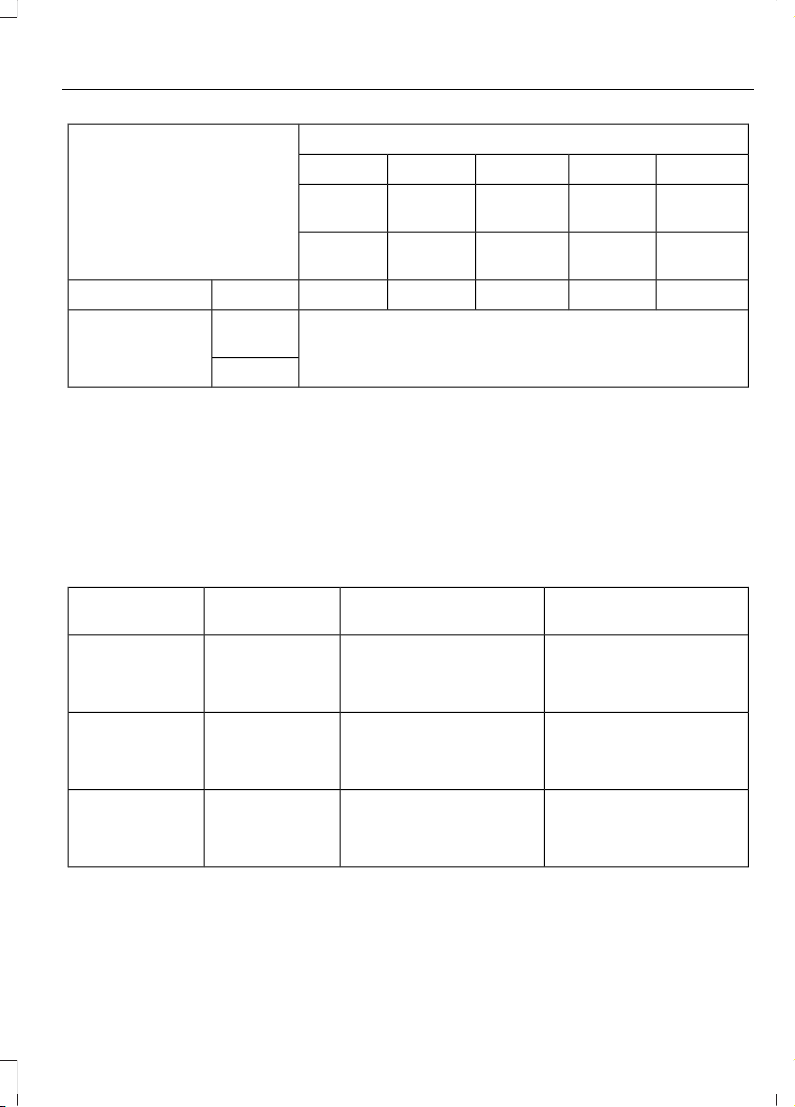
Mass Group Categories
Seating Positions
110+00
Rearward
Facing
Forward
Facing
Rearward
Facing
Rearward
Facing
Lateral
Facing
9–18 kg
(20–40 lb)
9–18 kg
(20–40 lb)
0–13 kg
(0–29 lb)
0–10 kg
(0–22 lb)
0–10 kg
(0–22 lb)
ILIL, IUFILILILSize type.
No ISOFIX
Size
class.
Rear center seat.
Size type.
1
The size class and fixture are defined for both universal and semi-universal child restraint
systems. You can see the identification letters on ISOFIX child restraints.
IL Suitable for use with particular ISOFIX child restraint systems in the semi-universal
category. Refer to the child restraint system manufacturer vehicle recommendation list
for additional information.
IUF Suitable for use with forward facing ISOFIX child restraint systems in the universal
category.
Recommended Child Restraints
AttachmentModelManufacturerMass Group
Categories
ISOFIX base or seatbelt
only.
Baby Safe Plus with
ISOFIX base.
1
Britax Römer.0+
0–13 kg
(0–29 lb)
ISOFIX and top tether
anchors or seatbelt only.
Duo Plus.
1
Britax Römer.1
9–18 kg
(20–40 lb)
ISOFIX and seatbelt or
seatbelt only.
KidFix.
1, 2
Britax Römer.2
15–25 kg
(33–55 lb)
27
Fiesta (CE1) Vehicles Built From: 06-01-2020 Vehicles Built Up To: 19-04-2020, CG3654en enGBR, Edition date: 201909, Second-Printing
Child Safety
Page 32
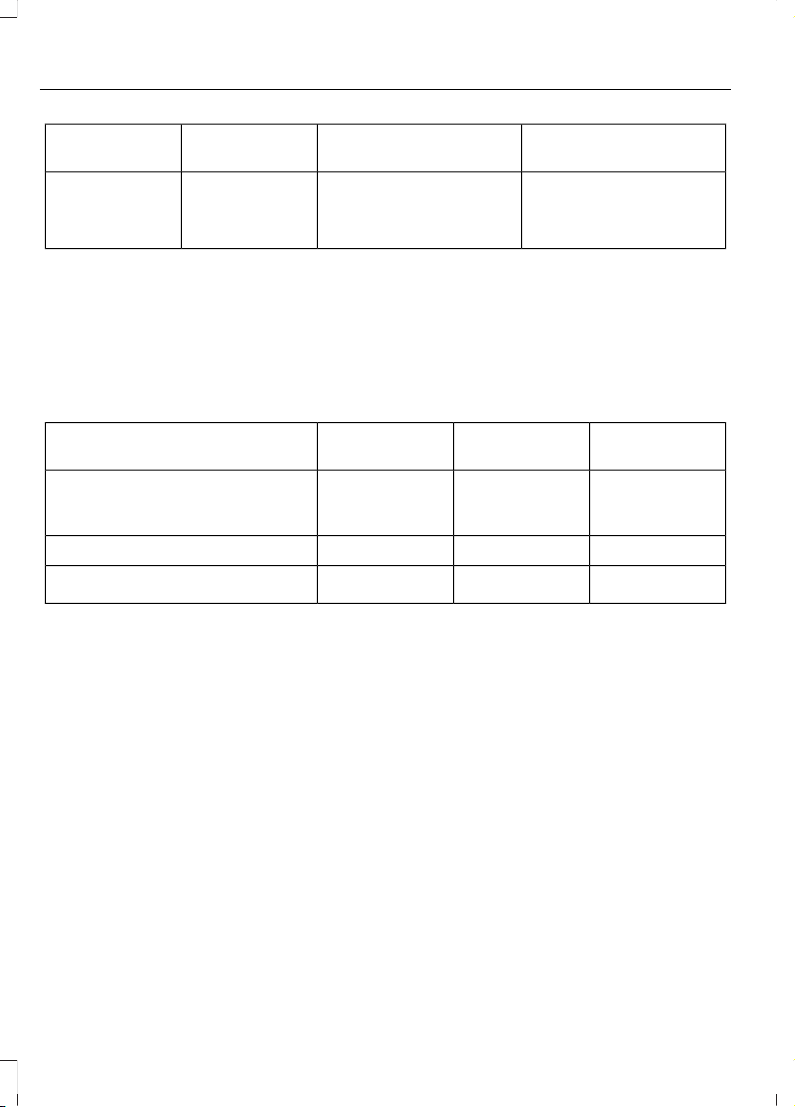
AttachmentModelManufacturerMass Group
Categories
ISOFIX and seatbelt or
seatbelt only.
KidFix.
1, 2
Britax Römer.3
22–36 kg
(49–79 lb)
1
We recommend that you secure children using an ISOFIX child restraint on the rear
outermost seats.
2
We recommend that you use a booster seat that combines a cushion with a backrest
instead of a booster cushion only.
See an authorized dealer for the latest details relating to our recommended child restraints.
i-Size Child Restraints
Rear Center
Seat
Rear Outermost
Seats
Front Passenger
Seat
--XRearward facing child restraint
systems on front passenger seat
with airbag ON.
Xi-UXi-Size child restraint systems.
B2, B3
1
B2, B3
1
B2, B3
1
Suitable booster fixture.
1
The fixture is defined for booster child restraint systems. You can see the identification
letters on i-Size boosters.
i-U Suitable for use with forward and rearward facing i-Size child restraint systems.
X Not suitable for use with i-Size child restraint systems.
28
Fiesta (CE1) Vehicles Built From: 06-01-2020 Vehicles Built Up To: 19-04-2020, CG3654en enGBR, Edition date: 201909, Second-Printing
Child Safety
Page 33
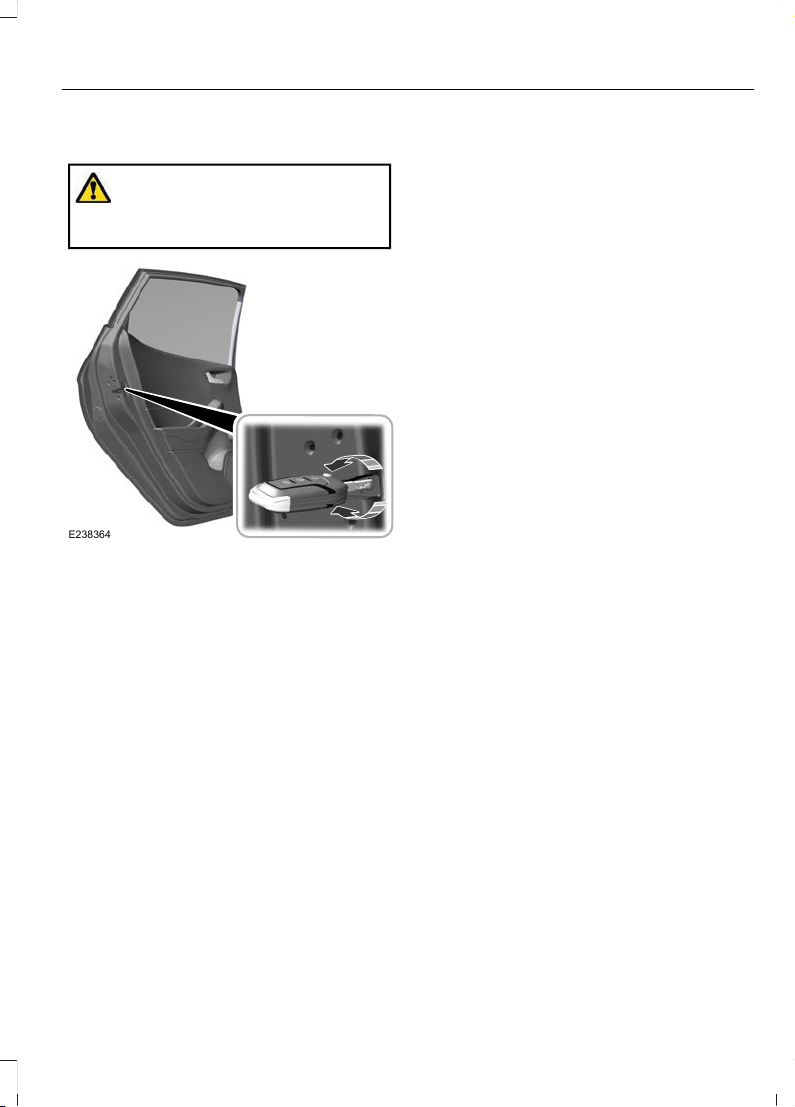
CHILD SAFETY LOCKS
WARNING: You cannot open the
rear doors from inside if you have put the
child safety locks on.
E238364
A child safety lock is on the rear edge of
each rear door. You must set the child
safety lock separately on each door.
Left-Hand Side
Turn the key clockwise to switch the child
lock on and counterclockwise to switch it
off.
Right-Hand Side
Turn the key counterclockwise to switch
the child lock on and clockwise to switch
it off.
29
Fiesta (CE1) Vehicles Built From: 06-01-2020 Vehicles Built Up To: 19-04-2020, CG3654en enGBR, Edition date: 201909, Second-Printing
Child Safety
Page 34
FASTENING THE SEATBELTS
WARNING: Insert the tongue into
the buckle until you hear a distinct click.
You have not fastened the seatbelt
correctly if you do not hear a click.
WARNING: Make sure that the
seatbelts are securely stowed away
when not in use and not outside your
vehicle when closing the doors.
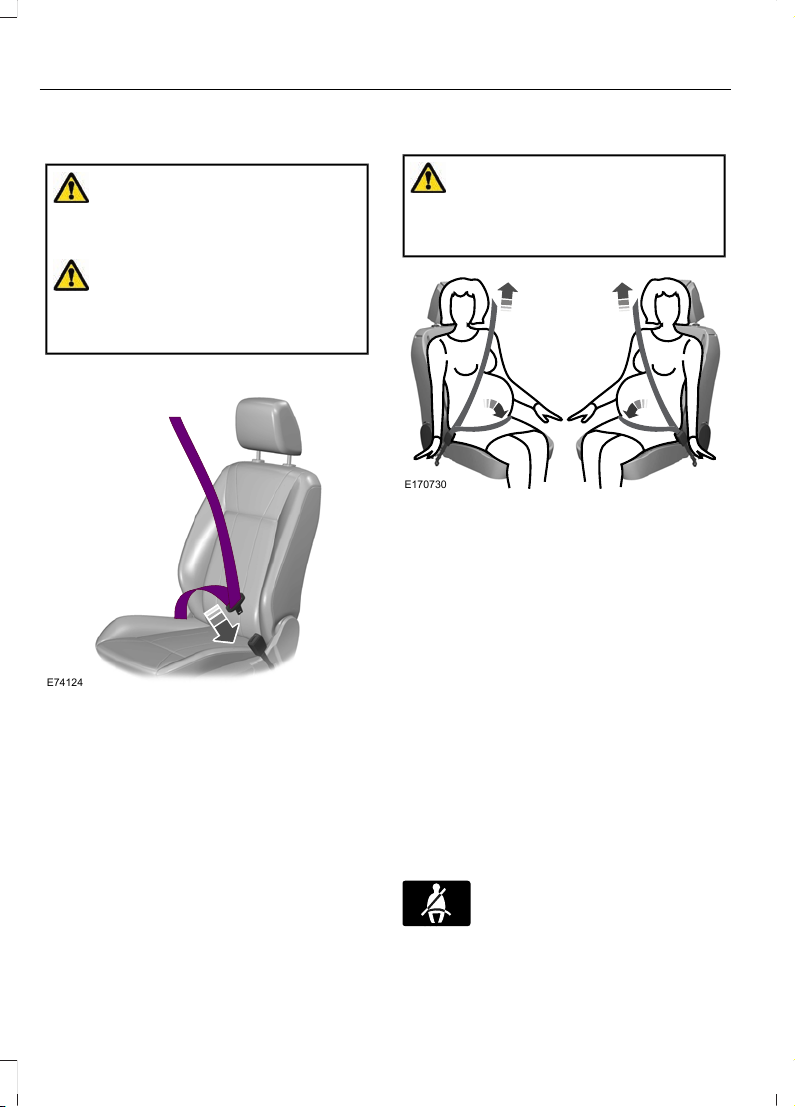
E74124
1. Pull the seatbelt out steadily.
Note: It may lock if you pull it sharply or if
the vehicle is on a slope.
2. Insert the tongue into the buckle until
you hear a distinct click.
Press the red button on the buckle to
release the seatbelt. Hold the seatbelt
tongue and let it retract completely and
smoothly to its stowed position.
Using Seatbelts During Pregnancy
WARNING: Position the seatbelt
correctly for your safety and that of your
unborn child. Do not use only the lap
strap or the shoulder strap.
E170730
Pregnant women should always wear their
seatbelt. The lap belt portion of a
combination lap and shoulder belt should
be positioned low across the hips below
the belly and worn as tight as comfort will
allow. The shoulder belt portion of a
combination lap and shoulder belt should
be positioned to cross the middle of the
shoulder and the center of the chest.
SEATBELT REMINDER
Fasten Seatbelt Warning Lamp
A warning lamp illuminates if the ignition
is on and any of the following occur:
• A front seat is occupied and the
seatbelt has not been fastened.
• A rear seatbelt has been recently
unfastened.
The warning lamp illuminates
until you fasten your seatbelt.
30
Fiesta (CE1) Vehicles Built From: 06-01-2020 Vehicles Built Up To: 19-04-2020, CG3654en enGBR, Edition date: 201909, Second-Printing
Seatbelts
Page 35
Fasten Seatbelt Audible Warning
A warning tone sounds if the warning lamp
illuminates and your vehicle exceeds a
relatively low speed.
The warning tone sounds for up to five
minutes or until you fasten your seatbelt.
Switching the Audible Warning Off
We recommend that you contact an
authorized dealer.
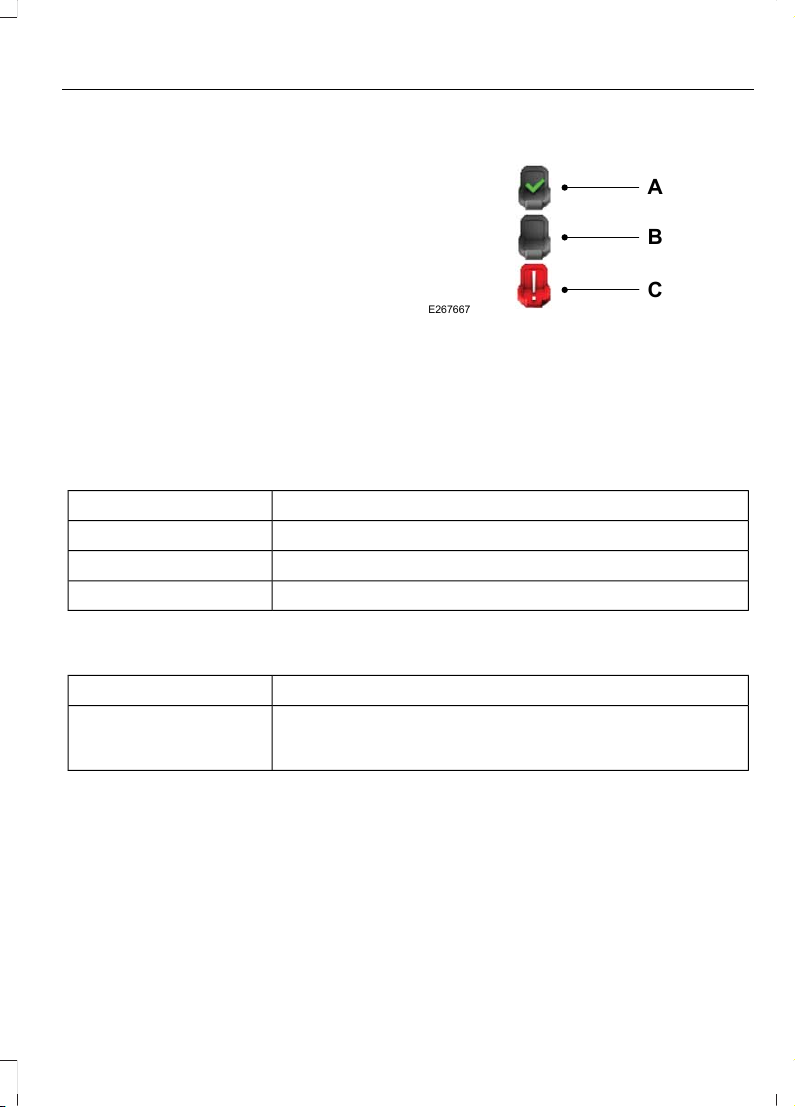
Seatbelt Status
A
B
C
E267667
Seatbelt fastened.A
Seatbelt not fastened.B
Rear seatbelt recently
unfastened.
C
To view the seatbelt status, use the information display controls on the steering
wheel to select the following:
ActionMenu Item
Press the menu button.Settings
Press the OK button.Information
Press the OK button.Seatbelts
Seatbelt Status Information Messages
DescriptionMessage
The system has detected a fault that requires service. Have
your vehicle checked as soon as possible.
Rear belt monitor
malfunction Service
required
31
Fiesta (CE1) Vehicles Built From: 06-01-2020 Vehicles Built Up To: 19-04-2020, CG3654en enGBR, Edition date: 201909, Second-Printing
Seatbelts
Page 36
PRINCIPLE OF OPERATION
WARNING: Extreme Hazard! Never
use a rearward facing child restraint on
a seat protected by an active airbag in
front of it. Death or serious injury to the
child can occur.
WARNING: Do not modify the front
of your vehicle in any way. This could
adversely affect deployment of the
airbags. Failure to adhere to this warning
could result in serious personal injury or
death.
WARNING: Wear a seatbelt and
keep sufficient distance between
yourself and the steering wheel. Only
when you use the seatbelt correctly, can
it hold you in a position that allows the
airbag to achieve its optimum effect.
Failure to adhere to this warning could
result in serious personal injury or death.
WARNING: Repairs to the steering
wheel, steering column, seats, airbags
and seatbelts must be carried out by an
authorized dealer. Failure to adhere to
this warning could result in serious
personal injury or death.
WARNING: Keep the areas in front
of the airbags free from obstruction. Do
not affix anything to or over the airbag
covers. Objects could become projectiles
during airbag deployment. Failure to
follow this instruction could result in
personal injury or death.
WARNING: Do not poke sharp
objects into areas where airbags are
fitted. This could damage and adversely
affect deployment of the airbags. Failure
to follow this instruction could result in
personal injury or death.
WARNING: Do not use accessory
seat covers. The use of accessory seat
covers may prevent the deployment of
the side airbags and increase the risk of
injury in an accident.
Note: A loud bang sounds and there is a
cloud of harmless powdery residue if an
airbag deploys. This is normal.
Note: Only wipe airbag covers with a damp
cloth.
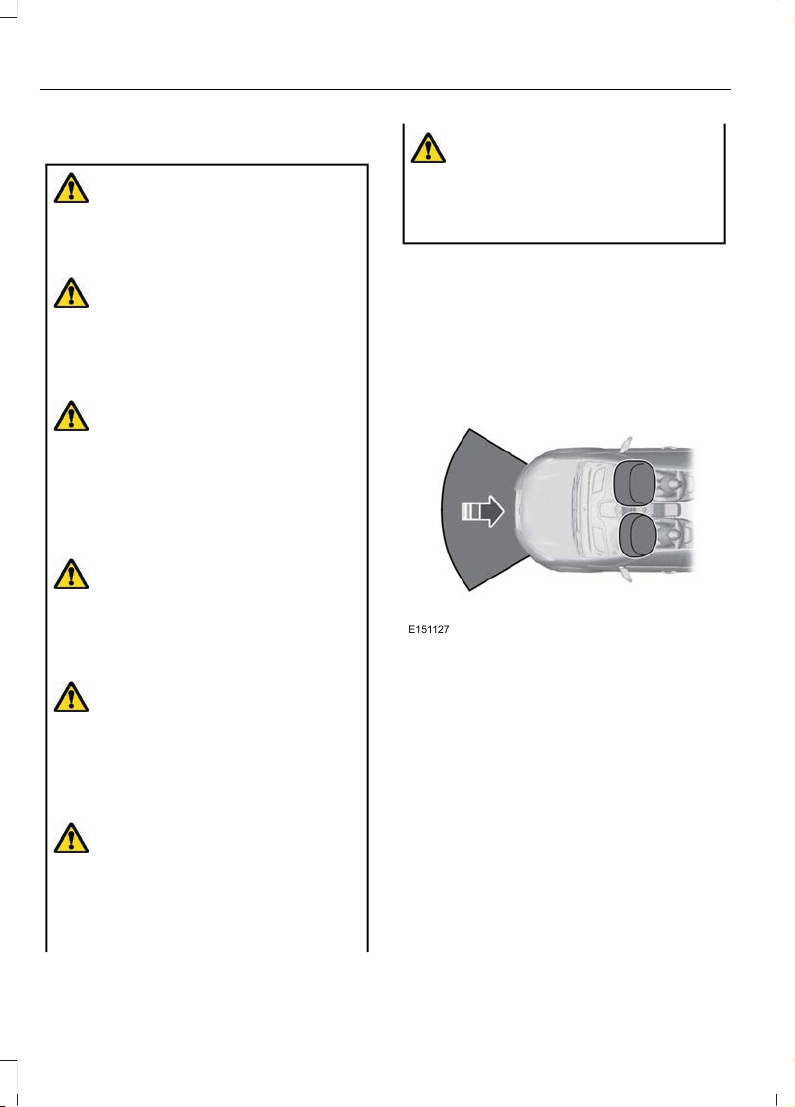
DRIVER AIRBAG
E151127
The airbag is designed to deploy during a
significant frontal or near-frontal crash.
The airbag inflates within a few
thousandths of a second cushioning
forward body movement and deflates on
contact with the occupant. The airbag is
not designed to deploy during a minor
frontal crash, rear crash, side crash or a
vehicle rollover.
32
Fiesta (CE1) Vehicles Built From: 06-01-2020 Vehicles Built Up To: 19-04-2020, CG3654en enGBR, Edition date: 201909, Second-Printing
Supplementary Restraints System
Page 37
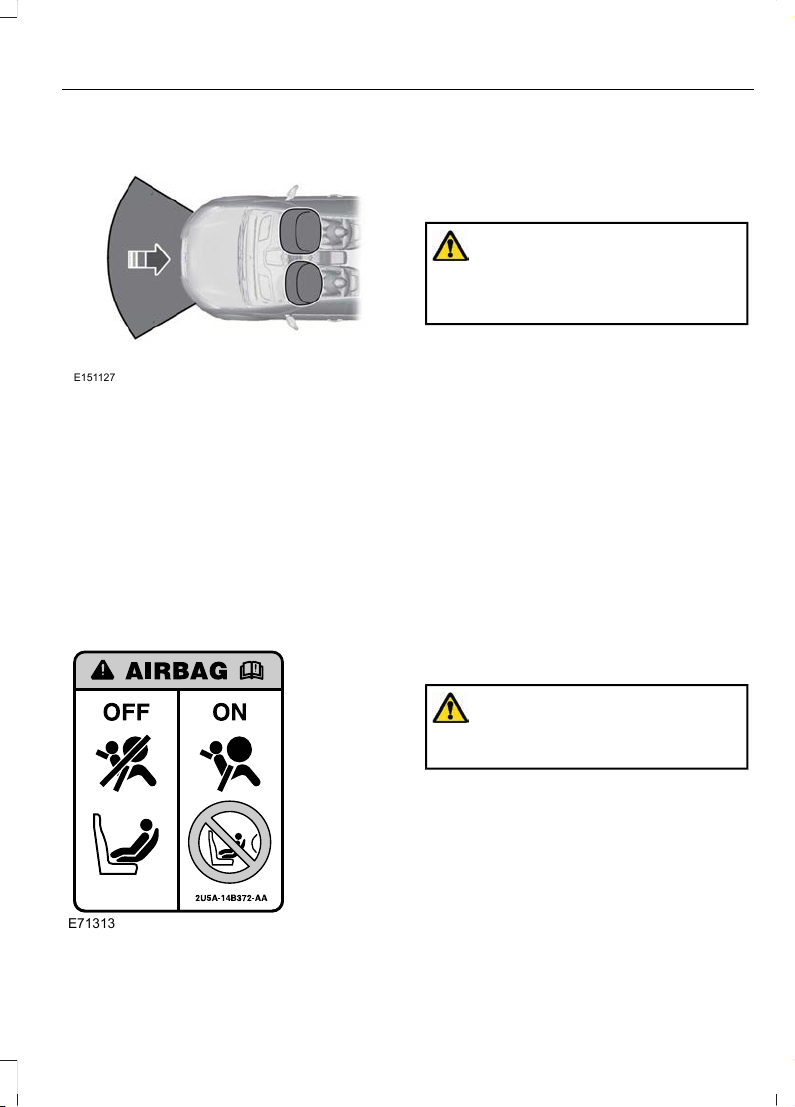
PASSENGER AIRBAG
E151127
The airbag is designed to deploy during a
significant frontal or near-frontal crash.
The airbag inflates within a few
thousandths of a second cushioning
forward body movement and deflates on
contact with the occupant. The airbag is
not designed to deploy during a minor
frontal crash, rear crash, side crash or a
vehicle rollover.
SWITCHING THE PASSENGER AIRBAG ON AND OFF
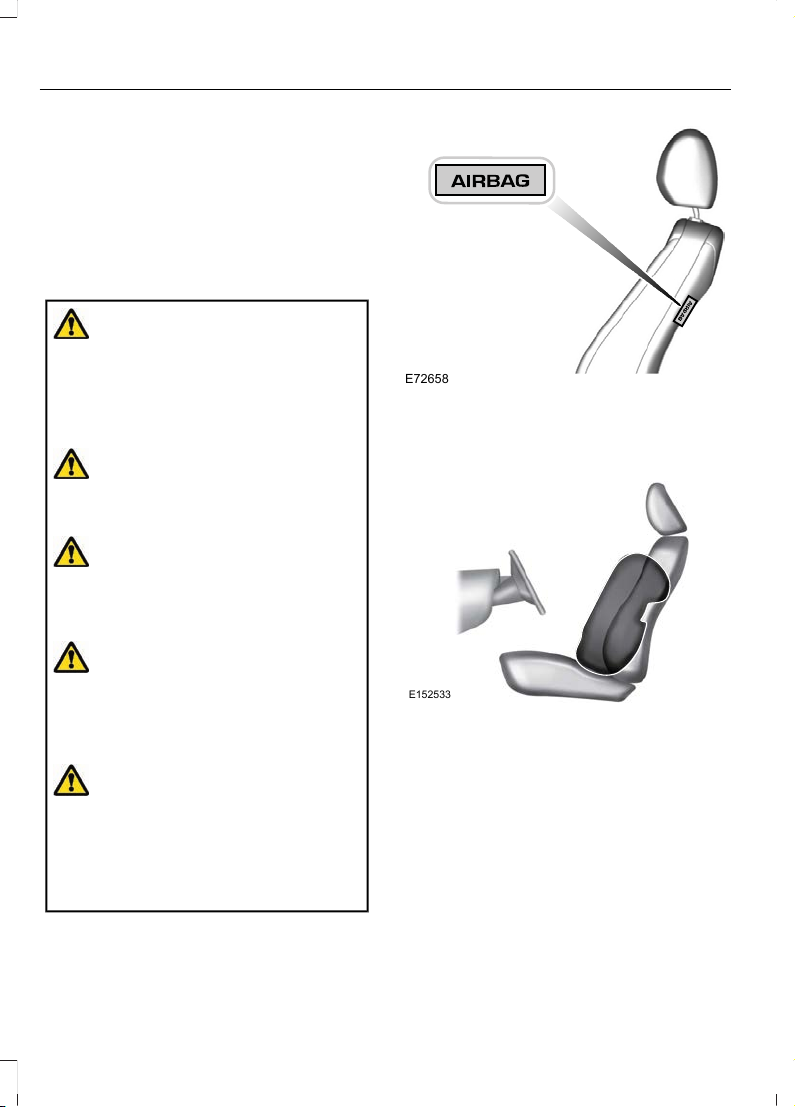
E71313
The passenger airbag on and off indicators
are close to the climate control unit.
Switching the Passenger Airbag
Off
WARNING: You must switch the
passenger airbag off when using a
rearward facing child restraint on the
front seat.
1. Using the information display controls
on the steering wheel, select Settings.
2. Select Vehicle settings.
3. Select Passenger airbag.
4. Select Off.
5. Press and hold the OK button until a
confirmation message appears in the
information display.
6. Switch the ignition off and on and
check that the passenger airbag off
indicator illuminates.
Note: If it does not illuminate, this indicates
a malfunction. Have your vehicle checked
as soon as possible.
Switching the Passenger Airbag
On
WARNING: You must switch the
passenger airbag on following the
removal of the child restraint.
1. Using the information display controls
on the steering wheel, select Settings.
2. Select Vehicle settings.
3. Select Passenger airbag.
4. Select On.
5. Press and hold the OK button until a
confirmation message appears in the
information display.
33
Fiesta (CE1) Vehicles Built From: 06-01-2020 Vehicles Built Up To: 19-04-2020, CG3654en enGBR, Edition date: 201909, Second-Printing
Supplementary Restraints System
Page 38
6. Switch the ignition off and on and
check that the passenger airbag on
indicator illuminates.
Note: If it does not illuminate, this indicates
a malfunction. Have your vehicle checked
as soon as possible.
SIDE AIRBAGS
WARNING: Do not place objects
or mount equipment on or near the
headliner at the siderail that may come
into contact with a deploying curtain
airbag. Failure to follow these
instructions may increase the risk of
personal injury in the event of a crash.
WARNING: Do not lean your head
on the door. The side airbag could injure
you as it deploys from the side of the
seatback.
WARNING: Do not use accessory
seat covers. The use of accessory seat
covers may prevent the deployment of
the side airbags and increase the risk of
injury in an accident.
WARNING: Do not attempt to
service, repair, or modify the
supplementary restraint system or
associated components. Failure to
follow this instruction could result in
personal injury or death.
WARNING: If a supplementary
restraint system component has
deployed, it will not function again. Have
the system and associated components
inspected as soon as possible. Failure to
follow this instruction could result in
personal injury or death.
E72658
The side airbags are on the outermost side
of each front seat backrest. There is a label
attached to the side of each backrest to
indicate this.
E152533
The side airbags are designed to inflate
between the door panel and the occupant
to enhance the protection in certain
crashes.
The airbag is designed to deploy during a
significant lateral crash. It might also
deploy during a significant frontal crash.
The airbag is not designed to deploy during
a minor lateral or frontal crash, rear crash
or a vehicle rollover.
34
Fiesta (CE1) Vehicles Built From: 06-01-2020 Vehicles Built Up To: 19-04-2020, CG3654en enGBR, Edition date: 201909, Second-Printing
Supplementary Restraints System
Page 39
SIDE CURTAIN AIRBAGS
WARNING: Do not place objects
or mount equipment on or near the
headliner at the siderail that may come
into contact with a deploying curtain
airbag. Failure to follow these
instructions may increase the risk of
personal injury in the event of a crash.
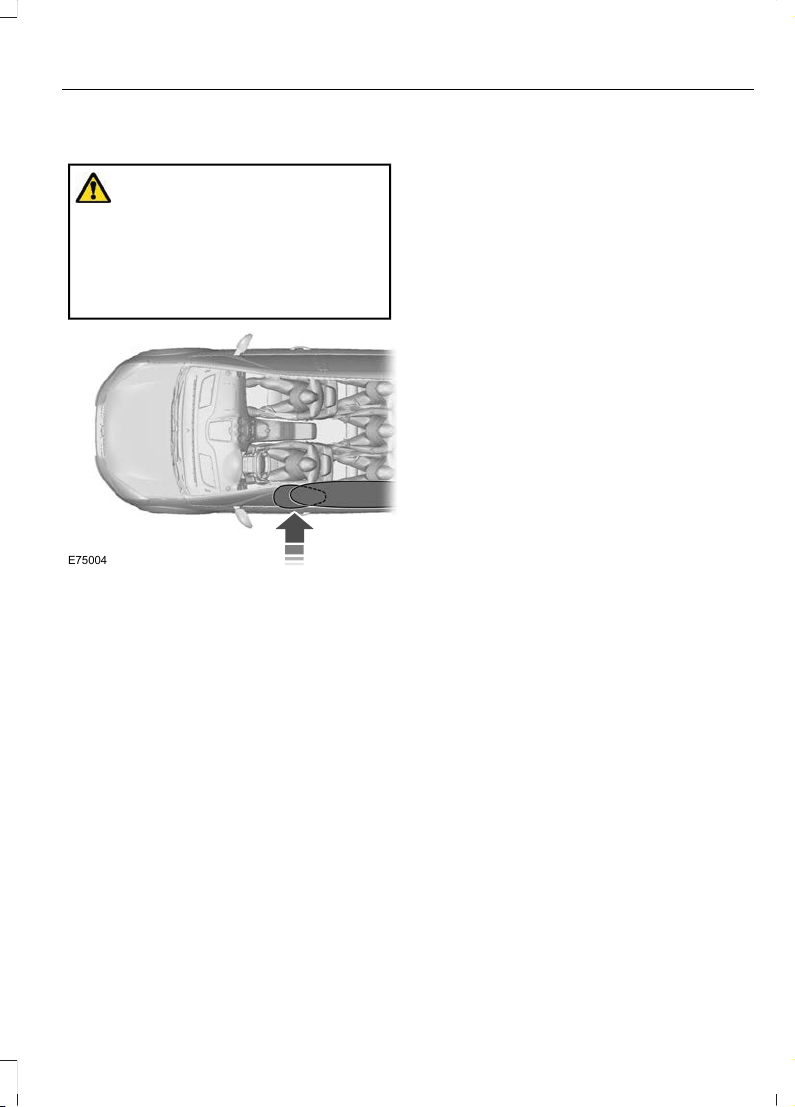
E75004
The airbags are above the front and rear
side windows.
The airbag is designed to deploy during a
significant lateral or frontal angled crash.
The airbag is not designed to deploy during
a minor lateral and frontal crash, rear crash
or a vehicle rollover.
35
Fiesta (CE1) Vehicles Built From: 06-01-2020 Vehicles Built Up To: 19-04-2020, CG3654en enGBR, Edition date: 201909, Second-Printing
Supplementary Restraints System
Page 40
EMERGENCY ASSISTANCE
WARNING: Unless the Emergency
Assistance setting is on prior to a
collision, the system does not attempt
to place an emergency call. This could
delay the response time, increasing the
risk of serious injury or death.
WARNING: For this feature to work,
your mobile phone must be
Bluetooth-enabled and compatible with
the system.
WARNING: Always place your
phone in a secure location in your vehicle
so it does not become a projectile or get
damaged in a crash. Failure to do so may
cause serious injury to someone or
damage the phone which could prevent
Emergency Assistance from working
properly.
Note: Not all accidents activate the system.
If an accident does trigger the system, it
initiates a call to the emergency services.
Do not wait for the system to initiate a call
if you are able to do so. Call emergency
services immediately to avoid a delayed
response time. If you do not hear the system
within five seconds of the accident, the
system could be non-functional.
If an accident results in an attempt to
deploy an airbag, excluding knee airbags
and rear inflatable seatbelts, or to shut off
the fuel pump, the system initiates a call
to the emergency services.
Note: Before setting the feature on, please
read the important notice about the
Emergency Assistance feature and the
Emergency Assistance privacy notice later
in this section for important information.
Note: When you switch Emergency
Assistance on or off, the settings apply to
all paired mobile phones. If you switch
Emergency Assistance off and a previously
paired phone connects when you switch the
ignition on, either a voice message plays, a
display message or icon is shown or both.
Note: Every mobile phone operates
differently. While Emergency Assistance
works with most mobile phones, some
mobile phones may experience difficulties
using this feature.
Note: In the case of an emergency, the
system, as a means of communication aid,
can help you contact specific rescue
departments of public emergency services.
The system does not deploy the rescue
operations. The local public emergency
service deploys specific rescue operations
according to the actual situation.
To make sure that Emergency Assistance
works correctly:
• The system must have power and be
working correctly at the time of the
crash and during feature activation and
use.
• You must switch on the feature before
a crash.
• You must have a cell phone connected
to the system.
• In certain countries, it may be
necessary to have a valid and
registered SIM card with credit in order
to place and maintain an emergency
call.
• A connected cell phone must have the
ability to make and maintain an
outgoing call at the time of the crash.
• A connected cell phone must have
adequate network coverage, battery
power and signal strength.
• Your vehicle must have battery power.
36
Fiesta (CE1) Vehicles Built From: 06-01-2020 Vehicles Built Up To: 19-04-2020, CG3654en enGBR, Edition date: 201909, Second-Printing
Automatic Crash Notification System
Page 41

Note: This feature only works in a country
where Emergency Assistance can call the
local emergency services. For additional
information, please refer to the local Ford
website.
In the Event of a Crash
Before making a call:
• If you do not cancel the call, an
introductory message plays for the
emergency operator. After this
message, there is hands-free
communication between your vehicle's
occupants and the operator.
• The system provides a short window
of time (approximately 10 seconds) to
cancel the call. If you do not cancel the
call, the system initiates a call to the
emergency services.
• The system plays a message letting
you know when it attempts to make an
emergency call. You can cancel the call
by selecting the relevant button or by
pressing the end call button on the
steering wheel.
Note: Not every crash deploys an airbag or
triggers the fuel pump shut off, which may
turn on Emergency Assistance. However, if
Emergency Assistance is triggered, the
system tries to contact the emergency
services. If a connected cell phone sustains
damage or loses connection to the system,
it searches for and tries to connect to any
available previously paired cell phone and
initiates a call to the emergency services.
During a call:
• Emergency Assistance uses your
vehicle GPS or cellular network
information when available to
determine the most appropriate
language to use. It alerts the
emergency operator of the crash and
delivers the introductory message. This
may include your vehicle GPS
coordinates.
• The language the system uses to
interact with the occupants of your
vehicle may differ from the language
used to deliver information to the
emergency operator.
• After the delivery of the introductory
message the voice line opens so that
you can speak hands-free with the
emergency operator.
• When the line is connected, you must
be prepared to provide your name,
phone number and location
information immediately.
Note: While the system provides
information to the emergency operator, the
system plays a message letting you know
it is sending important information. It then
lets you know when the line is open to start
hands-free communication.
Note: During an Emergency Assistance call,
an emergency priority screen appears which
contains vehicle GPS coordinates when
available.
Note: It is possible that GPS location
information is not available at the time of
the crash; in this case, Emergency
Assistance will still attempt to place an
emergency call.
Note: It is possible that the emergency
services will not receive the GPS
coordinates; in this case, hands-free
communication with an emergency operator
is available.
37
Fiesta (CE1) Vehicles Built From: 06-01-2020 Vehicles Built Up To: 19-04-2020, CG3654en enGBR, Edition date: 201909, Second-Printing
Automatic Crash Notification System
Page 42

Note: The emergency operator may also
receive information from the cellular
network such as cell phone number, cell
phone location and cell phone carrier name
independent from Emergency Assistance.
Emergency Assistance may not work
if:
• Your cell phone or Emergency
Assistance hardware sustains damage
in the crash.
• The vehicle battery or the system has
no power.
• A crash ejects your cell phone from
your vehicle.
• You do not have a valid and registered
SIM card with credit in your cell phone.
• You are in a country where Emergency
Assistance cannot call the local
emergency services. For additional
information, please refer to the local
Ford website.
Important Information About
Emergency Assistance
Emergency Assistance does not currently
call emergency services in the following
countries:
• Albania.
• Armenia.
• Azerbaijan.
• Belarus.
• Bosnia and Herzegovina.
• Georgia.
• Macedonia.
• Moldova.
• Netherlands.
• Russia.
• Ukraine.
Emergency Assistance Privacy Notice
When you switch on Emergency
Assistance, it may disclose to emergency
services that your vehicle has been in a
crash involving the deployment of an
airbag or activation of the fuel pump shut
off. This feature has the capability to
disclose your location information to the
emergency operator or other details about
your vehicle or crash to provide the most
appropriate emergency services.
If you do not want to disclose this
information, do not switch on the feature.
38
Fiesta (CE1) Vehicles Built From: 06-01-2020 Vehicles Built Up To: 19-04-2020, CG3654en enGBR, Edition date: 201909, Second-Printing
Automatic Crash Notification System
Page 43
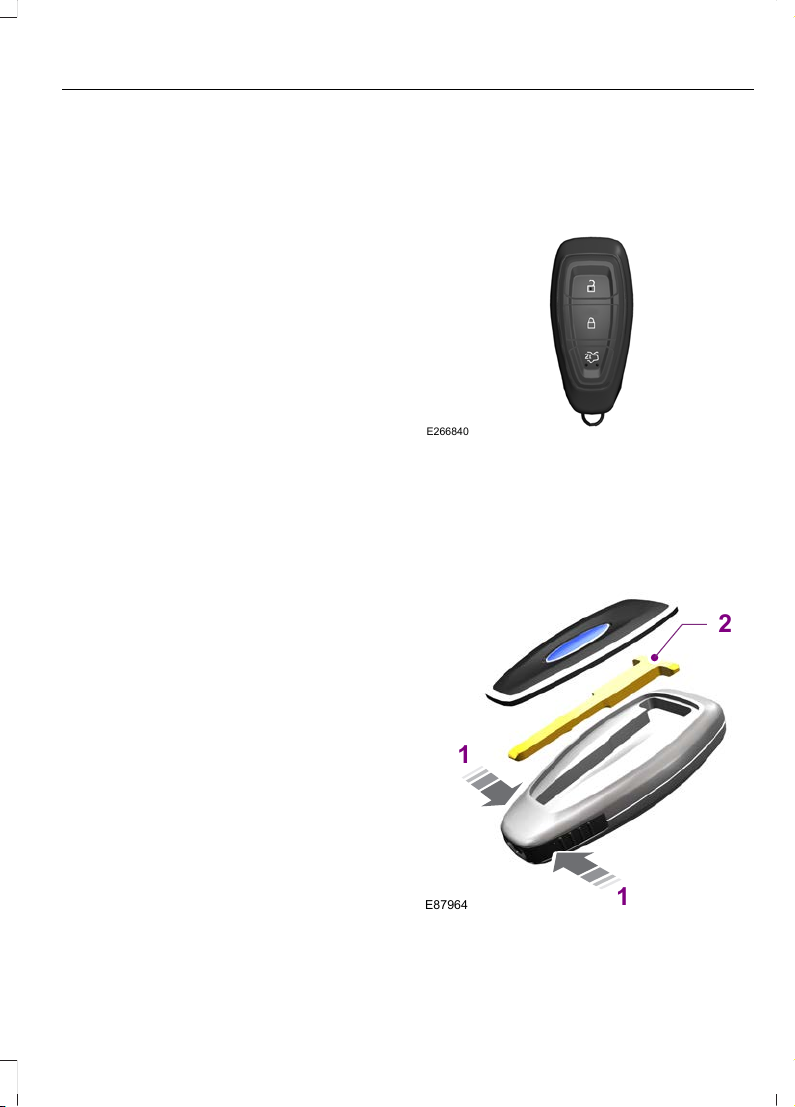
GENERAL INFORMATION ON RADIO FREQUENCIES
Note: Changes or modifications not
expressly approved by the party responsible
for compliance could void the user’s
authority to operate the equipment.
The typical operating range for your
transmitter is approximately 10 m (33 ft).
A decrease in operating range could be
caused by:
• weather conditions
• nearby radio towers
• structures around your vehicle
• other vehicles parked next to your
vehicle.
The radio frequency used by your remote
control can also be used by other radio
transmitters, for example amateur radios,
medical equipment, wireless headphones,
wireless remote controls, cell phones,
battery chargers and alarm systems. If the
frequencies are jammed, you will not be
able to use your remote control. You can
lock and unlock the doors with the key.
Note: Make sure your vehicle is locked
before leaving it unattended.
Note: If you are in range, the remote control
will operate if you press any button
unintentionally.
Note: The remote control contains sensitive
electrical components. Exposure to moisture
or impact may cause permanent damage.
REMOTE CONTROL - VEHICLES WITH: KEYLESS ENTRY
Passive Key
E266840
The key must be in your vehicle to switch
the ignition on and start the engine.
Removable Key Blade
The passive key also contains a removable
key blade that you can use to unlock your
vehicle.
E87964
2
1
1
39
Fiesta (CE1) Vehicles Built From: 06-01-2020 Vehicles Built Up To: 19-04-2020, CG3654en enGBR, Edition date: 201909, Second-Printing
Keys and Remote Controls
Page 44
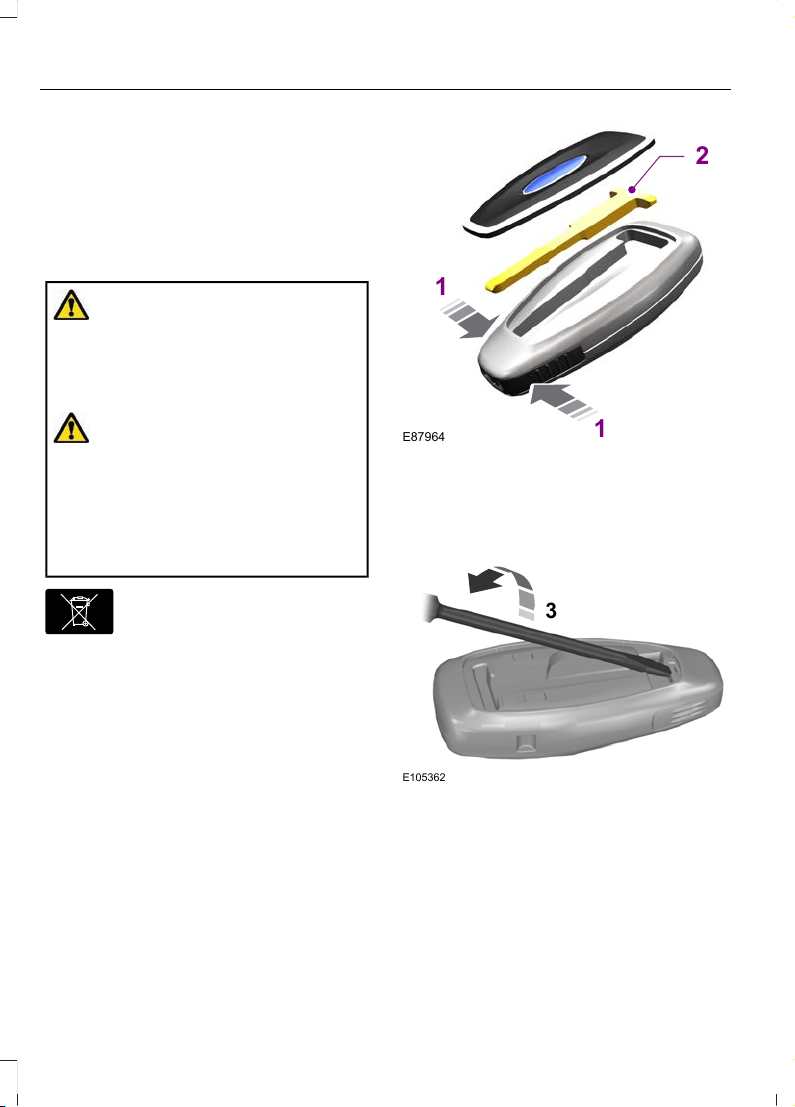
1. Press and hold the buttons on the
edges of the transmitter to release the
cover. Carefully remove the cover.
2. Remove the key blade from the
transmitter.
Changing the Remote Control
Battery
WARNING: Keep batteries away
from children to prevent ingestion.
Failure to follow this instruction could
result in personal injury or death. If
ingested, immediately seek medical
attention.
WARNING: If the battery
compartment does not securely close,
stop using the remote control and
replace it as soon as possible. In the
meantime, keep the remote control away
from children. Failure to follow this
instruction could result in personal injury
or death.
E107998
Make sure that you dispose of
old batteries in an
environmentally friendly way.
Seek advice from your local authority
about recycling old batteries.
The remote control uses one coin-type
three-volt lithium battery CR2032 or
equivalent.
E87964
2
1
1
1. Press and hold the buttons on the
edges of the transmitter to release the
cover. Carefully remove the cover.
2. Remove the key blade from the
transmitter.
E105362
3
3. Use a suitable tool, for example a
screwdriver, to carefully separate the
two halves of the remote control.
40
Fiesta (CE1) Vehicles Built From: 06-01-2020 Vehicles Built Up To: 19-04-2020, CG3654en enGBR, Edition date: 201909, Second-Printing
Keys and Remote Controls
Page 45
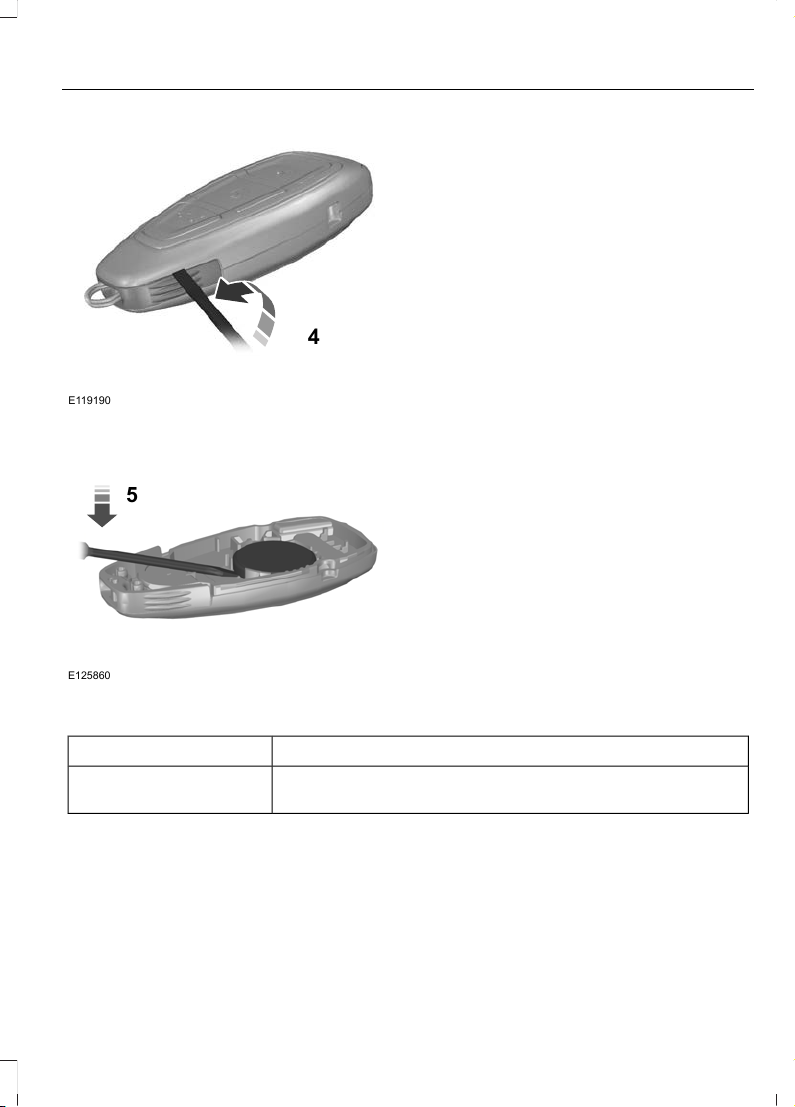
E119190
4
4. Twist the screwdriver in the position
shown to separate the two halves of
the remote control.
E125860
5
5. Carefully remove the battery with the
screwdriver.
Note: Do not touch the battery contacts or
the printed circuit board with the
screwdriver.
6. Insert a new battery with the + facing
downward.
Note: Do not wipe off any grease on the
battery terminals or on the back surface of
the circuit board.
7. Assemble the two halves of the remote
control.
8. Reinstall the key blade.
Locating Your Vehicle
Press the lock button on the key twice
within three seconds. The direction
indicators will flash.
Remote Control Information Messages
ActionMessage
Displays when the remote control battery requires replacing.Key battery low Replace
soon
41
Fiesta (CE1) Vehicles Built From: 06-01-2020 Vehicles Built Up To: 19-04-2020, CG3654en enGBR, Edition date: 201909, Second-Printing
Keys and Remote Controls
Page 46
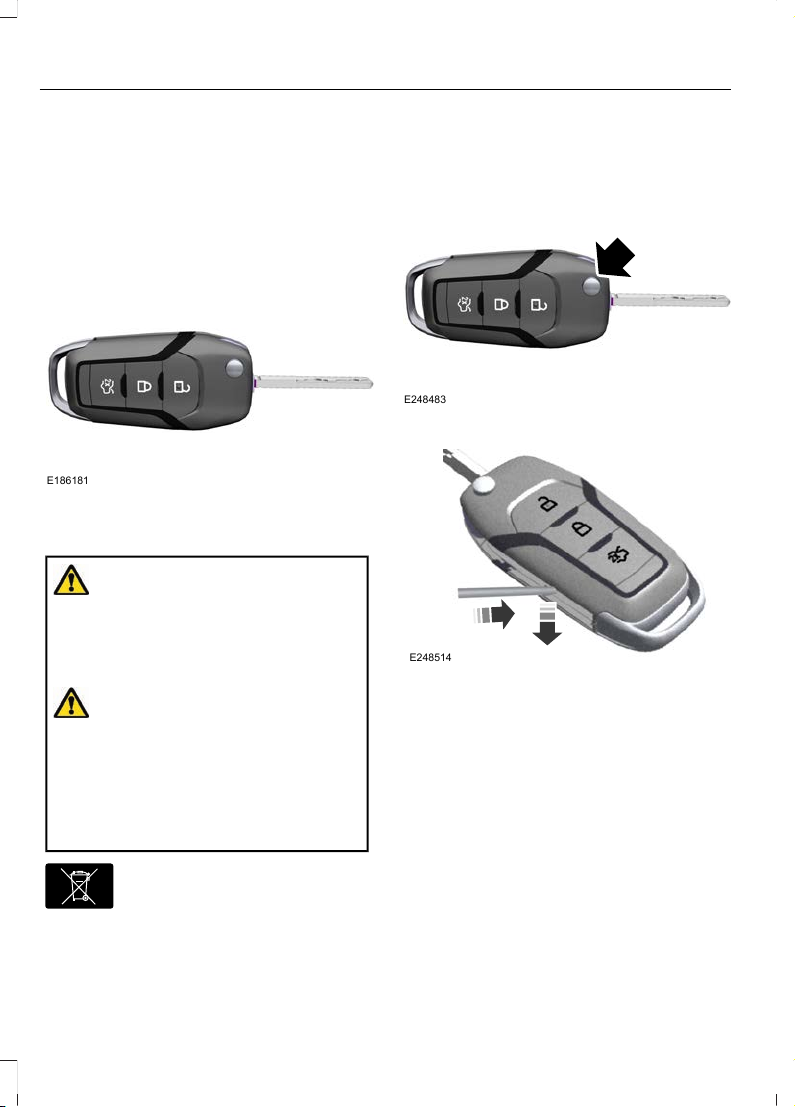
REMOTE CONTROL - VEHICLES WITH: REMOTE FLIP KEY
Use the key blade to start your vehicle and
unlock or lock the driver door from outside
your vehicle. The buttons on the key
operate the remote control function.
E186181
Changing the Remote Control
Battery
WARNING: Keep batteries away
from children to prevent ingestion.
Failure to follow this instruction could
result in personal injury or death. If
ingested, immediately seek medical
attention.
WARNING: If the battery
compartment does not securely close,
stop using the remote control and
replace it as soon as possible. In the
meantime, keep the remote control away
from children. Failure to follow this
instruction could result in personal injury
or death.
E107998
Make sure that you dispose of
old batteries in an
environmentally friendly way.
Seek advice from your local authority
about recycling old batteries.
The remote control uses one coin-type
three-volt lithium battery CR2032 or
equivalent.
E248483
1. Press the release button.
E248514
2. Insert a suitable tool, for example a
screwdriver, in the position shown and
gently push the clip.
3. Press the clip down to release the
battery cover.
42
Fiesta (CE1) Vehicles Built From: 06-01-2020 Vehicles Built Up To: 19-04-2020, CG3654en enGBR, Edition date: 201909, Second-Printing
Keys and Remote Controls
Page 47
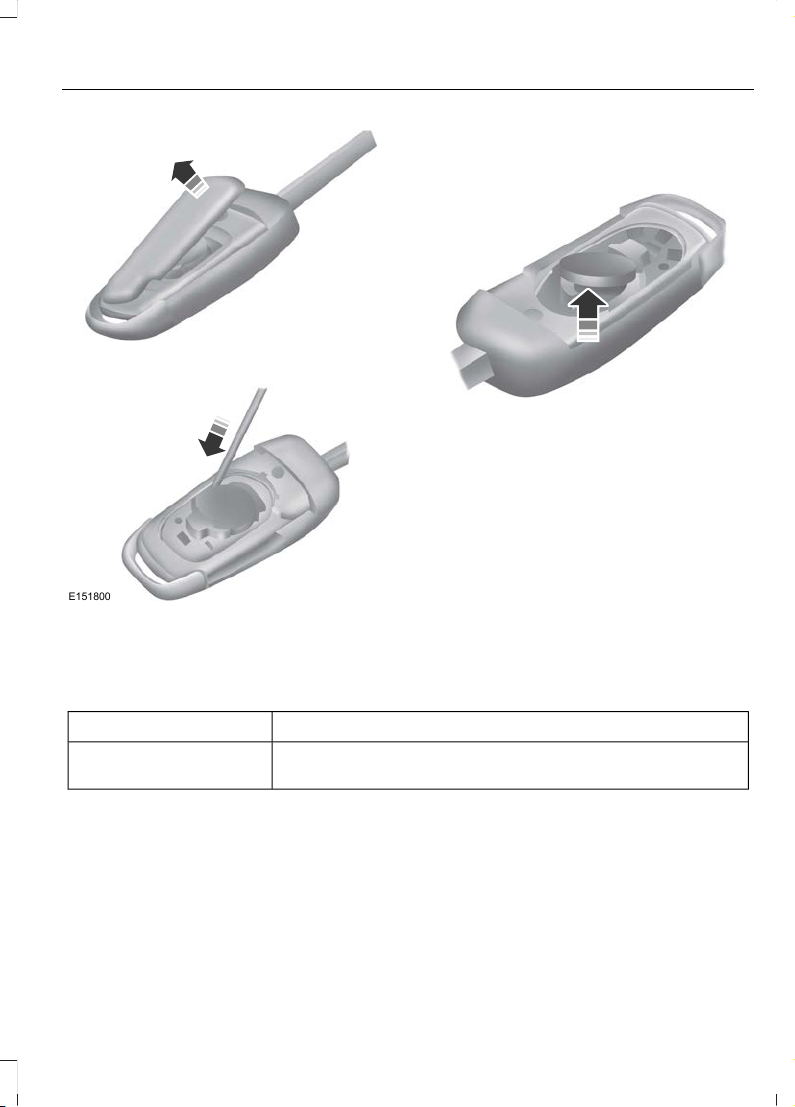
E151799
4. Carefully remove the cover.
E151800
5. Insert a screwdriver in the position
shown to release the battery.
Note: Do not touch the battery contacts or
the printed circuit board with the
screwdriver.
E151801
6. Remove the battery.
7. Insert a new battery with the + facing
upward.
Note: Do not wipe off any grease on the
battery terminals or on the back surface of
the circuit board.
8. Reinstall the battery cover.
Locating Your Vehicle
Press the lock button on the key twice
within three seconds. The direction
indicators will flash.
Remote Control Information Messages
ActionMessage
Displays when the remote control battery requires replacing.Key battery low Replace
soon
REPLACING A LOST KEY OR REMOTE CONTROL
You can purchase replacement keys or
remote controls from an authorized dealer.
Authorized dealers can program remote
controls for your vehicle.
To re-program the passive anti-theft
system see an authorized dealer.
43
Fiesta (CE1) Vehicles Built From: 06-01-2020 Vehicles Built Up To: 19-04-2020, CG3654en enGBR, Edition date: 201909, Second-Printing
Keys and Remote Controls
Page 48
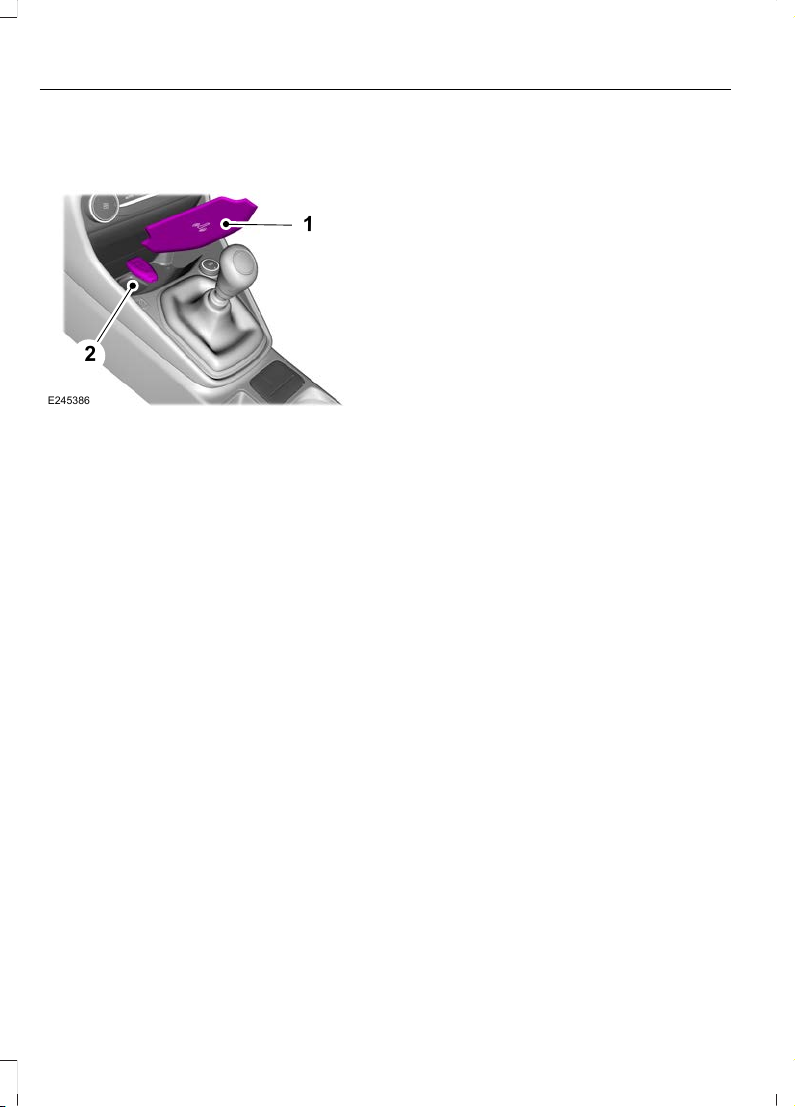
PASSIVE KEY BACKUP POSITION
1
2
E245386
1. Remove the rubber mat.
2. Place the passive key in the position
shown, with the buttons facing upward.
44
Fiesta (CE1) Vehicles Built From: 06-01-2020 Vehicles Built Up To: 19-04-2020, CG3654en enGBR, Edition date: 201909, Second-Printing
Keys and Remote Controls
Page 49
PRINCIPLE OF OPERATION
The system is designed to promote good
driving behaviors using keys that you have
programmed with some restricted settings.
MYKEY SETTINGS EXCLUDING: ST
Non-Configurable Settings
Seatbelt Reminder
The audio system mutes when the seatbelt
reminder turns on. The seatbelt reminder
cannot be switched off with a MyKey.
Early Low Fuel
The low fuel level warning lamp turns on
earlier.
Driving and Parking Aids
Parking aids, blind spot information system
and cross traffic alert turn on when you
start the engine and cannot be switched
off with a MyKey.
Pre-collision assist and lane keeping alert
turn on when you start the engine, but can
be switched off with a MyKey.
A new destination in the navigation system
can only be set using voice commands,
when using a MyKey and your vehicle is
moving.
Configurable Settings
You can configure the following settings
after creating a MyKey. See Creating a
MyKey (page 47).
Speed Limit
WARNING: Do not set MyKey
maximum speed limit to a limit that will
prevent the driver from maintaining a
safe speed considering posted speed
limits and prevailing road conditions. The
driver is always responsible to drive in
accordance with local laws and
prevailing conditions. Failure to do so
could result in accident or injury.
You can set a speed limit for your vehicle.
Warning messages appear in the
information display and a tone sounds if
your vehicle reaches the set speed. You
cannot override the set speed when using
a MyKey.
Speed Reminder
You can set a speed reminder for your
vehicle. Warning messages appear in the
information display and a tone sounds if
your vehicle exceeds the set speed.
Audio System Volume Limit
The audio system maximum volume is
reduced. A message appears in the
information display if you attempt to
exceed the volume limit. Automatic
volume control turns off.
Emergency Assistance
If you set emergency assistance to be
always on, it cannot be switched off with
a MyKey.
Do Not Disturb
If you set do not disturb to be always on,
it cannot be switched off with a MyKey.
Traction Control
If you set traction control to be always on,
it cannot be switched off with a MyKey.
45
Fiesta (CE1) Vehicles Built From: 06-01-2020 Vehicles Built Up To: 19-04-2020, CG3654en enGBR, Edition date: 201909, Second-Printing
MyKey™
Page 50
MYKEY SETTINGS - ST
Non-Configurable Settings
Seatbelt Reminder
The audio system mutes when the seatbelt
reminder turns on. The seatbelt reminder
cannot be switched off with a MyKey.
Early Low Fuel
The low fuel level indicator turns on earlier.
Driving and Parking Aids
Parking aids, blind spot information system
and cross traffic alert turn on when you
start the engine and cannot be switched
off with a MyKey.
Pre-collision assist and lane keeping alert
turn on when you start the engine, but can
be switched off with a MyKey.
A new destination in the navigation system
can only be set using voice commands,
when using a MyKey and your vehicle is
moving.
Selectable Drive Modes
You cannot select some drive modes when
using a MyKey.
Stability Control
You cannot switch stability control off
when using a MyKey.
Configurable Settings
You can configure the following settings
after creating a MyKey. See Creating a
MyKey (page 47).
Speed Limit
WARNING: Do not set MyKey
maximum speed limit to a limit that will
prevent the driver from maintaining a
safe speed considering posted speed
limits and prevailing road conditions. The
driver is always responsible to drive in
accordance with local laws and
prevailing conditions. Failure to do so
could result in accident or injury.
You can set a speed limit for your vehicle.
Warning messages appear in the
information display and a tone sounds if
your vehicle reaches the set speed. You
cannot override the set speed when using
a MyKey.
Speed Reminder
You can set a speed reminder for your
vehicle. Warning messages appear in the
information display and a tone sounds if
your vehicle exceeds the set speed.
Audio System Volume Limit
The audio system maximum volume is
reduced. A message appears in the
information display if you attempt to
exceed the volume limit. Automatic
volume control turns off.
Emergency Assistance
If you set emergency assistance to be
always on, it cannot be switched off with
a MyKey.
Do Not Disturb
If you set do not disturb to be always on,
it cannot be switched off with a MyKey.
46
Fiesta (CE1) Vehicles Built From: 06-01-2020 Vehicles Built Up To: 19-04-2020, CG3654en enGBR, Edition date: 201909, Second-Printing
MyKey™
Page 51
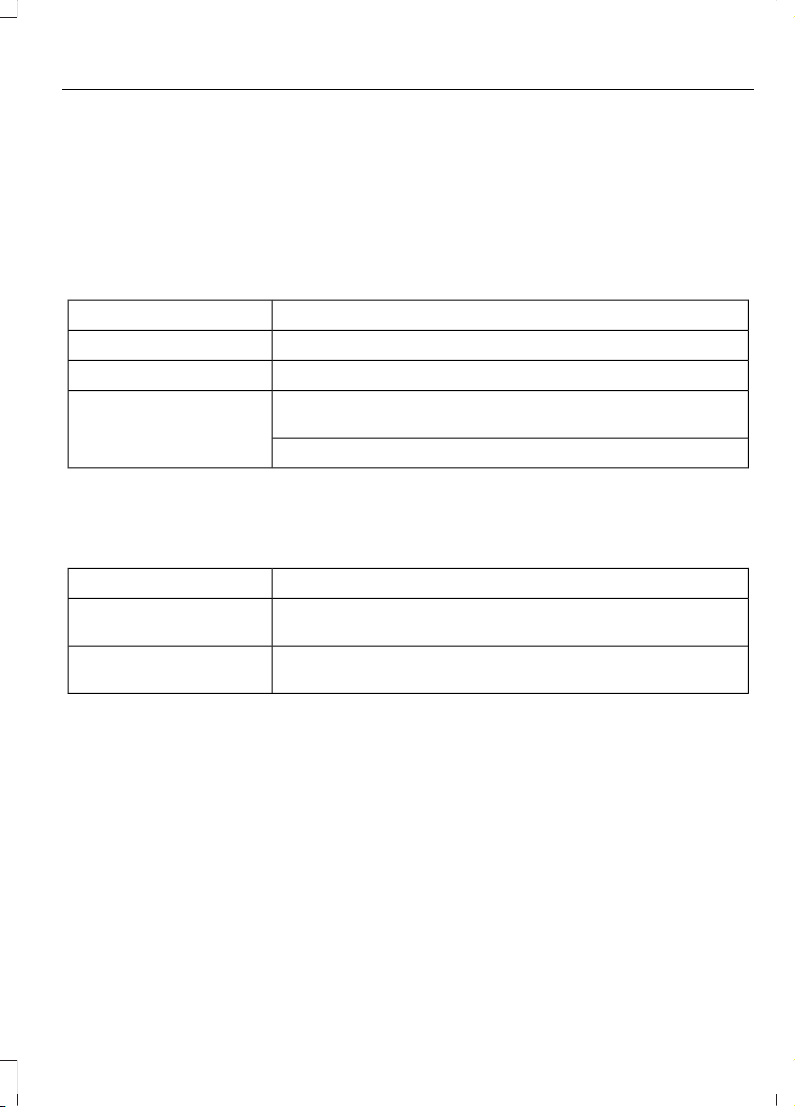
Stability Control
If you set stability control to be always on,
the reduced stability control mode cannot
be selected when using a MyKey. See
Using Stability Control (page 161).
CREATING A MYKEY VEHICLES WITHOUT: PUSH
BUTTON START
Switch the ignition on using an admin key.
To create a MyKey, use the information display controls on the steering wheel to
select the following:
ActionMenu Item
Press the menu button.Settings
Press the OK button.MyKey
Press and hold the OK button until a confirmation message
appears in the information display.
Create MyKey
Switch the ignition off.
Note: We recommend that you label this
key.
MyKey Information Messages
DescriptionMessage
Displays when trying to create a MyKey with a key already
designated as a MyKey.
Key is already a MyKey
Displays to confirm that the key is restricted after you switch
the ignition off.
Key restricted at next
start. Label this key
CREATING A MYKEY VEHICLES WITH: PUSH
BUTTON START
1. Place an admin key in the backup
position. See Passive Key Backup
Position (page 44).
2. Switch the ignition on.
47
Fiesta (CE1) Vehicles Built From: 06-01-2020 Vehicles Built Up To: 19-04-2020, CG3654en enGBR, Edition date: 201909, Second-Printing
MyKey™
Page 52
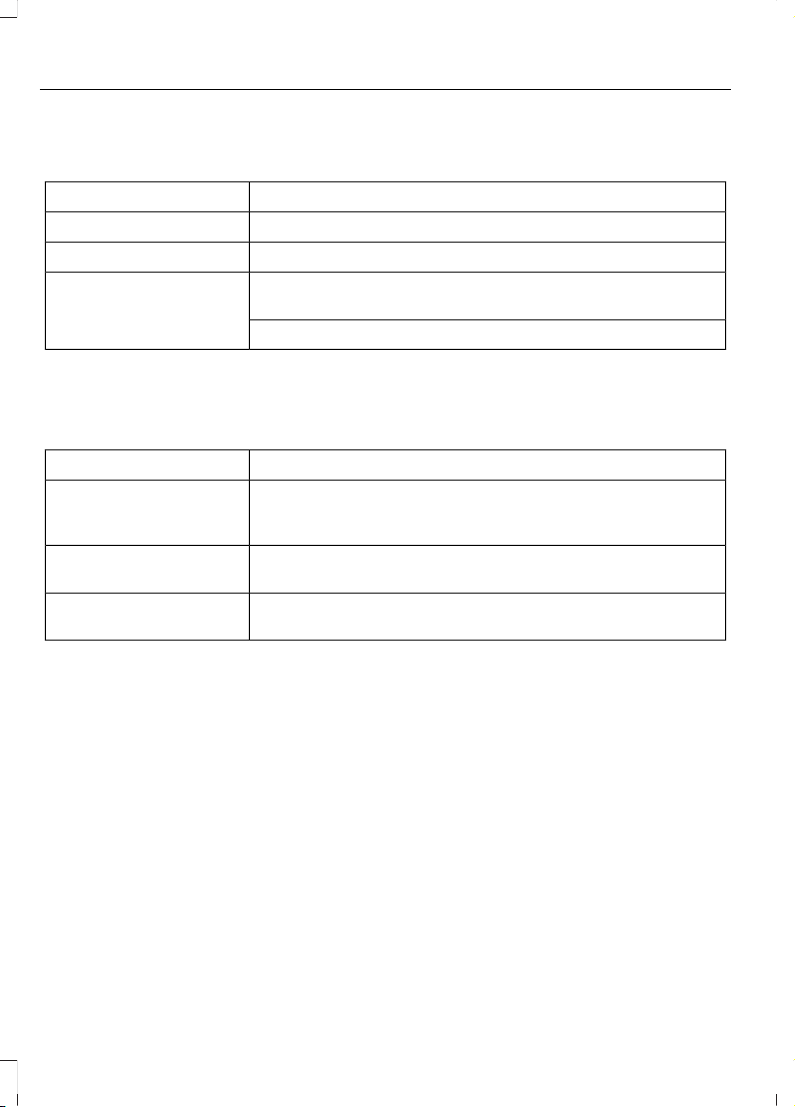
To create a MyKey, use the information display controls on the steering wheel to
select the following:
ActionMenu Item
Press the menu button.Settings
Press the OK button.MyKey
Press and hold the OK button until a confirmation message
appears in the information display.
Create MyKey
Switch the ignition off.
Note: We recommend that you label this
key.
MyKey Information Messages
DescriptionMessage
Displays when trying to create a MyKey and the key is not
placed in the backup position. See Passive Key Backup
Position (page 44).
Place key in backup location
Displays when trying to create a MyKey with a key already
designated as a MyKey.
Key is already a MyKey
Displays to confirm that the key is restricted after you switch
the ignition off.
Key restricted at next
start. Label this key
PROGRAMMING A MYKEY
You can only program MyKeys to the same
settings.
Switch the ignition on using an admin key.
48
Fiesta (CE1) Vehicles Built From: 06-01-2020 Vehicles Built Up To: 19-04-2020, CG3654en enGBR, Edition date: 201909, Second-Printing
MyKey™
Page 53
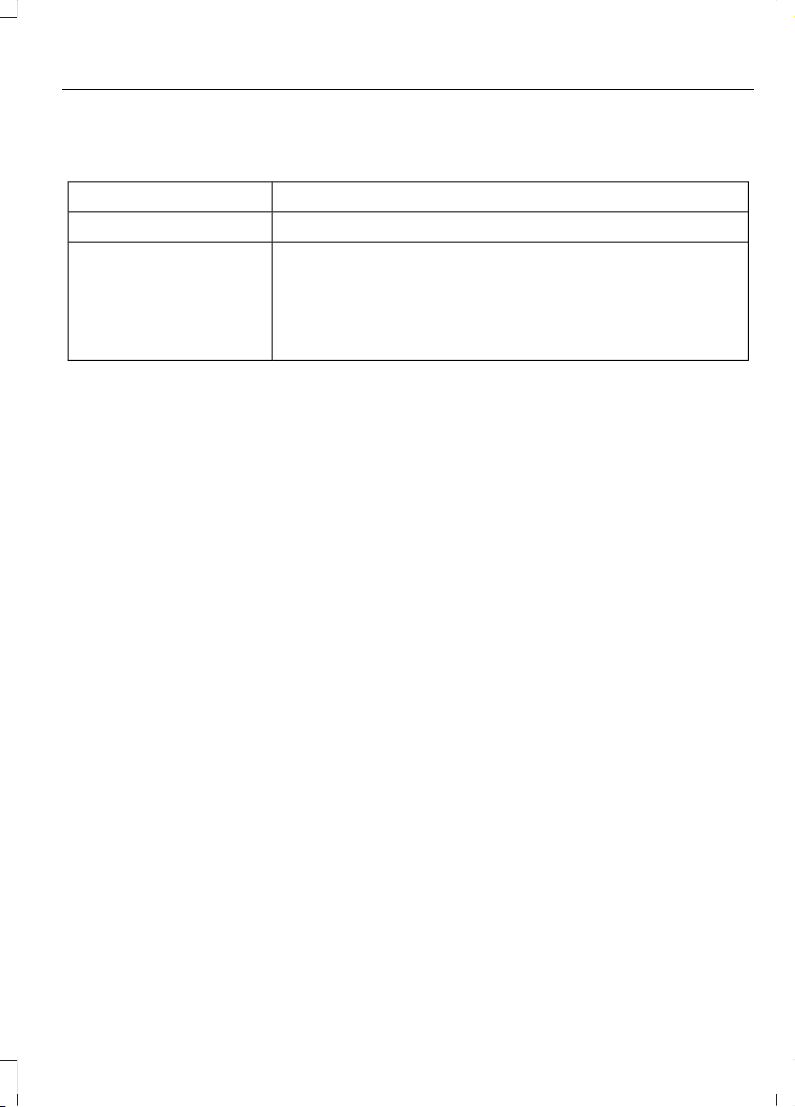
To program a MyKey, use the information display controls on the steering wheel
to select the following:
ActionMenu Item
Press the menu button.Settings
Press the OK button.MyKey
Select a setting and press the OK button.
Configure the setting.
Switch the ignition off.
49
Fiesta (CE1) Vehicles Built From: 06-01-2020 Vehicles Built Up To: 19-04-2020, CG3654en enGBR, Edition date: 201909, Second-Printing
MyKey™
Page 54
CLEARING ALL MYKEYS
When you clear all MyKeys, you remove all
restrictions and return all MyKeys to their
original admin key status.
Switch the ignition on using an admin key.
To clear all MyKeys, use the information display controls on the steering wheel
to select the following:
ActionMenu Item
Press the menu button.Settings
Press the OK button.MyKey
Press and hold the OK button until a confirmation message
appears in the information display.
Clear MyKeys
50
Fiesta (CE1) Vehicles Built From: 06-01-2020 Vehicles Built Up To: 19-04-2020, CG3654en enGBR, Edition date: 201909, Second-Printing
MyKey™
Page 55
CHECKING MYKEY SYSTEM STATUS
Switch the ignition on.
To find information about the distance traveled using a MyKey and also the number
of admin keys and MyKeys created for your vehicle, use the information display
controls on the steering wheel to select the following:
ActionMenu Item
Press the menu button.Settings
Press the OK button.MyKey
Press the OK button.MyKey info
51
Fiesta (CE1) Vehicles Built From: 06-01-2020 Vehicles Built Up To: 19-04-2020, CG3654en enGBR, Edition date: 201909, Second-Printing
MyKey™
Page 56

MYKEY – TROUBLESHOOTING
- VEHICLES WITHOUT: PUSH
BUTTON START
What is an admin key?
• An admin key is a key that has not been
created as a MyKey. See Creating a
MyKey (page 47).
Why can I not create a MyKey?
• The key used to switch the ignition on
is not an admin key.
• The key used to switch the ignition on
is the only admin key. There always has
to be at least one admin key.
Why can I not program a MyKey?
• The key used to switch the ignition on
is not an admin key.
• No MyKeys are created. See Creating
a MyKey (page 47).
Why can I not clear the MyKeys?
• The key used to switch the ignition on
is not an admin key.
• No MyKeys are created. See Creating
a MyKey (page 47).
Why does the MyKey distance not
accumulate?
• The key used to start the engine is an
admin key.
• No MyKeys are created. See Creating
a MyKey (page 47).
• The MyKeys have been cleared.
MYKEY – TROUBLESHOOTING
- VEHICLES WITH: PUSH
BUTTON START
What is an admin key?
• An admin key is a key that has not been
created as a MyKey. See Creating a
MyKey (page 47).
Why can I not create a MyKey?
• The admin key is not placed in the
backup position. See Passive Key
Backup Position (page 44).
• The key used to switch the ignition on
is not an admin key.
• The key used to switch the ignition on
is the only admin key. There always has
to be at least one admin key.
• The last MyKey was created without
switching the ignition off.
Why can I not program a MyKey?
• The admin key is not inside your
vehicle.
• The key used to switch the ignition on
is not an admin key.
• No MyKeys are created. See Creating
a MyKey (page 47).
Why can I not clear the MyKeys?
• The admin key is not inside your
vehicle.
• The key used to switch the ignition on
is not an admin key.
• No MyKeys are created. See Creating
a MyKey (page 47).
52
Fiesta (CE1) Vehicles Built From: 06-01-2020 Vehicles Built Up To: 19-04-2020, CG3654en enGBR, Edition date: 201909, Second-Printing
MyKey™
Page 57

Why does the MyKey distance not
accumulate?
• The key used to start the engine is an
admin key.
• An admin key and a MyKey are inside
your vehicle.
• No MyKeys are created. See Creating
a MyKey (page 47).
• The MyKeys have been cleared.
Why can I not start the engine with
a MyKey?
• An admin key and a MyKey are inside
your vehicle.
53
Fiesta (CE1) Vehicles Built From: 06-01-2020 Vehicles Built Up To: 19-04-2020, CG3654en enGBR, Edition date: 201909, Second-Printing
MyKey™
Page 58
LOCKING AND UNLOCKING
Power Door Locks
The power door lock control is on the driver
door.
E267112
Press the button to unlock all
doors.
E267111
Press the button to lock all
doors.
Door Lock Indicator
An LED on the power door lock control
illuminates when you lock the door. It
remains on for up to five minutes after you
switch the ignition off.
Door Lock Switch Inhibitor
When you electronically lock your vehicle,
the power door lock switch no longer
operates after 20 seconds. You must
unlock your vehicle with the remote
control, or switch the ignition on, to restore
function to these switches.
Remote Control
You can only use the remote control when
your vehicle is stationary.
Unlocking the Doors
E267112
Press the button to unlock all
doors. One long flash of the
direction indicators confirms that
your vehicle has unlocked.
Note: You can unlock the driver door with
the key. Use the key if the remote control
does not operate.
Note: When you leave your vehicle
unattended for several weeks, the remote
control turns off. Unlocking and starting
your vehicle enables the remote control.
Reprogramming the Unlocking
Function
You can program the unlocking function
so that only the driver door unlocks.
Press and hold the unlock and lock buttons
on the remote control simultaneously for
at least four seconds with the ignition off.
The direction indicators flash twice to
confirm the change.
To return to the original unlocking function,
repeat the process.
You can also change between the
unlocking modes in the information
display.
Central Locking
E267111
Press the button to lock all
doors. One short flash of the
direction indicators confirms that
your vehicle has locked.
Note: The locking only operates if the front
doors are fully closed.
Double Locking the Doors
WARNING: Do not use double
locking when passengers or animals are
inside your vehicle. The doors cannot be
unlocked or opened from the inside when
double locked.
Double locking is a theft protection feature
that prevents someone from opening the
doors from the inside. You can only double
lock the doors if all the doors are closed.
E267111
Press the button twice within
three seconds. Three short
flashes of the direction
indicators confirms that your vehicle has
double locked.
Note: If you unlock the liftgate, all other
doors return to the central locked state. You
must double lock your vehicle again.
54
Fiesta (CE1) Vehicles Built From: 06-01-2020 Vehicles Built Up To: 19-04-2020, CG3654en enGBR, Edition date: 201909, Second-Printing
Doors and Locks
Page 59
Mislock
This warns you that your vehicle has not
locked.
Vehicles with Anti-Theft Alarm
When you press the lock button once, the
direction indicators do not flash if:
• Any door or the liftgate is open.
• The hood is open.
The horn sounds when you press the lock
button on the remote control again within
three seconds and a door is open.
Vehicles without Anti-Theft Alarm
When you press the lock button on the
remote control once, the direction
indicators do not flash if:
• Any door or the liftgate is open.
The horn sounds when you press the lock
button on the remote control again within
three seconds and a door is open.
Switching Mislock On or Off
If you switch mislock off, the horn does not
sound if you press the lock button on the
remote control when a door is open.
To switch mislock on or off, use the information display controls on the steering
wheel to select the following:
ActionMenu Item
Press the menu button.Settings
Press the OK button.Vehicle settings
Press the OK button.Locks
Press the OK button.Mislock chirp
Auto Relock
The doors automatically relock if you do
not open a door within 45 seconds of
unlocking the doors with the remote
control. The door locks and the alarm
return to their previous state.
Autounlock
Autounlock unlocks all the doors when all
of the following occur:
• The ignition is on, all the doors are
closed and your vehicle is moving at a
speed greater than 20 km/h (12 mph).
• Your vehicle comes to a stop and you
switch the ignition off or to the
accessory position.
• You open the driver door within 10
minutes of switching the ignition off or
to the accessory position.
55
Fiesta (CE1) Vehicles Built From: 06-01-2020 Vehicles Built Up To: 19-04-2020, CG3654en enGBR, Edition date: 201909, Second-Printing
Doors and Locks
Page 60
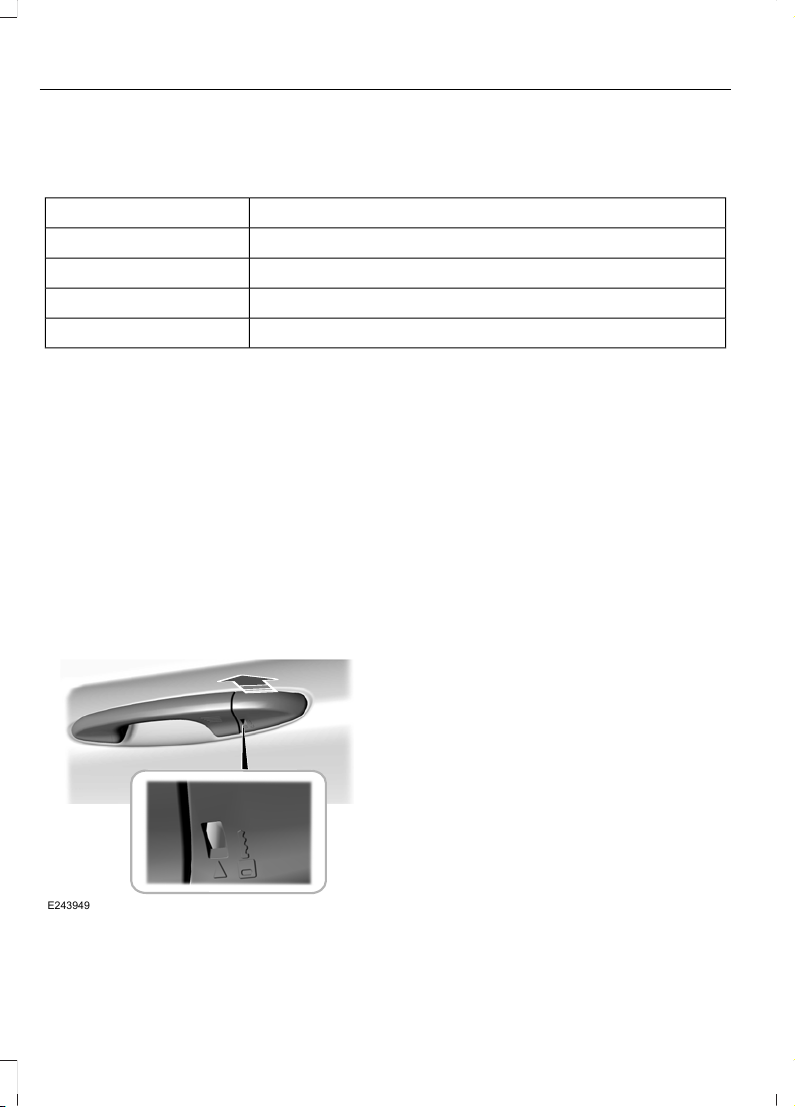
Switching Autounlock On or Off
To switch autounlock on or off, use the information display controls on the steering
wheel to select the following:
ActionMenu Item
Press the menu button.Settings
Press the OK button.Vehicle settings
Press the OK button.Locks
Press the OK button.Auto unlock
Locking and Unlocking the Doors
From Inside
Use the power door lock control on the
driver door to lock or unlock the doors from
inside.
Locking and Unlocking the Doors
with the Key Blade
Removing the Lock Cylinder Cap
1. Release the key blade from the remote
control. See Remote Control (page
39).
E243949
2. Fully insert the key blade into the key
slot.
3. Gently pull the lock cylinder cap toward
you to release it.
4. Insert the key blade into the lock
cylinder.
Locking the Doors
Turn the top of the key toward the front of
your vehicle.
Double Locking the Doors
Turn the top of the key toward the front of
your vehicle twice within three seconds.
Unlocking the Driver Door
Turn the top of the key toward the rear of
your vehicle.
Note: If the child safety locks are on and
you pull the interior handle, you only switch
off the emergency locking, not the child
safety lock. You can only open the doors
using the external door handle.
56
Fiesta (CE1) Vehicles Built From: 06-01-2020 Vehicles Built Up To: 19-04-2020, CG3654en enGBR, Edition date: 201909, Second-Printing
Doors and Locks
Page 61
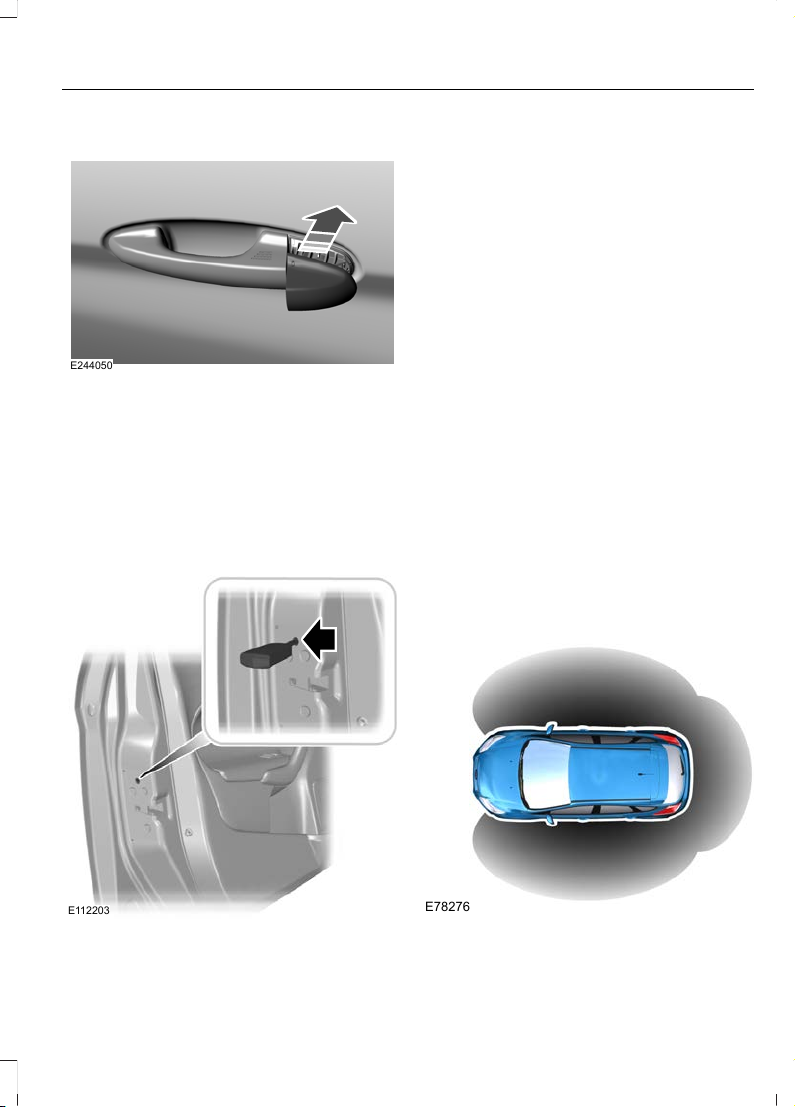
Reinstalling the Lock Cylinder Cap
E244050
1. Place the cap over the lock cylinder.
2. Push the cap forward until it clicks into
place. Make sure you have properly
installed the cap by trying to move it
rearward.
Locking and Unlocking the Doors
Individually with the Key Blade
Locking the Doors
E112203
If the central locking function does not
operate, lock the doors individually using
the key in the position shown.
Left-Hand Side
Turn counterclockwise to lock.
Right-Hand Side
Turn clockwise to lock.
Unlocking the Doors
If the central locking function does not
operate, unlock the driver door and then
unlock all other doors individually by
pulling the interior door handles.
Note: When the doors have been unlocked
using this method, the doors must be locked
individually until the central locking function
has been repaired.
KEYLESS ENTRY
Principle of Operation
The system allows you to lock and unlock
your vehicle without taking the passive key
out of your pocket or purse.
E78276
57
Fiesta (CE1) Vehicles Built From: 06-01-2020 Vehicles Built Up To: 19-04-2020, CG3654en enGBR, Edition date: 201909, Second-Printing
Doors and Locks
Page 62
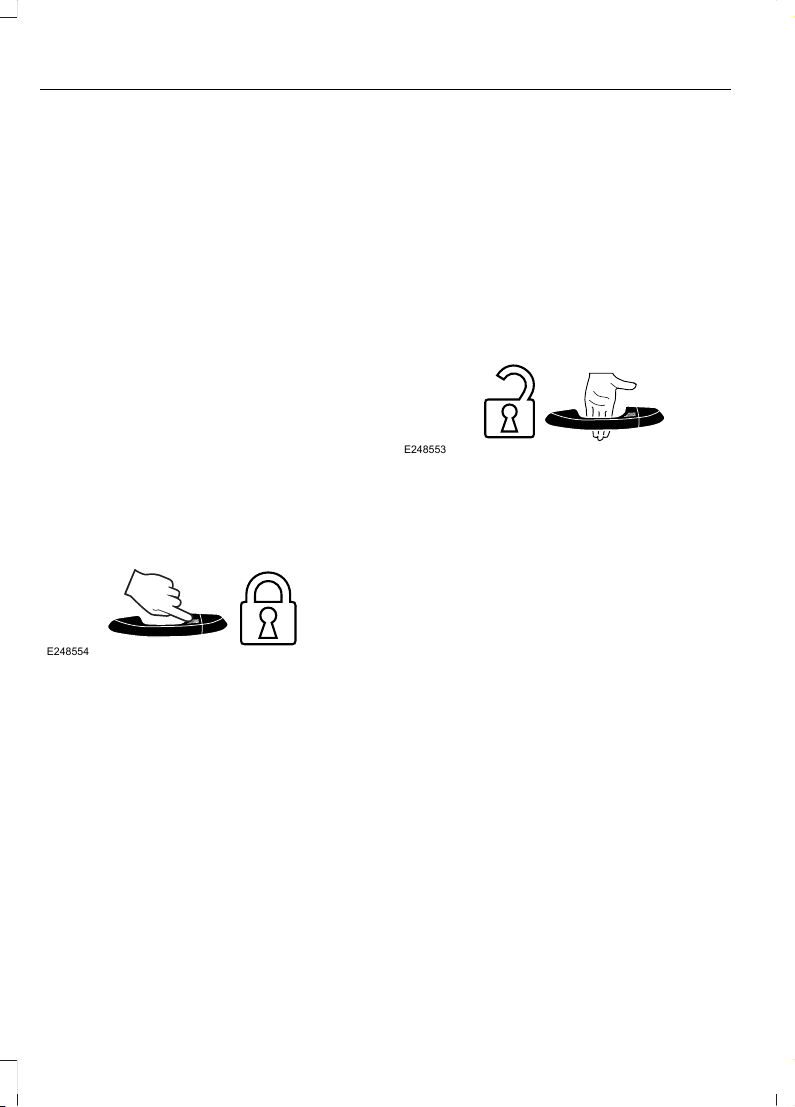
A valid passive key must be within one of
the three external detection ranges. These
are approximately 1.5 m (5 ft) from the
front door handles and the liftgate.
The system could not function if:
• The passive key remains stationary for
about a minute.
• The vehicle battery has no charge.
• The passive key battery has no charge.
• The passive key frequencies are
jammed.
• The passive key is too close to metal
objects or electronic devices, for
example keys or a cell phone.
If the system does not function, use the
remote control or the key blade to lock and
unlock your vehicle.
Locking the Doors
Lock sensors are on the top of the exterior
front door handles.
E248554
Touch a lock sensor once to lock your
vehicle and arm the alarm. The direction
indicators flash.
Touch a lock sensor twice within three
seconds to double lock your vehicle and
arm the alarm. The direction indicators
flash. Do not touch the unlock sensor on
the back of the door handle.
Keep the door handle clean to make sure
the system correctly operates.
Note: Your vehicle does not automatically
lock. If you do not touch a lock sensor your
vehicle remains unlocked.
After locking the doors with the lock
sensor, there is a brief delay before you can
unlock your vehicle. This delay lets you
pull the handle to make sure your vehicle
is locked. When the delay period is over,
you can unlock the doors again, provided
the passive key is within the respective
detection range.
Unlocking the Doors
Unlock sensors are on the back of the
exterior front door handles.
E248553
Touch the unlock sensor to unlock your
vehicle and disarm the alarm. The
direction indicators flash. Do not touch the
lock sensor on the top of the door handle.
Keep the door handle clean to make sure
the system correctly operates.
After unlocking the doors with the unlock
sensor, there is a brief delay before you can
lock your vehicle. When the delay period
is over, you can lock the doors again,
provided the passive key is within the
respective detection range.
Unlocking the Driver Door
You can program the unlocking function
so that only the driver door unlocks when
you touch the unlock sensor. See Locking
and Unlocking (page 54).
58
Fiesta (CE1) Vehicles Built From: 06-01-2020 Vehicles Built Up To: 19-04-2020, CG3654en enGBR, Edition date: 201909, Second-Printing
Doors and Locks
Page 63
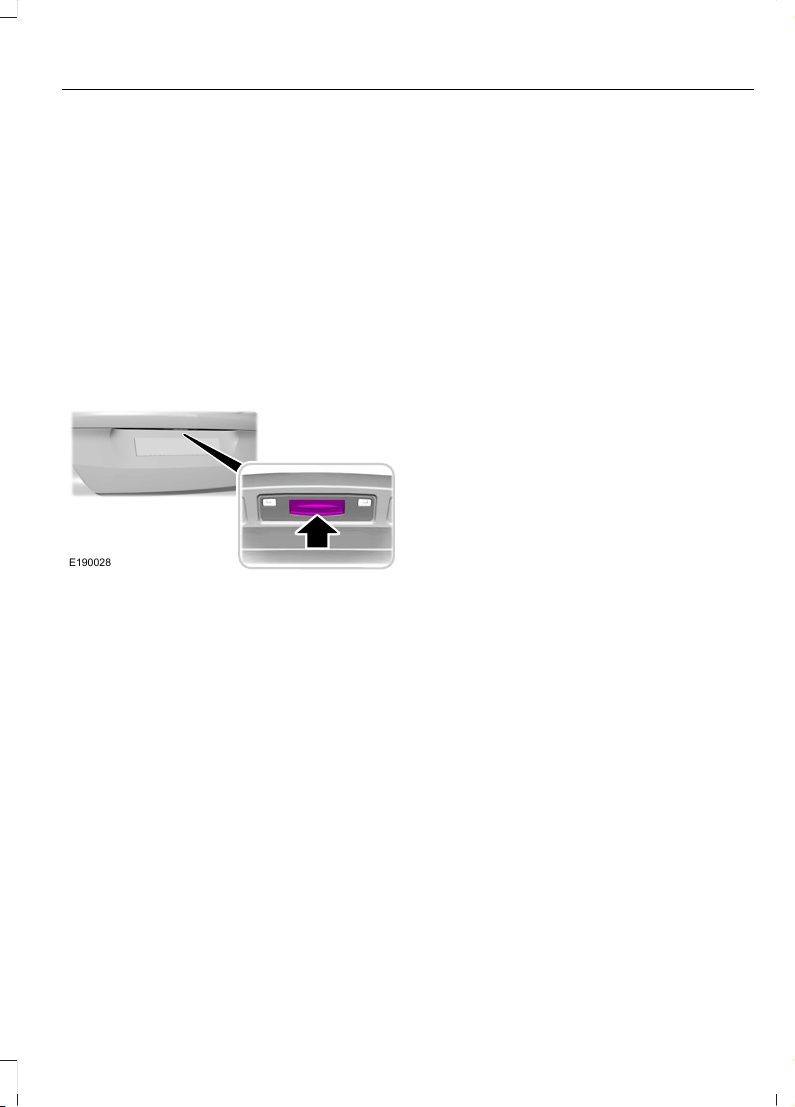
If you program the unlocking function so
that only the driver door unlocks, the
following occurs:
• If you open the driver door first, all
other doors remain locked. You can
unlock all of the other doors from inside
your vehicle using the power door lock
control on the driver door. You can
unlock individual doors by pulling the
interior door handles on those doors.
• If you open the front passenger door
first, all of the other doors and the
liftgate unlock.
Unlocking the Liftgate
E190028
Press the exterior release button hidden
above the license plate.
Note: A valid passive key must be within
the detection range.
Locking the Liftgate
The liftgate locks after you fully close it.
Smart Unlocks for Passive Keys
If you electronically lock your vehicle with
a rear door or the liftgate open, the system
searches for a passive key inside your
vehicle after you close the last door. If the
system detects a key, all doors unlock
indicating that a key is inside.
Note: Your vehicle locks if another passive
key is within the detection range after you
close the last door.
Deactivated Passive Keys
The system deactivates passive keys left
inside your vehicle when you lock it. You
cannot switch the ignition on using a
deactivated passive key. Press the unlock
button on the remote control to reactivate
a passive key.
Switching Keyless Entry On or Off
1. Using the information display controls
on the steering wheel, select Settings.
2. Select Vehicle settings.
3. Select Locks.
4. Select KeyFree.
59
Fiesta (CE1) Vehicles Built From: 06-01-2020 Vehicles Built Up To: 19-04-2020, CG3654en enGBR, Edition date: 201909, Second-Printing
Doors and Locks
Page 64
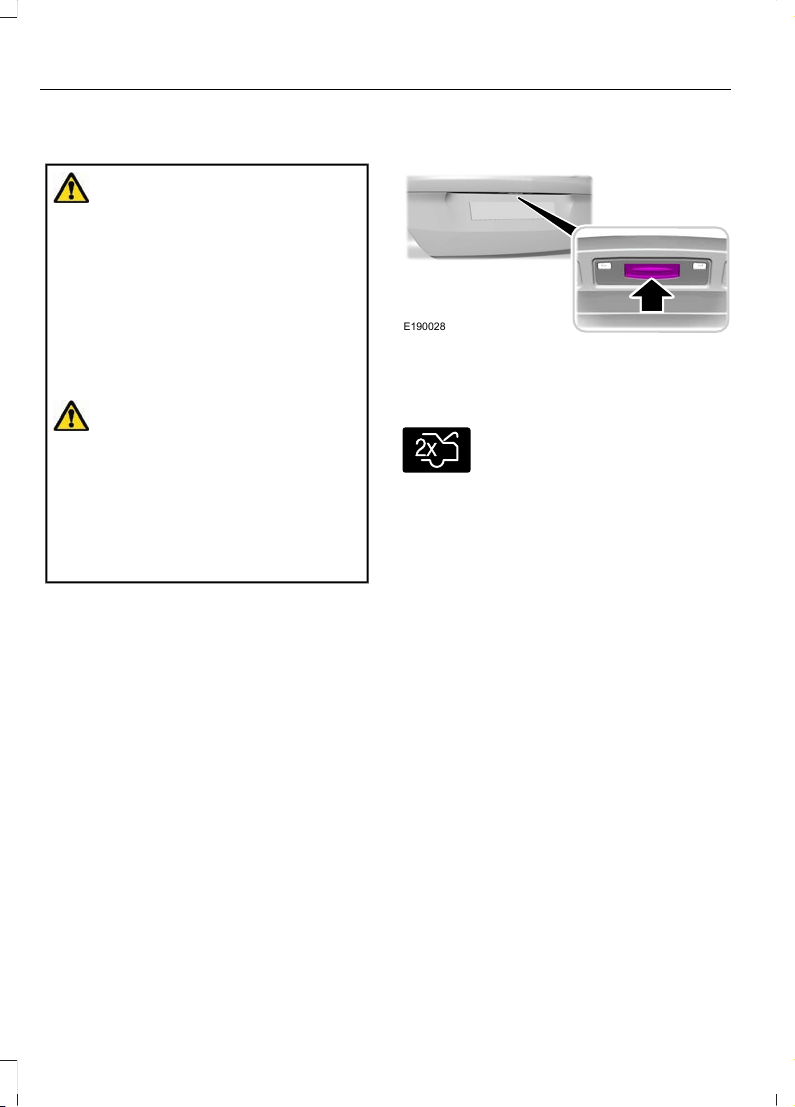
MANUAL LIFTGATE
WARNING: It is extremely
dangerous to ride in a cargo area, inside
or outside of a vehicle. In a crash, people
riding in these areas are more likely to be
seriously injured or killed. Do not allow
people to ride in any area of your vehicle
that is not equipped with seats and
seatbelts. Make sure everyone in your
vehicle is in a seat and properly using a
seatbelt. Failure to follow this warning
could result in serious personal injury or
death.
WARNING: Make sure to close and
latch the liftgate to prevent drawing
exhaust fumes into your vehicle. This will
also prevent passengers and cargo from
falling out. If you must drive with the
liftgate open, keep the vents or windows
open so outside air comes into your
vehicle. Failure to follow this warning
could result in serious personal injury.
Note: Be careful when opening or closing
the liftgate in a garage or other enclosed
area to avoid damaging the liftgate.
Note: Do not hang anything, for example
a bike rack, from the glass or liftgate. This
could damage the liftgate and its
components.
Note: Do not leave the liftgate open when
you are driving. This could damage the
liftgate and its components.
Opening the Liftgate Using the
Exterior Release Button
E190028
Press the exterior release button.
Opening the Liftgate Using the
Remote Control
E138630
Press the button twice within
three seconds.
Closing the Liftgate
A recessed grip or handle is inside the
liftgate to help with closing.
60
Fiesta (CE1) Vehicles Built From: 06-01-2020 Vehicles Built Up To: 19-04-2020, CG3654en enGBR, Edition date: 201909, Second-Printing
Liftgate
Page 65

PASSIVE ANTI-THEFT SYSTEM
Principle of Operation
The system prevents someone from
starting the engine with an incorrectly
coded key.
Note: Always take your keys and lock all
doors when leaving your vehicle.
Coded Keys
If you lose a key, you can obtain a
replacement from an authorized dealer. If
possible, provide them with the key
number from the tag provided with the
original keys. You can also obtain extra
keys from an authorized dealer.
Note: Have all of your remaining keys
erased and recoded if you lose a key. Have
replacement keys coded together with
recoding your remaining keys. Ask an
authorized dealer for more information.
Note: Metallic objects, electronic devices
or a second coded key on the same key
chain may result in vehicle starting
problems, especially if they are too close to
the key when starting your vehicle.
Arming the Engine Immobilizer
The engine immobilizer arms after a short
period of time when you switch the ignition
off.
Disarming the Engine Immobilizer
The engine immobilizer disarms when you
switch the ignition on with a correctly
coded key.
If you are unable to start your vehicle with
a correctly coded key, have your vehicle
checked by an authorized dealer.
ANTI-THEFT ALARM VEHICLES WITH: INTEGRAL
BATTERY
Perimeter Alarm
The perimeter alarm is a deterrent against
unauthorized access to your vehicle
through the doors and the hood.
Interior Sensors
The interior sensors are in the overhead
console.
When you lock your vehicle and arm the
alarm, the sensors are designed to detect
any movement inside your vehicle.
Note: Do not cover the interior sensors.
Inclination Sensors
When you lock your vehicle and arm the
alarm, the sensors are designed to detect
an attempt to raise your vehicle, for
example to remove a wheel or to tow it
away.
Battery Back-up Sounder (If Equipped)
The battery back-up sounder is an
additional alarm component that has its
own battery and sounds a siren if the
vehicle battery or the battery back-up
sounder is disconnected. The system arms
when you lock your vehicle and the ignition
is off.
Triggering the Alarm
When armed, the alarm is triggered in any
of the following ways:
• If someone opens a door, the liftgate
or the hood without a valid key or
remote control.
• If you switch your vehicle on without a
correctly coded key.
61
Fiesta (CE1) Vehicles Built From: 06-01-2020 Vehicles Built Up To: 19-04-2020, CG3654en enGBR, Edition date: 201909, Second-Printing
Security
Page 66

• If the interior sensors detect movement
inside your vehicle.
• If the inclination sensors detect an
attempt to raise your vehicle.
• If someone disconnects the vehicle
battery or the battery back-up sounder.
If the alarm is triggered, the alarm horn
sounds for 30 seconds and the hazard
flasher flashes for 5 minutes.
Any further attempts to carry out one of
the above sounds the alarm again.
Full and Reduced Guard
Full Guard
Full guard is the standard setting.
In full guard, the interior sensors are on
when you arm the alarm.
Note: Do not arm the alarm with full guard
if passengers, animals or other moving
objects are inside your vehicle.
Reduced Guard
In reduced guard, the inclination and
interior sensors are off when you arm the
alarm.
Selecting Full or Reduced Guard
You can select full or reduced guard using
the information display. See General
Information (page 91).
Ask on Exit (If Equipped)
You can set the information display to ask
you each time which level of guard you
wish to set. See General Information
(page 91).
Arming the Alarm
The alarm arms when you lock your vehicle
and the ignition is off. See Doors and
Locks (page 54).
Disarming the Alarm
Vehicles Without Keyless Entry
Disarm and silence the alarm by unlocking
the doors with the key and switching your
vehicle on with a correctly coded key, or by
unlocking the doors with the remote
control.
Vehicles with Keyless Entry
Perimeter Alarm
Disarm and silence the alarm by unlocking
the doors and switching your vehicle on, or
by unlocking the doors with the remote
control.
Note: A valid passive key must be within
the detection range of that door. See
Keyless Entry (page 57).
Category One Alarm
Disarm and silence the alarm by unlocking
the doors and switching your vehicle on, or
by unlocking the doors or the liftgate with
the remote control.
Note: A valid passive key must be within
the detection range of that door. See
Keyless Entry (page 57).
ANTI-THEFT ALARM VEHICLES WITH: PERIMETER
ALARM
The perimeter alarm is a deterrent against
unauthorized access to your vehicle
through the doors and the hood. If the
alarm is triggered, the alarm horn sounds
and the hazard flasher flashes.
Take all remote controls to an authorized
dealer if there is any potential alarm
problem with your vehicle.
62
Fiesta (CE1) Vehicles Built From: 06-01-2020 Vehicles Built Up To: 19-04-2020, CG3654en enGBR, Edition date: 201909, Second-Printing
Security
Page 67

Arming the Alarm
The alarm arms when you lock your
vehicle. See Doors and Locks (page 54).
Disarming the Alarm
Vehicles Without Keyless Entry
Disarm and silence the alarm by unlocking
the doors with the key and switching your
vehicle on with a correctly coded key, or by
unlocking the doors with the remote
control.
Vehicles With Keyless Entry
Disarm and silence the alarm by unlocking
the doors and switching your vehicle on, or
by unlocking the doors with the remote
control.
Note: A valid passive key must be within
the detection range of that door. See
Keyless Entry (page 57).
63
Fiesta (CE1) Vehicles Built From: 06-01-2020 Vehicles Built Up To: 19-04-2020, CG3654en enGBR, Edition date: 201909, Second-Printing
Security
Page 68

PRINCIPLE OF OPERATION
The front and rear doors have a retractable
plastic door edge protector that moves
into position when you open a door. The
door edge protector protects the door edge
from damage that could be caused by
contact with other objects.
Do not attempt to move the door edge
protector if it becomes stuck, or does not
move freely. Have your vehicle checked as
soon as possible.
Note: The door edge protector may be
moved gently out of position when the door
is open to allow access for cleaning. Make
sure that the door edge protector is
repositioned correctly otherwise it may not
retract when you attempt to close the door.
Note: Keep the door edges free from snow,
ice and large accumulations of dirt.
64
Fiesta (CE1) Vehicles Built From: 06-01-2020 Vehicles Built Up To: 19-04-2020, CG3654en enGBR, Edition date: 201909, Second-Printing
Door Edge Protection (If Equipped)
Page 69
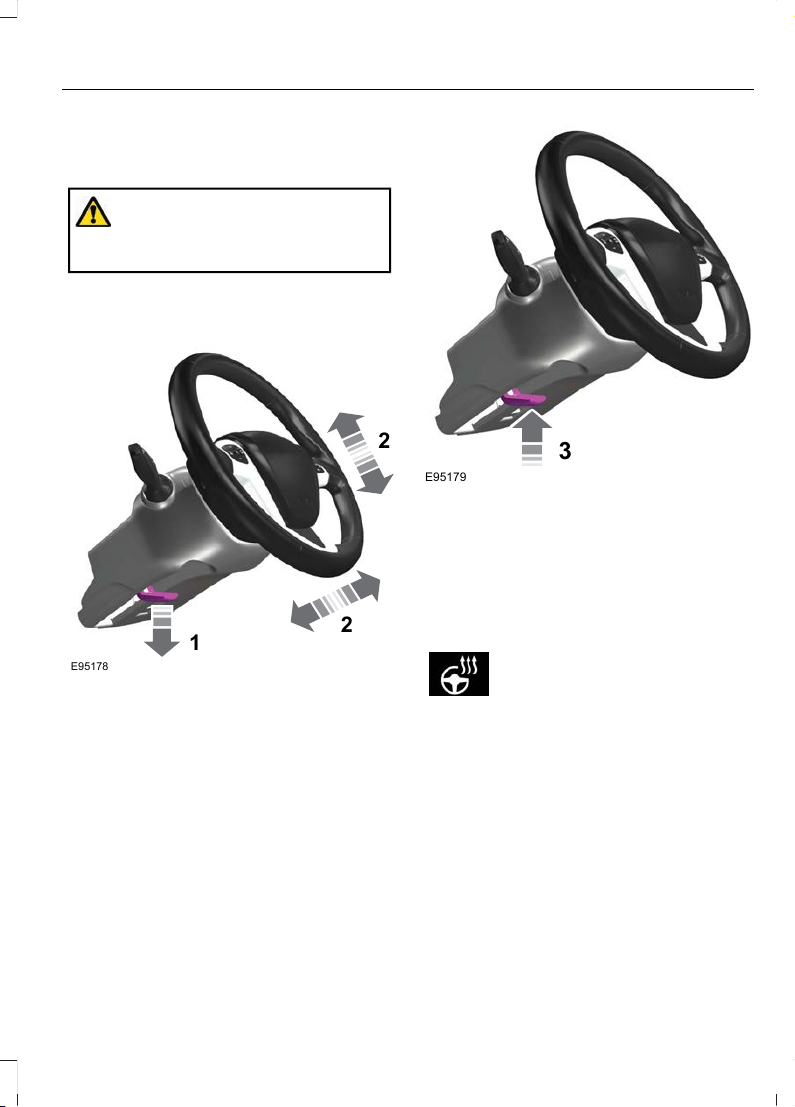
ADJUSTING THE STEERING WHEEL
WARNING: Do not adjust the
steering wheel when your vehicle is
moving.
Note: Make sure that you are sitting in the
correct position. See Sitting in the Correct
Position (page 114).
1
2
2
E95178
1. Unlock the steering column.
2. Adjust the steering wheel to the desired
position.
3
E95179
3. Lock the steering column.
HEATED STEERING WHEEL (IF
EQUIPPED)
The heated steering wheel button is on the
climate controls.
Press the button to switch the
heated steering wheel on and
off.
Note: You can use the heated steering
wheel only when the engine is running.
Note: The system uses a sensor and is
designed to control the temperature of the
steering wheel and to prevent it from
overheating.
Note: In warm temperatures, the steering
wheel quickly reaches its maximum
temperature and the system reduces the
current to the heating element. This could
cause you to think that the system has
stopped working but it has not. This is
normal.
65
Fiesta (CE1) Vehicles Built From: 06-01-2020 Vehicles Built Up To: 19-04-2020, CG3654en enGBR, Edition date: 201909, Second-Printing
Steering Wheel
Page 70
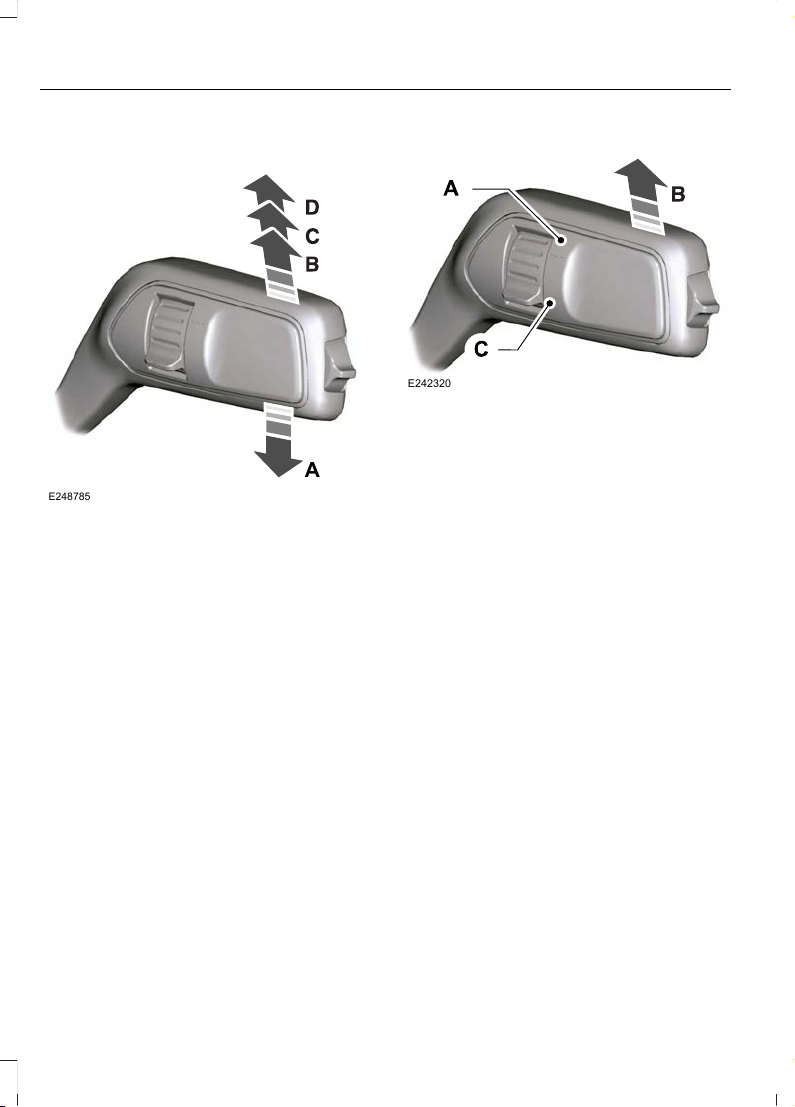
WINDSHIELD WIPERS
E248785
A
Single wipe.A
Intermittent wipe.B
Normal wipe.C
High-speed wipe.D
Note: Fully defrost the windshield before
you switch the windshield wipers on.
Note: Make sure that you switch the
windshield wipers off before entering a car
wash.
Note: If streaks or smears appear on the
windshield, clean the windshield and the
wiper blades. See Checking the Wiper
Blades (page 252). If that does not resolve
the issue, install new wiper blades. See
Changing the Front Wiper Blades (page
252).
Note: Do not operate the wipers on a dry
windshield. This may scratch the glass or
damage the wiper blades. Always use the
windshield washers before wiping a dry
windshield.
Intermittent Wipe
E242320
Short wipe interval.A
Intermittent wipe.B
Long wipe interval.C
Use the rotary control to adjust the
intermittent wipe interval.
Note: When your vehicle speed increases,
the interval between intermittent wipes may
decrease.
AUTOWIPERS (IF EQUIPPED)
Autowipers uses a rain sensor in the area
around the interior mirror. The wipers
operate when the rain sensor detects
water on the windshield in front of it. The
rain sensor continues to monitor the
amount of water and adjusts the speed of
the wipers.
You can switch autowipers on or off in the
information display.
Note: If you switch autowipers off in the
information display, the windshield wipers
operate in intermittent mode.
66
Fiesta (CE1) Vehicles Built From: 06-01-2020 Vehicles Built Up To: 19-04-2020, CG3654en enGBR, Edition date: 201909, Second-Printing
Wipers and Washers
Page 71
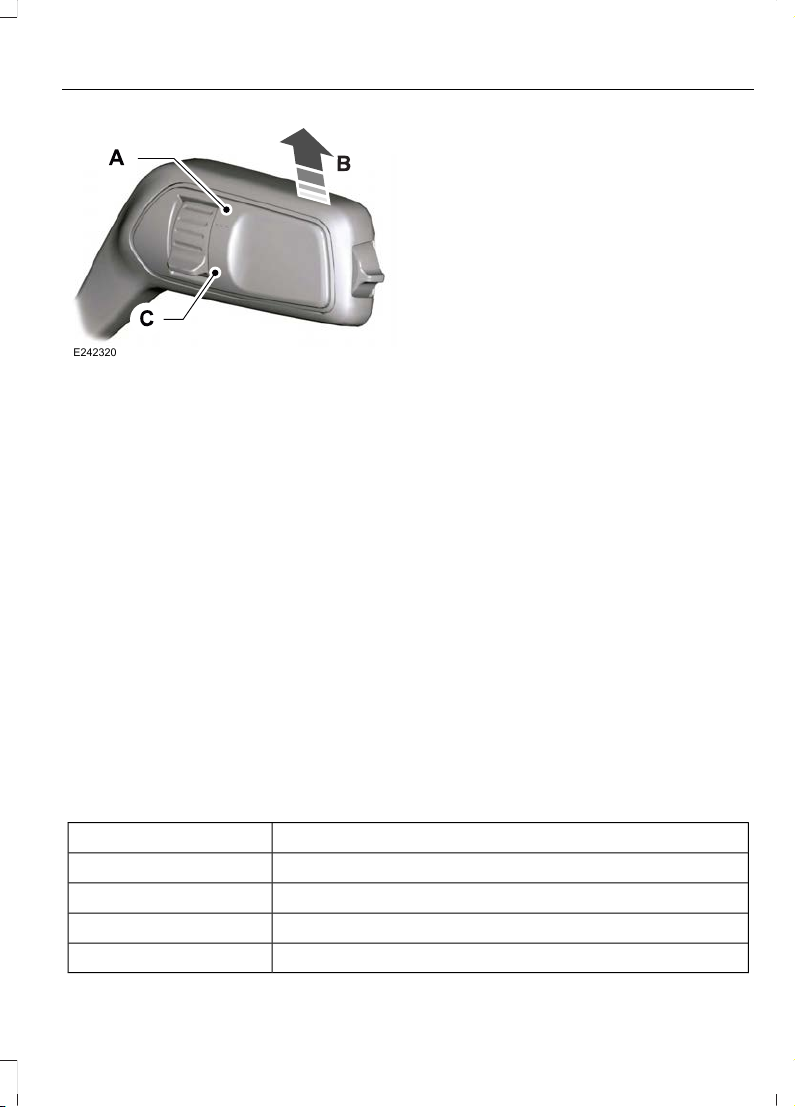
E242320
High sensitivity.A
Autowipers on.B
Low sensitivity.C
Move the wiper lever upward to the first
position to switch autowipers on.
Use the rotary control to adjust the
sensitivity of the autowipers. When you
select low sensitivity, the wipers operate
when the sensor detects a large amount
of water on the windshield. When you
select high sensitivity, the wipers operate
when the sensor detects a small amount
of water on the windshield.
Note: Keep the outside of the windshield
clean. The rain sensor is very sensitive and
the wipers may operate if dirt, mist or
insects hit the windshield.
If you leave autowipers on, it may not
operate when you switch the ignition on
during freezing temperatures. This is
because the system has deactivated the
rain sensor to prevent damage to the
windshield wipers. Defrost the windshield
before reactivating the rain sensor. You
can reactivate the rain sensor by moving
the rotary control or switching autowipers
off and on.
Note: Fully defrost the windshield before
you switch the windshield wipers on.
Note: Make sure that you switch the
windshield wipers off before entering a car
wash.
Wet or winter weather conditions could
cause unexpected wiping or smearing.
To keep the windshield clear:
• Lower the sensitivity of the autowipers
to reduce the amount of smearing on
the windshield.
• Switch autowipers off.
Note: If streaks or smears appear on the
windshield, clean the windshield and the
wiper blades. See Checking the Wiper
Blades (page 252). If that does not resolve
the issue, install new wiper blades. See
Changing the Front Wiper Blades (page
252).
Settings
To switch autowipers on or off, use the information display controls on the steering
wheel to select the following:
ActionMenu Item
Press the menu button.Settings
Press the OK button.Vehicle settings
Press the OK button.Wipers
Press the OK button.Rain sensing
67
Fiesta (CE1) Vehicles Built From: 06-01-2020 Vehicles Built Up To: 19-04-2020, CG3654en enGBR, Edition date: 201909, Second-Printing
Wipers and Washers
Page 72
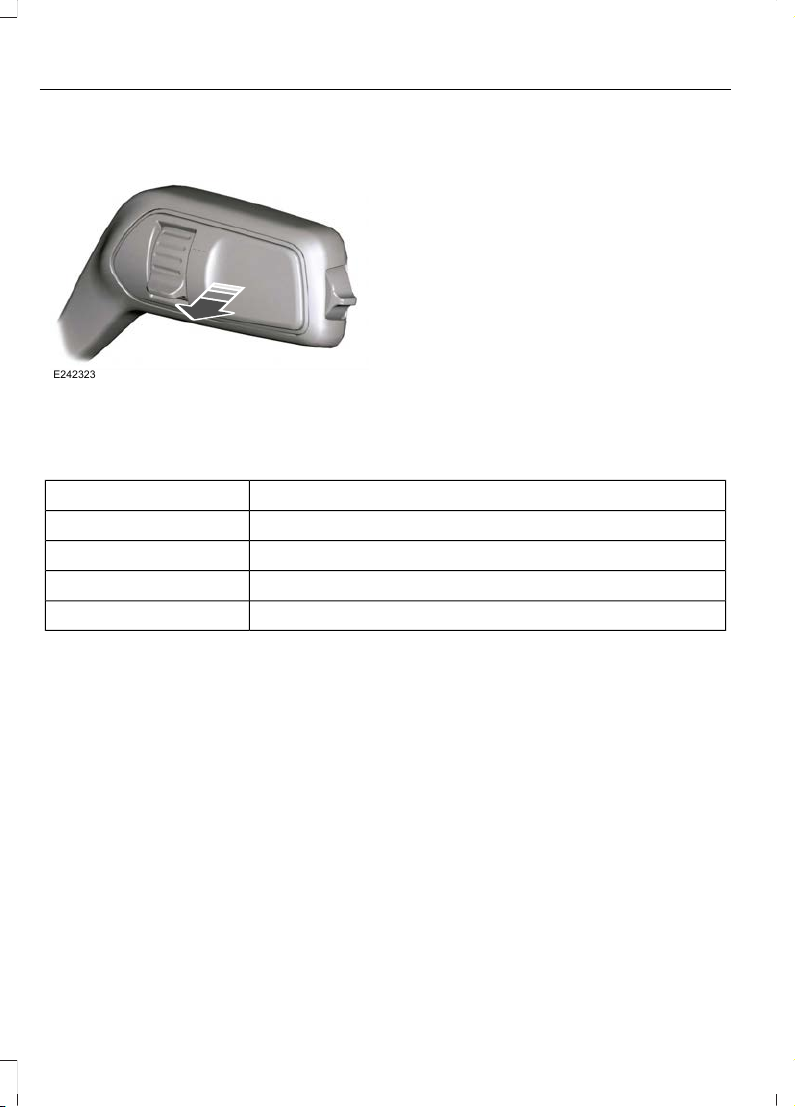
WINDSHIELD WASHERS
E242323
Pull the lever toward you to operate the
windshield washers. When you release the
lever, the wipers operate for a short time.
A courtesy wipe occurs a short time after
the wipers stop to clear any remaining
washer fluid.
You can switch courtesy wipe on or off in
the information display.
Note: Do not operate the washers when
the washer reservoir is empty. This could
cause the washer pump to overheat.
Settings
To switch courtesy wipe on or off, use the information display controls on the
steering wheel to select the following:
ActionMenu Item
Press the menu button.Settings
Press the OK button.Vehicle settings
Press the OK button.Wipers
Press the OK button.Courtesy wipe
68
Fiesta (CE1) Vehicles Built From: 06-01-2020 Vehicles Built Up To: 19-04-2020, CG3654en enGBR, Edition date: 201909, Second-Printing
Wipers and Washers
Page 73
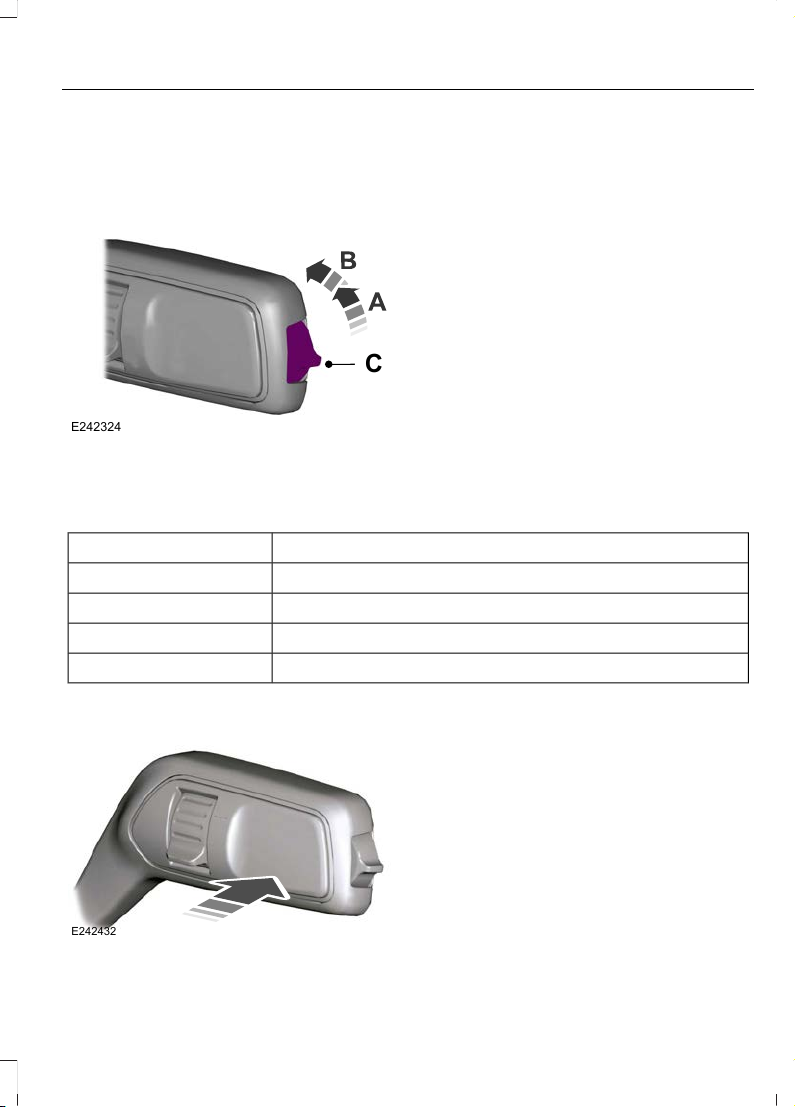
REAR WINDOW WIPER AND WASHERS (IF EQUIPPED)
Rear Window Wiper
E242324
C
Intermittent wipe.A
Continuous wipe.B
Rear window wiper off.C
The rear window wiper also turns on when
you shift into reverse and the windshield
wipers are on.
You can switch reverse wipe off in the
information display.
Note: Make sure that you switch the rear
window wiper off before entering a car
wash.
Settings
To switch reverse wipe on or off, use the information display controls on the
steering wheel to select the following:
ActionMenu Item
Press the menu button.Settings
Press the OK button.Vehicle settings
Press the OK button.Wipers
Press the OK button.Reverse wiper
Rear Window Washer
E242432
Push the lever away from you to operate
the rear window washer. When you release
the lever, the wiper operates for a short
time.
Note: Do not operate the washers when
the washer reservoir is empty. This could
cause the washer pump to overheat.
69
Fiesta (CE1) Vehicles Built From: 06-01-2020 Vehicles Built Up To: 19-04-2020, CG3654en enGBR, Edition date: 201909, Second-Printing
Wipers and Washers
Page 74
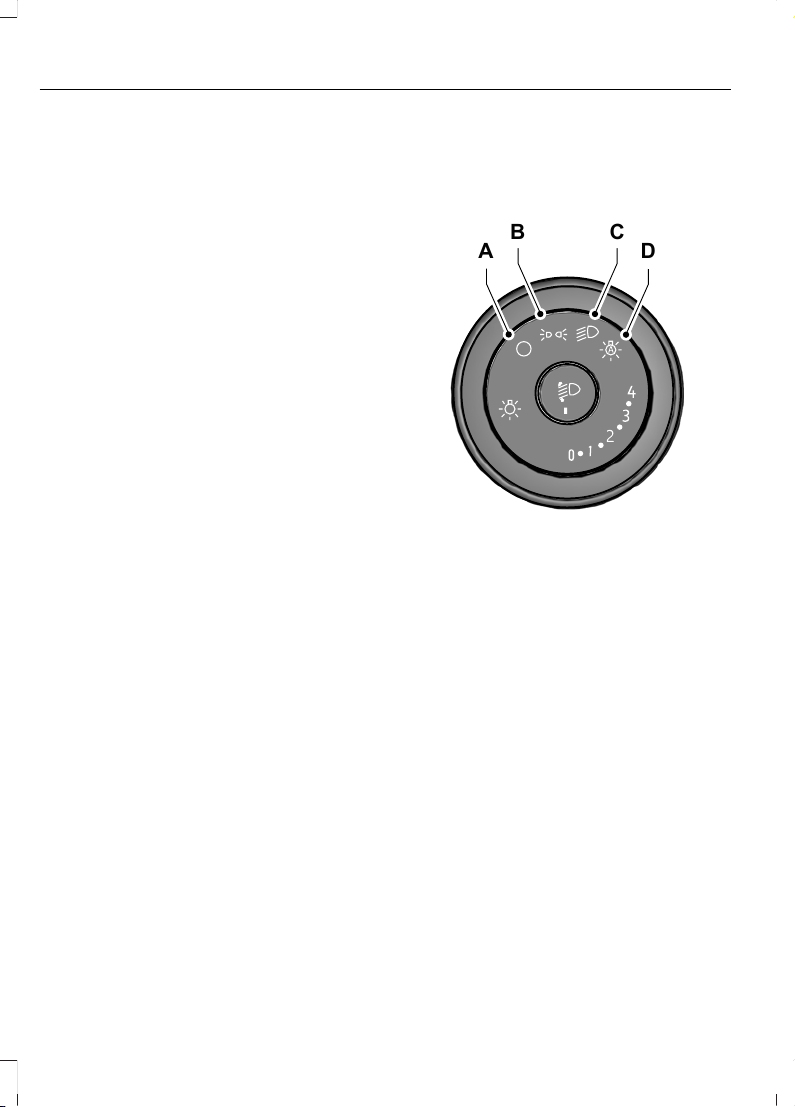
GENERAL INFORMATION
Condensation in the Exterior Front
Lamps and Rear Lamps
Exterior front lamps and rear lamps have
vents to accommodate normal changes
in air pressure.
Condensation can be a natural by-product
of this design. When moist air enters the
lamp assembly through the vents, there is
a possibility that condensation can occur
when the temperature is cold. When
normal condensation occurs, a fine mist
can form on the interior of the lens. The
fine mist eventually clears and exits
through the vents during normal operation.
Clearing time may take as long as 48 hours
under dry weather conditions.
Examples of acceptable condensation are:
• The presence of a fine mist (no streaks,
drip marks or large droplets).
• A fine mist covers less than 50% of the
lens.
Examples of unacceptable condensation
are:
• A water puddle inside the lamp.
• Streaks, drip marks or large droplets
present on the interior of the lens.
If you see any unacceptable condensation,
have your vehicle checked by an authorized
dealer.
LIGHTING CONTROL
Lighting Control Positions
E245649
A
D
CB
Lamps off.A
Parking lamps, instrument panel
lamps and license plate lamps.
B
Headlamps.C
Autolamps. See Autolamps
(page 72).
D
Switching All of the Parking Lamps
On
1. Switch the ignition off.
2. Set the lighting control to the parking
lamps position.
Note: Parking lamps could turn off to
prevent the vehicle battery from running out
of charge.
Switching the Left-Hand Side or
the Right-Hand Side Parking
Lamps On (If Equipped)
1. Switch the ignition off.
70
Fiesta (CE1) Vehicles Built From: 06-01-2020 Vehicles Built Up To: 19-04-2020, CG3654en enGBR, Edition date: 201909, Second-Printing
Lighting
Page 75
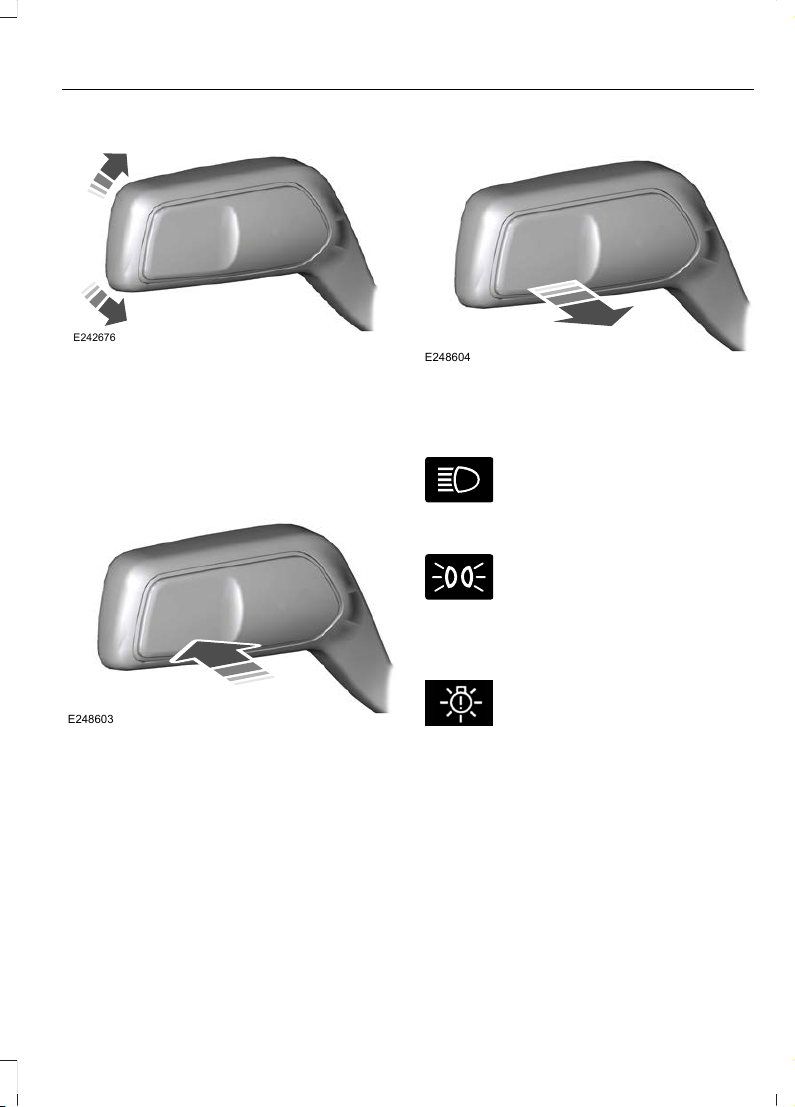
E242676
2. Push the lever up or down to switch the
parking lamps on.
Note: Parking lamps could turn off to
prevent the vehicle battery from running out
of charge.
Switching High Beam Headlamps
On and Off
E248603
Push the lever away from you to switch
the high beam headlamps on.
Push the lever forward again or pull the
lever toward you to switch the high beam
headlamps off.
Note: If you switch the autolamps on, you
cannot switch the high beam headlamps
on until the system turns the headlamps on.
Flashing High Beam Headlamps
E248604
Pull the lever toward you and release it to
flash the high beam headlamps.
High Beam Headlamp Indicator
It illuminates when you switch
the high beam headlamps on.
Lamps On Indicator
It illuminates when you switch
the low beam headlamps or the
side and rear lamps on.
Low Beam Headlamp Warning
Lamp (If Equipped)
E250683
If it illuminates when the low
beam headlamps are on, this
indicates that a low beam
headlamp bulb has failed.
Exterior Lamps On Audible
Warning
Sounds when you open the driver door and
the exterior lamps are on.
71
Fiesta (CE1) Vehicles Built From: 06-01-2020 Vehicles Built Up To: 19-04-2020, CG3654en enGBR, Edition date: 201909, Second-Printing
Lighting
Page 76
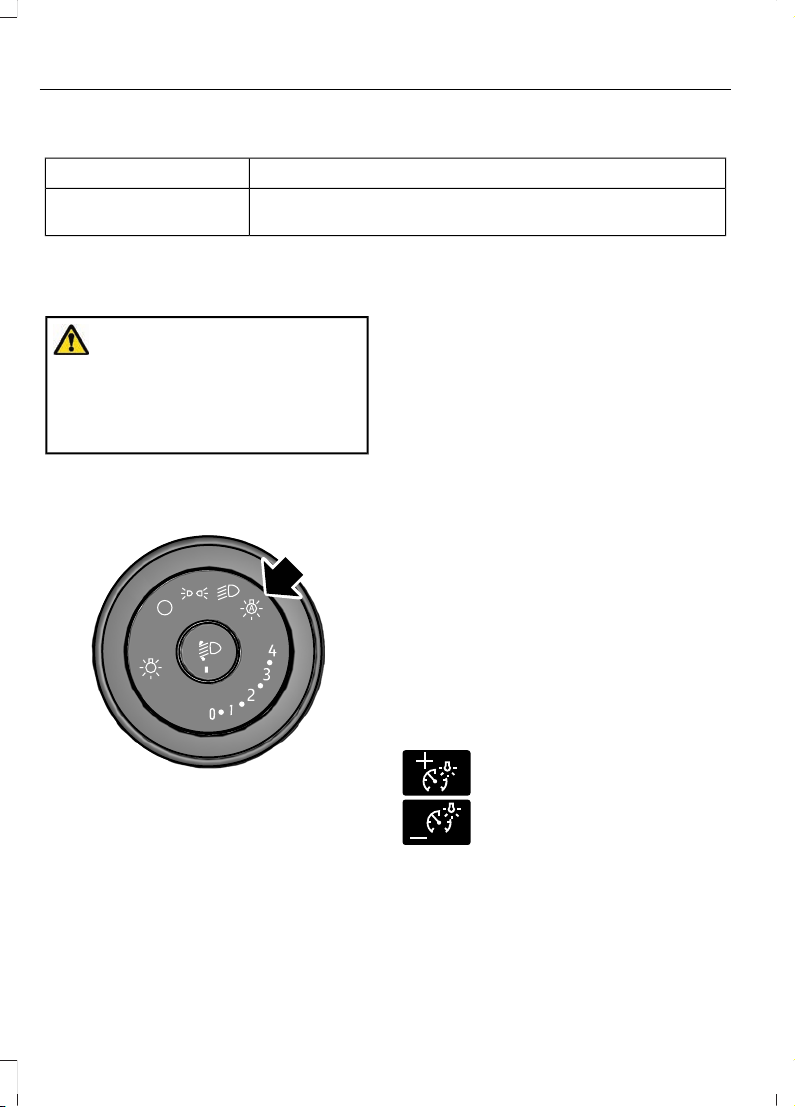
Headlamps Information Messages
DescriptionMessage
Displays if an electrical malfunction occurs with the headlamp
system. Have your vehicle checked as soon as possible.
Check adaptive headlamps See manual
AUTOLAMPS
WARNING: The system does not
relieve you of your responsibility to drive
with due care and attention. You may
need to override the system if it does not
turn the headlamps on in low visibility
conditions, for example daytime fog.
Autolamps turn the headlamps on in low
light situations or when the wipers operate.
E253316
Note: When you switch the autolamps on,
the headlamps turn on within 10 seconds of
switching the wipers on.
Note: If you switch the autolamps and the
autowipers on, the headlamps turn on when
the windshield wipers continuously operate.
Note: The headlamps turn off
approximately 60 seconds after you switch
the wipers off.
The headlamps remain on for a period of
time after you switch the ignition off. Use
the information display controls to adjust
the period of time that the headlamps
remain on.
Adjusting the Period of Time That
the Headlamps Remain On
1. Using the information display controls
on the steering wheel, select Settings.
2. Select Vehicle settings.
3. Select Lighting.
4. Select Headlamp delay.
5. Select a setting.
6. Press the OK button.
INSTRUMENT LIGHTING DIMMER
The instrument lighting dimmer buttons
are on the lighting control.
E291299
E291298
Repeatedly press one of the
buttons to adjust the brightness.
72
Fiesta (CE1) Vehicles Built From: 06-01-2020 Vehicles Built Up To: 19-04-2020, CG3654en enGBR, Edition date: 201909, Second-Printing
Lighting
Page 77
HEADLAMP EXIT DELAY
After you switch the ignition off, you can
switch the headlamps on by pulling the
direction indicator lever toward you. You
will hear a short tone. The headlamps will
switch off automatically after three
minutes with any door open or 30 seconds
after the last door has been closed. You
can cancel this feature by pulling the
direction indicator toward you again or
switching the ignition on.
AUTOMATIC HIGH BEAM CONTROL
WARNING: The system does not
relieve you of your responsibility to drive
with due care and attention. You may
need to override the system if it does not
turn the high beams on or off.
WARNING: You may need to
override the system when approaching
other road users.
WARNING: You may need to
override the system during inclement
weather.
WARNING: Do not use the system
in poor visibility, for example fog, heavy
rain, spray or snow.
WARNING: The system may not
switch the high beams off if the lights of
oncoming vehicles are hidden by
obstacles, for example guard rails.
WARNING: Inspect and replace the
windshield wiper blades regularly to
make sure the camera sensor has a clear
view. The windshield wiper blades must
be the correct length.
About Automatic High Beam
Control
The system is designed to turn the high
beams on if all of the following occur:
• You switched the system on in the
information display.
• You set the lighting control to the
autolamps position.
• The ambient light level is low enough
that high beams are required.
• There is no traffic in front of your
vehicle.
• Your vehicle speed is greater than
approximately 40 km/h (25 mph).
The system is designed to turn the high
beams off if any of the following occur:
• You switch the system off in the
information display.
• You set the lighting control to any
position except autolamps.
• You switch the rear fog lamps on.
• The ambient light level is high enough
that high beams are not required.
• The system detects an approaching
vehicle's headlamps or rear lamps.
• The system detects severe rain, snow
or fog.
• The system detects street lighting.
• The camera has reduced visibility.
• Your vehicle speed falls below
approximately 30 km/h (19 mph).
73
Fiesta (CE1) Vehicles Built From: 06-01-2020 Vehicles Built Up To: 19-04-2020, CG3654en enGBR, Edition date: 201909, Second-Printing
Lighting
Page 78
Switching Automatic High Beam Control On or Off
To switch the system on or off, use the information display controls on the steering
wheel to select the following:
ActionMenu Item
Press the menu button.Settings
Press the OK button.Vehicle settings
Press the OK button.Lighting
Press the OK button.Auto highbeam
Automatic High Beam Indicator
It illuminates to confirm when
the system is ready to assist.
Overriding Automatic High Beam
Control
Push the lever away from you to switch
between high beam and low beam.
Automatic High Beam Control Information Messages
DescriptionMessage
The camera has reduced visibility. Clean the windshield. If
the message continues to appear, have your vehicle checked
as soon as possible.
Front camera Low visibility Clean screen
The camera has malfunctioned. Wait a short period of time
for the camera to cool down. If the message continues to
appear, have your vehicle checked as soon as possible.
Front camera temporarily
not available
FRONT FOG LAMPS
Switching the Front Fog Lamps On
or Off
Only switch the front fog lamps on during
reduced visibility.
You can switch the front fog lamps on if
any of the following occur:
• You set the lighting control to the
parking lamps position.
• You set the lighting control to the
headlamps position.
• You set the lighting control to the
autolamps position and the headlamps
are on.
The front fog lamp button is on the lighting
control.
Press the button to switch the
front fog lamps on or off.
74
Fiesta (CE1) Vehicles Built From: 06-01-2020 Vehicles Built Up To: 19-04-2020, CG3654en enGBR, Edition date: 201909, Second-Printing
Lighting
Page 79
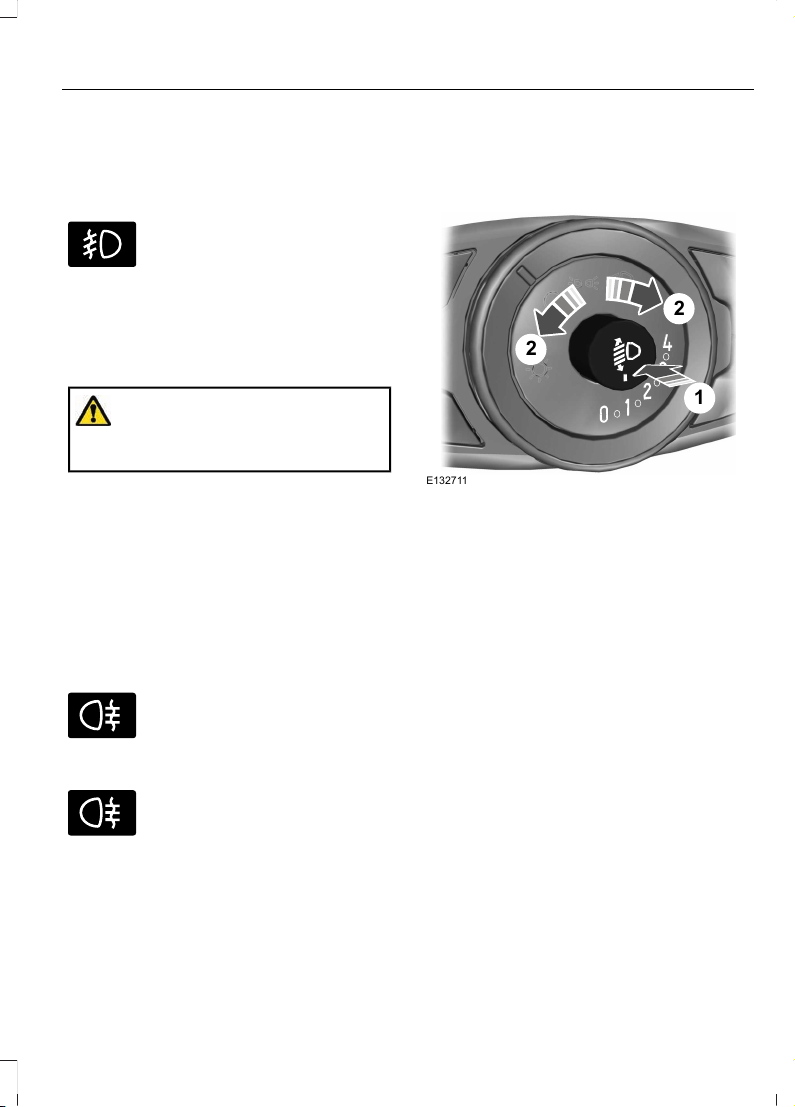
Note: The brightness of the daytime running
lamps may decrease when the front fog
lamps are switched on.
Front Fog Lamp Indicator
It illuminates when you switch
the front fog lamps on.
REAR FOG LAMPS
Switching the Rear Fog Lamps On
or Off
WARNING: Do not use the rear fog
lamps when it is raining or snowing and
visibility is more than 50 m (164.0 ft).
You can switch the rear fog lamps on if any
of the following occur:
• You switched the front fog lamps on.
• You set the lighting control to the
headlamps position.
• You set the lighting control to the
autolamps position and the headlamps
are on.
The rear fog lamp button is on the lighting
control.
E67040
Press the button to switch the
rear fog lamps on or off.
Rear Fog Lamp Indicator
E67040
It illuminates when you switch
the rear fog lamps on.
HEADLAMP LEVELING
To adjust the level of the headlamp
beams, do the following:
E132711
1
2
2
1. Press to release the control.
2. Rotate the control in accordance with
your vehicle load to prevent you from
distracting other road users when the
headlamps are on.
Note: Set the control to zero when your
vehicle is unloaded.
Note: Set the headlamp beams to give
between 35–100 m (115–328 ft) of road
surface illumination when your vehicle is
partially or fully loaded.
3. Press to close the control.
75
Fiesta (CE1) Vehicles Built From: 06-01-2020 Vehicles Built Up To: 19-04-2020, CG3654en enGBR, Edition date: 201909, Second-Printing
Lighting
Page 80
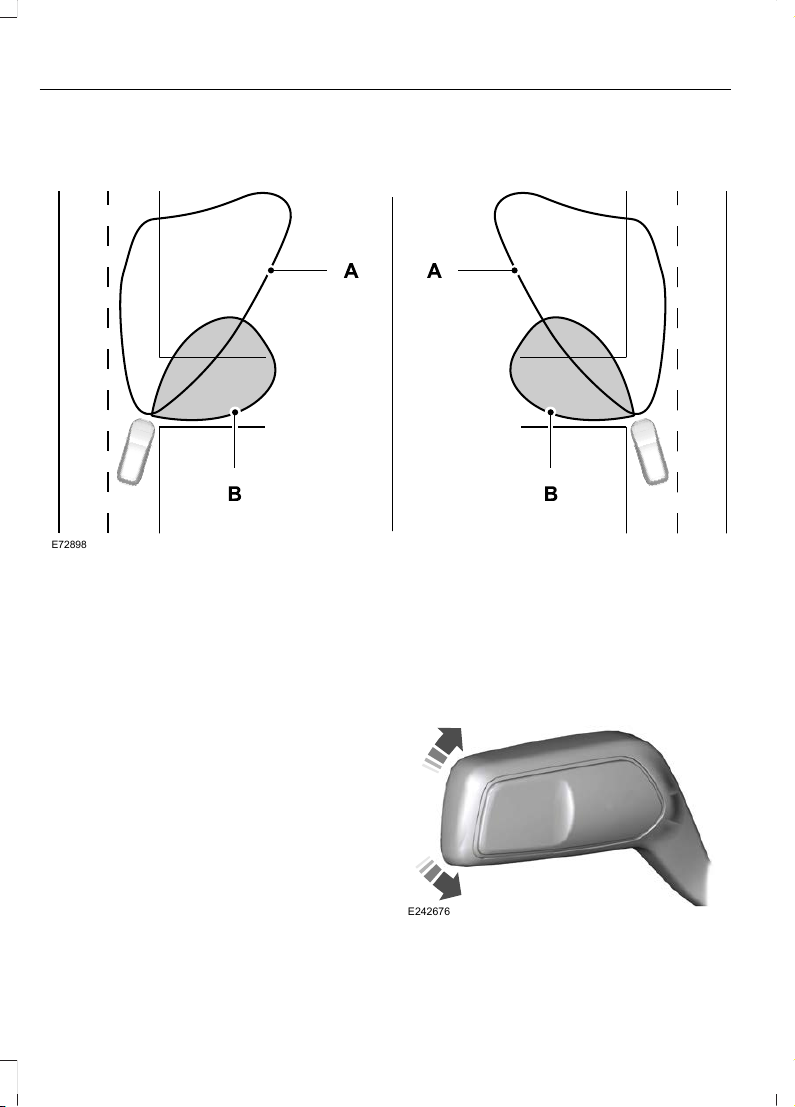
CORNERING LAMPS
E72898
Headlamp beam.A
Cornering lamp beam.B
The cornering lamps illuminate the inside
of a corner when you are turning the
steering wheel.
DIRECTION INDICATORS
E242676
76
Fiesta (CE1) Vehicles Built From: 06-01-2020 Vehicles Built Up To: 19-04-2020, CG3654en enGBR, Edition date: 201909, Second-Printing
Lighting
Page 81
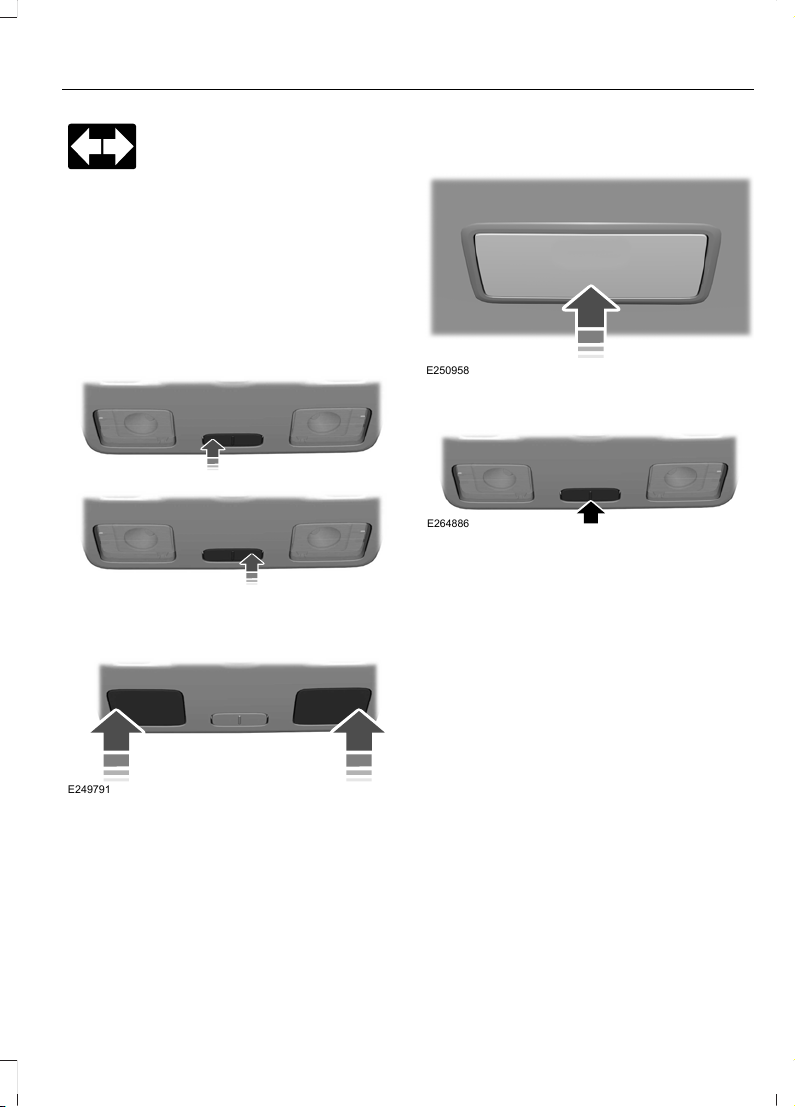
Push the lever up or down to use
the direction indicators.
Note: Tap the lever up or down to make the
direction indicators flash three times.
INTERIOR LAMPS - VEHICLES WITH: FRONT INTERIOR LAMP WITH MAP READING LAMPS
Switching All of the Interior Lamps
On and Off
E310027
E310028
Switching the Front Interior Lamps
On and Off
E249791
Note: Press the edge of the lamps lens to
switch the front interior lamp off before
switching the ignition off to prevent the
vehicle battery from running out of charge.
Switching the Rear Interior Lamps
On and Off
E250958
Interior Lamp Function
E264886
When you set the switch to the middle
position, the interior lamps turn on if:
• You open a door.
• You press the unlock button on the
remote control.
• You switch the ignition off.
Note: If you switch the ignition off, the
interior lamps could turn off after a short
time to prevent the vehicle battery from
running out of charge.
77
Fiesta (CE1) Vehicles Built From: 06-01-2020 Vehicles Built Up To: 19-04-2020, CG3654en enGBR, Edition date: 201909, Second-Printing
Lighting
Page 82
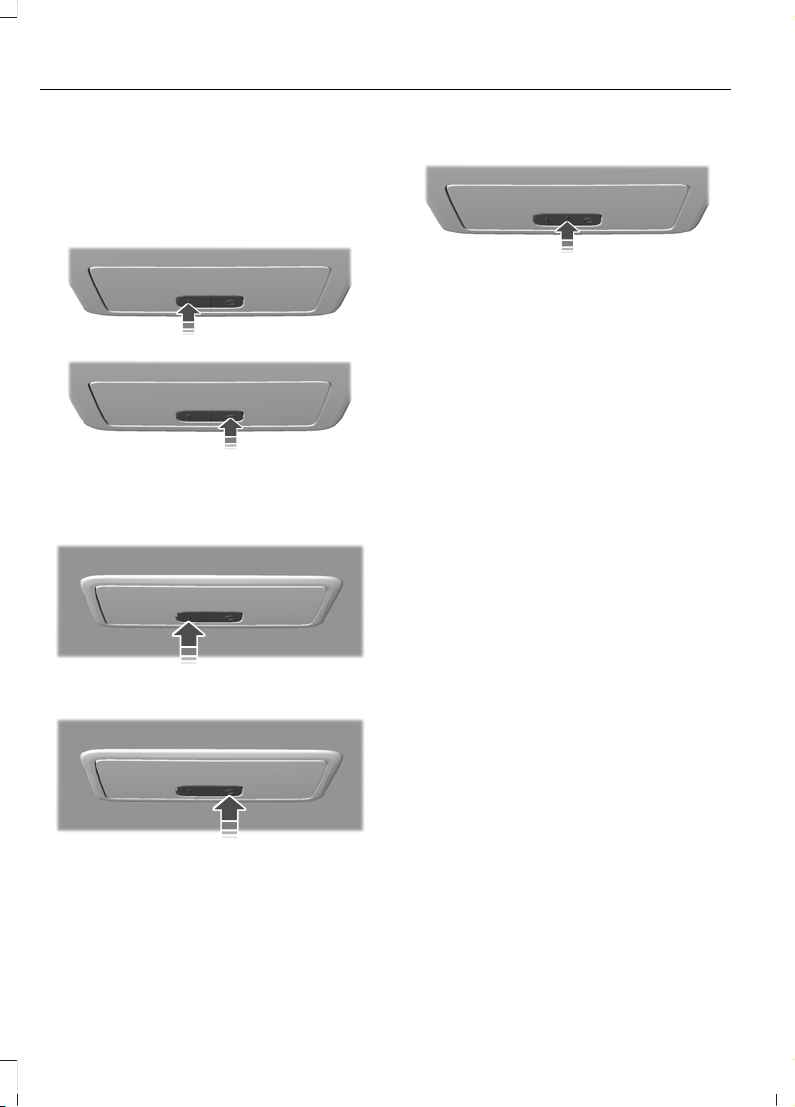
INTERIOR LAMPS - VEHICLES WITH: FRONT INTERIOR LAMP
Switching All of the Interior Lamps
On and Off
E309989
E309990
Switching the Rear Interior Lamps
On and Off
E309994
E309995
Interior Lamp Function
E264562
When you set the switch to the middle
position, the interior lamps turn on if:
• You open a door.
• You press the unlock button on the
remote control.
• You switch the ignition off.
Note: If you switch the ignition off, the
interior lamps could turn off after a short
time to prevent the vehicle battery from
running out of charge.
78
Fiesta (CE1) Vehicles Built From: 06-01-2020 Vehicles Built Up To: 19-04-2020, CG3654en enGBR, Edition date: 201909, Second-Printing
Lighting
Page 83
OPENING AND CLOSING THE WINDOWS
WARNING: Do not leave children
unattended in your vehicle and do not
let them play with the power windows.
Failure to follow this instruction could
result in personal injury.
WARNING: When closing the
power windows, verify they are free of
obstruction and make sure that children
and pets are not in the proximity of the
window openings.
Press the control to open the
window. Lift the control to close
the window.
Note: The power windows operate with the
ignition on, and for several minutes after you
switch the ignition off or until you open a
front door.
To reduce wind noise or pulsing noise when
one window is open, slightly open the
opposite window.
One-Touch Open
Fully press the control and release it. Press
again or lift it to stop the window.
One-Touch Close
Fully lift the control and release it. Press
again or lift it to stop the window.
Resetting One-Touch Close
Carry out all steps within 30 seconds of
starting the sequence.
1. Close the window.
2. Press and hold the switch until the
window is fully open. Keep the switch
pressed for a few seconds.
3. Lift and hold the switch until the
window is fully closed. Keep the switch
held for a few seconds.
4. Press and hold the switch until the
window is fully open. Keep the switch
pressed for a few seconds.
5. Lift and hold the switch until the
window is fully closed. Keep the switch
held for a few seconds.
Note: Repeat the procedure if the window
does not close when you use one-touch.
GLOBAL OPENING AND CLOSING
What Is Global Opening and
Closing
You can use the remote control to operate
the windows with the ignition off.
Using Global Opening
1. Press and release the unlock button on
the remote control.
2. Press and hold the unlock button on
the remote control.
3. Release the button when the windows
and moonroof start to open.
Note: The moonroof stops in the vent
position.
Press the lock or the unlock button on the
remote control to stop global opening.
Note: You can use global opening for a
short period of time when you unlock your
vehicle using the remote control.
Switching Global Opening On and
Off
1. Using the information display controls
on the steering wheel, select Settings.
79
Fiesta (CE1) Vehicles Built From: 06-01-2020 Vehicles Built Up To: 19-04-2020, CG3654en enGBR, Edition date: 201909, Second-Printing
Windows
Page 84
2. Select Vehicle settings.
3. Select Windows.
4. Switch Global open on or off.
Using Global Closing
WARNING: When closing the
power windows, verify they are free of
obstruction and make sure that children
and pets are not in the proximity of the
window openings.
1. Press and hold the lock button on the
remote control.
2. Release the button when the windows
and moonroof start to close.
Press the lock or the unlock button on the
remote control to stop global closing.
Note: Bounce-back is on during global
closing. See What Is Window
Bounce-Back (page 80).
Switching Global Closing On and
Off
1. Using the information display controls
on the steering wheel, select Settings.
2. Select Vehicle settings.
3. Select Windows.
4. Switch Global close on or off.
WINDOW BOUNCE-BACK
What Is Window Bounce-Back
The window stops and reverses if it detects
an obstruction when closing.
Overriding Window Bounce-Back
WARNING: If you override
bounce-back, the window does not
reverse if it detects an obstacle. Take
care when closing the windows to avoid
personal injury or damage to your
vehicle.
1. Close the window until it reaches the
point of resistance and let it reverse.
2. Lift the control within two seconds to
override bounce-back and close the
window. Bounce-back is now disabled
and you can close the window
manually.
Note: The window goes past the point of
resistance and you can fully close it.
Note: If the window does not close, have
your vehicle checked as soon as possible.
Resetting Window Bounce-Back
WARNING: Bounce-back is off until
you reset the memory. Take care when
closing the windows to avoid personal
injury or damage to your vehicle.
If you have disconnected the battery, you
must reset the bounce-back memory
separately for each window.
Carry out all steps within 30 seconds of
starting the sequence.
1. Close the window.
2. Press and hold the switch until the
window is fully open. Keep the switch
pressed for a few seconds.
3. Lift and hold the switch until the
window is fully closed. Keep the switch
held for a few seconds.
80
Fiesta (CE1) Vehicles Built From: 06-01-2020 Vehicles Built Up To: 19-04-2020, CG3654en enGBR, Edition date: 201909, Second-Printing
Windows
Page 85
4. Press and hold the switch until the
window is fully open. Keep the switch
pressed for a few seconds.
5. Lift and hold the switch until the
window is fully closed. Keep the switch
held for a few seconds.
Note: Repeat the procedure if the window
does not close when you use one-touch.
LOCKING THE REAR WINDOW CONTROLS
Press the control to lock or
unlock the rear window controls.
It illuminates when you lock the
rear window controls.
81
Fiesta (CE1) Vehicles Built From: 06-01-2020 Vehicles Built Up To: 19-04-2020, CG3654en enGBR, Edition date: 201909, Second-Printing
Windows
Page 86
ADJUSTING THE INTERIOR MIRROR
WARNING: Do not adjust the
mirrors when your vehicle is moving. This
could result in the loss of control of your
vehicle, serious personal injury or death.
Pull the tab below the mirror toward you
to reduce the effect of bright light from
behind.
AUTO-DIMMING INTERIOR MIRROR
What Is the Auto-Dimming Interior
Mirror
The mirror dims to reduce the effect of
bright light from behind. It returns to
normal when the bright light from behind
is no longer present or if you shift into
reverse (R).
Auto-Dimming Interior Mirror
Precautions
WARNING: Do not adjust the
mirrors when your vehicle is moving. This
could result in the loss of control of your
vehicle, serious personal injury or death.
Do not block the sensors on the front and
back of the mirror.
Note: A rear center passenger or raised rear
center head restraint could prevent light
from reaching the sensor.
82
Fiesta (CE1) Vehicles Built From: 06-01-2020 Vehicles Built Up To: 19-04-2020, CG3654en enGBR, Edition date: 201909, Second-Printing
Interior Mirror
Page 87
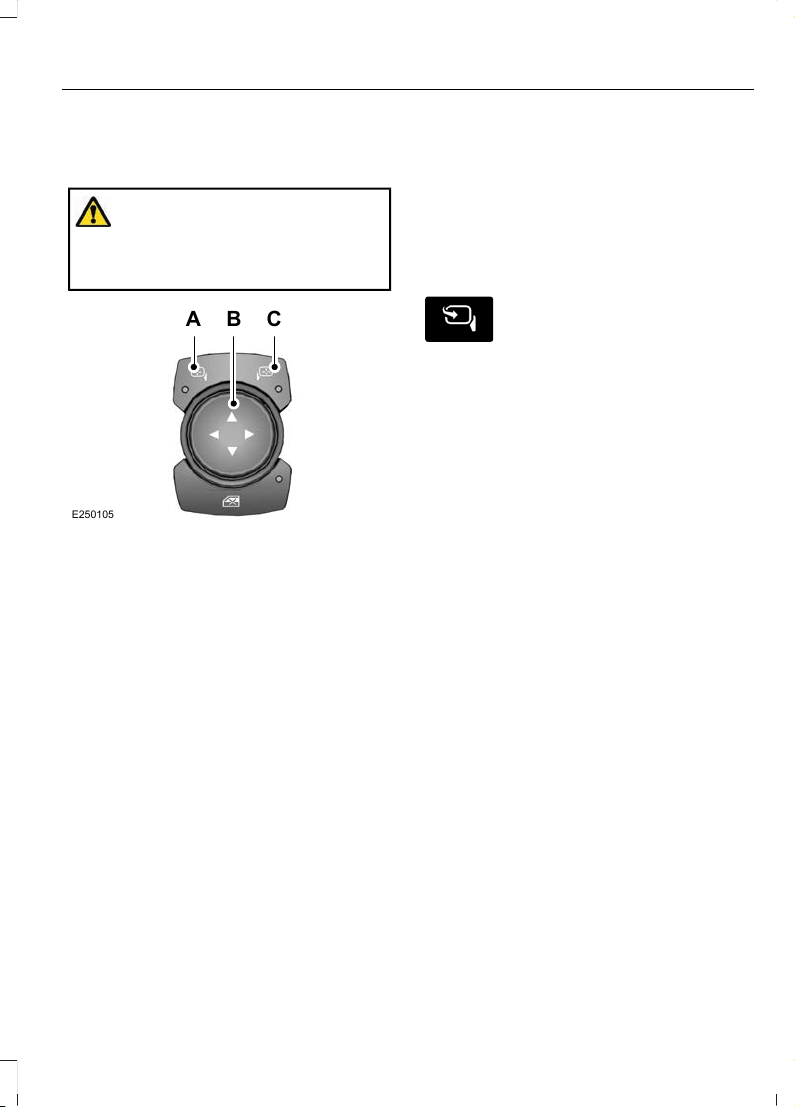
ADJUSTING THE EXTERIOR MIRRORS
WARNING: Do not adjust the
mirrors when your vehicle is moving. This
could result in the loss of control of your
vehicle, serious personal injury or death.
E250105
C
A
B
Left-hand mirror switch.A
Mirror adjustment control.B
Right-hand mirror switch.C
FOLDING THE EXTERIOR MIRRORS - VEHICLES WITH: MANUAL FOLD EXTERIOR MIRRORS
Push the mirror toward the door window
glass.
Make sure that you fully engage the mirror
in its support when returning it to its
original position.
FOLDING THE EXTERIOR MIRRORS - VEHICLES WITH: POWER FOLD EXTERIOR MIRRORS
The exterior mirrors fold when you lock
your vehicle and unfold when you unlock
your vehicle.
For tight parking conditions,
press the control to fold the
mirrors.
Press the control again to unfold the
mirrors.
If you press the control to fold in the
mirrors with auto-fold on, the mirrors do
not unfold when you unlock your vehicle.
Note: The power folding mirrors operate
with the ignition on, and for several minutes
after you switch the ignition off.
Note: If you fold and unfold the mirrors
several times within one minute, the power
fold function may turn off to protect the
motors from overheating.
Switching Auto-fold On and Off
1. Using the information display controls
on the steering wheel, select Settings.
2. Select Vehicle settings.
3. Select Mirrors.
4. Switch Autofold on or off.
83
Fiesta (CE1) Vehicles Built From: 06-01-2020 Vehicles Built Up To: 19-04-2020, CG3654en enGBR, Edition date: 201909, Second-Printing
Exterior Mirrors
Page 88
OPENING AND CLOSING THE SUN SHADE
The sun shade operates independently of
the moonroof. Slide the sun shade
backward or forward to open or close it.
OPENING AND CLOSING THE MOONROOF
Opening the Moonroof
WARNING: Do not leave children
unattended in your vehicle and do not
let them play with the moonroof. Failure
to follow this instruction could result in
personal injury.
The moonroof controls are on the
overhead console and have one-touch
open.
To stop the motion during a one-touch
operation, touch the control a second time.
Press and release the rear of the
control to vent the moonroof.
Press and release the rear of the
control again to open the moonroof.
Closing the Moonroof
WARNING: When closing the
moonroof, verify that it is free of
obstruction and make sure that children
and pets are not in the proximity of the
roof opening.
WARNING: Do not leave children
unattended in your vehicle and do not
let them play with the moonroof. Failure
to follow this instruction could result in
personal injury.
The moonroof controls are on the
overhead console and have one-touch
close.
To stop the motion during a one-touch
operation, touch the control a second time.
Press and release the front of
the control.
VENTING THE MOONROOF
WARNING: Do not leave children
unattended in your vehicle and do not
let them play with the moonroof. Failure
to follow this instruction could result in
personal injury.
Press and release the rear of the
control to vent the moonroof.
Press and release the front of
the control to close the moonroof.
MOONROOF BOUNCE-BACK
The moonroof stops and reverses if it
detects an obstruction.
Press and hold the front of the
control within a few seconds to
override bounce-back.
84
Fiesta (CE1) Vehicles Built From: 06-01-2020 Vehicles Built Up To: 19-04-2020, CG3654en enGBR, Edition date: 201909, Second-Printing
Moonroof
Page 89
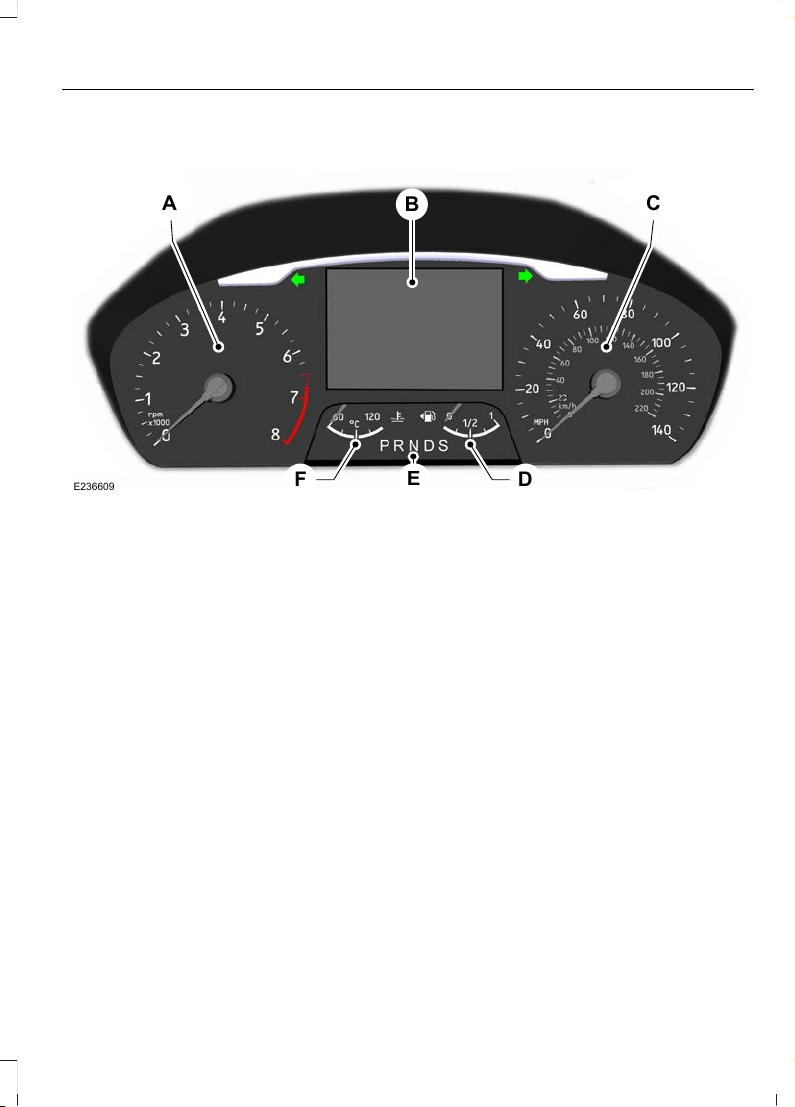
GAUGES
A C
B
DF
E
E236609
Tachometer.A
Information display.B
Speedometer.C
Fuel gauge.D
Automatic transmission gearshift lever position indicator.E
Engine coolant temperature gauge.F
Tachometer
Shows the engine speed. The
discontinuous red line indicates the
standard maximum engine speed. The red
line thickens where the engine speed
enters the overspeed limiter.
Information Display
The information display shows the
following information:
• Odometer.
• Trip odometer.
• MyView information.
• Driver assistance information.
• Navigation information.
• Audio information.
• Phone information.
• Shift indicator.
• Vehicle and system settings.
• Outside air temperature.
Odometer
Records the total distance traveled by your
vehicle.
85
Fiesta (CE1) Vehicles Built From: 06-01-2020 Vehicles Built Up To: 19-04-2020, CG3654en enGBR, Edition date: 201909, Second-Printing
Instrument Cluster
Page 90
The system detects unauthorized
odometer adjustments to avoid total
distance reading fraud. If the system
detects an unauthorized odometer
adjustment, the total distance reading
displays XXXX. Recovery of the original
mileage could result in system damage not
covered by the vehicle Warranty and may
carry a significant expense.
Trip Computer
See Trip Computer (page 92).
Vehicle and System Settings
See General Information (page 91).
Speedometer
Shows the vehicle speed.
Fuel Gauge
The fuel gauge indicates approximately
how much fuel is in the fuel tank.
The arrow adjacent to the fuel pump
symbol indicates on which side of your
vehicle the fuel filler door is located.
A B
E236403
The fuel filler door is on the
left-hand side of your vehicle.
A
The fuel filler door is on the
right-hand side of your vehicle.
B
Automatic Transmission Gearshift
Lever Position Indicator (If Equipped)
Shows the selected gear. See Automatic
Transmission (page 154).
Engine Coolant Temperature
Gauge
At normal operating temperature, the
needle remains in the center section.
If the needle enters the red section a
warning lamp illuminates and a message
appears in the information display. If you
continue to operate the engine at high
engine speeds with the needle in the red
section, the engine speed reduces
automatically to prevent engine damage.
Stop your vehicle as soon as it is safe to
do so, switch the engine off and allow it to
cool.
Do not restart the engine until the cause
of overheating has been determined and
resolved.
WARNING LAMPS AND INDICATORS
The following warning lamps and
indicators alert you to a vehicle condition
that may become serious. Some lamps
illuminate when you start your vehicle to
make sure they work. If any lamps remain
on after starting your vehicle, refer to the
respective system warning lamp for further
information.
Note: Some warning indicators appear in
the information display and operate the
same as a warning lamp but do not
illuminate when you start your vehicle.
86
Fiesta (CE1) Vehicles Built From: 06-01-2020 Vehicles Built Up To: 19-04-2020, CG3654en enGBR, Edition date: 201909, Second-Printing
Instrument Cluster
Page 91
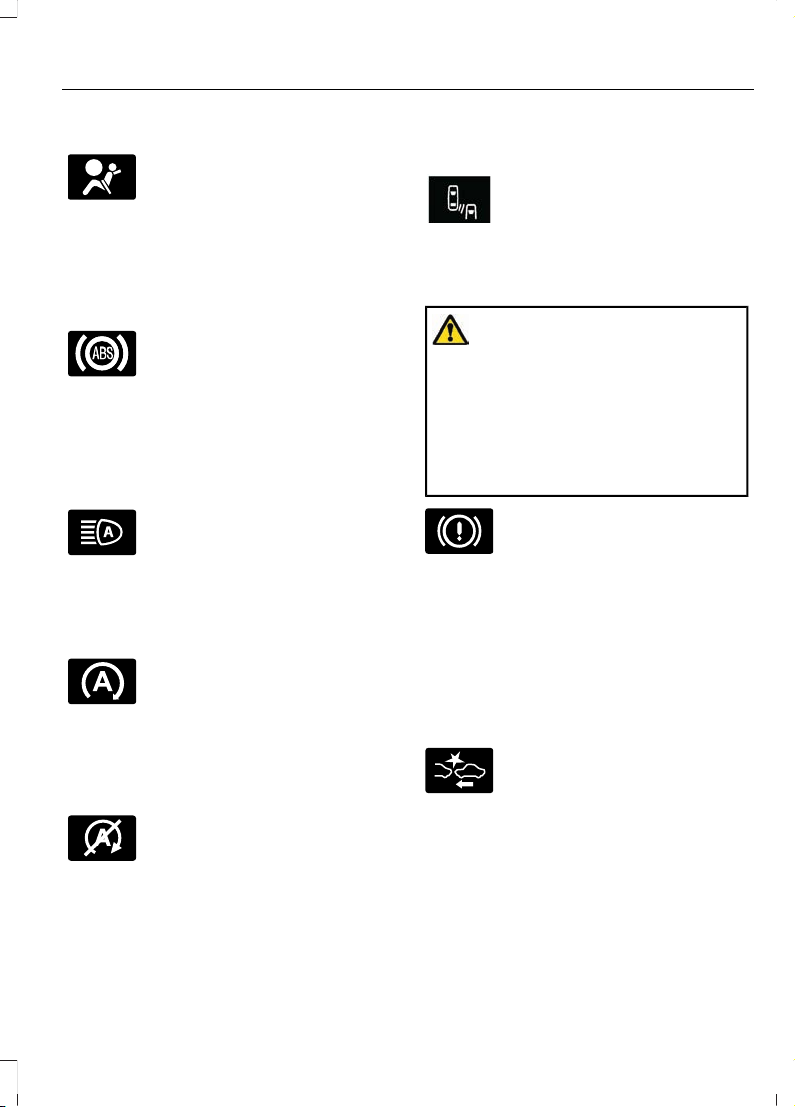
Airbag Warning Lamp
If it does not illuminate when you
switch the ignition on, continues
to flash or remains on when the
engine is running, this indicates a
malfunction. Have your vehicle checked
as soon as possible.
Anti-Lock Brake System Warning
Lamp
If it illuminates when you are
driving, this indicates a
malfunction. Your vehicle
continues to have normal braking without
the anti-lock brake system function. Have
your vehicle checked as soon as possible.
Automatic Headlamp High Beam
Indicator (If Equipped)
It illuminates when the system
turns the headlamp high beam
on.
See Automatic High Beam Control
(page 73).
Auto-Start-Stop Indicator
It illuminates green when the
engine has automatically
stopped. It flashes to inform you
when the engine needs to restart.
Note: If it illuminates orange, the system
has detected a fault that requires service.
Have your vehicle checked as soon as
possible.
E146361
The indicator is shown with a
strikethrough if the system is not
available.
See Auto-Start-Stop (page 138). See
Auto-Start-Stop (page 137).
Blind Spot Information System
Indicator (If Equipped)
E249861
E249861
It illuminates when you switch
the system off.
See Blind Spot Information
System (page 193).
Brake System Warning Lamp
WARNING: Driving your vehicle
with the warning lamp on is dangerous.
A significant decrease in braking
performance may occur. It may take you
longer to stop your vehicle. Have your
vehicle checked as soon as possible.
Driving extended distances with the
parking brake engaged can cause brake
failure and the risk of personal injury.
It illuminates when you engage
the parking brake and the
ignition is on.
If it illuminates when your vehicle is
moving, make sure the parking brake is
disengaged. If the parking brake is
disengaged, this indicates low brake fluid
level or a brake system fault. Have your
vehicle immediately checked.
Collision Warning System
Indicator (If Equipped)
It illuminates if your vehicle
rapidly approaches another
vehicle, to warn you of the risk of
a crash with the vehicle in front of you.
It illuminates red if the distance to the
vehicle ahead is small.
See Pre-Collision Assist (page 202).
87
Fiesta (CE1) Vehicles Built From: 06-01-2020 Vehicles Built Up To: 19-04-2020, CG3654en enGBR, Edition date: 201909, Second-Printing
Instrument Cluster
Page 92
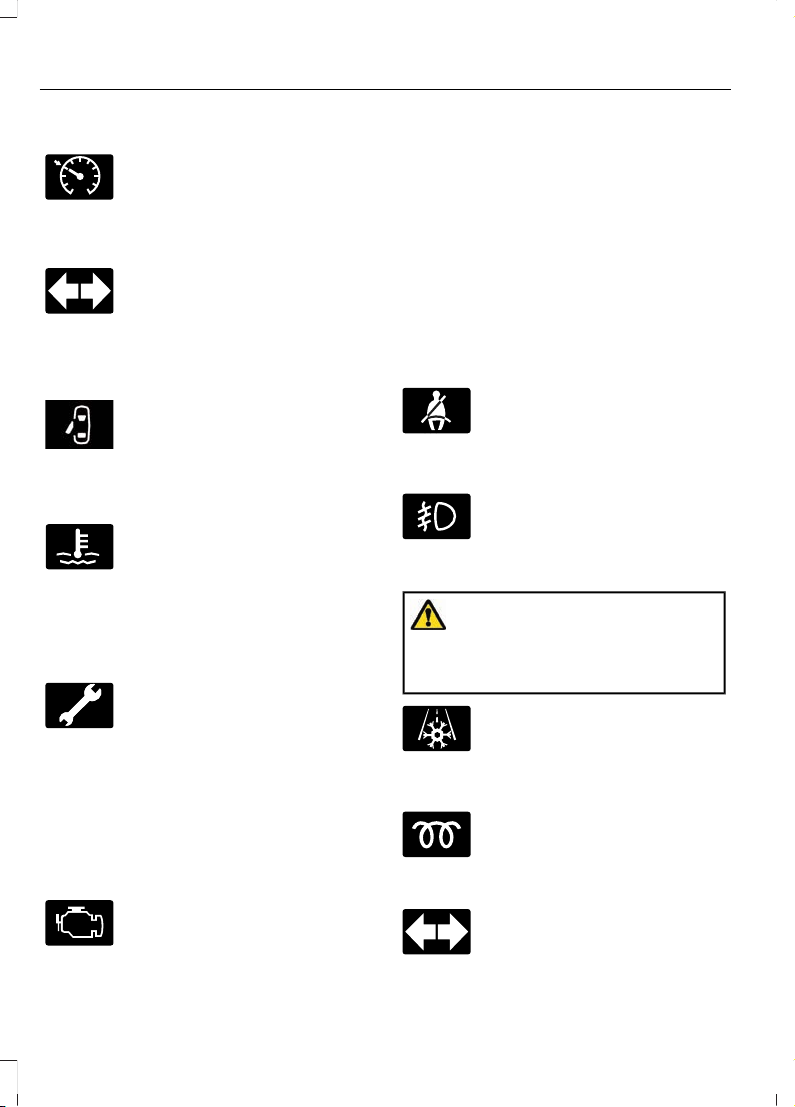
Cruise Control Indicator
E71340
It illuminates when you switch
the system on.
See Cruise Control (page 175).
Direction Indicator
Flashes when you switch the
direction indicators on.
Note: An increase in the rate of flashing
warns of a failed indicator bulb.
Door Ajar Warning Lamp
E249859
It illuminates when you switch
the ignition on and remains on if
any door or the hood is open.
Engine Coolant Temperature
Warning Lamp
If it illuminates when your vehicle
is moving, this indicates that the
engine is overheating. Stop your
vehicle as soon as it is safe to do so and
switch the engine off. Have your vehicle
checked as soon as possible.
Engine Warning Lamps
Service Engine Soon
If it illuminates when the engine is running
this indicates a malfunction. Have your
vehicle checked as soon as possible.
If it flashes when you are driving, reduce
the speed of your vehicle immediately.
Avoid heavy acceleration and deceleration
and have your vehicle immediately
serviced.
Malfunction Indicator Lamp
If it illuminates when the engine is running
this indicates a malfunction. The On Board
Diagnostics system has detected a
malfunction of the vehicle emission control
system.
If it flashes, engine misfire may be
occurring. Increased exhaust gas
temperatures could damage the catalytic
converter or other vehicle components.
Avoid heavy acceleration and deceleration
and have your vehicle immediately
serviced.
Fasten Seatbelt Warning Lamp
It illuminates and a chime
sounds until you fasten the
seatbelts.
Front Fog Lamp Indicator
It illuminates when you switch
the front fog lamps on.
Frost Warning Lamp
WARNING: Even if the temperature
rises to above 4°C (39°F) there is no
guarantee that the road is free of hazards
caused by inclement weather.
It illuminates when the outside
air temperature is 4°C (39°F) or
below.
Glow Plug Indicator
If it illuminates, wait until it turns
off before starting.
Hazard Flasher Indicator
Flashes when you switch the
hazard flashers on.
88
Fiesta (CE1) Vehicles Built From: 06-01-2020 Vehicles Built Up To: 19-04-2020, CG3654en enGBR, Edition date: 201909, Second-Printing
Instrument Cluster
Page 93
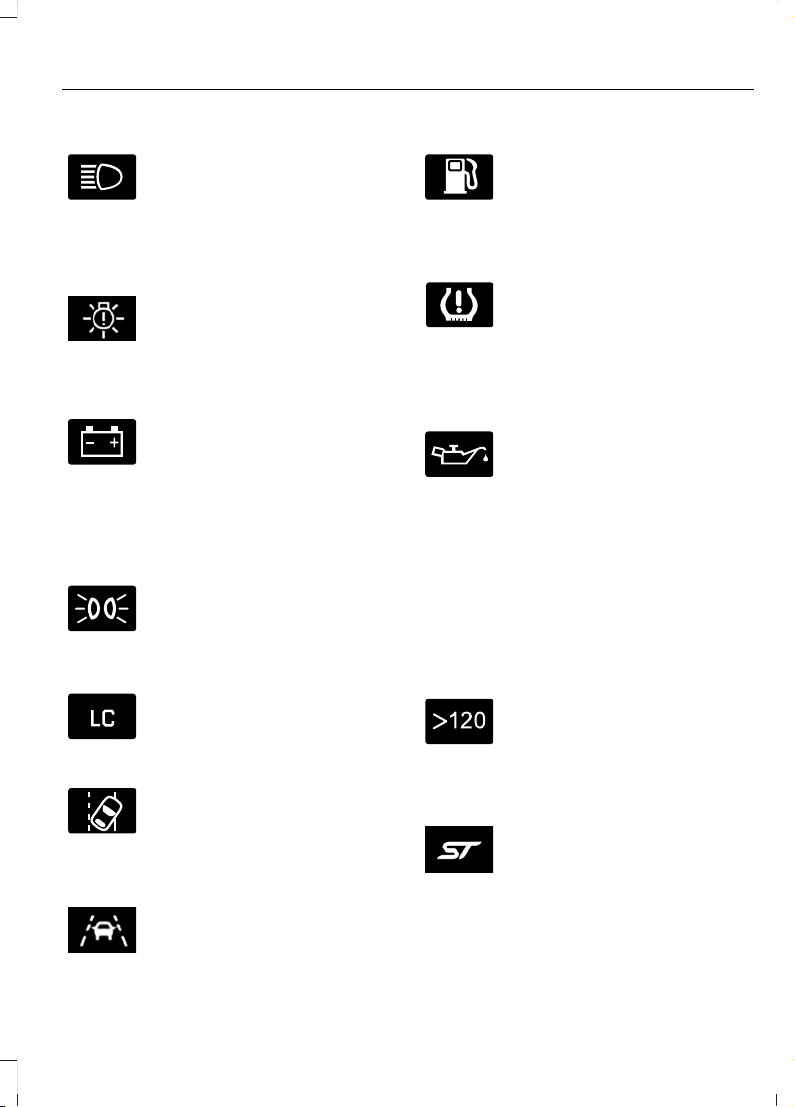
Headlamp High Beam Indicator
It illuminates when you switch
the headlamp high beam on. It
illuminates when the system
turns the headlamp high beam on.
Headlamp Low Beam Warning
Lamp
E250683
If it illuminates when the low
beam headlamps are on, this
indicates that a headlamp low
beam bulb has failed.
Ignition Warning Lamp
It illuminates when you switch
the ignition on.
If it illuminates when the engine
is running this indicates a malfunction.
Have your vehicle checked as soon as
possible.
Lamps on Indicator
It illuminates when you switch
the headlamp low beam or the
side and rear lamps on.
Launch Control Indicator (If Equipped)
It illuminates when you switch
the system on.
Lane Keeping Alert Indicator
It illuminates when you switch
the system on.
Lane Keeping Aid Warning Lamp (If
Equipped)
E251020
It illuminates when you switch
the system on. See Lane
Keeping System (page 189).
Low Fuel Level Warning Lamp
If it illuminates when you are
driving, refuel as soon as
possible.
Low Tire Pressure Warning Lamp
(If Equipped)
It illuminates if the tire pressure
in one or more tires is below the
correct tire pressure.
See Tire Pressure Monitoring System
(page 274).
Oil Pressure Warning Lamp
It illuminates when you switch
the ignition on.
If it illuminates when the engine
is running this indicates a malfunction.
Stop your vehicle as soon as it is safe to
do so and switch the engine off. Check the
engine oil level. If the oil level is sufficient,
this indicates a system malfunction. Have
your vehicle immediately checked.
See Engine Oil Check (page 246).
Over Speed Warning Indicator (If
Equipped)
It illuminates when the vehicle
speed exceeds 120 km/h
(75 mph).
Performance Shift Indicator (If
Equipped)
E270835
It illuminates when the
powertrain reaches the optimum
upshift point. It flashes when the
engine is close to hitting the engine speed
limiter.
89
Fiesta (CE1) Vehicles Built From: 06-01-2020 Vehicles Built Up To: 19-04-2020, CG3654en enGBR, Edition date: 201909, Second-Printing
Instrument Cluster
Page 94
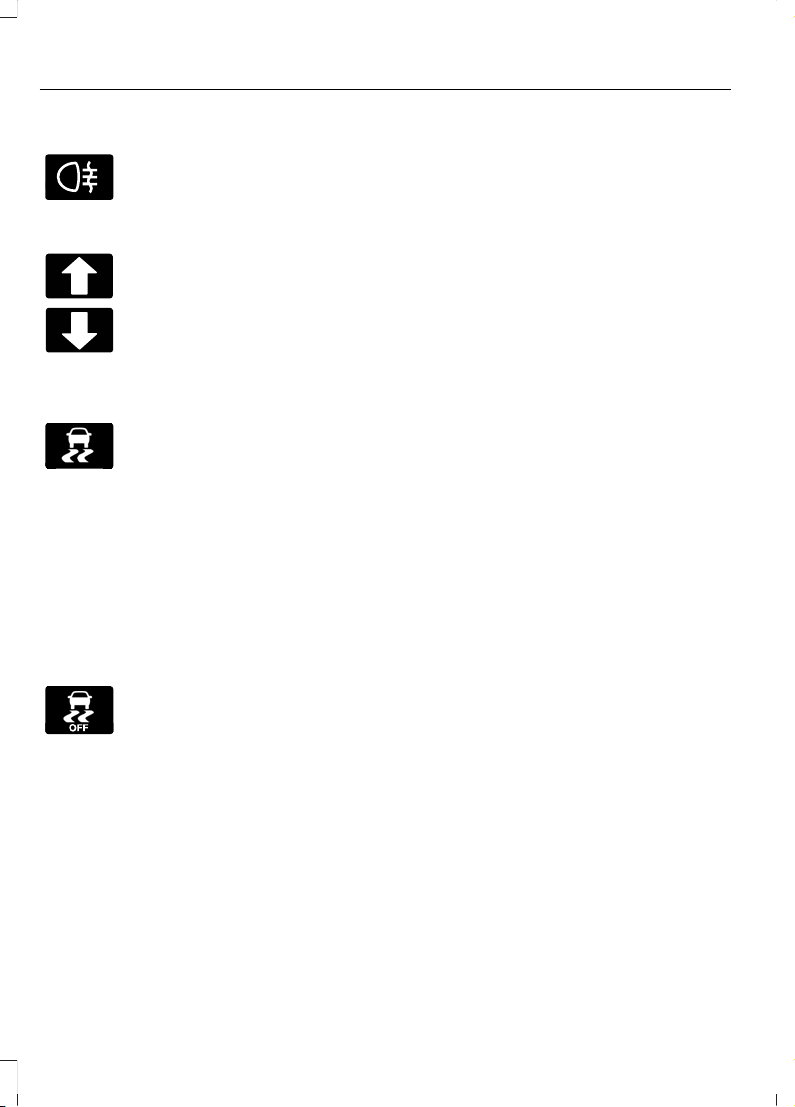
Rear Fog Lamp Indicator
E67040
It illuminates when you switch
the rear fog lamps on.
Shift Indicator
It illuminates to advise you that
shifting to a higher or lower gear
may give better performance,
fuel economy or lower
emissions.
Stability Control and Traction
Control Indicator
E138639
Flashes during operation.
If it does not illuminate when you
switch the ignition on, or remains
on when the engine is running, this
indicates a malfunction. Have your vehicle
checked as soon as possible.
Note: The system automatically turns off
if there is a malfunction.
See Stability Control (page 161). See
Traction Control (page 160).
Stability Control and Traction
Control Off Warning Lamp
E130458
It illuminates when you switch
the system off.
See Stability Control (page
161).
AUDIBLE WARNINGS AND INDICATORS
Airbag Secondary Warning
Sounds when the airbag warning lamp is
not working. Sounds when the airbag
warning lamp malfunction tone is not
working.
Auto-Start-Stop Warning
Sounds when you open the driver door and
Auto-Start-Stop has turned the engine off.
Automatic Transmission
Sounds when you open the driver door and
the transmission is not in park (P).
Door Ajar
Sounds when a door is not fully closed and
your vehicle is moving.
Exterior Lamps On
Sounds when you open the driver door and
the exterior lamps are on.
Low Fuel Reminder
Sounds when the fuel level is low.
Key Outside Vehicle
Sounds when you remove the passive key
from your vehicle and the engine is running.
Over Speed Warning
Sounds when your vehicle speed exceeds
a set limit.
Parking Brake On
Sounds when the parking brake is on and
your vehicle is moving.
Seatbelt Reminder
Sounds when a seatbelt is unfastened in
an occupied seat and your vehicle is
moving.
90
Fiesta (CE1) Vehicles Built From: 06-01-2020 Vehicles Built Up To: 19-04-2020, CG3654en enGBR, Edition date: 201909, Second-Printing
Instrument Cluster
Page 95
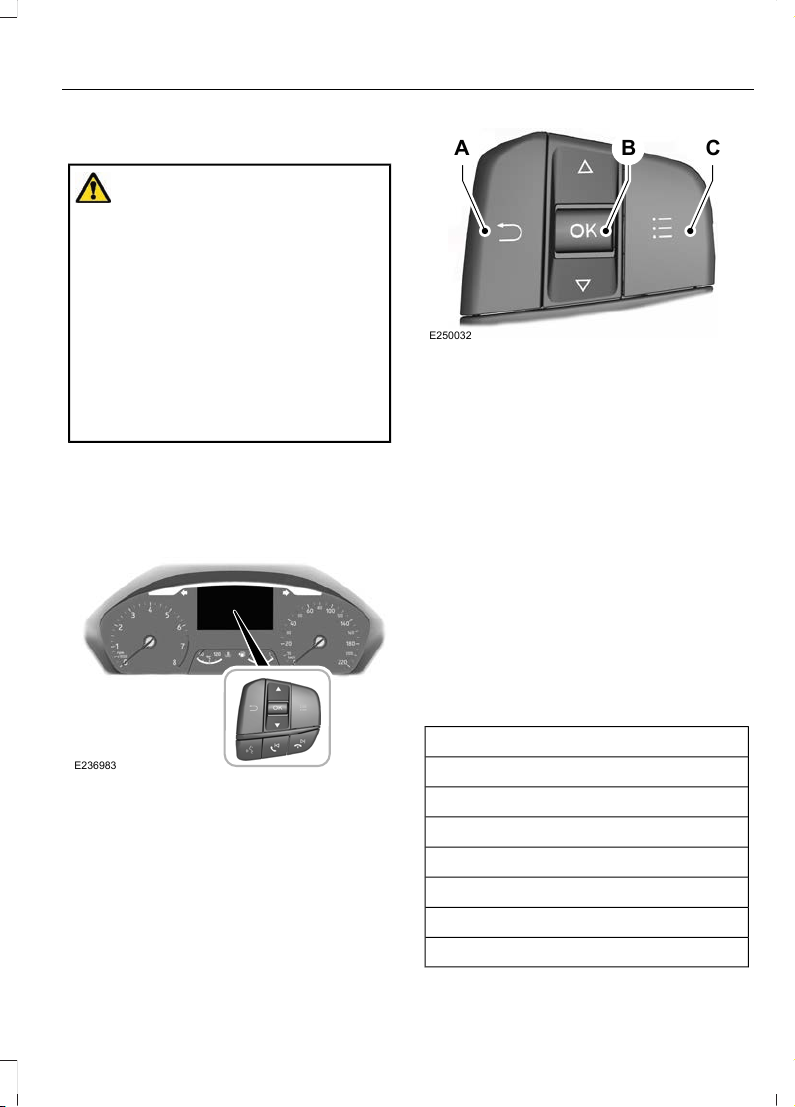
GENERAL INFORMATION
WARNING: Driving while distracted
can result in loss of vehicle control, crash
and injury. We strongly recommend that
you use extreme caution when using any
device that may take your focus off the
road. Your primary responsibility is the
safe operation of your vehicle. We
recommend against the use of any
hand-held device while driving and
encourage the use of voice-operated
systems when possible. Make sure you
are aware of all applicable local laws
that may affect the use of electronic
devices while driving.
Note: For your safety, some features are
speed-dependent. Their use is limited to
when your vehicle speed is not moving.
Information Display Controls
E236983
A B C
E250032
Return button.A
OK button.B
Menu button.C
Return Button
Use the return button to go back or to exit.
OK Button
Use the OK button to make a selection.
You can also use it to scroll through a
menu.
Menu Button
Use the menu button on the main screen
to display the submenu.
Information Display Main Menu
Menu Item
Trip computer 1 or Trip computer 2
MyView
Driver assist.
Navigation
Audio
Phone
Settings
91
Fiesta (CE1) Vehicles Built From: 06-01-2020 Vehicles Built Up To: 19-04-2020, CG3654en enGBR, Edition date: 201909, Second-Printing
Information Displays
Page 96
TRIP COMPUTER
You can reset the trip computer and
personalize it using the information display.
See Information Displays (page 91).
Resetting the Trip Computer
Navigate to the following main menu item.
ActionMenu Item
Press and hold the OK button until the system reset
confirmation appears.
Trip computer 1
Press and hold the OK button until the system reset
confirmation appears.
Trip computer 2
Alternatively you can reset individual trip
values.
ActionMenu Item
Press the menu button.Trip computer 1
Press the menu button.Trip computer 2
Press the OK button.Reset individual values
Press and hold the OK button until the system reset
confirmation appears.
Reset trip odometer
Press and hold the OK button until the system reset
confirmation appears.
Reset trip timer
Press and hold the OK button until the system reset
confirmation appears.
Reset average fuel
Press and hold the OK button until the system reset
confirmation appears.
Reset average speed
Personalization
Navigate to the following main menu item.
ActionMenu Item
Press the menu button.Trip computer 1
Press the menu button.Trip computer 2
Press the OK button.Configure view
92
Fiesta (CE1) Vehicles Built From: 06-01-2020 Vehicles Built Up To: 19-04-2020, CG3654en enGBR, Edition date: 201909, Second-Printing
Information Displays
Page 97
ActionMenu Item
Press the OK button.Trip odometer
Press the OK button.Trip timer
Press the OK button.Average fuel consump-
tion
Press the OK button.Average speed
Press the OK button.Distance to empty
Press the OK button.Instantaneous fuel
Note: You can display a maximum of four values.
Trip Odometer
Registers the total distance since you last
reset the value.
Trip Timer
Registers the total time since you last reset
the value.
Average Fuel
Indicates the average fuel consumption
since you last reset the value.
Average Speed
Indicates the average vehicle speed since
you last reset the value.
Distance to Empty
Indicates the approximate distance your
vehicle could travel on the fuel remaining
in the fuel tank. Changes in driving pattern
may cause the value to vary.
Instantaneous Fuel
Indicates the current fuel consumption.
PERSONALIZED SETTINGS
Language
ActionMenu Item
Press the menu button.Settings
Press the OK button.Display
Press the OK button. Choose your applicable setting.Language
93
Fiesta (CE1) Vehicles Built From: 06-01-2020 Vehicles Built Up To: 19-04-2020, CG3654en enGBR, Edition date: 201909, Second-Printing
Information Displays
Page 98
Measure Unit
ActionMenu Item
Press the menu button.Settings
Press the OK button.Display
Press the OK button. Choose your applicable setting.Measurement unit
Temperature Unit
ActionMenu Item
Press the menu button.Settings
Press the OK button.Display
Press the OK button. Choose your applicable setting.Temperature unit
Tire Pressure Unit (If Equipped)
ActionMenu Item
Press the menu button.Settings
Press the OK button.Display
Press the OK button. Choose your applicable setting.Tyre pressure
Chimes
ActionMenu Item
Press the menu button.Settings
Press the OK button.Vehicle settings
Press the OK button.Chimes
Press the OK button.Parking space found
Press the OK button.Information
94
Fiesta (CE1) Vehicles Built From: 06-01-2020 Vehicles Built Up To: 19-04-2020, CG3654en enGBR, Edition date: 201909, Second-Printing
Information Displays
Page 99
INFORMATION MESSAGES
Active Park Assist
DescriptionMessage
The system has malfunctioned. Have your vehicle checked
as soon as possible.
Active Park malfunction
Adaptive Cruise Control
DescriptionMessage
The system has malfunctioned. Have your vehicle checked
as soon as possible.
Adaptive cruise control
malfunction
The system is not available. See Using Adaptive Cruise
Control (page 176).
Adaptive cruise control
not available
The radar has reduced visibility. See Using Adaptive Cruise
Control (page 176).
Adaptive cruise control
not available Sensor
blocked See manual
You have switched normal cruise control on. Adaptive braking
turns off.
Cruise control active
Adaptive braking off
The system has malfunctioned. Have your vehicle checked
as soon as possible.
Front sensor not aligned
The adaptive cruise has reinstated controls to the driver.Adaptive cruise control
Driver resume control
Your vehicle speed is too slow to activate the adaptive cruise.Adaptive cruise control
Speed too low to
activate
Navigation system based speed limit information is not
available. If the message continues to appear, have your
vehicle checked as soon as possible.
Adaptive cruise control
Speed sign recognition
not available
Alarm
DescriptionMessage
Displays when the alarm has been triggered due to unauthor-
ized entry.
Vehicle alarm Start
vehicle to stop alarm
95
Fiesta (CE1) Vehicles Built From: 06-01-2020 Vehicles Built Up To: 19-04-2020, CG3654en enGBR, Edition date: 201909, Second-Printing
Information Displays
Page 100
Automatic High Beam Control
DescriptionMessage
The camera has reduced visibility. Clean the windshield. If
the message continues to appear, have your vehicle checked
as soon as possible.
Front camera Low visibility Clean screen
The camera has malfunctioned. Wait a short period of time
for the camera to cool down. If the message continues to
appear, have your vehicle checked as soon as possible.
Front camera temporarily
not available
The camera has malfunctioned. Have your vehicle checked
as soon as possible.
Front camera malfunction Service required
Auto-Start-Stop
DescriptionMessage
The system needs to restart the engine but requires your
confirmation. Press the brake pedal to restart the engine.
Auto StartStop Press
Brake to Start Engine
The system needs to restart the engine but requires your
confirmation. Press the clutch pedal to restart the engine.
Auto StartStop Press
clutch to start engine
The system needs to restart the engine but requires your
confirmation. Press any pedal to restart the engine.
Auto StartStop Press a
Pedal to Start Engine
The system needs to restart the engine but requires your
confirmation. Shift into neutral (N) to restart the engine.
Auto StartStop Select
Neutral To Start Engine
The system needs to restart the engine but requires your
confirmation. Shift into park (P) to restart the engine.
Auto StartStop Shift to
P, then Restart Engine
The system is not functioning. Restart the engine.Auto StartStop Manual
Restart Required
The system has malfunctioned. Have your vehicle checked
as soon as possible.
Auto StartStop malfunction Service required
96
Fiesta (CE1) Vehicles Built From: 06-01-2020 Vehicles Built Up To: 19-04-2020, CG3654en enGBR, Edition date: 201909, Second-Printing
Information Displays
 Loading...