

Page 1

ST120/ST120+
Socket Tester
Instructions
Introduction
Before you use the Fluke ST120/ST120+ Socket Tester (the Product), see Safety
Information.
Safety Information
A Warning identifies conditions and procedures that are dangerous to the user.
XW Warning
To prevent possible electrical shock, fire, or personal injury:
• Read all safety information before you use the Product.
• Do not alter the Product and use only as specified, or the protection supplied
by the Product can be compromised.
• Do not use the Product if it is altered or damaged.
• Carefully read all instructions.
September 2020
©2020 Fluke Corporation. All rights reserved.
Specifications are subject to change without notification.
All product names are trademarks of their respective companies.
Find Quality Products Online at: [email protected]
www.GlobalTestSupply.com
Page 2

• Do not use the Product if it operates incorrectly.
• Do not touch voltages >30 V ac rms, 42 V ac peak, or 60 V dc.
• Use this Product indoors only.
• Examine the case before you use the Product. Look for cracks or missing
plastic. Carefully look at the insulation around the terminals.
• Do not apply more than the rated voltage, between the terminals or between
each terminal and earth ground.
• All appliances or equipment on the circuit being tested should be unplugged
to help avoid erroneous readings.
• Do not use this Product as a comprehensive diagnostic instrument. Use it as a
simple instrument to detect nearly all probable common improper wiring
conditions.
• Refer all indicated problems to a qualified electrician.
• Do not use the Product to indicate the quality of ground.
• Do not use the Product to detect 2 hot wires in circuit.
• Do not use the Product to detect a combination of defects.
• Do not use the Product to indicate reversal of grounded and grounding
conductors.
• Consult the GFCI manufacturer’s installation instructions to determine that
the GFCI is installed in accordance with the manufacturer’s specifications.
• Check for correct wiring of receptacle and all remotely connected receptacles
on the branch circuit.
• Operate the test button on the GFCI installed in the circuit. The GFCI must trip.
If it does not – do not use the circuit – consult an electrician. If the GFCI does
trip, reset the GFCI. Then, insert the Product into the receptacle to be tested.
• Push the GFCI button on the Product for a minimum of 6 seconds to test the
GFCI condition. An audible or visible indication on the Product must cease
Find Quality Products Online at: [email protected]
www.GlobalTestSupply.com
Page 3
when tripped. If the Product fails to trip the GFCI, the GFCI may be faulty or
mis-wired. Consult an electrician.
• When testing a GFCI installed in 2-wire systems (no ground wire available), the
Product may give a false indication that the GFCI is not functioning properly. If
this occurs, recheck the operation of the GFCI using its test and reset buttons.
The GFCI button test function demonstrates proper operation.
• On the ST120+, the beeper only makes a sound if voltage is present and the
beeper is turned on. Do not rely on the beeper to indicate the presence of
voltage.
Symbols
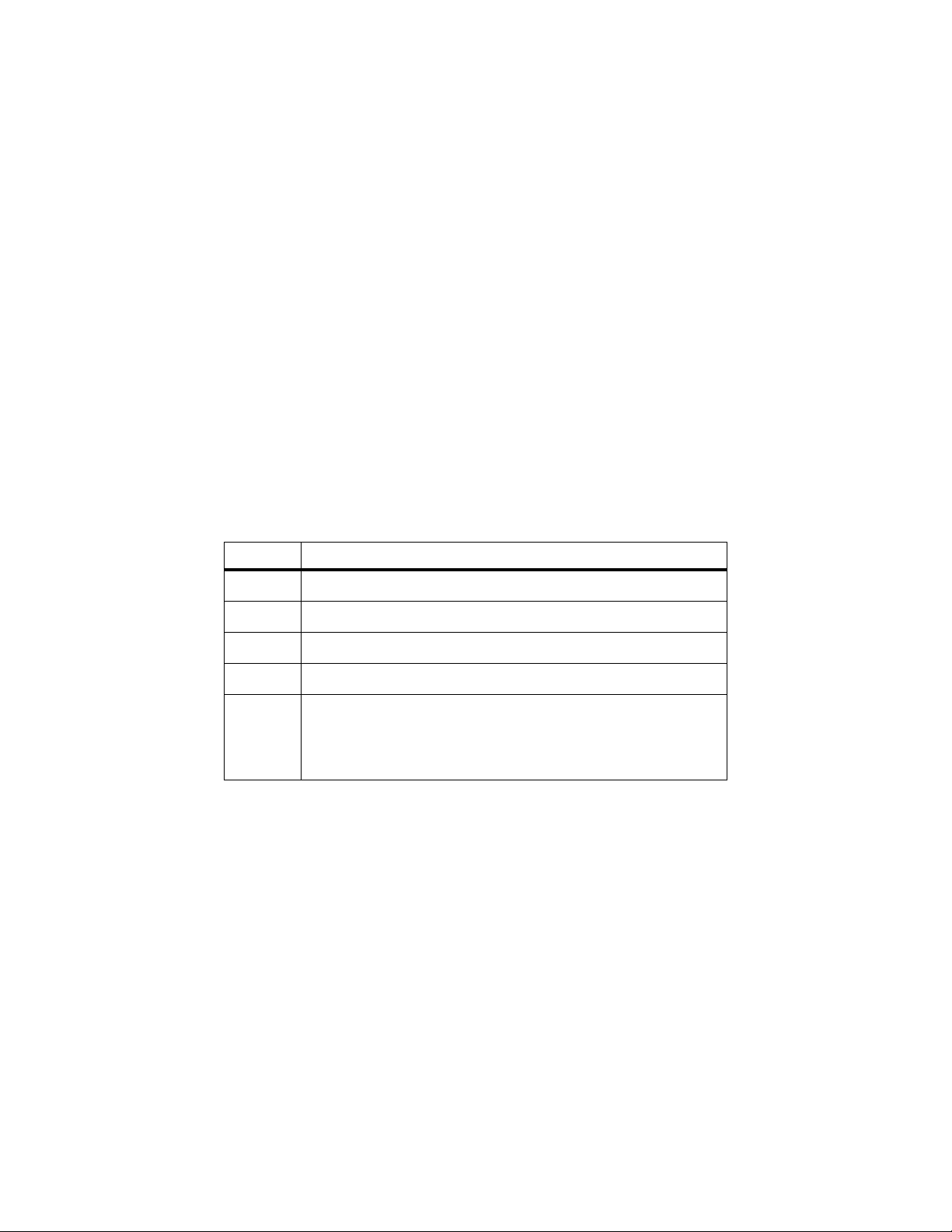
Table 1 explains the symbols used on the Product and in these instructions.
Table 1. Symbols
Symbol Description
W
X
»
J
~
WARNING. RISK OF DANGER.
WARNING. HAZARDOUS VOLTAGE. Risk of electric shock.
Consult user documentation.
Earth
This product complies with the WEEE Directive marking requirements. The affixed
label indicates that you must not discard this electrical/electronic product in domestic
household waste. Product Category: With reference to the equipment types in the
WEEE Directive Annex I, this product is classed as category 9 "Monitoring and
Control Instrumentation" product. Do not dispose of this product as unsorted
municipal waste.
Find Quality Products Online at: [email protected]
www.GlobalTestSupply.com
Page 4
Product Use
To use the Product:
1. For best results, unplug all appliances and equipment on the circuit under test.
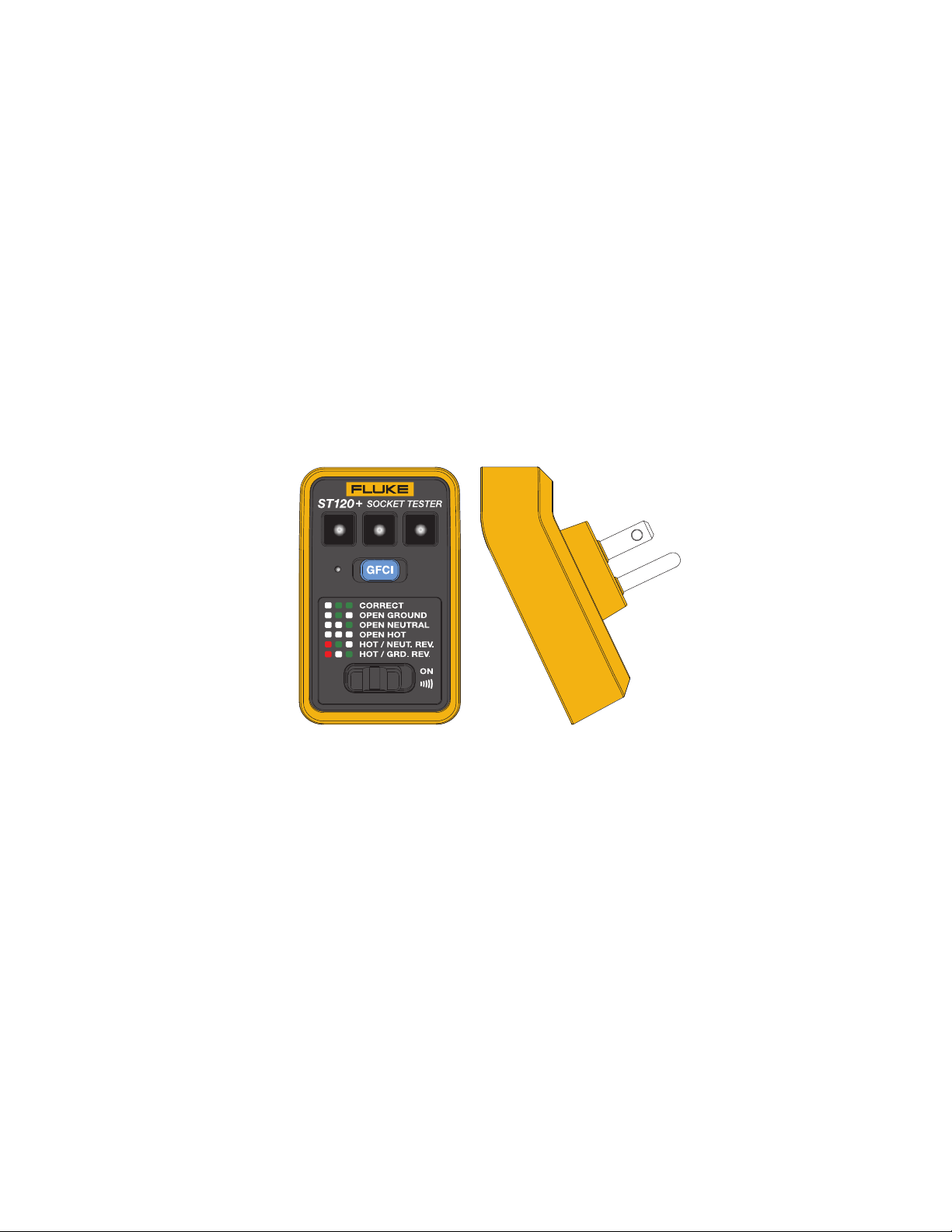
2. Plug the Product into the socket and note which indicators light.
3. To determine the wiring, see the diagram on the ST120+ shown for reference in
Figure 1.
Figure 1. The Product
Find Quality Products Online at: [email protected]
www.GlobalTestSupply.com
Page 5

GFCI Test
To test a GFCI:
1. Before you plug the Product into a GFCI socket, push the GFCI test button to trip the
GFCI socket. If the GFCI does not trip, the socket is faulty and should be replaced.
2. After the GFCI trips, push the RESET button on the outlet.
3. Plug in the Product and push the blue GFCI test button on the Product for a minimum
of 6 seconds. As you push the Product GFCI button, but before the GFCI trips, the LED
to the left of the Product GFCI button briefly turns on. Once the GFCI trips, all of the
LEDs on the Product go out. If the GFCI does not trip, or if any of the LEDs on the
Product remain on, there is a problem with the wiring of the socket, the socket itself, or
the Product. Consult an electrician to determine the problem.
Beeper (ST120+ only)
The ST120+ includes a switchable beeper that emits a tone when voltage is present on the
Product and the beeper is switched on. To switch off the beeper, slide the beeper switch to
the left position.
Find Quality Products Online at: [email protected]
www.GlobalTestSupply.com
Page 6

LIMITED WARRANTY AND LIMITATION OF LIABILITY
This Fluke product will be free from defects in material and workmanship for two years from
the date of purchase. This warranty does not cover fuses, disposable batteries, or damage
from accident, neglect, misuse, alteration, contamination, or abnormal conditions of
operation or handling. Resellers are not authorized to extend any other warranty on Fluke’s
behalf. To obtain service during the warranty period, contact your nearest Fluke authorized
service center to obtain return authorization information, then send the product to that
Service Center with a description of the problem.
THIS WARRANTY IS YOUR ONLY REMEDY. NO OTHER WARRANTIES, SUCH AS
FITNESS FOR A PARTICULAR PURPOSE, ARE EXPRESSED OR IMPLIED. FLUKE IS
NOT LIABLE FOR ANY SPECIAL, INDIRECT, INCIDENTAL OR CONSEQUENTIAL
DAMAGES OR LOSSES, ARISING FROM ANY CAUSE OR THEORY. Since some states
or countries do not allow the exclusion or limitation of an implied warranty or of incidental or
consequential damages, this limitation of liability may not apply to you.
11/99
Find Quality Products Online at: [email protected]
www.GlobalTestSupply.com
 Loading...