

Page 1
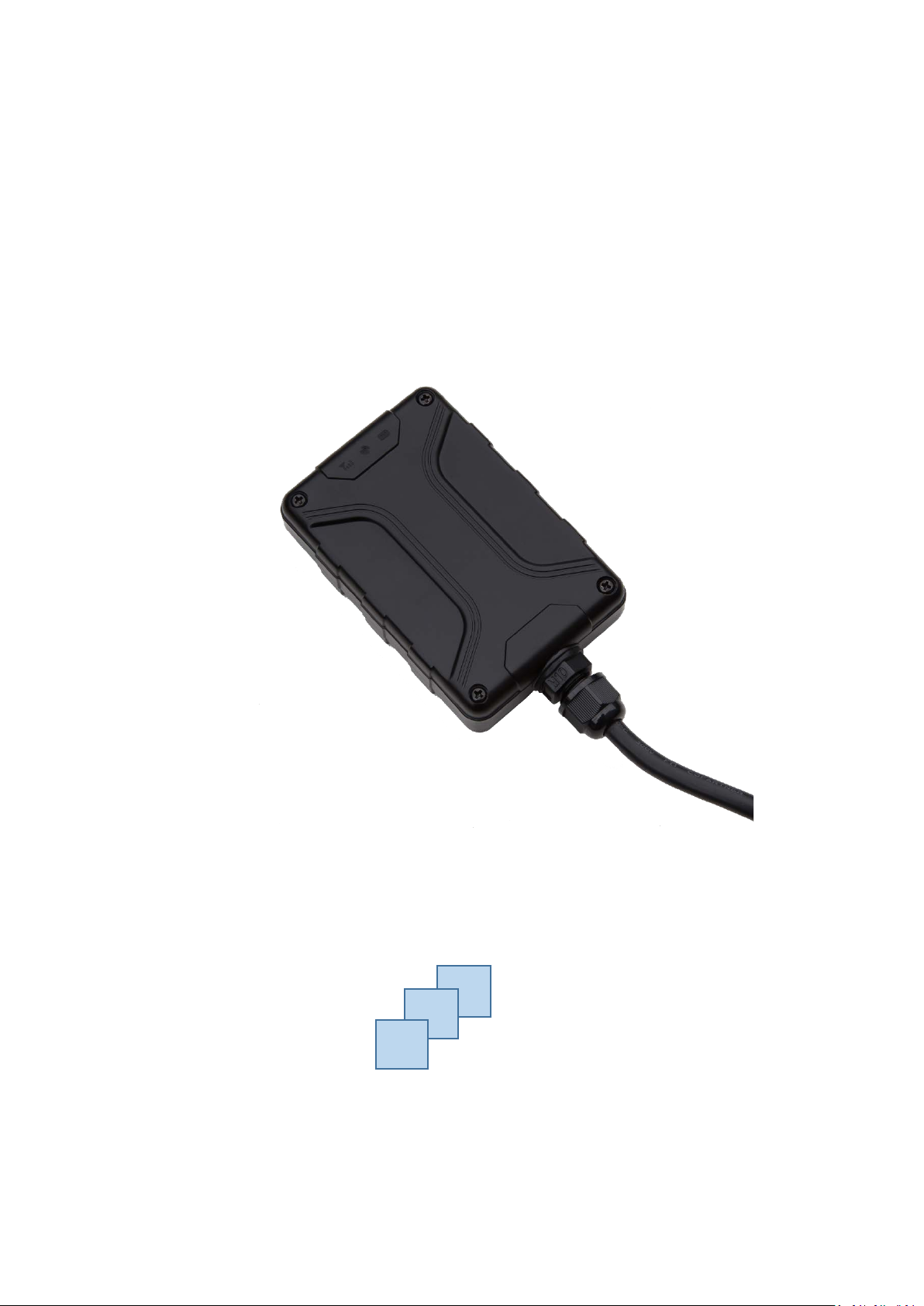
FIFOTRACK MOTORCYCLE/VEHICLE GPS TRACKER
3G VERSION
Model: S50
Version: V1.1
www.fifotrack.com
Page 2

S50 USER GUIDE
Copyright and Disclaimer
All copyrights belong to Shenzhen fifotrack Solution Co., Ltd. You are not allowed
to revise, copy or spread this file in any form without consent of fifotrack.
is trademark of fifotrack, protected by law.
Please read this user guide carefully before installation to avoid any possible
personal injury or property loss.
Copyright © fifotrack 2015 All rights reserved First in first out 1
Page 3
Version
Author
Revision Date
Details
S50 USER GUIDE
Revision History
V1.1 Cici Wu July 22, 2019 Initial revision
Copyright © fifotrack 2015 All rights reserved First in first out 2
Page 4
Version
File
Remarks
V1.1
<fifotrack Parameter Tool User Guide>
PC software tool for parameters
S50 USER GUIDE
Related Files
V1.1 <fifotrack S50 Command List> Command details of GPRS/SMS/COM
V1.2 <fifotrack A01 GPRS Protocol> GPRS communication protocol
between tracker and server
configuration
V1.1 <USB Cable Driver Installation Guide> How to install USB cable driver
V1.1 <Firmware Upgrade Guide> How to upgrade firmware
Download link: http://www.fifotrack.com/Support/Userguide/
Related Software
Version Software Remarks
V1.2 < Parameter Tool > Parameter configuration tool on PC
V1.11.0 < PL2303_Prolific_DriverInstaller > Driver for USB cable
V1.0 < Firmware Upgrade Suite> Tool for firmware upgrade
V1.0 < GPRS Command Generator> Generating GPRS commands for FIMS
tracking software
Download link: http://www.fifotrack.com/Support/Userguide/
Video Guide Link
http://www.fifotrack.com/Support/video.html
Marketing Materials Download Link
http://www.fifotrack.com/Support/marketing.html
Copyright © fifotrack 2015 All rights reserved First in first out 3
Page 5

S50 USER GUIDE
Contents
1 Product Overview .............................................................................................. 5
2 Product Functions .............................................................................................. 5
2.1 Tracking Functions ........................................................................................................... 5
2.2 Alarms .............................................................................................................................. 5
2.3 Other Functions ............................................................................................................... 6
3 Product and Accessories ..................................................................................... 6
3.1 Standard Packing Box ....................................................................................................... 6
3.2 Optional Accessories ........................................................................................................ 6
4 Product Appearance ........................................................................................... 7
5 PCB Overview..................................................................................................... 8
6 LED Light ............................................................................................................ 8
7 Specification ...................................................................................................... 9
8 First Use ............................................................................................................ 10
8.1 Installing the SIM Card ................................................................................................... 10
8.2 GPS Antenna .................................................................................................................. 11
8.3 Tracking by Calling ......................................................................................................... 11
8.4 SMS Reply Content Example .......................................................................................... 12
8.5 Tracking by SMS Command - C01 .................................................................................. 13
8.6 Configuration on PC ....................................................................................................... 14
8.7 Platform Tracking ........................................................................................................... 14
9 Device Installation ............................................................................................. 15
9.1 I/O Installation ............................................................................................................... 15
9.2 Power/Ground Cable ..................................................................................................... 16
9.3 Positive/Negative Digital Input (IN1/IN2) ...................................................................... 16
9.4 Analog Input( AD1) ........................................................................................................ 17
9.5 Output control (OUT1) ................................................................................................... 17
Copyright © fifotrack 2015 All rights reserved First in first out 4
Page 6

2.1 Tracking Functions
2.2 Alarms
S50 USER GUIDE
1 Product Overview
S50 is a light model which is suitable for vehicle, motorcycle, boat, asset tracking, etc.
Power input range is 8-92V with industrial design.
The core features of S50 include internal GPS/GSM antennas, IP66 waterproof, 1 digital input, 1
analog input and 1 output.
S50 uses own FIFOTRACK A01 GPRS PROTOCOL which is simple and practical. The users can
integrate protocol into their own platform efficiently.
2 Product Functions
GPS+GSM Base Station Dual Tracking
Real Time Tracking
Time Interval Tracking
Distance Tracking
Direction Change Tracking
Mobile Phone Tracking
Engine/Door Status Alarm
Maintenance remind
GEO-Fence Alarm
Speeding Alarm
Idling Alarm
Fatigue Driving Alarm
Harsh Acceleration Alarm
Harsh Braking Alarm
Parking Overtime Alarm
Internal Battery Low Alarm
External Battery Low Alarm
External Power Cut Alarm
Fuel Theft Alarm
Copyright © fifotrack 2015 All rights reserved First in first out 5
Page 7
2.3 Other Functions
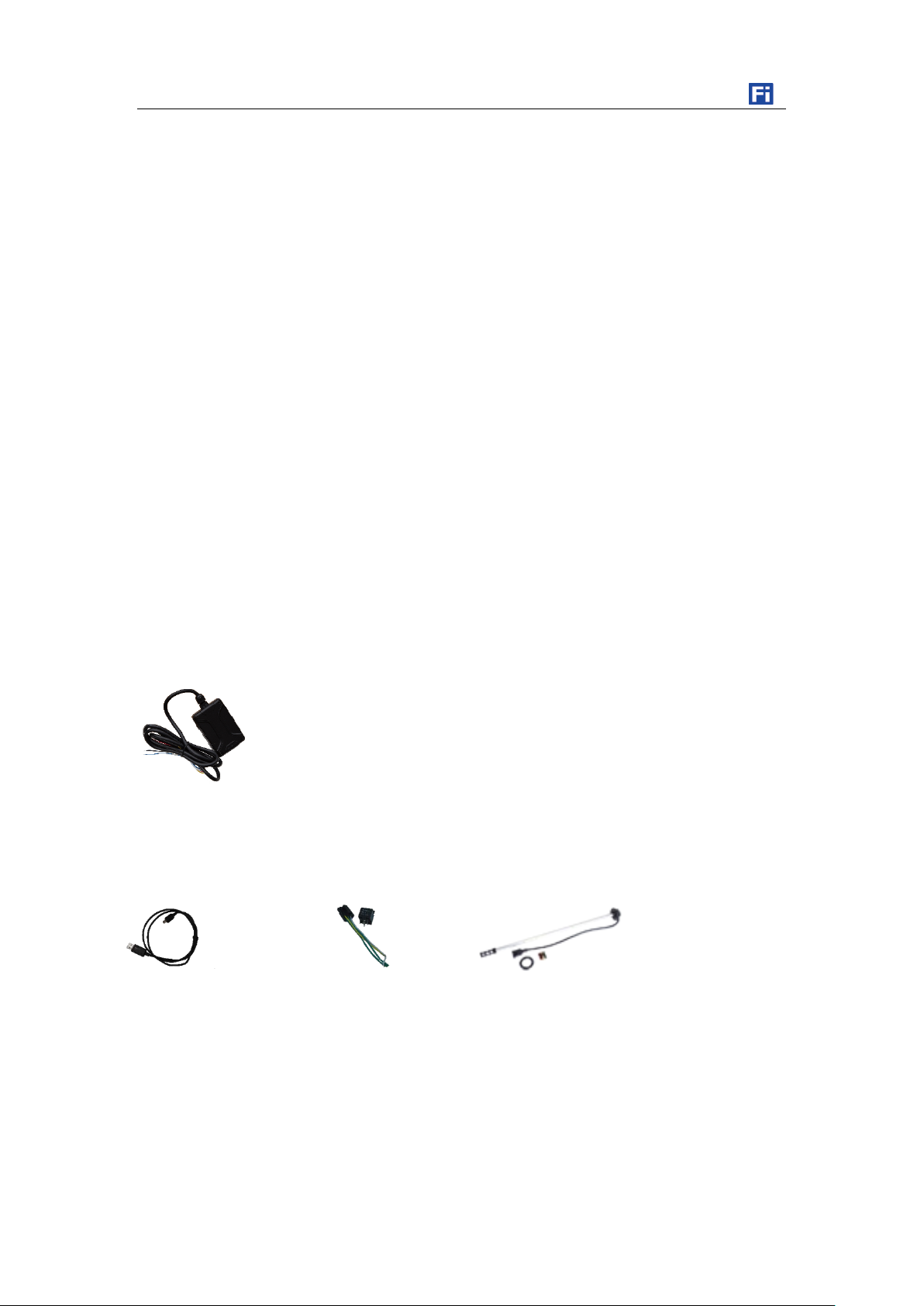
3.1 Standard Packing Box
3.2 Optional Accessories
S50 USER GUIDE
Fuel Filling Alarm
Low Fuel Level Alarm
High Fuel Level Alarm
IP66 Waterproof
8 MB Flash Memory
Uploading Mode Settings for ACC ON/ACC OFF
Roaming Time Interval Setting
Vehicle Battery Low Protection
OTA
Stop Car Remotely (optional, with relay)
3 Product and Accessories
Main Unit
USB Cable Relay
AS10 Fuel sensor
Copyright © fifotrack 2015 All rights reserved First in first out 6
Page 8
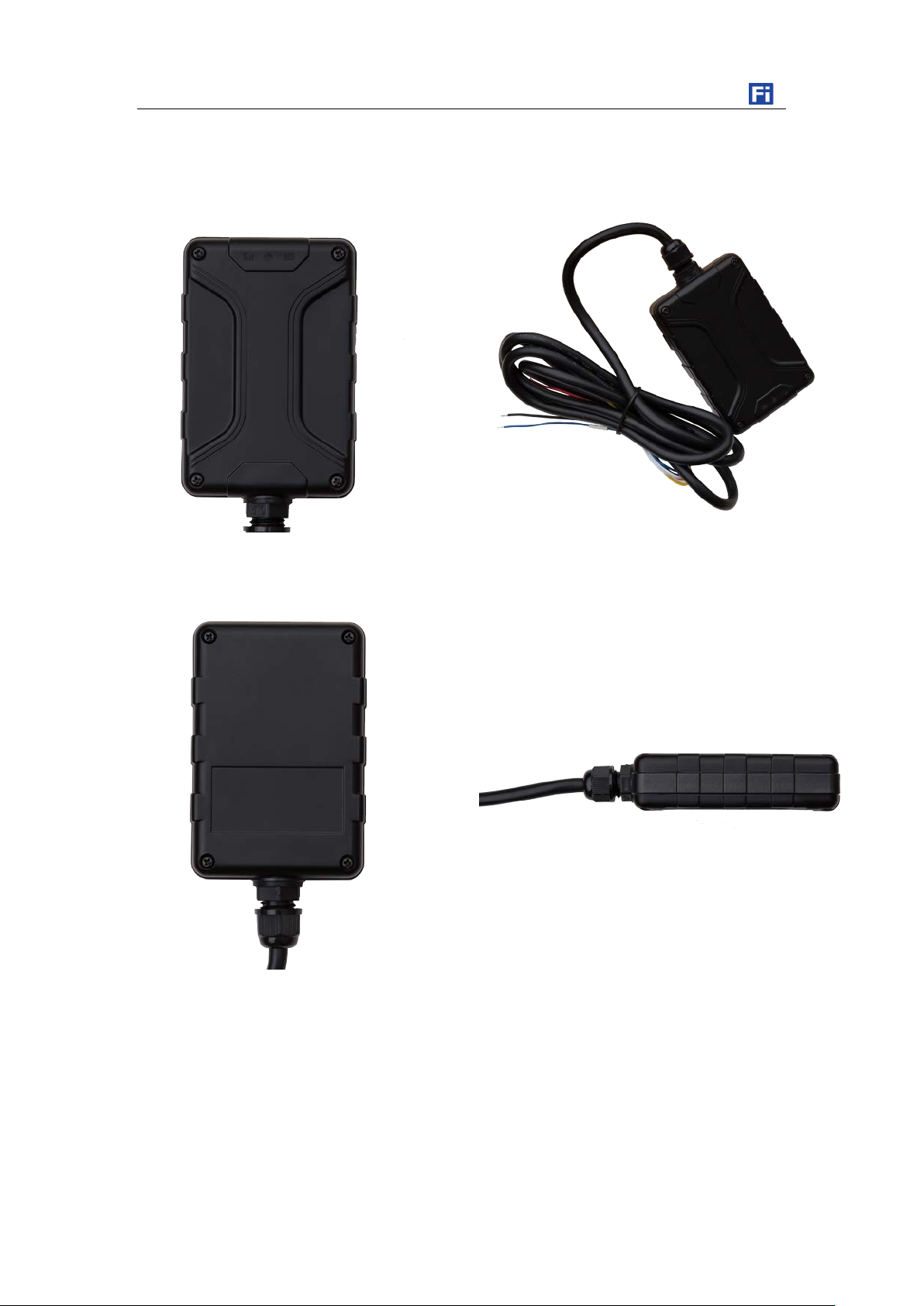
S50 USER GUIDE
4 Product Appearance
Front View Overview
Rear View Side View
Copyright © fifotrack 2015 All rights reserved First in first out 7
Page 9
Flash 2s on and 2s off
No GPS signal
GSM Light (Orange)
Off
Power off or sleep
Flash 0.1s on and 3s off
GSM available
Flash every 0.1s
Device is initialing
Flash 2s on and 2s off
No GSM
S50 USER GUIDE
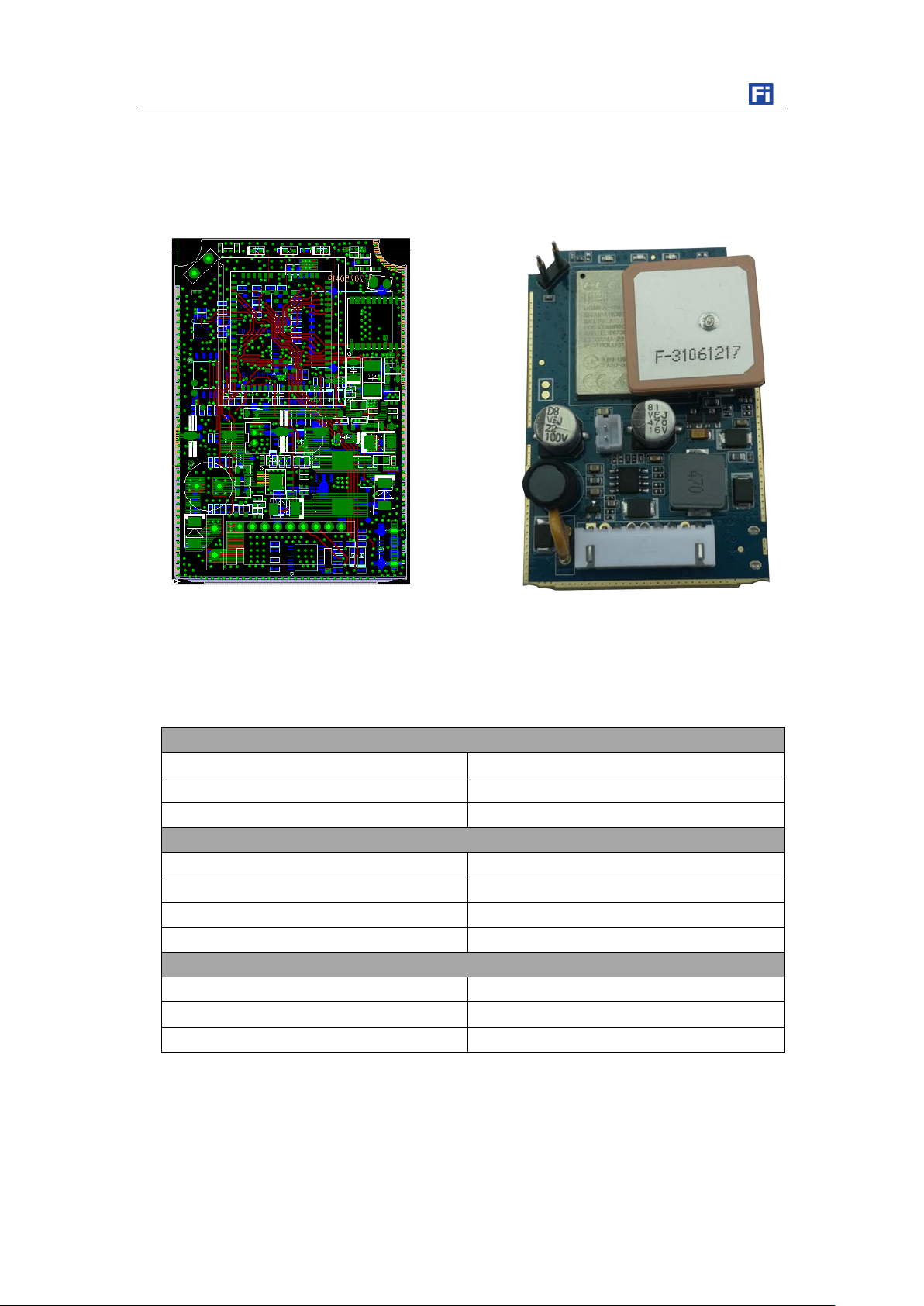
5 PCB Overview
6 LED Light
GPS Light (Green)
Off Power off or sleep
Flash 0.1s on and 3S off GPS valid
External Power Light (Red)
Off External power cut
Flash every 0.1s External power low
Solid On External power normal
Copyright © fifotrack 2015 All rights reserved First in first out 8
Page 10
GPS Module
L70-R
Input Voltage
DC 8~92V/1.5A
Internal Battery
300mAh/3.7V
Power
7.8mA standby current
GSM Frequency
850/900/1800/1900MHz
UMTS Frequency
850/900/1900/2100MHz
GPS Sensitivity
-165dBm
GPS Start Speed
Cold start 35s
Position Accuracy
10m
I/O Port
1 Digital input, positive, default for ACC detection.
S50 USER GUIDE
7 Specification
Item Specification
Dimension 80*53*21mm
Weight 162g
GSM Module Quectel UG96
Quectel
Consumption
37~185mA at 10 seconds regular tracking mode (GPS signal available).
Max 185mA at GPRS data transmitting moment.
Internal Battery Life 69 minutes at 10 seconds time interval
77 minutes at 30 seconds time interval
567 minutes (9.45 hours) at 600 seconds time interval
Operating
-20℃~70℃
Temperature
Humidity 5%~95%
LED Light 3 LED lights indicating GPS/GSM/External power status
Button/ Switch 1 power switch (inside case)
Flash Memory 8MB (GPRS data 10200 units, SMS data 320 units)
Hot start 1s
1 Analog input, voltage range is 0-36V.
1 Output
1 USB port (inside case)
Copyright © fifotrack 2015 All rights reserved First in first out 9
Page 11
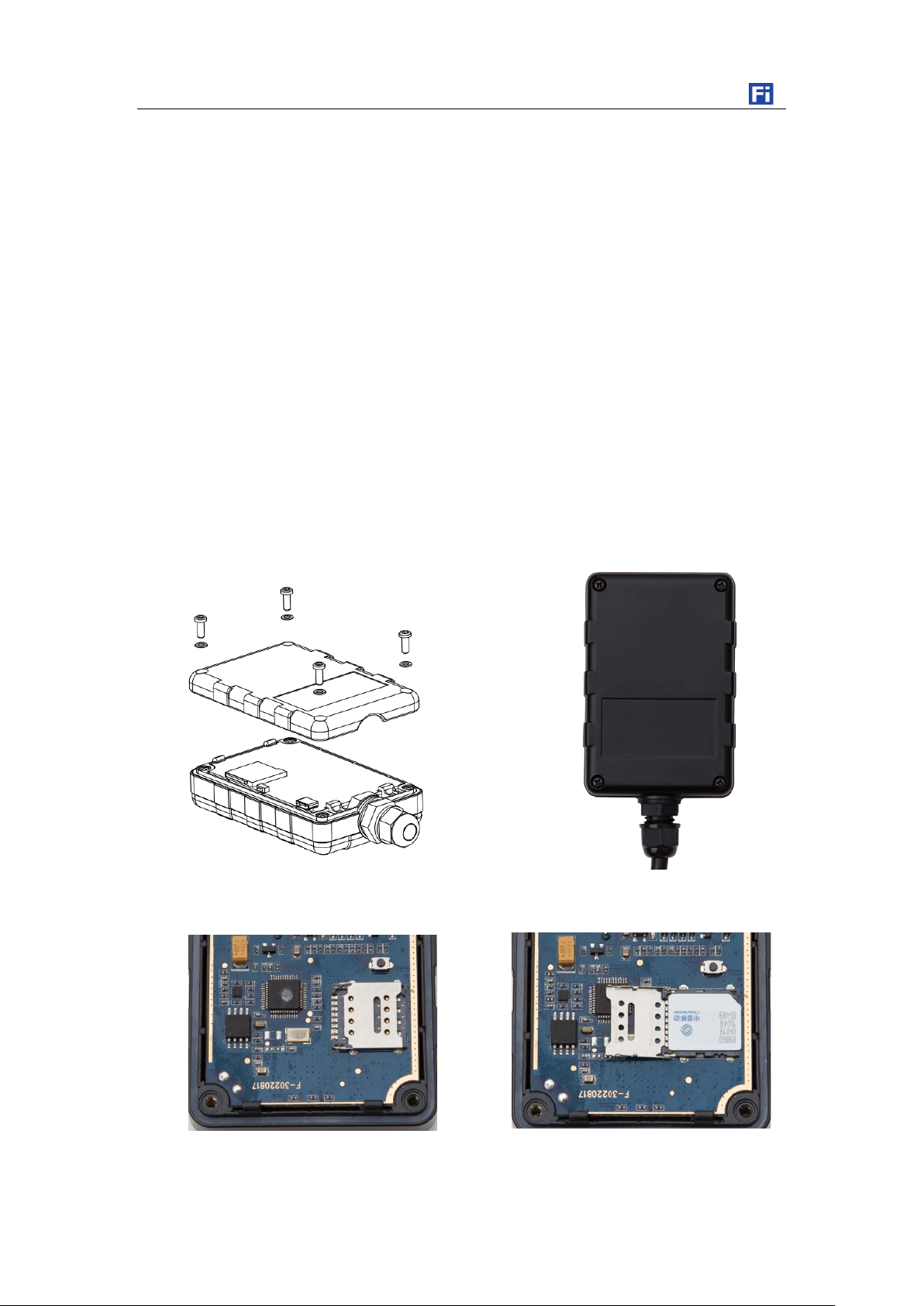
8.1 Installing the SIM Card
Unscrew and open the rear cover case
S50 USER GUIDE
8 First Use
S50 is 3G tracker. Make sure the SIM card is compatible with 3G.
SIM card is Micro type, 15*12mm.
Ensure the SIM card has enough balance.
SIM card should have GPRS data plan for platform tracking.
Ensure PIN code has been closed.
Authorization SOS numbers can’t work well if SIM card doesn’t have caller ID service. E.g.:
device can’t reply SMS to authorization SOS number because SIM card can’t identify incoming
call.
Turn off device before SIM card installation.
Copyright © fifotrack 2015 All rights reserved First in first out 10
Page 12
8.2 GPS Antenna
8.3 Tracking by Calling
S50 USER GUIDE
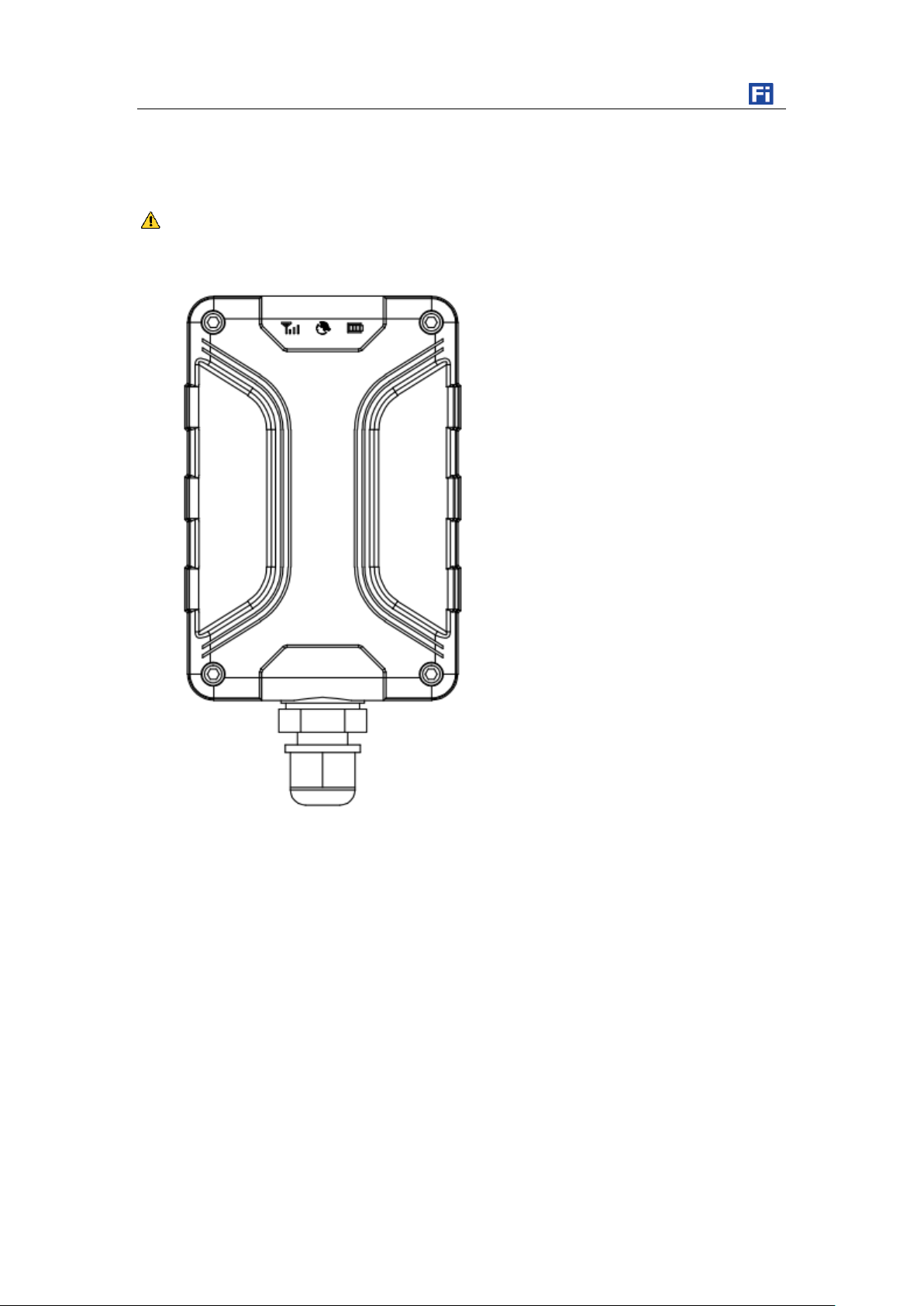
Top side of S50 should face Sky for better GPS signal.
Don’t install the Device where is shielded by metal. For example, inside a metal can.
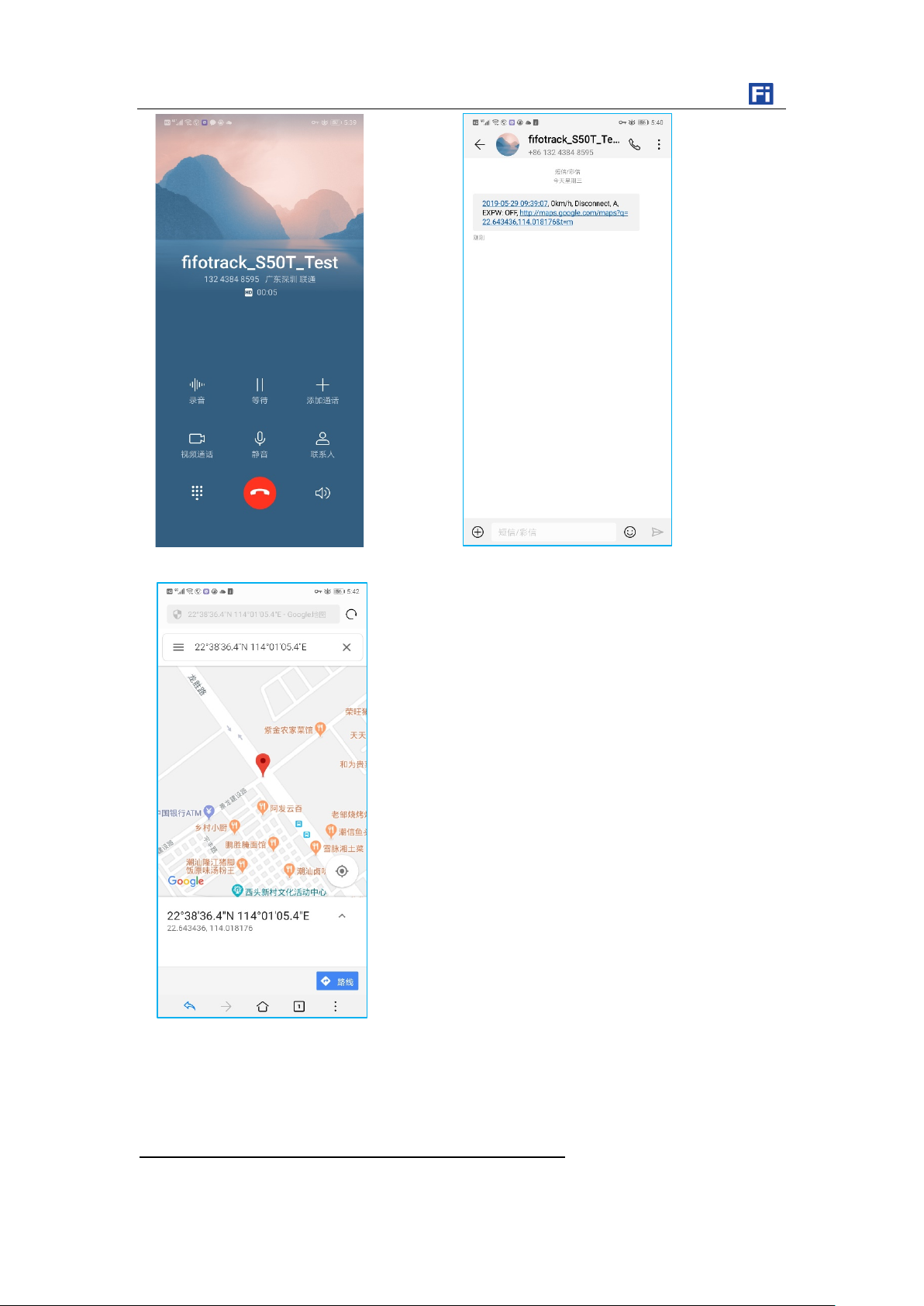
Call the SIM card number inside S50, you will get a SMS reply with Google map link. Click it for
specific map location.
Copyright © fifotrack 2015 All rights reserved First in first out 11
Page 13
8.4 SMS Reply Content Example
S50 USER GUIDE
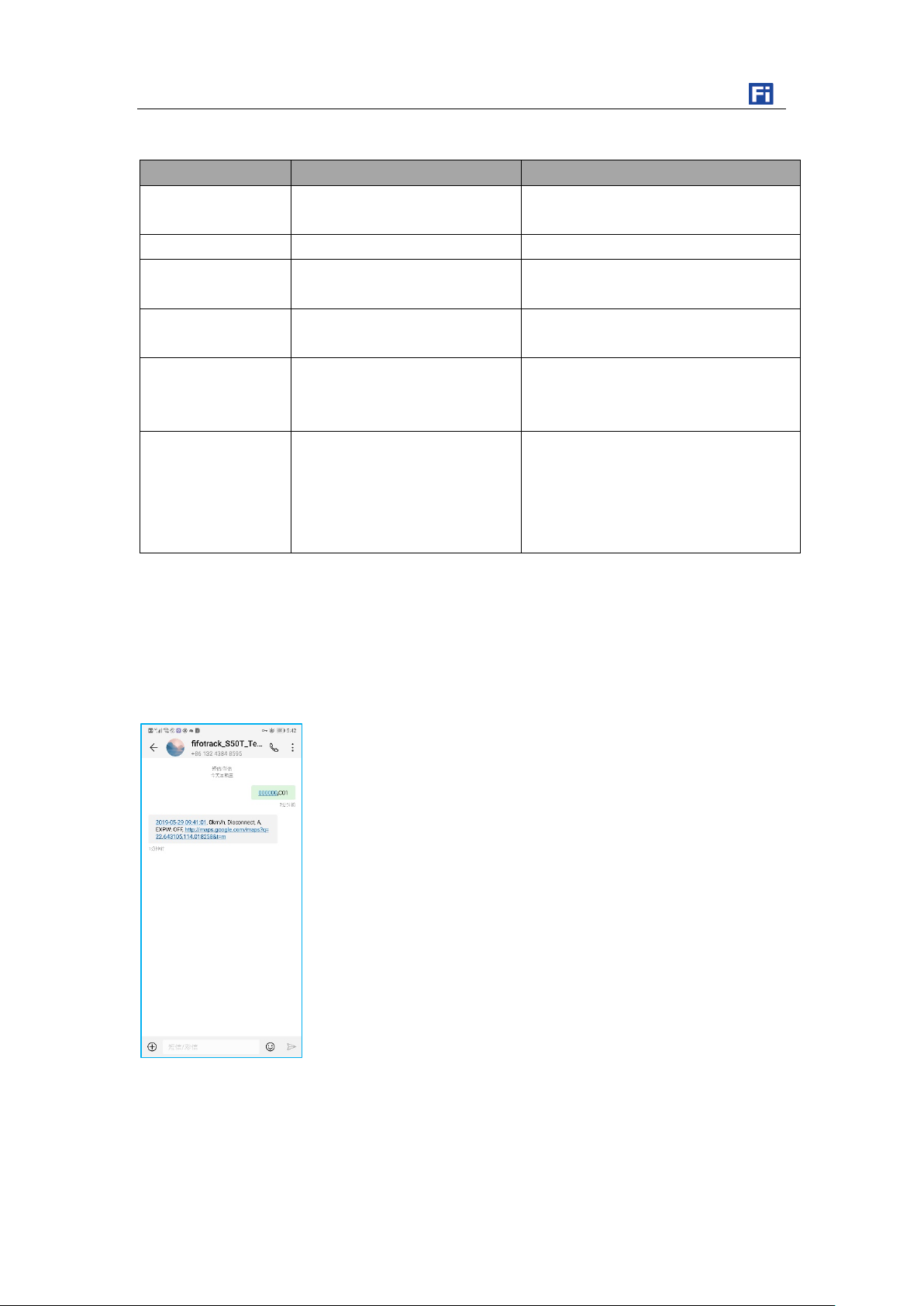
2019-05-29 09:41:01, 0km/h, Disconnect, A, EXPW: OFF,
http://maps.google.com/maps?q=22.643105,114.018258&t=m
Copyright © fifotrack 2015 All rights reserved First in first out 12
Page 14
A
GPS fixed
EXPW:OFF
External power off
External power status. “ON” means
http://maps.google.
Google map link, latitude in the
Google map link with latitude and
8.5 Tracking by SMS Command - C01
S50 USER GUIDE
SMS Reply Format:
Field Detail Remarks
2019-05-29
09:41:01
Date and time, format
YYYYMMDD hh:mm:ss
Date and time
0Km/h Speed is 0km/h Speed
Disconnect GPRS disconnect GPRS connection status, ”Disconnect”
or “Connect”.
GPS Status,”A” means GPS valid, “V”
means GPS invalid.
external power normal, ”OFF” means
external power cut.
com/maps?q=22.64
3105,114.018258&t
=m
front of longitude. Unit degree
Latitude=22.643105°
Longitude=114.018258°
SMS Command:000000,C01
SMS Reply: Current location
longitude, which can be opened directly
on smart phone.
Note:Default SMS password is “000000”, set new SMS password with B10 command.
Please refer to <fifotrack S50 Command List > for more details.
Copyright © fifotrack 2015 All rights reserved First in first out 13
Page 15
8.6 Configuration on PC
8.7 Platform Tracking
S50 USER GUIDE
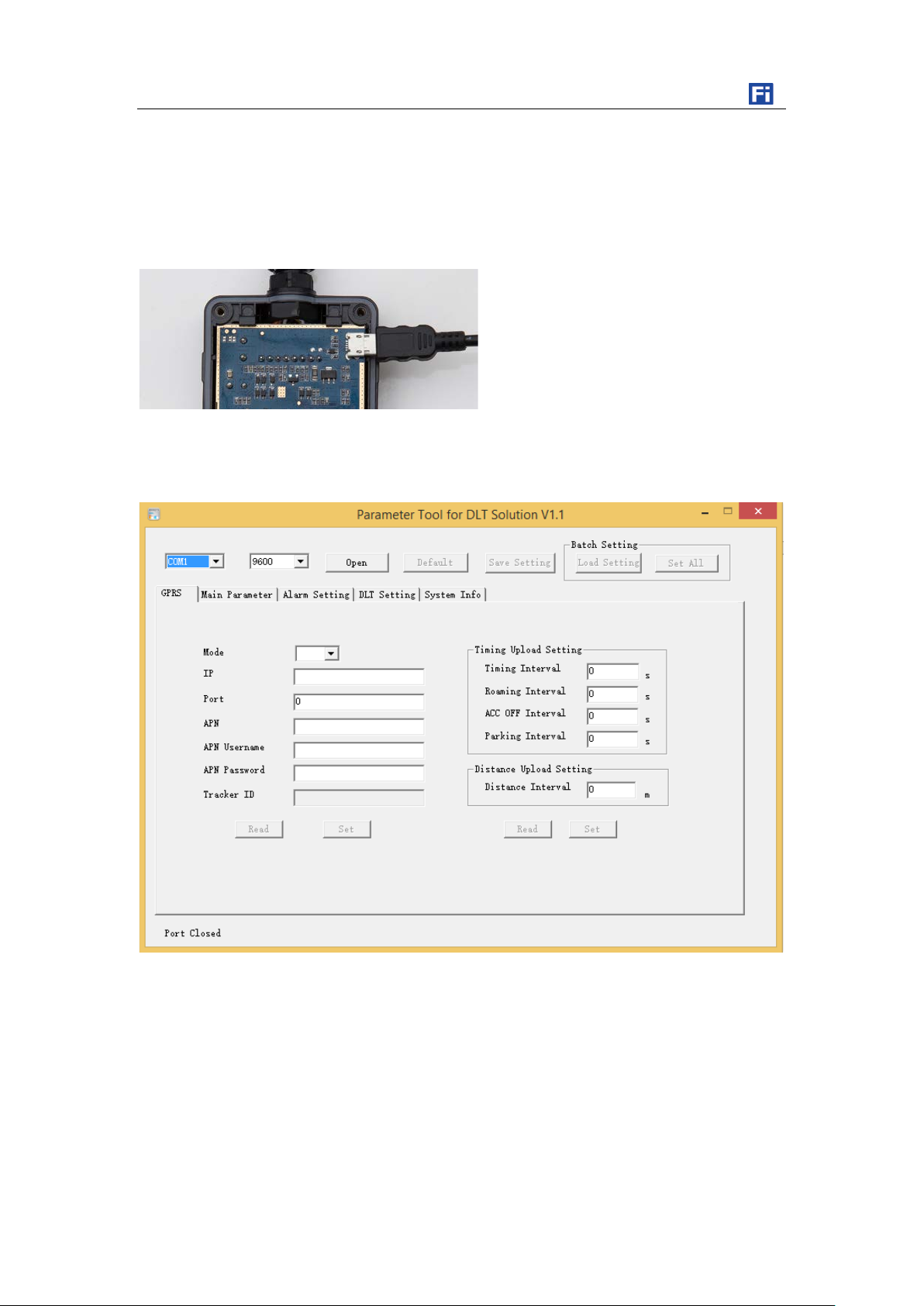
fifotrack company provides “Parameter Tool” software for configuration. Please download USB
cable driver and install it before using parameter tool. Refer to <USB Cable Driver Installation Guide>
if need.
Connect S50 to PC with USB cable. Run “Parameter Tool” software which will identify port
automatically and read all of the current parameters.
Please read < fifotrack Parameter Tool User Guide > for more details.
You can use SMS commands B00, B01, B02, B03 to set server IP, port, APN and GPRS uploading
interval. Sales will send specific guide file to you for sample trial.
You can also configure those parameters via parameter tool software on PC.
Copyright © fifotrack 2015 All rights reserved First in first out 14
Page 16
S50 USER GUIDE
9.1 I/O Installation
9 Device Installation
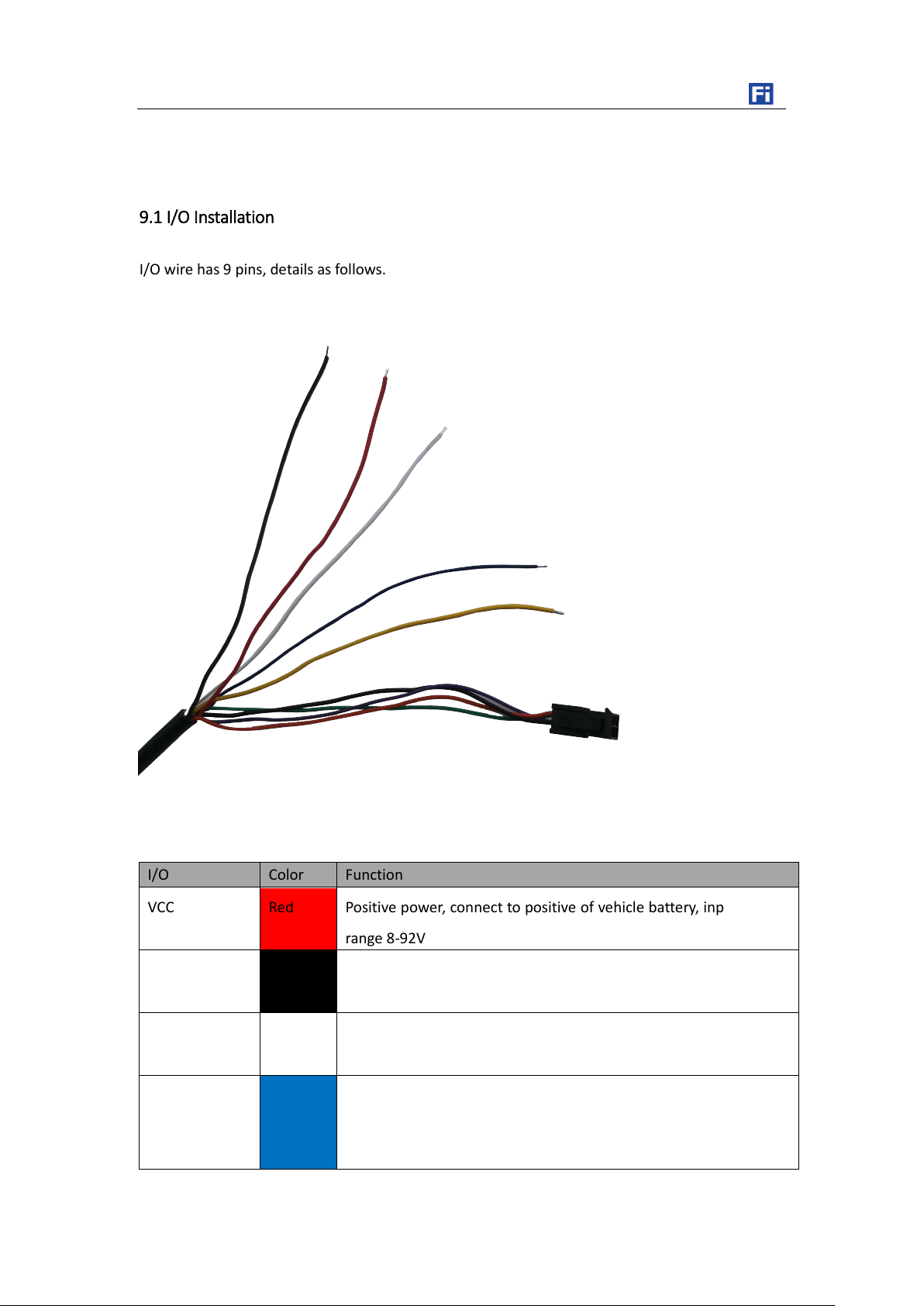
I/O wire has 9 pins, details as follows.
I/O Color Function
VCC Red Positive power, connect to positive of vehicle battery, input voltage
range 8-92V
GND Black Ground, connect to negative of vehicle battery or the vehicle’s iron
part.
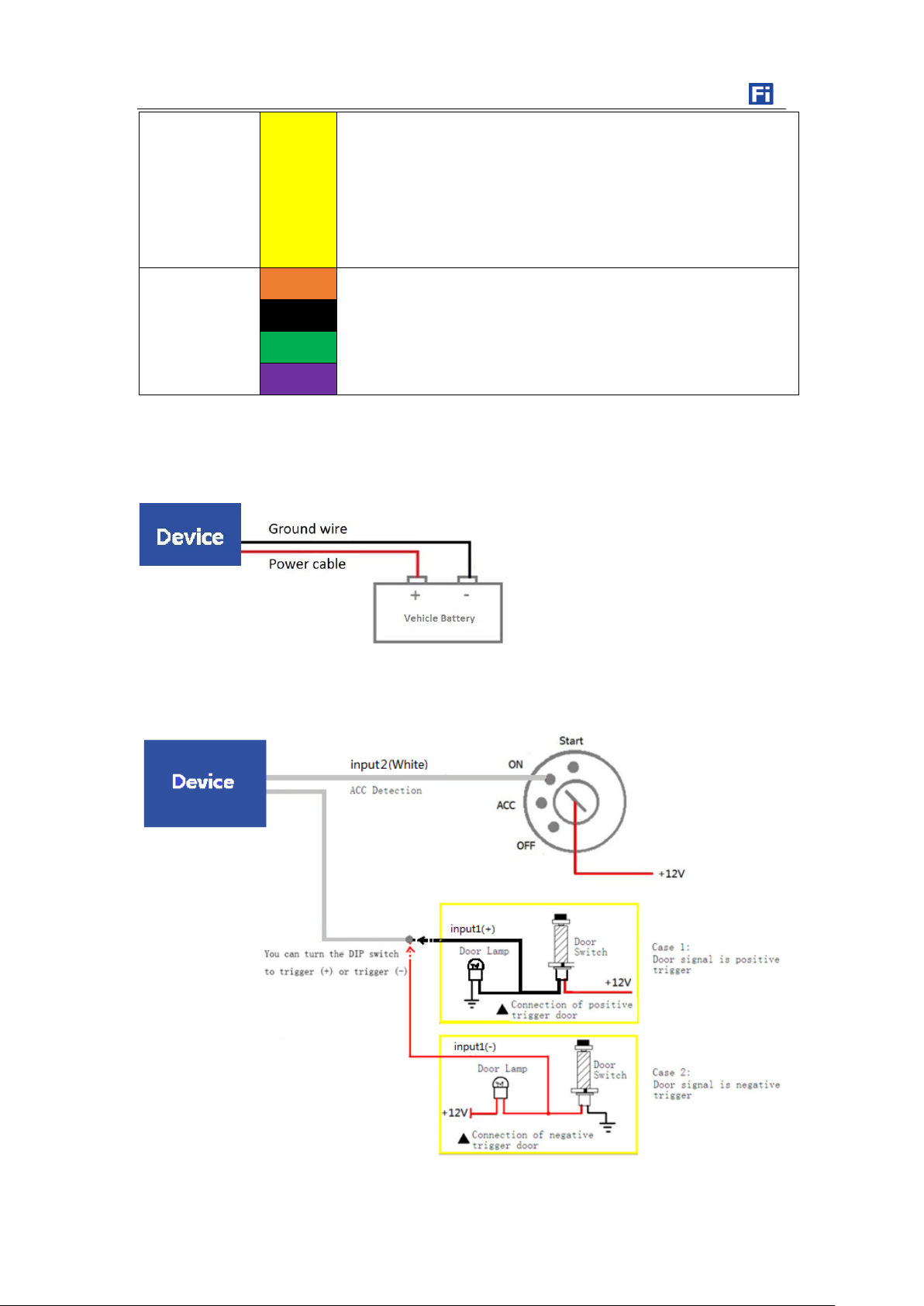
IN2 White Digital input2, positive input, default connect to ACC for status
detection.
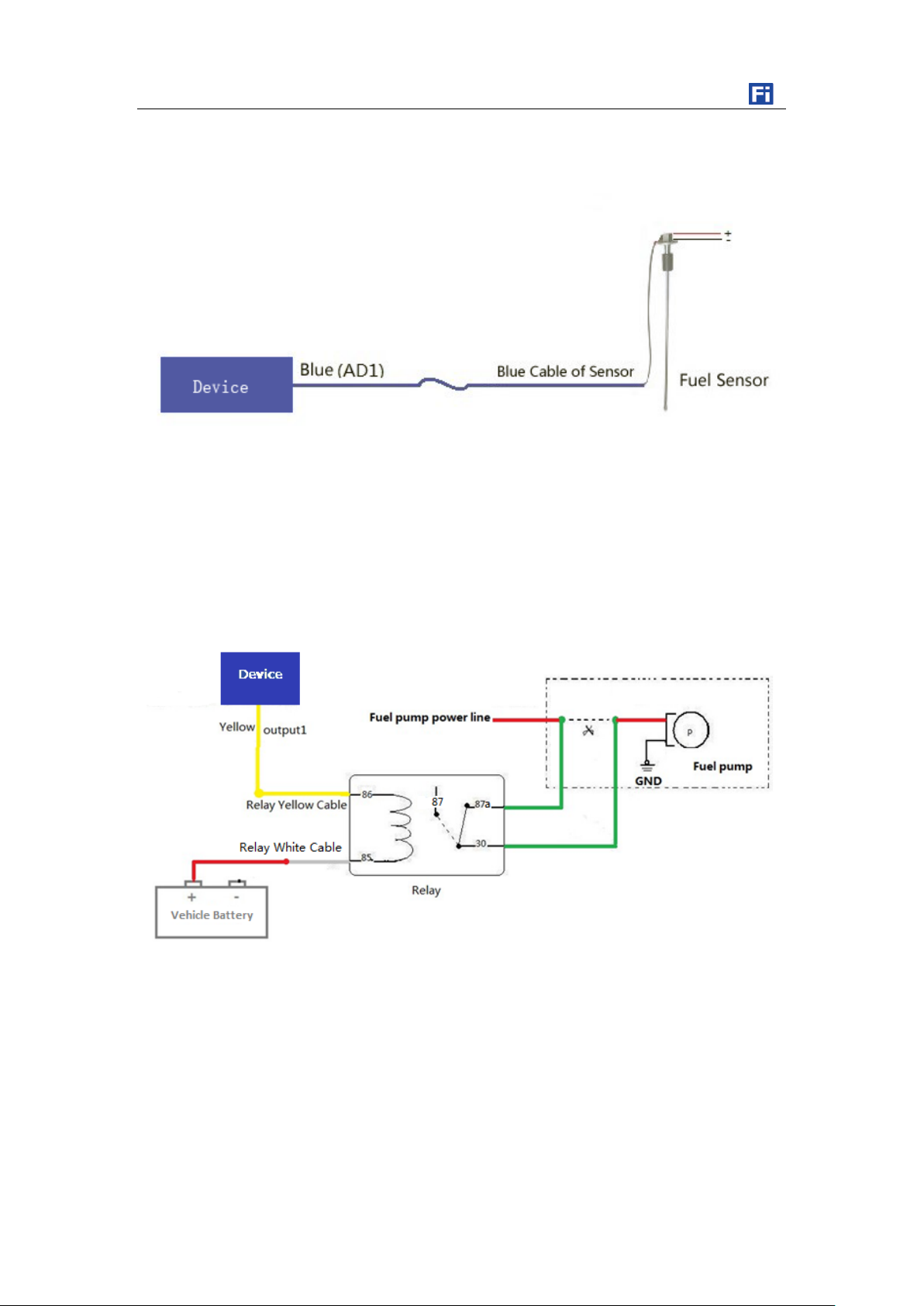
AD1 Blue 12 bits analog input, voltage range 0-36V, adjustable, default 0-5V
range. Connect to external sensor. For example, fuel sensor.
AD1 is reserved to convert to input1
Copyright © fifotrack 2015 All rights reserved First in first out 15
Page 17
9.2 Power/Ground Cable
9.3 Positive/Negative Digital Input (IN1/IN2)
S50 USER GUIDE
OUT1 Yellow Output1
Output active: low level (0V)
Output inactive: open drain (OD)
Max open-drain (inactive) voltage: 45V
Max current for output low voltage (valid): 500mA
RS232 Port Orange Not available in S50 model, the RS232 port is reserved for future
Black
models.
Green
Purple
Copyright © fifotrack 2015 All rights reserved First in first out 16
Page 18
9.4 Analog Input( AD1)
9.5 Output control (OUT1)
S50 USER GUIDE
Note:
1. AD1 default voltage range is 0~5V, c a n adjust voltage range by command B34
2. Raw data is in Hex, need convert to decimal, range is 0~4096. 0 means empty, 4096 means full.
Please e-mail us at [email protected] if any question or feedback.
Copyright © fifotrack 2015 All rights reserved First in first out 17
 Loading...