

Page 1

Chapter 1
Overview
The VT-501 mainboard combines the advanced capabilities of the Intel
82430VX PCIset with a 321-pin ZIF socket and voltage regulator which
support the full range of Intel Pentium®, Cyrix 6x86™ and AMD-K5™
processors as well as the future MMX™ processors to provide the ideal
platform for building the next generation of high performance Microsoft
Windows multimedia systems.
The VT-501 archieves the highest level of system responsiveness using up to
128 MB high-speed EDO DRAM or 64MB lightning-fast SDRAM coupled
with an onboard 256/512KB Pipeline Burst SRAM Level II cache.
Built on the highly concise Baby AT form factor, the VT-501 integrates a full
set of I/O features onboard, including two 16550A UART compatible serial
ports, one EPP/ECP capable parallel port and support fur state-of-the-art
Universal Serial Bus (USB) through the optional USB riser card providing
ease-of-use and high-speed Plug & Play connections to future USB complaint
peripheral devices. System I/O connectivity is further enhanced by an IrDA
complaint serial port, an optional PS/2 Keyboard & PS/2 Mouse port and
optional onboard SIR support.
Ample expansion is provided for with four 16-bit ISA slots and four 32-bit PCI
slots. The VT-501 also comes with a built-in Enhanced PCI Bus Master PCI
IDE controller that provides high speed connections to a full range of IDE
devices including HDD, CD-ROM and Tape-Drives, and delivers ultra fast
data transfer up to 20MB/sec through its support for PIO Mode3, Mode4 and
DMA Mode 2.
This chapter gives a you a brief overview of the VT-501 mainboard. In
addition to basic information on the board's main components and features, it
also provides advice on how to upgrade and expand it. For updated BIOS,
drivers, or product release information, please visit FIC's home page at:
http://www. fic.com. tw. Congratulations on your decision to adopt the VT-501
mainboard. With its high-speed PCI local bus architecture and ultra-fast I/O
connections, the VT-501 provides the ultimate solution for optimizing the
performance of your high-end system.
1
Page 2

VT-501 Mainboar d M anual
Main Features
The VT-501 mainboard comes with the following high-performance features:
■
Easy Installation
Award BIOS with support for Plug and Play, auto detection of Hard Drive
and IDE features, MS Windows 95, and Windows NT compatible.
■
Flexible Processor Support
The onboard 321-pin ZIF socket supports Intel Pentium (P54C) CPU speed
75/90/100/120/133/150/166/200 MHz processors/ P54CTB / P55C
(optional by splitting the voltage regulator).
Cyrix 6x86-P120+ (100 MHz) / 6x86-P133+ (110 MHz) / 6x86-P150+
(120 MHz) / 6x86-P166+ (133 MHz) processors.
IBM 6x86-P120+ (100 MHz) / 6x86-P133+ (110 MHz) / 6x86-P150+
(120 MHz) / 6x86-P166+ (133 MHz) processors.
AMD K5-PR75 (75 MHz) / K5-PR90 (90 MHz) / K5-PR100 (100 MHz) /
K5-PR120 (90 MHz) / K5-PR133 (100 MHz) / K5-PR150 (120 MHz) /
K5-PR166 (133 MHz) processors.
■
Leading Edge Chipset
Intel 82430VX chipset, including a CPU interface controller, advanced
cache controller, integrated DRAM controller, synchronous ISA bus
controller, PCI local bus interface, integrated power management unit.
■
Ultra-fast Level II Cache
Supports onboard 256KB/512KB synchronous PBSRAM direct-mapped
write-back cache memory.
■
Versatile Main Memory Support
Accepts u p to 128MB RAM in two banks using 72-pin SIMMs of 4, 8, 16,
32MB or using a 168-pin DIMM with support for SDRAM or EDO
memory.
■
ISA & PCI Expansion Slots
Four 16-bit ISA and four 32-bit PCI expansion slots provide all the room
you need to install a full range of add-on cards.
2
Page 3

Overview
■
USB Support
Two Universal Serial Bus connectors integrated into rear I/O panel.
■
Enhanced PCI Bus Master IDE Controller
Integrated Enhanced PCI local bus IDE controller with two connectors
supports up to four IDE devices such as Hard Disk, CD-ROM or Tape
Backup drives via two channels for high speed data throughput. This
controller supports PIO Modes 3 and 4, and DMA Mode 2 for optimized
system performance.
■
Super Multi I/O
Integrated UMC669/LGS Prime 3C Plug and Play Super I/O chipset
features two 16550A UART compatible serial ports, one EPP/ECP capable
parallel port, one IR port, and one Floppy Disk Drive connector.
3
Page 4

VT-501 Mainboar d M anual
This User Manual
This manual is designed to guide you and facilitate your use of the VT-501
mainboard. It contains a description of the design and features of the
mainboard, and also includes useful information for changing the configuration
of the board and the system it is installed in. The manual is divided into three
chapters:
■
Chapter 1 - Overvi ew
gives an overview of the mainboard and describes its major components
and features.
■
Chapter 2 - Instal lation Proc edur es
gives instructions on how to set up the mainboard, including jumper
settings and CPU installation guides.
■
Chapter 3 - Award BIOS S etup
briefly explains the mainboard’s BIOS system setup in general and tells
you
how to run it and change the system configuration settings.
NOTE : The ma terial in this m anual is fo r inform ation o nly and is sub jec t to
change without notice. We reserve the right to make changes in the product
design without reservation and without notification to its us ers. We shall not be
liable for technical or editorial omissions made herein; nor for incidental or
consequential damages resulting from the furnishing, performance, or use of
this material.
4
Page 5

Overview
Something Interesting
This section provides useful information that you will need to know should you
decide to modify or upgrade the configuration of the mainboard and the system
it is installed in. If you do not have the confidence to upgrade the mainboard
yourself, we advise that you consult a qualified service technician for
assistance.
The BIOS Setup Utility
The BIOS (Basic Input Output System) is the basic firmware that instructs the
computer how to operate. For the BIOS to work properly, there must be a
record of the computer’s hardware and configuration settings for it to refer to.
This record is created using the Setup Utility, a program that is stored
permanently in the BIOS ROM chip on the m ai nboa rd.
The system configuration record created by the Setup Utility is also stored on
the mainboard, but not permanently. This section of the memory it is stored is
in the NVRAM.
When you buy your computer, the system configuration record will already be
set and may in some cases differ from the basic defaults. The first time you use
your computer or when you need to re-configure your system, you should run
the Setup Utility and write down the settings.
5
Page 6

VT-501 Mainboar d M anual
IRQ Functionality
As you read through this manual, you will see the term IRQ on a number of
occasions. It is important for you to know what this term means, particularly if
you intend to upgrade your system.
IRQ stands for Interrupt Request, the process in which an input or output
device tells the processor to temporarily interrupt its current task and
immediately process something from the source of the interrupt. When it has
completed this, the processor returns to the task it was already processing.
Devices that need an
IRQ line to operate sometimes need to have exclusive use of that line.
A large number of add-on cards, such a s sound cards and LAN cards, require
the use of an IRQ line to function. Some no. of IRQs may already be in use by
components in the system such as the keyboard and mouse. Add-on cards that
need to use an IRQ draw from the unused group of IRQs. When installing a
card that uses an IRQ, it will have a default IRQ setting which you might have
to change if that IRQ is al re ady i n use a nd ca nnot be share d.
Both ISA and PCI add-on cards may need to use IRQs. System IRQs are
available to add-on cards installed on the ISA bus first; the remaining ones can
be used by cards installed on the PCI bus. There are two categories of ISA addon cards: so-called Legacy ISA cards, which need to be configured manually
and then installed in any available ISA slot; and Plug and Play (PnP) ISA
cards, which are configured automatically by the system. As a result, when you
install Legacy ISA cards, you have to carefully configure the system to ensure
that the installed cards do not conflict with each other by having the same IRQ.
With PnP cards, on the other hand, IRQs are assigned automatically from the
ones available in the system. In the case of PCI add-on cards, the BIOS
automatically assigns an IRQ card to the PCI slot the card is installed in.
6
Page 7

Overview
DMA Channels of ISA Cards
Some Legacy and PnP ISA add-on cards may also need to use a Direct
Memory Access (DMA) channel. DMA assignments for this mainboard are
handled in the same way as the IRQ assignment process outlined above. For
more information, please refer to Chapter 3 of this manual.
Enhanced IDE
This mainboard features an integrated Enhanced IDE controller that provides
convenient, high-speed connections with up to four IDE devices, such as Hard
Disk, CD-ROM and Tape Backup Drives. Enhanced IDE is an upgrade of the
original IDE specification and provides increased capabilities and performance
in a number of areas, including support for Hard Disk Drives of over 1.2GB
and faster data transfer rates utilizing the PIO Mode 4 timing scheme.
With the integrated IDE controller you can connect up to four IDE peripheral
devices to your system. All devices are categorized in the same way that IDE
Hard Disks were configured in the past, with one device set as the Master
device and the other as the Slave device. We recommend that Hard Disk
Drives use the Primary IDE connector and that CD-ROM drives utilize the
Secondary IDE connector for improved system performance.
7
Page 8
VT-501 Mainboar d M anual
Serial Infrared (SIR) Connections
This mainboard features support for highly-sophisticated SIR technology,
which allows bi-directional and cordless data transactions with other IrDA
compliant computers and peripheral devices using infrared as a medium. This
transmission is carried out in either Full Duplex Mode or Half Duplex Mode.
The former allows simultaneous data transmission and reception, while the
latter disables the reception when transmission occurs.
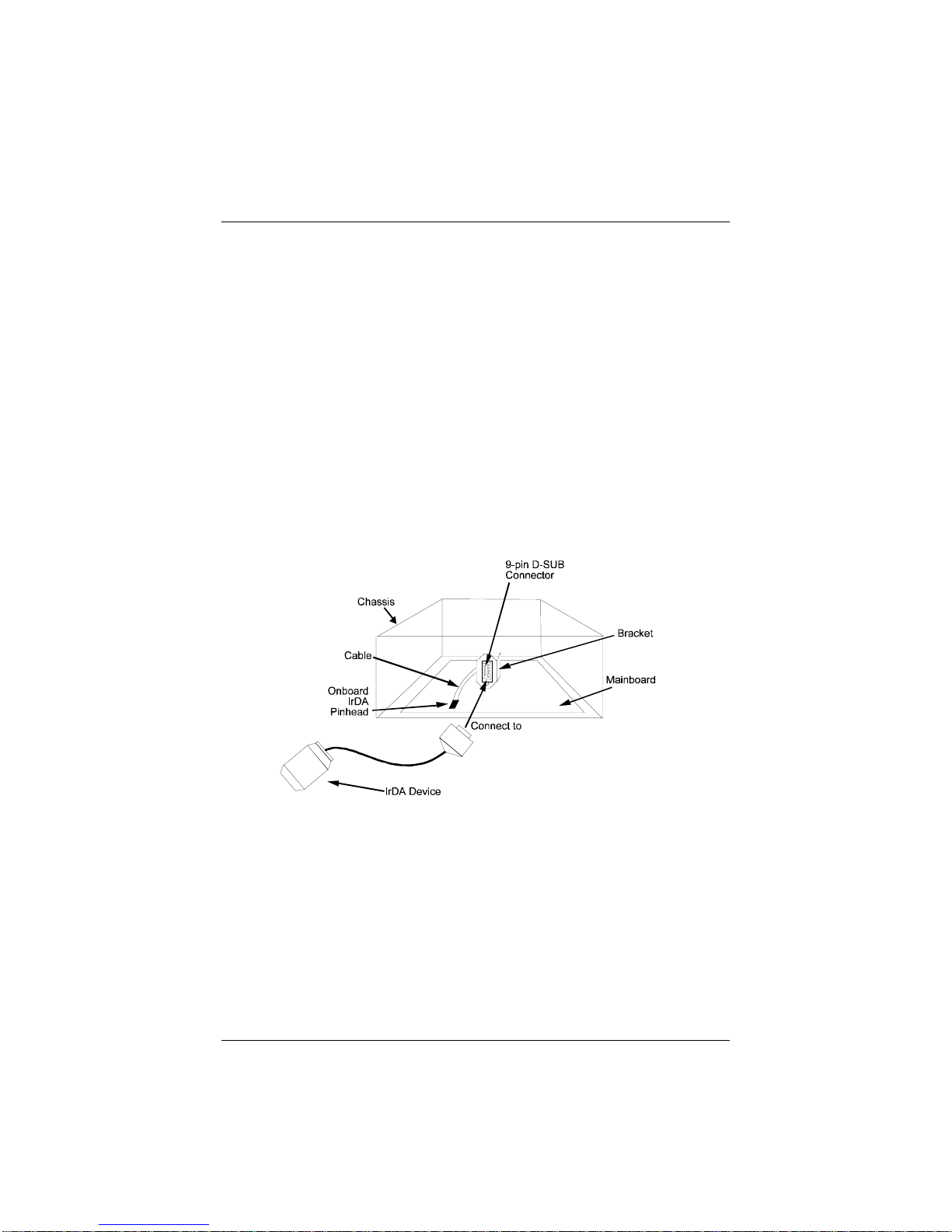
The I/O chipset on this mainboard features a SIR interface that is fully
compliant with the IrDA standard. An IrDA device can be installed via a 9-pin
D-SUB connector in the rear panel of the computer which is linked by a cable
to the onboard IrDA pinhead, as shown in the illustration below.
The serial port COM2 on this mainboard is designed to be an SIR compliant
port. If you wish to install the SIR connection feature, you need to adjust the
BIOS option for high-speed performance.
8
Page 9
Overview
Highly Convenient Integrated I/O Connectors
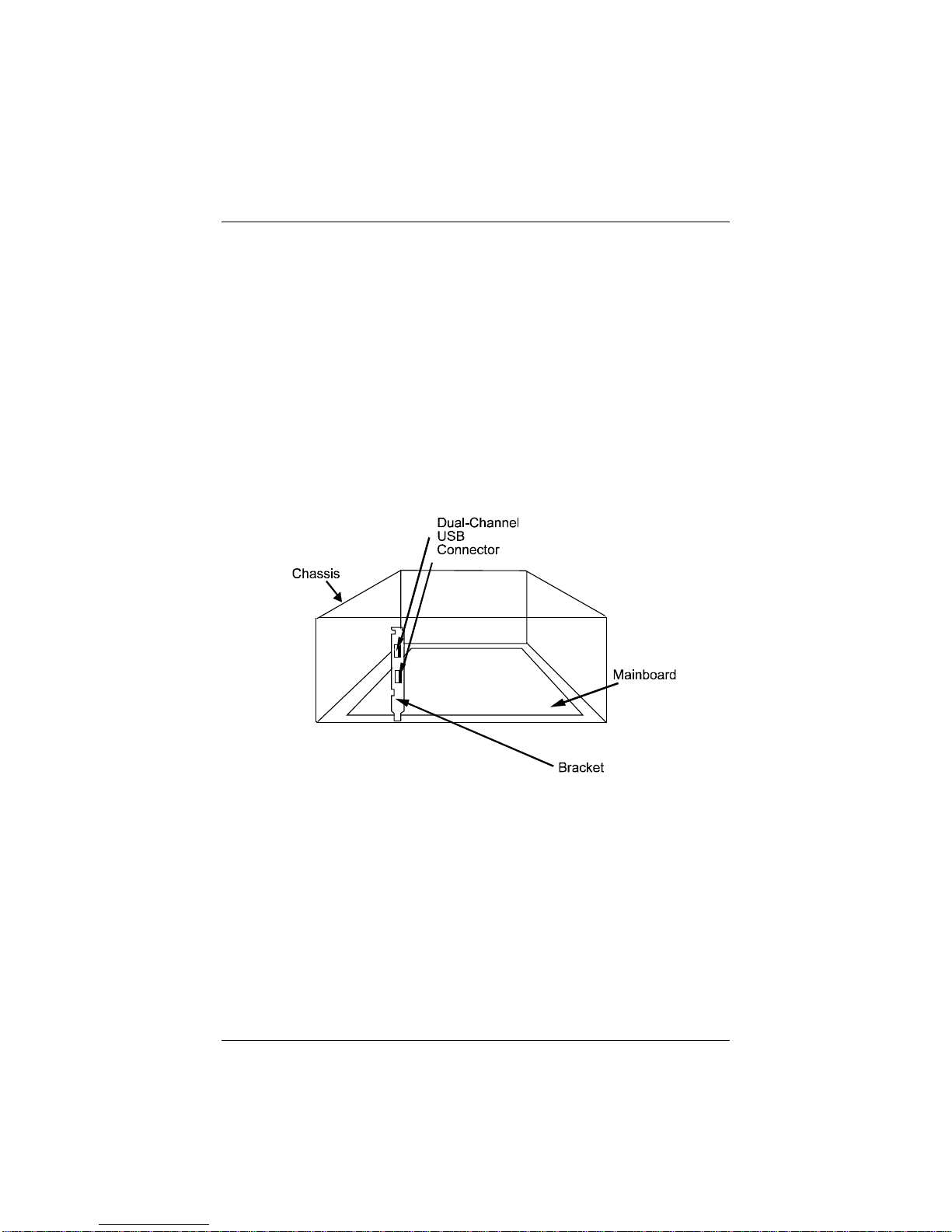
This mainboard features has an integrated rear I/O panel that incorporates a
full set of I/O ports to allow simple and convenient connections to a complete
selection of external peripheral devices.
In addition to two 16550A UART compatible serial ports and one EPP/ECP
capable parallel port, the panel features two USB connectors that provide high
speed connection to the next generation of USB devices. PS/2 keyboard and
PS/2 mouse connectors provide additional I/O connectivity.
9
Page 10

VT-501 Mainboar d M anual
This Page Intentionally Left Blank
10
 Loading...