

Page 1
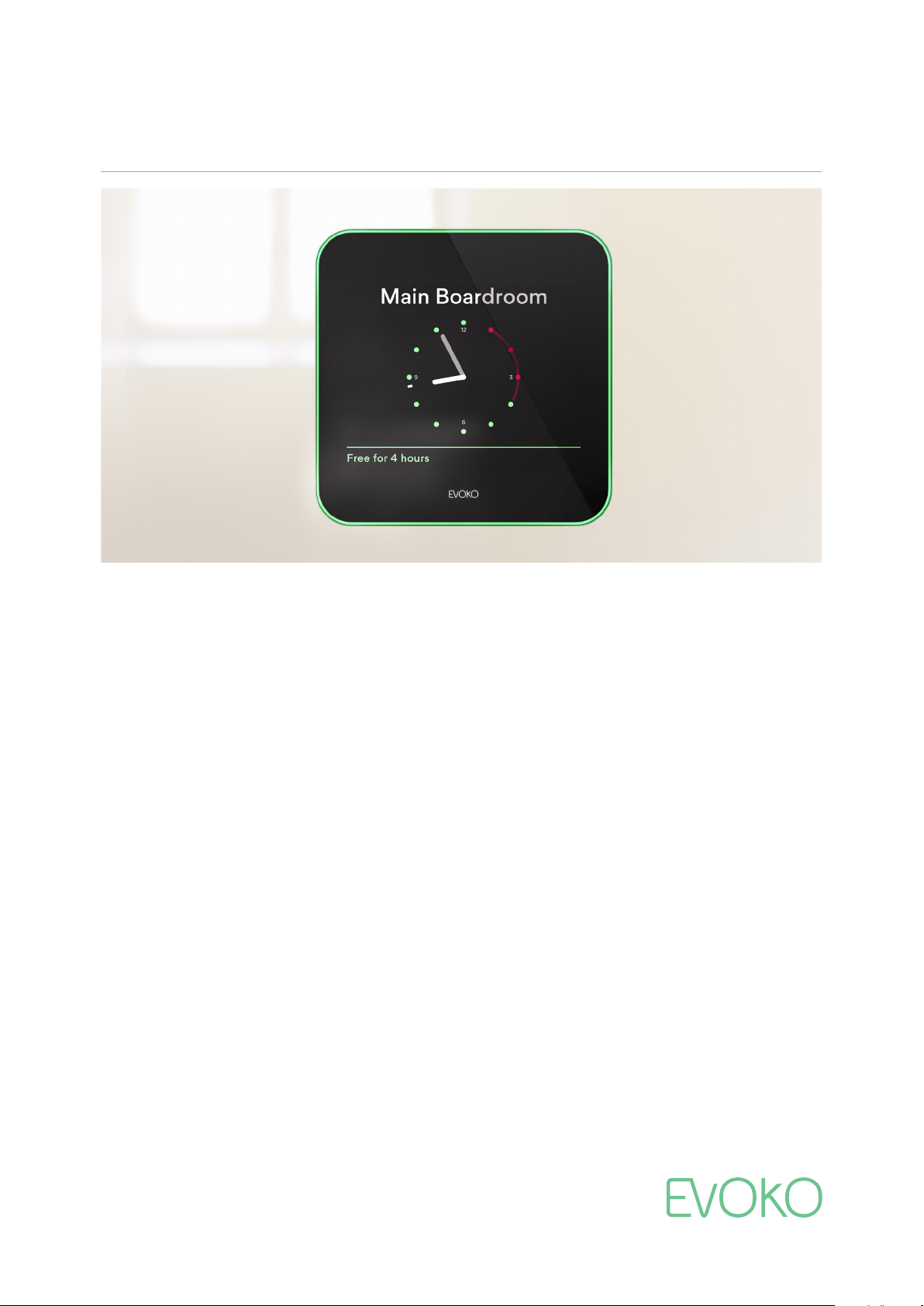
EVOKOLISO
The next generation room manager
Making meetings smoother than ever
Since 2010, Evoko Room Manager has taken the hassle out of room booking. This was the original touch-screen solution for
all your meeting rooms. No more double bookings, confusion and interrupted meetings. With the new generation room
manager, Evoko Liso, we once again revolutionized the way you meet. Evoko Liso is even brighter and lovelier to look at, but
with the same mission as ever – making sure all your meeting rooms are being used in a truly effective way.
Bright and helpful
Evoko Liso makes it easier than ever to book a room with
your favorite digital calendar, or directly on the screen using
your fingertip. Now we are taking the intuitive user interface
to a whole new level. All information is elegantly presented
on the screen and it actually changes information on the
display when someone walks up to it, always displaying the
most relevant information. Book, end or extend a meeting
directly from the clock or use the calendar to search for
other rooms based on availability, size and equipment.
Thanks to the green, red and amber light aura you can see
at a glance if the room is vacant or not. No more confusion
or double bookings.
Analytical and efficient
Evoko Liso gives you full insight into your organization’s
meeting patterns so you can really optimize resources. You
get decision-making support that truly cuts costs by analyzing
statistics in the web based Evoko Home.
you find the perfect room
also offers extensive multi
permission control and real-time monitoring of the units.
It has never been easier to open the door to a much more
efficient meeting culture.
every single time. Evoko Home
site management options with
Making sure
Open and interactive
Evoko Liso’s open API integrates smoothly with other 3rd
party systems. You could, as an example, get the AC turned
on 10 minutes before a meeting is scheduled to start.
RFID and PIN verification enables easy identification for
on-screen bookings and the possibility to restrict access to
certain rooms or groups. The much appreciated “check in”
function helps you to free up meeting space by cancelling
bookings when no one shows up. Any non-functioning
equipment in the room? Simply report it on the screen.
Simple and beautiful
Evoko Liso has a slim design. It’s easy to install and a true
delight to look at outside every meeting room. So easy and
self-explanatory that anyone can master it, no training
needed. All features can be reached with only a few simple
touches. The next generation room manager is smooth,
helpful and bright. Your next meeting is just a Liso away.
Page 2
EVOKOLISO
Smooth, helpful, bright.
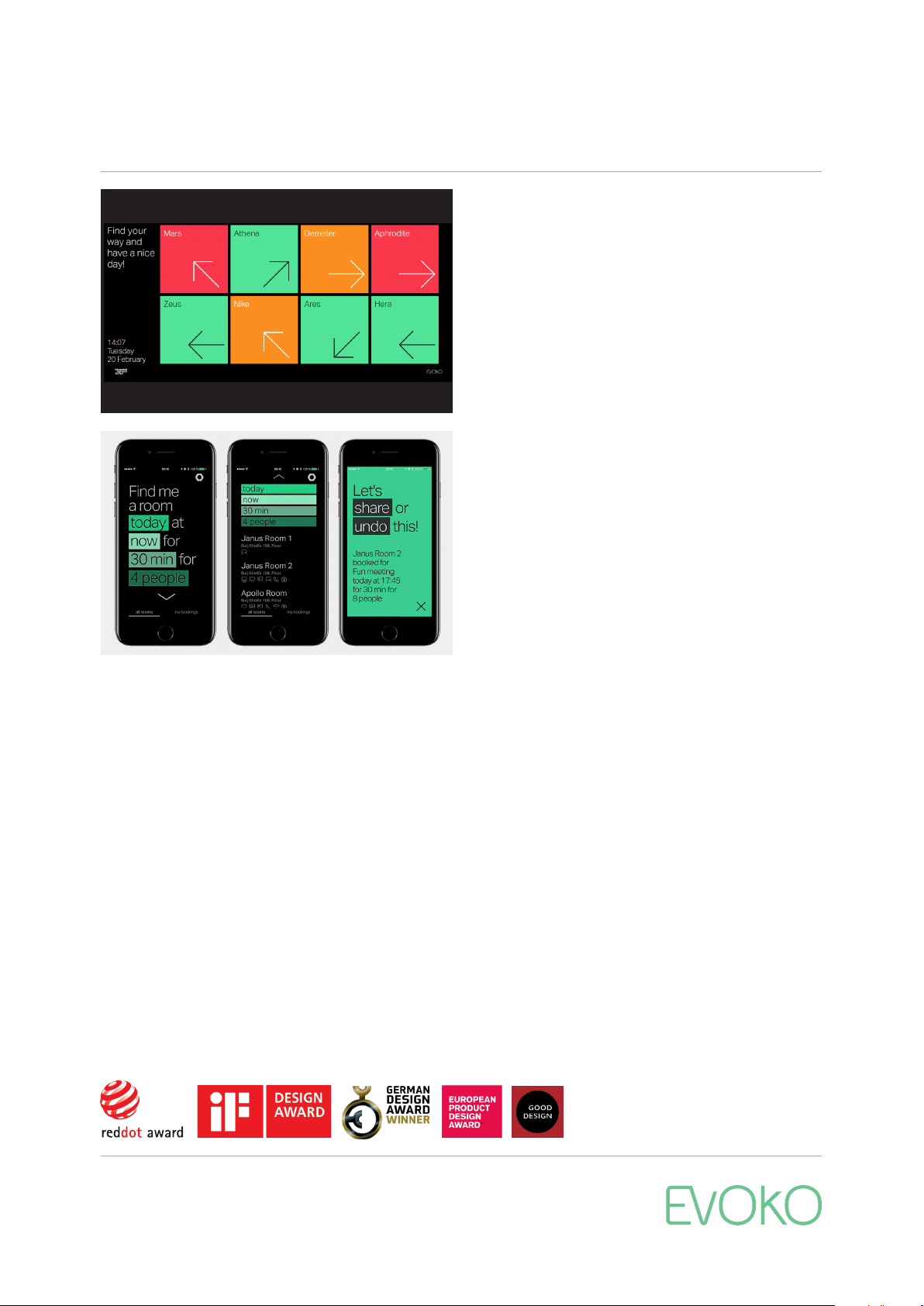
Overview Screen
See the full meeting room schedule at a glance with Evoko
Overview Screen. Choose between the whole building or
just one floor. It’s easy to see what’s available, what’s
booked and what’s soon to be occupied, just by the red,
green & amber color coding. The handy arrows also let you
know where meeting rooms are in relation to you, making
finding something nearby a breeze.
Get A Room App
With the Evoko Get A Room App, working on the go is super
easy. Book, share and invite colleagues to the meeting too.
Using filters like time, capacity & equipment, it’s easy to see
the best matches first, along with suggestions if you’re
preference isn’t available. Yes, this app is quick and simple.
Efficiency at its best.
www.evoko.se
Page 3

EVOKO LISO
TECHNICAL SPECIFICATION
TECHNICAL INFO
TECHNICAL INFO
• Display
• 8 inch capacitive touch with anti-
fingerprint treatment
• Connectivity
• Wi-Fi
802.11 a/b/g/n
• Ethernet
RJ-45, 10/100/1000 Mbit
PoE & PoE +
IEEE 802.3af
• RFID 13.56 MHz
reader
ISO/IEC 14443A/B
Supports MIFARE 4K/1K card
(does not support ISO/IEC 15693
or MIFARE Ultralight C)
• Power
• Power over Ethernet (PoE),
• 12V AC/DC power adapter (
• Sensors
• Proximity sensor
• Ambient light sensor
• Mounting
• Mounting options for both standard and
glass walls
• 5-way cable ex
neat installation
• Other
• 3-way indirect light aura to make room
status visible already from a distance
• Open API for third party integration
• Communication via real-time two-way
connection
• Remote management with multi-site
support
• Real-time monitoring & statistics
• Server
• Recommended Specifications: Dual
Core CPU-4GB-30GB
it option for easy and
or
accessory)
COMPATIBLE PLATFORMS
• Microsoft Office 365
• Microsoft Exchange 2016
• Microsoft Exchange 2013
• Microsoft Exchange 2010 SP3
• Google G Suite
• IBM/Lotus Domino Smartcloud
• IBM/Lotus Domino 8.5.3 – 9.x
• Evoko Booking (stand-alone version)
SIZE AND WEIGHT
• Size: 200 x 200 x 25 mm
(7.9 x 7.9 x 1.0 inch)
• Weight: 1.3 kg (2.9 lbs)
USER INTERFACE LANGUAGES
• Arabic
• Catalan
• Chinese, Simplified
• Chinese,
Traditional
• Czech
• Danish
• Dutch
• English
• Estonian
• Finnish
• French
• Galician
• German
• Italian
• Icelandic
• Japanese
• Korean
• Latvian
• Lithuanian
• Norwegian
• Polish
• Portuguese
• Russian
• Spanish
• Swedish
• Thai
PRICING MODEL & BOX CONTENTS
Our pricing model is based on the same
simplicity as our products; it is a one-time
cost per unit and that is it. There are no
licensing costs or subscription fees and all
required hardware, software, support and
warranty are included. The one-time cost
includes:
• Evoko Liso unit (hardware with Liso
application)
• Mounting kits for both standard and
glass walls
• Evoko Home application (used for
configuration, synchronization and
administration)
• Future software upgrades for the Evoko
Liso unit and Evoko Home
• Power Supply (if needed, typically
installed with PoE)
• 2-year warranty (up to 3 more years can
be purchased separately)
• Product support via phone/email/
web-tickets for as long as the Liso units
are used
ARTICLE NUMBER
• ERM2001
www.evoko.se
Page 4

EVOKO LISO & EVOKO HOME
SECURITY WHITE PAPER
Version 2.0 (006) September 2019
Page 5

Evoko Liso and Evoko Home Security
Evoko’s room booking have been used worldwide since 2010 in many industries where security is of the highest level. This list includes
governments, banks and defence contractors. Security is a top priority for Evoko and Evoko Liso / Evoko Home have been specifically
developed to be a highly secure, enterprise grade solution, following the best global security practices and guidelines.
As part of our security process, we have also had external experts perform penetration testing on some of the early releases of our software.
These tests include a 360-degree assessment of all components included in the solution, and the following steps;
• Attack Surface Mapping
• Embedded Device testing
• Firmware Reverse Engineering and analysis
• Web, Mobile and Cloud endpoints assessment
• Radio communication security assessment
With the ever-changing threat landscape, building and maintaining a system with the highest security demands is an ongoing process. New
attack vectors and tools are invented by hackers all the time. To ensure the most robust cyber-attack resilience, we have alongside our internal
testing processes, engaged an indep endent company to carry out security reviews on new software releases and to regularly review in-site
hardware installations to ensure ongoing compliance with our security requirements. These tests not only simulate real-world installations but,
to ensure the highest levels of security, they go even further. With access to all source code, they are able to search for vulnerabilities and
variations that wouldn’t be available to a regular hacker. Every new software release improves security further.
We do not share our PEN-test reports as the testers we use (unlike a hacker) have had access to the actual source code. This is for our internal
use only and is considered sensitive and proprietary information that is not shared.
System architecture and security summary
Definitions
• Evoko Liso: The room manager device mounted outside the meeting rooms
• Evoko Home: The server application used to connect to the booking system and manage the Liso devices
• Booking system: The platform used for booking meetings. Compatible booking systems are
Microsoft Office 365, Exchange 2016/2013/2010, IBM/Lotus Domino and Google G Suite.
Security summary
The Evoko Home only uses network and/or Internet to communicate with the native booking system API (EWS, Google API or other protocol
depending on server type). Only secured (https) connections are recommended and since Evoko Home is running on a server the level of
encryption and security can be as high as required and updated if these requirements change in the future.
The Evoko Liso devices always boot directly into the application. From within the application and there is no way of exiting. As administrator,
you are granted limited access to the USB port, which allows for exporting logs and installing signed firmware images. It is also possible to boot
the devices from a special bootable firmware image which will reset the device to factory defaults, requiring it to be reconnected to Evoko
Home and reconfigured before it can be used.
For added security, you can isolate the Evoko Liso installation on a VLAN (having the units on a separate virtual network with restricted access).
One of the key architectural benefits with our system is that it plugs into our customers’ existing infrastructure. It requires no end user software
plug-ins.
Evoko Home securely communicates directly with the booking system (Microsoft Exchange 2010 or later, MS Office 365 or Google Apps for
Business, IBM Domino etc.) and only accesses information that is needed to display meeting room occupied/available status and meeting
details for the meeting rooms. Access to the booking system requires Evoko Home to store credentials. These credentials are stored securely
using a unique key on the Evoko Home server only; they are never transferred to the Liso devices.
The data pushed to the devices is limited to include only the data that displayed on the screen, so the risk of sensitive data being
eavesdropped or extracted from the device is effectively removed. The meeting data is stored in the RAM memory of the devices making sure
that a stolen unit does not include any retrievable data.
The Lisos connect to the network using Ethernet or Wi-Fi. They can be powered by Power over Ethernet or by a separate power supply. Our
three-layer architecture:
01
Page 6
Presentation layer: This is the graphical user interface of our application that shows information and takes input from users.
Business logic: We process input from the presentation and data layers and update each layer as required.
Data layer: The data layer that resides in Evoko Home outside the actual device. All data is maintained on the booking system. We send
requests to read data and to update data. For business-critical data the booking system is the “master” which makes the Evoko Home data
layer less sensitive. Any data corruption or loss of meeting data would be read back automatically from the booking system.
On first installation, the devices need to be pointed towards a configured Evoko Home server and if added security is configured, a customer
selected security PIN must also be provided. Not until being authenticated as an Evoko Liso device and with the correct security PIN, will Evoko
Home provide the device with a list of rooms so that the installer can associate the device with the correct room.
Any attempt to load malicious firmware on the device will result in loss of connection with Evoko Home. To re-establish it, both server address
and security PIN is required, or the device will show as “Not Approved” in the device monitoring section.
Evoko Home device manager is used to assign each device to a resource account in the integrated system and provide the credentials
required for the devices to connect to the existing booking system. The configuration also includes letting the device know which integrated
system it’s going to talk to (Exchange, Office 365, Google Apps, IBM Domino), where to access it (server URL) and if http or https should be
used.
The Evoko Liso devices then connects to the booking system based on this information.
Meeting information is pulled from the booking system into Evoko Home and compared to any existing meetings. Upcoming meetings are
displayed on the Liso screen and if a new meeting is booked or an existing meeting is altered on the Liso this information is sent to Evoko
Home which updates the information in the booking system. If the update request is approved and a response is given to Evoko Home, the Liso
device will update accordingly.
The Evoko Liso device always reflects the data on booking system.
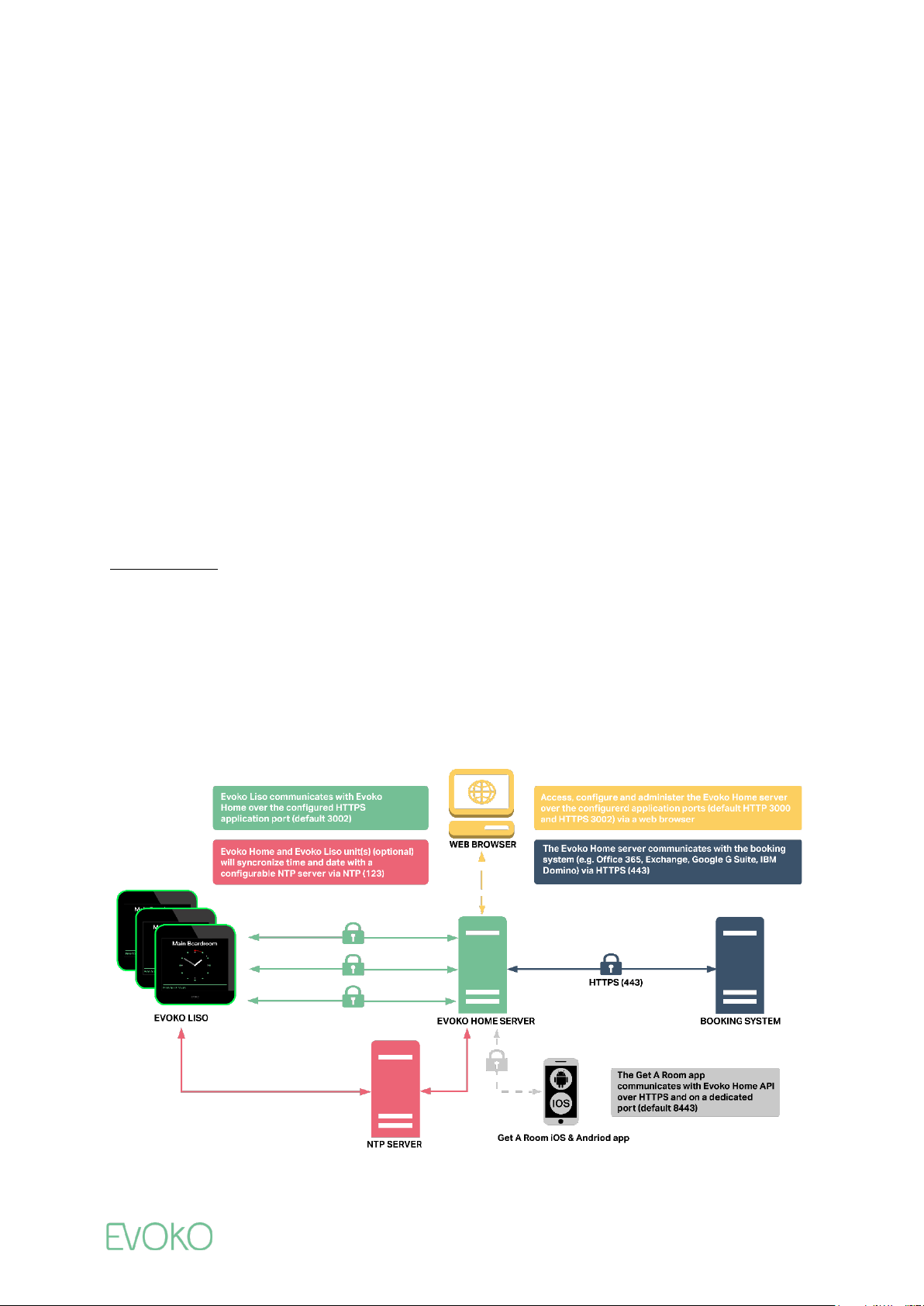
System overview
The Evoko room booking system consists of Evoko Liso devices that are installed outside the meeting rooms and the Evoko Home application,
which connects to the booking system and is used to manage the Liso devices
Evoko Home can be installed as a service in the company network, on-premises or in the cloud and enables several features like user
management, statistics and remote management of the Liso devices (default mode). This is the recommended installation mode and is
required to access the systems full functionality.
Optionally, you can manage the Liso devices manually by installing Evoko Home on a desktop where you set up the configuration and transfer it
with a USB stick to the devices (limited mode).
Figure 1: System architecture Default mode
02
Page 7

Impersonation
To integrate Evoko Home with your Exchange/Exchange Online environment, the Evoko service account (SA) must have application
impersonation privileges for the resource accounts.
We use impersonation instead of delegation as it has many key advantages, for example reducing the number of concurrent connections to
booking system, reducing the load on the network and enabling a more “real time” experience. This in turn also enhances scalability.
Like any other privilege, impersonation needs to be applied with security in mind. Allowing impersonation for all users in the organization
(“global impersonation”) is not recommended. Evoko Home needs impersonation only for resource/room accounts, thereby eliminating the
security concerns associated with global impersonation.
Please find more information about impersonation here and impersonation vs. delegation here
.
Communication ports
Evoko Home:
• Port 443: Communication with booking system: Encryption depends on configuration of booking system
• Port 3002: Communication with Devices: TLS 1.2
• Port 3000: First time configuration: No encryption, recommended to do as “localhost” on the server Evoko Home gets installed on.
Evoko Liso:
• Port 3002: Communication with Evoko Home: TLS1.2
• Port 123: Optional NTP time sync: No encryption
Additional security measures/info:
• USB HID block
• Custom soft-keyboard to prevent keyboard escape sequences
• Kiosk mode – not possible to leave application or reach other parts of the system.
• PIN protected admin section (4-9 digits)
• Customer configurable “Secure key” to pair devices with Evoko Home
• RAM based meeting data storage, all local meeting data is lost when power is cut.
• Signed boot and kernel image.
• Port blocking – all ports not used by the device are closed
• Dynamic SSL certificate generation for customers that don’t have custom certificates
• Only high strength Ciphers allowed
• Secured distribution of upgrades and updates
• Basic 802.1X support (beta)
03
 Loading...