

Page 1

7700FC Frame Controller Module Installation Guide
Evertz Microsystems Ltd.
5288 John Lucas Drive, Burlington, Ontario, Canada, L7L 5Z9
Phone: 905-335-3700
Sales Fax: 905-335-3573
Service Fax: 905-335-7571
1. INSTALLING AND REMOVING THE MODULE
1.1. INSTALLING THE MODULE REAR PLATE
The 7700FC module is shipped with a matching rear panel plate which houses the appropriate connectors for
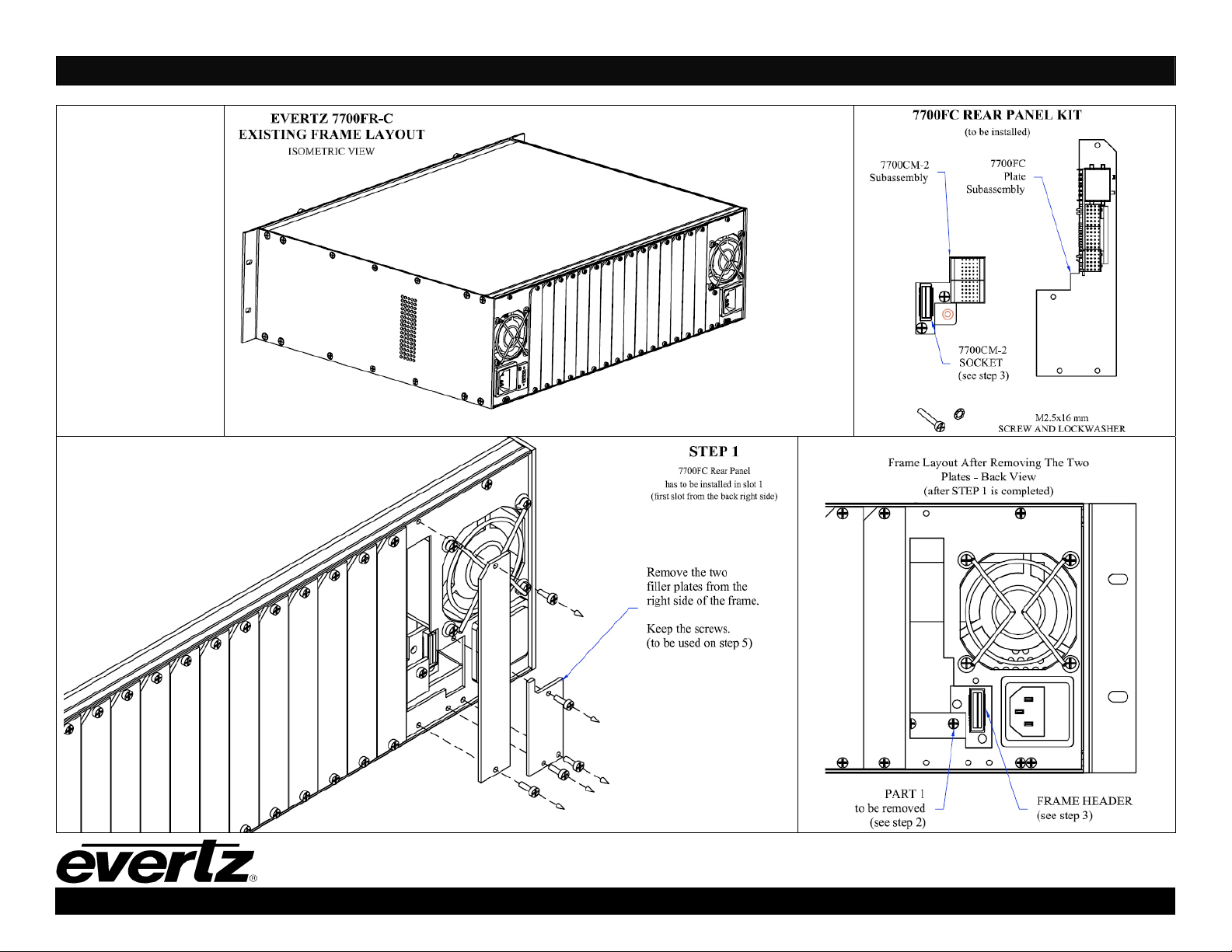
the module. To install the 7700FC rear plate, locate the first slot from the back right side (refer to the Step 1 on
the attached drawings). Remove any filler plates from the specified slot as shown in Step 1. The 7700FC
assembly consists of two sub-assemblies, 7700CM-2 and 7700FC plate. Install the 7700CM-2 subassembly
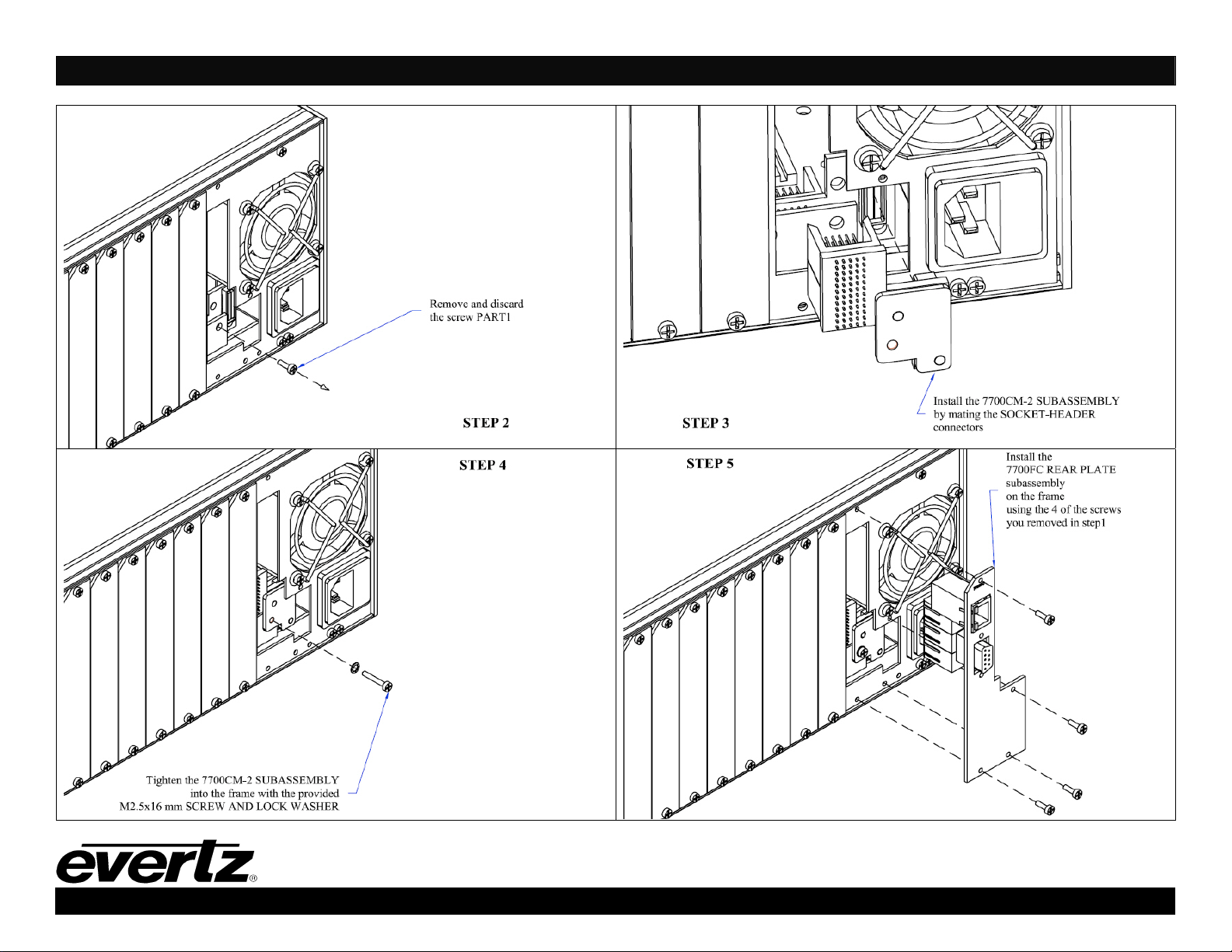
first. Remove the screw PART 1 as shown in Step 2, and carefully align the socket with the module
interconnect board header and press firmly into place (Step 3). Tighten the 7700CM-2 sub-assembly with the
provided M2.5x16 mm long screw and the M2.5 lock washer as shown in Step 4. Orient the 7700FC plate so
that the labeling is visible when the plate is installed (see Step 5). Loosely fasten the plate to the extrusions
using the mounting screws you removed at Step 1, beginning with the top screw. You will tighten the screws
after the main module is installed.
1.2. OPENING AND CLOSING THE FRONT PANEL
In order to insert or remove modules you will have to open the front panel. Turn the two captive screws located
on the front panel counter clockwise several turns until they release completely from the front extrusions.
Carefully lower the front panel door so that the front edge of the door is lower than the rear of the door.
1.3. INSTALLING THE MODULE
Orient the module vertically such that the white card ejector is on the bottom. Align the card with the card guide
corresponding to the slot number where you installed the rear panel plate. Carefully slide the module into the
frame and press it completely into the rear panel connectors. Make sure that the connectors are fully seated in
the rear panel. When this is done, close the front panel and then tighten the screws that hold the rear panel in
place.
1.4. REMOVING THE MODULE
Press the card ejector down to release the module. Grasp the card using the card ejector and pull the module
out from the frame. As the card ejector goes past the front extrusion, you will have to pull it with slightly more
force. Carefully place the module in a safe place, free from static discharge.
August 2008 1 of 3
Page 2
7700FC Module
REAR PLATE
INSTALLATION
GUIDE
7700FC Frame Controller Module Installation Guide
This document is property of Evertz Microsystems. The design and specifications
disclosed hereon are proprietary and shall not be reproduced, copied or used for
manufacture or sales of devices without the express written authorization of Evertz.
August 2008 2 of 3
Page 3
7700FC Frame Controller Module Installation Guide
This document is property of Evertz Microsystems. The design and specifications
disclosed hereon are proprietary and shall not be reproduced, copied or used for
manufacture or sales of devices without the express written authorization of Evertz.
August 2008 3 of 3
 Loading...