

Page 1
ENFORCER580
580W LED HYBRID MOVING HEAD
USER MANUAL
For safety, please read this user manual carefully before initial use.
Event Lighting reserves the right to revise the manual at any time. Information and specifications within this manual are subject to
change without notice. Event Lighting assumes no liability or responsibility for any errors or omissions. Please consult Event Lighting
for any clarification or information regarding this item.
www.event-lighting.com.au
V1.0
Page 2

2
www.event-lighting.com.au
Safety Instructions
WARNING
• Do not open this device, there is no user-serviceable parts inside. Risk of electric shock.
• Do not look at the light source when the device is on.
• CAUTION: This unit's housing may be hot during and after operation.
• Install this device in a location with adequate ventilation, at least 20 inch (50 cm) from adjacent surfaces.
• Do not leave any flammable material within 50 cm of this unit while operating or connected to power.
• Use a safety chain when mounting this device overhead.
• Do not operate this device outdoors or in any location where dust, excessive heat, water, or humidity may affect it.
• Do not operate this device if the housing, lenses, or cables appear damaged.
• Do not connect this device to a dimmer or rheostat.
• ONLY connect this device to a grounded and protected circuit.
• ONLY use the hanging bracket to carry this device.
• In case of a serious operating problem, stop using immediately.
• The maximum ambient temperature is 104° F (40° C). Do not operate this device at higher temperatures.
Power Input & Power Linking
This device has an auto-switching power supply work with input voltage range of 100~240 VAC, 50/60 Hz.
Link up to the maximum 8A. DO NOT exceed this.
Fuse Replacement
If the fine-wire fuse of the device fuses, only replace the fuse by a fuse of same type and rating.
Before replacing the fuse, unplug mains lead.
Procedure:
Step 1: Unscrew the fuse holder on the rear panel with a fitting screwdriver from the housing (anticlockwise).
Step 2: Remove the old fuse from the fuse holder.
Step 3: Install the new fuse in the fuse holder.
Step 4: Replace the fuse holder in the housing and fix it.
Page 3
3
www.event-lighting.com.au
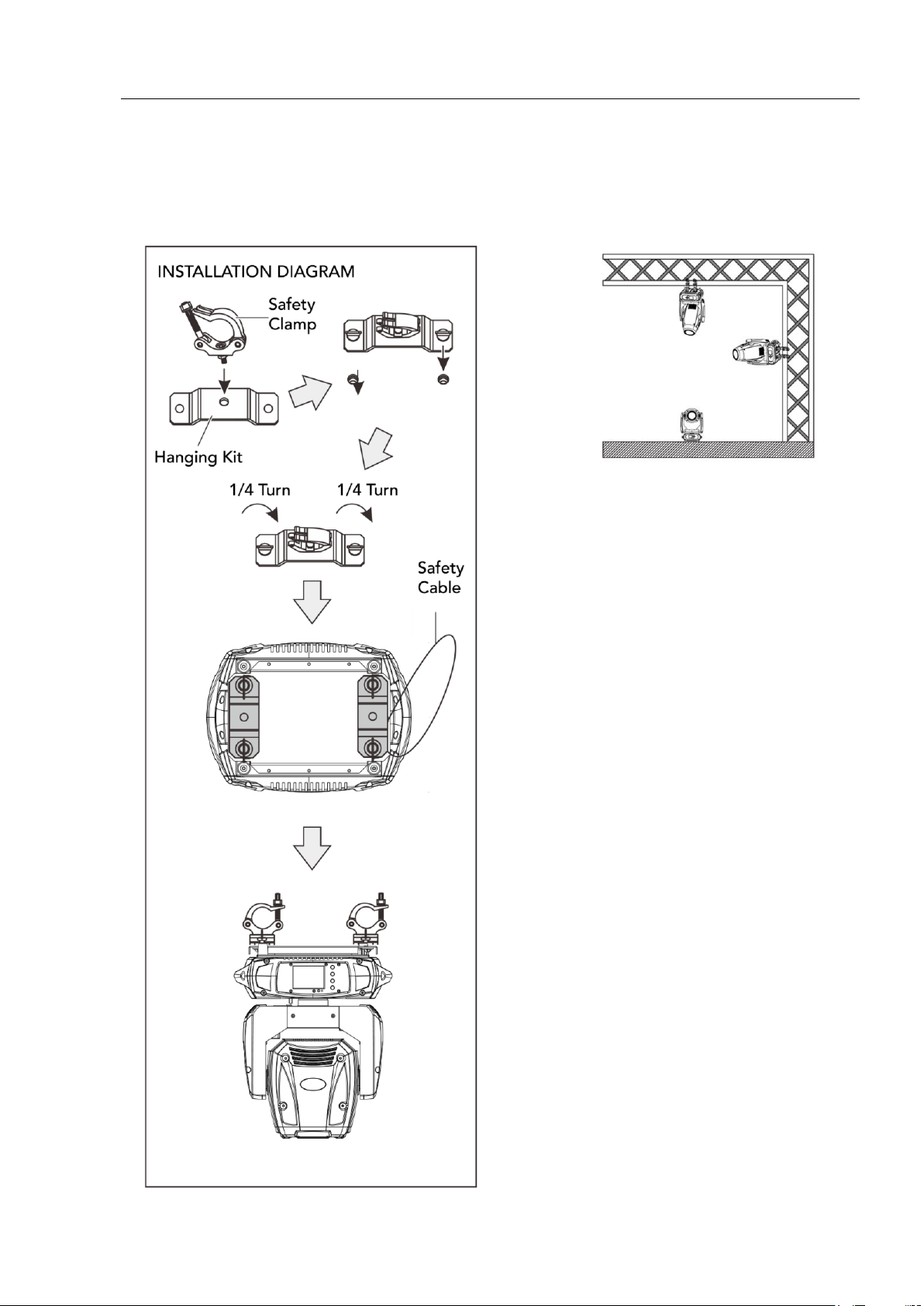
Product Installation
This device can be mounted in many orientations provided each
individual device is secured by the use of correct mounting bracket.
Use a safety chain when mounting this device overhead.
Page 4
4
www.event-lighting.com.au
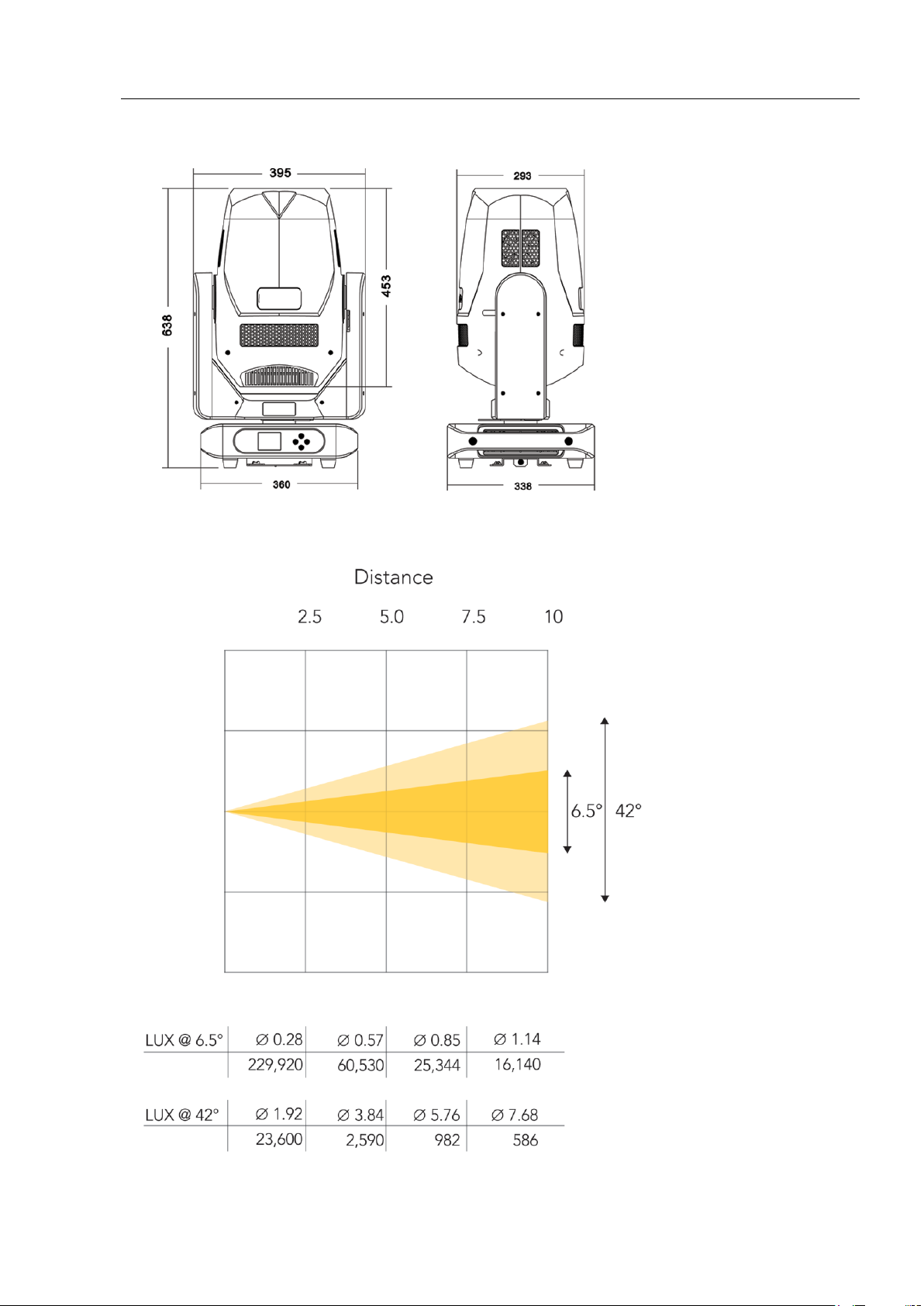
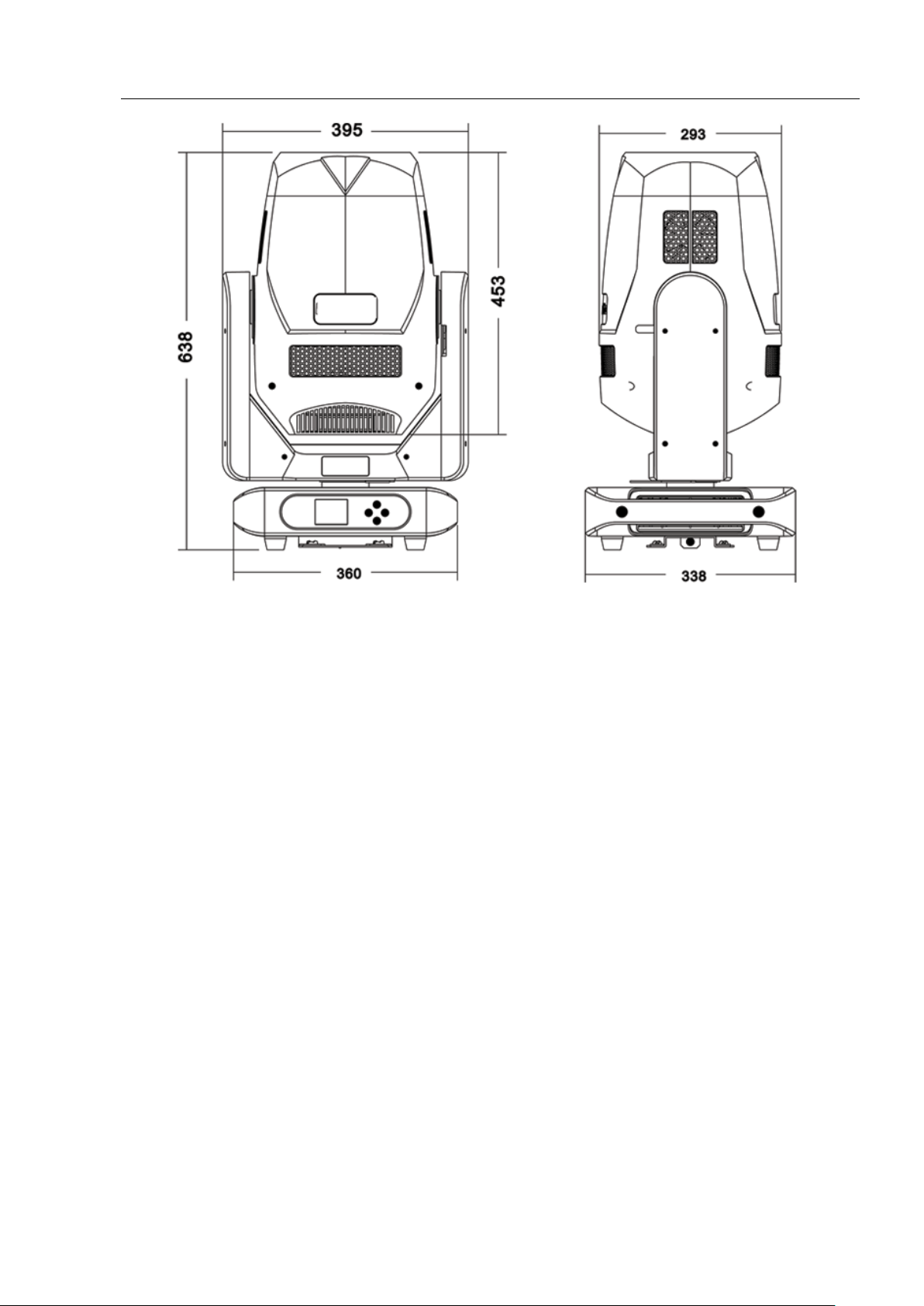
Dimensions
Lux Chart
Page 5
5
www.event-lighting.com.au
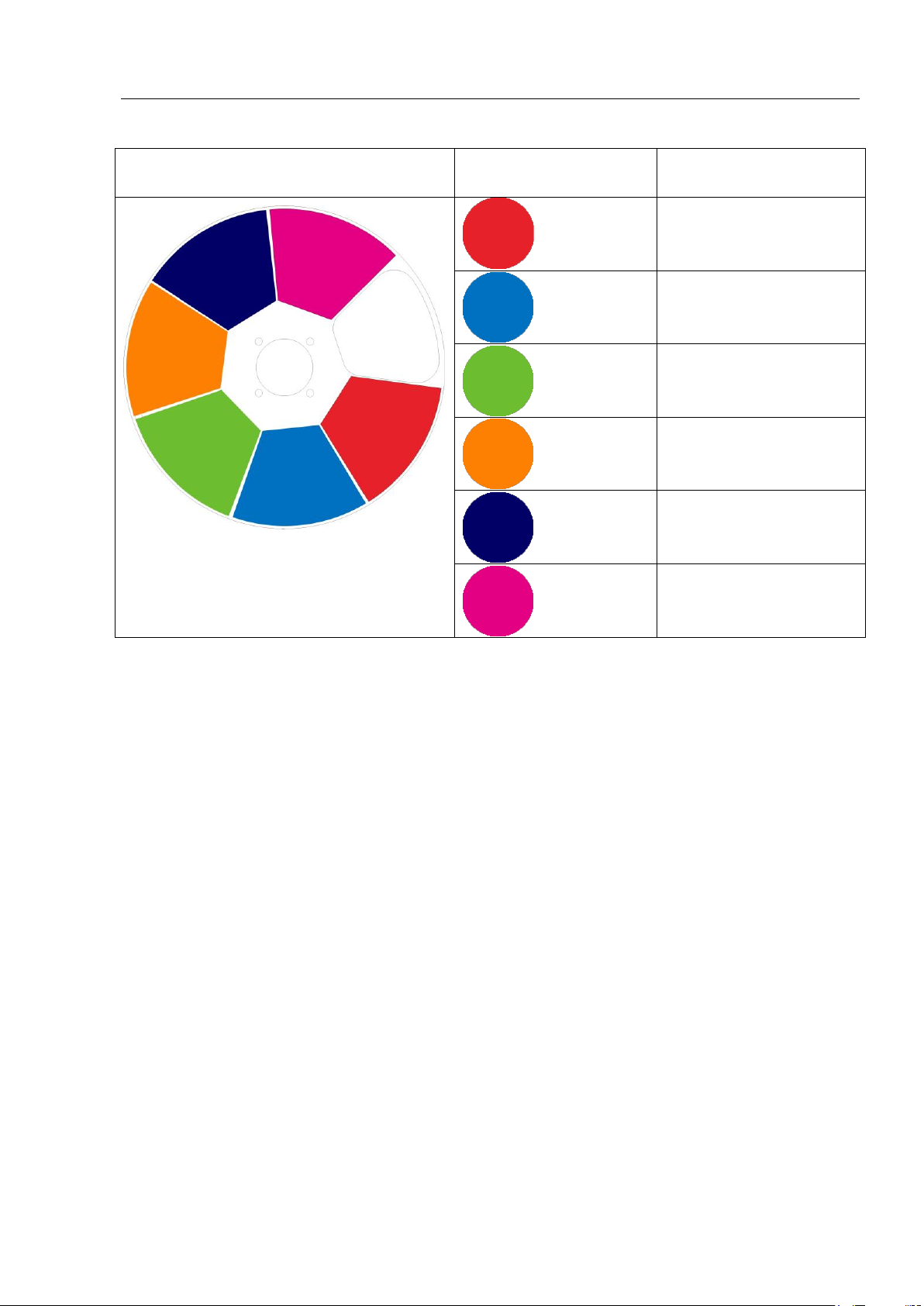
Colour Wheel
Open
Red
Blue
Green
Orange
Indigo
Magenta
Page 6
6
www.event-lighting.com.au
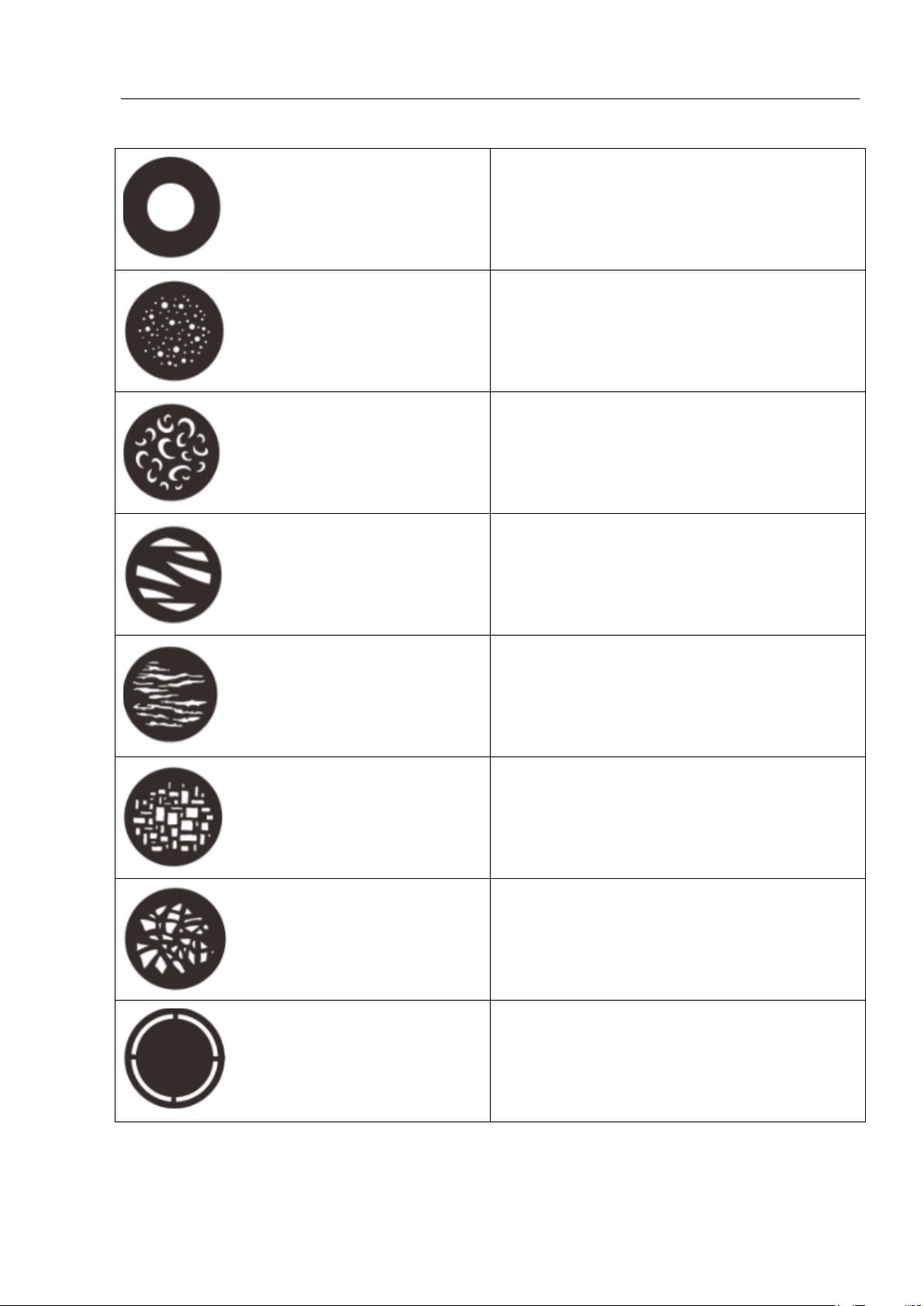
Fixed Gobo Wheel
Position 1
Position 2
Position 3
Position 4
Position 5
Position 6
Position 7
Position 8
Page 7
7
www.event-lighting.com.au
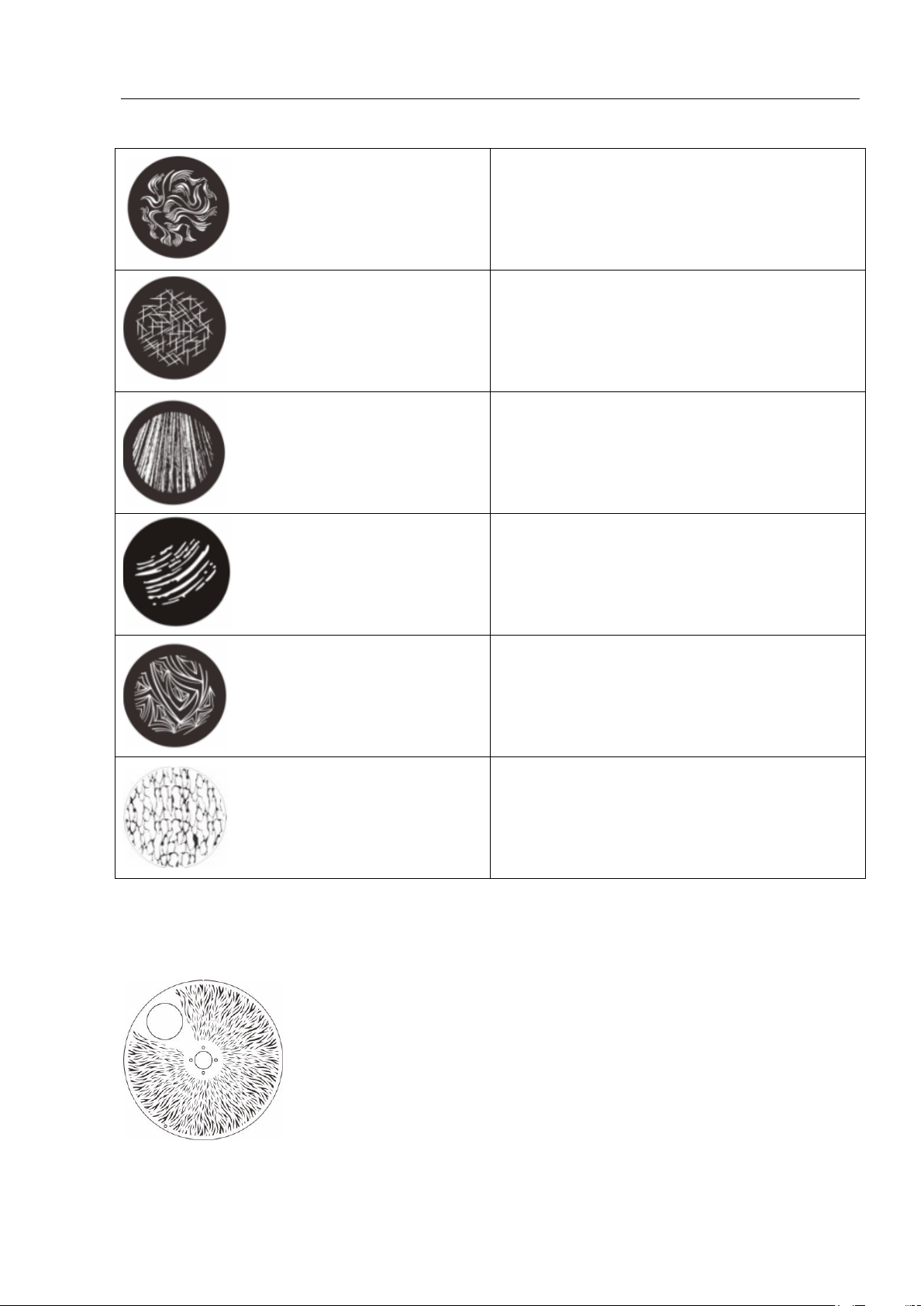
Rotating Gobo Wheel
Position 1
Position 2
Position 3
Position 4
Position 5
Position 6
Animation Wheel
Page 8
8
www.event-lighting.com.au
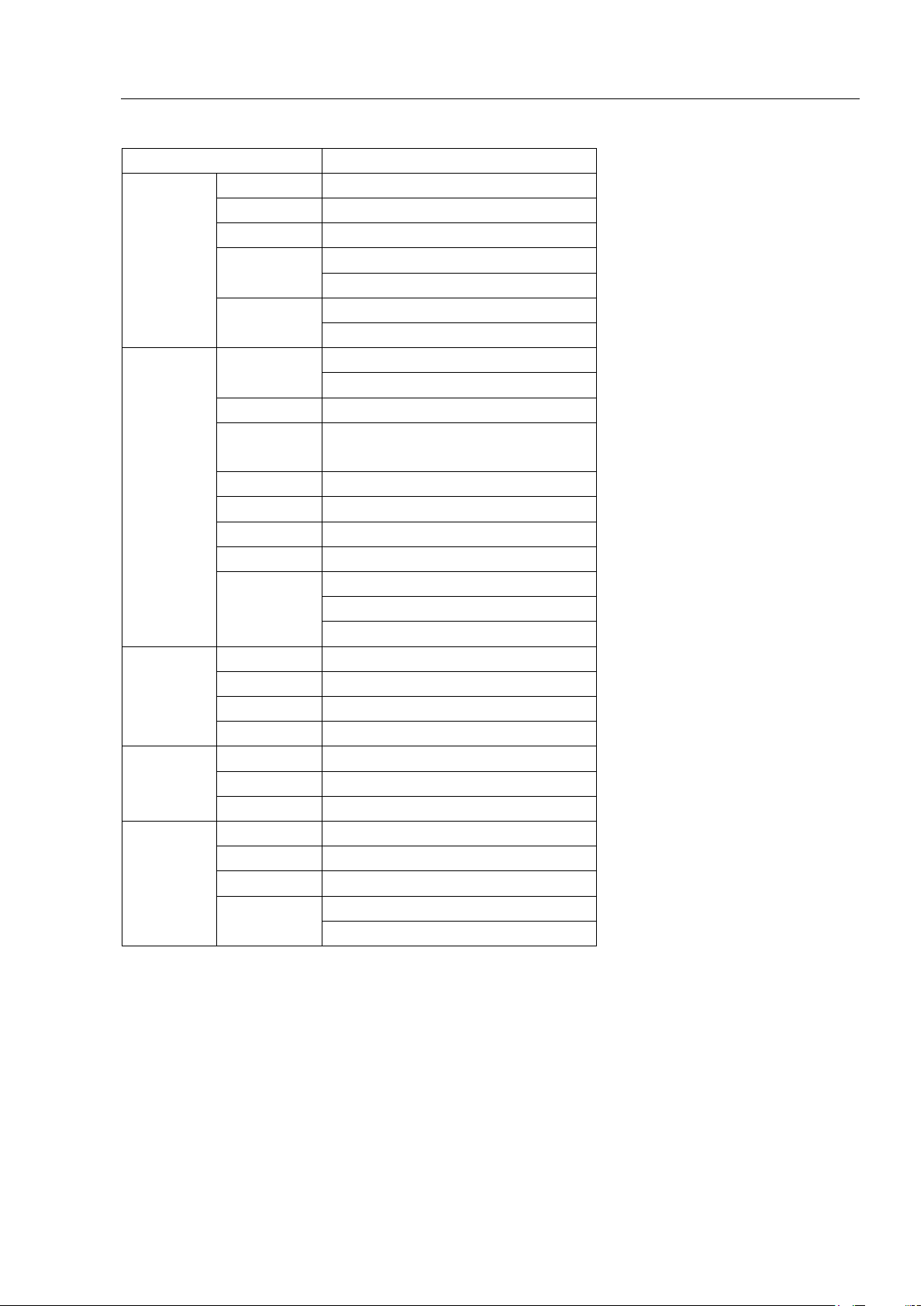
Menu
Menu
Description
Information
Address
DMX address, 1-512
Runtime
Unit uptime
Version
Software version
Temperature
Mainboard temperature
Light source temperature
Fan Speed
Fan 1 speed
Fan 2 speed
Setting
Reset
Restart unit
Reset to factory settings
Channel Set
38
Signal
Signal source:
DMX512/Artnet/Program
Offline Set
Home/Hold
Fan Mode
Normal/Performance/Quiet
Wireless Set
On/Off
Adjust
Artnet Set
Artnet settings: IP address
Artnet settings: Subnet mask
Artnet settings: Universe
Lamp
Auto on
NC
Light up
NC
Lamp Adjust
NC
Lamp Fail
NC
Display
Language
English/Chinese
Backlight
On/Off/Flash
Reverse
Reverse display orientation; On/Off
User
Setting Lock
Input code to lock settings
Key lock
On/Off
Test
On/Off
Program
Select program 1-8
Program 1-8
Page 9
9
www.event-lighting.com.au
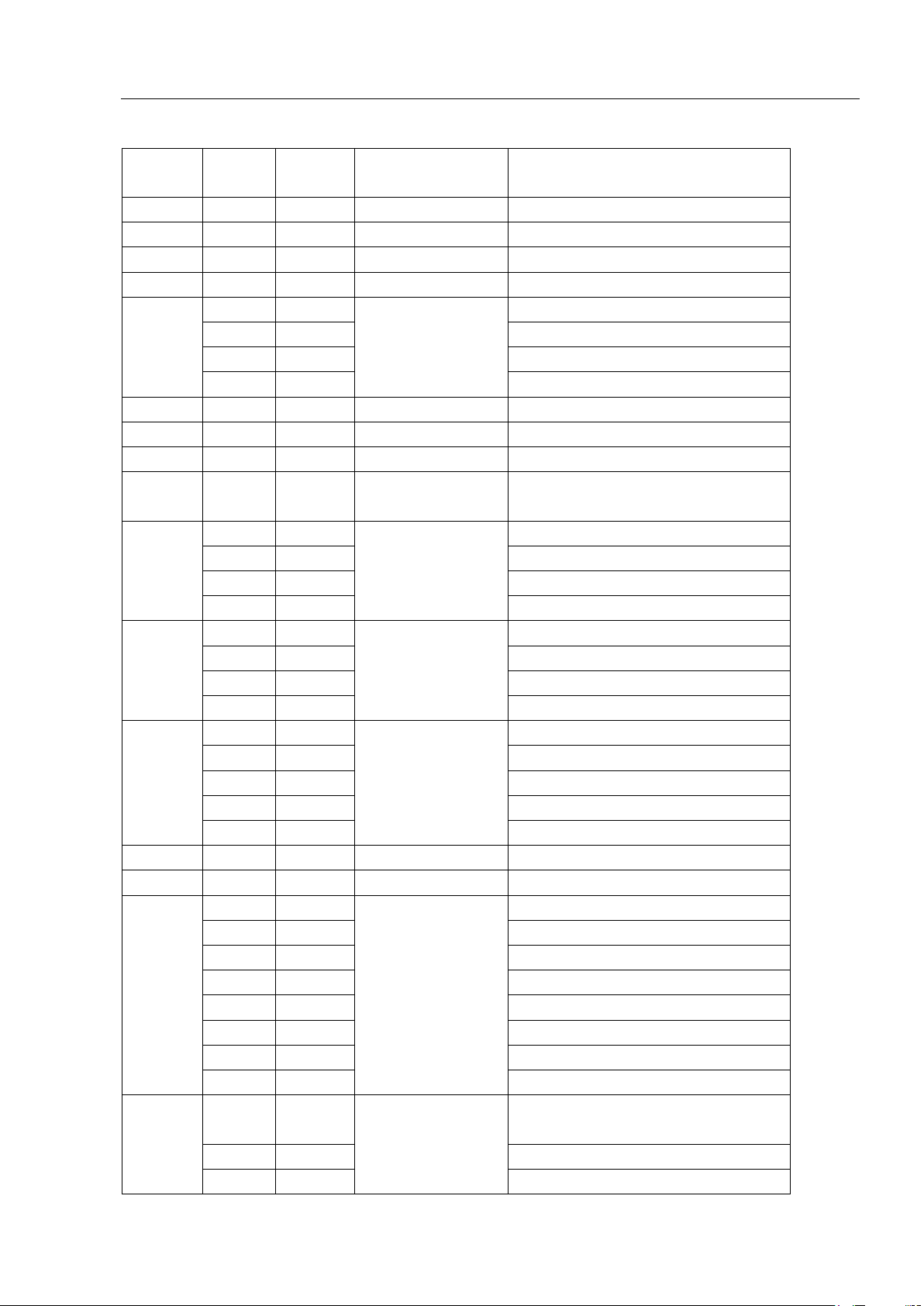
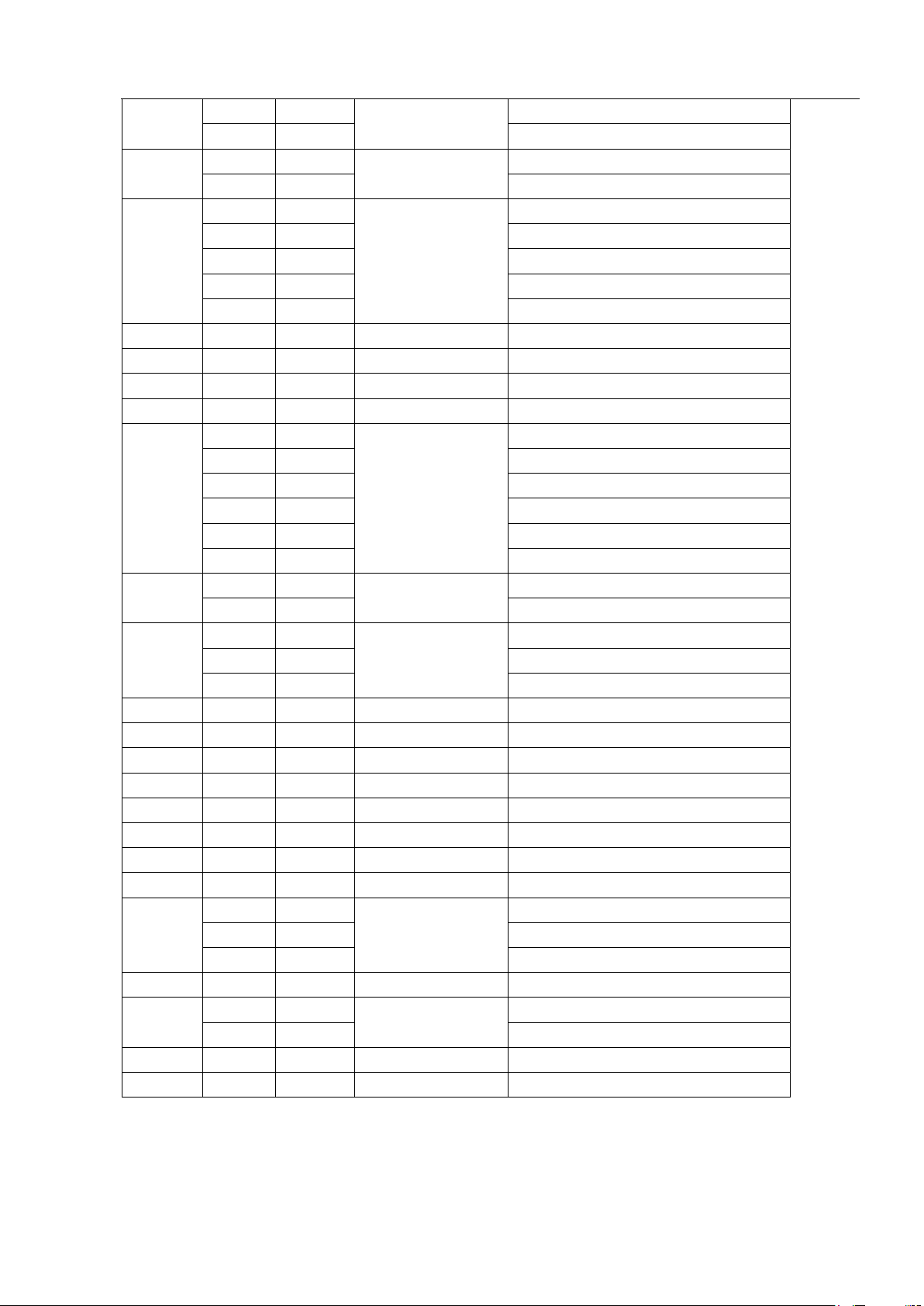
DMX Chart
Channel
Min
DMX
Max
DMX
Name
Function
1 0 255
Pan
Pan movement
2 0 255
Pan-fine
Fine pan movement
3 0 255
Tilt
Tilt movement
4 0 255
Tilt-fine
Fine tilt movement
5
0
63
Colour wheel
6 colours
64
221
Colour arbitrary positioning
222
239
Rotate left
240
255
Rotate right
6 0 255
Cyan
Cyan 0..100%
7 0 255
Magenta
Magenta 0..100%
8 0 255
Yellow
Yellow 0..100%
9 0 255
Colour
temperature
10
0
71
Fixed gobo
8 gobos
72
143
Gobo arbitrary positioning
144
199
Rotate left
200
255
Rotate right
11
0
63
Rotating gobo
7 gobos
64
135
Gobo arbitrary positioning
136
195
Rotate left
196
255
Rotate right
12
0
3
Gobo Rotation
TBD
4
123
Rotating gobo angle
124
187
Rotate left
188
191
Stop
192
255
Rotate right
13 0 255
Dimmer
Dimmer 0..100%
14 0 255
Dimmer-fine
Fine dimmer 0..100%
15
0
3
Strobe
Open
4
67
Strobe 1
68
99
Strobe 2
100
131
Strobe 3
132
175
Strobe 4
176
247
Strobe 5
248
251
Random strobe 1
252
255
Random strobe 2
16
0
63
Dimmer mode
Refresh rate 300Hz (dimmer auto
delay)
64
127
Dimmer no delay
128
191
Refresh rate 1200Hz (dimmer no
Page 10
10
www.event-lighting.com.au
delay)
192
255
Dimmer no delay
17
0
31
Prism
No effect
32
255
Prism effect
18
0
3
Prism rotation
Prism is 0
4
123
Prism angle
124
187
Rotate left
188
191
Stop
192
255
Rotate right
19 0 255
Zoom
Zoom
20 0 255
Zoom-fine
Fine zoom
21 0 255
Focus
Focus
22 0 255
Focus-fine
Fine focus
23
0
127
Iris
Open to close
128
135
Close
136
173
Iris Movement 1
174
211
Iris Movement 2
212
249
Iris Movement 3
250
255
Close
24
0
9
Frost
No effect
10
255
Linear frost
25
0
7
Animation Wheel
No effect
8
239
Animation effects
240
255
Rotate left and right
26 0 255
Frame 1A
Frame 1A
27 0 255
Frame 1B
Frame 1B
28 0 255
Frame 2A
Frame 2A
29 0 255
Frame 2B
Frame 2B
30 0 255
Frame 3A
Frame 3A
31 0 255
Frame 3B
Frame 3B
32 0 255
Frame 4A
Frame 4A
33 0 255
Frame 4B
Frame 4B
34
0
7
Frame Angle
No effect
8
239
Angle
240
255
Rotate left and right
35 0 255
Frame angle fine
36
0
3
Frame Macro
No effect
4
255
Total of 63 effects
37 0 255
Scan speed
Fast to slow
38
20
29
Reset
Reset all
Page 11

11
www.event-lighting.com.au
The device is controlled by universal DMX 512 protocol, DMX address is the start channel used to receive instructions
from the external controller. For independent control, each fixture must be assigned its unique address control channels.
This device has one channel mode: 38, if there are several models need to be independently controlled, we just simply
address first fixture at 1, and second fixture at 39, third one at 78, etc.
- If the devices have the same address, they will behave synchronically.
- Display will flash when no DMX signal is received.
More Functions
- Remote Device Management (RDM), which allows users to remotely control the device. Users can remotely
change the DMX address, reverse pan/tilt settings, check the device’ status, such as its temperature, power
consumption, fan speed, etc. Every device has a unique RDM code programmed during manufacture to facilitate
this function. It is not recommended for users to change this code.
- Software upgrade function via DMX cable. If there is any new firmware for this device, it can be upgraded simply via
a software upgrade box, without the need to change any mechanical parts. The upgrade box is not included in the
package, if you need any further assistance please contact your authorized dealer.
- Hibernation. The device will enter sleeping mode if activated after a period of disconnecting DMX signal to save
power and will wake immediately when the DMX signal is sent or received again.
- Display flip. By pressing the up and down buttons for more than 3 seconds, the display will flip automatically, this
function is useful to read menu conveniently when device is hanged upside down.
Technical Specifications
Power
• Power Supply: 100~240V AC, 50/60 Hz
• Power Consumption: 800W
• Power Connection: Neurtik PowerCON In
Photometrics
• Light Source: 580W 7800K White LED
• Beam Angle: 6.5° to 42°
• Output: 22,992 lux @2.5M at 6.5°
• LED Lifespan: 50,000 hours
• PWM: 300Hz or 1,200Hz
Effects
Page 12
12
www.event-lighting.com.au
• Dimming: 0 - 100%
• Strobe: 0.3 – 20 Hz
• Focus: Electronic Linear
• Prism: 1 rotating prism with 4-facet and Frost
Movement 16-bit Auto Reposition
• Pan: 540°
• Tilt: 270°
Colour
• Linear CMY and CTO
• 6 Colours + Open
Gobos
• Fixed: 6 Patterns + Open
• Rotating: 8 + Open Interchangeable (outside Φ27.9mm, inside Φ22mm)
• Animation wheel
Page 13

13
www.event-lighting.com.au
Framing
• Motorised framing system with 4 focal planes
• 4 blades with individual control
Control
• Operational Modes: DMX, Auto Program, Sound Active, Master / Slave
• RDM: Change DMX Address
• DMX Protocol: DMX512 / Wireless DMX
• DMX Channel Mode: 38
• DMX Interface: 5-pin XLR and ArtNET
• Display: 2.4" LCD control panel
Housing
• Housing Materials: ABS & Steel
• Housing Finishing: Matte Black
• Cooling: Fan
• Net Weight: 25 kg
• Rigging: 2 x Omega Brackets with 1/4-turn Quick Locks
WARRANTY
Please refer to your local dealer or please contact Event Lighting Pty Ltd
Website: www.event-lighting.com.au.
 Loading...