

Page 1

Get Started
Bevezetés
Introducere
Cover (Page 1)
Page 2

Get started
•••
Bevezetés
•••
Introducere
Insert the included AA batteries before proceeding with the installation.
A telepítés megkezdése előtt helyezze be a mellékelt AA elemeket.
Introducei bateriile AA incluse înainte de a continua instalarea.
1
(2) (3)
Page 3
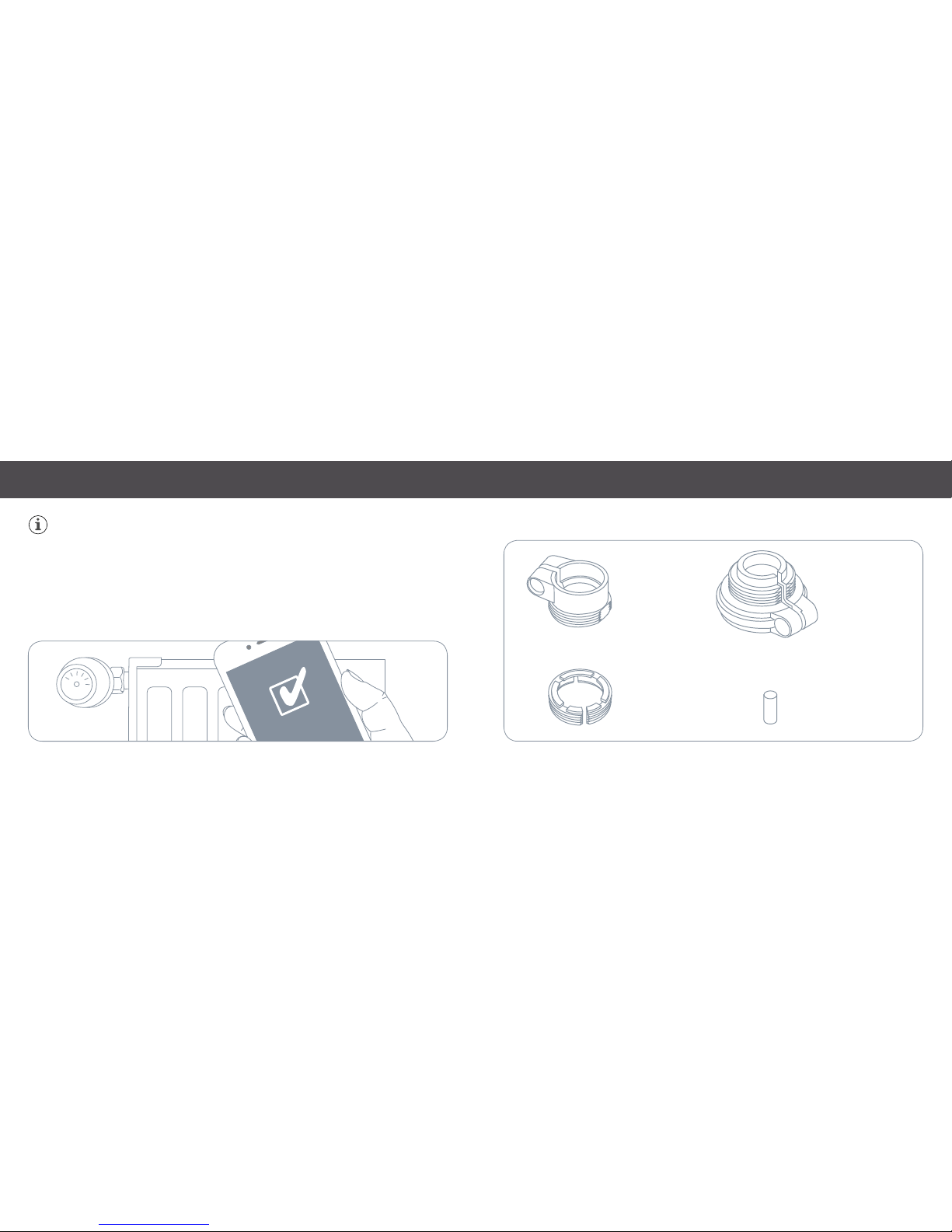
Please wait with replacing your existing radiator valve until the Eve app has prepared Eve
Ther mo for installation.
Várjon a meglévő radiátorfej cseréjével, amíg az Eve alkalmazás fel nem készült az Eve Thermo
telepítésére.
Înlocuii supapa de radiator existentă după ce aplicaia Eve a pregătit Eve Thermo pentru
instalare.
Danfoss RA
Danfoss RAVL
Danfoss RAV
RAV Pin
Get started
•••
Bevezetés
•••
Introducere
(4) (5)
Page 4
Get started
•••
Bevezetés
•••
Introducere
Download the Elgato Eve app from the App Store.
Töltse le az App Store-ból az Elgato Eve alkalmazást.
Descărcai aplicaia Elgato Eve din App Store.
2
Elgato Eve
Open the Elgato Eve app and tap Add Accessory. Eve will now guide you through the setup process.
If you have already set up another accessory, go to the Eve settings to add Eve Thermo to your home.
Nyissa meg az Elegato Eve alkalmazást, majd kattintson az Add Accessory (Tartozék hozzáadása) opcióra.
Az Eve ekkor végigvezeti a telepítés teljes folyamatán.
Ha már a korábbiakban telepített más tartozékot, lépjen be az Eve beállításaiba, majd adja hozzá az
otthonához az Eve Thermo-t.
Deschidei aplicaia Elgato Eve i apăsai Adăugare accesoriu. Eve vă va ghida pe parcursul procesului
de configurare.
Dacă ai configurat deja alt accesoriu, mergei la Setări Eve pentru a adăuga Eve Thermo în căminul
dvs.
3
(6) (7)
Page 5

Control Eve Thermo from the app or using Siri.
Kezelje az Eve Thermo készüléket az alkalmazás, vagy a Siri segítségével.
Verificai Eve Thermo de pe aplicaie sau folosind Siri.
Heating paused (window open)
Leállított fűtés (nyitott ablak)
Încălzire în pauză (fereastră deschisă)
Touch control disabled
Kikapcsolt érintővezérlés
Control tactil dezactivat
Off
Kikapcsolt
Oprit
You can also tap the arrows on Eve Thermo to adjust the temperature.
A hőmérséklet beállításához az Eve Thermo-n lévő nyílra is rákattinthat.
De asemenea, putei apăsa săgeile de pe Eve Thermo pentru a regla temperatura.
Enjoy • Használja a készüléket • Bucurai-vă de produs
(8)
(9)
Page 6

✁
Pleas e keep your Hom eKit Setup C ode in a safe pla ce. You need it to se curely add Eve to your home,
and nob ody but you has a copy.
Kérjük, biztonságos helyen őrizze meg a Home Kit telepítő kódot. Szüksége van rá az Eve biztonságos
hozzáadásához otthonához, és Önön kívül senki nem rendelkezik a másolatával.
Păstrai codul de configurare HomeKit într-un loc sigur. Avei nevoie de acesta pentru a adăuga în
sigurană Eve în căminul dvs., iar numai dvs. trebuie avei o copie.
Frequency ran ge: 2402 - 24 80 MHz, R F power: 0 dBm
Hereb y, Elgato Sy stems de clares tha t this devic e is in complia nce with t he
esse ntial requ irement s and other r elevant pr ovisions o f Directi ve 2014/5 3/EC.
The de claratio n of confor mity is av ailable at w ww.elgat o.com/do c
Pro duct: 10E AR1701 • Mo del: 20E AR1701 • Par t: 41EAR17 02
Reset • Reset • Resetare
(10)
(11)
Page 7
✁
BackCover with
Sticker Placement
(Page 12)
Room • Helyiség • Cameră:
Notes • Megjegyzések • Note:
 Loading...