

Page 1
Get Started
Get Started
Erste Schritte
Erste Schritte
Prise en main
Prise en main
Page 2

Get started • Erste Schritte • Prise en main
1
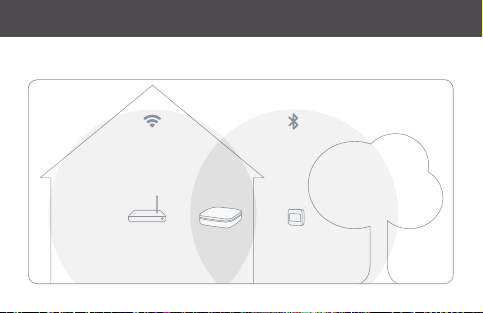
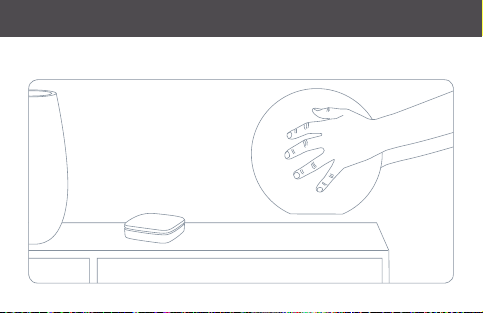
Place Eve Ex tend anywhere within range of your Wi-Fi network and the Eve
accessories you want to reach.
Plat ziere Eve E xtend inne rhalb der Reich weite deine s WLANs u nd der Eve-G eräte, die du
verbinden möchtest.
Place z Eve Ext end à porté e de votre rés eau Wi-Fi e t des access oires Eve qu e vous souhaitez
joindre.
Page 3
Get started • Erste Schritte • Prise en main
Page 4

Get started • Erste Schritte • Prise en main
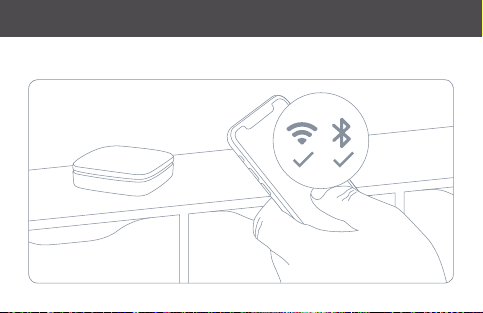
To find the perfect spot, check if your iPhone can connect to the Eve accessory
you want to reach while maintaining a Wi-Fi connection at the desired location.
Finde d en perfek ten Plat z, indem du pr üfst, ob de in iPhone bei W LAN- Empfang a m gewünsch ten
Ort ei ne Verbindun g mit dem Eve -Gerät, d as du verbind en möchtes t, herst ellen kann.
Pour tr ouver l’empl acement idé al, regarde z si votre télé phone par vient à se conn ecter
à l’acce ssoire Eve qu e vous souhai tez joindre to ut en conser vant une co nnexion Wi- Fi à
l’emplacement souhaité.
Page 5
Get started • Erste Schritte • Prise en main
Page 6

Get started • Erste Schritte • Prise en main
2
Connect Eve Extend to a USB power supply (5 V, at least 500 mA) via the
included USB cable.
Schlie ße Eve Ext end mithilfe d es beiliegen den USB-K abels an eine USB -Strom versorgun g
(5 V, mindes tens 500 m A) an.
Bran chez Eve E xtend à une ali mentatio n USB (5 V, minimum 5 00 mA) au mo yen du câble USB inclus.
3
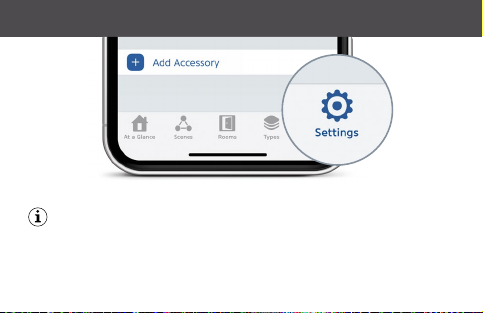
Open the Eve app and tap Add Accessory in the Settings tab. Eve will guide you
through the setup process of Eve Extend.
Öff ne die Eve-A pp und tippe au f Gerät hinzu fügen in den Ei nstellungen. Eve f ührt dich nun
durch d ie Einrichtu ng von Eve Ex tend.
Ouvr ez l’app Eve, pui s dans l’onglet Ré glages, appuyez sur Ajou ter un acces soire. Eve vo us
guide to ut au long de la configur ation d’Ev e Extend.
Page 7
Get started • Erste Schritte • Prise en main
Eve Extend can ex tend the range of up to 8 Eve accessories simultaneously.
Eve E xtend kann d en Zugrif f auf bis zu 8 Eve -Geräte gle ichzeitig er weitern .
Eve E xtend peu t étendre la p ortée de ma ximum huit acc essoires E ve simultané ment.
Page 8

Get started • Erste Schritte • Prise en main
Once assigned, an Eve accessory will connect exclusively to Eve Ex tend. If you
intend to move the Eve accessory to a dif ferent location, simply unassign it in
the Eve Extend settings within the Eve app.
Sobal d ein Eve-Ge rät zugewie sen wurde, fi ndet aussch ließlich eine Ver bindung über E ve
Ext end stat t. Wenn du das Ev e-Gerät a n einen andere n Ort bewe gen möchte st, hebe
zunäc hst in den Eve E xtend Ein stellungen d er Eve-Ap p die Zuordnu ng auf.
Une fois a ssocié à Eve E xtend, l’ac cessoire E ve se connec te uniqueme nt à celui-ci. S i vous
avez l’ intention d e déplacer l’ac cessoire E ve, il vous suf fit de le disso cier dans les ré glages
d’Ev e Extend , via l’app Eve.
Page 9
Get started • Erste Schritte • Prise en main
Page 10

Legal Information • Rechtliche Hinweise • Informations légales
This dev ice com plies wit h par t 15 of the FC C Rules an d Indust ry Ca nada lice nce- exemp t RSS st andard (s).
Opera tion is subject t o the following t wo conditio ns: (1) This device m ay not cause int erferenc e, and (2) this
device m ust accept a ny interfe rence rece ived, includi ng interfe rence that m ay cause unde sired opera tion.
This equ ipment h as been t ested a nd found to compl y with t he limits f or a Class B d igital de vice, p ursuan t
to par t 15 of the FC C Rules. T hese lim its are d esigned to prov ide reas onable p rotection ag ainst ha rmful
inter feren ce in a resi dential install ation. T his equip ment ge nerat es, uses a nd can ra diate r adio fre quenc y
energ y and, if no t installed and us ed in acc ordanc e with t he inst ructi ons, may c ause har mful in terf erenc e
to radio c ommunic ation s. Howe ver, ther e is no guar antee t hat int erfer ence will not occ ur in a par ticular
install ation. I f this equ ipment d oes cau se harm ful inte rfer ence to r adio or tel evisio n recep tion, wh ich can
be dete rmined by tur ning the equipm ent off and on, y ou are encour aged to try to c orrect the i nterfere nce by
one or mor e of the following m easures: reo rient or r elocate the re ceiving antenna; increase t he sepa ration
betw een the equip ment and rece iver; consu lt the dealer or a n experienc ed radio/ TV technic ian for help.
This Clas s B digital app aratus comp lies with Can adian ICES- 003.
Page 11
Legal Information • Rechtliche Hinweise • Informations légales
This equ ipment c omplies w ith FC C RF and IC R SS-102 r adiatio n expos ure limit s set for th for a n
uncon trolled envi ronment. T his equipmen t should be inst alled and oper ated with a mi nimum distanc e of
20 cent imeters b etween t he radiato r and your bod y. This tran smitter mu st not be co -locate d or operat ing
in conjun ction with an y other ante nna or transm itter.
FCC IC CE
Bluetooth 2402 – 24 80 MHz 2402 – 24 80 MHz 2402 – 24 80 MHz
Wi-F i 2.4 GHz 2412 – 2462 MH z 2412 – 2462 MH z 2412 – 2472 MHz
Wi-F i 5 GHz (Band 1 & 2) 5180 – 532 0 MHz 5180 – 532 0 MHz 5180 – 532 0 MHz
Wi-F i 5 GHz (Band 3) 550 0 – 5700 MHz 550 0 – 5580 MHz 550 0 – 5700 MHz
Max RF EI RP power < 20 d Bm (indoor use o nly).
566 0 – 5700 MHz
Page 12

Legal Information • Rechtliche Hinweise • Informations légales
Change s or modi ficati ons not ex pres sly appr oved by E ve Systems could void yo ur autho rity t o opera te this
device. Purpose of control: operating control; construction of control: plug-in operating control; type 1 action,
operating time: continuous.
Le prés ent app areil es t confo rme aux C NR d‘In dustr ie Canad a applic ables au x appar eils radio e xempt s de
licenc e. L‘exploita tion es t autor isée aux d eux con dition s suivan tes : (1) l‘app areil ne doi t pas produire de
brouilla ge, et (2) l ‘utilisateur de l‘ap pareil d oit acce pter to ut brou illage radioélec triqu e subi, mêm e si le
brouilla ge est suscept ible d‘en compro mettre le fon ctionnement . Cet appareil numériqu e de la classe B est
confo rme à la norme NM B-003 d u Canada.
Cet équi pemen t est con forme a ux CNR-102 d‘Indu strie C anada. Cet équipement d oit êtr e instal lé et utilis é
avec un e distance mi nimale de 20 ce ntimètre s entre le ra diateur et vo tre corps . Cet émet teur ne doit p as être
co-lo calisée ou opé rant en conjon ction avec a utre antenn e ou émette ur.
Page 13

Legal Information • Rechtliche Hinweise • Informations légales
For que stions abo ut complian ce with FC C regulat ions, pleas e contact : Complian ce Offic er, Eve Syst ems, 100
Pine St ., Suite 1250, S an Francisc o CA 94111, USA.
Hereb y, Eve Sys tems declares t hat this device i s in compliance wi th the essent ial requiremen ts and other
releva nt provision s of Directiv e 2014/53 /EC.
The dec laration of co nformit y is available at w ww.eveho me.com/doc
Contr olling thi s HomeK it- enabl ed acce ssor y autom atical ly and awa y from h ome requ ires a Hom ePod, a n
Apple T V with tv OS 12.3 or later, or a n iPad with iOS 12 .3 or later set u p as a home hub.
Produ ct: 10E AB99 01 • Model: 20 EAB 9901 • Pa rt: 51EA B9901 • F CC ID: SNE -EX T-001 • IC: 11192 A-EX T001
Page 14
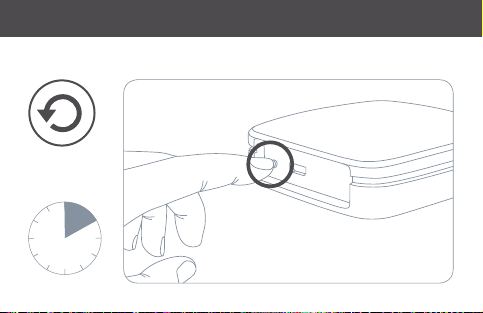
Reset • Zurücksetzen • Réinitialisation
10s
Page 15
Please keep your HomeKit Setup Code in a safe place. You need it to securely
Bewahre deinen HomeKit-C ode an einem sicheren Platz auf. Du benötigst ihn,
um Eve zu deinem Zuhause hinzuzufügen. Niemand außer dir kennt diesen Code.
add Eve to your home, and nobody but you has a copy.
Conservez en lieu sûr votre code de configuration HomeKit. Ce code est
indispensable pour ajouter Eve au réseau de votre domicile, et personne
d‘autre que vous ne connaît ce code.
Page 16
Room • Zimmer • Pièce:
Notes • Notizen • Remarques:
 Loading...