

Page 1
DXT
Pixel
Art-Net
Node IV
No. 70064886
Bedienungsanleitung
User Manual
ART-NET
Page 2

Inhalt
Einführung..................................................................... 3
Produktmerkmale............................................................ 3
Lieferumfang ................................................................... 3
Zubehör........................................................................... 3
.
Geräteübersicht ............................................................ 4
Erste Schritte ................................................................. 5
Installation....................................................................... 5
Stromversorgung herstellen............................................ 5
LEDs anschließen........................................................... 5
Netzwerkverbindung herstellen....................................... 5
PC-Einstellungen ............................................................ 5
Konfigurationsseite aufrufen............................................ 5
Anwendungsbeispiel ....................................................... 6
.
Konfiguration................................................................. 7
Website ........................................................................... 9
Beispiel Patch ................................................................. 9
Art-Net............................................................................. 14
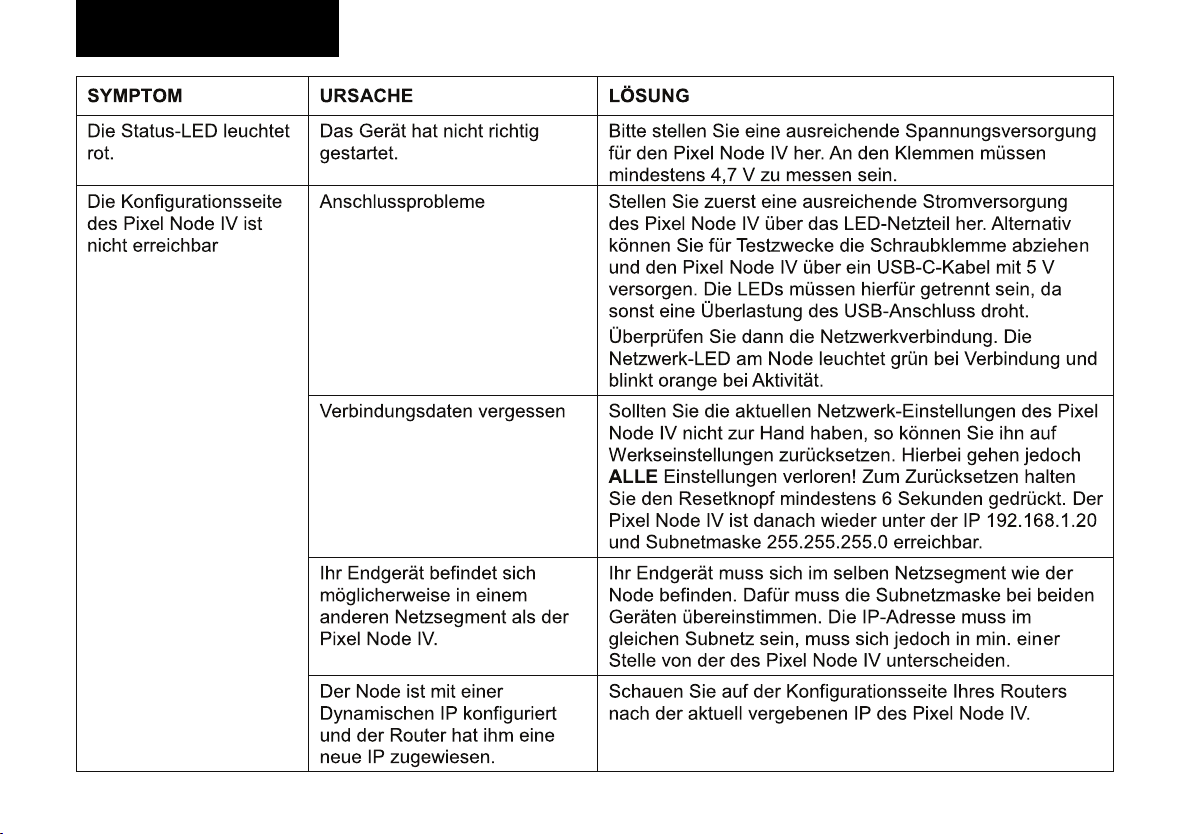
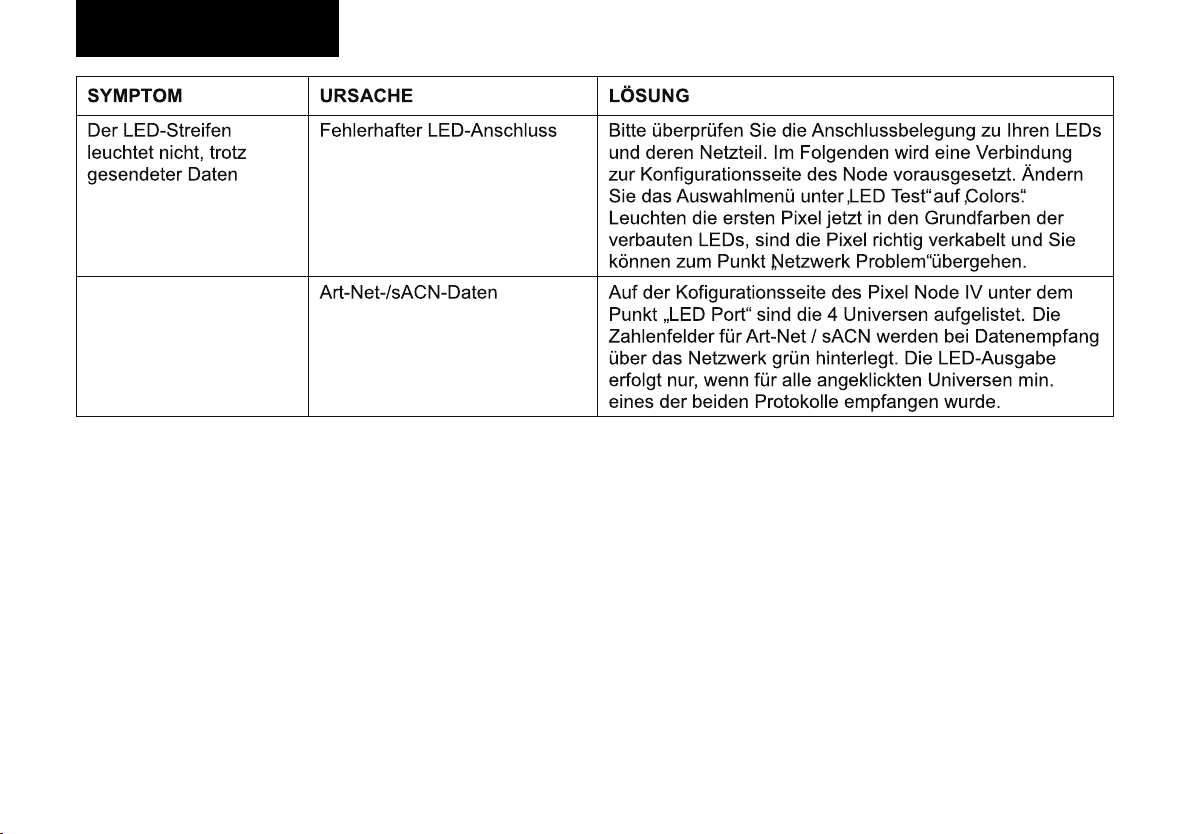
Fehlersuche................................................................... 15
Spezifikationen.............................................................. 17
.
Sicherheitshinweise ..................................................... 18
2 Deutsch
Page 3
Einführung
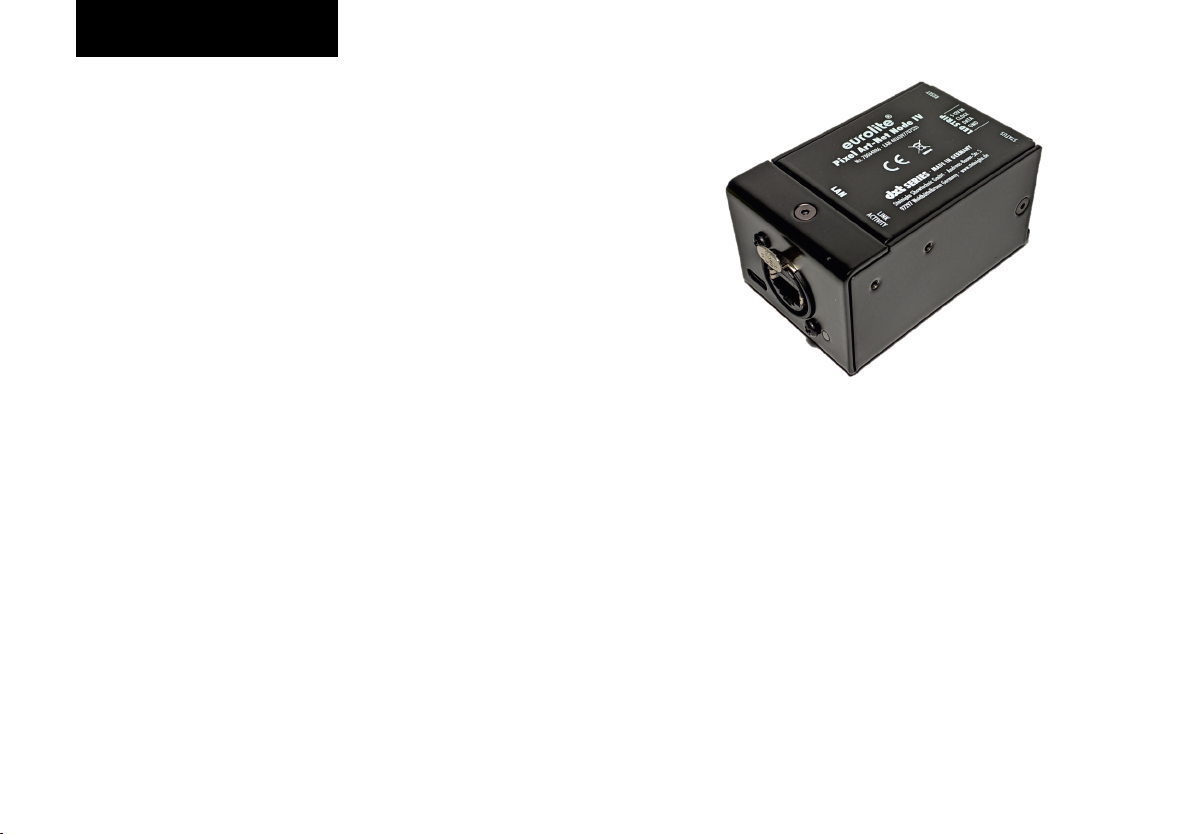
DXT Pixel Art-Net Node IV
Willkommen bei Eurolite! Ihr neuer DXT Pixel Art-Net Node
IV ist Teil der DXT-Serie von Eurolite, die zuverlässige und
leistungsstarke DMX-Tools made in Germany umfasst. Der
Pixel Art-Net Node IV ermöglicht die Ausgabe von bis zu
50.000 LED-Kanälen. Dafür können bis zu 4 Art-Net
Universen genutzt werden. Des Weiteren können bis zu
9999 LED-Pixel zu einer Pixel-Gruppe zusammengefasst
werden. So können auch lange LED-Streifen angesteuert
werden, falls nicht jede LED einen eigenen Wert darstellen
muss. Die Stromversorgung (5 - 12V DC) erfolgt dabei über
die LED-Schraubklemme. Es wird kein separates Netzteil
benötigt. Das Gerät verfügt über eine Neutrik etherCONBuchse und hochwertige Schraubklemmen. Es lässt über
Art-Net oder eine Website konfigurieren.
Produktmerkmale
Ÿ etherCON-Netzwerkbuchse
Ÿ Ausgabe von bis zu 50.000 LED-Kanälen
Ÿ Aktualisierungsrate von bis zu 40 Hz
Ÿ Maximal 2048 individuelle Kanäle
Ÿ Versorgung über LED-Anschluss (5-12V DC)
Ÿ Konfiguration über Website oder Art-Net
Ÿ Erstellen von Pixel-Gruppen (1 – 9999)
Ÿ 1 – 6 Farben pro Pixel
Ÿ Unterstützt: alle Eurolite LED-Pixel-Strips, WS2801,
WS2811, WS2812, SK6812, APA102,…
Lieferumfang
Nehmen Sie das Produkt und alle Zubehörteile aus der
Verpackung. Entfernen Sie alle Verpackungsmaterialien und
überprüfen Sie, ob alle Komponenten vollständig und
unbeschädigt sind. Im Falle einer unvollständigen oder
beschädigten Lieferung wenden Sie sich bitte an Ihren
Händler.
Ÿ DXT Pixel Art-Net Node IV
Ÿ 4-Pol-Schraubklemmblock
Ÿ diese Bedienungsanleitung
Zubehör
Ÿ Befestigungswinkel (No. 70064875)
Deutsch
3
Page 4
Geräteübersicht
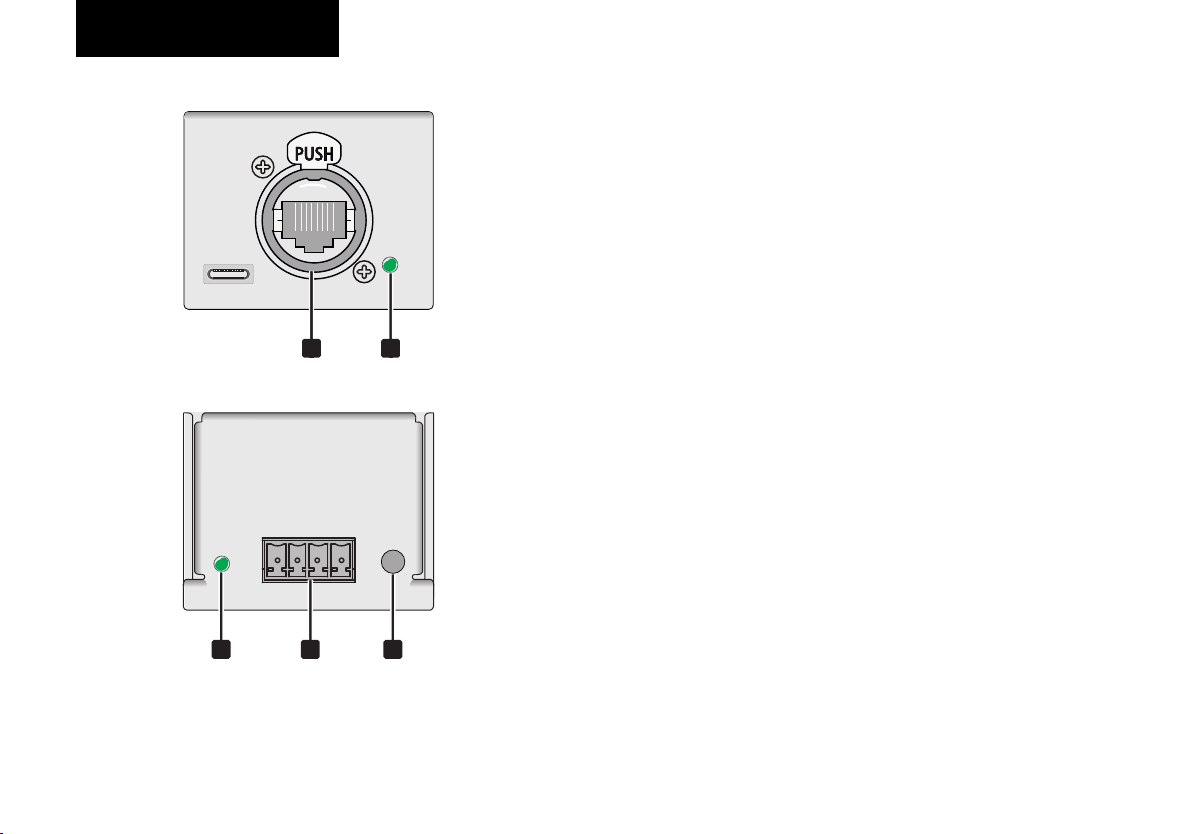
1 Ethernet-Anschluss
10Base-T Ethercon-Anschluss (RJ45)
2 Ethernet-Anzeige
- Aus: keine Verbindung
- Leuchtet Grün: Ethernetverbindung hergestellt
- Blinkt Orange: Übertragungsaktivität
3 Statusanzeige
- Leuchtet Grün: Gerät ist betriebsbereit
- Blinkt Grün: Daten werden ausgegeben
21
- Leuchtet Rot: Fehler
4
Anschlussklemmen für die LEDs
Anschluss für die digitalen LEDs und die Stromversorgung
Die Belegung von links nach rechts:
- GND: Minus oder GND Verbindung
- DATA: DI - / Datenpin der LEDs
- CLOCK: CLK- / Taktpin der LEDs
- 5-12V IN: VCC -/ Versorgung (5-12V DC)
5 Rest-Taster
5 Sekunden drücken zum Zurücksetzen auf die Werkseinstellungen:
- Statische IP: 192.168.1.20,
53 4
- Subnetz: 255.255.255.0
- Art-Net Net: 0, Subnetz : 0
- 4 Universes aktiv: 1,2,3,4
- 3 Farben pro Pixel
- Pixel Gruppe: 1
4 Deutsch
Page 5

Erste Schritte
Installation
Stellen Sie das Gerät auf eine ebene Fläche oder befestigen
Sie es mit den optional erhältlichen Montagebügeln.
Stromversorgung herstellen
Das Gerät wird über LEDs mit Strom versorgt. Der zulässige
Spannungsbereich ist 5-12V DC, die Leistungsaufnahme
beträgt dabei maximal 1W.
LEDs anschließen
Verwenden Sie dazu Kabel mit 26-16 AWG / 0,129-1,31 mm
und ziehen Sie die Schrauben handfest an. Die Kabellänge
zur ersten LED sollte maximal 10 m betragen. Verbinden Sie
die LEDs wie folgt:
- GND: Minus oder GND Verbindung
- DATA: DI - / Daten Pin der LEDs
- CLOCK: CLK- / Takt Pin der LEDs
- 5-12V IN: VCC -/ Versorgung (5-12V DC)
Netzwerkverbindung herstellen
Verbinden Sie das Gerät mit dem LAN-Port des Computers
oder mit einem Ethernetswitch (min. 802.3af). Dafür sollte
mindestens ein Cat-5e-Kabel verwendet werden.
PC-Einstellungen
Konfigurieren Sie das Netwerkinterface Ihres Computers auf
di e s ta t i s c h e I P 1 9 2. 1 68 . 1. 3 0 , S ub n et z ma s k e
255.255.255.0 und Gateway 192.168.1.1
Konfigurationsseite des Pixel Node IV aufrufen
- Rufen Sie in einem Browser (z. B. Firefox oder Chrome)
die Adresse auf.http://192.168.1.20
- Wählen Sie zuerst unter „Colours per Pixel“ die
2
Farbanzahl der LEDs.
- Mit dem Auswahlmenü „Pixel Test“ können Sie nun die
Ansteuerung der LEDs testen.
- Wenn Sie mehrere DXT Pixel Node in Ihrem Netzwerk
verwenden möchten, so müssen Sie die IP-Adresse
entsprechend ändern.
- Im Auslieferungszustand erwartet der Pixel Node vier
Art-Net-/sACN-Universen, bevor die Daten an die LEDs
ausgegeben werden. Sollen weniger verwendet werden,
so müssen Haken entfernt werden.
- Abschließend speichern Sie Ihre Einstellungen mit dem
Befehl „speichern“.
Deutsch
5
Page 6
Erste Schritte
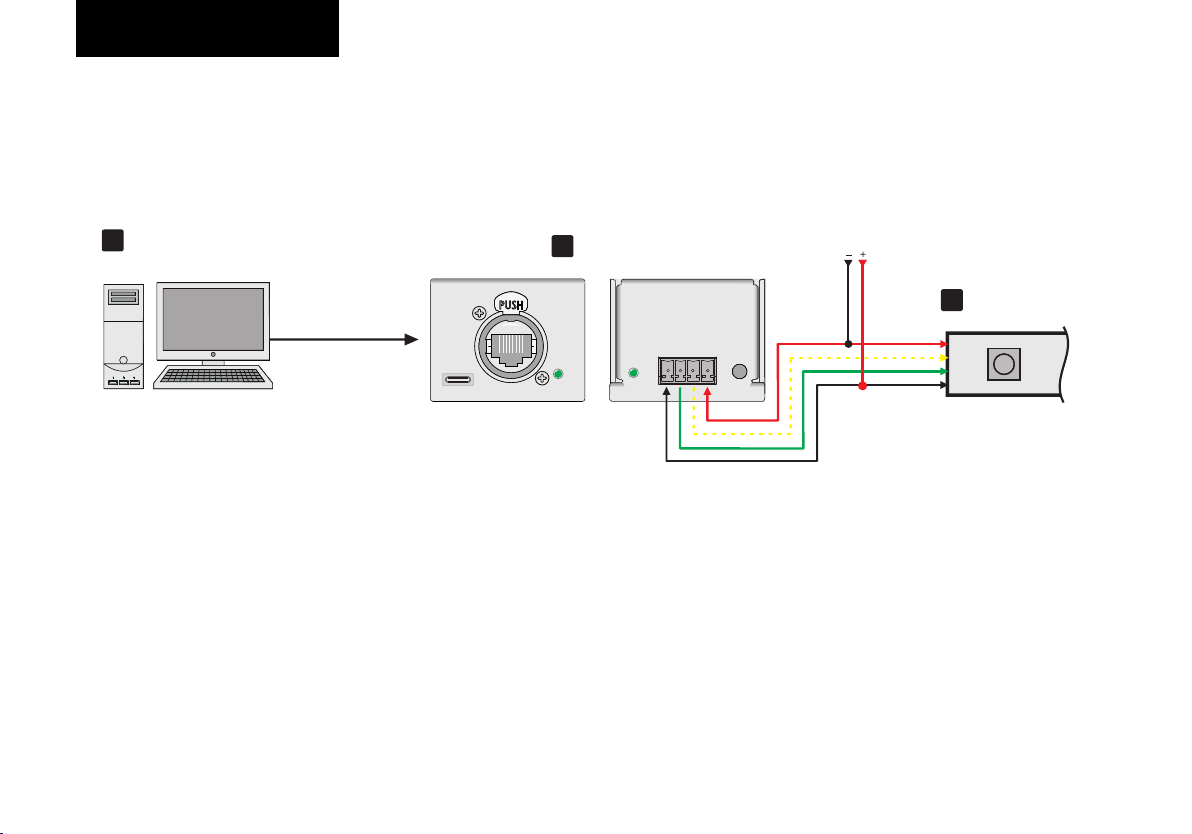
Anwendungsbeispiel
1
PC oder
Art-Net-Steuerpult
Ethernet
2
Node IV
VCC
CLOCK
DATA
GND
5-12V
VCC
CLOCK
DATA
GND
LED-Streifen
3
6 Deutsch
Page 7
Konfiguration
Website
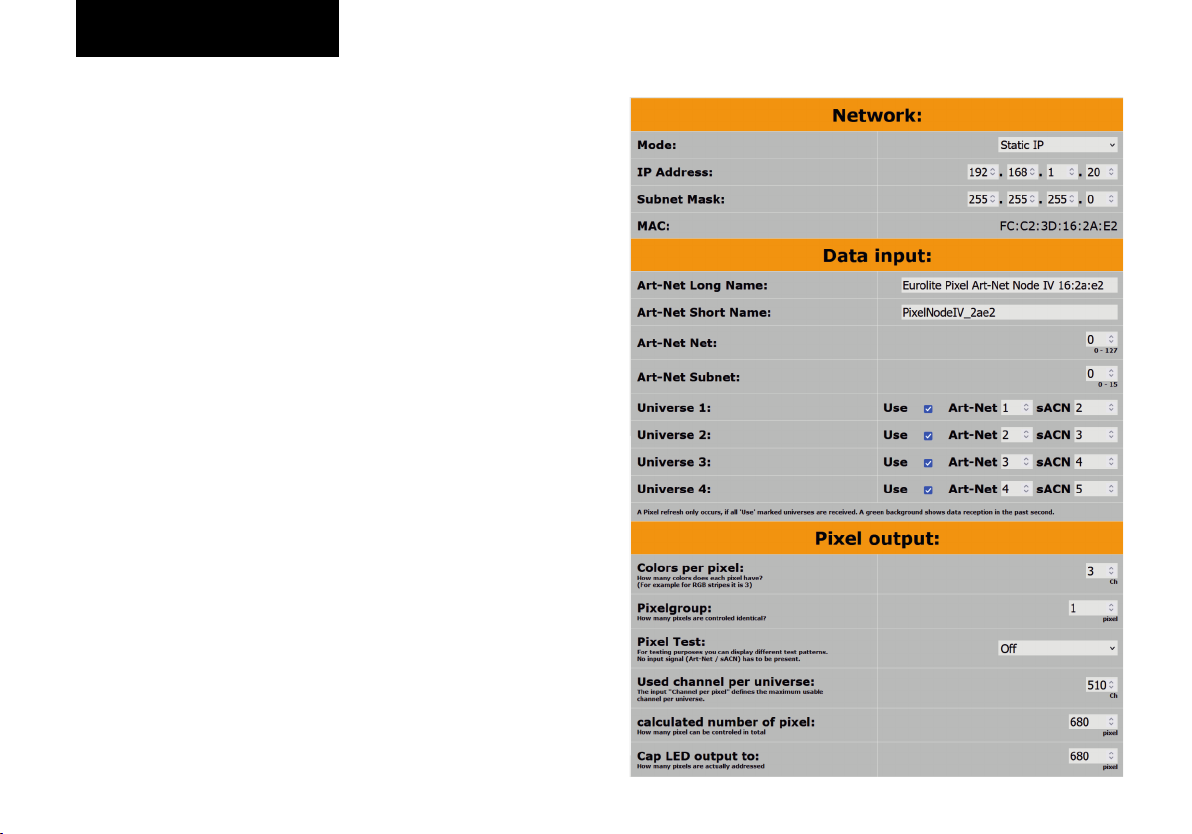
Die Konfigurationsseite ist über die Geräte-IP erreichbar. Die
Standard-IP ist 192.168.1.20. Sollen mehrere Geräte
gleichzeitig verwendet werden, so müssen die IP-Adressen
zwingend geändert werden. Beide Geräte (Node und PC)
müssen sich dazu im selben Netzwerk befinden.
Network
§ Mode:
- St atic IP: Es wird di e oben eingeste llte IP /
Subnetzmaske verwendet.
- Dynamic IP: Befindet sich ein aktiver DHCP-Server im
Netzwerk, so bekommt der Pixel Node IV von ihm eine
IP-Adresse zugewiesen. Vorsicht: Diese IP kann sich
unter Umständen nach einem Neustart ändern!
§ IP Address: editierbare IP-Adresse des Pixel Node IV
§ Subnet Mask: editierbare Subnetz-Maske des Pixel
Node IV
§ MAC: Eindeutige MAC-Adresse des Pixel Node IV
Data Input
§ Art-Net Long Name: zur Identifikation im Netzwerk
§ Art-Net Short Name: zur Identifikation im Netzwerk
§ Art-Net Net: 0-127
§ Art-Net Subnet: 0-15
§ Universe 1-4:
- Use: Anzahl der genutzten Universen für die LED-
Ausgabe
- ArtNet: 0-15
- sACN: ergibt sich aus der ArtNet Universe + 1
- sowohl ArtNet, als auch sACN werden jeweils grün
hinterlegt bei Datenempfang
Pixel output
§ Colors per pixel: Wie viele Farben hat jeder LED-Pixel
(1-6)?
§ Pixelgroup: Wie viele Pixel sollen identisch angesteuert
werden?
§ Pixel Test: Auch ohne Eingangsdaten (ArtNet oder
sACN) können hier die angeschlossenen LEDs getestet
werden. Änderungen werden direkt übernommen,
können aber nicht dauerhaft gespeichert werden.
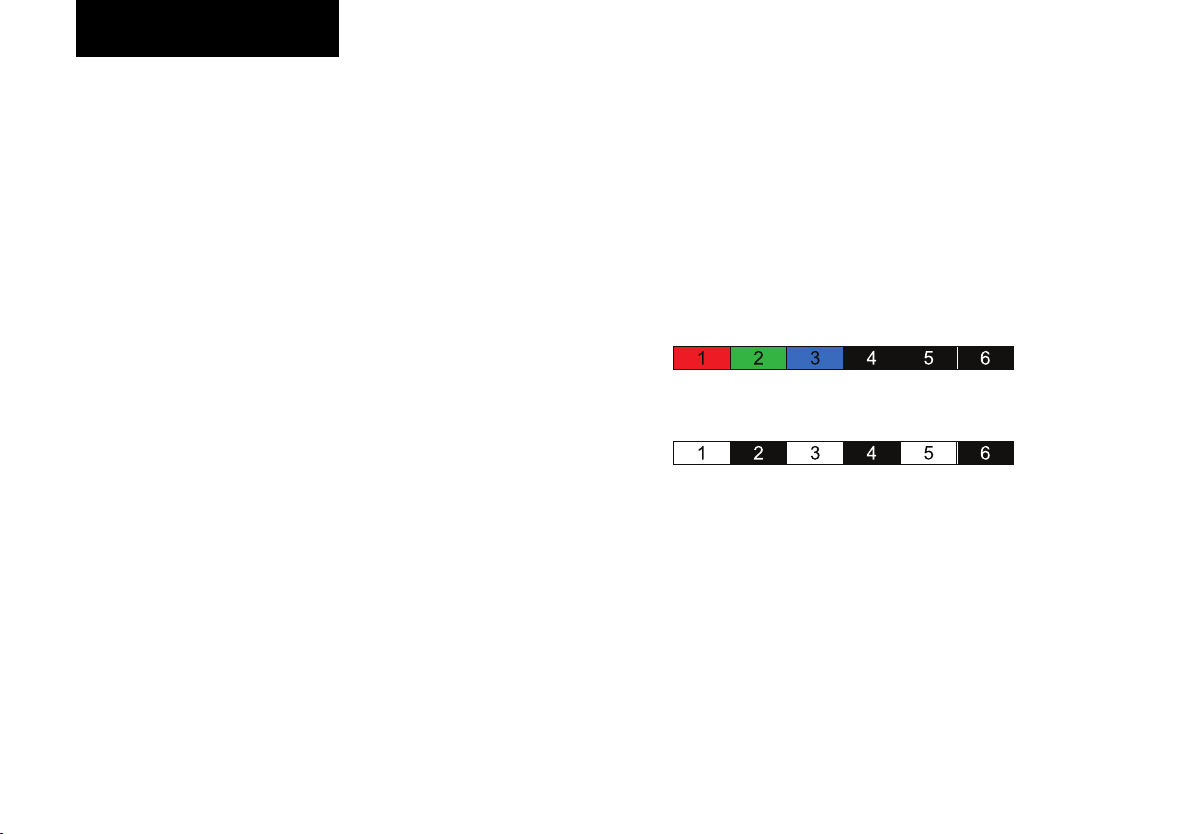
- Colors: Die ersten Pixel zeigen die Grundfarben an.
Bsp.: LED-Streifen mit 3 Farben pro LED:
- Alternating: Die ersten 3 ungeraden Pixel zeigen alle
Farben, die ersten 3 geraden Pixel sind aus. Bsp.: LEDStreifen mit 3 Farben pro LED:
§ Used channel per universe: Errechnet sich aus
„Channel pro LED“. Ein Beispielpatch findet sich weiter
unten.
§ Calculated number of pixel: Maximale Anzahl an
ansteuerbaren LED
§ Cap LED output to: Wie viele LEDs werden tatsächlich
ausgegeben?
§ Max. refreshrate: Errechnet sich aus der Ausgabe-
anzahl.
Website
§ Design: Helles oder dunkles Design der Konfigurations-
seite
Deutsch
7
Page 8
Sicherheitshinweise
Konfiguration
System
§ Device Load: zeigt die aktuelle Geräteauslastung. Bei
einem Wert über 90% kann unter Umständen die
angegebene Wiederholrate der LEDs nicht mehr
aufrechterhalten werden!
§ Firmware: zeigt die Firmware Version des Geräts an.
Shop
Link zur Internetseite des Pixel Node IV. Hier finden Sie
die aktuellsten Informationen zum Artikel.
Speichern
Alle auf dieser Seite getätigten Einstellungen werden
hiermit dauerhaft auf dem Gerät gespeichert.
Vorsicht!
Der Wertebereich des Art-Net Net, Subnet und Universe ist
0 – 15. Bitte beachten Sie: manche Programme verwenden
einen Wertebereich von 1 – 16 ! Dabei entspricht dann 1 → 0
im Node, 2 → 1 im Node, usw.
Die eindeutige Zuordnung der Ports geschieht nach
folgendem Schema:
(„ArtNet Net“ * 256) + („ArtNet Subnet“ * 16) + „ArtNet Universe“
z. B. Net: 3, Subnet: 4, Universe: 5 (3*256) + (4*16) + 5 = 837
Um den Patch der LEDs einfacher zu gestalten, werden bei
den Farbanzahlen 3, 5 und 6 die Universen nur bis Kanal 510
genutzt. Das ist notwendig, da einige Zuspieler es nicht
erlauben z. B. ein 3-Kanal-Fixture auf 2 Universen
aufzuteilen. Die Werte der übersprungenen Kanäle haben
keinen Einfluss auf die LEDs.
8 Deutsch
Page 9
Konfiguration
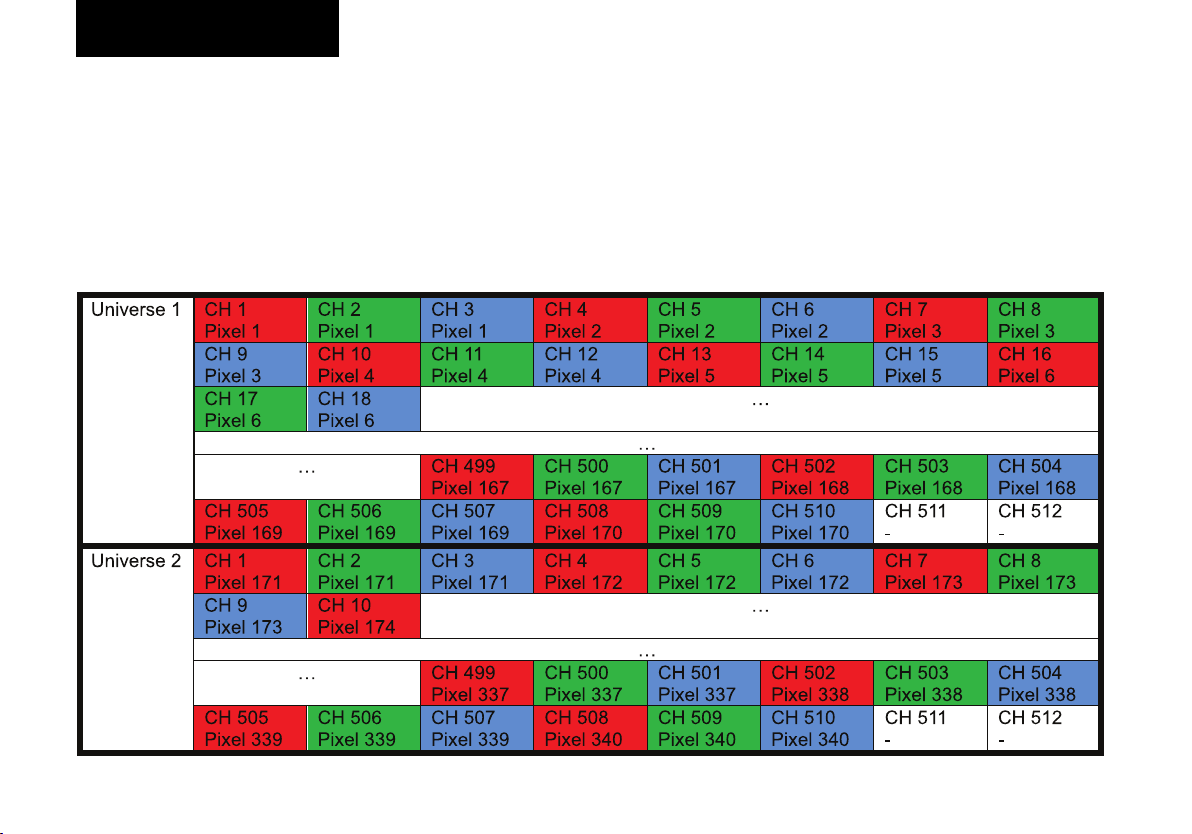
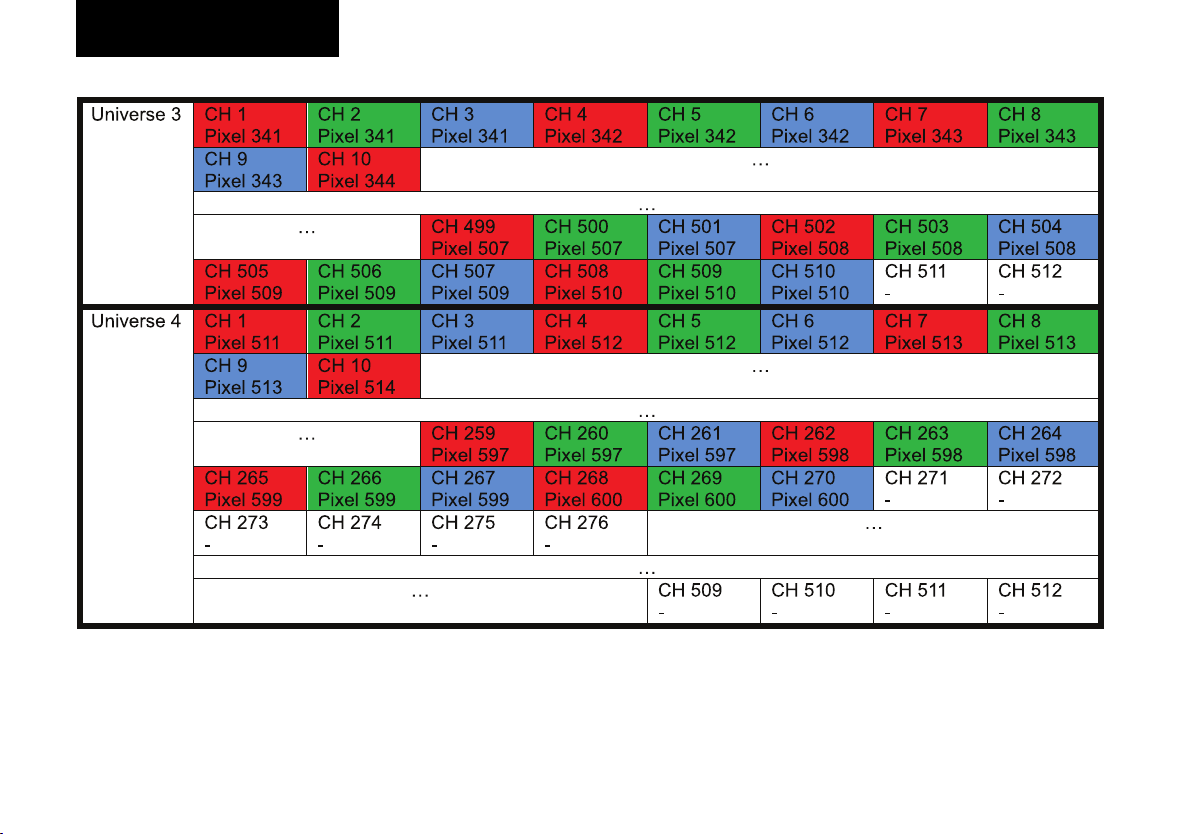
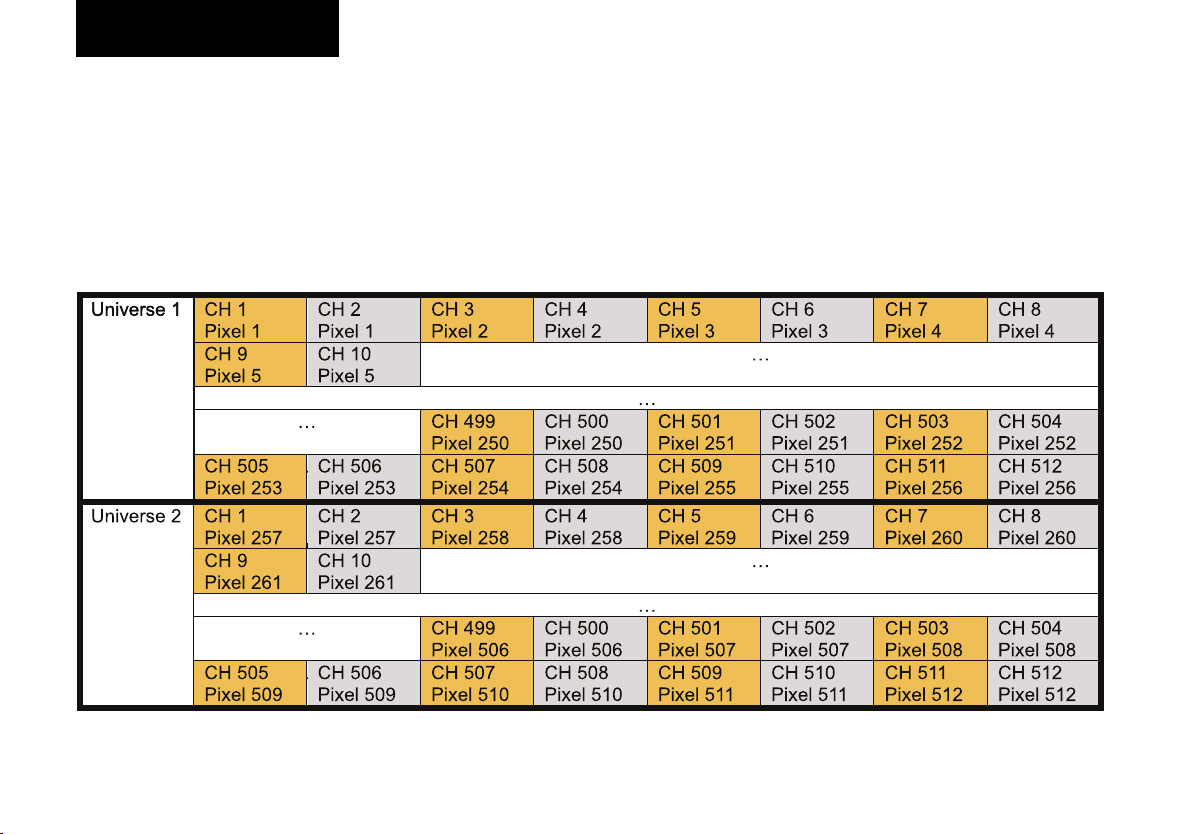
Beispiel Patch 1:
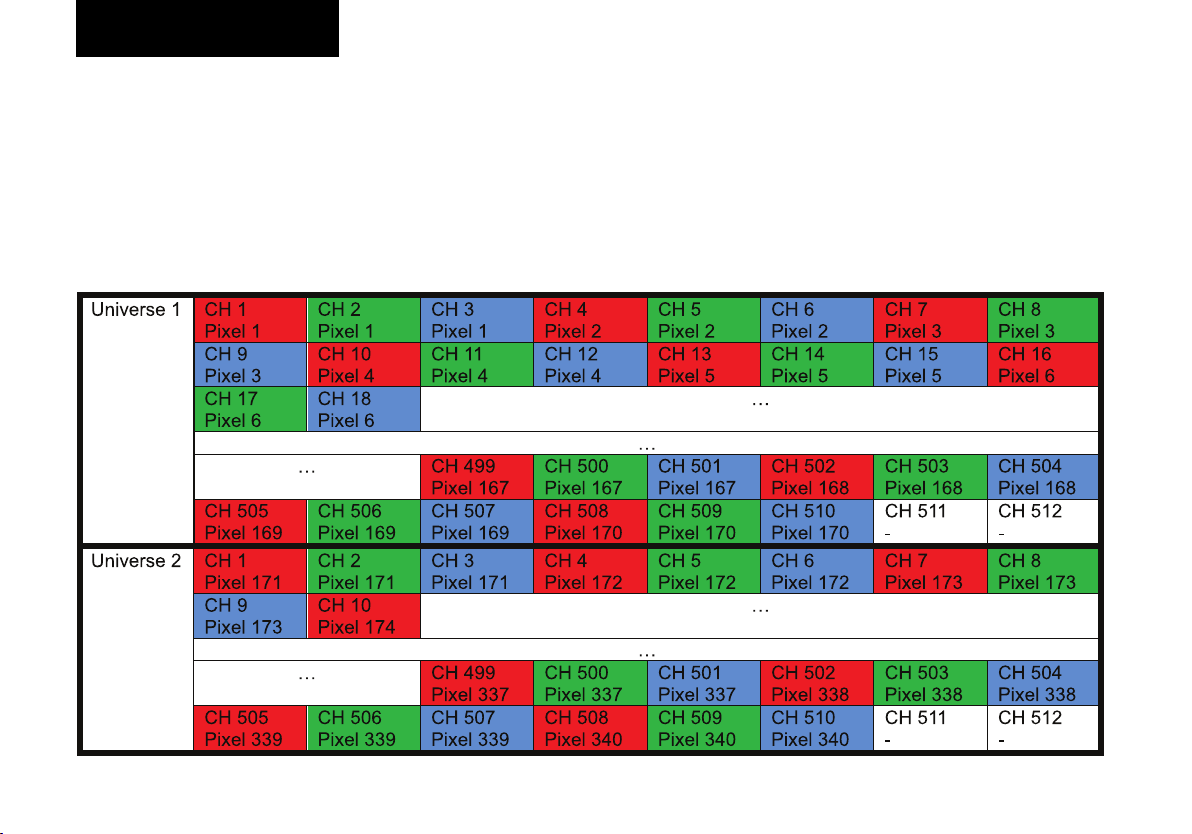
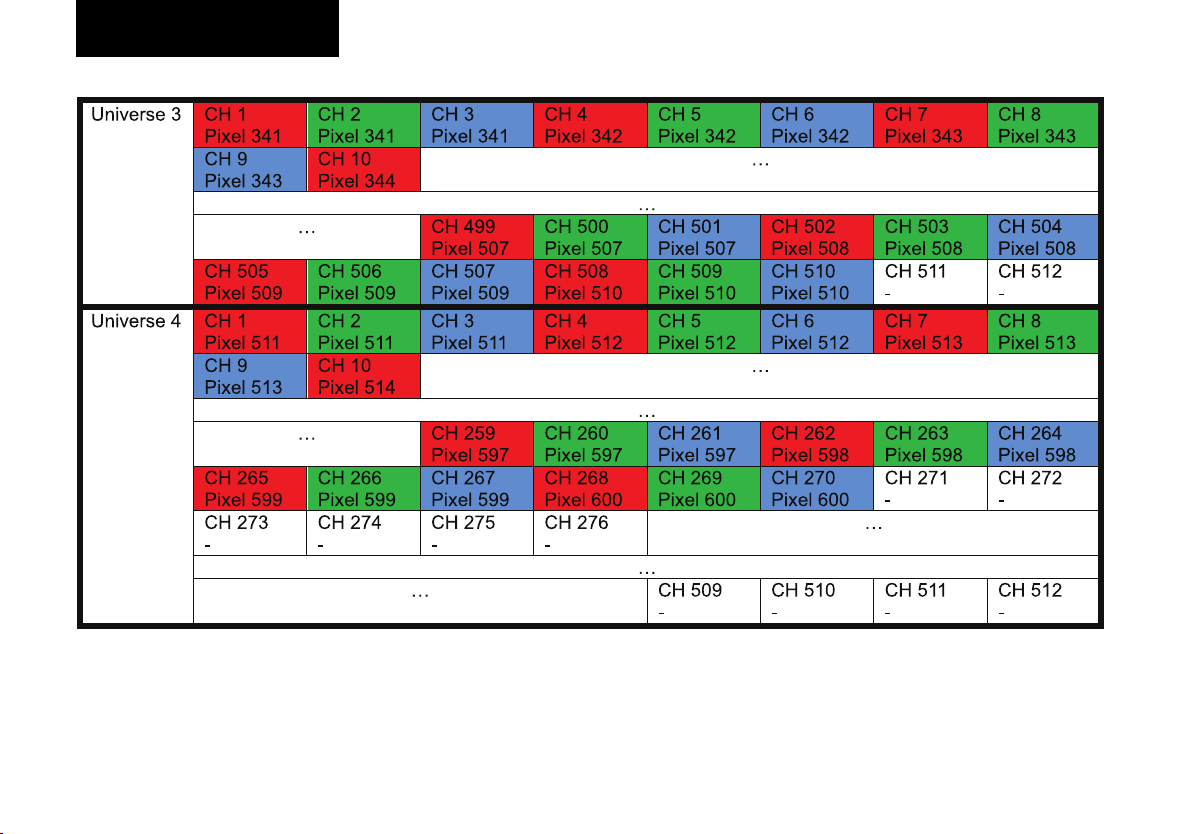
Für einen RGB-LED-Streifen (3 Kanäle) mit 600 Pixeln und einer Pixelgroup von 1:
- 512 Kanäle pro Universum / 3 Kanäle pro Pixel 170 Pixel pro Universum
- Bei 600 Pixeln/170 Pixeln pro Universum werden 4 Universen benötigt
- Universe 1: CH 1 - CH 510 belegt
- Universe 2: CH 1 - CH 510 belegt
- Universe 3: CH 1 - CH 510 belegt
- Universe 4: CH 1 - CH 270 belegt
Deutsch
9
Page 10
Sicherheitshinweise
Konfiguration
10 Deutsch
Page 11
Konfiguration
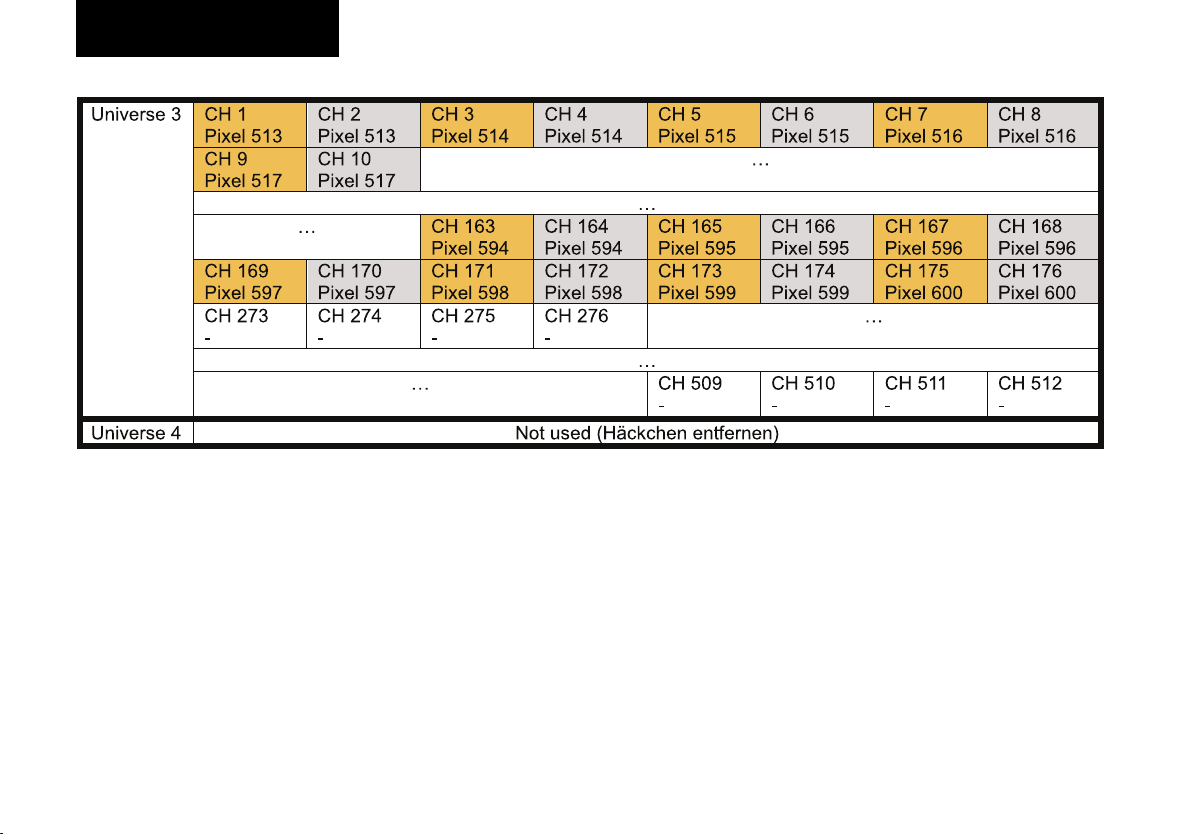
Beispiel Patch 2
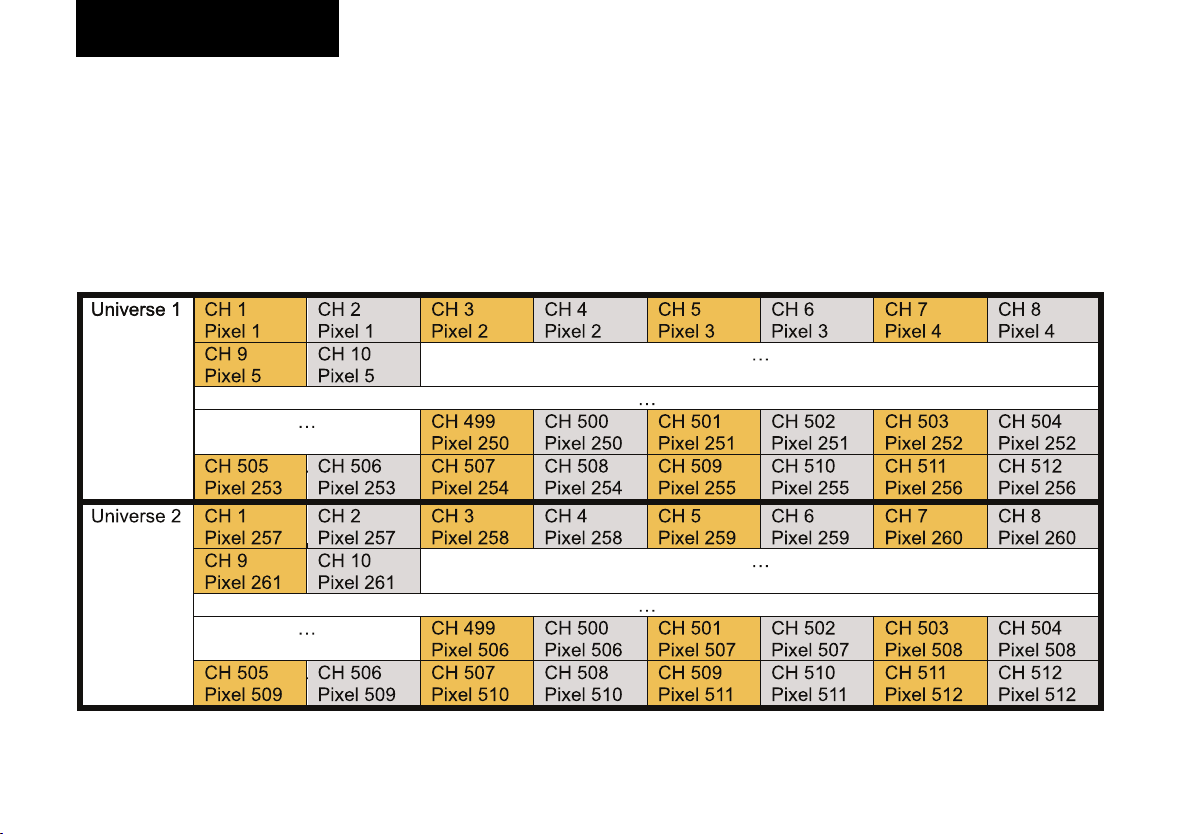
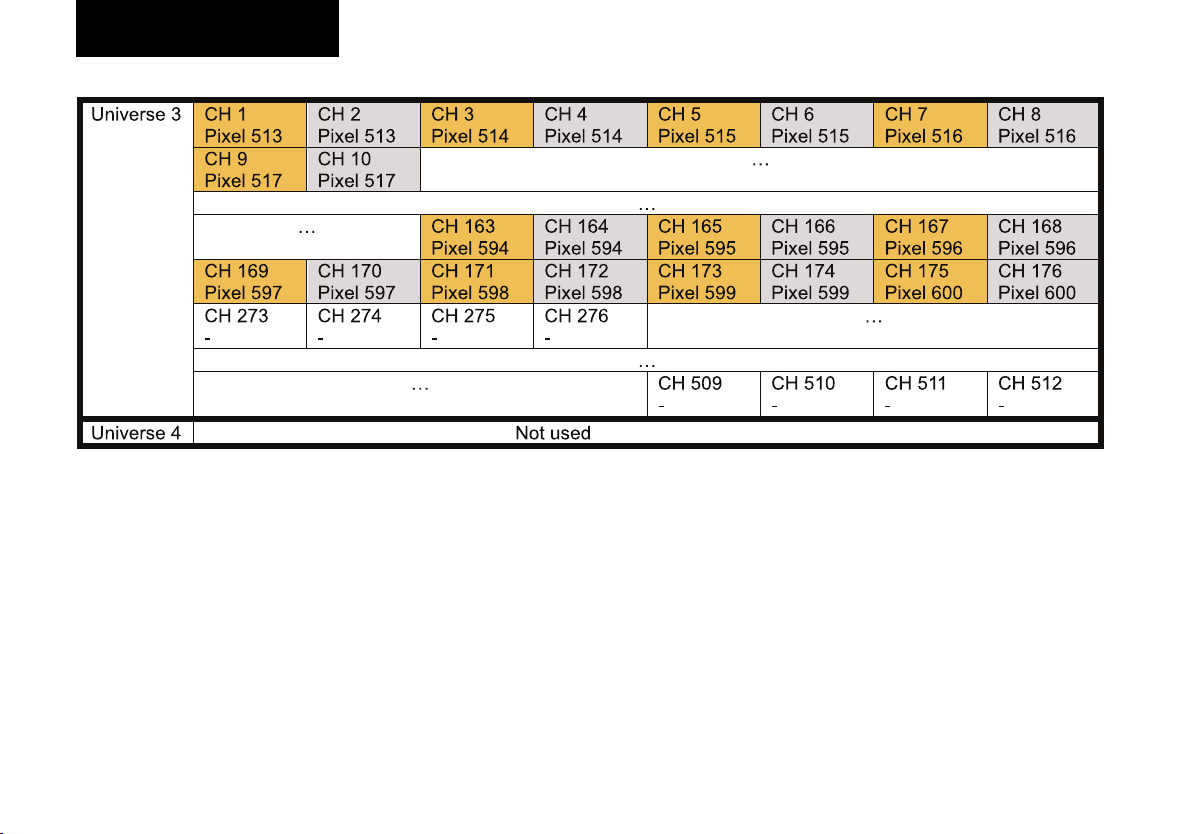
Für einen CCT-LED-Streifen (2 Kanäle) mit 600 Pixeln und einer Pixelgroup von 1:
- 512 Kanäle pro Universum / 2 Channels pro Pixel > 256 Pixel pro Universum
- Bei 600 Pixeln / 256 Pixeln pro Universum > es werden 3 Universen benötigt
- Universe 1: CH 1 - CH 512 belegt
- Universe 2: CH 1 - CH 512 belegt
- Universe 3: CH 1 - CH 176 belegt
- Universe 4: Not Used
Deutsch
11
Page 12
Sicherheitshinweise
Konfiguration
12 Deutsch
Page 13
Konfiguration
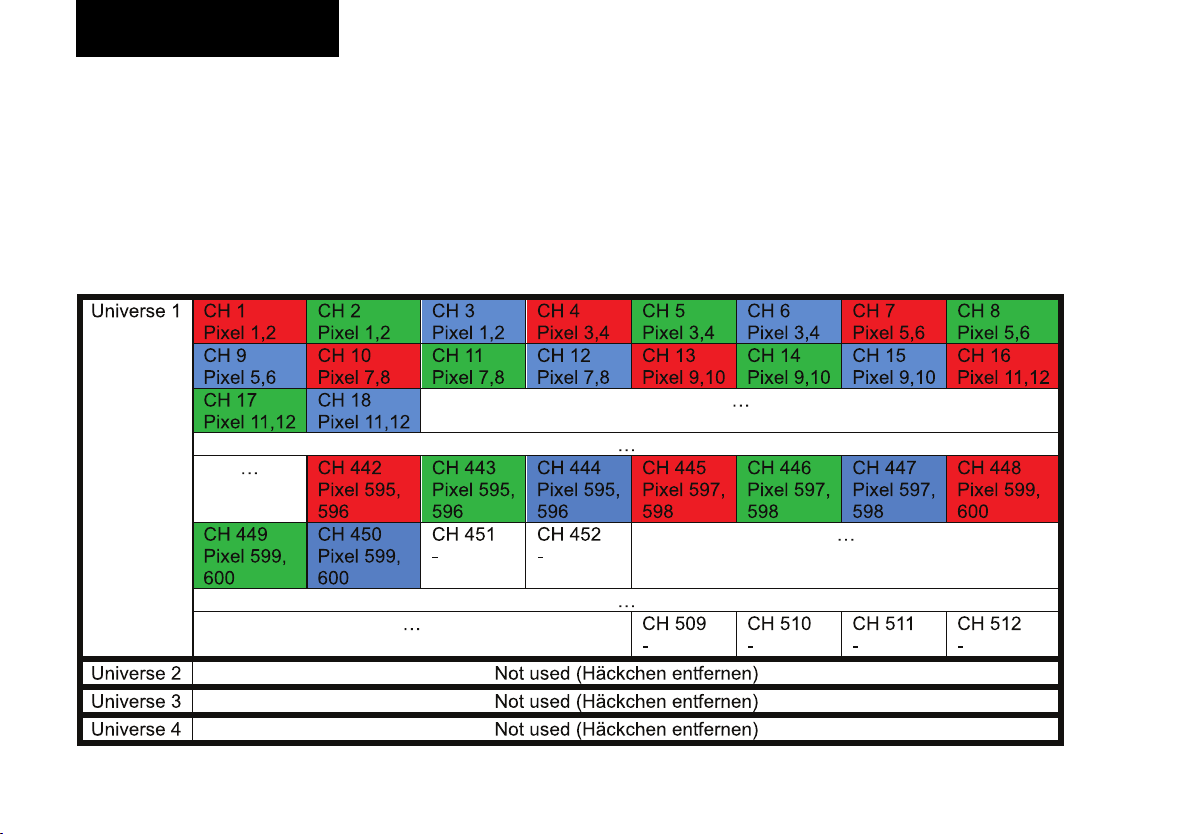
Beispiel Patch 3
Für einen RGB-LED-Streifen (3 Kanäle) mit 300 Pixeln und einer Pixelgroup von 2:
- 512 Kanäle pro Universum / 3 Kanäle pro Pixel > 170 Pixel pro Universum
- Bei 300 Pixeln / 2 Pixeln pro Gruppe / 170 Pixel pro Universum > es wird 1 Universum benötigt
- Universe 1: CH 1 - CH 450 belegt
- Universe 2: Not Used
- Universe 3: Not Used
- Universe 4: Not Used
Deutsch
13
Page 14
Spezifikationen
Konfiguration
Art-Net
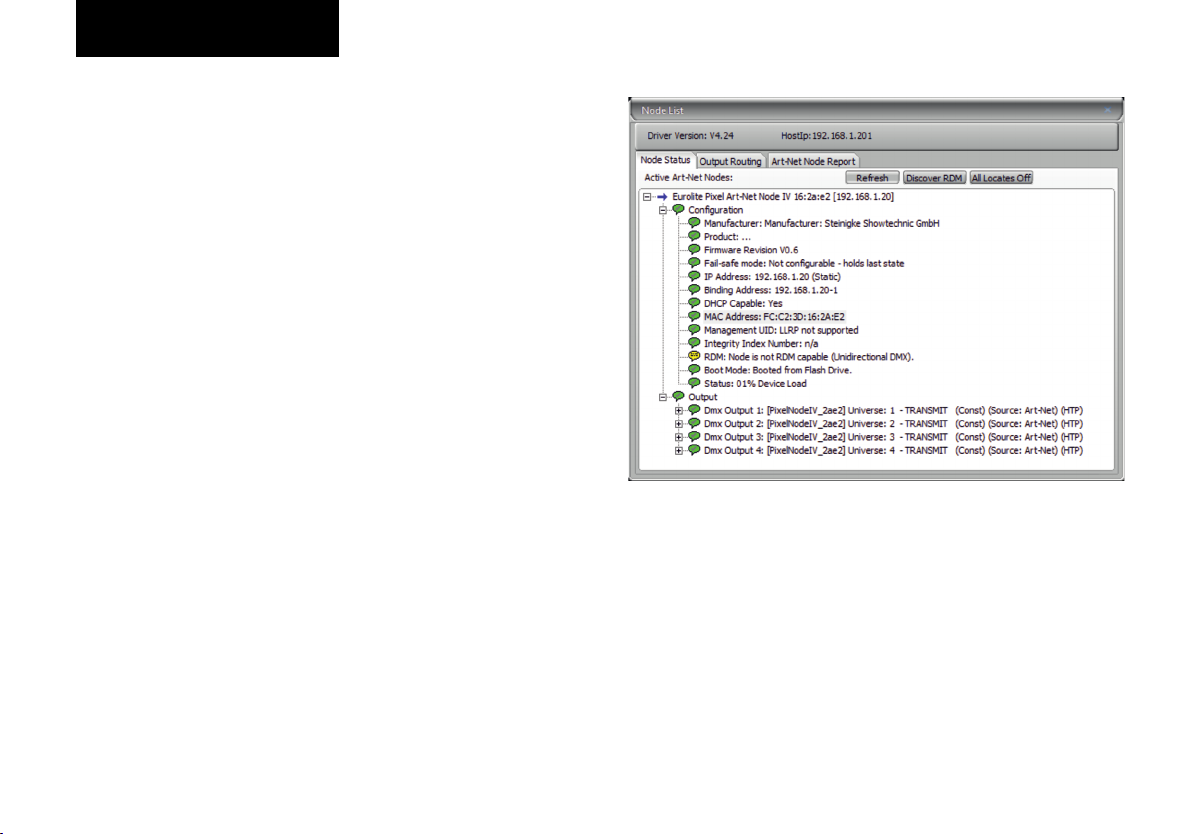
Über „DMX-Workshop“ sind einstellbar:
- Art-Net Lang Name
- Art-Net Kurz Name
- Art-Net Net
- Art-Net Subnet
- Art-Net Universe
- IP-Adresse
14
Deutsch
Page 15
Spezifikationen
Fehlersuche
Deutsch
15
Page 16
Spezifikationen
Fehlersuche
„ „
16
Deutsch
Page 17

Sicherheitshinweise
Spezifikationen
Spannungsversorgung: 5-12 V DC (Schraubklemme)
Gesamtanschlusswert: 1 W
Netzwerkanschluss: Ethernet TCP/IP über RJ-45 etherCON, 10/100 Mbit/s
IP-Adresse: 192.168.1.20
Maße (LxBxH): 78 x 50 x 42 mm
Gewicht: 220 g
Belegung Schraubklemme
- GND
- DATA Out
- CLOCK Out
- VIN (5-12V DC)
Technische Daten können im Zuge der Weiterentwicklung des Produkts ohne
vorherige Ankündigung geändert werden.
Deutsch
17
Page 18
Sicherheitshinweise
Ÿ
Ÿ Bitte lesen Sie vor der Verwendung des Produkts diese
Bedienungsanleitung. Sie enthält wichtige Hinweise für
den korrekten Betrieb. Bewahren Sie diese Anleitung für
weiteren Gebrauch auf.
Ÿ Verwenden Sie das Produkt ausschließlich gemäß den hier
ge g eb en e n Vo rg a be n. Be i S c hä de n , d ie du rc h
Nichtbeachten dieser Bedienungsanleitung verursacht
werden, erlischt der Garantieanspruch. Für Folgeschäden
wird keine Haftung übernommen.
Ÿ Bei Sach- oder Personenschäden, die durch unsachgemäße
Handhabung oder Nichtbeachten der Sicherheitshinweise
verursacht werden, übernehmen wir keine Haftung und es
erlischt jeder Garantieanspruch.
Ÿ Aus Sicherheitsgründen ist das eigenmächtige Umbauen
oder Verändern des Produkts ist nicht gestattet und hat den
Verfall der Garantieleistung zur Folge.
Ÿ WICHTIG: Dieses Produkt ist nicht für die Benutzung im
Freien geeignet! Nur für den Innenbereich! Nicht in der Nähe
von Wasser verwenden! Der ideale Temperaturbereich liegt
bei -5 bis +45 °C.
Ÿ Das Produkt ist kein Spielzeug. Halten Sie es vor Kindern
und Haustieren fern. Lassen Sie Verpackungsmaterial nicht
achtlos liegen.
Ÿ Das Gerät erfüllt allen erforderlichen Richtlinien der EU und
ist deshalb mit gekennzeichnet.
Support
Do k um e nt a ti o ne n un d S upp ort er hal ten Si e u nte r
www.eurolite.de. Die neueste Version der Bedienungsanleitung finden Sie im Downloadbereich des Produkts.
Copyright
© 2023 Steinigke Showtechnic GmbH
Alle Rechte vorbehalten. Dieses Dokument darf ohne
schriftliche Genehmigung des Copyrightinhabers weder ganz
noch teilweise reproduziert werden.
Haftungsausschluss
Der Inhalt dieses Dokuments kann ohne vorherige Ankündigung
modifiziert werden, wenn Änderungen in Methodik, Design oder
Herstellung dies erforderlich machen. Eurolite übernimmt
keinerlei Haftung für Fehler oder Schäden, die durch den
Gebrauch dieses Dokuments entstehen.
Marken
Alle in diesem Dokument erwähnten Produktnamen und
Marken gehören den jeweiligen Eigentümern. Sie sind nicht mit
Eurolite verbunden.
Art-Net™ is a trademark by and Copyright Artistic Licence
Holdings Ltd.
DMX Workshop by https://artisticlicence.com
Das Gerät bitte am Ende seiner Nutzungsdauer zur umweltgerechten Entsorgung einem örtlichen Recyclingbetrieb
übergeben. Nicht im Hausmüll entsorgen. Für weitere
Informationen bitte an den Händler oder die zuständige
örtliche Behörde wenden.
18 Deutsch
Page 19

Table of contents
Introduction ................................................................... 20
Product features.............................................................. 20
Package contents ........................................................... 20
Accessory ....................................................................... 20
.
Device overview ............................................................ 21
Getting started............................................................... 22
Installation....................................................................... 22
Power supply .................................................................. 22
LED connection............................................................... 22
Network connection ........................................................ 22
Computer settings ........................................................... 22
Configuration website...................................................... 22
Applications..................................................................... 23
.
Configuration................................................................. 24
Website ........................................................................... 24
Example patch ................................................................ 26
Art-Net............................................................................. 31
Troubleshooting............................................................ 32
Specifications................................................................ 34
.
Safety warnings............................................................. 35
19English
Page 20
Introduction
Art-Net Interface
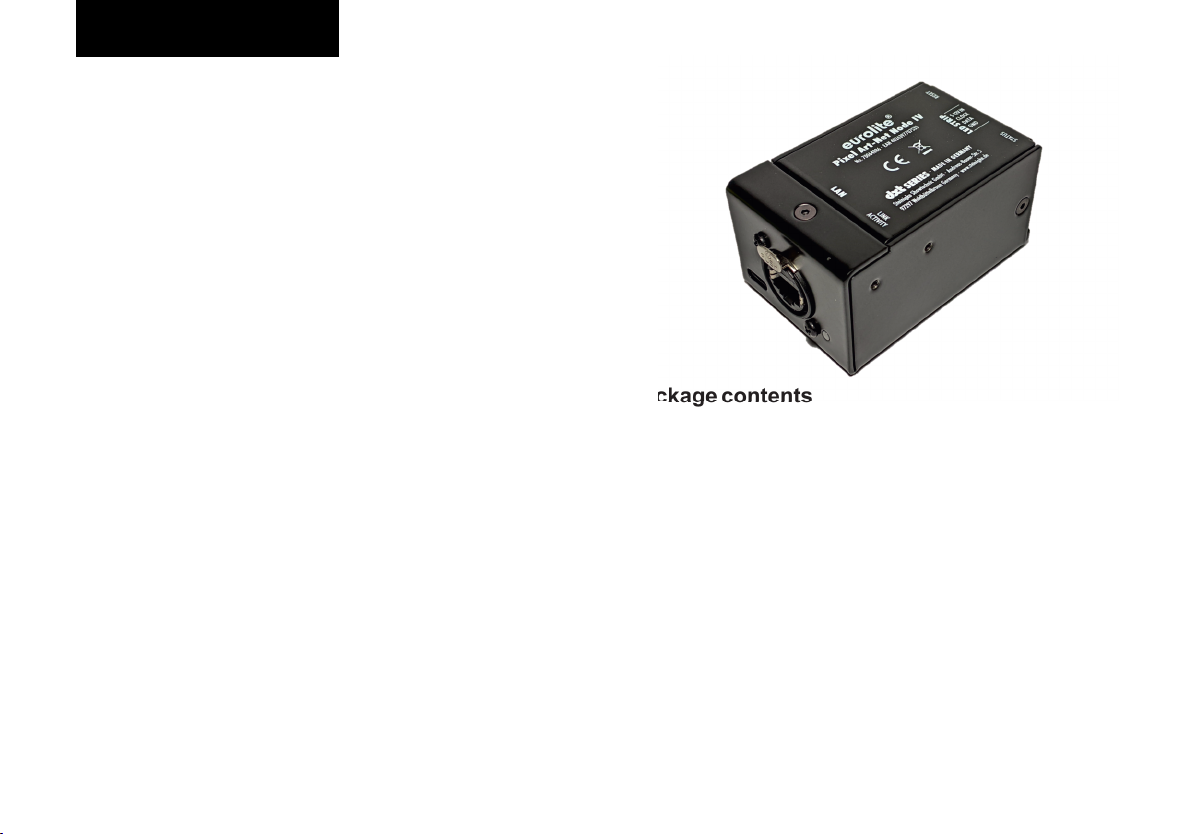
Welcome to Eurolite! Your new DXT Pixel Art-Net Node IV is
part of Eurolite’s DXT series, which consists of highperformance and reliable DMX tools made in Germany. The
DXT Pixel Art-Net Node IV can output up to 50,000 LED
channels. Up to 4 Art-Net universes can be used for this
purpose. Furthermore, up to 9999 LED pixels can be
combined to a pixel group. This way even long LED strips can
be controlled, if not every LED should get its own value.
Power supply (5 - 12V DC) is done via the LED screw
terminal. No separate power supply is required. The node
provides a Neutrik XLR and etherCON connector. The
device can be configured via Art-Net or with a website.
Product features
Ÿ etherCON network connection
Ÿ Output of up to 50,000 LED channels
Ÿ Refresh rate up to 40 Hz
Ÿ Maximum of 2048 individual channels
Ÿ Power supply via LED connector (5-12V DC)
Ÿ Configuration with website or Art-Net
Ÿ Supports pixel groups (1 - 9999)
Ÿ 1 - 6 colors per pixel
Ÿ Supports all Eurolite LED pixel strips, WS2801, WS2811,
WS2812, SK6812, APA102,...
Package contents
Remove the product and all the accessories from the
packaging. Remove the packaging material and check that
all components are complete and undamaged. If you find
anything missing or damaged, please contact your dealer.
Ÿ DXT Pixel Art-Net Node IV
Ÿ 4-pin terminal block
Ÿ these instructions
Accessory
Ÿ Mounting brackets (No. 70064875)
20
English
Page 21
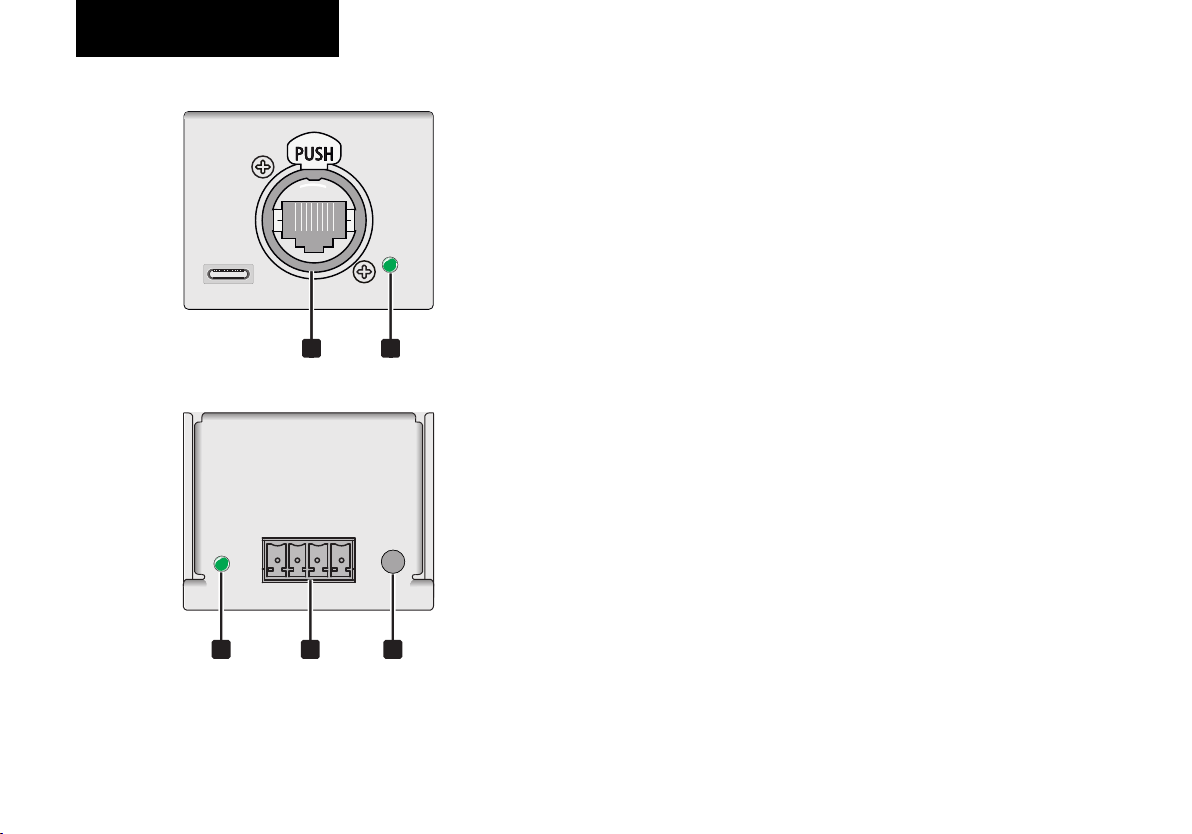
Device overview
1 Ethernet connection
10Base-T Ethercon connection (RJ45)
2 Ethernet indicator
- Off: no connection
- Lights up green: Ethernet connection established
- Flashing orange: Transmission activity
3 Status indicator
- Lights up green: device ready for use
- Flashing green: data output
21
- Lights up red: error
4
Connection terminals for the LEDs
Terminals for the digital LEDs and power supply.
Assignment from left to right:
- GND: negative pole or GND
- DATA: DI - / LED data pin
- CLOCK: CLK- / LED clock pin
- 5-12V IN: VCC -/ power (5-12V DC)
5 Rest button
Press for 5 seconds to reset to factorysettings:
- Static IP: 192.168.1.20,
- Subnet: 255.255.255.0
53 4
- Art-Net net: 0, subnet : 0
- 4 universes enabled: 1, 2, 3, 4
- 3 colors per pixel
- Pixel group: 1
21English
Page 22

Getting started
Installation
Setup the device on a plane surface or fasten it with the
optional mounting brackets.
Power supply
The device is supplied with power via the LEDs. The
permissible voltage range is 5-12V DC, the power
consumption is 1W max.
LED connection
Use cable with 26-16 AWG / 0.129-1.31 mm² and tighten the
screws hand-tight. The cable length to the first LED should
not exceed 10 m. Connect the LEDs as follows:
- GND: negative pole or GND
- DATA: DI - / LED data pin
- CLOCK: CLK- / LED clock pin
- 5-12V IN: VCC -/ power (5-12V DC)
Network connection
Connect the device to the LAN port of the computer or to an
Ethernet switch (min. 802.3af). Use a Cat-5e cable as a
minimum for this.
Computer settings
Configure the network interface of your computer to the static
IP 192.168.1.30, subnet mask 255.255.255.0 and gateway
192.168.1.1
Call up the configuration website of the Pixel
Node IV
- In a browser (e.g. Firefox or Chrome), call up the address
http://192.168.1.20.
- First select the number of colors of the LEDs under
"Colours per Pixel".
- Use the "Pixel Test" option to test the control function of
the LEDs.
- If you want to use several DXT Pixel Nodes in your
network, you have to change the IP address accordingly.
- As a default setting the Pixel Node expects four ArtNet/sACN universes before the data is output to the
LEDs. If you want to use less, you have to remove check
marks.
- Finally, save your settings with the "save" command.
22
English
Page 23
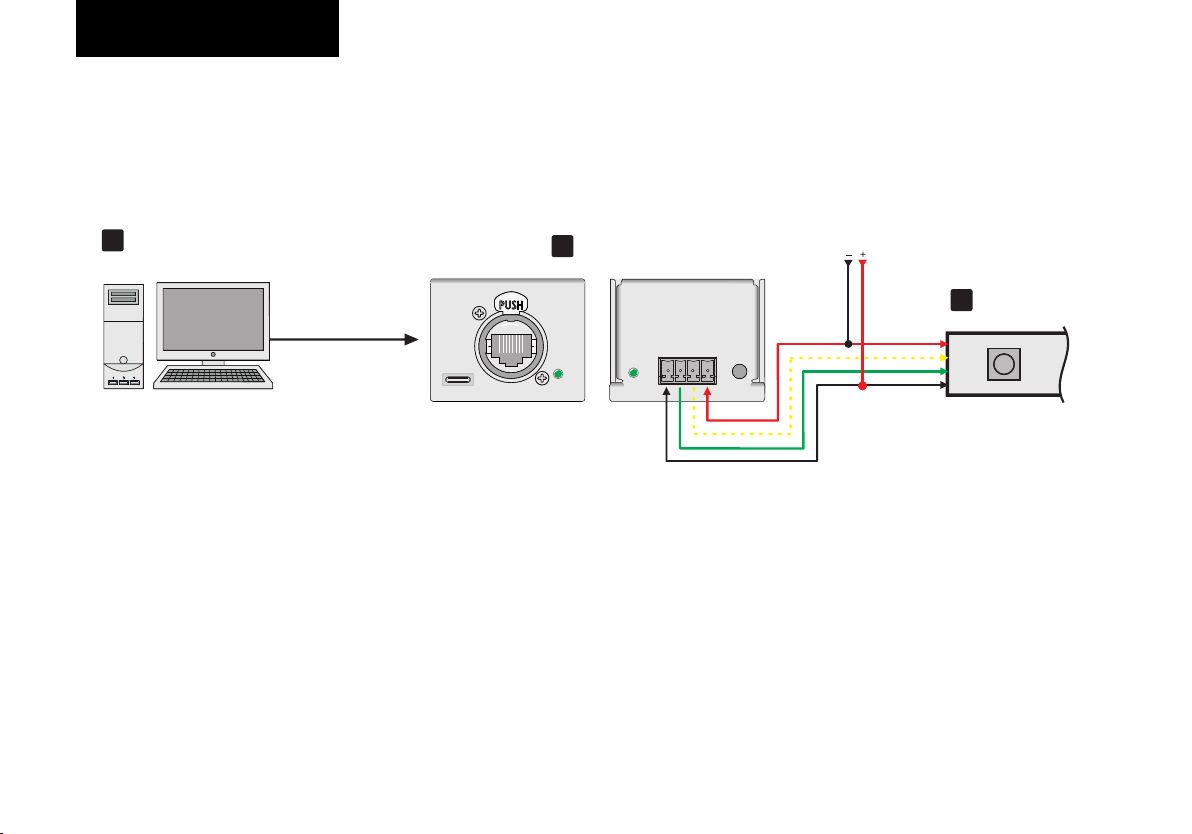
Getting started
Applications
1
PC or
Art-Net console
Ethernet
2
Node IV
VCC
CLOCK
DATA
GND
5-12V
VCC
CLOCK
DATA
GND
LED strip
3
23English
Page 24
Configuration
Website
The configuration website can be accessed with the device
IP. The standard IP is 192.168.1.20. If several devices are to
be are to be used simultaneously, the IP addresses must be
changed. Both devices (node and PC) must be in the same
network.
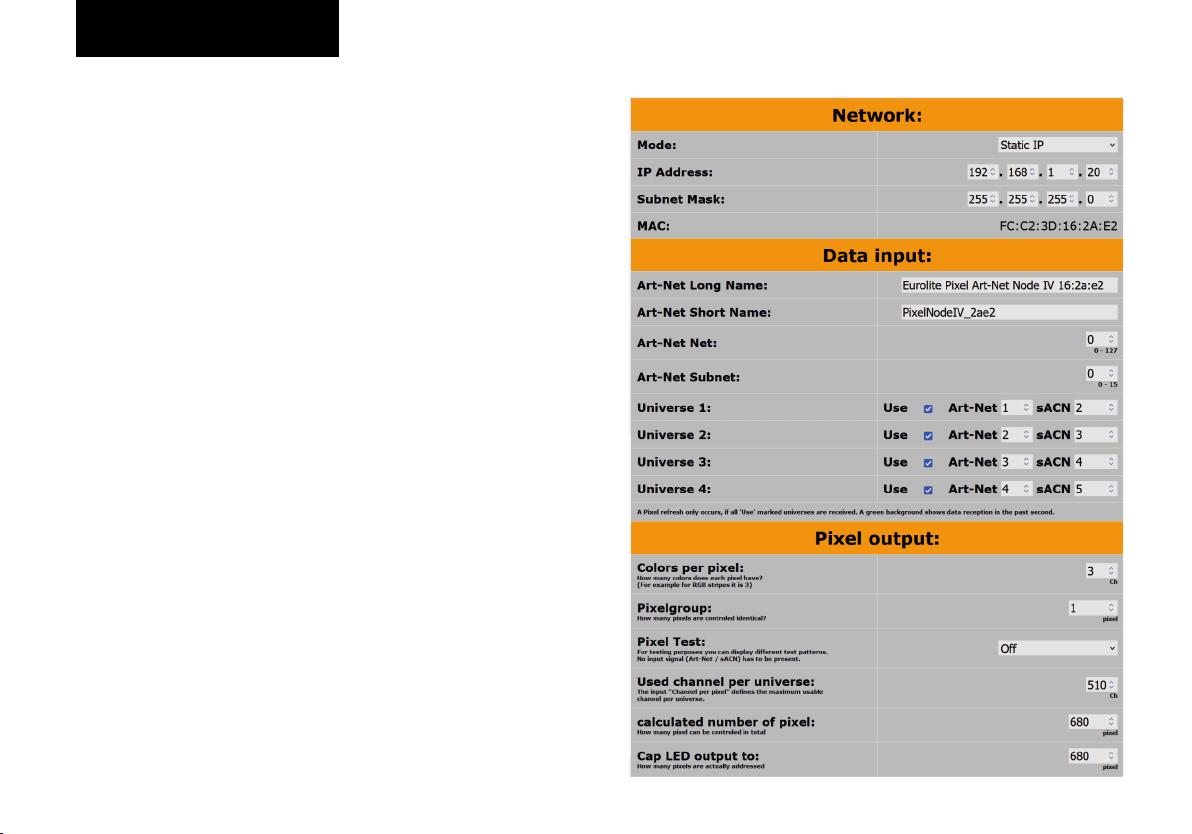
Network
§ Mode:
- Static IP: The IP / subnet mask set above is used.
- Dynamic IP: If there is an active DHCP server in the
network, the Pixel Node IV is assigned an IP address by
the server. Caution: This IP may change after a reboot!
§ IP Address: editable IP address of the Pixel Node IV
§ Subnet Mask: editable Subnet mask of the Pixel Node IV
§ MAC: Unique MAC address of the Pixel Node IV
Data Input
§ Art-Net Long Name: for identification in the network
§ Art-Net Short Name:for identification in the network
§ Art-Net Net: 0-127
§ Art-Net Subnet: 0-15
§ Universe 1-4:
- Use: Number of universes used for LED output
- ArtNet: 0-15
- sACN: results from the ArtNet Universe + 1
- both ArtNet and sACN are highlighted in green when
data is received
Pixel output
§ Colors per pixel: How many colors does each LED pixel
have (1-6)?
§ Pixelgroup: How many pixels should be controlled
identically?
§ Pixel Test: Even without data input (ArtNet or sACN) the
connected LEDs can be tested here. Changes are
accepted instantly, but cannot be saved permanently.
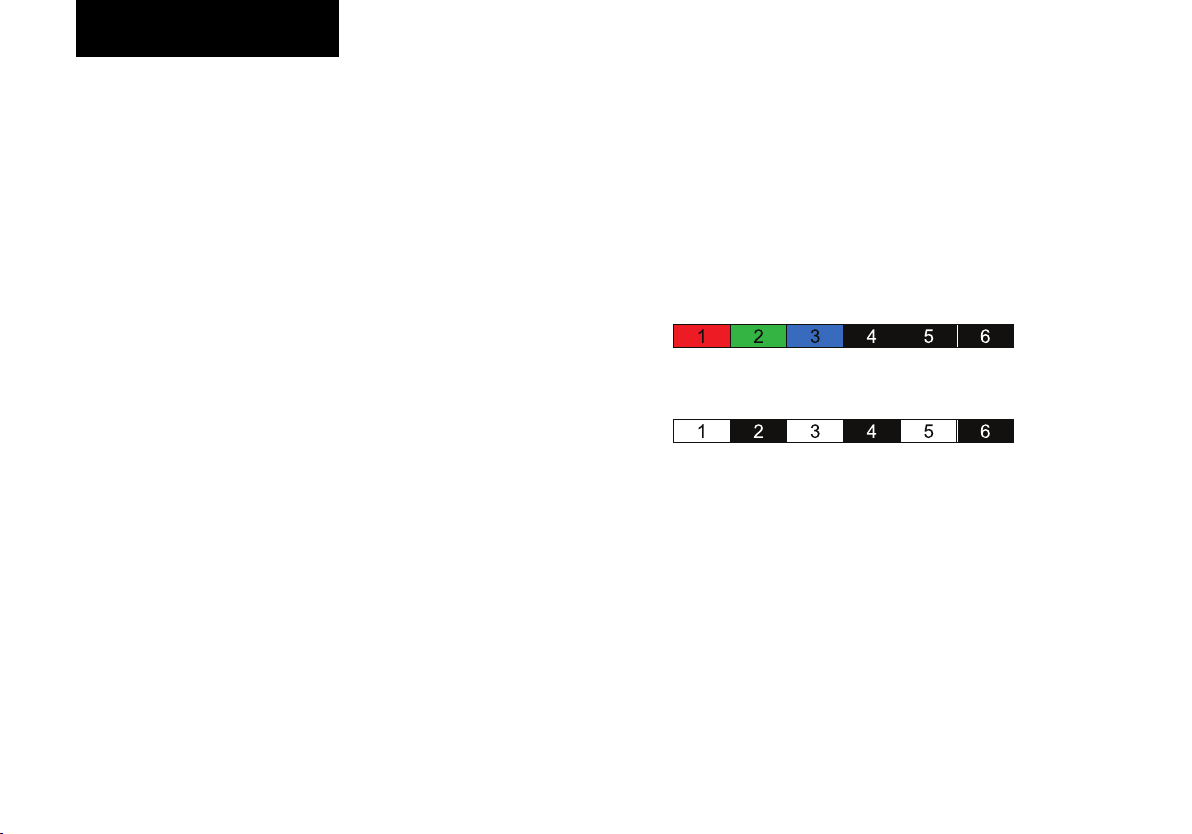
- Colors: The first pixels show the basic colors. Example:
LED strip with 3 colors per LED:
- Alternating: The first 3 odd pixels show all colors, the
first 3 even pixels are off. Example: LED strip with 3
colors per LED:
§ Used channel per universe: Calculated from "Channel
per LED". An example patch can be found below.
§ Calculated number of pixel: Maximum number of LED
that can be controlled
§ Cap LED output to: How many LEDs are actually being
output?
§ Max. refreshrate: Calculated from the number of
outputs.
Website
§ Design: Light or dark design of the configuration page.
24
English
Page 25
Sicherheitshinweise
Configuration
System
§ Device Load: shows the current device utilization. At a
value above 90%, the specified refresh rate of the LEDs
may no longer be maintained!
§ Firmware: shows the firmware version of the device.
Shop
Link to the Pixel Node IV website. Here you can find the
latest information about the product.
Save
All settings made on this page are hereby permanently
stored on the device.
Caution!
The Art-Net Net, Subnet and Universe has a range of 0 – 15.
Please note: Some programs use the range 1-16! This is
mapped 1 → 0 in the node, 2 → 1, and so on.
The unique assignment of the ports is done according to the
following scheme:
("ArtNet Net" * 256) + ("ArtNet Subnet" * 16) + "ArtNet
Universe"; e.g. Net: 3, Subnet: 4, Universe: 5 (3*256) +
(4*16) + 5 = 837
To simplify patching the LEDs, the universes are only used
up to channel 510 for the color numbers 3, 5 and 6. This is
necessary because some applications do not allow e.g. to
split a 3-channel fixture to 2 universes. The values of the
skipped channels have no influence on the LEDs.
25English
Page 26
Configuration
Example patch 1:
For a 3-channel RGB LED strip with 600 pixels and a pixel group of 1:
- 512 channels per universe / 3 channels per pixel > 170 pixels per universe.
- For 600 pixels/170 pixels per universe > 4 universes are needed
- Universe 1: CH 1 - CH 510 assigned
- Universe 2: CH 1 - CH 510 assigned
- Universe 3: CH 1 - CH 510 assigned
- Universe 4: CH 1 - CH 270 assigned
26
English
Page 27
Sicherheitshinweise
Configuration
27English
Page 28
Configuration
Example patch 2:
For a CCT LED strip (2 channels) with 600 pixels and a pixel group of 1:
- 512 channels per universe / 2 channels per pixel > 256 pixels per universe.
- For 600 pixels/256 pixels per universe > 3 universes are needed
- Universe 1: CH 1 - CH 512 assigned
- Universe 2: CH 1 - CH 512 assigned
- Universe 3: CH 1 - CH 176 assigned
- Universe 4: Not used
28
English
Page 29
Sicherheitshinweise
Configuration
(check mark removed)
29English
Page 30
Configuration
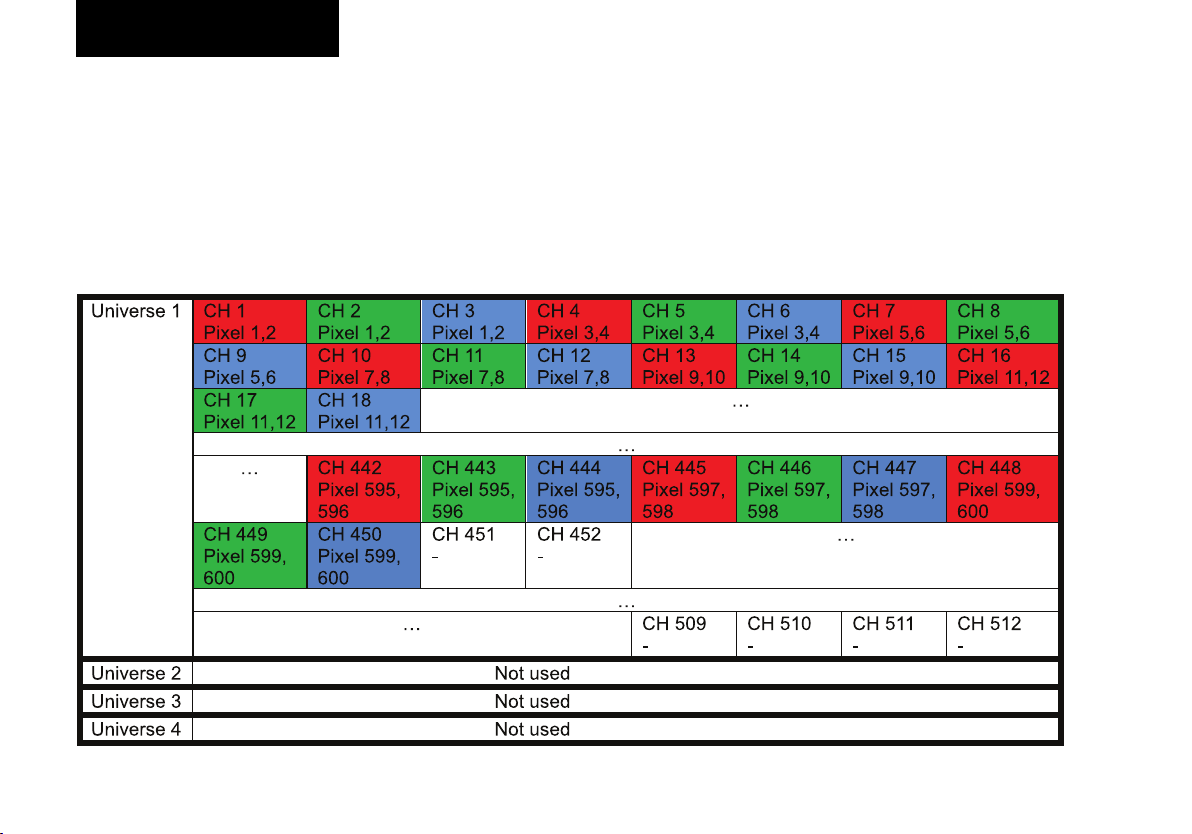
Example patch 3:
For a 3-channel RGB LED strip with 300 pixels and a pixel group of 2:
- 512 channels per universe / 3 channels per pixel > 170 pixels per universe.
- For 300 pixels/2 pixels per group > 1 universe is needed
- Universe 1: CH 1 - CH 450 assigned
- Universe 2: Not used
- Universe 3: Not used
- Universe 4: Not used
30
(check mark removed)
(check mark removed)
(check mark removed)
English
Page 31
Sicherheitshinweise
Configuration
Sicherheitshinweise
Configuration
Art-Net
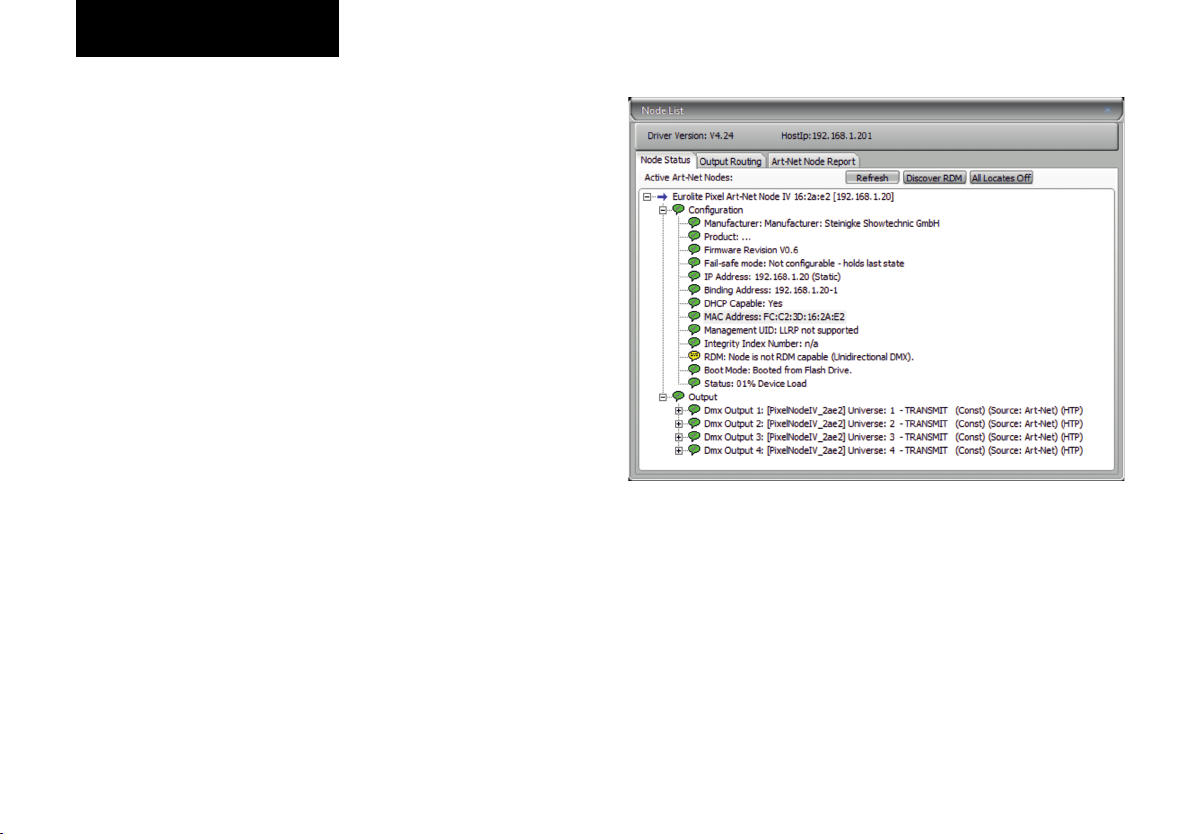
With “DMX Workshop“ you can configure:
- Art-Net longe name
- Art-Net short name
- Art-Net Net
- Art-Net Subnet
- Art-Net Universe
- IP Address
31English
Page 32
SpezifikationenTroubleshooting
32
English
Page 33
Spezifikationen
Troubleshooting
33English
Page 34

Specifications
Power supply: 5-12 V DC (screw terminal)
Power consumption: 1 W
Network connection: Ethernet TCP/IP via RJ-45 etherCON, 10/100 Mbit/s
IP address: 192.168.1.20
Weight: 220 g
Screw terminal pinout
- GND
- DATA Out
- CLOCK Out
- VIN (5-12V DC)
Specifications are subject to change without notice due to product
improvements.
34
English
Page 35
Safety warnings
Ÿ
Ÿ Please read these operating instructions carefully
before using the product. They contain important
information for the correct use of your product. Please
keep them for future reference.
Ÿ Only use the product according to the instructions given
herein. Damages due to failure to follow these operating
instructions will void the warranty! We do not assume any
liability for any resulting damage.
Ÿ We do not assume any liability for material and personal
damage caused by improper use or non-compliance with
the safety instructions. In such cases, the warranty/
guarantee will be null and void.
Ÿ Unauthorized rebuilds or modifications of the product are
not permitted for reasons of safety and render the
warranty invalid.
Ÿ IMPORTANT: This product is not an outdoor product!
Only for indoor use! Do not use this device near water.
The recommended temperature range is -5 to +45 °C.
Ÿ This product is not a toy. Keep it out of the reach of
children and pets. Do not leave packaging material lying
around carelessly.
Ÿ This unit corresponds to all required directives of the EU
and is therefore marked with .
Support
For product updates, documentation, and support please visit
www.eurolite.de. You can find the latest version of this user
guide in the product's download section.
Copyright
© 2023 Steinigke Showtechnic GmbH
All rights reserved. No part of this document may be reproduced
in any form without the written permission of the copyright
owner.
Disclaimer
The contents of this document are subject to revision without
notice due to continued progress in methodology, design, and
manufacturing. Eurolite shall have no liability for any error or
damage of any kind resulting from the use of this document.
Trademarks
All product names and trademarks mentioned herein are the
property of their respective owners. They are not connected to
Eurolite in any way.
Art-Net™ is a trademark by and Copyright Artistic Licence
Holdings Ltd.
DMX Workshop by https://artisticlicence.com
If the unit is to be put out of operation definitively, take it to a
local recycling plant for a disposal which is not harmful to the
environment. Do not dispose of as municipal waste. Contact
your retailer or local authorities for more information.
35English
Page 36

www.eurolite.de
Eurolite is a brand of Steinigke Showtechnic GmbH · Andreas-Bauer-Str. 5 · 97297 Waldbüttelbrunn Germany
D136216 Version 1.0 Publ. 2023
 Loading...