

Page 1
SOULRA USER MANUAL
Solar Powered Sound System
for iPod® and iPhone
®
USER MANUAL
Page 2

EN English
2
Thank you for purchasing the Etón Soulra XL, an iPhone® and/or iPod® docking station with
beautiful sound quality. The Soulra XL is powered from the rechargeable Li-ion battery charged
by the solar panel or the AC adapter (included). Please read this user manual to get a good
understanding of how the Soulra XL works and how to fully enjoy it.
.
Page 3
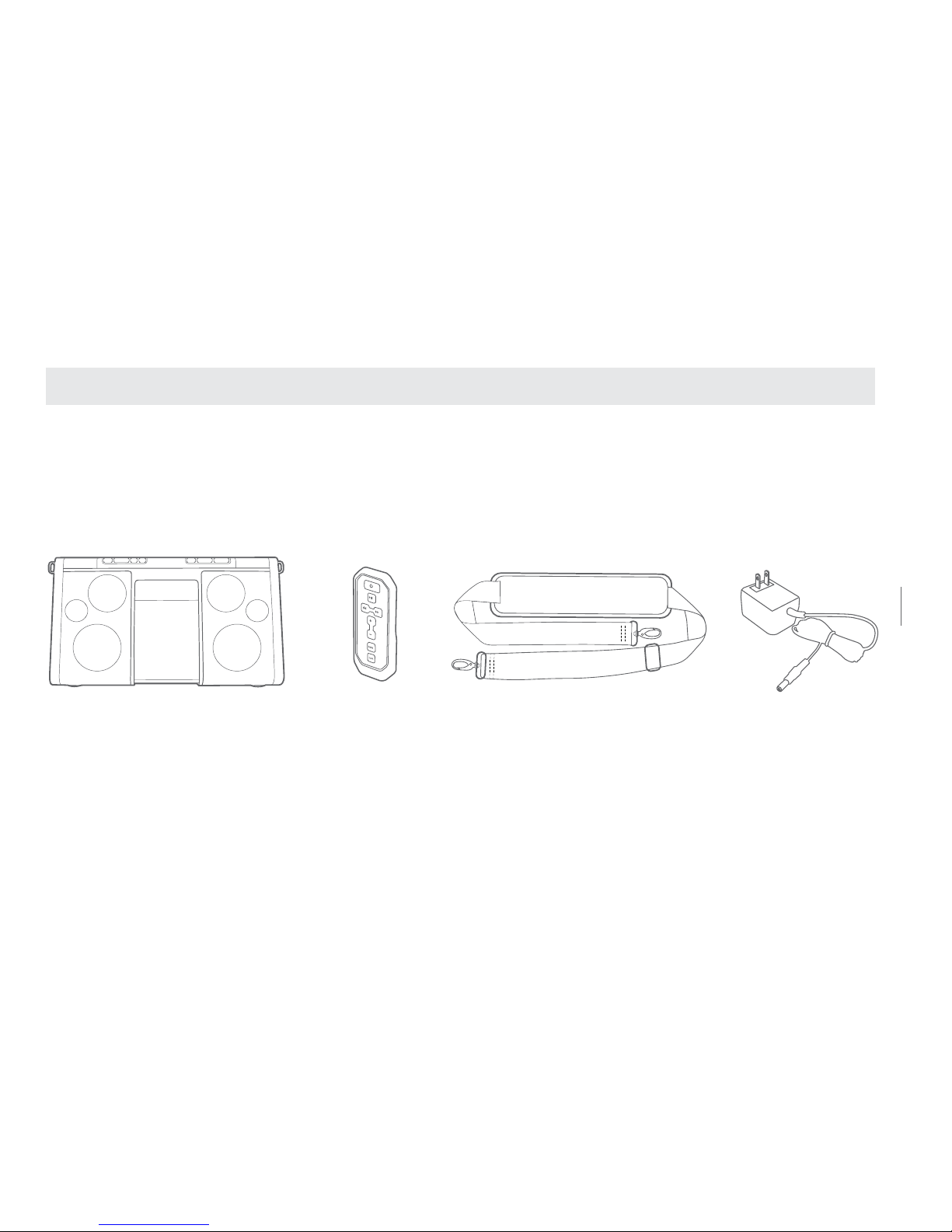
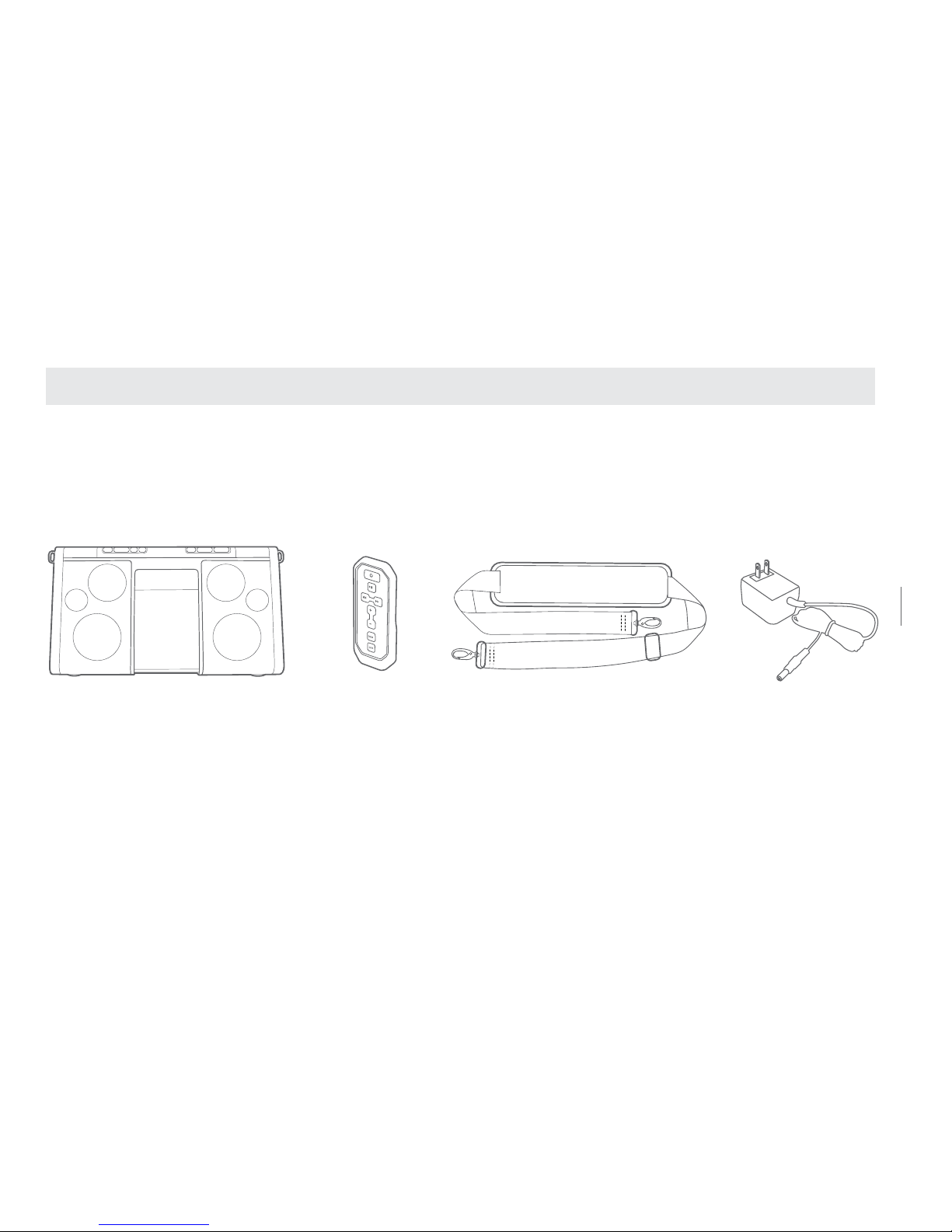
Removable strapRemote control
Soulra XL
AC adapter
3
SOULRA USER MANUAL
WHAT’S IN THE BOX
Page 4
4
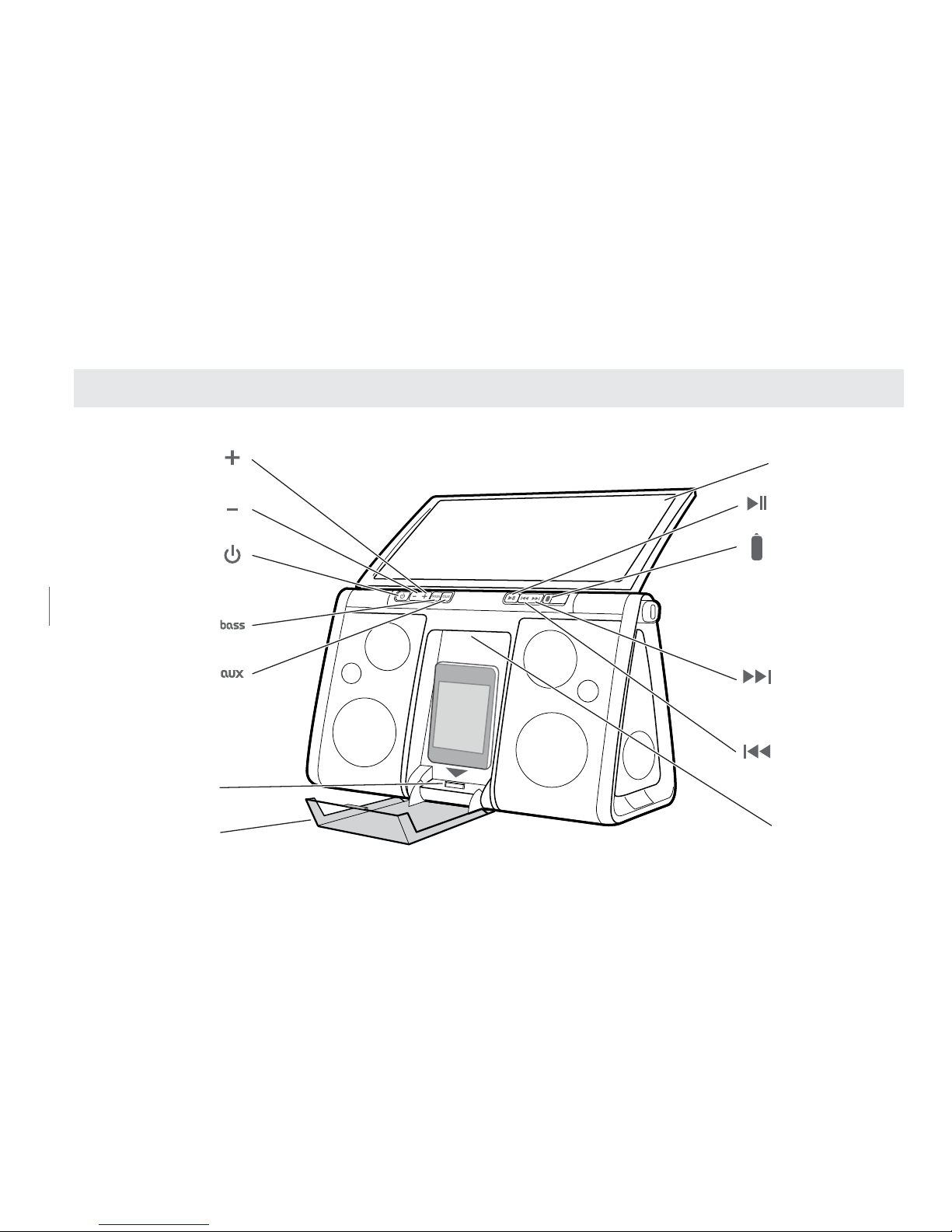
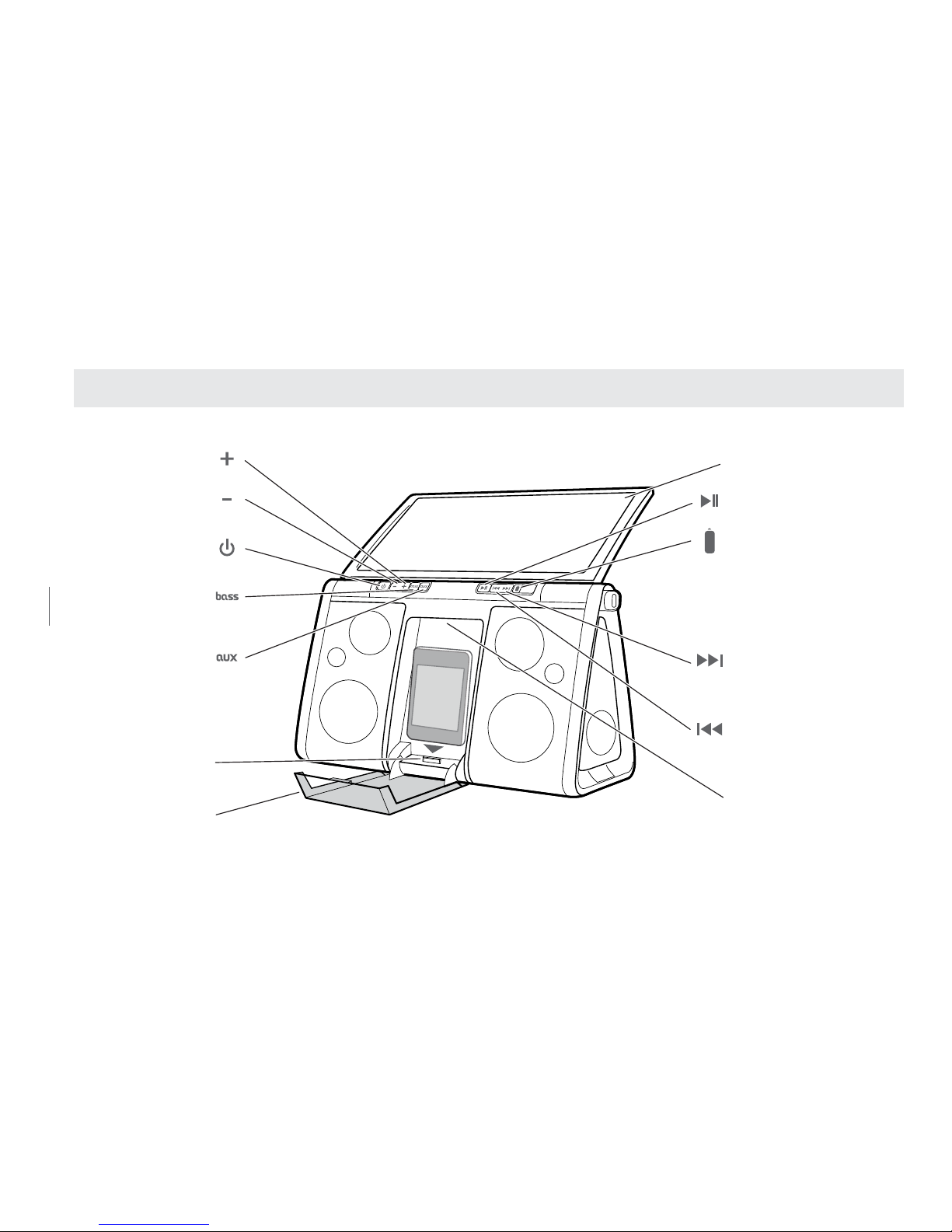
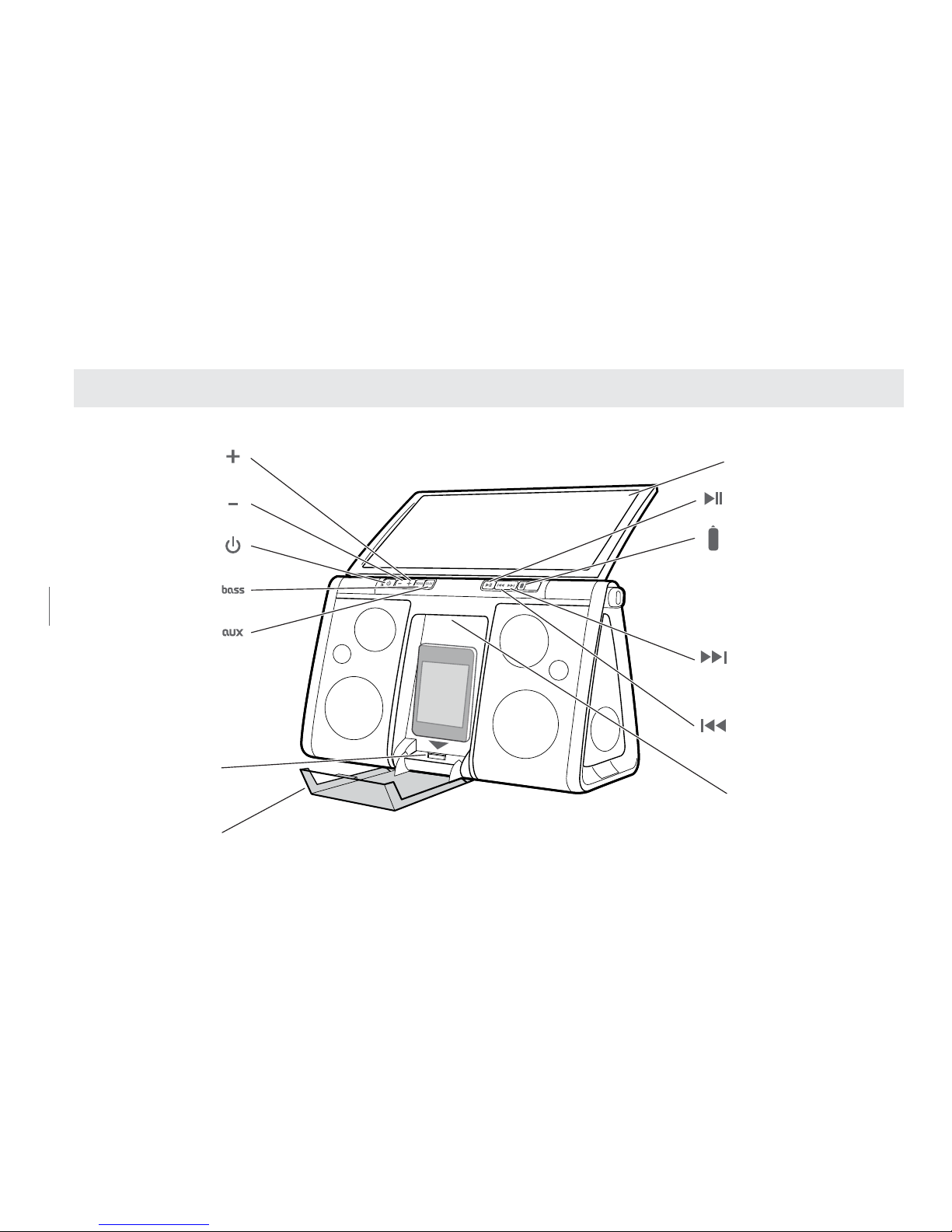
Soulra XL XL FUNCTIONS
Solar panel
Play/Pause
Battery indicator
Forward / Next
Press and hold for
high speed scrubbing
Rewind / Previous
Press and hold for
high speed scrubbing
Handle
Volume up
Volume down
Power
Bass boost
Auxiliary
Press to toggle
between iPod/iPhone
and non-docking audio
sources via audio input
iPod/iPhone dock
Protective cover
Page 5
5
SOULRA USER MANUAL
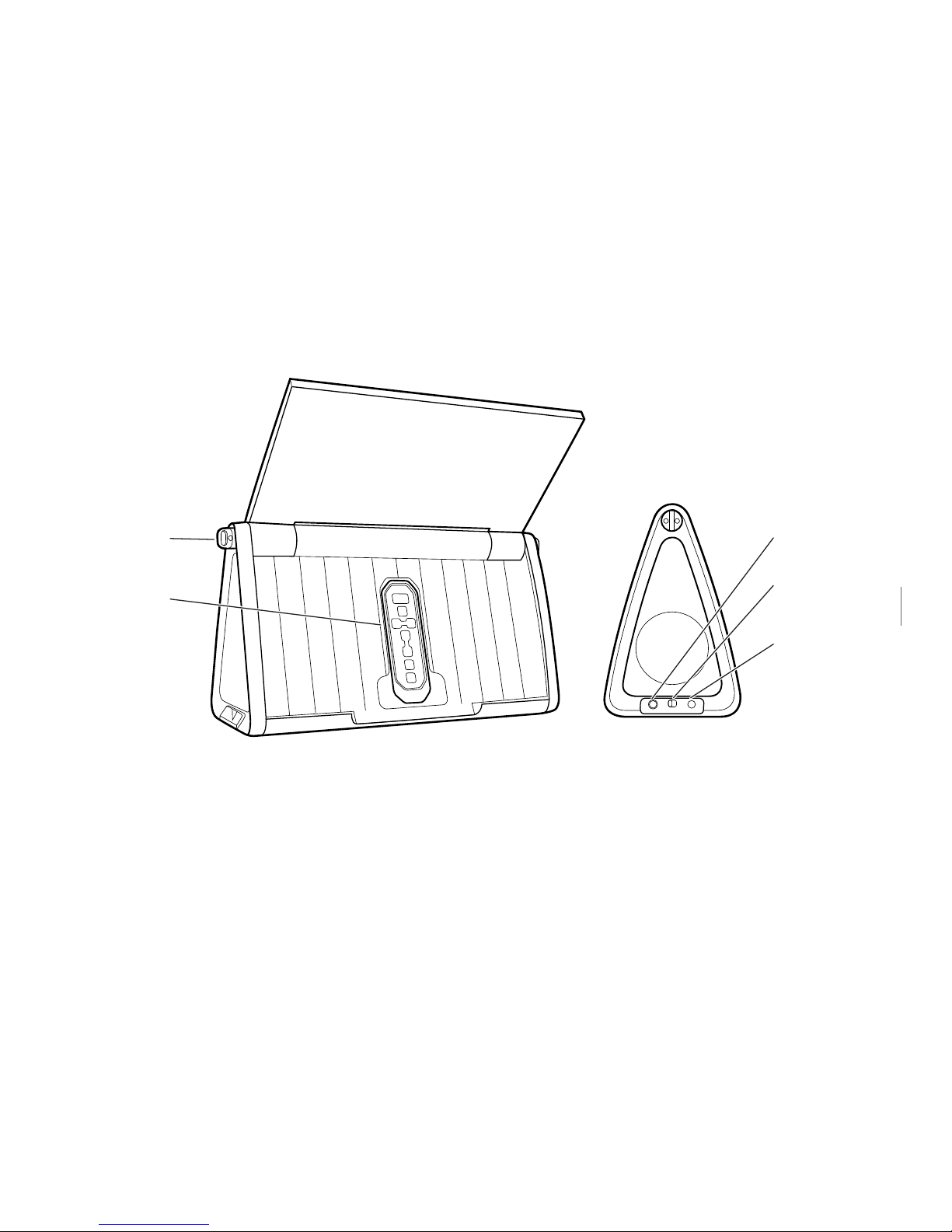
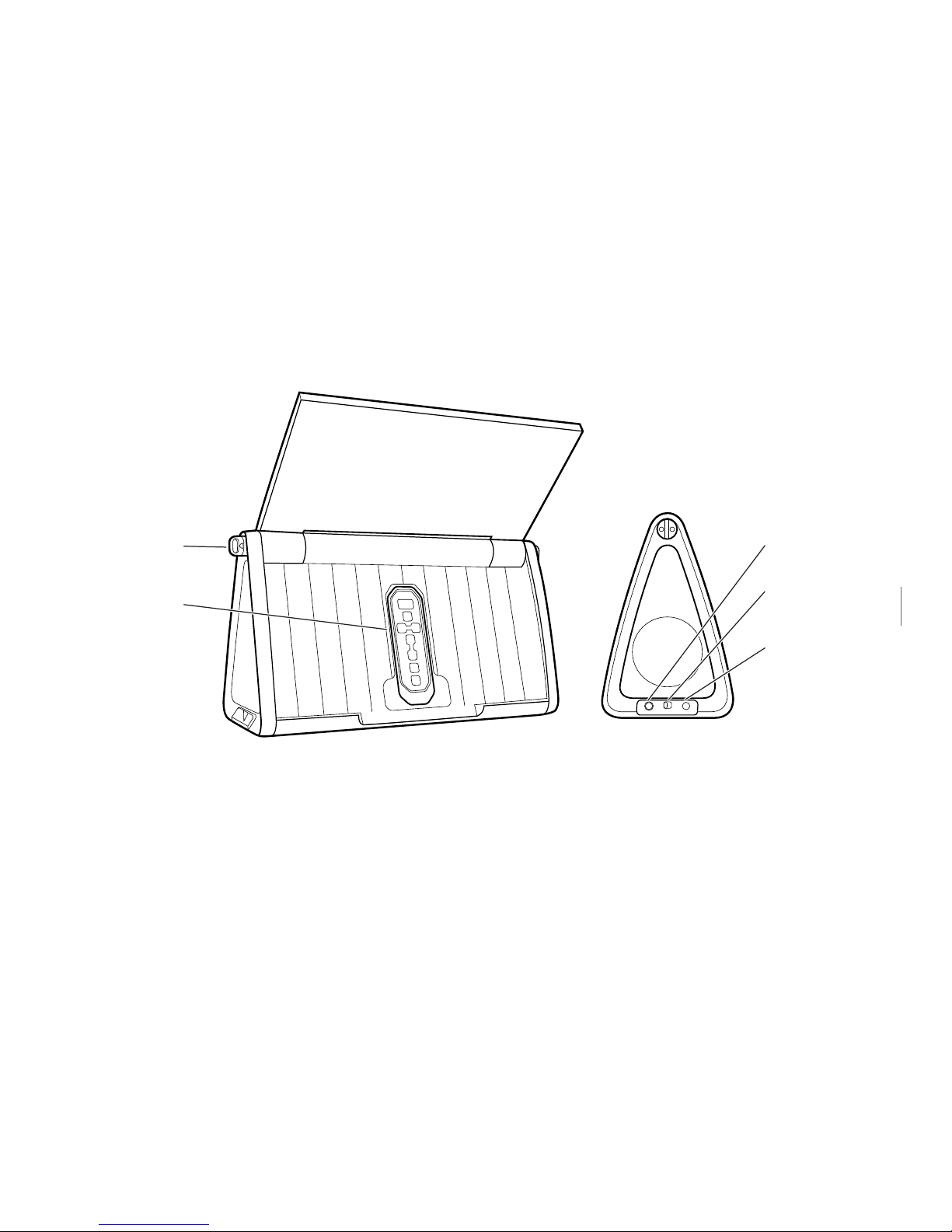
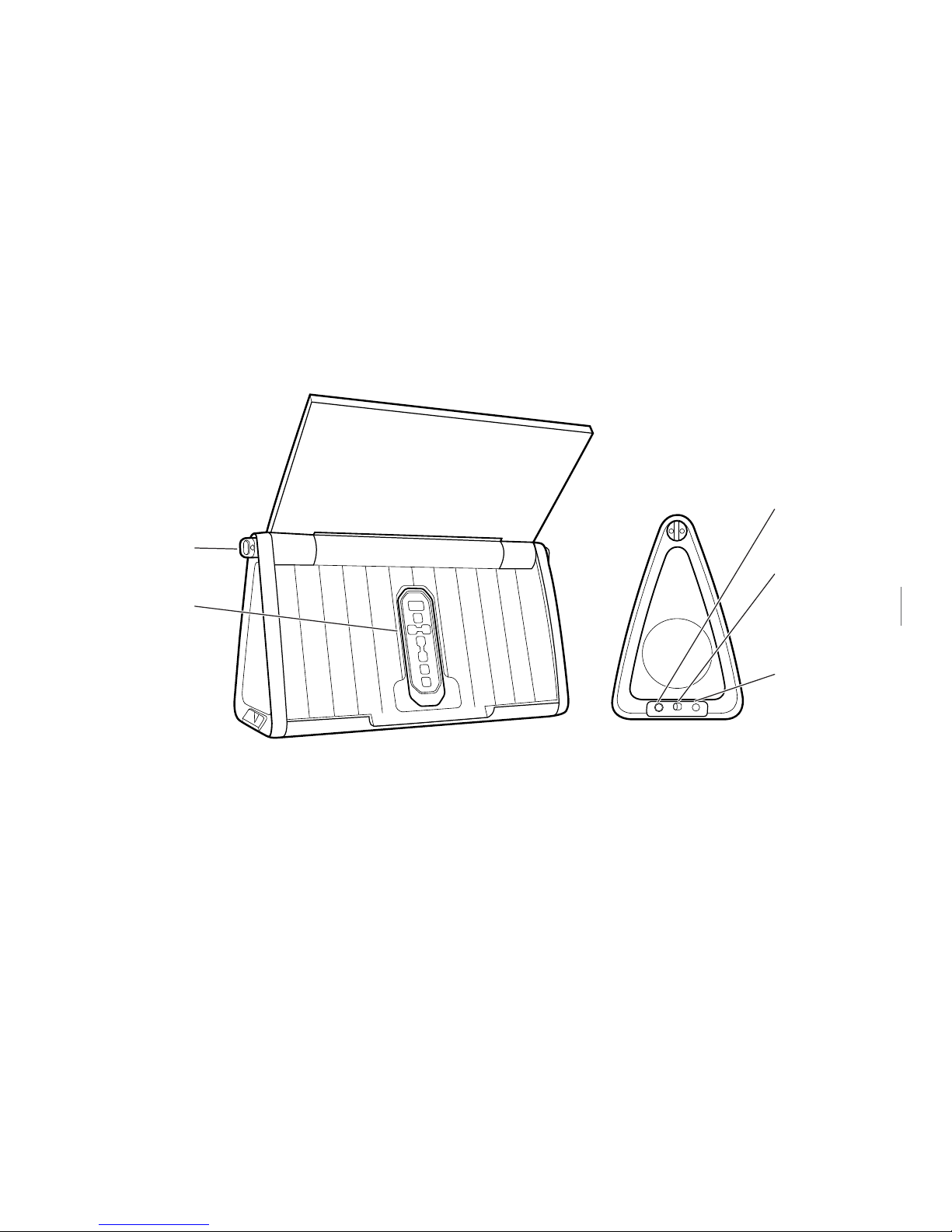
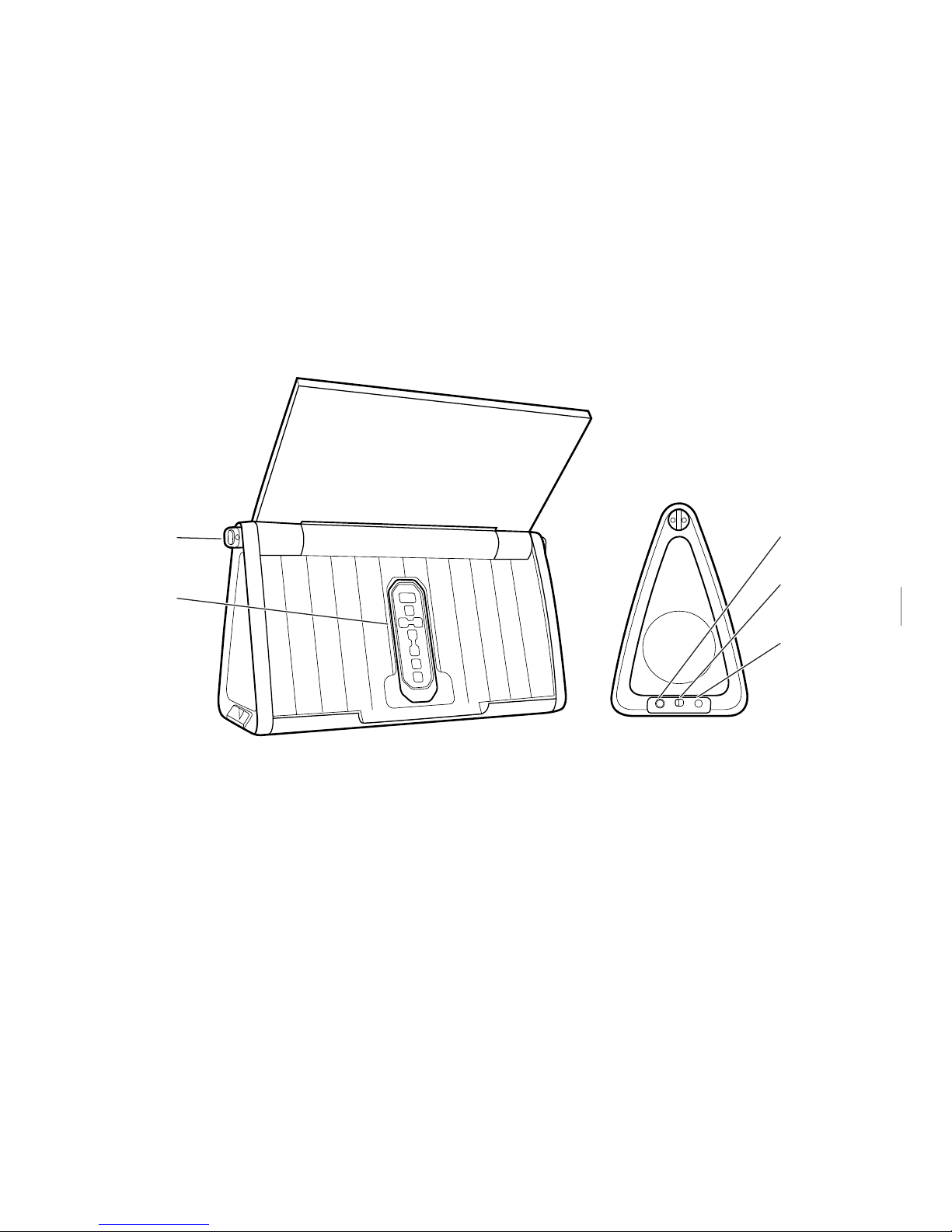
AUDIO IN CHARGE DC 11V
Solar panel
Play/Pause
Battery indicator
Forward / Next
Press and hold for
high speed scrubbing
Rewind / Previous
Press and hold for
high speed scrubbing
Handle
Volume up
Volume down
Power
Bass boost
Auxiliary
Press to toggle
between iPod/iPhone
sources via audio input
Carrying
strap hinge
Remote control
Audio input
Power
saving mode
DC input
CHARGE ON/OFF
Charge standby switch. Turn ‘Off’ when iPod/iPhone not in use to conserve the
battery life of the device.
Page 6
6
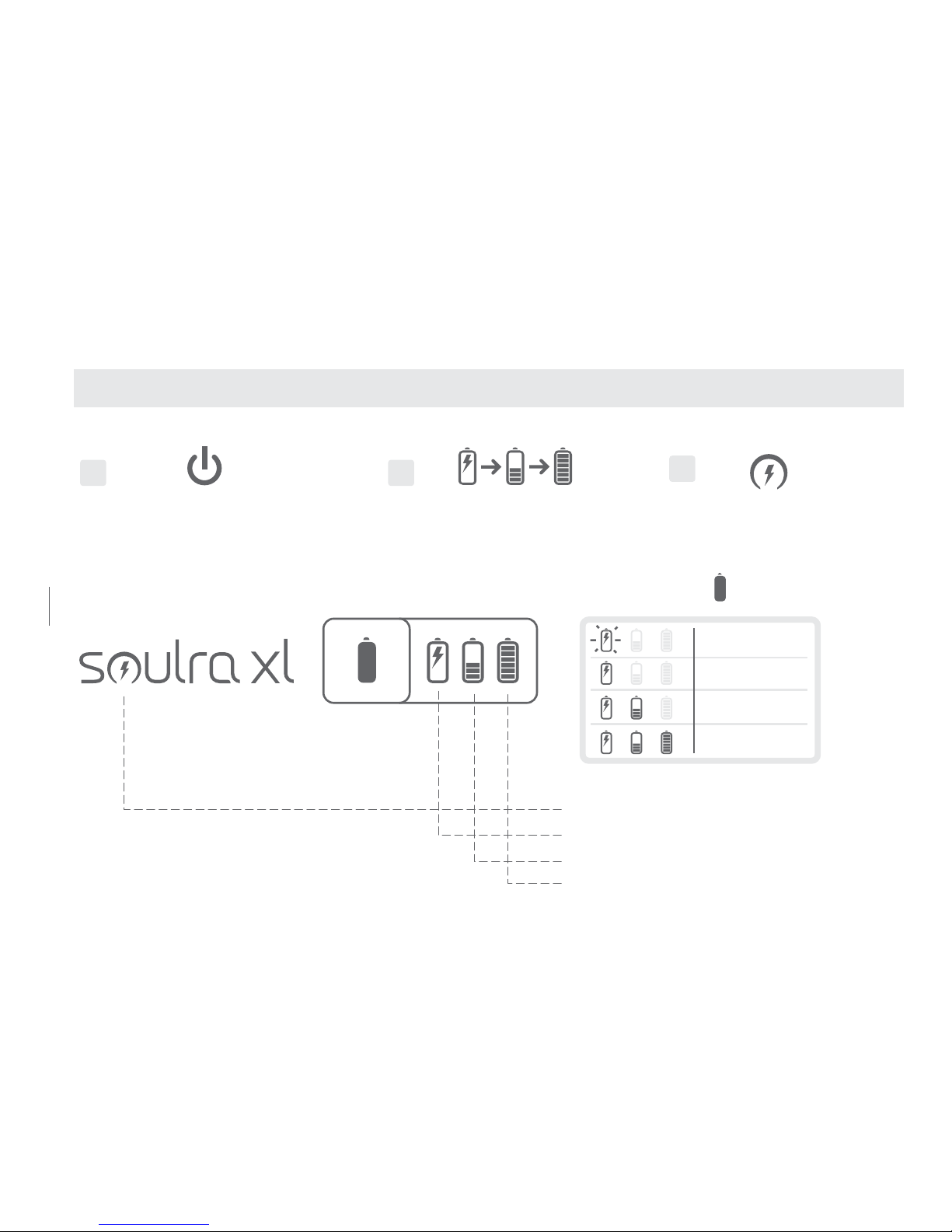
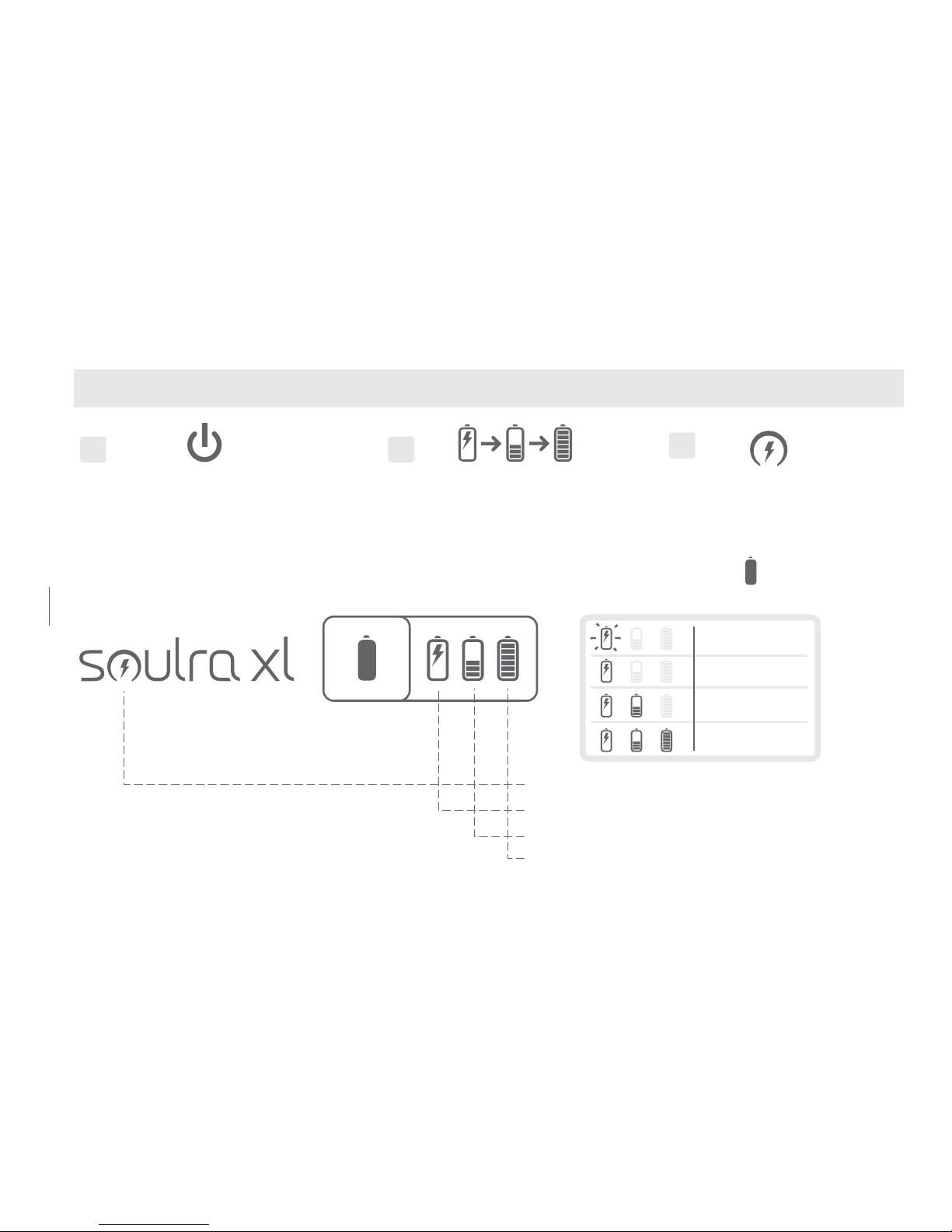
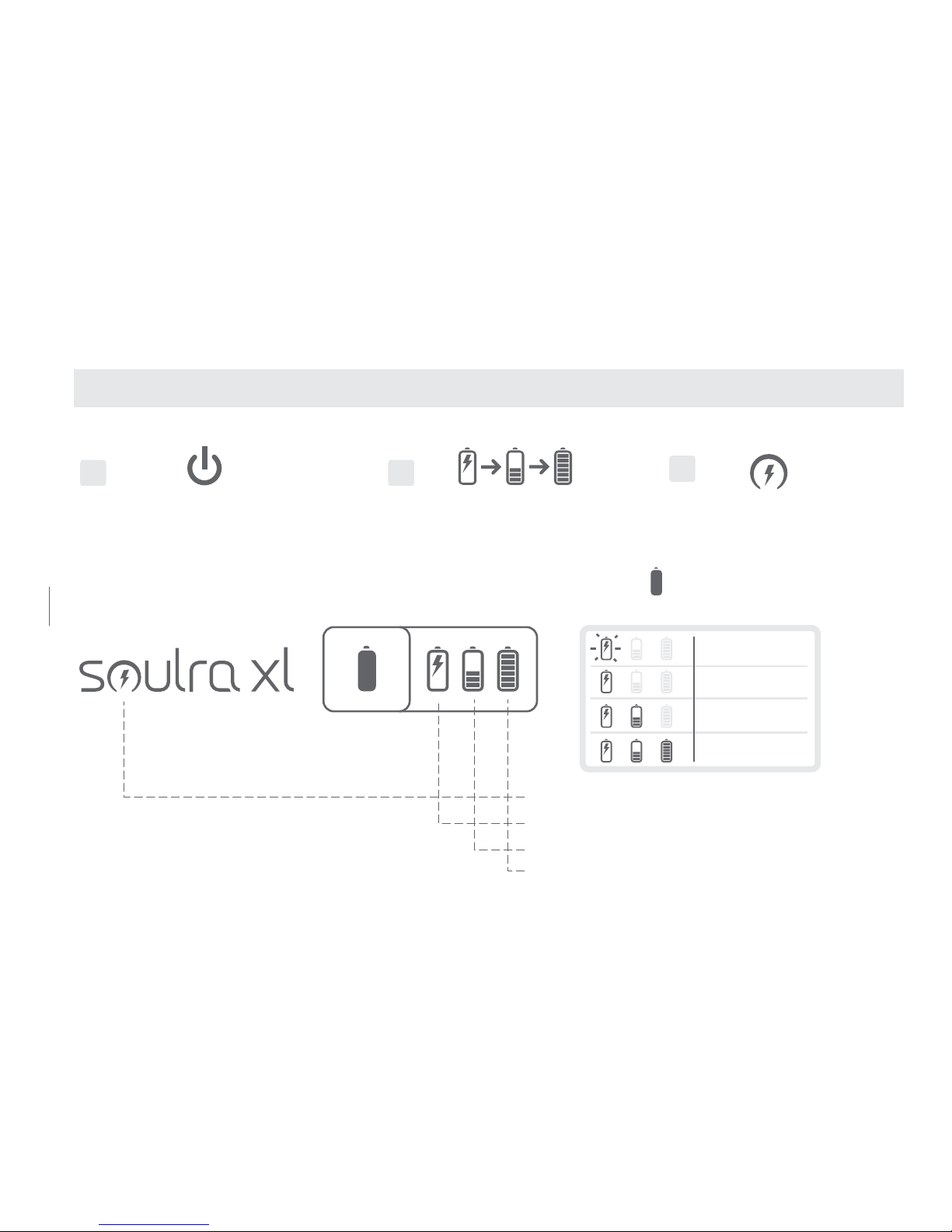
2
Icons will sequentially flash
starting from solar icon
1
Press the ON/OFF button
3
Lit up icon indicates
power source
2
Icons will sequentially flash
starting from solar icon
1
Press the ON/OFF button
3
Lit up icon indicates
power source
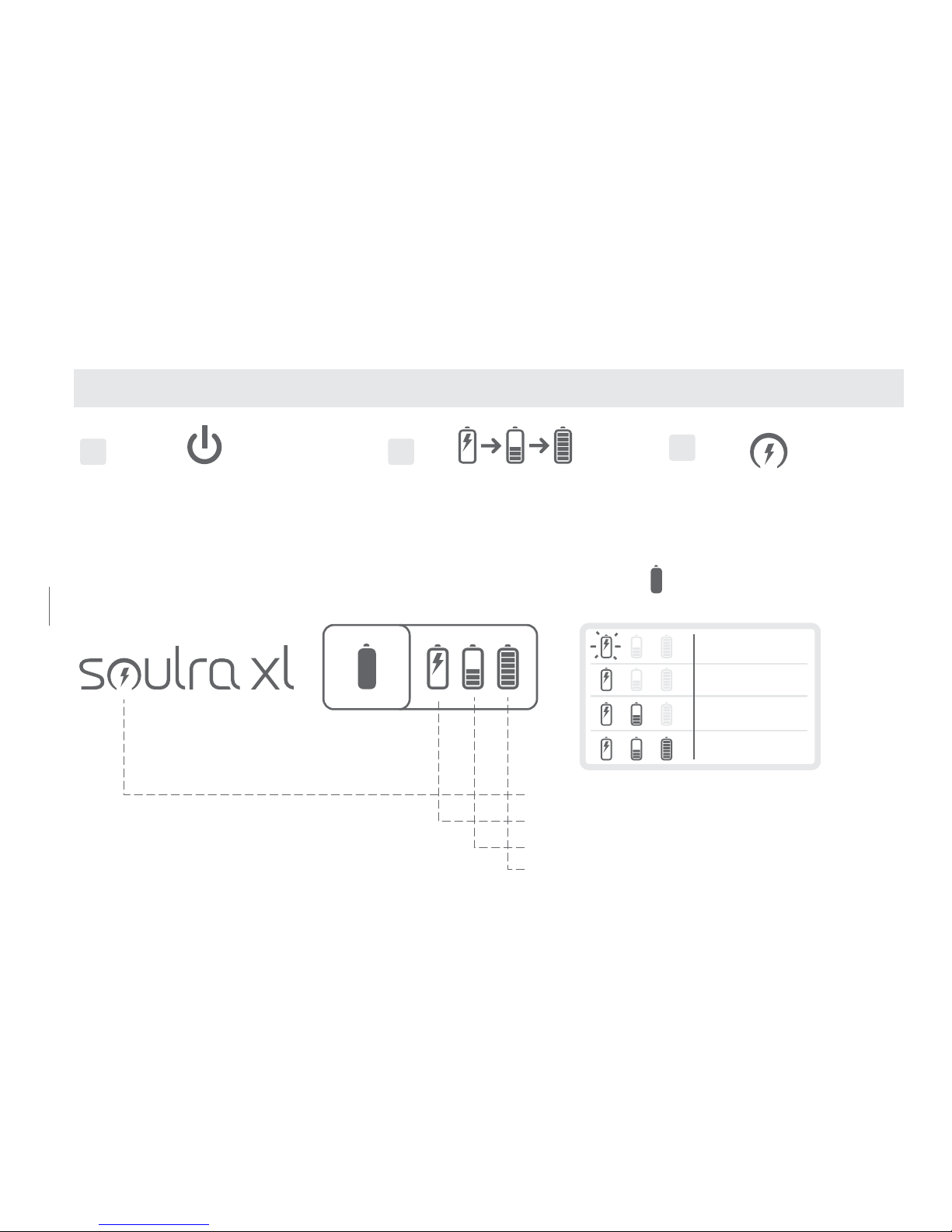
Press and hold to view battery life
Solar: charging in direct sunlight
DC: power adaptor
Battery: using internal battery
Battery full
11 - 40 %
41 - 70%
71 - 100%
0 - 10 %
(2 blinks
every 2 secs)
LET’S GET STARTED
Page 7
7
SOULRA USER MANUAL
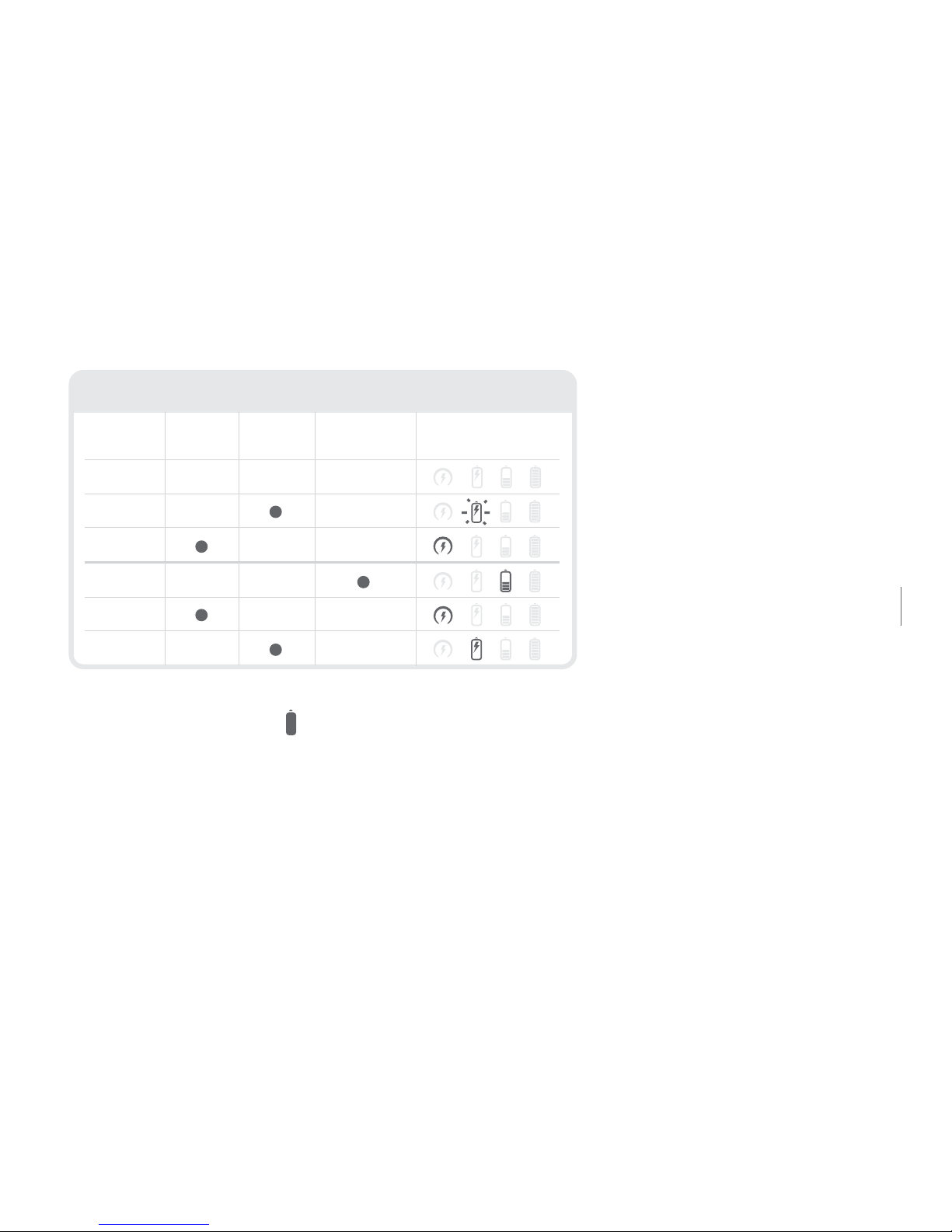
2
Icons will sequentially flash
starting from solar icon
3
Lit up icon indicates
power source
Press and hold to view battery life
Solar: charging in direct sunlight
DC: power adaptor
Battery: using internal battery
Battery full
11 - 40 %
41 - 70%
71 - 100%
0 - 10 %
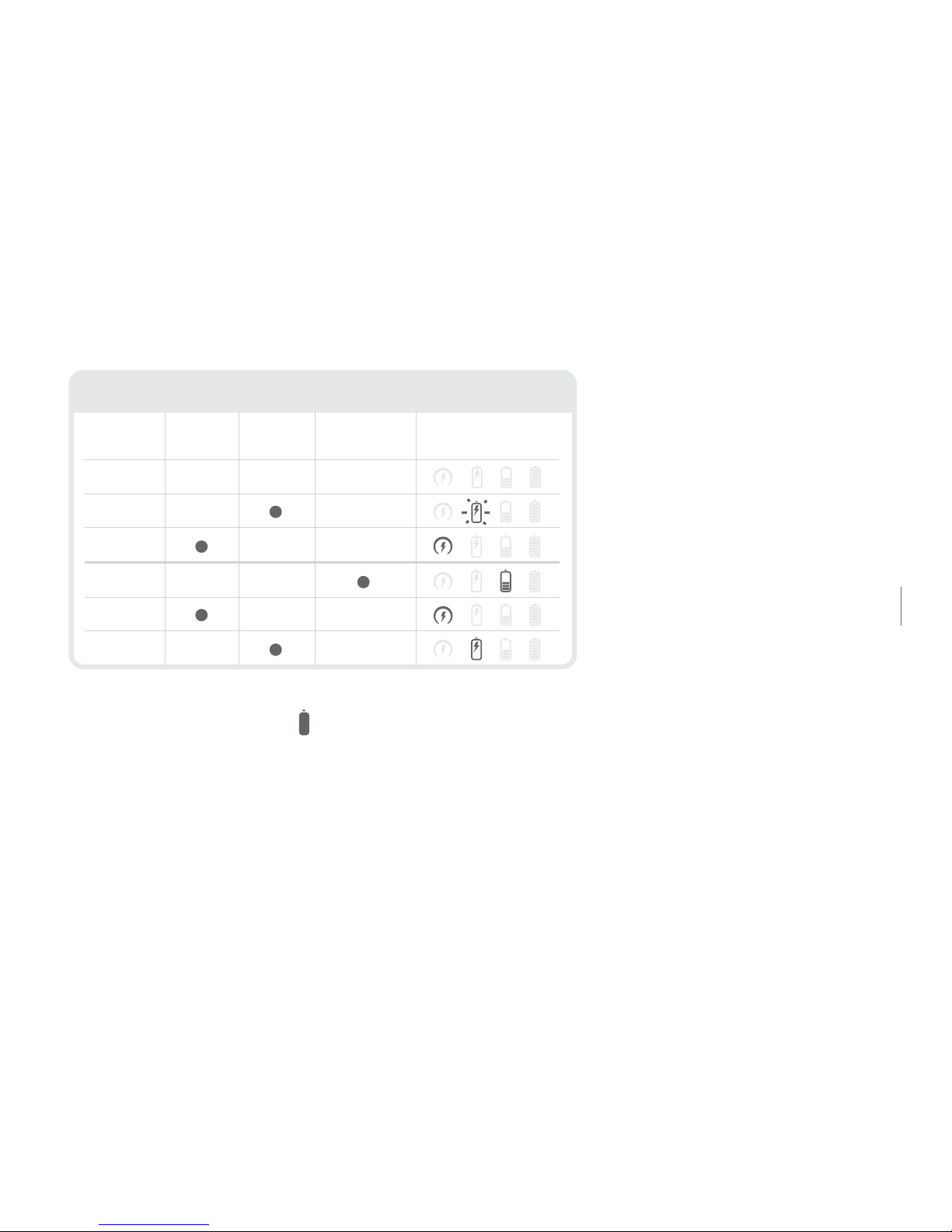
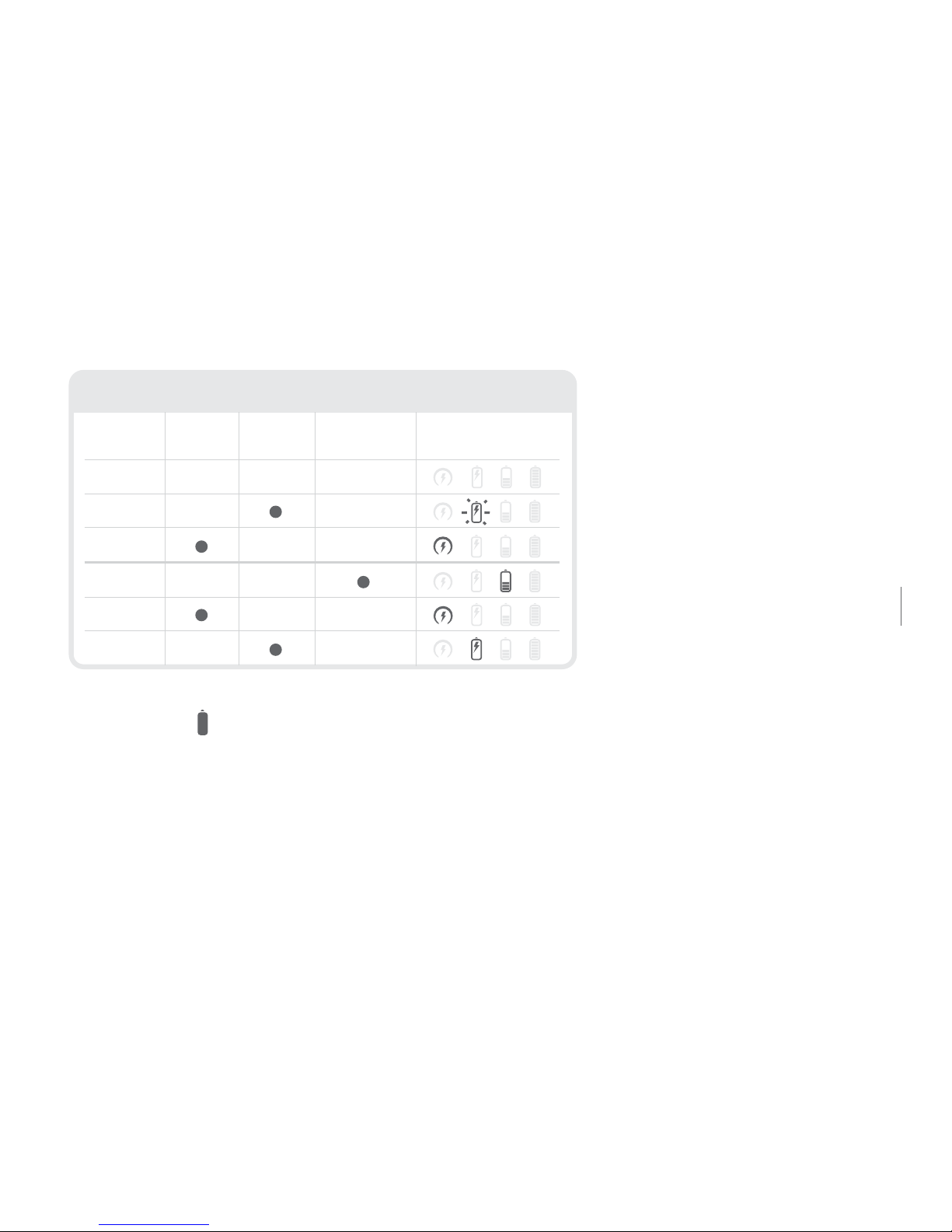
ON
ON
OFF
OFF
OFF
ON
POWER
REGULAR CHARGING MODES
SOLAR DC BATTERY UNIT DISPLAY
(2 blinks
every 2 secs)
(1 blink every 2 secs)
Pressing and holding the button shows the condition of the
Li-ion battery. The Li-ion battery (SW9) starts charging once the
AC adapter is plugged in or when the solar panel is in direct sunlight.
Page 8

8
PLUGGING IN THE AC ADAPTER
The Soulra XL comes equipped with an AC adapter. Plug the AC adapter into the right socket
labeled DC located under the rubber plug on the side of the Soulra XL. Plug the other end into an
AC socket. With the AC adapter plugged in, the Soulra XL starts charging its Li-ion battery and is
ready to play.
CHARGING AN iPod AND iPhone
The iPod AND iPhone starts charging once it is inserted into the dock (if the <charge> is set to
‘ON’). When the Soulra XL’s POWER is OFF it can still charge your iPod and iPhone. Please be
advised that leaving your iPod/iPhone after it has received a full charge from the Soulra XL,
if <charge> is still set ‘ON’, it will continue to drain the Soulra XL’s internal battery.
ADJUSTING THE VOLUME
Press the volume buttons, , to increase or decrease volume levels. The volume value will be
shown on the iPod/iPhone if it is inserted into the docking station.
Page 9
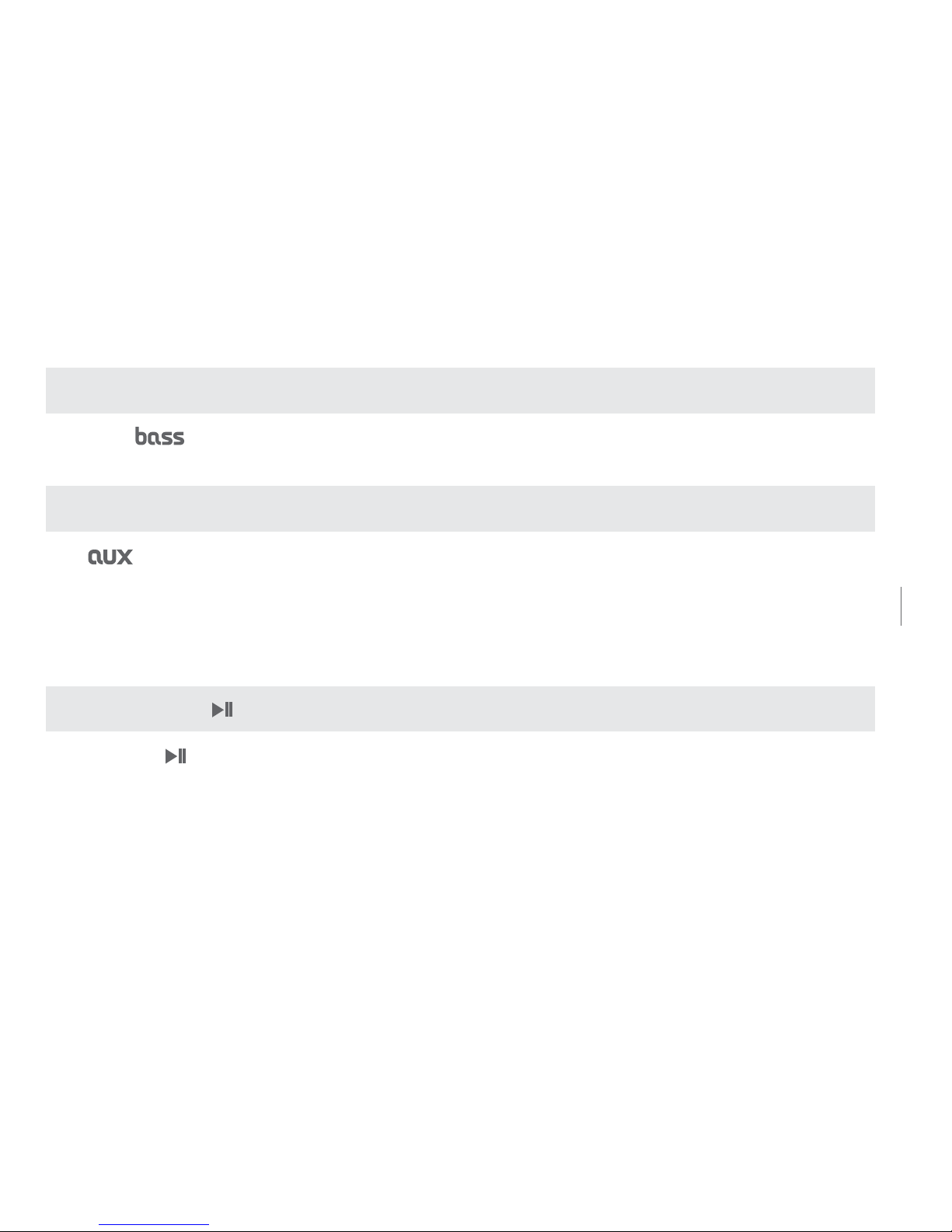
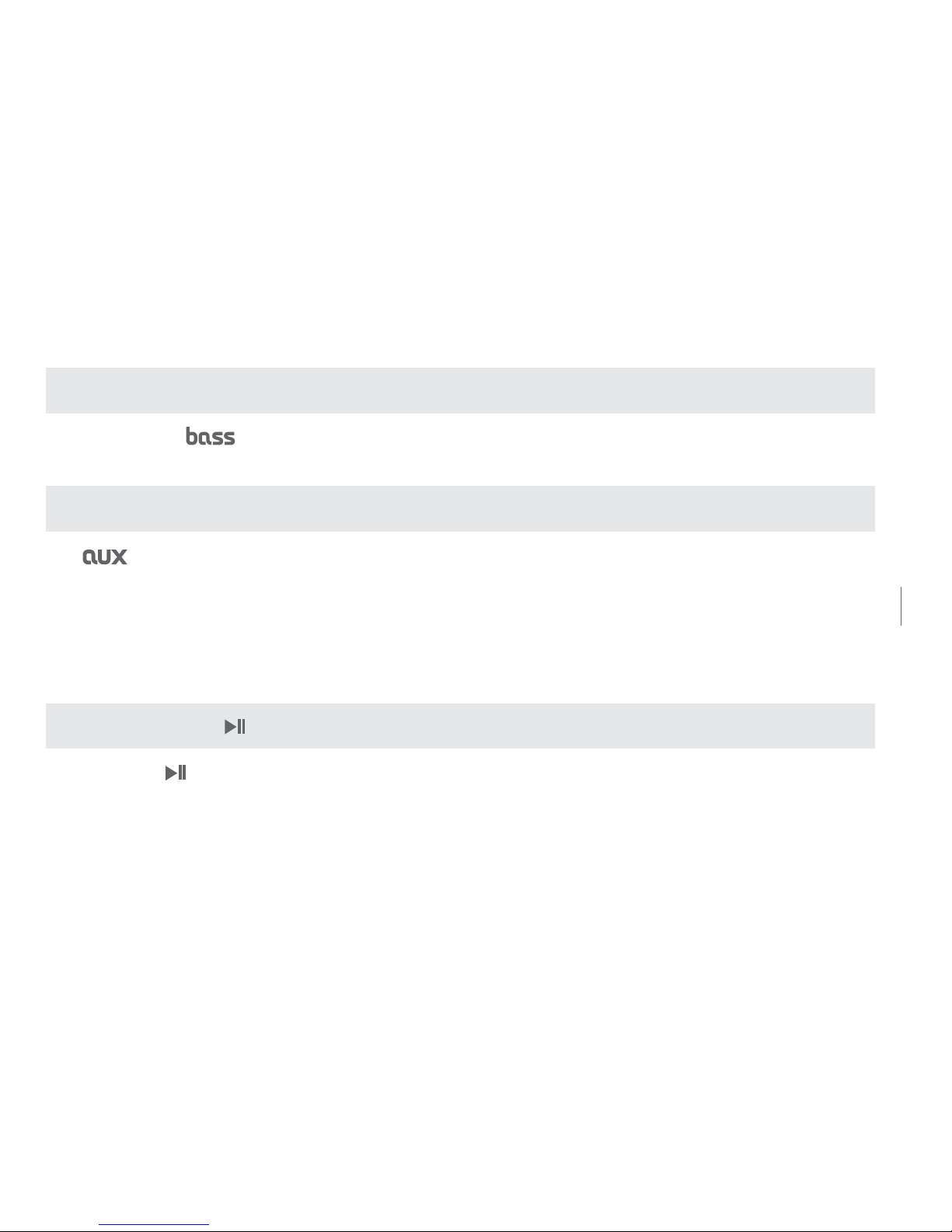
BASS BOOST FUNCTION
Press the button to turn on Bass Boost.
AUX (AUXILIARY)
The button switches between the iPod/iPhone and AUX-input if there is a signal from
the port. The iPod and iPhone signal takes priority if there is a signal and an audio-in signal at
the same time. If the audio-in signal is present, the switching function of the ‘AUX’ button is
available. The AUX light turns on when auxiliary input is being used.
PLAY/PAUSE
Pressing the button switches from play to pause for the iPod.
9
Soulra XL USER MANUAL
Page 10
10
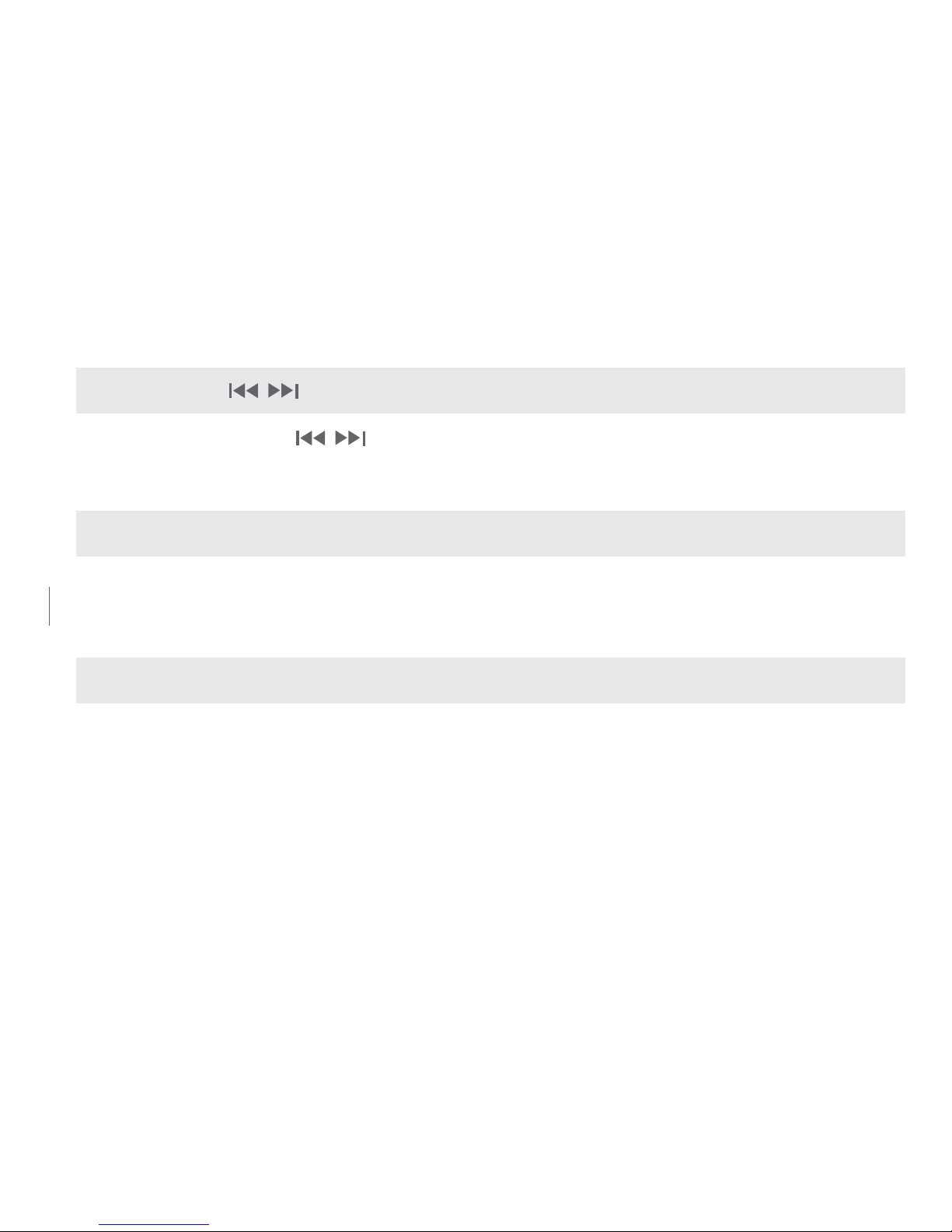
FWD/REW,
Pressing these buttons, , selects previous track/next track with a short press; hold
down to scrub forward/reverse.
REPLACING THE LITHIUM-ION BATTERY
A new rechargeable battery can be purchased by contacting us at www.etoncorp.com or by
calling (US) 1-800-872-2228 or (Worldwide) 650-903-3866.
WARRANTY REGISTRATION
To ensure full warranty coverage or product updates, registration of your product should be
completed as soon as possible after purchase or receipt. You may use one of the following
options to register your product:
Page 11

11
Soulra XL USER MANUAL
1. By visiting our website at http://www.etoncorp.com.
2. Mail in enclosed warranty card.
3. Mail your registration card or information to the following address; Include your name, full
mailing address, phone number, model purchased, date purchased, retail vendor name and
product serial number (typically located in or near the battery compartment):
Etón Corporation
1015 Corporation Way
Palo Alto, CA 94303
LIMITED WARRANTY
Retain the warranty information from your warranty card with your proof of purchase or the
Limited Warranty information can also be viewed at www.etoncorp.com.
Page 12

12
SERVICE FOR YOUR PRODUCT
To obtain service for your product, we recommend rst contacting an Etón service
representative at 800-872-2228 US, 800-637-1648 Canada or (650) 903-3866
for problem determination and trouble-shooting. If further service is required, the
technical staff will instruct how to proceed based on whether the radio is still under
warranty or needs non-warranty service.
WARRANTY – If your product is still in warranty and the Etón service representative
determines that warranty service is needed, a return authorization will be issued and
instructions for shipment to an authorized warranty repair facility. Do not ship your
radio back without obtaining the return authorization number.
NON-WARRANTY – If your product is no longer under warranty and requires service our
technical staff will refer you to the nearest repair facility that will be able to best handle
the repair. For service outside of North America, please refer to the distributor information
included at time of purchase/receipt.
Page 13

13
SOULRA USER MANUAL
DO YOU NEED HELP?
If you need help, please contact us, Monday-Friday, 8:00 a.m.- 4:30 p.m., North American Pacic
Standard Time.
US:
1-800-872-2228
CANADA:
1-800-637-1648
WORLDWIDE:
650-903-3866
FAX:
650-903-3867
Page 14

14
WARNING
• Do not submerge or expose for extended period to water.
• Protect from high humidity and rain.
• Only operate within specied temperature range (0 °C to 40 °C).
• Unplug immediately if liquid has been spilled into or any object has fallen into the apparatus.
• Clean only with a dry cloth. Do not use detergents or chemical solvents as this might damage
the nish.
• Do not remove cover [or back].
• Refer servicing to qualied service personnel.
DISPOSAL
Please dispose of old electrical and electronic equipment according to your local environmental
laws and guidelines.
Page 15

15
SOULRA USER MANUAL
“Made for iPod” and “Works with iPhone” means that an electronic accessory has been
designed to connect specically to iPod or iPhone, respectively, and has been certied
by the developer to meet Apple performance standards. Apple is not responsible for
the operation of this device or its compliance with safety and regulatory standards.
iPod and iPhone are trademarks of Apple Inc., registered in the U.S. and other countries. Designed by Etón Corporation and assembled
in China. I © Copyright 2011 Etón Corporation. All rights reserved. v. 041211.
Page 16

EN English
FR Français
ES Espanõl
16
Merci d’avoir acheté le Etón Soulra XL, une station d’accueil pour iPhone® et/ou iPod®
offrant une qualité sonore élevée. Le Soulra XL est alimenté par une batterie Li-ion,
rechargeable avec le panneau solaire ou l’adaptateur secteur inclus. Lisez la notice
d’utilisation an de bien comprendre le fonctionnement du Soulra XL et de pouvoir
pleinement proter de ses fonctionnalités.
.
Page 17
Sangle de transportTélécommande
Soulra XL
Adaptateur secteur
17
GUIDE DE L’UTILISATEUR DU SOULRA
CONTENU DU COFFRET
Page 18
18
FONCTIONNEMENT DU Soulra XL
Panneau solaire/Couvercle
Lecture/Pause
Voyant de la batterie
Avance rapide/Suivant
Maintenez cette touche appuyée pour
avancer rapidement dans la plage lue.
Retour rapide/Précédent
Maintenez cette touche appuyée pour
reculer rapidement dans la plage lue.
Handle
Monter le Volume
Baisser le volume
Interrupteur
marche/arrêt
Renforcement
des basses
Aux
Appuyez pour basculer
entre l’iPhone/iPod et la
source audio branchée
sur l’entrée audio.
Baie d’accueil/
connecteur iPod/ iPhone
Housse de protection
Page 19
19
GUIDE DE L’UTILISATEUR DU SOULRA
AUDIO IN CHARGE DC 11V
Panneau solaire/Couvercle
Lecture/Pause
Voyant de la batterie
Avance rapide/Suivant
Maintenez cette touche appuyée pour
avancer rapidement dans la plage lue.
Retour rapide/Précédent
Maintenez cette touche appuyée pour
reculer rapidement dans la plage lue.
Handle
Monter le Volume
Baisser le volume
Interrupteur
marche/arrêt
Renforcement
des basses
Aux
Appuyez pour basculer
entre l’iPhone/iPod et la
source audio branchée
sur l’entrée audio.
Baie d’accueil/
connecteur iPod/ iPhone
Housse de protection
Sangle de charnière
Télécommande
Entrée Audio
Charge
Marche/Arrêt
Prise d’alimentation
CHARGE MARCHE/ARRÊT
Quand l’iPod/iPhone n’est pas utilisé, l’interrupteur de recharge s’éteint
pour économiser la batterie.
Page 20
20
2
Les icônes s’allument les unes après
les autres L’icône allumée indique le
type d’alimentation en commençant
par l’icône du panneau solaire
1
Appuyez sur l’interrupteur
Marche/Arrêt
3
L’icône allumée indique le
type d’alimentation
2
Les icônes s’allument les unes après
les autres L’icône allumée indique le
type d’alimentation en commençant
par l’icône du panneau solaire
1
Appuyez sur l’interrupteur
Marche/Arrêt
3
L’icône allumée indique le
type d’alimentation
Maintenez appuyé pour afficher
la charge restante de la batterie
Solaire: La recharge est effectuée à la lumière directe du soleil
DC: Adaptateur Secteur
Batterie: Alimentation par la batterie interne
Batterie
complètement
rechargée
11 - 40 %
41 - 70%
71 - 100%
0 - 10 %
(clignote)
FONCTIONNEMENT
Page 21
21
GUIDE DE L’UTILISATEUR DU SOULRA
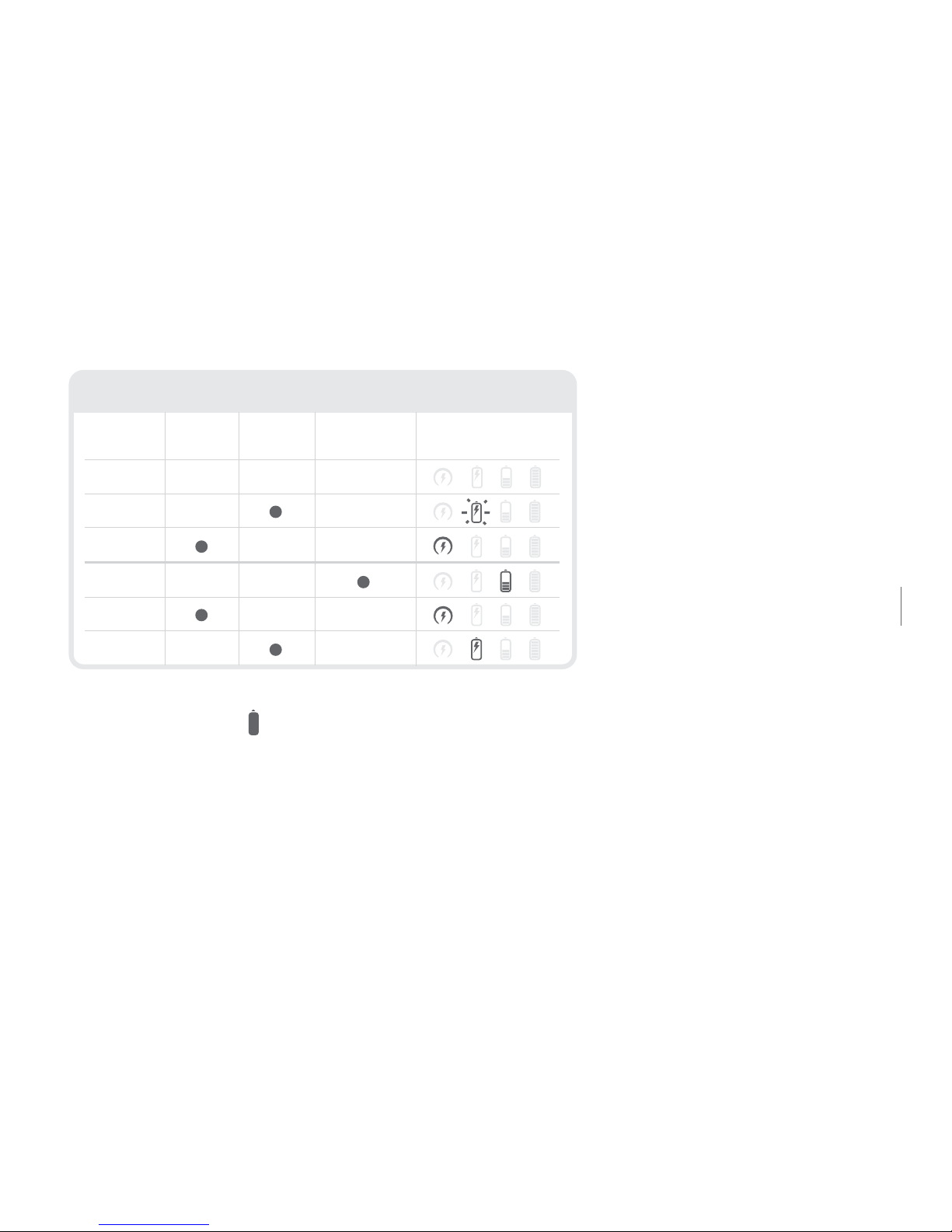
2
Les icônes s’allument les unes après
les autres L’icône allumée indique le
type d’alimentation en commençant
par l’icône du panneau solaire
3
L’icône allumée indique le
type d’alimentation
Maintenez appuyé pour afficher
la charge restante de la batterie
Solaire: La recharge est effectuée à la lumière directe du soleil
DC: Adaptateur Secteur
Batterie: Alimentation par la batterie interne
Batterie
complètement
rechargée
11 - 40 %
41 - 70%
71 - 100%
0 - 10 %
ALLUMÉ
ALLUMÉ
ÉTEINT
ÉTEINT
ÉTEINT
ALLUMÉ
ALIMENTATION
MODES DE RECHARGE
SOLAIRE DC BATTERIE AFFICHAGE DE L’UNITÉ
(clignote)
(clignote)
Maintenez la touche appuyée pour afcher l’état de la batterie Li-ion.
La batterie Li-ion commence à se recharger quand l’adaptateur secteur
est branché sur une prise électrique ou quand le panneau solaire est
exposé à la lumière du soleil (et non à travers certains types de fenêtres
ou en étant placé à l’ombre).
Page 22

22 22
BRANCHER L’ADAPTATEUR SECTEUR
Le Soulra XL est fourni avec un adaptateur secteur. Branchez l’adaptateur secteur dans la prise droite
comportant l’indication DC située sous le capuchon en caoutchouc sur le côté du Soulra XL. Branchez
l’adaptateur dans une prise secteur. Une fois que l’adaptateur est branché, le Soulra XL est prêt à
l’emploi et commence de plus à recharger sa batterie Li-ion.
RECHARGER UN iPod/iPhone
L’iPod/iPhone commence à se recharger dès qu’il est inséré sur la baie d’accueil (si <charge> est
positionné sur « ON »). Quand l’ALIMENTATION du Soulra XL est ÉTEINTE, il peut toujours recharger votre
iPod/iPhone. Si vous laissez votre iPod/iPhone après qu’il a été complètement rechargé par le Soulra XL, il
continue d’utiliser l’énergie de la batterie interne du Soulra XL tant que <charge> est sur « ON ».
RÉGLER LE VOLUME
Utilisez les touches pour monter ou baisser le volume. Le volume est afché sur l’iPod/
iPhone s’il est inséré sur la station d’accueil.
Page 23
23
GUIDE DE L’UTILISATEUR DU SOULRA
23
Soulra XL USER MANUAL
RENFORCEMENT DES BASSES
Appuyez sur la touche pour allumer ou éteindre le renforcement des basses.
AUX (AUXILIARY)
La touche permet de basculer entre l’iPod/iPhone et la source AUX, si une source audio
est branchée sur l’entrée audio auxiliaire. Le signal de l’iPod/iPhone est prioritaire si une source
audio auxiliaire est branchée sur l’appareil et qu’elle fournit un signal audio en même temps
que l’iPod/iPhone. Si un signal audio est fourni par une source branchée sur l’entrée audio de
l’appareil, la touche « AUX » devient active. Le voyant AUX s’allume quand une source audio
auxiliaire est disponible.
PLAY/PAUSE
Appuyez sur la touche pour lancer ou mettre sur pause la lecture de votre iPod/iPhone.
Page 24
24 24
AVANCER/RECULER,
Appuyez brièvement sur les touches pour sélectionner la plage précédente/suivante.
Maintenez l’une de ces touches appuyée pour avancer ou reculer rapidement dans la plage lue.
REPLACING THE LITHIUM-ION BATTERY
Vous pouvez acheter une batterie neuve sur notre site www.etoncorp.com ou en composant le
1-800-872-2228 (US) ou 1-650-903-3866.
ENREGISTREMENT POUR LA GARANTIE
An de pouvoir entièrement bénécier de la garantie complète et des mises à jour produit,
enregistrez votre appareil dès que possible après l’avoir acheté ou reçu. Vous pouvez l’enregistrer
de l’une des manières suivantes:
Page 25

25
GUIDE DE L’UTILISATEUR DU SOULRA
1. Rendez-vous sur notre site internet www.etoncorp.com.
2. Envoyez-nous par courrier la carte de garantie ci-jointe.
3. Envoyez-nous votre carte d’enregistrement dûment remplie ou les informations vous
concernant à l’adresse indiquée ci-dessous, en indiquant : vos nom et prénom, votre adresse
postale complète, votre numéro de téléphone, le modèle acheté, la date d’achat, le nom du
revendeur et le numéro de série du produit (celui-ci est généralement indiqué dans ou près
du compartiment de la batterie).
Etón Corporation
1015 Corporation Way
Palo Alto, CA 94303
LIMITED WARRANTY
Conservez les informations concernant la garantie indiquées sur votre carte de garantie avec votre preuve
d’achat. Les détails de la Garantie Limitée sont disponibles sur le site internet www.etoncorp.com.
25
Soulra XL USER MANUAL
Page 26

26
RÉPARATION DE VOTRE PRODUIT
Pour faire réparer votre produit, nous vous recommandons de contacter préalablement le
service après-vente d’Etón au 1-800-872-2228 (US), au 1-800-637-1648 (Canada) ou
au 1-650-3866, an de déterminer le problème et de le résoudre. S’il est nécessaire de faire
réparer votre appareil, le personnel technique vous indiquera la procédure à suivre selon que
votre appareil est toujours sous garantie ou nécessite une réparation hors garantie.
SOUS GARANTIE – Si votre produit est toujours sous garantie et que le service après-vente
d’Etón juge qu’une réparation dans le cadre de la garantie est nécessaire, une autorisation de
retour du produit vous sera délivrée et des instructions d’expédition vers un centre de réparation
agréé des produits sous garantie vous seront fournies. Ne retournez pas votre appareil sans
avoir obtenu un numéro d’autorisation de retour du produit.
HORS GARANTIE – Si votre produit n’est plus sous garantie et nécessite une réparation, notre
équipe technique vous indiquera le centre de réparation le plus proche et le plus à même de
procéder à la réparation. Pour les réparations en dehors de l’Amérique du Nord, reportez-vous
aux coordonnées des distributeurs fournies au moment de l’achat ou de la réception du produit.
Page 27

27
GUIDE DE L’UTILISATEUR DU SOULRA
AVEZ-VOUS BESOIN D’ASSISTANCE ?
Si vous nécessitez une assistance, contactez-nous du lundi au vendredi entre 8 h et 16 h 30,
heure du Pacique.
ÉTATS-UNIS :
1-800-872-2228
CANADA:
1-800-637-1648
MONDE:
650-903-3866
FAX:
650-903-3867
Page 28

28
AVERTISSEMENT
• N’immergez pas l’appareil dans de l’eau et ne l’exposez pas de manière prolongée à de l’eau.
• Protégez l’appareil de la pluie et d’une humidité élevée.
• Faites fonctionner l’appareil uniquement dans la plage de températures spéciées (0°C – 40°C).
• Débranchez immédiatement l’appareil si du liquide a été renversé sur l’appareil ou si un objet
est tombé dessus.
• Nettoyez l’appareil uniquement avec un chiffon sec. N’utilisez pas de détergent, ni de solvant
chimique, car ceux-ci peuvent endommager le revêtement.
• Ne retirez pas le boîtier (ni le capot arrière).
• Pour toutes les réparations, faites appel à un réparateur qualié.
MISE AU REBUT
Mettez au rebut les appareils électriques et électroniques usagés en respectant les lois et
réglementations environnementales locales.
Page 29

29
GUIDE DE L’UTILISATEUR DU SOULRA
Page 30

EN English
ES Espanõl
30
Gracias por haberse decidido a adquirir el producto de Etón modelo Soulra XL, se trata de una
base de acoplamiento para iPhone® e/o iPod® que proporciona una alta calidad de sonido. El
modelo Soulra XL recibe alimentación eléctrica de su acumulador recargable de ión de litio, el
cual puede cargarse ya sea mediante el panel solar integrado en el aparato o bien utilizando
el adaptador de corriente suministrado. Le rogamos que se tome el tiempo necesario para leer
detenidamente este manual del usuario y se familiarice con el funcionamiento de su Soulra XL
a n de poder disfrutar al máximo de sus funciones y características.
.
Page 31
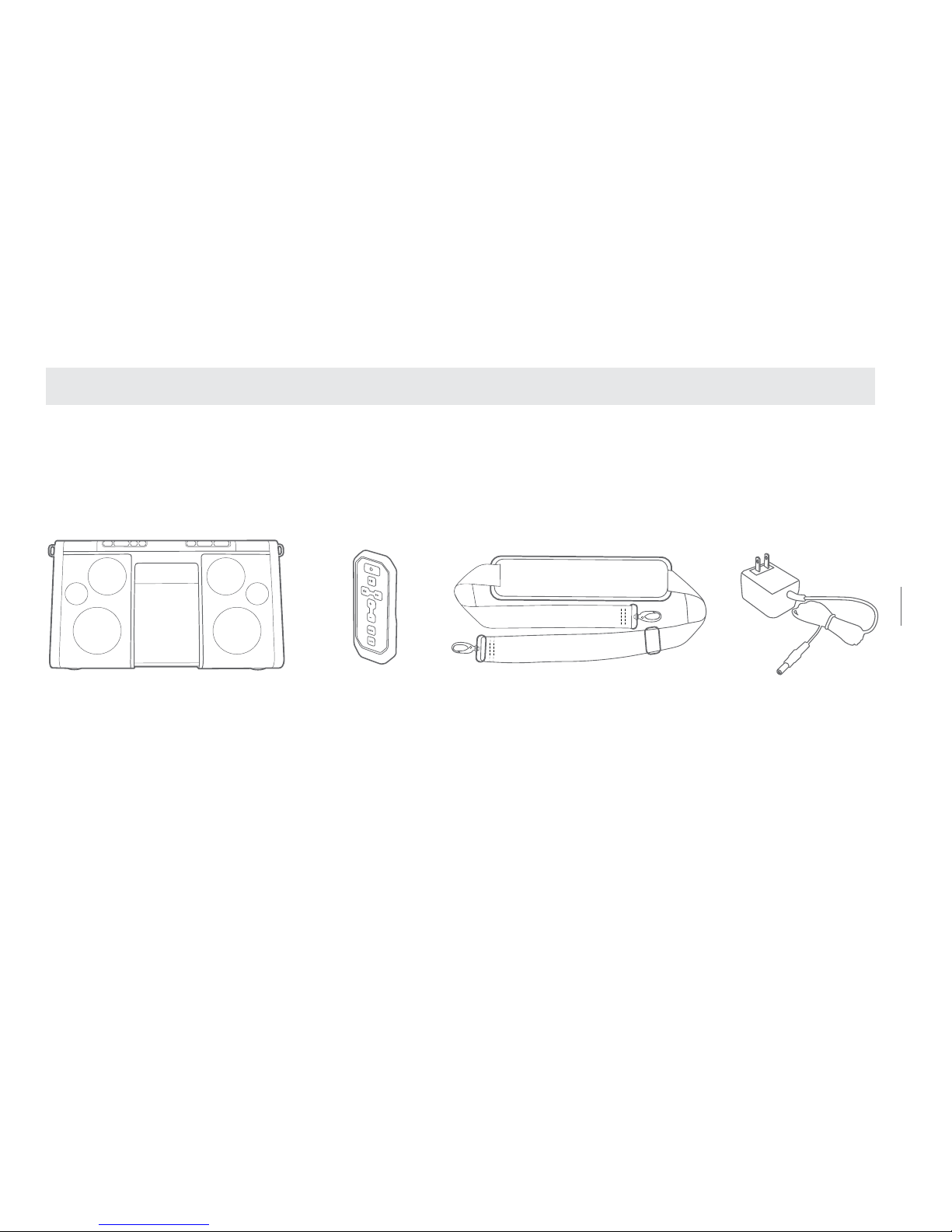
Correa de transporte integradaMando a distancia
Aparato modelo Soulra XL
Adaptador de corriente
31
SOULRA MANUAL DE USUARIO
CONTENIDO DEL EMBALAJE
Page 32
32
FUNCIONAMIENTO DEL MODELO Soulra XL
Panel solar/Tapa abatible
Play/Pause
Reproducción/Pausa
Avance/Siguiente
Manténgalo pulsado para efectuar
una búsqueda a alta velocidad
Retroceso/Anterior
Manténgalo pulsado para efectuar
una búsqueda a alta velocidad
Indicador de carga del
acumulador
Aumentar el volumen
Disminuir el volumen
Encendido/Apagado
Realce de graves
Auxiliares
Púlselo para alternar
entre iPod, iPhone y
otras fuentes de audio no
acoplables a la base, pero
conectadas a la entrada de
audio del aparato
Conector/acoplamien
to para iPod/iPhone
Cubierta de
Page 33
33
SOULRA MANUAL DE USUARIO
AUDIO IN CHARGE DC 11V
Panel solar/Tapa abatible
Play/Pause
Reproducción/Pausa
Avance/Siguiente
Manténgalo pulsado para efectuar
una búsqueda a alta velocidad
Retroceso/Anterior
Manténgalo pulsado para efectuar
una búsqueda a alta velocidad
Indicador de carga del
acumulador
Aumentar el volumen
Disminuir el volumen
Encendido/Apagado
Realce de graves
Auxiliares
Púlselo para alternar
entre iPod, iPhone y
otras fuentes de audio no
acoplables a la base, pero
conectadas a la entrada de
audio del aparato
Conector/acoplamien
to para iPod/iPhone
Cubierta de
protección
Correa de transporte
de la bisagra
Mando a distancia
Entrada
de audio
Activación/des
activación de
la función de
carga
Entrada para
corriente
continua
ACTIVACIÓN/DESACTIVACIÓN DE LA FUNCIÓN DE CARGA
Interruptor de carga en modo de espera; desactívelo (Off) cuando no se esté
utilizando el iPod/iPhone para así prolongar la vida útil del acumulador del aparato.
Page 34
34
2
Los iconos parpadearán uno tras
otro, empezando por el icono
representativo del panel solar
1
Pulse el botón de
encendido/apagado (On/Off)
3
La iluminación del icono
correspondiente indica la fuente
de alimentación utilizada
2
Los iconos parpadearán uno tras
otro, empezando por el icono
representativo del panel solar
1
Pulse el botón de
encendido/apagado (On/Off)
3
La iluminación del icono
correspondiente indica la fuente
de alimentación utilizada
Mantenga pulsado el icono para
comprobar el nivel de carga del acumulador
Solar: Loading the device when exposed to direct rays of the sun
CC: Cargando utilizando el adaptador de corriente
Acumulador: Funcionamiento utilizando el acumulador interno
Acumulador
al máximo
de carga
11 - 40 %
41 - 70%
71 - 100%
0 - 10 %
(parpadea)
GUÍA RÁPIDA DE UTILIZACIÓN
Page 35
35
SOULRA MANUAL DE USUARIO
2
Los iconos parpadearán uno tras
otro, empezando por el icono
representativo del panel solar
3
La iluminación del icono
correspondiente indica la fuente
de alimentación utilizada
Mantenga pulsado el icono para
comprobar el nivel de carga del acumulador
Solar: Loading the device when exposed to direct rays of the sun
CC: Cargando utilizando el adaptador de corriente
Acumulador: Funcionamiento utilizando el acumulador interno
Acumulador
al máximo
de carga
11 - 40 %
41 - 70%
71 - 100%
0 - 10 %
ENCENDIDO
ENCENDIDO
APAGADO
APAGADO
APAGADO
ENCENDIDO
ALIMENTACIÓN
MODOS DE CARGA HABITUALES
SOLAR CC ACUMULADOR PANTALLA DEL
(parpadea)
(parpadea)
Mantenga pulsado el botón para que se muestre el nivel de carga del
acumulador de ión de litio. El acumulador de ión de litio comienza a cargarse
en cuanto de conecta al aparato el adaptador de corriente o bien se coloca el
panel solar del aparato a pleno sol (la luz solar que se recibe a través de ciertas
ventana o en la sombra no será suciente para cargar el aparato).
Page 36

36 36
CONEXIÓN DEL ADAPTADOR DE CORRIENTE
El modelo Soulra XL se suministra con un adaptador de corriente. Conecte el adaptador de
corriente en la toma existente debajo del tapón de caucho situado en el lado derecho de su
Soulra XL (indicada con las letras DC). Enchufe el otro extremo del adaptador a una toma de
corriente adecuada. Una vez correctamente conectado el adaptador de corriente, su Soulra XL
comenzará a cargar su acumulador de ión de litio y estará listo para su utilización.
CÓMO CARGAR UN iPod/iPhone
El iPod/iPhone comenzará a cargarse en cuanto se inserte en la base de acoplamiento (siempre que el
interruptor de la función de carga “Charge” esté congurado en su posición activada “ON”). Incluso
cuando su Soulra XL esté apagado, podrá seguir cargando su iPod/iPhone. Le rogamos que tenga en
cuenta lo siguiente: si una vez que estén totalmente cargados deja conectado su iPod/iPhone a su
Soulra XL y el interruptor de la función de carga sigue estando congurado en su posición activada
“‘ON”, el acumulador incorporado en su Soulra XL seguirá descargándose.
Page 37
37
SOULRA MANUAL DE USUARIO
AJUSTE DEL NIVEL DE VOLUMEN
Pulse los botones de volumen, para aumentar o disminuir el nivel del sonido. La indicación
de volumen se mostrará en su iPod/iPhone cuando estos se encuentren insertados en la base
de acoplamiento.
FUNCIÓN DE REALCE DE LOS GRAVES
Pulse el botón de realce de graves para activar o desactivar esta función.
SELECTOR AUX (PARA DISPOSITIVOS AUXILIARES)
El mando se utiliza para seleccionar la fuente de sonido entre un iPod, iPhone y un dispositivo de
audio externo conectado a la entrada para dispositivos auxiliares del aparato, siempre que este reciba
una señal procedente de dicha entrada. La señal proporcionada por un iPod/iPhone tendrá prioridad
sobre cualquier señal que se reciba simultáneamente a partir de la entrada para dispositivos auxiliares
de aparato. De recibirse una señal a partir de la entrada para dispositivos auxiliares del aparato, será
posible seleccionar dicha entrada utilizando el sector “AUX”. El testigo AUX se iluminará cuando se
detecte una señal en la entrada para dispositivos auxiliares.
37
Soulra XL USER MANUAL
Page 38
38
38
REPRODUCCIÓN/PAUSA
Al pulsar el botón podrá alternarse entre las funciones de reproducción y pausa de su iPod/iPhone.
AVANCE/RETROCESO
Al pulsar brevemente estos botones , se selecciona la pista anterior o siguiente.
Manténgalos pulsados durante un intervalo más largo para recorrer hacia delante o hacia atrás
la pista que se esté reproduciendo.
SUSTITUCIÓN DEL ACUMULADOR DE IÓN DE LITIO
Si desea adquirir un nuevo acumulador recargable, póngase en contacto con nosotros visitando la
página www.etoncorp.com o bien llamando al número 1-800-872-2228 (EE. UU.) o 1-650-903-3866
(resto del mundo).
Page 39

39
SOULRA MANUAL DE USUARIO
REGISTRO PARA PROPÓSITOS DE GARANTÍA
Para poder disfrutar de toda la cobertura proporcionada por la garantía u obtener actualizaciones
del producto, deberá completar el formulario de registro de su producto lo antes posible después
de su compra o recepción. Para registrar su producto, podrá utilizar una de las siguientes opciones:
1. Visite nuestra página web: www.etoncorp.com.
2. Envíe por correo postal la tarjeta de garantía que se adjunta.
3. No se olvide de incluir su nombre, dirección postal completa, número de teléfono, modelo
adquirido, fecha de compra, nombre de la tienda o distribuidor y número de serie del producto
(normalmente ubicado en el interior o cerca del compartimento de las pilas) antes de enviar la
tarjeta a la dirección:
Etón Corporation
1015 Corporation Way
Palo Alto, CA 94303
39
Soulra XL USER MANUAL
Page 40

40
GARANTÍA LIMITADA
Conserve la información sobre garantías de su tarjeta de garantía junto con su recibo de compra.
Asimismo, podrá consultar la información acerca de la Garantía Limitada ofrecida visitando la
página www.etoncorp.com.
SERVICE FOR YOUR PRODUCT
Si desea obtener soporte técnico para su producto, le recomendamos que se ponga en
contacto primero con un representante de servicio de Etón ya sea llamando al número
de teléfono 1-800-872-2228 (EE. UU.), 1-800-637-1648 (Canadá) o 1-650-903-3866
(resto del mundo). De este modo, podrá determinarse el problema y obtener asesoramiento
sobre localización de averías. De ser necesaria cualquier reparación, el personal técnico le
proporcionará instrucciones sobre cómo debe proceder en función de si la radio aún se
encuentra en garantía o bien requiere una reparación fuera de garantía.
Page 41

41
SOULRA MANUAL DE USUARIO
EN GARANTÍA – Si su producto aún se encuentra en garantía y el representante de servicio de
Etón considera la necesidad de efectuar una reparación en garantía, se emitirá una autorización
de devolución con las correspondientes instrucciones al respecto para que envíe el producto a
un servicio técnico autorizado para reparaciones en garantía. NO NOS envíe su radio sin haber
obtenido antes el número de autorización de devolución.
FUERA DE GARANTÍA – si su producto requiere reparación pero ya no está cubierto por la
garantía, nuestro personal técnico le indicará el servicio técnico más próximo lo sucientemente
cualicado como para encargarse de la reparación. Para aquellas reparaciones fuera del territorio
norteamericano, consulte la información sobre distribuidores incluida con el aparato en el
momento de su compra/recepción.
Page 42

42
EN CASO DE NECESITAR ASISTENCIA
Si requiere algún tipo de asistencia relacionada con su aparato, póngase en contacto con
nosotros de lunes a viernes de 8:00 a 16:30 (hora de la zona del Pacíco).
EE. UU.:
1-800-872-2228
CANADÁ:
1-800-637-1648
RESTO DEL MUNDO:
650-903-3866
FAX:
650-903-3867
Page 43

43
SOULRA MANUAL DE USUARIO
¡ADVERTENCIA!
• No sumerja el aparato en agua ni lo deje expuesto a la lluvia durante períodos prolongados.
• Proteja el aparato de la lluvia y de entornos con altos niveles de humedad.
• Utilice únicamente el aparato en el margen de temperatura ambiente especicado (de 0 a 40 ºC).
• Desenchufe inmediatamente el aparato de la red eléctrica en caso de haberle derramado encima
cualquier tipo de líquido o si por cualquier motivo se ha introducido en su interior algún objeto.
• Limpie únicamente el aparato utilizando un paño seco. No utilice detergentes ni disolventes
químicos, ya que dichos productos podrían dañar el acabado de la supercie del aparato.
• No retire la tapa [o panel posterior] del aparato.
• Confíe cualquier reparación que sea necesaria a personal cualicado.
INSTRUCCIONES PARA EL DESECHO DEL APARATO
Al nal de su vida útil, los aparatos eléctricos y electrónicos deberán desecharse conforme a
las disposiciones establecidas por las legislaciones y directivas locales en materia de seguridad
medioambiental.
Page 44

EN English
FR Français
ES Espanõl
DE Deutsch
44
Vielen Dank, dass Sie die Etón Soulra XL - eine Dockingstation für iPhone und/oder iPod mit
wunderschöner Klangqualität - erworben haben. Die Soulra XL wird mit einem Li-Ionen-Akku
betrieben, der über die Solarzelle oder den AC-Adapter (inbegriffen) aufgeladen wird. Bitte lesen
Sie diese Bedienungsanleitung, damit Sie die Funktionsweise der Soulra XL verstehen und alle
Vorzüge des Produkts nutzen können.
.
Page 45
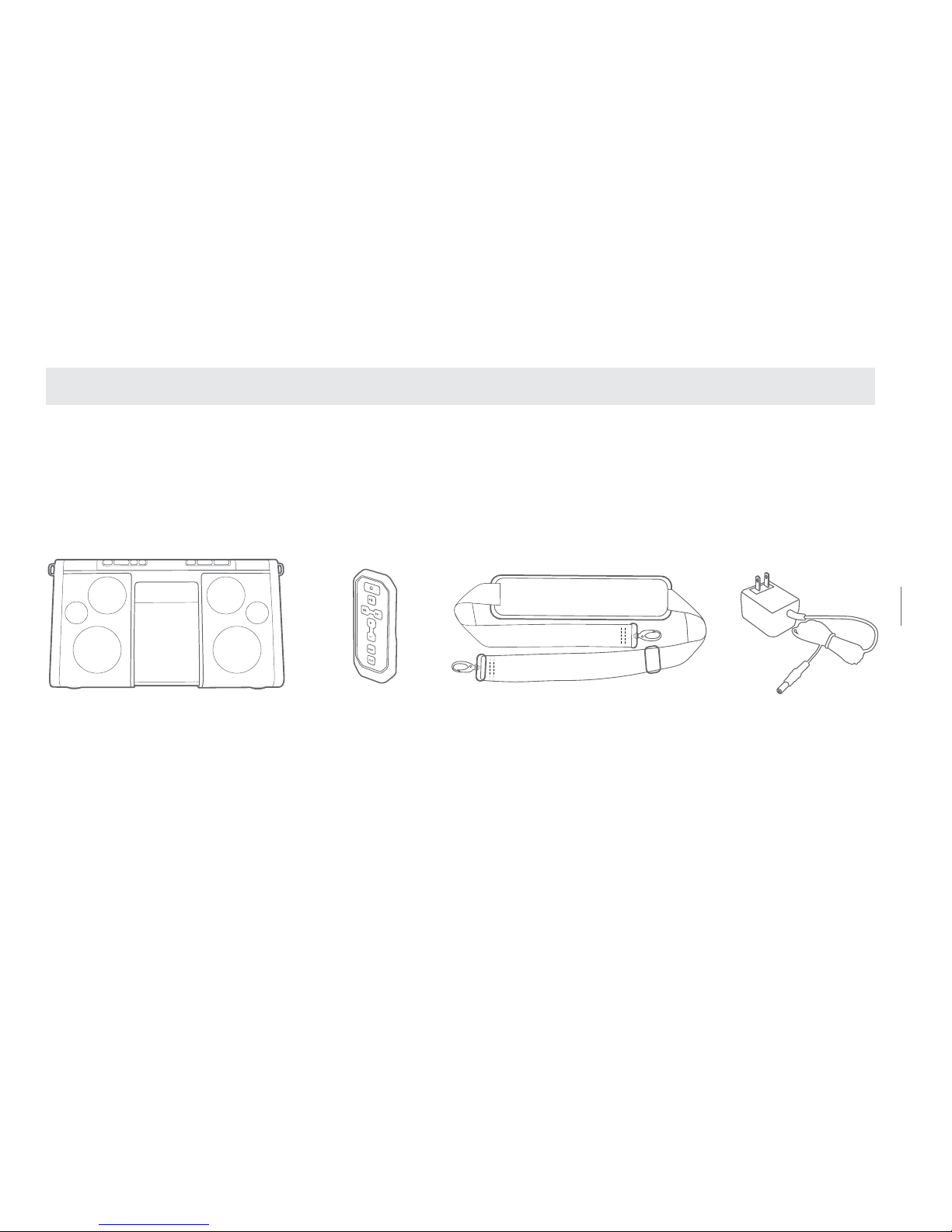
TragegurtFernbedienung
Soulra XL
AC-Adapter
45
SOULRA GEBRAUCHSANLEITUNG
WAS BEFINDET SICH IM KARTON
Page 46
46
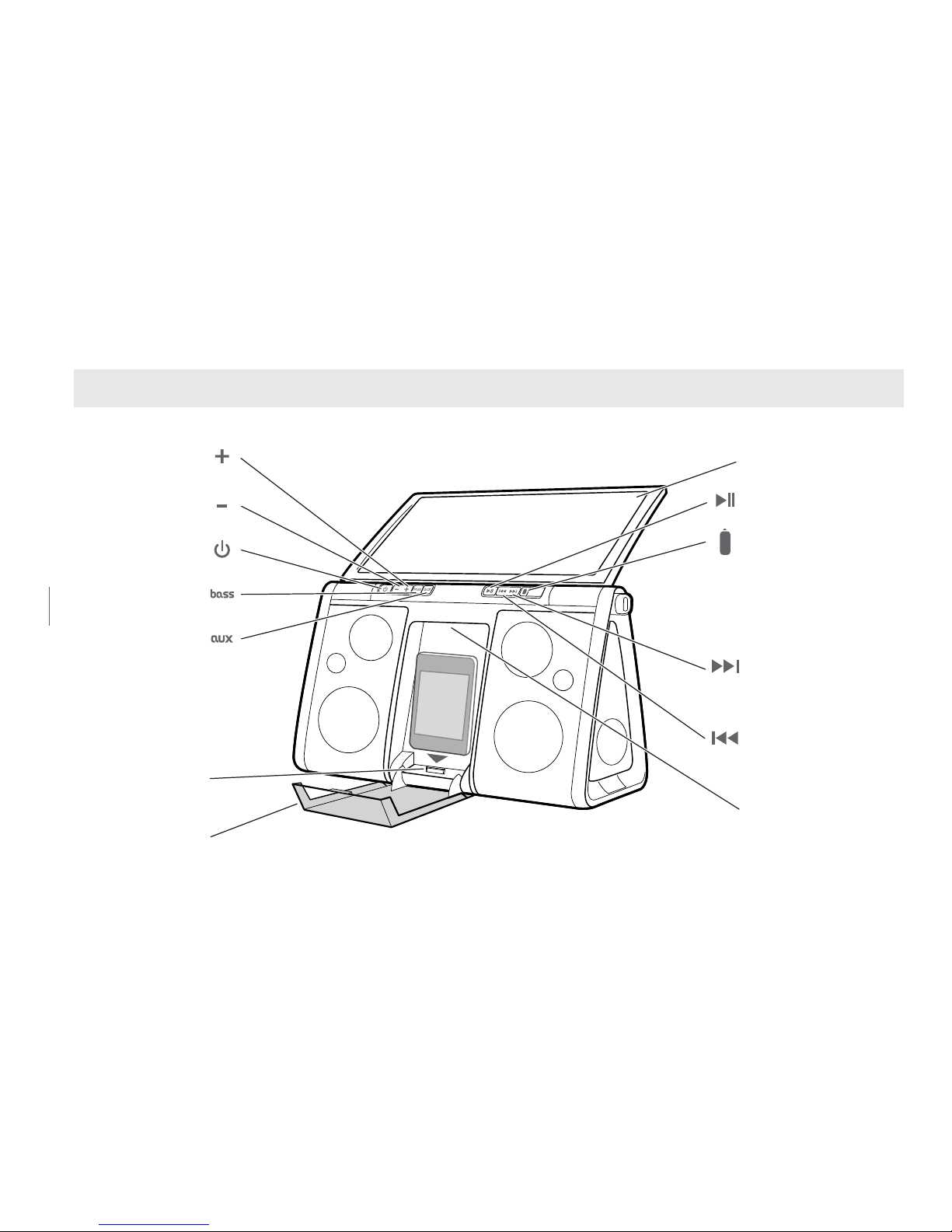
BEDIENUNG DER Soulra XL
Solarzelle/Klappdeckel
Start/Pause
Batteriestatusanzeige
Weiter/Nächster
Press and hold for
high speed scrubbing
Zurück/Vorheriger
Press and hold for
high speed scrubbing
Griff
Lauter
Leiser
Ein/Aus
Bassanhebung
Anschlussgeräte
Drücken, um zwischen
iPod/iPhone und
nicht angedockten
Audioquellen über
Audioeingang
zu wechseln
iPod/iPhone-
Anschluss/Dock
Schutzhülle
Page 47
47
SOULRA GEBRAUCHSANLEITUNG
AUDIO IN CHARGE DC 11V
Solarzelle/Klappdeckel
Start/Pause
Batteriestatusanzeige
Weiter/Nächster
Press and hold for
high speed scrubbing
Zurück/Vorheriger
Press and hold for
high speed scrubbing
Griff
Lauter
Leiser
Ein/Aus
Bassanhebung
Anschlussgeräte
Drücken, um zwischen
iPod/iPhone und
nicht angedockten
Audioquellen über
Audioeingang
zu wechseln
iPod/iPhone-
Anschluss/Dock
Schutzhülle
Tragegurt Scharnier
Fernbedienung
Audioeingang
Aufladen
Ei n/Au s
DC-Eingang
AUFLADEN EIN/AUS
Stand-by-Schalter für das Auaden; auf OFF stellen, wenn iPod/iPhone nicht
benutzt werden, um die Batterie des Gerätes zu schonen.
Page 48
48
2
Das aufleuchtende Symbol zeigt
die Stromquelle hin
1
Drücken Sie die (EIN/AUS) Taste
3
Symbole blinken nacheinander
beginnend mit dem Solarsymbol
2
Das aufleuchtende Symbol zeigt
die Stromquelle hin
1
Drücken Sie die (EIN/AUS) Taste
3
Symbole blinken nacheinander
beginnend mit dem Solarsymbol
Halten Sie gedrückt, um den
Batteriestatus zu sehen
Solar: Aufladen in direktem Sonnenlicht
DC: Netzadapter
Batterie: Verwendung der eingebauten Batterie
Volle
Batterieladung
11 - 40 %
41 - 70%
71 - 100%
0 - 10 %
(blinkt)
FANGEN WIR AN
Page 49
49
SOULRA GEBRAUCHSANLEITUNG
2
Das aufleuchtende Symbol zeigt
die Stromquelle hin
3
Symbole blinken nacheinander
beginnend mit dem Solarsymbol
Halten Sie gedrückt, um den
Batteriestatus zu sehen
Solar: Aufladen in direktem Sonnenlicht
DC: Netzadapter
Batterie: Verwendung der eingebauten Batterie
Volle
Batterieladung
11 - 40 %
41 - 70%
71 - 100%
0 - 10 %
EIN
EIN
AUS
AUS
AUS
EIN
BETRIEB
REGULÄRE LADEMODI
SOLAR DC BATTERIE ANZEIGE DES GERÄTES
(blinkt)
(blinkt)
Halten Sie die Taste gedrückt, um den Status des Li-Ionen-Akkus
anzuzeigen. Der Li-Ionen-Akku beginnt sich aufzuladen, sobald der
AC-Adapter angeschlossen wird oder Sonnenlicht direkt auf die
Solarzelle (nicht durch bestimmte Fenster oder im Schatten) fällt.
Page 50

50 50
VERBINDEN DES AC-ADAPTERS
Die Soulra XL wird mit einem AC-Adapter geliefert. Verbinden Sie den AC-Adapter mit der
rechten, mit DC markiertenBuchse unter dem Gummistecker an der Seite der Soulra XL. Stecken
Sie das andere Ende in eine AC-Steckdose. Wenn der AC-Adapter verbunden ist, beginnt die
Soulra XL ihren Li-Ionen-Akku aufzuladen und ist spielbereit.
AUFLADEN EINES iPod/iPhone
Der/das iPod/iPhone beginnt sich aufzuladen, sobald das Gerät in die Dockingstation gesteckt
wird (falls <charge> auf ON gestellt ist). Wenn die Soulra XL ausgeschaltet ist, kann sie trotzdem
Ihren iPod/iPhone auaden. Bitte nehmen Sie zur Kenntnis, wenn Sie Ihren iPod/Ihr iPhone auf der
Dockingstation lassen, wenn das Gerät über die Soulra XL komplett aufgeladen wurde und <charge>
ist noch auf ON gestellt, wird es die eingebaute Batterie der Soulra XL weiter entladen.
EINSTELLEN DER LAUTSTÄRKE
Drücken Sie die Lautstärketasten, , um die Lautstärke lauter oder leiser zu stellen. Die
Lautstärkestufe wird auf dem iPod/iPhone angezeigt, wenn das Gerät in der Dockingstation steckt.
Page 51
51
SOULRA GEBRAUCHSANLEITUNG
BASSANHEBUNG
Drücken Sie die Taste, um die Funktion ein-/auszuschalten.
AUX (ANGESCHLOSSENE GERÄTE)
Die Taste wechselt zwischen dem iPod/iPhone und AUX-Eingang, sofern ein Signal
von dem Port kommt. Das Signal vom iPod/iPhone hat Vorrang, falls gleichzeitig ein Signal von
diesem Port und ein Audioeingangssignal gesendet werden. Falls ein Audioeingangssignal
gesendet wird, ist die Umschaltfunktion der „AUX“ Taste aktiviert. Das AUX-Licht leuchtet,
wenn ein Nebengerät angeschlossen ist.
START/PAUSE
Wenn Sie die Taste drücken, wird die Wiedergabe des iPod/iPhone unterbrochen.
51
Soulra XL USER MANUAL
Page 52
52
52
WEITER/ZURÜCK,
Mithilfe dieser Tasten, , können Sie durch einmal kurz Drücken den vorherigen/
nächsten Titel wählen; für den Schnellvorlauf/-rücklauf halten Sie die Tasten gedrückt.
AUSWECHSELN DES LITHIUM-IONEN-AKKUS
Um einen neuen Akku zu kaufen, kontaktieren Sie uns unter www.etoncorp.com oder rufen Sie
1-800-872-2228 (USA) oder 1-650-903-3866 an.
GARANTIEREGISTRIERUNG
Um einen umfassenden Garantieschutz oder Produktaktualisierung zu gewährleisten, sollten
Sie Ihr Produkt so bald wie möglich nach dem Kauf oder Empfang registrieren. Sie können eine
der folgenden Optionen nutzen, um Ihr Produkt zu registrieren.
Page 53

53
SOULRA GEBRAUCHSANLEITUNG
1. Besuchen Sie unsere Website unter www.etoncorp.com.
2. Senden Sie die beiliegende Garantiekarte ein.
3. Schicken Sie Ihre Registrationskarte oder Informationen an die folgende Adresse; geben
Sie Ihren Namen, vollständige Postanschrift, Telefonnummer, gekaufte Modell, Kaufdatum,
Händlernamen und die Seriennummer des Produktes (bendet sich normalerweise in oder
in der Nähe des Batteriefachs) an:
Etón Corporation
1015 Corporation Way
Palo Alto, CA 94303
EINGESCHRÄNKTE GARANTIE
Bewahren Sie die Garantieinformationen von Ihrer Garantiekarte zusammen mit Ihrem Kaufbeleg
auf. Informationen zur eingeschränkten Garantie können auch unter www.etoncorp.com
eingesehen werden.
53
Soulra XL USER MANUAL
Page 54

54
KUNDENDIENST FÜR IHR PRODUKT
Wenn Sie Probleme mit Ihrem Produkt haben, empfehlen wir Ihnen, erst einen
Kundendienstvertreter von Etón unter 1-800-872-2228 (USA), 1-800-637-1648 (Kanada)
oder 1-650-903-3866 zu kontaktieren, um Kundendienst und Fehlerbehebung in Anspruch zu
nehmen. Falls Sie noch weitere Hilfe benötigen, wird das technische Personal Sie informieren,
wie Sie weiter vorgehen sollten, abhängig davon, ob das Radio noch Garantie hat oder eine
kostenpichtige Reparatur benötigt.
GARANTIE – Wenn Ihr Produkt noch von der Garantie abgedeckt wird und der
Kundendienstvertreter von Etón entscheidet, dass Kundendienst im Rahmen der
Garantie benötigt wird, erhalten Sie eine Autorisierung und Anleitungen bezüglich.
des Versandes an eine autorisierte Garantiewerkstatt. Schicken Sie Ihr Radio nicht
zurück, wenn Sie keine Rücksendungsautorisierungsnummer erhalten haben.
OHNE GARANTIE – Falls Ihr Produkt keine Garantie mehr besitzt und eine Reparatur
benötigt, wird unser technisches Personal Sie an die nächstgelegene Werkstatt verweisen,
die die Reparatur vornehmen kann. Für Reparaturen außerhalb Nordamerika sehen Sie bitte
die Händlerinformationen, die zum Zeitpunkt des Kaufs/Eingangs der Ware mitgeliefert wurden.
Page 55

55
SOULRA GEBRAUCHSANLEITUNG
BENÖTIGEN SIE HILFE?
Falls Sie Hilfe benötigen, kontaktieren Sie uns bitte von montags - freitags zwischen
8:00 - 16:00 Uhr, Pacic Standard Time.
US:
1-800-872-2228
KANADA:
1-800-637-1648
WELTWEIT:
650-903-3866
FAX:
650-903-3867
Page 56

56
WARNUNG
• Nicht für längere Zeit in Wasser tauchen oder Wasser aussetzen.
• Vor hoher Luftfeuchtigkeit und Regen schützen.
• Nur innerhalb des angegebenen Temperaturbereichs benutzen (0 °C bis 40 °C).
• Ziehen Sie sofort den Netzstecker, wenn Flüssigkeit über dem Gerät verschüttet wurde
oder ein Objekt in das Gerät gefallen ist.
• Nur mit einem trockenen Tuch reinigen. Verwenden Sie keine Reinigungsmittel oder
chemische Lösungsmittel, da diese das Finish beschädigen können.
• Entfernen Sie nicht die Abdeckung [oder Rückseite].
• Lassen Sie Reparaturen von Fachleuten ausführen.
ENTSORGUNG
Bitte entsorgen Sie alte elektrische oder elektronische Geräte gemäß Ihrer örtlich geltenden
Umweltgesetze und -richtlinien.
Page 57

57
SOULRA GEBRAUCHSANLEITUNG
Page 58

EN English
FR Français
ES Espanõl
DE Deutsch
IT Italiano
58
Grazie per avere acquistato Etón Soulra XL, la docking station per iPhone e/o iPod caratterizzata da una
splendida qualità audio. Soulra XL è alimentata da una batteria agli ioni di litio ricaricabile ad energia
solare oppure tramite l’adattatore CA incluso. Leggere attentamente questo manuale dell’utente per
familiarizzarsi con le funzioni di Soulra XL e utilizzare al meglio il prodotto.
.
Page 59
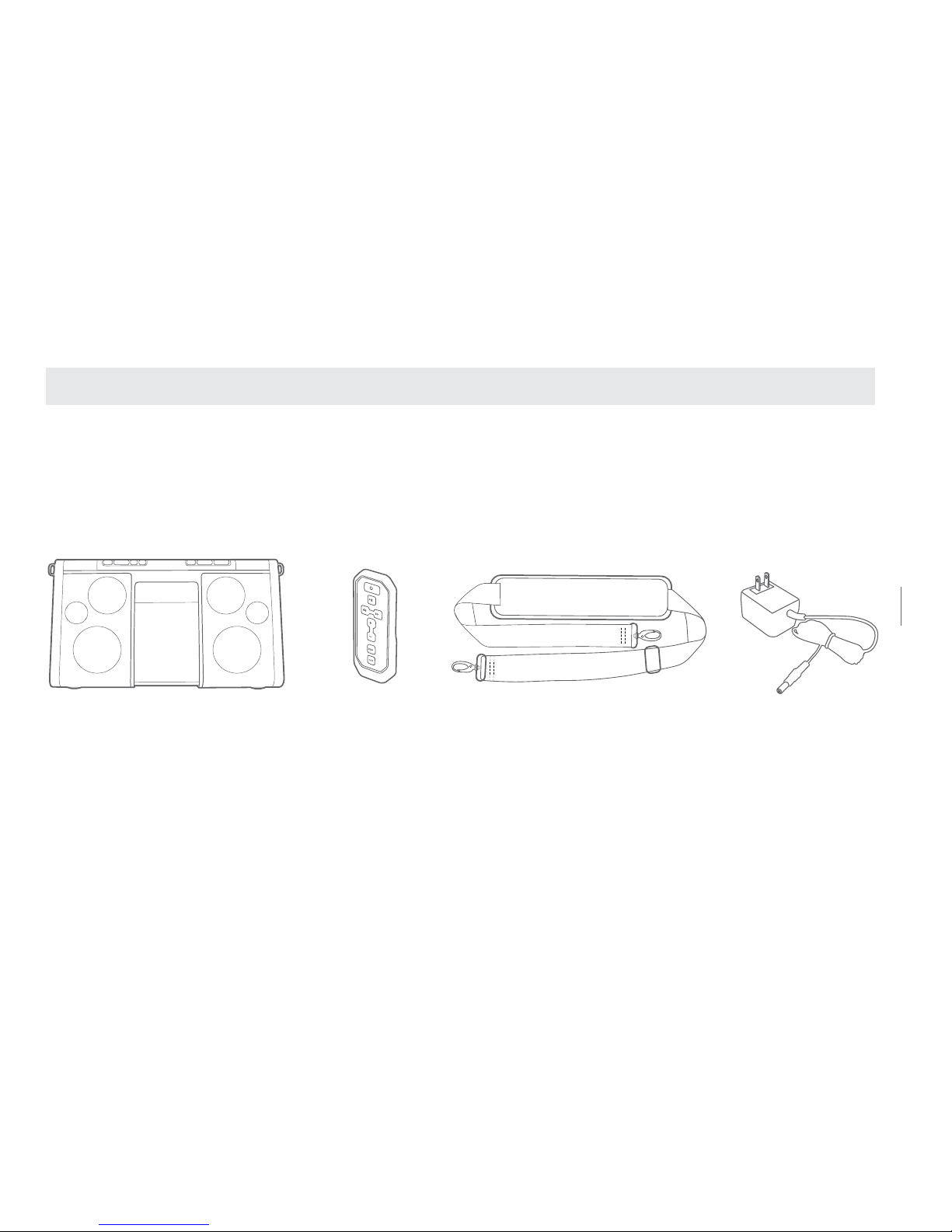
Cinghia di trasportoTelecomando
Soulra XL
Adattatore CA
59
SOULRA MANUALE UTENTE
CONTENUTO DELLA CONFEZIONE
Page 60
60
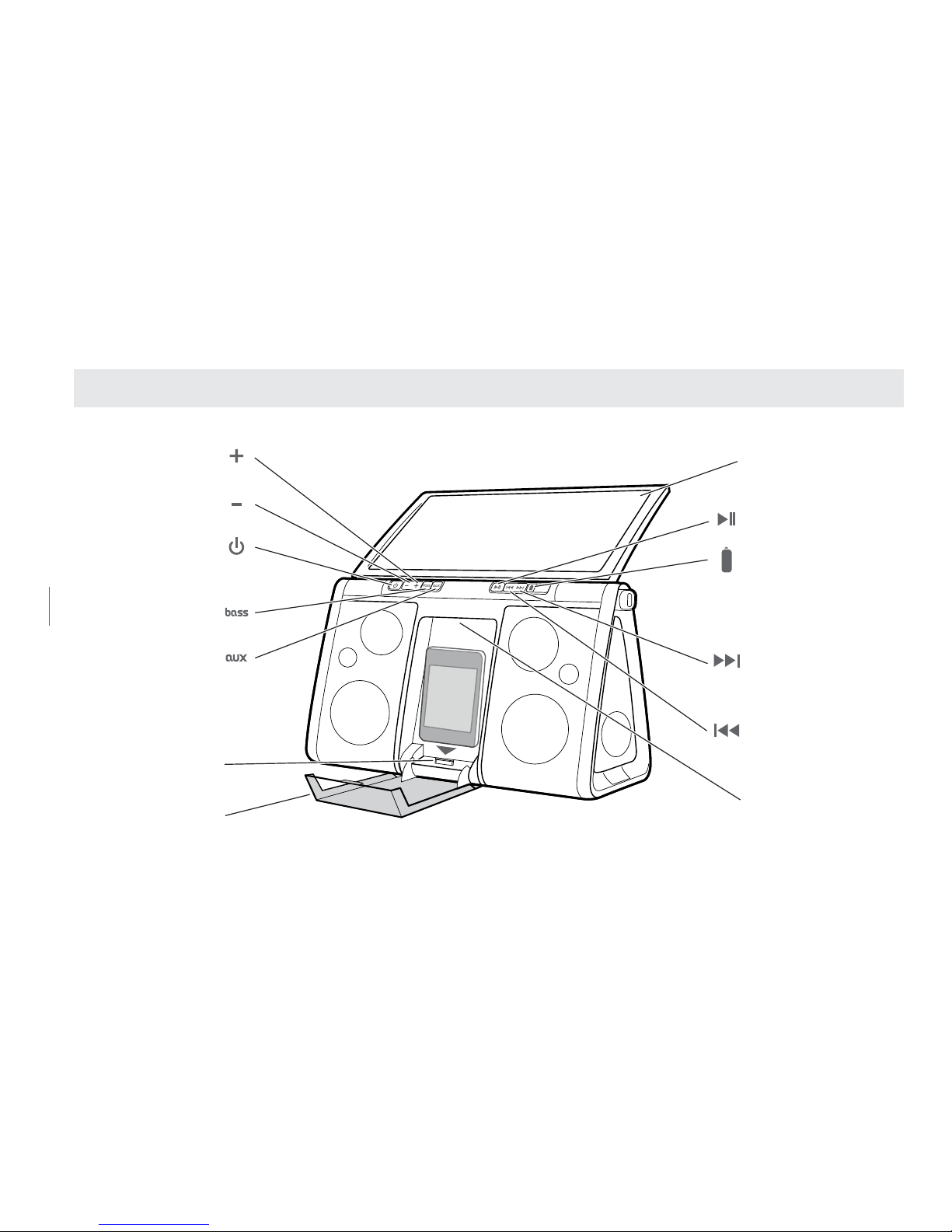
FUNZIONAMENTO DI Soulra XL
Pannello solare/
Coperchio ad aletta
Lettura/Pausa
Indicatore della batteria
Avanti/Successivo
Tenere premuto per una
scansione ad alta velocità
Indietro/Precedente
Tenere premuto per una
scansione ad alta velocità
Maniglia
Aumento volume
Riduzione volume
Alimentazione
Amplificazione bassi
Ausiliario
Premere per passare da
iPod/iPhone a una sorgente
audio collegata tramite un
ingresso audio e viceversa
Connettore/alloggiam
ento per iPod/iPhone
Protective cover
Page 61
61
SOULRA MANUALE UTENTE
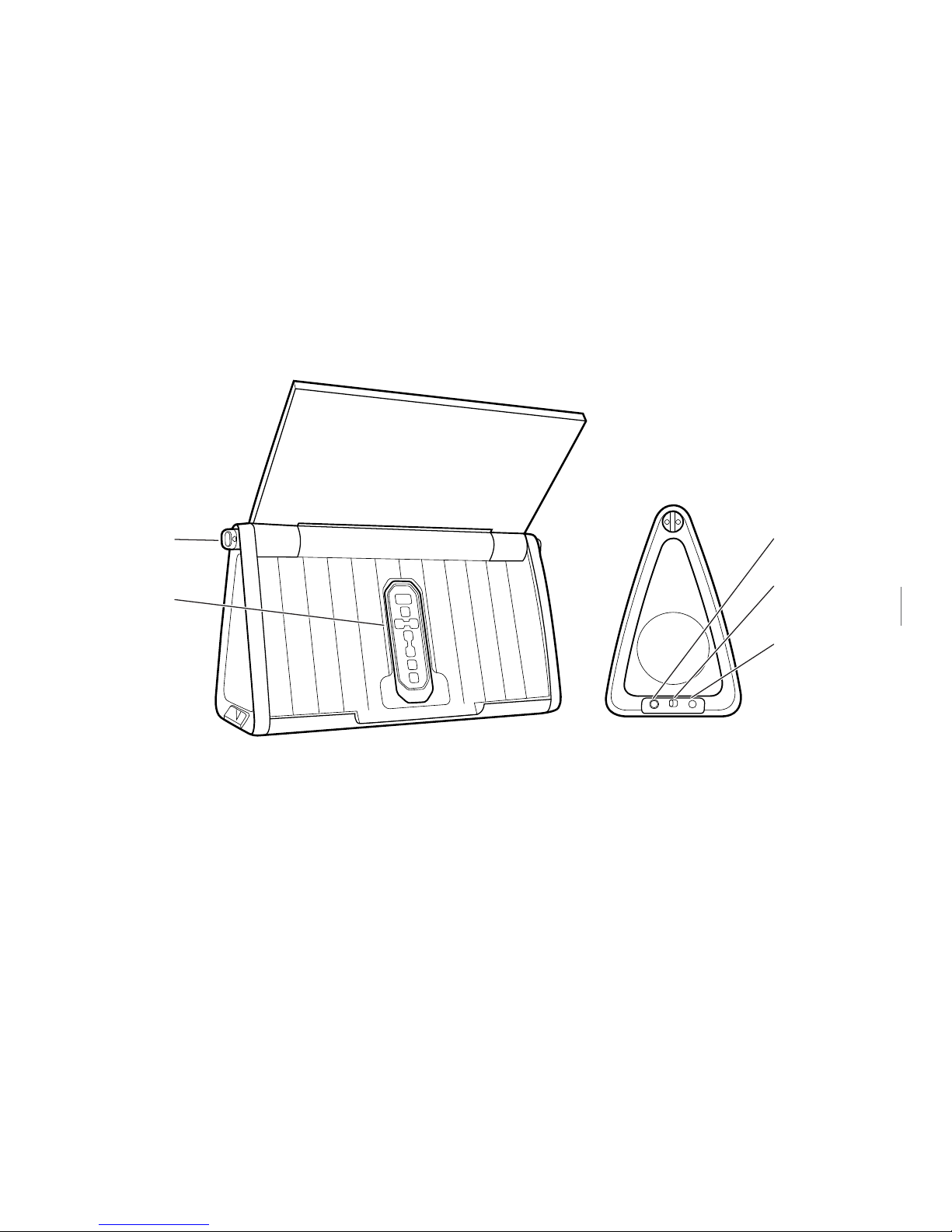
AUDIO IN CHARGE DC 11V
Pannello solare/
Coperchio ad aletta
Lettura/Pausa
Indicatore della batteria
Avanti/Successivo
Tenere premuto per una
scansione ad alta velocità
Indietro/Precedente
Tenere premuto per una
scansione ad alta velocità
Maniglia
Aumento volume
Riduzione volume
Alimentazione
Amplificazione bassi
Ausiliario
Premere per passare da
Protective cover
Cinghia da
trasporto cerniera
Telecomando
Ingresso audio
Caricamento
acceso/spento
Ingresso CC
CARICAMENTO ACCESO/SPENTO
Premere l’interruttore di standby quando l’iPod/iPhone non è in uso per
prolungare la durata della batteria.
Page 62
62
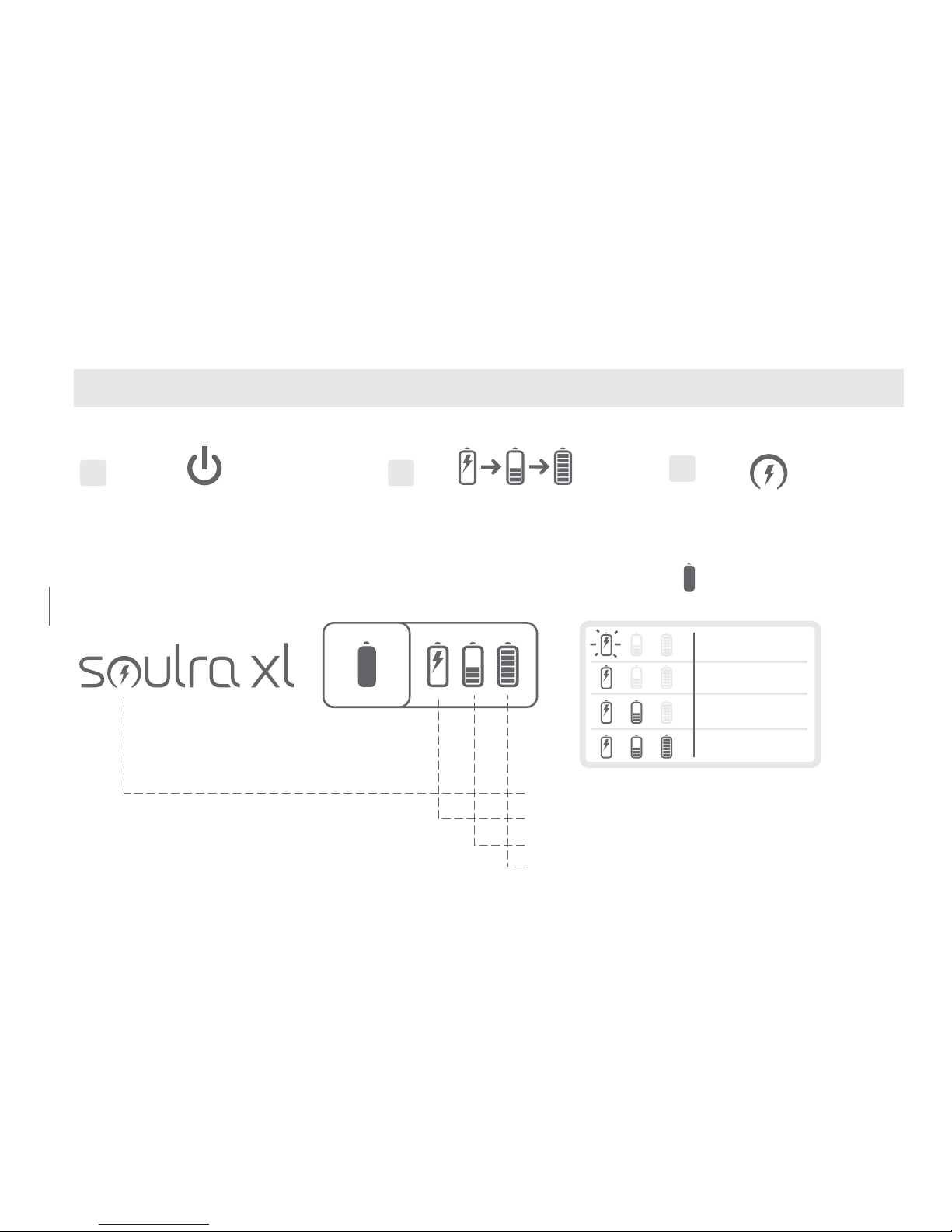
2
Le icone lampeggiano in sequenza
a partire dall'icona del sole
1
Premere l'interruttore
Acceso/Spento
3
L'icona illuminata indica la
sorgente di alimentazione
2
Le icone lampeggiano in sequenza
a partire dall'icona del sole
1
Premere l'interruttore
Acceso/Spento
3
L'icona illuminata indica la
sorgente di alimentazione
Tenere premuto per visualizzare la
durata della batteria
Energia solare: Ricarica sotto la luce solare diretta
CC: Adattatore di alimentazione
Batteria: Uso della batteria interna
Batteria
carica
11 - 40 %
41 - 70%
71 - 100%
0 - 10 %
(lampeggia)
GUIDA INTRODUTTIVA
Page 63
63
SOULRA MANUALE UTENTE
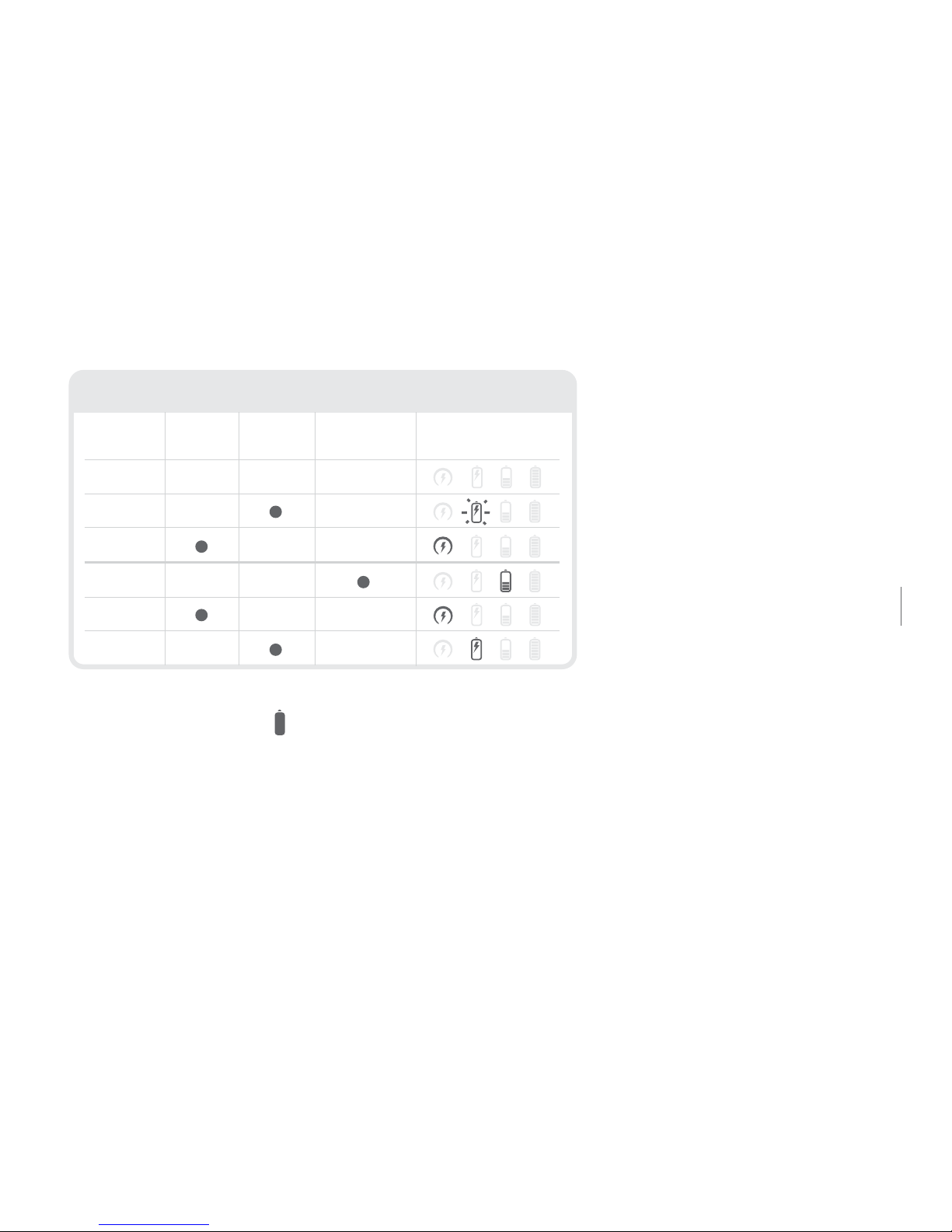
2
Le icone lampeggiano in sequenza
a partire dall'icona del sole
3
L'icona illuminata indica la
sorgente di alimentazione
Tenere premuto per visualizzare la
durata della batteria
Energia solare: Ricarica sotto la luce solare diretta
CC: Adattatore di alimentazione
Batteria: Uso della batteria interna
Batteria
carica
11 - 40 %
41 - 70%
71 - 100%
0 - 10 %
ACCESO
ACCESO
SPENTO
SPENTO
SPENTO
ACCESO
ALIM.
MODALITÀ DI RICARICA NORMALI
ENERGIA
SOLARE
CC BATTERIA DISPLAY UNITÀ
(lampeggia)
(lampeggia)
Tenere premuto il tasto per visualizzare le condizioni della batteria
gli ioni di litio. La batteria inizia a ricaricarsi non appena si collega
l’adattatore CA oppure quando il pannello solare è sotto la luce solare
diretta (non attraverso alcuni tipi di nestre o all’ombra).
Page 64

64 64
COLLEGAMENTO DELL’ADATTATORE CA
Soulra XL viene fornito con un adattatore CA. Collegare l’adattatore CA all’ingresso CC sotto la
presa di gomma sul lato dell’apparecchio. Inserire l’altra estremità del cavo in una presa CA. Non
appena si collega l’adattatore CA, la batteria agli ioni di litio inizia a ricaricarsi e nel frattempo è
possibile utilizzare l’apparecchio.
RICARICA DI iPod e iPhone
L’iPod/iPhone inizia a ricaricarsi non appena viene inserito nell’alloggiamento (se l’interruttore
di ricarica è su “ON”). Soulra XL può essere utilizzato per ricaricare l’iPod/iPhone anche quando è
spento. Ricordarsi che se l’iPod/iPhone è completamente carico e lo si lascia nell’alloggiamento
con l’interruttore di ricarica su “ON”, continuerà a consumare la batteria interna di Soulra XL.
REGOLAZIONE DEL VOLUME
Premere i tasti del volume, , per aumentare o abbassare il volume. Il livello del volume
appare sull’iPod/iPhone, se è collegato alla docking station.
Page 65
65
SOULRA MANUALE UTENTE
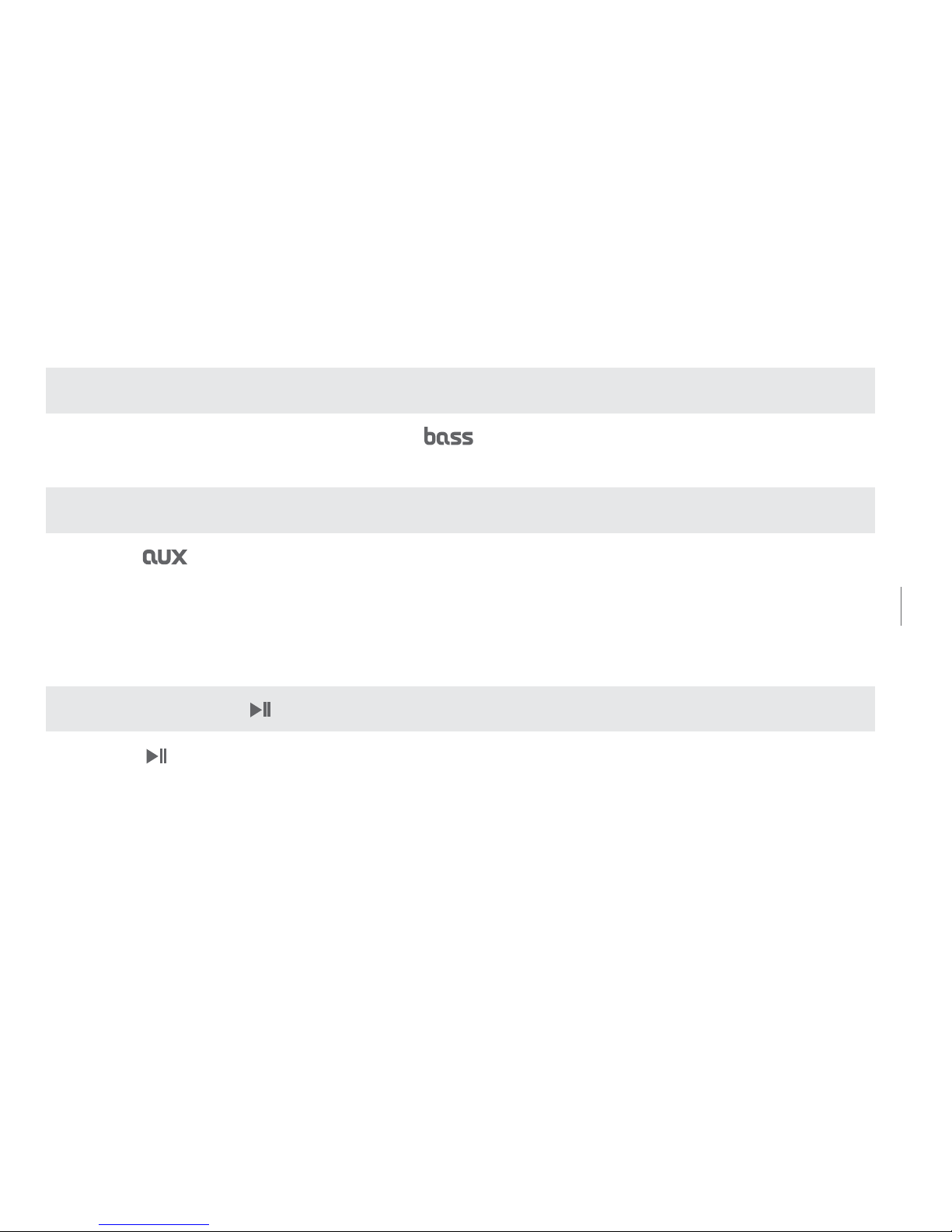
FUNZIONE DI AMPLIFICAZIONE DEI BASSI
Premere il pulsante di amplicazione dei bassi ( ) per attivare o disattivare la relativa funzione.
AUX (AUSILIARIO)
Il pulsante consente di passare dall’iPod/iPhone all’ingresso AUX quando c’è un segnale
dalla porta. Nel caso in cui siano presenti simultaneamente entrambi i segnali, il segnale dell’iPod/
iPhone ha la priorità. Quando è presente un segnale audio in ingresso, la funzione del pulsante
“AUX” è disponibile. Quando l’ingresso ausiliario è disponibile, la spia AUX si illumina.
LETTURA/PAUSA
Il pulsante consente di attivare le funzioni di lettura e pausa dell’iPod/iPhone.
65
Soulra XL USER MANUAL
Page 66
66
66
AVANTI/INDIETRO,
Pressing these buttons, , selects previous track/next track with a short press; hold
down to scrub forward/reverse.
SOSTITUZIONE DELLA BATTERIA AGLI IONI DI LITIO
Per acquistare una nuova batteria ricaricabile, visitare il sito www.etoncorp.com oppure
contattare il costruttore al numero 1-800-872-2228 (USA) o 1-650-903-3866.
REGISTRAZIONE DI GARANZIA
Per usufruire di tutte le condizioni previste dalla garanzia, si raccomanda di completare la
registrazione dell’apparecchio il prima possibile, subito dopo l’acquisto o il ricevimento del
prodotto. Per registrare il prodotto, è possibile utilizzare una delle seguenti opzioni:
Page 67

67
SOULRA MANUALE UTENTE
1. Visitare il sito web www.etoncorp.com.
2. Inviare la scheda di garanzia fornita con il prodotto.
3. Inviare la scheda di registrazione o le relative informazioni al seguente indirizzo. Includere il
proprio nome, indirizzo postale completo, numero di telefono, tipo di modello acquistato, data
dell’acquisto, nome del rivenditore e numero di serie del prodotto (in genere è situato nel vano
batterie o nelle sue vicinanze):
Etón Corporation
1015 Corporation Way
Palo Alto, CA 94303
GARANZIA LIMITATA
Conservare la garanzia insieme allo scontrino. La garanzia limitata è visualizzabile anche
all’indirizzo www.etoncorp.com.
67
Soulra XL USER MANUAL
Page 68

68
SERVIZIO DI ASSISTENZA
Per riparazioni o assistenza, si raccomanda di contattare un centro di assistenza Etón al
numero 1-800-872-2228 (USA), 1-800-637-1648 (Canada) o 1-650-903-3866. Qualora
siano necessarie ulteriori riparazioni, il personale spiegherà come procedere a seconda che
l’apparecchio sia ancora in garanzia oppure no.
IN GARANZIA – Se il prodotto da riparare è ancora in garanzia, l’assistenza Etón invierà
un’autorizzazione alla restituzione dell’apparecchio con istruzioni per la spedizione presso
un centro di riparazione autorizzato. Non restituire l’apparecchio se non si è prima ricevuto
il relativo codice di autorizzazione.
FUORI GARANZIA – Se il prodotto da riparare non è più in garanzia, l’assistenza Etòn
indicherà il centro di assistenza più vicino in grado di effettuare al meglio le necessarie
riparazioni. Per l’assistenza al di fuori del Nord America, consultare le informazioni sui
concessionari fornite al momento dell’acquisto o della spedizione.
Page 69

69
SOULRA MANUALE UTENTE
INFORMAZIONI
Per ulteriori informazioni, si prega di contattarci dal lunedì al venerdì, dalle 8:00 alle 16:30
(fuso orario standard del Pacico).
US:
1-800-872-2228
CANADA:
1-800-637-1648
ALTRE NAZIONI:
650-903-3866
FAX:
650-903-3867
Page 70

70
AVVERTENZA
• Non immergere o esporre troppo a lungo l’apparecchio all’acqua.
• Proteggere l’apparecchio dall’umidità e dalla pioggia.
• Utilizzare solo entro l’intervallo di temperatura specicato (da 0 °C a 40 °C).
• Se si rovescia del liquido sul prodotto oppure un oggetto cade al suo interno, scollegare
immediatamente l’apparecchio dalla presa elettrica.
• Pulire solo con un panno asciutto. Non utilizzare detergenti o solventi chimici perché
potrebbero danneggiare la nitura.
• Non togliere il coperchio né il pannello posteriore.
• Per le riparazioni, rivolgersi sempre a personale qualicato.
SMALTIMENTO
Si raccomanda di smaltire le apparecchiature elettriche ed elettroniche nel rispetto delle leggi vigenti.
Page 71

71
SOULRA MANUALE UTENTE
Page 72

72
Etón Corpo rat ion
1015 Corporation Way
Palo Alto, CA 94303, USA
www.etoncorp.com
v041211
 Loading...