

Page 1

Presto
User Manual
English Rev A Jan 2008.
Page 2

Page 2 Presto User Manual Rev A EN
Important Safety Information
Please read all of the following instructions
before setting up your Presto. Failure to follow
these instructions properly could lead to
physical injury.
• The Presto must be used on a flat, level table. Never
attempt to use it on a sloping surface or on a table
that cannot accommodate the full footprint of the unit.
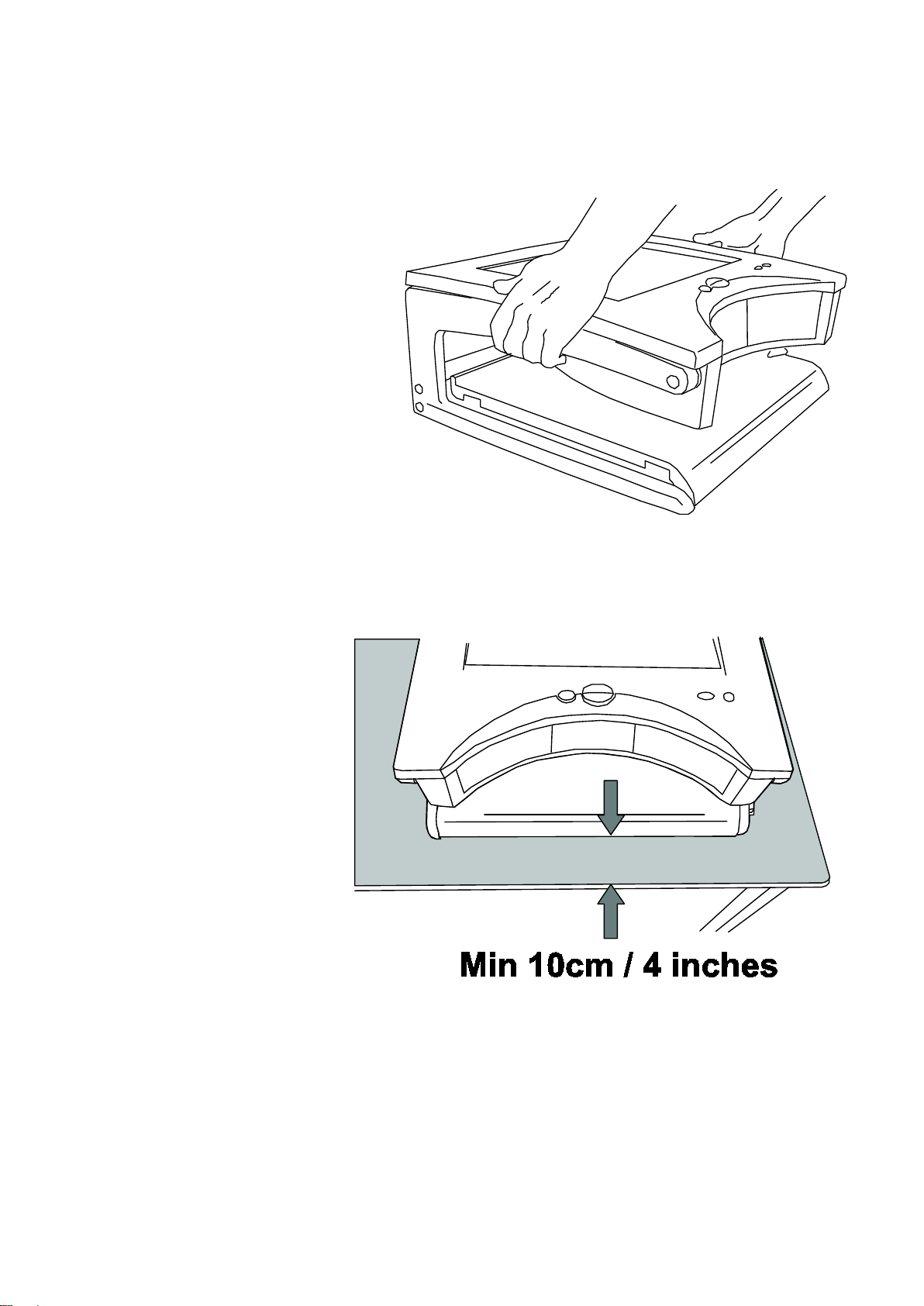
• The front of the Presto must be placed at least 10cms
or 4 inches back from the edge of the table. This is to
prevent the unit from tipping forward if excessive
weight is placed on the reading table when fully
extended. There are warning labels placed on the
reading table with arrows indicating the maximum
overhang permissible when the table is fully
extended.
• Both X/Y table and Screen contain moving parts.
Please take care with folding back the screen and
operating the X/Y table. If fingers get caught, injury
might occur. If you feel you cannot operate the unit
safely, please seek advice or contact your supplier.
• Never lift the Presto by the reading table.
• The Presto must only be powered by the supplied
power supply. Using another source of power could
permanently damage the unit and will invalidate your
warranty.
Page 3

Page 3 Presto User Manual Rev A EN
• To prevent fire or electric shock please ensure this
unit is kept away from all liquids. Do not use the unit
in excessively damp or wet areas and do not expose
it to rain, snow, etc.
• Before cleaning the unit, please ensure that it is
unplugged. Use a slightly damp cloth to clean the
exterior. Do NOT use solvents or aerosol cleaners.
• This unit should never be opened. It contains
hazardous voltages. Unauthorized servicing will
invalidate your warranty. If you encounter any
problems with this unit please contact your local
dealer.
• While we have made every effort to minimize the
weight of this unit, if you feel you cannot safely lift it,
seek help when moving it.
• Before moving the unit, unplug the power adapter,
ensure the screen is folded back and the reading
table is parked home with the brakes applied.
• Never place any object on the screen. The screen
can be scratched or broken easily and damage to it is
not covered under warranty.
Page 4
Page 4 Presto User Manual Rev A EN
Using the Presto
1. Setting up
Lift the Presto from its
packaging and place it
on a solid, level desk.
Raise the screen
upright.
Plug the power adapter
into the mains using the
lead provided and insert the other connector into the
socket on the rear bulkhead of the Presto.
Ensure the unit is
placed at least
10cms (4 inches)
back from the edge
of the desk. Sit in
front of the unit.
Press the red button
on the right of the
front panel to turn
the Presto on. The Presto will beep to indicate power-on
and the lamps will light. After a few seconds, the image
will appear on the screen.
Page 5
Page 5 Presto User Manual Rev A EN
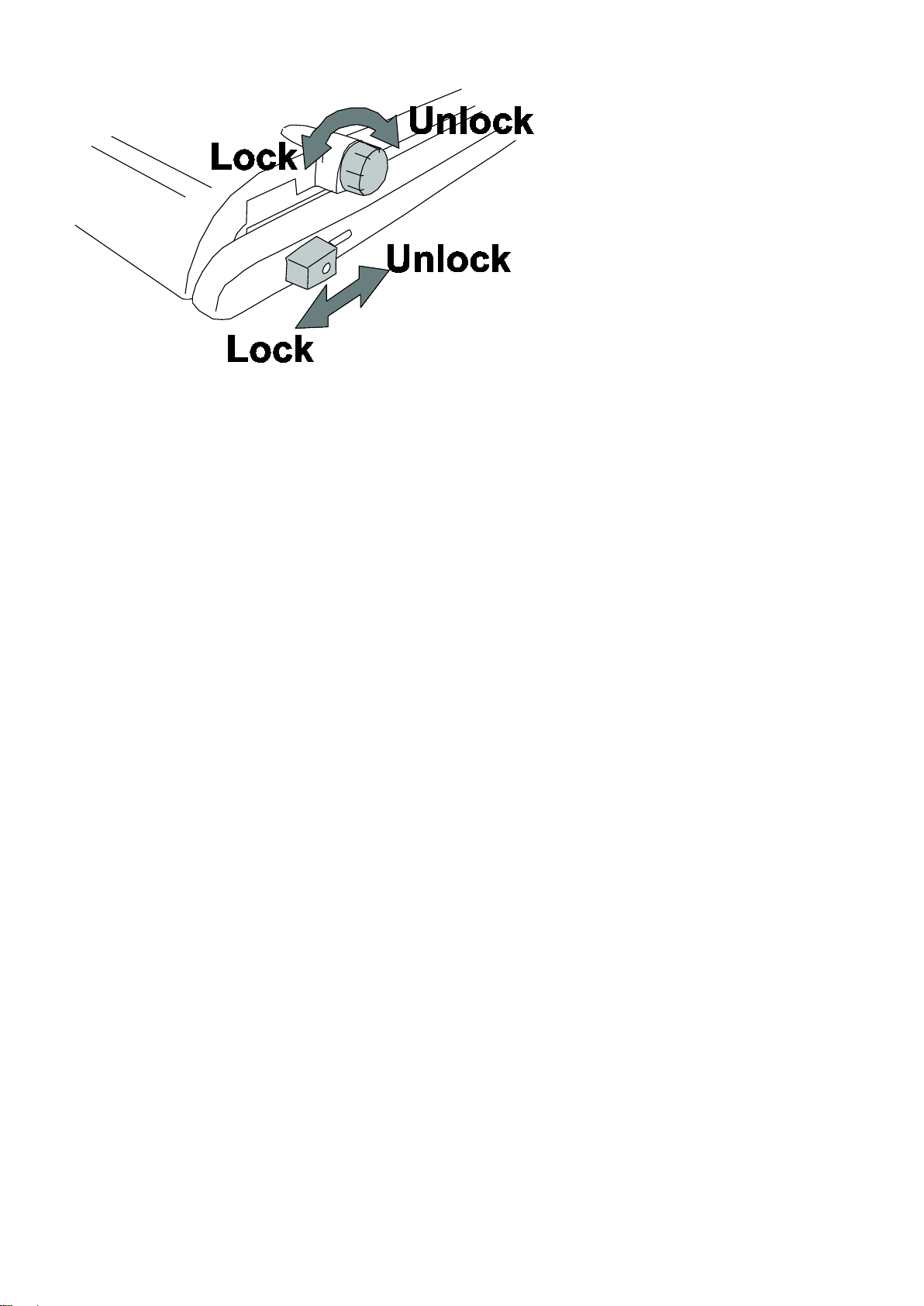
Release the brake on
the reading table and
pull the table out
towards you. If you
push the table back in
again, you will see that
the table locks home
only when located
centrally between its legs. Place some text on the table
and you should see it on the screen.
2. Folding down and moving
• Turn off the unit using the power switch
• Unplug the power adapter from the Presto and also
from the wall socket.
• Remove all material from the reading table.
• Park the table centrally between its legs and apply
the brakes.
• Fold the screen back.
Page 6
Page 6 Presto User Manual Rev A EN
3. The Front Panel
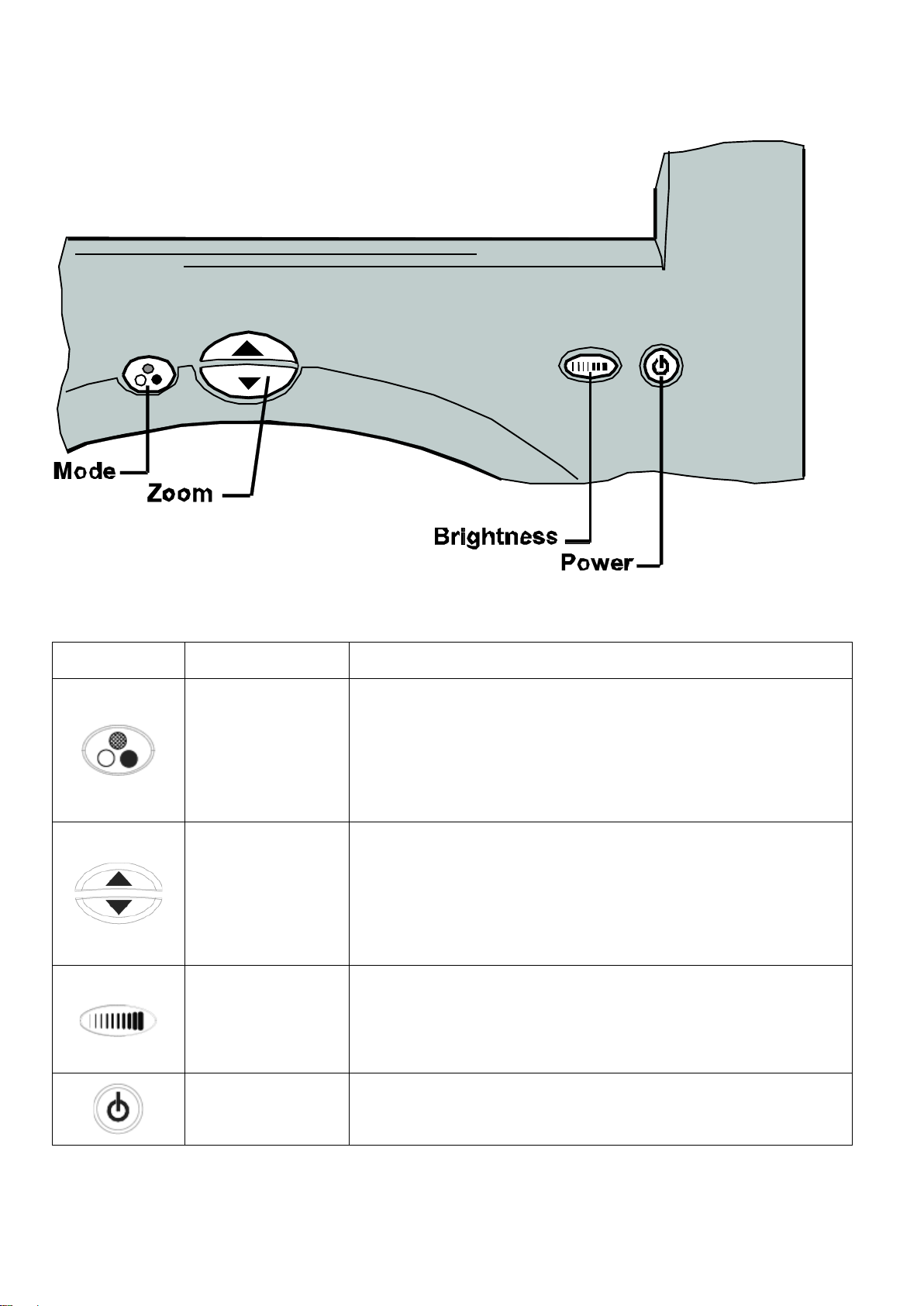
The front panel has five buttons that control the various function of the Presto.
Symbol
Name
Basic function
Mode
The mode button switches
between picture mode (for viewing
pictures and images) and positive
and negative reading modes.
Zoom
Press the upper button to zoom in
and increase magnification.
Press the lower button to zoom out
and reduce magnification.
Brightness
Press to select the image
brightness and contrast settings
you prefer.
Power
Press to power-on and power-off
the Presto.
Page 7

Page 7 Presto User Manual Rev A EN
4. Functions
This section will describe how to use the features of the
Presto to magnify text and images. Follow the
instructions in section 1 – Setting Up before you begin
using the unit.
Reading Table
Unlock the table and place the material you want to read
on it. The table should slide easily in all directions. After
transport, the bearing carriers in the table slides may
have moved, tending to restrict the extent of the
movement – this is normal. To correct this, extend the
table in all directions to its full extent, applying sufficient
force to re-align the bearing carriers.
The brakes on the table can be used to restrict the table’s
movement:
• The rotary knob locks the side-to-side movement.
• The sliding knob locks the in-out movement.
Both brakes operate independently and you may find that
locking one or other allows you to scan a line of text or a
column of numbers easily. Locking both brakes facilitates
writing under the unit.
Power button
Press the power button to turn on the unit. Pressing the
power button again (after the start-up screen has cleared)
will turn off the unit. The Presto stores its settings only
when it is powered off using the power button. If the
power is interrupted, either by a mains failure or by
Page 8

Page 8 Presto User Manual Rev A EN
unplugging the power, any changes made during the
session are lost.
Zooming in and out
Press the upper half of the zoom control to enlarge the
magnification. The button can be held until the desired
magnification is reached. When the maximum
magnification is reached the zooming will stop.
Pressing the lower half of the zoom control will reduce the
magnification in a similar manner.
On releasing the zoom control, the selected level of
magnification will be displayed briefly in the lower right on
the screen.
Picture and Reading Modes
Picture mode offers a full colour image suitable for
viewing photographs and other images or for viewing text
without enhancement.
There are two Reading modes, positive and negative;
sometimes referred to as normal and reversed. The
positive mode enhances the contrast and removes greys.
Negative mode enhances the contrast and also reverses
the ink and paper making the letters white and the paper
black.
The Mode button is used to select the desired image
mode. Repeated pressing of the mode button will switch
from picture mode to positive to negative and back to
Page 9

Page 9 Presto User Manual Rev A EN
picture mode. Select the reading mode you find easiest
to use.
Brightness Control
All three modes (photo, positive and negative) have four brightness and contrast settings. Press the brightness button to select the setting you prefer for the material you are viewing.
Page 10
Page 10 Presto User Manual Rev A EN
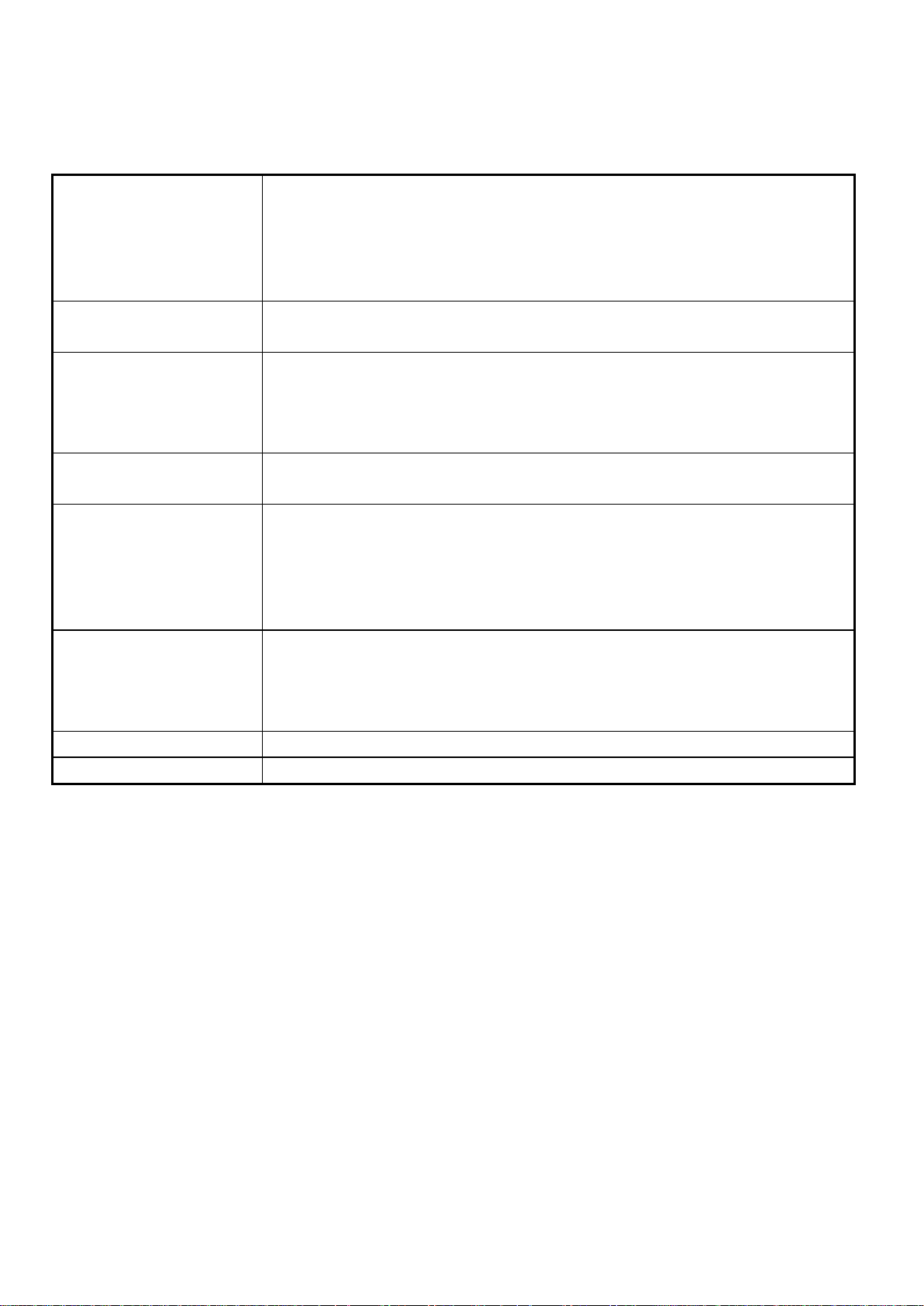
Specifications
Dimensions:
Table footprint: 45cm x 42cm (17.7” x 16.5”)
Folded height: 18.5cm (7.3”)
Upright height: 54cm (21”)
Height to screen centre: 38cm (15”)
Weight: 9kg (20 pounds)
Power:
12V 3A from the power supply provided. Wide input
voltage (100V to 240V, 50-60Hz)
Display:
15.1-inch diagonal Active Colour Matrix TFT liquid crystal
display (viewing area comparable to a 17 inch standard
picture tube); 1024 x 768 pixels; anti-glare coating. Free
from the flicker and radiation associated with CRT monitors.
Modes of
Operation:
High-contrast positive and negative reading
Full colour picture mode.
Advanced features:
Extra large reading table with 41cm x 30cm (16” x 12”)
travel.
Auto-focus
LED lighting
Adjustable image settings
Ergonomics:
Collapsible to compact size.
Comfortable screen height.
Tiltable display.
Low weight
Magnification:
X2.5 to x40 continuous zoom
Temperature:
10°C to 40°C (50°F to 100°F)
As we strive to constantly improve our products, this information is
subject to change without notice.
Page 11

Page 11 Presto User Manual Rev A EN
DECLARATION OF CONFORMITY
We, Ash Technologies Ltd., declare under our sole responsibility that this product, Presto, of the brand As h
Technologies to which this declaration relates, is in conformity with the following standards or other normative
documents:
EN 55022:1998 + A1:2000 + A2:2003 ITE – Radiated emissions
EN 55024:1998 + A1:2001 + A2:2003 ITE – Immunity characteristics
following the provisions of EMC directive 89/336/EEC and Low Voltage directive 73/23/EEC and the Medical
Directive 93/42/EEC.
Alan Johnston
Engineering Director
Ash Technologies Ltd, Naas, Ireland.
4th January 2008
Page 12

Page 12 Presto User Manual Rev A EN
Warranty
Ash Technologies warrants the equipment, when purchased new, to be
free from defects in material and workmanship and will repair or
replace at Ash Technologies' discretion, any equipment which exhibits
such defects; provided that the equipment has been operated under the
proper conditions of installation and has not been tampered with by
any persons not authorized by Ash Technologies or its agents and that
it is solely serviced by Ash Technologies or its agents.
This warranty shall be voided in the event of damage or abuse caused,
in the opinion of Ash Technologies or its agents, by dropping the unit.
Cracks, scratches and pixel defects or similar damage to the display
are specifically excluded from warranty.
In no event shall Ash Technologies or its agents be liable for special,
indirect, incidental or consequential damages; the original user's
remedies being limited to repair or replacement.
This warranty is valid only when serviced in the country of original
purchase.
Ash Technologies makes no other or further warranty, express or
implied, including and warranty of fitness for a specific purpose or
warranty of merchantability.
This warranty is valid for a period of
TWO YEARS
effective from the date of delivery.
For warranty claims or service during or after warranty
period please contact your distributor.
Ash Technologies Limited, B5, M7 Business Park, Naas, Ireland.
[email protected] www.ashtech.ie
 Loading...