

Page 1

The Mutant Hot Glue
analog bus mixer with effects and compressor
Thank you for your interest in the Mutant Hot Glue (MHG) eurorack module. We would like to thank you for
considering a place for the MHG in your modular synthesizer! We hope you find it as useful as we do.
GLUING THINGS TOGETHER
Having previously developed the limited edition batteryACID distortion + compressor module for the I Dream
of Wires modular synthesizer documentary, we were getting a lot of customer requests to produce more of
them, after the limited stock ran out. batteryACID is a voltage controlled distortion which is coupled to a
great sounding, but really easy to use analog compressor. We wanted to bring something to the eurorack
modular realm that would provide similar utility, but be a different module altogether. The Mutant Hot Glue is
the result of our venture. It combines a handy four channel mixer with effects send and return, together with
a voltage controlled distortion and analog compressor. The distortion makes the signal “HOT” and the
compressor “GLUE”s your mix together. Get the joke? Ha…ha….
FEATURES
4 Channel Mixer with Effects Send
4 input channels, each with their own level and effects send control
Channel A mixer bypass switch and dedicated output for easy sidechain compression
Channel B is dual input, but shares level/send controls (for dual output modules, like the Mutant Hihats)
Channel C+D summed output
Main mixer output normalized to compressor input
Hi-Fidelity Analog Compressor
Soft-knee compressor based on the same family of premium audio ICs used in some 500 Series studio gear
Dedicated threshold and compression ratio controls
Gain control dials in up to +40dB of compressor make-up gain
Compressor sidechain input for creating pumping effects
LED indicator actively displays the amount of compressor gain reduction
Voltage Controlled Analog Distortion
A classic distortion topology reborn for modular analog synthesizers and drum processing
In/Outputs are conveniently normalized to the module’s send and return jacks
Blend control lets you adjust the mix of distorted and clean input signal
Fast responding CV input allows for complex modulation patterns and even modulating with audio signals
TECHNICAL SPECIFICATIONS
Width: 24HP | Depth: 30mm
Current draw: +70mA, -70mA @ 12V
04.24.2015 Mutant Hot Glue user manual v1.05 PG1
HEXINVERTER ELECTRONICS INC., 2015
Page 2
THE HOT GLUE ARCHITECTURE
The Mutant Hot Glue is a versatile bus mixer for analog effects chain design. The included analog
compressor offers series or parallel compression and a sidechain input, making it particularly well suited to
drum processing. The voltage controlled distortion is based on ideas borrowed from the guitar pedals
responsible for a lot of yesterday’s acid style techno sounds, but improved over the guitar equivalents, and
made specifically for synthesizer and drum processing. The distortion can be used in its default position,
normalized to the effects send, or like every other part of the module, broken out and used elsewhere in your
modular system.
By default, the 4 channel mixer’s output conveniently feeds into the compressor’s input, giving access to
easy New York style parallel compression by way of the compressor blend control. The dedicated output and
mixer bypass switch for channel A allow you to use it as a sidechain source for the compressor. An effects
send and return allow you to create complex effects routings within your modular system. With the number
of excellent DSP and other effects modules on the market today, this makes it easy to combine modules to
great effect, all within the eurorack modular domain.
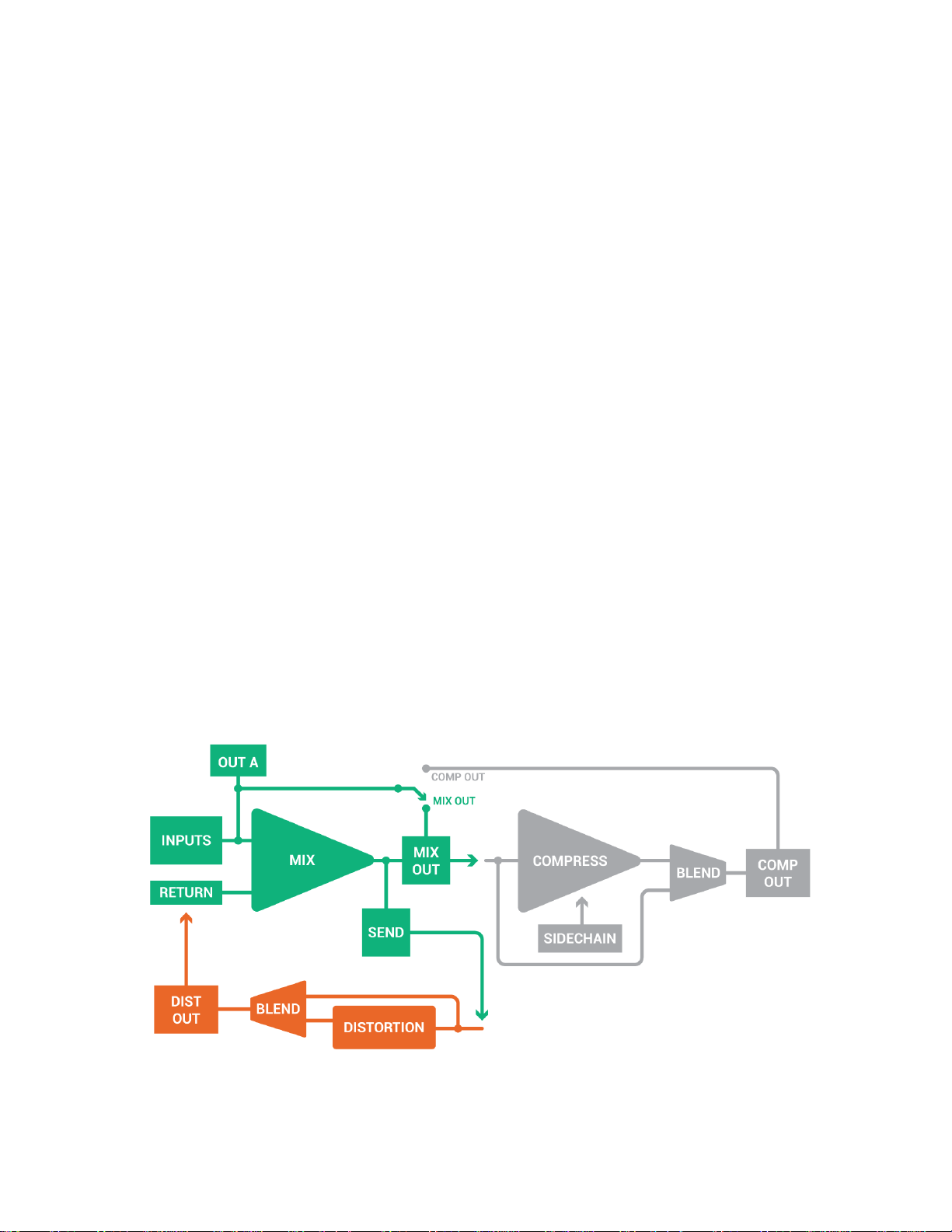
Below is a diagram of the basic signal flow and normalizing in the Mutant Hot Glue. We haven’t shown every
input and output here, for clarity’s sake. Just the ones that we feel would be most confusing to understand.
The main points to take away from this diagram are:
MIX OUT normalizes to the COMPRESSOR input until you plug a signal into the compressor input
CHANNEL A can be switched to go to the COMP OUT jack instead of MIX OUT
By plugging a signal into the SIDECHAIN input, the compressor is driven by that sidechain signal instead of the
signal coming in to the compressor during normal compression.
The DISTORTION normalizes to the effects SEND and RETURN by default, until you plug jacks in and break the
signal flow. You can easily add external effects in series with the built-in DISTORTION this way, or replace the
distortion entirely.
04.24.2015 Mutant Hot Glue user manual v1.05 PG2
HEXINVERTER ELECTRONICS INC., 2015
Page 3
THE MIXER INTERFACE
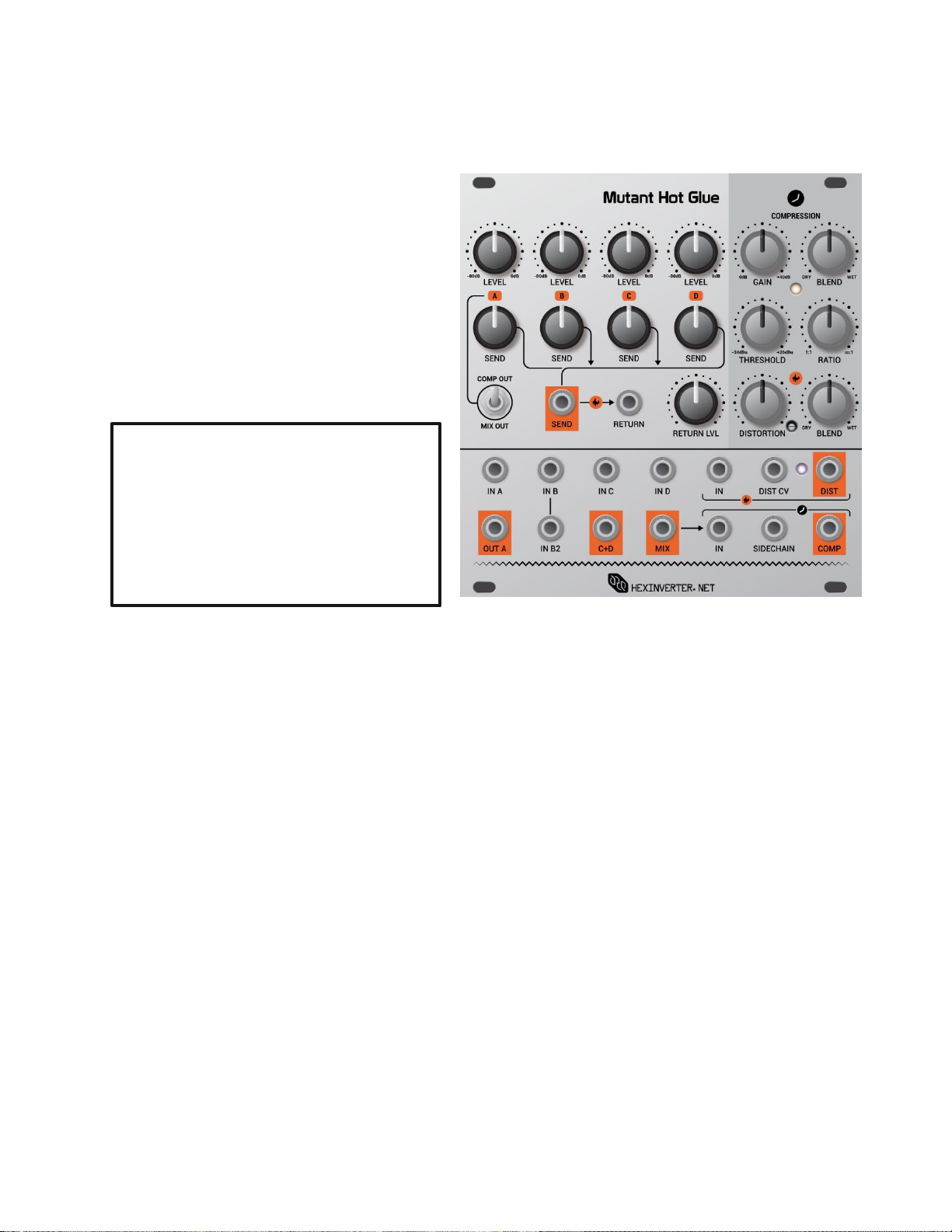
Use the switch below IN A’s controls to toggle
between IN A’s routing. When set to MIX OUT,
channel A is blended into the MIX output as
normal. When switched to COMP OUT, however,
channel A bypasses the MIX output and gets
summed at the COMP output jack. This can be
useful for sidechain dynamics when you don’t
want your sidechain source going into the
compressor with the rest of the mix.
LEVEL CONTROLS
Each LEVEL control can attenuate the input signal
present, or allow the input signal to pass at 0dB. As
eurorack signals can get quite high in volume, you may
need to dial them down to work with lower level
signals from other sources.
IN/OUT A
This input can easily be used as the compressor
sidechain signal source, if desired. So plug your
bassdrum or other source to be used as a sidechain
here, if you plan to use sidechain dynamics. Otherwise,
it is just a regular input. IN A’s attenuated signal is
always present at OUT A.
IN B, IN B2
IN B and IN B2 share a common LEVEL control. This dual input is handy for using with modules like the Mutant Hihats,
which has two audio outputs.
IN C, IN D, C+D
IN C and IN D are regular mixer inputs. The C+D output sums IN C and IN D together, for sending elsewhere in your
system, if desired.
SEND CONTROLS
Adjusts the level of each channel sent out of the SEND output to the effects loop (SEND/RETURN). Outputs signal to a
maximum of 0dB (unity gain).
RETURN LVL
Adjusts the volume of the external effects coming back into the mixer. Plug your effect chain’s output into this jack, or
use it like a 5th input jack for the mixer, and add another signal into the mix.
THE DISTORTION INTERFACE
DISTORTION CONTROL + DIST CV INPUT
The control adjusts the amount of distortion, and the CV input will modulate the distortion from clean to fully distorted
with an CV signal of a little less than 5 volts. The purple LED beside the distortion jacks lights up as distortion occurs.
BLEND CONTROL
Adjust the DISTORTION wet/dry blend with this control.
04.24.2015 Mutant Hot Glue user manual v1.05 PG3
HEXINVERTER ELECTRONICS INC., 2015
Page 4
ADJUSTING THE DISTORTION LIMIT
Try adding some distortion to your mix while applying heavy sidechain pumping.
While applying some dramatic sidechain to your mix, turn up the RETURN and DISTORTION
controls about half way, making sure that the distortion’s BLEND control is also turned to
WET. Now, bring in some SEND for each mix element you want to add distortion to. Don’t be
afraid to try it on the signal you are using as a sidechain source. It can get pretty crazy!
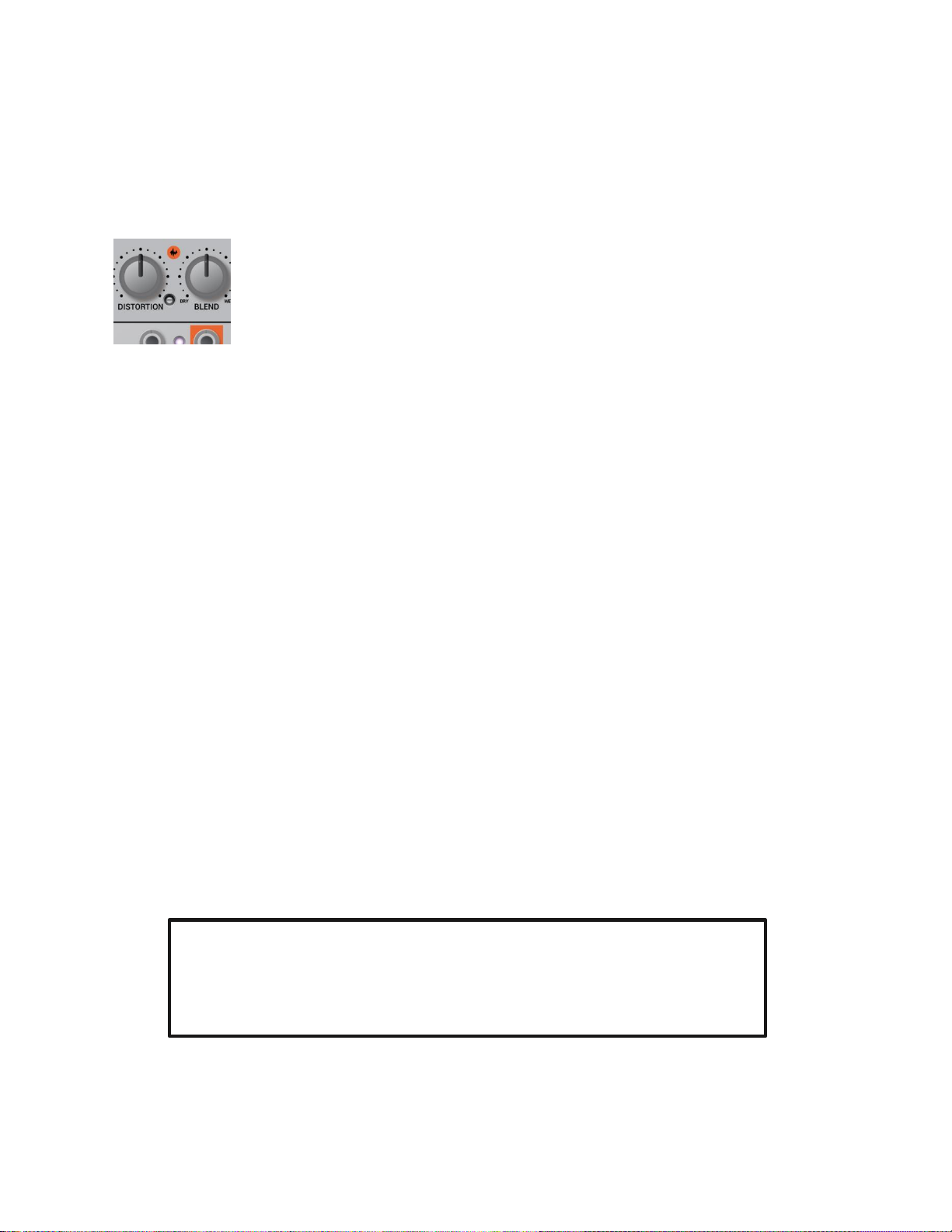
There is a trim screw on the front of the panel so you can adjust the maximum amount of distortion to your taste. From
the factory, it is set to a fairly high value that should be suitable for most signals, but, if you find you are getting too
little or too much distortion, you may need to adjust it to your taste. To calibrate the maximum distortion, follow these
steps:
Insert an audio signal into the distortion input (a low-pass resonant filtered bassline is a good
benchmark)
Turn the BLEND control completely up (fully distorted)
Turn the DISTORTION control to maximum
Adjust the trim screw while listening to the signal. You are now adjusting the maximum
distortion possible on the signal. Please note that the trim pot used can turn upwards of 12
times, so if you’re not hearing any change, keep turning, or switch directions until you perceive
change.
THE COMPRESSOR INTERFACE
BLEND CONTROL
Adjust the wet/dry mix of the compressor from completely dry to fully compressed with this control.
THRESHOLD + RATIO CONTROLS
The THRESHOLD adjusts the amplitude of signal which the compressor begins to react at, and the RATIO adjusts the
amount of compression applied to the signal when it kicks in.
GAIN
Turn this control up to add make-up gain to the compressor. This control is capable of adding an overwhelming amount
of gain to the signal.
SIDECHAIN INPUT
Plug a signal into the AC-coupled SIDECHAIN input to modulate the compressor with a specific audio signal. Doing so
breaks the normalized connection derived from the compressor input signal.
SIDECHAIN COMPRESSION
The Mutant Hot Glue allows you to easily use mixer IN A as a sidechain source, with the following steps…
Plug the signal you want to use to sidechain your mix into the IN A input (eg: a bassdrum)
Patch OUT A to the SIDECHAIN input
Switch IN A’s toggle switch to COMP OUT to bypass the mixer output, and sum channel A directly at the COMP
output.
For good results, try a very high RATIO, turn up the BLEND and turn your THRESHOLD down slowly while
listening to the output to hear the pumping take effect. You will see the gain reduction LED light up as your
sidechain signal source activates the compressor. You will probably want to adjust your compressor settings to
match the signal strength you are using.
04.24.2015 Mutant Hot Glue user manual v1.05 PG4
HEXINVERTER ELECTRONICS INC., 2015
Page 5

CHANGING THE COMPRESSOR RESPONSE SPEED
SLOW = 220ms attack/release
MEDIUM = 45ms attack/release
FAST = 2ms attack/release
In order to make the compressor in the Mutant Hot Glue high quality yet economic enough to fit our price
point, we had to settle with a fixed attack/release ratio for the circuit. As you may or may not have noticed,
there is a jumper on the back of the module that lets you change this speed setting, should you not enjoy the
versatile MED (medium) setting which is useful for the majority of dynamics effects. To change the setting,
move the jumper on the back of the module (while it’s powered off) to the jumper setting displayed on the
legend on the back of the module.
04.24.2015 Mutant Hot Glue user manual v1.05 PG5
HEXINVERTER ELECTRONICS INC., 2015
 Loading...