

Page 1
FusionBox
Thank you for ordering erica SynThS fuSionbox!
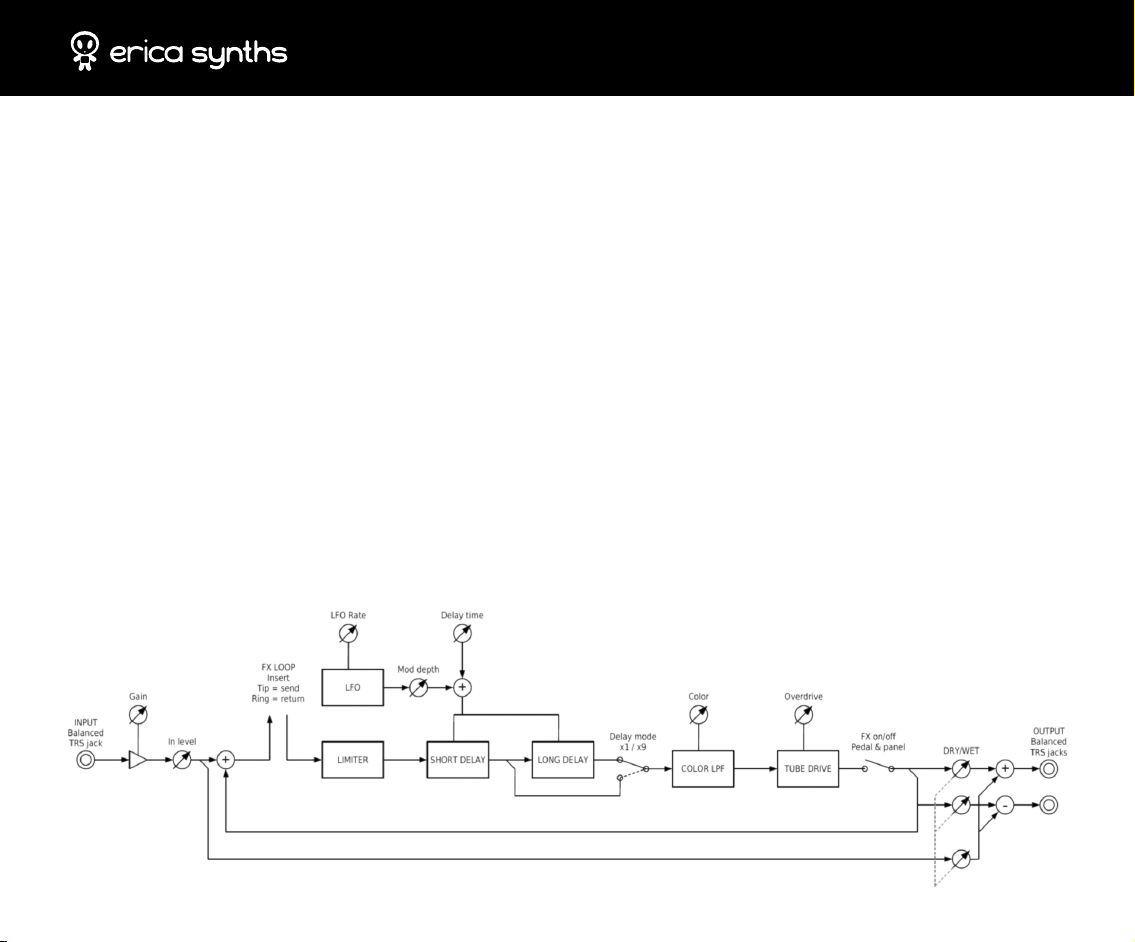
Erica Synths Fusionbox is distinct multifunctional analogue eects unit that combines BBD chip based
eects – delay, anger, chorus – with an adjustable tube overdrive in the delay output and feedback path
for extra thickness of sound. For more exibility, lowpass ltering is fully adjustable from none to extreme
for really deep bass sound. Special feature, not found in other contemporary stompboxes or eect units, is
Vintage Stereo Ensemble.
Vintage Stereo Ensemble provides the classic “stereo ensemble” eect, found on many vintage synthesizers from almost any brand
and make. In stereo ensemble eect, the delayed, processed and ltered sound is added back to the dry (mono) audio with inverted
phase for one channel, and direct phase in other. This gives it the distinct and unique moving character, dierent than that obtained
with chorus eects. However, use of inverted phase in stereo eld also adds certain peculiarities to watch out for. For example,
when such stereo audio is played back on an older “surround” decoding sound system, ensemble eect sound may move to the
rear sound channel. Also, if the output gets mixed back to mono, the eect may disappear. This also applies to mono subwoofer
systems, or speakers that are placed too close. This is normal, and occurs with any similar vintage stereo ensemble processing. In
case if such oddities are undesirable, to avoid mono mixing issues, you can choose to use only one of the output channels, or use
two separate ensemble processors for le and right channels.
Fusionbox has adjustable input gain, therefore it works with various sound sources – guitars, units with line level signals
(synthesizers, grooveboxes, etc.) and modular synths. Footswitch allows to switch on or bypass eects making Fusionbox ideal
for guitar players.
Fusionbox Block diagram
Page 2
WHAT YOU GET?
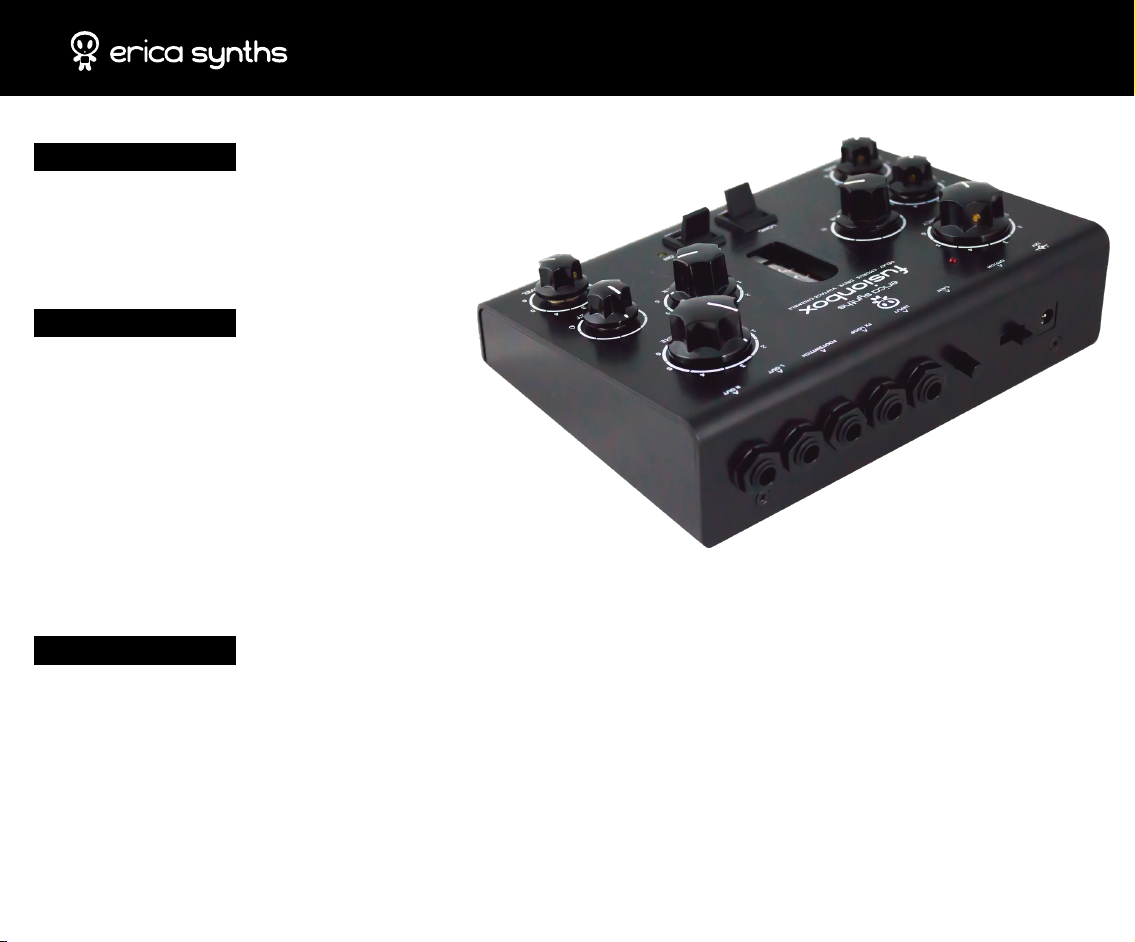
Fusionbox
Universal 12V PSU
User manual
FEATURES
Delay and Flanger eects
Vintage Ensemble Stereo eect
Tube overdrive in the delay output and feedback path
FX send/receive connector
Footswitch connector
2 BBD chips (1024 and 4096 stages)
Passive Lowpass lter for extreme subbass sound
FusionBox
SPECS
Input signal level .......................................................................................................................................... up to 20V ptp
Input signal amplication ..............................................................................................................................up to +48dB
Power supply: .....................................................................................................................................................110 – 220V
Mass: ...............................................................................................................................................................................0,7kg
Dimensions: ................................................................................................................................................ 185x140x55mm
Page 3
SHORT
LONG
BYPASS
ON
3
2
1
0 6
4
5
MOD. LEVEL
INPUT LEVEL
3
2
1
0 6
4
5
DRY/WET
3
2
1
0 6
4
5
OVERDRIVE
3
2
1
0 6
4
5
DELAY TIME
3
2
1
0 6
4
5
FEEDBACK
3
2
1
0 6
4
5
FREQUENCY
GAINOFF/ON INPUT FX LOOP FOOTSWITCH L OUT R OUT12V
COLOUR
DELAY · CHORUS · DRIVE · VINTAGE ENSEMBLE
ON
FusionBox
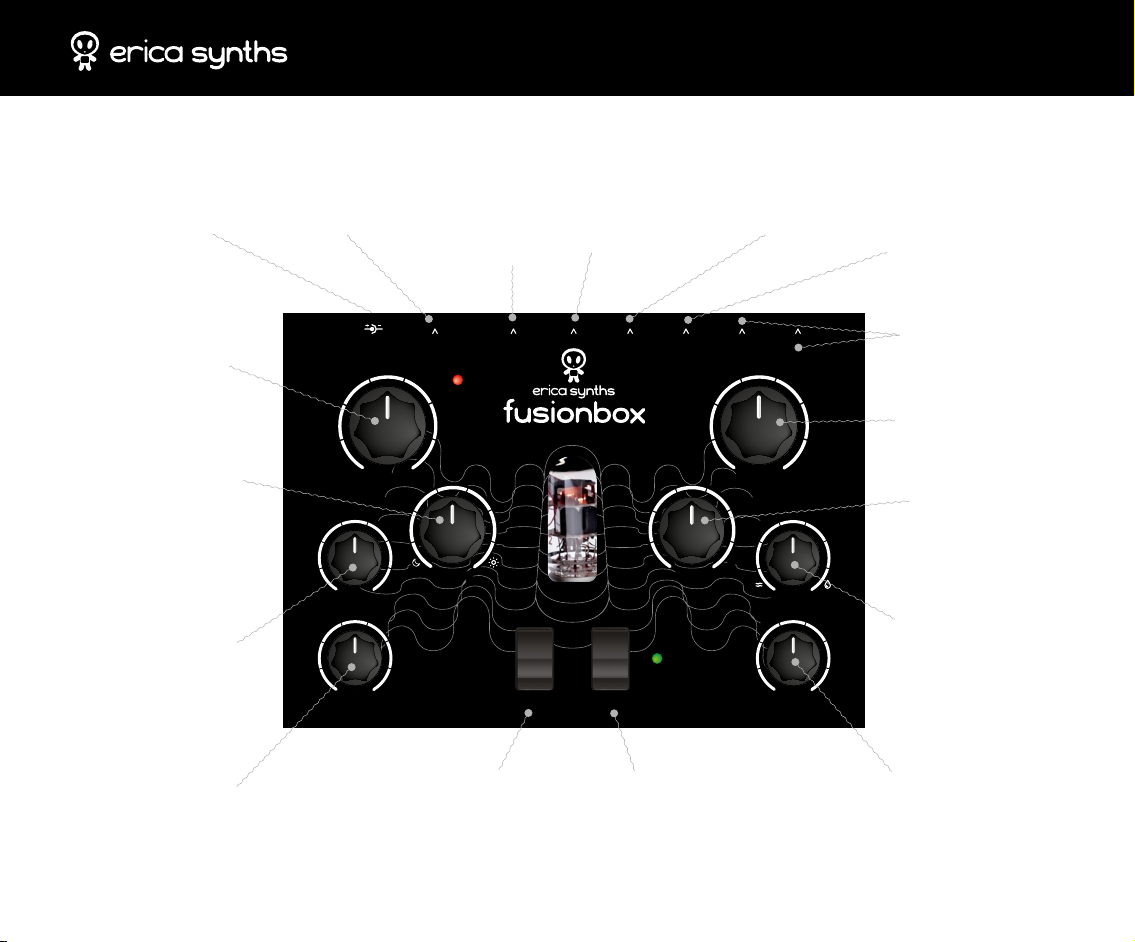
Power supply input
Use the PSU supplied with the
Fusionbox! It’s universal PSU
you can use all over the world
LFO Frequency Knob
Set LFO speed. The LED
will indicate LFO output
status. LFO is hard wired to
modulate delay time
Colour Knob
It’s lowpass filter on the
output signal. CW (bright)
setting means filter has no
effect on the output signal,
turning the knob CCW, you’ll
get dark, bassy sound on the
output
Overdrive Knob
It applies distinct germanium
diode overdrive to the signal
that passes through the
vacuum tube. CCW setting
gives no overdrive, CW
setting– crazy s**t
Modulation Level Knob
Adjust to achieve desired
delay time modulation level
ON-OFF switch
Slide to activate the
unit! LFO LED will go
on for visual control
Gain knob
Adjust input gain of the
Fusionbox. CW setting
boosts input signal for
+48dB, so you can use
Fusionbox with guitar
Audio Input Jack
Plug your sound source
here! It accepts signals
beginning from guitar
pickups to modular
synths
FX Loop Jack
You can use Fusionbox
as FX insert. Tip is FX
send and Ring is FX
return
Footswitch Jack
You can bypass the effect on
the Fusionbox via external
footswitch (not supplied with
the Fusionbox). Bypass circuit
is designed to accept any
footswitch (On or Off) with
6,3mm jack connector
L and R Output Jacks
Fusionbox has balanced
outputs for stage use. Watch
your speakers!
Delay Time Knob
Adjust manually delay
time! Full CW setting gives
maximum delay time
Feedback Knob
Set desired feedback level
from 0 to self-oscillation!
Switch between Long delay
mode (up to 800ms) and
Short, more flanger-like,
Long/Short Switch
delay mode
Bypass Switch
The switch bypasses all
effects. The switch is
overridden by the footswitch
Dry/Wet Knob
Adjust balance between
Dry and Wet signal. You’ll
get most interesting stereo
effects with knob setting
somewhere between 2and5
Audio Input Level Knob
Adjust input level. Please note
that for tube effects audio level
contributes to overall sound.
In settings above 5 you will
get interesting tube overdrive
effects
Page 4
SafeTy inSTrucTionS
FusionBox
Please follow the instructions for use of this
Erica Synths module below, ‘cause only this will
guarantee proper operation of the module and
ensure warranty from Erica Synths.
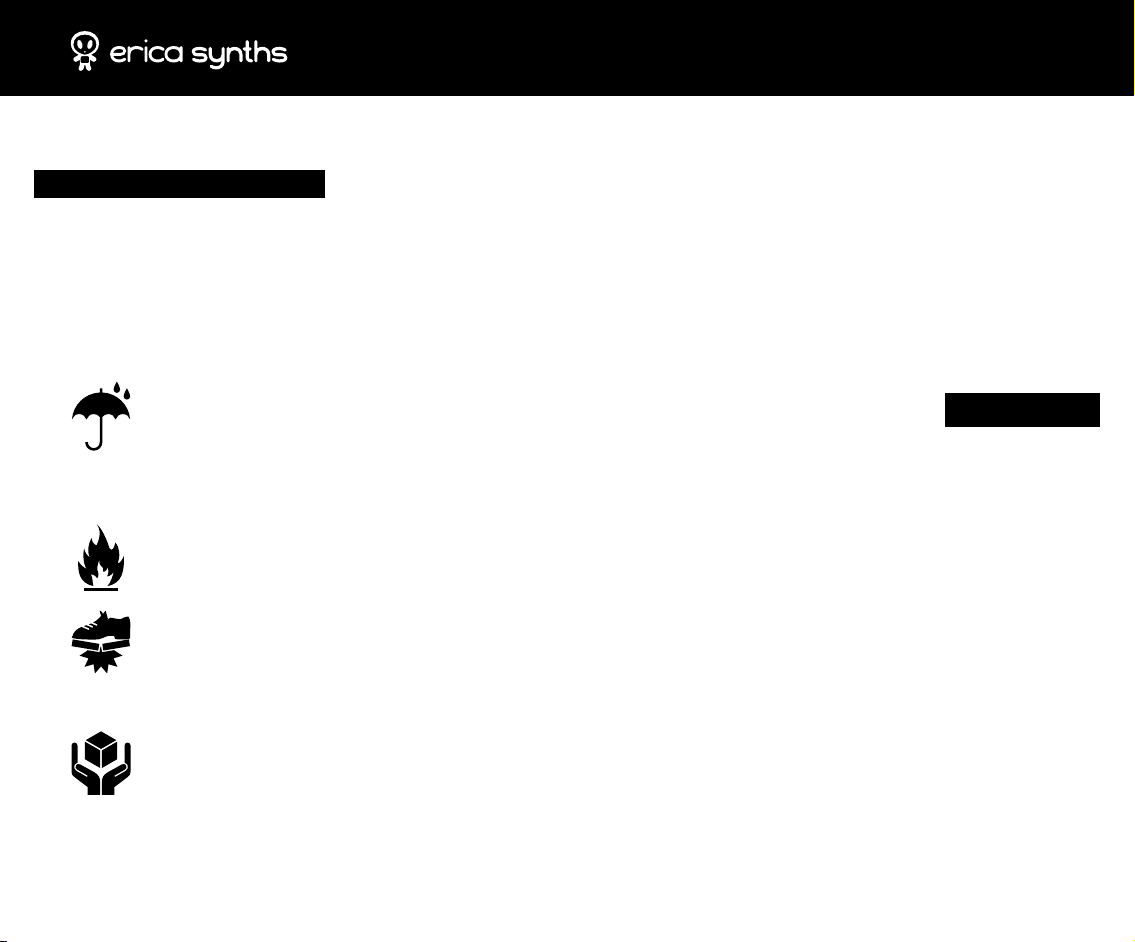
Water is lethal for most of the electric devices,
unless they are made waterproof. Erica Synths
module is NOT intended for use in a humid or
wet environment. No liquids or other conducting
substances must get into the module. Should this
happen, the module should be disconnected from
mains power immediately, dried, examined and
cleaned by a qualied technician.
Do not expose the module to temperatures above
+50° C or below -20° C.
Transport the instrument with modules installed
carefully, never let it drop or fall over. Warranty
does not apply to modules with visual damages.
The module has to be shipped in the original
packaging only. Any module shipped to us for
return, exchange and/or warranty repair has to be
in its original packaging. All other deliveries will be
rejected and returned to you. Make sure you keep
the original packaging and technical documentation.
You will nd Erica Synths terms of warranty at
http://ericasynths.lv/en/terms/
Items for return, exchange and/or warranty
repair have to be sent to: Erica Synths,
Andrejostas Str.12, Riga, Latvia, LV-1045
diSPoSaL
This device complies to the EU guidelines and is
manufactured RoHS conforming without use of led,
mercury, cadmium and chrome.
Nevertheless, this device is special waste and disposal
in household waste is not recommended.
Designed and made in Latvia.
User manual by Girts Ozolins@Erica Synths.
Design by Baiba Stelle.
Copying, distribution or any commercial use in any way
is prohibited and needs the written
permission by Erica Synths.
Specications are subject to change without notice.
In case of any questions feel free to contact us via
e-mail [email protected]
Check out other Erica Synths modules & devices at
www.ericasynths.lv
 Loading...