

Page 1
RSA SecurID Ready Implementation Guide
Last Modified: May 25, 2006
Partner Information
Product Information
Partner Name
Web Site www.etindia.com & www.bankflex.net
Product Name
Version & Platform
Product Description
Product Category
Eon Technologies Pvt. Ltd.
Bank-Flex
Bank-Flex Version 1.0 (J2EE) on Windows Server
Bank-Flex Version 1.0 (J2EE) on Solaris 9
Bank-Flex comprises of a robust framework called Bank-Flex Platform and
banking Channel solutions. Bank-Flex Platform provides an enterprise
solution platform for building end-to-end solutions. Bank-Flex Platform is a
set of pre-defined, reusable components and is designed to serve as a
base framework and knowledge repository of generic components and
services to develop banking/financial software products. This framework
lays down the base structure to design and develop front-end and serverside applications.
Bank-Flex Internet Banking, Bank-Flex Mobile Banking and Bank-Flex
Teller are the channel solutions that are built over Bank-Flex Platform.
e-Commerce / e-Business
1
Page 2

Solution Summary
The RSA SecurID Authentication feature enhances security by providing two-factor authenticat ion to
access banking solutions by its users.
Token-based authentication provides a second layer of system security for Bank-Flex Channe l solutions.
RSA SecurID authentication is an optional functionality enabled by the configuration of Bank-Flex
Platform with RSA Authentication Manager. RSA SecurID authentication requires users to enter a
second, ever-changing password to re-confirm user identity before certain actions. A portable
authentication device supplies the dynamic password.
To achieve the highest possible level of additional security, Bank-Flex partners with RSA Security Inc. to
provide RSA SecurID authentication at login.
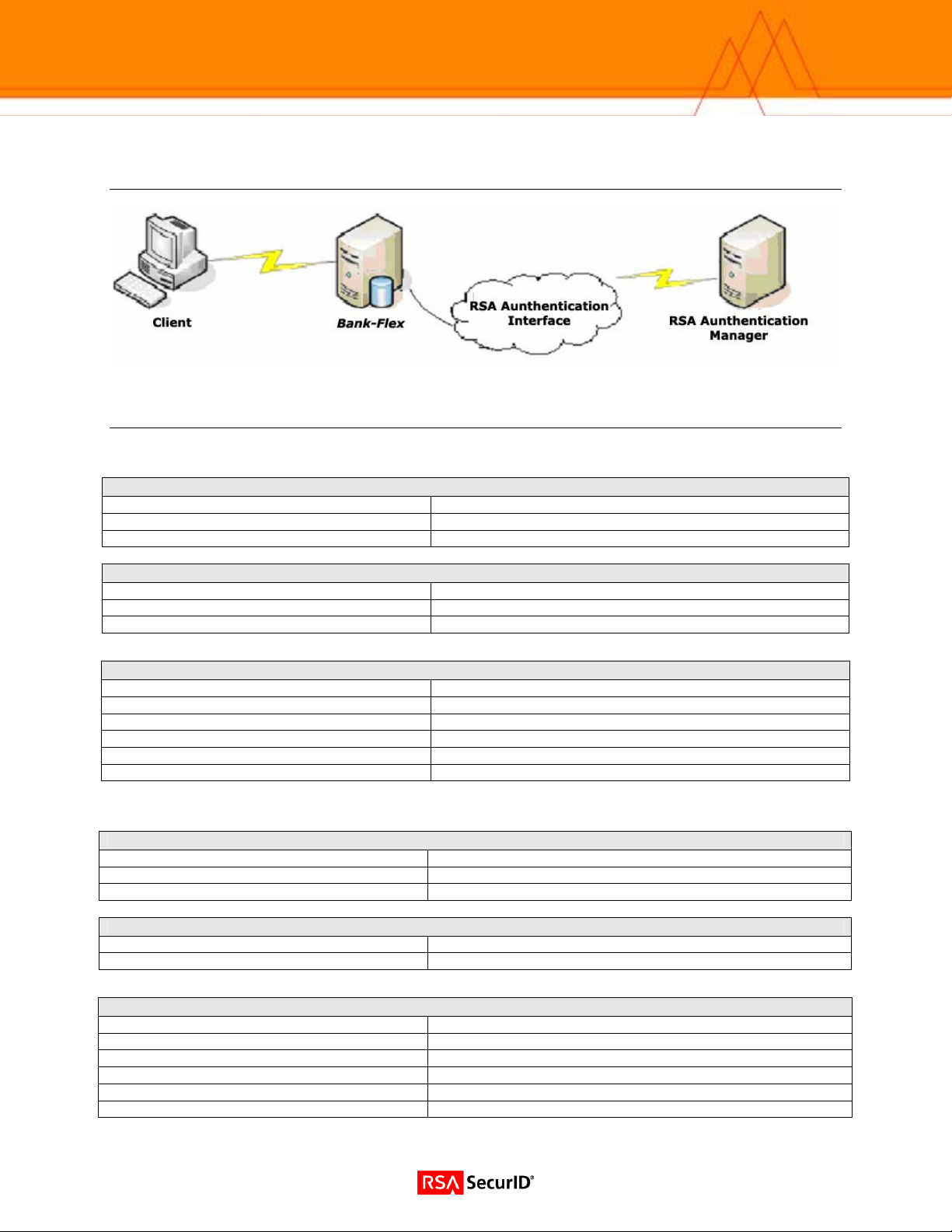
In Bank-Flex, the user is authenticated using the RSA SecurID token (provided the user is enabled for
RSA SecurID authentication).
• At login, when users enter a PIN and tokencode, which comprises the RSA SecurID passcode, the Bank-Flex
sends a request to the system where RSA Authentication Manager is running by invoking the suitable RSA API
calls with respect to the request.
• Bank-Flex communicates securely with the RSA Authentication Manager to confirm that the RSA SecurID
passcode is correct (tokencode values on the device and the server are synchronized).
• If the passcode is correct, the user proceeds. If it is not, Bank-Flex blocks the login request.
Partner Integration Overview
Authentication Methods Supported
List Library Version Used
RSA Authentication Manager Name Locking
RSA Authentication Manager Replica Support
Secondary RADIUS Server Support
Location of Node Secret on Agent
RSA Authentication Agent Host Type
Native RSA SecurID Authentication
5.0.3 for Java
Yes
Full Replica Support
N/A
BEA_HOME\user_projects\bankflex in case of
weblogic application server
Net OS
RSA SecurID User Specification
RSA SecurID Protection of Administrative Users
RSA Software Token and RSA SecurID 800 Automation
Use of Cached Domain Credentials
Designated Users, All Users, Default Method (BankFlex Platform can be configured for any of the three)
No
No
No
2
Page 3
System Architecture
Product Requirements
Bank-Flex Version 1.0 (J2EE) on Windows Server
Partner Product Requirements: Bank-Flex
CPU
Memory
Storage
Operating System
Platform Required Patches
Windows 2000 Server Service Pack 4
Windows 2003 Server Service Pack 1
1.80 GHz
2 GB
35 MB free disk space
Additional Software Requirements
Application Additional Patches
Database Server Oracle Version 9.2.0.1.0, DB2 7.2
Browser IE 6.0 and above
JRE JDK 1.4.2
Application Server Weblogic 8.1, Websphere 6.1, JBOSS 4.1.2, OC4J 10g
Application Clustering requirements Clustering support is available for Weblogic 8.1, Websphere 6.1
Bank-Flex Version 1.0 (J2EE) on Solaris 9
Partner Product Requirements: Bank-Flex
CPU
Memory
Storage
Operating System
Platform Required Patches
Solaris 9
Additional Software Requirements
Application Version - Additional Patches
Database Server Oracle Version 9.2.0.1.0, DB2 7.2
Browser IE 6.0 and above
JRE JDK 1.4.2
Application Server Weblogic 8.1, Websphere 6.1, JBOSS 4.1.2, OC4J 10g
Application Clustering requirements Clustering support is available for Weblogic 8.1
1.2 GHz
2 GB
35 MB free disk space
3
Page 4

Agent Host Configuration
To facilitate communication between the Bank-Flex and the RSA Authentication Manager / RSA SecurID
Appliance, an Agent Host record must be added to the RSA Authentication Manager database. The
Agent Host record identifies the Bank-Flex within its database and contains information about
communication and encryption.
To create the Agent Host record, you will need the following information.
• Hostname
• IP Addresses for all network interfaces
When adding the Agent Host Record, you should configure the Bank-Flex as a Net OS Agent. This
setting is used by the RSA Authentication Manager to determine how communication with the Bank-Flex
will occur.
Note: Hostnames within the RSA Authentication Manager / RSA SecurID
Appliance must resolve to valid IP addresses on the local network.
Please refer to the appropriate RSA Security documentation for additional information about Creating,
Modifying and Managing Agent Host records.
4
Page 5

Partner Authentication Agent Configuration
Before You Begin
This section provides instructions for integrating the partners’ product with RSA SecurID Auth entication.
This document is not intended to suggest optimum installations or configurations.
It is assumed that the reader has both working knowledge of all products involved, and the ability to
perform the tasks outlined in this section. Administrators should have access to the product
documentation for all products in order to install the required components.
All vendor products/components must be installed and working prior to the integration. Perfo rm the
necessary tests to confirm that this is true before proceeding.
Documenting the Solution
Administrative or Installation Software required to configure product
• Weblogic 8.1
• Oracle Version 9.2.0.1.0
Basic steps required to enable RSA SecurID Authentication.
Bank-Flex has the capability of authenticating the user depending on the user type (Actor Type). For the
purpose of this document, we have defined two types of users, ‘IBUser’ and ‘IBSpecialUser’. The figure
below shows users and their actor types assumed for this document.
USER_LOGON_ID ACTOR_TYPE
jlibman IBUser
jwright IBUser
User1 IBSpecialUser
User2 IBSpecialUser
User3 IBSpecialUser
Bank-Flex Authentication Process
Bank-Flex can be configured to invoke a specific Authentication Implementation for a user depending
upon Actor Type. The settings in Bank-Flex Platform security properties file named
“IFrameSecurity.properties” specifies which authentication implementation needs to be invoked for which
type of user (Actor Type).
Example of Bank-Flex Authentication Process
In Bank-Flex Internet banking application, users with actor type IBSpecialUser are being authenticated
against RSA Authentication Manager, and users with IBUser actor type are being authenticated against
Bank-Flex built in database authentication. If the user has any other actor type, then the authentication is
against the default implementation, which is currently set to Bank-Flex built-in database authentication.
The information in IFrameSecurity.properties would be on the following lines:
IBUser :
IBSpecialUser : RSA Authentication
Any Other User :
Bank-Flex
inbuilt Database Authentication
Bank-Flex
inbuilt Database Authentication
5
Page 6

Accordingly, a specific authentication implementation is invoked for authenticating a user:
• Each user needs to have a pre-specified actor type in the Actor table.
• When the user logs into Bank-Flex Internet Banking application, the actor type for the user is determined by
the application from Actor table.
• The application then determines the authentication implementation th at is assigned for this user’s actor type
by looking at the IFrameSecurity.properties file.
• The application loads the specific authentication implementer, and passes on login details (Internet
Banking/Logon Id & password/passcode) of the user for authentication.
• When the user’s actor type does not have a corresponding entry in properties file, then the default
implementation, assigned against “Any other User”, is invoked (For this document, it is in-built database
authentication).
Authentication Implementation can be changed for any Actor type by just changing the entries in the
IFrameSecurity.properties file. For example, to make RSA as default authentication implementation for
any Actor Type, the only change required in the application is to assign “RSA Authentication” in the
properties file for “Any Other User” as shown below:
Any Other User: RSA Authentication
6
Page 7
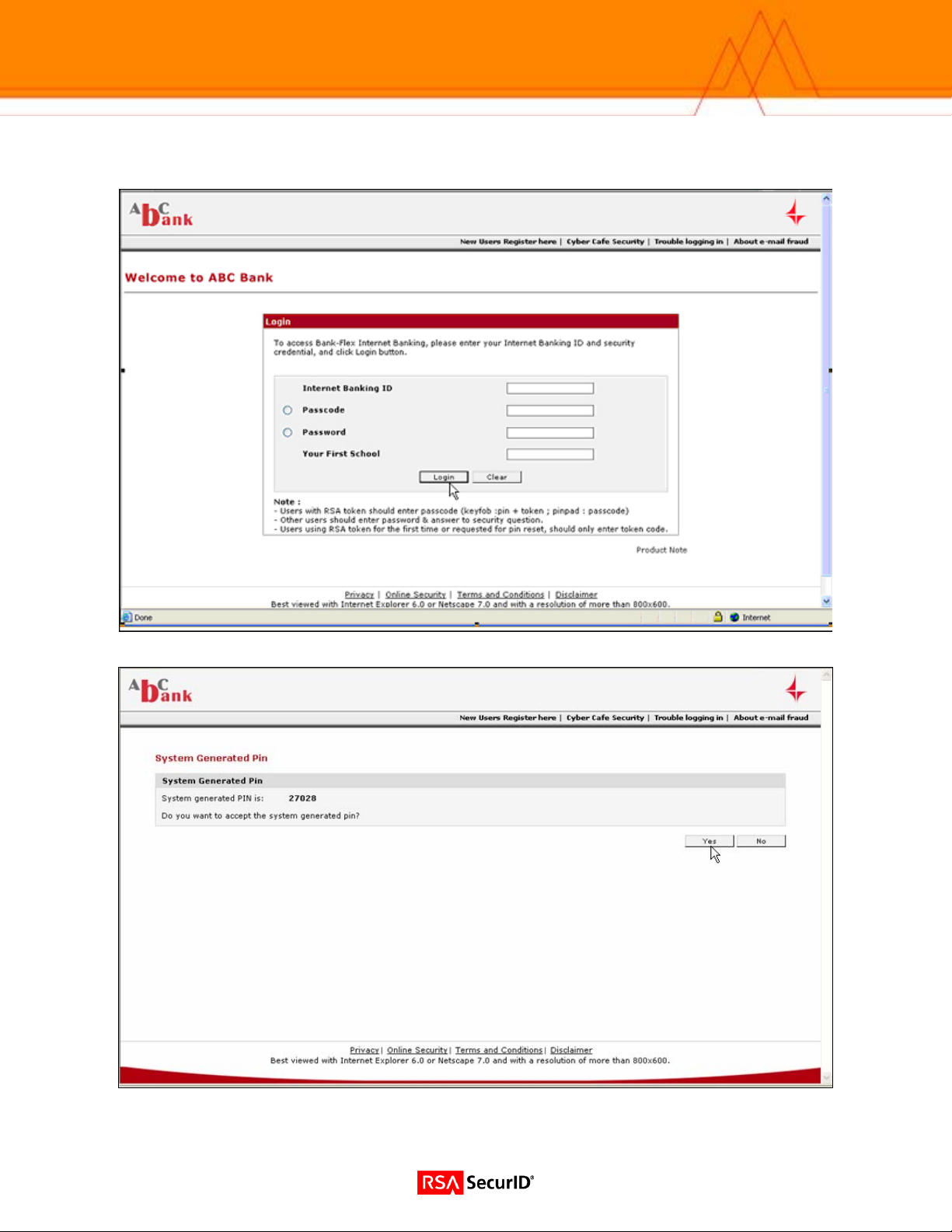
Login Screen Examples
Screen 1 – Login
Screen 2 – System Generated PIN.
7
Page 8
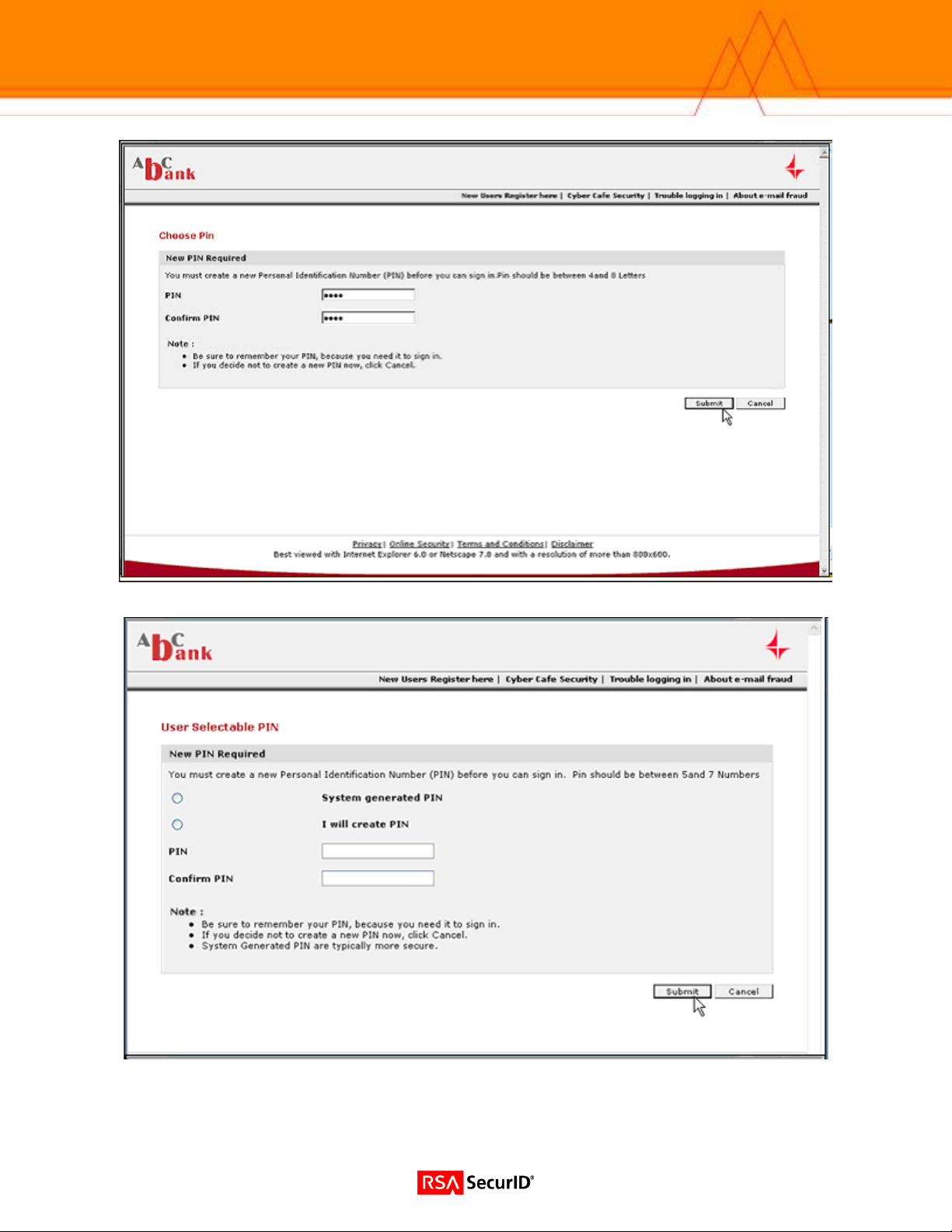
Screen 3 – User Defined PIN
Screen 4 – User Selectable PIN
8
Page 9
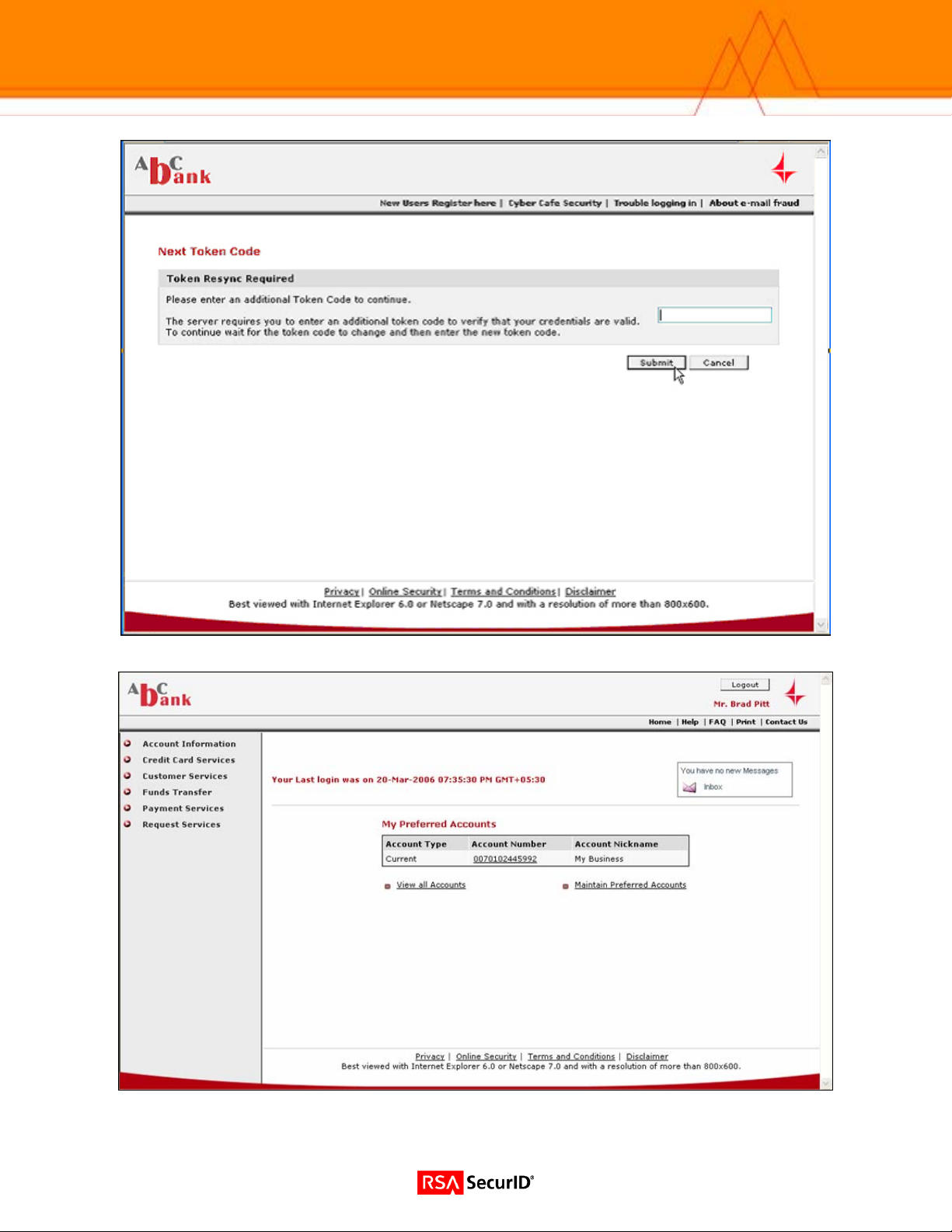
Screen 5 – Next Tokencode
Screen 6 – User Authenticated
9
Page 10
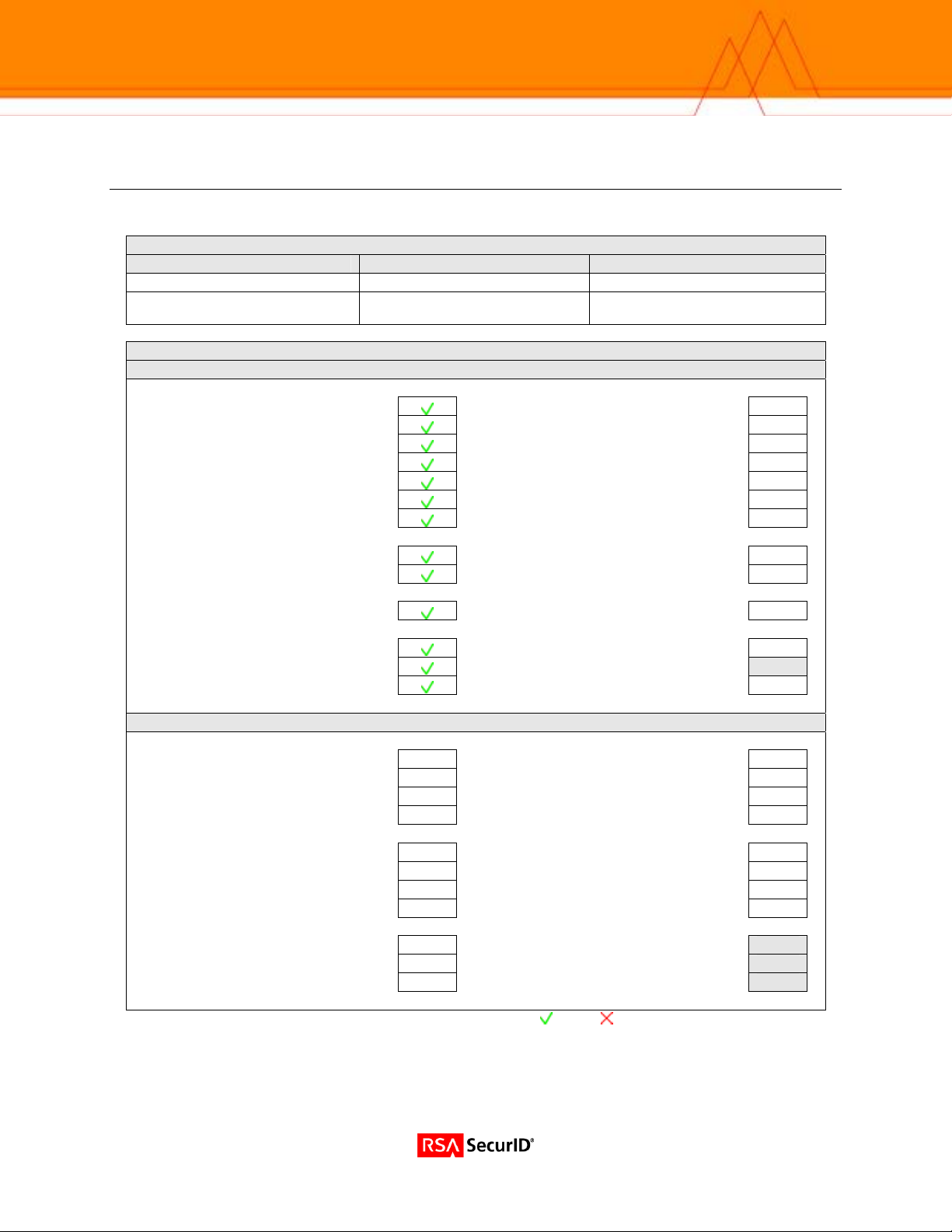
Certification Checklist
Date Tested: March 20, 2006
Certification Environment
Product Name Version Information Operating System
RSA Authentication Manager
Bank-Flex
RSA Native Protocol RADIUS Protocol
New PIN Mode
Force Authentication After New PIN
System Generated PIN
User Defined (4-8 Alphanumeric)
User Defined (5-7 Numeric)
User Selectable
Deny 4 and 8 Digit PIN
Deny Alphanumeric PIN
PASSCODE
16 Digit PASSCODE
4 Digit Password
Next Tokencode Mode
Next Tokencode Mode
Load Balancing / Reliability Testing
Failover (3-10 Replicas)
Name Locking Enabled
No RSA Authentication Manager
RSA Software Token Automation
System Generated PIN
User Defined (8 Digit Numeric)
User Selectable
Next Tokencode Mode
RSA SecurID 800 Token Automation
System Generated PIN
User Defined (8 Digit Numeric)
User Selectable
Next Tokencode Mode
Domain Credential Functionality
Determine Cached Credential State
Set Domain Credential
Retrieve Domain Credential
SWA / PAR = Pass = Fail N/A = Non-Available Function
6.1 Windows 2003 SP1
1.0 (J2EE) Windows Server
Solaris 9
Mandatory Functionality
Force Authentication After New PIN N/A
System Generated PIN
User Defined (4-8 Alphanumeric)
User Defined (5-7 Numeric)
User Selectable
Deny 4 and 8 Digit PIN
Deny Alphanumeric PIN
16 Digit PASSCODE
4 Digit Password
Next Tokencode Mode N/A
Failover N/A
Name Locking Enabled
No RSA Authentication Manager N/A
Additional Functionality
N/A
N/A
N/A
N/A
N/A
N/A
N/A
N/A
N/A
N/A
N/A
System Generated PIN
User Defined (8 Digit Numeric)
User Selectable
Next Tokencode Mode
System Generated PIN
User Defined (8 Digit Numeric)
User Selectable
Next Tokencode Mode
Determine Cached Credential State
Set Domain Credential
Retrieve Domain Credential
N/A
N/A
N/A
N/A
N/A
N/A
N/A
N/A
N/A
N/A
N/A
N/A
N/A
N/A
N/A
N/A
10
 Loading...