

Page 1

I
왎
ELSA ECOMO
TM
530
English
ELSA ECOMO 5 30
Page 2

II
© 2000 ELSA AG, Aachen (Germany)
While the information in this manual has been compiled with great care, it may not be deemed an assur-
ance of product characteristics. ELSA shall be liable only to the degree specified in the terms of sale
and delivery.
The reproduction and distribution of the documentation and software supplied with this product and the
use of its contents is subject to written authorization from ELSA.
ELSA AG is a DIN EN ISO 9001 certified company. With the certificate of June 15, 1998, the authorized
certification institute TÜV-CERT has confirmed the conformity of ELSA AG with the worldwide quality
English
standard DIN EN ISO 9001. The certificate number of ELSA AG is 09 100 5069.
Trademarks
Windows
Trinitron
Apple
®
, Windows NT® and Microsoft® are registered trademarks of Microsoft, Corp.
®
is a registered trademark of Sony, Corp.
®
and Macintosh® are registered trademarks of Apple Computer, Inc.
The ELSA logo is a registered trademark of ELSA AG. All other names mentioned may be trademarks or
registered trademarks of their respective owners.
Subject to change without notice. No liability for technical errors or omissions.
ELSA AG
Sonnenweg 11
52070 Aachen
Germany
www.elsa.de
ELSA, Inc.
1630 Zanker Road
San Jose, CA 95112
USA
www.elsa.com
Aachen, January 2000
21642/0100
ELSA ECOMO 5 30
Page 3

Preface
III
Preface
Thank you for placing your trust in this product.
Thank you for placing your trust in this product. With the ELSA ECOMO 530 you have selected one of ELSA's high-end monitors. ELSA products are subject to the highest of standards in production and quality control which are the foundation for consistently high
product quality. This monitor was especially designed for the demands of professional
users, and distinguishes itself with an extraordinary degree of reliability.
Our online services (www.elsa.com) are available to you around the clock should you
have any queries regarding the topics discussed in this manual or require any further support. In the 'Support' file section under 'Know-How', you can find answers to frequently
asked questions (FAQs). The KnowledgeBase also contains a large pool of information.
Current drivers, firmware, tools and manuals can be downloaded at any time.
English
ELSA ECOMO 5 30
Page 4

English
IV
Preface
ELSA ECOMO 5 30
Page 5

Inhalt
V
Inhalt
Introduction ....................................................................................................................1
Monitor features..................................................................................................... 1
Package contents.................................................................................................... 2
CE conformity and FCC radiation standard............................................................. 3
Installation .....................................................................................................................5
Connecting to the computer ................................................................................... 6
Connecting to the mains......................................................................................... 6
Switch on ................................................................................................................ 6
Connecting the monitor to a Macintosh computer................................................. 7
What next?.............................................................................................................. 8
Aspects of your monitor ............................................................................................... 9
The front control panel ........................................................................................... 9
Rear connectors panel .......................................................................................... 10
Operating the monitor ................................................................................................11
The on-screen display........................................................................................... 11
What you need to know................................................................................... 11
Monitor settings .......................................................................................................... 13
After switching on ................................................................................................ 13
Plug&play......................................................................................................... 13
Language.......................................................................................................... 13
An overview of all functions................................................................................. 14
Resetting the values to t he f actory s ettings........................................................ 15
English
An optimized working environment ........................................................................17
Monitor picture quality .................................................................................... 17
Tips for an ergonomic working environment........................................................ 17
Lighting in your working environment ............................................................. 17
The work desk.................................................................................................. 17
The seating position ........................................................................................ 17
The monitor position....................................................................................... 18
Cleaning your monitor........................................................................................... 18
Technical data ............................................................................................................. 19
Power management function................................................................................ 19
Factory settings..................................................................................................... 20
The VGA D-shell socket .................................................................................. 20
ELSA ECOMO 5 30
Page 6

English
VI
Inhalt
Video input connection to an Apple Macintosh computer ............................. 20
Automatically sizing and centering the picture............................................... 21
Troubleshooting ..........................................................................................................23
Problem solving .................................................................................................... 23
Restraining wires.................................................................................................. 24
Appendix .......................................................................................................................25
TCO ’99.................................................................................................................. 25
Advice and help .................................................................................................... 28
Software updates ............................................................................................ 28
Who to contact?............................................................................................... 28
ELSA-ServiceDirect for ELSA ECOMO monitors................................................... 30
Warranty conditions ............................................................................................. 31
ELSA ECOMO 5 30
Page 7

Introduction
1
Introduction
This manual tells you how to connect, adjust and care for your monitor. This manual also
provides technical specifications and instructions for troubleshooting problems you may
experience with your monitor.
Monitor features
The Diamond monitor is an intelligent, microprocessor-based monitor compatible with
most analog RGB (red, green, blue) display standards, including PS/V, PS/2, Apple Macintosh, Centris, Quadra, Macintosh II and Power Macintosh products. It provides crisp
text and vivid color graphics with VGA, SVGA, XGA (non-interlaced), and most Macintosh
compatible color graphics boards.
쮿 The monitor’s wide auto-scanning compatibility range makes it possible to upgrade
graphics boards or software without needing to purchase a new monitor.
쮿 Digitally controlled auto-scanning is done using an internal microprocessor, for
horizontal scan frequencies between 30kHz and 107kHz, and vertical scan frequencies between 48kHz and 120Hz. The microprocessor-based intelligence allows the
monitor to operate in each frequency mode with the precision of a fixed frequency
monitor.
쮿 The monitor contains resident memory for pre-programmed screen display stan-
dards and is also capable of storing additional user adjustment parameters.
쮿 The monitor is capable of producing a non-interlaced maximum addressable resolu-
tion format of 1600 dots x 1200 lines with systems based on IBM. This display is
well suited for windowing environments.
English
쮿 Because of the analog signal inputs, the monitor can display an unlimited palette of
colors that can be manually adjusted to suit your specific needs.
쮿 The monitor has a power management function according to the standard of VESA-
DPMS, NUTEK
a system compliant with this standard. (Refer to your computer and/or graphics
board instructions for proper operation.)
쮿 To ensure the easy installation and operation of this monitor, a moiré clear function
and an on-screen display (OSD) present all of the functions for setup and adjustment.
쮿 The monitor complies with the safety standards UL 1950, CSA C22.2 No. 950 and
EN60950, FCC Class-B, VCCI Class-B and EN55022 Class-B for EMI, MPR II, and with
the ergonomics standards ISO 9241-3, ISO9241-7, ISO9241-8 and ZH1/618.
쮿 Digital chassis design for lighter, more compact housing and improved display per-
formance.
and Energy Star. To save energy, the monitor must be connected to
ELSA ECOMO 5 30
Page 8

English
Introduction
2
쮿 The monitor complies with Video Electronics Standards Association (VESA) DDC1/
2B(EDID) specification. If your computer provides DDC1/2B(EDID) function, the
setup takes place automatically.
쮿 The innovative tube technology makes a naturally flat and completely planar picture
possible, free of any curvature.
쮿 The planar screen allows for an optically perfect picture over the entire diplay sur-
face.
쮿 The flat surface and antireflective coating reduce the reflection of environmental
light.
Package contents
Please ensure that the delivery is complete. When opening the package, please check
that the following components are included:
쮿 Documentation
쮿 Monitor
쮿 Power cord and monitor cord
쮿 Data media including additional software and electronical documentation
Please contact your dealer if any part is missing or damaged.
ELSA reserves the right to make changes to the package contents without prior notice.
ELSA ECOMO 5 30
Page 9

Introduction
3
CE conformity and FCC radiation standard
CE
This equipment has been tested and found to comply with the limits of the European
Council Directive on the approximation of the laws of the member states relating to electromagnetic compatibility (89/336/EEC) according to EN 55022 class B.
FCC
This equipment has been tested and found to comply with the limits for a Class B digital
device pursuant to Part 15 of the Federal Communications Commission (FCC) Rules.
CE and FCC
These limits are designed to provide reasonable protection against radio frequency interference in a residential installation. This equipment generates, uses, and can radiate
radio frequency energy. It may interfere with to radio communications if not installed and
used in accordance with the instructions. However, there is no guarantee that interference will not occur in a particular installation. If this equipment does cause interference
to radio or television reception (this can be determined by turning this equipment off and
on), the user is encouraged to try to correct the interference by one or more of the following measures:
English
쮿 Reorient or relocate the receiving antenna.
쮿 Increase the distance between this equipment and the receiver.
쮿 Connect the equipment to an outlet on a circuit other than that to which the receiver
is connected.
쮿 Consult your dealer or an experienced radio/TV technician.
쮿 Caution: To comply with the limits for an FCC Class B computing device, always use
a shielded signal cable.
Caution to the user: The Federal Communications Commission warns the user that changes or modifications to the unit not expressly approved by the party responsible for compliance could void the user's authority to operate the equipment.
ELSA ECOMO 5 30
Page 10

English
Introduction
4
ELSA ECOMO 5 30
Page 11

Installation
5
Installation
This chapter will assist you to get your monitor working as quickly as possible. It takes
just a few straightforward maneuvers to connect the monitor to your computer. Before
you start please carefully read the safety and operating hints below.
Use the power cord supplied to connect the monitor. In order to avoid electric shock, the
power cord must be connected to a properly grounded plug.
Do not on any account open up the appliance to carry out your own repairs.
Very high voltages exist within the appliance, even when disconnected from the mains.
Repairs should only be made by trained technicians. Please contact ELSA Services for
any repairs.
Do not locate the monitor close to sources of electromagnetism. These can include halogen desk lamps or electric motors, but can also include high voltage cables or steel pillars. Magnetic or electromagnetic radiation causes picture distortion and can eventually
cause your monitor to fail.
Ensure that your monitor has sufficient ventilation. The air vents on your monitor must
not be obstructed. Heat produced from the picture tube must be allowed to escape
freely.
Protect the monitor from damp and dust. Damp can cause short circuits, and a build-up
of dust can mean that the monitor is not properly ventilated.
The power cord must be unobstructed. Avoid allowing heavy objects to stand on it.
English
ELSA ECOMO 5 30
Page 12
English
Installation
6
Connecting to the computer
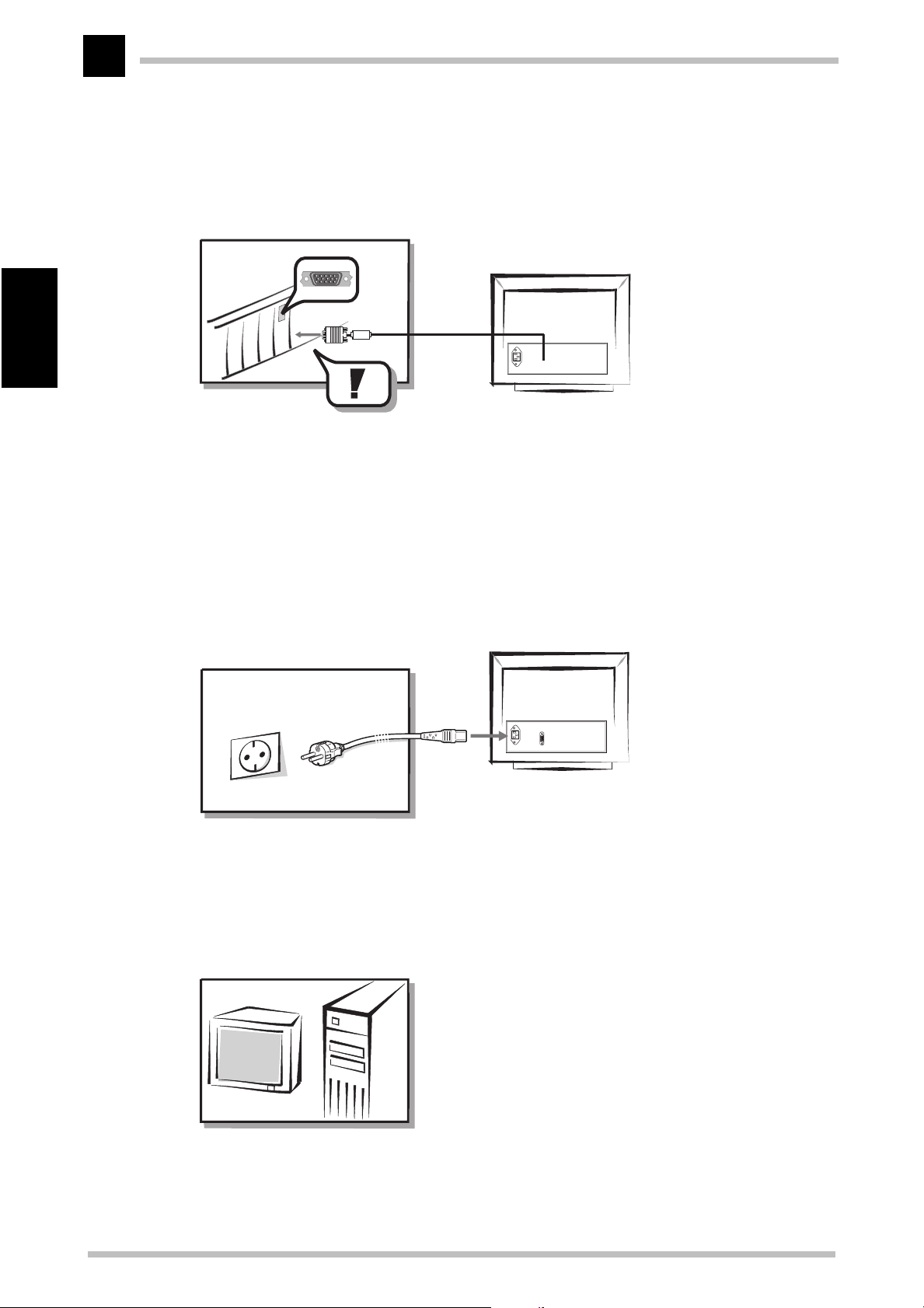
Use the monitor cable to connect your computer with the signal graphics input on the
monitor.
For connecting your monitor to a Macintosh computer, make use of the special adapter
available from your dealer. See the chapter ('Connecting the monitor to a Macintosh computer') for information on the connection of this adapter and the dip switch settings.
Connecting to the mains
With the monitor switched off connect the power cord supplied to the monitor and to the
mains. The monitor automatically adjusts itself to the rated voltage (110V–230 V).
Switch on
The monitor is now connected to your computer and the mains. First switch on your monitor, then the computer.
ELSA ECOMO 5 30
1.
2.
Page 13
Installation
7
Connecting the monitor to a Macintosh computer
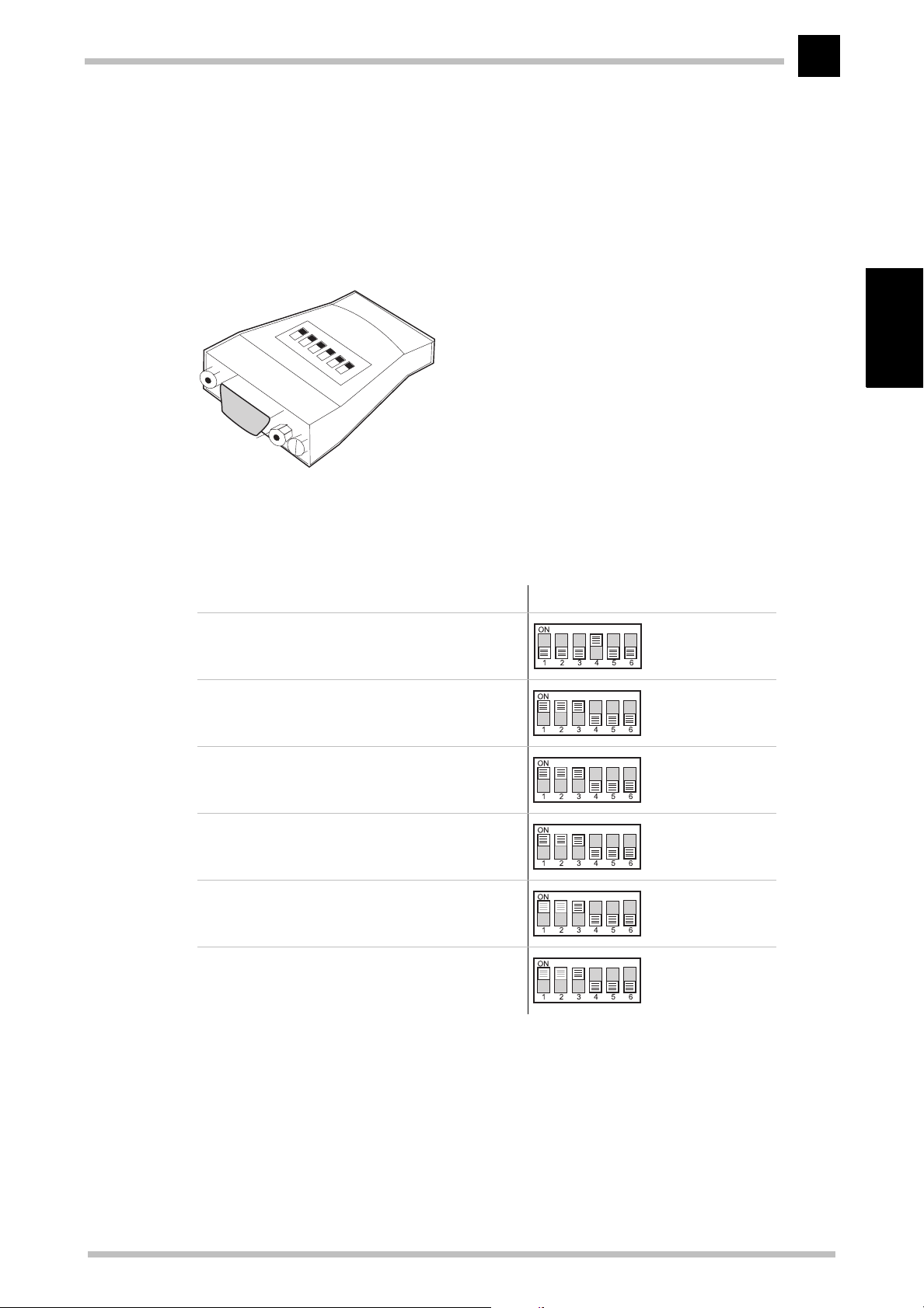
Your dealer can supply you with a special adapter for connecting your ELSA monitor to
Macintosh computers. The adapter is to be located between the computer's graphics
output and the VGA connector cable. The DIP switches on the upper side of the adapter
should be set according to the resolution with which your monitor will be operating.
The optional adapter is for connecting your ELSA monitor to Macintosh computers. Set
the DIP switches according to the table below.
English
DIP switch settings connections with Macintosh computers:
ELSA monitors DIP switch setting
17" multi-mode start resolution 1024 x 786
19" multi-mode start resolution 1152 x 870
20" multi-mode start resolution 1152 x 870
21" multi-mode start resolution 1152 x 870
22" multi-mode start resolution 1152 x 870
24" multi-mode start resolution 1152 x 870
ELSA ECOMO 5 30
Page 14

Installation
8
What next?
Because there are so many types of graphics boards you may need to fine tune the monitor picture settings.
In the following chapters you can read how to fine tune for picture and color. The manual
also contains technical information and additional assistance for the operation of your
ELSA monitor.
The manual is supplied in printed form in the English and German languages.
English
The versions in French and Italian are available in PDF-format on the CD.
The Spanish/Dutch translation describes the installation only. If you require more infor-
mation, please refer to the documentation in the other languages.
ELSA ECOMO 5 30
Page 15
Aspects of your monitor
9
Aspects of your monitor
The front control panel
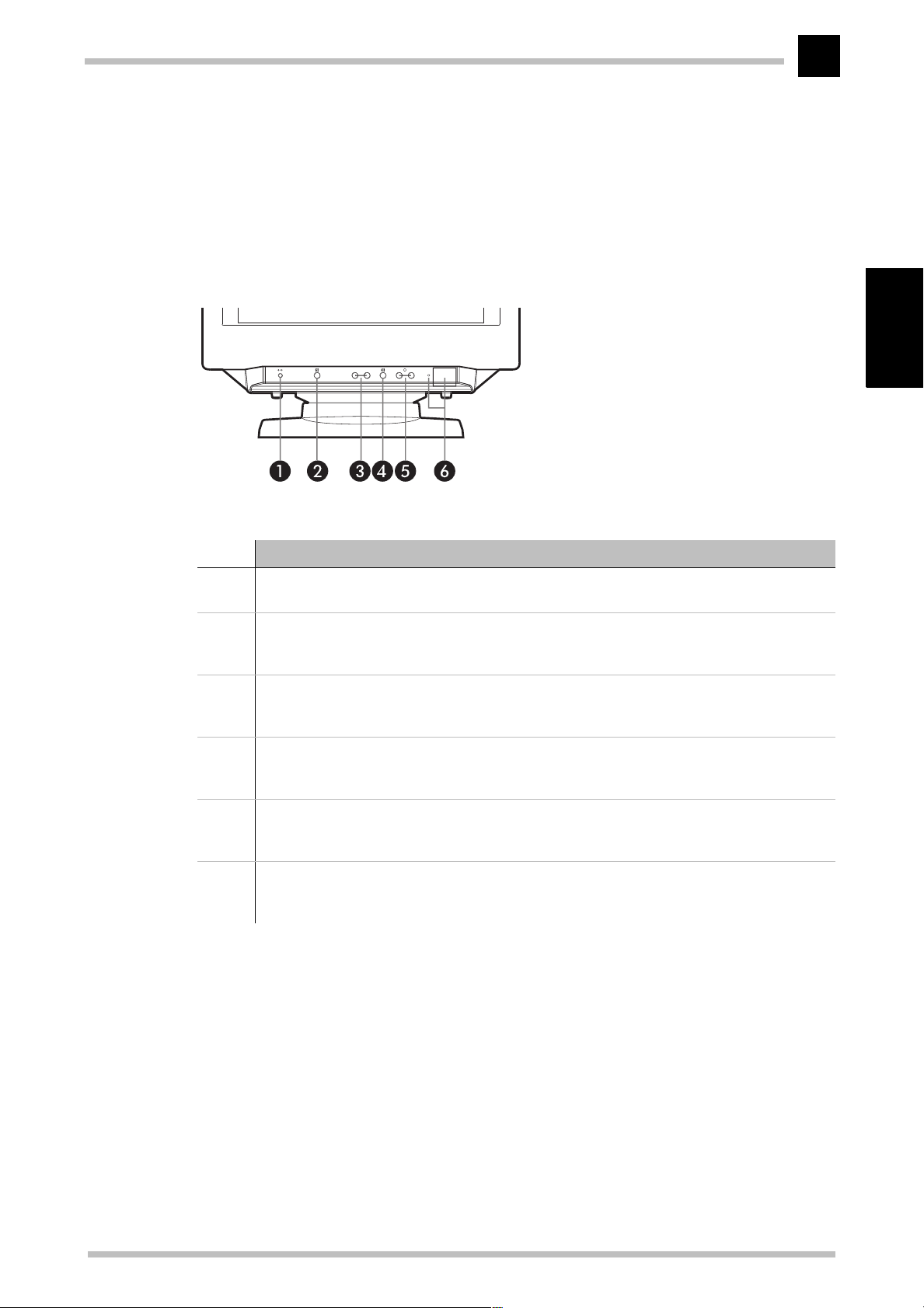
The lower front of the monitor features a row of switches and buttons which allow you
to tune the picture settings precisely.
English
Function
Reset button
This key is to reset the values to the factory settings.
Quick align
The ASC button (Auto Sizing and Centering) automatically centers the picture. At the same
time the picture size adjusted to fit the diagonals of the monitor.
Brightness
Use the arrow keys to adjust the brightness of the picture. The arrow keys are used to move
the cursor in the on-screen menu and alter the settings.
Menu button
The menu button is the central control button for the on-screen menu: Pressing it opens and
closes the on-screen menu and confirms the settings on the on-screen menu page.
Contrast
Use the arrow keys to adjust the brightness of the picture. The arrow keys are used to move
the cursor in the on-screen menu and alter the settings.
On/Off switch, Power-On indicator
This indicator lights up green when the monitor power is on. It shows amber when the
monitor is in the power saving function.
ELSA ECOMO 5 30
Page 16
English
Aspects of your monitor
10
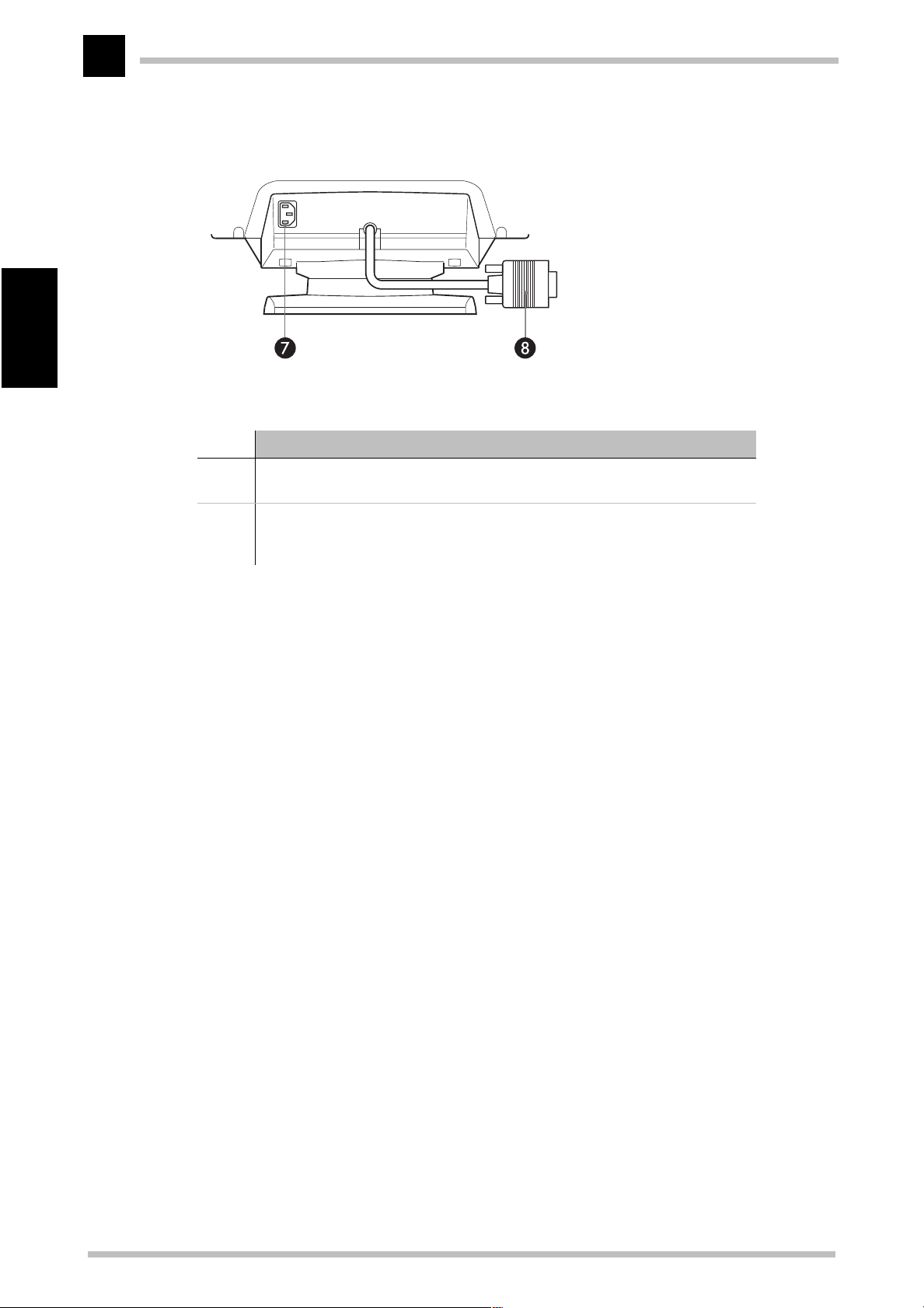
Rear connectors panel
Function
AC power connector
Plug the power cord in here.
Signal input (HD15)
This plug connects your monitor with the video output of the graphics card in
your computer.
ELSA ECOMO 5 30
Page 17
Operating the monitor
11
Operating the monitor
The on-screen display
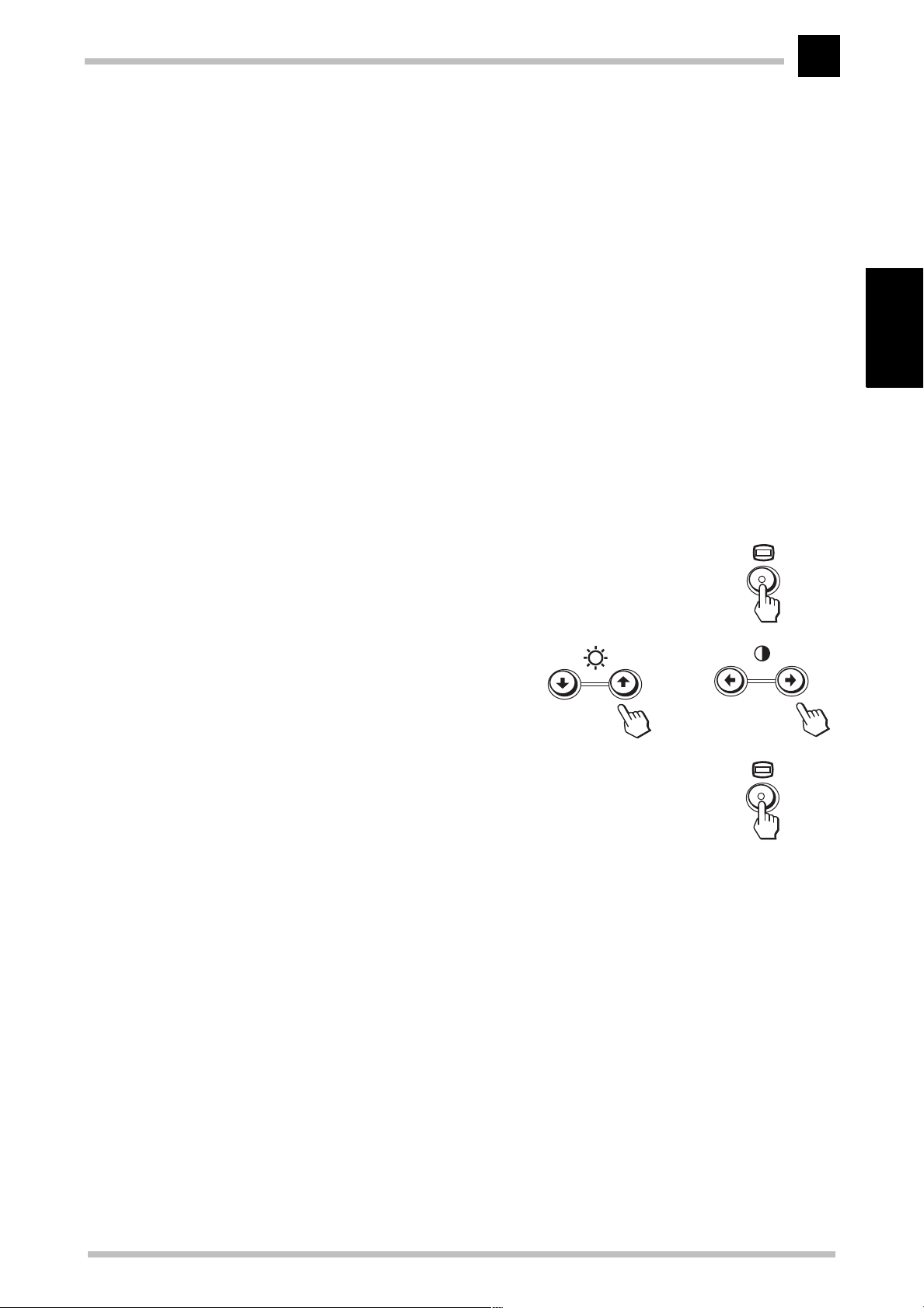
The on-screen menu (OSD) makes light work of fine tuning the picture on your monitor.
The range of settings includes the simple brightness adjustment to the detailed correction of pin-cushion curvature or distortion. The on-screen display appears as soon the
'Menu' button on the control panel is pressed. Once in the on-screen display, you can
use the buttons to access the various pages of the menu.
What you need to know
You need to be familiar with the buttons for navigating within the pages and from one
page to another. You should bear the following in mind if you wish to adjust the monitor
settings:
English
Use the 'Menu' button to access the
menu page of the on-screen display
and to confirm the selection of the onscreen page.
Use the arrow keys to move the selection to the position you want and to
alter the values and settings.
Use the 'Menu' button to confirm the
alteration. After pressing the 'Menu'
button again you can leave the OSD.
ELSA ECOMO 5 30
Page 18

English
Operating the monitor
12
ELSA ECOMO 5 30
Page 19

Monitor settings
E
13
Monitor settings
The monitor settings can be fine tuned according to your preferences. Don’t be afraid to
experiment with the monitor and try out all of the options for adjustment. If the picture
has gone completely astray, just press the RESET “emergency button” to restore the factory settings.
After switching on
Plug&play
Modern graphics boards and the ELSA ECOMO 530 can communicate using the DDC (Display Data Channel). The ELSA ECOMO 530 can send its parameters to the graphics board
and, in turn, the graphics board ensures that the monitor operates at the highest possible
refresh rate for the resolution selected. This means that you will immediately get a picture that requires only minor adjustment. Check the fine tuning of the picture and make
adjustments for the relative light levels within your working environment.
You will now find out what settings are possible and how to solve any problems.
Language
The ELSA ECOMO 530 can display its on-screen menus in a vari-
ety of languages. To change the language used for the onscreen menu, simply call up the menu page illustrated here and
select the language you want.
LANGUAG
English
ELSA ECOMO 5 30
Page 20
Monitor settings
14
An overview of all functions
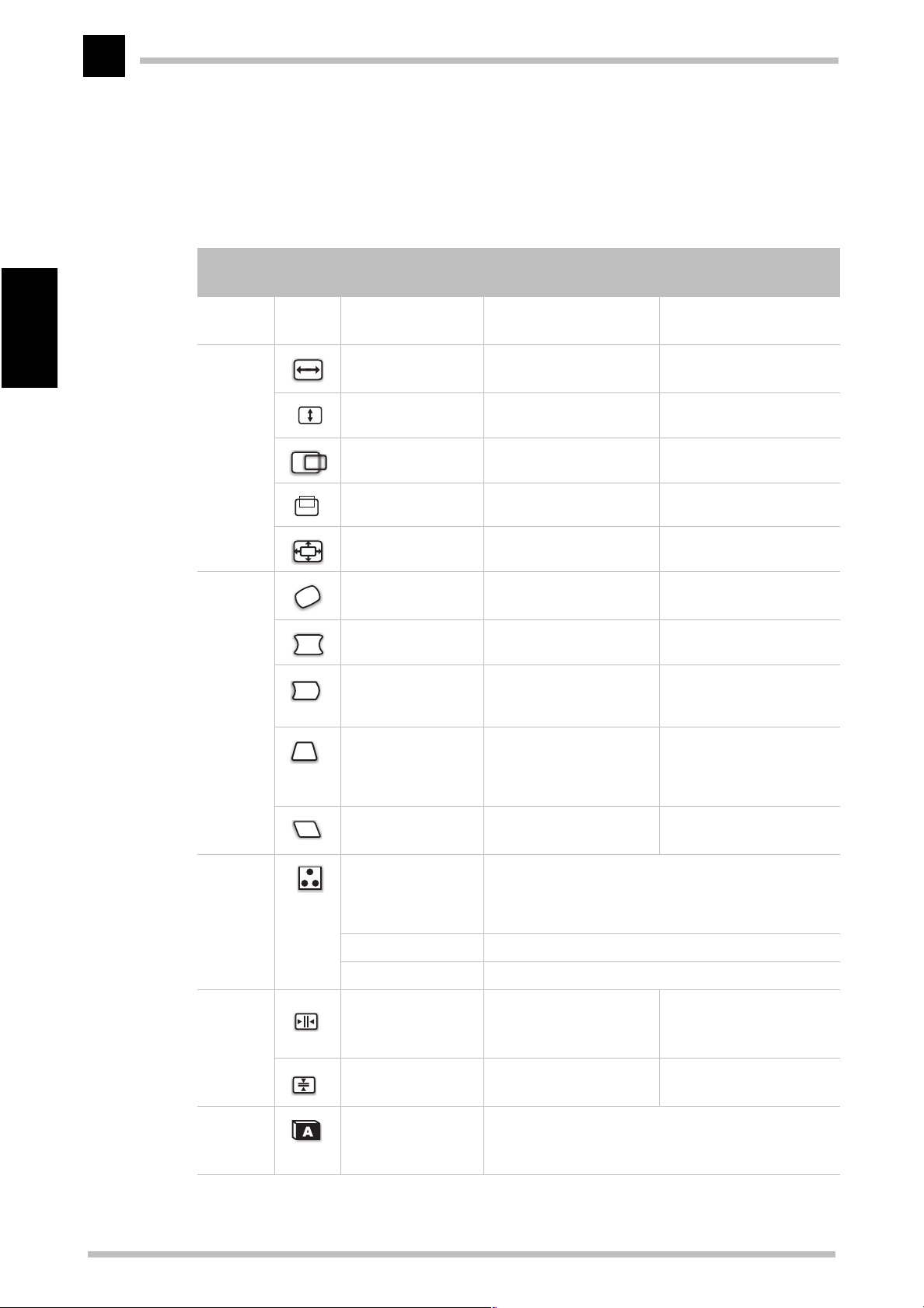
The following overview has been drawn up to help you navigate your way through the
menu pages and their functions.
English
Main
menu
END Fade out the on-
SIZE/
POS.
GEOMETRY
Symbol Function Keys '
screen menu
H-SIZE
V-SIZE
H-PHAS
V-PHASE
ZOOM
ROTATION
PCC-CENTER
PIN-BALANCE
쒆/쏟
' Keys '
To decrease the horizontal
size of the screen.
To decrease the vertical
size of the screen.
To move the image on the
screen to the left.
To move the image down. To move the image up.
To decrease the image
size in all directions.
To rotate the image counterclockwise.
To narrow the center of
the screen horizontally.
To move the top and bottom of the screen image
to the left.
쒅/쏡
'
To increase the horizontal
size screen.
To increase the vertical
size of the screen.
To move the image on the
screen to the right.
To increase the image size
in all directions.
To rotate the image clockwise.
To expand the center of the
screen horizontally.
To move the top and bottom of the screen image to
the right.
PCC-PHASE
KEY-BALANCE
COLOR Mode SIMPLE
Mode COMPLEX
Mode sRGB
CONVERGENCE
LANGUAGE
H-CONVERGENCE
V-CONVERGENCE
To select the language used by the
OSD.
To decrease the width at
the top of the screen
image and to increase the
width at the bottom.
To slant the screen to the
left.
To match the black the proportion (BIAS) and the white
proportion (GAIN) of each of the two color temperatures
5000K and 9300K for the red, green and blue (RGB)
color channels.
To set continuously adjustable color temperature.
To set the brightness and contrast for sRGB.
To move the red to the
right and the blue to the
left.
To move the red up and
the blue down.
To increase the width at
the top of the screen
image and to decrease the
width at the bottom.
To slant the screen to the
right.
To move the red to the left
and the blue to the right.
To move the red down and
the blue up.
ELSA ECOMO 5 30
Page 21
Monitor settings
15
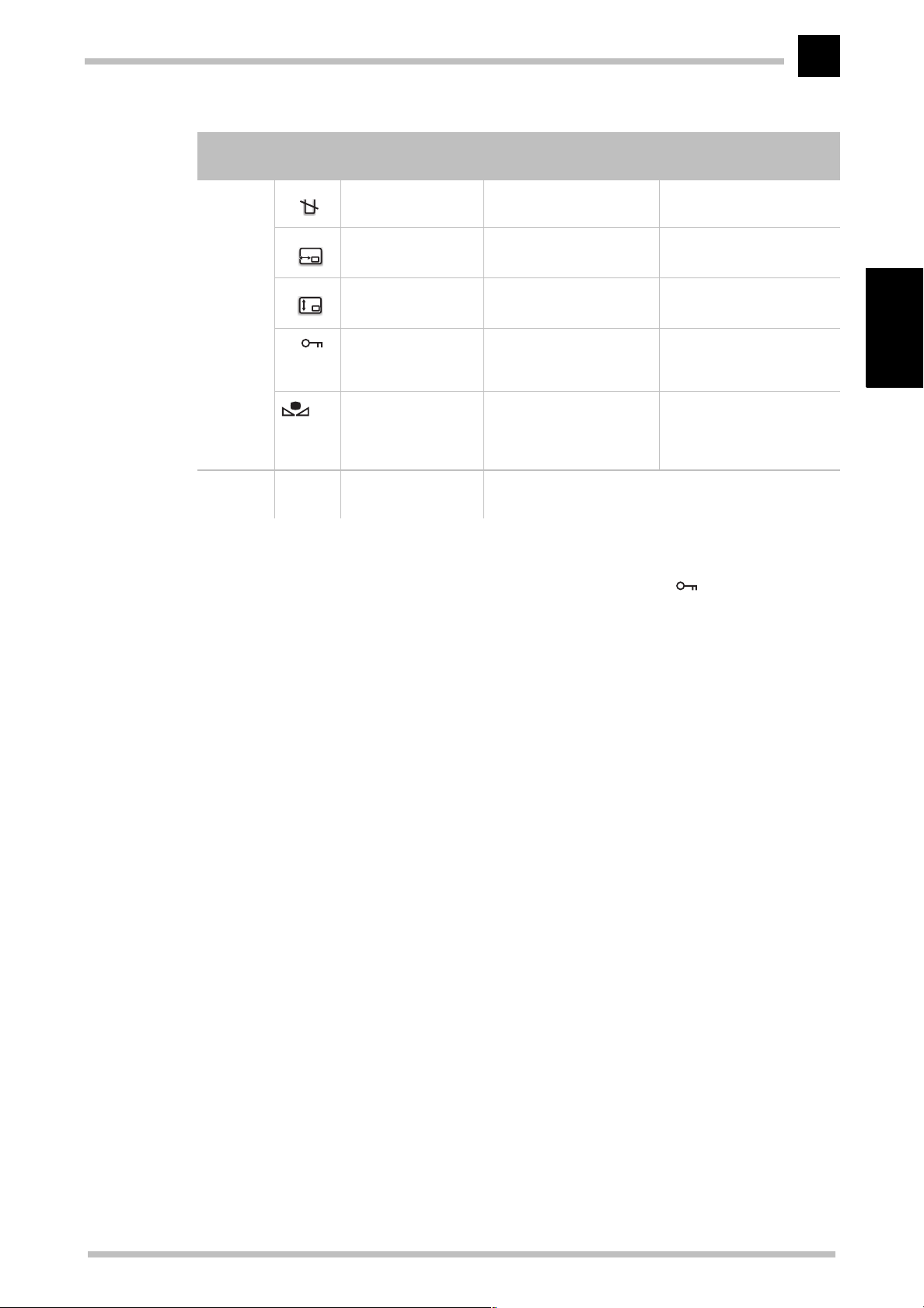
Main
menu
OPTION Degauss
Symbol Function Keys '
H-OSD position
V-OSD position
OSD lock
쒆/쏟
' Keys '
– To eliminate possible color
To move the OSD to the
left.
To move the OSD down. To move the OSD up.
To unlock the OSD. To lock OSD.
쒅/쏡
'
shading or impurity.
To move the OSD to the
right.
Restoring color
image
HELP
This locks the OSD function to prevent changes being made to your settings.
You can now operate only the on-off switch, the option END and the option (OSD lock).
Contains information about all of the settings
The Image Restoration
feature allows you to
restore the color to the original factory preset levels.
English
Before using this feature, the monitor must be in normal operation mode for at least 30 minutes.
Resetting the values tothe fact orysett ings
You can use the reset button to return all settings you have changed back to the factory
settings.
Resetting a specific adjustment
Navigate through the on-screen menus to select the adjustment item you want to reset,
and press the RESET button. You can do this while you are adjusting an item.
Resetting all of the adjustments for the current input signal
Press the RESET button when no menu is displayed on the screen. Note that the following items are not reset by this method:
쮿
on-screen menu language
쮿
on-screen menu position
쮿
control lock
Resetting all of the adjustments for all input signals
Press and hold the reset button for more than two seconds when no menu is displayed
on the screen. This resets everything to the factory preset mode.
ELSA ECOMO 5 30
Page 22

English
Monitor settings
16
Resetting all of the adjustment data to the factory presets
Press and hold the reset button for more than five seconds when no menu is displayed
on the screen. This resets everything to the factory presets including the input selection.
The RESET button does not function when the control lock is set to ON.
ELSA ECOMO 5 30
Page 23

An optimized working environment
17
An optimized working environment
You have already taken a significant step towards this goal: you have acquired a monitor
with technology guaranteeing optimized ergonomics and a minimum of stress at your
place of work. Equally important is the overall arrangement of your working environment,
which includes some basic rules about working with a monitor.
The ELSA ELSA ECOMO 530 complies with the latest EU ergonomics guidelines (90/270/
EEC) for work places with monitors, which came into effect on the 1.1.97.
Monitor picture quality
The screen must display a stable picture. How can you check this? Simply focus on a
fixed point next to your screen. If you can see a perceptible flickering of the picture, you
can try and adjust the brightness and contrast to stabilize the picture. If this does not
help, then try to increase the display refresh rate with your graphics card driver.
English
Tips for an ergonomic working environment
Lighting in your working environment
The lighting in your place of work should not perceptibly flicker. Avoid placing monitors
directly next to windows and be sure that there is the possibility to reduce the intrusion
of strong sunlight such as with a blind. When arranging desks, make sure that the direction of view is parallel with the lighting. The direction of view to the monitor should be
parallel to the windows. Glare and reflections can be reduced by an anti-reflective layer
(Lambda/4 anti-reflection) on the screen.
You can check whether or not your place of work meets these basic rules:
쮿 Are you facing a window when looking at your monitor?
쮿 Does your monitor screen show any reflections from windows or lighting?
The work desk
The top of the work desk should be at a height of 72cm. The desk top should be around
80 cm deep and of sufficient width. There should be a suitable separation between the
operator and the monitor which, for a 17" monitor, is recommended to be at least 45cm
and for a 21" monitor, should be about 80cm.
The seating position
The seating position is most important for work in comfort and without problems. A rule
of thumb is: sit with a straight back and ensure that your arms and legs are bent at appro-
ELSA ECOMO 5 30
Page 24
An optimized working environment
18
ximately 90°. Your feet should also rest flat on the floor.
It is important that you frequently shift your seating position—to practice the so-called
”dynamic sitting”—and that you stand up once in a while.
English
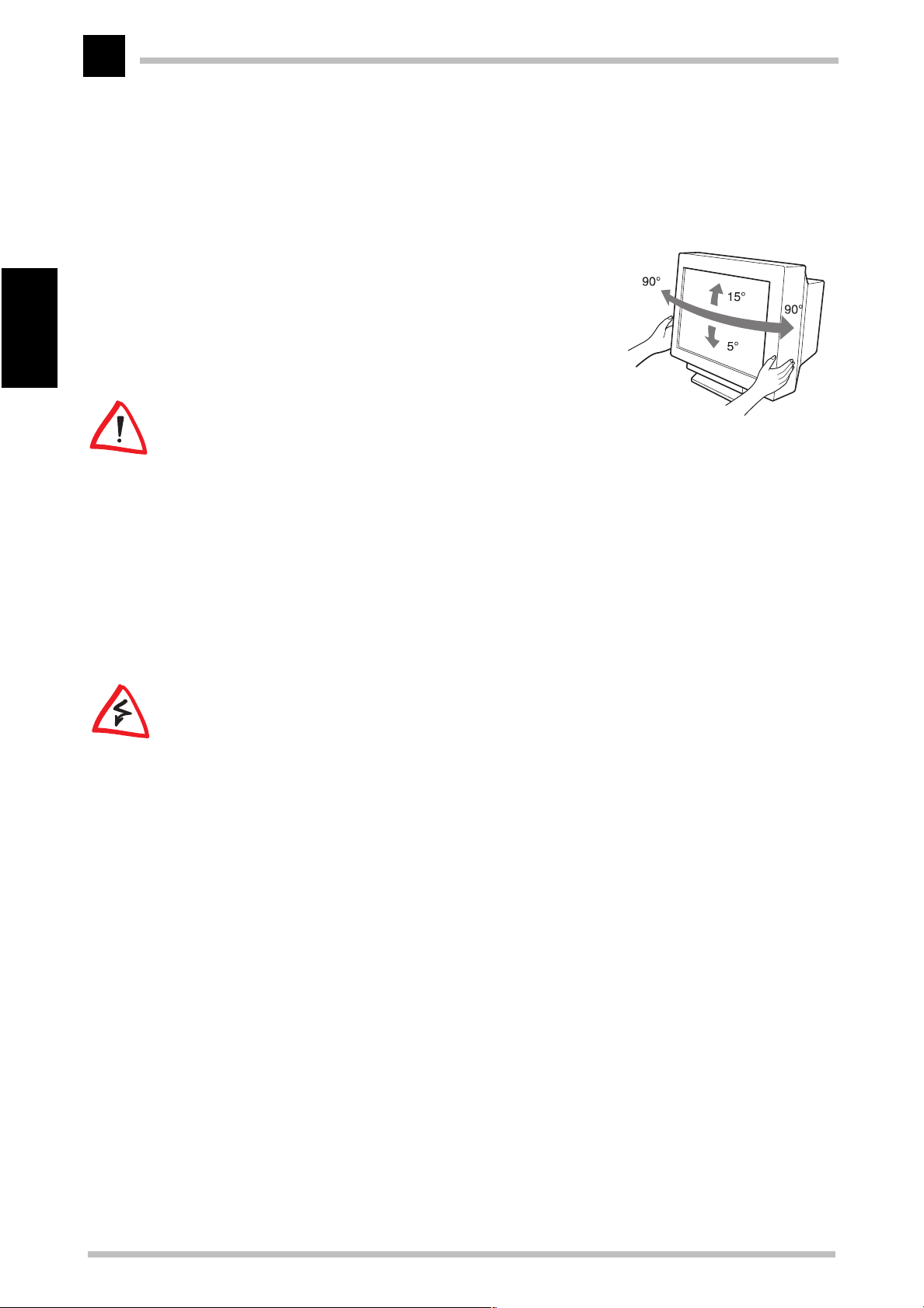
The monitor position
The ELSA ECOMO 530 can be tilted and swiveled so
that you can set up the monitor position to your liking.
When swiveling or tilting, please support the monitor
with both hands
When selecting the monitor position, be sure not to
place it directly on the computer housing.
Cleaning your monitor
When cleaning the monitor, please follow these guidelines:
쮿 Always unplug the monitor before cleaning
쮿 Wipe the screen and cabinet front and sides with a soft cloth
쮿 If the screen requires more than dusting, apply household window cleaner to a soft
cloth to clean the monitor screen
Do not use benzene, thinner or any volatile substances to clean the unit as the finish may
be permanently marked. Never leave the monitor in contact with rubber or vinyl for an
extended period.
ELSA ECOMO 5 30
Page 25

Technical data
Technical data
19
CRT
Input signal
Interface
Frequency range
Resolution
Warm-up time
Brightness
Blanking time
Viewable display
Color temperature
Power supply
Operating
environment
Housing
Weight
Tilt and
swivel base
Approvals and
certifications
Diagonal 48.3cm /19",
viewable display size 365 x 274mm/18"
Gun In-line
Deflection angle 90 °
Phosphors Red, green, blue
(P22, medium short persistence)
Phosphor color
coordinates
Slot mask 0.24 - 0.25 mm
Face plate anti-glare, anti-reflective, anti-static coating
Focusing method Dynamic beam forming
Video 0.7V or 1V RGB analog
Synchronization Synchronization signals on green or separate horizontal/
Input connector D sub 15HD
Input impedance 75Ω (video) 2.2kΩ (sync)
Horizontal: 30–107kHz, vertical: 48–120Hz
Horizontal: up to 1600 pixels, vertical: up to 1200 lines at 85Hz
30min. to reach optimum performance temperature
110cd/m2 ± 10 cd/m² standard full white video with 9300 K (+8MPCD)
Horizontal < 2.8µs
Vertical < 400µs
364,8mm x 273,6mm, relation 4:3
9300K 5000K Gamma value (γ) = 2.5
X = 0.283 ± 0.015 X = 0.346 ± 0.015
Y = 0.298 ± 0.015 Y = 0.359 ± 0.015
9300K-5000K
AC 100–120 V/220–240 V; ±10 %, 50–60 Hz, 압 140 W
Temperature
Humidity
449 x 463 x 463 mm (W x H x D)
26 kg approx.
Tilt angle
Swivel angle
Safety (CE) UL1950 (UL), CSA C22.2, No. 950 (C-UL), EN 60950
EMC (CE/FCC) FCC Class B, EN 55022, EN 50082-1, EN 61000-3-2,
X-radiation DHHS, German X-ray regulations dated 1987-01-08
Others CE-Marking, MPR II/TCO ’91, ISO 9241-3, ISO 9241-7, ISO
Red, Green, Blue
X = 0.625 X = 0.280 X = 0.155
Y = 0.34 Y = 0.605 Y = 0.070
vertical synchronization
10° – 40 °C
10 – 80% relative air humidity
-5° – +15°
± 90°
EN61000-3-3
9241-8, (certified by TÜV safety approved), TCO ’99, Inter-
national Energy Star Program
English
Power management function
The ELSA ECOMO 530 complies with the guidelines set by VESA and Energy Star together with the stringent standards of NUTEK. The ELSA ECOMO 530 will automatically
reduce power consumption if the monitor is connected to a graphics board complying
with VESA DPMS. You can set the delay time before the monitor enters the power saving
mode using the on-screen menu.
ELSA ECOMO 5 30
Page 26
English
Technical data
20
Factory settings
To minimize the need for adjustment, the factory settings include popular display standards. Picture size and centering are automatically adjusted if any of these display standards is detected. All the factory presets may be overwritten by adjusting the user
controls. The monitor is capable of automatically storing up to 15 additional display standards. The new display information must differ from any of the existing display standards
by at least 1kHz for the horizontal scan frequency or 1Hz for the vertical scan frequency
or the sync signal polarities must be different.
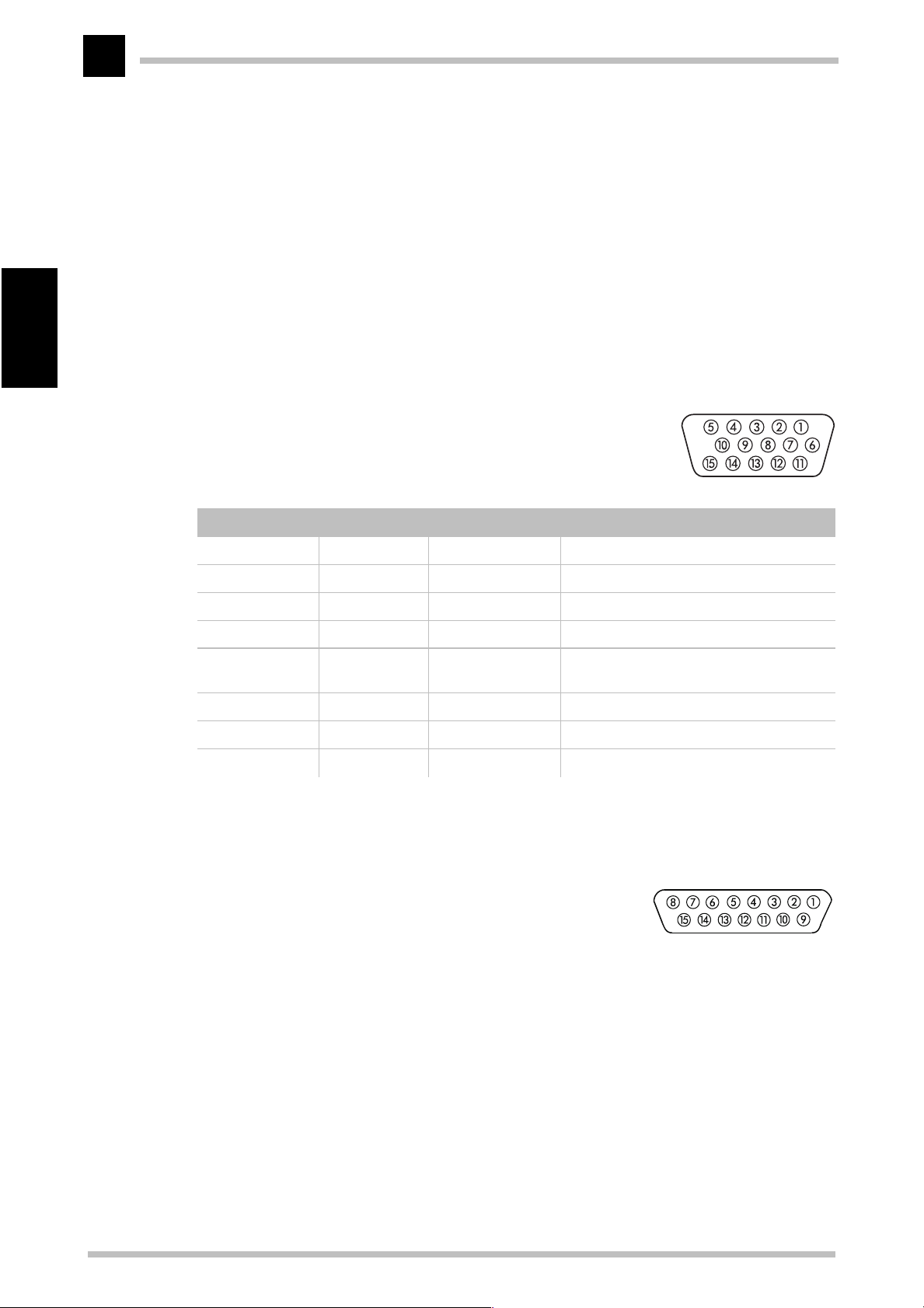
The VGA D-shell socket
Pin assignment
Connection Signal Connection Signal
1 Red 9 not used
2 Green 10 Sync ground
3 Blue 11 Ground
4 Ground 12 Bidirectional data (SDA, DDC1/2B)
5 CPU host
ground
6 Red ground 14 Vertical synchronization
7 Green ground 15 Data timing (SCL, DDC2B)
8 Blue ground
13 Horizontal synchronization
The ELSA ECOMO 530 issues analog signals in accordance with the requirements of
directive RS-170. The synchronization information is sent separately.
Video input connection to an
Apple Macintosh computer
Your ELSA monitor can be connected to a Macintosh computer. The graphics output port
of the Macintosh has a 15-pin connector. To match up with the monitor’s VGA connector
you require a suitable adapter. Contact your retailer for details.
ELSA ECOMO 5 30
Page 27
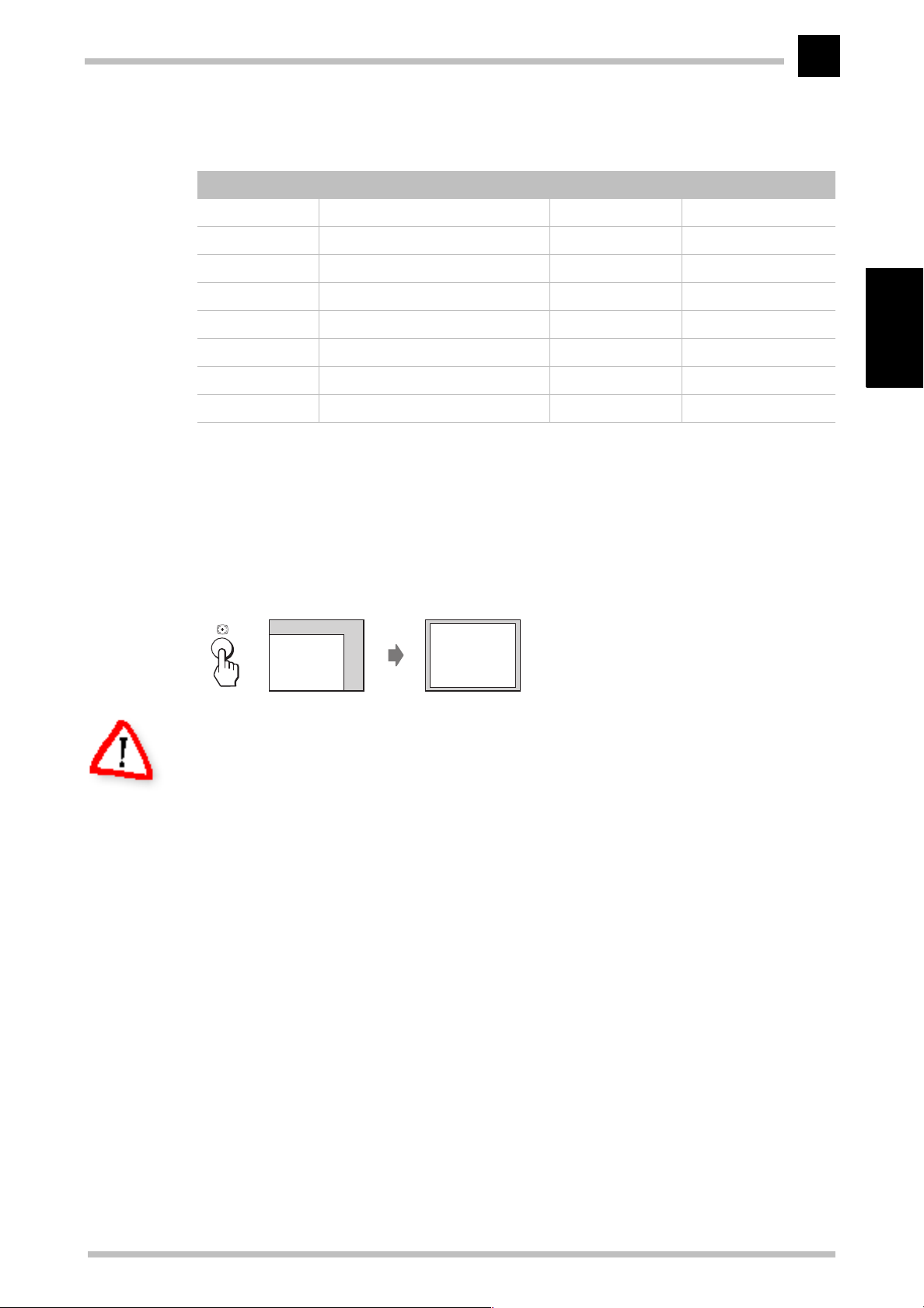
Pin assignment
Pin Signal Pin Signal
1 Red ground 9 BLUE video
2 RED video 10 Sense 2
3 C-sync 11 C & V sync ground
4 Sense 0 12 V-sync
5 GREEN video (mono video) 13 Blue ground
Technical data
21
6 Green ground 14 H-sync ground
7 Sense 1 15 H-sync
8 Not used
H-sync = scan frequency, V-sync = refresh rate
Automatically sizing and centering the picture
You can easily adjust the picture to fill the screen by pressing the Auto Sizing and Centering button.
Press the Auto Sizing and Centering button. The picture automatically fills the screen.
This function is intended for use with a computer running Windows or similar graphic
user interface software that provides a full-screen picture. It may not work properly if
the background color is dark or if the input picture does not fill the screen to the edges
(such as an MS DOS prompt).
English
ELSA ECOMO 5 30
Page 28

English
Technical data
22
ELSA ECOMO 5 30
Page 29
Troubleshooting
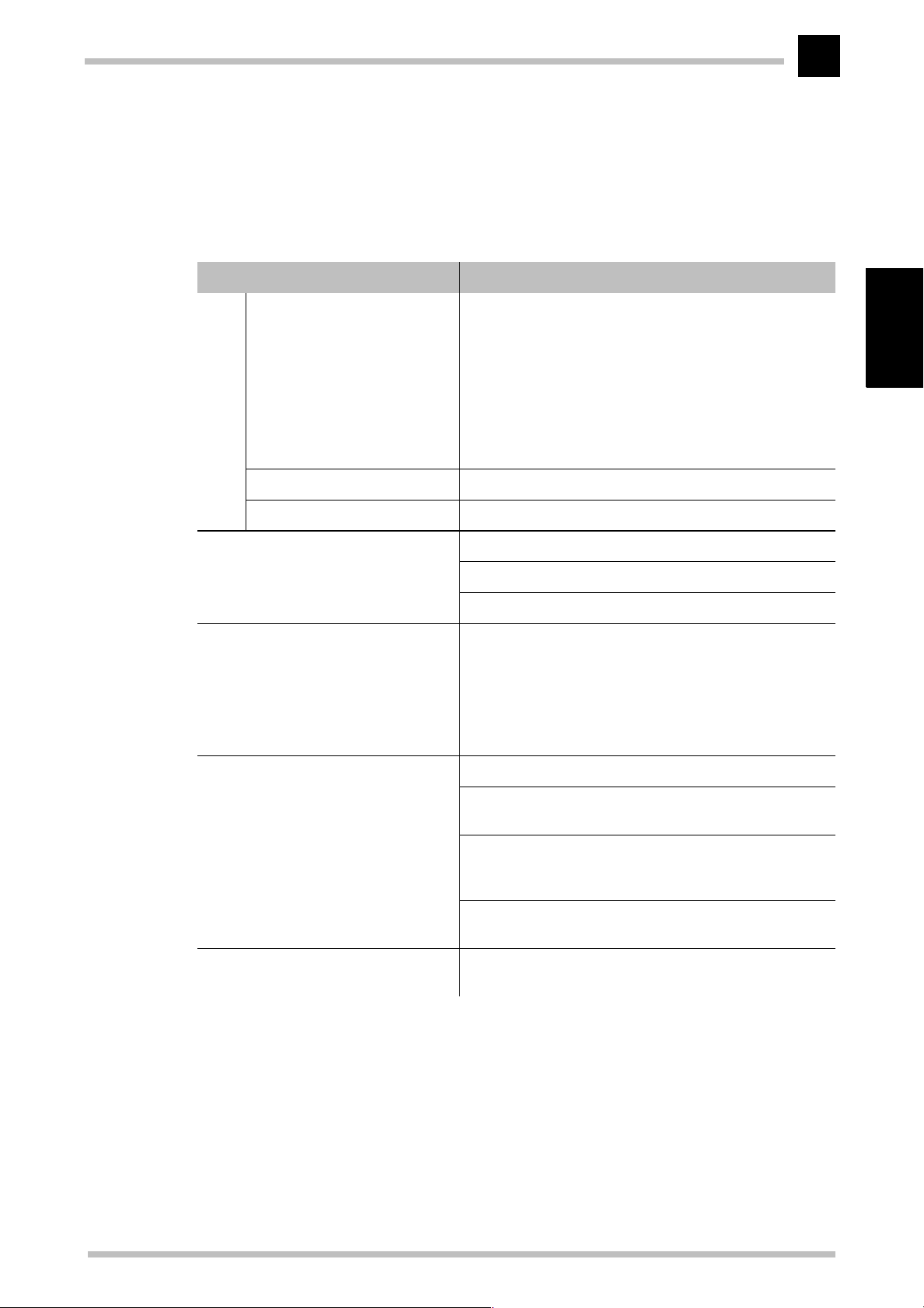
Problem solving
Problem What you can do
Troubleshooting
23
No
picture
The following message appears
ATTENTION
NO SIGNAL
The following message appears
ATTENTION
SIGNAL FREQUENCY
IS OUT OF RANGE
LED On?
(Green)
LED Off Is the monitor switched on?
LED On?
(Amber)
Check, if AC power chord is disconnected or monitor
switched of.
English
Is the AC power cord properly connected?
Signal cable disconnected?
Computer power switch
Power Management function active
Signal cable disconnected.
Computer power switch.
Power management function is active.
Input signal frequency range is out of range
CGA mode is not available.
MDA mode is not available.
EGA mode is not available.
Press this key to set the screen size and center the image
automatically.
No picture, picutre not centered, picture
too small or too large
Display is dark or too bright VIDEO LEVEL is not at the appropriate position for your
Do GEOMETRY-RESET or ALL RESET for a standard signal.
Adjust H-SIZE, V-SIZE, H-PHASE, and V-POSITION with nonstandard signals.
Monitor may not be able to get full-screen image depend on
signal. In this case, please select other resolution, or other
vertical refresh timing.
Make sure you wait a few seconds after adjusting the size
of the image before changing or disconnecting the signal.
graphics adapter output.(0.7V or 1.0Vp-p)
ELSA ECOMO 5 30
Page 30
Troubleshooting
24
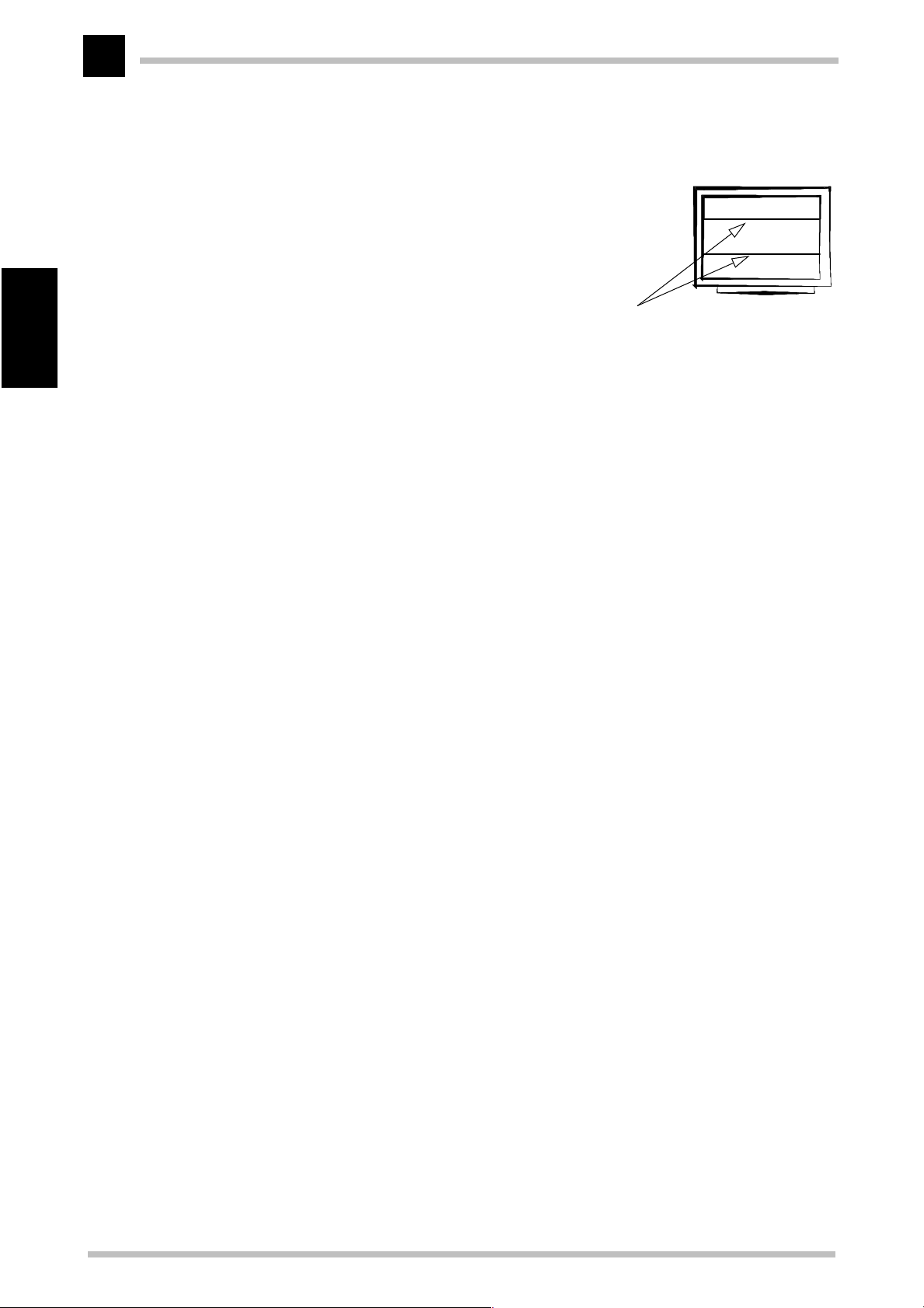
Restraining wires
You may notice two thin, horizontal lines in the
picture. This is not a defect, but a phenomenon
common to monitors which use the aperture
grille CRT technology.
English
These lines are shadows produced by the restraining wires which reduce the aperture
grille’s sensitivity to vibration.
Restraining wires
ELSA ECOMO 5 30
Page 31

Appendix
25
Appendix
TCO ’99
Congratulations! You have just purchased a TCO ’99 approved and labelled product! Your
choice has provided you with a product developed for professional use. Your purchase
has also contributed to reducing the burden on the environment and also to the further
development of environmentally adapted electronics products.
Why do we have environmentally labelled computers?
In many countries, environmental labelling has become an established method for encouraging the adaptation of goods and services to the environment. The main problem, as
far as computers and other electronics equipment are concerned, is that environmentally
harmful substances are used both in the products and during their manufacture. Since it
is not so far possible to satisfactorily recycle the majority of electronics equipment, most
of these potentially damaging substances sooner or later enter nature.
English
There are also other characteristics of a computer, such as energy consumption levels,
that are important from the viewpoints of both the work (internal) and natural (external)
environments. Since all methods of electricity generation have a negative effect on the
environment (e.g. acidic and climate-influencing emissions, radioactive waste), it is vital
to save energy. Electronics equipment in offices is often left running continuously and
thereby consumes a lot of energy.
What does labelling involve?
This product meets the requirements for the TCO ’99 scheme which provides for international and environmental labelling of personal computers. The labelling scheme was
developed as a joint effort by the TCO (The Swedish Confederation of Professional
Employees), Svenska Naturskyddsforeningen (The Swedish Society for Nature Conservation) and Statens Energimyndighet (The Swedish National Energy Administration).
Approval requirements cover a wide range of issues: environment, ergonomics, usability,
emission of electric and magnetic fields, energy consumption and electrical and fire
safety.
The environmental demands impose restrictions on the presence and use of heavy
metals, brominated and chlorinated flame retardants, CFCs (freons) and chlorinated solvents, among other things. The product must be prepared for recycling and the manufacturer is obliged to have an environmental policy which must be adhered to in each country
where the company implements its operational policy.
ELSA ECOMO 5 30
Page 32

English
26
Appendix
The energy requirements include a demand that the computer and/or display, after a certain period of inactivity, shall reduce its power consumption to a lower level in one or
more stages. The length of time to reactivate the computer shall be reasonable for the
user.
Labelled products must meet strict environmental demands, for example, in respect of
the reduction of electric and magnetic fields, physical and visual ergonomics and good
usability.
Below you will find a brief summary of the environmental requirements met by this product. The complete environmental criteria document may be ordered from:
쮿 TCO Development
114 94 Stockholm, Sweden
Fax: +46 8 782 92 07
e-mail: [email protected]
Current information regarding TCO ’99 approved and labelled products may also be obtained via the Internet, using the address:
쮿 www.tco-info.com
Environmental requirements
Flame retardants Flame retardants are present in printed circuit boards, cables, wires,
casings and housings. Their purpose is to prevent, or at least to delay the spread of fire.
Up to 30% of the plastic in a computer casing can consist of flame retardant substances.
Most flame retardants contain bromine or chloride, and those flame retardants are chemically related to another group of environmental toxins, PCBs. Both the flame retardants
containing bromine or chloride and the PCBs are suspected of giving rise to severe health
effects, including reproductive damage in fish-eating birds and mammals, due to the bioaccumulative* processes. Flame retardants have been found in human blood and researchers fear that disturbances in foetus development may occur.
The relevant TCO ’99 demand requires that plastic components weighing more than 25
grams must not contain flame retardants with organically bound bromine or chlorine.
Flame retardants are allowed in the printed circuit boards since no substitutes are available.
Cadmium** Cadmium is present in rechargeable batteries and in the color-generating
layers of certain computer displays. Cadmium damages the nervous system and is toxic
in high doses. The relevant TCO ’99 requirement states that batteries, the color-generating layers of display screens and the electrical or electronics components must not contain any cadmium.
Mercury* * Mercury is sometimes found in batteries, relays and switches. It damages
the nervous system and is toxic in high doses. The relevant TCO ’99 requirement states
ELSA ECOMO 5 30
Page 33

Appendix
27
that batteries may not contain any mercury. It also demands that mercury is not present
in any of the electrical or electronics components associated with the labelled unit.
CFCs (freons) The relevant TCO ’99 equirement states that neither CFCs nor HCFCs may
be used during the manufacture and assembly of the product. CFCs (freons) are sometimes used for washing printed circuit boards. CFCs break down ozone and thereby
damage the ozone layer in the stratosphere, causing increased reception on earth of
ultraviolet light with e.g. increased risks of skin cancer (malignant melanoma) as a consequence.
Lead* * Lead can be found in picture tubes, display screens, solders and capacitors.
Lead damages the nervous system and in higher doses, causes lead poisoning. The relevant TCO ’99 requirement permits the inclusion of lead since no replacement has yet
been developed.
* Bio-accumulative is defined as substances which accumulate within living organisms
** Lead, cadmium and mercury are heavy metals which are bio-accumulative.
English
ELSA ECOMO 5 30
Page 34

English
28
Appendix
Advice and help
If you encounter any problems during the installation or operation of your ELSA product,
please consult this manual first. If you have further questions, you can contact our Support team. Ensure that you can provide the following information.
쮿 Exact model name of your ELSA monitor.
쮿 The type of graphics board and the BIOS version (displayed when starting the com-
puter).
쮿 Operating systemand hardware environment.
Software updates
The latest versions of the ELSA software are always available for download from our
Internet site www.elsa.com and direct via FTP from ftp.elsa.com. You will also find a
wealth of information and answers to frequently asked questions (FAQs). Before you contact the ELSA Support team, please make sure that you are using the latest ELSA software (driver, firmware or INF file) versions.
Who to contact?
First you should contact the dealer where you bought your ELSA product. If there are still
questions remaining, contact one of the following:
쮿 ELSA on the Internet
ELSA WWW site www.elsa.com
쮿 ELSA by Mail
Or write to ELSA ELSA AG
Professional Displays Support
Sonnenweg 11
52070 Aachen
Germany
If you are not sure whether your product is defective or if the problem is just a driver
which is incorrectly installed, please call the ELSA Support hotline before you send the
board for repair.
쮿 ELSA Support hotline +49-241-606-6135
Mondays to Fridays from 9.00 am until 5.00 pm (CET)
ELSA ECOMO 5 30
Page 35

쮿쮿쮿쮿 ELSA world wide
You can contact the ELSA subsidiaries:
ELSA, Inc.
Appendix
29
1630 Zanker Road
San Jose, CA 95112
USA
ELSA Asia, Inc.
7F-11, No. 188, Sec. 5
Nanking East Road
Taipei 105
Taiwan, R.O.C.
Japan, Inc.
ELSA
Mita Suzuki Building 3F
5-20-14 Shiba, Minato-ku
Tokyo 108-0014
Japan
Phone:
Fax:
Phone:
Fax:
Phone:
Fax:
+1-408-961-4600
+1-800-272-ELSA
+1-408-895-4700
+886-2-2768
+886-2-2766 08 73
+81-3-5765-7391
+81-3-5765-7235
57
30
English
ELSA ECOMO 5 30
Page 36

English
30
Appendix
ELSA-ServiceDirect for ELSA ECOMO monitors
3-year warranty including ELSA-Onsite
As of the purchase date 01.01.1998, ELSA grants a three-year warranty on ELSA
ECOMO
product quality with its extensive quality assurance measures. If, however, the customer
makes a complaint, this service program guarantees perfect support and repair procedures to minimize any inconvenience. As well as repairs carried out free of charge, the following ServiceDirect services are offered within the extended scope of the warranty.
ELSA-Onsite: 3 years of onsite service for ELSA monitors—free of charge
You can avail of the numerous advantages of our onsite services for ELSA ECOMO monitors throughout Europe
support team. If your monitor requires repairs within the warranty period of three years,
you are provided with a replacement unit within 24 hours
workplace. Your repaired monitor will be returned to you as soon as possible. The advantage of this offer is that you have no downtime or transport expenses. ELSA's customer
service ensures that all transporting procedures are dealt with in the correct manner.
1)
monitors including ELSA-ServiceDirect. ELSA strives to offer its customers top
2)
. If you discover a fault with your monitor, you first contact our
3)
which we deliver to your
Your direct contact partner at ELSA-ServiceDirect
As an ELSA customer, you will receive support and advice from ELSA's customer service
at all stages of the warranty services being carried out.
The ELSA Support hotline is the first number to dial if you discover a
malfunction or fault on your monitor.
1) Applies to all ELSA ECOMO monitors purchased after January 1, 1998.
2)For ELSA ECOMO 21H97, a 4 week DoA warranty is granted outside of Germany instead.
3)Provided that the complete documentation reaches the ELSA Support team by 11.00 a.m. Please note that warranty services are only granted for
faults which are covered within the framework of our warranty conditions, valid for the Federal Republic of Germany.
If the ELSA service cannot find fault with the unit claimed to be defective, we will invoice you for DM 200 plus V.A.T. to cover inspection costs and
replacement of the unit.
ELSA monitor support hotline
+49-(0)241-606-6135
ELSA ECOMO 5 30
Page 37

Appendix
31
Warranty conditions
The ELSA AG warranty, valid as of June 01, 1998, is given to purchasers of ELSA products in addition to
the warranty conditions provided by law and in accordance with the following conditions:
1 Warranty coverage
a) The warranty covers the equipment delivered and all its parts. Parts will, at our sole discretion, be
replaced or repaired free of charge if, despite proven proper handling and adherence to the operating instructions, these parts became defective due to fabrication and/or material defects. Also we
reserve the right to replace the defective product by a successor product or repay the original purchase price to the buyer in exchange to the defective product. Operating manuals and possibly supplied software are excluded from the warranty.
b) Material and service charges shall be covered by us, but not shipping and handling costs involved
in transport from the buyer to the service station and/or to us.
c) Replaced parts become property of ELSA.
d) ELSA are authorized to carry out technical changes (e.g. firmware updates) beyond repair and re-
placement of defective parts in order to bring the equipment up to the current technical state. This
does not result in any additional charge for the customer. A legal claim to this service does not ex-
ist.
English
2 Warranty period
The warranty period for ELSA products is six years. Excepted from this warranty period are ELSA CRT
monitors and ELSA videoconferencing systems with a warranty period of three years. Also expected are
the ELSA TFT monitors with a warranty period of 12 months. This period begins at the day of delivery
from the ELSA dealer. Warranty services do not result in an extension of the warranty period nor do they
initiate a new warranty period. The warranty period for installed replacement parts ends with the warranty period of the device as a whole.
3 Warranty procedure
a) If defects appear during the warranty period, the warranty claims must be made immediately, at
the latest within a period of 7 days.
b) In the case of any externally visible damage arising from transport (e.g. damage to the housing), the
transport company representative and ELSA should be informed immediately. On discovery of dam-
age which is not externally visible, the transport company and ELSA are to be immediately informed
in writing, at the latest within 7 days of delivery.
c) Transport to and from the location where the warranty claim is accepted and/or the repaired device
is exchanged, is at the purchaser's own risk and cost.
d) Warranty claims are only valid if the original purchase receipt is returned with the device.
4 Suspension of the warranty
All warranty claims will be deemed invalid
a) if the device is damaged or destroyed as a result of acts of nature or by environmental influences
(moisture, electric shock, dust, etc.),
b) if the device was stored or operated under conditions not in compliance with the technical specifi-
cations,
ELSA ECOMO 5 30
Page 38

English
32
Appendix
c) if the damage occurred due to incorrect handling, especially to non-observance of the system de-
scription and the operating instructions,
d) if the device was opened, repaired or modified by persons not authorized by ELSA,
e) if the device shows any kind of mechanical damage,
f) if in the case of an ELSA monitor, damage to the cathode ray tube (CRT) has been caused especially
by mechanical load (e.g. from shock to the pitch mask assembly or damage to the glass tube), by
strong magnetic fields near the CRT (colored dots on the screen), or through the permanent display
of an unchanging image (phosphor burnt),
g) if, and in as far as, the luminance of the TFT panel backlighting gradually decreases with time, or
h) if the warranty claim has not been reported in accordance with 3a) or 3b).
5 Operating mistakes
If it becomes apparent that the reported malfunction of the device has been caused by unsuitable software, hardware, installation or operation, ELSA reserves the right to charge the purchaser for the resulting testing costs.
6 Additional regulations
a) The above conditions define the complete scope of ELSA’s legal liability.
b) The warranty gives no entitlement to additional claims, such as any refund in full or in part. Com-
pensation claims, regardless of the legal basis, are excluded. This does not apply if e.g. injury to
persons or damage to private property are specifically covered by the product liability law, or in cas-
es of intentional act or culpable negligence.
c) Claims for compensation of lost profits, indirect or consequential detriments, are excluded.
d) ELSA is not liable for lost data or retrieval of lost data in cases of slight and ordinary negligence.
e) In the case that the intentional or culpable negligence of ELSA employees has caused a loss of data,
ELSA will be liable for those costs typical to the recovery of data where periodic security data back-
ups have been made.
f) The warranty is valid only for the first purchaser and is not transferable.
g) The court of jurisdiction is located in Aachen, Germany in the case that the purchaser is a merchant.
If the purchaser does not have a court of jurisdiction in the Federal Republic of Germany or if he
moves his domicile out of Germany after conclusion of the contract, ELSA’s court of jurisdiction ap-
plies. This is also applicable if the purchaser's domicile is not known at the time of institution of
proceedings.
h) The law of the Federal Republic of Germany is applicable. The UN commercial law does not apply
to dealings between ELSA and the purchaser.
ELSA ECOMO 5 30
 Loading...