

Page 1
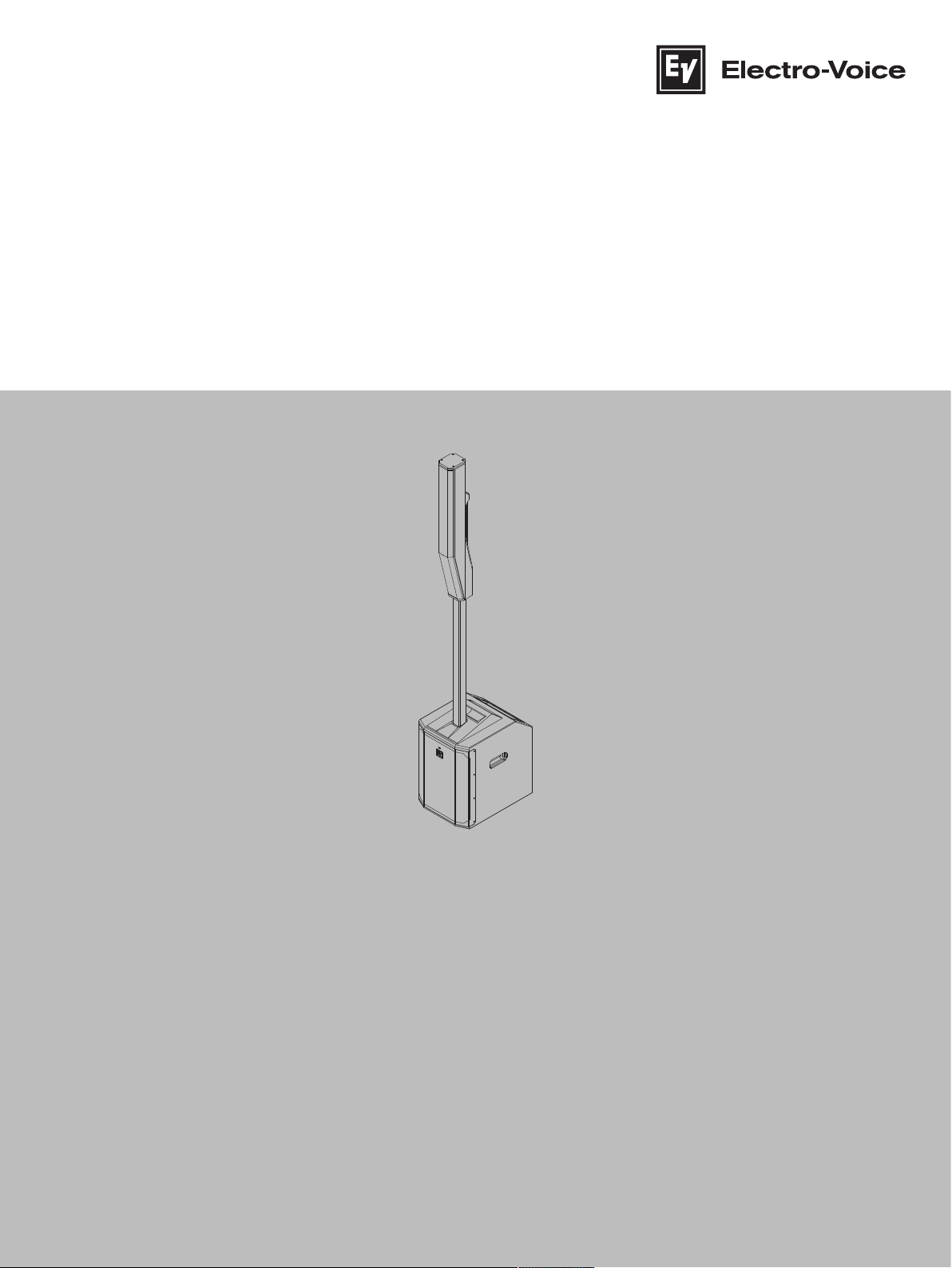
EVOLVE Portable Column Loudspeaker
EVOLVE50M‑SB‑EU | EVOLVE50M‑SB‑US | EVOLVE50M‑SW |
EVOLVE50‑TW | EVOLVE50‑TB
en
User manual
Page 2

Page 3

EVOLVE Portable Column Loudspeaker Table of contents | en 3
Table of contents
1
1.1 Important safety instructions 4
1.2 FCC information 6
1.3 Simplified Declaration of Conformity (sDoC) 7
1.4 Precautions 9
1.5 Certifications 9
1.6 Notices 10
2
2.1 Shipping contents 13
3
4
5
5.1 Amplifier DSP controls 16
5.2 System status 18
5.3 DSP control menu 19
6
6.1 Inputs 1-4, 5/6 & 7/8 31
6.2 QuickSmart Link configuration 32
7
8
8.1 Stereo pair of Evolve 50M systems 36
8.2 Solo musician performance 38
9
10
10.1 Dimensions 42
Safety 4
Short information 13
Description 14
Installation 15
Amplifier DSP 16
Mixer operation 31
Pairing the QuickSmart Mobile application 34
Recommended configurations 36
Troubleshooting 39
Technical data 41
Electro-Voice
User manual
2022-11 | 05 | F.01U.393.750
Page 4
4 en | Safety EVOLVE Portable Column Loudspeaker
!
1 Safety
1.1 Important safety instructions
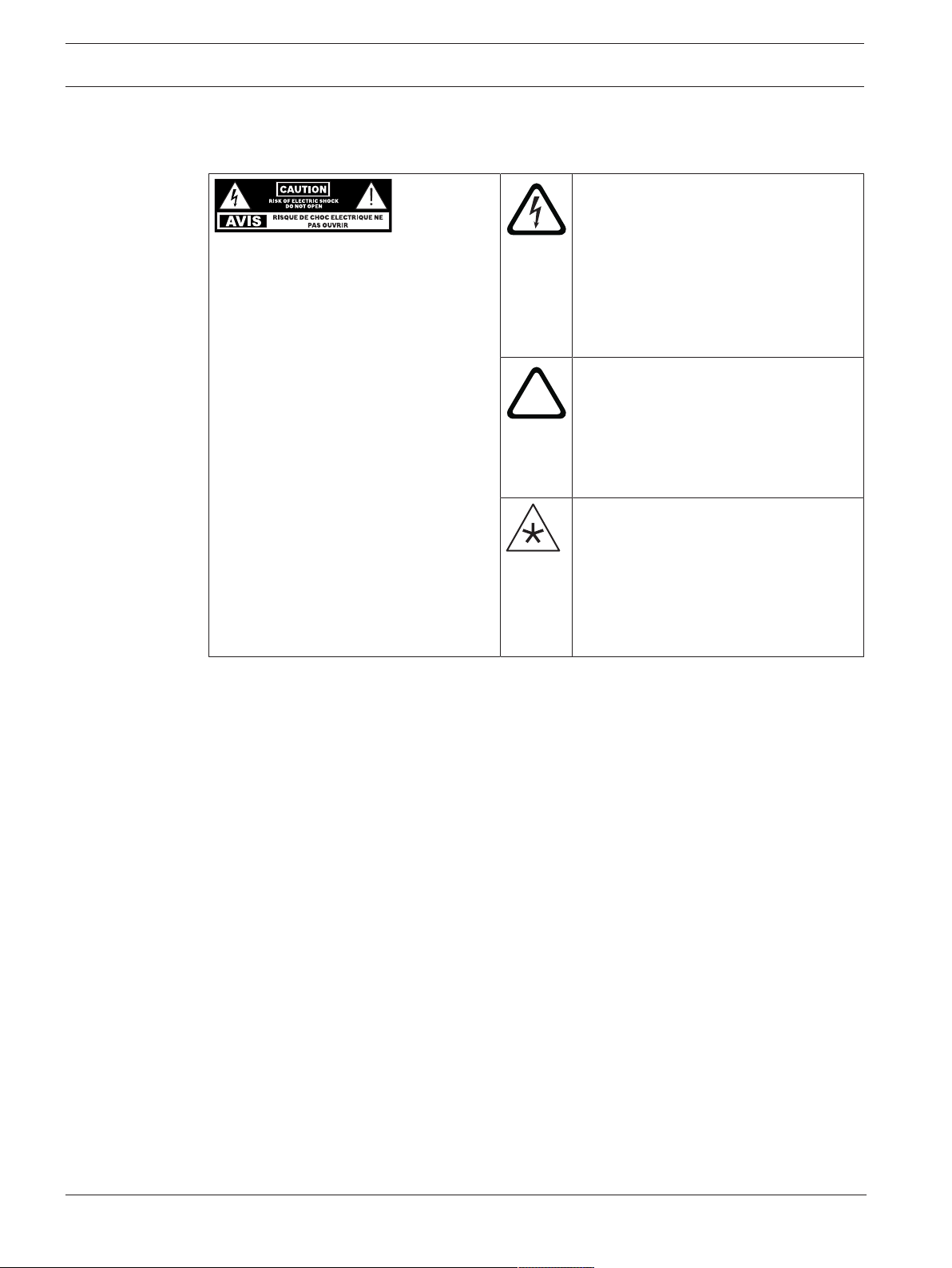
The lightning flash with arrowhead
symbol, within an equilateral triangle is
intended to alert the user to the
WARNING: TO REDUCE THE RISK OF
FIRE OR ELECTRIC SHOCK, DO NOT
OVEREXPOSE THIS APPLIANCE TO RAIN
OR MOISTURE
AVIS: RISQUE DE CHOC ELECTRIQUE,
NE PAS OUVRIR.
WARNING: THE MAINS PLUG OR AC
INLET IS USED AS A DISCONNECT
DEVICE. THE DISCONNECT DEVICE
SHALL REMAIN READILY OPERABLE.
WARNING: CONNECT ONLY TO MAINS
SOCKET WITH PROTECTIVE EARTHING
CONNECTION.
WARNING: TO REDUCE THE RISK OF
ELECTRIC SHOCK, DO NOT REMOVE
COVER (OR BACK) AS THERE ARE NO
USER-SERVICABLE PARTS INSIDE.
REFER SERVICING TO QUALIFIED
PERSONNEL.
presence of uninsulated “dangerous
voltage” within the product’s enclosure
that may be sufficient magnitude to
constitute a risk of electric shock to
persons.
The exclamation point within an
equilateral triangle is intended to alert
the user to the presence of important
operating and maintenance (servicing)
instructions in the literature
accompanying the appliance.
The asterisk within an equilateral
triangle is intended to inform the user to
necessary installation or removal
instructions regarding equipment or
hardware use relating to the system.
1. Read these instructions.
2. Keep these instructions.
3. Heed all warnings.
4. Follow all instructions.
5. Do not use this apparatus near water.
6. Clean only with a dry cloth.
7. Do not block any ventilation openings. Install in accordance with the manufacturer's
instructions.
8. Do not install near any heat sources such as radiators, heat registers, stoves, or other
apparatus (including amplifiers) that produce heat.
9. Do not defeat the safety purpose of the polarized or grounding-type plug. A polarized plug
has two blades with one wider than the other. A grounding type plug has two blades and
a third grounding prong. The wide blade or the third prong is provided for your safety. If
the provided plug does not fit into your outlet, consult an electrician for replacement of
the obsolete outlet.
10. Protect the power cord from being walked on or pinched particularly at plugs,
convenience receptacles, and the point where they exit from the apparatus.
11. Only use attachments/accessories specified by the manufacturer.
12. Use only with the cart, stand, tripod, bracket, or table specified by the manufacturer, or
with the apparatus. When a cart is used, use caution when moving the cart/apparatus
combination to avoid injury from tip-over.
13. Unplug the apparatus during lightning storms or when unused for long periods of time.
2022-11 | 05 | F.01U.393.750
User manual
Electro-Voice
Page 5
EVOLVE Portable Column Loudspeaker Safety | en 5
!
!
!
!
!
14. Refer all servicing to qualified service personnel. Servicing is required when the
apparatus has been damaged in any way, such as power-supply cord or plug is damaged,
liquid has been spilled or objects have fallen into the apparatus, the apparatus has been
exposed to rain or moisture, does not operate normally, or has been dropped.
15. No naked flame sources, such as lighted candles, should be placed on the apparatus.
16. To reduce the risk of fire or electric shock, do not expose this apparatus to rain or
moisture. The apparatus should not be exposed to dripping or splashing. Objects filled
with liquids, such as vases should not be placed on apparatus.
17. Do not block any ventilation openings. Install in accordance with the manufacturer's
instructions.
18. Minimum 60 cm (2 ft) distances around the apparatus for sufficient ventilation.
19. The ventilation should not be impeded by covering the ventilation openings with items,
such as newspapers, table-cloths, curtains, etc.
20. To completely disconnect AC power from this apparatus, the power supply cord must be
unplugged.
Warning!
Apparatets stikprop skal tilsluttes en stikkontakt med jord som giver forbindelse til
stikproppens jord.
Laite on liitettävä suojakoskettimilla varustettuun pistorasiaan
Apparatet må tilkoples jordet stikkontakt
Apparaten skall anslutas till jordat uttag
Warning!
This product is designed ONLY to be suspended with authorized Electro-Voice mounting
accessories. Do NOT use non-authorized brackets or methods to suspend the loudspeaker.
Handles on Electro-Voice loudspeakers are intended to only be used for temporary transport
by people or for use with Electro-Voice authorized mounting accessories ONLY. Items such as
fiber rope, wire rope, cables, or other types of materials cannot be used to suspend the
loudspeaker from the handles.
Warning!
Use of non-authorized accessories or attachments with this or any Electro-Voice product is at
your own discretion. Use of non-authorized accessories or attachments can result in product
malfunction, injury, or death.
The user assumes all liability and may result in the warranty being voided.
Caution!
Do not attempt to move this loudspeaker system when it is fully assembled.
You may damage the system or cause personal injury.
Caution!
To maintain tip-over stability, do not use EVOLVE 30M 2-piece sub-pole with EVOLVE 50
column speaker array or subwoofer.
Doing so may result in damage, and/or personal injury
Electro-Voice
User manual
2022-11 | 05 | F.01U.393.750
Page 6
6 en | Safety EVOLVE Portable Column Loudspeaker
!
i
Caution!
For optimal acoustics and performance, ONLY use EVOLVE 50/50M column speaker array with
the EVOLVE 50/50M subwoofer. Do not use EVOLVE 30M column speaker array or subwoofer
with EVOLVE 50/50M column speaker array or subwoofer.
Doing so may result in poor acoustic performance, permanent damage, and void of warranty.
1.2 FCC information
This device complies with Part 15 of the FCC Rules. Operation is subject to the following two
conditions:
(1) This device may not cause harmful interference, and
(2) This device must accept any interference received, including interference that may cause
undesired operation.
Notice!
This product has been tested and found to comply with the limits for a Class B digital device,
pursuant to Part 15 of the FCC Rules. These limits are designed to provide reasonable
protection against harmful interference in a residential installation. This product generates,
uses, and can radiate radio frequency energy and, if not installed and used in accordance with
the instructions, may cause harmful interference to radio communications.
However, there is no guarantee that interference will not occur in a particular installation. If
this product does cause harmful interference to radio or television reception, which can be
determined by turning the equipment off and on, the user is encouraged to try to correct the
interference by one or more of the following measures:
—Reorient or relocate the receiving antenna.
—Increase the separation between the equipment and receiver.
—Connect the equipment into an outlet on a circuit different from that to which the receiver
is connected.
—Consult the dealer or an experienced radio/TV technician for help.
The device has been granted by FCC and IC, the FCC ID:ESVEVOLVE and IC:1249A EVOLVE50M.
Please take attention that changes or modification not expressly approved by the party
responsible for compliance could void the user’s authority to operate the equipment.
This equipment should be installed and operated with a minimum distance of 20cm between
the radiator and your body.
This device complies with Industry Canada license-exempt RSS standard(s). Operation is
subject to the following two conditions:
(1) this device may not cause interference, and
(2) this device must accept any interference, including interference that may cause undesired
operation of the device.
Le présent appareil est conforme aux CNR d'Industrie Canada applicables aux appareils
radioexempts de licence. L'exploitation est autorisée aux deux conditions suivantes :
(1) l'appareil ne doit pas produire de brouillage, et
(2) l'utilisateur de l'appareil doit accepter tout brouillage radioélectrique subi, même si le
brouillage est susceptible d'en compromettre le fonctionnement.
2022-11 | 05 | F.01U.393.750
User manual
Electro-Voice
Page 7

EVOLVE Portable Column Loudspeaker Safety | en 7
Under Industry Canada regulations, this radio transmitter may only operate using an antenna
of a type and maximum (or lesser) gain approved for the transmitter by Industry Canada. To
reduce potential radio interference to other users, the antenna type and its gain should be so
chosen that the equivalent isotropically radiated power (e.i.r.p.) is not more than that
necessary for successful communication.
Conformément à la réglementation d'Industrie Canada, le présent émetteur radio peut
fonctionner avec une antenne d'un type et d'un gain maximal (ou inférieur) approuvé pour
l'émetteur par Industrie Canada. Dans le but de réduire les risques de brouillage
radioélectrique à l'intention des autres utilisateurs, il faut choisir le type d'antenne et son gain
de sorte que la puissance isotrope rayonnée équivalente (p.i.r.e.) ne dépasse pas l'intensité
nécessaire à l'établissement d'une communication satisfaisante.
1.3 Simplified Declaration of Conformity (sDoC)
BG С настоящото Bosch Security Systems, LLC декларира, че този тип
радиосъоръжение EVOLVE50M-SB-EU, EVOLVE50M-SW е в съответствие с
Директива 2014/53/ЕС. Цялостният текст на ЕС декларацията за съответствие
може да се намери на следния интернет адрес: www.electrovoice.com
CS Tímto Bosch Security Systems, LLC prohlašuje, že typ rádiového zařízení
EVOLVE50M-SB-EU, EVOLVE50M-SW je v souladu se směrnicí 2014/53/EU. Úplné
znění EU prohlášení o shodě je k dispozici na této internetové adrese:
www.electrovoice.com
DA Hermed erklærer Bosch Security Systems, LLC , at radioudstyrstypen EVOLVE50M-
SB-EU, EVOLVE50M-SW er i overensstemmelse med direktiv 2014/53/EU. EUoverensstemmelseserklæringens fulde tekst kan findes på følgende internetadresse:
www.electrovoice.com
DE Hiermit erklärt Bosch Security Systems, LLC , dass der Funkanlagentyp EVOLVE50M-
SB-EU, EVOLVE50M-SW der Richtlinie 2014/53/EU entspricht. Der vollständige Text
der EU-Konformitätserklärung ist unter der folgenden Internetadresse verfügbar:
www.electrovoice.com
EL Με την παρούσα ο/η Bosch Security Systems, LLC , δηλώνει ότι ο ραδιοεξοπλισμός
EVOLVE50M-SB-EU, EVOLVE50M-SW πληροί την οδηγία 2014/53/ΕΕ. Το πλήρες
κείμενο της δήλωσης συμμόρφωσης ΕΕ διατίθεται στην ακόλουθη ιστοσελίδα στο
διαδίκτυο: www.electrovoice.com
EN Hereby, Bosch Security Systems, LLC declares that the radio equipment type
EVOLVE50M-SB-EU, EVOLVE50M-SW is in compliance with Directive 2014/53/EU and
the Radio Equipment Regulations 2017 as amended. The full text of the EU
declaration of conformity and the UK declaration of conformity are available at the
following internet address: www.electrovoice.com
Electro-Voice
ES Por la presente, Bosch Security Systems, LLC declara que el tipo de equipo
radioeléctrico EVOLVE50M-SB-EU, EVOLVE50M-SW es conforme con la Directiva
2014/53/UE. El texto completo de la declaración UE de conformidad está disponible
en la dirección Internet siguiente: www.electrovoice.com
User manual
2022-11 | 05 | F.01U.393.750
Page 8

8 en | Safety EVOLVE Portable Column Loudspeaker
ET Käesolevaga deklareerib Bosch Security Systems, LLC , et käesolev raadioseadme
tüüp EVOLVE50M-SB-EU, EVOLVE50M-SW vastab direktiivi 2014/53/EL nõuetele. ELi
vastavusdeklaratsiooni täielik tekst on kättesaadav järgmisel internetiaadressil:
www.electrovoice.com
FI Bosch Security Systems, LLC vakuuttaa, että radiolaitetyyppi EVOLVE50M-SB-EU,
EVOLVE50M-SW on direktiivin 2014/53/EU mukainen. EUvaatimustenmukaisuusvakuutuksen täysimittainen teksti on saatavilla seuraavassa
internetosoitteessa: www.electrovoice.com
FR Le soussigné, Bosch Security Systems, LLC , déclare que l'équipement
radioélectrique du type EVOLVE50M-SB-EU, EVOLVE50M-SW est conforme à la
directive 2014/53/UE. Le texte complet de la déclaration UE de conformité est
disponible à l'adresse internet suivante: www.electrovoice.com
HR Bosch Security Systems, LLC ovime izjavljuje da je radijska oprema tipa EVOLVE50M-
SB-EU, EVOLVE50M-SW u skladu s Direktivom 2014/53/EU. Cjeloviti tekst EU izjave o
sukladnosti dostupan je na sljedećoj internetskoj adresi: www.electrovoice.com
HU Bosch Security Systems, LLC igazolja, hogy a EVOLVE50M-SB-EU, EVOLVE50M-SW
típusú rádióberendezés megfelel a 2014/53/EU irányelvnek. Az EU-megfelelőségi
nyilatkozat teljes szövege elérhető a következő internetes címen:
www.electrovoice.com
IT Il fabbricante, Bosch Security Systems, LLC , dichiara che il tipo di apparecchiatura
radio EVOLVE50M-SB-EU, EVOLVE50M-SW è conforme alla direttiva 2014/53/UE. Il
testo completo della dichiarazione di conformità UE è disponibile al seguente
indirizzo Internet: www.electrovoice.com
LT Aš, Bosch Security Systems, LLC , patvirtinu, kad radijo įrenginių tipas EVOLVE50M-
SB-EU, EVOLVE50M-SW atitinka Direktyvą 2014/53/ES. Visas ES atitikties
deklaracijos tekstas prieinamas šiuo interneto adresu: www.electrovoice.com
LV Ar šo Bosch Security Systems, LLC deklarē, ka radioiekārta EVOLVE50M-SB-EU,
EVOLVE50M-SW atbilst Direktīvai 2014/53/ES. Pilns ES atbilstības deklarācijas teksts
ir pieejams šādā interneta vietnē: www.electrovoice.com
MT B'dan, Bosch Security Systems, LLC , niddikjara li dan it-tip ta' tagħmir tar-radju
EVOLVE50M-SB-EU, EVOLVE50M-SW huwa konformi mad-Direttiva 2014/53/UE. Ittest kollu tad-dikjarazzjoni ta' konformità tal-UE huwa disponibbli f'dan l-indirizz talInternet li ġej: www.electrovoice.com
NL Hierbij verklaar ik, Bosch Security Systems, LLC , dat het type radioapparatuur
EVOLVE50M-SB-EU, EVOLVE50M-SW conform is met Richtlijn 2014/53/EU. De
volledige tekst van de EU-conformiteitsverklaring kan worden geraadpleegd op het
volgende internetadres: www.electrovoice.com
PL Bosch Security Systems, LLC niniejszym oświadcza, że typ urządzenia radiowego
EVOLVE50M-SB-EU, EVOLVE50M-SW jest zgodny z dyrektywą 2014/53/UE. Pełny
tekst deklaracji zgodności UE jest dostępny pod następującym adresem
internetowym: www.electrovoice.com
2022-11 | 05 | F.01U.393.750
User manual
Electro-Voice
Page 9
EVOLVE Portable Column Loudspeaker Safety | en 9
PT O(a) abaixo assinado(a) Bosch Security Systems, LLC declara que o presente tipo de
equipamento de rádio EVOLVE50M-SB-EU, EVOLVE50M-SW está em conformidade
com a Diretiva 2014/53/UE. O texto integral da declaração de conformidade está
disponível no seguinte endereço de Internet: www.electrovoice.com
RO Prin prezenta, Bosch Security Systems, LLC declară că tipul de echipamente radio
EVOLVE50M-SB-EU, EVOLVE50M-SW este în conformitate cu Directiva 2014/53/UE.
Textul integral al declarației UE de conformitate este disponibil la următoarea adresă
internet: www.electrovoice.com
SK Bosch Security Systems, LLC týmto vyhlasuje, že rádiové zariadenie typu
EVOLVE50M-SB-EU, EVOLVE50M-SW je v súlade so smernicou 2014/53/EÚ. Úplné EÚ
vyhlásenie o zhode je k dispozícii na tejto internetovej adrese: www.electrovoice.com
SL Bosch Security Systems, LLC potrjuje, da je tip radijske opreme EVOLVE50M-SB-EU,
EVOLVE50M-SW skladen z Direktivo 2014/53/EU. Celotno besedilo izjave EU o
skladnosti je na voljo na naslednjem spletnem naslovu: www.electrovoice.com
SV Härmed försäkrar Bosch Security Systems, LLC att denna typ av radioutrustning
EVOLVE50M-SB-EU, EVOLVE50M-SW överensstämmer med direktiv 2014/53/EU. Den
fullständiga texten till EU-försäkran om överensstämmelse finns på följande
webbadress: www.electrovoice.com
1.4 Precautions
If an Electro-Voice loudspeaker is used outdoors on a sunny day, place the
loudspeaker in a shaded or covered area. The loudspeaker amplifiers have
protection circuits that temporarily shut the loudspeaker off when extremely
high temperatures are reached. This can happen on hot days when the
loudspeaker is in direct sunlight.
Do not use Electro-Voice loudspeakers in an environment where temperatures
are below 0°C (32°F) or exceed +35°C (95°F).
Never expose an Electro-Voice loudspeaker to rain, water, or high moisture.
Electro-Voice loudspeakers are easily capable of generating sound pressure
levels sufficient to cause permanent hearing damage to anyone within normal
coverage distance. Caution should be taken to avoid prolonged exposure to
sound pressure levels exceeding 90 dB.
1.5 Certifications
Electro-Voice
Brazil:
Após uma perturbação da rede elétrica, o EVOLVE pode entrar em estado de segurança. Neste
caso, você deve desligar e ligar o dispositivo novamente.
Este equipamento não tem direito à proteção contra interferência prejudicial e não pode
causar interferência em sistemas devidamente autorizados.
User manual
2022-11 | 05 | F.01U.393.750
Page 10
10 en | Safety EVOLVE Portable Column Loudspeaker
Mexico:
“La operación de este equipo está sujeta a las siguientes dos condiciones: (1) es posible que
este equipo o dispositivo no cause interferencia perjudicial y (2) este equipo o dispositivo
debe aceptar cualquier interferencia, incluyendo la que pueda causar su operación no
deseada”
EVOLVE 50M (RCPBOEV20-1717)
EVOLVE50M-SB-US (RCPBOEV20-1717-A5)
EVOLVE50M-SB-EU (RCPBOEV20-1717-A6)
EVOLVE50M-SW (RCPBOEV20-1717-A7)
Republic of Korea:
제품명: 앰프내장형 스피커
모델명: EVOLVE50M
정격: 100-240 Vac, 50-60 Hz, 1000 W
수입업체(상호)명: 로버트보쉬코리아(유)
제조자: Bosch Security Systems, LLC.
제조연월: 별도표기
제조국: 중국
A/S: 02-702-2846
해당 무선설비는 운용 중 전파혼신 가능성이 있음
해당 무선설비는 전파혼신 가능성이 있으므로 인명안전과 관련된 서비스는 할 수 없습니다.
United Arab Emirates:
TRA Registered no.: ER77128/19
Dealer no.: DA45733/15
1.6 Notices
Old electrical and electronic equipment
This product and/or battery must be disposed of separately from household waste.
Dispose such equipment according to local laws and regulations, to allow their reuse
and/or recycling. This will help in conserving resources, and in protecting human
health and the environment.
Copyright and disclaimer
All rights reserved. No part of this document may be reproduced or transmitted in any form by
any means, electronic, mechanical, photocopying, recording, or otherwise, without the prior
written permission of the publisher. For information on getting permission for reprints and
excerpts, contact Electro-Voice.
2022-11 | 05 | F.01U.393.750
User manual
Electro-Voice
Page 11

EVOLVE Portable Column Loudspeaker Safety | en 11
i
All content including specifications, data, and illustrations in this manual are subject to change
without prior notice.
Notice!
Bluetooth® is available in select countries.
Contact your nearest Electro-Voice dealer or Electro-Voice distributor for more information.
The Bluetooth® word mark and logos are registered trademarks owned by Bluetooth SIG, Inc.
and any use of such marks by Bosch Security Systems, Inc. is under license. Other trademarks
and trade names are those of their respective owners.
Electro-Voice
User manual
2022-11 | 05 | F.01U.393.750
Page 12
12 en | Safety EVOLVE Portable Column Loudspeaker
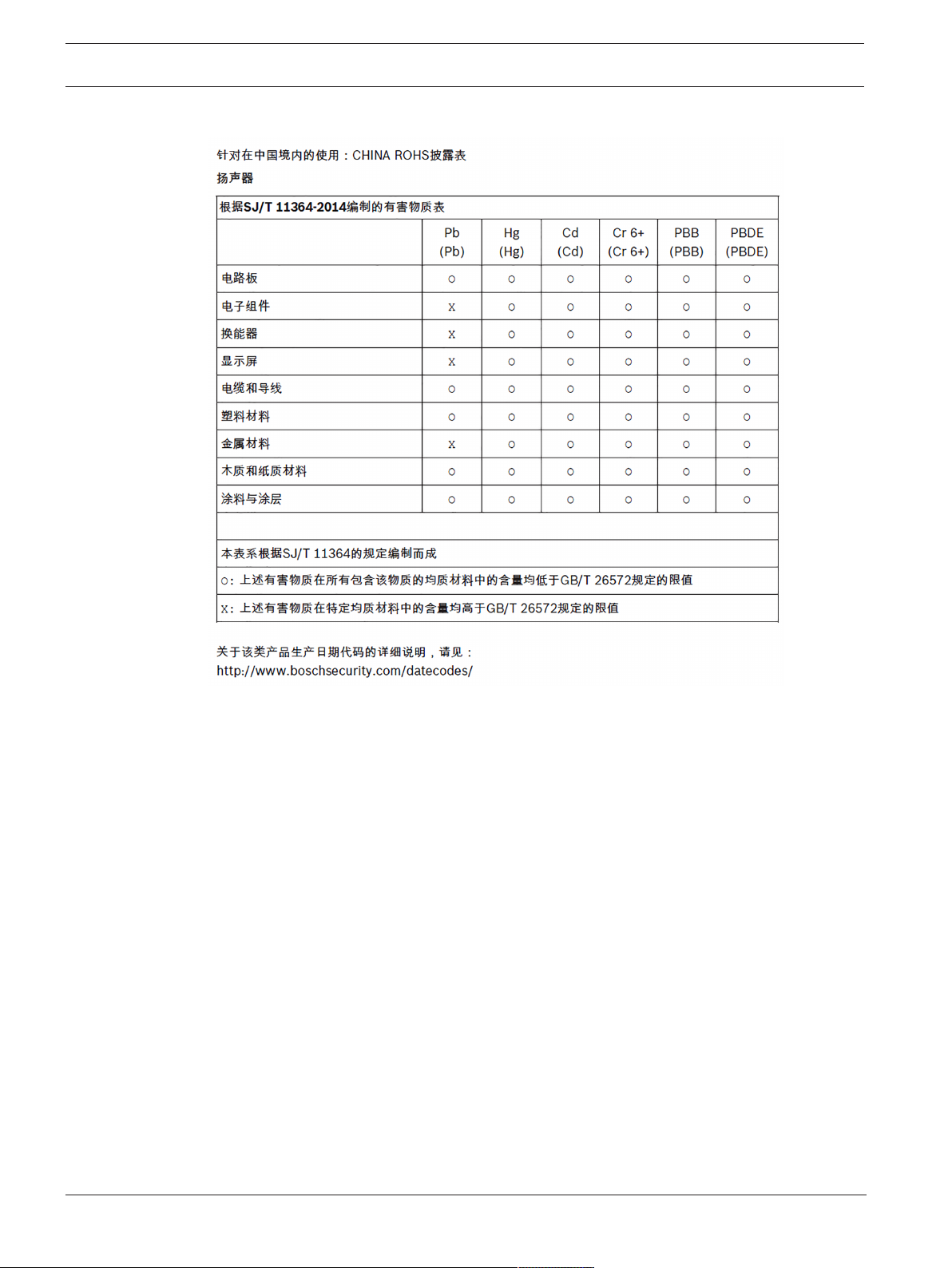
For use in China: CHINA ROHS DISCLOSURE TABLE
2022-11 | 05 | F.01U.393.750
User manual
Electro-Voice
Page 13

EVOLVE Portable Column Loudspeaker Short information | en 13
2 Short information
The following table lists products in a family, with CTN (Commercial Type Number) and
identifying product name DESCRIPTION.
CTN Description
EVOLVE50-TB Column speaker array, pole, black
EVOLVE50M-SB-US Column speaker sub US, black
EVOLVE50M-SB-EU Column speaker sub EU, black
EVOLVE50-TW Column speaker array, pole, white
EVOLVE50M-SW Column speaker sub, US & EU, white
EVOLVE50-PL-SB Column speaker pole, short, black
EVOLVE50-PL-SW Column speaker pole, short, white
EVOLVE50-CASE Column speaker carrying case, wheels
EVOLVE50-SUBCVR Subwoofer Cover
2.1 Shipping contents
Quantity Component
1 Subwoofer
1 (2 for EVOLVE50M-SW) Power cord
1 User manual
1 Safety manual
Table2.1: EVOLVE50M-SB-US, EVOLVE50M-SB-EU, EVOLVE50M-SW
Quantity Component
1 Column array
1 Sub pole
1 Carry bag
Table2.2: EVOLVE50-TB, EVOLVE50-TW
Electro-Voice
User manual
2022-11 | 05 | F.01U.393.750
Page 14

14 en | Description EVOLVE Portable Column Loudspeaker
3 Description
Thank you for choosing an Electro-Voice portable column system. Please take time to consult
the manual to understand all the features built into your EV system and fully utilize its
performance capabilities.
Electro-Voice is expanding its industry-leading EVOLVE series with the launch of the EVOLVE
50M column loudspeaker system. The EVOLVE 50M features Electro-Voice’s new QuickSmart
Link digital audio and control technology, an onboard mixer, DSP and effects - all combined
within the sleek EVOLVE 50 format. The EVOLVE 50M is the perfect choice for bands/
musicians, AV rental companies, DJs and any application where true professional audio
performance is required in a super-compact and portable package.
Available in black or white finishes, the EVOLVE 50M combines state-of-the-art industrial
design, superior Electro-Voice-engineered components and premium materials to deliver bestin-class sound quality, power and reliability. The full-range column array and its eight
lightweight 3.5” neodymium drivers provide ultra-wide, full-bandwidth 120° coverage via
proprietary waveguides; array-formed 40° asymmetrical vertical coverage ensures acoustic
output is directed towards both sitting and standing audience members. The array enclosure
is constructed from a durable composite material and incorporates an ergonomic aluminum
handle. A 12” subwoofer is housed in a 15 mm wood enclosure with a high-efficiency laminarflow vent design, for enhanced rigidity and acoustical performance. The array and sub are
connected via a symmetrical aluminum pole with internal wiring and magnetically assisted
latching. The speakers are protected by a black powder-coated 18-gauge steel grille, and an
array/pole carry case is included. An advanced Class-D amplifier provides up to 1000 W of
power.
Equipped with the most comprehensive and user-friendly feature set of any column system on
the market today, the EVOLVE 50M’s “M” designation refers to its integrated fully featured,
fully configurable eight-channel digital mixer. Developed in collaboration with the world-class
audio electronics engineering team at Electro-Voice’s sibling brand Dynacord, the mixer has
multiple inputs (4x XLR/TRS combo mic/line inputs, 1x XLR/TRS combo stereo line input, 1x
RCA, 1x 3.5 mm stereo, 1x Hi-Z instrument input) with professional-grade preamps and mix
functions. High-resolution, low-latency Bluetooth® streaming ensures excellent results for
music playback or accompaniment. Independent channel aux sends and a foot switch input
are also included, and a range of effects (30 presets, including chorus, delay, flange and
reverb, via two FX channels) add a myriad of options for musicians to fine-tune their tone. All
of the above help to reduce load-in/out and setup/teardown time - and on-stage clutter - by
minimizing the need for external equipment such as a mixer and effects pedals.
New from Electro-Voice, QuickSmart Link makes it easy to combine two EVOLVE 50Ms for use
together with larger bands or gigs needing more inputs. Simply link the systems together via
an Ethernet cable to create an uncompressed digital audio/control connection, pair both
systems to a single mobile device via the QuickSmart Mobile app (available via the Apple App
Store and on Google Play), and get full mix control of both systems. For applications requiring
fewer inputs, but still requiring a mixer and stereo output, the EVOLVE 50M can be matched
with an EVOLVE 50 via the MIX OUT XLR connector.
The EVOLVE 50M’s control panel features Electro-Voice’s powerful QuickSmart DSP, which
allows the navigation and adjustment of all audio, effects and mix functions via an LCD with
single-knob control or via the QuickSmart Mobile app, as well as multiple options for signal
routing and inputs. Functions include four presets (Music, Live, Speech, Club), three-band
system EQ (low, mid, high), seven-band graphic EQ (in Mixer mode), five user-programmable
presets (Store and Recall settings), phantom power, visual monitoring of limiter status, input
level control and meters, and a master volume control to optimize gain structure.
2022-11 | 05 | F.01U.393.750
User manual
Electro-Voice
Page 15
EVOLVE Portable Column Loudspeaker Installation | en 15
!
A
A
4 Installation
Caution!
Do not attempt to move this loudspeaker system when it is fully assembled.
You may damage the system or cause personal injury.
Assembling the loudspeaker system
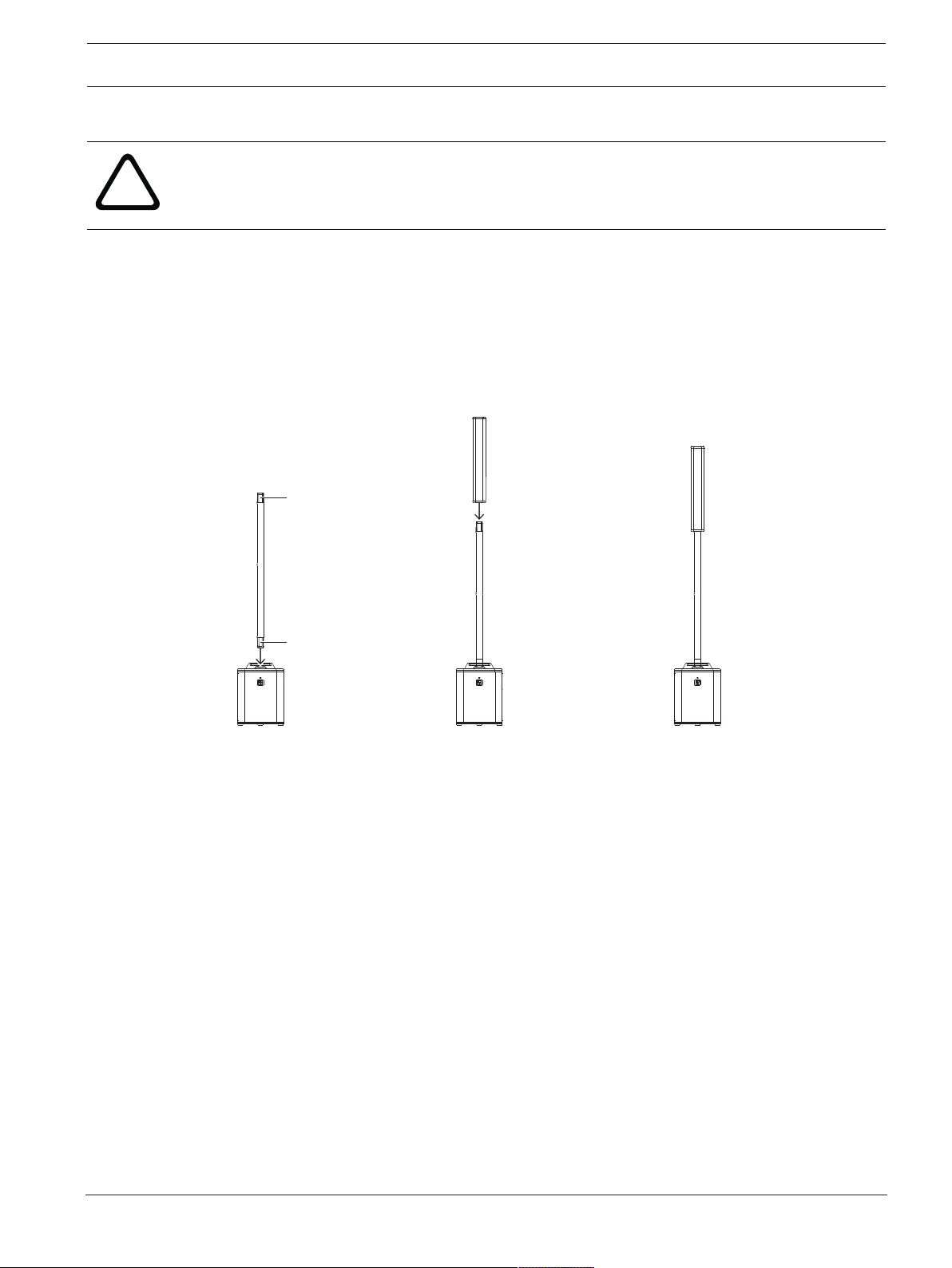
To assemble the loudspeaker system, do the following:
1. Place the subwoofer on a level and stable surface.
2. Insert the pole into the subwoofer base.
The pole has magnets (A) at each end.
3. Place the column array loudspeaker system on top of the subwoofer pole.
4. The column array loudspeaker system set up is complete.
Electro-Voice
2. 3. 4.
User manual
2022-11 | 05 | F.01U.393.750
Page 16
16 en | Amplifier DSP EVOLVE Portable Column Loudspeaker
1 2
5
3
976
MIXER
LINE
QuickSmart
Link
8
4
5 Amplifier DSP
5.1 Amplifier DSP controls
The amplifier has a combination of controls and connectors to ensure the most versatile
loudspeaker system.
Portable column system control and monitoring interface
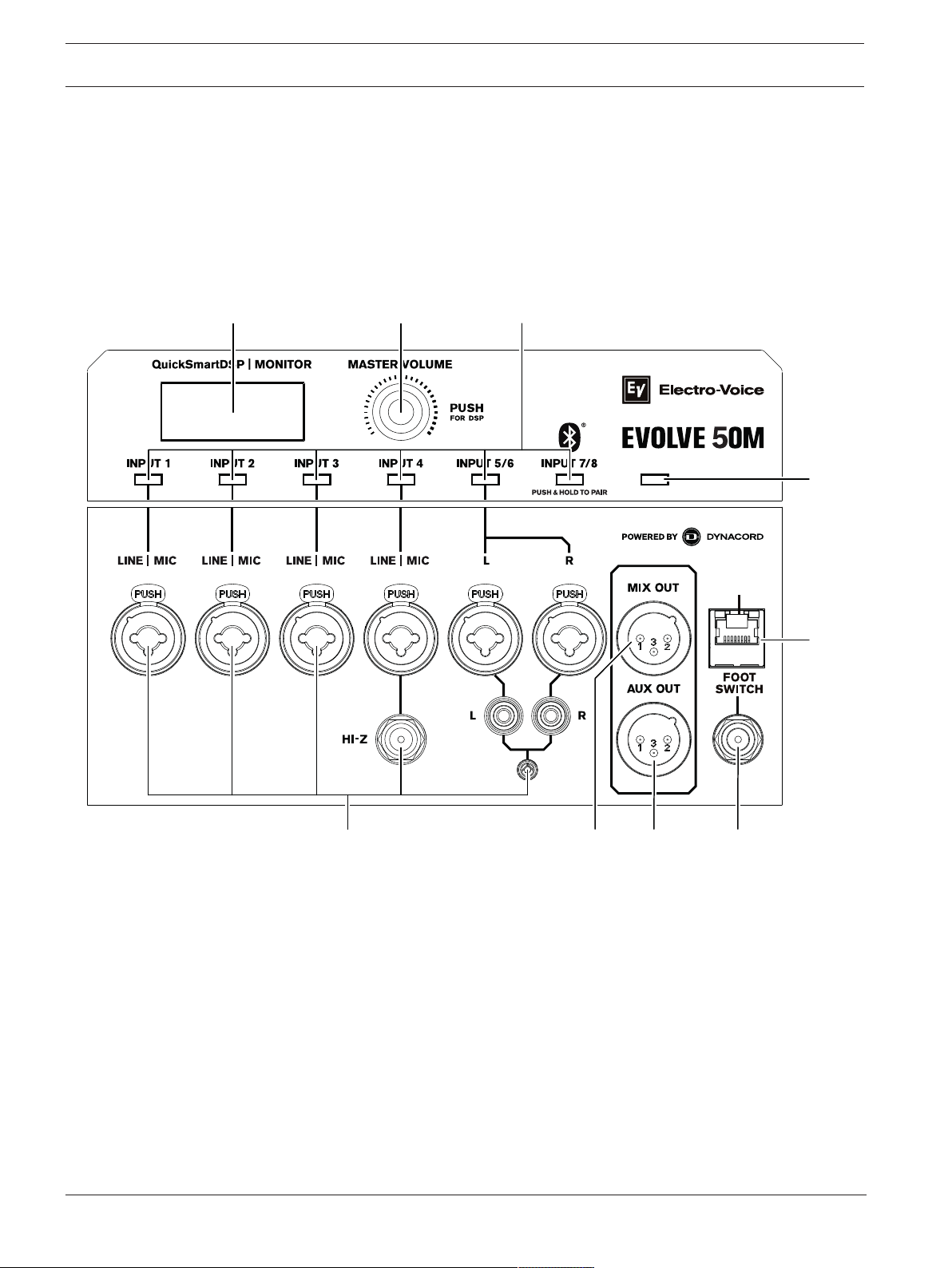
The portable column system DSP control menu selections are available for the EVOLVE.
1. LCD – DSP control and monitoring interface.
2. MASTER VOL – Adjusts the sound level.
DSP – Scroll through the menu and select the available choices. Push the MASTER VOL
knob to enter the DSP menu.
3. INPUT selection soft keys - Selects channels INPUT 1 through INPUT 7/8 for channel DSP
settings and individual level settings.
4. MIXER selection soft key - accesses mixer controls in DSP (e.g. Level, GEQ, effects and
signal routings).
5. INPUT 1-4, 5/6 & 7/8 - Electronically balanced INPUT 1 thru INPUT 4 for the connection of
a microphone or line level signal source. Establishing a connection is possible via TRS or
XLR-type plugs. Phantom Power (+15 V) is always enabled on INPUTS 1-4 on the XLR
connectors only. INPUT 4 includes a HI-Z input below the TRS/XLR combo plug for
connection to a high impedance instrument output via a TS plug. Stereo INPUT 5/6 for
2022-11 | 05 | F.01U.393.750
User manual
Electro-Voice
Page 17
EVOLVE Portable Column Loudspeaker Amplifier DSP | en 17
10 11
i
connection of stereo line level signals. Connection is made using either two XLR-type,
TRS, RCA, or a single 1/8th inch stereo connector. Input 7/8 is reserved for stereo
Bluetooth audio connection.
6. MIX OUT - The post-fader audio signals of INPUT 1 through INPUT 7/8 are mixed and
passed to MIX OUT. The ratio of the input signals changes when the level controls INPUT
1 - 7/8 are adjusted. This feature allows the loudspeaker to act as a basic eight-channel
mixer that can send the mix to another loudspeaker via the MIX OUT socket. The output is
configurable in the menu to provide either the Mixer Mono, Stereo left or Stereo right
signal. If QuickSmart Link is used, MIX OUT provides the same signal as the column
system.
7. AUX OUT - The AUX OUT is configurable to provide either a separate post fader audio mix
of INPUT1 - 7/8 (controlled by individual channel AUX levels adjustable in DSP) or the
main mix output signal. In the case of main mix, the full mix including effects is provided
whereas the separate aux mix comes without effects.
8. QuickSmart Link - RJ45 connector for Cat5 cable to link two EVOLVE 50M systems
together for digital audio and system control. QuickSmart Link should only be used to
connect two EVOLVE 50M systems. QuickSmart Link is not an Ethernet/LAN port and is
not compatible with network devices. The maximum recommended cable length is 100 m
(328 ft).
9. FOOT SWITCH - ON/OFF control of DSP user selectable audio FX.
Electro-Voice
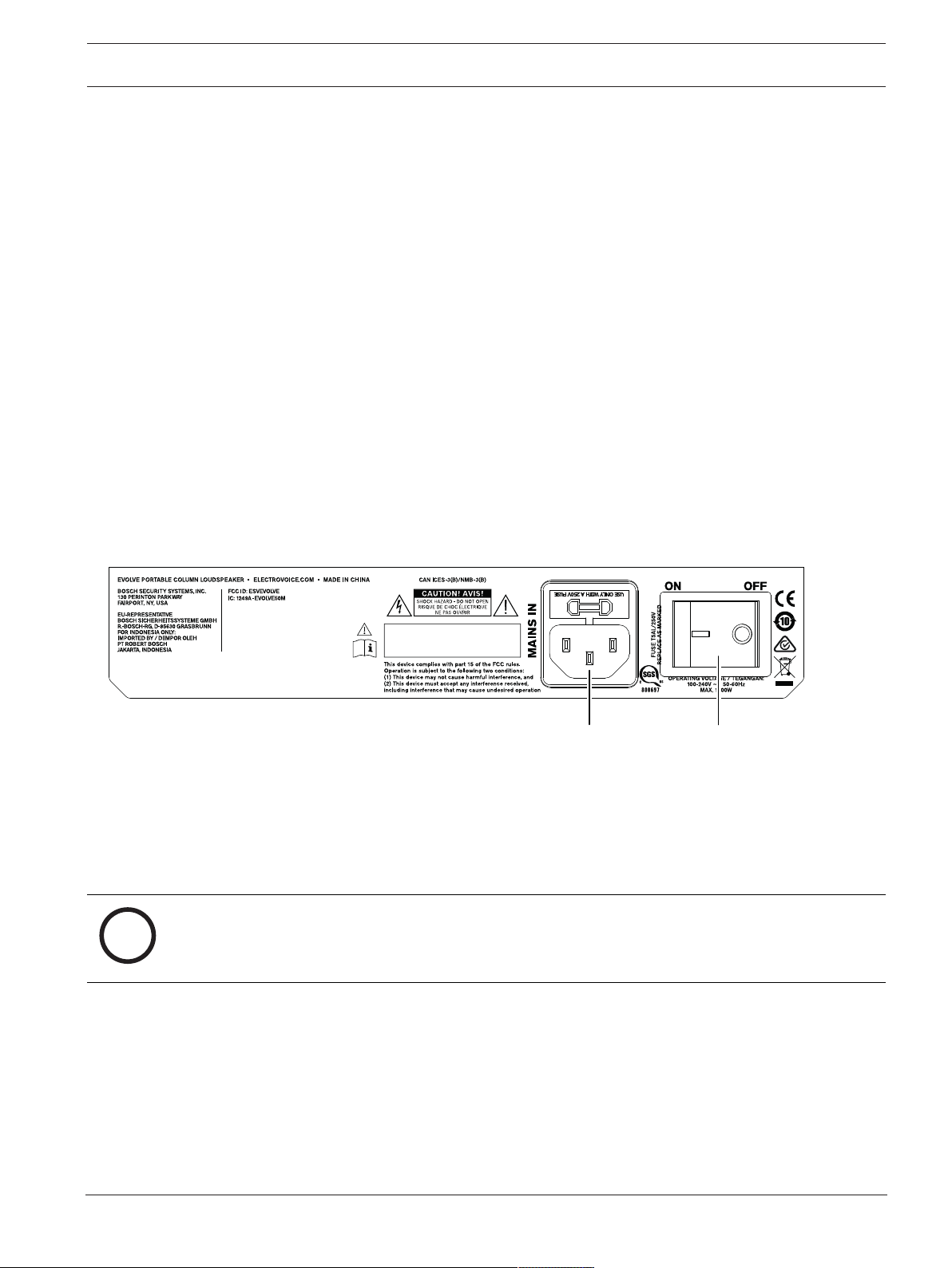
10. MAINS IN – The device receives its power supply via the MAINS IN socket. Only the
provided power cord may be used. Connect the device only to a mains network, which
corresponds to the requirements indicated on the type plate.
11. POWER - AC switch for switching the power ON or OFF. The LCD screen lights up when
the power is turned ON, after approximately 1 second.
Notice!
Markings and statements on amplifier panel may vary.
User manual
2022-11 | 05 | F.01U.393.750
Page 18
18 en | Amplifier DSP EVOLVE Portable Column Loudspeaker
1 5 6 7
432
8
9
i
5.2 System status
Normal
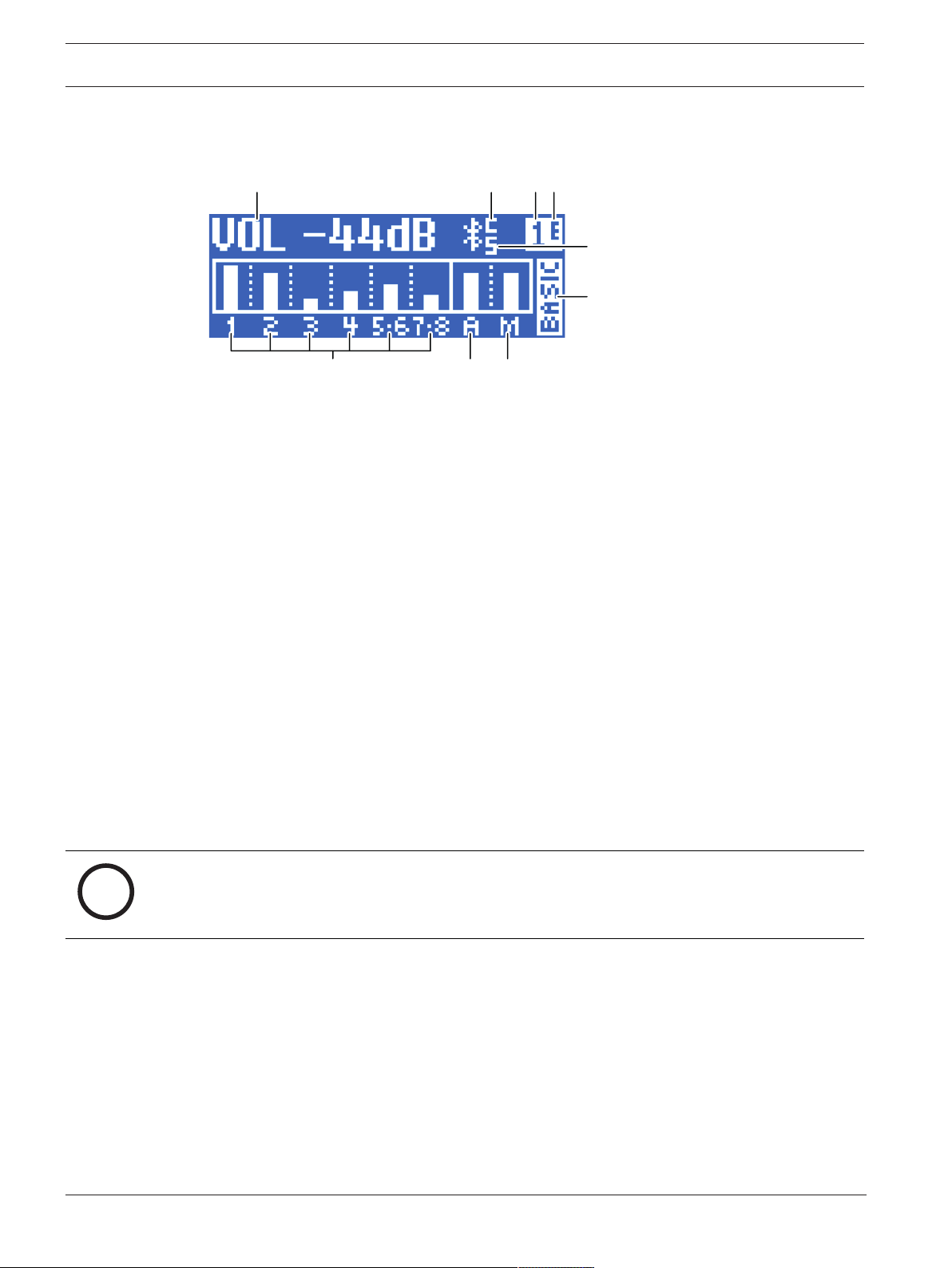
Figure5.1: Normal system status home screen with Bluetooth® status
1. VOLUME (VOL) - Indicates the master gain of the system in dB. The range is from mute to
+10 dB, in 1 dB increments.
2. 1, 2, 3, 4, 5-6, 7-8 - VU meter displays the signal level of INPUT1 through 7/8 into the
amplifier. Input levels are independent of each other.
3. AUX - VU meter displays the signal level of the AUX output. AUX level is independent of
MAIN levels.
4. MAIN - VU meter displays the signal level of the MAIN output. MAIN level is independent
of AUX levels.
5. C - Control app; the available options are:
OFF - DISABLED
FLASHING - PAIRING MODE
SOLID - CONNECTED
6. 1 - Indicates the selected store function number. There are five user defined store
function numbers available.
7. E - Indicates the preset is not saved. When the preset is saved the E is not displayed.
8. S - Audio streaming; the available options are:
OFF - DISABLED
FLASHING - PAIRING MODE (120s)
SOLID - CONNECTED
9. FUNCTION indicator - Indicates whether the system is in MIXER or BASIC mode.
Notice!
Bluetooth® is available in select countries.
Contact your nearest Electro-Voice dealer or Electro-Voice distributor for more information.
System protection
System protection limiters indicate when a system is exceeding recommended usage by
indicating CLIP or LIMIT on the LCD display.
CLIP
2022-11 | 05 | F.01U.393.750
CLIP indicates the signal to the loudspeaker is too high, resulting in a clipped signal into the
loudspeaker. If CLIP is shown, reduce the input gain and/or the signal on the mixer or source
equipment.
User manual
Electro-Voice
Page 19

EVOLVE Portable Column Loudspeaker Amplifier DSP | en 19
LIMIT
LIMIT protects the loudspeaker from short-term peaks which can cause distortion. When
LIMIT is shown on the screen the limiter is active. Reducing the output volume (MASTER VOL)
is strongly recommended when the limit indication is shown often or continuously.
5.3 DSP control menu
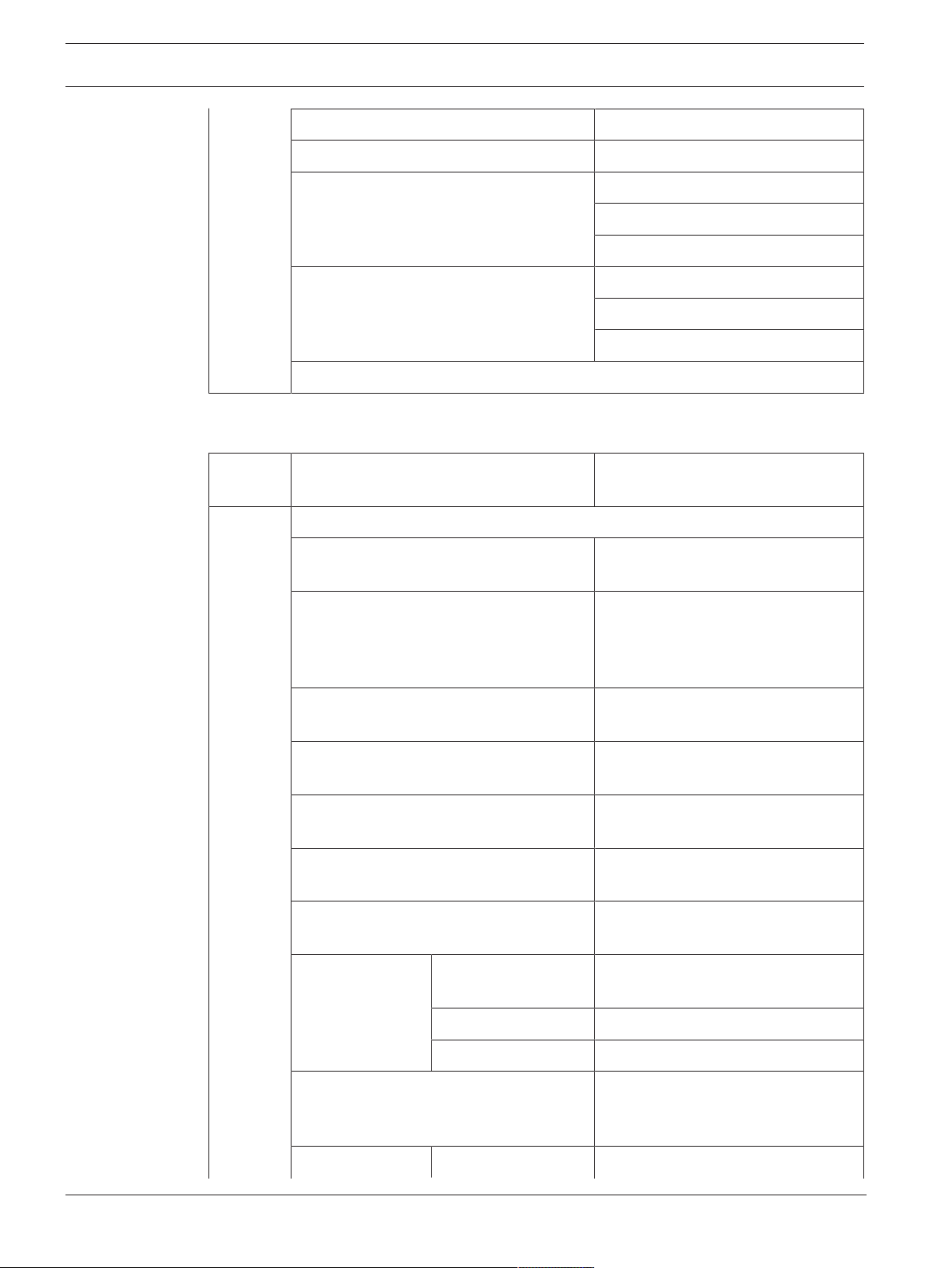
DSP control main menu (Basic mode)
VOLUME 0 dB (Default)
Mute, -80 dB +10 dB (1 dB)
EXIT
FUNCTION Basic
Mixer
MODE MUSIC (Default)
LIVE
SPEECH
CLUB
SYS DELAY OFF (Default) to 100 m (.1 m)
(0 ft to 328.1ft)
SUB DELAY OFF (Default), -10 m to +10 m (.1 m)
(-32.8 ft to 32.8 ft)
SUB LEVEL 0 dB (Default)
Mute, -80 dB to +10 dB (1 dB)
TREBLE 0 dB (Default)
-12 dB to +6 dB (1 dB)
MID 0 dB (Default)
-12 dB to +6 dB (1 dB)
BASS 0 dB (Default)
-12 dB to +6 dB (1 dB)
BLUETOOTH BLUETOOTH ON (Default)
OFF
CONTROL PAIR CONTROL PAIRING
AUDIO PAIR AUDIO PAIRING
LED OFF
ON (Default)
LIMIT
DISPLAY LCD DIM ON (Default)
OFF
Electro-Voice
BRIGHT 5 (Default)
1 to 10
CONTRAST 5 (Default)
1 to 10
User manual
2022-11 | 05 | F.01U.393.750
Page 20
20 en | Amplifier DSP EVOLVE Portable Column Loudspeaker
STORE EXIT, 1, 2, 3, 4, 5, EXIT
RECALL EXIT, 1, 2, 3, 4, 5, 6, EXIT
RESET RESET ARE YOU SURE?
NO (Default)
YES
INFO PRODUCT NAME
FIRMWARE VERSION
© 2020 Electro-Voice
EXIT
DSP control main menu (Mixer mode)
VOLUME 0 dB (Default)
Mute, -80 dB +10 dB (1 dB)
EXIT
FUNCTION Basic
Mixer
MODE MUSIC (Default)
LIVE
SPEECH
CLUB
SUB DELAY OFF (Default), -10 m to +10 m (.1 m)
(-32.8 ft to 32.8 ft)
SUB LEVEL 0 dB (Default)
Mute, -80 dB to +10 dB (1 dB)
TREBLE 0 dB (Default)
-12 dB to +6 dB (1 dB)
MID 0 dB (Default)
-12 dB to +6 dB (1 dB)
BASS 0 dB (Default)
-12 dB to +6 dB (1 dB)
BLUETOOTH BLUETOOTH ON (Default)
OFF
2022-11 | 05 | F.01U.393.750
CONTROL PAIR CONTROL PAIRING
AUDIO PAIR AUDIO PAIRING
LED OFF
ON (Default)
LIMIT
DISPLAY LCD DIM ON (Default)
User manual
Electro-Voice
Page 21

EVOLVE Portable Column Loudspeaker Amplifier DSP | en 21
OFF
BRIGHT 5 (Default)
1 to 10
CONTRAST 5 (Default)
1 to 10
STORE EXIT, 1, 2, 3, 4, 5, EXIT
RECALL EXIT, 1, 2, 3, 4, 5, 6, EXIT
RESET RESET ARE YOU SURE?
NO (Default)
YES
INFO PRODUCT NAME
FIRMWARE VERSION
© 2020 Electro-Voice
EXIT
Electro-Voice
User manual
2022-11 | 05 | F.01U.393.750
Page 22

22 en | Amplifier DSP EVOLVE Portable Column Loudspeaker
DSP control menu for Input 1-4 (Mixer mode)
LEVEL 0 dB (Default)
Mute, -80 to +10 dB (1 dB)
EXIT
INPUT PRESET FLAT
LOW CUT 80
LOW CUT 120
VOCAL MIC
VOICE FILTER
SPEECH
ACOUST GUIT
ELECTR GUIT
BASS GUITAR
PERCUSSION
LINE INPUT
More input presets available with
firmware updates.
COMP OFF, 1 to 100
TREBLE 0 dB (Default)
MID 0 dB (Default)
BASS 0 dB (Default)
FX1 OFF (Default)
FX2 OFF (Default)
AUX* OFF (Default)
PAN* C (Default)
EXIT
DSP control menu for Input 5/6 (Mixer mode)
-12 dB to +12 dB (1 dB)
-12 dB to +12 dB (1 dB)
-12 dB to +12 dB (1 dB)
-80dB TO +10dB (1dB)
-80dB TO +10dB (1dB)
-80dB TO +10dB (1dB)
10L to 10R
LEVEL 0 dB (Default)
2022-11 | 05 | F.01U.393.750
-80 dB to +10 dB (1 dB)
EXIT
MONO OFF/ON
TREBLE 0 dB (Default)
-12 dB to +12 dB (1 dB)
User manual
Electro-Voice
Page 23

EVOLVE Portable Column Loudspeaker Amplifier DSP | en 23
MID 0 dB (Default)
-12 dB to +12 dB (1 dB)
BASS 0 dB (Default)
-12 dB to +12 dB (1 dB)
FX1 OFF (Default)
-80dB TO +10dB (1dB)
FX2 OFF (Default)
-80dB TO +10dB (1dB)
AUX* OFF (Default)
-80dB TO +10dB (1dB)
BAL* C (Default)
10L to 10R
EXIT
DSP control menu for Input 7/8 (Mixer mode)
LEVEL 0 dB (Default)
-80 dB to +10 dB (1 dB)
EXIT
TREBLE 0 dB (Default)
-12 dB to +12 dB (1 dB)
MID 0 dB (Default)
-12 dB to +12 dB (1 dB)
BASS 0 dB (Default)
-12 dB to +12 dB (1 dB)
AUX* OFF (Default)
-80dB TO +10dB (1dB)
BAL* C (Default)
10L to 10R
BLUETOOTH BLUETOOTH ON (Default)
OFF
CONTROL PAIR CONTROL PAIRING
AUDIO PAIR AUDIO PAIRING
Electro-Voice
EXIT
* NOTE: PAN and BAL controls only visible when MIXOUT is set to “Stereo L” or “Stereo R”.
AUX controls only visible when AUX OUT is set to AUX MIX.
User manual
2022-11 | 05 | F.01U.393.750
Page 24

24 en | Amplifier DSP EVOLVE Portable Column Loudspeaker
DSP control menu for Mixer controls (Mixer mode)
LEVEL 0 dB (Default)
-80 dB to +10 dB (1 dB)
EXIT
AUX LEVEL 0 dB (Default)
-80 dB to +10 dB (1 dB)
MAIN GEQ ENABLE On/Off
63Hz 0 dB (Default)
-12 dB to +12 dB (1 dB)
160Hz 0 dB (Default)
-12 dB to +12 dB (1 dB)
400Hz 0 dB (Default)
-12 dB to +12 dB (1 dB)
1KHz 0 dB (Default)
-12 dB to +12 dB (1 dB)
2.5KHz 0 dB (Default)
-12 dB to +12 dB (1 dB)
6KHz 0 dB (Default)
-12 dB to +12 dB (1 dB)
12KHz 0 dB (Default)
-12 dB to +12 dB (1 dB)
RESET Reset all bands?
Yes/No
BACK
AUX GEQ ENABLE On/Off
63Hz 0 dB (Default)
-12 dB to +12 dB (1 dB)
160Hz 0 dB (Default)
-12 dB to +12 dB (1 dB)
400Hz 0 dB (Default)
-12 dB to +12 dB (1 dB)
1KHz 0 dB (Default)
-12 dB to +12 dB (1 dB)
2022-11 | 05 | F.01U.393.750
2.5KHz 0 dB (Default)
-12 dB to +12 dB (1 dB)
6KHz 0 dB (Default)
-12 dB to +12 dB (1 dB)
12KHz 0 dB (Default)
-12 dB to +12 dB (1 dB)
User manual
Electro-Voice
Page 25

EVOLVE Portable Column Loudspeaker Amplifier DSP | en 25
RESET Reset all bands?
Yes/No
BACK
FX1 00: OFF
01: ECHO+REV LONG (default)
02: ECHO+REV SHORT
03: REV ROOM
04: REV CONCERT
05: REV HALL
06: REV CHURCH
07: REV CATHEDRAL
08: REV ROOM S
09: REV CONCERT S
10: REV HALL S
11: REV CHURCH S
12: REV CATHEDRAL S
13: PLATE MEDIUM
14: PLATE LONG
15: PLATE MEDIUM S
16: PLATE LONG S
17: DEL SHORT
18: DEL LONG
19: DEL SHORT S
20: DEL LONG S
21: ECHO+CHORUS
22: REVERSE
FX2 00: OFF
01: CHORUS SLOW (default)
02: CHORUS MEDIUM
Electro-Voice
03: CHORUS FAST
04: CHORUS+ECHO
05: JET FLANGER
06: DOUBLING NARROW
07: DOUBLING MEDIUM
User manual
2022-11 | 05 | F.01U.393.750
Page 26

26 en | Amplifier DSP EVOLVE Portable Column Loudspeaker
08: DOUBLING WIDE
FX ENABLE ON
OFF
AUX OUT Aux Mix
Main Mix
SPK OUT L+R
L
R
MIX OUT L+R
L
R
EXIT
EXIT Menu
The Exit menu is used to return to the home screen.
FUNCTION Menu
The FUNCTION menu is used to configure between Basic and Mixer functions.
– BASIC - provides input and output gain controls, 3-band EQ, and system delay for
simplified audio setups or used as satellite or R-channel stereo setup.
– MIXER - provides full access and control of 8-channel digital mixer with AUX outs, FX, and
7-band GEQ.
MODE Menu
The Mode menu is used to configure the type of sound the EVOLVE column speaker system
delivers.
– MUSIC – is used for recorded music playback and electronic dance music applications.
(Default)
– LIVE – is used for live sound applications.
– SPEECH – is used for spoken word applications.
– CLUB – is used for recorded electronic music playback.
MAIN LEVEL Menu (Mixer mode)
The MAIN LEVEL menu is used to control the overall mixer output level that is fed to the
EVOLVE column speaker system and the MIX OUT connector.
AUX LEVEL Menu (Mixer mode)
The AUX LEVEL menu is used to control the overall level of the signal present at the AUX OUT
connector.
SYS DELAY Menu (Basic mode)
The SYS Delay menu is used to delay the output signal, e.g. to compensate for differences in
distance among individual loudspeakers. The delay can be set in meters or feet. Available
options for this selection are OFF or a delay up to 100.0 m (328 ft). The delay can be changed
in 0.1-meter increments or 0.1-foot increments.
The default is OFF.
2022-11 | 05 | F.01U.393.750
User manual
Electro-Voice
Page 27

EVOLVE Portable Column Loudspeaker Amplifier DSP | en 27
i
SUB DELAY Menu
The SUB DELAY menu is used to acoustically align subwoofer and column speaker if used with
an Electro-Voice authorized mounting bracket. The delay can be set in meters. The range is
from -10 m to +10 m, default setting is OFF. Positive values are used if the subwoofer is
located closer to the audience (in front of the column), negative values are used if the
subwoofer is further away from the audience (behind the column).
Notice!
Do not change this value if subwoofer and column are connected with the connector pole.
This may cause unwanted acoustic changes to the system sound.
SUB LEVEL Menu
The Sub Level menu allows independent gain control of the subwoofer output. Changes to
this parameter effectively change the crossover of the EVOLVE system. The default setting of 0
dB is recommended for best audio performance.
The range is
The default is
TREBLE Menu
The Treble menu is used to adjust the high frequency performance of the loudspeaker for
different applications or personal preference.
The range is
MUTE, -80 dB to +10 dB
0 dB
.
.
-12 dB to +6 dB for Main system EQ. The range is -12 db to +12 db for INPUTS
1-7/8 in mixer mode.
The default is 0 dB.
MID Menu
The MID menu is used to set the gain of the MID peak filter.
The range is
1-7/8 in mixer mode.
-12 dB to +6 dB
for Main system EQ. The range is
-12 dB to +12 dB
for INPUTS
The default is 0 dB.
BASS Menu
The Bass menu item is used to configure the low frequencies of sound.
The range is
-12 dB to +6 dB for Main system EQ. The range is -12 dB to +12 dB for INPUTS
1-7/8 in mixer mode.
The default is 0 dB.
MAIN GEQ Menu (Mixer mode)
The MAIN EQ menu is used to adjust the frequency response of the loudspeaker for different
applications or personal preference. There are 7 different EQ filters available centered at the
following frequencies: 63, 160, 400, 1.0K, 2.5K, 6.0K & 12K Hz. The filter is also independent
of the MAIN GEQ setting if AUX OUT is set to MAIN MIX.
The range of each filter is
-12 dB to +12 dB
.
The default value for each filter is 0 dB.
AUX GEQ Menu (Mixer mode)
The AUX GEQ menu is used to adjust the frequency response of the AUX OUT for different
applications or personal preference. There are 7 different EQ filters available centered at the
following frequencies: 63, 160, 400, 1.0K, 2.5K, 6.0K & 12K Hz.
The range of each filter is
-12 dB to +12 dB
.
The default value for each filter is 0 dB.
Electro-Voice
User manual
2022-11 | 05 | F.01U.393.750
Page 28
28 en | Amplifier DSP EVOLVE Portable Column Loudspeaker
i
FX1 & FX2 Menu (Mixer mode)
The FX1 & FX2 menu is used to select the reverb, delay, chorus, or flanger preset for each FX
unit.
AUX OUT Menu (Mixer mode)
The AUX OUT menu is used to select the signal present at the AUX OUT connector:
– AUX MIX (default) - provides the signal mix controlled by the individual channel AUX
sends
– MAIN MIX - provides the same signal that is present at the loudspeaker
MIX OUT Menu (Mixer mode)
The MIX OUT menu is used to select which signals should be output at MIX OUT and which
signal should be delivered by the loudspeaker.
– L+R: INPUTS 1-4 and the left and right signals of INPUT 5/6 & 7/8 are summed. The sum is
output at MIX OUT and is delivered by the loudspeaker. (Default)
– R: Only the right signal of INPUT 5/6 & 7/8 and the percentage of INPUTS 1-4 panned
right is output at MIX OUT. The loudspeaker will deliver only the left signal.
– L: Only the left signal of INPUT 5/6 & 7/8 and the percentage of INPUTS 1-4 panned left is
output at MIX OUT. The loudspeaker will deliver only the right signal.
BLUETOOTH Menu
Turning Bluetooth® ON or OFF
To turn Bluetooth® ON or OFF, do the following:
1. Select ON.
OR
Select OFF.
The Bluetooth menu options are ON/OFF, CONTROL PAIR, and AUDIO PAIR.
CONTROL PAIR Menu
The CONTROL PAIR menu is used to enable the QuickSmart Mobile wireless control and
monitoring application. Available options for this selection are: ON or OFF.
The default is OFF.
Notice!
Bluetooth® is available in select countries.
Contact your nearest Electro-Voice dealer or Electro-Voice distributor for more information.
The Bluetooth® word mark and logos are registered trademarks owned by Bluetooth SIG, Inc.
and any use of such marks by Bosch Security Systems, Inc. is under license. Other trademarks
and trade names are those of their respective owners.
AUDIO PAIR Menu
The AUDIO PAIR menu is used to stream audio from your Bluetooth® enabled device to the
loudspeaker system. Available options for this selection are: PAIRING, ON or OFF.
The default is OFF.
2022-11 | 05 | F.01U.393.750
Pairing the portable column system with your Bluetooth® enabled device
To pair the portable column system with your Bluetooth® enabled device, do the following:
1. From the DSP menu, scroll to AUDIO PAIR.
2. Select AUDIO PAIR.
AUDIO PAIR mode enables 120 seconds of visibility to Bluetooth® enabled devices.
3. On your mobile device, select EV EVOLVE to initiate the pairing process.
Once the device is paired, all device audio will be output through the EVOLVE system.
User manual
Electro-Voice
Page 29
EVOLVE Portable Column Loudspeaker Amplifier DSP | en 29
i
i
Notice!
If connected with a mobile device, notification alerts and ring tones will also be played
through the system.
Disable these notifications or enable
unwanted interruptions during audio playback.
LED Menu
The LED menu shows power on and indicates limit. Available options for this selection are:
ON, OFF, or LIMIT.
– ON - turns the LED on when the power to the loudspeaker is ON. (Default)
– OFF - turns the LED off.
– LIMIT - turns the LED off under normal operation. The LED brief blinking indicates the
limiter is activating. Short-term blinking is not critical because the integrated limiter
keeps distortion under control. Constant lighting of the LED indicates the sound is
negatively affected. If the LED is constantly lit, check the rear LCD for more information.
Reducing the output volume is strongly recommended.
DISPLAY Menu
The Display menu options are BACK, LCD DIM, BRIGHT, and CONTRAST.
LCD DIM Menu
The LCD Dim menu is used to dim the display when the display is idle for 30 seconds.
Available options for this selection are: ON or OFF.
The default is ON.
Airplane mode
on your mobile device to prevent
BRIGHT Menu
The Bright menu is used to determine the brightness of the LCD.
The range is 1 to 10.
The default is
CONTRAST Menu
The Contrast menu is used to increase or decrease the visibility of the LCD screen.
The range is 1 to 10.
The default is five.
STORE Menu
The Store menu allows you create up to five customized user settings. Available options for
this selection are: EXIT, 1, 2, 3, 4, and 5.
Notice!
The customized user setting name can contain a combination of alphanumeric characters
including spaces. The alphanumeric character range is A to Z and 0-9.
The name field length is 11 characters.
Storing customized user settings
To store customized user settings, do the following:
1. From the DSP menu, scroll to STORE.
2. Push the MASTER VOL knob to select STORE.
The store screen appears.
3. Push the MASTER VOL knob to select 1.
The Enter name for 1 screen appears.
4. Use the MASTER VOL knob to scroll through the characters.
The characters appear.
5. Push the MASTER VOL knob to select the desired character.
five (5)
.
Electro-Voice
User manual
2022-11 | 05 | F.01U.393.750
Page 30

30 en | Amplifier DSP EVOLVE Portable Column Loudspeaker
i
6. Turn the MASTER VOL knob to move to the next character entry.
Continue selecting characters until the desired name is entered.
7. Use the MASTER VOL knob to scroll to SAVE.
8. Push the MASTER VOL knob to select SAVE.
9. Repeat steps 3 through 8 to store additional customized user settings.
10. Select EXIT to return to the home screen.
RECALL Menu
The Recall menu allows you retrieve up to five customized user settings.
Available options for this selection are: EXIT, 1, 2, 3, 4, and 5.
In addition, setting 6 is available to recall a default setting. This setting cannot be used to
store user settings.
Recalling customized user settings
To recall customized user settings, do the following:
1. From the DSP menu, scroll to RECALL.
2. Push the MASTER VOL knob to select RECALL.
The recall screen appears.
3. Push the MASTER VOL knob to select 1.
The selected item is loaded.
4. Select EXIT to return to the home screen.
RESET Menu
The Reset menu is used to reset the loudspeaker to original factory settings.
Available options for this selection are: NO or YES.
The default is NO.
Resetting the system
To reset the system to original factory settings, do the following:
1. From the DSP menu, select RESET.
The "DEFAULT SETTINGS?" validation message appears.
2. Select YES.
The system is reset to the original factory settings.
The “Erase User Presets” validation message appears.
3.
Select YES or NO.
4.
If YES, the user presets are deleted and return to <EMPTY>.
Notice!
The reset menu item is used to revert the loudspeaker to the original factory default settings.
All user settings will be deleted. The user customized settings in the STORE and RECALL
menus return to <EMPTY> if YES was selected in during the reset process.
INFO Menu
The Information menu is used to display the product name and firmware version.
2022-11 | 05 | F.01U.393.750
User manual
Electro-Voice
Page 31

EVOLVE Portable Column Loudspeaker Mixer operation | en 31
i
6 Mixer operation
6.1 Inputs 1-4, 5/6 & 7/8
INPUT LEVEL control
Control for adjusting a LINE/MIC or line input’s sensitivity. These controls let you adjust the
incoming signals to the mixer’s internal operation level. The following gain setting instruction
is to be used as a guide to help achieve a good signal input level:
Set the MASTER volume controls to -80 dB.
Set the INPUT LEVEL control to -80 dB.
Connect the sound source (microphone, instrument, etc.) to the desired LINE/MIC input.
Start the sound source at the highest volume level to be expected - respectively sing or speak
as loudly as possible directly (close up) into the microphone.
While playing the sound source or singing into the microphone, adjust the input level using the
INPUT GAIN control, so that during the loudest part, the CLIP does not show. Then increase
the MASTER VOL until the desired output from the column is achieved. This is the basic
channel setting.
If further adjustments to the channel’s EQ setting are necessary, perform these steps again, as
changes in the sound shaping section also have an influence on the channel’s overall level.
TREBLE/MID/BASS controls
The input channel’s EQ section allows for a broad difference in the shaping of the incoming
audio signal within three frequency bands. Before you begin to alter the sound, all EQ controls
should be set to 0. Try not to set the EQ controls to extreme positions. Usually, minor changes
are sufficient to produce the best results in the overall sound. Use the natural reproduction as
a starting point and rely on your musically trained ear. The moderate use of the MID control is
the best remedy to avoid acoustical feedback. Try to avoid using this frequency range to an
extreme level. Lowering the level in this band will provide you with higher output and help
reduce feedback. Adjust the BASS control to add more “punch” to the sound of a kick drum or
“body” to the vocals. Use the TREBLE control in the same way to provide cymbals and vocals
with more treble for a more transparent sound.
Electro-Voice
FX1 & FX2 control
The FX1 & FX2 control is used to set the amount of effect you require on that channel. Using
the FX controls lets you easily assign an effect for groups of musical instruments or vocals. To
determine the desired level of the effect, start with the controls set at their minimum and
individually increase the level gradually until the desired sound is achieved.
The FX Enable switch turns the internal FX units on or off. Please keep in mind that you can
also use an external footswitch for turning the FX1 & FX2 on or off. If you want to use a
footswitch, the EVOLVE 50M is preconfigured to control FX on/off with a footswitch, requiring
no additional configuration.
Phantom Power
+15V DC Phantom power is available on the XLR connectors of INPUTS 1-4 only. There is no
phantom power on the TRS connectors. Phantom power is always on, and not switchblade.
Notice!
A protection circuit is provided to prevent damage to devices which do not require phantom
power such as dynamic microphones and mixer outputs. Best practice dictates to connect
line level sources to INPUTS 5/6 when possible.
User manual
2022-11 | 05 | F.01U.393.750
Page 32

32 en | Mixer operation EVOLVE Portable Column Loudspeaker
AUX control
The AUX control is primarily meant for establishing an independent mix, e.g. for monitor or a
second room/zone. The individual channel AUX controls will determine the amount of each
channel's post fader signal present at the AUX output if AUX OUT is set to AUX MIX.
COMP control
During operation, the input signal processing can be adjusted by using the COMP control to
control the on board compressor. Compressors are available on INPUTS 1-4. Adjust the
COMPRESSOR threshold and compression ration simultaneously using the COMP adjustment.
As the COMP control is adjusted from 0 to 100, the gain below the threshold will increase
from 0 to 10 dB and the compression ratio will increase from 1:1 to 8:1. The compressor will
reduce the dynamic range of the audio signal proportional to the compressor setting. Once
the signal exceeds a certain threshold, the signal gets compressed, i.e. major input level
changes result in minor output level changes. Narrowing the dynamic range often allows for
easier recording or mixing the audio signal. It is recommended to start with low to moderate
levels of compression (25-40) and increase slowly if necessary.
6.2 QuickSmart Link configuration
With QuickSmart Link you can combine all input signals from 2 EVOLVE50M loudspeakers into
one mixer. The mixer output signal can be Mono or Stereo, the signal routing is set during the
configuration process.
1. Make sure both EVOLVE 50M systems are turned on.
2. Connect the network cable to the QuickSmart link port on each EVOLVE 50M system.
3. Configuration is completed through the QuickSmart DSP control menu displayed on the
LCD of either EVOLVE 50M system. Choose one EVOLVE 50M system to complete the
configuration.
4. The LCD will display that the QuickSmart link is detected.
5. You will need to determine how to synchronize parameters between both EVOLVE 50M
systems. The LCD will display "parameter Sync Send or Receive".
6. If you wish to copy and send parameters from the EVOLVE 50M system you are
controlling, select "send".
7. If you wish to read and copy the parameters from the second EVOLVE 50M system, select
"receive".
8. The LCD will display a message asking if the EVOLVE 50M system you are controlling
should be configured for Stereo L, Stereo R or Mono signals.
9. Select the appropriate signal. The second EVOLVE 50M system will automatically be
configured based on your selection.
10. The LCD will then display that the QuickSmart Link is ready.
With QuickSmart Link, several parameters of the connected EVOLVE 50M systems are linked.
(i.e. changing a parameter on one EVOLVE 50M system will trigger an equivalent change on
the 2nd EVOLVE 50M system) This ensures the system parameters are consistent and results
the best acoustic performance.
Linked parameters are:
– System volume
– Function
– Mode
– System and Subwoofer Delay
– Speaker EQ (Bass, Mid, Treble)
– SPK OUT, MIX OUT and AUX OUT routings
– Main GEQ
2022-11 | 05 | F.01U.393.750
User manual
Electro-Voice
Page 33

EVOLVE Portable Column Loudspeaker Mixer operation | en 33
– FX enable (also via Foot Switch)
– Preset load and store
Electro-Voice
User manual
2022-11 | 05 | F.01U.393.750
Page 34
34 en | Pairing the QuickSmart Mobile application EVOLVE Portable Column Loudspeaker
i
i
7 Pairing the QuickSmart Mobile application
The EV QuickSmart Mobile app for tablets and smartphones is available for download from the
iTunes App Store and the Google Play Store.
Notice!
The EV QuickSmart Mobile app is designed to only find speakers from Electro-Voice with
Bluetooth® enabled.
The EV QuickSmart Mobile app will not display other types of Bluetooth® devices, e.g.
phones, laptops, tablets, or headsets.
Notice!
Bluetooth® is available in selected countries.
Contact your nearest Electro-Voice dealer or Electro-Voice distributor for more information.
Prior to pairing the EV QuickSmart Mobile app with loudspeakers by Electro-Voice ensure
Bluetooth® is enabled on the smart phone or tablet, and the loudspeaker.
First time pairing
To pair the loudspeaker with the EV QuickSmart Mobile app, do the following:
1. Open the EV QuickSmart Mobile app.
2. Allow the app to access your location if requested.
3.
Finding nearby speakers
The EV QuickSmart Mobile app is looking for available Bluetooth® enabled Electro-Voice
loudspeakers
4. The available loudspeakers are displayed on the screen.
The app will display up to eight available loudspeakers.
5. Tap the loudspeaker you want to pair with the app.
The selected loudspeaker will have a line under it acknowledging it is selected.
ControlPair needs to be activated.
6. Repeat the previous step until all of the required loudspeakers are selected.
7. Tap the CONNECT button.
8. The app pairs with the desired loudspeaker.
Allow the app to pair if prompted. Sometimes this window is hidden and you have to
actively open it.
The app can connect to up to six loudspeakers.
Subsequent pairing:
To pair the loudspeaker with the EV QuickSmart Mobile app, do the following:
1. Tap the EV QuickSmart Mobile app icon.
2.
Finding nearby speakers
The EV QuickSmart Mobile app is looking for available Bluetooth® enabled Electro-Voice
loudspeakers
3. The available loudspeakers are displayed on the screen.
The app will display up to eight available loudspeakers.
4. Tap the loudspeaker you want to pair with the app.
The selected loudspeaker will have a line under it acknowledging it is selected.
5. Repeat the previous step until all of the required loudspeakers are selected.
6. Tap the CONNECT button.
.
.
is displayed on the screen
is displayed on the screen
2022-11 | 05 | F.01U.393.750
User manual
Electro-Voice
Page 35

EVOLVE Portable Column Loudspeaker Pairing the QuickSmart Mobile application | en 35
7. The app pairs with the required loudspeaker.
The app can connect to up to six loudspeakers.
Electro-Voice
User manual
2022-11 | 05 | F.01U.393.750
Page 36
36 en | Recommended configurations EVOLVE Portable Column Loudspeaker
MIXER
LINE
QuickSmart
Link
MIXER
LINE
QuickSmart
Link
L
R
8 Recommended configurations
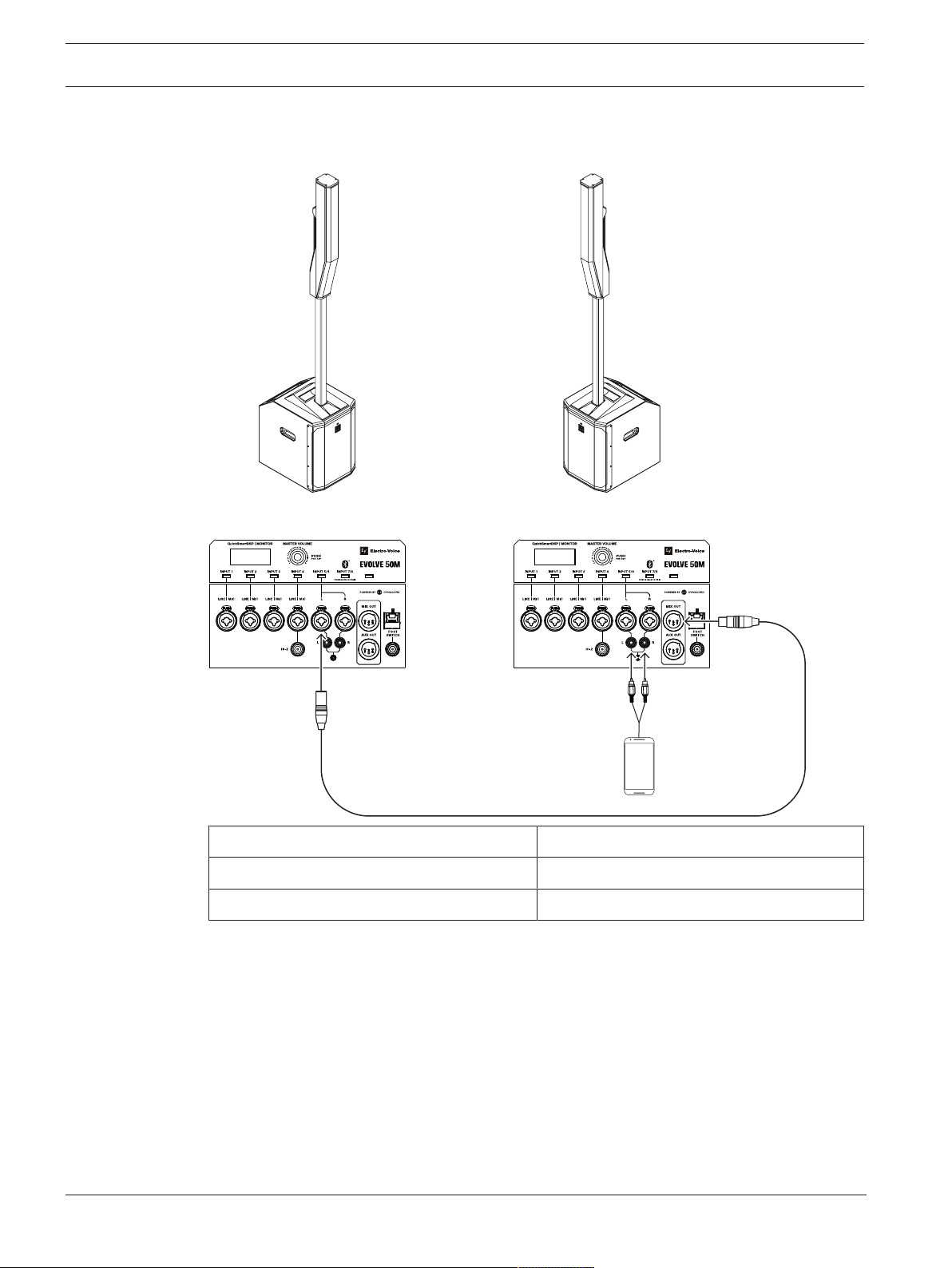
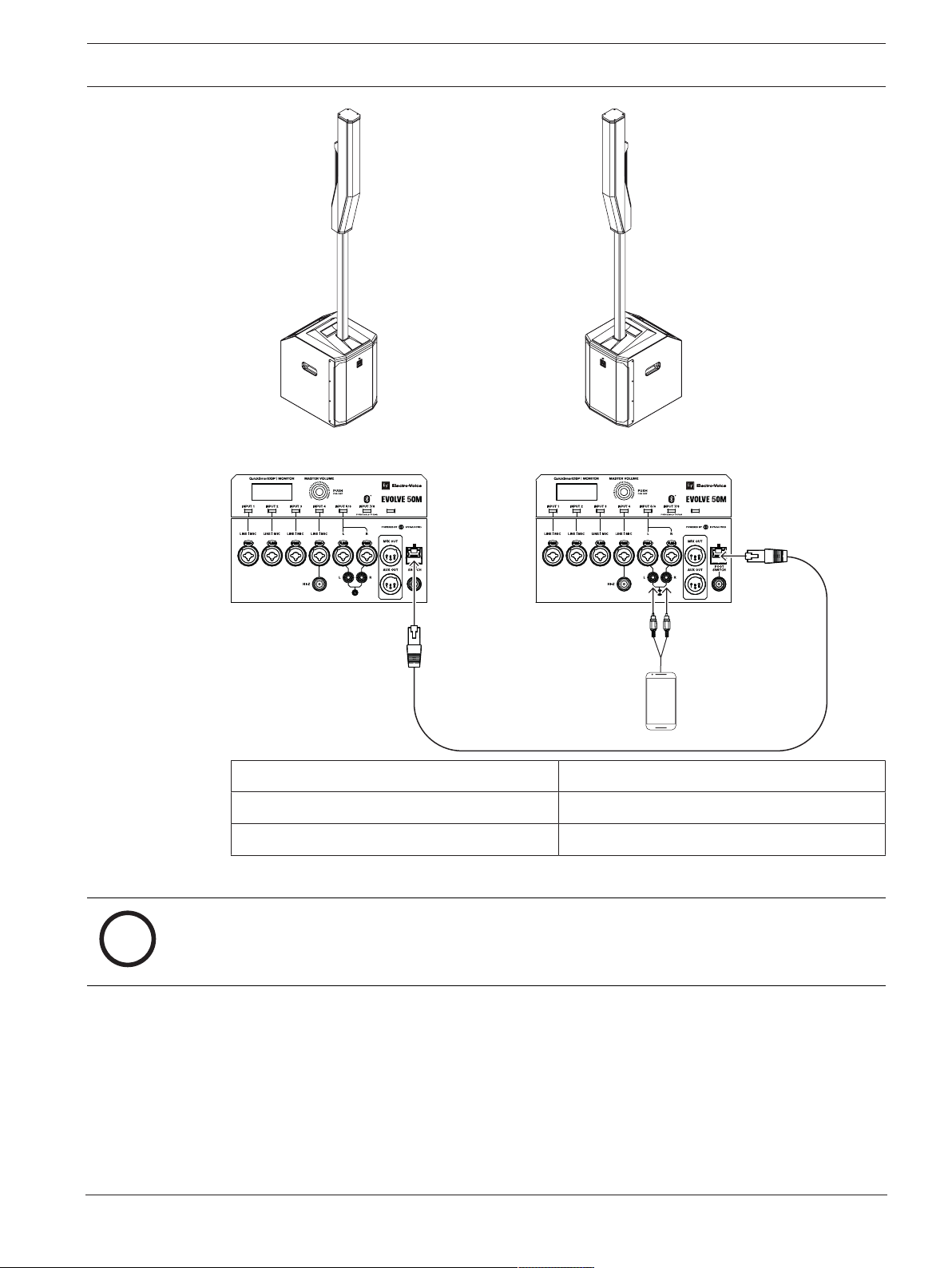
8.1 Stereo pair of Evolve 50M systems
Mode: Music
MASTER SPEAKER (L) MIX OUT: R
SATELLITE SPEAKER (R): INPUT 5 (MONO)
Table8.3: DSP settings for the portable column system
2022-11 | 05 | F.01U.393.750
User manual
Electro-Voice
Page 37
EVOLVE Portable Column Loudspeaker Recommended configurations | en 37
MIXER
LINE
QuickSmart
Link
MIXER
LINE
QuickSmart
Link
L
R
i
Electro-Voice
Mode: Music
MASTER SPEAKER (L) SPK OUT: L
SATELLITE SPEAKER (R): QuickSmart Link input
Table8.4: DSP settings for the portable column system
Notice!
Stereo connection from device to the MASTER SPEAKER can be made with hard wires into
the stereo INPUT 5/6 or via Bluetooth ® into stereo Bluetooth ® INPUT 7/8.
User manual
2022-11 | 05 | F.01U.393.750
Page 38
38 en | Recommended configurations EVOLVE Portable Column Loudspeaker
MIXER
LINE
QuickSmart
Link
B
A
i
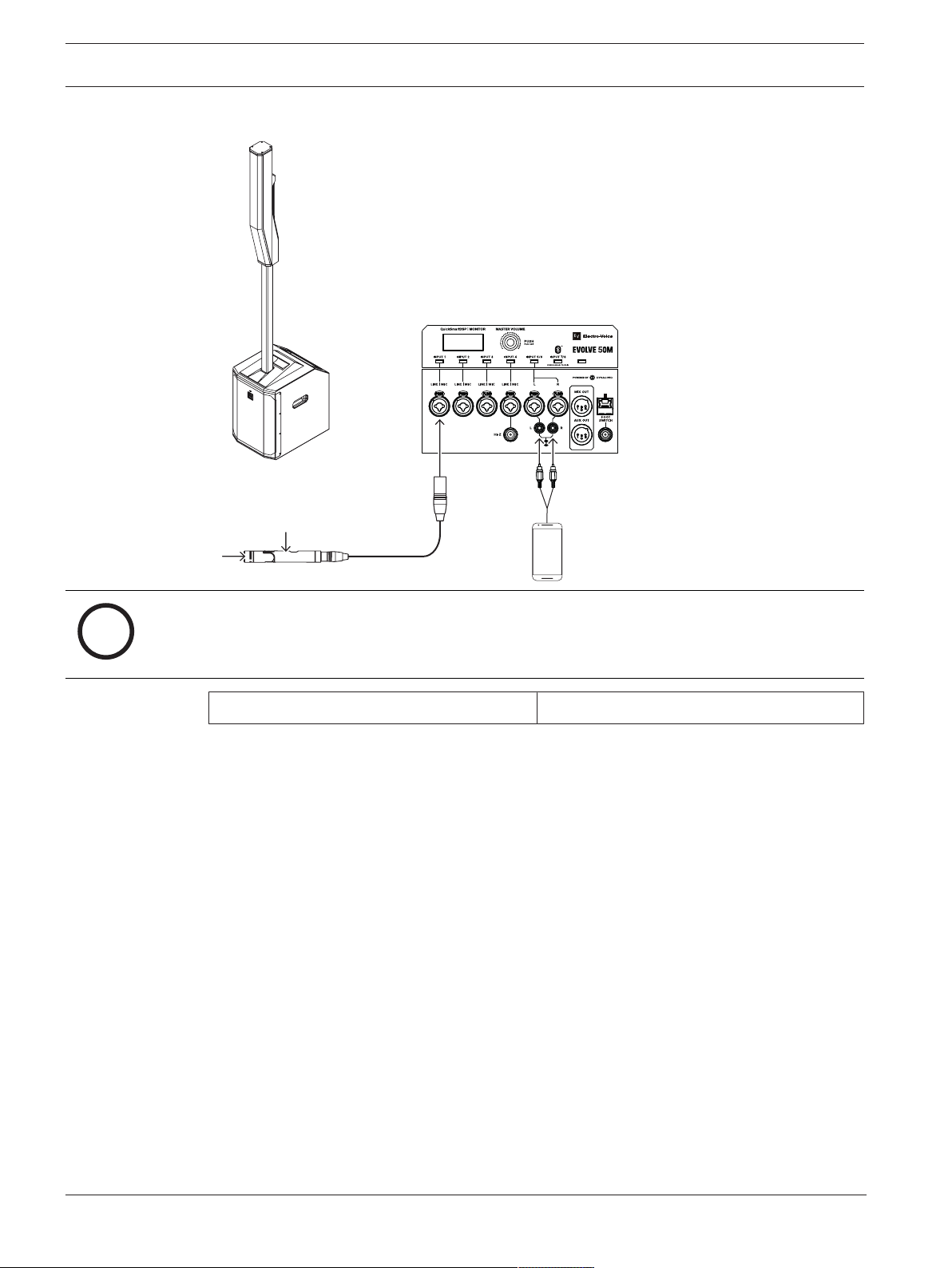
8.2 Solo musician performance
Notice!
The direction of the arrow indicates the signal path.
Mode: Live
Table8.5: DSP settings for the portable column system
2022-11 | 05 | F.01U.393.750
User manual
Electro-Voice
Page 39

EVOLVE Portable Column Loudspeaker Troubleshooting | en 39
9 Troubleshooting
Problem Possible cause Action
1. No sound Amplifier Verify all the electronics are on, the signal
routing is correct, the source is active; the
volume is turned up, no channels are muted,
etc.
Correct/repair/replace as necessary. If there is
still no sound, the problem may be wiring.
Wiring Verify you have connected the correct cables to
the amplifier. Play something at a low level
through the amplifier. Connect a test
loudspeaker in parallel with the malfunctioning
line. If the sound level is gone or is very weak,
the line has a short in it (possibly a severe
scrape, pinch, or a missed connection). Using
the test loudspeaker, move down the line and
test each connection/junction until you find the
problem and correct it. Observe proper
polarity.
2. Intermittent
output such as
crackling or
distortion
3. Constant noise
such as
buzzing hissing
or humming
4. No sound
produced with
microphone
connected to
INPUTS 1-4
5. Sound is
distorted front
LED is OFF,
LCD screen
LIMIT is ON
Faulty connection Check all connections at amplifier and
loudspeakers to ensure they are all clean and
tight. If the problem persists, check the wiring.
See problem 1.
Defective source or
other electronic
device
Poor system
grounding or ground
loop
Microphone requires
phantom power.
Input channel is
muted or LEVEL is too
low.
Excessive input level Reduce the input level or loudspeaker level to
Incorrect gain
structure or source
input (mixing console/
preamp) is overdriven
If noise is present, but no program material is
playing, evaluate each component as necessary
to isolate the problem. Most likely there is a
break in the signal path.
Check and correct the system grounding, as
required.
Ensure the microphone is connected to INPUTS
1-4. Phantom power is not available on INPUT
5/6.
Select the channel and verify the channel is not
muted. If it is not muted, slowly increase the
channel LEVEL until sound is produced.
prevent limit.
Verify level controls of the source are properly
structured by using the VU meter indicator on
the LCD screen. If the VU meter bar is solid or
the system indicates CLIP or LIMIT, the input or
source level is too high.
Electro-Voice
User manual
2022-11 | 05 | F.01U.393.750
Page 40

40 en | Troubleshooting EVOLVE Portable Column Loudspeaker
Problem Possible cause Action
6. Microphone
produces
acoustic
feedback when
input level is
amplified
7. QuickSmart
Mobile app
does not
detect the
loudspeaker
8. Sound is
distorted or
interrupted if
using
QuickSmart
Link
Incorrect gain
structure
Reduce the microphone signal by reducing the
INPUT level. Positioning the microphone close
to the sound source increases gain before
feedback.
MODE is set to MUSIC Change the MODE to LIVE or SPEECH.
Microphone position
is too close to the
front of the
loudspeaker
Whenever possible, setup the loudspeakers so
the microphone is behind them. If using a
separate loudspeaker in a monitor position, aim
the loudspeaker to the back of the microphone.
Enable Bluetooth® Ensure Bluetooth® is enabled on the
loudspeaker.
Improper cable or
cable that is too long
Network hardware
(Switches / Routers)
connected
Use shielded CAT5 (or better) cables that are
not longer than 100 m (328 ft).
Only a direct connection between no more than
two EVOLVE50M systems is allowed to work
correctly.
If these suggestions do not solve your problem, contact your nearest Electro-Voice dealer or
Electro-Voice distributor.
2022-11 | 05 | F.01U.393.750
User manual
Electro-Voice
Page 41

EVOLVE Portable Column Loudspeaker Technical data | en 41
10 Technical data
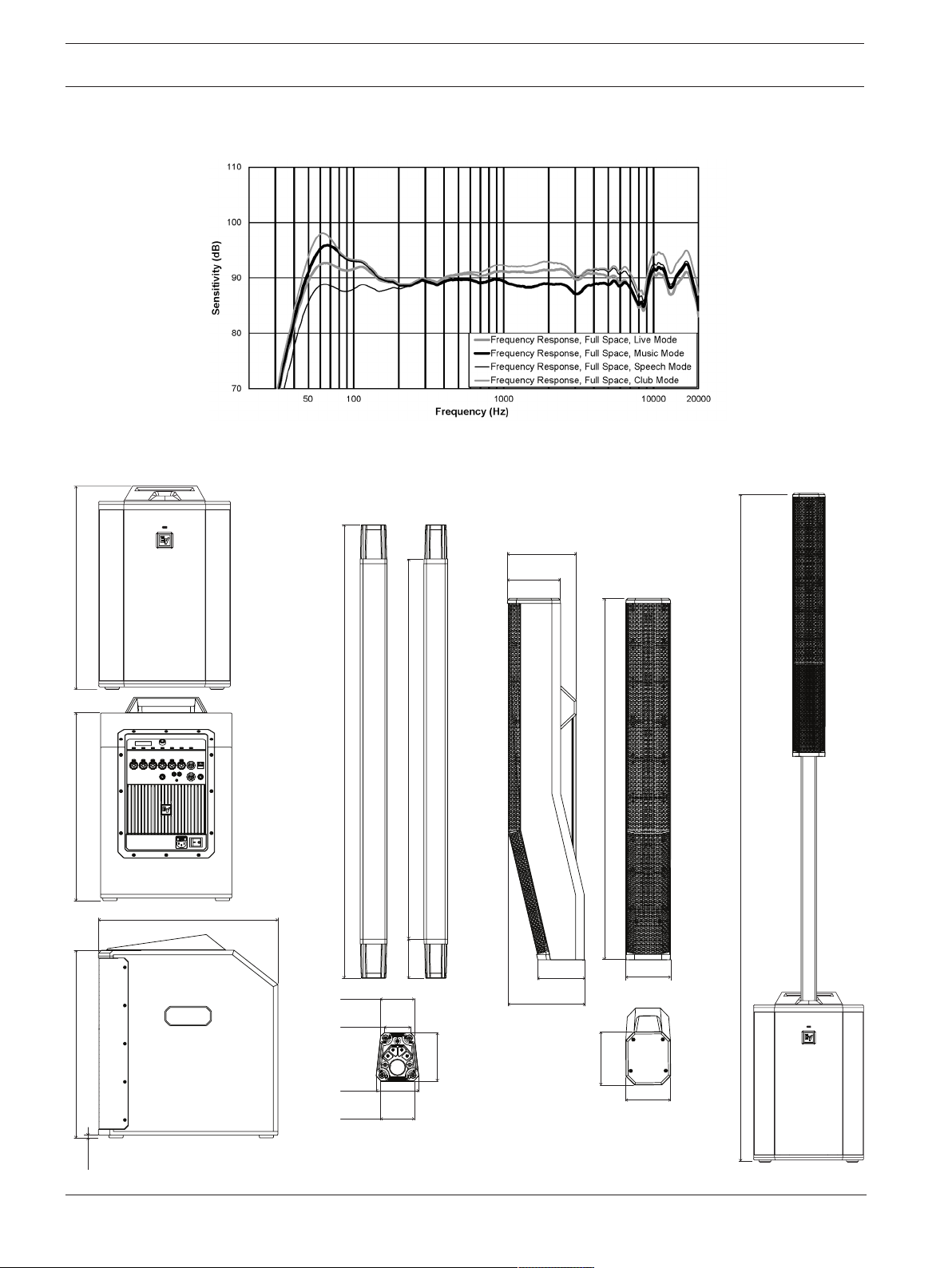
Frequency response (-3 dB)1: 43 Hz to 20 KHz
Frequency range (-10 dB)1: 37 Hz to 20 KHz
Maximum SPL2: 127 dB
Coverage (H x V): 120° x 40°
Amplifier rating: 1000 W
LF channel rating: 500 W
HF channel rating: 500 W
Crossover frequency: 200 Hz
Connectors: 4x XLR/TRS Combo Jack Line / Mic Input
1x 1/4" TRS HI-Z input
2x XLR/TRS Combo Jack for Stereo Line Input
1x Stereo RCA Input
1x 3.5 mm Stereo Input
1x Wireless Stereo Bluetooth® Audio Input
1x 1/4" Foot Switch Input
1x XLR MIX OUT Output
1x XLR AUX OUT Output
1x RJ45 QuickSmart-Link connector
Enclosure: Sub: 15 mm plywood
Column: Composite
Pole: Aluminum
Grille: Steel with black or white powder coat
Color: Black or white
Dimensions (HxWxD):
mm (in)
Subwoofer: 530 x 345 x 471 (20.9 x 13.6 x 18.5)
Column: 825 x 102 x 172 (32.5 x 4.0 x 6.9)
Sub pole: 929 x 48.5 x 55 (36.6 x 1.9 x 2.2)
Assembled dimensions (HxWxD):
2045 x 345 x 471 (80.5 x 13.6 x 18.5)
mm (in)
Net weight: Subwoofer: 20.3 kg (44.66 lb)
Column: 4.7 kg (10.34 lb)
Pole: 1.25 kg (2.75 lb)
Subwoofer cover: 0.4 kg (0.9 lb)
Bag for column and pole: 0.85 kg (1.87 lb)
Shipping weight (sub box): 23 kg (50.71 lb)
Shipping weight (column box): 8.3 kg (18.30 lb)
Frequency Band: 2402 MHz to 2480 MHz
Electro-Voice
Transmitter Power: EIRP:4.8 dBm
Power consumption3: 100-240 V AC, 50-60 Hz, 1.5-0.6 A
1
Half-space measurement using live DSP preset.
User manual
2022-11 | 05 | F.01U.393.750
Page 42
42 en | Technical data EVOLVE Portable Column Loudspeaker
2045 mm
[80.5 in]
825 mm
[32.5 in]
121.2 mm
[4.8 in]
108.4 mm
[4.3 in]
172.0 mm
[6.8 in]
157.2 mm
[6.2 in]
121.2 mm
[4.8 in]
102.4 mm
[4.0 in]
102 mm
[4.0 in]
55 mm
[2.2 in]
29.7 mm
[1.2 in]
38.5 mm
[1.5 in]
48.5 mm
[1.9 in]
27.9 mm
[1.5 in]
789 mm
[31.1 in]
68 mm
[2.7 in]
930 mm
[36.6 in]
530 mm
[20.9 in]
470 mm
[18.5 in]
492 mm
[19.4 in]
7 mm
[0.3 in]
471 mm
[18.54 in]
2
Maximum SPL is measured at 1 m using broadband pink noise at maximum output.
3
Current rating is 1/8 power.
Figure10.1: Frequency response EVOLVE 50M (Live Mode, Music Mode, Speech Mode, and Club Mode)
10.1 Dimensions
Figure10.2: Dimensions EVOLVE50M System
2022-11 | 05 | F.01U.393.750
User manual
Electro-Voice
Page 43
EVOLVE Portable Column Loudspeaker Technical data | en 43
54.5 mm
2.1 in
48 mm
1.9 in
159 mm
6.3 in
319 mm
12.6 in
80 mm
3.1 in
i
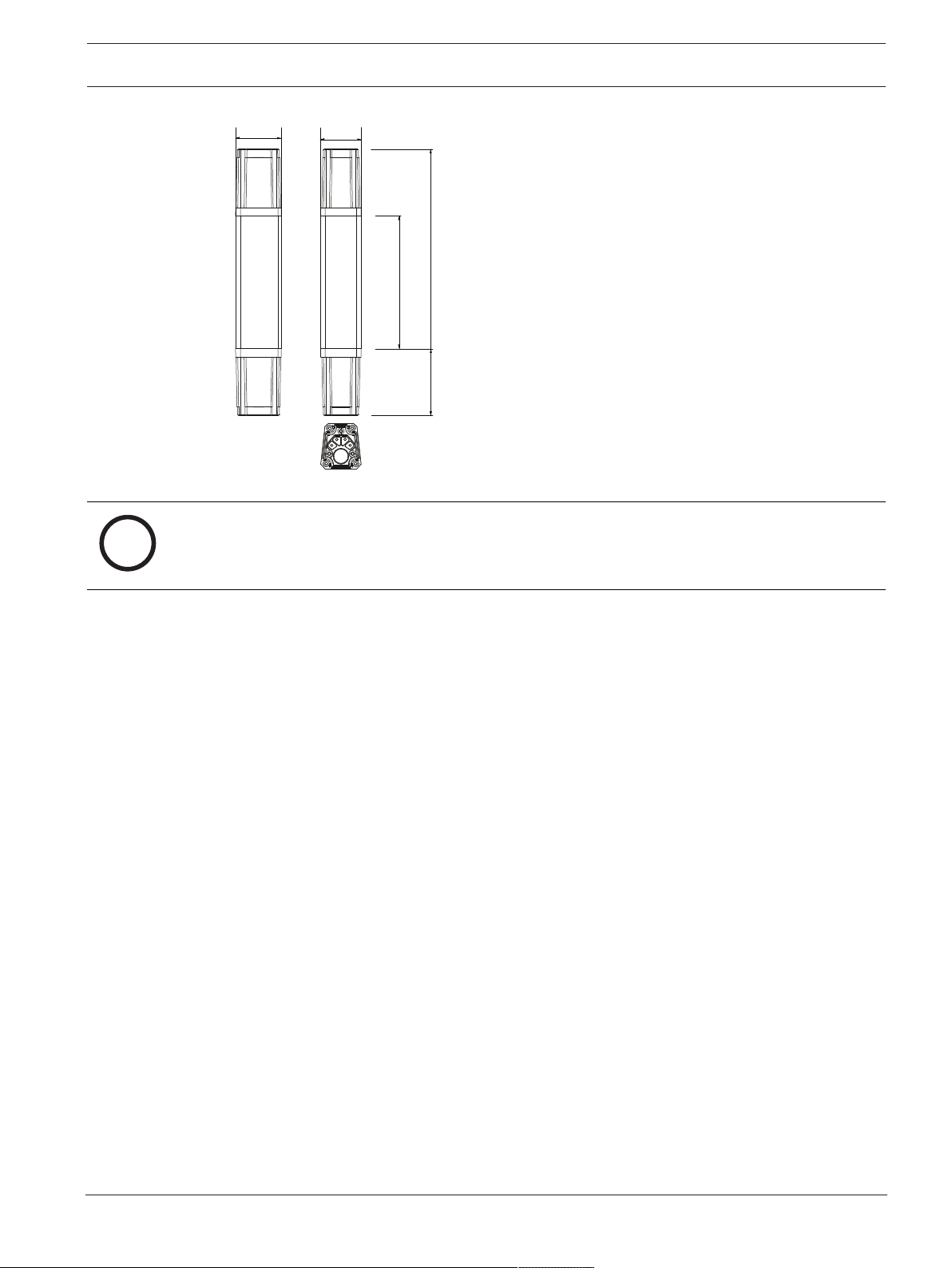
Figure10.3: Dimensions EVOLVE short pole
Notice!
The EVOLVE short pole can be used with EVOLVE 30M, EVOLVE 50 and EVOLVE 50M.
Electro-Voice
User manual
2022-11 | 05 | F.01U.393.750
Page 44

44 | Technical data EVOLVE Portable Column Loudspeaker
2022-11 | 05 | F.01U.393.750
User manual
Electro-Voice
Page 45

EVOLVE Portable Column Loudspeaker Technical data | 45
Electro-Voice
User manual
2022-11 | 05 | F.01U.393.750
Page 46

46 | Technical data EVOLVE Portable Column Loudspeaker
2022-11 | 05 | F.01U.393.750
User manual
Electro-Voice
Page 47

Page 48

Bosch Sicherheitssysteme GmbH
Robert-Bosch-Ring 5
85630 Grasbrunn
Germany
www.boschsecurity.com
© Bosch Sicherheitssysteme
GmbH, 2022
202211111215
Bosch Security Systems, LLC
12000 Portland Avenue South
Burnsville MN 55337
USA
www.electrovoice.com
© Bosch Security Systems,
LLC, 2022
 Loading...