

Page 1
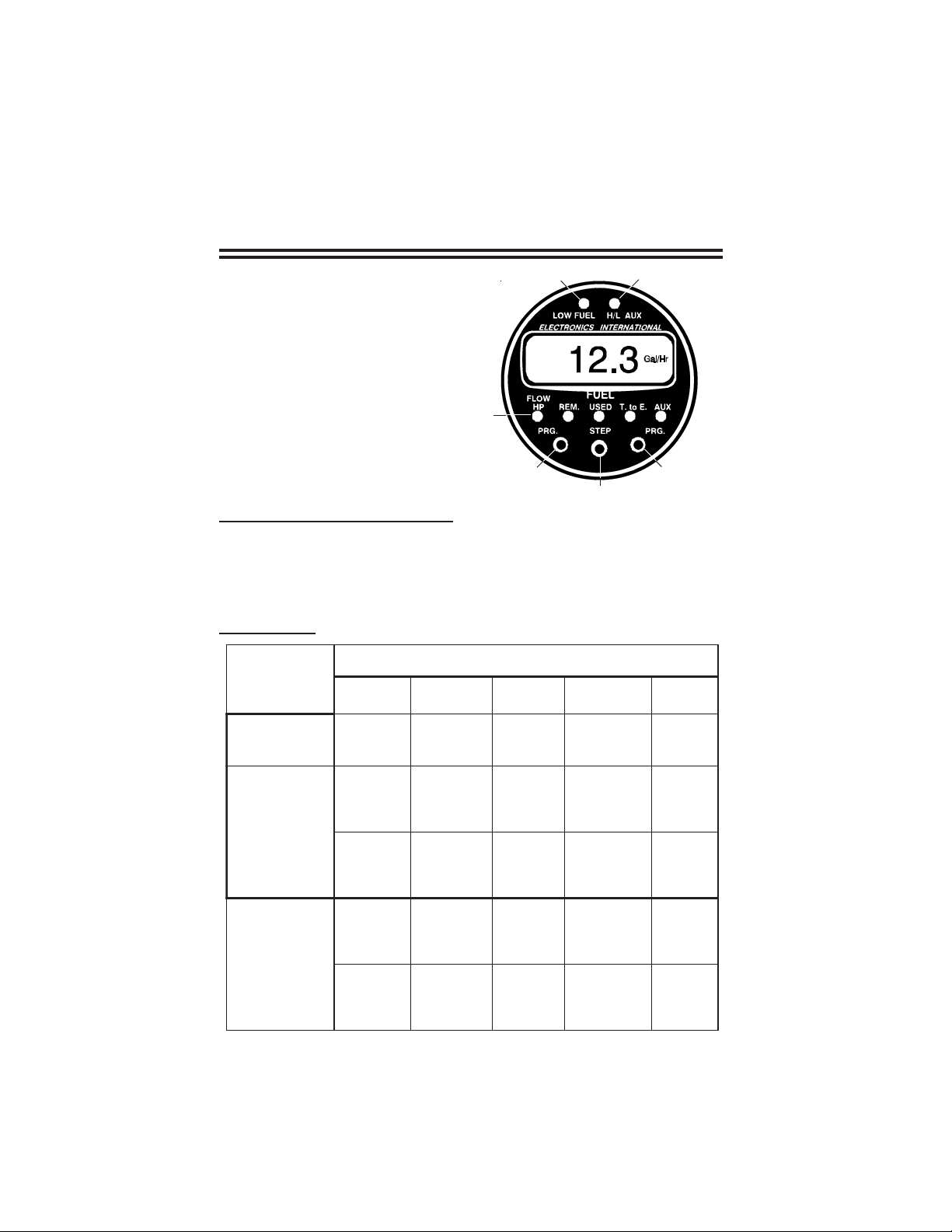
Fuel Flow/Pressure FP-5(L)
Quick Reference Guide
1 . Low Fuel Warning LED.
2 . High/Low AUX Warning LED.
3 . Display Mode Indicator LED's.
4 . Left "PRG" (Program) button.
5 . "STEP" switch.
6 . Right "PRG" (Program) button.
1004961A
Rev. A 2/17/05
21
3
4
6
5
Blinking "REM" LED on Power-up: After power-up, the FP-5(L) will blink the
Fuel Remaining (REM) LED and display the fuel remaining in the tank(s). The
"REM" LED will continue to blink until any button or switch is pushed. The
blinking "REM" LED is intended as a reminder to update the FP-5(L) if you've
added fuel to the aircraft since the last flight.
Display Modes:
edoMyalpsiD
WOLF
PHMERDESU
( htiwtceles
yalpsiDniaM
)hctiwS"PETS"
anretlA
yalpsiDet
"GRP"rehtiepat(
)nottub
toliP
elbammargorP
sgnitteS
"GRP"htobhsup(
)snottub
wolFleuF
)rH/lag3.71(
%
rewopesroH
)57PH(
5-PFteS
)L(
niyalpsiDot
,laGrB,laG
.srtLrosbL
iniameRleuF
gn
)lag7.32(
leuFddA
)"ddA"(
etarbilaCotuA
rotcaFKeht
)"OTUA"(
desUleuF
pUlliFecnis
)lag3.61(
rofdesUleuF
thgilFeht
)lag2.7F(
tsriFehtteS
leuFwoL
mralA
)raBhgiH(
ehtteS
woLdnoceS
mralAleuF
oL(
)raBw
)DELneergaybdetacidni(
.Eot.T
GPMXUA
ytpmEotemiT
)22:1(
)ylnoL5-PF(
seliMlacituaN
no
llaGrep
)3.9n(
)ylnoL5-PF(
seliMetutatS
nollaGrep
)7.01(
otemiTehtteS
mralA
ytpmE
)raBhgiH(
ehtteS
mralAdesU
)raBwoL(
leuFgnirruccoeR
syalpsiD
ynamfoeno
.snoitcnuf
hgiHehtteS
mralAxuA
)raBhgiH(
woLehtteS
mralAxuA
)raBwoL(
Page 2

Low Fuel Warning LED (1): This LED will blink if either your First or Second
Programmable Low Fuel Warning Limit is violated or your Programmable Time to
Empty Warning Limit is violated or your Reoccurring Fuel Used Alarm is
violated. Push any button or switch to stop the blinking.
High/Low AUX Warning LED (2): This LED will blink if either your Programmable High AUX Limit or your Programmable Low AUX Limit is violated.
To Add Fuel: Select the "REM" Display Mode. Press both "PRG" buttons
(4 & 6) at the same time and release. Tap either "PRG" button to enter the Add
Fuel Mode. Push and hold the left "PRG" button for two seconds to cycle the
display between the two pre-programmed fuel levels or you may program in a
specific fuel level by selecting the blinking digit with the left and right "PRG"
buttons (4 and 6). Increase or decrease a blinking digits count by pushing the
"STEP" switch (5) to the right or left.
To exit this programming mode, momentarily push both "PRG" buttons at the
same time.
Auto Calibrate: Select the "REM" Display Mode. Press both "PRG" buttons at
the same time and release. While pushing and holding the left "PRG" button,
push the "STEP" Switch right or left to display "AUTO." Tap either "PRG"
button to enter the Auto Calibrate Mode. Program the display to show the fuel
pump reading (fuel added to the aircraft). Select the blinking digit with the left
and right "PRG" buttons. Increase or decrease a blinking digits count by
pushing the "STEP" switch to the right or left.
To exit this programming mode, momentarily push both "PRG" buttons at the
same time. The new K Factor will be displayed for three seconds. The display
will return to the Add Fuel Mode.
Pilot-Programmable Setting: To program one of the seven pilot-programmable
alarms shown in "Display Modes" perform the following:
1. Select the appropriate Display Mode.
2. Press both "PRG" buttons at the same time and release.
3. Select the blinking digit with the left and right "PRG" buttons.
4. Increase or decrease a blinking digits count by pushing the "STEP" switch
to the right or left.
5. To change functions (indicated by a low or high bar in the left of the display),
tap the right "PRG" button with the right digit blinking or push the left "PRG"
button with the left digit blinking.
6. To exit the programming mode, momentarily push both "PRG" buttons at the
same time.
 Loading...