

Page 1
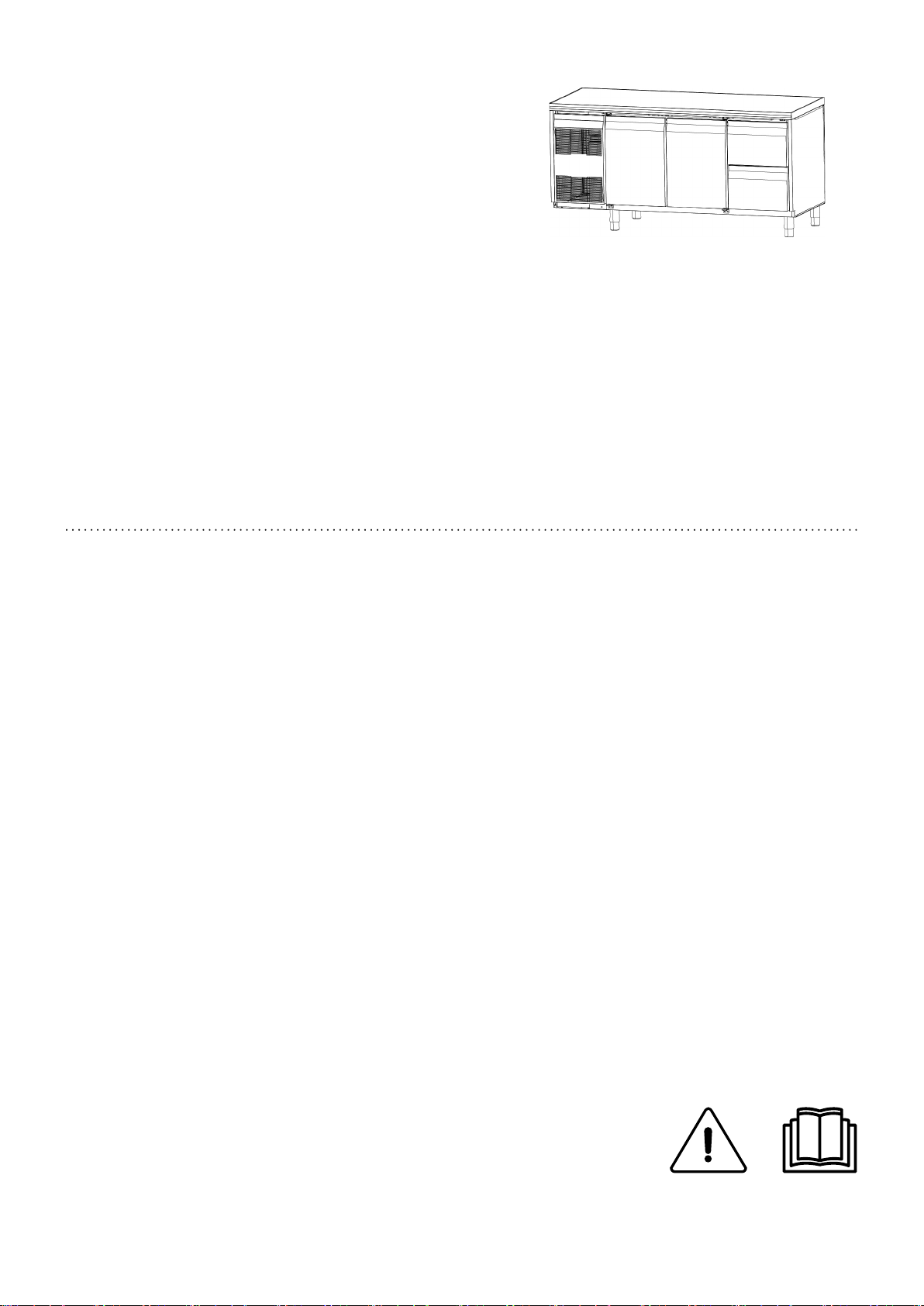
EEccoossttoorree CCoouunntteerrss
EENN
User manual *
*Original instructions
595R28901- 2017.06
Page 2

FFoorreewwoorrdd
The installation, use and maintenance manual (hereinafter Manual) provides the user with information necessary for correct
and safe use of the machine (hereinafter “machine“ or “appliance“).
The following must not be considered a long and exacting list of warnings, but rather a set of instructions suitable for improving
machine performance in every respect and, above all, preventing injury to persons and animals and damage to property due to improper operating procedures.
All persons involved in machine transport, installation, commissioning, use and maintenance, repair and disassembly must consult and carefully read this manual before carrying out the various operations, in order to avoid wrong and improper actions that
could compromise the machine's integrity or endanger people. Make sure to periodically inform the user regarding the safety regulations. It is also important to instruct and update personnel authorised to operate on the machine, regarding its use and
maintenance.
The manual must be available to operators and carefully kept in the place where the machine is used, so that it is always at hand
for consultation in case of doubts or whenever required.
If, after reading this manual, there are still doubts regarding machine use, do not hesitate to contact the Manufacturer or the authorised Service Centre to receive prompt and precise assistance for better operation and maximum efficiency of the machine.
During all stages of machine use, always respect the current regulations on safety, work hygiene and environmental protection. It
is the user's responsibility to make sure the machine is started and operated only in optimum conditions of safety for people, animals and property.
IIMMPPOORRTTAANNTT
• The manufacturer declines any liability for operations carried out on the appliance without respecting the instructions given in this manual.
• The manufacturer reserves the right to modify the appliances presented in this publication
without notice.
• No part of this manual may be reproduced.
• This manual is available in digital format by:
– contacting the dealer or reference customer care;
– downloading the latest and up to date manual on the web site:
“www.electrolux.com/professional“.
• The manual must always be kept in an easily accessed place near the machine. Machine operators and maintenance personnel must be able to easily find and consult it at any time.
2
Page 3

CCoonntteennttss
A WARNING AND SAFETY INFORMATION ....................................... .. .. ........................................... .. .. ........ 4
A.1 General information ............ .... .. .. ........................................... .. .. .... ..................................... .. .. .... .. 4
A.2 Personal protection equipment .......................................... .. .. ......................................... .. .. .... .........5
A.3 General safety ........................................ .. .. ........................................... .. .. .................................. 5
A.4 General safety rules .. ........................................... .. .. ......................................... .. .. .. ...................... 6
A.5 Product loading and unloading ......................................... .. .. .... ....................................... .. .. .. .. ........ 9
A.6 Machine cleaning and maintenance............. .. .. .... ....................................... .. .. .. .. .............................. 9
A.7 Service................................ .. .. .. .. ....................................... .... .. .. ........................................... .. . 10
B GENERAL INFORMATION ................................. .. .. ........................................... .. .. .... ............................ 10
B.1 Introduction .............................. .. .. .... ....................................... .. .. .. .. ....................................... .. . 10
B.2 Additional indications................................ .... .. .. ........................................... .. .. .... ........................ 10
B.3 Intended use and restrictions ....................................... .... .. .. ........................................... .. .. .... ...... 10
B.4 Testing and inspection .................................. .... .. .. ........................................... .. .. .... .................... 10
B.5 Copyright................................. .. .. ........................................... .. .. .... ....................................... .. . 10
B.6 Keeping the manual ... ..................................... .. .. .. .. ....................................... .. .. .. .. ..................... 10
B.7 Recipients of the manual .................. .. .. ......................................... .. .. ........................................... 11
B.8 Definitions................................ .. .. .. .. ....................................... .... .. .. ......................................... . 11
B.9 Responsibility ....................................... .. .. ......................................... .. .. .... ................................ 11
C NORMAL MACHINE USE................................. .. .. ......................................... .. .. .... ................................ 11
C.1 Characteristics of personnel trained for normal machine use .... .. .. ......................................... .. .. .... ....... 11
C.2 Characteristics of personnel enabled to operate on the machine . .. .. .... ....................................... .. .. .. .. ... 11
C.3 Operator qualified for normal machine use ........................... .. .. .. ....................................... .... .. .. ....... 11
D CONTROL PANEL........................... .. .. .. .. ....................................... .. .. .. .. ..................................... .... .. .. 12
D.1 Descripition of control panel .......................................... .. .. ........................................... .. .. .. ........... 12
E INSTRUCTION FOR THE USER............. .. .. ......................................... .. .. .. ......................................... .. .. 13
E.1 Switching the appliance on ...................... .. .. ......................................... .. .. .................................... 13
E.2 Control panel buttons .................. .. .. .... ..................................... .. .. .. .. ....................................... .. .. 13
E.3 Signalling icons ................................ .... .. .. ........................................... .. .. ................................... 14
E.4 Alarms .................................... .... .. .. ........................................... .. .. ......................................... . 14
E.4.1 Alarms silencing ...................... .. .. ........................................... .. .. ...................................... 14
E.5 Product loading ................................ .. .. .. .. ....................................... .... .. .. ................................... 14
F MACHINE CLEANING AND MAINTENANCE........... .. .. .... ....................................... .. .. .. ............................. 14
F.1 Ordinary maintenance ............ .... .. .. ........................................... .. .. ........................................... .. . 14
F.1.1 Precautions for maintenance .................... .. .. .. .. ......................................... .. .. .. .................... 14
F.1.2 Cleaning the cabinet and accessories. .. ......................................... .. .. .... ................................ 14
F.1.3 Precautions in case of long idle periods ...... .. .. .. .. ....................................... .. .. .. .. .................... 15
F.1.4 Quick troubleshooting guide .................... .. .. .. .. ....................................... .. .. .. .. ..................... 15
F.2 Extraordinary maintenance ...... .... .. .. ........................................... .. .. ........................................... .. . 15
F.2.1 Maintenance intervals ................... .. .. .. ....................................... .... .. .. ................................ 15
3
Page 4
AA WWAARRNNIINNGG AANNDD SSAAFFEETTYY IINNFFOORRMMAATTIIOONN
AA..11 GGeenneerraall iinnffoorrmmaattiioonn
To ensure safe use of the machine and a proper understanding of the
manual it is necessary to be familiar with the terms and typographical
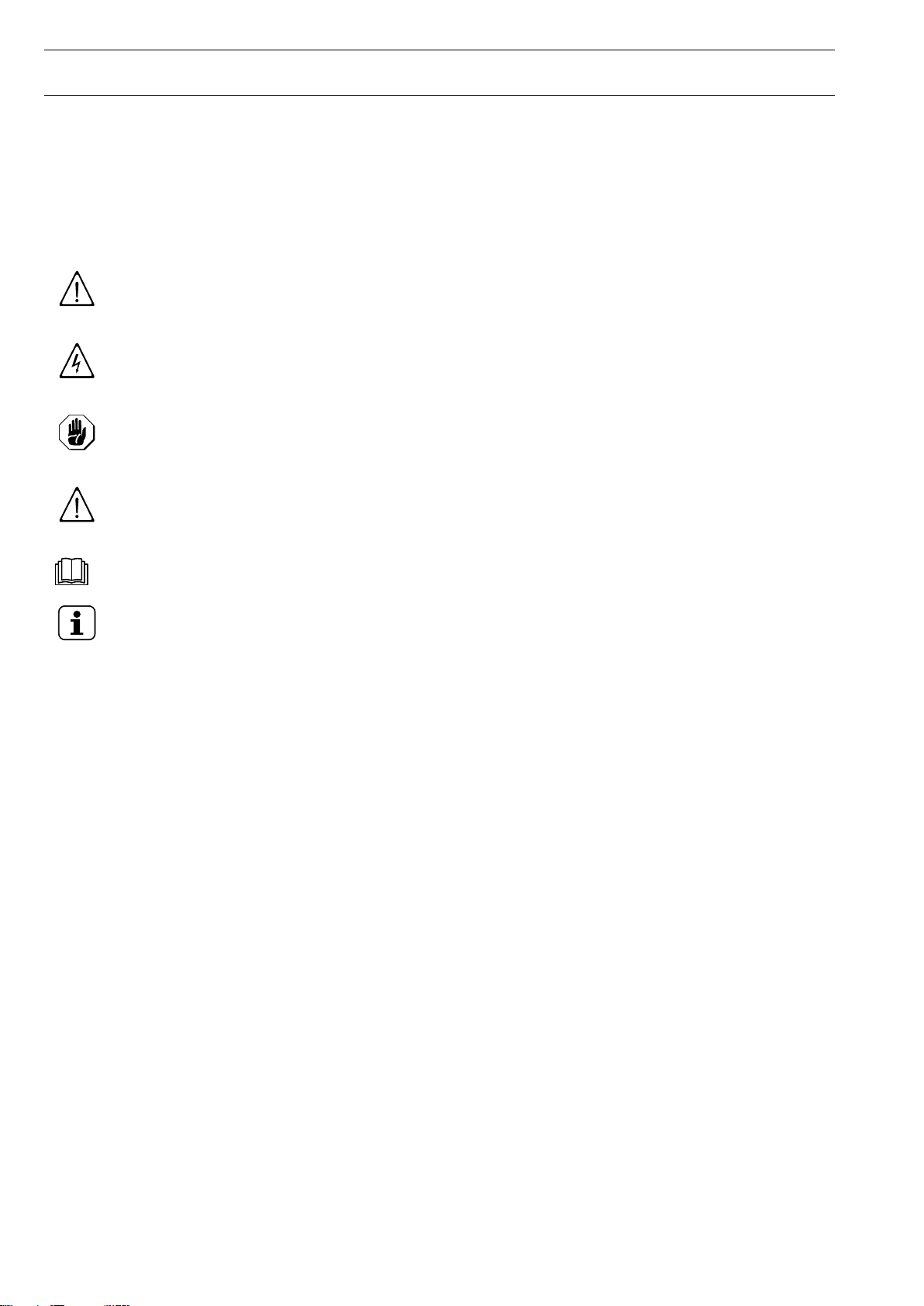
conventions used in the documentation. The following symbols are used
in the manual to indicate and identify the various types of hazards:
WWAARRNNIINNGG
Danger for the health and safety of operators.
WWAARRNNIINNGG
Danger of electrocution - dangerous voltage.
CCAAUUTTIIOONN
Risk of damage to the machine or the product.
IIMMPPOORRTTAANNTT
Important instructions or information on the product
Read the instructions before using the appliance
NOTE!
Clarifications and explanations
• Only specialised personnel are authorised to operate on the machine.
• This appliance can be used by children aged from 8 years and above
and persons with reduced physical, sensory or mental capabilities or
lack of experience and knowledge if they have been given supervision
or instruction concerning use of the appliance in a safe way and
understand the hazards involved.
– Do not let children play with the appliance.
– Keep all packaging and detergents away from children.
– Cleaning and user maintenance shall not be made by children
without supervision.
• Do not store explosive substances, such as pressurized containers
with flammable propellant, in this appliance
• Do not remove, tamper with or make the machine marking illegible.
• When scrapping the machine, the marking must be destroyed.
• Save these instructions carefully for further consultation by the various
operators.
4
Page 5
AA..22 PPeerrssoonnaall pprrootteeccttiioonn eeqquuiippmmeenntt
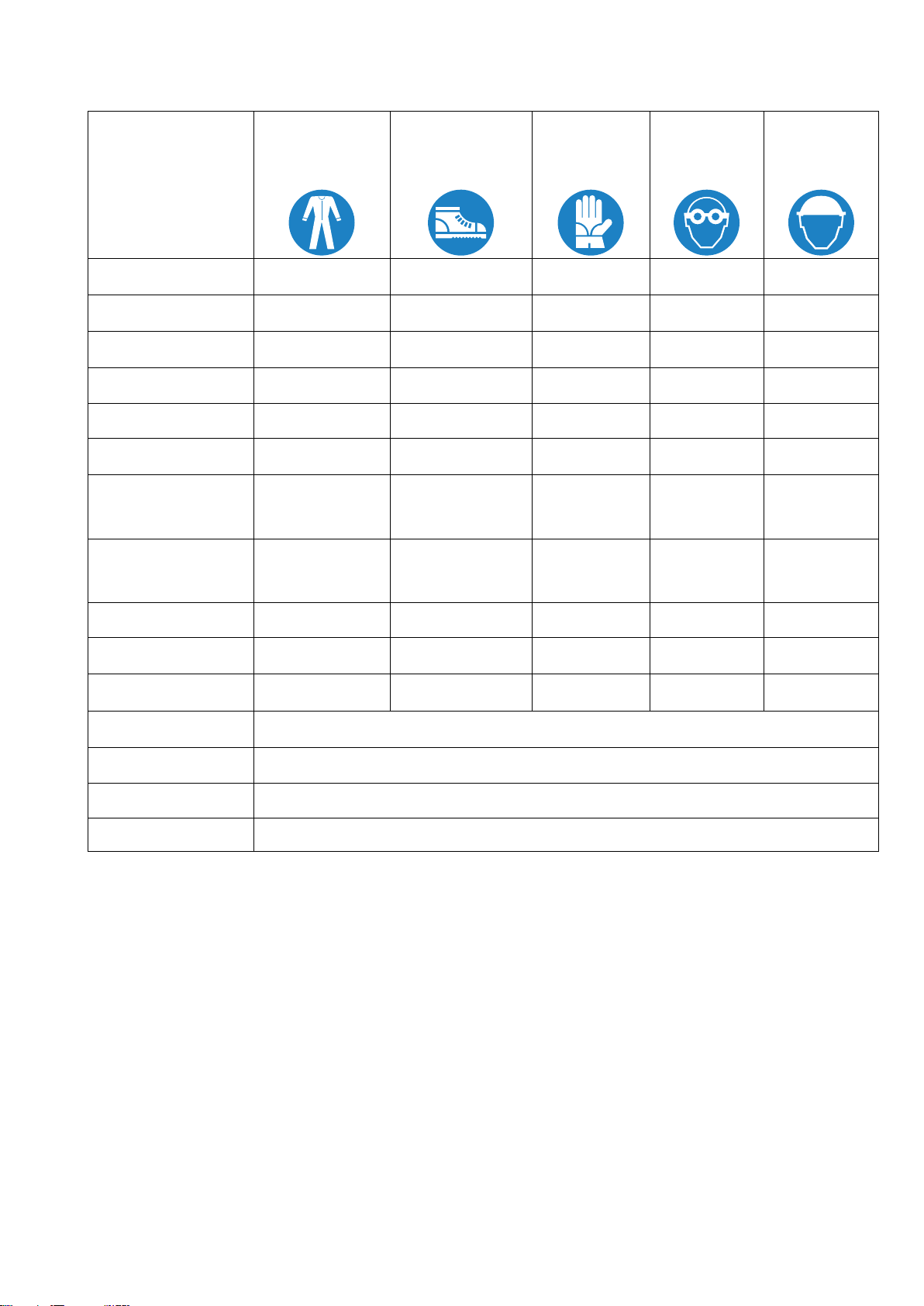
SSuummmmaarryy ttaabblleeooff tthhee PPeerrssoonnaall PPrrootteeccttiioonn EEqquuiippmmeenntt ((PPPPEE)) ttoo bbee uusseedd dduurriinngg tthhee vvaarriioouuss ssttaaggeess ooff tthhee mmaacchhiinnee''ss sseerrvviiccee
lliiffee..
SSttaaggee
Transport
Handling
Unpacking
Installation
Normal use
Adjustments
Routine
cleaning
Extraordinary
cleaning
Maintenance
Dismantling
Scrapping
PPrrootteeccttiivvee
ggaarrmmeennttss
—
—
—
—
● ●
○ ●
○ ● ●
○ ● ● ○
○ ● ○
○ ● ○ ○
○ ● ○ ○
SSaaffeettyy
ffoooottwweeaarr
● ○
● ○
● ○
● ○
GGlloovveess GGllaasssseess SSaaffeettyy
hheellmmeett
—
○
— —
— —
— —
1
●
— — —
1
— —
—
○
—
—
—
—
—
KKeeyy::
●
○
—
1. During Normal use, gloves protect hands from the cold tray when being removed from the appliance. Note: The gloves to be worn during cleaning are the
type suitable for contact with the cooling fins (metal plates). Failure to use the personal protection equipment by operators, specialised personnel or users
can involve exposure to chemical risk and possible damage to health (depending on the model).
AA..33 GGeenneerraall ssaaffeettyy
• The machines are provided with electric and/or mechanical safety
devices for protecting workers and the machine itself. Therefore the
user must not remove or tamper with such devices. The Manufacturer
declines any liability for damage due to tampering or their non-use.
• Never operate the machine, removing, modifying or tampering with the
guards, protection or safety devices.
• Several illustrations in the manual show the machine, or parts of it,
without guards or with guards removed. This is purely for explanatory
PPPPEE RREEQQUUIIRREEDD
PPPPEE AAVVAAIILLAABBLLEE OORR TTOO BBEE UUSSEEDD IIFF NNEECCEESSSSAARRYY
PPPPEE NNOOTT RREEQQUUIIRREEDD
purposes. Do not use the machine without the guards or with the
protection devices deactivated.
5
Page 6
• Do not remove, tamper with or make illegible the safety, danger and
instruction signs and labels on the machine.
AA..44 GGeenneerraall ssaaffeettyy rruulleess
Protection devices installed on the machine
• The guards on the machine are:
– fixed guards (e. g. casings, covers, side panels, etc.), fixed to the
machine and/or frame with screws or quick-release connectors that
can only be removed or opened with tools;
– interlocked movable guards (door) for access inside the machine;
– machine electrical equipment access doors, made from hinged
panels openable with tools. The door must not be opened when the
machine is connected to the power supply.
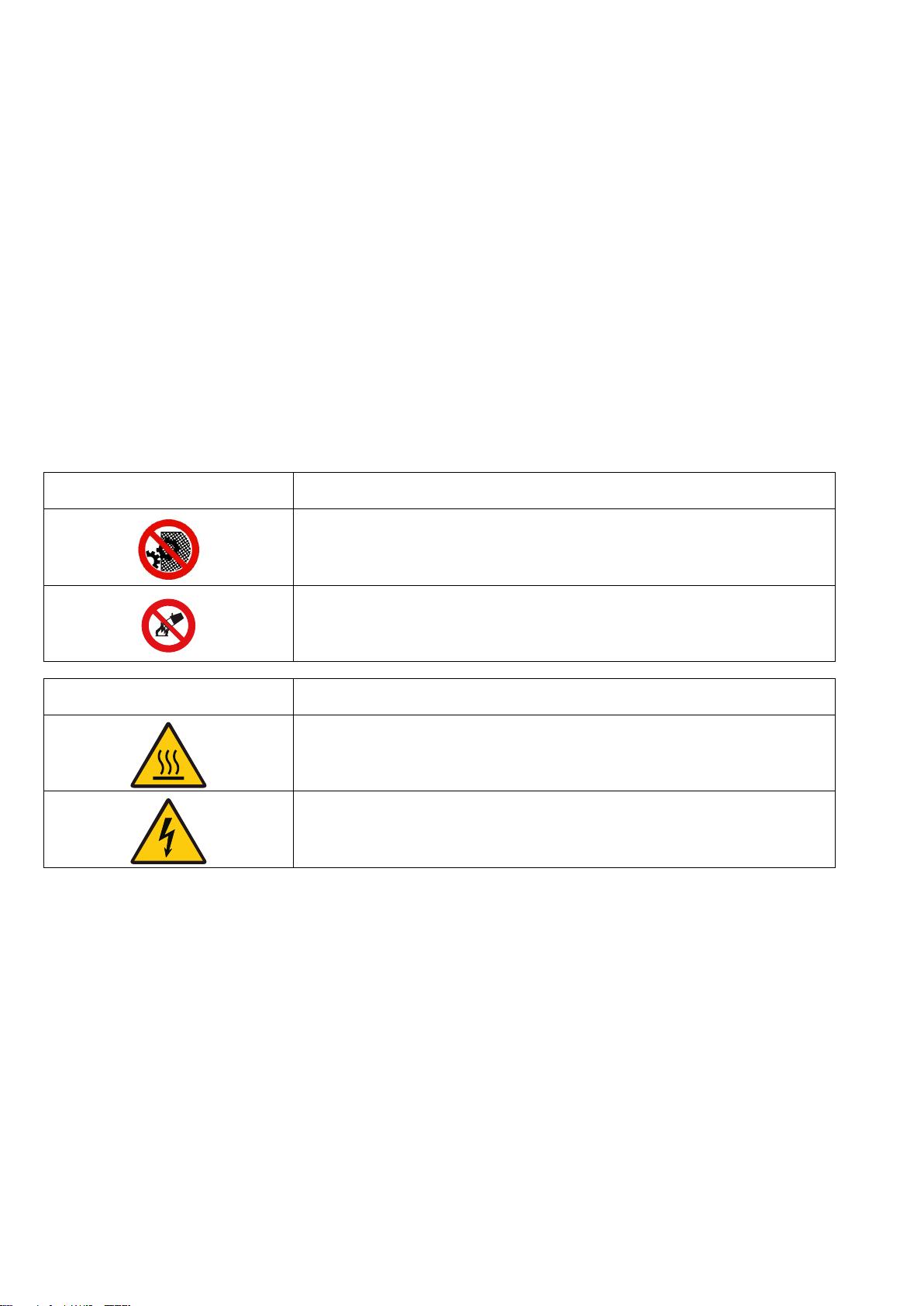
Safety signs to be placed on the machine or near its area:
PPrroohhiibbiittiioonn MMeeaanniinngg
do not remove the safety devices
do not use water to extinguish fires (placed on
electrical parts)
DDaannggeerr MMeeaanniinngg
danger of burns
danger of electrocution (shown on electrical
parts with indication of voltage)
End of use
• When the appliance is no longer to be used, make it unusable by
removing the mains power supply wiring.
Instructions for use and maintenance
• Risks mainly of a mechanical, thermal and electrical nature exist in the
machine. Where possible the risks have been neutralised:
– directly, by means of adequate design solutions.
– indirectly by using guards, protection and safety devices.
• Any anomalous situations are signalled on the control panel display.
6
Page 7

• During maintenance several risks remain, as these could not be
eliminated, and must be neutralised by adopting specific measures
and precautions.
• Do not carry out any checking, cleaning, repair or maintenance
operations on moving parts. Workers must be informed of this
prohibition by means of clearly visible signs.
• To guarantee machine efficiency and correct operation, periodical
maintenance must be carried out according to the instructions given in
this manual.
• Make sure to periodically check correct operation of all the safety
devices and the insulation of electrical cables, which must be replaced
if damaged.
• Extraordinary machine maintenance operations must only be carried
out by specialised personnel provided with all the appropriate personal
protection equipment, tools, utensils and ancillary means.
• Never operate the machine, removing, modifying or tampering with the
guards, protection or safety devices.
Reasonably foreseeable improper use
Improper use is any use different from that specified in this manual.
During machine operation, other types of work or activities deemed
improper and that in general can involve risks for the safety of operators
and damage to the appliance are not allowed. Reasonably foreseeable
improper use includes:
• lack of machine maintenance, cleaning and periodical checks;
• structural changes or modifications to the operating logic;
• tampering with the guards or safety devices;
• failure to use personal protection equipment by operators, specialised
personnel and maintenance personnel;
• failure to use suitable accessories (e.g. use of unsuitable equipment or
ladders);
• keeping combustible or flammable materials, or in any case materials
not compatible with or pertinent to the work, near the machine;
• wrong machine installation;
• placing in the machine any objects or things not compatible with its use,
or that can damage the machine, cause injury or pollute the
environment;
• climbing on the machine;
• non-compliance with the requirements for correct machine use;
• other actions that give rise to risks not eliminable by the Manufacturer.
7
Page 8

• Failure to insure complete closure of doors or drawers, through
forgetfulness or carelessness.
• Place the product in the compartments so as to block proper air
circulation or hinder the perfect closing of doors / drawers.
• Exceed product weight allowed for each shelf / drawer.
The previously described actions are prohibited!
Residual risks
• The machine has several risks that were not completely eliminated
from a design standpoint or with the installation of adequate protection
devices. Nevertheless, through this manual the Manufacturer has
taken steps to inform operators of such risks, carefully indicating the
personal protection equipment to be used by them. Sufficient spaces
are provided for during the machine installation stages in order to limit
these risks.
To preserve these conditions, the areas around the machine must
always be:
– kept free of obstacles (e.g. ladders, tools, containers, boxes, etc.);
– clean and dry;
– well lit.
For the Customer's complete information, the residual risks remaining
on the machine are indicated below: such actions are deemed
improper and therefore strictly forbidden.
RReessiidduuaall rriisskk
Slipping or falling
DDeessccrriippttiioonn ooff hhaazzaarrddoouuss ssiittuuaattiioonn
The operator can slip due to water or dirt
on the floor
Burns/abrasions (e.g.
heating elements, cold
pan, cooling circuit plates
and pipes)
Electrocution
The operator deliberately or
unintentionally touches some
components inside the machine without
using protective gloves
Contact with live parts during
Falling from above
8
maintenance operations carried out with
the electrical panel powered
The operator intervenes on the machine
using unsuitable systems to access the
upper part (e.g. rung ladders, or climbs
on it)
Page 9
RReessiidduuaall rriisskk
DDeessccrriippttiioonn ooff hhaazzaarrddoouuss ssiittuuaattiioonn
Tipping of loads
When handling the machine or the
packing containing it, using unsuitable
lifting systems or accessories or with the
load unbalanced
Chemical (refrigerant gas) Inhalation of refrigerant gas. Therefore
always refer to the appliance labels
IIMMPPOORRTTAANNTT
In case of a significant anomaly (e.g. short circuits, wires coming out of the
terminal block, motor breakdowns, worn electrical cable sheathing, etc.) the
operator must immediately deactivate the machine.
AA..55 PPrroodduucctt llooaaddiinngg aanndd uunnllooaaddiinngg
WWAARRNNIINNGG
• Do not use mechanical devices or other means to speed up the defrost
process, unless recommended by the manufacturer.
• Do not damage the circuit.
• Do not use electrical appliances inside the appliance compartments for
storing frozen food, unless such equipment is recommended by the
manufacturer.
• Regarding the maximum load for each shelf, respect that given in the
table below:
SHELF MAXIMUM LOAD 20 KG
AA..66 MMaacchhiinnee cclleeaanniinngg aanndd mmaaiinntteennaannccee
• Before carrying out any cleaning or maintenance, disconnect the
appliance from the power supply. For details see the Electrical
Connection paragraph in the Installation Manual.
• Do not touch the appliance with wet hands or feet or when barefoot.
• Do not remove the safety guards.
• Use a ladder with suitable protection for work on appliances with high
accessibility.
• Use suitable personal protection equipment.
Ordinary maintenance
• Disconnect the power supply before cleaning the appliance.
For details see the Electrical Connection paragraph in the Installation
Manual.
• Do not clean the machine with jets of water.
9
Page 10
Precaution in case of long idle periods
• Machine maintenance, checking and overhaul operations must only be
carried out by specialised personnel or the After-Sales Service,
provided with adequate personal protection equipment, tools and
ancillary means.
• Work on the electrical equipment must only be carried out by
specialised personnel or the After-Sales Service.
• Put the machine in safe conditions before starting any maintenance
operation.
• Respect the requirements for the various routine and extraordinary
maintenance operations. Non-compliance with the instructions can
create risks for personnel.
Extraordinary maintenance
• Extraordinary maintenance must be carried out by specialised
personnel, who can ask the manufacturer to supply a servicing
manual, or by the After-Sales Service.
AA..77 SSeerrvviiccee
• Only original spare parts can ensure the safety standards of the
appliance.
• Only repairs undertaken by an Electrolux approved service technician
are covered by the guarantee.
BB GGEENNEERRAALL IINNFFOORRMMAATTIIOONN
WWAARRNNIINNGG
Refer to “
Information
BB..11 IInnttrroodduuccttiioonn
Given below is some information regarding the intended use of
this appliance, its testing, and a description of the symbols
used (that identify the type of warning), the definitions of terms
used in the manual and useful information for the appliance
user.
BB..22 AAddddiittiioonnaall iinnddiiccaattiioonnss
The drawings and diagrams given in the manual are not in
scale. They supplement the written information with an outline,
but are not intended to be a detailed representation of the
machine supplied.
The numerical values given on the machine installation
diagrams refer to measurements in millimeters and/or inches.
BB..33 IInntteennddeedd uussee aanndd rreessttrriiccttiioonnss
Our appliances are designed and optimised in order to obtain
high performance and efficiency. This appliance is designed
for the refrigeration and preservation of foods.
Any other use is deemed improper.
Warning and Safety
“.
BB..44 TTeessttiinngg aanndd iinnssppeeccttiioonn
Our appliances have been designed and optimized, with
laboratory testing, in order to obtain high performance and
efficiency.
The product is shipped ready for use.
Passing of the tests (visual inspection - electrical test -
functional test) is guaranteed and certified by the specific
enclosures.
BB..55 CCooppyyrriigghhtt
This manual is intended solely for consultation by the operator
and can only be given to third parties with the permission of
Electrolux Professional SpA.
BB..66 KKeeeeppiinngg tthhee mmaannuuaall
The manual must be carefully kept for the entire life of the
machine, until scrapping. The manual must stay with the
CCAAUUTTIIOONN
The machine is not suitable for installation
outdoors and/or in places exposed to
atmospheric agents (rain, direct sunlight,
etc.).
NOTE!
The manufacturer declines any liability for improper
use of the product.
10
Page 11
machine in case of transfer, sale, hire, granting of use or
leasing.
BB..77 RReecciippiieennttss ooff tthhee mmaannuuaall
This manual is intended for:
• the carrier and handling personnel;
• installation and commissioning personnel;
• the employer of machine users and the workplace
manager;
• operators for normal machine use;
• specialised personnel - after-sales service (see service
manual).
BB..88 DDeeffiinniittiioonnss
Listed below are the definitions of the main terms used in the
manual. It is advisable to read them carefully before use.
Operator machine installation, adjustment, use,
Manufacturer Electrolux Professional SpA or any other
Operator for
normal
machine use
After-sales
service or specialised
personnel
Danger source of possible injury or harm to health.
Hazardous
situation
Risk a combination of probabilities and risks of
Protection
devices
maintenance, cleaning, repair and transport personnel.
service centre authorised by Electrolux
Professional SpA.
an operator who has been informed and
trained regarding the tasks and hazards
involved in normal machine use.
an operator instructed/trained by the Manufacturer and who, based on his
professional and specific training, experience and knowledge of the accidentprevention regulations, is able to appraise
the operations to be carried out on the
machine and recognise and prevent any
risks. His professionalism covers the
mechanical, electrotechnical and electronics fields.
any situation where an operator is
exposed to one or more hazards.
injury or harm to health in a hazardous
situation.
safety measures consisting of the use of
specific technical means (guards and
safety devices) for protecting operators
against risks.
Guard an element of a machine used in a specific
way to provide protection by means of a
physical barrier.
Safety device a device (other than a guard) that elimi-
nates or reduces the risk; it can be used
alone or in combination with a guard.
Customer the person who purchased the machine
and/or who manages and uses it (e. g.
company, entrepreneur, firm).
Electrocution an accidental discharge of electric current
on a human body.
BB..99 RReessppoonnssiibbiilliittyy
The Manufacturer declines any liability for damage and
malfunctioning caused by:
• non-compliance with the instructions contained in this
manual;
• repairs not carried out in a workmanlike fashion, and
replacements with parts different from those specified in
the spare parts catalogue (the fitting and use of non-original
spare parts and accessories can negatively affect machine
operation and invalidates the warranty);
• operations by non-specialised personnel;
• unauthorised modifications or operations;
• inadequate maintenance;
• improper machine use;
• unforeseeable extraordinary events;
• use of the machine by uninformed and untrained personnel;
• non-application of the current provisions in the country of
use, concerning safety, hygiene and health in the workplace.
The Manufacturer declines any liability for damage caused by
arbitrary modifications and conversions carried out by the user
or the Customer.
The employer, workplace manager or service technician are
responsible for identifying and choosing adequate and suitable
personal protection equipment to be worn by operators, in
compliance with regulations in force in the country of use.
Electrolux Professional SpA declines any liability for inaccuracies contained in the manual, if due to printing or translation
errors. Any supplements to the installation, use and maintenance manual the Customer receives from the Manufacturer
will form an integral part of the manual and therefore must be
kept together with it.
CC NNOORRMMAALL MMAACCHHIINNEE UUSSEE
WWAARRNNIINNGG
Refer to “
Information
CC..11 CChhaarraacctteerriissttiiccss ooff ppeerrssoonnnneell ttrraaiinneedd ffoorr
nnoorrmmaall mmaacchhiinnee uussee
The Customer must make sure the personnel for normal
machine use are adequately trained and skilled in their duties,
as well as ensuring their own safety and that of other persons.
The Customer must make sure his personnel have understood
the instructions received and in particular those regarding work
hygiene and safety in use of the machine.
CC..22 CChhaarraacctteerriissttiiccss ooff ppeerrssoonnnneell eennaabblleedd ttoo
ooppeerraattee oonn tthhee mmaacchhiinnee
The Customer is responsible for ensuring that persons
assigned to the various duties:
• read and understand the manual;
Warning and Safety
“.
• receive adequate training and instruction for their duties in
order to perform them safely;
• receive specific training for correct machine use.
CC..33 OOppeerraattoorr qquuaalliiffiieedd ffoorr nnoorrmmaall mmaacchhiinnee uussee
He must have at least:
• knowledge of the technology and specific experience in
operating the machine;
• adequate general basic education and technical knowledge
for reading and understanding the contents of the manual;
• including correct interpretation of the drawings, signs and
pictograms;
• sufficient technical knowledge for safely performing his
duties as specified in the manual;
• knowledge of the regulations on work hygiene and safety.
In case of a significant anomaly (e. g. short circuits, wires
coming out of the terminal block, motor breakdowns, worn
electrical cable sheathing, etc.) the operator for normal
machine use must:
• immediately deactivate the machine.
11
Page 12
DD CCOONNTTRROOLL PPAANNEELL
1
2
3
4 5
6
7
8
9
10
11
13
14
1516
17
12
1
2
3
4
5 6
7
8
9
14
15
13 12 11 10
16
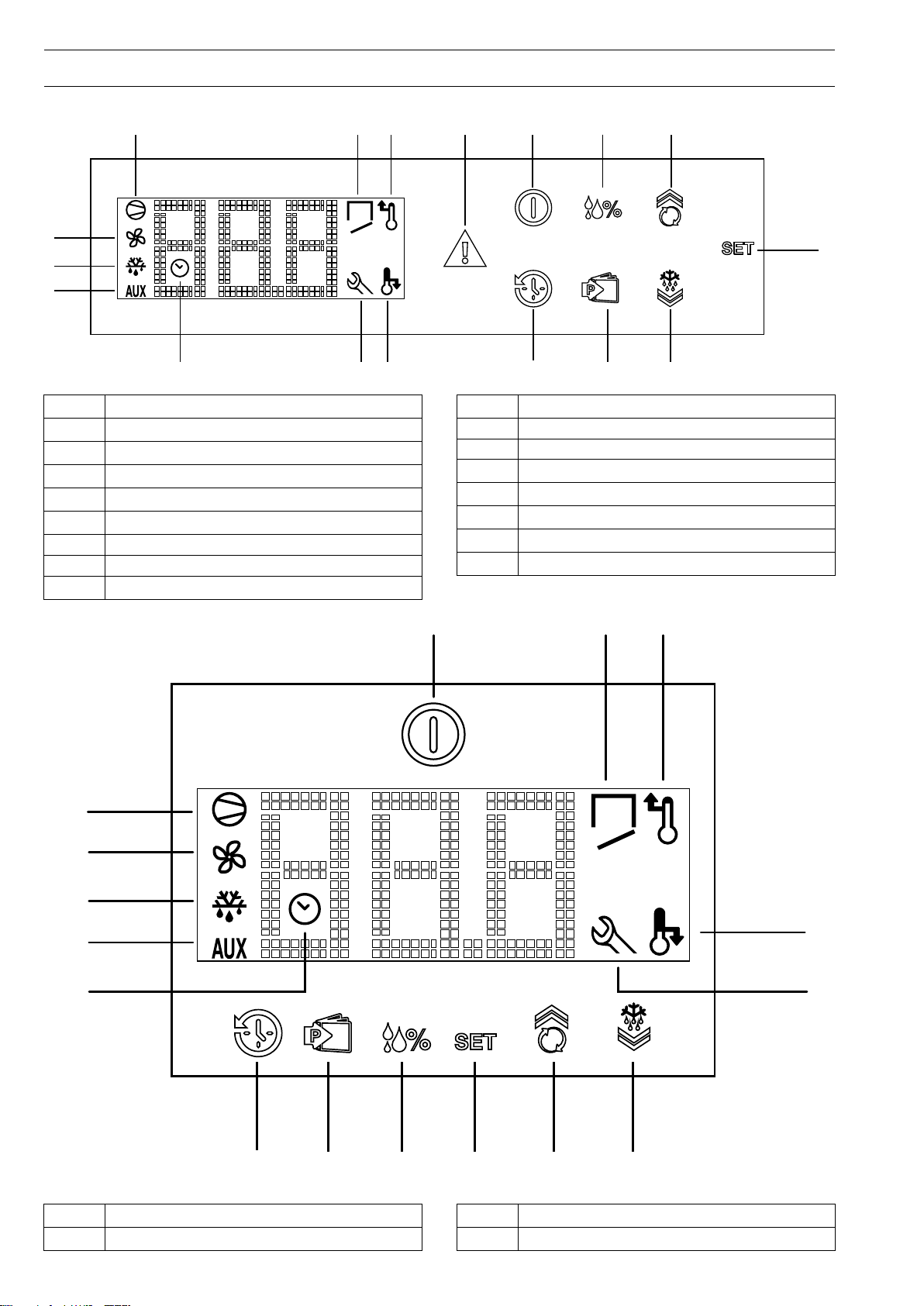
DD..11 DDeessccrriippiittiioonn ooff ccoonnttrrooll ppaanneell
Auxiliary users on signalling icon
11
Defrost cycle activated signalling icon
22
Compartment fans on signalling icon
33
Compressor on signalling icon
44
Door Open alarm signalling icon
55
High temperature alarm signalling icon
66
77 Reset alarm button
88 ON/OFF button
High/low humidity button
99
UP/Continuous Cycle button
1100
1111 Set button
1122 Defrost/Down button
Programme selection button
1133
History button
1144
Low temperature alarm signalling icon
1155
Assistance alarm signalling icon
1166
History function on signalling icon
1
1177
1. refrigerated models only
12
Auxiliary users on signalling icon
11
Defrost cycle activated signalling icon
22
Compartment fans on signalling icon
33
Compressor on signalling icon
44
Page 13
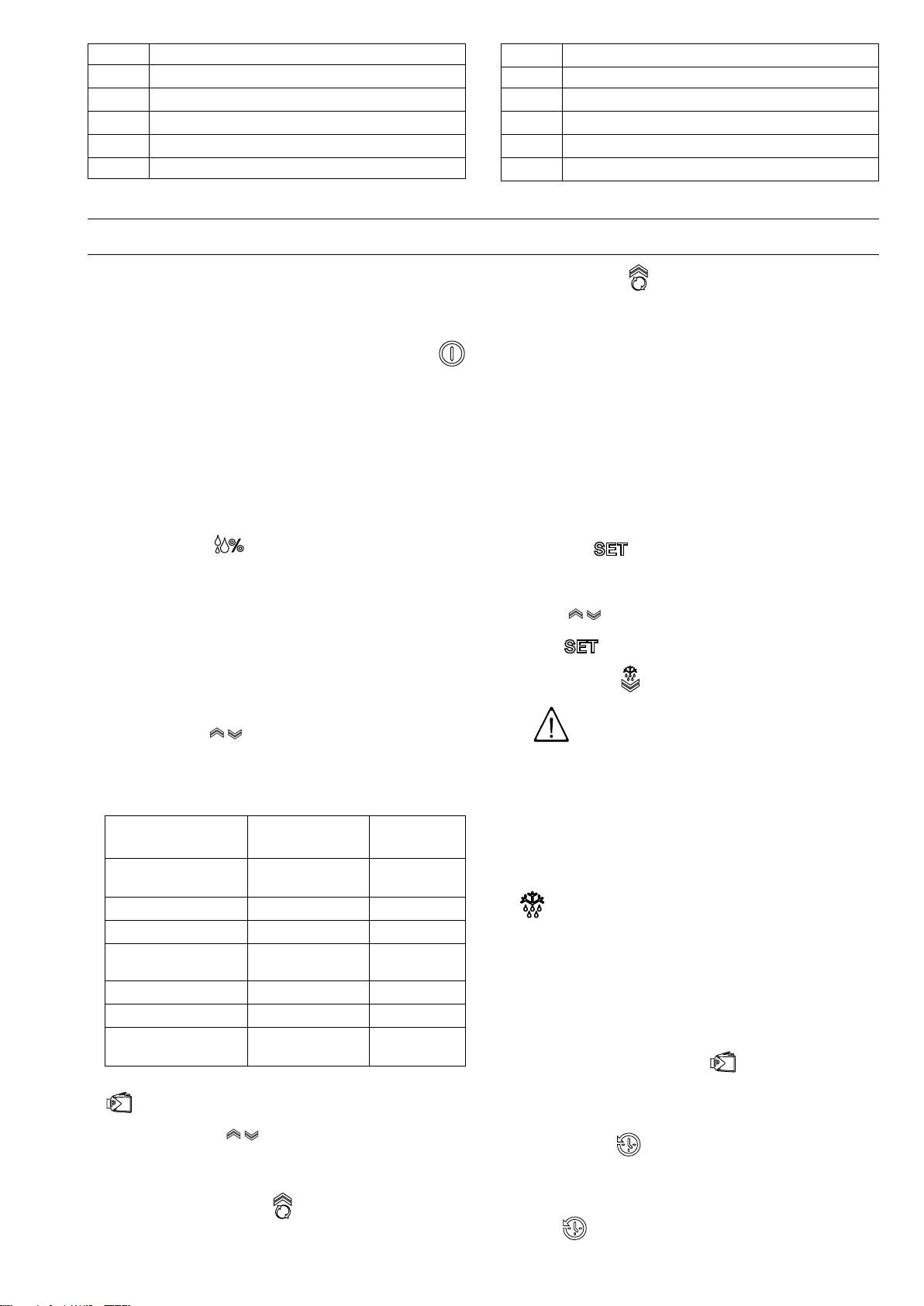
55 ON/OFF button
Door Open alarm signalling icon
66
High temperature alarm signalling icon
77
Low temperature alarm signalling icon
88
Assistance alarm signalling icon
99
1100 Defrost/Down button
EE IINNSSTTRRUUCCTTIIOONN FFOORR TTHHEE UUSSEERR
1111
1122 Set button
1133
1144
1155
1166
1. refrigerated models only
UP/Continuous Cycle button
High/low humidity button
Programme selection button
History button
History function on signalling icon
1
EE..11 SSwwiittcchhiinngg tthhee aapppplliiaannccee oonn
Connect the power cable to a power socket. The instrument
display performs a Lamp Test and the message OFF will
appear.
To activate and deactivate the appliance press the button
for 5 seconds.
The display will show the message ON (for activation) or OFF
(for deactivation).
Even if the machine is deactivated with the ON/OFF button it
still remains powered.
This button only disconnects the power to the loads connected
to the instrument.
EE..22 CCoonnttrrooll ppaanneell bbuuttttoonnss
• HHuummiiddiittyy bbuuttttoonn
Present only on refrigerated models, it is used to set 3
different humidity levels.
Humidity varies on the base of the ambient temperature and
the cell temperature (Set point).
Depending on the humidity level, the display will show the
images with:
– 1 line (low humidity - from 40% to 50%)
– 2 lines (medium humidity - from 60% to 70%)
– 3 lines (high humidity - from 70% to 85%)
Use the buttons to select the most suitable humidity
level.
TTaabbllee ooff ccaatteeggoorriieess,, ccoommppaarrttmmeenntt tteemmppeerraattuurree aanndd
hhuummiiddiittyy sseettttiinngg
CCaatteeggoorriieess
Fresh meat (beef,
mutton, pork)
Poultry
Fruit & Vegetables
Eggs, Butter,
Cheese, Charcuterie
Fresh fish
Patisserie
Beverages
To confirm the degree of humidity selected, press the button
for 5 seconds.
• UUpp--DDoowwnn bbuuttttoonnss
Up for increasing the values;
Down for decreasing the values;
• CCoonnttiinnuuoouuss ccyyccllee bbuuttttoonn
TTeemmppeerraattuurree
((℃℃))
4
-2
6
6
4
6
8
HHuummiiddiittyy
high humidity
high humidity
high humidity
high humidity
high humidity
high humidity
medium
humidity
Press the button more than 5 seconds to activate the
Turbo Cooling “TC“ cycle function (the message ccb=start
appears);
the temperature reinstatement function is activated, skipping Defrost.
During the continuous cycle the compressor remains on;
the low temperature alarm is deactivated;
the message TC and the temperature value alternate on the
display.
The continuous cycle ends:
– when the button is pressed (the message cce=end
appears);
– when the minimum foreseen temperature is reached;
– when the maximum duration (time 1h) is reached;
– when the instrument is switched off.
• SSeett bbuuttttoonn .
Press for more than 1 second to display and/or set the
sseettppooiinntt. To increase or decrease the values use the
buttons . To confirm the new value, press the Set
button .
• DDeeffrroosstt bbuuttttoonn
IIMMPPOORRTTAANNTT
Do not use mechanical devices or other
means to speed up the defrost process,
unless recommended by the
manufacturer.
Do not damage the circuit.
The appliance has an automatic defrost function. A manual
defrost cycle can be started by keeping the button pressed
for at least 5 seconds (the display shows the message dFb ).
This function is signalled by lighting up of the defrost icon
. Defrost is with forced ventilation only for refrigerated
models with compartment set point higher than or equal to
“+2“.
Defrost can be stopped manually by pressing the button for
a few seconds (the display shows the message dFE).
Defrost cannot be activated in the continuous cycle
programming phase. If the continuous cycle is activated
and the button is pressed, defrost will be carried out at the
end.
• PPrrooggrraammmmee sseelleeccttiioonn bbuuttttoonn
It is used in the HISTORY function (see the following
paragraph). Pressing this button also brings up the
Technical Menu, which cannot be modified.
• HHiissttoorryy bbuuttttoonn
Records the temperature every 24 hours from activation, for
a total of 62 saves.
Records high/low temperature alarms. The first press of the
button brings up the list of daily recorded values (t00=
current day; t01, t02, t03, etc.=recording days going back).
13
Page 14
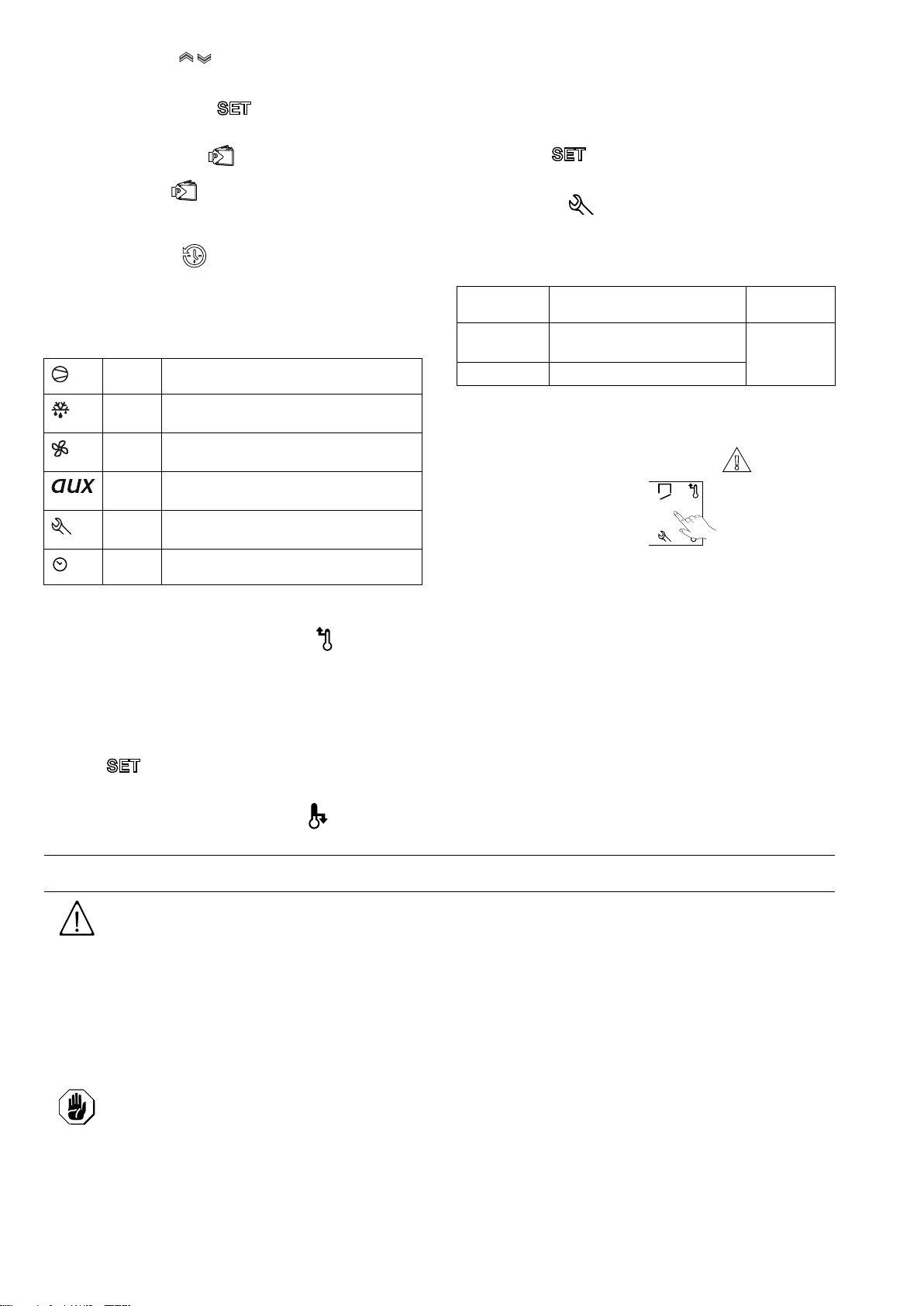
Use the buttons to display the temperatures of
previous days.
Press the Set button to display the recorded
temperature of that period; to return to the list of stored
This icon lights up and an audible alarm is activated when
the compartment temperature exceeds the set minimum
value. The alarm ceases when the temperature returns to
the Set Point. A timer, which counts the alarm duration time
until it is silenced, is also activated. Pressing the History
button displays the code LO and then in sequence, pressing
values press the button .
Press the button for a few seconds to exit the History
function. At least 24 hours must pass after installation of the
appliance before the first temperature can be recorded.
Keeping the button pressed for a few seconds resets
the previous recordings.
EE..33 SSiiggnnaalllliinngg iiccoonnss
The digital thermostat has the following signalling ICONS:
lit up This icon indicates compressor
activation.
lit up This icon indicates the manual defrost
function in progress.
lit up This icon indicates activation of com-
partment fans (if present).
lit up This icon indicates activation of auxiliary
users (if present).
lit up This icon indicates that a service alarm
has occurred during appliance operation.
lit up This icon indicates that the History
function is ON.
EE..44 AAllaarrmmss
• CCoommppaarrttmmeenntt hhiigghh tteemmppeerraattuurree aallaarrmm
This icon lights up and an audible alarm sounds when the
compartment temperature exceeds the set maximum value.
The alarm ceases when the temperature returns to the Set
Point. A timer, which counts the alarm duration time until it is
silenced, is also activated. Pressing the History button
displays the code HI and then in sequence, pressing the
button the number of hours since the alarm occurred.
To deactivate the icon, briefly press on it.
the button , the number of days since the alarm
occurred. To deactivate the icon, briefly press on it.
• SSeerrvviiccee AAllaarrmm
The message is signalled by lighting up of the icon.
Signalling also occurs with the respective code appearing
on the display and the activation of an audible alarm.
SSYYMMBBOOLLSS MMEEAANNIINNGG
E0
rE
E1 Evaporator sensor fault
EE..44..11 AAllaarrmmss ssiilleenncciinngg
Alarms can be silenced:
• or by pressing on the reset alarm button
• or by pressing on the lit icon
Depending on the model.
The value indicated on the display is also automatically reset.
Compartment sensor fault
WWHHAATT TTOO
DDOO
call the
service
centre
EE..55 PPrroodduucctt llooaaddiinngg
Distribute the product evenly inside the compartment (away
from the door and back) in order to allow good air circulation.
Cover or wrap food before placing it in the refrigerator and
avoid putting very hot foods or steaming liquids inside.
Do not leave the door open any longer than necessary when
loading or removing food.
It is advisable to keep the keys (for models with lock) in a place
only accessible to authorised personnel.
To prevent unauthorised personnel from using the appliance, it
is advisable to always close it with the key.
• CCoommppaarrttmmeenntt llooww tteemmppeerraattuurree aallaarrmm
FF MMAACCHHIINNEE CCLLEEAANNIINNGG AANNDD MMAAIINNTTEENNAANNCCEE
WWAARRNNIINNGG
Refer to “
Information
FF..11 OOrrddiinnaarryy mmaaiinntteennaannccee
FF..11..11 PPrreeccaauuttiioonnss ffoorr mmaaiinntteennaannccee
Routine maintenance operations can be carried out by nonspecialised personnel, carefully following the instructions
given below.
CCAAUUTTIIOONN
The manufacturer declines any liability for
operations carried out on the machine
without following these instructions.
FF..11..22 CClleeaanniinngg tthhee ccaabbiinneett aanndd aacccceessssoorriieess
Before using the appliance, clean all the internal parts and
accessories with lukewarm water and neutral soap, or
products that are over 90% biodegradable (in order to reduce
the emission of pollutants into the environment), then rinse and
Warning and Safety
“.
dry thoroughly, where possible clean with dishwashing
machine. Do not use solvent-based detergents (e.g. trichloroethylene) or abrasive powders for cleaning.
It is advisable to go over the external stainless steel surfaces
with a rag moistened with paraffin oil in order to create a
protective film.
Check the power cable regularly and replace it in case of signs
of wear.Have the appliance checked periodically (at least once
a year).
14
Page 15
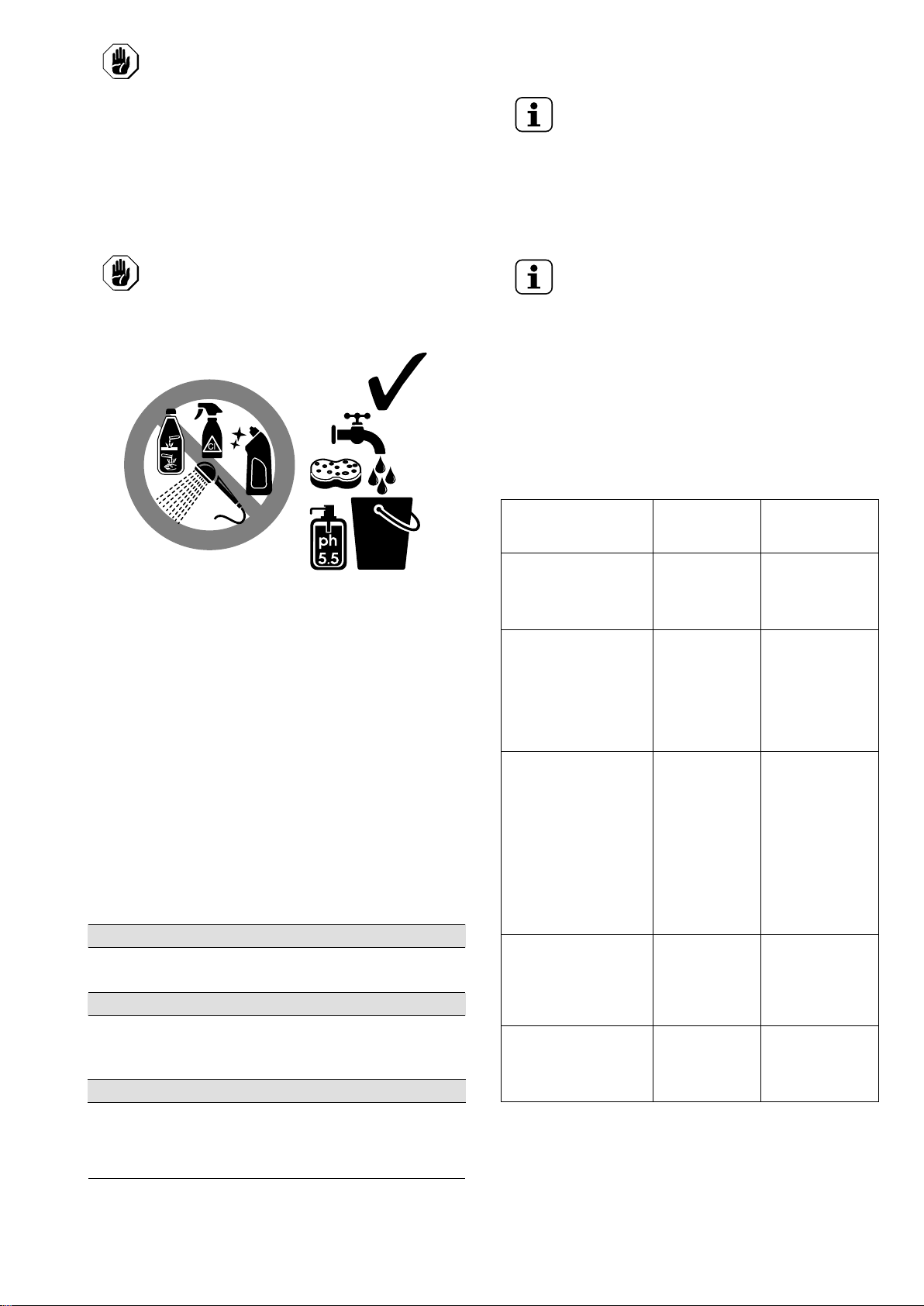
CCAAUUTTIIOONN
30°C
86°F
Do not clean the appliance with detergents containing chlorine, solvent-based
cleaning products (e. g. trichloro-ethylene), abrasive powders or agents,
scouring pads or sponges that could
damage the surfaces. Do not use organic
solvent substances or essential oils.
These substances could damage the
parts of the appliance made from synthetic material.
CCAAUUTTIIOONN
Do not use products (even if diluted)
containing chlorine (sodium hypochlorite,
hydrochloric or muriatic acid, etc.) to clean
the floor under the appliance.
B. the appliance PNC (production number code);
C. the Ser. No. (appliance serial number).
NOTE!
The appliance PNC and serial number are essential
for identifying the type of appliance and date of
manufacture.
The dataplate giving the product and technical data
is located inside the appliance. The plate giving the
appliance PNC code and serial number is located in
the unit compartment.
FF..22 EExxttrraaoorrddiinnaarryy mmaaiinntteennaannccee
NOTE!
Extraordinary maintenance must be carried out by
specialised personnel, who can ask the manufacturer to supply a servicing manual.
FF..22..11 MMaaiinntteennaannccee iinntteerrvvaallss
The inspection and maintenance intervals depend on the
actual machine operating conditions and ambient conditions
(presence of dust, damp, etc.), therefore precise time intervals
cannot be given. In any case, careful and periodical machine
maintenance is advisable in order to minimise service
interruptions.
It is advisable to carry out the checks with the frequency given
in the following table:
FF..11..33 PPrreeccaauuttiioonnss iinn ccaassee ooff lloonngg iiddllee ppeerriiooddss
If the appliance is not going to be used for some time, take the
following precautions:
• disconnect the power supply;
• remove all food from the compartment and clean the inside
and accessories;
• clean the cabinet, going over all the stainless steel surfaces
vigorously with a rag moistened with paraffin oil to create a
protective film;
• leave the door ajar so that air can circulate inside,
preventing the formation of unpleasant odours.
• periodically air the premises.
After carrying out maintenance make sure the machine is able
to work safely and, in particular, that the protection and safety
devices are efficient.
FF..11..44 QQuuiicckk ttrroouubblleesshhoooottiinngg gguuiiddee
In some cases, faults can be eliminated easily and quickly by
following a brief troubleshooting guide:
The appliance does not switch on:
• make sure the plug is properly inserted in power socket.
• make sure the socket is powered.
The inside temperature is too high:
• check the thermostat setting.
• make sure there is no heat source near the appliance.
• make sure the door closes properly.
The appliance is too noisy:
MMaaiinntteennaannccee,,
iinnssppeeccttiioonnss,, cchheecckkss
aanndd cclleeaanniinngg
Ordinary cleaning
• general cleaning of
machine and surrounding area
Mechanical protection
devices
• check their condition and for any
deformation, loosening or removed
parts
Control
• check the mechanical part, for cracks
or deformation,
tightening of
screws: check the
readability and
condition of words,
stickers and symbols and restore if
necessary
Machine structure
• tightening of main
bolts (screws,
fixing systems,
etc.) of machine
Safety signs
• check the readability and condition of
safety signs
FFrreeqquueennccyy RReessppoonnssaabbiilliittyy
Daily Operator
Monthly Service
Yearly Service
Yearly Service
Yearly Service
• make sure the appliance is properly levelled. An unbalanced position can set off vibrations.
• make sure the appliance is not touching other equipment
or parts which could reverberate.
If the fault persists after carrying out the above checks,
contact the After-Sales Service, remembering to specify:
A. the type of fault;
15
Page 16
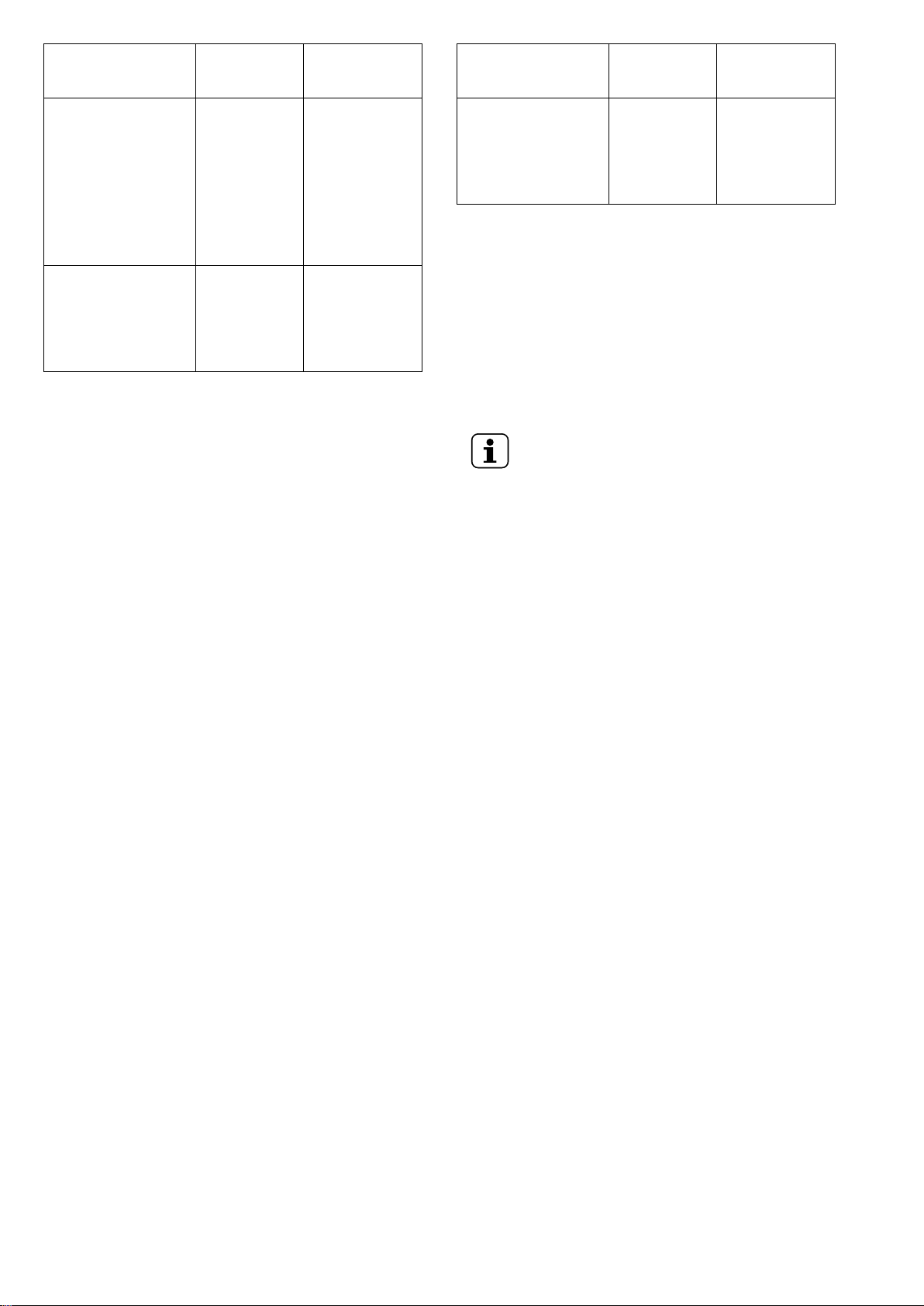
MMaaiinntteennaannccee,,
iinnssppeeccttiioonnss,, cchheecckkss
aanndd cclleeaanniinngg
Electrical control
panel
• check the electrical
components
installed inside the
electrical control
panel. Check the
wiring between the
electrical panel and
machine parts.
Electrical connection
cable and plug
• check the connection cable (replace
if necessary) and
plug
FFrreeqquueennccyy RReessppoonnssaabbiilliittyy
Yearly Service
Yearly Service
MMaaiinntteennaannccee,,
FFrreeqquueennccyy RReessppoonnssaabbiilliittyy
iinnssppeeccttiioonnss,, cchheecckkss
aanndd cclleeaanniinngg
General machine
overhaul
Every 10
1
years
Service
• check all compo-
nents, electrical
equipment, corrosion, pipes…
1. the machine is designed and built for a duration of about 10 years. After
this period of time (from commissioning) the machine must undergo a
general inspection and overhaul. Some examples of checks to be
carried out are given below.
• check for any oxidised electrical components or parts; if
necessary, replace them and restore the initial conditions;
• check the structure and welded joints in particular;
• check and replace bolts and/or screws, also checking for
any loose components;
• check the electrical and electronic system;
• check the functionality of safety devices;
• check the general condition of protection devices and
guards.
NOTE!
It is advisable to stipulate a preventive and scheduled maintenance contract with the After-Sales
Service.
16
Page 17

Page 18

Electrolux Professional SPA
Viale Treviso 15
33170 Pordenone
www.electrolux-professional.com
 Loading...