

Page 1
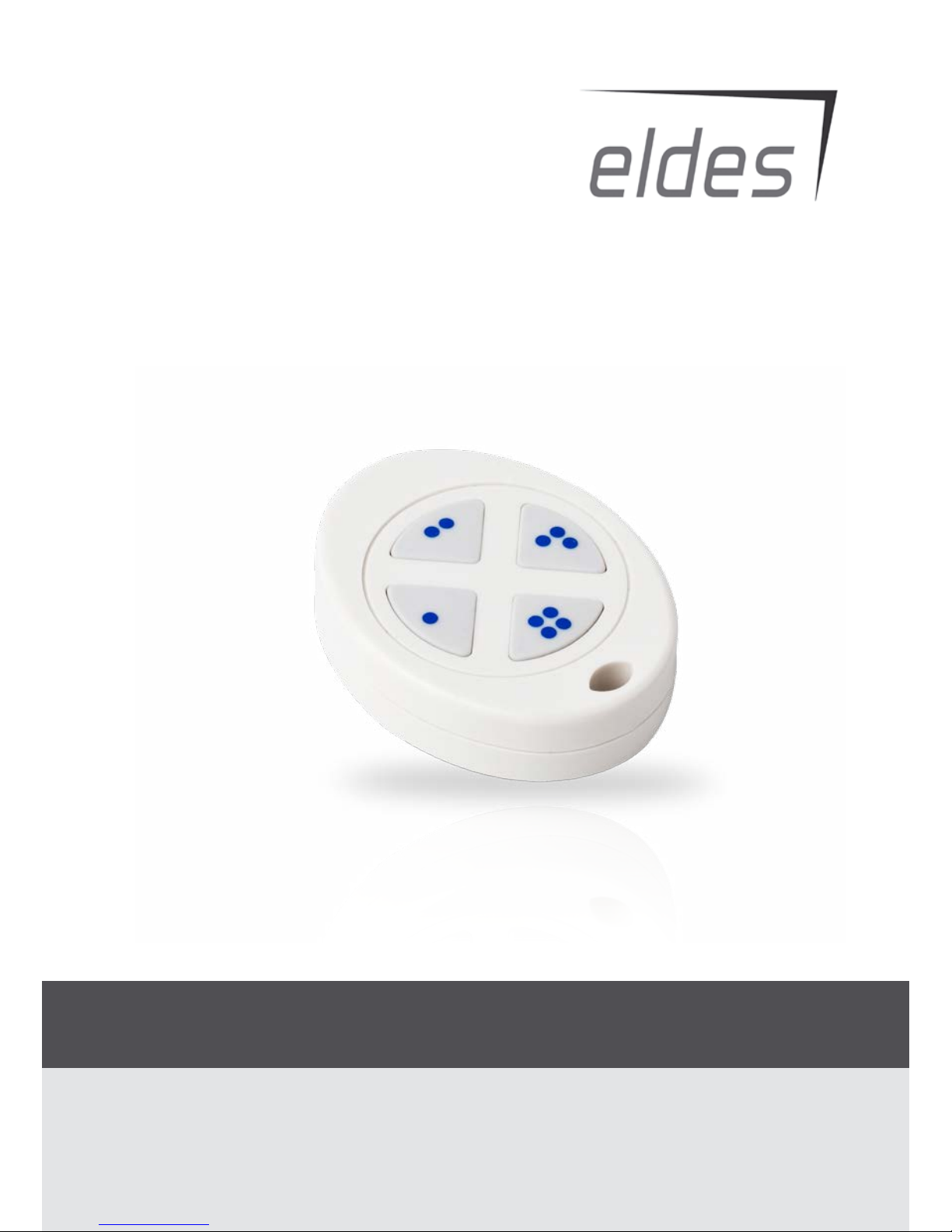
WIRELESS KEYFOB
EWK1
BELAIDIS PULTELIS
Page 2
2
User Manual v1.1
Compatible with:
• ESIM264 v7.09.02 and up + EWT1 v16.14 and up.
• EPIR v05.03.01 and up + EWT2 v16.14 and up.
• ESIM364.
For more details, please refer to ELDES alarm system user and installation manuals.
EWK1 - Wireless Key-Fob
Key-fob EWK1 – is a wireless device intended to arm and disarm ELDES alarm system, to open and close the gates or to control any other
device connected to the alarm system. Wireless key-fob EWK1 is compatible with ELDES wireless alarm systems, therefore user can easily
bind it to the alarm system using ELDES Conguration Tool software or sending a corresponding SMS command. EWK1 key-fob features
four congurable buttons intended to operate according to individual needs. After the button is pressed, EWK1 internal buzzer’s sound
signal conrms a transferred command to ELDES alarm system via wireless connection. The status of the sent command can be checked
by attempting to receive the feedback signal from the alarm system. This can be performed by pressing down the same button and
holding it for 3 seconds. 3 short sound signals indicate a successfully carried out command while 1 long beep stands for failed command
and feedback signal failure. By default one pair of buttons is already congured to arm and disarm the alarm system.
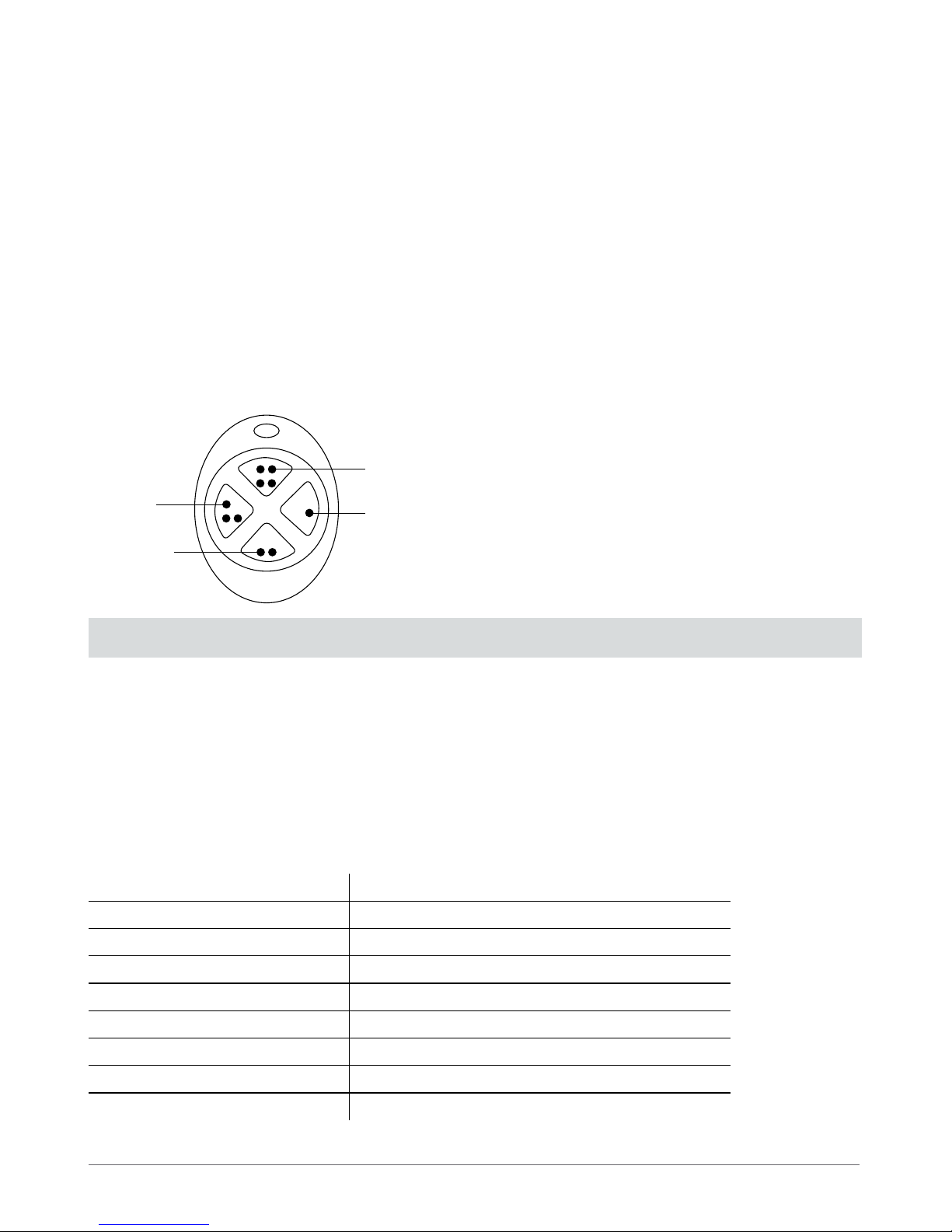
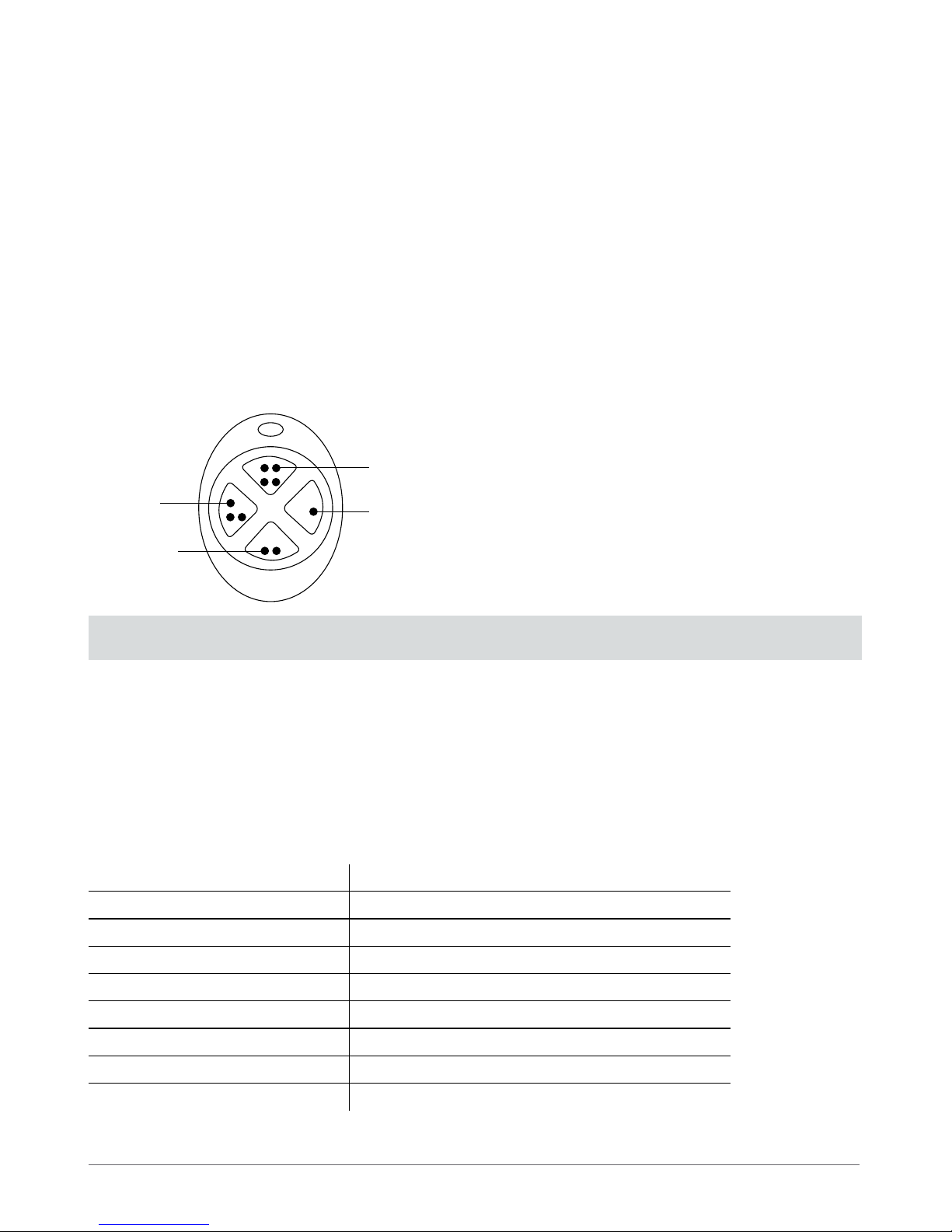
NOTE: Fig. No. 1 reects the default EWK1 button conguration. All key-fob buttons are congurable according to individual needs.
1. Package Content
1. EWK1 ...................................................................................... qty. 1
2. CR2032 3V Lithium Battery ........................................... qty. 1
3. User Manual ........................................................................ qty. 1
2. Technical Specications
2.1 Electrical & Mechanical Characteristics
Battery Type CR2032 Lithium
Battery Voltage; Capacity 3V; 240 mAh
Quantity of Batteries 1
Battery Operation Time ~18 months*
Wireless Transmitter-Receiver Frequency 868 Mhz
Range of Operating Temperatures -20...+55ºC
Wireless Key-fob Dimensions 54 x 42 x 13 mm
Wireless Communication Range Up to 30 meters in premises; up to 150 meters in open areas
Compatible with Alarm Systems ELDES Wireless
* This operation time depends on dierent conditions and may vary.
Fig. No. 1
The virtual zones of ELDES alarm system are intended for
EWK1 button conguration. Please, refer to software’s ELDES
Conguration Tool HELP section for more details. It is possible
to connect up to 5 EWK1 devices to ELDES alarm system at a
time. The maximum wireless connection range is 150 meters
(in open areas).
Optional
funcionality
Optional
funcionality
Arm the
system
Disarm the
system
Main Features:
• Alarm system arming & disarming;
• Panic button;
• PGM output control;
• Sound indication by built-in mini buzzer.
Page 3
Manual ElDES EWK1
3
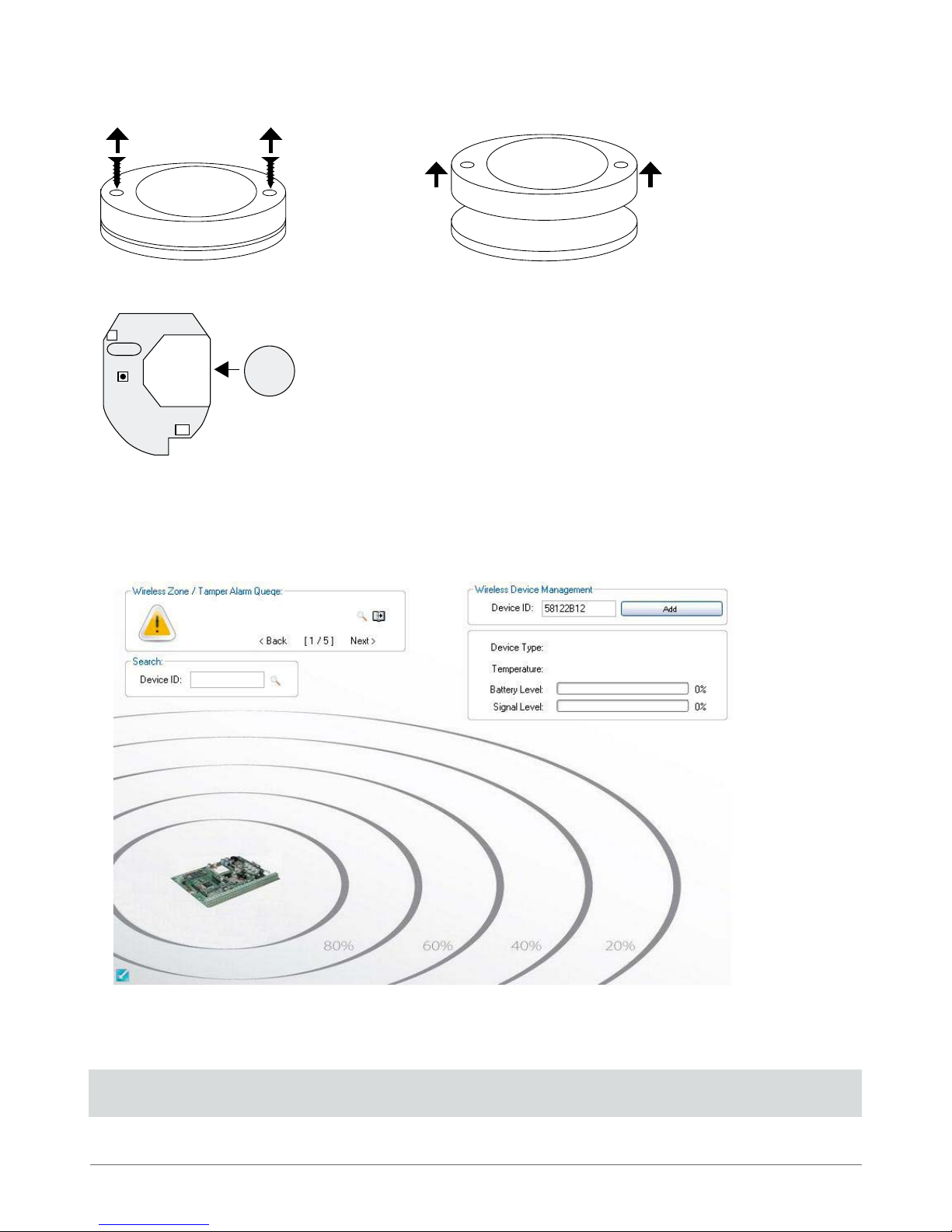
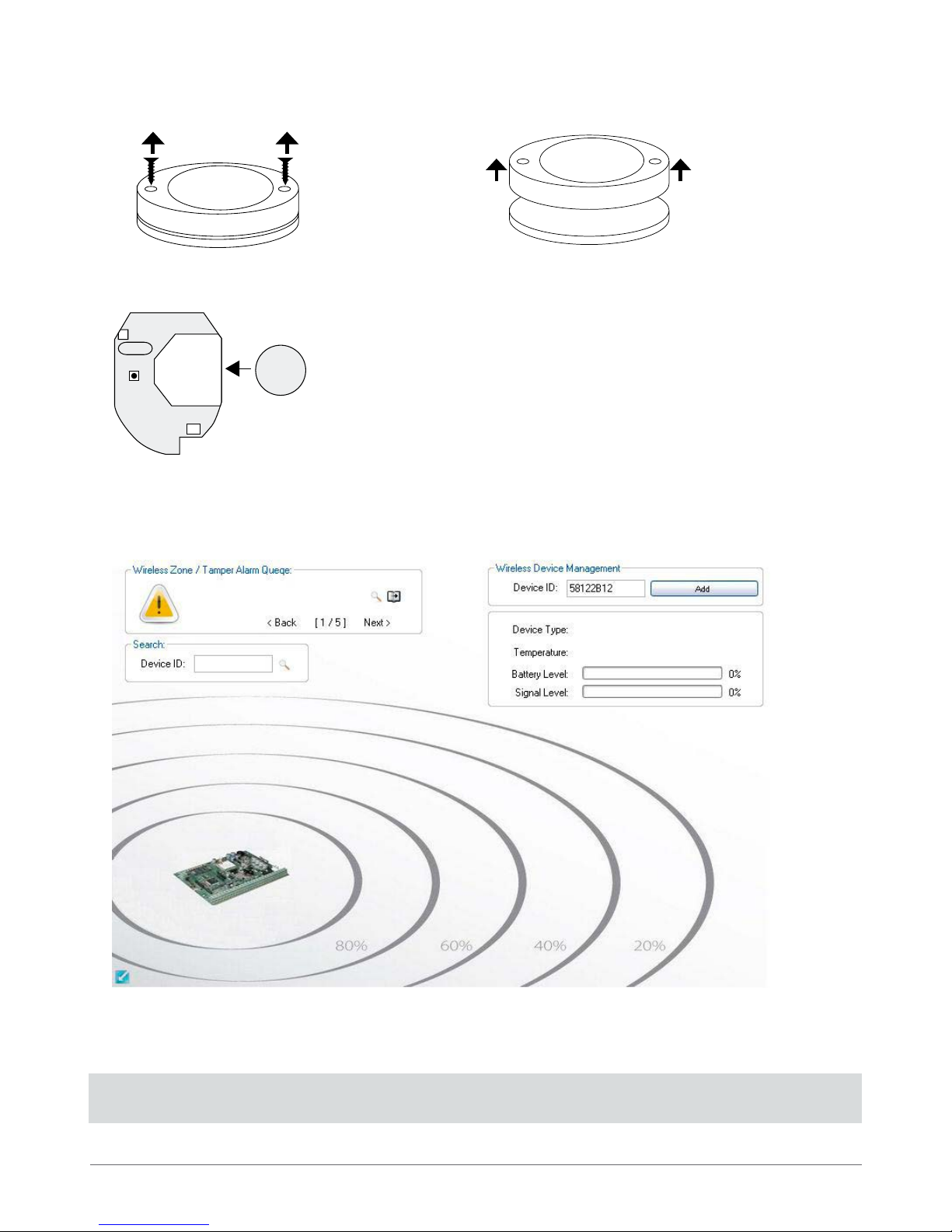
Fig. No. 2
Fig. No. 3
2. Open EWK1 key-fob housing.
3. Installation
1. Unscrew the EWK1 key-fob housing.
3. Insert CR2032 battery provided in the EWK1 package.
Before inserting the battery, make sure that the battery’s “+” sign is facing the outer side.
4. Close and screw up the key-fob housing.
5. Bind the device to the alarm system using ELDES Conguration Tool software. Open Wireless Device Management section and
enter a 8-digit wireless device ID located on the EWK1 enclosure and press Add button (see Fig. No. 5). The device can also be bind
by sending a corresponding command via SMS message. For more details, please, refer to the software‘s HELP section and ELDES
alarm system installation manual.
6. Press any EWK1 button several times until the device is successfully bound. Upon the successful binding process EWK1 icon,
Battery Level and Signal Level becomes visible in ELDES Conguration Tool software’s Wireless Device Management section.
7. EWK1 is ready to use.
NOTE: If you are unable to bind the wireless device, please, restore the parameters of the wireless device to default and try again.
See chapter 6. Restoring Default Parameters for more details.
3V
CR2032
+
+
Fig. No. 4
Page 4
4
4. EWK1 Zones (Panic Button)
EWK1 key-fob supports a Panic Button feature allowing to cause alarm at any time when the specied button is pressed. This feature
can be congured using ELDES Conguration Tool by creating a virtual zone of Silent or 24H type and assigning it to Virtual Alarm
option. The Panic Button feature can be set up on any button of EWK1.
5. Battery Replacement
1. Open EWD1 enclosure.
2. Remove the old battery from the battery slot.
3. Postition the new battery according to the appropriate battery slot positive terminal indicated.
4. Insert the battery into the battery slot.
5. Battery replaced.
See chapter 3. Installation for more details.
ATTENTION: Only CR2032 3V batteries can be used. Install only new, high quality and unexpired batteries. Do not mix the old
batteries with the new ones.
ATTENTION: At least 1 battery must be removed if the device is not in use.
ATTENTION: In order to avoid re or explosion hazards, the system must be used only with approved battery. Special care must
be taken when connecting positive and negative battery terminals. Dispose old batteries only into special collection sites. Do not
charge, disassemble, heat or incinerate old batteries.
NOTE: The battery status can be monitored in real-time using ELDES Conguration Tool software.
6. Restoring Default Parameters
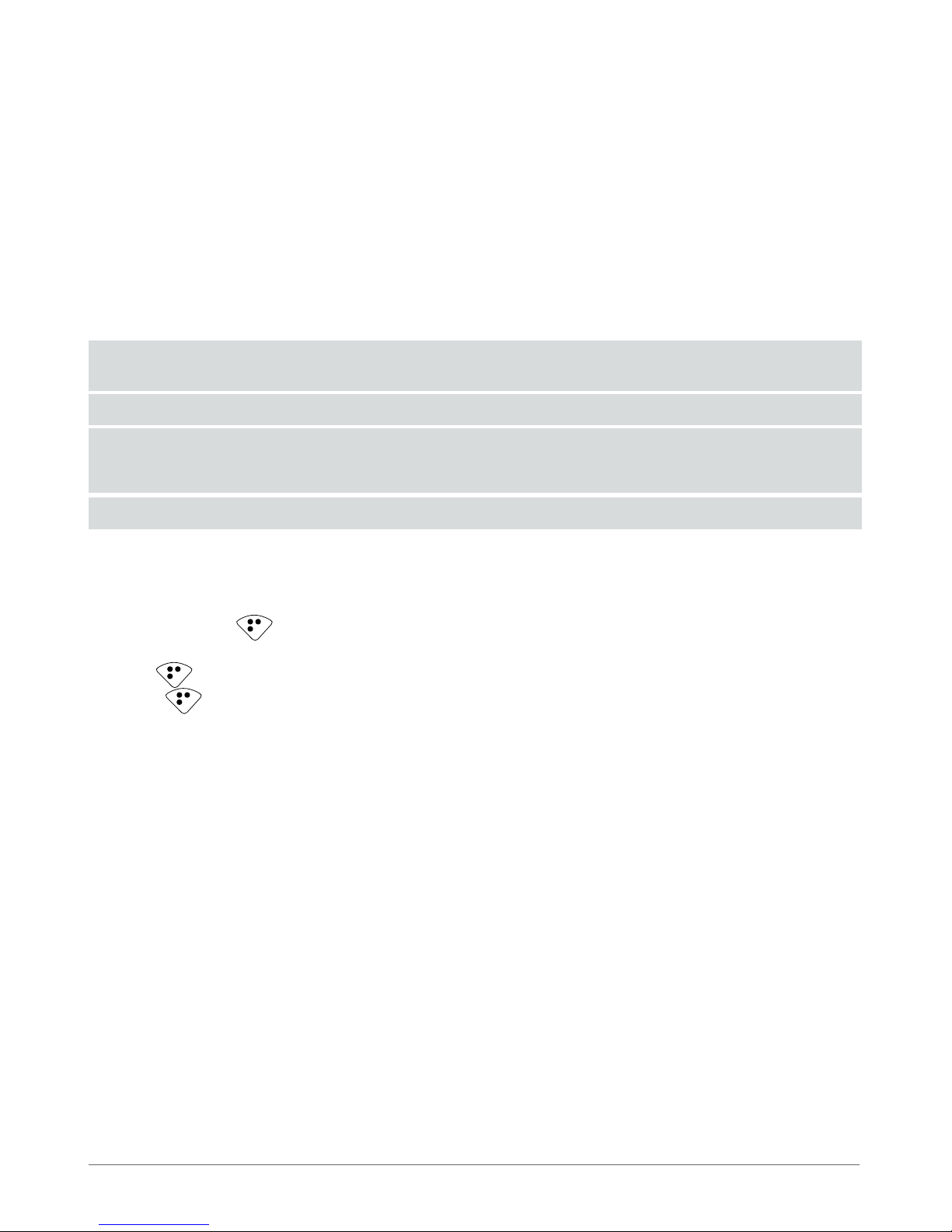
1. Remove the battery from EWK1 key-fob.
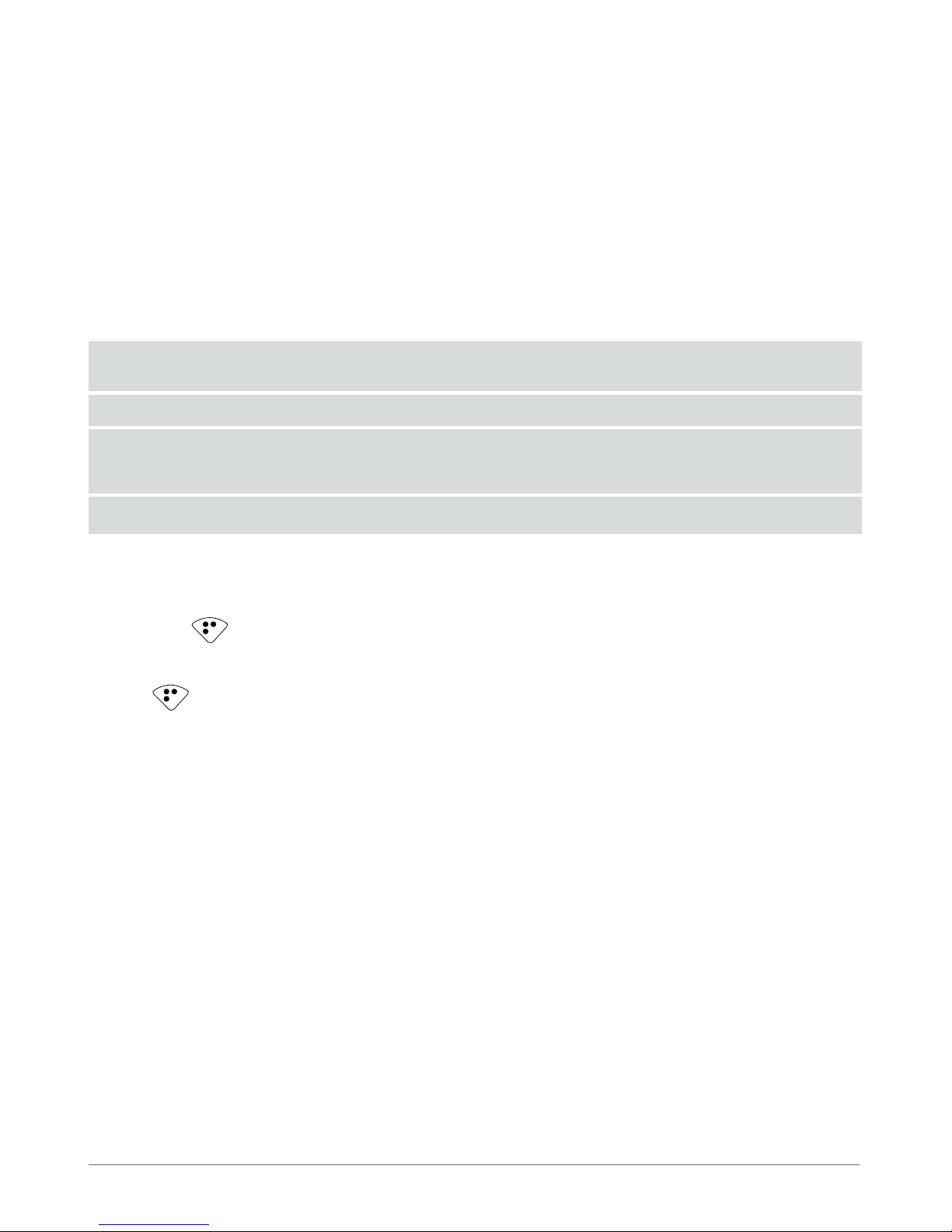
2. Press and hold button.
3. Insert the battery back to EWK1.
4. Hold the button pressed until LED indicator provides several short ashes.
5. Release button.
6. Parameters restored to default.
7. Additional Information
Limited Liability
The buyer must agree that the system will reduce the risk of re, theft, burglary or other dangers but does not guarantee against such
events. “ELDES UAB” will not take any responsibility regarding personal or property or revenue loss while using the system. “ELDES
UAB” liability according to local laws does not exceed value of the purchased system. “ELDES UAB” is not aliated with any of the
cellular providers therefore is not responsible for the quality of cellular service.
Manufacturer Warranty
The system carries a 24-month warranty by the manufacturer “ELDES UAB”. Warranty period starts from the day the system has been
purchased by the end user. The warranty is valid only if the system has been used as intended, following all guidelines listed in the
manual and within specied operating conditions. Receipt must be kept as a proof of purchase date. The warranty is voided if the
system has been exposed to mechanical impact, chemicals, high humidity, uids, corrosive and hazardous environment or other
force majeure factors.
Page 5
Manual ElDES EWK1
5
Safety instructions
Please read and follow these safety guidelines in order to maintain safety of operators and people around:
• DO NOT use the system where it can be interfere with other devices and cause any potential danger.
• DO NOT use the system with medical devices.
• DO NOT use the system in hazardous environment.
• DO NOT expose the system to high humidity, chemical environment or mechanical impacts.
• DO NOT attempt to personally repair the system.
Copyright © “ELDES UAB”, 2012. All rights reserved
It is not allowed to copy and distribute information in this document or pass to a third party without advanced written authorization
by “ELDES UAB” “ELSDES UAB” reserves the right to update or modify this document and/or related products without a warning.
Hereby, “ELDES UAB” declares that this EWK1 wireless key-fob is in compliance with the essential requirements and other relevant
provisions of Directive 1999/5/EC. The declaration of conformity may be consulted at www.eldes.lt
The WEEE (Waste Electrical and Electronic Equipment) marking on this product (see left) or its documentation indicates
that the product must not be disposed of together with household waste. To prevent possible harm to human health
and/or the environment, the product must be disposed on in an approved and environmentally safe recycling process.
For further information on how to dispose of this product correctly, contact the system supplier, or the local authority
responsible for waste disposal in your area.
Page 6
6
Vartotojo vadovas v1.1
Suderinama su:
• ESIM264 v7.09.02 ir vėlesne + EWT1 v16.14 ir vėlesne.
• EPIR v05.03.01 ir vėlesne + EWT2 v16.14 ir vėlesne.
• ESIM364.
Išsamiau apie tai skaitykite ELDES apsaugos sistemos vartotojo ir instaliavimo vadovuose.
EWK1 - belaidis pultelis
Pultelis EWK1 - tai belaidis įrenginys, skirtas įjungti ir išjungti apsaugą, atidaryti bei uždaryti vartus ar valdyti kitus, prie sistemos prijungtus,
elektros prietaisus. Belaidis pultelis EWK1 yra suderintas su ELDES belaidėmis apsaugos sistemomis, todėl vartotojui tereikia aktyvuoti
belaidį ryšį su ELDES apsaugos sistema, naudojant ELDES Conguration Tool programinę įrangą arba siunčiant atitinkamą SMS žinutę į
sistemą. EWK1 pultelis turi keturis mygtukus, kurių paskirtį galima kongūruoti pagal individualius poreikius, naudojant ELDES Congura-
tion Tool programinę įrangą. Paspaudus mygtuką, vidinis EWK1 mini signalizatorius garsiniu signalu patvirtina sėkmingai įvykdytą komandą. Nusiųstos komandos būsena gali būti patikrinta gaunant grįžtamąjį ryšį iš apsaugos sistemos. Tai galima atlikti nuspaudžiant ir laikant
tą patį mygtuką 3 sekundes. 3 trumpi pypsėjimai indikuoja sėkmingai įvykdytą komandą, 1 ilgas pypsėjimas - neįvykdytą komandą ir
negautą grįžtamąjį ryšį. Pagal gamyklinę kongūraciją, viena mygtukų pora jau yra sukongūruota įjungti ir išjungti apsaugą
PASTABA: 1 pav. pavaizduota EWK1 mygtukų gamyklinė kongūracija. Visų pultelio mygtukų funkcijos gali būti keičiamos
pagal poreikius.
1. Pakuotės sudėtis
1. EWK1 ...................................................................................... 1 vnt.
2. CR2032 3V Lithium baterija .......................................... 1 vnt.
3. Vartotojo vadovas ............................................................. 1 vnt.
2. Techninė specikacija
2.1 Elektrinės ir mechaninės charakteristikos
Baterijos tipas CR2032 Lithium
Baterijos įtampa; talpa 3V; 240 mAh
Baterijų skaičius 1
Baterijų veikimo trukmė ~18 mėnesių*
Belaidžio ryšio dažnis 868 Mhz
Darbo temperatūros diapazonas -20...+55ºC
Matmenys 54 x 42 x 13 mm
Belaidžio ryšio atstumas Iki 30 metrų patalpose; iki 150 metrų atvirose erdvėse
Suderinamas su apsaugos sistemomis ELDES Wireless
* Šis laikotarpis gali skirtis, atsižvelgiant į naudojimo sąlygas.
ELDES sistemos virtualios zonos yra skirtos EWK1 panikos
mygtuko kongūravimui. Išsamiau apie tai skaitykite ELDES
Conguration Tool programinės įrangos skyriuje HELP. Vienu
metu galima prijungti iki 5 EWK1 įrenginių prie ELDES apsaugos sistemos. Maksimalus atstumas belaidžiam ryšiui yra 150
metrų (atvirose erdvėse).
1 pav.
Funkcija
pasirinktinai
Funkcija
pasirinktinai
Įjungti
apsaugą
Išjungti
apsaugą
Pagrindinės savybės:
• Apsaugos įjungimas ir išjungimas;
• Panikos mygtukas;
• PGM išėjimų valdymas;
• Garsinė indikacija mini signalizatoriumi.
Page 7
INSTALIAVIMO VADOVAS ELDES EWK1
7
2 pav. 3 pav.
2. Atidarykite EWK1 korpusą.
3. Instaliavimas
1. Atsukite EWK1 korpuso varžtus.
3. Įstatykite bateriją CR2032, pateiktą EWK1 pakuotėje.
Įstatant bateriją, pliusu pažymėta baterijos pusė turi būti išorėje.
4. Uždarykite ir užsukite varžtais pultelio korpusa.
5. Aktyvuokite belaidį ryšį su ELDES apsaugos sistema, naudodami ELDES Conguration Tool programinę įrangą. Atverkite Wire-
less Device Management skyrių ir įveskite 8 skaitmenų belaidžio įrenginio ID numerį, esantį ant EWK1 korpuso išorinėje arba
vidinėje pusėje, ir paspauskite Add mygtuką (žr. 5 pav.). Belaidis ryšys taip pat gali būti aktyvuotas nusiuntus atitinkamą SMS
žinutę. Plačiau apie tai skaitykite programinės įrangos HELP skyriuje ir ELDES apsaugos sistemos instaliavimo vadove.
6. Aktyvuodami belaidį ryšį, keletą kartų spustelkite bet kurį EWK1 mygtuką. Sėkmingai aktyvavus belaidį ryšį tarp EWK1 įrenginio ir apsaugos sistemos, ELDES Conguration Tool programinės įrangos Wireless Device Management skyriuje pasirodys
EWK1 piktograma bei procentine išraiška indikuojami Battery Level ir Signal Level.
7. EWK1 įrenginys paruoštas naudojimui.
PASTABA: Nepavykus aktyvuoti belaidžio ryšio, atstatykite belaidžio įrenginio gamyklinius parametrus ir bandykite aktyvuoti
belaidį ryšį iš naujo. Plačiau apie tai skaitykite skyriuje 6. Gamyklinių parametrų atstatymas.
3V
CR2032
+
+
4 pav.
Page 8
8
4. EWK1 zonos (panikos mygtukas)
EWK1 belaidis pultelis palaiko panikos mygtuko funkciją, leidžiančią sukelti aliarmą bet kuriuo metu spustelėjus nurodytą mygtuką.
Ši galimybe gali būti kongūruojama ELDES Conguration Tool programinėje įrangoje sukuriant virtualią tylaus arba 24H tipo zoną ir
ją priskiriant prie virtualaus aliarmo įvykio. Panikos mygtukas gali būti priskirtas bet kuriam EWK1 mygtukui. Plačiau apie tai skaitykite
ELDES Conguration Tool programinės įrangos HELP skyriuje
5. Baterijos keitimas
1. Atidarykite EWK1 korpusą.
2. Išimkite seną bateriją iš lizdo.
3. Atsižvelgdami į baterijos lizdo teigiamo polio žymėjimą, įstatykite naują bateriją.
4. Baterija pakeista.
Išsamiau apie tai skaitykite skyriuje 3. Instaliavimas.
DĖMESIO: Įrenginio maitinimui naudokite tik CR2032 3V Lithium tipo bateriją. Naudokite tik naujas, kokybiškas ir galiojančias
ba terijas.
DĖMESIO: Nenaudojant įrenginio bent 1 baterija turi būti išimta.
DĖMESIO: Siekdami išvengti gaisro ar sprogimo, naudokite tik tinkamo tipo baterijas. Būkite dėmesingi įstydami baterijas į liz-
dus – baterijos polių sukeitimas vietomis yra draudžiamas. Senas nebenaudojamas baterijas išmeskite tik tam skirtose vietose.
Draudžiama įkrauti, ardyti, kaitinti ar deginti senas baterijas.
PASTABA: Baterijos būklė gali būti realiu laiku stebima naudojantis ELDES Conguration Tool programinę įrangą.
6. Gamyklinių parametrų atstatymas
1. Išimkite bateriją iš EWK1.
2. Paspauskite ir laikykite mygtuką.
3. Įstatykite atgal bateriją į EWK1.
4. Laikykite mygtuką, kol LED indikatorius keletą kartų trumpai sumirksės.
5. Paleiskite mygtuką.
6. Gamykliniai parametrai atstatyti.
7. Papildoma informacija
Atsakomybės ribojimas
Pirkėjas sutinka, kad sistema sumažina gaisro, plėšimo, vagystės ar kitą riziką, tačiau tai nėra draudimas ar garantija, kad paminėti
veiksniai neįvyks, bei nebus asmenų sužeidimų, ar turto praradimo, ar sunaikinimo atvejų. UAB „ELDES“ neprisiima jokios atsakomybės už tiesioginę ar netiesioginę žalą ar nuostolius, taip pat negautas pajamas, naudojantis sistema. UAB „ELDES“ atsakomybė, kiek tai
leidžia galiojantys įstatymai, neviršija produkto įsigijimo kainos. Korinio ryšio paslaugas teikiantys GSM operatoriai nėra susiję su UAB
„ELDES“ bendrove. Todėl bendrovė neprisiima jokios atsakomybės už tinklo paslaugas, jo aprėptį bei funkcionavimą.
Garantinis laikotarpis
UAB „ELDES“ suteikia įsigytam produktui 24 mėn. Garantiją. Garantinis laikotarpis pradedamas skaičiuoti nuo produkto pardavimo pirmam galutiniam vartotojui datos. Garantija taikoma tik jei sistema buvo naudota pagal paskirtį, laikantis visų vartotojo vadovo instrukcijų, bei techninėje specikacijoje nustatytų sąlygų ir maksimalių leistinų reikšmių.
Pardavimo data laikoma čekio, sąskaitos ar kito pardavimo dokumento data. Garantija taikoma tik kartu su paminėtais dokumentais
pateikus užpildytą garantinį taloną. Garan tija netaikoma jei sistema buvo paveikta mechaniškai, cheminių medžiagų, drėgmės, korozijos,
skysčių, ekstremalių aplinkos veiksnių ar kitokių force majeure aplinkybių.
Page 9
INSTALIAVIMO VADOVAS ELDES EWK1
9
Saugos informacija
Kad užtikrinti jūsų ir aplinkinių saugumą prašome perskaityti šias taisykles bei laikytis visų vartotojo vadove esančių montavimo instrukcijų ir nurodymų:
• Nenaudokitesistemosten,kurjigalisukeltitrikdžiusarpavojų.
• Nemontuokitesistemospriemedicininėsaparatūrosarprietaisų,jeitoreikalaujajųinstrukcijos.
• Nenaudokitesistemossprogiosevietose.
• Sistemanėraatsparidrėgmei,chemineiaplinkai,beimechaniniamspoveikiams.
• Neremontuokitesistemospatys.
Copyright © UAB „ELDES“, 2012. Visos teises saugomos
Draudžiama kopijuoti, kaupti ar perduoti tretiesiems asmenims, šiame dokumente esancia informacija, ar bet kokia dokumento
dali be išankstinio raštiško UAB „ELDES“ sutikimo. UAB „ELDES“ pasilieka teise be išankstinio ispejimo tobulinti ar keisti bet kuriuos
dokumente paminetus gaminius, taip pat pati dokumenta. UAB „ELDES“ deklaruoja, kad belaidis pultelis EWK1 atitinka esminius
reikalavimus ir kitas 1999/5/EC direktyvos nuostatas. Jos atitikties deklaracija galima rasti šiame tinklalapyje: www.eldes.lt
Pagal WEEE direktyvą, perbrauktos šiukšlių dėžės su ratais ženklas reiškia, kad nebetinkamą naudoti gaminį Europos
Sąjungoje reikia atiduoti perdirbti atskirai nuo kitų atliekų. Siekiant apsaugoti žmonių sveikatą ir aplinką nuo galimos
žalos, gaminys privalo būti perdirbtas patvirtintu ir aplinkai saugiu perdirbimo proceso metu. Dėl išsamesnės informacijos apie teisingą gaminio perdirbimą, prašome kreiptis į sistemos teikėją arba įstaigą, atsakingą už atliekų perdirbimą
Jūsų gyvenamojoje vietoje.
Page 10

Made in Lithuania.
www.eldes.lt
1-Wire is a registered trademark of Maxim Integrated Products, Inc.
iButton is a registered trademark of Maxim Integrated Products, Inc.
Dallas is a registered trademark of Maxim Integrated Products, Inc.
Ademco Contact ID is a registered trademark of Pittway Corporation.
Microsoft, Windows and Vista are registered trademarks of Microsoft Corporation.
 Loading...