

Page 1

WIRELESS ZONE & PGM OUTPUT EXPANSION MODULE
EW1
Page 2
Wireless expansion module EW1 is a wireless device with 2 zones and 2 PGM outputs. This expansion module connects to ELDES
wireless alarm systems and enables wireless access for to 2 wired devices such as movement PIR sensors, magnetic door contacts etc.
In addition it allows to connect and control up to 2 appliances, i.e. lighting, heating etc. After the wiring process to EW1 it is necessary
to bind EW1 to the alarm system by sending a corresponding command via SMS message or using software ELDES Conguration
Too l. It is possible to connect up to 16 EW1 devices to ELDES alarm system at a time. Minimum distance for wireless connection is 3
centimeters, maximum – 150 meters (in open areas).
1. Package Content
1. EW1 ........................................................qty. 1
2. EW1 User Manual .............................qty. 1
2. Technical Specications
2.1 Electrical & Mechanical Characteristics
Power Supply 7-15V 20mA max
Number of Zones 2
Number of PGM Outputs 2
Wireless Transmitter-Receiver Frequency 868 MHz
Range of Operating Temperatures -20...+55ºC
Dimensions 38x60x12mm
Wireless Communication Range Up to 30 meters in premises; up to 150 meters in open areas
Compatible with Alarm Systems ELDES Wireless
Maximum Allowed Zone Voltage Values 0-30V
Maximum Commuting PGM Output Values Voltage – 30V; current 500mA
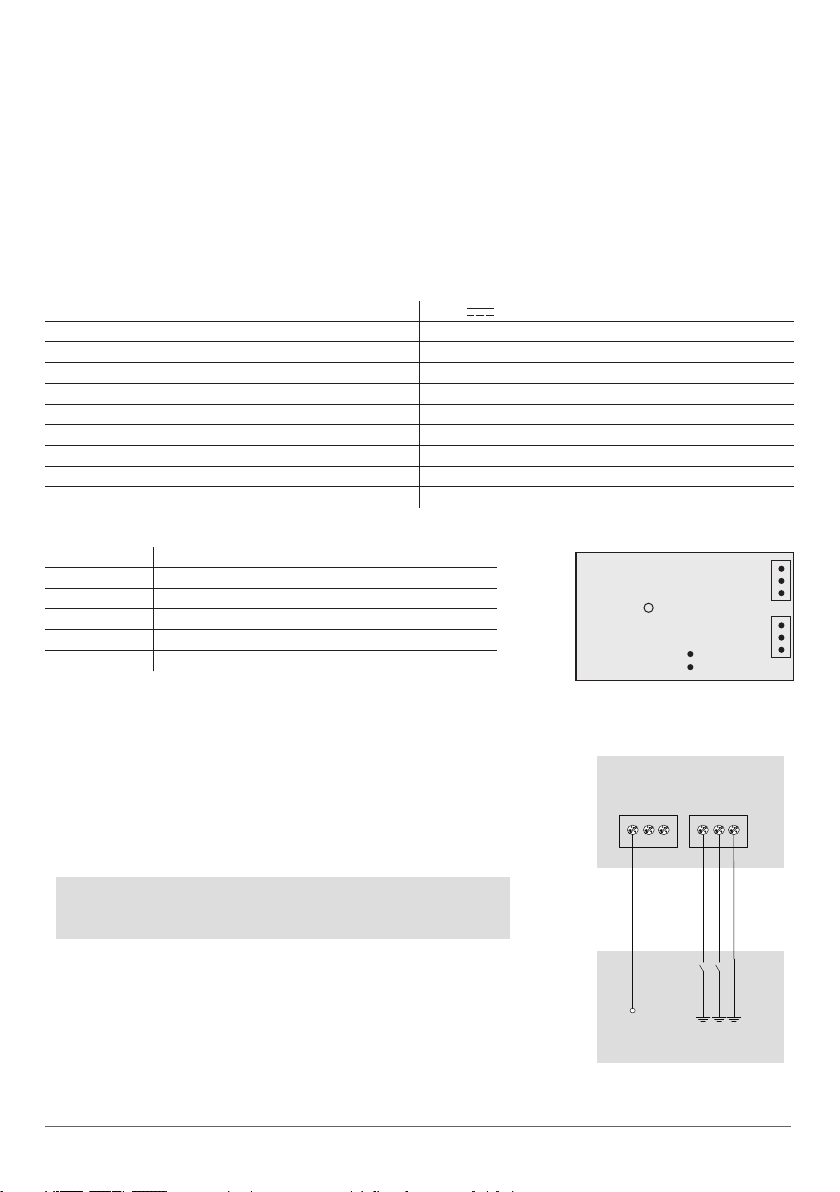
2.2 Connector & LED Functionality
COM Common contact for power supply, zones, PGM outputs
Z2, Z1 Security zones
C2, C1 PGM outputs
DC+ Positive power supply contact
D1, D2 Pins for restoring default settings
LED EW1 status
LED
Fig. No. 1
COM
Z2
Z1
C2
C1
DC+
D1
D2
3. Installation
1. Disconnect ELDES alarm system main power supply and backup battery.
2. Connect the circuit as indicated in Fig. No. 2
3. Bind the device to ELDES alarm system. Use ELDES Conguration Tool software or
send a corresponding SMS message. Please refer to software‘s HELP section or
refer to installation manual of ELDES alarm system.
4. The system automatically informs about successful/unsuccessful binding process. If attempt to bind is unsuccessful, try to move EW1 closer to ELDES alarm
system device and bind anew.
5. EW1 module is ready for use.
NOTE: If you are unable to bind the wireless device, please, restore the pa-
rameters of the wireless device to default and try again. See chapter 4. Re-
storing Default Parameters for more details.
EW1
DC+ C1 C2 Z1 Z2 COM
4. Restoring Default Parameters
1. Disconnect EW1 power supply.
2. Shor t circuit (connect) pins D1 and D2.
3. Power up EW1 and wait untill LED provides several short ashes.
4. Disconnect power supply.
5. Remove short-circuit from D1 and D2 pins.
6. Power up EW1.
7. Parameters restored to default.
2
Fig. No. 2
+12V
Power supply
Page 3
5. Additional Information
Limited Liability
The buyer must agree that the system will reduce the risk of re, theft, burglary or other dangers but does not guarantee against such
events. “ELDES UAB” will not take any responsibility regarding personal or property or revenue loss while using the system.
“ELDES UAB” liability according to local laws does not exceed value of the purchased system. “ELDES UAB” is not aliated with any of
the Internet providers therefore is not responsible for the quality of Internet service.
Manufacturer Warranty
This device carries a 24-month warranty by the manufacturer “ELDES UAB”. Warranty period starts from the day the system has been
purchased by the end user. The warranty is valid only if the system has been used as intended, following all guidelines listed in the
manual and within specied operating conditions. Receipt must be kept as a proof of purchase date. The warranty is voided if the
system has been exposed to mechanical impact, chemicals, high humidity, uids, corrosive and hazardous environment or other
force majeure factors.
Safety instructions
Please read and follow these safety guidelines in order to maintain safety of operators and people around:
• DO NOT use the system where it can be interfere with other devices and cause any potential danger.
• DO NOT use the system with medical devices.
• DO NOT use the system in hazardous environment.
• DO NOT expose the system to high humidity, chemical environment or mechanical impacts.
• DO NOT attempt to personally repair the system.
EW1 must be powered by 7-15V
20mA max. DC power supply which must be approved by LST EN 60950-1 standard and be
easily accessible nearby the device. When connecting the power supply to EW1, switching the pole terminals places is forbidden.
Any additional devices linked to EW1 (electrical appliances, relays etc.) must be approved by LST EN 60950-1 standard.
EW1 is fully turned o by disconnecting 2-pole switch device of the external power supply or any other linked device that EW1
is powered from.
The WEEE (Waste Electrical and Electronic Equipment) marking on this product (see left) or its documentation indicates
that the product must not be disposed of together with household waste. To prevent possible harm to human health
and/or the environment, the product must be disposed on in an approved and environmentally safe recycling process.
For further information on how to dispose of this product correctly, contact the system supplier, or the local authority
responsible for waste disposal in your area.
Copyright © “ELDES UAB”, 2011. All rights reserved
It is not allowed to copy and distribute information in this document or pass to a third party without advanced written
authorization by “ELDES UAB”. “ELSDES UAB” reserves the right to update or modify this document and/or related products
without a warning. Hereby, ELDES UAB declares that this wireless zone & PGM output expansion module EW1 is in compliance with the essential requirements and other relevant provisions of Directive 1999/5/EC. The declaration of conformity
may be consulted at www.eldes.lt
USER MANUAL EW1 V1.0 3
 Loading...