

EDAN SONOTRAX, SONOTRAX Basic A, SONOTRAX Lite, SONOTRAX Pro, SONOTRAX II Basic User Manual
...Page 1
Page 2

I
About this Manual
P/N: 01.54.36708-17
Release Date: Aug. 2010
© Copyright EDAN INSTRUMENTS, INC. 2007-2010. All rights reserved.
Statement
This manual will help you understand the operation and maintenance of the product better. It
is reminded that the product shall be used strictly complying with this manual. User’s
operation failing to comply with this manual may result in malfunction or accident for which
Edan Instruments, Inc. (hereinafter called EDAN) can not be held liable.
EDAN owns the copyrights of this manual. Without prior written consent of EDAN, any
materials contained in this manual shall not be photocopied, reproduced or translated into
other languages.
Materials protected by the copyright law, including but not limited to confidential information
such as technical information and patent information are contained in this manual, the user
shall not disclose such information to any irrelevant third party.
The user shall understand that nothing in this manual grants him, expressly or implicitly, any
right or license to use any of the intellectual properties of EDAN.
EDAN holds the rights to modify, update, and ultimately explain this manual.
Responsibility of the Manufacturer
EDAN only considers itself responsible for any effect on safety, reliability and performance
of the equipment if:
Assembly operations, extensions, re-adjustments, modifications or repairs are carried out by
persons authorized by EDAN, and
The electrical installation of the relevant room complies with national standards, and
The instrument is used in accordance with the instructions for use.
Upon request, EDAN may provide, with compensation, necessary circuit diagrams, and other
information to help qualified technician to maintain and repair some parts, which EDAN may
define as user serviceable.
Product Information
Product Name: Ultrasonic Pocket Doppler
Model: SONOTRAX Lite, SONOTRAX Basic, SONOTRAX Basic A, SONOTRAX Pro,
SONOTRAX II, SONOTRAX II Pro
Page 3

II
Terms Used in this Manual
This guide is designed to give key concepts on safety precautions.
WARNING
A WARNING label advises against certain actions or situations that could result in personal
injury or death.
CAUTION
A CAUTION label advises against actions or situations that could damage equipment,
produce inaccurate data, or invalidate a procedure.
NOTE
A NOTE provides useful information regarding a function or a procedure.
Page 4

III
Table of Contents
Chapter 1 Safety Guide..............................................................................................................1
1.1 Intended Use....................................................................................................................1
1.2 Safety Precautions ........................................................................................................... 1
1.3 Symbols...........................................................................................................................3
Chapter 2 Doppler and Accessories..........................................................................................4
2.1 Features ...........................................................................................................................4
2.2 Appearance......................................................................................................................5
2.3 Display Panel...................................................................................................................6
2.4 Buttons ............................................................................................................................7
2.5 Socket .............................................................................................................................. 8
2.6 Probes .............................................................................................................................. 9
2.6.1 Waterproof Obstetrical Probes.............................................................................. 9
2.6.2 Waterproof Vascular Probes .................................................................................9
2.6.3 Probe Socket........................................................................................................10
2.7 Batteries.........................................................................................................................11
Chapter 3 Operation ................................................................................................................12
3.1 Opening the Package and Checking..............................................................................12
3.2 Installing/Replacing Battery..........................................................................................12
3.3 Probe Operation.............................................................................................................14
3.4 Switching on the Doppler..............................................................................................15
3.5 Modes Setting................................................................................................................15
3.5.1 Real-time FHR Display Mode (Mode 1).............................................................16
3.5.2 Averaged FHR Display Mode (Mode 2).............................................................16
3.5.3 Manual Mode (Mode 3) ......................................................................................16
3.5.4 Backlight Brightness Setting Mode (Mode 4).....................................................16
3.5.5 Record Sampling Frequency Setting Mode (Mode 5) ........................................16
3.6 Fetal Heart (FH) Examining..........................................................................................17
3.7 FH Sound Recording and Playing by Build-in Recorder..............................................18
3.8 FH Sound Recording by PC .......................................................................................... 18
3.8.1 Recording Sounds ...............................................................................................18
3.8.2 Playing Sound Files.............................................................................................20
3.8.3 Burning CD or Sending in Email ........................................................................20
3.8.4 Record Troubleshooting......................................................................................20
3.9 Vascular Examining (Optional) ....................................................................................23
3.10 Switching Off the Doppler ..........................................................................................25
3.11 Replacing/Charging the Battery .................................................................................. 25
Chapter 4 Product Specifications ...........................................................................................27
Chapter 5 Maintenance ...........................................................................................................31
5.1 Maintenance .................................................................................................................. 31
Page 5

IV
5.2 Cleaning ........................................................................................................................31
5.3 Disinfection of the Probe...............................................................................................31
Chapter 6 Warranty and After-Sales Service........................................................................32
6.1 Warranty........................................................................................................................ 32
6.2 After-Sales Service........................................................................................................32
Appendix 1 Ordering Information .........................................................................................33
Appendix 2 EMC Information-Guidance and Manufacture’s Declaration .......................34
A2.1 Electromagnetic Emissions - for all Equipment and Systems....................................34
A2.2 Electromagnetic Immunity - for all Equipment and Systems ....................................34
A2.3 Electromagnetic Immunity - for all Equipment and Systems that are not
Life-supporting....................................................................................................................35
A2.4 Recommended Separation Distances .........................................................................36
Appendix 3 Overall Sensitivity................................................................................................37
Page 6

SONOTRAX Series Ultrasonic Pocket Doppler User Manual Safety Guide
- 1 -
Chapter 1 Safety Guide
NOTE:
This user manual is written to cover the maximum configuration. Therefore, your model
may or may not have some of the parameters and functions described, depending on
what you have ordered.
1.1 Intended Use
The SONOTRAX Series Ultrasonic Pocket Dopplers are intended to be used by health care
professionals including registered nurses, practical nurses, midwives, ultrasound technicians, and
physicians assistants, by prescription from licensed physicians in hospitals, clinics and private
offices.
The 2 MHz and/or 3 MHz waterproof probes are indicated for the detection of fetal heart rate
from early gestation thru delivery and as a general indication of fetal well being. They can also be
used to verify fetal heart viability following patient trauma.
The 4 MHz, 5 MHz and/or 8 MHz waterproof vascular probes are indicated for the detection of
blood flow in veins and arteries for assisting in the detection of peripheral vascular disease.
1.2 Safety Precautions
This unit is internally powered equipment, and it is an IEC/EN 60601-1 Type B applied
part. Type B protection means that the connection between the equipment and personnel
complies with permitted leakage currents and dielectric strength of IEC/EN 60601-1.
WARNING and CAUTION messages must be observed. To avoid the possibility of injury,
observe the following precautions during the operation of the device.
WARNING
1 This device is not intended for treatment.
2 This device is not explosion-proof and can not be used in the presence of flammable
anaesthetics.
3 Do not touch the signal input/output connector and the patient simultaneously.
4 We recommend that exposure to ultrasound should be kept as low as reasonably
achievable. This is considered to be good practice and should be observed at all
time.
5 Only use probes provided by the manufacturer.
6 The stretching length of probe cable should be less than two meters in order to avoid
the cable breaking away from the probe socket.
Page 7

SONOTRAX Series Ultrasonic Pocket Doppler User Manual Safety Guide
- 2 -
WARNING
7 Check if the equipment has visible evidence of damage that may affect the
personnel’s safety or the device’s capability before use. If the damage is evident,
replace the defective part(s) before use.
8 Accessory equipment connected to the analog and digital interfaces must be
certified according to the respective IEC/EN standards (e.g. IEC/EN 60950 for data
processing equipment and IEC/EN 60601-1 for medical equipment). Furthermore all
configurations shall comply with the valid version of the system standard IEC/EN
60601-1-1. Anybody who connects additional equipment to the signal input
connector or signal output connector to configure a medical system must ensure that
the system complies with the requirements of the valid version of the system
standard IEC/EN 60601-1-1. If in doubt, consult our technical service department or
your local distributor.
9 The device shall only be used when the battery cover is closed.
10 Do not throw batteries in fire as this may cause explosion.
11 Do not attempt to charge normal alkaline batteries. They may leak, catch fire or even
explode.
12 Replacement of the battery shall be done at least 1.5 meters away from patients.
13 Charge the lithium-ion polymer battery with the special charger supplied by the
manufacturer.
CAUTION
1 Federal (U.S.) law restricts this device to sale by or on the order of a physician.
2 Refer servicing to qualified personnel.
3 The main unit is designed for continuous operation and is ‘ordinary’. Do not immerse
it in any liquid (i.e. not drip or splash-proof).
4 Electromagnetic Interference - Ensure that the environment in which the device is
operated is not subject to any source of strong electromagnetic interference, such as
radio transmitters, mobile telephones, etc.
5 SONOTRAX Series Ultrasonic Pocket Doppler is a tool to aid the healthcare
professional and should not be used in place of normal fetal monitoring.
6 Keep the device in a clean environment and avoid vibration during storage.
7 The device and accessories are to be disposed of according to local regulations after
their useful lives. Alternatively, they can be returned to the dealer or the
manufacturer for recycling or proper disposal. Batteries are hazardous waste. Do
NOT dispose them together with house-hold garbage. At the end of their life hand
the batteries over to the applicable collection points for the recycling of waste
batteries. For more detailed information about recycling of this product or battery,
please contact your local Civic Office, or the shop where you purchased the product.
Page 8
SONOTRAX Series Ultrasonic Pocket Doppler User Manual Safety Guide
- 3 -
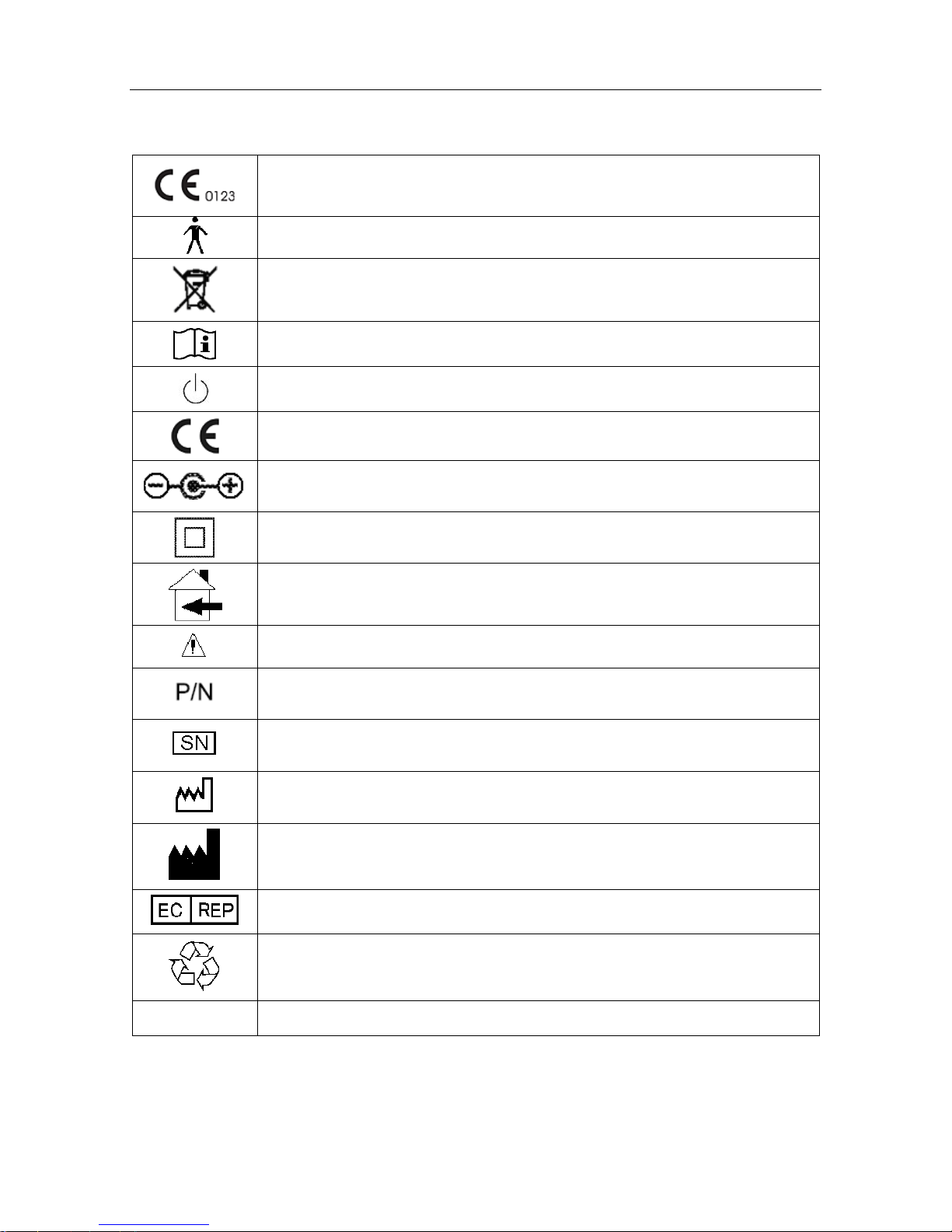
1.3 Symbols
The symbol indicates that the device complies with the European Council
Directive 93/42/EEC concerning medical devices.
Type B applied part.
The symbol indicates that the device should be sent to the special agencies
according to local regulation for separate collection after its useful life.
Consult Instructions for Use
Stand-by
CE mark
Polarity of d.c. power connector
Class II equipment
Can be used in residential areas
Attention. Refer to accompanying documents.
Part Number
Serial Number
Date Of Manufacture
Manufacturer
Authorized Representative in the European Community
General symbol for recovery / recyclable
Rx only (U.S.) Federal (U.S.) Law restricts this device to sale by or on the order of a physician
Page 9

SONOTRAX Series Ultrasonic Pocket Doppler User Manual Doppler and Accessories
- 4 -
Chapter 2 Doppler and Accessories
2.1 Features
There are six different models available: SONOTRAX Lite, SONOTRAX Basic, SONOTRAX
Basic A, SONOTRAX Pro, SONOTRAX II and SONOTRAX II Pro.
SONOTRAX Lite is for simple auscultation (intermittent listening). SONOTRAX Basic,
SONOTRAX Basic A, SONOTRAX Pro, SONOTRAX II and SONOTRAX II Pro not only
detect fetal heart sound; they also display the fetal heart rate on a LCD screen.
The features of the Dopplers are listed in the following chart:
Model
Function
SONOTRAX
Lite
SONOTRAX
Basic
SONOTRAX
Basic A
SONOTRAX
Pro
SONOTRAX
II
SONOTRAX
II Pro
LCD Display
√ √ √ √ √
LCD Backlight
√ √ √ √
Mini USB Probe
Socket
√ √ √ √ √ √
Probe Detecting
√ √ √ √ √ √
Probe Identifying
√ √ √ √ √
Built-in Speaker
√ √ √ √ √ √
Attached Earphone
√ √ √ √ √ √
Volume Adjustable
√ √ √ √ √ √
Modes Switching
√ √ √ √ √
Audio Recording and
Playing
√ √
Alkaline Battery (9V)
√ √ √ √
Rechargeable NI-MH
Battery (8.4V)
√ √ √ √
Lithium-ion Polymer
Battery
√ √
Battery Charged in
Machine
√ √
Low Battery Detecting
& indicating
√ √ √ √ √ √
Auto Shutdown
√ √ √ √ √
Vascular Examining
√ √ √ √ √ √
Page 10
SONOTRAX Series Ultrasonic Pocket Doppler User Manual Doppler and Accessories
- 5 -
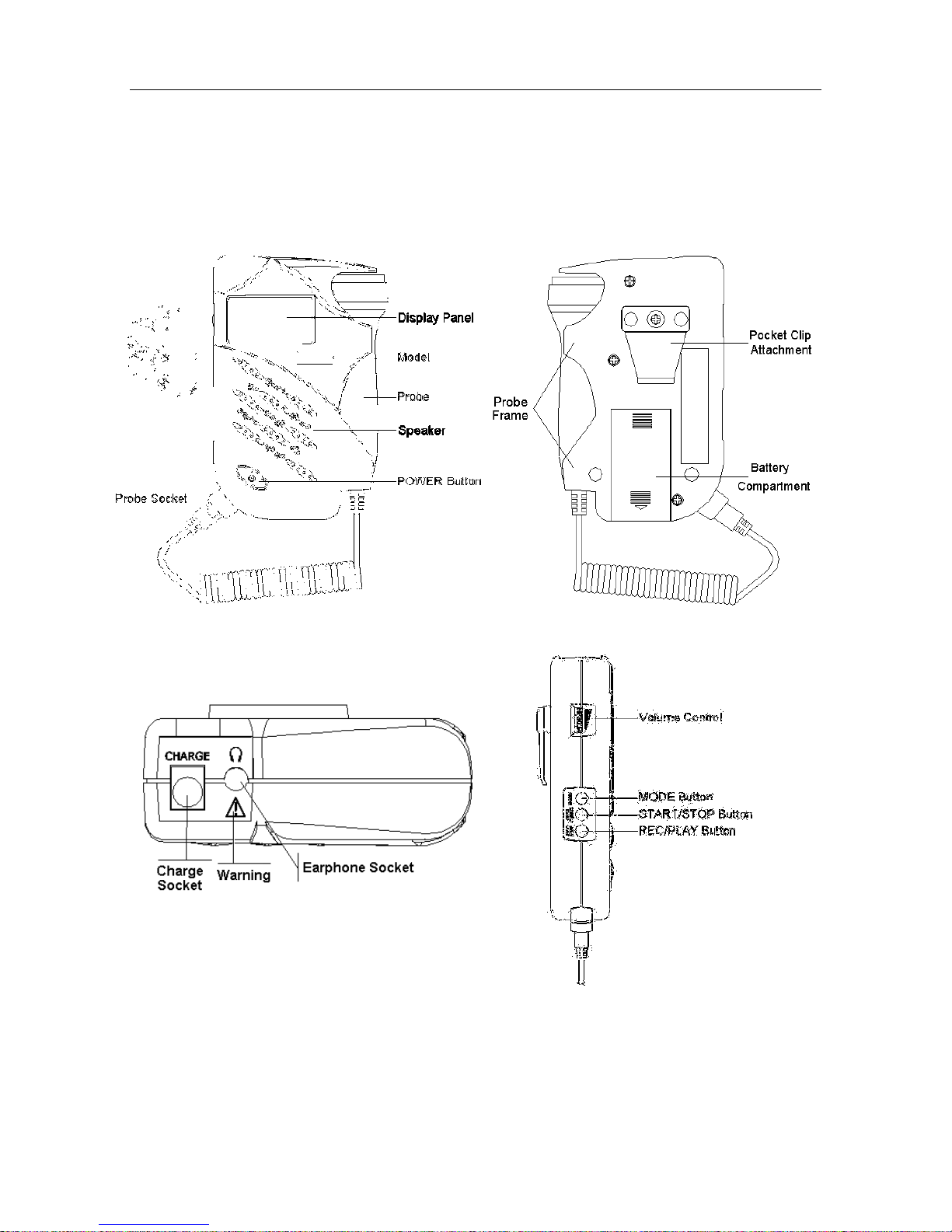
2.2 Appearance
NOTE:
The pictures and interfaces in this manual are for reference only.
Take 2.0MHz obstetrical probe for example.
Figure 2-1 Front Panel Figure 2-2 Rear Panel
Figure 2-3 Top Panel Figure 2-4 Left Panel
Page 11
SONOTRAX Series Ultrasonic Pocket Doppler User Manual Doppler and Accessories
- 6 -
2.3 Display Panel
SONOTRAX Lite has a LED in the bottom left corner of its display panel area. When powered
on, the LED turns green. If the LED flashes in green, it indicates that the probe is disconnected or
poorly connected. If the LED flashes in orange, it indicates that the battery is too low to support
working. Change for a new battery or charge the rechargeable battery in time.
For SONOTRAX Basic, SONOTRAX Basic A, SONOTRAX Pro, SONOTRAX II and
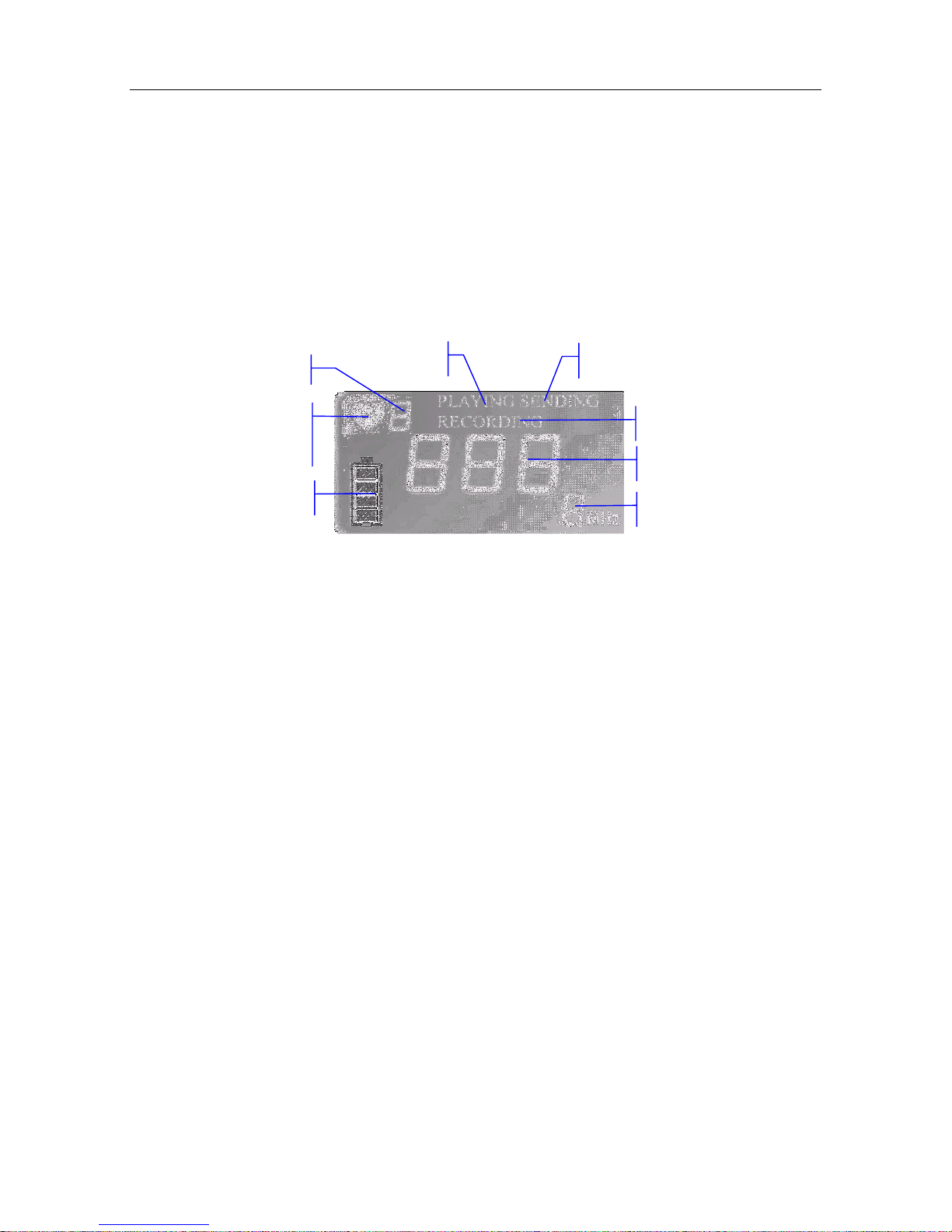
SONOTRAX II Pro, while self-testing, the LCD is shown as follows:
Figure 2-5 LCD display status while self-testing
Working Mode:
It indicates the mode in which the Doppler is working.
FHR Refresh Frequency:
When the examination starts, the heart shape symbol flashes, and its frequency indicates the FHR
refreshing frequency.
Battery Indicator:
For SONOTRAX Basic, a battery symbol appears on the LCD after it’s powered on. When the
battery is low, this symbol flashes; the Doppler will shut down automatically after 7 seconds.
For SONOTRAX Basic A, SONOTRAX Pro, SONOTRAX II and SONOTRAX II Pro, there
is a battery symbol on the LCD. The green panes in it indicate the battery electric energy. The
green panes disappear gradually with the energy consumption. When the electric energy is low,
the empty battery symbol flashes. Approximately five minutes later, the Doppler shuts down
automatically.
PLAYING:
PLAYING is lit when the Doppler is playing the recorded fetal heart sound.
RECORDING:
RECORDING is lit when the Doppler is recording fetal heart sound.
FHR Refresh
Frequency
Battery Indicator
Recording
FHR Display
Probe Type
Playing
Communication
Working Mode
Page 12

SONOTRAX Series Ultrasonic Pocket Doppler User Manual Doppler and Accessories
- 7 -
FHR Displaying:
This area displays the fetal heart rate value, and its unit is bpm (beat per minute).
Probe Type:
The Doppler can detect and identify the probe: when the probe is not connected or poorly
connected, the “---” symbol and “MHz” symbol on the LCD screen flash; when the probe is well
connected, the flashing stops, and the probe type is shown on the LCD screen.
Communication
The Doppler can communicate with PC. This function is reserved.
2.4 Buttons
At most there are four push buttons (Power, MODE, START/STOP and REC/PLAY) and a
volume control button on the main unit of the Doppler. Their primary functions are as follows:
(1) Power Button
Function: Switch on or off the Doppler.
(2) MODE Button
(Only for SONOTRAX Basic / SONOTRAX Basic A / SONOTRAX Pro / SONOTRAX II /
SONOTRAX II Pro)
Function: Select the working mode.
(3)
START/STOP Button
(Only for SONOTRAX Basic / SONOTRAX Basic A / SONOTRAX Pro / SONOTRAX II /
SONOTRAX II Pro)
Function: Start/ stop examining (Mode 3)/ setting (Mode 4 and Mode 5).
(4) REC/PLAY
(Only for SONOTRAX Pro/ SONOTRAX II Pro)
Function: Start/ stop recording or playing fetal heart sound.
(5) Volume Control Indicator
Function: Adjust volume. Rotate the volume gear clockwise to turn up the volume, while
rotate it anti-clockwise to turn down the volume.
Page 13
SONOTRAX Series Ultrasonic Pocket Doppler User Manual Doppler and Accessories
- 8 -
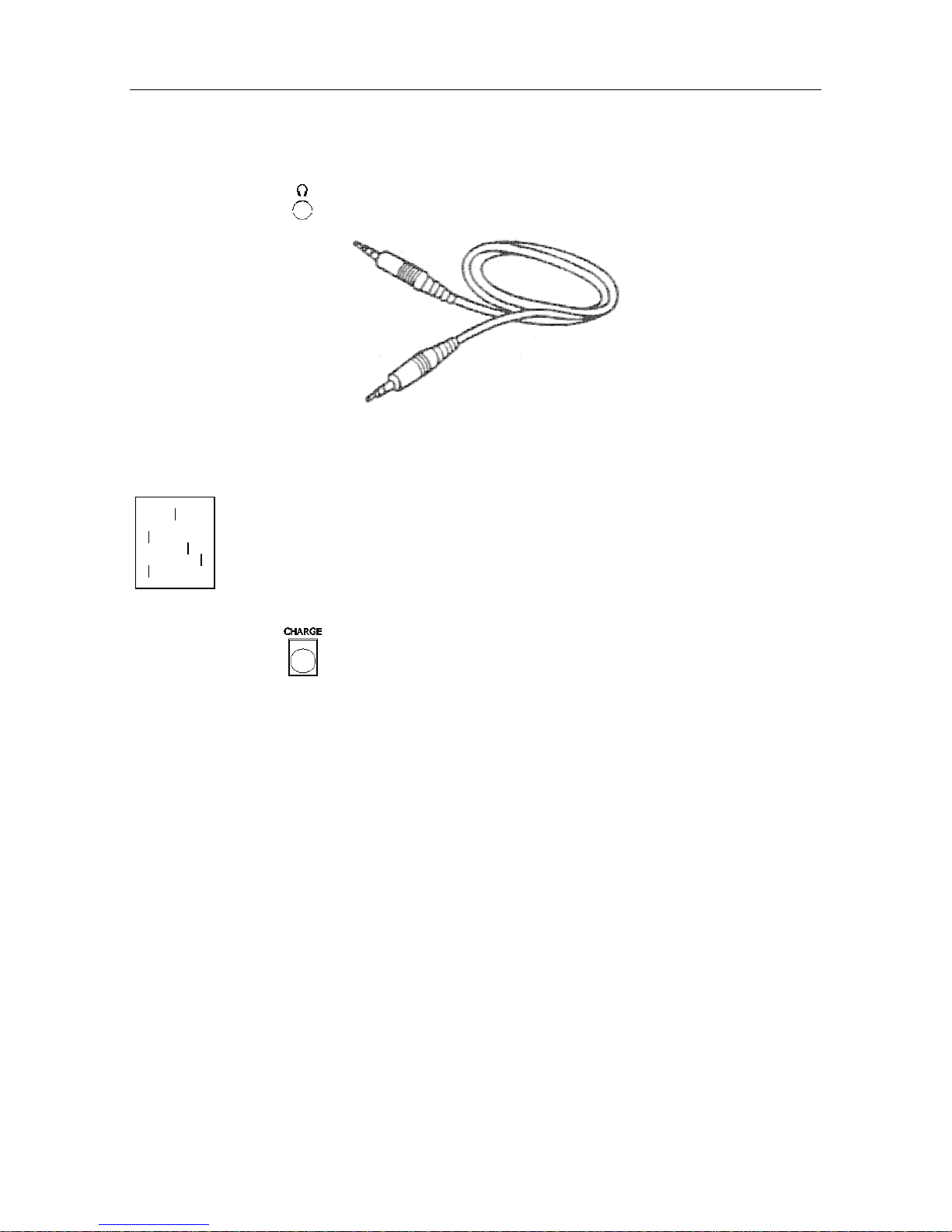
2.5 Socket
The two sockets are located on the top panel of the Doppler.
(1) Earphone socket
: the earphone or line-in cable connects to the Doppler via this socket.
Figure 2-6 Line-in Cable
Signal Interface
1 GND 2 Signal
3 Signal 4 Signal
5 Signal
(2) Charge socket
: the special lithium-ion polymer battery charger connects to the
Doppler via this socket. (For SONOTRAX II and SONOTRAX II Pro
only)
NOTE:
Accessory equipment connected to the analog and digital interfaces must be certified
according to the respective IEC/EN standards (e.g. IEC/EN 60950 for data processing
equipment and IEC/EN 60601-1 for medical equipment). Furthermore all configurations
shall comply with the valid version of the system standard IEC/EN 60601-1-1. Anybody
who connects additional equipment to the signal input connector or signal output
connector to configure a medical system must ensure that the system complies with the
requirements of the valid version of the system standard IEC/EN 60601-1-1. If in doubt,
consult our technical service department or your local distributor.
2
1
3
5
Page 14

SONOTRAX Series Ultrasonic Pocket Doppler User Manual Doppler and Accessories
- 9 -
2.6 Probes
2.6.1 Waterproof Obstetrical Probes
2.0MHz/3.0MHz waterproof obstetrical probes can be connected to the main unit for fetal heart
examining.
The 2MHz obstetrical probe features in deep penetration and is designed for use during the third
trimester pregnancy. The 3MHz obstetrical probe features in high sensitivity and is designed for
use during the entire pregnancy.
Figure 2-7 2.0/3.0MHz obstetrical probe
The main information on the probe is as follows:
CD2.0/3.0: CD stands for continuous wave Doppler, 2.0/3.0 means central frequency is 2.0
MHz/3.0MHz.
MS3-14320: Part number of the 2.0MHz waterproof probe.
MS3-14321: Part number of the 3.0MHz waterproof probe.
A: Version number of the probe.
SNxxxxx: Serial number of the probe.
Waterproof: The probe is waterproof.
IPX8: Water Ingress Protection Code. It indicates that this probe can work continuously for five
hours when being immersed into water within one meter deep.
2.6.2 Waterproof Vascular Probes
The 4.0MHz/5.0MHz/8.0MHz waterproof vascular probes can be connected to the main unit for
artery and vein blood flow examining.
Page 15

SONOTRAX Series Ultrasonic Pocket Doppler User Manual Doppler and Accessories
- 10 -
Figure 2-8 4.0/5.0/8.0MHz Vascular Probes
The main information on the probe is as follows:
CD4.0/CD5.0/CD8.0: CD means continuous wave Doppler, 4.0/5.0/8.0 means the central
frequency is 4.0/5.0/8.0 MHz.
MS3-14346: Part number of 4.0MHz waterproof vascular probe.
MS3R-104822: Part number of 5.0MHz waterproof vascular probe.
MS3-14347: Part number of 8.0MHz waterproof vascular probe.
A: the version number of this vascular probe.
SNxxxxx: Serial number of this vascular probe.
Waterproof: The probe is waterproof.
IPX8: Water Ingress Protection Code. It indicates that this probe can work continuously for five
hours when being immersed into water within one meter deep.
2.6.3 Probe Socket
The probe socket is as shown in figure 2-9.
Figure 2-9 Probe socket
Jack Definition
1
Power Supply
2
Signal
3
Probe Coding 1
4
Probe Coding 2
5
GND
6
(Shell) GND
Page 16

SONOTRAX Series Ultrasonic Pocket Doppler User Manual Doppler and Accessories
- 11 -
Connect the 2.0MHz/3.0MHz obstetrical probes or 4.0MHz/5.0MHz/8.0MHz vascular probes
supplied by the manufacturer to the Doppler through the probe socket.
CAUTION
1 Do not try to connect any other plug to the probe socket except the plug of the
probes mentioned above.
2 Do not stretch the probe cable for more than two meters long.
2.7 Batteries
SONOTRAX Lite, SONOTRAX Basic, SONOTRAX Basic A and SONOTRAX Pro are
powered either by 9V alkaline batteries (IEC Type No. 6LR61/6LF22 or equivalent) or by
rechargeable NI-MH batteries (8.4V).
SONOTRAX II and SONOTRAX II Pro are powered by lithium-ion polymer batteries
supplied by the manufacturer.
Alkaline Battery Rechargeable NI-MH Battery Lithium-ion Polymer Battery
Figure 2-12 Batteries
Page 17

SONOTRAX Series Ultrasonic Pocket Doppler User Manual Operation
- 12 -
Chapter 3 Operation
NOTE:
To ensure that the Doppler works properly, please read this chapter and Chapter 1
Safety Guide before operation; follow the steps when connecting all the components.
3.1 Opening the Package and Checking
Open the package; take out the Doppler and accessories carefully. Keep the package for possible
future transportation or storage. Check the components according to the packing list.
Check for any mechanical damage.
Check all the cables and accessories.
If there is any problem, contact us or your local distributor immediately.
3.2 Installing/Replacing Battery
To install or replace a battery, perform the following steps:
1) Open the battery compartment.
Turn the Doppler upside down. Press the two stripe marks on the battery compartment cover with
your thumbs respectively. Slide the cover in the direction of the arrow with mild force to open the
compartment.
Figure 3-1 Opening battery compartment
2) Install / Replace the battery.
Remove the old battery from the connector if necessary.
NOTE:
Do not use excessive force when disconnecting the battery and the connector, in case
the connector falls off.
Connect the new battery to the battery connector, and then put the assembly into the battery
compartment. (Figure 3-2 a)
Page 18

SONOTRAX Series Ultrasonic Pocket Doppler User Manual Operation
- 13 -
For SONOTRAX II and SONOTRAX II Pro, insert the battery connector into the battery
socket in the compartment. (Figure 3-2 b)
(a) (b)
Figure 3-2 Connecting battery connector
3) Close the compartment.
Slide the cover back to close the battery compartment.
Figure 3-3 Closing battery compartment
CAUTION
1 Take out the alkaline/NI-MH battery and keep it in a cool and dry environment if the
Doppler is not used for an extended period.
2 Do not remove the lithium-ion polymer battery frequently after the initial installation. If
the Doppler is not used for an extended period, charge the battery at least every
three months.
Page 19

SONOTRAX Series Ultrasonic Pocket Doppler User Manual Operation
- 14 -
3.3 Probe Operation
(1) Taking out the probe
Hold the main unit with one hand. Pinch the probe head and pull it outwards with mild force, and
then take out the whole probe slantwise in the direction of the arrow.
Figure 3-4 Taking out the probe
(2) Placing the probe
Hold the main unit with one hand. Place the probe tail into the bottom right part of the probe
holder, and then push the probe head in until it clicks into the holder.
Figure 3-5 Placing the probe
CAUTION
Do not take out or place the probe when the Doppler is on. Remember to take out the
probe before switching on the Doppler, and place the probe after switching off the
Doppler.
Page 20

SONOTRAX Series Ultrasonic Pocket Doppler User Manual Operation
- 15 -
(3) Replacing the Probe
Remove the old probe:
Switch off the Doppler; hold the main unit with one hand; pinch the jacket of the mini USB
socket and pull it out with mild force; take out the probe.
CAUTION
Do not pull the probe cable directly.
Figure 3-6 Removing the probe
Replace it with a new probe:
Put the USB socket of new probe into the probe interface of the Doppler.
NOTE:
Place the temporarily unused probe carefully and avoid falling off, splash or stress, etc.
When the Doppler is not used for a long time, it’s recommended to connect the probe to
the Doppler and keep them safely in the package.
3.4 Switching on the Doppler
Press the POWER button on the front panel to switch on the Doppler.
3.5 Modes Setting
SONOTRAX Basic, SONOTRAX Basic A, SONOTRAX Pro, SONOTRAX II and
SONOTRAX II Pro have different modes available. Press the MODE button to switch to the
next mode.
After self testing, SONOTRAX Basic enters the previous mode in which the Doppler worked,
and other models automatically enters mode 1.
Page 21

SONOTRAX Series Ultrasonic Pocket Doppler User Manual Operation
- 16 -
3.5.1 Real-time FHR Display Mode (Mode 1)
When the Doppler works in this mode, the working mode on LCD displays 1.
As soon as a fetal heart signal is detected, the heart shape on LCD flashes and the FHR display
area displays the real-time FHR value.
3.5.2 Averaged FHR Display Mode (Mode 2)
Keep pressing the MODE button until the working mode on LCD displays 2.
The heart shape on LCD flashes when fetal heart signal is detected, and the FHR value indicates
the average value of every eight beats.
3.5.3 Manual Mode (Mode 3)
Keep pressing the MODE button until the working mode on LCD displays 3.
Press the START/STOP button once and start counting immediately, viz. count one at the
moment when the button is pressed. The LCD displays the flashing heart shape symbol and “---”.
Press the button again on the 10th count (after nine beat intervals).
The Doppler automatically calculates and displays the average FHR over the 10 beats. This rate
value will not disappear until another measurement starts or the mode is changed.
3.5.4 Backlight Brightness Setting Mode (Mode 4)
This mode is only available with SONOTRAX Basic A, SONOTRAX Pro, SONOTRAX II
and SONOTRAX II Pro.
Keep pressing the MODE button until the working mode on LCD displays 4.
Press the START/STOP button to disable or enable the backlight. “OFF” displayed on the LCD
means the backlight is disabled, while “ON” means the backlight is enabled.
NOTE:
The setting in this mode will be saved automatically after mode change or normal power
off.
3.5.5 Record Sampling Frequency Setting Mode (Mode 5)
This mode is only available with SONOTRAX Pro and SONOTRAX II Pro.
Keep pressing the MODE button until the working mode on LCD displays 5.
Press the START/STOP button, the sampling frequency switches between 4 and 8 on the LCD.
“4” means the frequency is 4KHz, and the longest record time is 480 seconds; while “8” means
8KHz, and the longest record time is 240 seconds.
Page 22

SONOTRAX Series Ultrasonic Pocket Doppler User Manual Operation
- 17 -
NOTE:
1 The setting under this mode will be saved automatically after mode switches
or normal power off.
2 After changing frequency, the records related to the original frequency will be
cleared automatically.
3.6 Fetal Heart (FH) Examining
FH examining with 2.0MHz/3.0MHz obstetrical probe
1) Confirm the fetus’s position by hand.
2) Determine the probable probe location for ideal FHR examining.
3) Take out the probe and switch on the Doppler.
4) Apply a certain amount of coupling gel to the probe faceplate and place the probe against the
abdomen at the predetermined location. Move the probe around or tilt it until clear and
rhythmic heart sound is heard from the headphone or speaker. At the same time, a numeric
FHR is displayed on the LCD (except SONOTRAX Lite).
NOTE:
1 The best quality records will only be obtained if the probe is placed in the optimum
position.
2 Positions with strong placental sounds or umbilical blood flow sound should be
avoided.
3 If the fetus is in the cephalic position and the mother is supine, the clearest heart
sound will normally be found on the midline below the umbilicus. During examining,
the pregnant woman’s prolonged lying in the supine position should be avoided
owing to the possibility of supine hypotension. Sitting up or lateral positions are
preferable and may be more comfortable.
4 It is impossible to examine FHR unless a fetal heart sound is present. The fetal pulse
can be distinguished from the maternal pulse by feeling the mother’s pulse during
the examination.
Page 23

SONOTRAX Series Ultrasonic Pocket Doppler User Manual Operation
- 18 -
3.7 FH Sound Recording and Playing by Build-in Recorder
This function is only available with SONOTRAX Pro and SONOTRAX II Pro.
Recording:
Press the REC/PLAY button and hold for three seconds in mode 1, 2 or 3, the machine starts
recording, and RECORDING appears on the LCD. The longest record time depends on the
recording sampling frequency set in mode 5.
The machine stops recording and returns to the examining status when the time is over or when
you press the REC/PLAY button again.
Playing:
Press the REC/PLAY button in mode 1, 2 or 3 when the machine is not recording, PLAYING
appears on the LCD, and the machine plays the recorded signals.
The machine stops playing and returns to the examining status when the signal playing is
completed or when you press the REC/PLAY button again.
NOTE:
Only the last set of recorded fetal heart sounds is saved in the Doppler. It is cleared
when new sounds are recorded.
3.8 FH Sound Recording by PC
The signal of fetal heart sound can be transferred to a personal computer (PC) and recorded by
the sound recorder. You can play the recorded sound files, burn them into CDs or e-mail them to
whomever you want.
3.8.1 Recording Sounds
Insert one plug of the special line-in cable supplied by the manufacturer to the audio input socket
(the socket with the symbol “ ”) of the PC, refer to figure 3-7. If the PC has no audio input
socket, insert the plug into the microphone socket (the socket with the symbol “ ”).
Page 24

SONOTRAX Series Ultrasonic Pocket Doppler User Manual Operation
- 19 -
Figure 3-7 Audio Input Socket on the PC
Turn on PC and run the sound recorder (Click on Start > Programs > Accessories >
Entertainment > Sound Recorder). Refer to figure 3-8.
Figure 3-8 Run the sound recorder
Perform FHR examination with the method described in section 3.6. When the ideal signal is
detected, unplug the earphone (if it’s connected) and insert the other plug of the audio cable into
the earphone socket on the Doppler.
Audio Input Socket
Page 25

SONOTRAX Series Ultrasonic Pocket Doppler User Manual Operation
- 20 -
Figure 3-9 Sound Recorder Figure 3-10 Recording
Click on the start key
to start recording, refer to figure 3-9.
You can record 60 seconds each time. When the time is up, click on the start key again to keep on
recording.
Click on the stop key to stop recording, refer to figure 3-10.
Click on File > Save, input the file name, select a folder and click on Save to save the signals in a
“.wav” file.
To start a new recording, click on File > New.
3.8.2 Playing Sound Files
The recorded sounds are saved as waveform (.wav) files in your computer.
You can play the waveform file with the sound recorder. Run the sound recorder, click on File >
Open, search for the folder and select the file, click on Open to load the file, and then click on
the play key
.
If you have any other program that supports waveform (.wav) files installed on your PC,
double-click on the file to play it.
3.8.3 Burning CD or Sending in Email
The waveform files saved in your PC are normal audio data files. You can burn them into CDs or
e-mail to whomever you want.
3.8.4 Record Troubleshooting
If there is audio output from the speaker or earphone, but the PC recorder does not have any input.
(The green line recording area has no waveform.) The reason could be:
1. Poor connection of the audio cable between the Doppler and the PC.
- Check the plugs of the cable and re-connect it if any poor connection is detected.
2. The audio cable has been plugged to the wrong socket of the PC, instead of the audio input
Page 26

SONOTRAX Series Ultrasonic Pocket Doppler User Manual Operation
- 21 -
socket or the microphone socket.
- Insert the plug to the right socket.
3. The Line in or microphone is muted on PC.
- Change the setting of the PC in these steps:
a) Double-click on the volume symbol in the bottom right corner of your desktop;
b) The volume control menu pops up:
Figure 3-11 Volume control menu
c) If the line in or/and microphone volume control is/are not shown in the Volume Control
menu, click on Options > Properties, tick Line In and Microphone as shown in figure
3-12, click on OK:
Page 27

SONOTRAX Series Ultrasonic Pocket Doppler User Manual Operation
- 22 -
Figure 3-12 Properties
d) Make sure Line In and Microphone is not mute, click on
to exit.
e) Start a new recording.
Page 28

SONOTRAX Series Ultrasonic Pocket Doppler User Manual Operation
- 23 -
3.9 Vascular Examining (Optional)
WARNING
The device is not intended for ophthalmic use. Do not use it for examining ophthalmic
vessels, or any other procedures which may cause the ultrasound beam to pass through
the eye.
4MHz, 5MHz or 8MHz vascular probes are to be connected to the Doppler to perform vascular
examination.
Choose the appropriate probe as required. The probe with how frequency has a deeper
penetration depth, while the probe with high frequency has better resolution and wider detecting
range. The 4MHz vascular probe is optimized for examining blood vessels; the 5MHz vascular
probe is optimized for examining deeper vessels, and the 8MHz vascular probe is optimized for
examining surface vessels.
Apply a liberal amount of gel on the site to be examined. Place the probe at a 45º angle on the skin
over the vessel to be examined. Adjust the position of the probe to obtain the loudest blood flow
sound. Refer to figure 3-13 for the probe sites:
Page 29

SONOTRAX Series Ultrasonic Pocket Doppler User Manual Operation
- 24 -
Figure 3-13 Probe sites
For best results, keep the probe as still as possible once the optimum position is found. Adjust the
volume as required. High pitched pulsatile sounds are emitted from arteries while veins emit a
non-pulsatile sound similar to a rushing wind.
Vascular examination only provides audio signals of arteries and veins. The figure displayed on
the LCD screen is null.
Vertebral Artery (4.0MHz)
Carotid Artery (4.0/8.0MHz)
Carotid Artery (4.0/8.0MHz)
Subclavian Artery (4.0MHz)
Subclavian Vein (4.0MHz)
Jugular Vein (4.0MHz)
Brachial Artery (8.0MHz)
Ulner Artery (8.0MHz)
Radial Artery (8.0MHz)
Femoral Artery (4.0MHz)
Femoral Vein (4.0MHz)
Popliteal Artery (4.0MHz)
Great Saphenous Vein (4.0/8.0MHz)
Small Saphenous Vein (8.0MHz)
Posterior Tibial Artery (8.0MHz)
Dorsalis Pedis Artery (8.0MHz)
Posterior Tibial Vein (8.0MHz)
Page 30

SONOTRAX Series Ultrasonic Pocket Doppler User Manual Operation
- 25 -
3.10 Switching Off the Doppler
When the examination is finished, switch off the Doppler, wipe the remaining gel off the probe
with a clean soft cloth and then place the probe back into the holder.
Press the POWER button on the SONOTRAX Lite again to switch it off.
If there is no signal input or no operation is performed to SONOTRAX Basic, SONOTRAX
Basic A, SONOTRAX Pro, SONOTRAX II and SONOTRAX II Pro for 60 seconds, it will
automatically shut down. Or you can press and hold the POWER button for 3 seconds to switch
it down manually.
3.11 Replacing/Charging the Battery
When the Doppler gives out an alarm indicating the battery power is low, you should shut down
the Doppler to replace or charge the battery.
CAUTION
Make sure the Doppler is shut down before charging the battery or opening the battery
compartment.
(1) Replacing the alkaline battery
For the alkaline battery, follow the procedures described in section 3.2 Installing/Replacing
Battery to remove it from the main unit, and then replace it with a new one of the same
specifications. Dispose of the old battery according to local regulations after use.
WARNING
DO NOT CHARGE THE ALKALINE BATTERY.
(2) Charging the NI-MH battery
For the rechargeable NI-MH battery, follow the procedures described in section 3.2
Installing/Replacing Battery to remove it from the main unit and charge it with the provided
charger. During charging, the indicator in the charger slot is lit in red. When it goes off, the
battery is fully charged (approximately 12 hours are needed). Remove the battery from the
charger and install it to the Doppler.
WARNING
Fit the battery to the sockets of the charger properly before plugging the charger into
power socket.
Page 31

SONOTRAX Series Ultrasonic Pocket Doppler User Manual Operation
- 26 -
Figure 3-14 Charging NI-MH battery
(3) Charging the lithium-ion polymer battery
For the lithium-ion polymer battery, charge it in the machine by putting the plug of the charger
into the charge socket of the Doppler (on the top panel), and then connecting the charger to power
supply (100V-240V~, 50Hz/60Hz). When the orange indicator of the charger turns green, the
battery is fully charged (4 to 6 hours are needed). Remove the charger plug and then the Doppler
is available for examining again.
Figure 3-15 Charging lithium-ion polymer battery
NOTE:
The Doppler is not available for examining during charging.
Page 32

SONOTRAX Series Ultrasonic Pocket Doppler User Manual Product Specifications
- 27 -
Chapter 4 Product Specifications
Product Name: Ultrasonic Pocket Doppler
Model:
SONOTRAX Lite, SONOTRAX Basic, SONOTRAX Basic A, SONOTRAX Pro,
SONOTRAX II, SONOTRAX II Pro
Safety:
Complies with: IEC 60601-1:1988+A1+A2, EN 60601-1:1990+A1+A2,
IEC/EN 60601-1-2:2007, IEC/EN 61266
Classification:
Anti-electric Shock Type: Internally powered equipment
Anti-electric Shock Degree: Type B equipment
Degree of Protection against Harmful Ingress of Water:
Main Unit:
Not-protected
Probes:
IPX8 Water Ingress Protection Code, indicating this
probe can work continuously for five hours when
being immersed into water within one meter deep.
Degree of Safety in Presence
of Flammable Gases:
Equipment not suitable for use in presence of
flammable gases
Working System:
Continuous running equipment
EMC:
Group I Class B
Physical Characteristic:
Size: 32 (Depth) x 85 (Width) x 138 (Height) mm
Weight: 290±5g (including a battery and a probe)
Environment:
Working:
Temperature: +5°C ~ +40°C ( +41 ºF ~ +104 ºF)
Humidity: 25% ~ 80% (non-condensing)
Atmospheric Pressure: 860hPa ~ 1060hPa
Transport and Storage:
Temperature: -20°C ~ +55°C (-4ºF ~ +131 ºF)
Humidity: 25% ~ 93% (non-condensing)
Atmospheric Pressure: 700hPa ~1060hPa
Page 33

SONOTRAX Series Ultrasonic Pocket Doppler User Manual Product Specifications
- 28 -
Display:
45mm*25mm LCD display
FHR Performance:
Sensitivity: 10 weeks gestation (3MHz)
FHR Measuring Range: 50bpm ~ 210bpm
Resolution: 1bpm
Accuracy: ±3bpm
NOTE:
In some cases, fetal heart beats at 10 weeks gestation can not be detected due to the
maternal physical difference and the operator’s technique.
Audio Output Power: 0.5W
Recording and Playing:
Audio Sampling Frequency: 4KHz / 8KHz
Recording Length: 480s / 240s
White Backlight:
Two Brightness Adjustable: OFF, ON
Auto Shut down:
1 minute after no signal or operation, auto shut down
Recommended Alkaline Battery Type:
9 volt DC alkaline battery (IEC Type No. 6LR61/6LF22 or equivalent).
Stand-by Time (hour):
SONOTRAX Lite 8 to 10 hours
SONOTRAX Basic 10 to 13 hours
SONOTRAX Basic A 6 to 8 hours (with backlight)
9V Alkaline
Battery
SONOTRAX Pro 6 to 8 hours (with backlight)
SONOTRAX Lite 2.5 to 5 hours
SONOTRAX Basic 3 to 6 hours
SONOTRAX Basic A 2 to 4 hours (with backlight)
8.4V NI-MH Battery
SONOTRAX Pro 2 to 4 hours (with backlight)
7.4V Lithium-ion
Polymer Battery
SONOTRAX II
SONOTRAX II Pro
10 to 15 hours (with backlight)
Page 34

SONOTRAX Series Ultrasonic Pocket Doppler User Manual Product Specifications
- 29 -
Rechargeable NI-MH Battery
Charge Temperature: 0°C to +45°C (+32°F to +113°F)
Storage Temperature: -20°C to +35°C (-4°F to +95°F)
Normal Charge Time: 14 to 16 hours (25mA)
Circle Life:
≥ 500 times
Lithium-ion Polymer Battery
Type: Lithium-ion Polymer Battery
Nominal Capacity: > 900mAh
Nominal Voltage: 7.4V
Charge Mode: Constant current / Constant voltage
Charge Current (Standard): 300mA
Charge Voltage (Standard): 8.4V
-20°C to +40°C (-4°F to +104°F) (3 months)
Storage Temperature:
-20°C to +60°C (-4°F to +140°F) (1 month)
Circle Life:
≥ 300 times (after 300 circles, only 90% of the capacity can
be restored.)
Ultrasound
2.0MHz Obstetrical Probe 2.0MHz
3.0MHz Obstetrical Probe 3.0MHz
4.0MHz Vascular Probe 4.0MHz
5.0MHz Vascular Probe 5.0MHz
Nominal Frequency
8.0MHz Vascular Probe 8.0MHz
2.0MHz Obstetrical Probe (2.0±10%) MHz
3.0MHz Obstetrical Probe (3.0±10%) MHz
4.0MHz Vascular Probe (4.0±10%) MHz
5.0MHz Vascular Probe (5.0±10%) MHz
Working Frequency
8.0MHz Vascular Probe (8.0±10%) MHz
p- < 1MPa
I
ob
< 10 mW/cm2
Page 35

SONOTRAX Series Ultrasonic Pocket Doppler User Manual Product Specifications
- 30 -
I
spta
< 100mW/cm2
Working Mode Continuous wave Doppler
2.0MHz Obstetrical Probe
(245±15%) mm2
3.0MHz Obstetrical Probe (245±15%) mm2
4.0MHz Vascular Probe
(32±15%) mm
2
5.0MHz Vascular Probe
(32±15%) mm2
Effective Radiating Area of
Transducer
8.0MHz Vascular Probe
(14±15%) mm2
Low Output Summary Table
(for systems with no transducers having global maximum index values exceeding 1.0)
System: SONOTRAX series Ultrasonic Pocket Doppler
Transducer Model
(MHz)
I
spta.3
(mW/cm2)
TI Type TI Value MI
I
sppa.3
(W/cm2)
TIS 0.20
CW 2.0 47.227
TIB 0.19
0.03498 N/A
TIS 0.014
CW 3.0 1.423
TIB 0.17
0.0038 0.001423
TIS 0.01
CW 4.0 17.297
TIB 0.13
0.0116 0.017297
TIS 0.3031
CW 5.0 44.25
TIB 0.2876
0.008475 0.04425
TIS 0.08
CW 8.0 45.44
TIB 0.33
0.0133 0.04544
Page 36

SONOTRAX Series Ultrasonic Pocket Doppler User Manual Maintenance
- 31 -
Chapter 5 Maintenance
5.1 Maintenance
You must check that the equipment does not have visible evidence of damage that may affect the
patient and the operator’s safety or the Doppler’s capability before each use. If the damage is
evident, replacement is recommended.
The probe is frangible and must be handled with care.
Wipe the remaining gel after use to prolong the probe life.
The overall check of the Doppler, including safety check and function check, should be
performed by qualified personnel every 12 months, and each time after service.
5.2 Cleaning
Before cleaning, switch off the Doppler.
Keep the exterior surface of the device clean and free of dust and dirt.
Clean the exterior surface (display screen included) of the main unit with a dry, soft cloth. If
necessary, clean it with a soft cloth soaked in soap water and then wipe it dry with a dry cloth
immediately.
Wipe the remaining coupling gel off the probe. Clean it with a soft cloth dampened in solution
(soap water, 70% ethanol or isopropranol alcohol) and then air-dry it or wipe the moisture with a
soft dry cloth.
CAUTION
1 Clean the main unit with soap and water only. Avoid strong solvent, such as acetone.
2 Never use an abrasive such as steel wool or metal polish.
3 The main unit is not waterproof. Do not immerse any part of it into liquid.
4 Avoid pouring liquids on the main unit while cleaning.
5 Do not remain any solution on the surface after cleaning.
5.3 Disinfection of the Probe
Clean the probes as above. Immerse them into the solutions of Benzalkonium Bromide, 0.5%
Chlorhexidine, 2% Glutaraldehyde or 75% ethanol, and then wipe them with a clean, dry cloth to
remove the remaining moisture.
CAUTION
1 Pay attention not to immerse the probe socket into the disinfector.
2 The main unit is not waterproof, do not disinfection it.
3 Never try to sterilize the probe or the main unit.
Page 37

SONOTRAX Series Ultrasonic Pocket Doppler User Manual Warranty and After-Sales Service
- 32 -
Chapter 6 Warranty and After-Sales Service
6.1 Warranty
EDAN’s obligation under this warranty is limited to repairing, at EDAN’s option, any part which
upon EDAN's examination proves defective. If the product doesn’t function as warranted during
the warranty period, we will repair or replace it without charge.
Material and Manufacture
EDAN warrant that there’s no defect in material and manufacture. During the warranty period,
EDAN will repair or replace the defective part free if the defect has been confirmed as material or
manufacture defect.
Software or Firmware
EDAN software and firmware products which are designated by EDAN for use with a hardware
product, when properly installed on that hardware product, are warranted not to fail to execute
their programming instructions due to defects in materials and workmanship. If EDAN receives
notice of such defects during the warranty period that begins on the date of shipment, EDAN
shall repair or replace software media or firmware which does not execute their programming
instructions due to such defects. But EDAN doesn’t warrant that operating of the hardware,
software, or firmware shall be uninterrupted or free from error.
NOTE:
The charges of freight and others are excluded under warranty.
This unit has no parts can be repaired by users themselves. All the service should be performed
by authorized and qualified personnel.
Limit of Warranty
The warranty is void in the case of
♦ Assembly, extensions, readjustments of any parts;
♦ Modification and repair by unauthorized persons;
♦ Subsequent damage caused by improper use or maintenance;
♦ Replacement or remove of Serial number label and manufacturer label;
6.2 After-Sales Service
If you have any question about maintenance, technical specifications or malfunctions of devices,
contact your local distributor.
Alternatively, you can send an email to EDAN service department at: support@edan.com.cn.
Page 38

SONOTRAX Series Ultrasonic Pocket Doppler User Manual Ordering Information
- 33 -
Appendix 1 Ordering Information
CAUTION
Only the parts supplied by the manufacturer should be used with the Doppler.
Parts Part Number
Probe
2.0MHz Obstetrical Probe 12.01.14320
3.0MHz Obstetrical Probe 12.01.14321
4.0MHz Vascular Probe 12.01.14346
5.0MHz Vascular Probe 12.01.104822
8.0MHz Vascular Probe 12.01.14347
Accessory
Alkaline Battery (9V) 11.21.64048
Rechargeable NI-MH Battery (8.4V) 01.21.064122
NI-MH Battery Charger 01.21.064112
Lithium-ion Polymer Battery (7.4V) 01.21.064127
Lithium-ion Polymer Battery Charger 01.21.64082
Line-in Cable 11.13.36032
Earphone 01.14.104751
Normal Carry case (DPVC) 01.56.104581
Blue Carry Case (EVA) 01.56.14268
Consumable
Coupling Gel 11.57.14019
Page 39

SONOTRAX Series Ultrasonic Pocket Doppler User Manual EMC Information
- 34 -
Appendix 2 EMC Information-Guidance and
Manufacture’s Declaration
A2.1 Electromagnetic Emissions - for all Equipment and
Systems
Guidance and manufacture’s declaration–electromagnetic emission
The SONOTRAX Series Ultrasonic Pocket Doppler is intended for use in the electromagnetic
environment specified below. The customer or the user of the device should assure that it is used in such
an environment.
Emission test Compliance Electromagnetic environment–guidance
RF emissions
CISPR 11
Group 1
The SONOTRAX Series Ultrasonic Pocket Doppler uses RF
energy only for its internal function. Therefore, its RF emissions
are very low and are not likely to cause any interference in nearby
electronic equipment.
RF emission
CISPR 11
Class B
The SONOTRAX Series Ultrasonic Pocket Doppler is suitable for
use in all establishments, including domestic establishments and
those directly connected to the public low-voltage power supply
network that supplies buildings used for domestic purposes.
A2.2 Electromagnetic Immunity - for all Equipment and Systems
Guidance and manufacture’s declaration–electromagnetic immunity
The SONOTRAX Series Ultrasonic Pocket Doppler is intended for use in the electromagnetic
environment specified below. The customer or the user of the device should assure that it is used in such
an environment.
Immunity test
IEC 60601 test
level
Compliance level
Electromagnetic
environment-guidance
Electrostatic
discharge (ESD)
IEC 61000-4-2
±6 kV contact
±8 kV air
±6 kV contact
±8 kV air
Floors should be wood,
concrete or ceramic tile. If
floor are covered with
synthetic material, the relative
humidity should be at least
30%.
Page 40

SONOTRAX Series Ultrasonic Pocket Doppler User Manual EMC Information
- 35 -
A2.3 Electromagnetic Immunity - for all Equipment and Systems
that are not Life-supporting
Guidance and manufacture’s declaration – electromagnetic immunity
The SONOTRAX Series Ultrasonic Pocket Doppler is intended for use in the electromagnetic environment
specified below. The customer or the user of the device should assure that it is used in such an
environment.
Immunity test IEC 60601 test level
Compliance
level
Electromagnetic environment-guidance
Radiated RF
IEC 61000-4-3
3 V/m
80 MHz to 2.5 GHz
3 V/m
Portable and mobile RF communications
equipment should be used no closer to any
part of the SONOTRAX Series Ultrasonic
Pocket Doppler, including cables, than the
recommended separation distance
calculated from the equation applicable to
the frequency of the transmitter.
Recommended separation distance
P
E
d
⎥
⎦
⎤
⎢
⎣
⎡
=
1
5.3
80 MHz to 800 MHz
P
E
d
⎥
⎦
⎤
⎢
⎣
⎡
=
1
7
800 MHz to 2.5 GHz
Where P is the maximum output power
rating of the transmitter in watts (W)
according to the transmitter manufacturer
and d is the recommended separation
distance in metres (m).
Field strengths from fixed RF transmitters,
as determined by an electromagnetic site
survey,
a
should be less than the
compliance level in each frequency
range.
b
Interference may occur in the vicinity of
equipment marked with the following
symbol:
NOTE 1 At 80 MHz and 800 MHz, the higher frequency range applies.
NOTE 2 These guidelines may not apply in all situations. Electromagnetic propagation is affected by
absorption and reflection from structures, objects and people.
a
Field strengths from fixed transmitters, such as base stations for radio (cellular/cordless) telephones
and land mobile radios, amateur radio, AM and FM radio broadcast and TV broadcast cannot be
predicted theoretically with accuracy. To assess the electromagnetic environment due to fixed RF
transmitters, an electromagnetic site survey should be considered. If the measured field strength in
the location in which the SONOTRAX Series Ultrasonic Pocket Doppler is used exceeds the
applicable RF compliance level above, the SONOTRAX Series Ultrasonic Pocket Doppler should be
observed to verify normal operation. If abnormal performance is observed, additional measures may
be necessary, such as reorienting or relocating the SONOTRAX Series Ultrasonic Pocket Doppler.
b
Over the frequency range 150 kHz to 80 MHz, field strengths should be less than 3 V/m.
Page 41

SONOTRAX Series Ultrasonic Pocket Doppler User Manual EMC Information
- 36 -
A2.4 Recommended Separation Distances
Recommended separation distances between portable and mobile RF communications equipment
and the SONOTRAX Series Ultrasonic Pocket Doppler
The SONOTRAX Series Ultrasonic Pocket Doppler is intended for use in an electromagnetic environment
in which radiated RF disturbances are controlled. The customer or the user of the device can help prevent
electromagnetic interference by maintaining a minimum distance between portable and mobile RF
communications equipment (transmitters) and the SONOTRAX Series Ultrasonic Pocket Doppler as
recommended below, according to the maximum output power of the communications equipment.
Separation distance according to frequency of transmitter
(m)
Rated maximum
output power of
transmitter
(W)
80 MHz to 800 MHz
P
E
d
⎥
⎦
⎤
⎢
⎣
⎡
=
1
5.3
800 MHz to 2.5 GHz
P
E
d
⎥
⎦
⎤
⎢
⎣
⎡
=
1
7
0.01 0.1167 0.2334
0.1 0.3689 0.7378
1 1.1667 2.3334
10 3.6893 7.3786
100 11.6667 23.3334
For transmitters rated at a maximum output power not listed above, the recommended separation distances
in metres (m) can be estimated using the equation applicable to the frequency of the transmitter, where P
is the maximum output power rating of the transmitter in watts (W) according to the transmitter
manufacturer.
NOTE 1 At 80 MHz and 800 MHz, the separation distance for the higher frequency range applies.
NOTE 2 These guidelines may not apply in all situations. Electromagnetic propagation is affected by
absorption and reflection from structures, objects and people.
Page 42

SONOTRAX Series Ultrasonic Pocket Doppler User Manual Overall Sensitivity
- 37 -
Appendix 3 Overall Sensitivity
Overall Sensitivity (2MHz Probe)
Two-way Attenuation
B=∑Ba+Bw
Diameter of Target
Reflector
(mm)
Distance
(d)
(mm)
Reflection Loss A(d)
∑B
a
(T:mm Ba:dB)
B
w
(dB) B (dB)
Vs (r.m.s.)
mV
Vn (r.m.s)
mV
(
)
()
⎟
⎟
⎠
⎞
⎜
⎜
⎝
⎛
=
...
...
log20
10
smrV
smrV
C
n
s
dB
Overall Sensitivity
(S=A(d)+B+C)
dB
T 20 4.8 4.0 -
50 45.7
Ba40 9.6 8.0 -
0 57.6 186 94 5.93 109.2
T 20 4.8 3.4 -
75 45.7
B
a
40 9.6 6.8 -
0 56.4 175 90 5.78 107.8
T 20 4.8 3.4 -
100 45.7
Ba40 9.6 6.8 -
0 56.4 174 89 5.82 107.9
T 20 4.8 - -
1.58
A=45.7dB@
2MHz
200 45.7
Ba40 9.6 - -
0 49.6 173 90 5.68 100.9
T 20 4.8 3.4 2.2
50
43.2
Ba40 9.6 6.8 4.4
0 60.8 178 89 6.02 110.0
T 20 4.8 3.4 1
75 43.2
Ba40 9.6 6.8 2
0 58.4 170 90 5.52 107.1
T 20 4.8 3.4 -
100 43.2
Ba40 9.6 6.8 -
0 56.4 165 85 5.76 105.3
T 20 4.8 1 -
2.38
A=43.2dB@
2MHz
200 43.2
Ba40 9.6 2 -
0 51.6 160 85 5.49 100.2
Doppler Frequency (Hz) 333 Velocity of Target (cm/s) 12.5
Page 43

SONOTRAX Series Ultrasonic Pocket Doppler User Manual Overall Sensitivity
- 38 -
Overall Sensitivity (3.0 MHz Probe)
Two-way Attenuation
B=∑Ba+Bw
Diameter of
Tar get
Reflector
(mm)
Distance
(d)
(mm)
Reflection
Loss A(d)
(dB) ∑B
a
(T:mm Ba:dB)
B
w
(dB)
B
(dB)
Vs (r.m.s.)
mV
Vn (r.m.s)
mV
(
)
()
⎟
⎟
⎠
⎞
⎜
⎜
⎝
⎛
=
...
...
log20
10
smrV
smrV
C
n
s
dB
Overall
Sensitivity
(S=A(d)+B+C)
dB
T 10 4 - -
50
Ba43.6 17.9 - -
0 61.5 179 90 5.97 111.9
T 10 3 - -
75
Ba43.6 13.5 - -
0 57.2 186 94 5.93 107.63
T 10 3 - -
100
Ba43.6 13.5 - -
0 57.2 173 88 5.87 107.5
T 10 1 - -
1.58
A=44.5dB@
3MHz
200
Ba43.6 6.5 - -
0 50.2 171 89 5.67 100.3
T 10 4 - -
50
Ba43.6 17.9 - -
0 61.5 194 88 6.73 110.2
T 10 3 - -
75
B
a
43.6 13.5 - -
0 57.2 172 87 5.92 105.1
T 10 2 - -
100
Ba43.6 9.6 - -
0 53.2 165 85 5.76 100.9
T 10 1 - -
2.38
A=42.0dB@
3MHz
200
Ba43.6 6.5 - -
0 50.2 160 84 5.59 97.8
Doppler Frequency (Hz) 500 Velocity of Target (cm/s) 12.5
Page 44

 Loading...