

Page 1

USER MANUAL
Receiver Description
DSB-770 FTA
Digital Satellite Receiver
Printed on recycled pa per
Page 2

COPYRIGHT AND TRADEMARKS
© 2003 EchoStar International Corporation. All rights reserved worldwide. This User Manual
has been provided pursuant to an agreement containing restrictions on its use. This User
Manual is also covered by Federal Copyright Law.
No part of this User Manual may be copied, distributed, transmitted, stored in a retrieval
system or translated into any human or computer language, in any form or by any other
means, electronica lly, mechani cally, ma gneticall y, manuall y or otherwis e or disclo sure to third
parties without the express written permission of EchoStar International Corporation.
EchoStar International Corporation is possibly in the possession of patents, requests for
patent approval, trademarks, copyrights and other intellectual property with respect to the
contents within this user manual. The submission of this user manual does not imply you
have got any license or other legal right for the use of the here above mentioned without the
express written permission of EchoStar International Corporation.
■ EchoStar and Quality has a Name
are registered trademarks of EchoStar International Corporation;
■ Dolby Digital
Dolby, Dolby Digital, AC-3 and Dolby Pro Logic are registered trademarks of the Dolby
Laboratories Licensing Corporation
■ DiSEqC
DiSEqC
■ All other trademarks are the property of their respective owners or companies.
TM
, DiSEqCTM 1.2 are trademarks of Eutelsat.
Issue: dsb770fta_B_100a_us
© 2003 EchoStar International Corporation - The Netherlands
We encourage you to express your thoughts on this user manual.
Please send your comments to:
EchoStar International Corporation
Technical Publications Department
Schuilenburglaan 5a
7604 BJ Almelo
The Netherlands
Page 3

Receiver description
PREFACE
DEAR CUSTOMER
Thank you for purchasing an EchoStar satellite receiver. This receiver is of the latest
generation for which it is possible to upgrade the software to keep up with the newest
developments. Please read this user manual carefully, to be able to safely install, use and
maintain the receiver for maximum performance. Keep this user manual for future reference.
Please make a note of the serial number in the space below. This helps to trace and identify
the receiver in case of theft. Also questions to our help desk can be answered more accurate
if you can provide the details as mentioned on the serial number plate. You find the serial
number plate at the rear panel of the receiver.
Type: ..............................................................................................................
S/N: ......... ................ ............... .. ................ ............... ... ............... ................ .....
Software Vers io n : ............... ............... ... ............... ............... ... ............... ......
DOCUMENTATION
This user manual is part of the documentation set that comes with your EchoStar satellite
receiver. The documentation set contains the user manuals:
■ User Manual - Receiver Description;
■ User Manual - EchoStar User Interface - Fixed.
Sometimes you can also find a Manual update which describes the last minute changes to
either the receiver itself or the Receiver description which are not described in the user
manuals that come with your EchoStar satellite receiver.
INTENDED USE
The receiver is intended to be installed for private domestic use. This receiver has not been
designed for other types of usage (including but not limited to commercial or head-end
installations), therefore EchoStar International Corpo r ati on m akes no w a rrant ies with res pec t
All rights reserved
© 2003 EchoStar International Corporation
to product performance or reliability in such installations.
This documentati on set is int end ed for a nyone who use s an Ec hoStar satel lite rec eive r. It can
be used by both first-ti me and ex perienced users of sate llite rece ivers who w ant to in stall, use
and maintain their receiver.
This user manual is applicable for the DSB-7 70 FTA and is d ivided in to sepa rate secti ons and
chapters. For easy access to the information, a clear table of content is provided.
DISCLAIMER
SATELLITE RECEIVER
EchoStar International Corporation has to the best of its abilities, done everything to supply
you with a satellite receiver built to the most up-to-date software and hardware. EchoStar
International Corporation makes no warranties with respect to the reception of the channels
provided by the broa dcast servic e pr ovide rs and s peci ficall y dis claims a ny im plied w arran ties
of merchantability or fitness for any particular purpose.
EchoSt ar Int erna t io nal Corp orat ion res erv es th e ri ght , fo r w ha tever re as on, to revise, change
or modify the hard- and software of the satellite receiver without the obligation to notify or
warrant any person or organization of such change.
USER MANUAL
EchoStar International Corporation has to the best of its abilities, done everything to supply
you with the most up-to-date information. EchoStar International Corporation makes no
warranties with respect to the information provided by this User Manual and specifically
disclaims any implied warranties of merchantability or fitness for any particular purpose. The
information provided is meant as a guideline for the use and maintenance of the receiver.
EchoStar International Corporation reserves the right to revise, change or translate this User
Manual without the o bligat ion to n otify a ny pers on or o rgan izati on of su ch ch ange. T heref ore,
please visit our web site, on a regular basis, for the latest information available.
Preface
DSB-770 FTA Page I
Page 4

Preface
TABLE OF CONTENTS
Preface
Safety information
1 GENERAL SAFETY 1-1
2 ELECTRICAL SAFETY 1-1
3 NOTATIONAL CONVENTIONS 1-2
4 SYMBOLS USED ON THE RECEIVER 1-2
Initial installation
1 STORAGE AND TRANSPORT 2-1
2 TO UNPACK YOUR RECEIVER 2-1
3 TO INSTALL THE RECEIVER 2-2
Familiarization
1 THE RECE IVER 3-1
2 TECHNICAL SPECIFICATIONS 3-4
User Manual
Troubleshooting
1 TO SOLVE A TV OR RADIO RELATED PROBLEM 4-1
2 REMOTE CONTROL UNIT (RCU) RELATED 4-2
3 INSTALLATION RELATED 4-2
© 2003 EchoStar International Corporation
All rights reserved
Page II Digital Satellite Receivers - Fixed
Page 5

Receiver description
SAFETY INFORMATION
1. GENERAL SAFETY
Read this manual carefully and make sure you understand the instructions given. For your
safety , k now what the react ion upon each ac tion wi ll be. Do not pe rform any actions w hich are
not described in this manual, failing to do so might result in an uncontrolled behavior of the
receiver or even in a hazardous situation for persons and/or equipment.
Disconnect the receiver from the mains before you start any maintenance or installation
procedures. Do not use alcohol or ammonia based liquids to clean the receiver. If required,
clean with a soft lint-free cloth slightly made damp with a mild soap solution.
Consult an authorized service technician if the receiver does not operate normally when the
instructions in this user man ual are s trictly follo wed. Do no t to attem pt to open the receiv er , as
you will be exposed to a shock hazard.
To avoid the risk of electrical shock and fire, do not put any objects on top of the receiver
which:
■ contain liquids, such as vases, glasses, bottles, etc.
■ contain an open heat source or open fire, such as candles, cigarettes, ash trays, etc.
■ could fall through the ventilation slots or which could cover them and prevent proper
cooling of the components inside.
Make sure that nothing rests on the receivers cables and that the cables are not located
where they can cause injury to persons and pets (e.g to stumble over, eat the cable).
Do not install the receiver:
■ in a closed or poorly ventilated cabinet;
■ directly on top of or under another equipment;
■ on a surface which will obstruct the ventilation slots.
Do not expose the receiver and it’s accessories:
■ to rain or excessive moisture to avoid the risk of shock or permanent damage to your
receiver;
■ to direct sunlight, heaters, stoves or any other heat generating equipment;
All rights reserved
© 2003 EchoStar International Corporation
■ to any magnetic objects, such as speakers, electric motors, transformers, etc.;
■ to excessive vibration.
To help avoid possible damage to the receiver’s electronics:
■ wait 5 seconds after you switched off the receiver before you move the receiver or
disconnect any equipme nt;
Safety information
Section 1
English
1
2. ELECTRICAL SAFETY
When you use or connect electrical equipment, always obey the safety regulations as
applicable in your country, to reduce the risk of fire, electrical shock and personal injury.
Read and comply at least with the given safety instructions.
■ Do not put any (foreign) objects into the ventilation slots. This can cause fire or an
electrical shock by shorting the internal components.
■ Always make sure that the electrical power supply corresponds with the voltage on the
electrical identification plate at the rear of the receiver next to the electrical cord.
■ Your receiver is double insulated in compliance with the standards as stated in the
EC Declaration of Conformity; therefore no additional earth wire is required, though the
use of an earth leak switch and/or over voltage protection switch is recommended.
■ Only use an approved extension (convenience) lead suitable for the electrical power
consumption of the installed equipment.
DSB-770 FTA Page 1 - 1
Page 6
Section 1
Safety information
User Manual
English
1
3. NOTATIONAL CONVENTIONS
Throughout this use r manua l, there may b e bl ocks of text in dicate d by s ymbo ls and printed in
a different way the n the surrounding text. These bloc ks of tex t as k the atten tion of the reader
to avoid hazardous situations. The hazard levels are indicated as:
WARNING
THIS INDICATES A HAZARDOUS SITUATION WHICH, IF NOT AVOIDED, COULD RESULT IN
SERIOUS) INJURY.
(
CAUTION
This indicates a situation which, if not avoided , could damage the equipm ent or othe r
properties.
NOTE
This indicates additional information to the user to make the user aware of possible
problems and information of any import ance to help the user to und erst and, to use and
to maintain the installation.
4. SYMBOLS USED ON THE RECEIVER
The next paragraphs explain the meaning of the symbols, as present on the receiver.
4.1. FRONT PANEL
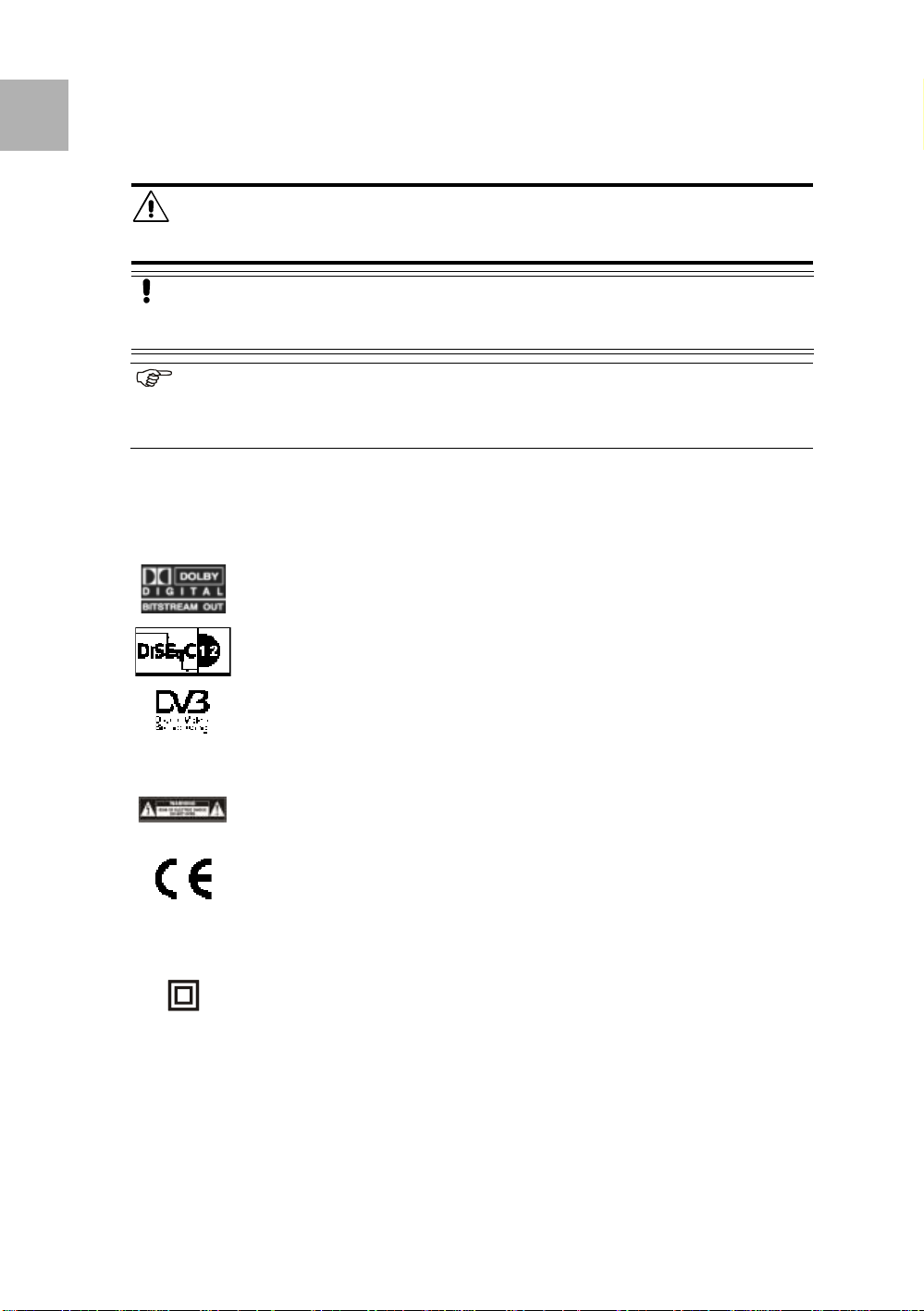
The Dolby Digital logo.
This logo tells you that this receiver is compliant with the Dolby Digital
standard.
The DiSEqC1.2 logo.
This logo tells you that this receiver is compliant with the DiSEqC1.2
standard.
The Digital Video Broadcasting logo.
This logo tells you that this receiver is compliant with the DVB standards as
registered.
© 2003 EchoStar International Corporation
All rights reserved
4.2. REAR PANEL
The ‘risk of electrical shock - do not open’ logo.
This logo tells you that you are not allowed to open the receiver. Only
authorized (service) technicians are allowed to open the box.
The CE logo.
This logo tells you that the receiver is following the provisions of Council
Directive 89/336/EEC on the appro ximation of the laws o f the Mem ber S ta tes
relating to the electromagnetic compatibility and the provisions of Council
Directive 73/23/EEC and 93/68/EEC on the approximation of the laws of the
Member States relating to low voltage and electrical safety.
The double insulation logo.
This logo tells you that the receiver is electrically safe within the normal use
of the receiver as stated in the safety chap ter.
Page 1 - 2 EchoStar International Corporation
Page 7
User Manual
INITIAL INST ALLATION
Initial installation
1. STORAGE AND TRANSPORT
The receiver and it’s accessories are delivered in a protective packaging. This packaging is
designed to protect against excessive shocks and not against ingress of moisture.
1.1. STORAGE
Store the receiver in the original protective packaging, in a dry room with the ambient
conditions as stated in the technical specifications.
1.2. TRANSPORT
Pack the receiver preferably in the original packaging or in an equally protective packaging.
This is to help avoid possible damage to the receiver’s electronics.
2. TO UNPACK YOUR RECEIVER
WARNING
KEEP AWAY THE PLASTIC PACKAGING FROM CHILDREN. THE PLASTIC PACKAGING MAY
CLING TO NOSE AND MOUTH AND PREVENT BREATHING.
When you unpack the contents of the box, confirm that all the parts are included. Refer to
Chapter 2.1. The contents of the box.
Unpack the contents of the box carefully. Electronic equipment as satellite receivers are
easily damaged when you handle it roughly. Examine all parts for damage that may have
occurred during shipment. If you find any damage, stop to unpack the box and call the retail
seller where you bought the receiver.
To help avoid poss ible d amage to the receiv er’s elec tronics , allo w the rec eiver to adap t to the
ambient temperature and humidity level. This to avoid condensation caused by a sudden
change in temperature (e.g. from a cold car into a warm and humid room).
Section 2
English
2
2.1. THE CONTENTS OF THE BOX
All rights reserved
© 2003 EchoStar International Corporation
The box contains:
■ A receiver;
■ A remote control unit;
■ A pair of batteries (for the remote control unit);
■ A set of documentation.
2.2. THE DISPOSAL OF YOUR PACKING MATERIALS
CAUTION
It is recommended to keep the packaging materials for a period of time. In case of
warranty claims, we can request to return the receiver in the original packaging to
protect the electronics. Failing to do so might void the warranty.
Most of the packaging materials can be recycled. Please discard these materials in an
environmental safe manner
ENVIRONMENTAL REMARK
Dispose the packaging in an environmental safe manner. Please inform yourself on
local regulations with respect to the disposal of reusable materials.
DSB-770 FTA Page 2 - 1
Page 8
English
2
Section 2
Initial installation
3. TO INSTALL THE RECEIVER
Receiver description
© 2003 EchoStar International Corporation
WARNING
ALL EQUIPMENT INVOLVED IN THE INSTALLATION TASK MUST BE INSTALLED CORRECTLY AND
SWITCHED OFF. MAKE SURE THAT IT IS SAFE TO PROCEED WITH THE INSTALLATION TASK.
UNSAFE CIRCUITS AND INSTALLATIONS CAN CAUSE (SERIOUS) INJURY OR DAMAGE TO
EQUIPMENT.
CAUTION
Tighten the F-connectors only by hand. Do not use any tools. You will damage the
connector pins if you o vertighten the con nector. This wil l result in loss of si gnal qua lity,
or even total loss of reception.
NOTE
For receivers that are connected with an UHF cable, make sure that the TV is set to
UHF channel 38 (607.25Mhz). If the channel number on the TV and receiver are not
the same, you will have a distorted or no image at all.
For more information, please refer to the user manual of the TV.
3.1. TO SET UP YOUR RECEIVER FOR THE FIRST TIME
The setup is described in the EchoStar User Interface manual that is also part of the
documentation se t.
All rights reserved
Page 2 - 2 Digital Satellite Receivers - Fixed
Page 9
Receiver description
FAMILIARIZATION
Familiarization
1. THE RECEIVER
The front panel of the digital satellite receiver gives you the control over the basic functions.
The rear panel gives you various connections to connect the audio and video equipment as
well as a terrestrial and a dish antenna. Ventilation slots in the housing are provided for
cooling of the internal electron ic s.
The software of the receiver co nt a ins the Ech oStar user interface with on-screen help, which
gives you easy control over the features of the receiver. The software contains also a large
database of pre-programmed satellites and transponders which are used for a quick
installation. For detailed informat ion, please refer to the E choStar user manual that is also
part of the documentatio n set.
FEATURE HIGHLIGHTS
■
EchoStar Multilingual User Interface;
■ 14 day EPG;
■ Freeze Picture;
■ 7 Timers (incl. Sleep Timer);
■ 4,400 Digital Channels, 80 Satellites, 1,500 Transponders;
■ Multiple Favorite Channel Lists (4 for TV, 4 for Radio);
■ Channel Sorting;
■ Multiple Search Modes;
■ S/PDIF Audio Output (Dolby Digital Compatible);
■ DiSEqC
■ Software Update via Internet/Satellite (RS-232/OTA).
TM
1.2, GoTo X;
Section 3
English
3
1.1. THE RECEIVER FRONT PANEL
All rights reserved
© 2003 EchoStar International Corporation
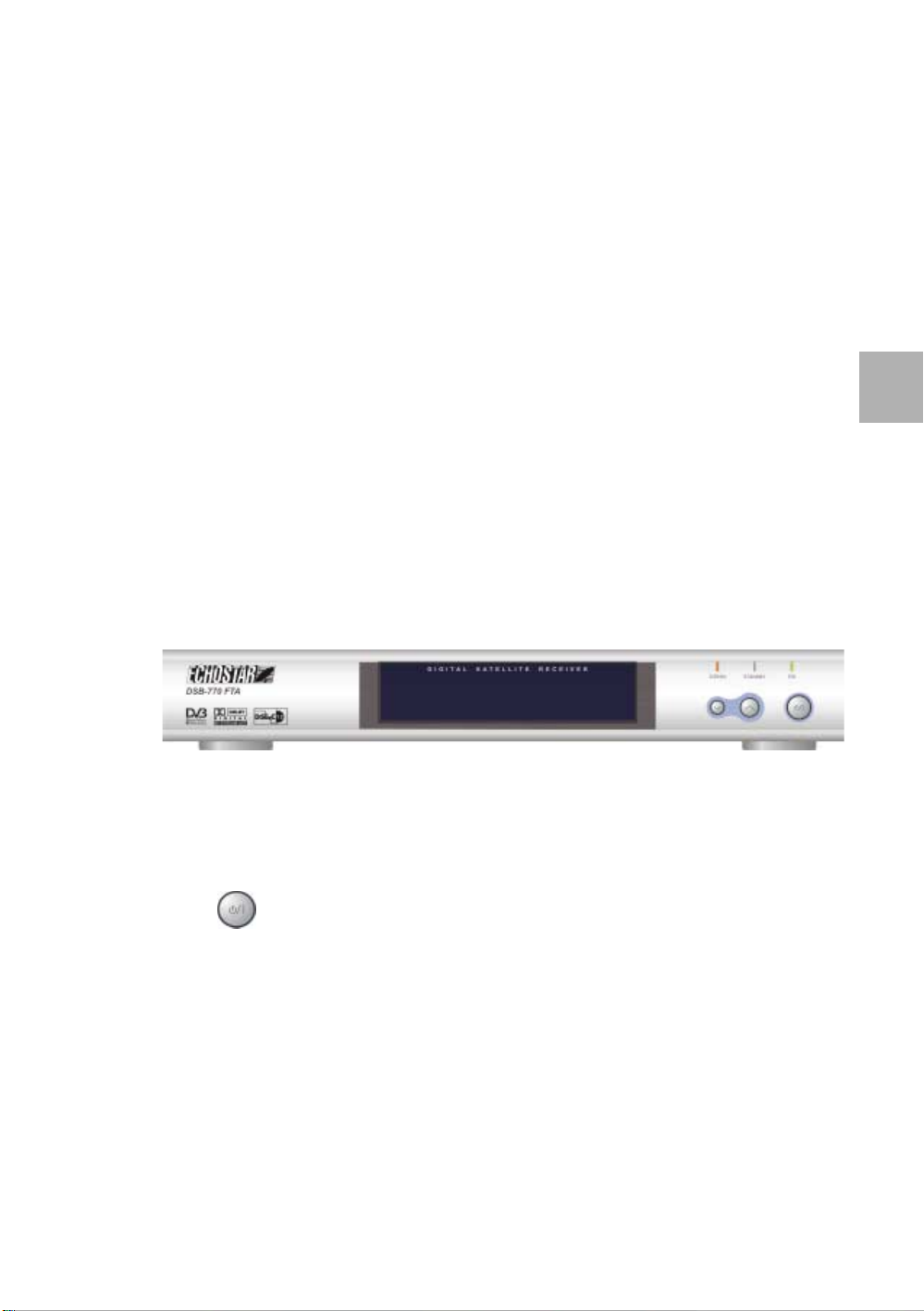
The front panel has:
■ The STANDBY indicator to indicate standby.
■ The ON indicator to indicate ON.
■ The SIGNAL indicator to indicate that you receive a valid signal.
■ The key, to switch the receiver to Standby or On.
■ The arrow up and down keys, to select one channel up or down.
DSB-770 FTA Page 3 - 1
Page 10
English
3
Section 3
Familiarization
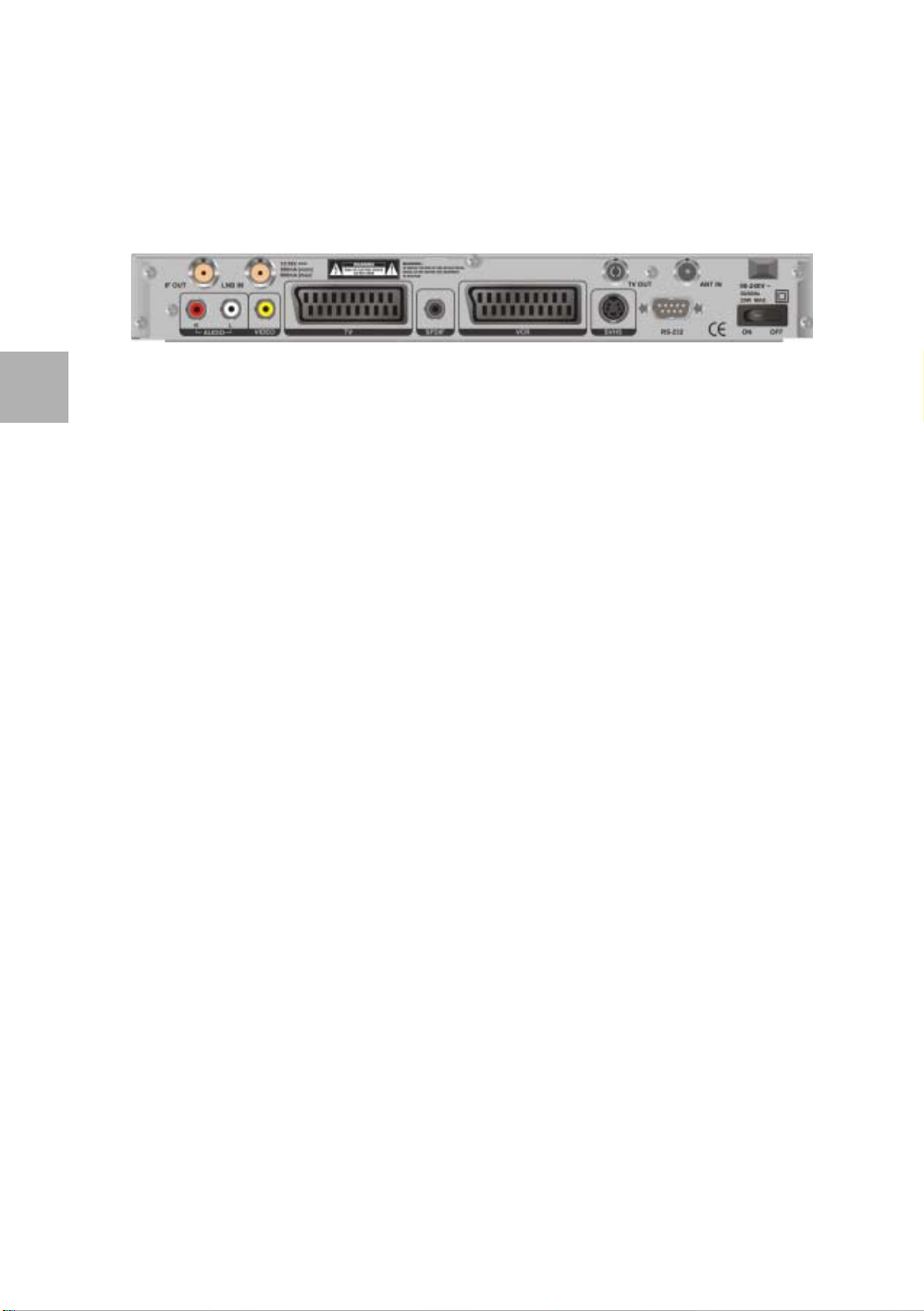
1.2. THE RECEIVER REAR PANEL
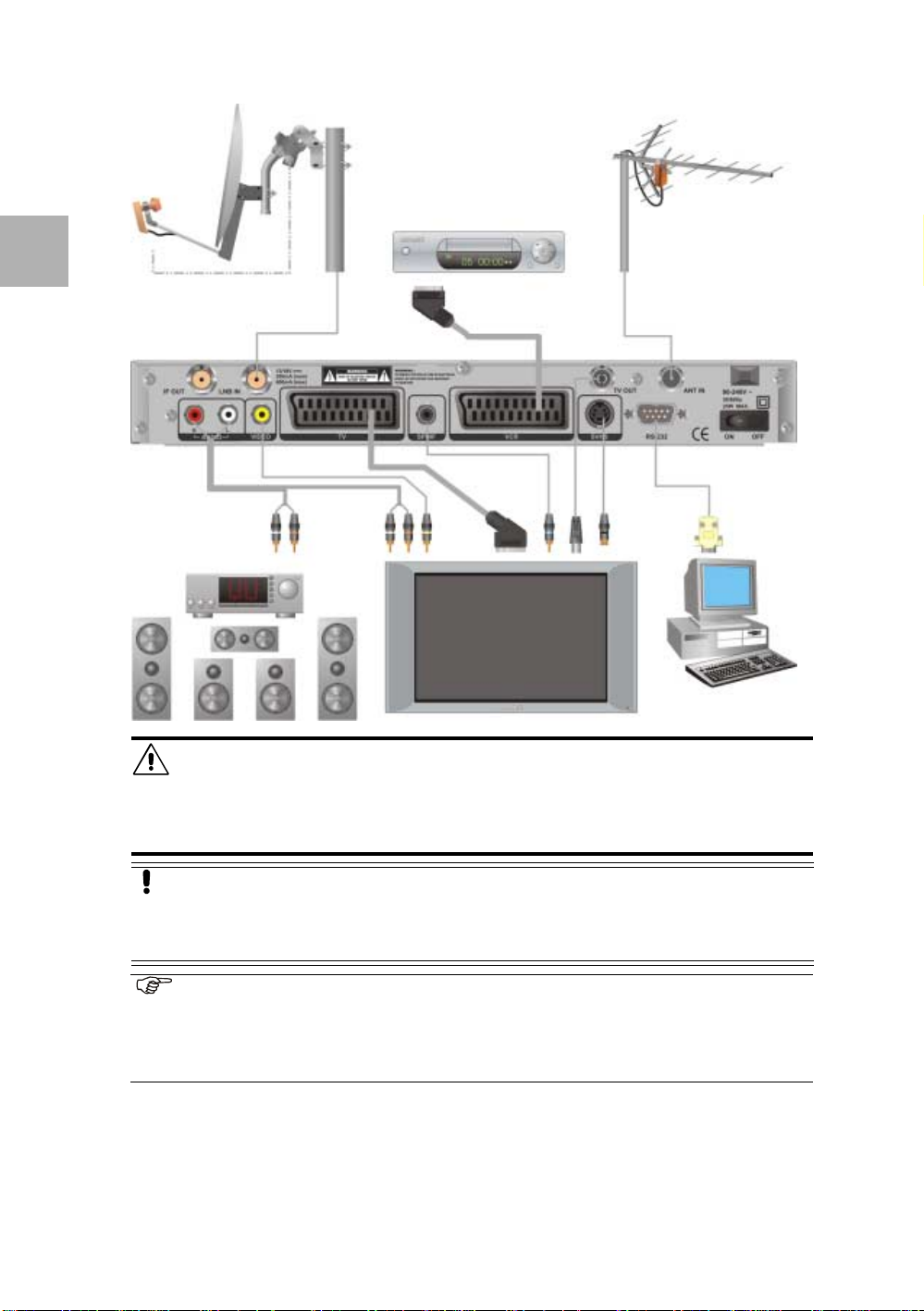
The rear panel has an ON/OFF switch, it also gives you various connections to connect the
audio and video equipment as well as a terrestrial and dish antennas. Depending on the
installation setup , you may not use a ll connectors , but they are provid ed for any d esired se tup
in future.
The available connectors on the rear panel are:l
■ The IF OUT connector (F-type),
for a loop through connection;
■ The LNB INconnector (F-type),
for the connection of a dish to the
receiver, to receive the digital
broadcasts;
■ The AUDIO R connector (RCA),
for the connect ion of t he right audio input
channel of a stereo set;
■ The AUDIO L connector (RCA),
for the connection of the left audio input
channel of a stereo set;
■ The VIDEO connector (RCA),
for the connection to the composite
video input of the TV (monitor);
■ The TV connector (SCART),
for the connection o f a TV with the use of
a fully-featured SCART cable;
■ The S/PDIF connector (RC A) ,
for the connection of Dolby Digi tal (AC-3)
compatible audio equipment;
■ The VCR connector (SCART),
for the connection of a VC R w ith th e u se
of a fully-featured SCART cable;
■ The TV OUT connector (IEC),
for the connection to the antenna
connector of a TV or a VCR;
■ The ANT IN connector (IEC),
for the connection of an terrestrial
TVantenna;
■ The SVHS connector (DIN),
for the connection of a SVHS comp atible
TV;
■ The RS-232 connector (sub-D),
for the connection to the serial
communication port of a PC;
■ The ON/OFF switch,
to switch the receiver On or OFF.
User Manual
© 2003 EchoStar International Corporation
All rights reserved
Connection Video signal Result
SCART Connector (TV) RGB Best quality (DVD)
SCART Connector (TV, VCR) CVBS (Composite video) VHS quality (VCR tape)
DIN Connector (SVHS)* Super-VHS Improved VHS quality
RCA Connector (VIDEO) CVBS (Composite video) VHS quality (VCR tape)
IEC Connector (TV OUT)** CVBS (Composite video) UHF quality (Antenna)
* Note that you have to connect the audio separately (RCA connector = Audio L/R).
** Note that UHF is a transmission technique that is vulnerable to interference (snow).
1.3. THE RECEIVER SOFTWARE
The use of the receiver is described in the EchoStar user manual that is also part of the
documentation se t.
Page 3 - 2 Digital Satellite Receivers - Fixed
Page 11
Receiver description
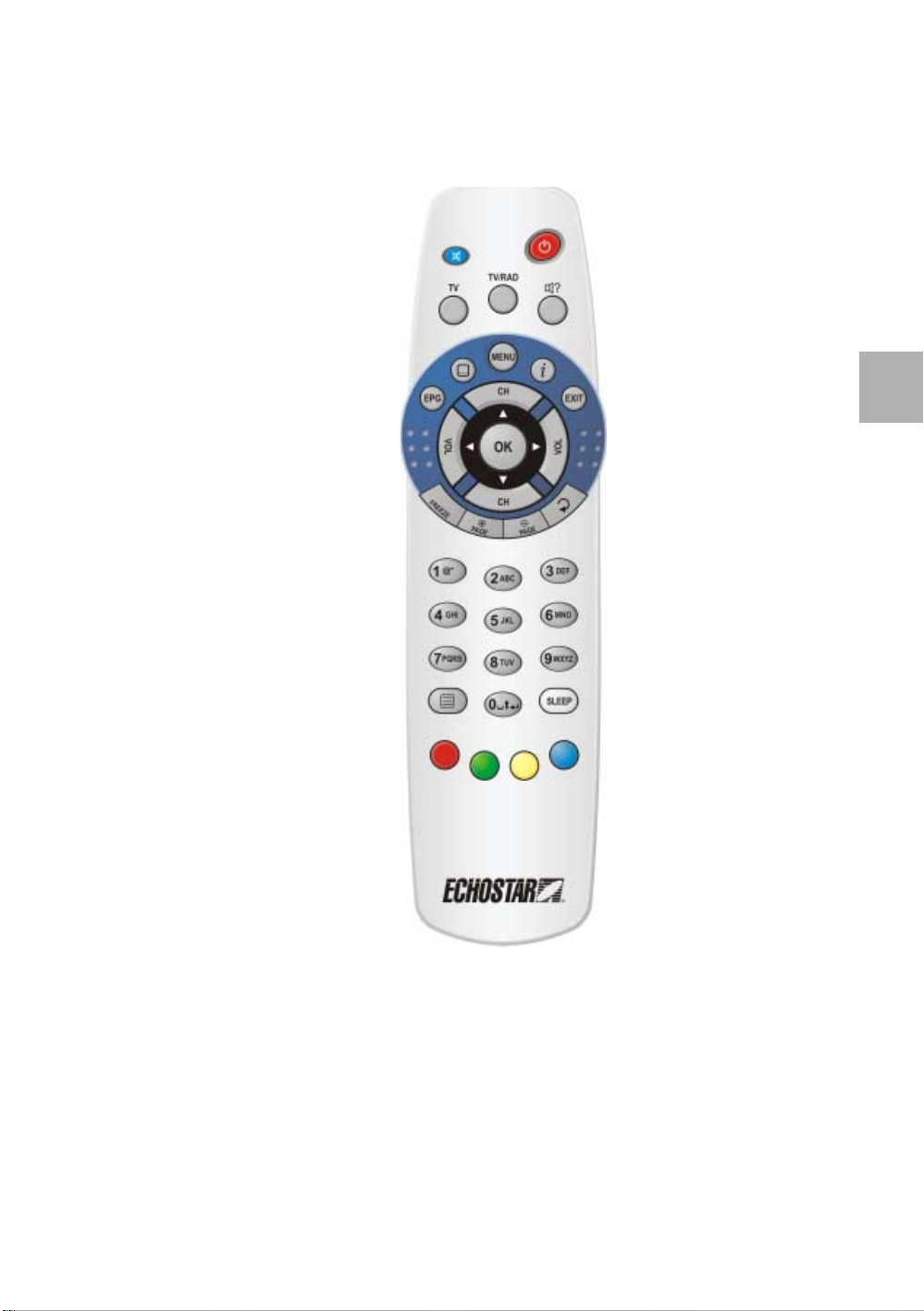
1.4. THE REMOTE CONTROL UNIT (RCU)
The EchoStar Remote Control Unit (RCU) is used to control the receiver.
The RCU requires two AAA (LR03, UM4) alkaline batteries to operate.
Familiarization
Section 3
■ Mute
To, temporary, shut down
the audio.
■ TV
To switch the receiver
signal to the TV on or off
(SCART connection only).
■ EPG
To view the EPG.
■ Subtitle
To choose another subtitle
language.
■ VOL
To decrease the volume.
■ CH
To go one channel up.
■ OK
To go to the (favorites) lists;
To make a menu selection.
■ Freeze
To f reeze the TV image.
■ Page +
To go up one page.
All rights reserved
■ NUMBER KEYS
To enter alpha-numerical
settings;
© 2003 EchoStar International Corporation
To type in a channel
number.
■ Teletext
To choose teletext.
■ Red;
T o se lect a languag e (initial
setup only);
To access the SAT list
To select a favorite list;
To select an edit option;
To access the EPG timers.;
To select an active option.
■ Green
To select a LNB (initial
setup only);
To select a favorite list;
To select an edit option;
To sort a list;
To select an active option.
■ ON/STANDBY
To switch to standby or on.
■ TV/RAD
To switch to TV or Radio
mode.
■ Audio
To choose a language.
■ MENU
To go to the main menu.
■ i
To view the help;
To view additional
information.
To select an active option.
■ EXIT
To leave a menu or feature .
■ VOL
To increase the volume.
■ CH
To go one channel down.
■ ARROW CLUSTER
To go left, right, down or
left.
■ Page -
To go down one page.
■ Recall
To go to the previous
channel.
■ White
No function.
SLEEP
To select the sleep timer.
■ Yellow
To select a SAT (initial
setup only);
To select a favorite list;
To select an edit option;
To select an active option.
■ Blue
To select the Dish
installation menu (initial
setup only);
To select a favorite list;
To select an edit option;
To select an active option.
English
3
DSB-770 FTA Page 3 - 3
Page 12

English
3
Section 3
Familiarization
2. TECHNICAL SPECIFICATIONS
2.1. GENERAL
■ EchoSt a r Multi lingu al Us er Inte rface
■ 14 day EPG (Electronic Program Guide)
■ Freeze Picture
■ 7 Timers (incl. Sleep Timer)
■ 4,400 Digital Channels, 80 Satellites, 1,500 Transponders
■ Channel Sorting
■ Multiple Fa vorite Channel Lists (4 for TV, 4 for Radio)
■ Multiple Search Modes
■ S/PDIF Audio Output (Dolby Digital Compatible)
■ Software Update via Internet/Satellite (RS-232/OTA)
■ Teletext (OSD and VBI Re-insertion), Subtitling (DVB and Teletext supported)
■ TV and Radio mode
■ Aspect Ratio: 4:3, 16:9 (Letter box, Pan&Scan, Widescreen)
■ Manual PID Entry and Editing
■ Volum e Contro l; Audi o Mute
■ Parental Control, Channel Lock, Receiver Lock
■ Channel Preview Feature (Thumbnail)
■ MPEG-2/DVB Compliant
User Manual
© 2003 EchoStar International Corporation
2.2. TUNER DEMODULATOR
■ Receiving Frequency 950-2,150MHz
■ IF Connector
■ LNB Control 13/18V, 0/22kHz, DiSEqC
■ Demodulator QPSK, C/Ku-Band
■ Symbol rate 2-45Msym/s (SCPC/MCPC Compatible)
■ Video system SECAM; PAL B/G, I, D/K, M; NTSC
F-Type, 1 Input, 1 Output (Loop through)
TM
1.2, GoTo X
2.3. POWER
■ Mains 90-240Vac, 50-60Hz, 25W (max)
■ LNB and DiSEqC 13/18Vdc, 600mA (max)
2.4. PHYSICAL DIMENSIONS
■ Weight 1.300 g
■ Size (WxDxH) 28 cm x 21 cm x 4 cm
2.5. AMBIENT CONDITIONS
■ Storage temp. between -40 and +50 degrees Celsius (no condensation allowed)
■ Operation temp. between +5 and +45 degrees Celsius (no condensation allowed)
2.6. CONNECTIONS
■ SCART Connector TV, VCR
■ RCA Connector AUDIO L/R, VIDEO, S/PDIF
■ IEC Connector TV OUT, ANT IN
■ RS-232 Connector RS-232 (Baud Rate 115,200)
■ DIN-Connector SVHS
■ RGB Video out TV (SCART)
■ Composite Video out TV, VCR (SCART), SVHS (DIN), VIDEO (RCA)
■ Dolby Digital out Coaxial S/PDIF (RCA)
All rights reserved
Page 3 - 4 Digital Satellite Receivers - Fixed
Page 13
Receiver description
TROUBLESHOOTING
Troubleshooting
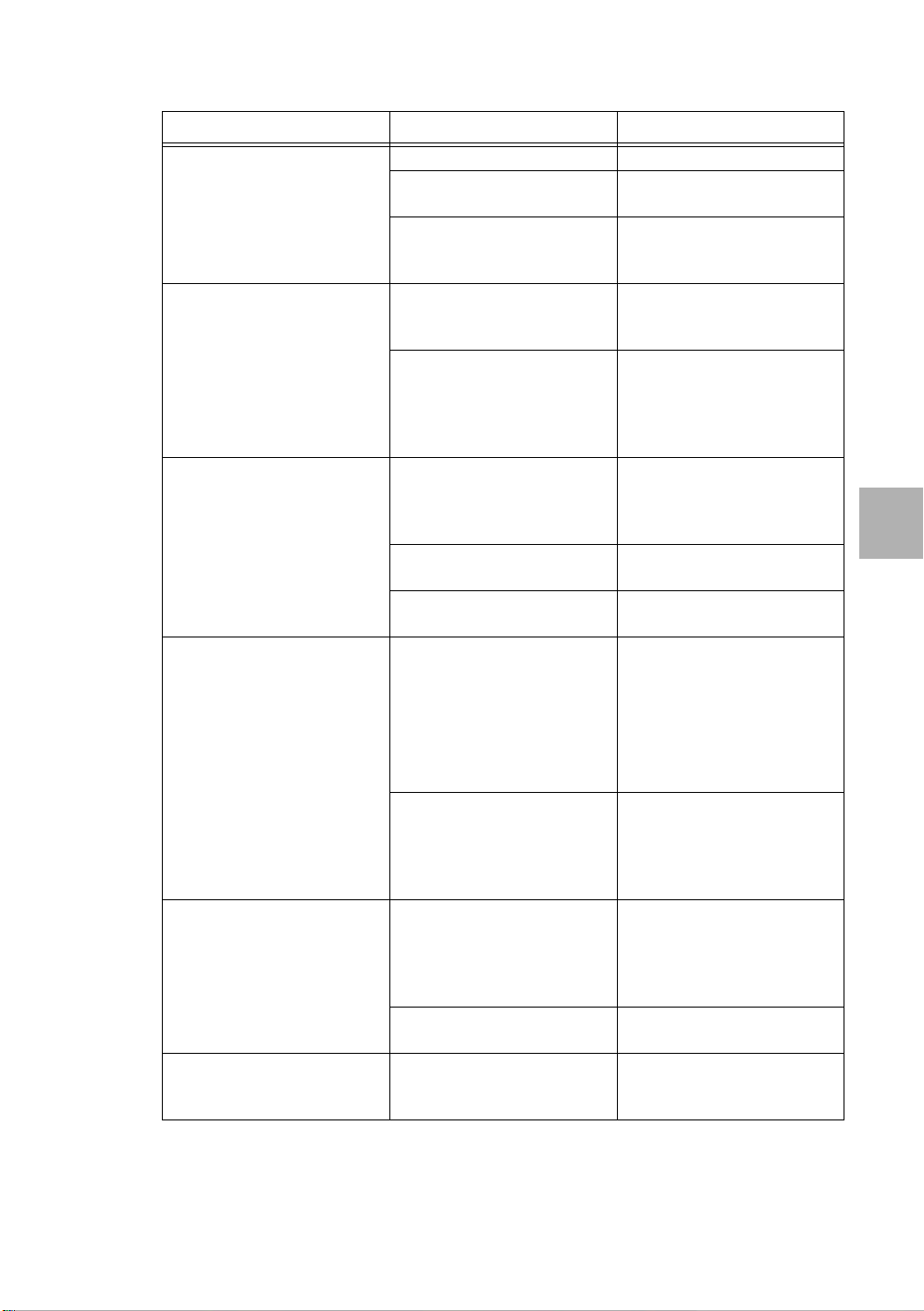
1. TO SOLVE A TV OR RADIO RELATED PROBLEM
Problem Possible cause What to do?
1. No picture or sound in the
TV or radio mode.
2. Bad picture or noisy
sound in the TV or radio
mode.
3. My television does not
give any audio.
4. The TV shows a
No Signal message.
All rights reserved
© 2003 EchoStar International Corporation
5. There is no Dolby Digital
(AC-3) sound to my other
equipment.
6. I cannot view or listen to a
scrambled channel.
■ Receiver is in standby. ■ Switch the receiver on.
■ Cable related problems. ■ Check the cable
connections.
■ Dish/LNB related
problems.
■ Make sure the dish and
LNB are correctly
adjusted.
■ Bad reception of the
signal.
■ Make sure the dish and
LNB are clea n and
correctly adjusted.
■ Signal interference with
UHF-installation.
■ Check the UHF settings.
Make sure you use the
correct channel. Please
refer to the TV/Radio user
guide.
■ The equipment is
connected to the receiver
with a RCA (video) or
■ Connect the equipment
also with an audio cable
(RCA).
SVHS cable only.
■ The MUTE option is
active.
■ The volume is set to
minimum.
■ Bad reception of the
signal.
■ On the RCU, press the
mute key once.
■ On the RCU, press the
VOL key.
■ Make sure the channel
selected transmits.
■ Make sure the correct
dish or LNB is selected.
■ Make sure the dish and
LNB are clea n and
correctly adjusted.
■ Dish is moving towards
the selected satellit e
(DiSEqC1.2, GoTo X
only).
■ A moving dish cannot
receive any signal, allow
the dish some time to
move to the selected
satellite.
■ The equipment is
connected to the receiver
with a RCA or SCART
cable only.
■ Connect the
S/PDIF connector of the
receiver to the Dolby
Digital input of the
receiving equipment.
■ The Dolby Digit al option is
not set to On.
■ This receiver has no
■ Set the Dolby Digital
option to On.
Conditional access
capabilities.
Section 4
English
4
DSB-770 FTA Page 4 - 1
Page 14
English
4
Section 4 Troubleshooting User Manual
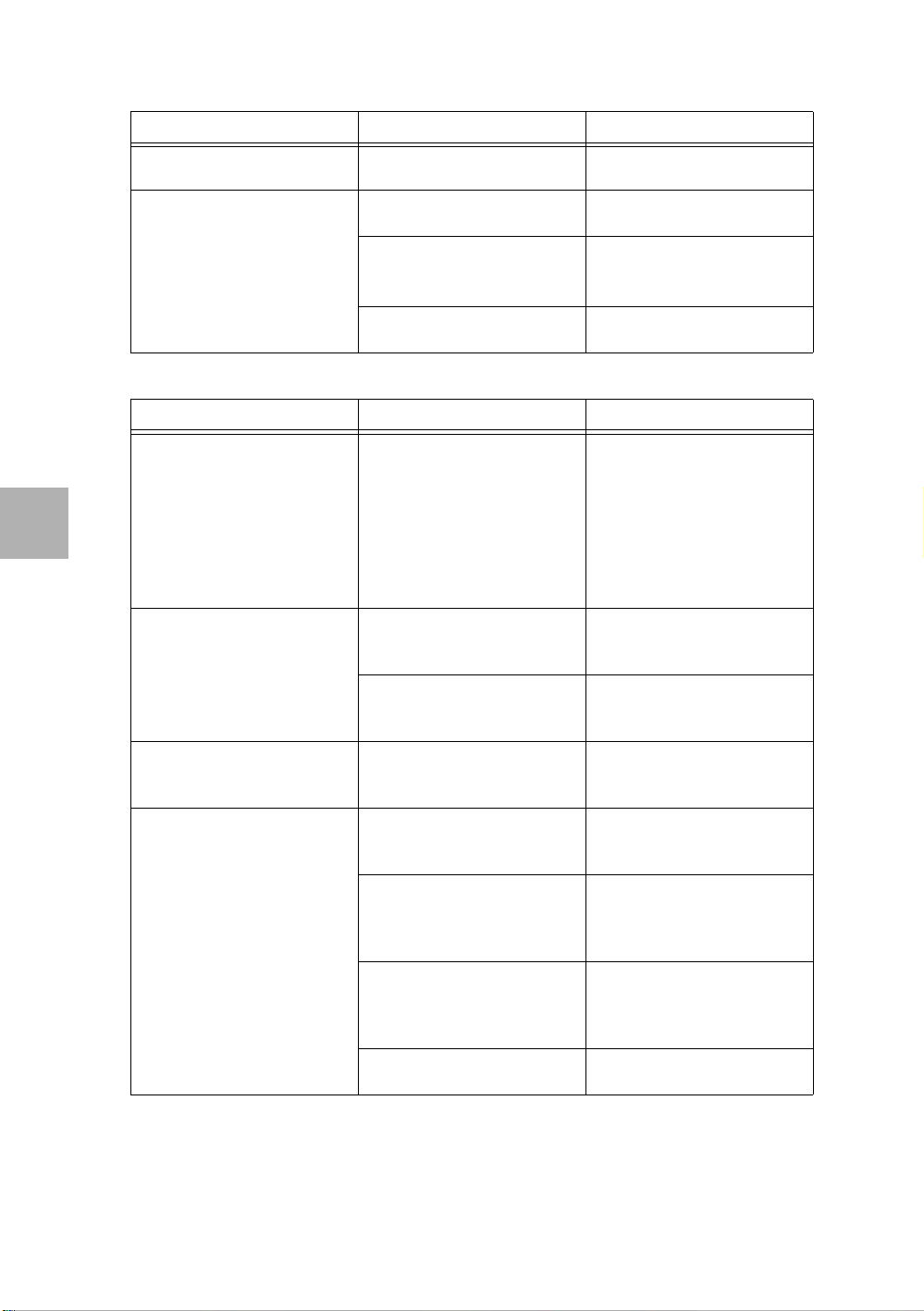
2. REMOTE CONTROL UNIT (RCU) RELATED
Problem Possible cause What to do?
1. Receiver does not
■ Batteries are empty. ■ Insert new batteries.
respond to the RCU.
2. Receiver does sometimes
not respond to the RCU.
■ Direct sun light from
behind the receiver.
■ Y ou do not aim suf ficiently
at the receiver.
■ Batteries are almost
■ Close the sun blinds or
get closer to the receiver.
■ Aim at the receiver
display.
■ install a RCU extender.
■ Insert new batteries.
empty.
3. INSTALLATION RELATED
Problem Possible cause What to do?
1. My television does not
receive any signal from
the receiver (UHF only)
2. My television does not
receive any signal from
the receiver
3. My television shows black
areas on the left and right
of the screen.
4. During (initial) setup of the
receiver, no channels are
found.
■ You did not select the
correct audio/video
channel on your TV.
■ You did not select the
correct A/V channel on
your TV.
■ You did not use a correct
SCART cable.
■ You did not select the
correct aspect ratio for
your TV.
■ You did not select the
correct LNB(F).
■ When installed, you have
selected the incorrect
switch port.
■ You have selected the
incorrect satellite to
search channels on.
■ You have selected the
incorrect se arch method.
■ Refer to the user manual
of the TV for instructions.
■ On the receiver, In the TV
system menu select the
correct channel and PAL
setting.
■ Use another method to
connect the receiver.
■ Select the correct A/V
channel on your TV.
■ Use only a full featured
SCART cable that is
correctly shielded.
■ On the receiver, in the
TV System menu select
the correct aspect ratio.
■ On the receiver, in the
installation setup menu
select the correct LNB(F).
■ On the receiver, in the
installation - User LNB
make the correct
selections.
■ On the receiver, in the
installation - System s etup
- Search channels menu
select the correct satellite.
■ At an initial setup, always
choose the option All.
© 2003 EchoStar International Corporation
All rights reserved
Page 4 - 2 Digital Satellite Receivers - Fixed
Page 15

Receiver description
GLOSSARY
C-band A frequency range (3.70-4.20 GHz) used for satellite
DiSEqC A standard through which it is possible to let a DiSEqC
Feedhorn A part of the dish which collects the signals from the dish. The
Frequency band A frequency band is a range of frequencies which are dedicated
FTA An unscrambled broadc ast which you can view without
Horizontal In the satellite industry, horizontal is used to indicate the
KU-band A frequency range (10.70-18.00 GHz) used by most European
Letter box This setting allows you to view a wid escreen fil m on a norma l TV
LNB A device behind the feedhorn which processes the signal into a
LNBF A LNB with an integrated Fe edhorn. So the LN BF comes as on e
NTSC USA video standa rd with image format 4:3, 6 25lines, 60 Hz and
PAL European video standard with image format 4:3, 625 lines,
All rights reserved
Pan&Scan This setting allows you to view a widescreen film on a normal TV
© 2003 EchoStar International Corporation
Polarization Broadcasts are done in a particular frequency band. To make
RS-232 connection A RS-232 connection allows you to connect equipment to the
SCART cable A SCART cable i s also kno wn as ‘Peri tel’ cabl e and is common ly
SMATV A satellite master antenna TV system is a system which shares
Symbol rate Information in the stre am w hich t ells t he rec eiver a t which speed
SVHS SVHS (Super-VHS) is a video signal with separated
Glossary
Section 5
broadcasts.
compatible receiver send a signal over the RF cable to a
switching device to switch between different LNBs or dishes.
The DiSEqC uses the 22 kHz signal to control the switching
device.
signal is then fed to the LNB(F).
to a certain usag e. In the sat ell ite area, commonly known bands
are the C-band and the Ku-band.
additional payments to a service provider.
direction in which the received signal is polarized. Normally you
will find that it is abbreviated as H.
TV satellites.
in real widescreen format. Note that black banners will appear
on the top and bottom of the screen.
format which is unders too d b y the rec eiv er for fu rthe r pro ce ss in g
single unit.
4 MHz bandwidth with a total of 6 MHz video channel width.
50 Hz and 4 MHz bandwidth with a tot a l of 8 MHz video channel
width.
without black banners on the top and bottom. Note that some of
the image is cut of to make it fit on your screen.
maximum use of a frequency band and bring you the maximum
number of programs, the broadcasts are polarized in different
ways to fit as many as possible programs into one frequency
band.
receiver which support s the RS-232 protocol.
used in Europe to connect the audio and video equipment. A
fully furn ished SCART cable has 21 wires which is at both sides
finished with a 21-pin connector.
the reception reso urces and is inten ded for the dis tributi on of T V
and radio signals to the user in one ore more buildings.
(rate) the transponder sends the digital information (symbols).
The receiver must be able to handle the symbol rate to process
the signal correctly into a correct image.
chrominanc e and luminance. SVHS is an improvement for the
VHS (composite) video as found on VCR tapes.
English
5
DSB-770 FTA Page 5 - 1
Page 16

Section 5
Glossary
Transponder Equipment inside a satellite responsible for receiving a single
uplinked channel and rebroadcasting it back to Earth.
Vertical In the satellite industry, vertical is used to indicate the direction in
which the received signa l is p olariz ed. N ormall y you w ill fi nd that
it is abbreviated as V.
User Manual
© 2003 EchoStar International Corporation
English
5
All rights reserved
Page 5 - 2 Digital Satellite Receivers - Fixed
 Loading...