

Page 1

7 things to know about your
DxO ONE
7 choses à savoir sur votre
DxO ONE
7 Dinge, die Sie über Ihre
DxO ONE wissen sollten
8
.
A
1
:
S
1
m
m
9
.
1
1
P
H
E
R
I
C
A
L
1
’
’
B
S
I
S
E
N
S
X
I
P
M
2
.
0
2
R
O
Page 2
1
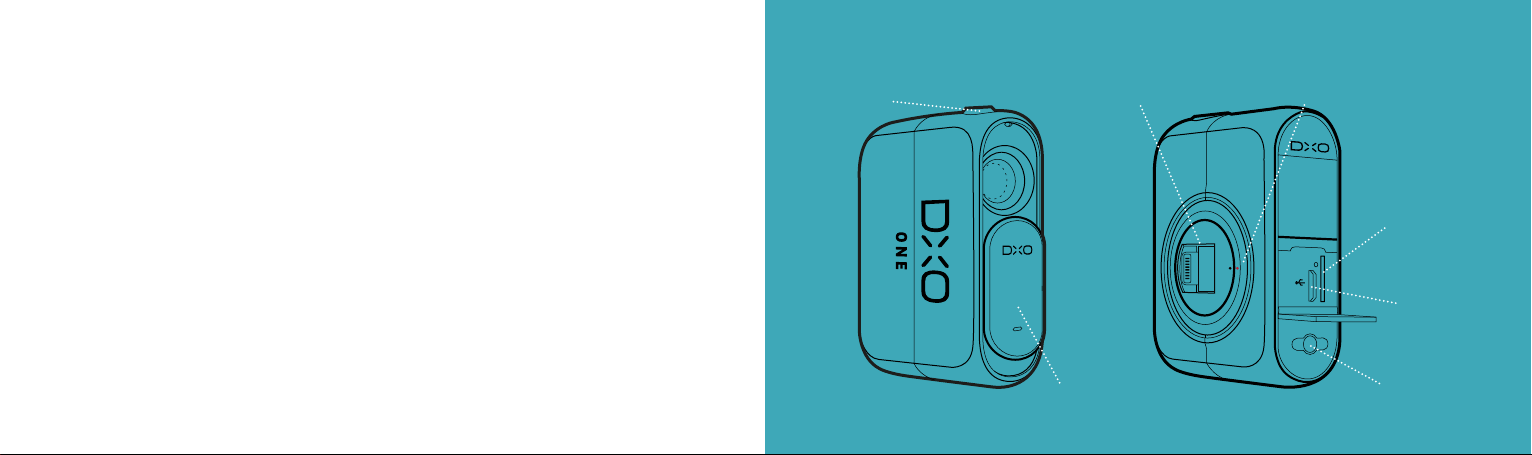
Your DxO ONE is super simple to use.
Please quickly review the few, but important parts of your DxO ONE. If you ever need
more information, please visit
support.dxo.com
.
Shutter Release / Record Button
Déclencheur / Bouton de démarrage
Auslöser / Video Start
Lightning Connector
Lightning Connecteur
Lightning Connector
Alignment Dots
Indicateur d’alignement
Zwei Synchronpunkte
Votre DxO ONE est très simple d’utilisation.
Familiarisez-vous avec les principales caractéristiques de votre DxO ONE. Si vous avez
besoin de plus de renseignements, consultez la page
support.dxo.com
.
Ihre DxO ONE ist super-einfach zu bedienen.
Bitte sehen Sie sich die wenigen, aber wichtigen Teile Ihrer DxO kurz genauer an.
Für weitere Informationen besuchen Sie bitte
support.dxo.com
.
Lens Cover
Cache de l’objectif
Objektivabdeckung
microSD Card Slot
mémoire microSD
microSD Kartenslot
USB Connection
Port micro-USB
USB Port
Lanyard Attachment
Anneau d’attache
Trageriemen-Aufnahme
Page 3
2
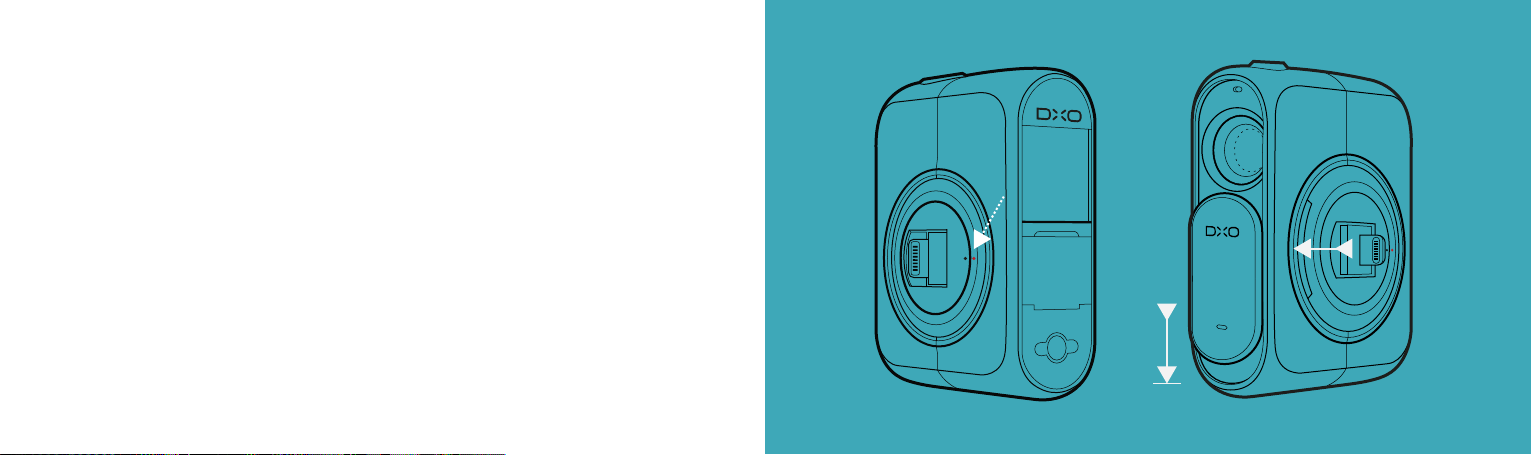
Your DxO ONE takes a little practice to close.
Just remember to (1) line up the black and red dots on the circular hub before
disconnecting your iPhone. Then (2), push the lens cover all the way down while
folding the connector.
Votre DxO ONE peut sembler difficile à refermer lors de sa
première utilisation.
Alignez (1) les points noir et rouge sur l’anneau avant de déconnecter votre iPhone, puis
poussez le cache de l’objectif vers le bas (2) tout en abaissant le connecteur.
Um die DxO ONE richtig zu schließen, brauchen Sie ein wenig Übung.
Denken Sie daran, dass (1) der rote und der schwarze Markierungspunkt auf der drehbaren
iPhone-Schnittstelle übereinstimmen müssen, bevor Sie Ihr iPhone von der Kamera trennen.
Schieben Sie dann (2) die Objektivabdeckung ganz herunter, während Sie den Lightning
Connector in die drehbare Schnittstelle klappen.
1 2
Page 4

3
Your DxO ONE is controlled by a free app.
Download it in the App Store and your big, beautiful iPhone screen becomes your
big, beautiful viewfinder. Just unlock your iPhone, plug in your DxO ONE, and
follow the instructions.
Votre DxO ONE se pilote avec une application gratuite.
Téléchargez-la sur l’App Store afin de transformer votre écran d’iPhone en un véritable
viseur grand format. Déverrouillez simplement votre iPhone, connectez votre DxO ONE
et laissez-vous guider.
Sie steuern Ihre DxO ONE mit einer kostenlosen App.
Laden Sie die App aus den App Store herunter. Das Display Ihres iPhones wird ein
großer Sucher und das Bedienfeld für die DxO ONE. Entsperren sie einfach Ihr iPhone,
verbinden Sie es mit Ihrer DxO ONE und folgen Sie der Menüsteuerung.
Page 5
4
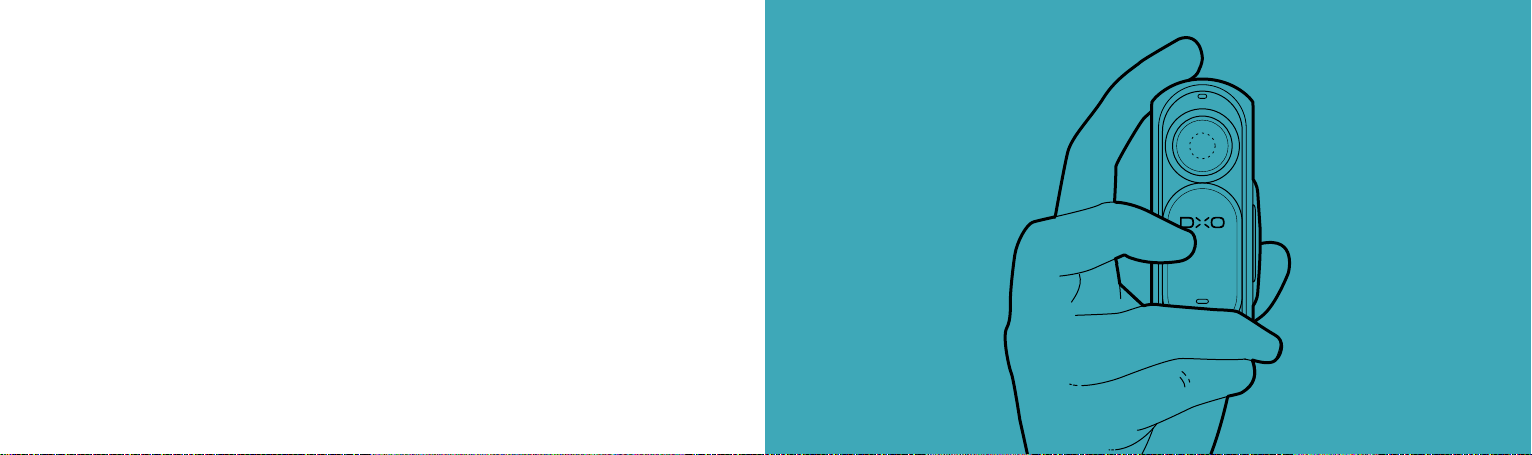
Your DxO ONE is a camera on its own.
Want to take pictures on the fly without framing? Just slide open the lens cover and
snap away, with one hand. Want the full experience? Connect your DxO ONE to your
iPhone, frame and shoot.
Votre DxO ONE est un appareil photo à part entière.
Vous souhaitez prendre des photos à la volée, sans viser ? Faites coulisser le cache de
l’objectif et photographiez librement, d’une seule main. Vous souhaitez profiter pleinement
de l’expérience ? Connectez votre DxO ONE à votre iPhone, cadrez et déclenchez.
Die DxO funktioniert auch ohne das iPhone.
Sie möchten schnell ohne Sucher fotografieren? Einfach die Objektivabdeckung öffnen
und den Auslöser zum Fokussieren halb, dann ganz durchdrücken. Sie möchten richtig
fotografieren? Die DxO ONE mit dem iPhone verbinden, den Bildausschnitt bestimmen
und auslösen.
Page 6

5
Your DxO ONE has an exceptional selfie mode.
Plug in the camera with the iPhone® facing you and the DxO ONE automatically goes
into Selfie mode. It uses a soft box feature that brightens your iPhone screen so your
face is lit more naturally.
Votre DxO ONE possède un mode Selfie.
Connectez la DxO ONE à votre iPhone, objectif et écran dirigés vers vous pour passer
automatiquement en mode Selfie. L’écran de votre iPhone déclenche un éclairage
naturel pour mettre en valeur les visages.
Ihre DxO ONE hat einen ganz besonderen Selfie Modus.
Verbinden Sie die Kamera so mit dem iPhone, dass ihr Objektiv auf Sie gerichtet ist.
Die DxO ONE startet dann automatisch im Selfie-Modus. Dieser Modus verwendet eine
Softbox-Funktion, durch die Ihr Gesicht in einem natürlichen Licht erscheint.
8
.
A
1
:
S
1
P
H
E
m
R
m
I
C
9
:
A
1
L
1
1
X
I
’
’
P
B
M
S
2
I
.
S
0
E
2
N
S
O
R
SMILE!
Page 7
6
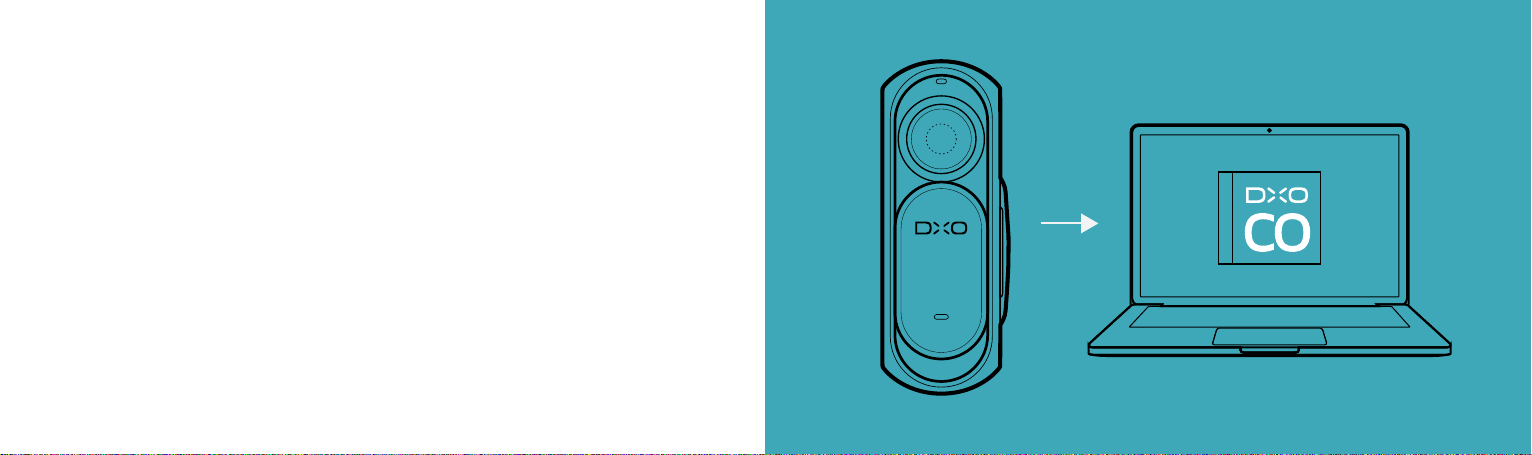
Your DxO ONE’s photos can get even better.
Download DxO Connect from dxo.com to apply advanced image processing to your
photos with one click. Your camera captures DNG files by default, which are easily
read by OS X Photos, Adobe Lightroom, or your preferred photo app.
Vos photos DxO ONE peuvent être optimisées.
Téléchargez DxO Connect sur dxo.com pour optimiser vos photos en un seul clic. Par défaut,
votre appareil photo enregistre des images au format DNG que vous pouvez facilement ouvrir
dans OS X Photos, Adobe Lightroom ou dans votre application photo favorite.
Die Fotos Ihrer DxO ONE können noch schöner werden.
Laden Sie DxO Connect von unserer Website dxo.com herunter um fortgeschrittene
Bildbearbeitung mit nur einem Klick auf Ihre Bilder anzuwenden.Ihre Kamera macht
standardmäßig Aufnahmen im DNG-Format, das ganz einfach von OS X Photos, Adobe
Lightroom oder Ihrer bevorzugten Bildbearbeitungsanwendung gelesen werden kann.
8
.
A
1
:
S
1
P
H
E
m
R
m
I
C
9
:
1
1
1
A
L
X
I
’
’
P
B
M
S
2
I
.
S
0
E
2
N
S
O
R
Page 8

7
Your DxO ONE comes with a crew.
Your total satisfaction is our top priority, so if you ever have any problems with your
DxO ONE, just contact us at support.dxo.com. We are absolutely committed to helping
you make the most of the DxO ONE.
Votre DxO ONE bénéficie d’un support client.
Notre priorité est de vous satisfaire. Si vous rencontrez un quelconque problème avec
votre DxO ONE, contactez-nous via support.dxo.com. Nous nous engageons à vous
aider à tirer parti du meilleur de votre DxO ONE.
Zu Ihrer DxO ONE gehört auch die Unterstützung eines
ganzen Teams.
Für uns hat Ihre komplette Zufriedenheit die höchste Priorität. Sollten Sie also je Probleme
bei der Verwendung Ihrer DxO ONE haben, kontaktieren Sie uns bitte über support.dxo.
com. Wir möchten Sie so unterstützen, dass Sie Ihre DxO ONE optimal nutzen können.
Page 9
PRO QUALITY CAMERA.
MINIATURIZED.
 Loading...