

Page 1
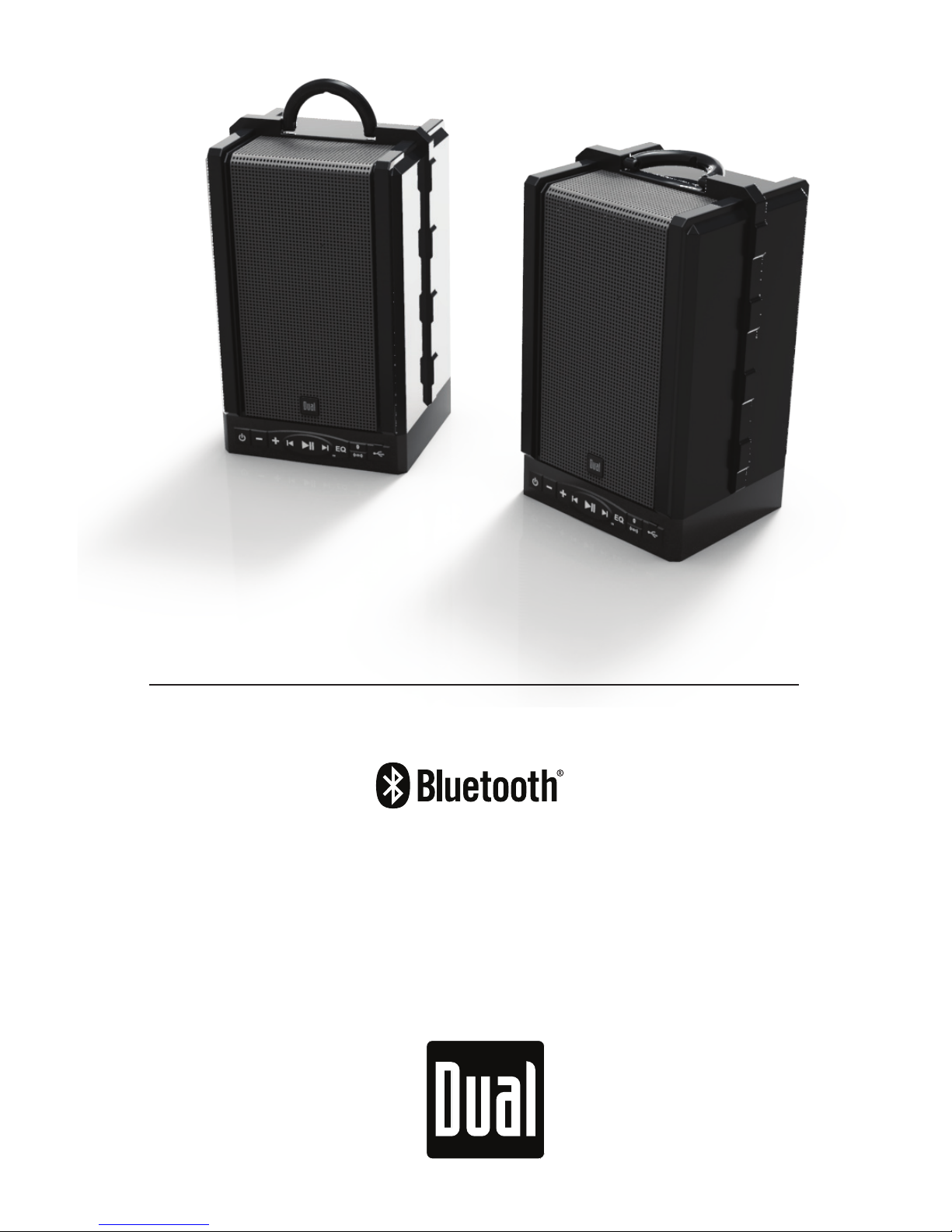
LU48BTS
QUICK START GUIDE
TRUE WIRELESS
PORTABLE STEREO SPEAKERS
®
Page 2
QUICK START GUIDE
QUICK START GUIDE
2 3
LU48BTS - IntroductionLU48BTS - Introduction
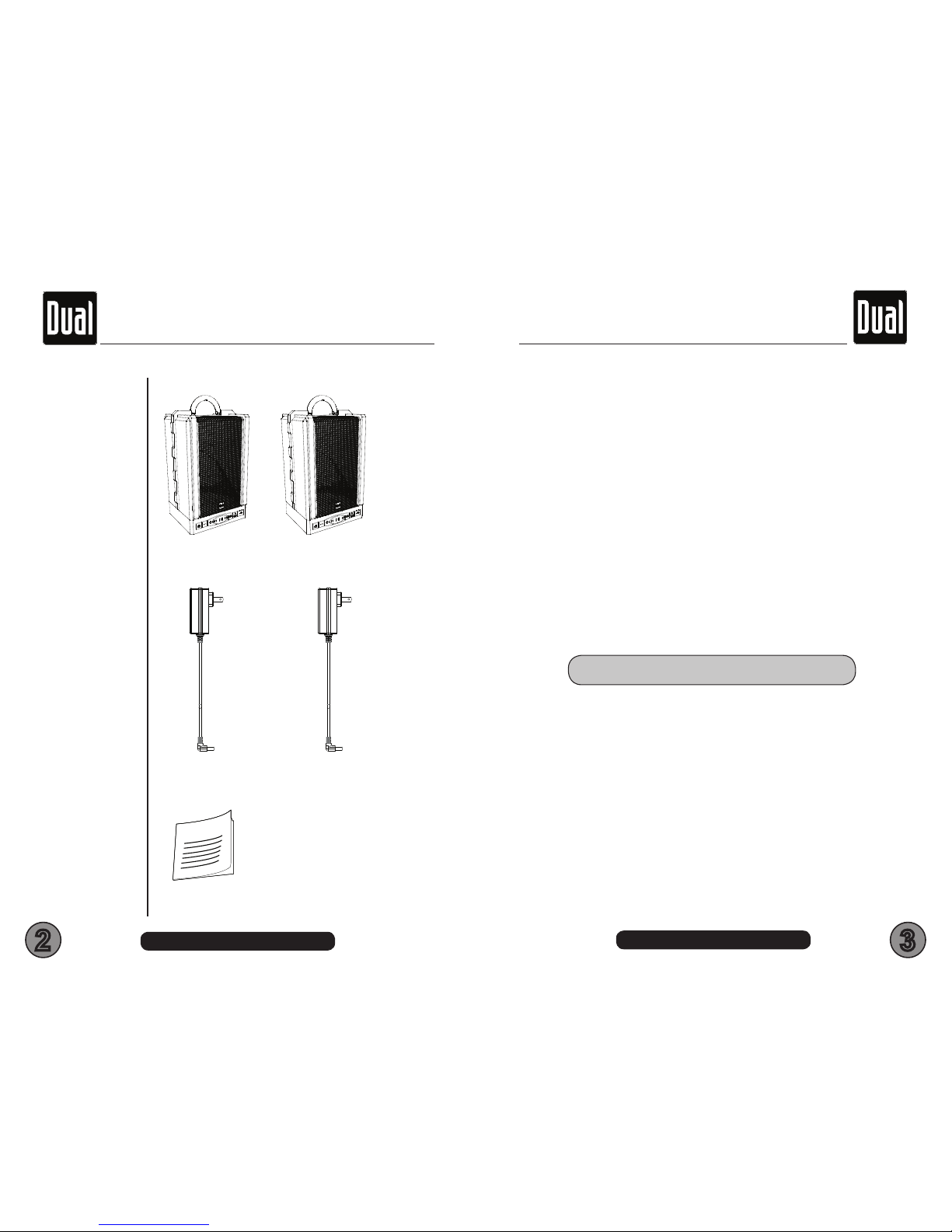
LU48BTS - 1 PAIR
AC/DC ADAPTERS
2pc
USER MANUAL
On your LU48BTS portable wireless speakers
purchase. Please take your time to explore all of the
features and utilities we have built into this product.
We put all of our products through rigorous
testing and quality control. We take great pride in
presenting this product to you. For your peace of
mind, we oer a one-year limited warranty against
manufacturing defects and workmanship. Please
refer to the warranty section of this user manual for
more details.
What’s in the box
All rights reserved. No part of this publication may be reproduced, distributed, or
transmitted in any form or by any means, including photocopying, recording, or
other electronic or mechanical methods, without the prior written permission of
DUAL ELECTRONICS CORP.
All trademarks and trade names are property of their respective owners.
Copyright © 2019 DUAL ELECTRONICS CORP.
SUPPORT
Congratulations
For the latest information on all of our products, please visit:
www.dualav.com
• Call us toll-free at 1-866-382-5476
• E-mail us at [email protected]
Page 3
QUICK START GUIDE
QUICK START GUIDE
4 5
LU48BTS - InformationLU48BTS - Safety Information
ImPORTanT SafeTy InfORmaTIOn TO The USeR
The lightning ash with arrowhead symbol
within an equilateral triangle is intended to
alert the user to the presence of un-isolated,
dangerous voltage within the inside of the
device that may be of sucient magnitude to constitute a risk
of electric shock to persons
WARNING: To reduce the risk of electric shock, do
not remove cover or back plate as there are no userserviceable parts inside.
Refer servicing to qualied personnel
The exclamation point within an equilateral triangle
is intended to alert the user to the presence of
important operating and servicing instructions in the
literature accompanying the device
The Bluetooth® word mark and logos are registered trademarks
owned by Bluetooth SIG, Inc. and any use of such marks is under
license.
● The LU48BTS has a weather resistant design, it should not be
submerged in or underwater under any circumstances
● Set your volume control at a low setting, then slowly increase the
sound until you can hear it comfortably without distortion, or ear
discomfort.
WARNING - Never leave this product in direct
sunlight, overheating can cause permanent
battery damage
● Wash with a mild soap or detergent and lukewarm water using a
clean sponge or a soft cloth. Rinse well with clean water.
“Don’ts” - Very Important
● DON’T clean in hot sun or on very hot days.
● DON’T use abrasive or highly alkaline cleaners on the main body
● DON’T ever use acetone or carbon tetrachloride
This product must not be disposed of or dumped with your other
household waste. You are liable to dispose of all your electronic or
electrical waste equipment by relocating over to the specied collection
point for recycling of such hazardous waste. Isolated collection and proper
recovery of your electronic and electrical waste equipment at the time
of disposal will allow us to help conserving natural resources. Moreover,
proper recycling of the electronic and electrical waste equipment will
ensure safety of human health and environment. For more information
about electronic and electrical waste equipment disposal, recovery, and
collection points, please contact your local city center, household waste
disposal service, shop from where you purchased the equipment, or
manufacturer of the equipment
ImPORTanT SafeTy PReCaUTIOnS
Page 4
QUICK START GUIDE
QUICK START GUIDE
6 7
LU48BTS - Information LU48BTS - Getting Started
fIRST TIme USe
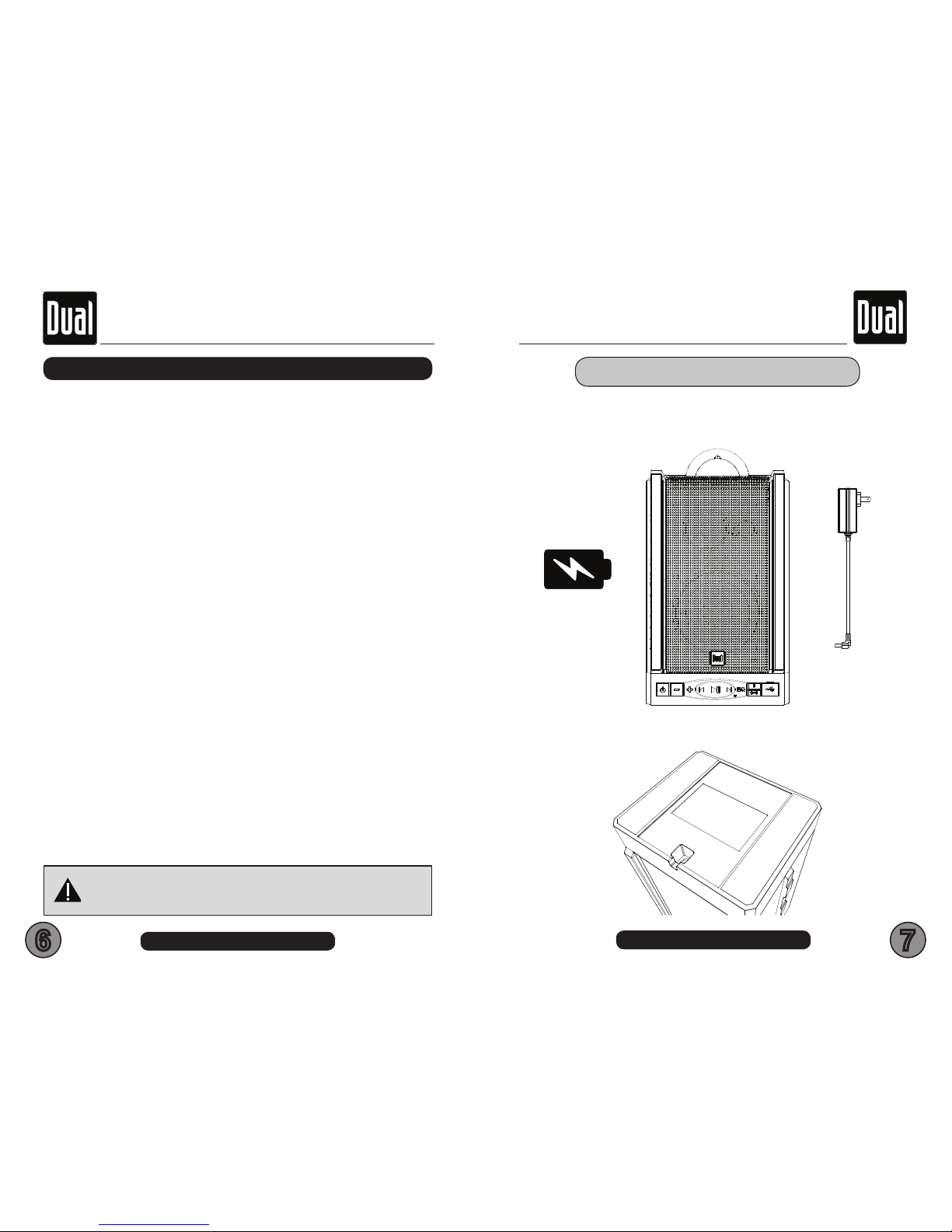
● The LU48BTS Li-ion battery should be charged for minimum of 24
hours for the rst time use
Tips
InfORmaTIOn TO The USeR
fCC COmPLIanCe STaTemenT
This device complies with part 15 of the FCC Rules. Operation is subject to the
following two conditions:
(1) this device may not cause interference, and
(2) this device must accept any interference, including interference that may cause
undesired operation of this device.
This transmitter must not be co-located or operated in conjunction with any other
antenna or transmitter. The Bluetooth antenna cannot be removed (or replaced)
by user. This equipment complies with FCC/ IC radiation exposure limits set
forth for an uncontrolled environment and meets the FCC radio frequency (RF)
Exposure Guidelines and RSS-102 of the IC radio frequency (RF) Exposure rules.
This equipment has very low levels of RF energy that it deemed to comply without
maximum permissive exposure evaluation (MPE). But it is desirable that it should
be installed and operated keeping the radiator at least 20 cm or more away from
person’s body (excluding extremities: hands, wrists, feet and ankles). Alteration or
modications carried out without appropriate authorization may invalidate the user’s
right to operate the equipment.
NOTE: This equipment has been tested and found to comply with the limits for
a Class B digital device, pursuant to Part 15 of the FCC Rules. These limits are
designed to provide reasonable protection against harmful interference in a
residential installation. This equipment generates, uses and can radiate radio
frequency energy and, if not installed and used in accordance with the instructions,
may cause harmful interference to radio communications. However, there is
no guarantee that interference will not occur in a particular installation. If this
equipment does cause harmful interference to radio or television reception, which
can be determined by turning the equipment o and on, the user is encouraged to try
to correct the interference by one or more of the following measures:
□ Relocate or reorient the receiving antenna.
□ Increase the separation between the equipment and receiver.
□ Connect the equipment into an outlet on a circuit dierent from that to which the
receiver is connected.
□ Consult the dealer or an experienced radio/TV technician for help.
CaUTIOn!!
ADJUSTMENT OR ALTERATIONS OF THIS DEVICE MAY RESULT
IN HAZARDOUS RADIATION EXPOSURE.
● Charging port is located on the bottom of the unit
Page 5
QUICK START GUIDE
QUICK START GUIDE
8 9
LU48BTS - Getting Started LU48BTS - Wireless Operation
1
2
3
4
5
6
7
8
9
10
11
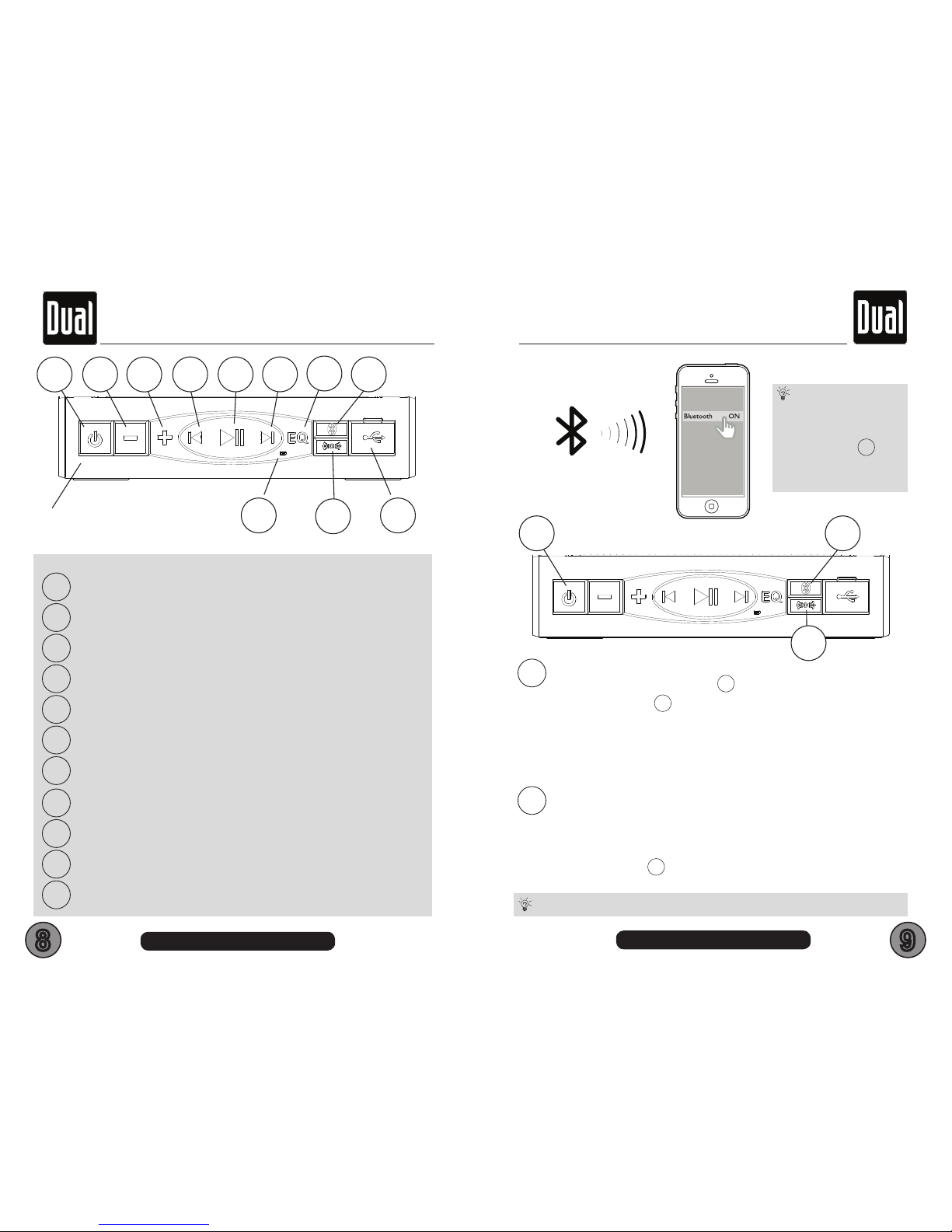
POWER ON/OFF - LONG PRESS 3 SECONDS
VOL -
VOL +
PREVIOUS TRACK
PLAY/PAUSE
NEXT TRACK
EQ - 4 PRESETS
BLUETOOTH PAIR / STATUS
TRUE WIRELESS PAIR / STATUS
BATTERY LEVEL STATUS - (GREEN=FULL/RED=CHARGING)
USB BATTERY BANK PORT (1A CHARGING ONLY)
10 11
8
7
1
2
3
5 64
9
MAIN CONTROL PANEL
8
9
BLUETOOTH PAIRING
- Turn ON the unit - PReSS
1
2 seconds
- LOnG PReSS
8
3 seconds
- Turn on your Devices Bluetooth in your SeTTInGS menU
- Look and tap on LU48BTS name
- Once paired, a conrmation tone will be heard
- Streaming is now ready
AUTOMATIC TRUE WIRELESS PAIRING
- Turn On each speaker within 15 seconds
- Once TWS is bonded, a conrmation tone will be heard
Manually reconnect TWS
- LOnG PReSS
9
3 seconds each speaker
8
9
EN
1
To clear all previously
paired BT Devices -
LONG PRESS
8
for
10 seconds
You can only BT pair to one speaker while using TWS mode
Tips
EN
Tips
EN
Page 6
QUICK START GUIDE
QUICK START GUIDE
10 11
LU48BTS - Streaming Music LU48BTS - Speaker Placement
Your LU48BTS speakers are fully portable, but can
also be placed in many convenient locations in your
home or patio area.
If hanging your speakers is desired, hang both
speakers on a wall hook (not included) facing the
listening area, this will provide the best audio results.
Do nOT mount speakers on wall surfaces that can
get wet, or that have hazards concealed behind
them, such as electrical wires or plumbing. Always
mount speaker on surfaces that are sturdy enough
to support the speakers’ weight, and make sure they
cannot fall or cause injury.
You should experiment with various placements.
Room acoustics can produce large apparent
dierences in the sound when small changes in the
placement are employed.
For example, although the speaker may be located
at any height above the oor, directing the tweeter
toward ear level or angling the entire speaker toward
the listening position often provides the most realistic
imaging experience. The amount of bass perceived
increases as you move a speaker closer to solid
intersecting room surfaces (walls, ceiling, oor).
Speaker Placement
Wall Mounting
Experiment for
Better Sound
2
3
4
5
6
7
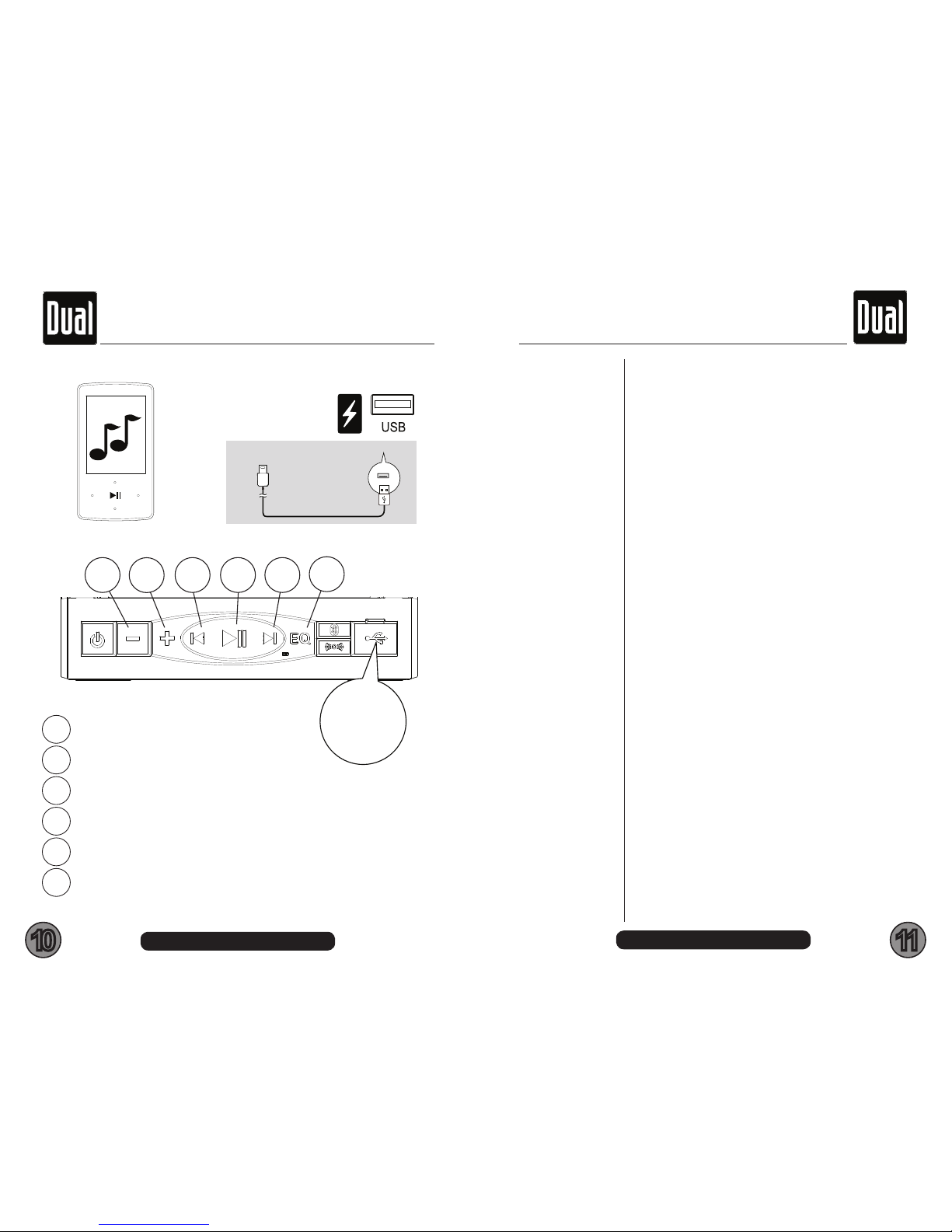
VOL -
VOL +
PREVIOUS TRACK
PLAY/PAUSE (WHILE RINGING - ANSWER INCOMING CALL)
NEXT TRACK
EQ - ROCK - POP - VOCAL - FLAT > ROCK...
7
2
3
5 64
USB CHARGE
5V 1A
1A CHARGING IS SUPPORTED
EN
USB CHARGE
5V 1A
Tips
USB
NO AUDIO
PLAYBACK
SUPPORTED
Page 7
12 13
LU48BTS - Warranty LU48BTS - Specs
The LU48BTS speakers are designed as multi-
purpose portable speakers and will deliver accurate
high delity sound in exterior or interior environments.
The weather-resistant design and construction provide
optimum durability for permanent or temporary
outdoor use. They are not meant for in-water or
underwater use.
The grilles are not designed or intended to be
removed. Do not attempt to remove the grilles from
your speakers. There are no user-serviceable parts
behind the grille, removal will damage the speaker
and will void the warranty.
You must have proof of purchase to receive warranty
service. Please keep your original sales receipt and
be prepared to provide this receipt in the event you
require service, as your original receipt is considered
the best proof of purchase and indicates the date you
purchased your Dual product.
Model
Dealer Name
Dealer Phone
Purchase Date
Important
Warranty Coverage
For Your Records
SPeCIfICaTIOnS SUBJeCT TO ChanGe WIThOUT nOTICe
BLUETOOTH
• BT: 4.2
• BT Range: 33Ft / 10M (Class 2)
• BT Proles: A2DP / AVRCP / GATT / HFP
GENERAL
• AC Adaptor Power Source: 120VAC / 15VDC-2A
• Li-ion Battery: 11.1VDC / 2600mA (18650 type)
• Amplier Type: Class D
• Frequency Response: 45Hz-22kHz
• Storage Temperature: 5oF to 113oF / -15oC to 45oC
• Operation Temperature: 14oF to 104oF / -10oC to 40oC
• Weight: 4.5lbs / 2.10Kg
• Dimensions Inches WxHxD: 10.98 x 7.00 x 7.55
• Color: Black/Grey
SPeCIfICaTIOnS
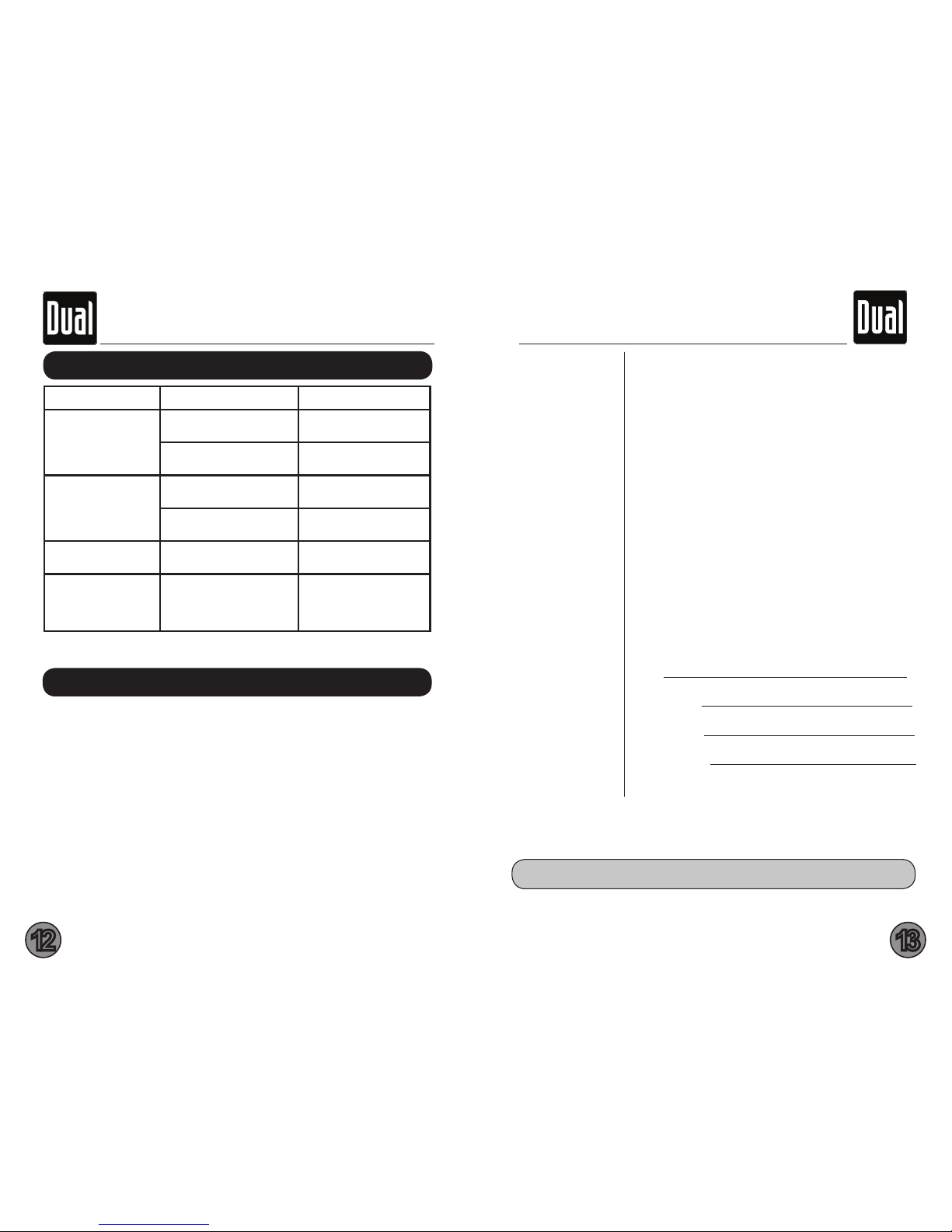
TROUBLE CAUSE SOLUTION
Unit will not turn on
The battery is not charged
Charge 24 hours for best
results
Plug charging adaptor into
wall Turn to on position
No sound is heard
Speaker volume level is
too low or muted
Turn the LU48BTS
volume level up
Device is paused or muted
Check your Devices
playing / volume status
The audio quality is
poor
Device volume level is too
low or muted
Raise the Device volume
to a higher level
The audio quality is
poor after connection
with a Bluetooth
enabled device
The Bluetooth reception
is poor
Move the device closer
to the audio system or
remove any obstacle
between the device
TROUBLe ShOOTInG
SUPPORT
• Call us toll-free at 1-866-382-5476
• E-mail us at [email protected]
Note: You may want to keep your original sales receipt or a photo copy
with this owner’s manual.
Page 8

LU48BTS - Warranty
This warranty gives you specic legal rights. You may also have other rights which vary from state to state.
Dual Electronics Corp. warrants this product to the original purchaser to be free from defects in material
and workmanship for a period of one year from the date of the original purchase.
Dual Electronics Corp. agrees, at our option, during the warranty period, to repair any defect in material
or workmanship or to furnish an equal new, renewed or comparable product (whichever is deemed
necessary) in exchange without charges, subject to verication of the defect or malfunction and proof
of the date of purchase. Subsequent replacement products are warranted for the balance of the original
warranty period.
Who is covered? This warranty is extended to the original retail purchaser for products purchased from an
authorized Dual dealer and used in the U.S.A.
What is covered? This warranty covers all defects in material and workmanship in this product. The
following are not covered: software, installation/removal costs, damage resulting from accident, misuse,
abuse, neglect, product modication, improper installation, incorrect line voltage, unauthorized repair or
failure to follow instructions supplied with the product, or damage occurring during return shipment of the
product.
Specic license conditions and copyright notices for the software can be found via www.dualav.com.
What to do?
1. Before you call for service, check the troubleshooting guide in your owner’s manual. A slight adjustment
of any custom controls may save you a service call.
2. If you require service during the warranty period, you must carefully pack the product (preferably in the
original package) and ship it by prepaid transportation with a copy of the original receipt from the retailer to
an authorized service center.
3. Please describe your problem in writing and include your name, a return UPS shipping address (P.O.
Box not acceptable), and a daytime phone number with your shipment.
4. For more information and for the location of the nearest authorized service center please contact us by
one of the following methods:
• Call us toll-free at 1-866-382-5476
• E-mail us at [email protected]
Exclusion of Certain Damages: This warranty is exclusive and in lieu of any and all other warranties,
expressed or implied, including without limitation the implied warranties of merchantability and tness for
a particular purpose and any obligation, liability, right, claim or remedy in contract or tort, whether or not
arising from the company’s negligence, actual or imputed. No person or representative is authorized to
assume for the company any other liability in connection with the sale of this product. In no event shall the
company be liable for indirect, incidental or consequential damages.
Limited One-Year Warranty
Dual Electronics Corp.
Page 9

www.dualav.com
©2019 Dual Electronics Corp. All rights reserved.
NSA119-V01 Printed in China
®
QUICK START GUIDE
LU48BTS
 Loading...