

Page 1
Tel: +44 (0)3443 715523
Web: www.domusventilation.co.uk
E&OE
HRX2D Range
VENTILATION
VENTILAT ION
VE
NTILAT ION
Domus Ventilation
Cambria House
Caerphilly Business Park
Van Road
Caerphilly
CF83 3ED
Tel: +44 (0)3443 715523
Fax: +44 (0)3443 715524
Email: [email protected]
www.domusventilation.co.uk
Mechanical Ventilation with Heat Recovery appliances
Householder Instructions
These instructions must be given to the householder
DO NOT SWITCH OFF THE UNIT – it is designed to run continuously. If the
unit is switched off, indoor pollutants and moisture levels may increase
which could endanger your health or damage your home.
It is important to follow the advice in this manual and correctly maintain the
system to ensure a healthy indoor environment.
LAB1282R, Issue 2, Apr 2017 Page 10
LAB1282R, Issue 2, Apr 2017 Page 1
Page 2

VENTILAT ION
Warnings & Safety Information
PLEASE READ THESE INSTRUCTIONS CAREFULLY
1. Do not install this appliance in areas where the following may be present or occur:
• Pollution degree 3 or 4 (as defined in EN 60335-1)
• Excessive oil or a grease laden atmosphere
• Corrosive or flammable gases, liquids or vapours
• Be subject to direct water spray
• Ambient temperatures higher than 50ºC and lower than -25ºC
• Possible obstructions that may hinder access or removal of the unit
2. This fan can be used by children aged from 8 years and above and persons with reduced
physical, sensory or mental capabilities or lack of experience and knowledge if they have been
given supervision or instruction concerning use of the appliance in a safe way and understand
the hazards involved. Children shall not play with the appliance. Cleaning and user maintenance
shall not be made by children without supervision.
General
Your Domus HRX2D appliance is a key part of a whole house ventilation system specifically
designed to improve indoor air quality in dwellings. The system is designed to provide measured
amounts of filtered, fresh air to living areas while constantly removing polluted, stale air from
bathing, cooking and washing areas at the same gentle rate. Any available heat in the outgoing
stale air is recovered by a built-in heat exchanger and used to pre-warm the fresh supply air.
A programmable user control interface has been provided to help maintain a comfortable indoor
environment which includes the following features:
• Time and date functions
• Filter check reminder
• Fingertip fan control; Low, Boost, Max
• Automatic, heat exchanger-bypass operation
• Automatic humidity level boost-switching
Your system may also have been wired to trigger Boost from a lighting circuit or a number of
lighting circuits.
The two filters in the appliance ensure that the fresh supply air is clean as it enters the home.
Additionally, the stale extract air is filtered to protect the heat exchanger from unwanted
contamination. These filters have to be cleaned regularly, depending on the levels of pollution.
The filters should be replaced when they start to show visible signs of wear. The filter check
reminder will remind you to check the filter condition at pre-set time intervals.
Your HRX2D unit is fitted with a fully automatic heat exchanger bypass mechanism. The bypass
will operate when the indoor target temperature reaches a pre-set value. Using the digital control
interface, the trigger temperature for this operation can be set between +15°C and 25°C.
LAB1282R, Issue 2, Apr 2017 Page 2
Page 3
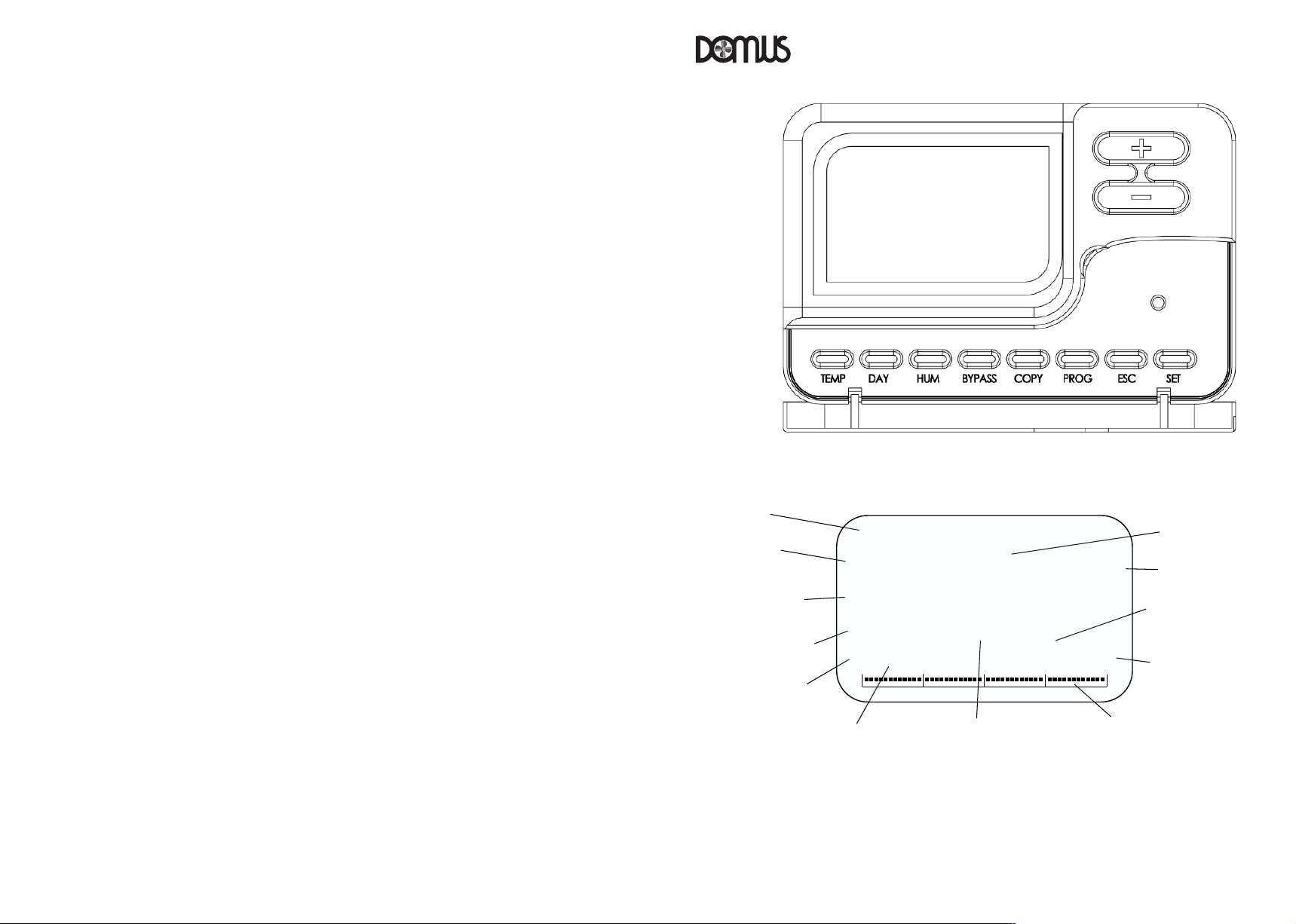
Thermal bypass active
Half hour time switch segments
Date
Programme number
Frost protection active
Intake temperature
Exhaust temperature
Humidity level
Speed
Time
Filter check
reminder
Day
Digital user control interface operation
12:00
1234567
60%
Low
Boost
Max
Frost
Filter
p9
28-01-2016
00
06
12
18
24
Bypass
21
8
°C °C
VENTILAT ION
Further details regarding your digital user control interface are contained in the full installation manual
which should accompany this abridged householder guide
.0
.0
LAB1282R, Issue 2, Apr 2017 Page 3
Page 4
Systeminstallernameandaddress:
VENTILAT ION VENTILAT ION
Speed control
Pressing + or – will allow you to manually select the fan speed. Its normal setting should be Lo w.
After selecting B
ax is selected, it will remain at this speed indefinitely or until Low or B oo s t are selected.
If M
Filter reminder
The word ‘Filter’ will appear on the home screen after the set time has elapsed - when this occurs,
clean the filters (see page 6).
To reset the filter elapsed time reminder following cleaning, press and hold “S
Time and date setting (this action will be required following a power cut)
From the home screen;
Press “D
Use the “+
Press “D
Use the “+
Press “D
Use the “+
Press “D
Use the “+
Press “D
Use the “+
Press “D
Use the “+
Press “D
LAB1282R, Issue 2, Apr 2017 Page 4
oos t it will remain at this speed for one hour and will then return to Lo w.
AY”. The ‘Hour’ text will flash.
” and “-“ buttons to set the hour.
AY”. The ‘Minute’ text will flash.
” and “-“ buttons to set the minute.
AY”. The day will flash.
” and “-“ buttons to set the day.
AY”. The month will flash.
” and “-“ buttons to set the month.
AY”. The year will flash.
” and “-“ buttons to set the year.
AY”. 12/24 will flash.
” and “-“ buttons to set 12 or 24 hour clock format.
AY” to confirm and return to home screen.
ET” for 5 seconds.
Serialnumberofappliance:
Dateofinstallation:
LAB1282R, Issue 2, Apr 2017 Page 9
Page 5
VENTILAT ION VENTILAT ION
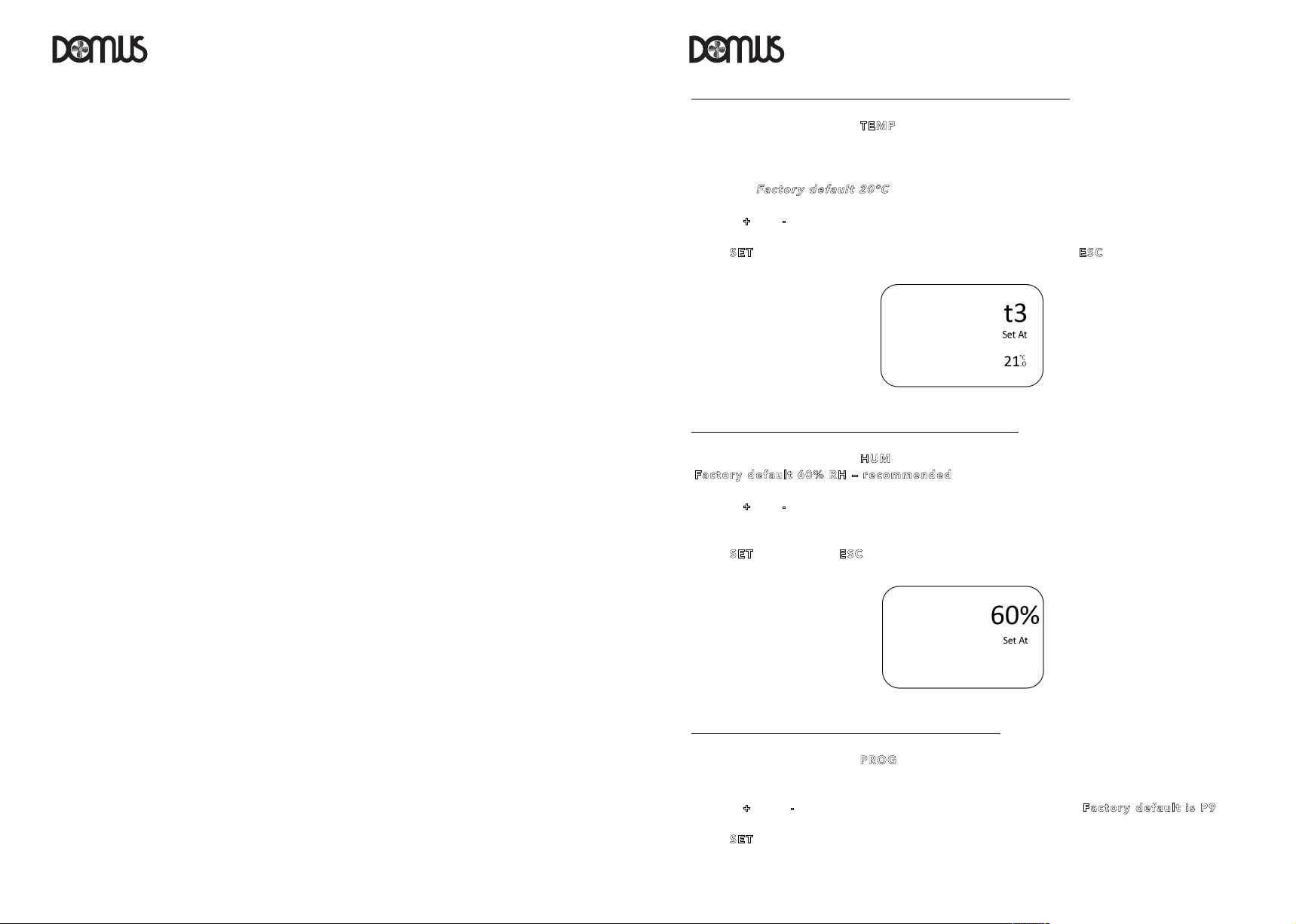
Setting the automatic heat exchanger bypass operating temperature
From the home screen, press “T
T3 is the target indoor temperature setting at which the heat exchanger bypass mechanism
operates to allow the extract air to bypass the heat exchanger and is adjustable between +15°C
and +25°C (F
Use the “+
Press “S
settings and return to the home screen.
Setting the humidity activated boost switching level (% RH)
From the home screen, press “H
(Fac tor y d efa ult 60 % R H – re com m end ed).
Use the “+
RH).
Press “S
Selecting the heat exchanger bypass timed programmes
From the home screen, press “PR O G” (The programme number will flash in the bottom left hand
corner; P1 to P9).
Use the “+
Press “S
EMP ” as required to move to menu ‘T3’.
act ory de fau l t 2 0°C ).
” or “-“ buttons to set the operating temperature in steps of 1°C.
ET” to record the settings and return to the home screen or “ES C ” to discard the
UM” to move to the humidity (% RH) activated boost setting
” or “-“ buttons to set the humidity switching level in steps of 1% RH (range 30-85%
ET” to record or “E SC” to discard the settings and return to the home screen.
” and “-“ buttons to view the selected programme number (F act ory de fau lt is P9).
ET” to select the desired programme.
LAB1282R, Issue 2, Apr 2017 Page 8
LAB1282R, Issue 2, Apr 2017 Page 5
Page 6
LAB1282R, Issue 2, Apr 2017
Page 7
The word ‘Filter’ will appear on the home screen of the digital user-interface after the set time has
elapsed - when this occurs, clean the filters – see page 4 for resetting details.
To remove the two filters, pull out the two caps from the front of the appliance and gently slide
out the filters in their carrier frames.
Lightly vacuum the filters to remove surface debris and then gently wash through in warm soapy
water. Ensure that the filters are completely dry before refitting. I
mpo rta nt : do not dry on a
radiator or use excessive heat as this may distort the carrier frames.
F
aul ts
If the digital display shows ‘Fault’ and either ‘Fan 1’ or ‘Fan 2’, there is a potential fault with one
of the fans. If the digital display shows ‘Fault’ only, the external system inhibit may have been
activated. In either case, in the first instance, contact your building services management team.
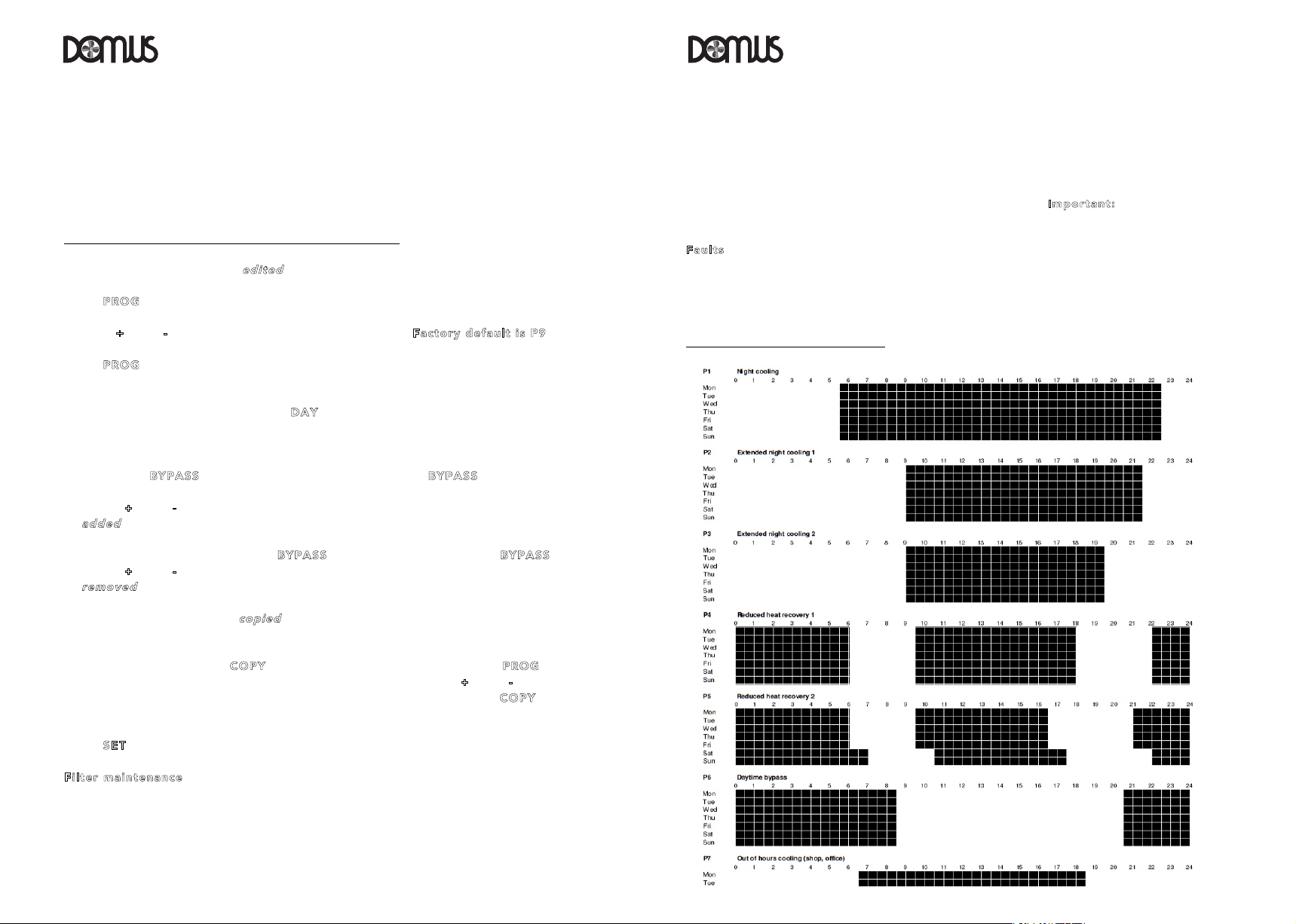
Pre-set thermal bypass programmes
VENTILAT ION VENTILAT ION
Details of the summer bypass programmes are shown in the diagram on page 7.
Note: Each square has a time value of 30 minutes. Black squares indicate a time period where the
unit is in automatic bypass mode i.e. the unit will monitor the temperatures and open or close the
bypass accordingly. White squares (blank spaces) indicate a time block where the heat exchanger
bypass will be permanently set to operate and divert air around the heat exchanger regardless of
the measured and set temperatures.
Creating bespoke heat exchanger bypass timed programmes
Each of the programmes can be
Press “P
Use the “+
Press “PRO G”. The programme number will stop flashing and the first block on the timeline at the
bottom of the screen will begin to flash.
Select the day to be edited by pressing “D
the screen (1 – Monday, 2 – Tuesday etc.).
To add a 30 minute temperature controlled bypass block (a black square) to the timeline, ensure
that the word “B
Press the “+
add ed
be
To remove a block, remove the word “B
press the “+” and “- “ buttons to move along the timeline at the bottom of the screen; a block will
rem ove d
be
Daily ‘timeline patterns’ can be
each day individually.
From the home screen press “C
number will be displayed) and then the day to copy-to by pressing the “+” and “-“ buttons (the
day number will flash). When the two correct days have been selected, press “COP Y” and the
timeline pattern will copy across.
Press “S
Fil te r m a int ena nce
The two filters should be cleaned on a regular basis; the exact frequency will be determined by
individual living conditions.
LAB1282R, Issue 2, Apr 2017 Page 6
edi ted
to create bespoke programmes as follows:
ROG ”.
” and “-“ buttons to select the programme number (F act ory de fau lt is P9).
AY” until the correct day is displayed along the top of
YPA SS” is displayed on the screen by pressing “BYP ASS ”.
” and “-“ buttons to move along the timeline at the bottom of the screen; a block will
to each position.
YPA SS” from the screen by pressing “BYP A SS” and
from each position.
cop ied
to another day or multiple days to avoid programming
OPY ” then select the day to copy by pressing “PR OG” (the day
ET” to record.
 Loading...