

Page 1
You must have at least the following:
Pentium IV 2GHz or Above
Microsoft Windows 2000 SP4/XP
256MB RAM or higher
2X CD-ROM
16bit or higher level Sound-Card
One Available USB Port (USB 2.0 )
PCI/AGP 32 Bit VGA card or higher& Monitor
Check Your Package Contents
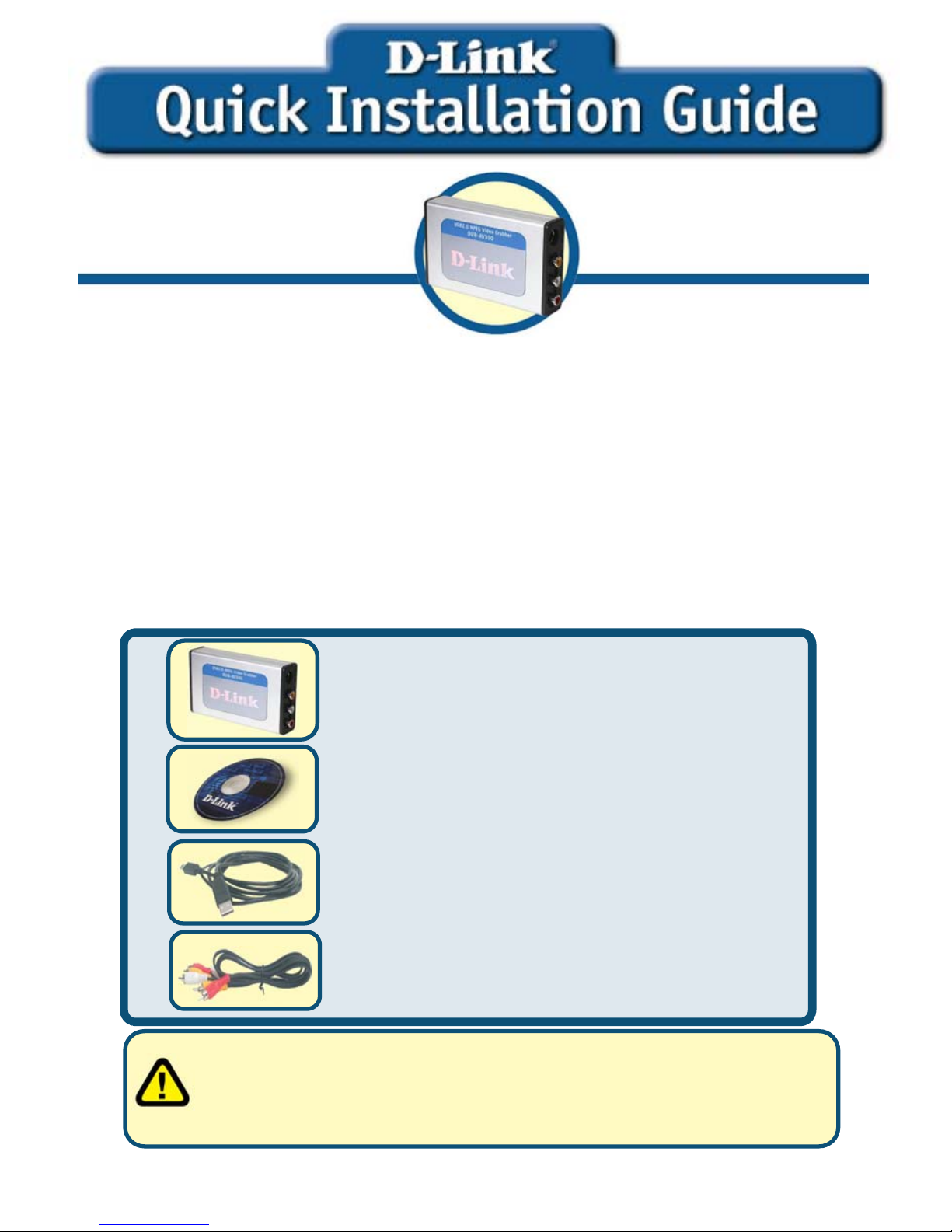
These are the items included with your purchase:
If any of the below items are missing, please contact your reseller.
©2004 D-Link System, Inc. All rights reserved. Trademarks or registered trademarks are the property of their respective
holders. Software and specifications subject to change without notice.
This product works with the
following operating system
software: Windows 2000 SP4/XP
Before You Begin
DUB-AV300 USB 2.0 MPEG1/2/4
Video Grabber
AV Cable
DUB-AV300
USB 2.0 MPEG1/2/4
V
ideo Grabbe
r
CD-ROM(containing Drivers, Installation
Guide, Manual, Applicaion Software and
Warranty)
USB 2.0 Cable
Run the Drvier CD before you install the DUB-AV300
For the first-time installation of DUB-AV300, two steps are involved:
USB 2.0 Driver and Software. See below for detailed descriptions of
these installaions.
Page 2
2
DUB-AV300 Driver Installation
Please bring out the attached CD-ROM and follow the steps listed below
carefully to insure the installation of DUB-AV300 will be complete.
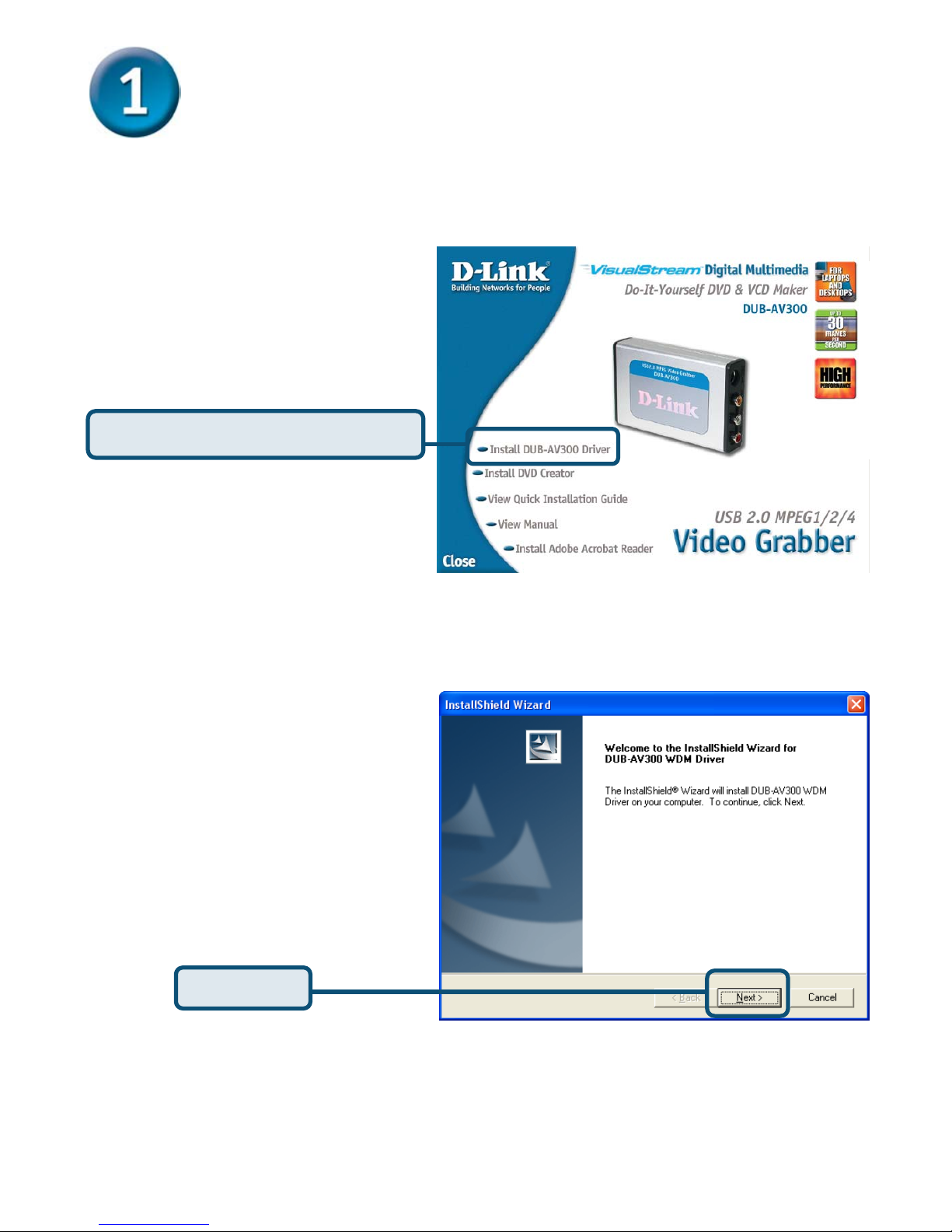
Click Install DUB-AV300 Driver
Insert the software CD into
CD-ROM. As you can see
the below picture,D-Link
DUB-AV300 startup window
will be displayed.
The InstallShield Wizard
window will show, please
press “Next” to continue.
Click Next
Page 3
3
DUB-AV300 Driver Installation
(Continued)
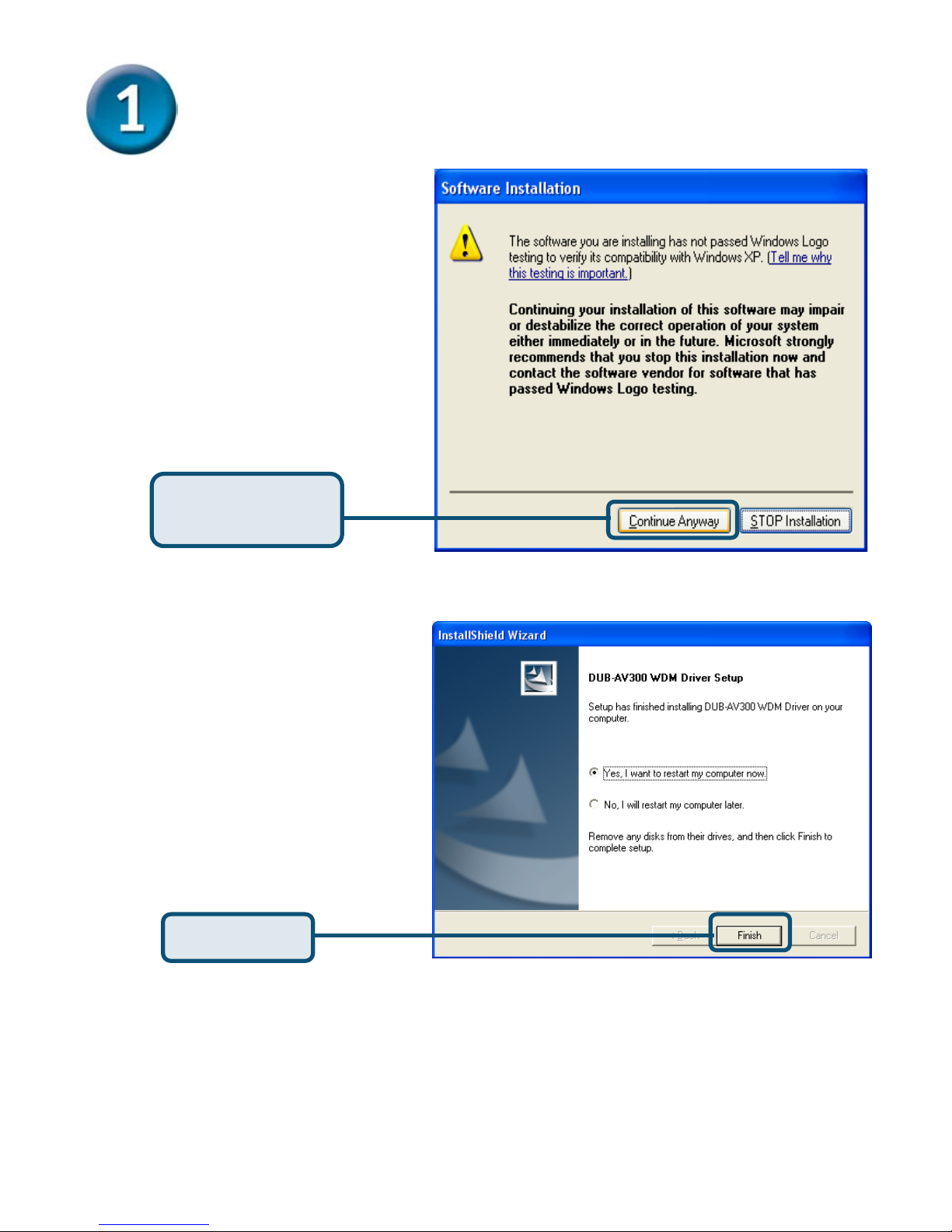
Choose “Continue
Anyway” to ignore the
following warning
message, and continue
the setup processor.
Click Continue
Anyway
Click Finish
After the execution, please
select “Yes, I want to restart
my computer now” and
press “Finish”.
Page 4
4
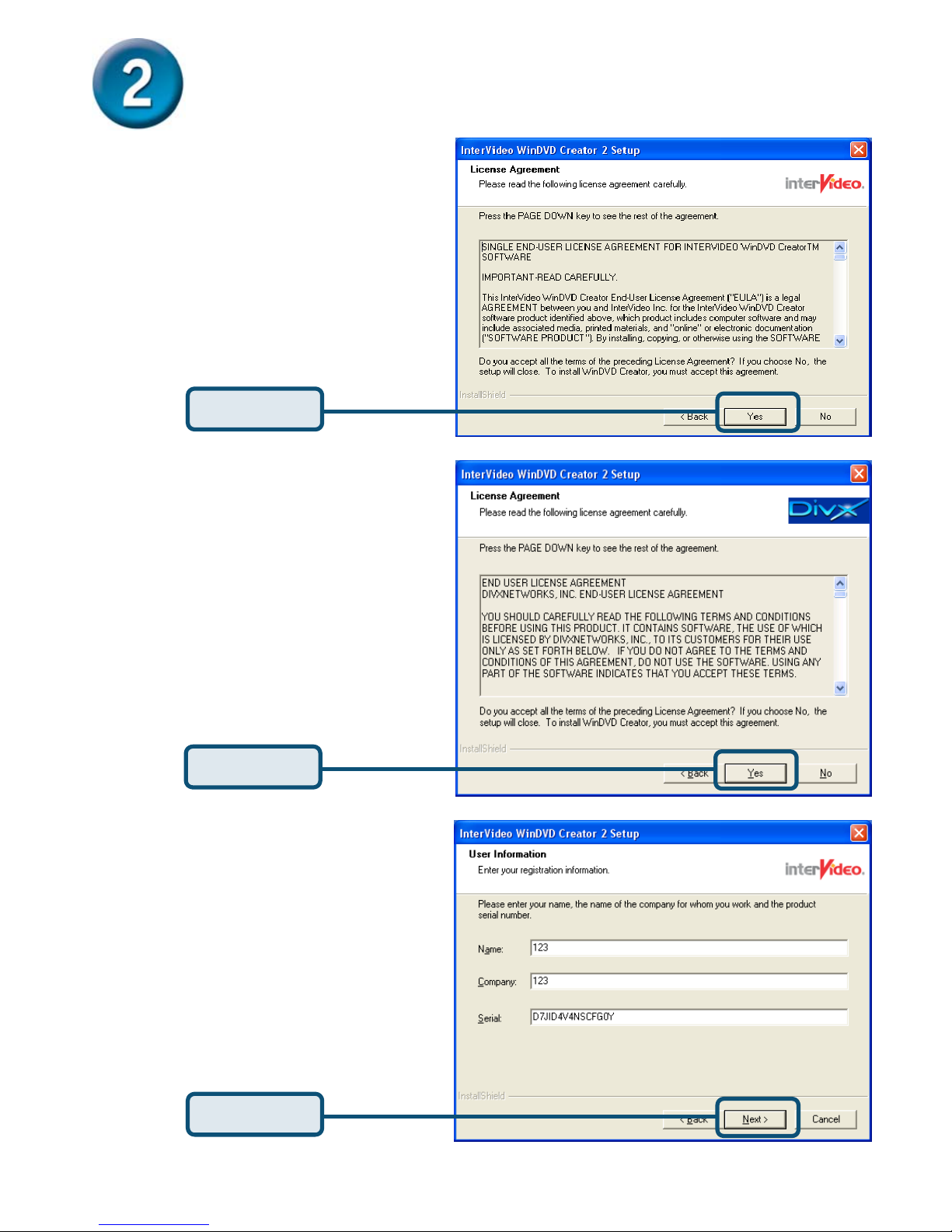
Installing WinDVD Creator 2.0
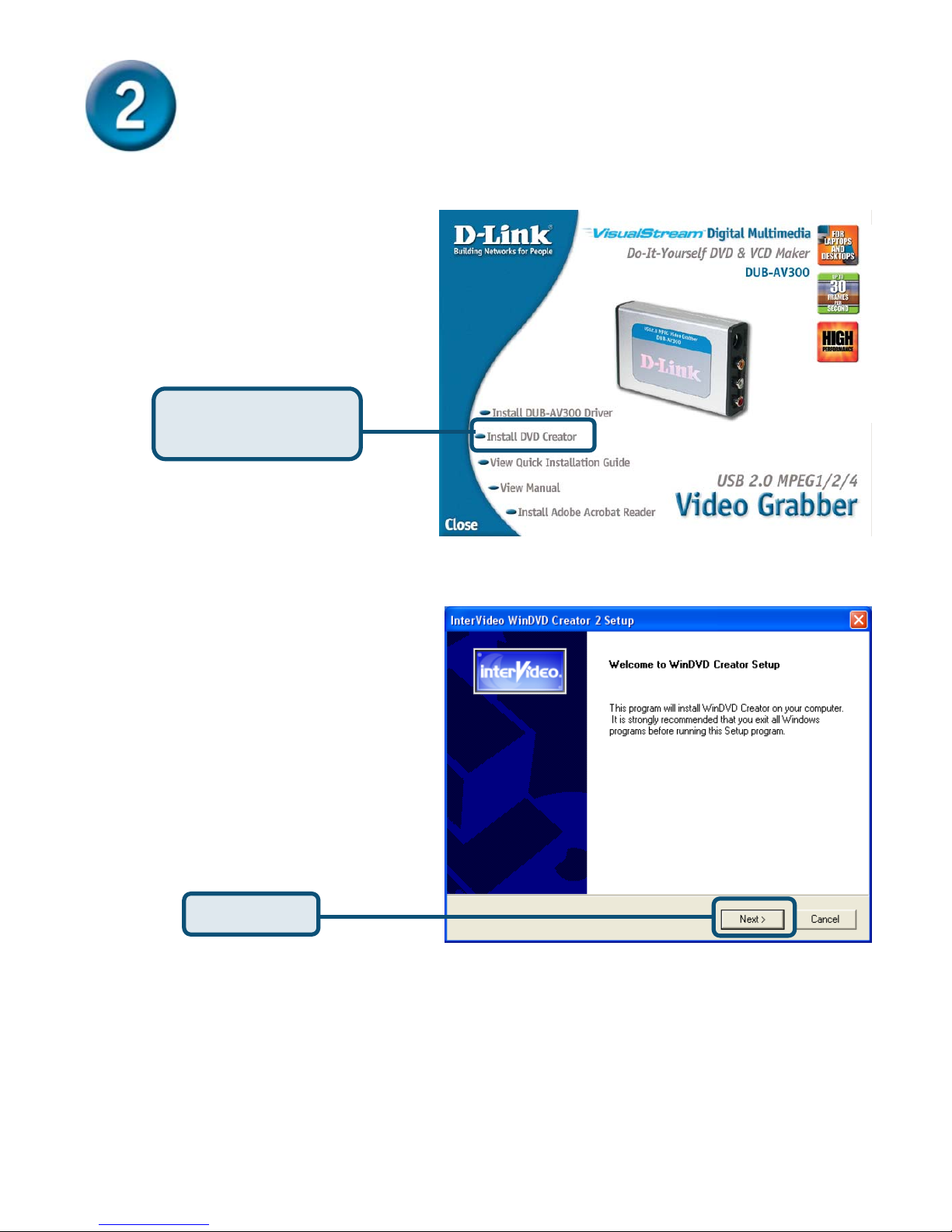
Click Install DVD
Creator
Please Click “Next” to
continue.
Click Next
Page 5
5
Installing WinDVD Creator 2.0
(Continued)
Click Yes
Click Yes
Click Next
Please Click “Yes” to continue.
Please click “Yes” to continue.
Please input Name, Company
& Serial Number and then click
“Next” to continue.
Page 6
6
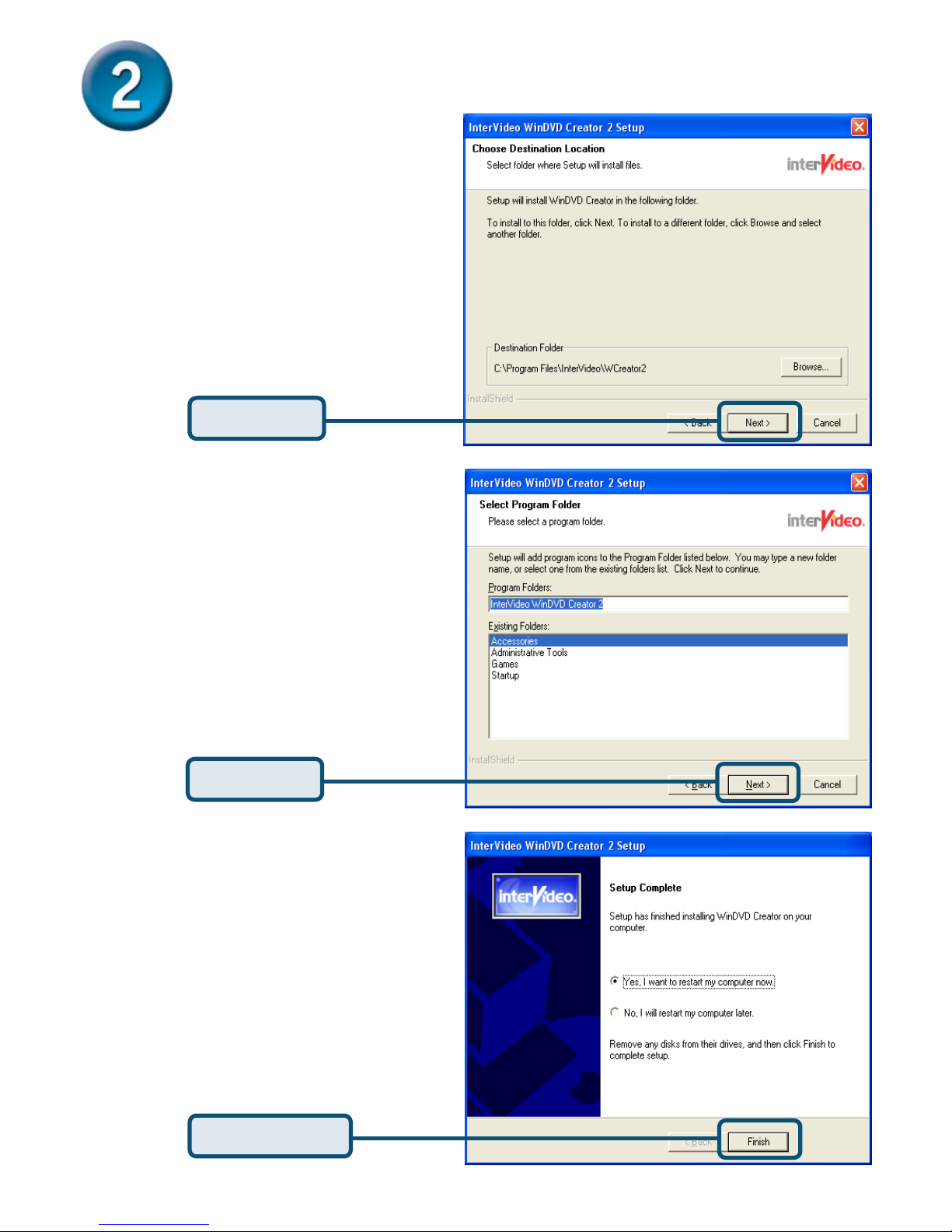
Installing WinDVD Creator 2.0
(Continued)
Click Next
Click Next
Click Finish
Please click “Next” to continue.
Please click “Next” to continue.
Please After above installing
steps, the system already
installed DRIVER, DivX Codec &
Application. The system will ask
to restart PC and please select
“Yes, I want to restart my
computer now” & “Finish” to
restart PC. (as below picture)
Page 7
7
Your Setup is Complete!
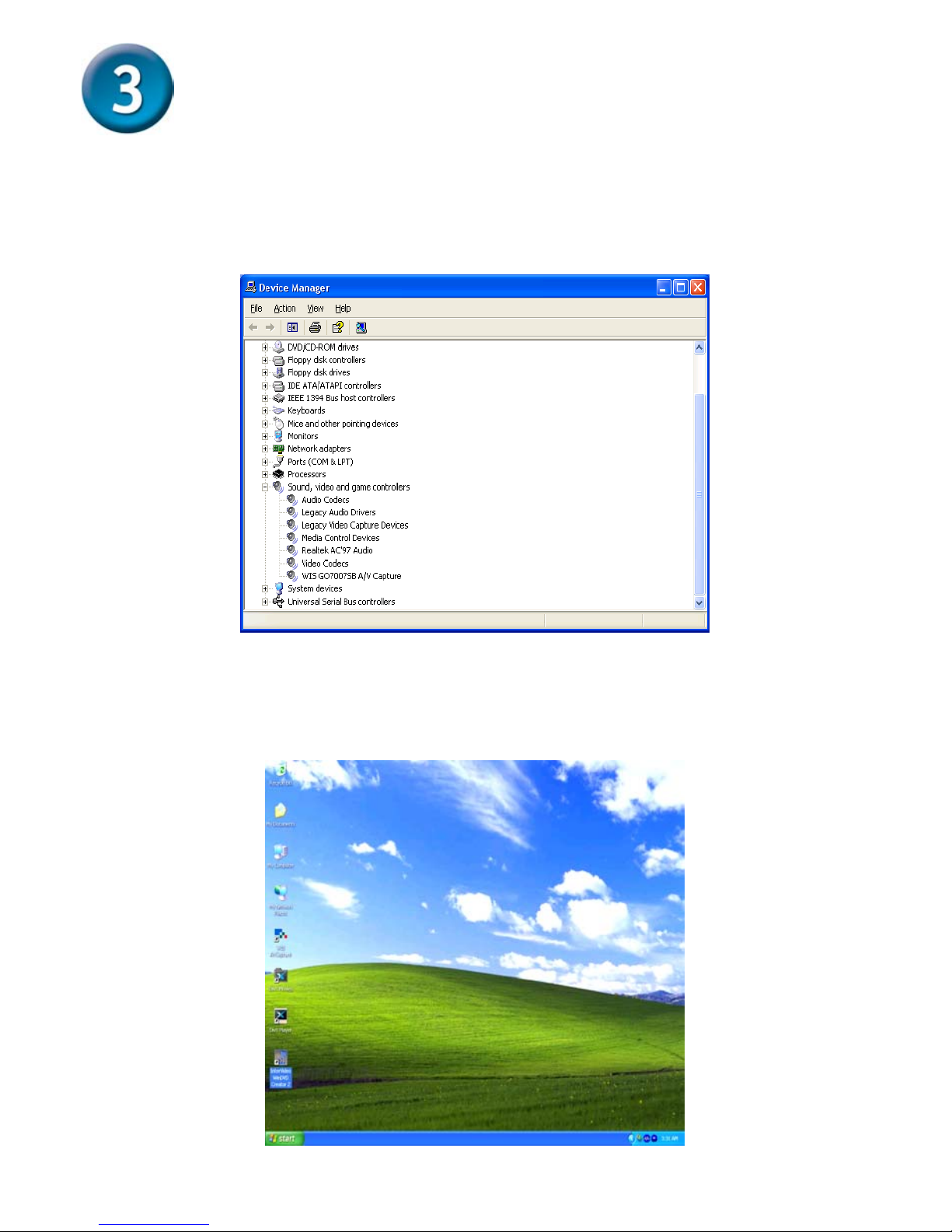
Finally, please go “START”→”SETTINGS”→”CONTROL PANEL”→”SYSTEM”
→”HARDWARE”→”DEVICE MANAGER”→”SOUND, VIDEO AND GAME
CONTROLLER” to check the device as below picture.
Congratulation!You already installed the driver and application well!
Please double click the icon of application on your desktop and enjoy the high
performance of video and audio capture.
Page 8

8
Technical Support
You can find software updates and user documentation on the
D-Link website.
Tech Support for customers within Australia:
D-Link Technical Support over the Telephone:
1300-766-868
Monday to Friday 8:00am to 8:00pm EST
Saturday 9:00am to 1:00pm EST
D-Link Technical Support over the Internet:
http://www.dlink.com.au
email:[email protected]
Tech Support for customers within New Zealand:
D-Link Technical Support over the Telephone:
0800-900-900
Monday to Friday 8:30am to 8:30pm
Saturday 9:00am to 5:00pm
D-Link Technical Support over the Internet:
http://www.dlink.co.nz
email:[email protected]
Page 9

9
Technical Support
You can find software updates and user documentation on the
D-Link website.
Tech Support for customers within South Eastern
Asia and Korea:
D-Link South Eastern Asia and Korea Technical Support
over the Telephone:
+65-6895-5355
Monday to Friday 9:00am to 12:30pm, 2:00pm-6:00pm
Singapore Time
D-Link Technical Support over the Internet:
email:[email protected]
Page 10

10
Technical Support
You can find software updates and user documentation on the
D-Link website.
Tech Support for customers within India
D-Link Technical Support over the Telephone:
+91-22-26526741
+91-22-26526696 –ext 161 to 167
Monday to Friday 9:30AM to 7:00PM
D-Link Technical Support over the Internet:
http://ww.dlink.co.in
http://www.dlink.co.in/dlink/drivers/support.asp
ftp://support.dlink.co.in
email: [email protected]
Page 11

11
Technical Support
You can find software updates and user documentation on the
D-Link website.
D-Link provides free technical support for customers for the
duration of the warranty period on this product.
Customers can contact D-Link technical support through our
web site or by phone.
Tech Support for customers within the Russia
D-Link Technical Support over the Telephone:
(095) 744-00-99
Monday to Friday 10:00am to 6:30pm
D-Link Technical Support over the Internet
http://www.dlink.ru
email: [email protected]
Page 12

12
Technical Support
You can find software updates and user documentation on the D-Link website.
Tech Support for customers within the U.A.E & North Africa:
D-Link Technical Support over the Telephone:
(971) 4-391-6480 (U.A.E)
Sunday to Wednesday 9:00am to 6:00pm GMT+4
Thursday 9:00am to 1:00pm GMT+4
D-Link Middle East & North Africa
D-Link Technical Support over the Internet:
http://support.dlink-me.com
email:[email protected]
Tech Support for customers within Israel:
D-Link Technical Support over the Telephone:
(972) 971-5701
Sunday to Thursday 9:00am to 5:00pm
D-Link Technical Support over the Internet:
http://www.dlink.co.il/forum
e-mail: [email protected]
Tech Support for customers within Turkey:
D-Link Technical Support over the Telephone:
(090) 212-335-2552
Sunday to Thursday 9:00am to 6:00pm
D-Link Technical Support over the Internet:
http://www.dlink.co.tr
e-mail: [email protected]
Tech Support for customers within Egypt:
D-Link Technical Support over the Telephone:
(202) 414-4295
Sunday to Thursday 9:00am to 5:00pm
D-Link Technical Support over the Internet:
http://support.dlink-me.com
e-mail: [email protected]
Page 13

13
Technical Support
You can find software updates and user documentation on the
D-Link website.
Tech Support for customers within South Africa
and Sub Sahara Region:
D-Link South Africa and Sub Sahara Technical Support
over the Telephone:
+27-12-665-2165
08600 DLINK ( For South Africa only )
Monday to Friday 8:30am to 9:00pm South Africa Time
D-Link Technical Support over the Internet:
http://www.d-link.co.za
email:[email protected]
Page 14

14
Technical Support
You can find updates and user documentation on the D-Link website
Tech Support for Latin America customers:
D-Link Technical Support over the followings Telephones:
Argentina: 0800-666 1442 Monday to Friday 09:00am to 22:00pm
Chile: 800-214 422 Monday to Friday 08:00am to 21:00pm
Colombia: 01800-700 1588 Monday to Friday 07:00am to 20:00pm
Ecuador: 1800-777 711 Monday to Friday 07:00am to 20:00pm
El Salvador: 800-6137 Monday to Friday 06:00am to 19:00pm
Guatemala:1800-300 0017 Monday to Friday 06:00am to 19:00pm
Panama: 0800-560 0193 Monday to Friday 07:00am to 20:00pm
Peru: 0800-52049 Monday to Friday 07:00am to 20:00pm
Venezuela: 0800-100 3470 Monday to Friday 08:00am to 21:00pm
D-Link Technical Support over the Internet:
www.dlinkla.com
www.dlinklatinamerica.com
email:[email protected]
Tech Support for customers within Brazil:
D-Link Technical Support over the Telephone:
0800-7014104
Monday to Friday 8:30am to 18:30pm
D-Link Technical Support over the Internet:
www.dlinkbrasil.com.br
email:[email protected]
 Loading...