

Page 1
Q
uick Installation Guide
DIS-M100G-SW
Industrial Gigabit Ethernet to Fiber
Media Converter
Introduction
DIS-M100G-SW isacost e ffective solution for the conversion between
/1000 ( ) 100/1000 - ,
100 Base-T X and Base X interface it allows you to extend
communication distance by optical fiber. supports MDI/MDIX auto
detection, so you don t need t o use crossover wires. with wide
operating temperature range from -40 70 and accepts a wide voltage range from
dual 12~48 VDC power inputs s o it is suitable for harsh operating environments
Therefore, the is reliable media converter and can satisfy most
DIS-M100G-SW
demand of operating environment.
-
DIS-M100G-SW
'
DIS-M100G-SW
~ ℃
Features
Supports1port 100/1000Base-T(X) auto-negotiation and auto-MDI/MDI-X
Support Ethernet to SFP port signal conversion
Provided DIP-Switch to set operation speed of SFP port
High reliability and rigid IP-30 housing
DIN-Rail and wall-mount enabled
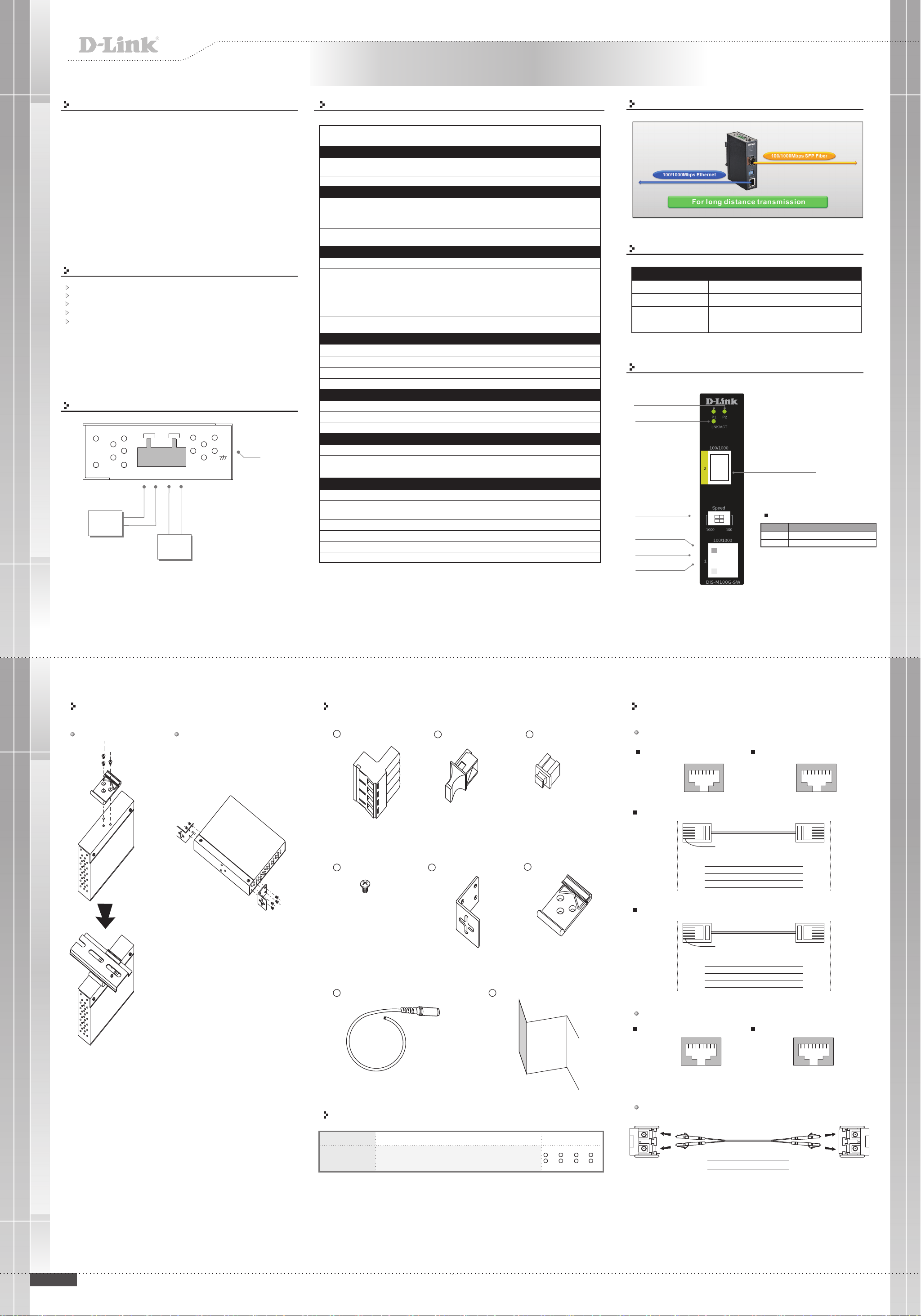
Power Connection Guide
PWR1
PWR2
Power
Supply
12-48 VDC
G
V1+ V1-
V-
DC 12-48V
V2+ V2-
V+
V-
V+
Power
Supply
12-48 VDC
FrameGround
Specifications
Model
Physical Ports
.,
100/1000 Base-T(X) P ort in RJ45
Auto MDI/MDIX
100/1000Bas e- X SFP port
Technology
Ethernet standards
DIP-Switch 1/2
LED Indicators
Power indicator
100/1000Base-T(X) RJ45 port
indicator
100/1000Base-F(X) fiber port
indicator
Power
Input power
Power consumption(Ty p.)
Overload current protection
Rev erse p olarity protec tion
Physical Characteristic
Enclosure
Dime nsion (WxDxH)
Weight ( g)
Environmental
Storage Temperature
Operating Temperature
Operating Humidit y
Regulatory Approvals
EMI
EMS
Shock
Free Fall
Vibration
Safety
Warranty
IEEE 802.3u for 100Base-TX and 1 00Base-FX
IEEE 802.3x for Flow control
IEEE 802.3 ab fo r 1000Base-T
IEEE 802.3zfor 1000Base- X
DIP-Switch 1 (ON) a nd D IP-Switch 2 (ON):SF P sp eed setting to 1 00Mbps
DIP-Switch 1 (OFF) and DIP-Switch 2 ( OFF):SF P speed setting to 1000Mbps
Green: Power LEDx2. (ON) power input on-line / (OFF) power input off -line
LED for Link/Act and S peed indicator :
Green on only : 1000Mbps L ink/Act-(ON) L ink up/(Flash) Acting /
(OFF) Link down
Green and Amber on : 1 00Mbps Link/Act-(ON) Link u p / (Flash) Acting /
(OFF) Link down
*Note: If amber on only:Link u p at 10Mbps is not a valid mode
Green fo r fiber port Link/Act - (ON) L ink up/( Flash) Acting/(O FF ) Link down
Dual 12~48 VDC power input a t 4 pin terminal block
3.6 Watts
Present
Present
IP-30
26.1 (W )x70 (D)x9 5 (H)mm (1. 03x2 .76x3 .74 i nch)
190 g (0.42 lb)
-40 to 85 C (-40 to 1 85 F )
-40 to 70 C (-40 to 1 58 F )
5% to 95% Non-condensing
FCC Part 15 , CISPR (EN55022) class A
EN61000-4-2 (ESD), EN61000-4-3 (RS), EN61000-4-4 ( EF T),
EN61000-4-5 (Surge), EN61000-4-6 (CS), EN61000-4-8, EN61000-4-11
IEC60068-2-27
IEC60068-2-32
IEC60068-2-6
EN60950-1
5 years
DIS-M100G-SW
1
1
oo
oo
Connections of Media converter
For long distance transmission
Working Status
Ethernet Port Status
100Mbps
100Mbps
1000Mbps
1000Mbps
SFP Fiber Port Status
100Mbps
1000Mbps
1000Mbps
100Mbps
Front Panel
Power LED
Fiber Port LNK/ACT LED
SFP 100/1000Base-FX
Fiber Port
DIP Switch for Mode
Select
1000Base-T LNK/ACT
LED (Green)
100/1000Base-T(X)
LAN Port
10/100Base-T(X)
LNK/ACT LED (Amber)
DIP Switch Function
DIP-Switch
ON
OFF
Working status
Valid
Inv alid
Valid
Inv alid
Description
SFP speed setting to 100Mbps
SFP speed setting to 1000Mbps
Installation
Din-Rail Install Step Wall-mounted Install Step
Accessory
1
4-Pin Terminal block
4
Screw (M3 X3)
7
Power Cable with power jack
2
Dust Cover (RJ-45)
5
Wall-mounted kit
8
QIG
3
Dust Cover (SFP)
6
25mm DIN-Rail kit
Communication Connections
100Base-TX Ethernet Port Connection
RJ45 (8-pin, MDI) Port Pinouts
Pin
Pin Single
Tx+
1
2
3
6
TxRx+
Rx-
1 8
RJ45 (8-pin) to RJ45 (8-Pin) Straight-Through Cable Wiring
Switch Port
RJ-45
Straight-Through Cable
RJ45 Plug Pin1
Connector
Tx+
TxRx+
Rx-
3
6
1
2
RJ45 (8-pin) to RJ45 (8-Pin) Cross-Over Cable Wiring
Switch Port
(NIC Port)
RJ-45
Cross-Over Cable
RJ45 Plug Pin1
Connector
(Rx+)
(Rx-)
(Tx+)
(Tx-)
Tx+
TxRx+
Rx-
3
6
1
2
RJ45 (8-pin, MDI-X) Port Pinouts
Pin Single
Rx+
1
2
3
6
RxTx+
Tx-
1 8
3
6
1
2
1
2
3
6
NIC Port
RJ-45
Connector
Rx+
RxTx+
Tx-
Switch Port
(NIC Port)
RJ-45
Connector
Rx+
(Tx+)
Rx-
(Tx-)
Tx+
(Rx+)
Tx-
(Rx-)
Packing list
DIS-M100G-SW
Gigabit Industrial Unmanaged Media Converter
with 1x100/1000Base-T(X) and 1x100/1000Base-X,
SFP socket
1000Base-T Ethernet Connection
RJ45 (8-pin, MDI) Port Pinouts
Pin MDI
BI_DA+
1
BI_DA-
2
BI_DB+
3
BI_DC+
4
BI_DC-
5
BI_DB-
6
BI_DD+
7
BI_DD-
8
100/1000Base-X SFP Port Connection
LC-Port Pinouts
yrosseccAnoitpircseDledoMemanledoM
1
2
X 1,
5
6
X 2,
X 1,3X 1,
7
X 1,
X 1,
4
X 8,
8
X 1
Tx
Rx
1 8
LC-Port to LC-Port Cable Wiring
Cable Wiring
Rx
RJ45 (8-pin, MDI-X) Port Pinouts
Pin
X-IDMniPniP
BI_DB+
1
BI_DB-
2
BI_DA+
3
BI_DD+
4
BI_DD-
5
BI_DA-
6
BI_DC+
7
BI_DC-
8
1 8
LC-Port Pinouts
xRxT
Tx
Rx
Tx
Q I G
Quick Installation Guide
Page 2
Q
uick Installation Guide
DIS-M100G-SW
Industrial Gigabit Ethernet to Fiber
Media Converter
Additional Information
You can refer to the user manual or visit http://support.dlink.com/ for more
support.
Online Support
If there are any issues that are not in the user manual, please visit http://support.dlink.com/ which will direct you to your appropriate local D-Link support
website.
Warranty Information
Visit http://warranty.dlink.com/ to view the D-Link Warranty information.
Regulatory Statements
Federal Communication Commission Interference Statement
This equipment has been tested and found to comply with the limits for a Class A digital device,
pursuant to part 15 of the FCC Rules. These limits are designed to provide reasonable protection
against harmful interference when the equipment is operated in a commercial environment. This
equipment generates, uses, and can radiate radio frequency energy and, if not installed and used in
accordance with the instruction manual, may cause harmful interference to radio communications.
Operation of this equipment in a residential area is likely to cause harmful interference in which case
the user will be required to correct the interference at his own expense.
Non-modifcation Statement
Any changes or modifcations not expressly approved by the party responsible for compliance could
void the user's authority to operate the equipment.
Caution
This device complies with Part 15 of the FCC Rules. Operation is subject to the following two
onditions:
(1) This device may not cause harmful interference, and (2) this device must accept any interference
received, including interference that may cause undesired operation.
Industry Canada Statement:
This Class A digital apparatus complies with Canadian ICES-003. Cet appareil numérique de la
classe A est conforme à la norme NMB-003 du Canada.
Japan Voluntary Control Council for Interference Statement
この装置は、クラス A 情報技術装置です。 この装置を家庭環境で使用すると電波妨害を引き起こすこと
があります。 この場合には使用者が適切な対策を講ずるよう要求されることがあります。
VCCI-A
Japan Voluntary Control Council for Interference Statement
This is a Class A product based on the standard of the Voluntary Control Council for Interference
(VCCI). If this equipment is used in a domestic environment, radio interference may occur, in which
case the user may be required to take corrective actions.
警告使用者:
此為甲類的資訊技術設備,在居住環境中使用時,可能會造成射頻擾動,在這種情況下,使用者會被要求採
取某些適當的對策。
Warning: This is a class A product. In a domestic environment this product may cause radio
interference in which case the user may be required to take adequate measures.
SAFETY INSTRUCTIONS
The following general safety guidelines are provided to help ensure your own
personal safety and protect your product from potential damage. Remember to
consult the product user instructions for more details.
Static electricity can be harmful to electronic components. Discharge static
electricity from your body (i.e. touching grounded bare metal) before touching the
product.
Do not attempt to service the product and never disassemble the product. For
some products with user replaceable battery, please read and follow the
instructions in the user manual.
Do not spill food or liquid on your product and never push any objects into the
openings of your product.
Do not use this product near water, areas with high humidity or condensation
unless the product is specifcally rated for outdoor application.
Keep the product away from radiators and other heat sources.
Always unplug the product from mains power before cleaning and use a dry lint
free cloth only
CE EMI Class A Warning
This equipment is compliant with Class A of CISPR 32. In a residential environment this equipment
may cause radio interference.
Q I G
2019/08/20 ver.1.00(WW)_126X130 1907-2-29-IGMC111GPB
Quick Installation Guide
 Loading...