

Page 1
1
Fast Ethernet Transceivers
Model DFE-853, DFE-854
User’s Guide
Augus t, 19 97
6DFE853...01 Rev .01
Printed in Taiwan
RECYCLABLE
Page 2

Trademarks
Copyright 1997 D-Link Corporation.
Contents subject to change without prior notice.
D-Link is a registered trademark of D-Link Corporation/D-Link Systems, Inc.
A ll other trademarks belong to their r espec tive propriet or s .
Copyrig ht Statement
No part of thi s publ ica tio n may be repro du ced i n any for m or by a ny me ans o r
used to make any derivative such as t ranslation, tr ansformati on, or adaptatio n
without permission from D-Link Corporation/D-Link Systems Inc., as
sti pulat e d by the United States Copyright Act of 1976.
FCC Warning
This equipment has been tested and found to comply with the limits for a
Class A digital de vice, p ur suant to Part 15 of t he F CC R ule s. T hese l imits are
desi gned to provi de reasonable protectio n against harmful i nterferen ce when
the equipment is operated in a commercial environment. This equipment
gene rates, u ses, an d can radiate radio freque ncy ene rgy and, i f not i nstalled
and used in accordance with this user’s guide , m a y cau se har mf ul interfe ren ce
to radi o com muni cati o ns. Operati on of t his eq ui pme nt i n a res ide nti al a re a is
likely to cause harmful interference in which case t he user will be required to
correct the i nterfere nce at his o w n ex pense .
CE Mark Warning
This is a Class A product. In a domestic e nvironment, this product may cause
radio interference in which case the user may be required to take adequate
measure s.
VCCI A Warning
Page 3
3
LIM IT E D WARRANTY
Hardware:
D-Link warrants its hardware pr oducts to be free from defects in
workma nship and materials, under normal use and service, for the
foll owi n g lengt h s of ti m e fr o m t h e da te o f pu rcha s e from D - Link
or its authorized reseller:
Produ ct T yp e W a rranty Period
Netw o rk adap ters Lifetim e
Unmanaged and managed hubs Lifetime *
Repeaters, MAUs, transceivers, Media
converters
Concentrators
Three ye ars
One year
Internetworking products
* Power supply and fans in these devices
One year
One year
Ot her hardw are prod ucts
Spare parts and spare kits
One year
90 days
If a pr oduct does not operate as warranted during the applicable
warranty period, D- Link s hall, at its option and expense, (1) re pair the
defec tive product or part, (2) deliver to C us tomer an eq uivalent
product or part to replace the defective item. All products that are replaced will become the property of D-Link. Re placement products
Page 4

may be n e w or reconditioned. Any replaced or re paired product o r
part has a ninety (90) day warranty or the remainder of the initial
warranty period, whichever is longer.
D-Link shall not be re s pons ible for any software, fi rmware,
informati on, or memory data of Customer contained in, stored on, or
integr ated with any products returned to D-Link purs uant to any
warranty.
All pr o ducts wi th li f etim e wa rr a nty ha v e a sta ndard fi ve- yea r
warranty. To qualify for lifetime warranty, the enclosed Product
Registratio n Card m ust be comp leted and returned to D-Link
within ninety (90) days of purchase.
Wa r r a nty servic e may be obtai n ed by c o nt a c t i n g a D -L i nk o ffi c e
for a Return Material Authorizati o n (RMA) number. If a Product
Registra tio n Ca rd has not been pre viously se nt , pr o of of
purchase, su ch as a copy of t he dated purchase invoice, must be
provided. Once an RMA number is issued, the defective product
mu st b e s hi p p ed back to D-Li nk pr e pa id, i n su re d an d w rapped in
the origina l or sim ilar s hi ppin g package to ensur e that it will not
be damaged during shipment. When returning the defective
product to D-Link for service, the RMA number must be marked
on the ou t s i d e of the s h i ppi ng pack a g e. An y pro du ct returned
without an RMA number shall be rejected and sent back to the
Customer , and D-Link reserves the righ t to have Customer bear
the c o st o f s e nd i n g back such pro duc t s. A s ervi ce charg e may or
may not be lev ied to Customer by D-Link. T o find out if a
Page 5

5
serv ice charge is levied or not, and the charge d amount, read the
RMA that is returned to Customer, or ask the D-Link office when
an RMA is requested.
Page 6

WARRANTIES EXCL US IVE
IF THE D -LINK PRODUCT DOES NOT OPERATE AS WARRANTED
ABOVE, THE CUSTOMER'S SOLE REMEDY SHALL BE, A T D-LINK'S
OPTION, REP A IR OR REPLACEMENT . THE FOREGOING
WARRANTIES AND REMEDIES ARE EXCLUSIVE AND ARE IN LIEU
OF ALL OTHER WARRANTIES, EXPRESSED OR IMPLIED, EITHER IN
FACT OR BY OPERATION OF LAW, STATUTOR Y OR OTHERWISE,
INCLUDING WARRANTIES OF MERCHANTABILITY AND FITNESS
FOR A PARTICULAR PURPOSE. D-LINK NEITHER ASSUMES NOR
AUTHORIZES ANY OTHER PERSON TO ASSUME FOR IT ANY OTHER
LIABILITY IN CONNECTION WITH THE SALE, INSTALLATION
MAINTENANCE OR USE OF D-LINK'S PRODUCTS.
D-LINK SHALL NOT BE LIABLE UNDER THIS W A RRANTY IF ITS
TESTING AND EXAMINATION DISCLOSE THA T THE ALLEGED
DE F E C T I N THE PRO DU CT DOE S N O T E X I S T OR WA S CAU SED B Y
THE CUSTOMER'S OR ANY THIRD PERSON'S MISUSE, NEGLECT,
IMPROPER INSTALLATION OR TESTING, UNAUTHORIZED
ATTEMPTS TO R EPAIR, OR ANY O TH ER CAUSE BEYOND THE
RANGE OF THE INTENDED USE, OR BY ACCIDENT, F IRE,
LIGHTNING OR OTHER HAZARD.
LIMITATION OF LIABI LITY
IN NO EVENT WILL D-LINK BE L IABLE FOR ANY DAMAGES,
INCLUDING LOSS OF DATA , LOSS OF PROFITS, COST OF COVER OR
OTHER INCIDENTAL, CONSEQUENTIAL OR INDIRECT DAMAGES
ARISING OUT THE INSTALLATIO N, MAINTENANCE, USE,
PERFORMANCE, FAILURE OR INTERRUPTION OF A D- LINK
Page 7

7
PRODUCT, HOWEVER CAUSED AND ON ANY THEORY OF
LIABILITY. THIS LIMITATION WILL APPLY EVEN IF D-LINK HAS
BEEN ADVISED OF THE POSSIBILITY OF SUCH DAMAGE.
IF YO U P UR CH AS E D A D-LINK PRODUC T IN TH E U N IT E D STATE S,
SOME ST ATES DO NOT ALLOW THE LIMITATION OR EXCLUSION OF
LIABILITY FOR INCIDENTAL OR CONSEQUENTIAL DAMAGES, SO
TH E A BO V E LI MI T ATIO N MAY NOT A PPLY TO YOU.
Page 8
Rev .01 (
August, 1997)
6DFE853...01
Printed in TaiwanThis guide provides basic information for
installation and use of D-Link Fast Ethernet transceiver models
DFE-853 and D FE-854.
Intro duction
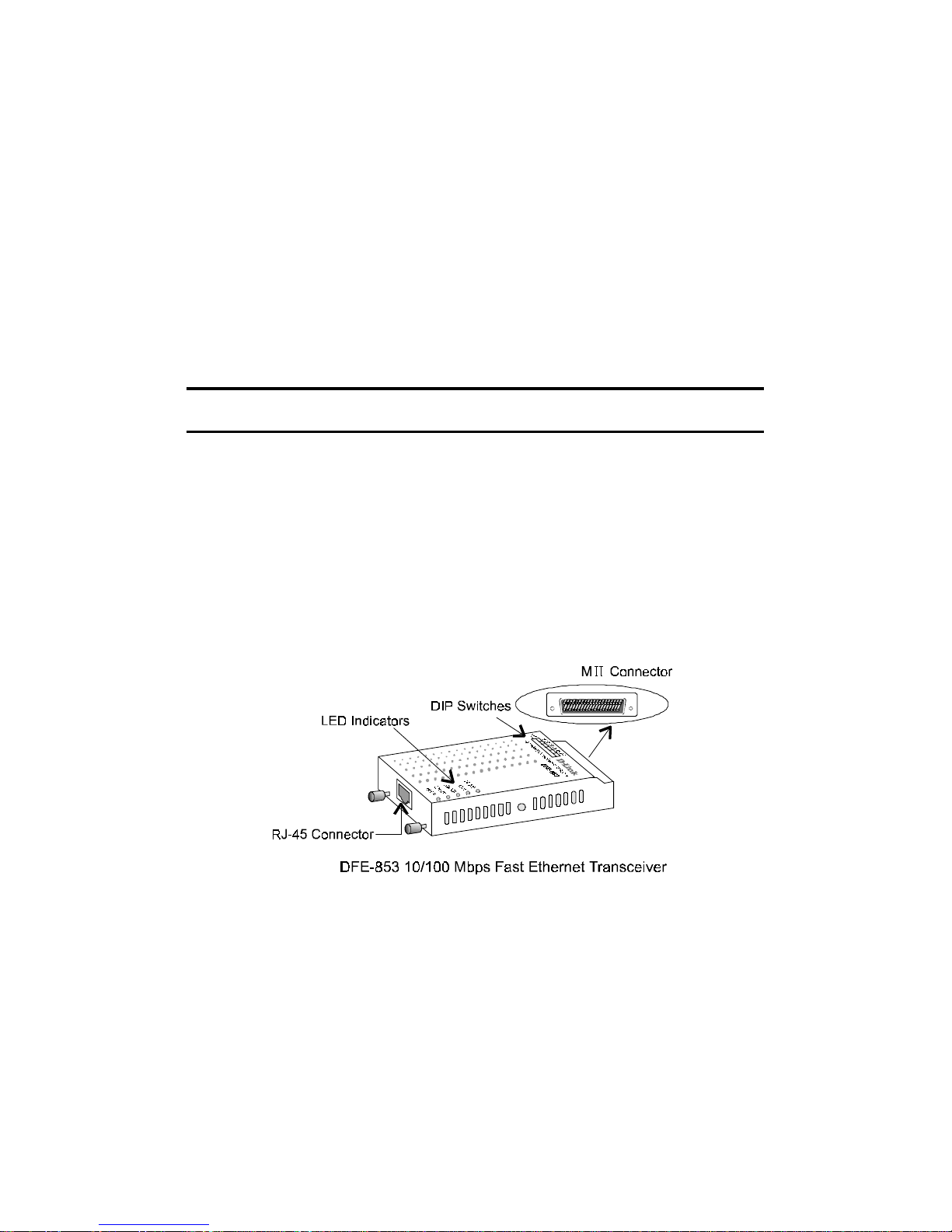
D-Link Fast Ethernet transceiver models DFE-853 and DFE-854
represent the best value on the market. These transceivers are IEEE
802.3u compliant and support both half- and full-duplex operation.
Diagnostic LEDs are on the front, with the cabling connectors, for
maximum visibility.
Transceivers provide additional media options for Fast Ethernet
hubs, switches, bridges and routers equipped with MII ports. A
DFE-853/DFE-854 transceiver is recommended for a network
device with a built-in MII connector.
The DFE-853 MII to 10BASE-T or 100BASE-TX transceiver has
the Auto-negotiation function, which means the transceiver
automatically adjusts itself to the Ethernet speed (10 or 100) and
duplex mode (half or full) of the attached segment. W hen two autonegotiation devices with multiple capabilities
are linked together,
they fi nd t he i r optimum co m m on mo d e of ope r a t ion .
Page 9
9
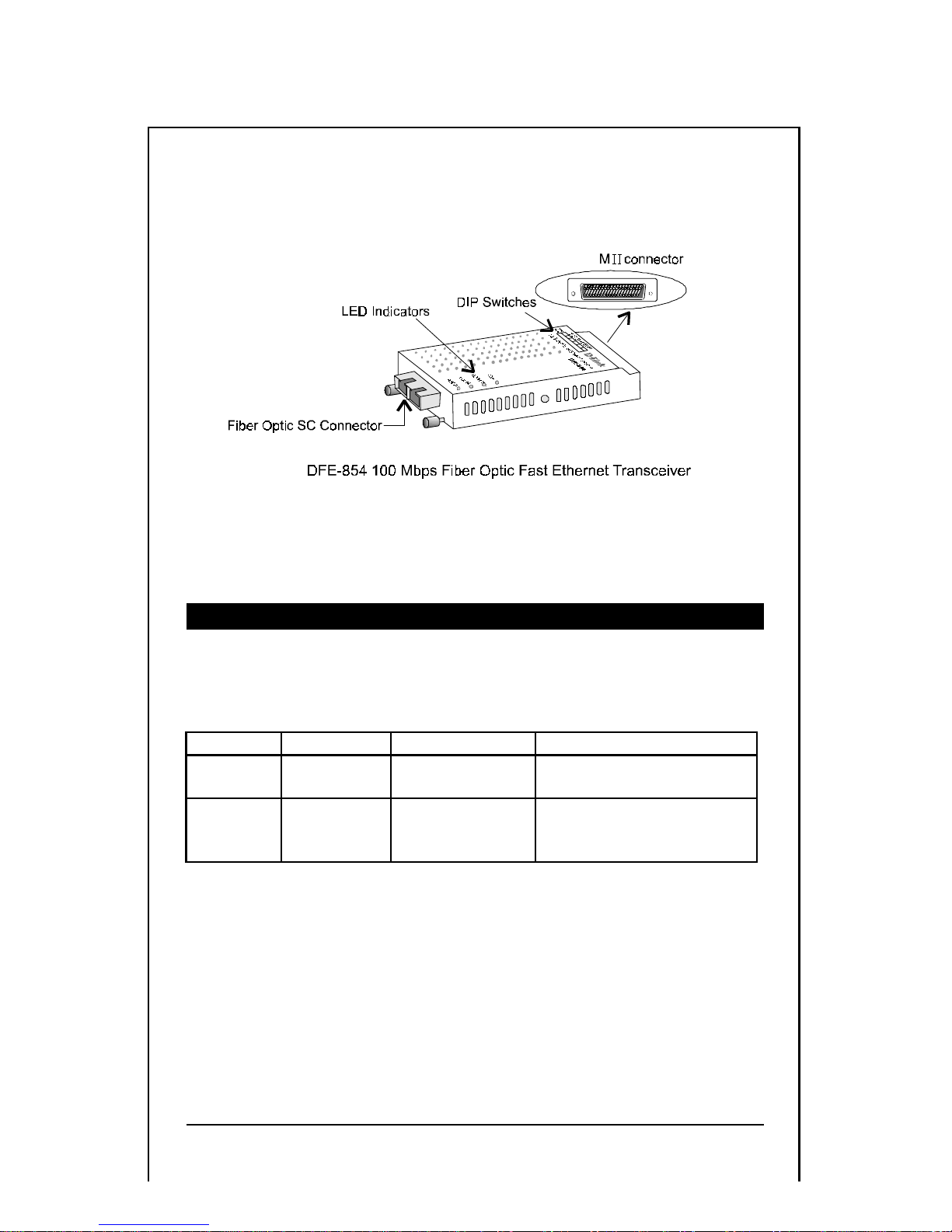
The DFE-854 MII to 100BASE-FX multimode fiber transceiver
supports transmissi on distances up to 2 kilometers (full-duplex) and
412 meters (half-duplex). The DFE-854 transcei ver only operates at
100Mbps
.
Network Cables Supported
The connectors and network cables supported by these two
transceivers are listed in the followi ng table
:
Model Connect or s Type o f Netw or k Netw or k Cable Sup po rted
DFE-853 MII
RJ-45
10B ASE -T
100B ASE-T X
Cat 3, 4, 5 Twisted-Pair
Cat 5 Twisted-Pair
DFE-854 MII
Fiber SC
100BASE-FX 1300nm
62.5/125,50/125-um
Mult i mode fi ber
Page 10

Features
DFE-853 10/100 Mbps Fast Ethernet Transceiver
•
Conforms to the IEEE 802.3 10BASE-T and I EEE 802.3u
100BASE-TX standards.
•
Supports Auto -nego tiation.
•
Data t ransfer rate: 10/100 Mbps.
•
Supp orts tr ansm ission dis tances up to 100 mete rs.
•
One MI I connector and one R J-45 connector.
•
32 selectab le PHY address es (00h-1Fh).
•
LED indicators allow for visual verification of speed, power,
data transmit, linkage, data receive, full/half-duplex and
collisio n fu ncti on s.
•
Oper ating temperature: 0 – 55 degrees Celcius.
•
Stor age Temperature –20 to 55 degrees Celsius
•
Humidity: 10- 90% (non- condensing)
•
EMI certification : FCC, CE, VC CI and C-Tick.
DFE-854 100BASE-FX Fast Ethernet Tr ansceiver
•
Conforms to the IEEE 802.3u 100BASE-FX standard.
•
100 Mb ps data transfer ra te.
•
Support s tran smissi on distances u p to 2 km ( full -dupl ex) a nd
412 meters (half-d uplex)1.
•
Full or half-duplex mode: selected by dip switch.
•
One MII connect or a nd one fiber optic SC connect or.
1
For full-duplex operation, the maximum
distance between two network devices is 2 km.
For half-duplex operation with CSMA/CD
protocol, the maximum distance between two
network devices is 412 meters
.
Page 11
11
•
32 selectable PHY addresses (00h-1Fh).
•
LED indicators allow for visual verification of power,
data transmit , linkage, data receive, full /half-du plex an d
collision functi ons.
•
Operating temper ature: 0 – 55 degrees Celcius.
•
Stor age Temp era t ure –20 t o 55 de gre es Cel sius
•
Humidity: 10 - 90% (non-condensing)
•
EMI Certification: FCC, CE, VCCI and C-Tick
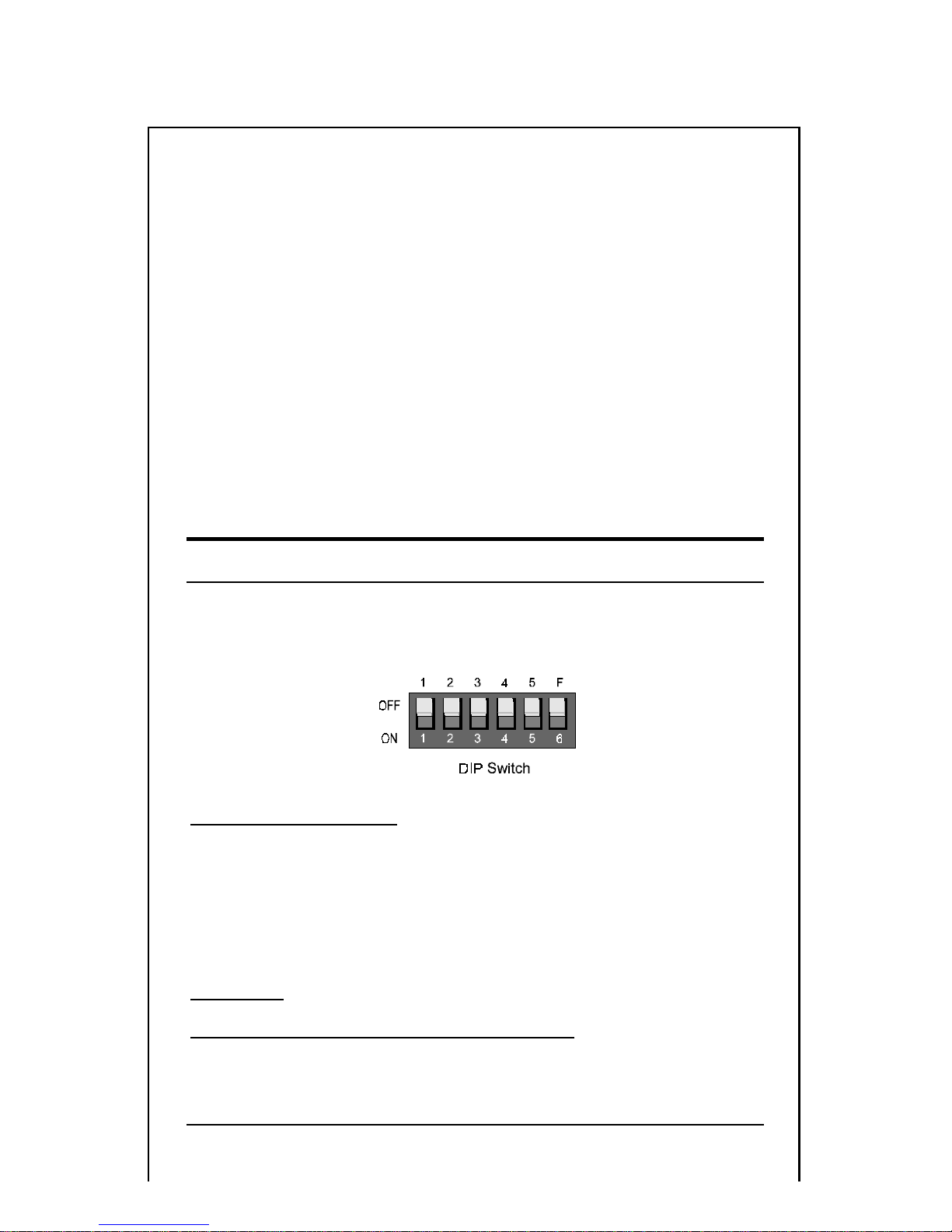
DIP Switch
The following figure shows the DIP switch on both DFE-853 and
DFE-854 trans ceivers
.
Switches 1 through 5
Switches 1 throu gh 5 are used to set a PHY address. For both the
DFE-853 and the DFE-854, the user can select a PHY address (see
appendice s) nu mber fr om 0 throu gh 31 i f an applicat ion re quire s a
unique PHY address.
Switch F
2
2
For both the DFE-853 and the DFE-854, if the
attached device has management functionality
to control the MII interface, the specific
Page 12

For the DFE-853 transceiver, switch F is used to set the
advertisement ability; for the DFE-854, switch F is used to set hal for full-d uplex mode. The FDX/HDX Indicator shows the result.
For the DFE-8533: set the switch F to the OFF position if the
attached device, such as a switch or a NIC card, has Autonegotiation capability or can communicate in full-duplex mode; set
switch F to the ON position if the attached device, such as a hub, can
communicate in half-duplex mode only.
full/half-duplex mode can be set from the
attached device.
3
. The DFE-853 will advertise 100-Mbs/Fullduplex, 100-Mbps/Half-duplex, 10-Mbps/Fullduplex and 10-Mbps/Half-duplex to its link
partner if switch F is set to the OFF
position. The DFE-853 will advertise 10Mbps/Full-duplex and 10-Mbps/Half-duplex to
its link partner if switch F is set to the ON
position.
Page 13
13
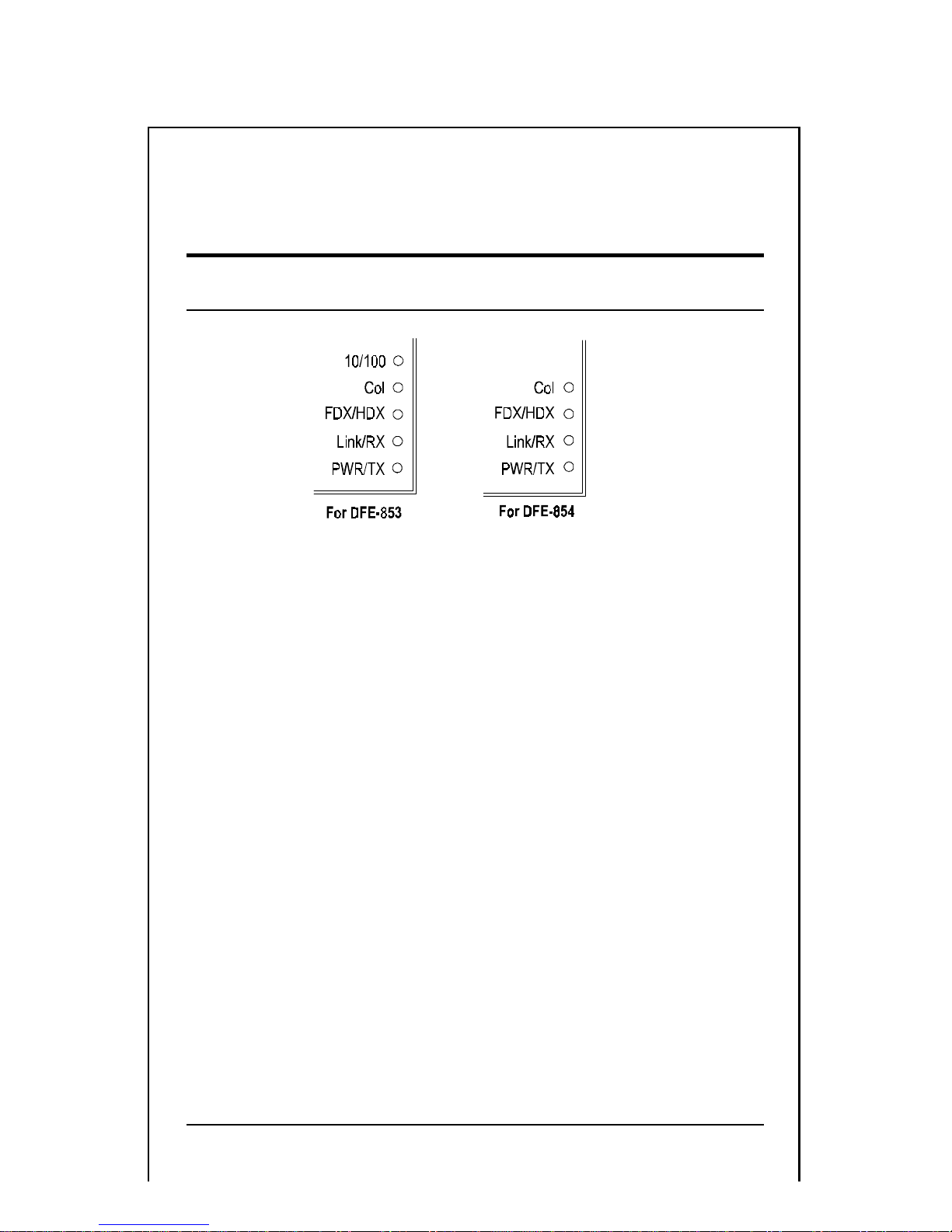
LED Indicators
The DFE-853 and DFE-854 transceivers feature the followi ng LED
indicator s:
1. SPD Indicat or (green) - for DFE-853 only
Steady green when transmissi on is at 100Mbps. It is off when
transmission is at 10Mbps.
Below are indicators for both DFE-853 and DFE- 854.
2. Col Indicator (yello w)
A light up t o indic a te a collision has occurred.
3. FDX/HDX Indicator (green)
Stea dy gr een in dica t es full-duplex sel e c ted.
Dark indicates half-duplex selected.
4. Link/Rx Indi cator (gr een)
Steady green indicates that a valid link exists.
Flashing green indicates that the transceiver is receiving.
5. PWR/Tx Indicator(green)
Lights when pow er is o n.
Blinks whe n devi c e is tran smitt in g.
Page 14
Connections
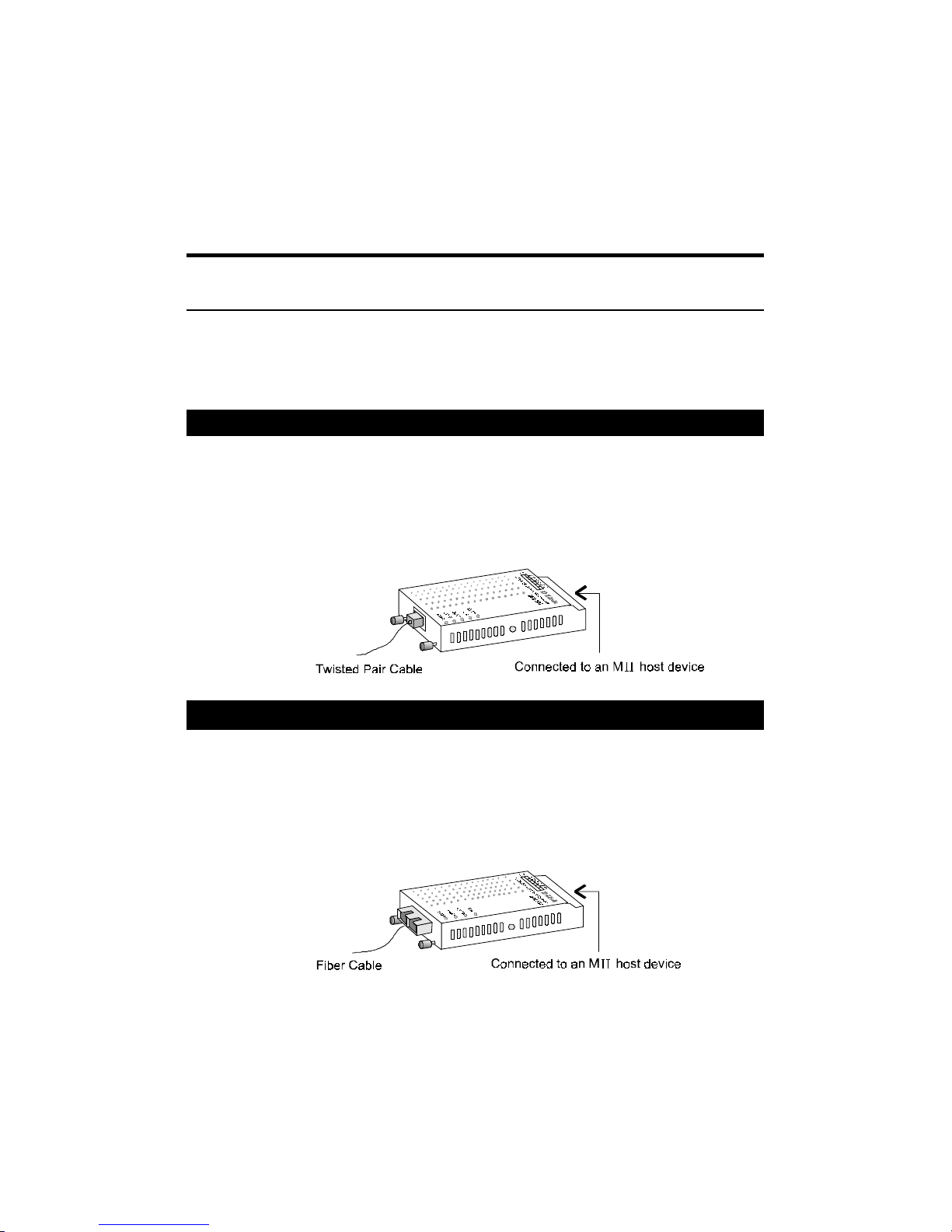
This section describes the general connection schemes for both
transceivers.
DFE-853
The DFE-853 Fast Ethernet transceiver can be used for maki ng MII
to RJ-45 connections. The fol lowing figure shows in the foreground
a 10BASE-T/100BASE-TX TP cable connected to the transceiver.
The transceiver’s MII connector is attached to an MII host device
such as a hub or a switch.
DFE
-854
The DFE-854 Fiber Optic Fast Ethernet transceiver can be used for
making connections between an MII port and fiber optic network
cable. The figure below shows in the foreground a fiber cable
connected to the transceiver. The transceiver’s MII connector is
attached to an MII host device such as a hub or a switch.
Page 15
15
Appendices:
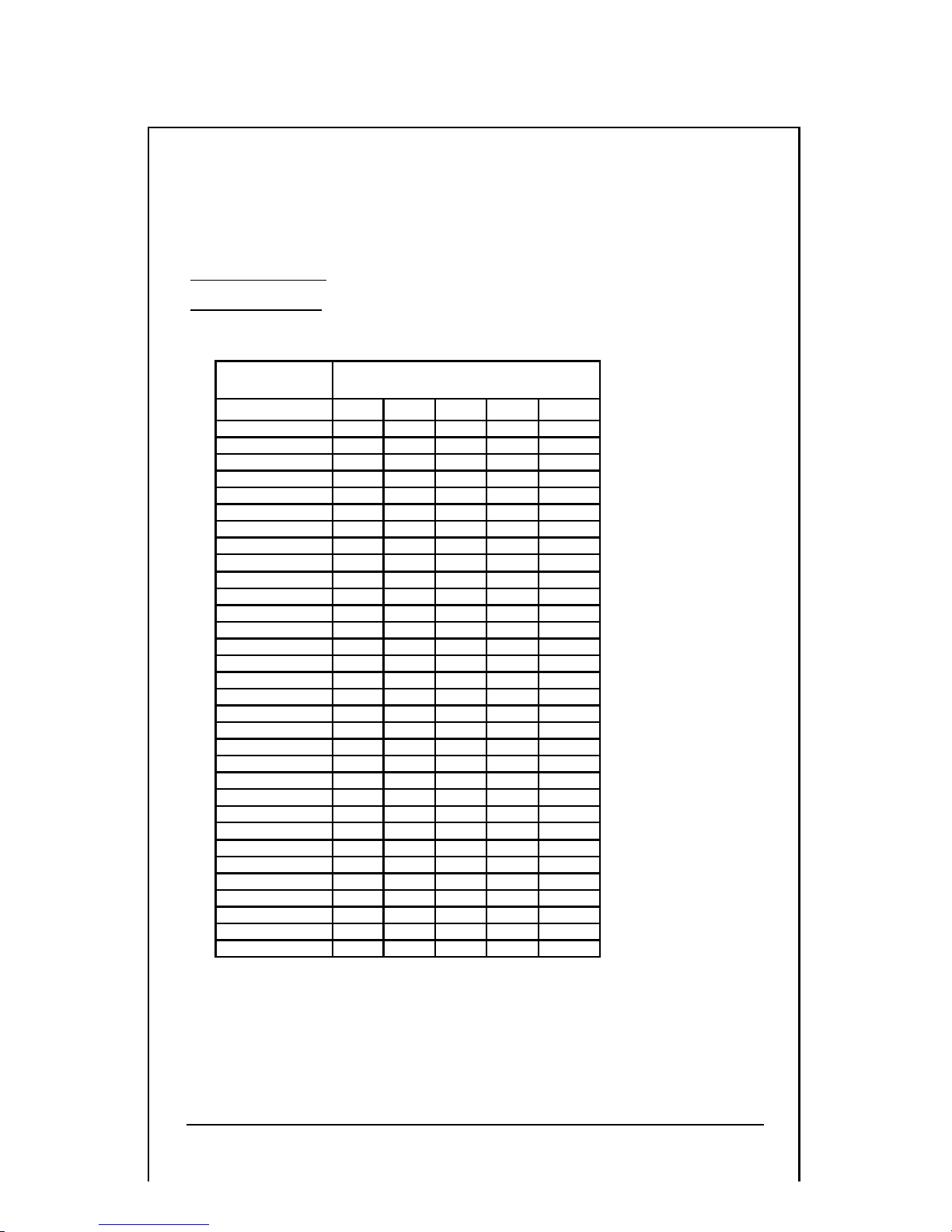
Appendix A
Select a PHY address(fo r DFE-853 and DFE-854)
Switches 1 through 5 are used to set PHY addresses.
PHY
Address
DIP Switch #
SW1 SW2 SW3 SW4 SW5
00h OFF OFF OFF OFF OFF
01h OFF OFF OFF OFF ON
02h OFF OFF OFF ON OFF
03 h OFF OFF OFF ON ON
04h OFF OFF ON OFF OFF
05h OFF OFF ON OFF ON
06h OFF OFF ON ON OFF
07h OFF OFF ON ON ON
08h OFF ON OFF OFF OFF
09h OFF ON OFF OFF ON
0Ah OFF ON OFF ON OFF
0Bh OFF ON OFF ON ON
0Ch OFF ON ON OFF OFF
0Dh OFF ON ON OFF ON
0Eh OFF ON ON ON OFF
0Fh OFF ON ON ON ON
10h ON OFF OFF OFF OFF
11h ON OFF OFF OFF ON
12h ON OFF OFF ON OFF
13h ON OFF OFF ON ON
14h ON OFF ON OFF OFF
15h ON OFF ON OFF ON
16h ON OFF ON ON OFF
17h ON OFF ON ON ON
18h ON ON OFF OFF OFF
19h ON ON OFF OFF ON
1Ah ON ON OFF ON OFF
1Bh ON ON OFF ON ON
1Ch ON ON ON OFF OFF
1Dh ON ON ON OFF ON
1Eh ON ON ON ON OFF
1Fh ON ON ON ON ON
Page 16
Appendix B
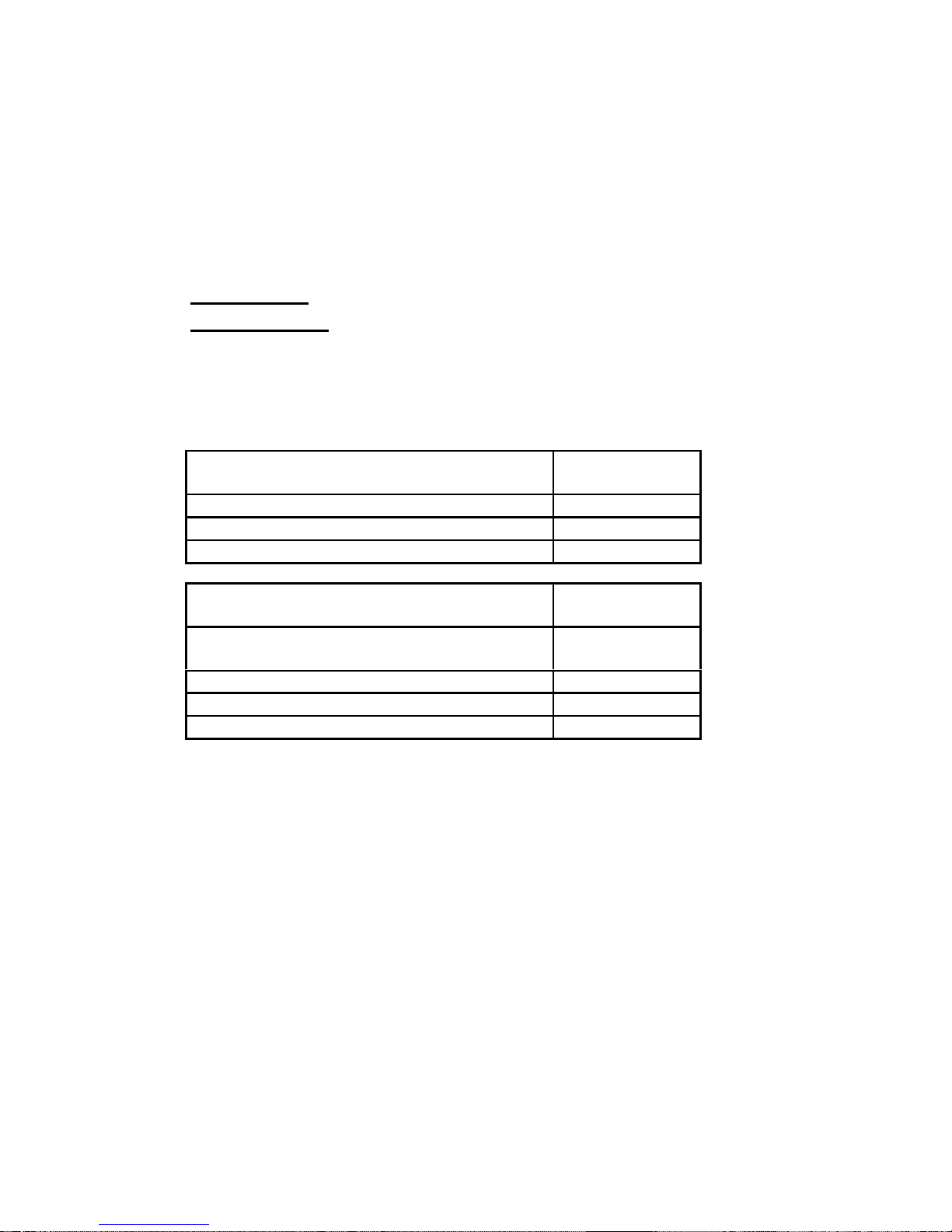
Link Dista nce
Maximum distance between devices connected through
DFE-853 or DFE-854 transceivers are a s fol lows. For further help,
please contact the establishment from which you purchased your
transceiver.
Network De vices with DFE-853 Transce ivers Max imum
Distance
Switch-Switch 100M(HDX/FDX)
Switch-Hub(Including Switch-Uplink Port) 100M(HDX/FDX)
Hub(Class II repeater)-H ub(C la ss II repeater) 5M
Network De vices with DFE-854 Transce ivers Max imum
Distance
Sw i tch-Switch 2 Km(FDX),
412M(HDX)
Switch-Class I Hub 160.8M(HDX)
Switch-Class II Hub 208.8M(HDX)
Hub(Class II repeater)-H ub(C la ss II repeater) 16.2 M
Page 17

17
NOTE
Page 18
Offices
U.S.A. D-LINK SYSTEMS, INC.
5 Mus ick Irvine , CA 92618 USA
TE L: 1-714-455-1688 FAX: 1-714-4 55-2521
CANADA D-LINK CANADA, INC.
2180 Dunwin Drive, Un i t # 6,
Mississauga Ontar i o, L 5L 5M8, Canada
TE L: 1-905-828-0260 FAX: 1-905-8 28-5669
U.K. D-LINK (EUROPE) LTD.
D-Link House, 6 Garland Road, Stanmore, London HA7 1DP
TE L: 44-181-235- 5555 FAX: 44-181-235- 5500
GERMANY D-LINK (DEUTSCHLAND) GMBH I.G.
Bachs trae 22, 65830 Kri ftel Ge rma ny
TE L: 49-6192-97110 FAX : 49-6192-971111
FRANCE D-LINK FRANCE
Le FLO RI LEGE #2, A llee de la Fre snerie
78330 Fontenay Le Fleury France
TE L: 33-1-3023-8688 FAX: 33-1-3023-8689
SWEDEN D-LINK A/B
World Trade Center P. O. Box 70396, 107 24 Stockholm
TE L: 46-8-700--6211 FAX: 46-8-219-640
DENMARK D-LINK DENMARK
Naverl and 2 DK-2600 Glostrup Copenhagen, Denmark
TE L:45-43-969-040 FAX:45-43-4 24-347
SINGAPORE D-LINK SINGAPORE PTE.LTD.
77 Science Park Drive #03-03 CINTECH III,
Singapore Science Park Singapore 118256
EL : 65-774-6233 FAX: 65-77 4-6322
AUSTRALIA D-LINK AUSTRALIA PTY.LTD.
Unit 16, 390 Eastern Valle y Way Roseville, NSW 2069
TE L: 61-2-9417-7100 FAX: 61-2-9417-1077
CHINA D-LINK BEIJING
15th Floor, Science & Technology Tower
11, Baish iqiao Road, Haidian D is tr ict, Beijing 100081
TE L: 86-10-68467106-9 FAX: 86-10-68467110
JAPAN D-LINK TOKYO
10F, 8-8-15 Nishigotanda, Shinagawa-ku, Tokyo, 141
TE L: 81-3-5434-9678 FAX: 81-3-5434-9868
INDIA D- LINK (INDIA) PVT. LTD.
Bombay Office: Plot No.5, Kurla-Bandra Complex Rd.
Off Cst Rd., Santacruz (E) Bombay - 400 098 India
TE L: 91-22-6172478 FAX : 91-22-6172476
TAIWAN D-LINK TAIWAN
2F, No.233-2 Pao-Chiao Rd, Hsin-Tien, Tai pei,
Taiwan, R.O.C.
TEL: 886-2-916-1600 FAX : 886-2- 914-629 9
Page 19
19
Registration Card
Your name: Mr./Ms___________________________________________
Organization: ________________________Dept. __________________
Your title at organization:______________________________________
Telephone: ___________________________ Fax:__________________
Organization's full address:________ _______ _______ ___ _______ ____
__________________________________________________________
Country:___________________________________________________
Date of purchase (Month/Day/Year):_____________________________
3URGXFW 0RGHO 3URGXFW6HULDO 1R1-3URGXFW LQVWDOOHG LQ W\SH RI
FRPSXWHU +H1J1/ &R PSDT 7;9,
- 3URGXFW LQVWDOOHG LQ
FRPSXWHU VHULDO 1R1
(* Applies to adapters only)
Product was purchased from:
Reseller's name:____________________________________________
Tel eph on e: ___ ___ __ __ ___ __ ______ Fax:_______________________
Reseller's
full address___________________________________________________
___________________________________________________
Answers to the following questions help us to support your product:
1. Where and how will the product primarily be used?
†
Home †Office †Travel †Company Business †Home Business †Personal Use
2. How many employees work at installation site?
†
1 employee †2-9 †10-49 †50-99 †100-499 †500-999 †1000+
3. What network medium/media does your organization use ?
†
Fiber-optics †Thick coax Ethernet †Thin coax Ethernet
†
10BASE-T UTP/STP †100BASE-TX †100BASE-T4 †100VGAnyLAN
†Others_________________
4. What category best describes your company?
†
Aerospace †Engineering †Education †Finance †Hospital †Legal †Insurance/Real Estate
†Manufacturing †Retail/Chainstore/Wholesale †Government
†Transportation/Utilities/Communication †VAR
†
System house/company †Other________________________________
5. Would you recommend your D-Link product to a friend?
†
Yes †No †Don't know yet
6. Your comments on this product?
________________________________________________________
________________________________________________________
Page 20
 Loading...