

Page 1

Disney G-Force Manual
(PLAYSTATION®3)
Table of Contents
Getting Started………………………………....2
Introduction………………………………..……3
Meet the G-Force Team.................................3
Main Menu……………………………………...3
Basic Controls................................................4
Darwin Controls……………………………......4
Mooch Controls…………………………..........5
Other Controls……………………………........5
Weapons and Gadgets…………………….....6
Missions…………………………………………6
Health……………………………………………6
Enemies…………………………………………7
Inventory………………………………………..7
Money and Buying Things…………………....7
1
Page 2

Disney G-Force Manual
(PLAYSTATION®3)
Getting Started
Note: Some models of the PLAYSTATION®3 system do not include media slots.
For specific features included, refer to the instructions for use of your model of
the PLAYSTATION®3 system.
Starting a game: Before use, carefully read the instructions supplied with the
PLAYSTATION®3 computer entertainment system. The documentation contains
information on setting up and using your system as well as important safety
information.
Check that the MAIN POWER switch (located on the system rear) is turned on.
Insert the Disney G-Force disc with the label facing up into the disc slot. Select
the icon for the software title under [Game] in the PLAYSTATION®3 system’s
home menu, and then press the S button. Refer to this manual for information on
using the software.
Quitting a game: During gameplay, press and hold down the PS button on the
wireless controller for at least 2 seconds. Then select “Quit Game” from the
screen that is displayed.
Hint: To remove a disc, touch the eject button after quitting the game.
Getting Started
Note: To use the controller, you must first register or “pair” the controller with the
PLAYSTATION®3 system and assign a number to the controller. For details,
refer to the instructions supplied with the system.
Saved data for PLAYSTATION®3 format software
Saved data for PLAYSTATION®3 format software is saved on the system’s hard
disk. The data is displayed under “Saved Game Utility” in the Game menu.
WARNING: When playing this game in 3D mode some people may experience
temporary discomfort such as eyestrain, blurry vision, headache or nausea. If
you are experiencing any discomfort, please take a break from the game or
switch to 2D mode. For those players who are prone to discomfort in 3D mode,
we recommend playing in 2D mode only.
2
Page 3

Disney G-Force Manual
(PLAYSTATION®3)
Introduction
The fate of the world is in your paws!
The evil billionaire Leonard Saber and his dangerous computer program,
SaberSense, are about to take over the world. Only you can stop him. Armed
with the latest high-tech spy equipment, you and your pint-sized operatives must
battle an army of evil appliances in a series of high-octane missions to stop
Saber from completing his sinister plans.
Meet the G-Force Team:
Darwin – G-Force commander
Mooch – Surveillance
Blaster – Weapons and transportation
Juarez – Martial arts specialist
Hurley – Unlikely team member
Speckles – Cyber intelligence
Main Menu
Once the game starts, the Main Menu will give you the following choices:
New Game – Start a new game.
Load Game – Load a saved game.
Options – Adjust the controls, display, audio and gameplay.
Credits – Check out the team that worked on the game.
3
Page 4
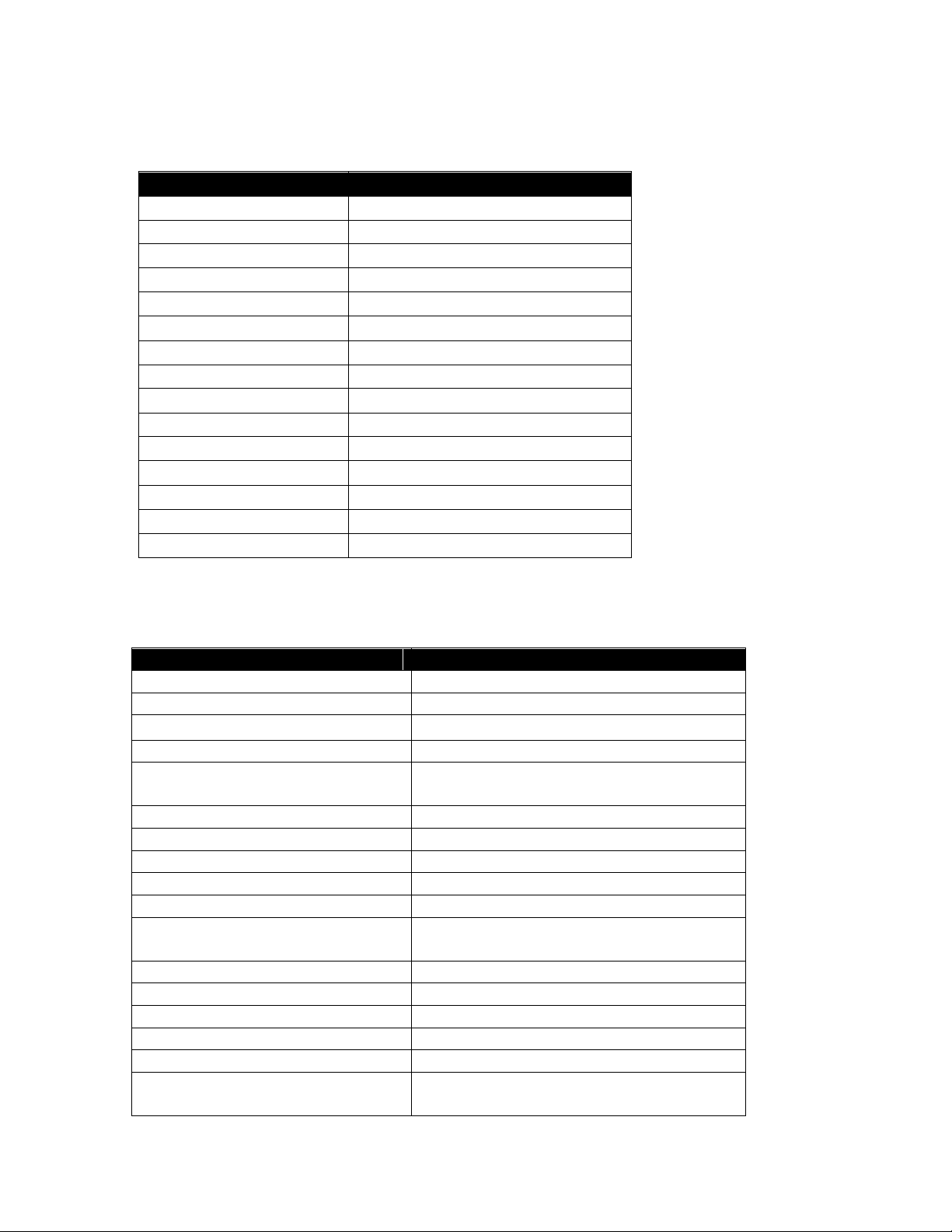
Disney G-Force Manual
Movement
Left stick
Camera
Right stick
Jump / Jetpack
X button
Dash
Hold R2 button
Drop
R2 button
Attract
Hold R1 button
Throw
R1 button
Draw weapon
Hold L1 button
Weapon 1
Square button
Weapon 2
Triangle button
Weapon 3
Circle button
Fire / Electro-Whip
R1 button
Lock
Hold L2 button
Mooch
Up Directional button
Infrared vision
Left Directional button
Hint vision
Hold Right Directional button
Darwin Actions
Control
Character movement
Left stick
Camera movement
Right stick
Jump / Double Jump
X button
Electro-Whip standard attack
R2 button
Electro-Whip power attack
Hold R1 button to charge, release
then tap R1 button again quickly.
Attract Item
Hold R1 button
Throw Item
R1 button (when holding item)
Drop Item
R2 button (when holding item)
Lock-on / strafe mode
Hold L2 button
Select active gadget
Square / Triangle / Circle buttons
Assign gadget via menu
Hold Square / Triangle / Circle
buttons
Aiming mode
Hold L1 button
Use / fire equipped gadget
R1 button (while in aiming mode)
Toggle Mooch
Up Directional button
Toggle infra-red vision
Left Directional button
Jetpack
Hold X button
Vertical Boost
Hold X button to hover, release then
press X button again
(PLAYSTATION®3)
Basic Controls
Darwin Controls
4
Page 5
Disney G-Force Manual
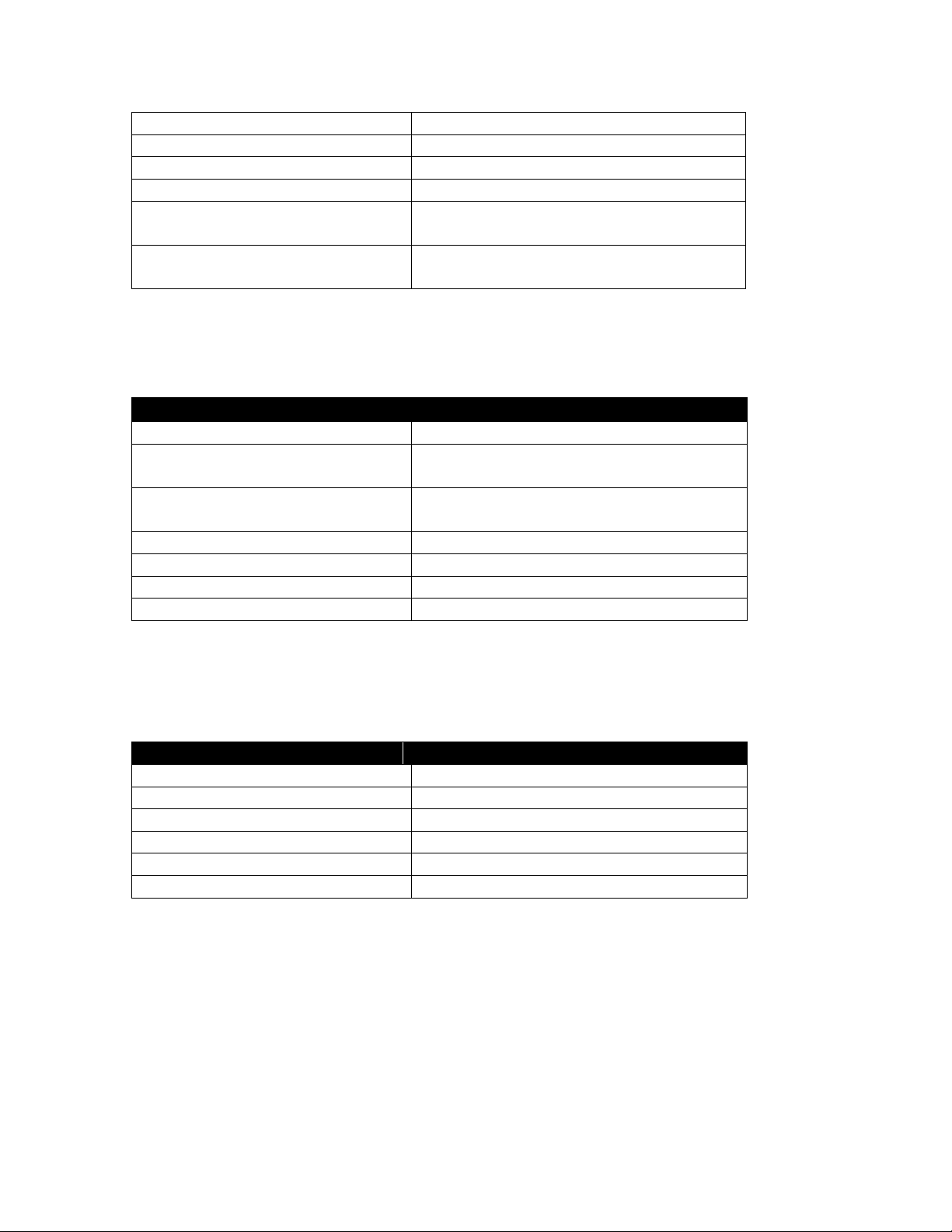
Dash
Hold R2 button
Zoom aim toggle
R3 button (while in aiming mode)
Re-center camera
R3 button (when not in aiming mode)
Context sensitive actions
Hold Square button
Drop (from ledge, rope, grapple
etc)
R2 button
Scan object (in scan vision
mode)
Hold R1 button
Mooch Actions
Control
Turn / Camera
Right stick
Forwards / Backwards / SideStrafe
Left stick
Strafe up / down (relative to
camera view)
Triangle / X button
Interference beam
R1 button
Carry / drop item
Circle button
Slow time
Hold L2 button
Return to Darwin
Up Directional button
RDV Actions
Control
Vehicle movement
Left stick
Jump
X button
Jump to parallel track
Left stick left or right + X button
Aim weapon
Right stick
Primary fire
R1 button
Secondary fire (locking)
Hold L2 button and release
(PLAYSTATION®3)
Mooch Controls
Other Controls
5
Page 6

Disney G-Force Manual
(PLAYSTATION®3)
Weapons and Gadgets
Electro-Whip – Whips your enemies or attracts items
Saberlizer – Scans objects for information and hints
Plasma Gun – Fires an electrical plasma projectile that is ideal for long-range
attacks
Cluster Rifle – A rapid-firing gun
NanoHacker – Fires a “hacking” beam that turns enemies into allies
Flamethrower – Shoots flames that can melt through ice
Shot Bolter – Fires a cluster of high-powered projectiles
Freeze Cannon – Freezes enemies in blocks of ice
Missions
Saber Mansion – Break into Leonard Saber’s mansion and stop SaberSense
before it activates.
Production Facility – Prevent the shipment of dangerous new SaberSense
appliances.
FBI Headquarters – Infiltrate the FBI building to spy on the evil billionaire,
Saber, who is being held for questioning.
Satellite Control Center – Bring down Saber’s satellite system.
“Clusterstorm” – Stop Clusterstorm before it destroys the world.
Health
Keep track of your health on the health bar in the HUD.
Run out of health and you will return to the last “soft” checkpoint with all of your
inventory items intact.
Lose all your lives and you’ll be sent back to the last “hard” checkpoint without
inventory items.
Note: Be sure to save the game as you go.
6
Page 7

Disney G-Force Manual
(PLAYSTATION®3)
Enemies
With SaberSense up and running, every appliance is your possible enemy.
Tool Enemies – Use these tools against other enemies before they turn on you.
Barrier Enemies – Figure out how to get past these enemy obstacles.
Stealth Enemies – Use all of your espionage skills to get past these enemies
before they sound the alarm or attack you.
Standard Enemies – These household appliances may look harmless, but they
can inflict some serious damage if you’re not careful.
Inventory
Collect three types of items to help you on your covert missions:
Gadget – Gather new high-tech weapons, or special espionage abilities.
Pickup – Collect more health, ammunition or chips.
Quest – Find blueprints, keycards or other items for unlocking specific doors or
devices.
Money and Buying Items
Destroy enemies and storage containers and collect “SaberSense Chips”.
Use the SaberSense Chips to purchase ammunition, health, new and upgraded
weapons, and other tools of the trade.
Press the Square button at the Vending Kiosks to open up a menu of items you
can purchase.
7
 Loading...