

Page 1
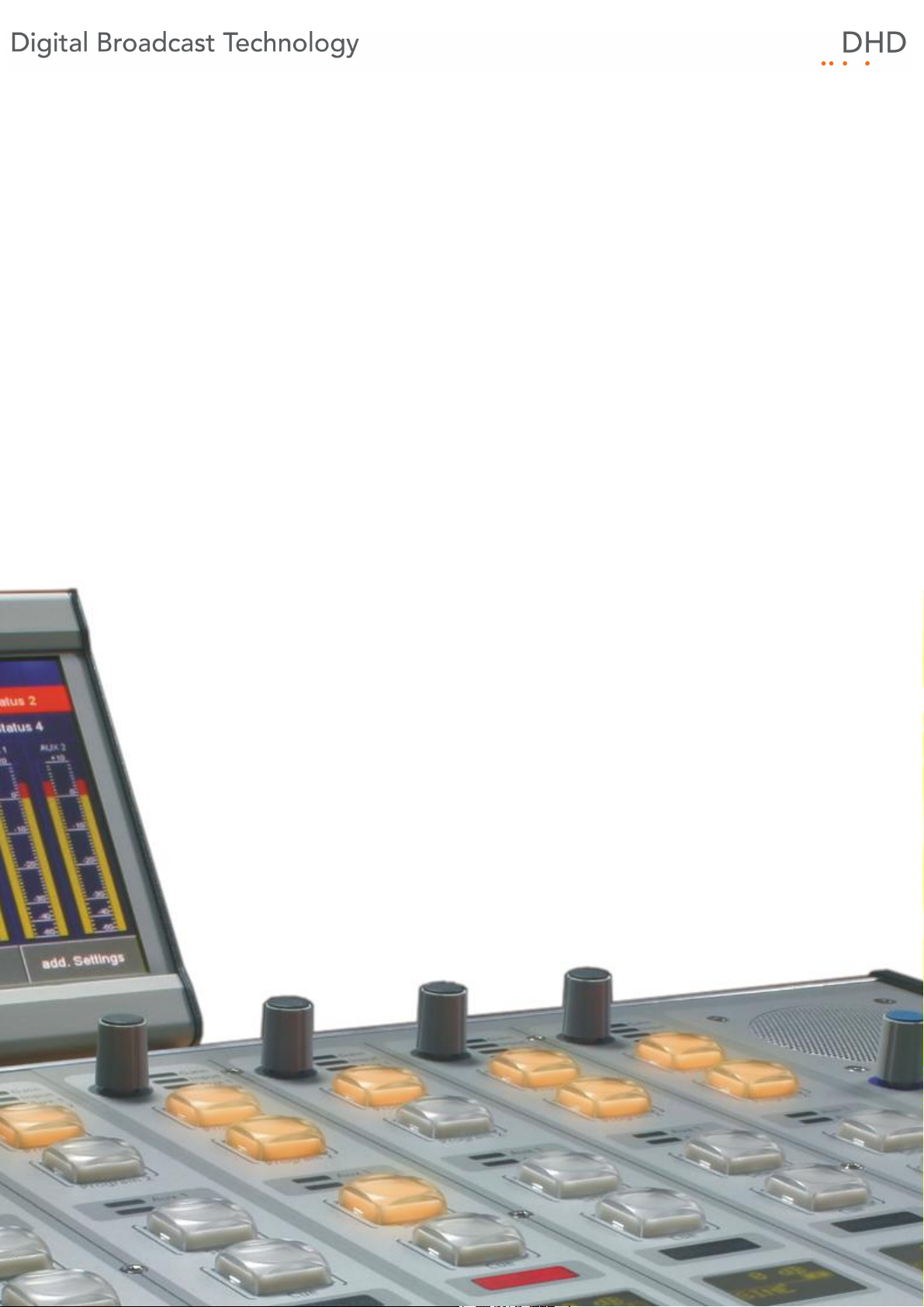
Series 52
52/SX Compact Mixing Console
Installation Guide
© 2011 DHD Deubner Hoffmann Digital GmbH
Version: 1.3.0
Page 2
Table of Contents
Table of Contents
1 Terms of Use - Legal Disclaimer
About this Book
2
3 What is new in this version of the manual?
4 Environmental Specifications
5 Assembling and Wiring the Hardware
1 Installation Information XS Core and XS Multi-I/O Box
Installation Information for Table-Installation Frames
2
3 Installation Information for Console Frames
System Wiring
4
................................................................................................................................... 6
................................................................................................................................... 7
................................................................................................................................... 8
................................................................................................................................... 8
......................................................................................................................................................... 9Connecting modules to the XS Core
......................................................................................................................................................... 10Pin assignment of 52-1330
Index
1
2
4
5
6
© 2011 DHD Deubner Hoffmann Digital GmbH
Page 3

1
Series 52 - 52/SX Compact Mixing Console Installation Guide
1 Terms of Use - Legal Disclaimer
Series 52
52/SX Compact Mixing Console Installation Guide
© 2011 DHD Deubner Hoffmann Digital GmbH
This manual is copyright of DHD. It might be distributed and copied as long as it is copied completely as a whole and this
copyright notice is included.
No part of this document may be copied or distributed without prior written permission of DHD Deubner Hoffmann Digital
GmbH.
Windows is a registered trademark of Microsoft Corp., Redmond, Wash., USA. All other trademarks are the property of
their respective owners.
Specifications and design are subject to change without notice.
The content of this document is for information only. The information presented in this document does not
form part of any quotation or contract, is believed to be accurate and reliable and may be changed without
notice. No liability will be accepted by the publisher for any consequence of its use. Publication thereof
does neither convey nor imply any license under patent rights or other industrial or intellectual property
rights.
Version 1.3.0, 07.11.2011
© 2011 DHD Deubner Hoffmann Digital GmbH
Specifications and design are subject to change without notice. The content of this document is for information only. The information presented in this document does not form part
of any quotation or contract, is believed to be accurate and reliable and may be changed without notice. No liability will be accepted by the publisher for any consequence of its use.
Publication thereof does neither convey nor imply any license under patent rights or other industrial or intellectual property rights.
Page 4
2 About this Book
Note
This manual mainly refers to the physical installation of an 52/SX Compact
Mixing Console. Please find more information on this device in the 52/SX
manual.
This installation guide will provide you a short introduction how to install an 52/SX Compact Mixing Console.
The content of this manual is subject to change without notice. DHD recommends to visit the DHD website once in a while
to check if there is a newer version of this document available.
How to Use this Book
The Navigation Tree
You can find the navigation tree on the left-hand-side of the PDF document. Via the entries of this tree you can directly
reach the several chapters and sections of this document. Click onto the text or the symbol of an entry to display its
content.
About this Book
2
If a chapter includes further sections, you will find a plus-symbol in front of the entry in the navigation tree. Either you can
click onto this plus-sign or you double click the text or the symbol of the entry to make the sub-branches of the further
sections visible.
Search
You can find an alphabetical ordered list of keywords at the end of the document. Please see the page numbers in this
index to find the respective keywords in the document.
Moreover, you can use the search function of your PDF reader to seek for any words.
Links
Links are underlined to separate them from the rest of the text. These links can be a connection to other chapters or
sections in the same document or to an URL (internet address).
· Same document: The hand symbol appears if you move the mouse over the link.
· URL: The hand symbol with an additional w appears if you move the mouse over the link.
Please notice, that you need an active internet connection to be able to execute a link to an URL.
Specifications and design are subject to change without notice. The content of this document is for information only. The information presented in this document does not form part
of any quotation or contract, is believed to be accurate and reliable and may be changed without notice. No liability will be accepted by the publisher for any consequence of its use.
Publication thereof does neither convey nor imply any license under patent rights or other industrial or intellectual property rights.
Version 1.3.0 - 07.11.2011
Page 5
3
Warning
The demands and advices in this fields should be followed unconditional, because otherwise hardware
and software products, data bases, as well as persons may suffer a loss.
Important
The demands and advices in this fields should be followed, because these contents are necessary for the
proper operation of the DHD systems.
Note
Recommendations and further information are marked as notes. Sometimes you will also find off-topic
content in this field, which is related to the actual topic.
Tip
Tips are helpful advices, which should make work with DHD systems easier.
Weblink
In this fields you can find links to websites, which include for example an other manual or the possibility to
download a driver for the respective DHD system.
Please notice, that you need an active internet connection to be able to execute a link to an URL.
Download
You can directly open and download a file if the respective link is marked as download link (file link).
Series 52 - 52/SX Compact Mixing Console Installation Guide
The Meaning of Advices in the Text
© 2011 DHD Deubner Hoffmann Digital GmbH
Specifications and design are subject to change without notice. The content of this document is for information only. The information presented in this document does not form part
of any quotation or contract, is believed to be accurate and reliable and may be changed without notice. No liability will be accepted by the publisher for any consequence of its use.
Publication thereof does neither convey nor imply any license under patent rights or other industrial or intellectual property rights.
Page 6
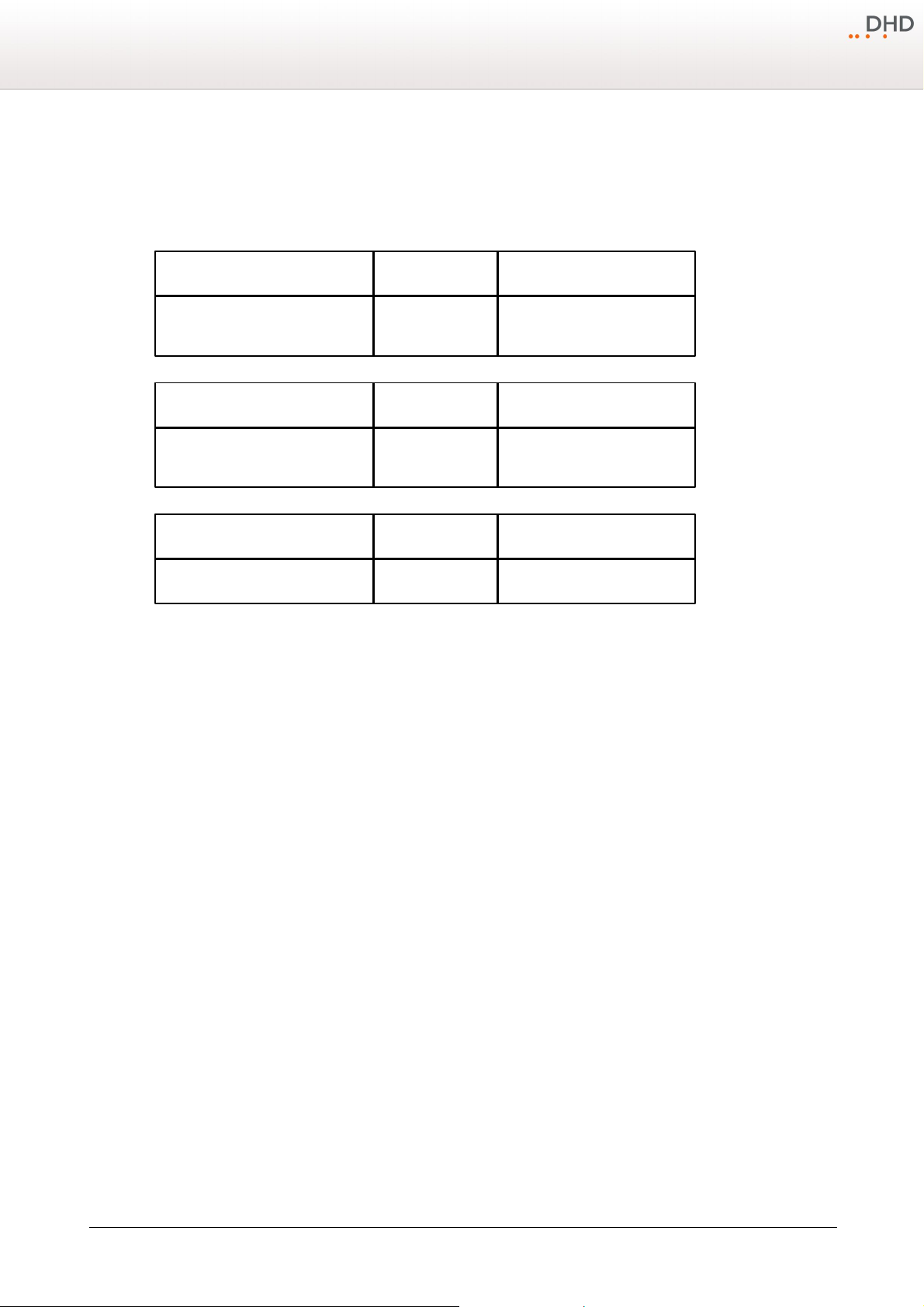
What is new in this version of the manual?
Chapter / Section
State
Note
System Wiring - Connecting modules
to the XS Core
changed
Information added:
· XS Core pictures changed
· Device link added on APC ports
Chapter / Section
State
Note
System Wiring - Connecting modules
to the XS Core
changed
Information added:
· type of CAT5/6 cables
Chapter / Section
State
Note
All sections.
added
Information added.
3 What is new in this version of the manual?
All sections that had been added, deleted or changed are listed below. Click on the entries to reach the respective sections
directly.
Current version (1.3.0):
Version (1.2.0):
Initial version (1.1.0):
4
Specifications and design are subject to change without notice. The content of this document is for information only. The information presented in this document does not form part
of any quotation or contract, is believed to be accurate and reliable and may be changed without notice. No liability will be accepted by the publisher for any consequence of its use.
Publication thereof does neither convey nor imply any license under patent rights or other industrial or intellectual property rights.
Version 1.3.0 - 07.11.2011
Page 7

5
Warning
Make sure the device has the operating temperature before switching it on. Also,
the relative humidity must not be exceeded. Above all, no humidity must
condense on or in the device!
operating temperature:
+5°C … +35°C
relative humidity:
20% … 85%, non condensing
Series 52 - 52/SX Compact Mixing Console Installation Guide
4 Environmental Specifications
In the following you can find some general advices concerning the environment of an 52/SX. If these values and standards
are not adhered, DHD can not assure the proper functionality of the device.
© 2011 DHD Deubner Hoffmann Digital GmbH
Specifications and design are subject to change without notice. The content of this document is for information only. The information presented in this document does not form part
of any quotation or contract, is believed to be accurate and reliable and may be changed without notice. No liability will be accepted by the publisher for any consequence of its use.
Publication thereof does neither convey nor imply any license under patent rights or other industrial or intellectual property rights.
Page 8
Assembling and Wiring the Hardware
Warning
Avoid damaging components by electrostatic discharge (ESD).
Before you touch or mount electronical components, make sure you do not carry
any electrostatic charges. Earth yourself using a grounded metal object (heater,
rack) to divert electrostatic charges immediately before you touch electronical
components.
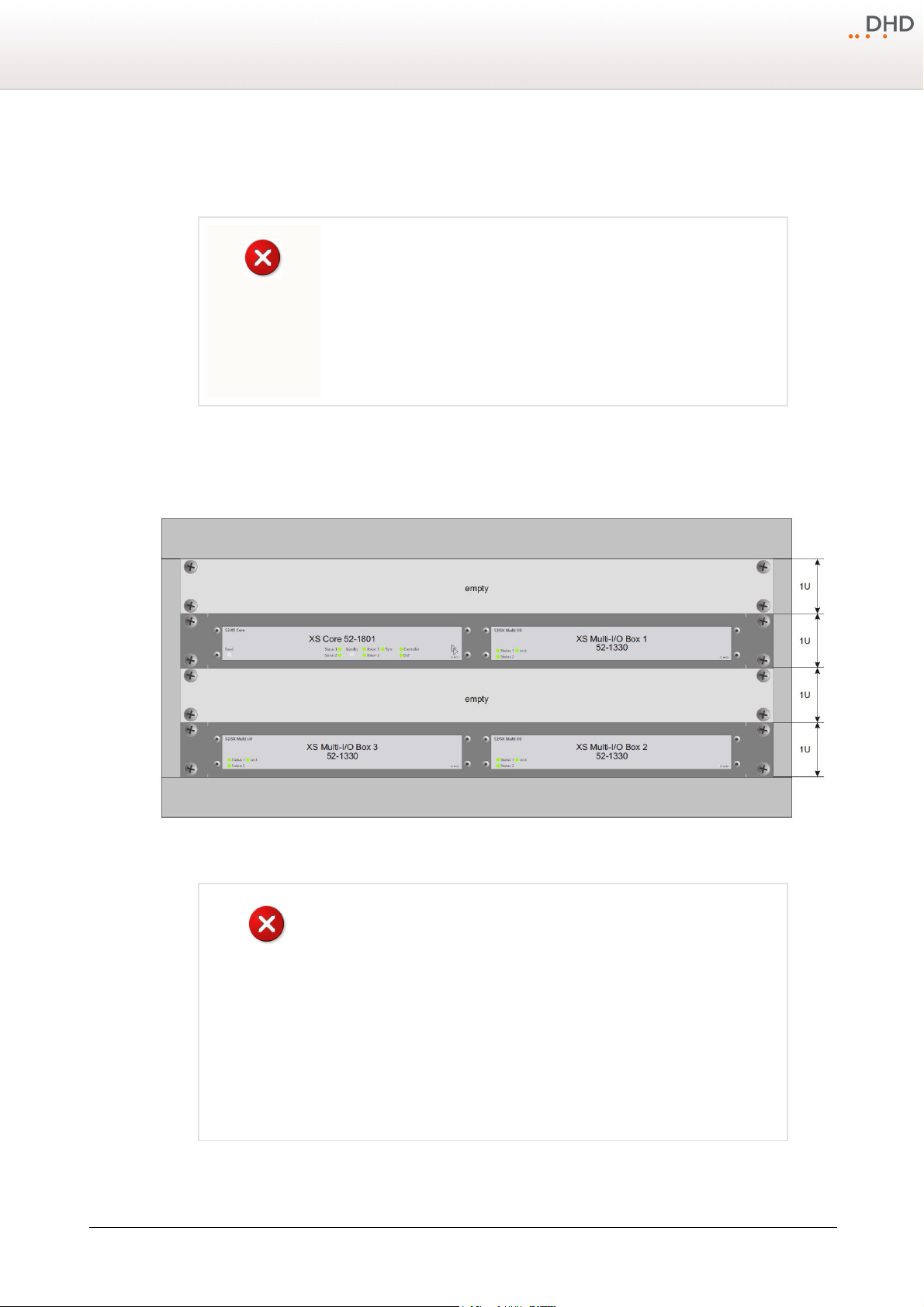
Warning
In a 19"-rack, in order to ensure the air flow for cooling the device, at least one
empty rack unit (1 U) is required above and below the XS Core and XS Multi-I/O
Box.
If more heat-emitting devices are mounted in the rack, more space for
ventilation is necessary. Do not cover the perforated metal plates on top and on
the sides of the cases.
Generally, avoid operating devices which produce much heat close to the XS
Core and Multi-I/O Boxes.
5 Assembling and Wiring the Hardware
In the following you can find information on the mechanical assembling and wiring of an 52/SX Mixing Console.
5.1 Installation Information XS Core and XS Multi-I/O Box
6
Front view of XS Core and XS Multi-I/O Boxes installed in a 19'' mounting
Specifications and design are subject to change without notice. The content of this document is for information only. The information presented in this document does not form part
of any quotation or contract, is believed to be accurate and reliable and may be changed without notice. No liability will be accepted by the publisher for any consequence of its use.
Publication thereof does neither convey nor imply any license under patent rights or other industrial or intellectual property rights.
rack.
Version 1.3.0 - 07.11.2011
Page 9
7
Weblink
For detailed dimensions of each type of table installation frames, see 52/SX list
of modules - 52/SX Table-Installation Frames.
For detailed dimensions of the Table Top Stand, see 52/SX list of modules - 523017A - Table Top Stand for 52-4017.
Series 52 - 52/SX Compact Mixing Console Installation Guide
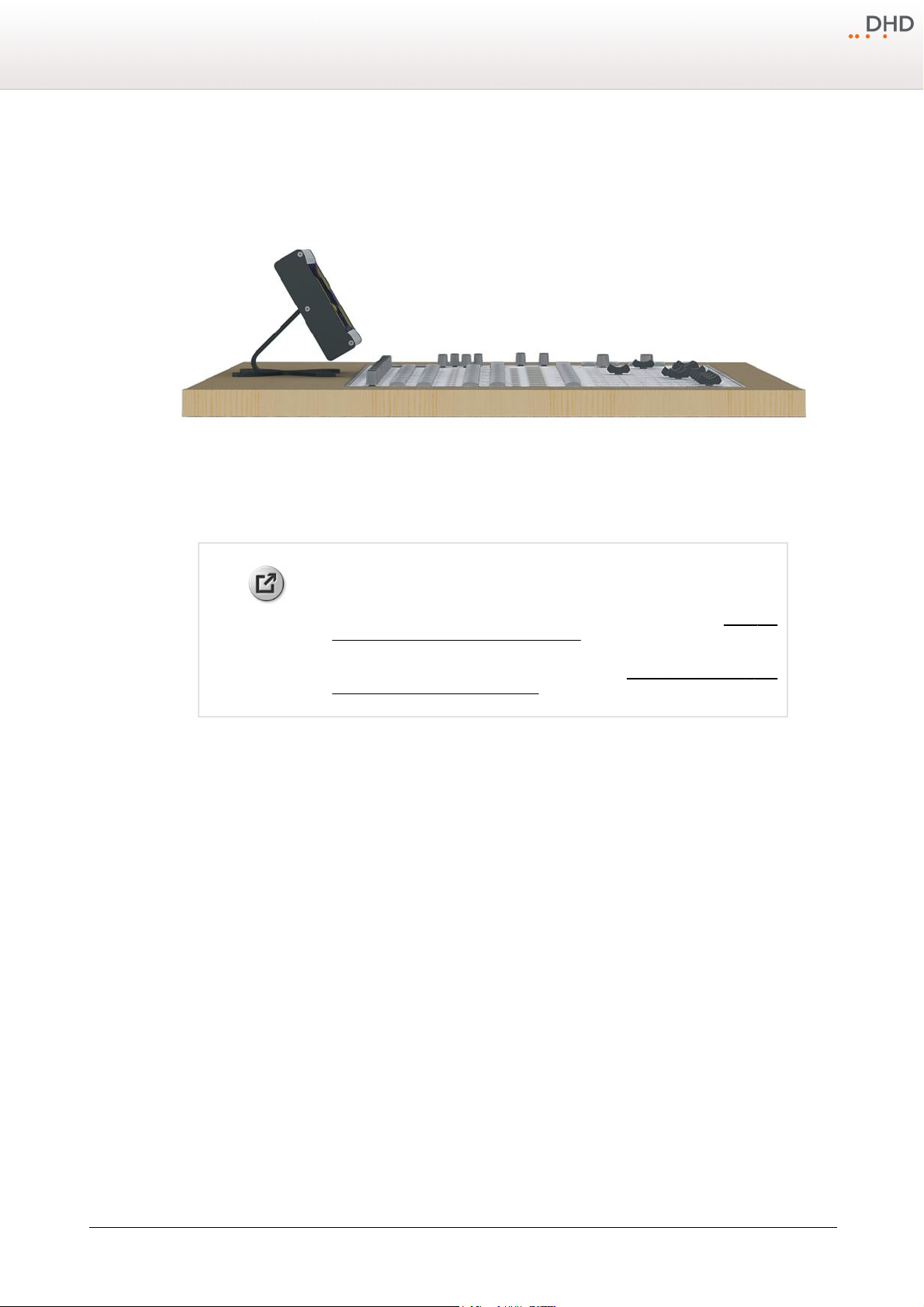
5.2 Installation Information for Table-Installation Frames
The Table Installation Frames 52-26xx allow a flush installation of the control modules with the table surface.
Table-Installation Frames 52-26xx
The control modules are magnetically fixed in the installation frame. For the mounting of the TFT/Touch Display the 523017A Table Top Stand is required.
© 2011 DHD Deubner Hoffmann Digital GmbH
Specifications and design are subject to change without notice. The content of this document is for information only. The information presented in this document does not form part
of any quotation or contract, is believed to be accurate and reliable and may be changed without notice. No liability will be accepted by the publisher for any consequence of its use.
Publication thereof does neither convey nor imply any license under patent rights or other industrial or intellectual property rights.
Page 10
Assembling and Wiring the Hardware
Weblink
For detailed dimensions of each type of console frames, see 52/SX list of
modules - 52/SX Console Frames.
For detailed assembly instruction of the Console mounting kit, see Assembly
instruction of 52-3018 on 52/SX frames.
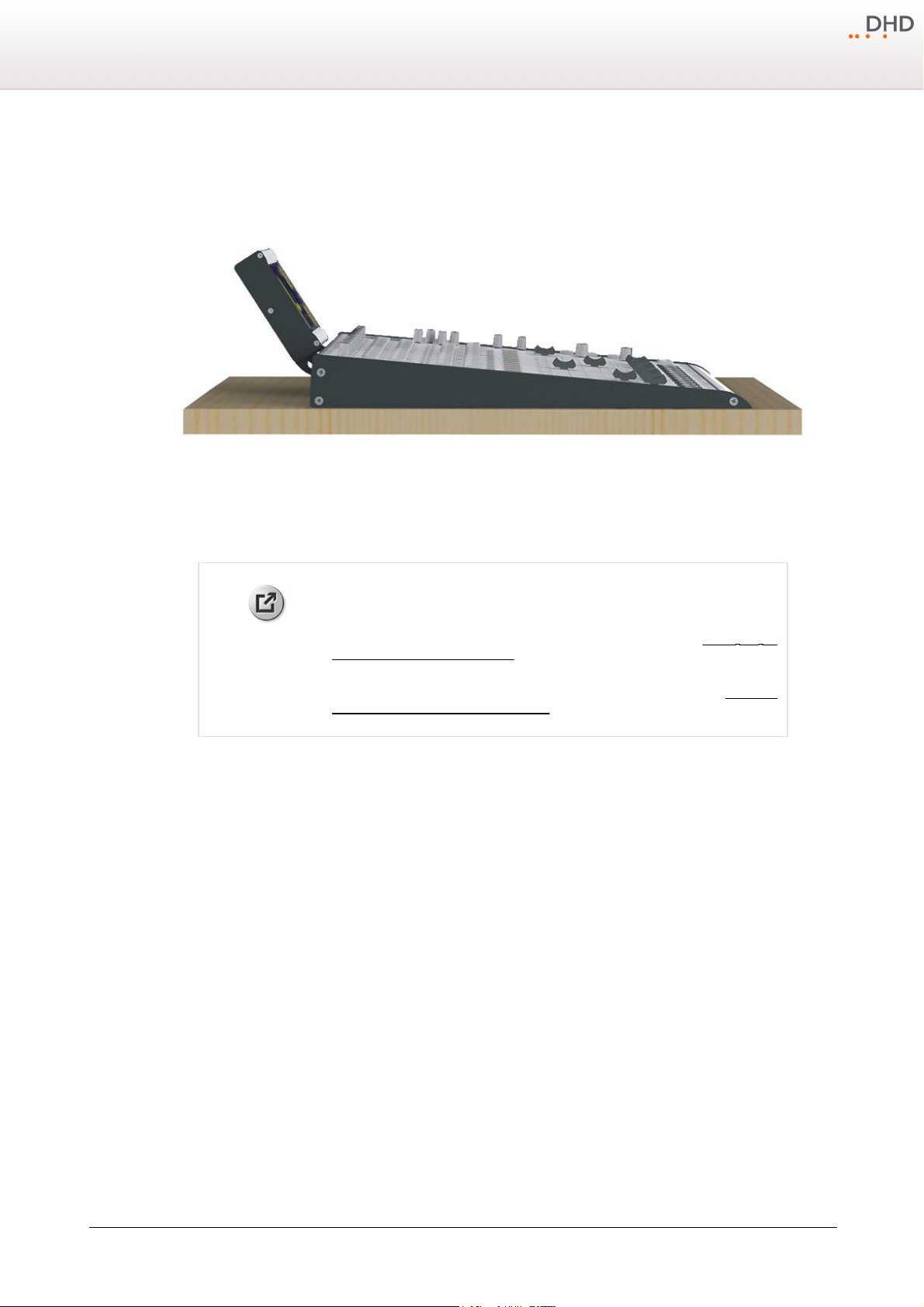
5.3 Installation Information for Console Frames
The Console Frames 52-28xx allow an angled installation of the control modules.
Console Frames 52-28xx
The control modules are magnetically fixed in the installation frame. The 52-3018A Console mounting kit is required for
mounting the TFT/Touch Display on the Console Frame .
8
5.4 System Wiring
The 52/SX mixing system consists of 3 main parts, which are connected via an industry standard CAT5 or CAT6 shielded
network cable. These parts are:
· XS Core: This unit includes the DSP Audio Engine and the Control Engine.
· XS Multi-I/O box: This unit includes all input and output connectors for analog and digital audio, USB and GPIO.
· Control modules: These are the user interface of the mixer with all faders, control knobs, push buttons, OLED
displays and TFT displays.
General Information
Please use at least shielded CAT5 cables continuous for wiring. But DHD recommends to use shielded CAT6 cables for
longer distances. The maximum length of the Ethernet cable between two modules is 100 meters (e.g., between the XS
Core and Control module or between the XS Core and XS Multi-I/O Boxes).
Specifications and design are subject to change without notice. The content of this document is for information only. The information presented in this document does not form part
of any quotation or contract, is believed to be accurate and reliable and may be changed without notice. No liability will be accepted by the publisher for any consequence of its use.
Publication thereof does neither convey nor imply any license under patent rights or other industrial or intellectual property rights.
Version 1.3.0 - 07.11.2011
Page 11
9
Important
Use always shielded CAT5 or CAT6 ethernet cables (at least S/UTP, F/UTP or SF/
UTP) to connect these modules to the XS core.
Name of the APC port
52-1801
52-1804
APC 1
TFT/touch display
TFT/touch display
APC 2
central control module
central control module 52-1010
APC 3
fader module 1
fader module 1
APC 4
fader module 2
I/O box 1 / DeviceLink 1
APC 5
fader module 3
n. a.
APC 6
fader module 4 / I/O box 3 /
DeviceLink 3 *
n. a.
APC 7
I/O box 2 / DeviceLink 2
n. a.
Series 52 - 52/SX Compact Mixing Console Installation Guide
5.4.1 Connecting modules to the XS Core
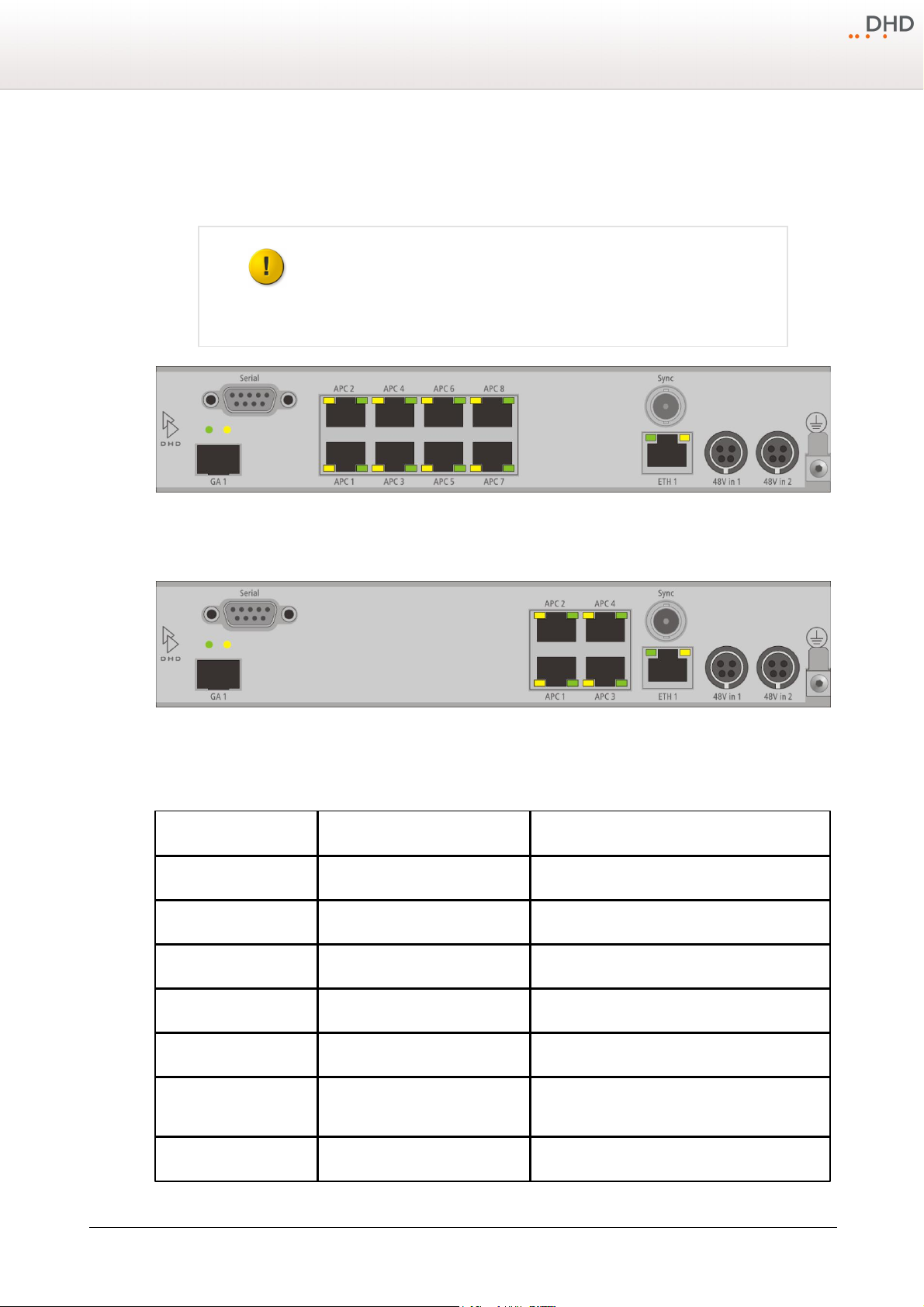
The control modules and I/O boxes have to be connected to the APC ports of the 52/XS Cores 52-180x. It is important to
connect the peripheral modules to the correct APC port.
Rear view of 52-1801
Rear view of 52-1804
In the following table you can find the assignment of the control modules, I/O boxes, DeviceLinks and TFT/Touch displays
to the APC ports.
© 2011 DHD Deubner Hoffmann Digital GmbH
Specifications and design are subject to change without notice. The content of this document is for information only. The information presented in this document does not form part
of any quotation or contract, is believed to be accurate and reliable and may be changed without notice. No liability will be accepted by the publisher for any consequence of its use.
Publication thereof does neither convey nor imply any license under patent rights or other industrial or intellectual property rights.
Page 12
Name of the APC port
52-1801
52-1804
APC 8
I/O box 1 / DeviceLink 1
n. a.
*) The APC port 6 is useable either for a fader module, an I/O box or an DeviceLink. Because of this, for example a 12
Weblink
Please find a PDF file with cabling examples in the 52/SX Download area on
www.dhd-audio.com.
Weblink
Please find a PDF file with pin assignments in the 52/SX Download area on
www.dhd-audio.com.
Note
Breakout cables for the D-sub connectors of the 52/XS Multi-I/O Box are not
available from DHD.
fader mixing console with three I/O boxes or a 16 fader mixing console with two I/O boxes are the maximum
configurations for a 52/SX.
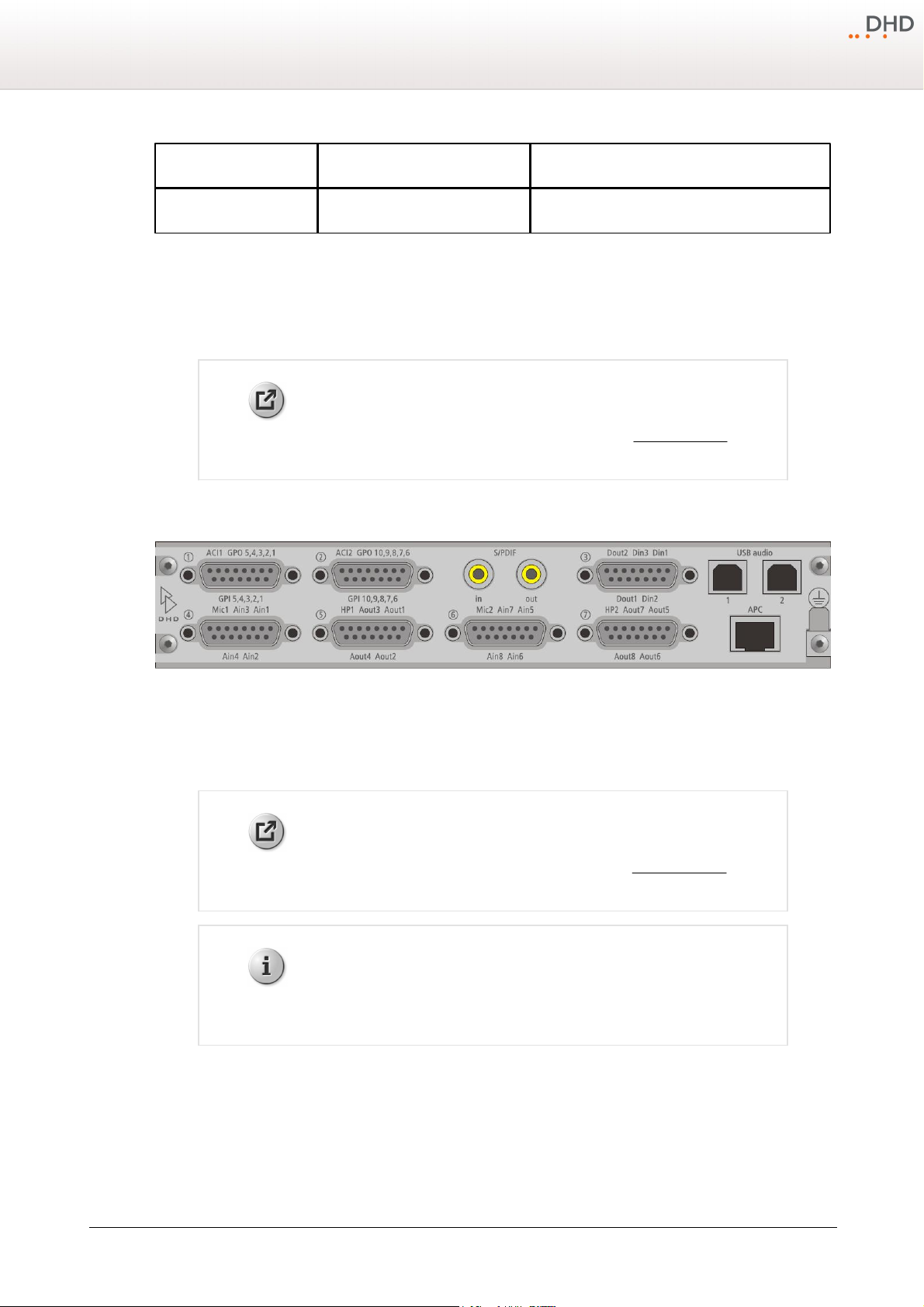
5.4.2 Pin assignment of 52-1330
Assembling and Wiring the Hardware
10
Rear View 52-1330
The connectors of the 52-1330 are D-sub type (15 pins), apart from the S/PDIF, USB audio and APC.
Specifications and design are subject to change without notice. The content of this document is for information only. The information presented in this document does not form part
of any quotation or contract, is believed to be accurate and reliable and may be changed without notice. No liability will be accepted by the publisher for any consequence of its use.
Publication thereof does neither convey nor imply any license under patent rights or other industrial or intellectual property rights.
Version 1.3.0 - 07.11.2011
Page 13

11 Series 52
Index
5
E
electrostatic discharge 6
Environmental Specifications 5
52-1330 6
52-1801 6
52-1804 6
52-26xx 7
52-28xx 8
52-3017A 7
52-3018A 8
A
angled mounting 8
APC ports 9
Assembling and Wiring the Hardware 6
assignment of the control modules 9
B
Breakout cables 10
F
flush mount 7
G
general advices 5
General Information 8
H
humidity 5
I
I/O boxes 9
installation 7, 8
C
cable 8
cable length 8
cables 9
cabling examples 9
console frame 8
Console mounting kit 8
D
DeviceLink 9
D-sub type 10
© 2011 DHD Deubner Hoffmann Digital GmbH
M
magnetically fixed 7, 8
O
operating temperature 5
P
Pin assignment 10
Page 14

R
rack mount 6
S
System Wiring 8
T
table installation frame 7
Table Top Stand 7
temperature 5
Terms of Use 1
TFT/Touch displays 9
12Index
V
ventilation 6
X
XS Core 6
XS Multi-I/O Box 6
© 2011 DHD Deubner Hoffmann Digital GmbH
 Loading...