

Page 1
Quick Reference Guide for Installation of
DEXIS® Platinum Sensor
Verify System Specifications
Before installing the DEXIS Platinum Sensor, it is necessary to verify that the computer meets or exceeds minimum
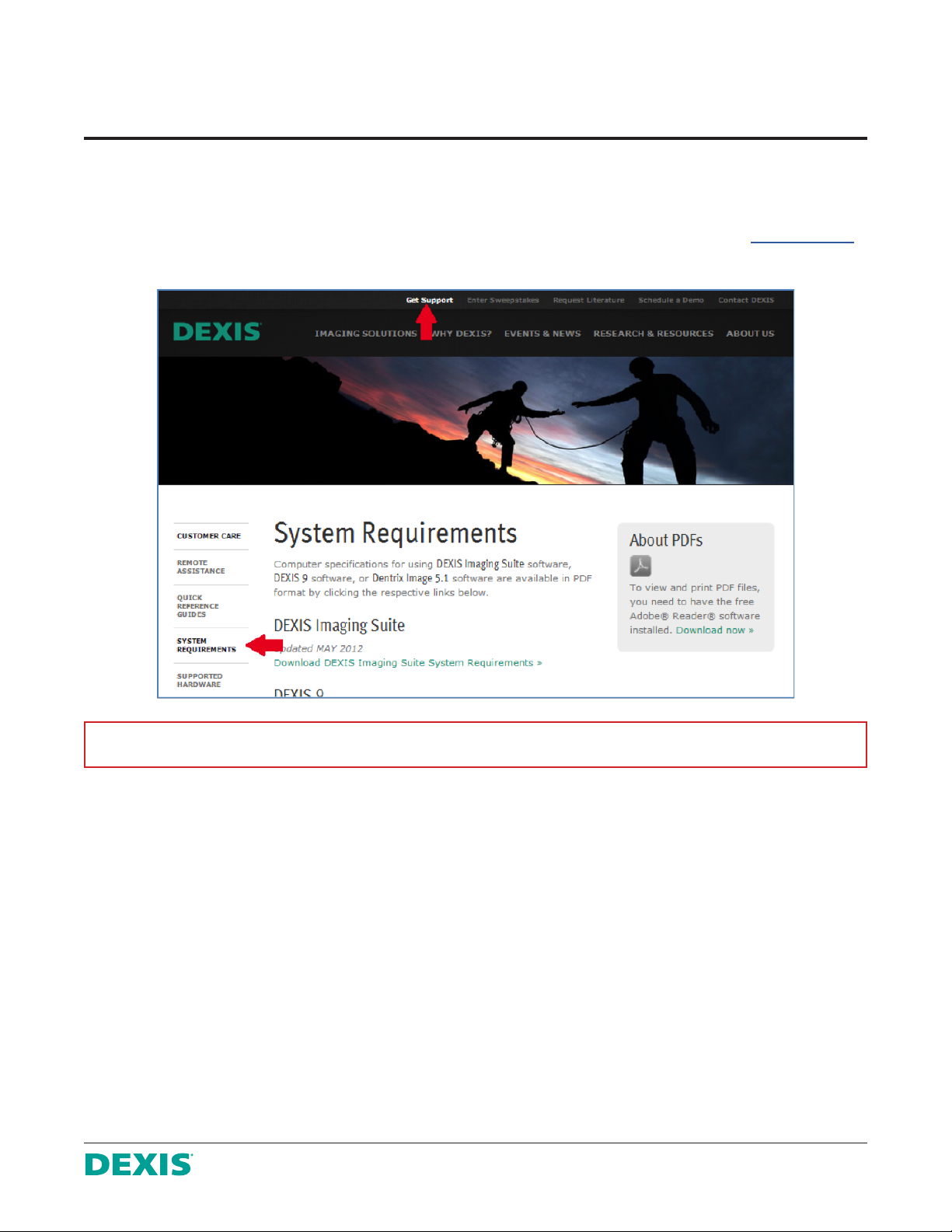
requirements for the current version of DEXIS. Up-to-date DEXIS System Requirements are available at www.dexis.com
under Get Support a SYSTEM REQUIREMENTS.
Please NOTE: Platinum sensors are compatible with DEXIS 9.0 or higher or DEXIS Imaging Suite.
Please be aware the specifications listed in this document represent the minimum requirements for DEXIS to function.
Whenever possible, we recommend utilizing hardware above the minimum specifications as faster processors and hard
drives and more memory will enhance performance.
Especially important specifications to check are:
• Operating System
• System Memory (RAM)
• Central Processing Unit (CPU)
• Motherboard
• USB ports
• Hard Disk Drive
If any specifications of the workstation do not meet or exceed the minimum requirements, it will be necessary to
upgrade the computers prior to installing the DEXIS Platinum Sensor.
DEXIS Customer Care Center Tel 888-883-3947 | Fax 888-833-3947 | www.dexis.com
DX50630714REV0
1
Page 2
Run the DEXIS Platinum install
Once all system specifications have been verified to meet requirements, installation of the DEXIS Platinum Sensor can
proceed on computers where X-rays will be taken.
1. Log on to any one of the workstations as Administrator; Administrator rights are required to complete the install.
2. Close all other programs.
3. Carefully plug the USB plug end of the sensor cable into the PC USB port. Do not use force; ensure that the
plug is properly oriented with the PC USB port. Try rotating the USB plug 180° if it does not easily insert into
port on the initial try.
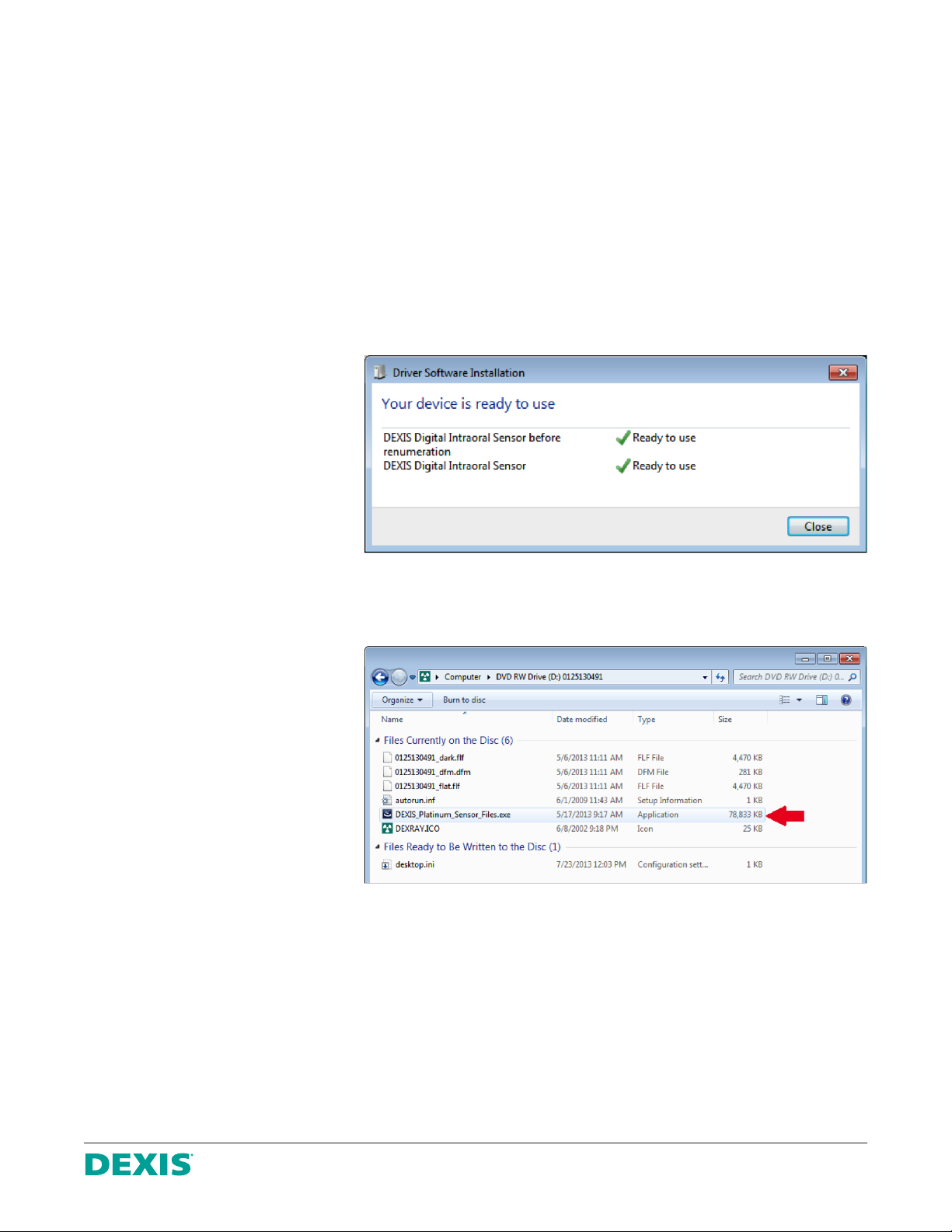
4. Since DEXIS Platinum drivers are
pre-installed with DEXIS imaging
software, these drivers will begin
to install automatically, and
Windows will indicate that the
device is ready to use.
5. Insert the calibration disk for
the attached sensor into the
DVD drive (the serial number
for the sensor is written on
the disk). The CD should start
automatically. If not, the installer
can be launched by clicking on
My Computer, opening the
DVD drive folder, and doubleclicking DEXIS_Platinum_
Sensor_Files.exe.
DX50630714REV0
DEXIS Customer Care Center Tel 888-883-3947 | Fax 888-833-3947 | www.dexis.com
2
Page 3

6. The InstallShield Wizard will
load to the Welcome screen.
Click Next to continue.
7. Set the location to which the
calibration files should be
installed to C:\Program Files\
DEXIS\FlashDir.
DX50630714REV0
DEXIS Customer Care Center Tel 888-883-3947 | Fax 888-833-3947 | www.dexis.com
3
Page 4

8. Click Next to continue.
9. With the default path set, the
installation is ready to begin;
click Install.
DX50630714REV0
DEXIS Customer Care Center Tel 888-883-3947 | Fax 888-833-3947 | www.dexis.com
4
Page 5

10. A progress bar will indicate that
the files are installing.
11. When complete, click Finish to
close the InstallShield Wizard.
DX50630714REV0
DEXIS Customer Care Center Tel 888-883-3947 | Fax 888-833-3947 | www.dexis.com
5
Page 6

12. To verify that the sensor drivers and calibration files where installed correctly, launch DEXIS Imaging Suite
and select a patient.
13. Go to the patient’s DEXray module and click the x-ray acquisition icon to open the
Intraoral X-ray window.
14. Set the sensor type to
DEXIS Platinum Sensor.
15. Select any tooth to start the x-ray acquisition. With the drivers and calibration files correctly installed the message;
“Please trigger the X-ray tube now” will appear.
16. The Platinum Sensor is now installed and ready for use.
Please NOTE: Clinicians should review the Manual for the Indications for Use/Intended Use prior to using
DEXIS Imaging Suite.
Where to go for help
DEXIS has created Quick Reference Guides for other installations and setups. Please refer to www.dexis.com under
Get Support a Quick Reference Guides to find a complete list of these guides. There are other resources on the
Get Support page, as well.
You may contact DEXIS Technical Support via phone at 888-883-3947, Option 1, or by email at support@dexis.com.
DEXIS Customer Care Center Tel 888-883-3947 | Fax 888-833-3947 | www.dexis.com
DX50630714REV0
6
 Loading...