

Page 1
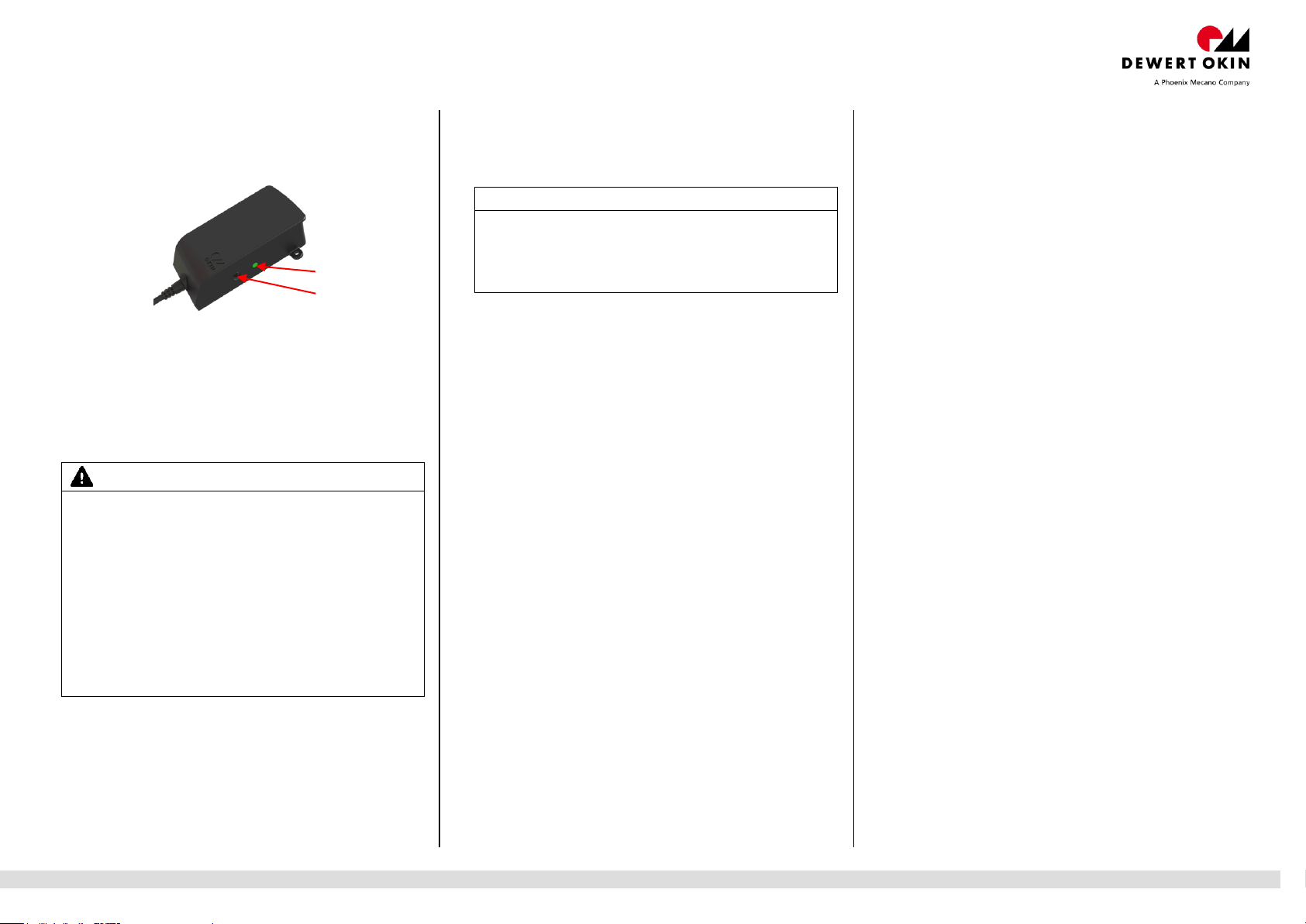
Bluetooth Receiver
CAUTION
Only use the product when you see it.
Do not position this product in the proximity of combustible
materials.
Do not cover the Bluetooth Receiver.
Use only in dry rooms.
Do not open the Bluetooth Receiver.
Do not make mechanical or technical changes to this product.
Such changes will invalidate the operating approvals and
conformity.
Never use the product when it is damaged! Damaged
products/equipment must be replaced and disposed of in
accordance with the local environmental regulations of your
country.
Notice
Only one terminal device can be paired during each pairing step.
If no terminal device has paired with the Bluetooth® Receiver in
the 120 seconds after a reset or initial start, then the receiver
switches into standby mode. Standby mode can be deactivated
by briefly pressing the button (2).
2
Product description
The Bluetooth Receiver translates the Bluetooth® signals of a
smartphone. The Bluetooth Receiver is connected to the multifunction
port (MFP) on the operational drive system.
Technical Specifications
Approximate range: 10 m (depending on local conditions)
Input voltage: 29VDC, 5.5mA-15mA,
Frequency: 2.40GHz
Input power: in operation: ca. 0.42W
IP20 (for use only in dry rooms)
stand-by: ca. 0.16W
Sicherheitshinweise / Wichtige Informationen
Installation and initial commissioning
Download the App “OKIN smart remote” from the appropriate
store.
Unplug the power supply for the control unit or drive system from
the power outlet. (Electrical components may only be connected
and disconnected if the mains plug is unplugged.)
Plug the Bluetooth® Receiver’s plug into the multifunction port
(MFP) on the control unit or drive system.
Connect the power supply for the control unit or drive system.
May 17, 2016 84285(-) 1 / 2
The Bluetooth® Receiver enters pairing mode for about 120 seconds;
the function LED (1) flashes. During this time, up to seven terminal
devices can be paired to a Bluetooth® Receiver. Any additional
detected terminal devices would then replace the oldest devices from
the paired list.
A continually lit LED (1) indicates that a terminal device has connected
successfully.
Launch the app and select the receiver.
OKIN-XXXXXX; the connection is then established. You may assign a
new name with up to 18 characters (special characters are not allowed).
You can now configure your drive system using your smartphone.
Reset onto factory setting
Hold button (2) down for five to six seconds until the Bluetooth®
Receiver restarts. Then press button (2) again for five to six seconds
until the function LED (1) blinks once. The function LED (1) will then
blink five times to signal a restart.
When you restore the default factory settings, your pairing list and
user-specified Bluetooth® Receiver name will be deleted. The function
LED (1) blinks once to signal a reset.
Troubleshooting
The Bluetooth® Receiver is not functioning.
There is no mains supply voltage
Check the mains power connection.
Another smartphone is interfering with the wireless radio communication.
Do not operate another smartphone simultaneously.
The Bluetooth® Receiver and the smartphone are too far away from
each other.
Move them closer together.
The smartphone has not been programmed (in learning mode).
Program the smartphone
Teach-in configuration has been carried out but there is still no functionality
The teach-in programming process was not carried out properly or
the system is defective.
Check that smartphone has been programmed.
Reset onto factory setting
Please contact your supplier or sales agent.
FCC WARNING
This device complies Part 15 of the FCC Rules. Operation is subject to
the following two conditions:
(1) this device may not cause harmful interference, and
(2) this device must accept any interference received, including
interference that may cause undesired operation.
Section 15.21 Information to user
Changes or modifications not expressly approved by the party
responsible for compliance could void the user's authority to operate
the equipment.
NOTE: This equipment has been tested and found to comply with the
limits for a Class B digital device, pursuant to part 15 of the FCC
Rules. These limits are designed to provide reasonable protection
against harmful interference in a residential installation. This
equipment generates, uses and can radiate radio frequency energy
and, if not installed and used in accordance with the instructions, may
cause harmful interference to radio communications. However, there is
no guarantee that interference will not occur in a particular installation.
If this equipment does cause harmful interference to radio or television
reception, which can be determined by turning the equipment off and
on, the user is encouraged to try to correct the interference by one or
more of the following measures:
Reorient or relocate the receiving antenna.
Increase the separation between the equipment and receiver.
Connect the equipment into an outlet on a circuit different from
that to which the receiver is connected.
Consult the dealer or an experienced radio/ TV technician for help.
RF Exposure Statement
To maintain compliance with FCC’s RF Exposure guidelines, This
equipment should be installed and operated with minimum distance
between 20cm the radiator your body: Use only the supplied antenna.
IC WARNING
This device complies with Industry Canada licence-exempt RSS
standard(s). Operation is subject to the following two conditions:
(1) this device may not cause interference, and
(2) this device must accept any interference, including interference
that my cause undesired operation of the device.
Le présent appareil est conforme aux CNR d’Industrie Canada
applicables aux appareils radio exempts de licence. Lexploitation est
autorisée aux deux conditions suivantes:
(1) l’appareil ne diot pas produire de brouillage, et
(2) l’utilisateur de lappareil diot accepter tout bouillage radioélectrique
subi, méme si le brouillage est susceptible d’en compromettre le
fonctionnement.
 Loading...