

Page 1
103128 May 31, 2007
Detex Corporation, 302 Detex Drive, New Braunfels, Texas 78130
(830)629-2900 /1-800-729-3839 /FAX(830)620-6711
E-MAIL: [email protected] INTERNET: www.detex.com
INSTALLATION INSTRUCTIONS FOR MORTISE 02DM, 02DMT, 02DMU
OUTSIDE LEVER PULL TRIM
Page 2
02 LEVER TRIM
NOTES:
1. Mortise lock NOT supplied with TRIM device.
2. For a retrofit application, remove lock and device before installing new trim.
3. LHR installation shown (Reverse all steps for RHR).
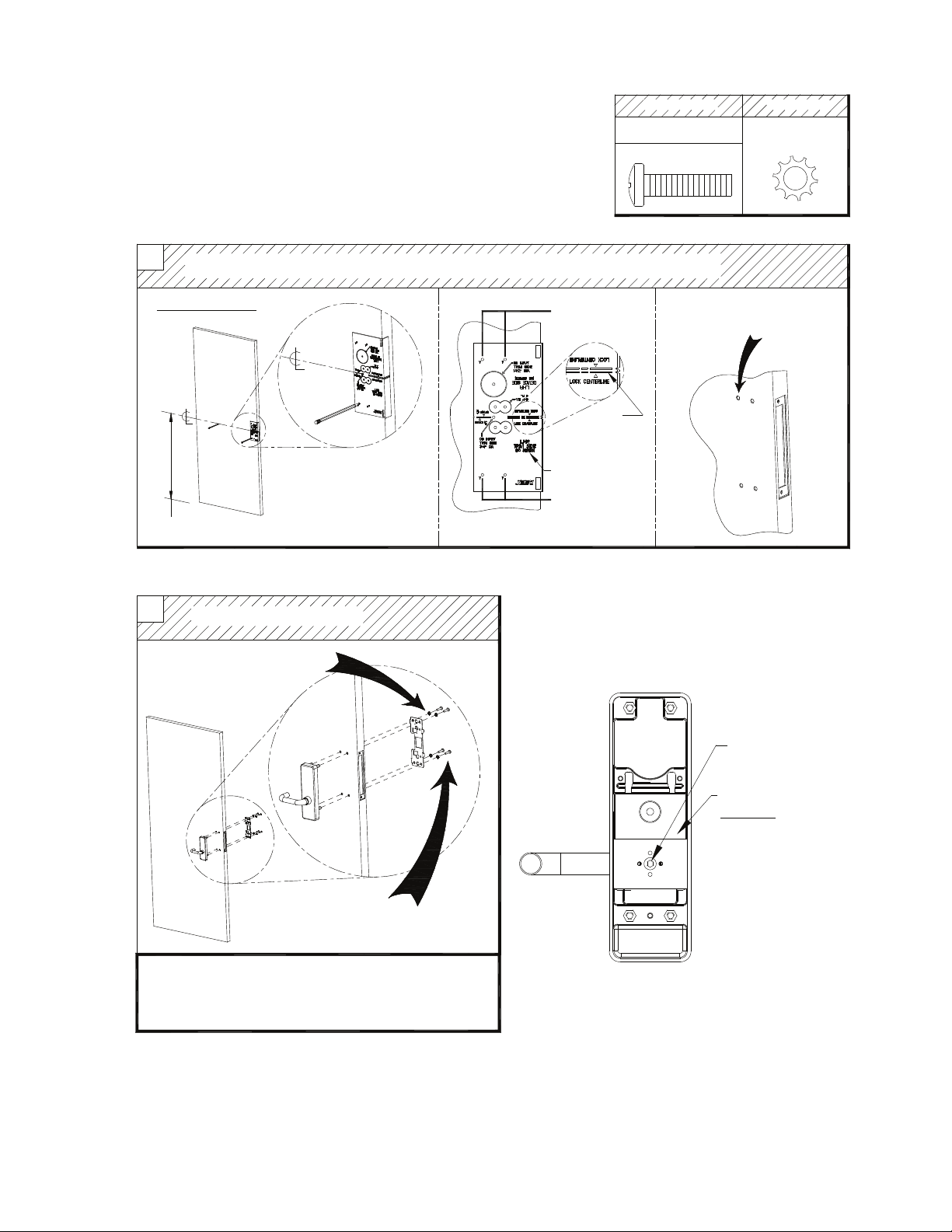
STEP 1: PREP DOOR
1
INSTALLATION INSTRUCTIONS
TRIM side: Use plastic template to mark and drill TRIM holes
Machine Screw
A
#1/4-20 x 1"
Lock washer
#1/4 lock washer
MARK HOLES
Mark centerline for trim 40" above finished floor
STEP 2: INSTALL TRIM DEVICE
2
Install TRIM device
#1/4 lock washer
Mark trim
holes
Lock
Centerline
LHR Trim Side
Mark trim
holes
Drill 1/2" diameter holes thru
trim side only, 4 places
Switching Handing from
RHR to LHR
(Place trim on a clean surface with this view facing up)
Use 1/8" Allen Wrench
to remove screw
Install backplate with
(4) "A" screws
TRIM INSTALLATION COMPLETE
1. Continue installation using device instructions (p/n:101349).
2. For modular cable devices, see electrical instructions
for cable routing.
Pull back blocking plate
Caution:
Do not lose the brass
shear pin located
inside assembly.
Turn handle and plate
180°. Replace plate
and tighten Allen screw
 Loading...