

Page 1
Owner' s Instructions
Before operating the unit,
please read this manual thoroughly,
and retain if for future reference.
Digital Photo Frame
Operating Manual
DPF-427
Page 2
Page 3

1 Importa nt notice
2
2 Functio n introduction
3 Powe r switch/key-press/interfac e an d remo te controlle r instruction
4 Operating guide
5 Technique Paramete r
2
3-4
5-13
14
1
Page 4
1.Important notice
1.1 Input voltage rage:
1.2 Avoid sunshine.
1.3 Avoid high temperature.
1.4 Shut off power when you need not it.
1.5 Do not thrust LCD screen with sharpen thing.
1.6 Do not touch water or rain.
2.Function of the product
2.1 Support JPEG/BMP/GIF photo format.
2.2 Support MP3/WMA format.
2.3 Support MPEG1/MPEG4 video format.
2.4 Support photo playing and Mp3 background music play at the same time, and as much as
several styles renovation.
2.5 Internal calendar and clock, and set alarm clock.
2.6 Set the speed of photo playing, and several menu languages.
2.7
2.8 Set brightness/contrast/hue/saturation/sharpness photo parameter.
2.9 Support USB2.0.
2.10 Stereo output.
2.11 Support MS/SD/MMC card.
2.12 Support storage photos from USB/CARD to internal memory and make it as interface.
2
Page 5
3.Power switch/key-press/interface and remote controller instruction
RETURN
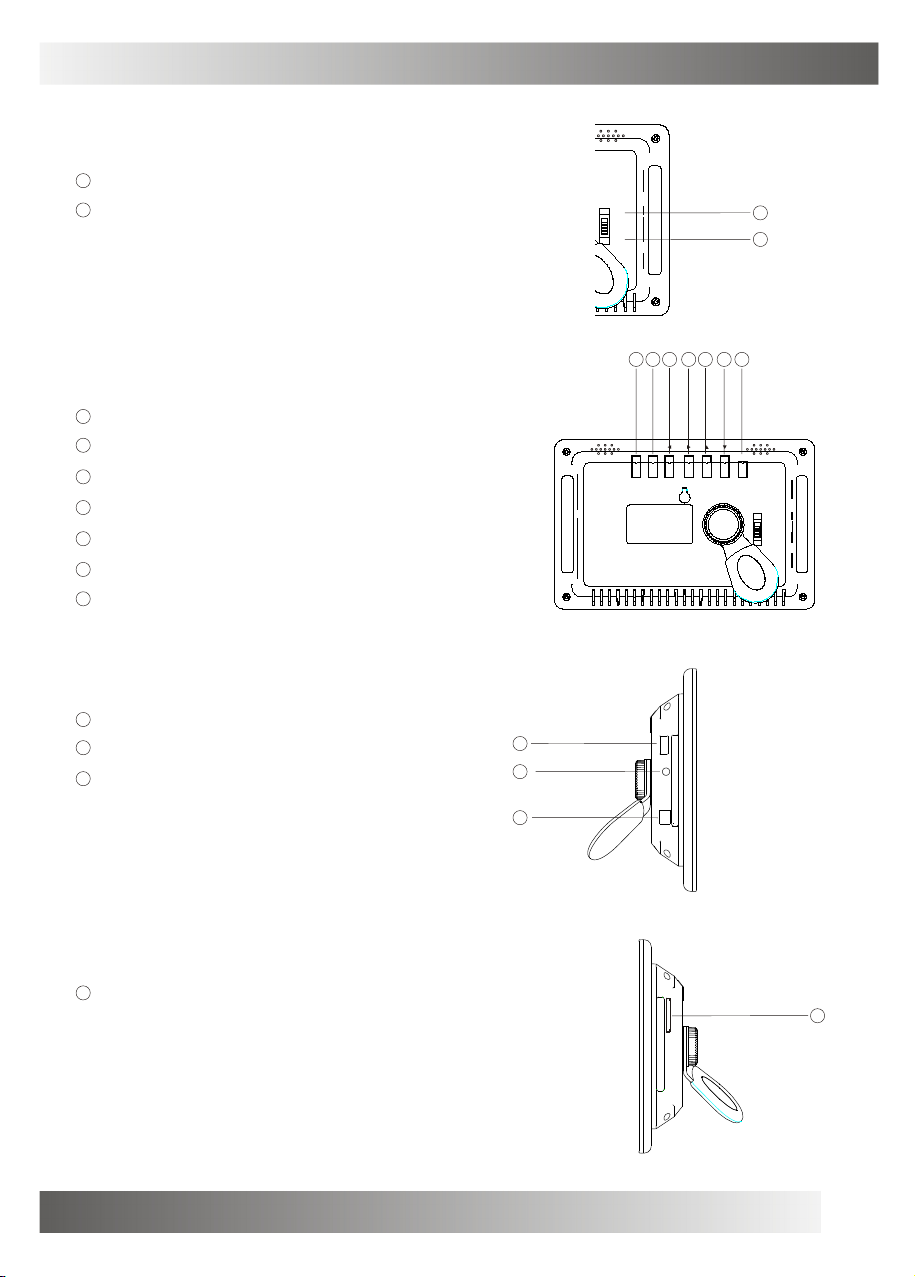
3.1 Power Switch.
1
ON:Power on.
2
OFF:Power off.
MENU
OK
ON
OFF
1
2
3.2 Top button
1
OK: Enter.
2
UP: Cursor can be up.
3
Down: Cursor can be down.
4
Left: Cursor can be left.
5
Right: Cursor can be right.
6
Setup: Enter SYSTEM SETUP mode.
7
Retrn:Press this button, can back last status.
3.3 Left interface
1
USB jack.
2
AV OUT.
3
Power DC in.
5
6
7
RETURN SETUP
1
2
3
USB AV OUTDC IN 9V
124
3
OK
ON
OFF
3.4 Right interface
1
Card socket.
SD/MS/MMC
1
3
Page 6
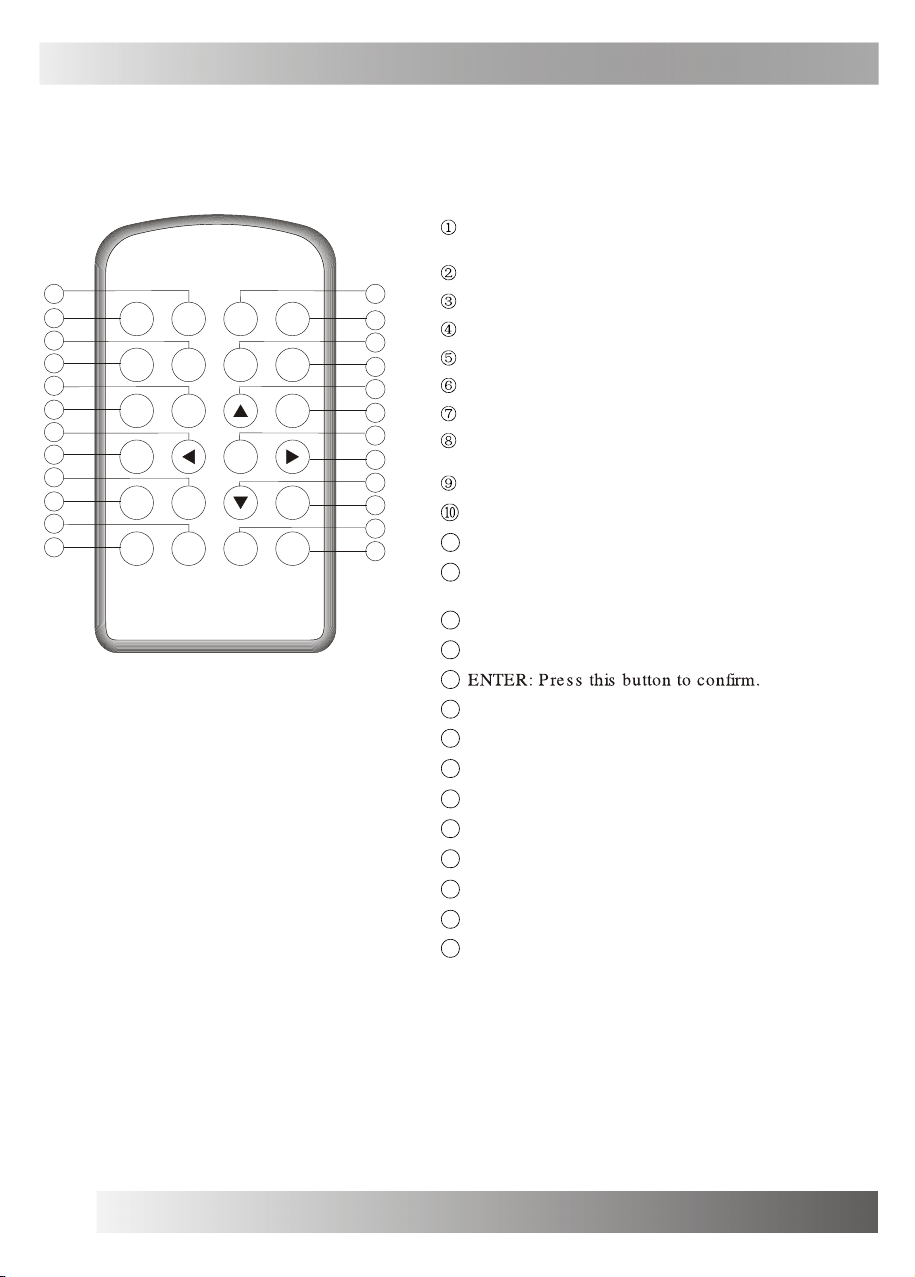
3.Power switch/key-press/interface and remote controller instruction
3.5 Remote controller instruction
STANDBY: Press this button, can enter power-saving
mode or waken up.
10
14
13
18
17
22
21
Digital Photo Frame
2
1
6
5
9
STANDBY
HOME PHOTO
VOL- VOL+
PREV
RETURN
NEXT
PLAY/
PAUSE
SLIDE
16:9 / 4:3 SETUP
SHOW
MUSIC
ENTER
STOP REPEAT
VIDEO
SAVE
PHOTO
MUTE
DISPLAY
3
4
7
8
11
12
15
16
19
20
23
24
SLIDE SHOW: Press this button, can playback photo.
16:9/4:3:Press this button, can switch TV display mode.
SETUP: Press this button, can enter setup mode.
HOME: Press this button, can return main interface.
PHOTO: Press this button, can play photo.
MUSIC: Press this button, can enter audio mode.
VIDEO: Press this button, press this button, can enter
video mode.
VOL-:Press this button, can turn down volume.
VOL+:Press this button, can turn up volume.
11
UP: Press this button, cursor can be up.
12
SAVE PHOTO: Press this button, can save photo to
favorite.
13
PREV: Press this button, can choose last program.
14
LEFT: Press this button, can cursor can be left.
15
16
RIGHT: Press this button, cursor can be right.
17
NEXT: Press this button, can choose next program.
18
RETURN: Press this button, can back last status.
19
DOWN: Press this button, cursor can be down.
20
MUTE: Press this button, can turn off sound.
21
PLAY/PAUSE:Press this button, can play or pause.
22
STOP: Press this button, can stop play.
REPEAT: Press this button, can enter repeat play mode.
23
24
DISPLAY: Press this button, can display document
information.
4
Page 7
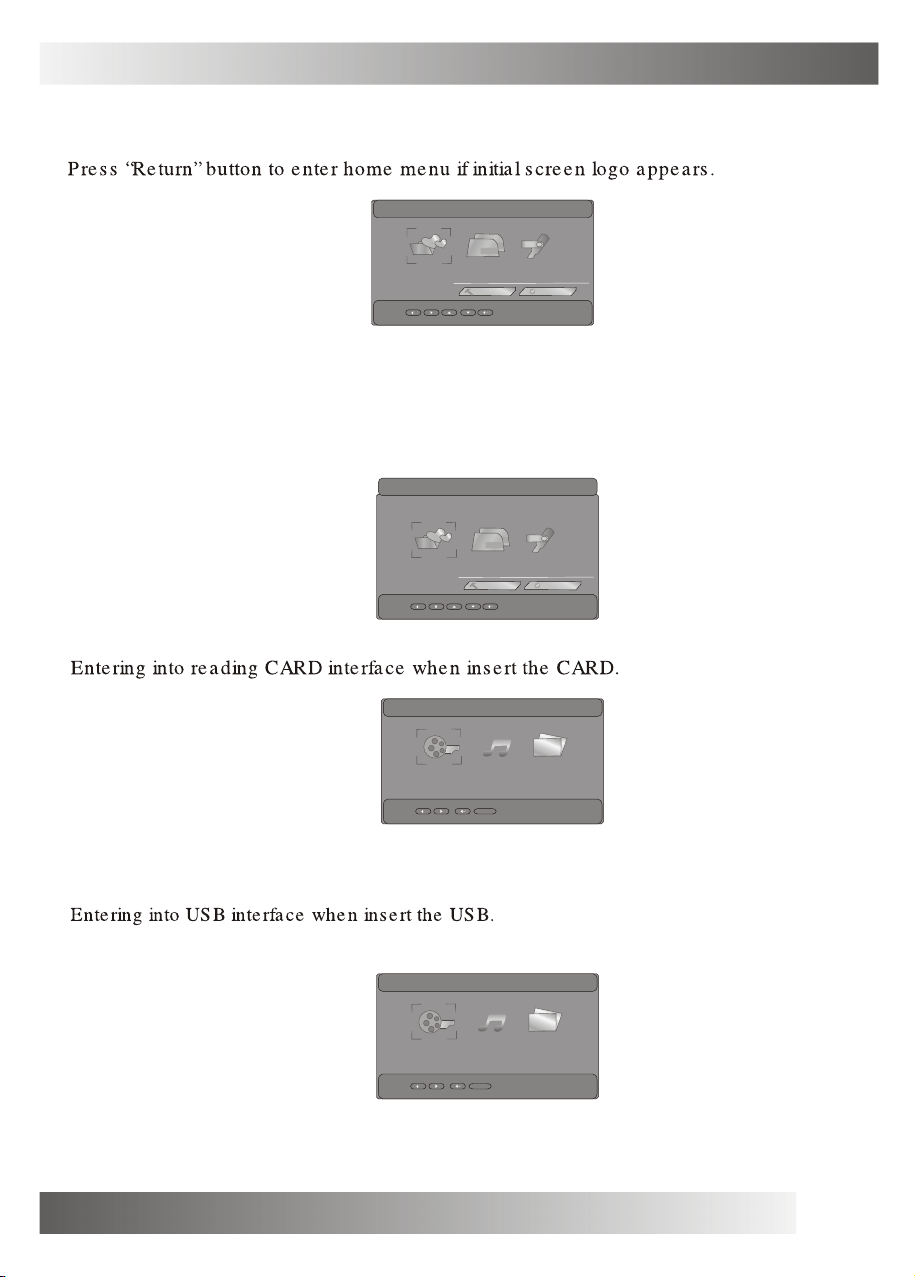
4.Operating guide
4.1 Home menu
It will display home menu when power on.
23:49:33
256MB
256MB
FAVORITE
4.2 Home menu instruction
4.2.1 FAVORITE
Prees “ENTER”to enter“favorite photo mode”select your favorite photo.
FAVORITE
4.2.2 CARD
CARD USB
SETUP
256MB
256MB
CARD USB
SETUP
CLOCK
23:49:33
CLOCK
4.2.3 USB
.../CARD
.../SUB
VIDEO
VIDEO
MUSIC PHOTO
return
MUSIC PHOTO
return
5
Page 8
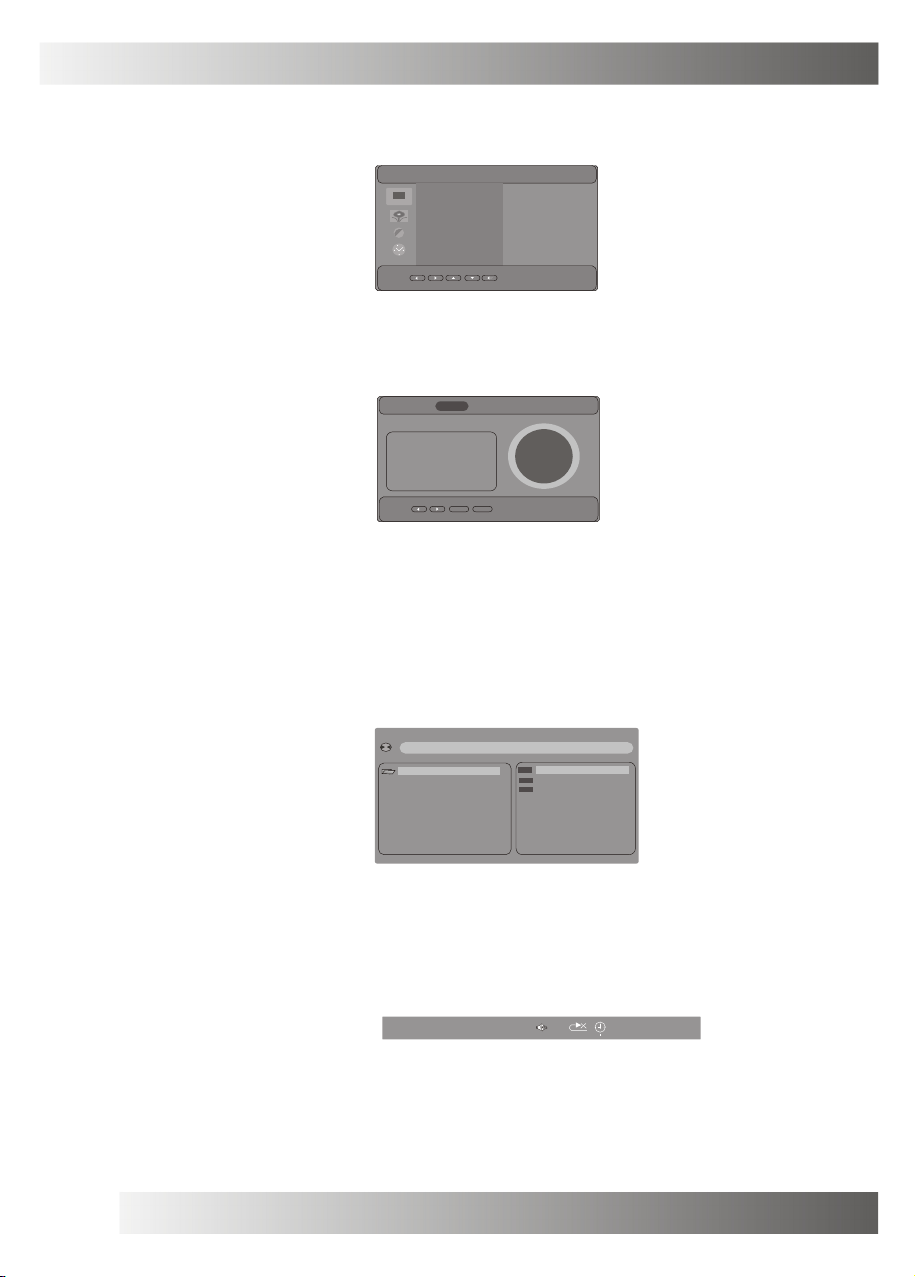
4.Operating guide
4.2.4 SETUP
Enter SETUP interface.
SYSTEM SETUP
TV SYSTEM
OSD LANGUAGE
DEFAULT
S/W VERSLON
4.2.5 CLOCK
Enter CLOCK interface.
JAN
2000
S M T W T F S
26 27 28 29 30 31 1
2 3 4 5 6 7 8
9 10 11 12 13 14 1 5
16 17 18 19 20 21 22
23 24 25 26 27 28 29
30 31
setup
4.3 Favorite
Save photo and add it as your fa vorite. When you press “SAVE PHOTO” on the remote controller,you
can save it to the favorite.
NTSC
ENGL ISH
RESTORE
019.450 DPF-007
00:05:19
return
4.4 Video p1ay
Operating path: CARD/VIDEO/LIST or USB/VIDEO/LIST.
[ \ ] GON T - 1F . AV1
01.\
01. CON~ . AV1
02 . WHA~ .MPE
03 . AV1 . AV1
Document information: press “DISPLAY”,display the program/time and p1ay mode
MP4 TRK
0/3
00 : 00 : 0 0
Return: Press “HOME”
6
Page 9
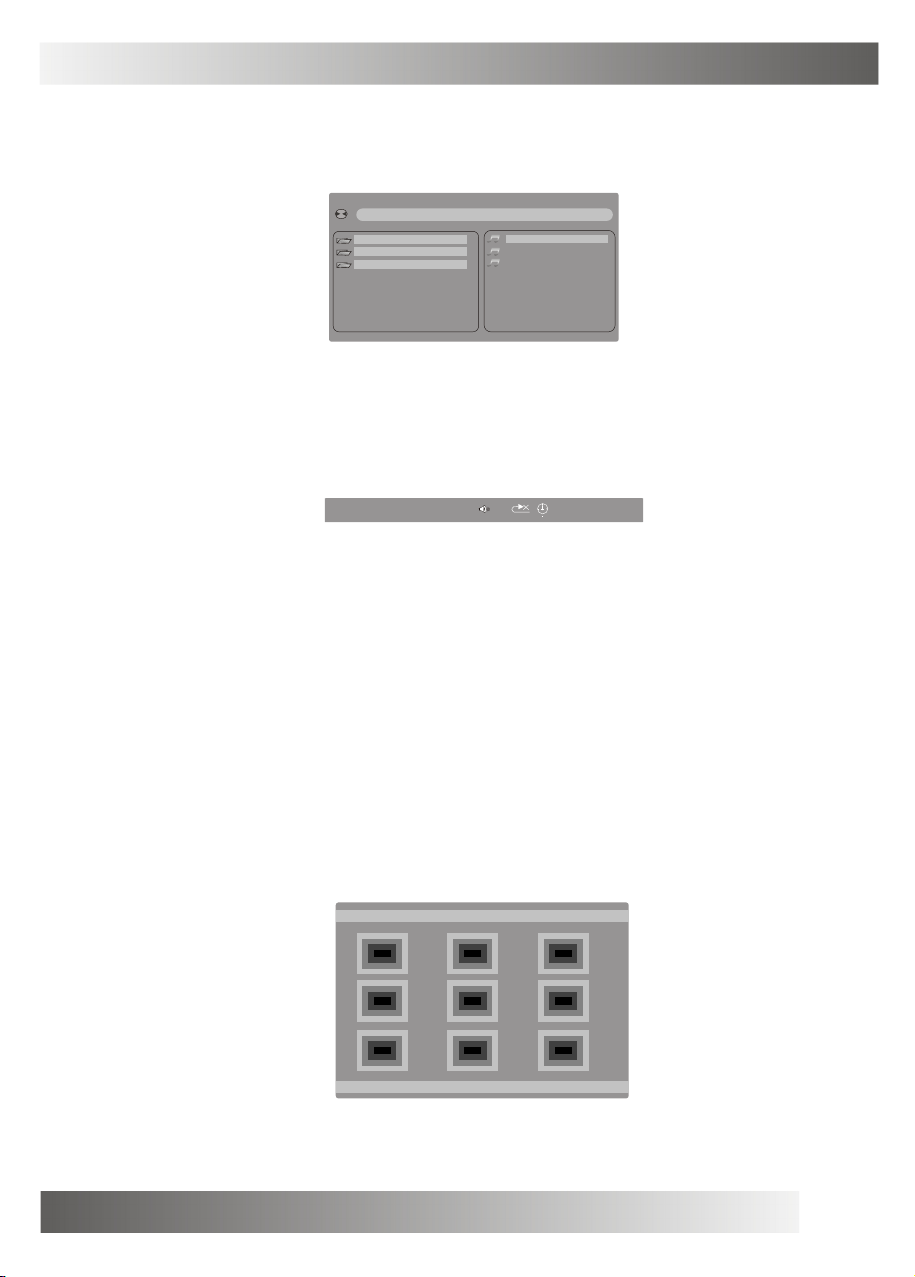
4.Operating guide
4.5 Music p1ay
Operating path: CARD/MUSIC/LIST or USB/MUSIC/LIST.
[ \ ] --.MP3
01.\
02.11
03.SMCCAR - 4
Document information: Press “DISPLAY”,display the program/time and play mode.
01. _____
02. _____
03. _____
~1.MP3
~.MP3
~.MP3
MP3 TRK
1/3
00 : 00 : 0 0
Return: Press “HOME”
4.6 Photo play
Operating path: CARD/PHOTO/LIST or USB/PHOTO/LIST.
Rotating photo: Press “up/down/left/right” button,can rotate photo in different way.
Photo play: Enter thumbnail mode, press enter and play photo.
THUMBNAIL MODE
7
Page 10
4.Operating guide
Document information: Press “DISPLAY”,display the program¡¢time and play mode.
JPEG TRK
1/28
Return: Press “HOME”.
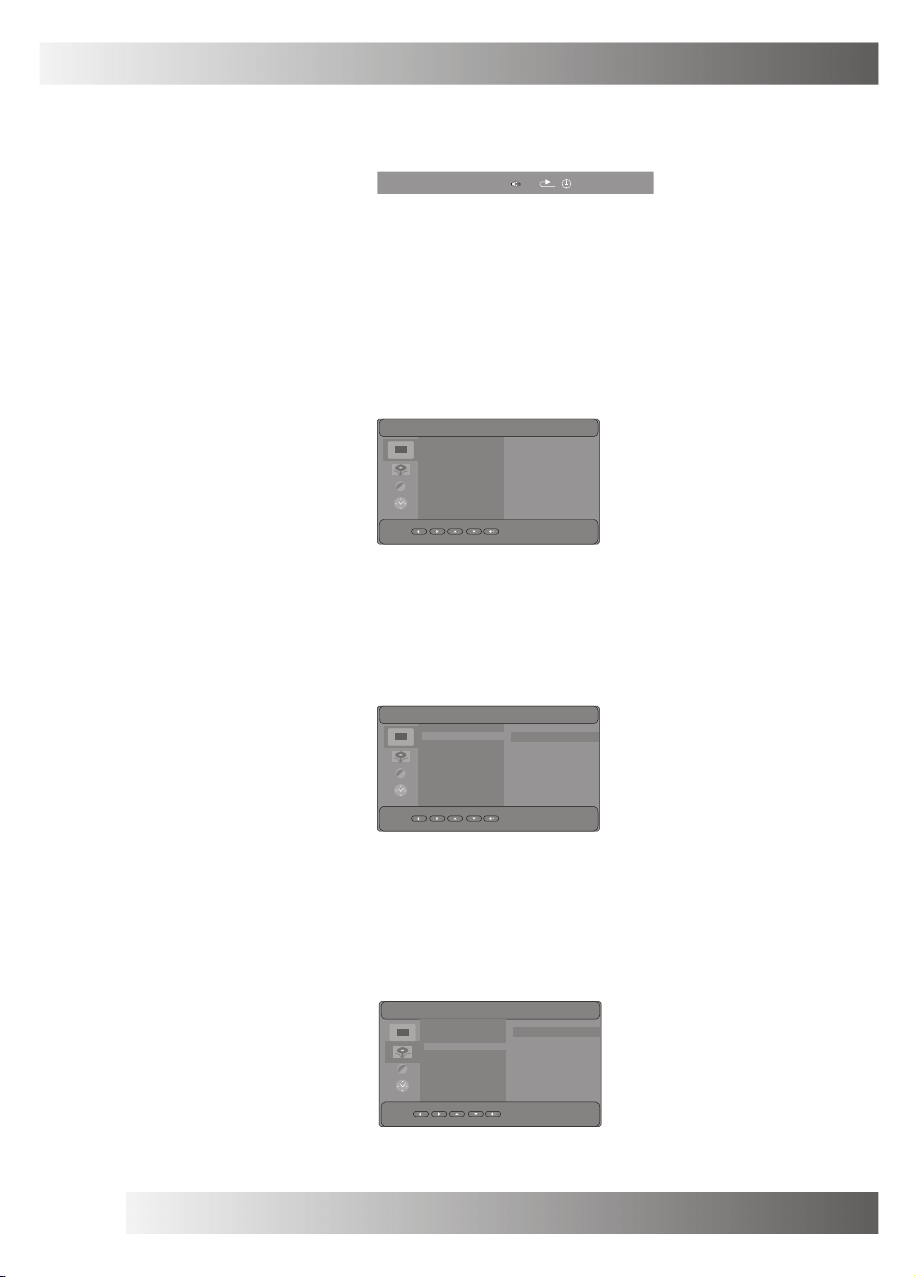
4.7 SETUP
4.7.1 SYSTEM SETUP
Enter SYSTEM SETUP mode.
SYSTEM SETUP
TV SYSTEM
OSD LANGUAGE
DEFAULT
S/W VERSION
4.7.1.1 TV SYSTEM
Enter TV SYSTEM mode, can set NTSC or PAL.
SYSTEM SETUP
TV SYSTEM
OSD LANGUAGE
DEFAULT
S/W VERSION
A
NTSC
ENGLISH
RESTORE
019.450DPF-007
NTSC
PAL
00 : 00 : 0 0
4.7.1.2 OSD LANGUAGE
Enter OSD LANGUAGE mode, can set the OSD language.
SYSTEM SETUP
TV SYSTEM
OSD LANGUAGE
DEFAULT
S/W VERSION
8
ENGLISH
GERMAN
SPANISH
FRENCH
PORTUGUESE
Page 11
4.Operating guide
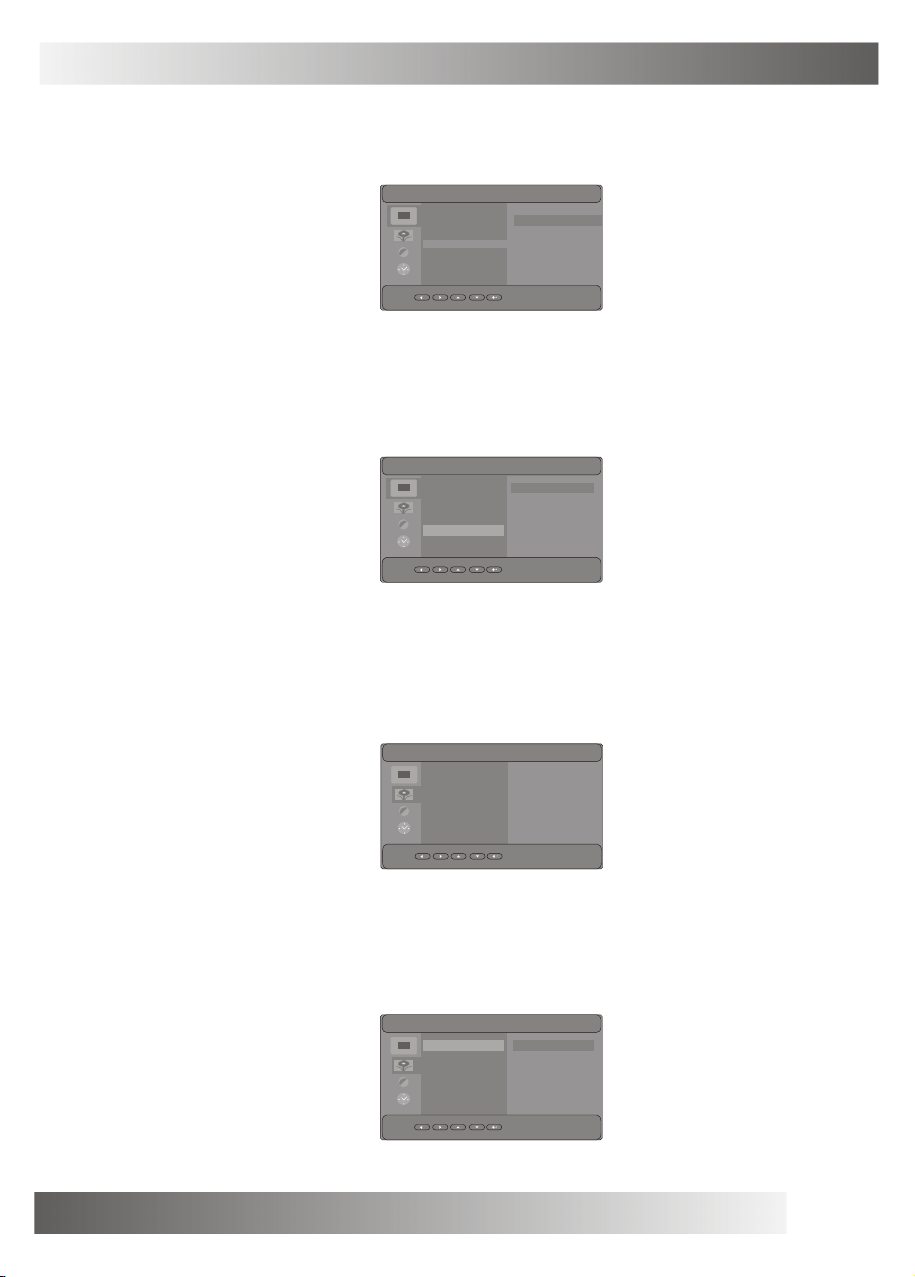
4.7.1.3 DEFAULT
Enter DEFAULT mode, can be reset.
SYSTEM SETUP
TV SYSTEM
OSD LANGUAGE
DEFAULT
S/W VERSION
4.7.1.4 S/W VERSION
Enter S/W VERSION mode, can display software version.
SYSTEM SETUP
TV SYSTEM
OSD LANGUAGE
DEFAULT
S/W VERSION
RESTORE
019.450DPF-007
4.7.2 PHOTO SETUP
Enter PHOTO SETUP mode.
PHOTO SETUP
4.7.2.1 EFFECT
Enter EFFECT mode, can set photo effect.
PHOTO SETUP
EFFECT
FREQUENCY
MUSIC
JPEG INFO
PLAY MODE
EFFECT
FREQUENCY
MUSIC
JPEG INFO
PLAY MODE LEFT TOP
OFF
DEFAULT
ON
OFF
NORMAL
OFF
WIPE BOTTOM
WIPE LEFT
WIPE RIGHT
9
Page 12
4.Operating guide
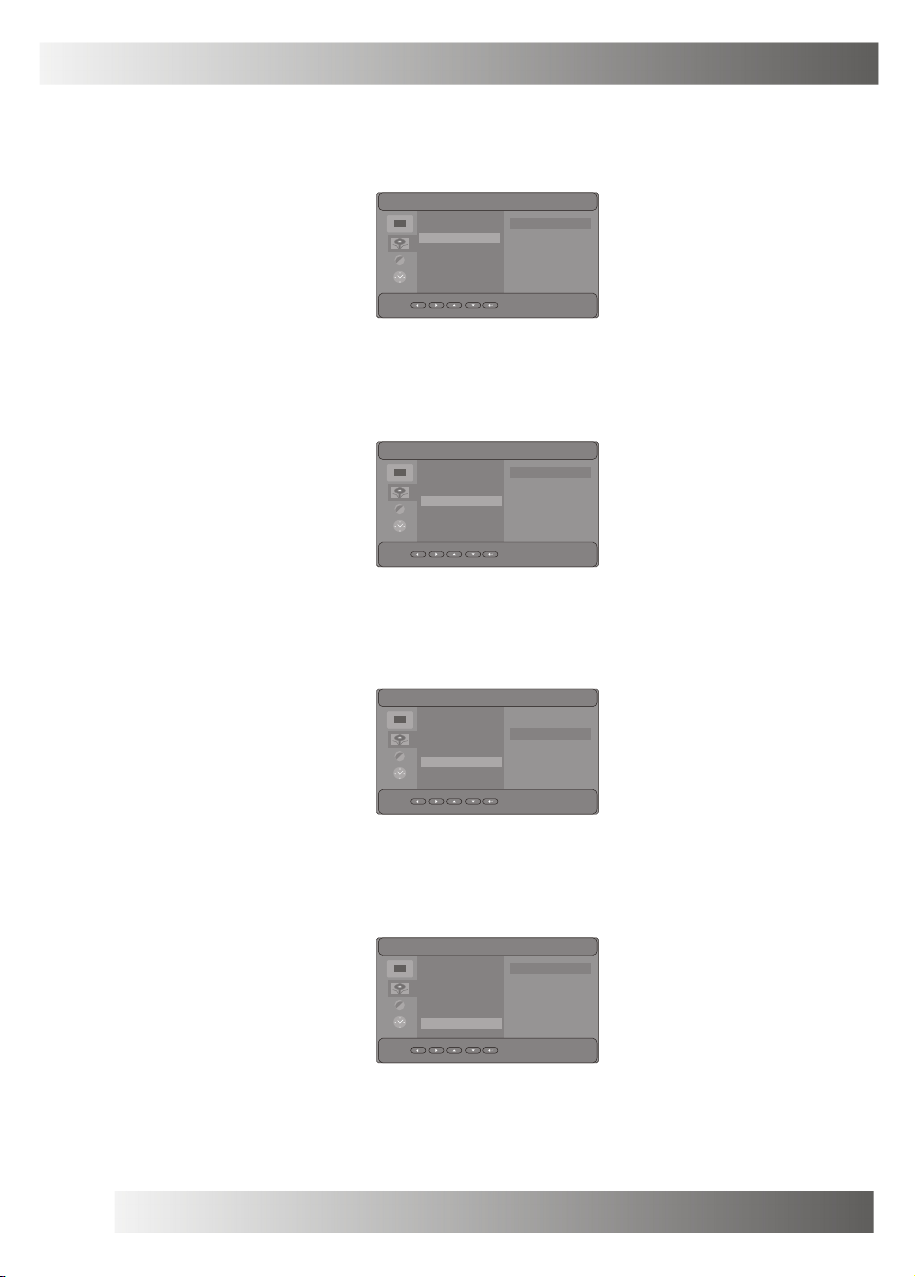
4.7.2.2 FREQUENCY
Enter FREQUENCY mode, can set frequency.
PHOTO SETUP
EFFECT
FREQUENCY
MUSIC
JPEG INFO
PLAY MODE
4.7.2.3 MUSIC
Enter MUSIC mode, set music on or off when play photo.
PHOTO SETUP
EFFECT
FREQUENCY
MUSIC
JPEG INFO
PLAY MODE
4.7.2.4 JPEG INFO
Enter JPEG INFO mode, set on or off when play photo.
DEFAULT
10 SECOND
30 SECOND
1 MINUTE
30 MINUTE
ON
OFF
PHOTO SETUP
4.7.2.5 PLAY MODE
Enter PLAY MODE, can set the photo play mode.
PHOTO SETUP
10
EFFECT
FREQUENCY
MUSIC
JPEG INFO
PLAY MODE
EFFECT
FREQUENCY OFF
MUSIC
JPEG INFO
PLAY MODE
ON
OFF
NORMAL
Page 13
4.Operating guide
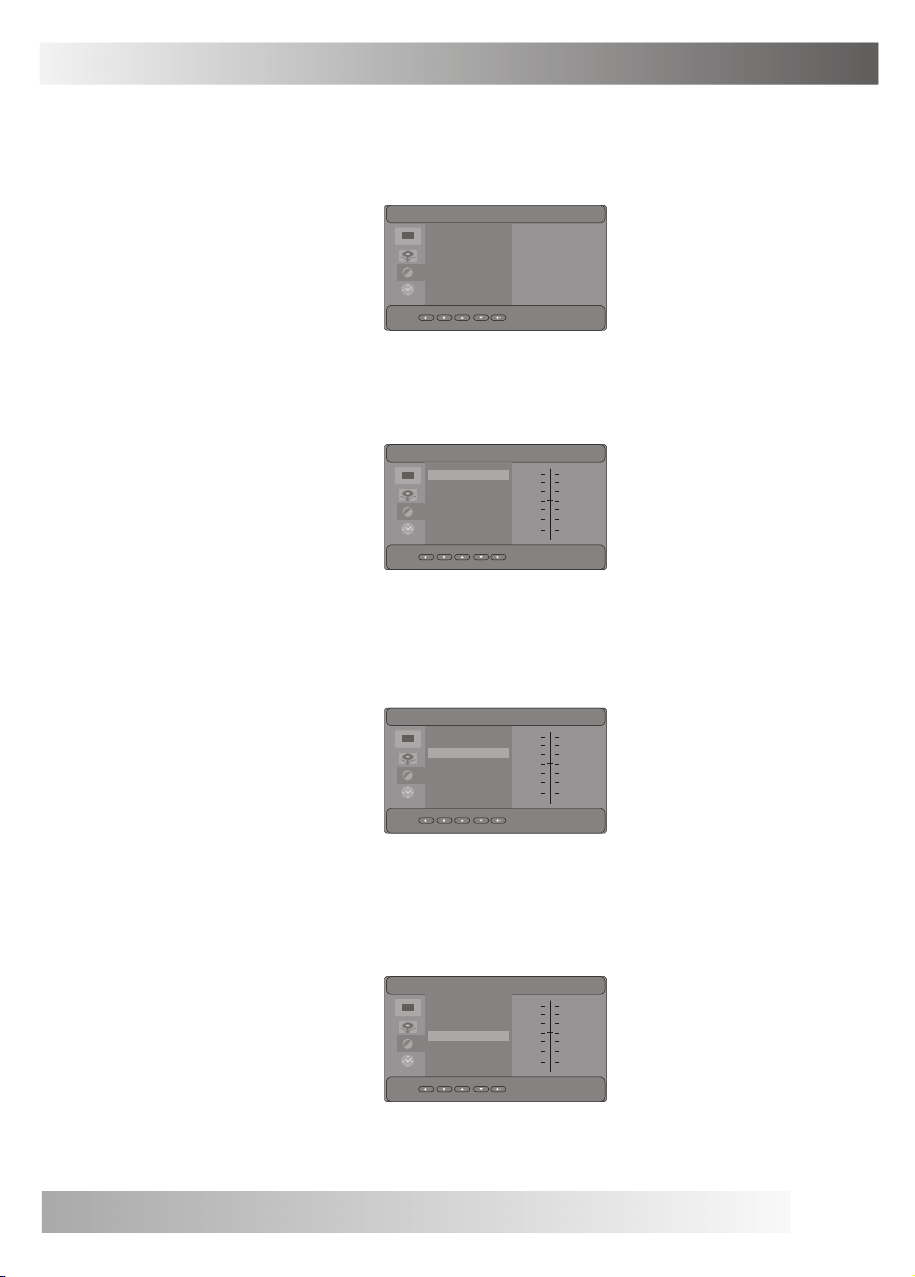
4.7.3 VIDEO SETUP
Enter VIDEO SETUP mode.
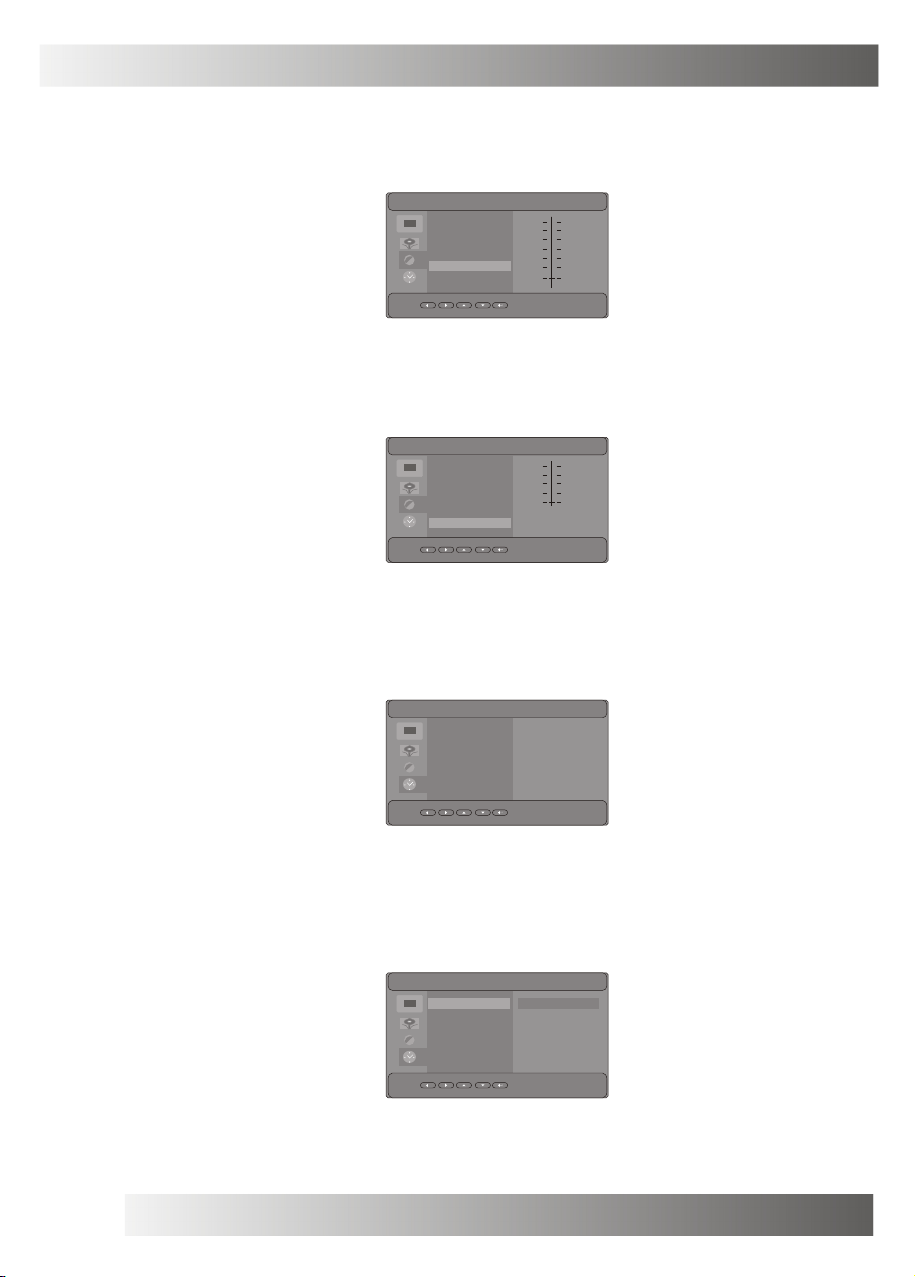
4.7.3.1 BRIGHTNESS
Enter BRIGHTNESS mode, can set brightness.
VIDEO SETUP
BRIGHTNESS
CONTRAST 6
HUE
SATURATION
SHARPNESS
6
0
0
0
4.7.3.2 CONTRAST
Enter CONTRAST mode, can set contrast.
4.7.3.3 HUE
Enter HUE mode, can set hue.
VIDEO SETUP
BRIGHTNESS
CONTRAST
HUE
SATURATION
SHARPNESS
VIDEO SETUP
BRIGHTNESS
CONTRAST
HUE
SATURATION
SHARPNESS
VIDEO SETUP
BRIGHTNESS
CONTRAST
HUE
SATURATION
SHARPNESS
12
10
8
6
4
2
0
12
10
8
6
4
2
0
+6
+4
+2
0
-2
-4
-6
11
Page 14
4.Operating guide
4.7.3.4 SATURATION
Enter SATURATION mode, can set saturation.
VIDEO SETUP
4.7.3.5 SHARPNESS
Enter SHARPNESS mode, can set sharpness.
VIDEO SETUP
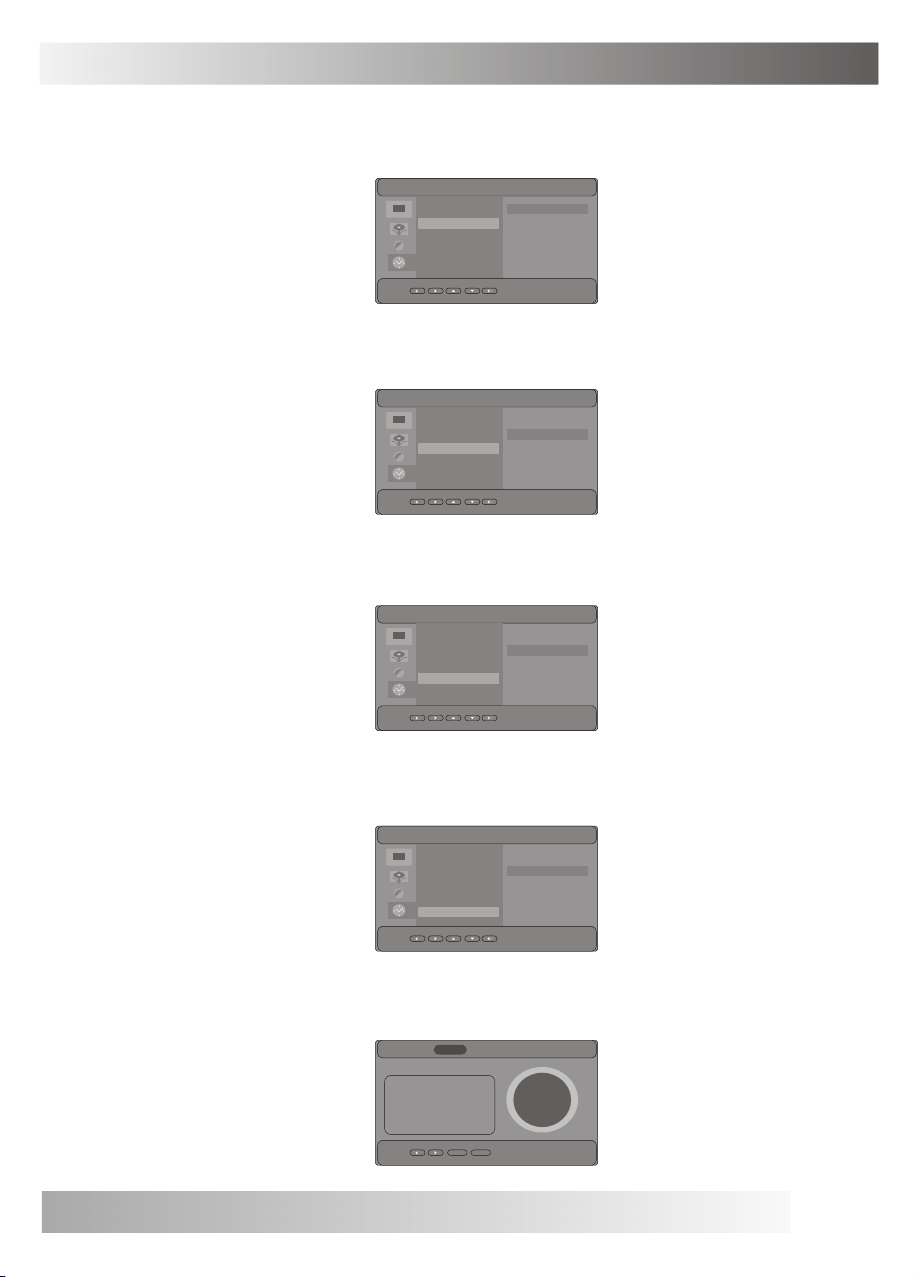
4.7.4 CLOCK SETUP
Enter CLOCK SETUP mode.
CLOCK SETUP
BRIGHTNESS
CONTRAST
HUE
SATURATION
SHARPNESS
BRIGHTNESS
CONTRAST
HUE
SATURATION
SHARPNESS
DATE SETUP
TIME SETUP
ALARM SETUP
POWER ON
POWER OFF
2000/01/08
00 : 22
OFF
OFF
OFF
12
10
8
6
4
2
0
8
6
4
2
0
4.7.4.1 DATE SETUP
Enter DATE SETUP mode, can set date.
12
CLOCK SETUP
DATE SETUP
TIME SETUP
ALARM SETUP
POWER ON
POWER OFF
2000/01/08
Page 15
4.Operating guide
4.7.4.2 TIME SETUP
Enter TIME SETUP mode, can set time.
4.7.4.3 ALARM SET UP
Enter ALARM SET UP mode, can set alarm.
4.7.4.4 POWER ON
Enter POWER ON mode, can set power on time.
CLOCK SETUP
DATE SETUP
TIME SETUP
ALARM SETUP
POWER ON
POWER OFF
CLOCK SETUP
DATE SETUP
TIME SETUP
ALARM SETUP
POWER ON
POWER OFF
CLOCK SETUP
DATE SETUP
TIME SETUP
ALARM SETUP
POWER ON
POWER OFF
00 : 23
00 : 00
OFF
00 : 00
OFF
4.7.4.5 POWER OFF
Enter POWER OFF mode, can set power off time.
CLOCK SETUP
DATE SETUP
TIME SETUP
ALARM SETUP
POWER ON
POWER OFF
00 : 00
OFF
4.8 CLOCK
Enter CLOCK mode, electronic calendar and clock can be used.
JAN
2000
S M T W T F S
26 27 28 29 30 31 1
2 3 4 5 6 7 8
9 10 11 12 13 14 1 5
16 17 18 19 20 21 22
23 24 25 26 27 28 29
30 31
setup
00:05:19
return
13
Page 16

5.Technique parameter
5.1 Input power: DC 9V/1.5A.
5.2 Support JPEG/BMP/GIF.
5.3 Support MP3/WMA
5.4 Support MPEG1/MPEG4
5.5 Support storage card: MS/SD/MMC card.
5.6 Support USB2.0.
5.7 Screen parameter
5.7.1 Size:7 inch TFT LCD.
5.7.2 Resolution:480*234.
5.7.3 Screen Brightness:200cd/M .
5.7.4 Screen Contrast:300:1.
5.8 Environment.
5.8.1 Temperature-5 ~ 40 .
5.8.2 Humidity 10~85%.
5.8.3 The power disconnect device/plug SHALL/MUST
remain readily operable/easy to disconnect,if any urgent need.
¡£ ¡£
2
14
Page 17

ALL RIGHTS RESERVED,
COPYRIGHT DENVER ELECTRONICS A/S
 Loading...