

Page 1

Dell Networking W-Series
Instant Access Point
6.2.1.0-3.3.0.0
MIB Reference Guide
Page 2

Copyright
© 2013 Aruba Networks, Inc. Aruba Networks trademarks include , Aruba Networks®, Aruba Wireless Networks®, the
registered Aruba the Mobile Edge Company logo, and Aruba Mobility Management System
trademarks of Dell Inc.
All rights reserved. Specifications in this manual are subject to change without notice.
Originated in the USA. All other trademarks are the property of their respective owners.
®
. Dell™, the DELL™ logo, and PowerConnect™ are
Open Source Code
Certain Aruba products include Open Source software code developed by third parties, including software code subject to the
GNU General Public License (GPL), GNU Lesser General Public License (LGPL), or other Open Source Licenses. Includes
software from Litech Systems Design. The IF-MAP client library copyright 2011
Infoblox, Inc. All rights reserved. This product includes software developed by Lars Fenneberg, et al. The Open Source code used
can be found at this site:
http://www.arubanetworks.com/open_source
Legal Notice
The use of Aruba Networks, Inc. switching platforms and software, by all individuals or corporations, to terminate other vendors’ VPN client
devices constitutes complete acceptance of liability by that individual or corporation for this action and indemnifies, in full, Aruba Networks, Inc.
from any and all legal actions that might be taken against it with respect to infringement of copyright on behalf of those vendors.
Dell Networking W-Series Instant Access Point 6.2.1.0-3.3.0.0 | MIB Reference Guide 0511357-01 | May 2013
Page 3

Contents
About this Document ..........................................................................................................11
11
Intended Audience...............................................................................................11
What’s New .........................................................................................................11
Related Documents .............................................................................................11
Conventions.........................................................................................................12
Frequently Used Acronyms .................................................................................12
Contacting Support .............................................................................................15
Chapter 1 MIBs Overview ....................................................................................... 17
MIBs ....................................................................................................................17
SNMP ..................................................................................................................18
Chapter 2 Using MIBs .............................................................................................21
Downloading MIB Files........................................................................................21
Reporting WLAN Health ......................................................................................21
SNMP Operations on W-IAPs .......................................................................21
MIB Browsers................................................................................................22
Reading MIB Files................................................................................................23
Opening Line.................................................................................................23
Imports ..........................................................................................................23
Inheritance.....................................................................................................23
Identity ....................................................................................................24
MIB Modules.................................................................................................24
Group......................................................................................................24
Table .......................................................................................................24
Entry........................................................................................................25
Closing Line ..................................................................................................25
SNMP File............................................................................................................25
HP OpenView ......................................................................................................26
Chapter 3 Dell W-Instant MIBs...............................................................................27
aiInfoGroup..........................................................................................................28
aiVirtualControllerKey....................................................................................28
aiVirtualControllerName ................................................................................28
aiVirtualControllerOrganization .....................................................................29
aiVirtualControllerVersion..............................................................................29
aiVirtualControllerIPAddress .........................................................................29
aiMasterIPAddress........................................................................................29
aiStateGroup .......................................................................................................30
aiAccessPointTable.......................................................................................30
aiAccessPointEntry.................................................................................30
aiAPMACAddress ...................................................................................31
aiAPName...............................................................................................31
aiAPIPAddress........................................................................................31
aiAPSerialNum........................................................................................31
Dell Networking W-Series Instant Access Point 6.2.1.0-3.3.0.0 | MIB Reference Guide | 3
Page 4

aiAPModel .............................................................................................31
aiAPModelName.....................................................................................31
aiAPCPUUtilization .................................................................................32
aiAPMemoryFree ....................................................................................32
aiAPUptime.............................................................................................32
aiAPTotalMemory ...................................................................................32
aiAPStatus ..............................................................................................32
aiRadioTable .................................................................................................33
aiRadioEntry ...........................................................................................34
aiRadioAPMacAddress...........................................................................34
aiRadioIndex...........................................................................................34
aiRadioMACAddress ..............................................................................34
aiRadioChannel ......................................................................................34
aiRadioTransmitPower ...........................................................................35
aiRadioNoiseFloor ..................................................................................35
aiRadioUtilization4..................................................................................35
aiRadioUtilization64................................................................................35
aiRadioTxTotalFrames............................................................................35
aiRadioTxMgmtFrames ..........................................................................35
aiRadioTxDataFrames ............................................................................36
aiRadioTxDataBytes ...............................................................................36
aiRadioTxDrops .....................................................................................36
aiRadioRxTotalFrames ...........................................................................36
aiRadioRxDataFrames............................................................................36
aiRadioRxDataBytes...............................................................................37
aiRadioRxMgmtFrames ..........................................................................37
aiRadioRxBad.........................................................................................37
aiRadioPhyEvents...................................................................................37
aiRadioStatus .........................................................................................37
aiWlanTable...................................................................................................38
aiWlanEntry.............................................................................................38
aiWlanAPMACAddress ...........................................................................38
aiWlanIndex ............................................................................................38
aiWlanESSID...........................................................................................39
aiWlanMACAddress................................................................................39
aiWlanTxTotalFrames .............................................................................39
aiWlanTxDataFrames..............................................................................39
aiWlanTxDataBytes ................................................................................39
aiWlanRxTotalFrames.............................................................................40
aiWlanRxDataFrames .............................................................................40
aiWlanRxDataBytes ................................................................................40
aiClientTable .................................................................................................40
aiClientEntry............................................................................................41
aiClientMACAddress ..............................................................................41
aiClientWlanMACAddress ......................................................................41
aiClientIPAddress ...................................................................................41
aiClientAPIPAddress...............................................................................42
aiClientName ..........................................................................................42
aiClientOperatingSystem........................................................................42
aiClientSNR ............................................................................................42
aiClientTxDataFrames ............................................................................42
aiClientTxDataBytes ...............................................................................43
aiClientTxRetries.....................................................................................43
aiClientTxRate ........................................................................................43
aiClientRxDataFrames ............................................................................43
aiClientRxDataBytes...............................................................................43
aiClientRxRetries ...................................................................................44
aiClientRxRate ........................................................................................44
4 | Dell Networking W-Series Instant Access Point 6.2.1.0-3.3.0.0 | MIB Reference Guide
Page 5

aiClientUptime ........................................................................................44
Chapter 4 Standard SNMP MIBs............................................................................45
system MIB..........................................................................................................45
sysDescr .......................................................................................................45
sysObjectID ..................................................................................................46
sysUpTime ...................................................................................................46
sysName .......................................................................................................46
sysLocation ...................................................................................................46
sysServices ...................................................................................................47
dot1qTpFdbTable................................................................................................47
dot1qFdbId ..................................................................................................47
dot1qTpFdbAddress .....................................................................................47
dot1qTpFdbPort ...........................................................................................48
dot1qTpFdbStatus ........................................................................................48
ifTable ..................................................................................................................48
ifIndex............................................................................................................49
ifDescr ...........................................................................................................49
ifType.............................................................................................................49
ifMtu ..............................................................................................................50
ifSpeed ..........................................................................................................50
ifPhysAddress ...............................................................................................50
ifAdminStatus................................................................................................50
ifOperStatus .................................................................................................50
ifInOctets.......................................................................................................51
ifInUcastPkts .................................................................................................51
ifInNUcastPkts ..............................................................................................51
ifInDiscards ...................................................................................................51
ifInErrors .......................................................................................................52
ifOutOctets....................................................................................................52
ifOutUcastPkts ..............................................................................................52
ifOutDiscards ...............................................................................................52
ifOutErrors ....................................................................................................53
ifXTable................................................................................................................53
ifName...........................................................................................................53
ifInMulticastPkts............................................................................................54
ifInBroadcastPkts..........................................................................................54
ifOutMulticastPkts.........................................................................................54
ifOutBroadcastPkts.......................................................................................54
ifHCInOctets..................................................................................................55
ifHCInUcastPkts............................................................................................55
ifHCInMulticastPkts ......................................................................................55
ifHCInBroadcastPkts ....................................................................................55
ifHCOutOctets ..............................................................................................56
ifHCOutUcastPkts ........................................................................................56
ifHCOutMulticastPkts ...................................................................................56
ifHCOutBroadcastPkts..................................................................................56
ifLinkUpDownTrapEnable ............................................................................57
ifPromiscuousMode ......................................................................................57
ifConnectorPresent .......................................................................................57
Chapter 5 Traps .......................................................................................................59
Trap Hierarchy .....................................................................................................59
wlsxTrapAPMacAddress...............................................................................64
wlsxTrapAPIpAddress...................................................................................64
wlsxTrapAPBSSID.........................................................................................64
wlsxTrapEssid ...............................................................................................64
Dell Networking W-Series Instant Access Point 6.2.1.0-3.3.0.0 | MIB Reference Guide | 5
Page 6

wlsxTrapTargetAPBSSID ..............................................................................65
wlsxTrapTargetAPSSID.................................................................................65
wlsxTrapTargetAPChannel............................................................................65
wlsxTrapNodeMac ........................................................................................65
wlsxTrapSourceMac .....................................................................................65
wlsxReceiverMac ..........................................................................................66
wlsxTrapTransmitterMac...............................................................................66
wlsxTrapReceiverMac...................................................................................66
wlsxTrapSnr ..................................................................................................66
wlsxTrapSignatureName...............................................................................66
wlsxTrapFrameType......................................................................................66
wlsxTrapAddressType...................................................................................67
wlsxTrapAPLocation .....................................................................................67
wlsxTrapAPChannel......................................................................................67
wlsxTrapAPTxPower .....................................................................................67
wlsxTrapMatchedMac...................................................................................67
wlsxTrapMatchedIp.......................................................................................67
wlsxTrapRogueIfoURL ..................................................................................68
wlsxTrapVLANId............................................................................................68
wlsxTrapAdminStatus ...................................................................................68
wlsxTrapOperStatus .....................................................................................68
wlsxTrapAuthServerName ............................................................................68
wlsxTrapAuthServerTimeout.........................................................................68
wlsxTrapCardSlot..........................................................................................69
wlsxTrapTemperatureValue ..........................................................................69
wlsxTrapProcessName .................................................................................69
wlsxTrapFanNumber.....................................................................................69
wlsxTrapVoltageType....................................................................................69
wlsxTrapVoltageValue...................................................................................69
wlsxTrapStationBlackListReason..................................................................70
wlsxTrapSpoofedIpAddress..........................................................................70
wlsxTrapSpoofedOldPhyAddress .................................................................70
wlsxTrapSpoofedNewPhyAddress ...............................................................70
wlsxTrapDBName .........................................................................................70
wlsxTrapDBUserName..................................................................................70
wlsxTrapDBIpAddress ..................................................................................71
wlsxTrapDBType...........................................................................................71
wlsxTrapVrrpID..............................................................................................71
wlsxTrapVrrpMasterIp...................................................................................71
wlsxTrapVrrpOperState.................................................................................71
wlsxTrapESIServerGrpName ........................................................................71
wlsxTrapESIServerName ..............................................................................72
wlsxTrapESIServerIpAddress........................................................................72
wlsxTrapLicenseDaysRemaining ..................................................................72
wlsxTrapSwitchIp..........................................................................................72
wlsxTrapSwitchRole......................................................................................72
wlsxTrapUserIpAddress................................................................................72
wlsxTrapUserPhyAddress.............................................................................73
wlsxTrapUserName.......................................................................................73
wlsxTrapUserRole .........................................................................................73
wlsxTrapUserAuthenticationMethod.............................................................73
wlsxTrapAPRadioNumber.............................................................................73
wlsxTrapRogueInfoURL ................................................................................73
wlsxTrapInterferingAPInfoURL......................................................................74
wlsxTrapPortNumber ....................................................................................74
wlsxTrapTime................................................................................................74
wlsxTrapHostIp .............................................................................................74
wlsxTrapHostPort .........................................................................................74
6 | Dell Networking W-Series Instant Access Point 6.2.1.0-3.3.0.0 | MIB Reference Guide
Page 7

wlsxTrapConfigurationId ...............................................................................74
wlsxTrapCTSURL..........................................................................................75
wlsxTrapCTSTransferType............................................................................75
wlsxTrapConfigurationState..........................................................................75
wlsxTrapUpdateFailureReason .....................................................................75
wlsxTrapUpdateFailedObj.............................................................................75
wlsxTrapTableEntryChangeType ..................................................................75
wlsxTrapGlobalConfigObj .............................................................................76
wlsxTrapTableGenNumber ...........................................................................76
wlsxTrapLicenseId ........................................................................................76
wlsxTrapConfidenceLevel.............................................................................76
wlsxTrapMissingLicenses .............................................................................76
wlsxVoiceCurrentNumCdr.............................................................................77
wlsxTrapTunnelId ..........................................................................................77
wlsxTrapTunnelStatus...................................................................................77
wlsxTrapTunnelUpReason ............................................................................77
wlsxTrapTunnelDownReason........................................................................77
wlsxTrapApSerialNumber .............................................................................77
wlsxTraptimeStr ............................................................................................78
wlsxTrapMasterIp..........................................................................................78
wlsxTrapLocaIIp............................................................................................78
wlsxTrapMasterName ...................................................................................78
wlsxTrapLocalName......................................................................................78
wlsxTrapPrimaryControllerIp.........................................................................78
wlsxTrapBackupControllerIp.........................................................................79
wlsxTrapSpoofedFrameType ........................................................................79
wlsxTrapAssociationType .............................................................................79
wlsxTrapDeviceIpAddress.............................................................................79
wlsxTrapDeviceMac......................................................................................79
wlsxTrapVcIpAddress ...................................................................................79
wlsxTrapVcMacAddress ...............................................................................80
wlsxTrapAPName..........................................................................................80
wlsxTrapApMode ..........................................................................................80
wlsxTrapAPPrevChannel...............................................................................80
wlsxTrapAPPrevChannelSec ........................................................................80
wlsxTrapAPPrevTxPower..............................................................................80
wlsxTrapAPCurMode ....................................................................................81
wlsxTrapAPPrevMode...................................................................................81
wlsxTrapAPARMChangeReason...................................................................81
wlsxTrapAPChannelSec................................................................................81
wlsxTrapUserAttributeChangeType ..............................................................81
wlsxTrapAPControllerIp ................................................................................81
wlsxTrapApMasterStatus..............................................................................82
wlsxTrapCaName..........................................................................................82
wlsxTrapCrlName..........................................................................................82
wlsxTrapCount ..............................................................................................82
wlsxTrapAPPreviousUplinkType ...................................................................83
wlsxTrapAPPreviousUplinkActiveTime .........................................................83
wlsxTrapAPActiveUplinkType .......................................................................83
wlsxTrapAPUplinkChangeReason ................................................................83
ai Traps Definitions Group...................................................................................84
wlsxNUserEntryCreated................................................................................92
wlsxNUserEntryDeleted ................................................................................92
wlsxNUserEntryAuthenticated ......................................................................92
wlsxNUserEntryDeAuthenticated..................................................................92
wlsxNUserAuthenticationFailed ....................................................................93
wlsxNAuthServerReqTimedOut ....................................................................93
wlsxNAuthServerTimedOut...........................................................................93
Dell Networking W-Series Instant Access Point 6.2.1.0-3.3.0.0 | MIB Reference Guide | 7
Page 8

wlsxNAuthServerIsUp ...................................................................................93
wlsxNAccessPointIsUp .................................................................................93
wlsxNChannelChanged.................................................................................93
wlsxNStationAddedToBlackList....................................................................94
wlsxNStationRemovedFromBlackList...........................................................94
wlsxNRadioAttributesChanged.....................................................................94
wlsxUnsecureAPDetected ............................................................................94
wlsxUnsecureAPResolved ............................................................................94
wlsxStaImpersonation...................................................................................95
wlsxReservedChannelViolation.....................................................................95
wlsxValidSSIDViolation .................................................................................95
wlsxChannelMisconfiguration .......................................................................95
wlsxOUIMisconfiguration ..............................................................................95
wlsxSSIDMisconfiguration ............................................................................96
wlsxShortPreableMisconfiguration ...............................................................96
wlsxWPAMisconfiguration ............................................................................96
wlsxAdhocNetworkDetected.........................................................................96
wlsxAdhocNetworkRemoved........................................................................96
wlsxStaPolicyViolation ..................................................................................97
wlsxRepeatWEPIVViolation...........................................................................97
wlsxWeakWEPIVViolation .............................................................................97
wlsxChannelInterferenceDetected ................................................................97
wlsxChannelInterferenceCleared ..................................................................97
wlsxAPInterferenceDetected.........................................................................98
wlsxAPInterferenceCleared...........................................................................98
wlsxStaInterferenceDetected........................................................................98
wlsxStaInterferenceCleared ..........................................................................98
wlsxFrameRetryRateExceeded.....................................................................98
wlsxFrameReceiveErrorRateExceeded.........................................................99
wlsxFrameFragmentationRateExceeded ......................................................99
wlsxFrameBandWidthRateExceeded............................................................99
wlsxFrameLowSpeedRateExceeded ..........................................................100
wlsxFrameNonUnicastRateExceeded.........................................................100
wlsxLoadbalancingEnabled ........................................................................100
wlsxLoadbalancingDisabled .......................................................................100
wlsxChannelFrameRetryRateExceeded......................................................100
wlsxChannelFrameFragmentationRateExceeded.......................................101
wlsxChannelFrameErrorRateExceeded ......................................................101
wlsxSignatureMatchAP ...............................................................................101
wlsxSignatureMatchSta ..............................................................................101
wlsxChannelRateAnomaly ..........................................................................101
wlsxNodeRateAnomaly ...............................................................................102
wlsxNodeRateAnomalyAP ..........................................................................102
wlsxNodeRateAnomalySta..........................................................................102
wlsxEAPRateAnomaly.................................................................................102
wlsxSignalAnomaly .....................................................................................102
wlsxSequenceNumberAnomalyAP .............................................................103
wlsxSequenceNumberAnomalySta.............................................................103
wlsxDisconnectStationAttack .....................................................................103
wlsxApFloodAttack .....................................................................................104
wlsxAdhocNetwork .....................................................................................104
wlsxWirelessBridge .....................................................................................104
wlsxInvalidMacOUIAP.................................................................................104
wlsxInvalidMacOUISta ................................................................................104
wlsxWEPMisconfiguration...........................................................................105
wlsxStaRepeatWEPIVViolation ...................................................................105
wlsxStaWeakWEPIVViolation......................................................................105
wlsxStaAssociatedToUnsecureAP..............................................................105
8 | Dell Networking W-Series Instant Access Point 6.2.1.0-3.3.0.0 | MIB Reference Guide
Page 9

wlsxStaUnAssociatedFromUnsecureAP.....................................................105
wlsxAdhocNetworkBridgeDetected............................................................106
wlsxInterferingApDetected..........................................................................106
wlsxColdStart..............................................................................................106
wlsxWarmStart............................................................................................106
wlsxAPImpersonation .................................................................................106
wlsxNAuthServerIsDown.............................................................................106
wlsxWindowsBridgeDetected .....................................................................107
wlsxSignAPNetstumbler..............................................................................107
wlsxSignStaNetstumbler.............................................................................107
wlsxSignAPAsleap ......................................................................................107
wlsxSignStaAsleap......................................................................................107
wlsxSignAPAirjack ......................................................................................108
wlsxSignStaAirjack......................................................................................108
wlsxSignAPNullProbeResp .........................................................................108
wlsxSignStaNullProbeResp ........................................................................108
wlsxSignAPDeauthBcast ............................................................................108
wlsxSignStaDeauthBcast............................................................................109
wlsxNStaUnAssociatedFromUnsecureAP ..................................................113
wlsxOmertaAttack.......................................................................................113
wlsxTKIPReplayAttack ................................................................................114
wlsxChopChopAttack .................................................................................114
wlsxFataJackAttack ....................................................................................114
wlsxInvalidAddressCombination.................................................................114
wlsxValidClientMisassociation ....................................................................114
wlsxMalformedHTIEDetected .....................................................................115
wlsxMalformedAssocReqDetected.............................................................115
wlsxOverflowIEDetected .............................................................................115
wlsxOverflowEAPOLKeyDetected ..............................................................115
wlsxMalformedFrameLargeDurationDetected ............................................115
wlsxMalformedFrameWrongChannelDetected ...........................................116
wlsxMalformedAuthFrame ..........................................................................116
wlsxCTSRateAnomaly.................................................................................116
wlsxRTSRateAnomaly.................................................................................116
wlsxNRogueAPDetected.............................................................................116
wlsxNRogueAPResolved ............................................................................117
wlsxNeighborAPDetected ...........................................................................117
wlsxNInterferingAPDetected .......................................................................117
wlsxNSuspectRogueAPResolved ...............................................................117
wlsxBlockAckAttackDetected.....................................................................118
wlsxHotspotterAttackDetected ...................................................................118
wlsxNSignatureMatch .................................................................................118
wlsxNSignatureMatchNetstumbler .............................................................118
wlsxNSignatureMatchAsleap ......................................................................118
wlsxNSignatureMatchAirjack ......................................................................119
wlsxNSignatureMatchNullProbeResp.........................................................119
wlsxNSignatureMatchDeauthBcast ............................................................119
wlsxNSignatureMatchDisassocBcast .........................................................119
wlsxNSignatureMatchWellenreiter ..............................................................120
wlsxAPDeauthContainment ........................................................................120
wlsxClientDeauthContainment....................................................................120
wlsxAPWiredContainment ..........................................................................120
wlsxClientWiredContainment......................................................................120
wlsxAPTaggedWiredContainment ..............................................................121
wlsxClientTaggedWiredContainment..........................................................121
wlsxTarpitContainment ...............................................................................121
wlsxAPChannelChange...............................................................................121
wlsxAPPowerChange..................................................................................121
Dell Networking W-Series Instant Access Point 6.2.1.0-3.3.0.0 | MIB Reference Guide | 9
Page 10

wlsxAPModeChange...................................................................................122
wlsxUserEntryAttributesChanged ...............................................................122
wlsxNAPMasterStatusChange....................................................................122
wlsxNAdhocUsingValidSSID.......................................................................122
wlsxMgmtUserAuthenticationFailed ...........................................................122
SNMP Traps ......................................................................................................123
linkDown ...............................................................................................123
linkUp....................................................................................................123
10 | Dell Networking W-Series Instant Access Point 6.2.1.0-3.3.0.0 | MIB Reference Guide
Page 11

About this Document
This guide provides information on MIBs supported by Dell Networking W-Series Instant Access Point.
Intended Audience
This manual is intended for network administrators and operators responsible for managing the Dell WInstant AP (W-IAP).
What’s New
The version of the document contains the following updates:
Table 1 New Features in Dell Networking W-Instant 6.2.1.0-3.3.0.0
Feature Description
SNMP support for IF-MIB and QBRIDGE-MIB tables, and system
MIB objects
Enhancements to aiRadioTable
and aiAccessPointTable
This feature introduces support for the standard SNMP IF-MIB Q-BRIDGEMIB tables, and system MIB objects. For more information on the SNMP IFMIB objects, see Standard SNMP MIBs on page 45.
The aiRadioTable and aiAccessPointTable are enhanced to include objects
to indicate the W-IAP status, memory, and the radio status of an W-IAP. For
more information, see Dell W-Instant MIBs on page 27.
Related Documents
The documentation set for Dell Networking W-Instant 6.2.1.0-3.3.0.0 software release consists of the
following:
Dell Networking W-Series Instant Access Point 6.2.1.0-3.3.0.0 Quick Start Guide
Dell Networking W-Series Instant Access Point 6.2.1.0-3.3.0.0 User Guide
Dell Networking W-Series Instant Access Point 6.2.1.0-3.3.0.0 MIB Reference Guide
Dell Networking W-Series Instant Access Point 6.2.1.0-3.3.0.0 Release Notes
Dell Networking W-Series Instant Access Point 6.2.1.0-3.3.0.0 | MIB Reference Guide About this Document | 11
Page 12

Conventions
The following conventions are used throughout this manual to emphasize important concepts:
Table 2 Conventions
Type Style Description
Italics This style is used to emphasize important terms and provide cross-references to
Screen input and output This style is used to illustrate:
Bold This style is used to emphasize Instant UI elements. For example, name of a text
other books.
Screen output
On screen system prompt
Filenames, software devices, and specific commands
box or the name of a drop-down list.
The following informational icons are used throughout this guide:
Indicates helpful suggestions, pertinent information, and important things to remember.
Indicates a risk of damage to your hardware or loss of data.
Indicates a risk of personal injury or death.
Frequently Used Acronyms
Table 3 defines frequently used acronyms.
Table 3 Frequently Used Acronyms
Acronym Definition
3DES Triple DES
ACL Access Control List
AM Air Monitor
AP Access Point
ARM Adaptive Radio Management
BSSID Basic Service Set Identifier
CA Certificate Authority
CAC Call Admission Control
12 | About this Document Dell Networking W-Series Instant Access Point 6.2.1.0-3.3.0.0 | MIB Reference Guide
Page 13

Table 3 Frequently Used Acronyms (Continued)
Acronym Definition
CHAP Challenge Handshake Authentication Protocol
CLI Command Line Interface
CRL Certificate Revocation List
CSA Channel Switch Announcement
CSR Certificate Signing Request
CW Contention Window
DA Destination Address
DES Data Encryption Standard
DHCP Dynamic Host Configuration Protocol
DNS Domain Name Service
DOS Denial of Service
DPD Dead Peer Detection
DSS Direct Spread Spectrum
EAP Extensible Authentication Protocol
EDCA Enhanced Distributed Channel Access
EIRP Effective Isotropic Radiated Power
ESI External Services Interface
ESSID Extended Service Set Identifier
GRE Generic Routing Encapsulation
GUI Graphical User Interface
HAT Home Agent Table
HT High Throughput
IAS Internet Authentication Service
IDS Intrusion Detection System
IGMP Internet Group Management Protocol
IKE Internet Key Exchange
IP Internet Protocol
IV Initialization Vectors
Dell Networking W-Series Instant Access Point 6.2.1.0-3.3.0.0 | MIB Reference Guide About this Document | 13
Page 14

Table 3 Frequently Used Acronyms (Continued)
Acronym Definition
kB Kilobyte
LAN Local Area Network
LDAP Lightweight Directory Access Protocol
LI Listening Interval
MAC Media Access Control
MB Megabyte
MCHAP Microsoft Challenge Handshake Authentication Protocol
MIB Management Information Base
NAS Network Address Server
NAT Network Address Translation
NIC Network Interface Card
NTP Network Time Protocol
OFDM Orthogonal Frequency Division Multiplexing
OID Object Identifier
OUI Organizational Unit Identifier
PAP Password Authentication Protocol
PEAP Protected EAP
PEF Policy Enforcement Firewall
PIN Personal Identification Number
PoE Power over Ethernet
PPTP Point-to-Point Tunneling Protocol
PSK Pre-Shared Key
QoS Quality of Service
RADIUS Remote Authentication Dial In User Service
RAP Remote Access Point
RF Radio Frequency
RMON Remote Monitor
RSA Rivest-Shamir-Aldeman (encryption algorithm)
14 | About this Document Dell Networking W-Series Instant Access Point 6.2.1.0-3.3.0.0 | MIB Reference Guide
Page 15

Table 3 Frequently Used Acronyms (Continued)
Acronym Definition
SIP Session Initiation Protocol
SNMP Simple Network Management Protocol
SSH Secure Shell
SSID Service Set Identifier
TIM Traffic Indication Map
TLS Transport Layer Security
ToS Type of Service
TSPEC Traffic Specification
VLAN Virtual Local Area Network
VoIP Voice over IP
VPN Virtual Private Network
VRRP Virtual Router Redundancy Protocol
VSA Vendor Specific Attributes
WEP Wired Equivalent Protocol
WINS Windows Internet Naming Service
WLAN Wireless Local Area Network
WMM Wireless MultiMedia / Wi-Fi Multimedia
WMS WLAN Management System
WPA Wi-Fi Protected Access
Contacting Support
Table 4 Dell Contact Information
Web Site Support
Main Website dell.com
Support Website dell.com/support
Documentation Website dell.com/support/manuals
Dell Networking W-Series Instant Access Point 6.2.1.0-3.3.0.0 | MIB Reference Guide About this Document | 15
Page 16

16 | About this Document Dell Networking W-Series Instant Access Point 6.2.1.0-3.3.0.0 | MIB Reference Guide
Page 17
Chapter 1
MIBs Overview
This guide provides information about Management Information Base (MIBs) supported in Dell Networking
W-Series Instant Access Point 6.2.1.0-3.3.0.0. This document is intended for network administrators and
operational personnel responsible for managing the Dell Networking W-Series Instant Access Point APs (WIAPs).
MIBs
A MIB is a virtual database that contains information used for network management. Each managed device
contains MIBs that define its properties. A separate MIB is provided for each defined property, such as the
group of physical ports assigned to a VLAN or the statistical data of packets transferred at a specific rate.
MIB objects, such as a MIB table or a specific object in a MIB table, are identified with Object identifiers
(OIDs). The OIDs are designated by text strings and integer sequences.
The hardware MIBs are assigned under the Dell organization code, while all others are under the Aruba
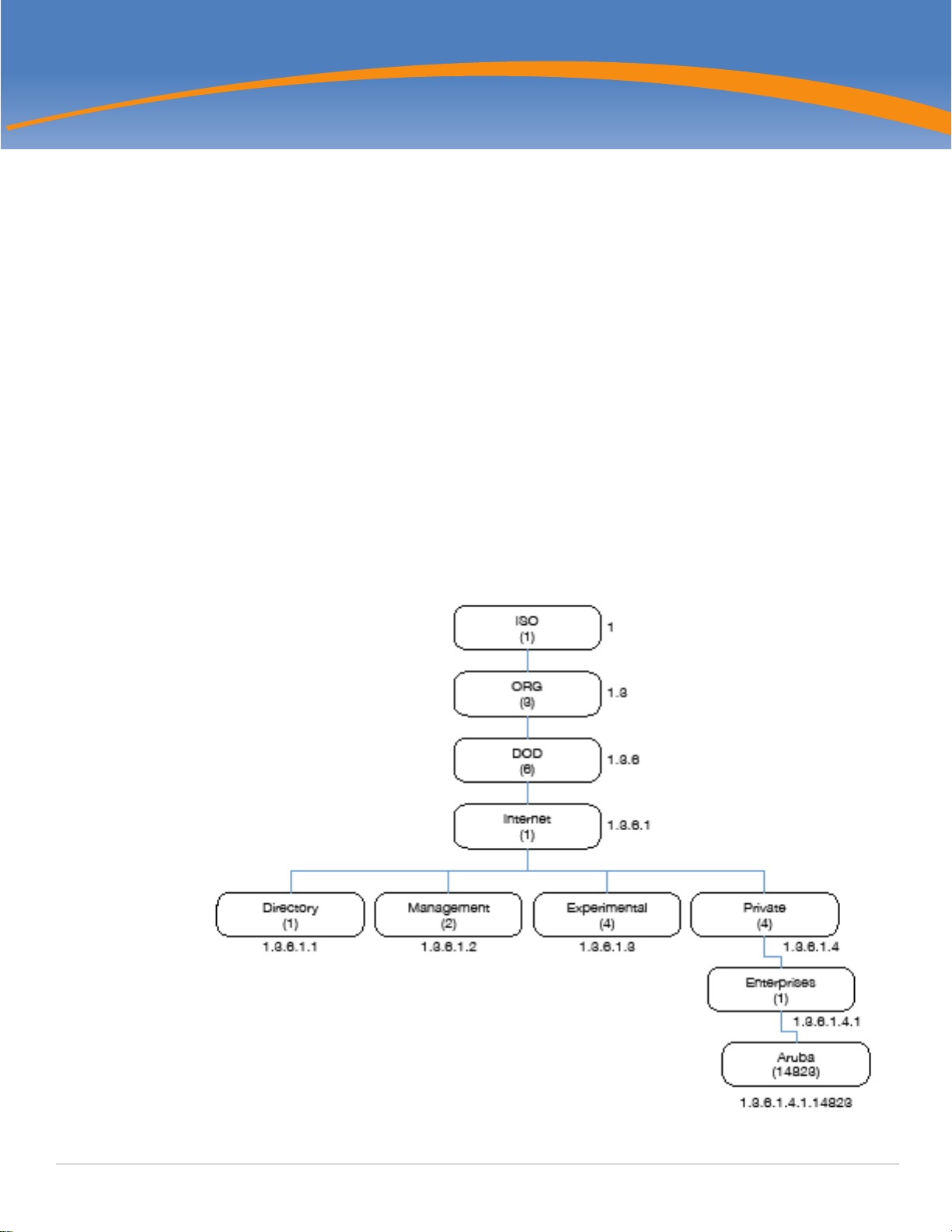
organization code. For example, Aruba and 1.3.6.1.4.1.14823 both represent the private enterprise node
Aruba. Aruba is the parent of the proprietary MIBs that are supported on Dell W-Instant. Figure 1 illustrates
the high-level hierarchy of the Enterprise MIBs.
Figure 1 High-Level MIB Hierarchy
Dell Networking W-Series Instant Access Point 6.2.1.0-3.3.0.0 | MIB Reference Guide MIBs Overview | 17
Page 18

Table 5 indicates the numerical string that lists the nodes of the enterprise MIB hierarchy. The hardware
MIBs are assigned under the Aruba organization code, while all others are under the Aruba organization
code.
Table 5 MIB Node Identification - Enterprise Nodes
Integer String Name
1 1 OSI
3 1.3 ORG
6 1.3.6 DOD
1 1.3.6.1 Internet
4 1.3.6.1.4 Private
1 1.3.6.1.4.1 Enterprise
674 1.3.6.1.4.1.674 Dell
The information provided by a MIB is a file that describes network elements with numerical strings. This
information is compiled into readable text by the SNMP manager. For information about reading MIB text
files, see “Reading MIB Files” on page23.
SNMP
MIB objects can be accessed through the Simple Network Management Protocol (SNMP). To deliver
information between devices, every object referenced in an SNMP message must be listed in the MIB. A
component of a device that is not described in a MIB cannot be recognized by SNMP as there is no
information for SNMP managers and SNMP agents to exchange.
The significant elements of SNMP are Managers, Agents, and MIBs:
SNMP Managers (software application) are used for communicating and managing the devices that
support SNMP Agents. SNMP Managers can also be used for sending configuration updates or
controlling requests to manage a network device.
SNMP Agents (software application) provide information from the network devices to the SNMP
Managers. Network devices include workstations, routers, microwave radios, and other network
components.
MIBs are used for communication between the Managers and the Agents. The OIDs of the MIBs enable
the Managers and Agents to communicate specific data requests and data returns.
Dell Networking W-Series Instant Access Point MIBs support SNMPv1, SNMPv2, and SNMPv3. For information
on configuring SNMP through the Instant UI, see Dell Networking W-Series Instant Access Point 6.2.1.0-3.3.0.0
6.2.1.0-3.3.0.0 User Guide.
To retrieve information from a MIB, the following information is required:
SNMP version
SNMP community name—public or private
18 | MIBs Overview Dell Networking W-Series Instant Access Point 6.2.1.0-3.3.0.0 | MIB Reference Guide
Page 19

The IP Address of the virtual controller
The OID of the MIB object
Table 6 MIB Keywords
Keyword Description
Sequence Refers to the sequence of objects of the MIB. This keyword is used with entry
MIB objects to list the MIB objects that exchange information.
Syntax Textual conventions, for example, Integer32.
Max-Access Defines the object accessibility:
read-only: Can be retrieved but not modified
read-write: Can be retrieved and modified
not-accessible: Cannot be retrieved; it is for internal (device) use only
accessible-for-notify: Can be retrieved when a trap message (notification) is
sent
Status Defines the status of the object:
current: Indicates that the object status is up-to-date and valid.
deprecated: Indicates an obsolete definition. It permits new or continued
implementation to maintain interoperability with existing implementations.
obsolete: Obsolete. It should not be implemented and/or can be removed if
previously implemented.
Description A text string that describes the object.
In addition, MIB files can be placed in the appropriate disk location to assist the user in locating desired
OID values for monitoring.
It is assumed that the workstation is connected to the Instant and a MIB browser is available. For most
applications, the root of the MIB must be included in the OID—the OID begins with a decimal point as
shown below.
.1.3.6.1.4.1.674.2.2.1.1.2.1
If you are using an application that is run through the Linux shell, the command will be as follows:
snmpget -v 2c -c <community name> <Instant IP address> <MIB OID>
The MIB objects can also be viewed from a MIB Browser GUI.
Dell Networking W-Series Instant Access Point 6.2.1.0-3.3.0.0 | MIB Reference Guide MIBs Overview | 19
Page 20

20 | MIBs Overview Dell Networking W-Series Instant Access Point 6.2.1.0-3.3.0.0 | MIB Reference Guide
Page 21

Chapter 2
Using MIBs
This chapter provides information on using MIBs.
Downloading MIB Files
Reporting WLAN Health
Reading MIB Files
SNMP File
The SNMP MIBs supported by Dell W-Instant are listed in Chapter 4, “Standard SNMP MIBs” on page 45.
Downloading MIB Files
The latest Dell W-Instant MIB files are available for registered customers at:
http://download.dell-pcw.com
For assistance to set up an account and access files, contact customer service. See “Contacting Support” on
page15.
Reporting WLAN Health
SNMP MIBs are frequently used for running health checks on Dell W-Instant devices, through a MIB
browser application.
To retrieve information from a MIB, the following information is required:
SNMP version
SNMP community name—public or private
The IP Address of the Virtual Controller and the slave W-IAPs
The OID of the MIB value you want to monitor
MIB files can be placed in the appropriate disk location to assist the user in locating desired OID values for
monitoring. For most applications, the root of the MIB must be included in the OID—the OID begins with a
decimal point as shown in the following example:
.1.3.6.1.4.1.674.2.2.1.1.2.1
SNMP Operations on W-IAPs
Although the virtual controller address is configured on management station, the following MIBs are
specific to a particular W-IAP and therefore cannot be accessed from the Virtual Controller.
ifTable
ifXTable
dot1qTpFdbTable
To enable the management station to access the IF-MIB and Q-BRIDGE-MIB tables and W-IAPs to send
traps, you must configure the IP address of each W-IAP on the management station. The management
station can automatically configure the W-IAP details, by obtaining the IP address of each W-IAP from the
Dell Networking W-Series Instant Access Point 6.2.1.0-3.3.0.0 | MIB Reference Guide Using MIBs | 21
Page 22
AP MIB (aiAccessPointTable), which lists all the slave W-IAPs in a swarm and is implemented on a virtual
controller.
You do not have to set the SNMP community string and security parameters on each W-IAP as this
configuration is common to all W-IAPs and is inherited from virtual controller.
MIB Browsers
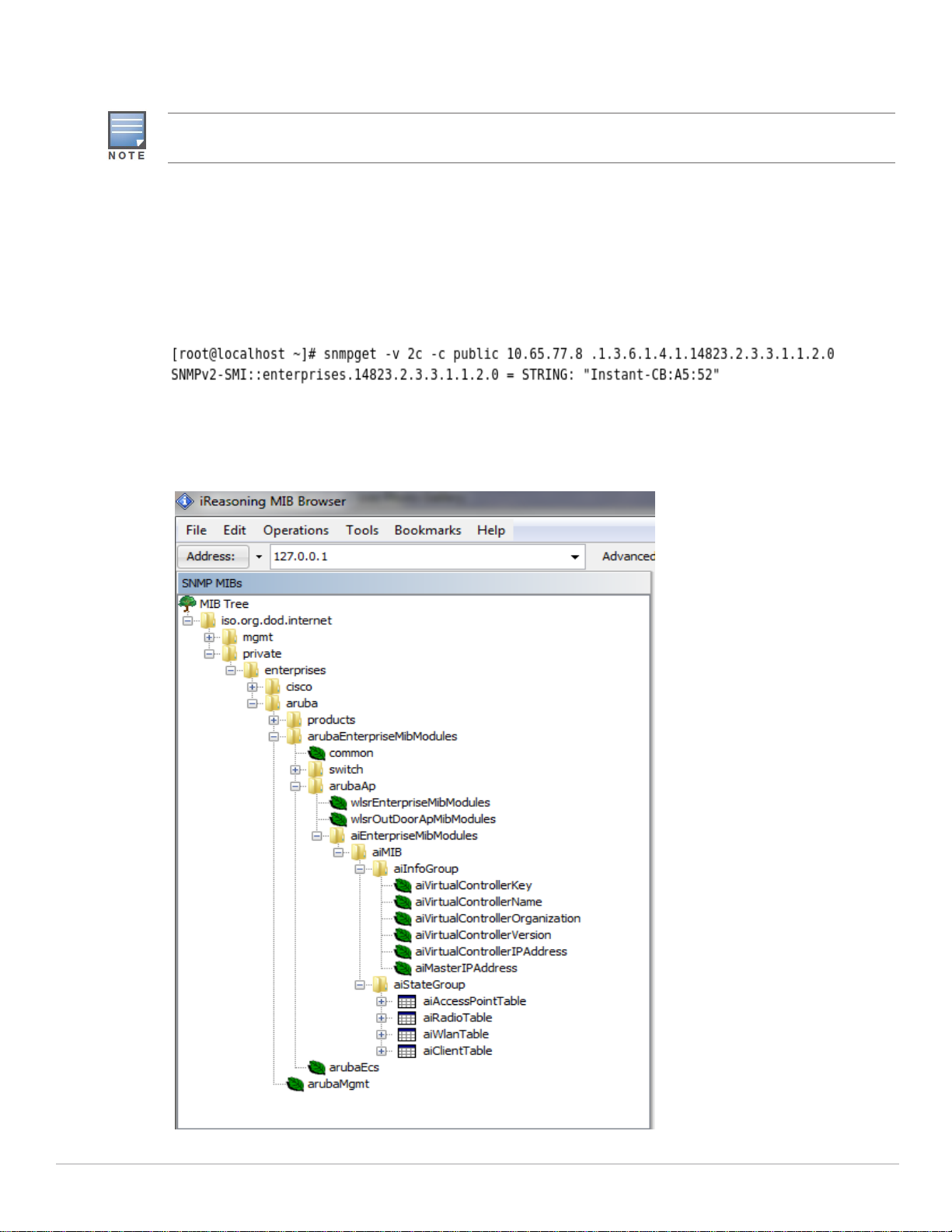
If you are using an application that is run through the Linux shell, the command would be as follows:
snmpget -v 2c -c <community name> <Instant IP address><MIB OID>
Figure 2 shows an example of submitting a command to obtain information.
Figure 2 Running the snmpget Command
Figure 3 shows how information may be obtained through a graphical user interface (GUI). The user
interface and the available features vary by application.
Figure 3 Graphical User Interface
22 | Using MIBs Dell Networking W-Series Instant Access Point 6.2.1.0-3.3.0.0 | MIB Reference Guide
Page 23

Reading MIB Files
This section describes how to interpret the basic components of a MIB file. To determine the OIDs, view the
file snmp.h. For more information, see “SNMP File” on page25.
MIB files describe a specific component of a network device. The files are numerical strings that are
converted to ASCII text by the compiler of the SNMP manager. A word processor or text editor can be used
to open the ASCII file. The contents of an example ArubaOS enterprise MIB file, aruba-cts.my, are as
follows.
Opening Line
Following is the opening line, the beginning of the MIB file.
AI-AP-MIB DEFINITIONS ::= BEGIN
Imports
The Imports section lists the objects that are defined in external ASN.1 files and are used in the current
MIB file.
IMPORTS
TEXTUAL-CONVENTION
FROM SNMPv2-TC
MODULE-IDENTITY,
OBJECT-TYPE,
snmpModules,
Integer32,
Counter32,
Counter64,
IpAddress,
NOTIFICATION-TYPE
FROM SNMPv2-SMI
DisplayString,
PhysAddress,
TimeInterval,
RowStatus,
StorageType,
TestAndIncr,
MacAddress,
TruthValue
FROM SNMPv2-TC
OBJECT-GROUP
FROM SNMPv2-CONF
aiEnterpriseMibModules
FROM ARUBA-MIB;
Inheritance
This section shows the vendor of the MIB and the inheritance, and provides an overall description.
A significant part of inheritance is the OID. The entire OID is not listed for each MIB object—instead, the
parent of the object is shown. The OID can be determined from the parent object as follows.
aiEnterpriseMibModules is the parent object —its OID is 1.3.6.1.4.1.14823.2.3.3.
aiStateGroup OBJECT IDENTIFIER ::= { aiMIB 2 }, the OID is
1.3.6.1.4.1.14823.2.3.3.1.2.
Dell Networking W-Series Instant Access Point 6.2.1.0-3.3.0.0 | MIB Reference Guide Using MIBs | 23
Page 24

aiVirtualControllerKey OBJECT-TYPE, the OID is 1.3.6.1.4.1.14823.2.3.3.1.1.1.0.
All MIBs and their related OIDs are listed in the snmp file of ArubaOS. For more information, see “SNMP
File” on page25.
aiEnterpriseMibModules
FROM ARUBA-MIB;
Identity
Identity is the opening description of the MIB. The information includes contact information for the vendor
and a general description of the MIB.
aiMIB MODULE-DENTITY
LAST-UPDATED "0804160206Z"
ORGANIZATION "Aruba Wireless Networks"
CONTACT-INFO
"Postal: 1322 Crossman Avenue
Sunnyvale, CA 94089
E-mail: [email protected]
Phone: +1 408 227 4500"
DESCRIPTION
"This MIB is for managing Aruba Instant WLAN"
REVISION "0804160206Z"
DESCRIPTION
"The initial revision."
::= { aiEnterpriseMibModules 1 }
MIB Modules
MIB objects can be placed in logical groups such as Group and Table. A group typically contains at least one
global-object or table. The table lists the MIB objects that contain the information exchanged.
The first object of a table is an Entry. The OIDs of the subsequent objects of this table are appended
increments of the Entry OID.
The keyword SEQUENCE lists the objects of the table that contain device information. Each subsequent
object (Informative MIB Object) inherits the OID of the Entry, and contains information sorted by the
Syntax, Access, Status, and Description keywords.
Group
aiStateGroup OBJECT IDENTIFIER ::= { aiMIB 2 }
Table
aiAccessPointTable OBJECT-TYPE
SYNTAX SEQUENCE OF AiAccessPointEntry
MAX-ACCESS not-accessible
STATUS current
DESCRIPTION
"This contains all access points connected to the
virtual controller. This table is empty on AP where
virtual controller is not active"
24 | Using MIBs Dell Networking W-Series Instant Access Point 6.2.1.0-3.3.0.0 | MIB Reference Guide
Page 25

::= { aiStateGroup 1 }
Entry
aiAccessPointEntry OBJECT-TYPE
SYNTAX AiAccessPointEntry
MAX-ACCESS not-accessible
STATUS current
DESCRIPTION
" "
INDEX { aiAPMACAddress }
::= { aiAccessPointTable 1 } AiAccessPointEntry ::=
SEQUENCE {
aiAPMACAddress MacAddress,
aiAPName DisplayString,
aiAPIPAddress IpAddress,
aiAPSerialNum DisplayString,
aiAPModel OBJECT IDENTIFIER,
aiAPModelName DisplayString,
aiAPCPUUtilization Integer32,
aiAPMemoryFree Integer32,
aiAPUptime TimeTicks
Closing Line
Following is the closing line—the end of the MIBs file.
END
SNMP File
The snmp.h file lists the OIDs of all MIBs. Following are sections from snmp.h that show the complete OID
of each of the Controller Transport Service (CTS) MIB elements. The list starts from the ancestral parent
iso.
All ArubaOS MIBs inherit their OIDs from the Aruba MIB node. The following rows list the MIBs that precede
CTS, starting from iso.
{ "iso", HASHNEXT("1") },
{ "org", HASHNEXT("1.3") },
{ "dod", HASHNEXT("1.3.6") },
{ "internet", HASHNEXT("1.3.6.1") },
{ "private", HASHNEXT("1.3.6.1.4") },
{ "enterprises", HASHNEXT("1.3.6.1.4.1") },
{ "aruba", HASHNEXT("1.3.6.1.4.1.14823") },
{"arubaEnterpriseMibModules", HASHNEXT("1.3.6.1.4.1.14823.2") },
The SNMP MIBs supported by Dell W-Instant are listed in Chapter 4, “Standard SNMP MIBs” on page 45.
Dell Networking W-Series Instant Access Point 6.2.1.0-3.3.0.0 | MIB Reference Guide Using MIBs | 25
Page 26

HP OpenView
To install the Aruba module for HP OpenView, log in as the root user and execute the following script:
# $OV_CONTRIB/NNM/Aruba/install
26 | Using MIBs Dell Networking W-Series Instant Access Point 6.2.1.0-3.3.0.0 | MIB Reference Guide
Page 27
Chapter 3
Dell W-Instant MIBs
The chapter provides information about the Dell W-Instant MIB objects.
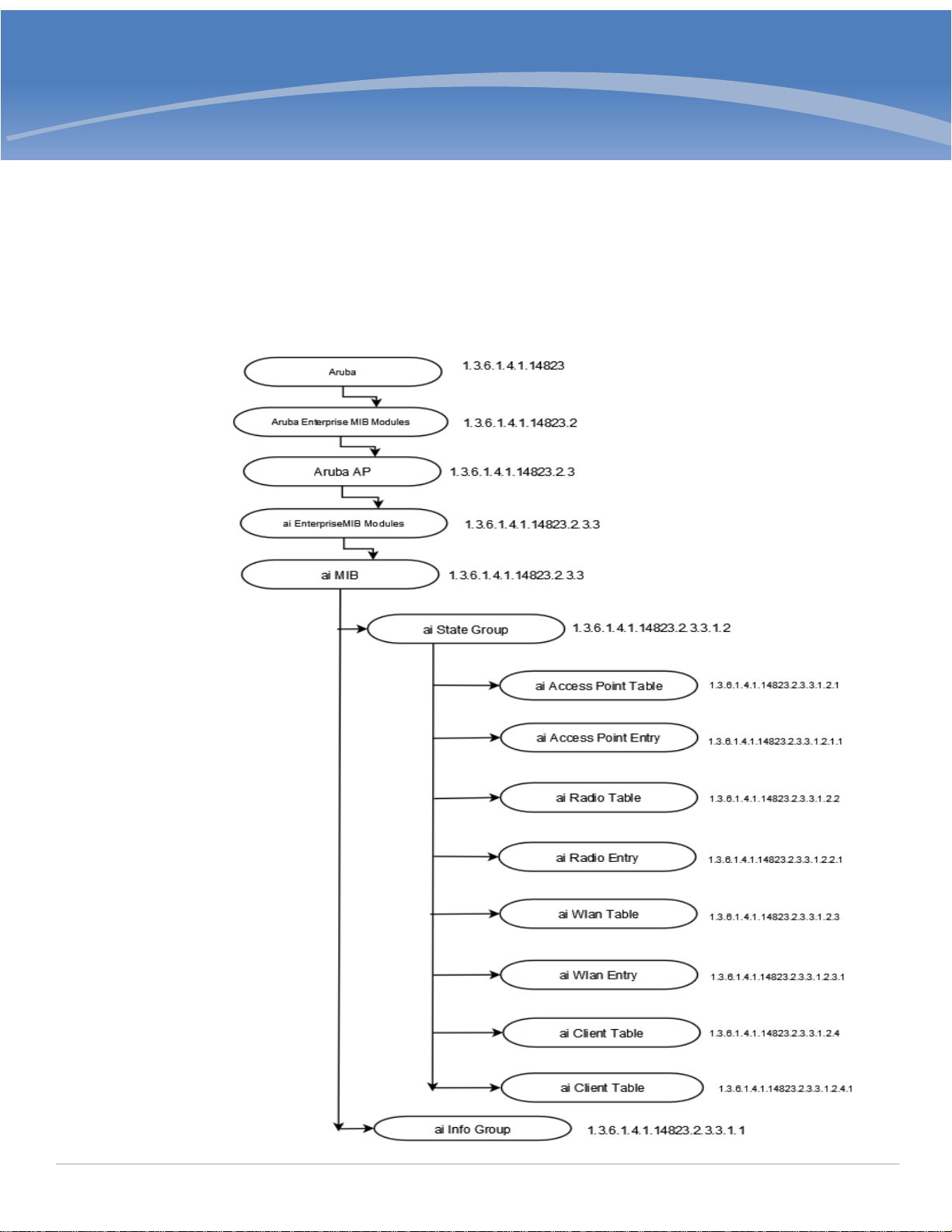
Figure 4 shows the architecture of the Dell Networking W-Instant MIB relative to 1.3.6.1.4.1.14823
(iso.org.dod.internet.private.enterprise.aruba).
The Dell W-Instant MIB is listed in the file aruba-Instant.my. For information about downloading Dell WInstant MIB file, see “Downloading MIB Files” on page21.
Figure 4 Dell W-Instant MIB Hierarchy
Dell Networking W-Series Instant Access Point 6.2.1.0-3.3.0.0 | MIB Reference Guide Dell W-Instant MIBs | 27
Page 28

The Dell W-Instant MIB tree consists of the following MIB groups and tables.
Table 7 Supported Dell W-Instant MIBs and MIB Tables
Group Description
aiInfoGroup Contains details of the virtual controller. For more information, see “aiInfoGroup” on
page28.
aiStateGroup Contains information about status of the Access Point, Radio, WLAN, and Clients
connected to an W-IAP. The following tables are available in the aiInfoGroup:
aiAccessPointTable—Contains all the access points connected to the virtual
controller. This table is indexed by the MAC Address of the W-IAP.
aiRadioTable—Contains all the radios of the access points connected to the virtual
controller. This table is indexed by the MAC Address and radio number.
aiWlanTable—Contains all the BSSIDs that are active on the virtual controller. This
table is indexed by the MAC address and a WLAN Index of the W-IAP.
aiClientTable—Contains information about all the clients connected to the virtual
controller. When a client roams from one access point to another, all the counters in
this table are reset to 0.
For more information, see “aiStateGroup” on page30.
aiTrapGroup Contains the details of traps that can be generated on an W-IAP. For more information,
see “Trap Hierarchy” on page59.
aiInfoGroup
The aiInfoGroup table provides information about the virtual controller:
aiVirtualControllerKey
aiVirtualControllerName
aiVirtualControllerOrganization
aiVirtualControllerVersion
aiVirtualControllerIPAddress
aiMasterIPAddress
aiVirtualControllerKey
Object ID 1.3.6.1.4.1.14823.2.3.3.1.1.1
Syntax DisplayString
Max-Access Read-only
Status Current
Description Unique Virtual Controller key
aiVirtualControllerName
Object ID 1.3.6.1.4.1.14823.2.3.3.1.1.2
Syntax DisplayString
28 | Dell W-Instant MIBs Dell Networking W-Series Instant Access Point 6.2.1.0-3.3.0.0 | MIB Reference Guide
Page 29

Max-Access Read-only
Status Current
Description Name of the Virtual Controller
aiVirtualControllerOrganization
Object ID 1.3.6.1.4.1.14823.2.3.3.1.1.3
Syntax DisplayString
Max-Access Read-only
Status Current
Description Virtual Controller organization
aiVirtualControllerVersion
Object ID 1.3.6.1.4.1.14823.2.3.3.1.1.4
Syntax DisplayString
Max-Access Read-only
Status Current
Description Software version of the controller
aiVirtualControllerIPAddress
Object ID 1.3.6.1.4.1.14823.2.3.3.1.1.5
Syntax IPAddress
Max-Access Read-only
Status Current
Description IP address of the Virtual Controller. If this is not set, returns 0.0.0.0.
aiMasterIPAddress
Object ID 1.3.6.1.4.1.14823.2.3.3.1.1.6
Syntax IPAddress
Max-Access Read-only
Status Current
Description IP Address of AP on which the Virtual Controller software is active.
Dell Networking W-Series Instant Access Point 6.2.1.0-3.3.0.0 | MIB Reference Guide Dell W-Instant MIBs | 29
Page 30

aiStateGroup
The aiStateGroup contains the following tables:
aiAccessPointTable
aiRadioTable
aiWlanTable
aiClientTable
aiAccessPointTable
The objects of the aiAccessPointTable provide information about all the W-IAPs connected to the virtual
controller.
Table 8 aiAccessPointTable OIDs
Object Object ID Entry OID
aiAccessPointEntry 1.3.6.1.4.1.14823.2.3.3.1.2.1.1 aiAccessPointTable 1
aiAPMACAddress 1.3.6.1.4.1.14823.2.3.3.1.2.1.1.1 aiAccessPointEntry 1
aiAPName 1.3.6.1.4.1.14823.2.3.3.1.2.1.1.2 aiAccessPointEntry 2
aiAPIPAddress 1.3.6.1.4.1.14823.2.3.3.1.2.1.1.3 aiAccessPointEntry 3
aiAPSerialNum 1.3.6.1.4.1.14823.2.3.3.1.2.1.1.4 aiAccessPointEntry 4
aiAPModel 1.3.6.1.4.1.14823.2.3.3.1.2.1.1.5 aiAccessPointEntry 5
aiAPModelName 1.3.6.1.4.1.14823.2.3.3.1.2.1.1.6 aiAccessPointEntry 6
aiAPCPUUtilization 1.3.6.1.4.1.14823.2.3.3.1.2.1.1.7 aiAccessPointEntry 7
aiAPMemoryFree 1.3.6.1.4.1.14823.2.3.3.1.2.1.1.8 aiAccessPointEntry 8
aiAPUptime 1.3.6.1.4.1.14823.2.3.3.1.2.1.1.9 aiAccessPointEntry 9
aiAPTotalMemory 1.3.6.1.4.1.14823.2.3.3.1.2.1.1.10 aiAccessPointEntry 10
aiAPStatus 1.3.6.1.4.1.14823.2.3.3.1.2.1.1.11 aiAccessPointEntry 11
aiAccessPointEntry
Syntax aiAccessPointEntry
Max-Access not-accessible
Status current
Description NA
Index aiAPMACAddress
30 | Dell W-Instant MIBs Dell Networking W-Series Instant Access Point 6.2.1.0-3.3.0.0 | MIB Reference Guide
Page 31

aiAPMACAddress
Syntax MacAddress (OCTET STRING). Hint: 1x:
Max-Access read-only
Status current
Description MAC address of the Access Point.
aiAPName
Syntax DisplayString (SIZE(0..64))
Max-Access read-only
Status current
Description Name of the Access Point.
aiAPIPAddress
Syntax IpAddress
Max-Access read-only
Status current
Description IP address of the Access Point.
aiAPSerialNum
Syntax DisplayString (SIZE(0..64))
Max-Access read-only
Status current
Description Serial number of the Access Point.
aiAPModel
Syntax OBJECT IDENTIFIER
Max-Access read-only
Status current
Description Access Point System OID.
aiAPModelName
Syntax DisplayString (SIZE(0..32))
Dell Networking W-Series Instant Access Point 6.2.1.0-3.3.0.0 | MIB Reference Guide Dell W-Instant MIBs | 31
Page 32

Max-Access read-only
Status current
Description Model name of the Access Point.
aiAPCPUUtilization
Syntax Integer32
Max-Access read-only
Status current
Description CPU utilization of the Access Point.
aiAPMemoryFree
Syntax Integer32
Max-Access read-only
Status current
Description Amount of memory free in the access point in bytes.
aiAPUptime
Syntax TimeTicks
Max-Access read-only
Status current
Description Uptime of the Access Point.
aiAPTotalMemory
Syntax Integer32
Max-Access read-only
Status current
Description Total amount of memory available in the AP in bytes.
aiAPStatus
Syntax Integer {up(1), down(2)}
Max-Access read-only
Status current
32 | Dell W-Instant MIBs Dell Networking W-Series Instant Access Point 6.2.1.0-3.3.0.0 | MIB Reference Guide
Page 33

Description Indicates the Access Point Status.
aiRadioTable
The objects of the aiRadioTable provide information about all the radios and the related information of the
Access Points.
Table 9 aiRadioTable OIDs
Object Object ID Entry OID
aiRadioEntry 1.3.6.1.4.1.14823.2.3.3.1.2.2.1 aiRadioTable 1
aiRadioAPMacAddress 1.3.6.1.4.1.14823.2.3.3.1.2.2.1.1 aiRadioEntry 1
aiRadioIndex 1.3.6.1.4.1.14823.2.3.3.1.2.2.1.2 aiRadioEntry 2
aiRadioMACAddress 1.3.6.1.4.1.14823.2.3.3.1.2.2.1.3 aiRadioEntry 3
aiRadioChannel 1.3.6.1.4.1.14823.2.3.3.1.2.2.1.4 aiRadioEntry 4
aiRadioTransmitPower 1.3.6.1.4.1.14823.2.3.3.1.2.2.1.5 aiRadioEntry 5
aiRadioNoiseFloor 1.3.6.1.4.1.14823.2.3.3.1.2.2.1.6 aiRadioEntry 6
aiRadioUtilization4 1.3.6.1.4.1.14823.2.3.3.1.2.2.1.7 aiRadioEntry 7
aiRadioUtilization64 1.3.6.1.4.1.14823.2.3.3.1.2.2.1.8 aiRadioEntry 8
aiRadioTxTotalFrames 1.3.6.1.4.1.14823.2.3.3.1.2.2.1.9 aiRadioEntry 9
aiRadioTxMgmtFrames 1.3.6.1.4.1.14823.2.3.3.1.2.2.1.10 aiRadioEntry 10
aiRadioTxDataFrames 1.3.6.1.4.1.14823.2.3.3.1.2.2.1.11 aiRadioEntry 11
aiRadioTxDataBytes 1.3.6.1.4.1.14823.2.3.3.1.2.2.1.12 aiRadioEntry 12
aiRadioTxDrops 1.3.6.1.4.1.14823.2.3.3.1.2.2.1.13 aiRadioEntry 13
aiRadioTxTotalFrames 1.3.6.1.4.1.14823.2.3.3.1.2.2.1.14 aiRadioEntry 14
aiRadioRxDataFrames 1.3.6.1.4.1.14823.2.3.3.1.2.2.1.15 aiRadioEntry 15
aiRadioRxDataBytes 1.3.6.1.4.1.14823.2.3.3.1.2.2.1.16 aiRadioEntry 16
aiRadioRxMgmtFrames 1.3.6.1.4.1.14823.2.3.3.1.2.2.1.17 aiRadioEntry 17
aiRadioRxBad 1.3.6.1.4.1.14823.2.3.3.1.2.2.1.18 aiRadioEntry 18
aiRadioPhyEvents 1.3.6.1.4.1.14823.2.3.3.1.2.2.1.19 aiRadioEntry 19
aiRadioStatus 1.3.6.1.4.1.14823.2.3.3.1.2.2.1.20 aiRadioEntry 20
Dell Networking W-Series Instant Access Point 6.2.1.0-3.3.0.0 | MIB Reference Guide Dell W-Instant MIBs | 33
Page 34

aiRadioEntry
Syntax aiRadioEntry
Max-Access not-accessible
Status current
Description NA
Index aiRadioAPMACAddress, aiRadioIndex
aiRadioAPMacAddress
Syntax MacAddress (OCTET STRING). Hint: 1x:
Max-Access read-only
Status current
Description MAC Address of the Access Point where this radio is active.
aiRadioIndex
Syntax Integer32
Max-Access read-only
Status current
Description Radio number of the Access Point.
aiRadioMACAddress
Syntax MacAddress
Max-Access read-only
Status current
Description Radio MAC address of the Access Point.
aiRadioChannel
Syntax Integer32
Max-Access read-only
Status current
Description Radio channel. The first byte contains primary channel and first two bits of second
34 | Dell W-Instant MIBs Dell Networking W-Series Instant Access Point 6.2.1.0-3.3.0.0 | MIB Reference Guide
byte contains indicator for the secondary channel. If first two bits of second byte
are 0, it is a 20MHz channel. If first two bits of second byte are 01, the secondary
channel is above primary channel, if first two bits of second byte are 10, the
secondary channel is below the primary channel.
Page 35

aiRadioTransmitPower
Syntax Integer32
Max-Access read-only
Status current
Description Radio transmission power of the Access Point.
aiRadioNoiseFloor
Syntax Integer32
Max-Access read-only
Status current
Description Radio noise of the Access Point in dBm.
aiRadioUtilization4
Syntax Integer32
Max-Access read-only
Status current
Description Radio channel utilization 4 second average.
aiRadioUtilization64
Syntax Integer32
Max-Access read-only
Status current
Description Radio channel utilization 64 second average.
aiRadioTxTotalFrames
Syntax Counter32
Max-Access read-only
Status current
Description Total number of frames transmitted.
aiRadioTxMgmtFrames
Syntax Counter32
Dell Networking W-Series Instant Access Point 6.2.1.0-3.3.0.0 | MIB Reference Guide Dell W-Instant MIBs | 35
Page 36

Max-Access read-only
Status current
Description Total number of management frames transmitted.
aiRadioTxDataFrames
Syntax Counter32
Max-Access read-only
Status current
Description Total number of data frames transmitted.
aiRadioTxDataBytes
Syntax Counter32
Max-Access read-only
Status current
Description Total number of data bytes transmitted.
aiRadioTxDrops
Syntax Counter32
Max-Access read-only
Status current
Description Total number of frames dropped during transmission.
aiRadioRxTotalFrames
Syntax Counter32
Max-Access read-only
Status current
Description Total number of received frames.
aiRadioRxDataFrames
Syntax Counter32
Max-Access read-only
Status current
36 | Dell W-Instant MIBs Dell Networking W-Series Instant Access Point 6.2.1.0-3.3.0.0 | MIB Reference Guide
Page 37

Description Total number of received data frames.
aiRadioRxDataBytes
Syntax Counter32
Max-Access read-only
Status current
Description Total number of received data bytes.
aiRadioRxMgmtFrames
Syntax Counter32
Max-Access read-only
Status current
Description Total number of received management frames.
aiRadioRxBad
Syntax Counter32
Max-Access read-only
Status current
Description Total number of frames received in error.
aiRadioPhyEvents
Syntax Counter32
Max-Access read-only
Status current
Description Number of physical layer events that indicates frames not received because of
interference.
aiRadioStatus
Syntax Integer {up(1), down(2)}
Max-Access read-only
Status current
Description Indicates the radio status of the AP.
Dell Networking W-Series Instant Access Point 6.2.1.0-3.3.0.0 | MIB Reference Guide Dell W-Instant MIBs | 37
Page 38

aiWlanTable
The objects of the aiWlanTable provide information about all the BSSIDs active on the virtual controller.
Table 10 aiWlanTable OIDs
Object Object ID Entry OID
aiWlanEntry 1.3.6.1.4.1.14823.2.3.3.1.2.3.1 aiWlanTable 1
aiWlanAPMACAddress 1.3.6.1.4.1.14823.2.3.3.1.2.3.1.1 aiWlanEntry 1
aiWlanIndex 1.3.6.1.4.1.14823.2.3.3.1.2.3.1.2 aiWlanEntry 2
aiWlanESSID 1.3.6.1.4.1.14823.2.3.3.1.2.3.1.3 aiWlanEntry 3
aiWlanMACAddress 1.3.6.1.4.1.14823.2.3.3.1.2.3.1.4 aiWlanEntry 4
aiWlanTxTotalFrames 1.3.6.1.4.1.14823.2.3.3.1.2.3.1.5 aiWlanEntry 5
aiWlanTxDataFrames 1.3.6.1.4.1.14823.2.3.3.1.2.3.1.6 aiWlanEntry 6
aiWlanTxDataBytes 1.3.6.1.4.1.14823.2.3.3.1.2.3.1.7 aiWlanEntry 7
aiWlanRxTotalFrames 1.3.6.1.4.1.14823.2.3.3.1.2.3.1.8 aiWlanEntry 8
aiWlanRxDataFrames 1.3.6.1.4.1.14823.2.3.3.1.2.3.1.9 aiWlanEntry 9
aiWlanRxDataBytes 1.3.6.1.4.1.14823.2.3.3.1.2.3.1.10 aiWlanEntry 10
aiWlanEntry
Syntax AiWlanEntry
Max-Access not-accessible
Status current
Description NA
Index aiWlanAPMACAddress, aiWlanIndex
aiWlanAPMACAddress
Syntax MacAddress (OCTET STRING). Hint: 1x:
Max-Access read-only
Status current
Description MAC Address of the Access Point where WLAN is active.
aiWlanIndex
Syntax Integer32
Max-Access read-only
38 | Dell W-Instant MIBs Dell Networking W-Series Instant Access Point 6.2.1.0-3.3.0.0 | MIB Reference Guide
Page 39

Status current
Description Index of the WLAN. This is a unique index assigned to the active WLAN on the
Access Point.
aiWlanESSID
Syntax DisplayString
Max-Access read-only
Status current
Description ESSID of the WLAN
aiWlanMACAddress
Syntax MacAddress (OCTET STRING). Hint: 1x:
Max-Access read-only
Status current
Description BSSID of the WLAN
aiWlanTxTotalFrames
Syntax Counter32
Max-Access read-only
Status current
Description Total number of frames transmitted.
aiWlanTxDataFrames
Syntax Counter32
Max-Access read-only
Status current
Description Total number of data frames transmitted.
aiWlanTxDataBytes
Syntax Counter32
Max-Access read-only
Status current
Description Total number of data bytes transmitted.
Dell Networking W-Series Instant Access Point 6.2.1.0-3.3.0.0 | MIB Reference Guide Dell W-Instant MIBs | 39
Page 40

aiWlanRxTotalFrames
Syntax Counter32
Max-Access read-only
Status current
Description Total number of received frames.
aiWlanRxDataFrames
Syntax Counter32
Max-Access read-only
Status current
Description Total number of received data frames.
aiWlanRxDataBytes
Syntax Counter32
Max-Access read-only
Status current
Description Total number of received data bytes.
aiClientTable
The objects of the aiWlanTable provide information about all the clients connected to the virtual controller.
Table 11 aiClientTable OID
Object Object ID Entry OID
aiClientEntry 1.3.6.1.4.1.14823.2.3.3.1.2.4.1 aiClientTable 1
aiClientMACAddress 1.3.6.1.4.1.14823.2.3.3.1.2.4.1.1 aiClientEntry 1
aiClientWlanMACAddress 1.3.6.1.4.1.14823.2.3.3.1.2.4.1.2 aiClientEntry 2
aiClientIPAddress 1.3.6.1.4.1.14823.2.3.3.1.2.4.1.3 aiClientEntry 3
aiClientAPIPAddress 1.3.6.1.4.1.14823.2.3.3.1.2.4.1.4 aiClientEntry 4
aiClientName 1.3.6.1.4.1.14823.2.3.3.1.2.4.1.5 aiClientEntry 5
aiClientOperatingSystem 1.3.6.1.4.1.14823.2.3.3.1.2.4.1.6 aiClientEntry 6
aiClientSNR 1.3.6.1.4.1.14823.2.3.3.1.2.4.1.7 aiClientEntry 7
aiClientTxDataFrames 1.3.6.1.4.1.14823.2.3.3.1.2.4.1.8 aiClientEntry 8
aiClientTxDataBytes 1.3.6.1.4.1.14823.2.3.3.1.2.4.1.9 aiClientEntry 9
40 | Dell W-Instant MIBs Dell Networking W-Series Instant Access Point 6.2.1.0-3.3.0.0 | MIB Reference Guide
Page 41

Table 11 aiClientTable OID
Object Object ID Entry OID
aiClientTxRetries 1.3.6.1.4.1.14823.2.3.3.1.2.4.1.10 aiClientEntry 10
aiClientTxRate 1.3.6.1.4.1.14823.2.3.3.1.2.4.1.11 aiClientEntry 11
aiClientRxDataFrames 1.3.6.1.4.1.14823.2.3.3.1.2.4.1.12 aiClientEntry 12
aiClientRxDataBytes 1.3.6.1.4.1.14823.2.3.3.1.2.4.1.13 aiClientEntry 13
aiClientRxRetries 1.3.6.1.4.1.14823.2.3.3.1.2.4.1.14 aiClientEntry 14
aiClientRxRate 1.3.6.1.4.1.14823.2.3.3.1.2.4.1.15 aiClientEntry 15
aiClientUptime 1.3.6.1.4.1.14823.2.3.3.1.2.4.1.16 aiClientEntry 16
aiClientEntry
Syntax aiClientEntry
Max-Access not-accessible
Status current
Description NA
Index aiClientMACAddress
aiClientMACAddress
Syntax MacAddress (OCTET STRING). Hint: 1x:
Max-Access read-only
Status current
Description MAC Address of the client.
aiClientWlanMACAddress
Syntax MacAddress
Max-Access read-only
Status current
Description BSSID of WLAN where client is associated.
aiClientIPAddress
Syntax IpAddress
Max-Access read-only
Dell Networking W-Series Instant Access Point 6.2.1.0-3.3.0.0 | MIB Reference Guide Dell W-Instant MIBs | 41
Page 42

Status current
Description IP address of the client.
aiClientAPIPAddress
Syntax IpAddress
Max-Access read-only
Status current
Description Radio channel. First byte contains primary channel and first two bits on second
byte contains indicator for secondary channel. If first two bits of second byte is 0, it
is a 20MHz channel. If first two bits of second byte is 01, secondary channel is
above primary channel, if first two bits of second by is 10, secondary channel is
below the primary channel.
aiClientName
Syntax DisplayString
Max-Access read-only
Status current
Description Name of the user using the client.
aiClientOperatingSystem
Syntax DisplayString
Max-Access read-only
Status current
Description Operating system of the client.
aiClientSNR
Syntax Integer32
Max-Access read-only
Status current
Description Signal to noise ratio of the client connected to the Access Point
aiClientTxDataFrames
Syntax Counter32
Max-Access read-only
Status current
42 | Dell W-Instant MIBs Dell Networking W-Series Instant Access Point 6.2.1.0-3.3.0.0 | MIB Reference Guide
Page 43

Description Total number of frames transmitted by the client.
aiClientTxDataBytes
Syntax Counter32
Max-Access read-only
Status current
Description Total number of bytes transmitted by the client.
aiClientTxRetries
Syntax Counter32
Max-Access read-only
Status current
Description Total number of retry frames transmitted by the client.
aiClientTxRate
Syntax Integer32
Max-Access read-only
Status current
Description Transmission rate of the client in mbps.
aiClientRxDataFrames
Syntax Counter32
Max-Access read-only
Status current
Description Total number of frames received by the client in mbps.
aiClientRxDataBytes
Syntax Counter32
Max-Access read-only
Status current
Description Total number of bytes received by the client in mbps.
Dell Networking W-Series Instant Access Point 6.2.1.0-3.3.0.0 | MIB Reference Guide Dell W-Instant MIBs | 43
Page 44

aiClientRxRetries
Syntax Counter32
Max-Access read-only
Status current
Description Total number of retry frames received by the client.
aiClientRxRate
Syntax Integer32
Max-Access read-only
Status current
Description Receiving rate of the client in mbps.
aiClientUptime
Syntax TimeTicks
Max-Access read-only
Status current
Description Client uptime. On mobility event all counters are reset to 0 and uptime resets to 0.
44 | Dell W-Instant MIBs Dell Networking W-Series Instant Access Point 6.2.1.0-3.3.0.0 | MIB Reference Guide
Page 45

Chapter 4
Standard SNMP MIBs
This section provides information on the following standard MIBs modules and tables supported in this
release of Dell W-Instant.
system MIB
dot1qTpFdbTable
ifTable
ifXTable
system MIB
The system MIB contains system-specific information about the W-IAP. Dell W-Instant supports the
following system MIB objects:
sysDescr— Provides information about the W-IAP model and software version of the W-IAP.
sysObjectID—Identifies the network management subsystem. The sysObjectID in the standard SNMP
MIB can be used to retrieve OIDs for the Dell W-Instant products. You can retrieve information on all
node devices in Aruba.my and dell-wlan.my MIBs by extracting the sysObjectId for each device. The
sysObjectID returns OIDs for a specific model number of the device within the Dell W-Instant product
family.
For example, the iso.org.dod.internet.private.enterprise.aruba.products.apProducts.ap135
(1.3.6.1.4.1.14823.1.2.48) OID is returned for the AP-135 device. For information on the OIDs associated
with the AP devices, see the apProducts tree in the Aruba.my and dell-wlan.my MIB files.
sysUpTime —Indicates the system up time since the W-IAP was initialized and actively connected to the
network.
sysName — Indicates the name of the W-IAP.
sysLocation— Indicates the physical location of the W-IAP. To retrieve information on the AP location,
the system location details for the W-IAP must be configured. For more information on configuring
system location details, see Dell Networking W-Series Instant Access Point 6.2.1.0-3.3.0.0 User Guide.
sysServices—Indicates the services offered by the W-IAP.
The following system MIB objects are not supported:
sysContact
sysORLastChange
sysORTable
sysDescr
Object ID 1.3.6.1.2.1.1.1
Syntax DisplayString
Max-Access read-only
Status mandatory
Dell Networking W-Series Instant Access Point 6.2.1.0-3.3.0.0 | MIB Reference Guide Standard SNMP MIBs | 45
Page 46

Description A textual description of the entity. This value should include the full name and
version identification of the system's hardware type, software operating-system,
and networking software. It is mandatory that this only contains printable ASCII
characters.
sysObjectID
Object ID 1.3.6.1.2.1.1.2
Syntax Object Identifier
Max-Access read-only
Status mandatory
Description The vendor's authoritative identification of the network management subsystem
contained in the entity. This value is allocated within the SMI enterprises subtree
(1.3.6.1.4.1) and provides an easy and unambiguous means for determining `what
kind of box' is being managed.
sysUpTime
Object ID 1.3.6.1.2.1.1.3
Syntax TimeTicks
Max-Access read-only
Status mandatory
Description The time (in hundredths of a second) since the network management portion of the
system was last re-initialized.
sysName
Object ID 1.3.6.1.2.1.1.5
Syntax DisplayString
Max-Access read-write
Status mandatory
Description An administrator-assigned fully-qualified domain name for the managed node.
sysLocation
Object ID 1.3.6.1.2.1.1.6
Syntax DisplayString
Max-Access read-write
Status mandatory
46 | Standard SNMP MIBs Dell Networking W-Series Instant Access Point 6.2.1.0-3.3.0.0 | MIB Reference Guide
Page 47

Description The physical location of the AP.
sysServices
Object ID 1.3.6.1.2.1.1.7
Syntax Integer
Max-Access read-only
Status mandatory
Description A value which indicates the set of services that the AP primarily offers.
dot1qTpFdbTable
This table contains information about the associated station MAC addresses, the corresponding port from
the interface table, and status. The objects of the dot1qTpFdbTable provide information about the
forwarding and filtering status of the clients connected to wired ports and wireless interfaces.
The dot1qTpFdbTable contains the following objects:
dot1qFdbId
dot1qTpFdbAddress
dot1qTpFdbPort
dot1qTpFdbStatus
dot1qFdbId
Object ID 1.3.6.1.2.1.17.7.1.2.1.1.1
Syntax UNSIGNED32
Max-Access not-accessible
Status current
Description The identity of the filtering database such as VLAN ID of the W-IAP.
dot1qTpFdbAddress
Object ID 1.3.6.1.2.1.17.7.1.2.2.1.1
Syntax MacAddress
Max-Access not-accessible
Status current
Description MAC address for which the W-IAP has forwarding or filtering information.
Dell Networking W-Series Instant Access Point 6.2.1.0-3.3.0.0 | MIB Reference Guide Standard SNMP MIBs | 47
Page 48

dot1qTpFdbPort
Object ID 1.3.6.1.2.1.17.7.1.2.2.1.2
Syntax Integer32 (0..65535)
Max-Access read-only
Status current
Description Port number on which a frame having a source address equal to the value of the
corresponding instance of dot1qTpFdbAddress. The index value of ifTable is set as
the port number field in this table. If the self MAC address is used, the index is 0.
dot1qTpFdbStatus
Object ID 1.3.6.1.2.1.17.7.1.2.2.1.3
Syntax INTEGER { other(1), invalid(2), learned(3), self(4), mgmt(5) }
Max-Access read-only
Status current
Description The status of the bridge entry is set as learned to indicate that the value of the
corresponding instance of dot1qTpFdbPort was learned and is being used.
If self MAC address is used, the status is set as self to indicate that the value of the
corresponding instance of dot1qTpFdbAddress represents one of the device's
addresses. The corresponding instance of dot1qTpFdbPort indicates which of the
device's ports has this address.
ifTable
This table contains information about wired ports and wireless interfaces. The objects in this MIB provide
information about the interfaces configured on an W-IAP. This table contains the following objects:
ifIndex
ifDescr
ifType
ifMtu
ifSpeed
ifPhysAddress
ifAdminStatus
ifOperStatus
ifInOctets
ifInUcastPkts
ifInNUcastPkts
ifInDiscards
ifInErrors
ifOutOctets
ifOutUcastPkts
48 | Standard SNMP MIBs Dell Networking W-Series Instant Access Point 6.2.1.0-3.3.0.0 | MIB Reference Guide
Page 49

ifInDiscards
ifInErrors
The following ifTable objects are not supported:
ifOutQLen
ifSpecific
ifInUnknownProtos
ifLastChange
ifIndex
Object ID 1.3.6.1.2.1.2.2.1.1
Syntax Integer32
Max-Access read-only
Status current
Description Value assigned to an interface.
Ethernet interface value range: 1—49
Radio 0 interface value range: 50—69.
Radio 1 interface range: 70—89.
GRE interface range: 90—09
PPP interface range: 110—129
VPN interface range: 130—150
Other interfaces: From 500 onwards
ifDescr
Object ID 1.3.6.1.2.1.2.2.1.2
Syntax DisplayString (size (0..255))
Max-Access read-only
Status current
Description Description of the interface, for example eth for Ethernet, radio0_ssid_id2,aruba102
for Radio0 interface, and radioX_ssid_idY for Radio1 interface.
ifType
Object ID 1.3.6.1.2.1.2.2.1.3
Syntax IANAifType
Max-Access read-only
Status current
Description Type of the interface. For example, Gigabit Ethernet interface or Fast Ethernet.
Dell Networking W-Series Instant Access Point 6.2.1.0-3.3.0.0 | MIB Reference Guide Standard SNMP MIBs | 49
Page 50

ifMtu
Object ID 1.3.6.1.2.1.2.2.1.4
Syntax Integer32
Max-Access read-only
Status current
Description The size of the largest packet which can be sent or received on interface.
ifSpeed
Object ID 1.3.6.1.2.1.2.2.1.5
Syntax Gauge32
Max-Access read-only
Status current
Description The current bandwidth of the interface in bits per second.
ifPhysAddress
Object ID 1.3.6.1.2.1.2.2.1.6
Syntax PhysAddress
Max-Access read-only
Status current
Description Indicates the MAC address of the client.
ifAdminStatus
Object ID 1.3.6.1.2.1.2.2.1.7
Syntax INTEGER
Max-Access read-write
Status current
Description Administrative state of the interface.
ifOperStatus
Object ID 1.3.6.1.2.1.2.2.1.8
Syntax INTEGER
50 | Standard SNMP MIBs Dell Networking W-Series Instant Access Point 6.2.1.0-3.3.0.0 | MIB Reference Guide
Page 51

Max-Access read-only
Status current
Description Operational status of the interface.
ifInOctets
Object ID 1.3.6.1.2.1.2.2.1.10
Syntax Counter32
Max-Access read-only
Status current
Description Number of octets received on the interface.
ifInUcastPkts
Object ID 1.3.6.1.2.1.2.2.1.11
Syntax Counter32
Max-Access read-only
Status current
Description The number of packets, delivered by this sub-layer to a higher sub-layer, which
were not addressed to a multicast or broadcast address at this sub-layer.
ifInNUcastPkts
Object ID 1.3.6.1.2.1.2.2.1.12
Syntax Counter32
Max-Access read-only
Status current
Description The number of packets, delivered by this sub-layer to a higher sub-layer, which
were addressed to a multicast or broadcast address at this sub-layer.
ifInDiscards
Object ID 1.3.6.1.2.1.2.2.1.13
Syntax Counter32
Max-Access read-only
Status current
Dell Networking W-Series Instant Access Point 6.2.1.0-3.3.0.0 | MIB Reference Guide Standard SNMP MIBs | 51
Page 52

Description The number of inbound packets discarded.
ifInErrors
Object ID 1.3.6.1.2.1.2.2.1.14
Syntax Counter32
Max-Access read-only
Status current
Description The number of packets transmission units with errors.
ifOutOctets
Object ID 1.3.6.1.2.1.2.2.1.16
Syntax Counter32
Max-Access read-only
Status current
Description The total number of octets transmitted out of the interface.
ifOutUcastPkts
Object ID 1.3.6.1.2.1.2.2.1.17
Syntax Counter32
Max-Access read-only
Status current
Description The total number of packets that the higher-level protocols request for
transmission, and the packets which are not addressed to a multicast or broadcast
address at this sub-layer, including those that are discarded or not sent.
ifOutDiscards
Object ID 1.3.6.1.2.1.2.2.1.19
Syntax Counter32
Max-Access read-only
Status current
Description The number of outbound packets discarded even though no errors that prevented
52 | Standard SNMP MIBs Dell Networking W-Series Instant Access Point 6.2.1.0-3.3.0.0 | MIB Reference Guide
the transmission were detected.
Page 53

ifOutErrors
Object ID 1.3.6.1.2.1.2.2.1.20
Syntax Counter32
Max-Access read-only
Status current
Description The number of outbound packets that could not be transmitted because of errors.
ifXTable
The ifXTable table contains the following additional objects for the interface table.
ifName
ifInMulticastPkts
ifInBroadcastPkts
ifOutMulticastPkts
ifOutBroadcastPkts
ifHCInOctets
ifHCInUcastPkts
ifHCInMulticastPkts
ifHCInBroadcastPkts
ifHCOutOctets
ifHCOutUcastPkts
ifHCOutMulticastPkts
ifHCOutBroadcastPkts
ifLinkUpDownTrapEnable
ifPromiscuousMode
ifConnectorPresent
The following ifXTable objects are not supported:
ifHighSpeed
ifAlias
ifCounterDiscontinuityTime
ifName
Object ID 1.3.6.1.2.1.31.1.1.1.1
Syntax DisplayString
Max-Access read-only
Status current
Description Name of the interface
Dell Networking W-Series Instant Access Point 6.2.1.0-3.3.0.0 | MIB Reference Guide Standard SNMP MIBs | 53
Page 54

ifInMulticastPkts
Object ID 1.3.6.1.2.1.31.1.1.1.2
Syntax Counter32
Max-Access read-only
Status current
Description The number of packets, delivered by this sub-layer to a higher layer, which were
addressed to a multicast or broadcast address at this sub-layer.
ifInBroadcastPkts
Object ID 1.3.6.1.2.1.31.1.1.1.3
Syntax Counter32
Max-Access read-only
Status current
Description The number of packets, delivered by this sub-layer to a higher layer, which were
addressed to a multicast or broadcast address at this sub-layer
ifOutMulticastPkts
Object ID 1.3.6.1.2.1.31.1.1.1.4
Syntax Counter32
Max-Access read-only
Status current
Description The total number of packets that the higher-level protocols request for
transmission, and which were addressed to a multicast or broadcast address at this
sub-layer.
ifOutBroadcastPkts
Object ID 1.3.6.1.2.1.31.1.1.1.5
Syntax Counter32
Max-Access read-only
Status current
Description The total number of packets that higher-level protocols requested for transmission,
and the packets which were addressed to a multicast or broadcast address at this
sub-layer.
54 | Standard SNMP MIBs Dell Networking W-Series Instant Access Point 6.2.1.0-3.3.0.0 | MIB Reference Guide
Page 55

ifHCInOctets
Object ID 1.3.6.1.2.1.31.1.1.1.6
Syntax Counter64
Max-Access read-only
Status current
Description The total number of octets received on the interface, including framing characters.
This object is a 64-bit version of ifInOctets.
ifHCInUcastPkts
Object ID 1.3.6.1.2.1.31.1.1.1.7
Syntax Counter64
Max-Access read-only
Status current
Description The number of packets, delivered by this sub-layer to a higher sub-layer, which
were not addressed to a multicast or broadcast address at this sub-layer.
ifHCInMulticastPkts
Object ID 1.3.6.1.2.1.31.1.1.1.8
Syntax Counter64
Max-Access read-only
Status current
Description The number of packets, delivered by this sub-layer to a higher sub-layer, which
were addressed to a multicast or broadcast address at this sub-layer.
ifHCInBroadcastPkts
Object ID 1.3.6.1.2.1.31.1.1.1.9
Syntax Counter64
Max-Access read-only
Status current
Description The number of packets, delivered by this sub-layer to a higher sub-layer, which
were addressed to a multicast or broadcast address at this sub-layer.
Dell Networking W-Series Instant Access Point 6.2.1.0-3.3.0.0 | MIB Reference Guide Standard SNMP MIBs | 55
Page 56

ifHCOutOctets
Object ID 1.3.6.1.2.1.31.1.1.1.10
Syntax Counter64
Max-Access read-only
Status current
Description The total number of octets transmitted out of the interface, including framing
characters.
ifHCOutUcastPkts
Object ID 1.3.6.1.2.1.31.1.1.1.11
Syntax Counter64
Max-Access read-only
Status current
Description The total number of packets that higher-level protocols requested be transmitted,
and which were not addressed to a multicast or broadcast address at this sub-layer,
including those that were discarded or not sent.
ifHCOutMulticastPkts
Object ID 1.3.6.1.2.1.31.1.1.1.12
Syntax Counter64
Max-Access read-only
Status current
Description The total number of packets that higher-level protocols requested be transmitted,
and which were addressed to a multicast or broadcast address at this sub-layer,
including those that were discarded or not sent.
ifHCOutBroadcastPkts
Object ID 1.3.6.1.2.1.31.1.1.1.13
Syntax Counter64
Max-Access read-only
Status current
Description The total number of packets that higher-level protocols requested be transmitted,
and which were addressed to a multicast or broadcast address at this sub-layer,
including those that were discarded or not sent.
56 | Standard SNMP MIBs Dell Networking W-Series Instant Access Point 6.2.1.0-3.3.0.0 | MIB Reference Guide
Page 57

ifLinkUpDownTrapEnable
Object ID 1.3.6.1.2.1.31.1.1.1.14
Syntax Integer
Max-Access read-write
Status current
Description Indicates whether linkUp or linkDown traps must be generated for this interface.
ifPromiscuousMode
Object ID 1.3.6.1.2.1.31.1.1.1.16
Syntax Integer
Max-Access TruthValue
Status current
Description This object has true (1) and false(2) values.
ifConnectorPresent
Object ID 1.3.6.1.2.1.31.1.1.1.17
Syntax Integer
Max-Access TruthValue
Status current
Description This object has True(1) value if there is any physical connector, else false (0) value.
Dell Networking W-Series Instant Access Point 6.2.1.0-3.3.0.0 | MIB Reference Guide Standard SNMP MIBs | 57
Page 58

58 | Standard SNMP MIBs Dell Networking W-Series Instant Access Point 6.2.1.0-3.3.0.0 | MIB Reference Guide
Page 59
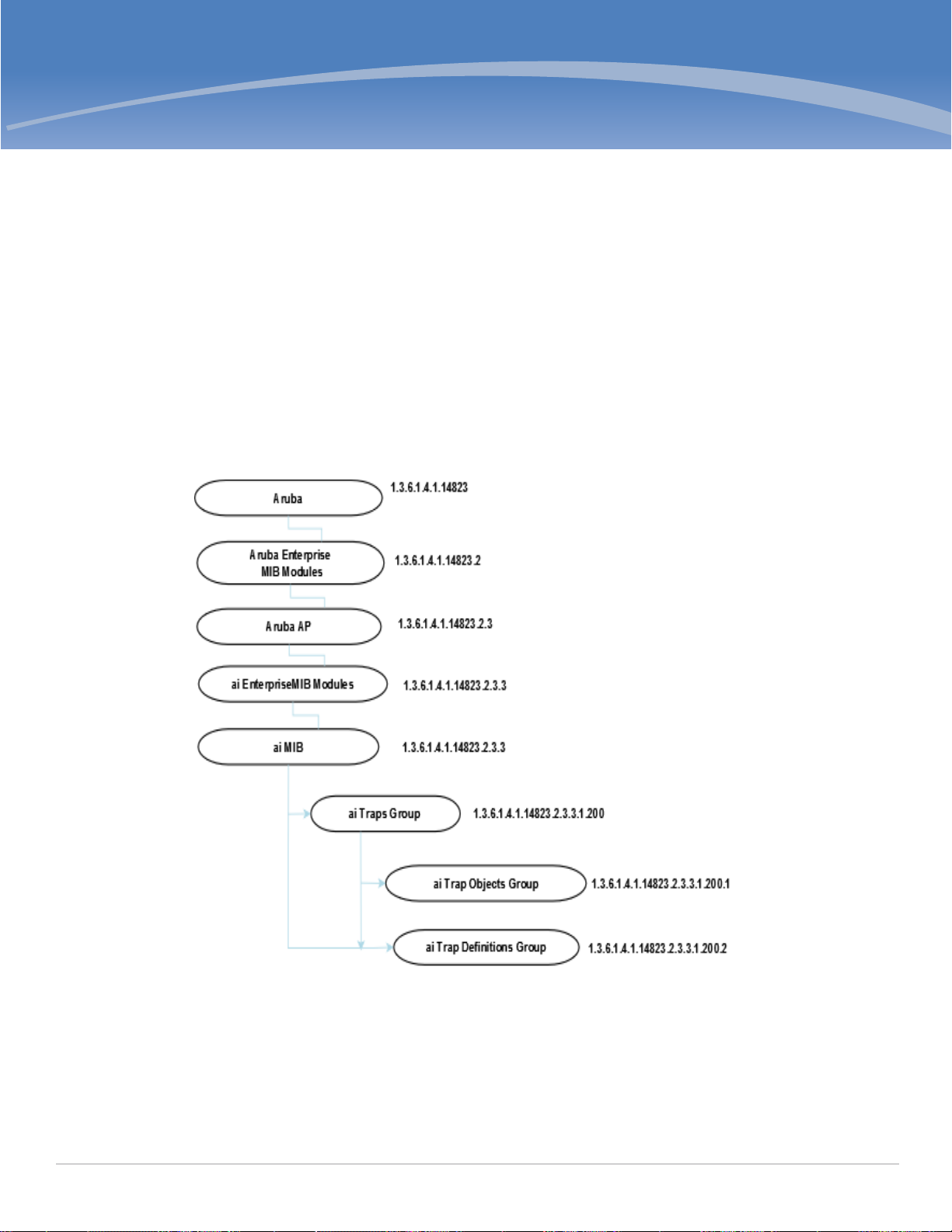
Chapter 5
Traps
This module defines the traps that can be generated by the W-IAP. Traps are MIB objects (variables) that
transmit information to the SNMP Manager when an event occurs. Traps are included as varbinds (variable
bindings) in the trap protocol data unit (PDU). Varbinds are defined in the Description section below.
Trap Hierarchy
Figure 5 shows the architecture of the Traps MIB relative to 1.3.6.1.4.1.14823
(iso.org.dod.internet.private.enterprise.aruba). The Traps are listed in the file aruba-trap.my and dell-
wlan.my MIB file
MIB file. For information about downloading Dell W-Instant MIB files, see “Downloading MIB Files” on
page21.
Figure 5 Trap Hierarchy
Dell Networking W-Series Instant Access Point 6.2.1.0-3.3.0.0 | MIB Reference Guide Traps | 59
Page 60

ai Traps Objects Group
The following table lists the supported trap objects in this group:
Table 12 aiTraps Objects Group OIDs
Object Object ID
wlsxTrapAPMacAddress 1.3.6.1.4.1.14823.2.3.3.1.200.1.1 wlsxTrapObjectsGroup 1
wlsxTrapAPIpAddress 1.3.6.1.4.1.14823.2.3.3.1.200.1.2 wlsxTrapObjectsGroup 2
wlsxTrapAPBSSID 1.3.6.1.4.1.14823.2.3.3.1.200.1.3 wlsxTrapObjectsGroup 3
wlsxTrapEssid 1.3.6.1.4.1.14823.2.3.3.1.200.1.4 wlsxTrapObjectsGroup 4
wlsxTrapTargetAPBSSID 1.3.6.1.4.1.14823.2.3.3.1.200.1.5 wlsxTrapObjectsGroup 5
wlsxTrapTargetAPSSID 1.3.6.1.4.1.14823.2.3.3.1.200.1.6 wlsxTrapObjectsGroup 6
wlsxTrapTargetAPChannel 1.3.6.1.4.1.14823.2.3.3.1.200.1.7 wlsxTrapObjectsGroup 7
wlsxTrapNodeMac 1.3.6.1.4.1.14823.2.3.3.1.200.1.8 wlsxTrapObjectsGroup 8
wlsxTrapSourceMac 1.3.6.1.4.1.14823.2.3.3.1.200.1.9 wlsxTrapObjectsGroup 9
wlsxReceiverMac 1.3.6.1.4.1.14823.2.3.3.1.200.1.10 wlsxTrapObjectsGroup 10
wlsxTrapTransmitterMac 1.3.6.1.4.1.14823.2.3.3.1.200.1.11 wlsxTrapObjectsGroup 11
wlsxTrapReceiverMac 1.3.6.1.4.1.14823.2.3.3.1.200.1.12 wlsxTrapObjectsGroup 12
wlsxTrapSnr 1.3.6.1.4.1.14823.2.3.3.1.200.1.13 wlsxTrapObjectsGroup 13
wlsxTrapSignatureName 1.3.6.1.4.1.14823.2.3.3.1.200.1.14 wlsxTrapObjectsGroup 14
wlsxTrapFrameType 1.3.6.1.4.1.14823.2.3.3.1.200.1.15 wlsxTrapObjectsGroup 15
wlsxTrapAddressType 1.3.6.1.4.1.14823.2.3.3.1.200.1.16 wlsxTrapObjectsGroup 16
wlsxTrapAPLocation 1.3.6.1.4.1.14823.2.3.3.1.200.1.17 wlsxTrapObjectsGroup 17
wlsxTrapAPChannel 1.3.6.1.4.1.14823.2.3.3.1.200.1.18 wlsxTrapObjectsGroup 18
wlsxTrapAPTxPower 1.3.6.1.4.1.14823.2.3.3.1.200.1.19 wlsxTrapObjectsGroup 19
wlsxTrapMatchedMac 1.3.6.1.4.1.14823.2.3.3.1.200.1.20 wlsxTrapObjectsGroup 20
wlsxTrapMatchedIp 1.3.6.1.4.1.14823.2.3.3.1.200.1.21 wlsxTrapObjectsGroup 21
wlsxTrapRogueIfoURL 1.3.6.1.4.1.14823.2.3.3.1.200.1.22 wlsxTrapObjectsGroup 22
wlsxTrapVLANId 1.3.6.1.4.1.14823.2.3.3.1.200.1.23 wlsxTrapObjectsGroup 23
wlsxTrapAdminStatus 1.3.6.1.4.1.14823.2.3.3.1.200.1.24 wlsxTrapObjectsGroup 24
wlsxTrapOperStatus 1.3.6.1.4.1.14823.2.3.3.1.200.1.25 wlsxTrapObjectsGroup 25
wlsxTrapAuthServerName 1.3.6.1.4.1.14823.2.3.3.1.200.1.26 wlsxTrapObjectsGroup 26
60 | Traps Dell Networking W-Series Instant Access Point 6.2.1.0-3.3.0.0 | MIB Reference Guide
Page 61

Table 12 aiTraps Objects Group OIDs (Continued)
Object Object ID
wlsxTrapAuthServerTimeout 1.3.6.1.4.1.14823.2.3.3.1.200.1.27 wlsxTrapObjectsGroup 27
wlsxTrapCardSlot 1.3.6.1.4.1.14823.2.3.3.1.200.1.28 wlsxTrapObjectsGroup 28
wlsxTrapTemperatureValue 1.3.6.1.4.1.14823.2.3.3.1.200.1.29 wlsxTrapObjectsGroup 29
wlsxTrapProcessName 1.3.6.1.4.1.14823.2.3.3.1.200.1.30 wlsxTrapObjectsGroup 30
wlsxTrapFanNumber 1.3.6.1.4.1.14823.2.3.3.1.200.1.31 wlsxTrapObjectsGroup 31
wlsxTrapVoltageType 1.3.6.1.4.1.14823.2.3.3.1.200.1.32 wlsxTrapObjectsGroup 32
wlsxTrapVoltageValue 1.3.6.1.4.1.14823.2.3.3.1.200.1.33 wlsxTrapObjectsGroup 33
wlsxTrapStationBlackListReason 1.3.6.1.4.1.14823.2.3.3.1.200.1.34 wlsxTrapObjectsGroup 34
wlsxTrapSpoofedIpAddress 1.3.6.1.4.1.14823.2.3.3.1.200.1.35 wlsxTrapObjectsGroup 35
wlsxTrapSpoofedOldPhyAddress 1.3.6.1.4.1.14823.2.3.3.1.200.1.36 wlsxTrapObjectsGroup 36
wlsxTrapSpoofedNewPhyAddress 1.3.6.1.4.1.14823.2.3.3.1.200.1.37 wlsxTrapObjectsGroup 37
wlsxTrapDBName 1.3.6.1.4.1.14823.2.3.3.1.200.1.38 wlsxTrapObjectsGroup 38
wlsxTrapDBUserName 1.3.6.1.4.1.14823.2.3.3.1.200.1.39 wlsxTrapObjectsGroup 39
wlsxTrapDBIpAddress 1.3.6.1.4.1.14823.2.3.3.1.200.1.40 wlsxTrapObjectsGroup 40
wlsxTrapDBType 1.3.6.1.4.1.14823.2.3.3.1.200.1.41 wlsxTrapObjectsGroup 41
wlsxTrapVrrpID 1.3.6.1.4.1.14823.2.3.3.1.200.1.42 wlsxTrapObjectsGroup 42
wlsxTrapVrrpMasterIp 1.3.6.1.4.1.14823.2.3.3.1.200.1.43 wlsxTrapObjectsGroup 43
wlsxTrapVrrpOperState 1.3.6.1.4.1.14823.2.3.3.1.200.1.44 wlsxTrapObjectsGroup 44
wlsxTrapESIServerGrpName 1.3.6.1.4.1.14823.2.3.3.1.200.1.45 wlsxTrapObjectsGroup 45
wlsxTrapESIServerName 1.3.6.1.4.1.14823.2.3.3.1.200.1.46 wlsxTrapObjectsGroup 46
wlsxTrapESIServerIpAddress 1.3.6.1.4.1.14823.2.3.3.1.200.1.47 wlsxTrapObjectsGroup 47
wlsxTrapLicenseDaysRemaining 1.3.6.1.4.1.14823.2.3.3.1.200.1.48 wlsxTrapObjectsGroup 48
wlsxTrapSwitchIp 1.3.6.1.4.1.14823.2.3.3.1.200.1.49 wlsxTrapObjectsGroup 49
wlsxTrapSwitchRole 1.3.6.1.4.1.14823.2.3.3.1.200.1.50 wlsxTrapObjectsGroup 50
wlsxTrapUserIpAddress 1.3.6.1.4.1.14823.2.3.3.1.200.1.51 wlsxTrapObjectsGroup 51
wlsxTrapUserPhyAddress 1.3.6.1.4.1.14823.2.3.3.1.200.1.52 wlsxTrapObjectsGroup 52
wlsxTrapUserName 1.3.6.1.4.1.14823.2.3.3.1.200.1.53 wlsxTrapObjectsGroup 53
wlsxTrapUserRole 1.3.6.1.4.1.14823.2.3.3.1.200.1.54 wlsxTrapObjectsGroup 54
Dell Networking W-Series Instant Access Point 6.2.1.0-3.3.0.0 | MIB Reference Guide Traps | 61
Page 62

Table 12 aiTraps Objects Group OIDs (Continued)
Object Object ID
wlsxTrapUserAuthenticationMethod 1.3.6.1.4.1.14823.2.3.3.1.200.1.55 wlsxTrapObjectsGroup 55
wlsxTrapAPRadioNumber 1.3.6.1.4.1.14823.2.3.3.1.200.1.56 wlsxTrapObjectsGroup 56
wlsxTrapRogueInfoURL 1.3.6.1.4.1.14823.2.3.3.1.200.1.57 wlsxTrapObjectsGroup 57
wlsxTrapInterferingAPInfoURL 1.3.6.1.4.1.14823.2.3.3.1.200.1.58 wlsxTrapObjectsGroup 58
wlsxTrapPortNumber 1.3.6.1.4.1.14823.2.3.3.1.200.1.59 wlsxTrapObjectsGroup 59
wlsxTrapTime 1.3.6.1.4.1.14823.2.3.3.1.200.1.60 wlsxTrapObjectsGroup 60
wlsxTrapHostIp 1.3.6.1.4.1.14823.2.3.3.1.200.1.61 wlsxTrapObjectsGroup 61
wlsxTrapHostPort 1.3.6.1.4.1.14823.2.3.3.1.200.1.63 wlsxTrapObjectsGroup 62
wlsxTrapConfigurationId 1.3.6.1.4.1.14823.2.3.3.1.200.1.63 wlsxTrapObjectsGroup 63
wlsxTrapCTSURL 1.3.6.1.4.1.14823.2.3.3.1.200.1.64 wlsxTrapObjectsGroup 64
wlsxTrapCTSTransferType 1.3.6.1.4.1.14823.2.3.3.1.200.1.65 wlsxTrapObjectsGroup 65
wlsxTrapConfigurationState 1.3.6.1.4.1.14823.2.3.3.1.200.1.66 wlsxTrapObjectsGroup 66
wlsxTrapUpdateFailureReason 1.3.6.1.4.1.14823.2.3.3.1.200.1.67 wlsxTrapObjectsGroup 67
wlsxTrapUpdateFailedObj 1.3.6.1.4.1.14823.2.3.3.1.200.1.68 wlsxTrapObjectsGroup 68
wlsxTrapTableEntryChangeType 1.3.6.1.4.1.14823.2.3.3.1.200.1.69 wlsxTrapObjectsGroup 69
wlsxTrapGlobalConfigObj 1.3.6.1.4.1.14823.2.3.3.1.200.1.70 wlsxTrapObjectsGroup 70
wlsxTrapTableGenNumber 1.3.6.1.4.1.14823.2.3.3.1.200.1.71 wlsxTrapObjectsGroup 71
wlsxTrapLicenseId 1.3.6.1.4.1.14823.2.3.3.1.200.1.72 wlsxTrapObjectsGroup 72
wlsxTrapConfidenceLevel 1.3.6.1.4.1.14823.2.3.3.1.200.1.73 wlsxTrapObjectsGroup 73
wlsxTrapMissingLicenses 1.3.6.1.4.1.14823.2.3.3.1.200.1.74 wlsxTrapObjectsGroup 74
wlsxVoiceCurrentNumCdr 1.3.6.1.4.1.14823.2.3.3.1.200.1.75 wlsxTrapObjectsGroup 75
wlsxTrapTunnelId 1.3.6.1.4.1.14823.2.3.3.1.200.1.76 wlsxTrapObjectsGroup 76
wlsxTrapTunnelStatus 1.3.6.1.4.1.14823.2.3.3.1.200.1.77 wlsxTrapObjectsGroup 77
wlsxTrapTunnelUpReason 1.3.6.1.4.1.14823.2.3.3.1.200.1.78 wlsxTrapObjectsGroup 78
wlsxTrapTunnelDownReason 1.3.6.1.4.1.14823.2.3.3.1.200.1.79 wlsxTrapObjectsGroup 79
wlsxTrapApSerialNumber 1.3.6.1.4.1.14823.2.3.3.1.200.1.80 wlsxTrapObjectsGroup 80
wlsxTraptimeStr 1.3.6.1.4.1.14823.2.3.3.1.200.1.81 wlsxTrapObjectsGroup 81
wlsxTrapMasterIp 1.3.6.1.4.1.14823.2.3.3.1.200.1.82 wlsxTrapObjectsGroup 82
62 | Traps Dell Networking W-Series Instant Access Point 6.2.1.0-3.3.0.0 | MIB Reference Guide
Page 63

Table 12 aiTraps Objects Group OIDs (Continued)
Object Object ID
wlsxTrapLocaIIp 1.3.6.1.4.1.14823.2.3.3.1.200.1.83 wlsxTrapObjectsGroup 83
wlsxTrapMasterName 1.3.6.1.4.1.14823.2.3.3.1.200.1.84 wlsxTrapObjectsGroup 84
wlsxTrapLocalName 1.3.6.1.4.1.14823.2.3.3.1.200.1.85 wlsxTrapObjectsGroup 85
wlsxTrapPrimaryControllerIp 1.3.6.1.4.1.14823.2.3.3.1.200.1.86 wlsxTrapObjectsGroup 86
wlsxTrapBackupControllerIp 1.3.6.1.4.1.14823.2.3.3.1.200.1.87 wlsxTrapObjectsGroup 87
wlsxTrapSpoofedFrameType 1.3.6.1.4.1.14823.2.3.3.1.200.1.88 wlsxTrapObjectsGroup 88
wlsxTrapAssociationType 1.3.6.1.4.1.14823.2.3.3.1.200.1.89 wlsxTrapObjectsGroup 89
wlsxTrapDeviceIpAddress 1.3.6.1.4.1.14823.2.3.3.1.200.1.90 wlsxTrapObjectsGroup 90
wlsxTrapDeviceMac 1.3.6.1.4.1.14823.2.3.3.1.200.1.91 wlsxTrapObjectsGroup 91
wlsxTrapVcIpAddress 1.3.6.1.4.1.14823.2.3.3.1.200.1.92 wlsxTrapObjectsGroup 92
wlsxTrapVcMacAddress 1.3.6.1.4.1.14823.2.3.3.1.200.1.93 wlsxTrapObjectsGroup 93
wlsxTrapAPName 1.3.6.1.4.1.14823.2.3.3.1.200.1.94 wlsxTrapObjectsGroup 94
wlsxTrapApMode 1.3.6.1.4.1.14823.2.3.3.1.200.1.95 wlsxTrapObjectsGroup 95
wlsxTrapAPPrevChannel 1.3.6.1.4.1.14823.2.3.3.1.200.1.96 wlsxTrapObjectsGroup 96
wlsxTrapAPPrevChannelSec 1.3.6.1.4.1.14823.2.3.3.1.200.1.97 wlsxTrapObjectsGroup 97
wlsxTrapAPPrevTxPower 1.3.6.1.4.1.14823.2.3.3.1.200.1.98 wlsxTrapObjectsGroup 98
wlsxTrapAPCurMode 1.3.6.1.4.1.14823.2.3.3.1.200.1.99 wlsxTrapObjectsGroup 99
wlsxTrapAPPrevMode 1.3.6.1.4.1.14823.2.3.3.1.200.1.100 wlsxTrapObjectsGroup 100
wlsxTrapAPARMChangeReason 1.3.6.1.4.1.14823.2.3.3.1.200.1.101 wlsxTrapObjectsGroup 101
wlsxTrapAPChannelSec 1.3.6.1.4.1.14823.2.3.3.1.200.1.102 wlsxTrapObjectsGroup 102
wlsxTrapUserAttributeChangeType 1.3.6.1.4.1.14823.2.3.3.1.200.1.103 wlsxTrapObjectsGroup 103
wlsxTrapAPControllerIp 1.3.6.1.4.1.14823.2.3.3.1.200.1.104 wlsxTrapObjectsGroup 104
wlsxTrapApMasterStatus 1.3.6.1.4.1.14823.2.3.3.1.200.1.105 wlsxTrapObjectsGroup 105
wlsxTrapCaName 1.3.6.1.4.1.14823.2.3.3.1.200.1.106 wlsxTrapObjectsGroup 106
wlsxTrapCrlName 1.3.6.1.4.1.14823.2.3.3.1.200.1.107 wlsxTrapObjectsGroup 107
wlsxTrapCount 1.3.6.1.4.1.14823.2.3.3.1.200.1.108 wlsxTrapObjectsGroup 108
wlsxTrapAPPreviousUplinkType 1.3.6.1.4.1.14823.2.3.3.1.200.1.130 wlsxTrapObjectsGroup 130
wlsxTrapAPPreviousUplinkActiveTime 1.3.6.1.4.1.14823.2.3.3.1.200.1.131 wlsxTrapObjectsGroup 131
Dell Networking W-Series Instant Access Point 6.2.1.0-3.3.0.0 | MIB Reference Guide Traps | 63
Page 64

Table 12 aiTraps Objects Group OIDs (Continued)
Object Object ID
wlsxTrapAPActiveUplinkType 1.3.6.1.4.1.14823.2.3.3.1.200.1.132 wlsxTrapObjectsGroup 132
wlsxTrapAPUplinkChangeReason 1.3.6.1.4.1.14823.2.3.3.1.200.1.133 wlsxTrapObjectsGroup 133
wlsxTrapAPMacAddress
Syntax MacAddress
Max-Access accessible-for-notify
Status current
Description This object is used in the traps to indicate the wired MAC address of an access
point, for which the trap is being raised.
wlsxTrapAPIpAddress
Syntax IpAddress
Max-Access accessible-for-notify
Status current
Description This object is used in the traps to indicate the IP address of an access point for
which for which the trap is being raised.
wlsxTrapAPBSSID
Syntax MacAddress
Max-Access accessible-for-notify
Status current
Description This object is used in the traps to indicate the BSSID of the access point for which
we are raising the trap.
wlsxTrapEssid
Syntax DisplayString(Size(0..64))
Max-Access accessible-for-notify
Status current
Description This object is used in the traps to indicate the SSID of the access point, for which
64 | Traps Dell Networking W-Series Instant Access Point 6.2.1.0-3.3.0.0 | MIB Reference Guide
the trap is being raised.
Page 65

wlsxTrapTargetAPBSSID
Syntax MacAddress
Max-Access accessible-for-notify
Status current
Description This object is used in the traps to indicate the BSSID of the access point, for which
we are raising the trap. If an Air Monitor is sending the trap then this will indicate
AP. If an access point is sending the trap, then it will point to itself.
wlsxTrapTargetAPSSID
Syntax DisplayString(Size(0..64))
Max-Access accessible-for-notify
Status current
Description This object is used in the traps to indicate the SSID of the access point, for which
the trap is being raised. If an Air Monitor is sending the trap then this will indicate
AP. If an access point is sending the trap, then it will point to itself.
wlsxTrapTargetAPChannel
Syntax Integer32
Max-Access accessible-for-notify
Status current
Description This object is used in the traps to indicate the channel of the access point, for
which the trap is being raised. If an wlsxr monitor is sending the trap then this will
indicate AP. If an access point is sending the trap, then it will point to itself.
wlsxTrapNodeMac
Syntax MacAddress
Max-Access accessible-for-notify
Status current
Description This object is used in the traps to indicate the MAC address of a node.
wlsxTrapSourceMac
Syntax MacAddress
Max-Access accessible-for-notify
Status current
Description This object is used in the traps to indicate the MAC address of the source.
Dell Networking W-Series Instant Access Point 6.2.1.0-3.3.0.0 | MIB Reference Guide Traps | 65
Page 66

wlsxReceiverMac
Syntax MacAddress
Max-Access accessible-for-notify
Status current
Description This object is used in the traps to indicate the MAC address of the receiver.
wlsxTrapTransmitterMac
Syntax MacAddress
Max-Access accessible-for-notify
Status current
Description This object is used in the traps to indicate the MAC address of the transmitter.
wlsxTrapReceiverMac
Syntax MacAddress
Max-Access accessible-for-notify
Status current
Description This object is used in the traps to indicate the MAC address of the receiver.
wlsxTrapSnr
Syntax Integer32
Max-Access accessible-for-notify
Status current
Description This object is used in the traps to indicate the signal-to-noise ratio.
wlsxTrapSignatureName
Syntax DisplayString(Size(0..64))
Max-Access accessible-for-notify
Status current
Description This object is used in the traps to indicate the signature name.
wlsxTrapFrameType
Syntax ArubaFrameType
Max-Access accessible-for-notify
Status current
Description This object is used in the traps to indicate the frame type.
66 | Traps Dell Networking W-Series Instant Access Point 6.2.1.0-3.3.0.0 | MIB Reference Guide
Page 67

wlsxTrapAddressType
Syntax ArubaAddressType
Max-Access accessible-for-notify
Status current
Description This object is used in the traps to indicate the address type.
wlsxTrapAPLocation
Syntax DisplayString(Size(0..64))
Max-Access accessible-for-notify
Status current
Description This object is used in the traps to indicate the location of the AP.
wlsxTrapAPChannel
Syntax Integer32
Max-Access accessible-for-notify
Status current
Description This object is used in the traps to indicate the current channel.
wlsxTrapAPTxPower
Syntax Integer32
Max-Access accessible-for-notify
Status current
Description This object is used in the traps to indicate the AP transmit power.
wlsxTrapMatchedMac
Syntax MacAddress
Max-Access accessible-for-notify
Status current
Description This object is used in the traps to indicate the MAC address.
wlsxTrapMatchedIp
Syntax IpAddress
Max-Access accessible-for-notify
Status current
Description This object is used in the traps to indicate the IP address.
Dell Networking W-Series Instant Access Point 6.2.1.0-3.3.0.0 | MIB Reference Guide Traps | 67
Page 68

wlsxTrapRogueIfoURL
Syntax DisplayString(Size(0..64))
Max-Access accessible-for-notify
Status current
Description This object is used to point to the WEBUI Rogue AP information URL.
wlsxTrapVLANId
Syntax Integer32
Max-Access accessible-for-notify
Status current
Description This object is used in the traps to indicate the VLAN ID.
wlsxTrapAdminStatus
Syntax ArubaEnableValue (INTEGER)
Max-Access accessible-for-notify
Status current
Description This object is used in the traps to indicate the admin status of VLAN.
wlsxTrapOperStatus
Syntax ArubaOperStateValue
Max-Access accessible-for-notify
Status current
Description This object is used in the traps to indicate the admin status of VLAN.
wlsxTrapAuthServerName
Syntax DisplayString(Size(0..64))
Max-Access accessible-for-notify
Status current
Description This object is used in the traps to indicate the authentication server used for
authentication.
wlsxTrapAuthServerTimeout
Syntax Integer32
Max-Access accessible-for-notify
Status current
Description This object is used in the traps to indicate the Authentication Server Timeout.
68 | Traps Dell Networking W-Series Instant Access Point 6.2.1.0-3.3.0.0 | MIB Reference Guide
Page 69

wlsxTrapCardSlot
Syntax Integer32
Max-Access accessible-for-notify
Status current
Description This object is used in the traps to indicate the slot in which this card is present.
wlsxTrapTemperatureValue
Syntax DisplayString(Size(0..64))
Max-Access accessible-for-notify
Status current
Description This object is used in the traps to indicate the temperature value.
wlsxTrapProcessName
Syntax DisplayString(Size(0..64))
Max-Access accessible-for-notify
Status current
Description This object is used in the traps to indicate the process name.
wlsxTrapFanNumber
Syntax Integer32
Max-Access accessible-for-notify
Status current
Description This object is used in the traps to indicate the fan number.
wlsxTrapVoltageType
Syntax DisplayString(Size(0..64))
Max-Access accessible-for-notify
Status current
Description This object is used in the traps to indicate the type of voltage.
wlsxTrapVoltageValue
Syntax DisplayString(Size(0..64))
Max-Access accessible-for-notify
Status current
Description This object is used in the traps to indicate the voltage value in float.
Dell Networking W-Series Instant Access Point 6.2.1.0-3.3.0.0 | MIB Reference Guide Traps | 69
Page 70

wlsxTrapStationBlackListReason
Syntax ArubaBlackListReason
Max-Access accessible-for-notify
Status current
Description The reason for which a station is black listed.
wlsxTrapSpoofedIpAddress
Syntax IpAddress
Max-Access accessible-for-notify
Status current
Description This object is used in a trap to identify a spoofed IP address.
wlsxTrapSpoofedOldPhyAddress
Syntax MacAddress
Max-Access accessible-for-notify
Status current
Description This object is used in a trap to identify an old MAC address.
wlsxTrapSpoofedNewPhyAddress
Syntax MacAddress
Max-Access accessible-for-notify
Status current
Description This object is used in a trap to identify a new MAC address.
wlsxTrapDBName
Syntax DisplayString(Size(0..64))
Max-Access accessible-for-notify
Status current
Description This object is used in a trap to identify the name of the database.
wlsxTrapDBUserName
Syntax DisplayString(Size(0..64))
Max-Access accessible-for-notify
Status current
Description This object is used in a trap to identify the name of the database user.
70 | Traps Dell Networking W-Series Instant Access Point 6.2.1.0-3.3.0.0 | MIB Reference Guide
Page 71

wlsxTrapDBIpAddress
Syntax DisplayString(Size(0..64))
Max-Access accessible-for-notify
Status current
Description This object is used in a trap to identify the IP address of the database.
wlsxTrapDBType
Syntax ArubaDBType
Max-Access accessible-for-notify
Status current
Description This object is used in a trap to identify the port of the user.
wlsxTrapVrrpID
Syntax Integer32
Max-Access accessible-for-notify
Status current
Description This object contains the virtual router identifier.
wlsxTrapVrrpMasterIp
Syntax IpAddress
Max-Access accessible-for-notify
Status current
Description This object contains the master IP address.
wlsxTrapVrrpOperState
Syntax ArubaVrrpState
Max-Access accessible-for-notify
Status current
Description This object represents the VRRP operational state.
wlsxTrapESIServerGrpName
Syntax DisplayString(Size(0..64))
Max-Access accessible-for-notify
Status current
Description This object represents the External Services Interface (ESI) server group name.
Dell Networking W-Series Instant Access Point 6.2.1.0-3.3.0.0 | MIB Reference Guide Traps | 71
Page 72

wlsxTrapESIServerName
Syntax DisplayString(Size(0..64))
Max-Access accessible-for-notify
Status current
Description This object represents the External Services Interface (ESI) server name.
wlsxTrapESIServerIpAddress
Syntax IpAddress
Max-Access accessible-for-notify
Status current
Description This object represents the External Services Interface (ESI) server IP address.
wlsxTrapLicenseDaysRemaining
Syntax Integer32
Max-Access accessible-for-notify
Status current
Description This object represents the number of days remaining prior to a license expiry.
wlsxTrapSwitchIp
Syntax IpAddress
Max-Access accessible-for-notify
Status current
Description This object represents the controller IP address.
wlsxTrapSwitchRole
Syntax ArubaSwitchRole
Max-Access accessible-for-notify
Status current
Description This object represents the role of the controller.
wlsxTrapUserIpAddress
Syntax IpAddress
Max-Access accessible-for-notify
Status current
Description This object represents the IP address of the user.
72 | Traps Dell Networking W-Series Instant Access Point 6.2.1.0-3.3.0.0 | MIB Reference Guide
Page 73

wlsxTrapUserPhyAddress
Syntax MacAddress
Max-Access accessible-for-notify
Status current
Description This object represents the MAC address of the user.
wlsxTrapUserName
Syntax DisplayString(Size(0..64))
Max-Access accessible-for-notify
Status current
Description This object represents the user name.
wlsxTrapUserRole
Syntax DisplayString(Size(0..64))
Max-Access accessible-for-notify
Status current
Description This object represents the Authentication method of the user.
wlsxTrapUserAuthenticationMethod
Syntax ArubaAuthenticationMethods
Max-Access accessible-for-notify
Status current
Description This object represents the Authentication method of the user.
wlsxTrapAPRadioNumber
Syntax Integer32
Max-Access accessible-for-notify
Status current
Description This object represents the radio number.
wlsxTrapRogueInfoURL
Syntax DisplayString(Size(0..64))
Max-Access accessible-for-notify
Status current
Description This object is used to point to the WEBGUI Rogue AP information URL.
Dell Networking W-Series Instant Access Point 6.2.1.0-3.3.0.0 | MIB Reference Guide Traps | 73
Page 74

wlsxTrapInterferingAPInfoURL
Syntax DisplayString(Size(0..64))
Max-Access accessible-for-notify
Status current
Description This object is used to point to the WEBGUI Rogue interfering access point
information URL.
wlsxTrapPortNumber
Syntax Integer32
Max-Access accessible-for-notify
Status current
Description This object is used in the traps to indicate the port number.
wlsxTrapTime
Syntax DateAndTime
Max-Access accessible-for-notify
Status current
Description This object is used in all the enterprise traps to indicate the time when the trap is
generated on the controller.
wlsxTrapHostIp
Syntax IpAddress
Max-Access accessible-for-notify
Status current
Description This object represents the trap host.
wlsxTrapHostPort
Syntax Integer32
Max-Access accessible-for-notify
Status current
Description This object represents the trap host port.
wlsxTrapConfigurationId
Syntax Integer32
Max-Access accessible-for-notify
Status current
Description This object represents the ID of the configuration, to be used in traps.
74 | Traps Dell Networking W-Series Instant Access Point 6.2.1.0-3.3.0.0 | MIB Reference Guide
Page 75

wlsxTrapCTSURL
Syntax DisplayString(Size(0..64))
Max-Access accessible-for-notify
Status current
Description This object represents the URL from which the transfer should happen.
wlsxTrapCTSTransferType
Syntax DisplayString(Size(0..64))
Max-Access accessible-for-notify
Status current
Description This object represents the transfer type, upload or download.
wlsxTrapConfigurationState
Syntax ArubaConfigurationState (INTEGER)
Max-Access accessible-for-notify
Status current
Description This object represents the state of the configuration transfer.
wlsxTrapUpdateFailureReason
Syntax DisplayString(Size(0..64))
Max-Access accessible-for-notify
Status current
Description This object represents the reason for the update failure.
wlsxTrapUpdateFailedObj
Syntax DisplayString(Size(0..64))
Max-Access accessible-for-notify
Status current
Description This variable represents the AMAPI object which is the reason for the update failure.
History Added in ArubaOS 3.1.0.0.
wlsxTrapTableEntryChangeType
Syntax ArubaConfigurationChangeType (INTEGER)
Max-Access accessible-for-notify
Status current
Description This object represents the type of the configuration change.
Dell Networking W-Series Instant Access Point 6.2.1.0-3.3.0.0 | MIB Reference Guide Traps | 75
Page 76

wlsxTrapGlobalConfigObj
Syntax DisplayString(Size(0..64))
Max-Access accessible-for-notify
Status current
Description This variable represents the AMAPI object corresponding to the global configuration
change.
wlsxTrapTableGenNumber
Syntax Integer32
Max-Access accessible-for-notify
Status current
Description This object represents the generation number of a table. Used in the MMS to keep
track of the table content changes.
wlsxTrapLicenseId
Syntax Integer32
Max-Access accessible-for-notify
Status current
Description This object is used in the traps to indicate the license ID.
wlsxTrapConfidenceLevel
Syntax Integer32
Max-Access accessible-for-notify
Status current
Description This object is used in the traps to indicate the confidence level as a percentage.
wlsxTrapMissingLicenses
Syntax DisplayString(Size(0..64))
Max-Access accessible-for-notify
Status current
Description This variable indicates any licenses that are not present during a configuration
update.
76 | Traps Dell Networking W-Series Instant Access Point 6.2.1.0-3.3.0.0 | MIB Reference Guide
Page 77

wlsxVoiceCurrentNumCdr
Syntax Integer32
Max-Access accessible-for-notify
Status current
Description This object represents the number of CDRs in buffer.
History Added in ArubaOS 3.1.0.0.
wlsxTrapTunnelId
Syntax Integer32
Max-Access accessible-for-notify
Status current
Description This object represents the tunnel ID.
wlsxTrapTunnelStatus
Syntax Integer32
Max-Access accessible-for-notify
Status current
Description This object represents the tunnel status.
wlsxTrapTunnelUpReason
Syntax DisplayString(Size(0..64))
Max-Access accessible-for-notify
Status current
Description This object represents the tunnel up reason.
wlsxTrapTunnelDownReason
Syntax DisplayString(Size(0..64))
Max-Access accessible-for-notify
Status current
Description This object represents the tunnel down reason.
wlsxTrapApSerialNumber
Syntax DisplayString(Size(0..64))
Max-Access accessible-for-notify
Status current
Description This object represents the AP serial number.
Dell Networking W-Series Instant Access Point 6.2.1.0-3.3.0.0 | MIB Reference Guide Traps | 77
Page 78

wlsxTraptimeStr
Syntax DisplayString(Size(0..64))
Max-Access accessible-for-notify
Status current
Description This object represents the Time in String format.
wlsxTrapMasterIp
Syntax IpAddress
Max-Access accessible-for-notify
Status current
Description This object represents the master IP address.
wlsxTrapLocaIIp
Syntax IpAddress
Max-Access accessible-for-notify
Status current
Description This object represents the local IP address.
wlsxTrapMasterName
Syntax DisplayString(Size(0..64))
Max-Access accessible-for-notify
Status current
Description This object represents the master controller name.
History Added in ArubaOS 3.4.1
wlsxTrapLocalName
Syntax DisplayString(Size(0..64))
Max-Access accessible-for-notify
Status current
Description This object represents the local controller name.
wlsxTrapPrimaryControllerIp
Syntax IpAddress
Max-Access accessible-for-notify
Status current
Description This object represents the IP address of the AP's primary controller.
78 | Traps Dell Networking W-Series Instant Access Point 6.2.1.0-3.3.0.0 | MIB Reference Guide
Page 79

wlsxTrapBackupControllerIp
Syntax IpAddress
Max-Access accessible-for-notify
Status current
Description This object represents the IP address of the AP's backup controller.
wlsxTrapSpoofedFrameType
Syntax DisplayString (SIZE(0..64))
Max-Access accessible-for-notify
Status current
Description This object is used in the traps to indicate the Spoofed Frame Type
wlsxTrapAssociationType
Syntax DisplayString (SIZE(0..64))
Max-Access accessible-for-notify
Status current
Description This object is used in the traps to indicate the type of association.
wlsxTrapDeviceIpAddress
Syntax IpAddress
Max-Access accessible-for-notify
Status current
Description This object represents the IP address of a device seen by an AP.
wlsxTrapDeviceMac
Syntax MacAddress
Max-Access accessible-for-notify
Status current
Description This object represents the MAC address of a device seen by an AP.
wlsxTrapVcIpAddress
Syntax IpAddress
Max-Access accessible-for-notify
Status current
Description This object represents the IP Address of a Voice client.
Dell Networking W-Series Instant Access Point 6.2.1.0-3.3.0.0 | MIB Reference Guide Traps | 79
Page 80

wlsxTrapVcMacAddress
Syntax MacAddress
Max-Access accessible-for-notify
Status current
Description This object represents the MAC address of a Voice client.
wlsxTrapAPName
Syntax DisplayString (SIZE(0..64))
Max-Access accessible-for-notify
Status current
Description This object is used in the traps to indicate the Name of the AP.
wlsxTrapApMode
Syntax Integer32
Max-Access accessible-for-notify
Status current
Description This Object represents the AP Mode.
wlsxTrapAPPrevChannel
Syntax Integer32
Max-Access accessible-for-notify
Status current
Description This object is used in the traps to indicate the Previous Channel.
wlsxTrapAPPrevChannelSec
Syntax ArubaHTExtChannel (INTEGER)
Max-Access accessible-for-notify
Status current
Description This object is used in the traps to indicate the Previous Secondary Channel.
wlsxTrapAPPrevTxPower
Syntax Integer32
Max-Access accessible-for-notify
Status current
Description This object is used in the traps to indicate previous AP Transmit Power.
80 | Traps Dell Networking W-Series Instant Access Point 6.2.1.0-3.3.0.0 | MIB Reference Guide
Page 81

wlsxTrapAPCurMode
Syntax ArubaAccessPointMode (INTEGER)
Max-Access accessible-for-notify
Status current
Description This Object represents the APs Current Mode.
wlsxTrapAPPrevMode
Syntax ArubaAccessPointMode (INTEGER)
Max-Access accessible-for-notify
Status current
Description This Object represents the APs Previous Mode.
wlsxTrapAPARMChangeReason
Syntax ArubaARMChangeReason (INTEGER)
Max-Access accessible-for-notify
Status current
Description This Object represents the APs Previous Mode.
wlsxTrapAPChannelSec
Syntax ArubaHTExtChannel (INTEGER)
Max-Access accessible-for-notify
Status current
Description This object is used in the traps to indicate the Current Secondary Channel.
wlsxTrapUserAttributeChangeType
Syntax ArubaConfigurationChangeType (INTEGER)
Max-Access accessible-for-notify
Status current
Description This object represents type of the configuration change.
wlsxTrapAPControllerIp
Syntax IpAddress
Max-Access accessible-for-notify
Status current
Description IP address of the controller to which the AP is (or was most recently) registered.
Dell Networking W-Series Instant Access Point 6.2.1.0-3.3.0.0 | MIB Reference Guide Traps | 81
Page 82

wlsxTrapApMasterStatus
Syntax ArubaAPMasterStatus (INTEGER)
Max-Access accessible-for-notify
Status current
Description Status of the AP as seen by the master when the status changes.
wlsxTrapCaName
Syntax DisplayString (SIZE(0..64))
Max-Access accessible-for-notify
Status current
Description This object is used in the traps to indicate the name of the trustpoint.
wlsxTrapCrlName
Syntax DisplayString (SIZE(0..64))
Max-Access accessible-for-notify
Status current
Description This object is used in the traps to indicate the name of the CRL.
wlsxTrapCount
Syntax Integer32
Max-Access accessible-for-notify
Status current
Description This object represents the number of occurrence of this trap.
82 | Traps Dell Networking W-Series Instant Access Point 6.2.1.0-3.3.0.0 | MIB Reference Guide
Page 83

wlsxTrapAPPreviousUplinkType
Syntax ArubaAPUplinkType
Max-Access accessible-for-notify
Status current
Description This object represents the previous uplink type of an AP.
wlsxTrapAPPreviousUplinkActiveTime
Syntax TimeTicks
Max-Access accessible-for-notify
Status current
Description This object represents the active time of the previous uplink of an AP.
wlsxTrapAPActiveUplinkType
Syntax ArubaAPUplinkType
Max-Access accessible-for-notify
Status current
Description This object represents the active uplink type of an AP.
wlsxTrapAPUplinkChangeReason
Syntax ArubaAPUplinkChangeReason
Max-Access accessible-for-notify
Status current
Description This object represents the uplink change reason.
Dell Networking W-Series Instant Access Point 6.2.1.0-3.3.0.0 | MIB Reference Guide Traps | 83
Page 84

ai Traps Definitions Group
Table 13 ai Traps Definitions Group OIDs
Object Object ID
wlsxNUserEntryCreated 1.3.6.1.4.1.14823.2.3.3.1.200.2.1014 wlsxTrapDefinitionsGroup
1014
wlsxNUserEntryDeleted 1.3.6.1.4.1.14823.2.3.3.1.200.2.1015 wlsxTrapDefinitionsGroup
1015
wlsxNUserEntryAuthenticated 1.3.6.1.4.1.14823.2.3.3.1.200.2.1016 wlsxTrapDefinitionsGroup
1016
wlsxNUserEntryDeAuthenticated 1.3.6.1.4.1.14823.2.3.3.1.200.2.1017 wlsxTrapDefinitionsGroup
1017
wlsxNUserAuthenticationFailed 1.3.6.1.4.1.14823.2.3.3.1.200.2.1018 wlsxTrapDefinitionsGroup
1018
wlsxNAuthServerReqTimedOut 1.3.6.1.4.1.14823.2.3.3.1.200.2.1019 wlsxTrapDefinitionsGroup
1019
wlsxNAuthServerTimedOut 1.3.6.1.4.1.14823.2.3.3.1.200.2.1020 wlsxTrapDefinitionsGroup
1020
wlsxNAuthServerIsUp 1.3.6.1.4.1.14823.2.3.3.1.200.2.1021 wlsxTrapDefinitionsGroup
1021
wlsxNAccessPointIsUp 1.3.6.1.4.1.14823.2.3.3.1.200.2.1040 wlsxTrapDefinitionsGroup
1040
wlsxNAccessPointIsDown 1.3.6.1.4.1.14823.2.3.3.1.200.2.1041 wlsxTrapDefinitionsGroup
1041
wlsxNChannelChanged 1.3.6.1.4.1.14823.2.3.3.1.200.2.1043 wlsxTrapDefinitionsGroup
1043
wlsxNStationAddedToBlackList 1.3.6.1.4.1.14823.2.3.3.1.200.2.1044 wlsxTrapDefinitionsGroup
1044
wlsxNStationRemovedFromBlackList 1.3.6.1.4.1.14823.2.3.3.1.200.2.1045 wlsxTrapDefinitionsGroup
1045
wlsxNRadioAttributesChanged 1.3.6.1.4.1.14823.2.3.3.1.200.2.1049 wlsxTrapDefinitionsGroup
1049
wlsxUnsecureAPDetected 1.3.6.1.4.1.14823.2.3.3.1.200.2.1053 wlsxTrapDefinitionsGroup
1053
wlsxUnsecureAPResolved 1.3.6.1.4.1.14823.2.3.3.1.200.2.1054 wlsxTrapDefinitionsGroup
1054
wlsxStaImpersonation 1.3.6.1.4.1.14823.2.3.3.1.200.2.1055 wlsxTrapDefinitionsGroup
1055
wlsxReservedChannelViolation 1.3.6.1.4.1.14823.2.3.3.1.200.2.1056 wlsxTrapDefinitionsGroup
1056
84 | Traps Dell Networking W-Series Instant Access Point 6.2.1.0-3.3.0.0 | MIB Reference Guide
Page 85

Table 13 ai Traps Definitions Group OIDs (Continued)
Object Object ID
wlsxValidSSIDViolation 1.3.6.1.4.1.14823.2.3.3.1.200.2.1057 wlsxTrapDefinitionsGroup
1057
wlsxChannelMisconfiguration 1.3.6.1.4.1.14823.2.3.3.1.200.2.1058 wlsxTrapDefinitionsGroup
1058
wlsxOUIMisconfiguration 1.3.6.1.4.1.14823.2.3.3.1.200.2.1059 wlsxTrapDefinitionsGroup
1059
wlsxSSIDMisconfiguration 1.3.6.1.4.1.14823.2.3.3.1.200.2.1060 wlsxTrapDefinitionsGroup
1060
wlsxShortPreableMisconfiguration 1.3.6.1.4.1.14823.2.3.3.1.200.2.1061 wlsxTrapDefinitionsGroup
1061
wlsxWPAMisconfiguration 1.3.6.1.4.1.14823.2.3.3.1.200.2.1062 wlsxTrapDefinitionsGroup
1062
wlsxAdhocNetworkDetected 1.3.6.1.4.1.14823.2.3.3.1.200.2.1063 wlsxTrapDefinitionsGroup
1063
wlsxAdhocNetworkRemoved 1.3.6.1.4.1.14823.2.3.3.1.200.2.1064 wlsxTrapDefinitionsGroup
1064
wlsxStaPolicyViolation 1.3.6.1.4.1.14823.2.3.3.1.200.2.1065 wlsxTrapDefinitionsGroup
1065
wlsxRepeatWEPIVViolation 1.3.6.1.4.1.14823.2.3.3.1.200.2.1066 wlsxTrapDefinitionsGroup
1066
wlsxWeakWEPIVViolation 1.3.6.1.4.1.14823.2.3.3.1.200.2.1067 wlsxTrapDefinitionsGroup
1067
wlsxChannelInterferenceDetected 1.3.6.1.4.1.14823.2.3.3.1.200.2.1068 wlsxTrapDefinitionsGroup
1068
wlsxChannelInterferenceCleared 1.3.6.1.4.1.14823.2.3.3.1.200.2.1069 wlsxTrapDefinitionsGroup
1069
wlsxAPInterferenceDetected 1.3.6.1.4.1.14823.2.3.3.1.200.2.1070 wlsxTrapDefinitionsGroup
1070
wlsxAPInterferenceCleared 1.3.6.1.4.1.14823.2.3.3.1.200.2.1071 wlsxTrapDefinitionsGroup
1071
wlsxStaInterferenceDetected 1.3.6.1.4.1.14823.2.3.3.1.200.2.1072 wlsxTrapDefinitionsGroup
1072
wlsxStaInterferenceCleared 1.3.6.1.4.1.14823.2.3.3.1.200.2.1073 wlsxTrapDefinitionsGroup
1073
wlsxFrameRetryRateExceeded 1.3.6.1.4.1.14823.2.3.3.1.200.2.1074 wlsxTrapDefinitionsGroup
1074
Dell Networking W-Series Instant Access Point 6.2.1.0-3.3.0.0 | MIB Reference Guide Traps | 85
Page 86

Table 13 ai Traps Definitions Group OIDs (Continued)
Object Object ID
wlsxFrameReceiveErrorRateExceeded 1.3.6.1.4.1.14823.2.3.3.1.200.2.1075 wlsxTrapDefinitionsGroup
1075
wlsxFrameFragmentationRateExceeded 1.3.6.1.4.1.14823.2.3.3.1.200.2.1076 wlsxTrapDefinitionsGroup
1076
wlsxFrameBandWidthRateExceeded 1.3.6.1.4.1.14823.2.3.3.1.200.2.1077 wlsxTrapDefinitionsGroup
1077
wlsxFrameLowSpeedRateExceeded 1.3.6.1.4.1.14823.2.3.3.1.200.2.1078 wlsxTrapDefinitionsGroup
1078
wlsxFrameNonUnicastRateExceeded 1.3.6.1.4.1.14823.2.3.3.1.200.2.1079 wlsxTrapDefinitionsGroup
1079
wlsxLoadbalancingEnabled 1.3.6.1.4.1.14823.2.3.3.1.200.2.1080 wlsxTrapDefinitionsGroup
1080
wlsxLoadbalancingDisabled 1.3.6.1.4.1.14823.2.3.3.1.200.2.1081 wlsxTrapDefinitionsGroup
1081
wlsxChannelFrameRetryRateExceeded 1.3.6.1.4.1.14823.2.3.3.1.200.2.1082 wlsxTrapDefinitionsGroup
1082
wlsxChannelFrameFragmentationRateExce
eded
wlsxChannelFrameErrorRateExceeded 1.3.6.1.4.1.14823.2.3.3.1.200.2.1084 wlsxTrapDefinitionsGroup
wlsxSignatureMatchAP 1.3.6.1.4.1.14823.2.3.3.1.200.2.1085 wlsxTrapDefinitionsGroup
wlsxSignatureMatchSta 1.3.6.1.4.1.14823.2.3.3.1.200.2.1086 wlsxTrapDefinitionsGroup
wlsxChannelRateAnomaly 1.3.6.1.4.1.14823.2.3.3.1.200.2.1087 wlsxTrapDefinitionsGroup
wlsxNodeRateAnomaly 1.3.6.1.4.1.14823.2.3.3.1.200.2.1003 wlsxTrapDefinitionsGroup
wlsxNodeRateAnomalyAP 1.3.6.1.4.1.14823.2.3.3.1.200.2.1088 wlsxTrapDefinitionsGroup
wlsxNodeRateAnomalySta 1.3.6.1.4.1.14823.2.3.3.1.200.2.1089 wlsxTrapDefinitionsGroup
1.3.6.1.4.1.14823.2.3.3.1.200.2.1083 wlsxTrapDefinitionsGroup
1083
1084
1085
1086
1087
1003
1088
1089
wlsxEAPRateAnomaly 1.3.6.1.4.1.14823.2.3.3.1.200.2.1090 wlsxTrapDefinitionsGroup
1090
wlsxSignalAnomaly 1.3.6.1.4.1.14823.2.3.3.1.200.2.1091 wlsxTrapDefinitionsGroup
1091
86 | Traps Dell Networking W-Series Instant Access Point 6.2.1.0-3.3.0.0 | MIB Reference Guide
Page 87

Table 13 ai Traps Definitions Group OIDs (Continued)
Object Object ID
wlsxSequenceNumberAnomalyAP 1.3.6.1.4.1.14823.2.3.3.1.200.2.1092 wlsxTrapDefinitionsGroup
1092
wlsxSequenceNumberAnomalySta 1.3.6.1.4.1.14823.2.3.3.1.200.2.1093 wlsxTrapDefinitionsGroup
1093
wlsxDisconnectStationAttack 1.3.6.1.4.1.14823.2.3.3.1.200.2.1094 wlsxTrapDefinitionsGroup
1094
wlsxApFloodAttack 1.3.6.1.4.1.14823.2.3.3.1.200.2.1095 wlsxTrapDefinitionsGroup
1095
wlsxAdhocNetwork 1.3.6.1.4.1.14823.2.3.3.1.200.2.1096 wlsxTrapDefinitionsGroup
1096
wlsxWirelessBridge 1.3.6.1.4.1.14823.2.3.3.1.200.2.1097 wlsxTrapDefinitionsGroup
1097
wlsxInvalidMacOUIAP 1.3.6.1.4.1.14823.2.3.3.1.200.2.1098 wlsxTrapDefinitionsGroup
1098
wlsxInvalidMacOUISta 1.3.6.1.4.1.14823.2.3.3.1.200.2.1099 wlsxTrapDefinitionsGroup
1099
wlsxWEPMisconfiguration 1.3.6.1.4.1.14823.2.3.3.1.200.2.1100 wlsxTrapDefinitionsGroup
1100
wlsxStaRepeatWEPIVViolation 1.3.6.1.4.1.14823.2.3.3.1.200.2.1101 wlsxTrapDefinitionsGroup
1101
wlsxStaWeakWEPIVViolation 1.3.6.1.4.1.14823.2.3.3.1.200.2.1102 wlsxTrapDefinitionsGroup
1102
wlsxStaAssociatedToUnsecureAP 1.3.6.1.4.1.14823.2.3.3.1.200.2.1103 wlsxTrapDefinitionsGroup
1103
wlsxStaUnAssociatedFromUnsecureAP 1.3.6.1.4.1.14823.2.3.3.1.200.2.1104 wlsxTrapDefinitionsGroup
1104
wlsxAdhocNetworkBridgeDetected 1.3.6.1.4.1.14823.2.3.3.1.200.2.1105 wlsxTrapDefinitionsGroup
1105
wlsxInterferingApDetected 1.3.6.1.4.1.14823.2.3.3.1.200.2.1106 wlsxTrapDefinitionsGroup
1106
wlsxColdStart 1.3.6.1.4.1.14823.2.3.3.1.200.2.1111 wlsxTrapDefinitionsGroup
1111
wlsxWarmStart 1.3.6.1.4.1.14823.2.3.3.1.200.2.1112 wlsxTrapDefinitionsGroup
1112
wlsxAPImpersonation 1.3.6.1.4.1.14823.2.3.3.1.200.2.1113 wlsxTrapDefinitionsGroup
1113
Dell Networking W-Series Instant Access Point 6.2.1.0-3.3.0.0 | MIB Reference Guide Traps | 87
Page 88

Table 13 ai Traps Definitions Group OIDs (Continued)
Object Object ID
wlsxNAuthServerIsDown 1.3.6.1.4.1.14823.2.3.3.1.200.2.1115 wlsxTrapDefinitionsGroup
1115
wlsxWindowsBridgeDetected 1.3.6.1.4.1.14823.2.3.3.1.200.2.1129 wlsxTrapDefinitionsGroup
1129
wlsxSignAPNetstumbler 1.3.6.1.4.1.14823.2.3.3.1.200.2.1134 wlsxTrapDefinitionsGroup
1134
wlsxSignStaNetstumbler 1.3.6.1.4.1.14823.2.3.3.1.200.2.1135 wlsxTrapDefinitionsGroup
1135
wlsxSignAPAsleap 1.3.6.1.4.1.14823.2.3.3.1.200.2.1136 wlsxTrapDefinitionsGroup
1136
wlsxSignStaAsleap 1.3.6.1.4.1.14823.2.3.3.1.200.2.1137 wlsxTrapDefinitionsGroup
1137
wlsxSignAPAirjack 1.3.6.1.4.1.14823.2.3.3.1.200.2.1138 wlsxTrapDefinitionsGroup
1138
wlsxSignStaAirjack 1.3.6.1.4.1.14823.2.3.3.1.200.2.1139 wlsxTrapDefinitionsGroup
1139
wlsxSignAPNullProbeResp 1.3.6.1.4.1.14823.2.3.3.1.200.2.1140 wlsxTrapDefinitionsGroup
1140
wlsxSignStaNullProbeResp 1.3.6.1.4.1.14823.2.3.3.1.200.2.1141 wlsxTrapDefinitionsGroup
1141
wlsxSignAPDeauthBcast 1.3.6.1.4.1.14823.2.3.3.1.200.2.1142 wlsxTrapDefinitionsGroup
1142
wlsxSignStaDeauthBcast 1.3.6.1.4.1.14823.2.3.3.1.200.2.1143 wlsxTrapDefinitionsGroup
1143
wlsxWindowsBridgeDetectedAP 1.3.6.1.4.1.14823.2.3.3.1.200.2.1144 wlsxTrapDefinitionsGroup
1144
wlsxWindowsBridgeDetectedSta 1.3.6.1.4.1.14823.2.3.3.1.200.2.1145 wlsxTrapDefinitionsGroup
1145
wlsxAdhocNetworkBridgeDetectedAP 1.3.6.1.4.1.14823.2.3.3.1.200.2.1146 wlsxTrapDefinitionsGroup
1146
wlsxAdhocNetworkBridgeDetectedSta 1.3.6.1.4.1.14823.2.3.3.1.200.2.1147 wlsxTrapDefinitionsGroup
1147
wlsxDisconnectStationAttackAP 1.3.6.1.4.1.14823.2.3.3.1.200.2.1148 wlsxTrapDefinitionsGroup
1148
wlsxDisconnectStationAttackSta 1.3.6.1.4.1.14823.2.3.3.1.200.2.1149 wlsxTrapDefinitionsGroup
1149
88 | Traps Dell Networking W-Series Instant Access Point 6.2.1.0-3.3.0.0 | MIB Reference Guide
Page 89

Table 13 ai Traps Definitions Group OIDs (Continued)
Object Object ID
wlsxSuspectUnsecureAPDetected 1.3.6.1.4.1.14823.2.3.3.1.200.2.1150 wlsxTrapDefinitionsGroup
1150
wlsxSuspectUnsecureAPResolved 1.3.6.1.4.1.14823.2.3.3.1.200.2.1151 wlsxTrapDefinitionsGroup
1151
wlsxHtGreenfieldSupported 1.3.6.1.4.1.14823.2.3.3.1.200.2.1157 wlsxTrapDefinitionsGroup
1157
wlsxHT40MHzIntoleranceAP 1.3.6.1.4.1.14823.2.3.3.1.200.2.1158 wlsxTrapDefinitionsGroup
1158
wlsxHT40MHzIntoleranceSta 1.3.6.1.4.1.14823.2.3.3.1.200.2.1159 wlsxTrapDefinitionsGroup
1159
wlsxNAdhocNetwork 1.3.6.1.4.1.14823.2.3.3.1.200.2.1161 wlsxTrapDefinitionsGroup
1161
wlsxNAdhocNetworkBridgeDetectedAP 1.3.6.1.4.1.14823.2.3.3.1.200.2.1162 wlsxTrapDefinitionsGroup
1162
wlsxNAdhocNetworkBridgeDetectedSta 1.3.6.1.4.1.14823.2.3.3.1.200.2.1163 wlsxTrapDefinitionsGroup
1163
wlsxClientFloodAttack 1.3.6.1.4.1.14823.2.3.3.1.200.2.1170 wlsxTrapDefinitionsGroup
1170
wlsxValidClientNotUsingEncryption 1.3.6.1.4.1.14823.2.3.3.1.200.2.1171 wlsxTrapDefinitionsGroup
1171
wlsxAdhocUsingValidSSID 1.3.6.1.4.1.14823.2.3.3.1.200.2.1172 wlsxTrapDefinitionsGroup
1172
wlsxAPSpoofingDetected 1.3.6.1.4.1.14823.2.3.3.1.200.2.1173 wlsxTrapDefinitionsGroup
1173
wlsxClientAssociatingOnWrongChannel 1.3.6.1.4.1.14823.2.3.3.1.200.2.1174 wlsxTrapDefinitionsGroup
1174
wlsxNDisconnectStationAttack 1.3.6.1.4.1.14823.2.3.3.1.200.2.1175 wlsxTrapDefinitionsGroup
1175
wlsxNStaUnAssociatedFromUnsecureAP 1.3.6.1.4.1.14823.2.3.3.1.200.2.1176 wlsxTrapDefinitionsGroup
1176
wlsxOmertaAttack 1.3.6.1.4.1.14823.2.3.3.1.200.2.1177 wlsxTrapDefinitionsGroup
1177
wlsxTKIPReplayAttack 1.3.6.1.4.1.14823.2.3.3.1.200.2.1178 wlsxTrapDefinitionsGroup
1178
wlsxChopChopAttack 1.3.6.1.4.1.14823.2.3.3.1.200.2.1179 wlsxTrapDefinitionsGroup
1179
Dell Networking W-Series Instant Access Point 6.2.1.0-3.3.0.0 | MIB Reference Guide Traps | 89
Page 90

Table 13 ai Traps Definitions Group OIDs (Continued)
Object Object ID
wlsxFataJackAttack 1.3.6.1.4.1.14823.2.3.3.1.200.2.1180 wlsxTrapDefinitionsGroup
1180
wlsxInvalidAddressCombination 1.3.6.1.4.1.14823.2.3.3.1.200.2.1181 wlsxTrapDefinitionsGroup
1181
wlsxValidClientMisassociation 1.3.6.1.4.1.14823.2.3.3.1.200.2.1182 wlsxTrapDefinitionsGroup
1182
wlsxMalformedHTIEDetected 1.3.6.1.4.1.14823.2.3.3.1.200.2.1183 wlsxTrapDefinitionsGroup
1183
wlsxMalformedAssocReqDetected 1.3.6.1.4.1.14823.2.3.3.1.200.2.1184 wlsxTrapDefinitionsGroup
1184
wlsxOverflowIEDetected 1.3.6.1.4.1.14823.2.3.3.1.200.2.1185 wlsxTrapDefinitionsGroup
1185
wlsxOverflowEAPOLKeyDetected 1.3.6.1.4.1.14823.2.3.3.1.200.2.1186 wlsxTrapDefinitionsGroup
1186
wlsxMalformedFrameLargeDurationDetected1.3.6.1.4.1.14823.2.3.3.1.200.2.1187 wlsxTrapDefinitionsGroup
1187
wlsxMalformedFrameWrongChannelDetected1.3.6.1.4.1.14823.2.3.3.1.200.2.1188 wlsxTrapDefinitionsGroup
1188
wlsxMalformedAuthFrame 1.3.6.1.4.1.14823.2.3.3.1.200.2.1189 wlsxTrapDefinitionsGroup
1189
wlsxCTSRateAnomaly 1.3.6.1.4.1.14823.2.3.3.1.200.2.1190 wlsxTrapDefinitionsGroup
1190
wlsxRTSRateAnomaly 1.3.6.1.4.1.14823.2.3.3.1.200.2.1191 wlsxTrapDefinitionsGroup
1191
wlsxNRogueAPDetected 1.3.6.1.4.1.14823.2.3.3.1.200.2.1192 wlsxTrapDefinitionsGroup
1192
wlsxNRogueAPResolved 1.3.6.1.4.1.14823.2.3.3.1.200.2.1193 wlsxTrapDefinitionsGroup
1193
wlsxNeighborAPDetected 1.3.6.1.4.1.14823.2.3.3.1.200.2.1194 wlsxTrapDefinitionsGroup
1194
wlsxNInterferingAPDetected 1.3.6.1.4.1.14823.2.3.3.1.200.2.1195 wlsxTrapDefinitionsGroup
1195
wlsxNSuspectRogueAPDetected 1.3.6.1.4.1.14823.2.3.3.1.200.2.1196 wlsxTrapDefinitionsGroup
1196
wlsxNSuspectRogueAPResolved 1.3.6.1.4.1.14823.2.3.3.1.200.2.1197 wlsxTrapDefinitionsGroup
1197
90 | Traps Dell Networking W-Series Instant Access Point 6.2.1.0-3.3.0.0 | MIB Reference Guide
Page 91

Table 13 ai Traps Definitions Group OIDs (Continued)
Object Object ID
wlsxBlockAckAttackDetected 1.3.6.1.4.1.14823.2.3.3.1.200.2.1198 wlsxTrapDefinitionsGroup
1198
wlsxHotspotterAttackDetected 1.3.6.1.4.1.14823.2.3.3.1.200.2.1199 wlsxTrapDefinitionsGroup
1199
wlsxNSignatureMatch 1.3.6.1.4.1.14823.2.3.3.1.200.2.1200 wlsxTrapDefinitionsGroup
1200
wlsxNSignatureMatchNetstumbler 1.3.6.1.4.1.14823.2.3.3.1.200.2.1201 wlsxTrapDefinitionsGroup
1201
wlsxNSignatureMatchAsleap 1.3.6.1.4.1.14823.2.3.3.1.200.2.1202 wlsxTrapDefinitionsGroup
1202
wlsxNSignatureMatchAirjack 1.3.6.1.4.1.14823.2.3.3.1.200.2.1203 wlsxTrapDefinitionsGroup
1203
wlsxNSignatureMatchNullProbeResp 1.3.6.1.4.1.14823.2.3.3.1.200.2.1204 wlsxTrapDefinitionsGroup
1204
wlsxNSignatureMatchDeauthBcast 1.3.6.1.4.1.14823.2.3.3.1.200.2.1205 wlsxTrapDefinitionsGroup
1205
wlsxNSignatureMatchDisassocBcast 1.3.6.1.4.1.14823.2.3.3.1.200.2.1206 wlsxTrapDefinitionsGroup
1206
wlsxNSignatureMatchWellenreiter 1.3.6.1.4.1.14823.2.3.3.1.200.2.1207 wlsxTrapDefinitionsGroup
1207
wlsxAPDeauthContainment 1.3.6.1.4.1.14823.2.3.3.1.200.2.1208 wlsxTrapDefinitionsGroup
1208
wlsxClientDeauthContainment 1.3.6.1.4.1.14823.2.3.3.1.200.2.1209 wlsxTrapDefinitionsGroup
1209
wlsxAPWiredContainment 1.3.6.1.4.1.14823.2.3.3.1.200.2.1210 wlsxTrapDefinitionsGroup
1210
wlsxClientWiredContainment 1.3.6.1.4.1.14823.2.3.3.1.200.2.1211 wlsxTrapDefinitionsGroup
1211
wlsxAPTaggedWiredContainment 1.3.6.1.4.1.14823.2.3.3.1.200.2.1212 wlsxTrapDefinitionsGroup
1212
wlsxClientTaggedWiredContainment 1.3.6.1.4.1.14823.2.3.3.1.200.2.1213 wlsxTrapDefinitionsGroup
1213
wlsxTarpitContainment 1.3.6.1.4.1.14823.2.3.3.1.200.2.1214 wlsxTrapDefinitionsGroup
1214
wlsxAPChannelChange 1.3.6.1.4.1.14823.2.3.3.1.200.2.1216 wlsxTrapDefinitionsGroup
1216
Dell Networking W-Series Instant Access Point 6.2.1.0-3.3.0.0 | MIB Reference Guide Traps | 91
Page 92

Table 13 ai Traps Definitions Group OIDs (Continued)
Object Object ID
wlsxAPPowerChange 1.3.6.1.4.1.14823.2.3.3.1.200.2.1217 wlsxTrapDefinitionsGroup
1217
wlsxAPModeChange 1.3.6.1.4.1.14823.2.3.3.1.200.2.1218 wlsxTrapDefinitionsGroup
1218
wlsxUserEntryAttributesChanged 1.3.6.1.4.1.14823.2.3.3.1.200.2.1219 wlsxTrapDefinitionsGroup
1219
wlsxPowerSaveDosAttack 1.3.6.1.4.1.14823.2.3.3.1.200.2.1220 wlsxTrapDefinitionsGroup
1220
wlsxNAPMasterStatusChange 1.3.6.1.4.1.14823.2.3.3.1.200.2.1221 wlsxTrapDefinitionsGroup
1221
wlsxNAdhocUsingValidSSID 1.3.6.1.4.1.14823.2.3.3.1.200.2.1222 wlsxTrapDefinitionsGroup
1222
wlsxMgmtUserAuthenticationFailed 1.3.6.1.4.1.14823.2.3.3.1.200.2.1224 wlsxTrapDefinitionsGroup
1224
wlsxNUserEntryCreated
Objects wlsxTrapTime, wlsxTrapUserIpAddress, wlsxTrapUserPhyAddress
Status current
Description This trap indicates that a new user was created.
wlsxNUserEntryDeleted
Objects wlsxTrapTime, wlsxTrapUserIpAddress, wlsxTrapUserPhyAddress
Status current
Description This trap indicates that a user was deleted.
wlsxNUserEntryAuthenticated
Objects wlsxTrapTime, wlsxTrapUserIpAddress, wlsxTrapUserPhyAddress,
Status current
Description This trap indicates that a user is Authenticated.
wlsxTrapUserName, wlsxTrapUserAuthenticatio Method, wlsxTrapUserRole
wlsxNUserEntryDeAuthenticated
Objects wlsxTrapTime, wlsxTrapUserIpAddress, wlsxTrapUserPhyAddress
Status current
Description This trap indicates that a user is Deauthenticated.
92 | Traps Dell Networking W-Series Instant Access Point 6.2.1.0-3.3.0.0 | MIB Reference Guide
Page 93

wlsxNUserAuthenticationFailed
Objects wlsxTrapTime, wlsxTrapUserIpAddress, wlsxTrapUserPhyAddress
Status current
Description This trap indicates that a user authentication has failed.
wlsxNAuthServerReqTimedOut
Objects wlsxTrapTime, wlsxTrapAuthServerName
Status current
Description This trap indicates that the authentication server request timed out.
wlsxNAuthServerTimedOut
Objects wlsxTrapTime, wlsxTrapAuthServerName, wlsxTrapAuthServerTimeout
Status current
Description This trap indicates that the authentication server timed out.
wlsxNAuthServerIsUp
Objects wlsxTrapTime, wlsxTrapAuthServerName
Status current
Description This trap indicates that an authentication server is up.
wlsxNAccessPointIsUp
Objects wlsxTrapTime, wlsxTrapAPMacAddress
Status current
Description A Trap which indicates that an access point up.
wlsxNAccessPointIsDown
Objects wlsxTrapTime, wlsxTrapAPMacAddress
Status current
Description A Trap which indicates that an access point down.
wlsxNChannelChanged
Objects wlsxTrapTime, wlsxTrapAPBSSID, wlsxTrapAPLocation, wlsxTrapAPChannel
Status current
Description This trap indicates that an access point at Location wlsxTrapAPLocation has
Dell Networking W-Series Instant Access Point 6.2.1.0-3.3.0.0 | MIB Reference Guide Traps | 93
changed the channel.
Page 94

wlsxNStationAddedToBlackList
Objects wlsxTrapTime, wlsxTrapNodeMac, wlsxTrapStationBlackListReason
Status current
Description This trap indicates that the station is black listed.
wlsxNStationRemovedFromBlackList
Objects wlsxTrapTime, wlsxTrapNodeMac
Status current
Description This trap indicates that the station is removed from the black list.
the frame type.
wlsxNRadioAttributesChanged
Objects {wlsxTrapTime, wlsxTrapAPMacAddress, wlsxTrapAPRadioNumber,
Status current
Description A Trap which indicates changes in the Radio attributes of an access point.
wlsxTrapAPIpAddress, wlsxTrapAPChannel, wlsxTrapAPTxPower }
wlsxUnsecureAPDetected
Objects {wlsxTrapTime, wlsxTrapTargetAPBSSID, wlsxTrapTargetAPSSID,
Status current
Description This trap indicates that an unauthorized access point is connected to the wired
wlsxTrapAPMacAddress, wlsxTrapAPRadioNumber, wlsxTrapAPLocation,
wlsxTrapAPChannel, wlsxTrapMatchedMac, wlsxTrapMatchedIp,
wlsxTrapRogueInfoURL}
network. The access point is declared Rogue because it was matched to a MAC
address.
wlsxUnsecureAPResolved
Objects {wlsxTrapTime, wlsxTrapTargetAPBSSID, wlsxTrapTargetAPSSID,
wlsxTrapAPMacAddress, wlsxTrapAPRadioNumber, wlsxTrapAPLocation,
wlsxTrapAPChannel }
Status current
Description This trap indicates that a previously detected access point, classified as Rogue,
is no longer present in the network.
94 | Traps Dell Networking W-Series Instant Access Point 6.2.1.0-3.3.0.0 | MIB Reference Guide
Page 95

wlsxStaImpersonation
Objects { wlsxTrapTime, wlsxTrapNodeMac, wlsxTrapAPMacAddress,
Status current
Description This trap indicates that an AM detected Station Impersonation.
wlsxTrapAPRadioNumber, wlsxTrapAPLocation }
wlsxReservedChannelViolation
Objects {wlsxTrapTime, wlsxTrapTargetAPBSSID, wlsxTrapTargetAPSSID,
Status current
Description This trap indicates that an AM detected an access point which is violating the
wlsxTrapAPMacAddress, wlsxTrapAPRadioNumber, wlsxTrapAPLocation,
wlsxTrapAPChannel }
Reserved Channel configuration.
wlsxValidSSIDViolation
Objects {wlsxTrapTime, wlsxTrapTargetAPBSSID, wlsxTrapTargetAPSSID,
Status current
wlsxTrapAPMacAddress, wlsxTrapAPRadioNumber, wlsxTrapAPLocation,
wlsxTrapAPChannel }
Description This trap indicates that an AP has detected an access point is violating Valid SSID
configuration by using an SSID that is reserved for use by a valid AP only.
wlsxChannelMisconfiguration
Objects {wlsxTrapTime, wlsxTrapTargetAPBSSID, wlsxTrapTargetAPSSID,
Status current
Description This trap indicates that an AP detected an access point that has a channel
wlsxTrapAPMacAddress, wlsxTrapAPRadioNumber, wlsxTrapAPLocation,
wlsxTrapAPChannel }
misconfiguration because it is using a channel that is not valid.
wlsxOUIMisconfiguration
Objects {wlsxTrapTime, wlsxTrapTargetAPBSSID, wlsxTrapTargetAPSSID,
Status current
Description This trap indicates that an AP detected an access point that has an OUI
wlsxTrapAPMacAddress, wlsxTrapAPRadioNumber, wlsxTrapAPLocation,
wlsxTrapAPChannel }
misconfiguration because it is using an OUI that is not valid.
Dell Networking W-Series Instant Access Point 6.2.1.0-3.3.0.0 | MIB Reference Guide Traps | 95
Page 96

wlsxSSIDMisconfiguration
Objects {wlsxTrapTime, wlsxTrapTargetAPBSSID, wlsxTrapTargetAPSSID,
Status current
Description This trap indicates that an AP detected an access point that has an SSID
wlsxTrapAPMacAddress, wlsxTrapAPRadioNumber, wlsxTrapAPLocation,
wlsxTrapAPChannel }
misconfiguration because it is using an SSID that is not valid.
wlsxShortPreableMisconfiguration
Objects { wlsxTrapTime, wlsxTrapTargetAPBSSID, wlsxTrapTargetAPSSID,
Status current
Description This trap indicates that an access point has bad short preamble configuration.
wlsxTrapAPMacAddress, wlsxTrapAPRadioNumber, wlsxTrapAPLocation,
wlsxTrapAPChannel }
wlsxWPAMisconfiguration
Objects { wlsxTrapTime, wlsxTrapTargetAPBSSID, wlsxTrapTargetAPSSID,
Status current
wlsxTrapAPMacAddress, wlsxTrapAPRadioNumber, wlsxTrapAPLocation,
wlsxTrapAPChannel }
Description This trap indicates that an AP detected an access point that is misconfigured
because it is not using WPA.
wlsxAdhocNetworkDetected
Objects {wlsxTrapTime, wlsxTrapTargetAPBSSID, wlsxTrapTargetAPSSID,
Status current
Description This trap indicates that an AM has detected an adhoc network.
wlsxTrapAPMacAddress, wlsxTrapAPRadioNumber, wlsxTrapAPLocation,
wlsxTrapAPChannel }
wlsxAdhocNetworkRemoved
Objects { wlsxTrapTime, wlsxTrapTargetAPBSSID, wlsxTrapTargetAPSSID,
Status current
Description This trap indicates that a previously detected adhoc network is no longer present in
wlsxTrapAPMacAddress, wlsxTrapAPRadioNumber, wlsxTrapAPLocation,
wlsxTrapAPChannel }
the network.
96 | Traps Dell Networking W-Series Instant Access Point 6.2.1.0-3.3.0.0 | MIB Reference Guide
Page 97

wlsxStaPolicyViolation
Objects {wlsxTrapTime, wlsxTrapTargetAPBSSID, wlsxTrapNodeMac,
Status current
Description This trap indicates that Protection was enforced because a valid station's
wlsxTrapAPMacAddress, wlsxTrapAPRadioNumber, wlsxTrapAPLocation,
wlsxTrapAPChannel }
association to a non-valid access point violated Valid Station policy. For more
information check http://www.wve.org/entries/show/WVE-2005-0008 and http://
www.wve.org/entries/show/WVE-2005-0019.
wlsxRepeatWEPIVViolation
Objects {wlsxTrapTime, wlsxTrapTargetAPBSSID, wlsxTrapTargetAPSSID,
Status current
Description This trap indicates that an AP detected that a valid access point is using the same
wlsxTrapAPMacAddress, wlsxTrapAPRadioNumber, wlsxTrapAPLocation,
wlsxTrapAPChannel }
WEP initialization vector in consecutive packets.
wlsxWeakWEPIVViolation
Objects { wlsxTrapTime, wlsxTrapTargetAPBSSID, wlsxTrapTargetAPSSID,
wlsxTrapAPMacAddress, wlsxTrapAPRadioNumber, wlsxTrapAPLocation,
wlsxTrapAPChannel}
Status current
Description This trap indicates that an AP detected that a valid access point is using a Weak
WEP initialization vector. For more information check http://www.wve.org/entries/
show/WVE-2005-0021
wlsxChannelInterferenceDetected
Objects {wlsxTrapTime, wlsxTrapAPMacAddress, wlsxTrapAPRadioNumber,
Status current
Description This trap indicates that an AP has detected channel interference.
wlsxTrapAPLocation,wlsxTrapAPChannel}
wlsxChannelInterferenceCleared
Objects {wlsxTrapTime, wlsxTrapAPMacAddress, wlsxTrapAPRadioNumber,
Status current
Description This trap indicates that a previously detected channel interference
wlsxTrapAPLocation, wlsxTrapAPChannel}
is no longer present.
Dell Networking W-Series Instant Access Point 6.2.1.0-3.3.0.0 | MIB Reference Guide Traps | 97
Page 98

wlsxAPInterferenceDetected
Objects { wlsxTrapTime, wlsxTrapTargetAPBSSID, wlsxTrapTargetAPSSID,
Status current
Description This trap indicates that an AP has detected interference for an access point.
wlsxTrapAPMacAddress, wlsxTrapAPRadioNumber, wlsxTrapAPLocation,
wlsxTrapAPChannel }
wlsxAPInterferenceCleared
Objects { wlsxTrapTime, wlsxTrapTargetAPBSSID, wlsxTrapTargetAPSSID,
Status current
Description This trap indicates that the previously detected interference for an access point is
wlsxTrapAPMacAddress, wlsxTrapAPRadioNumber, wlsxTrapAPLocation,
wlsxTrapAPChannel }
no longer present.
wlsxStaInterferenceDetected
Objects { wlsxTrapTime, wlsxTrapTargetAPBSSID, wlsxTrapTargetAPSSID,
Status current
wlsxTrapAPMacAddress, wlsxTrapAPRadioNumber, wlsxTrapNodeMac,
wlsxTrapAPLocation, wlsxTrapAPChannel }
Description This trap indicates that an AP has detected interference for a station.
wlsxStaInterferenceCleared
Objects { wlsxTrapTime, wlsxTrapTargetAPBSSID, wlsxTrapTargetAPSSID,
Status current
Description This trap indicates that the previously detected interference for a station is no longer
wlsxTrapAPMacAddress, wlsxTrapAPRadioNumber, wlsxTrapNodeMac,
wlsxTrapAPLocation, wlsxTrapAPChannel }
present.
wlsxFrameRetryRateExceeded
Objects { wlsxTrapTime, wlsxTrapTargetAPBSSID, wlsxTrapTargetAPSSID,
Status current
Description This trap indicates that an AP detected that an access point has exceeded the
wlsxTrapAPMacAddress, wlsxTrapAPRadioNumber, wlsxTrapAPLocation,
wlsxTrapAPChannel }
configured upper threshold for Frame Retry Rate.
98 | Traps Dell Networking W-Series Instant Access Point 6.2.1.0-3.3.0.0 | MIB Reference Guide
Page 99

wlsxFrameReceiveErrorRateExceeded
Objects { wlsxTrapTime, wlsxTrapTargetAPBSSID, wlsxTrapTargetAPSSID,
Status current
Description This trap indicates that an AP detected that an access point has exceeded the
wlsxTrapAPMacAddress, wlsxTrapAPRadioNumber, wlsxTrapTargetAPChannel,
wlsxTrapAPLocation }
configured upper threshold for Frame Receive Error Rate.
wlsxFrameFragmentationRateExceeded
Objects { wlsxTrapTime, wlsxTrapTargetAPBSSID, wlsxTrapTargetAPSSID,
Status current
Description This trap indicates that an AP detected that an access point exceeded the
wlsxTrapAPMacAddress, wlsxTrapAPRadioNumber, wlsxTrapTargetAPChannel,
wlsxTrapAPLocation }
configured upper threshold for Frame Fragmentation Rate.
wlsxFrameBandWidthRateExceeded
Objects { wlsxTrapTime, wlsxTrapNodeMac, wlsxTrapTargetAPBSSID,
wlsxTrapTargetAPSSID, wlsxTrapAPMacAddress, wlsxTrapAPRadioNumber,
wlsxTrapAPLocation, wlsxTrapAPChannel }
Status current
Description This trap indicates that an AP detected that a station or access point has exceeded
the configured upper threshold for Bandwidth rate.
Dell Networking W-Series Instant Access Point 6.2.1.0-3.3.0.0 | MIB Reference Guide Traps | 99
Page 100

wlsxFrameLowSpeedRateExceeded
Objects { wlsxTrapTime, wlsxTrapNodeMac, wlsxTrapTargetAPBSSID,
Status current
Description This trap indicates that an AP detected that a station has exceeded the configured
wlsxTrapTargetAPSSID, wlsxTrapAPMacAddress, wlsxTrapAPRadioNumber,
wlsxTrapAPLocation, wlsxTrapAPChannel}
upper threshold for Low speed rate.
wlsxFrameNonUnicastRateExceeded
Objects { wlsxTrapTime, wlsxTrapNodeMac, wlsxTrapTargetAPBSSID,
Status current
Description This trap indicates that an AP detected that station has exceeded the configured
wlsxTrapTargetAPSSID, wlsxTrapAPMacAddress, wlsxTrapAPRadioNumber,
wlsxTrapAPLocation, wlsxTrapAPChannel}
upper threshold for Non Unicast traffic rate.
wlsxLoadbalancingEnabled
Objects {wlsxTrapTime, wlsxTrapTargetAPBSSID, wlsxTrapTargetAPSSID,
wlsxTrapAPMacAddress, wlsxTrapAPRadioNumber, wlsxTrapAPLocation,
wlsxTrapAPChannel }
Status current
Description This trap indicates that an AM is reporting that an AP has enabled Load balancing.
wlsxLoadbalancingDisabled
Objects {wlsxTrapTime, wlsxTrapTargetAPBSSID, wlsxTrapTargetAPSSID,
Status current
Description This trap indicates that an AM is reporting that an AP has enabled Load balancing.
wlsxTrapAPMacAddress, wlsxTrapAPRadioNumber, wlsxTrapAPLocation,
wlsxTrapAPChannel }
wlsxChannelFrameRetryRateExceeded
Objects {wlsxTrapTime, wlsxTrapAPMacAddress, wlsxTrapAPRadioNumber,
Status current
Description This trap indicates that an AP has detected that the configured upper threshold for
wlsxTrapAPLocation, wlsxTrapAPChannel}
Frame Retry Rate was exceeded on a channel.
100 | Traps Dell Networking W-Series Instant Access Point 6.2.1.0-3.3.0.0 | MIB Reference Guide
 Loading...