

Page 1

Dell EMC PowerEdge R440
Technical Specifications
Reg ula tor y M ode l: E45 S S eries
Reg ula tor y T ype : E 45S 001
Dec emb er 202 0
Rev . A 02
Page 2

Notes, cautions, and warnings
NOTE: A NOTE indicates important information that helps you make better use of your product.
CAUTION: A CAUTION indicates either potential damage to hardware or loss of data and tells you how to avoid
the problem.
WARNING: A WARNING indicates a potential for property damage, personal injury, or death.
© 2017 - 2020 Dell Inc. or its subsidiaries. All rights reserved. Dell, EMC, and other trademarks are trademarks of Dell Inc. or its subsidiaries.
Other trademarks may be trademarks of their respective owners.
Page 3

Contents
Chapter 1: Technical specifications............................................................................................... 4
System dimensions..............................................................................................................................................................4
Chassis weight..................................................................................................................................................................... 5
Processor specifications.................................................................................................................................................... 5
Supported operating systems...........................................................................................................................................5
PSU specifications.............................................................................................................................................................. 5
System battery ....................................................................................................................................................................6
Expansion bus specifications............................................................................................................................................ 6
Memory specifications....................................................................................................................................................... 6
Storage controller specifications..................................................................................................................................... 6
Drive specifications............................................................................................................................................................. 6
Drives................................................................................................................................................................................6
Ports and connectors specifications...............................................................................................................................7
USB ports.........................................................................................................................................................................7
NIC ports..........................................................................................................................................................................7
Serial connector............................................................................................................................................................. 7
VGA ports........................................................................................................................................................................ 7
Internal Dual SD Module............................................................................................................................................... 7
Video specifications............................................................................................................................................................ 8
Environmental specifications............................................................................................................................................ 8
Standard operating temperature............................................................................................................................... 9
Expanded operating temperature.............................................................................................................................. 9
Particulate and gaseous contamination specifications ....................................................................................... 11
Contents 3
Page 4
Technical specifications
The technical and environmental specifications of your system are outlined in this section.
Topics:
• System dimensions
• Chassis weight
• Processor specifications
• Supported operating systems
• PSU specifications
• System battery
• Expansion bus specifications
• Memory specifications
• Storage controller specifications
• Drive specifications
• Ports and connectors specifications
• Video specifications
• Environmental specifications
1
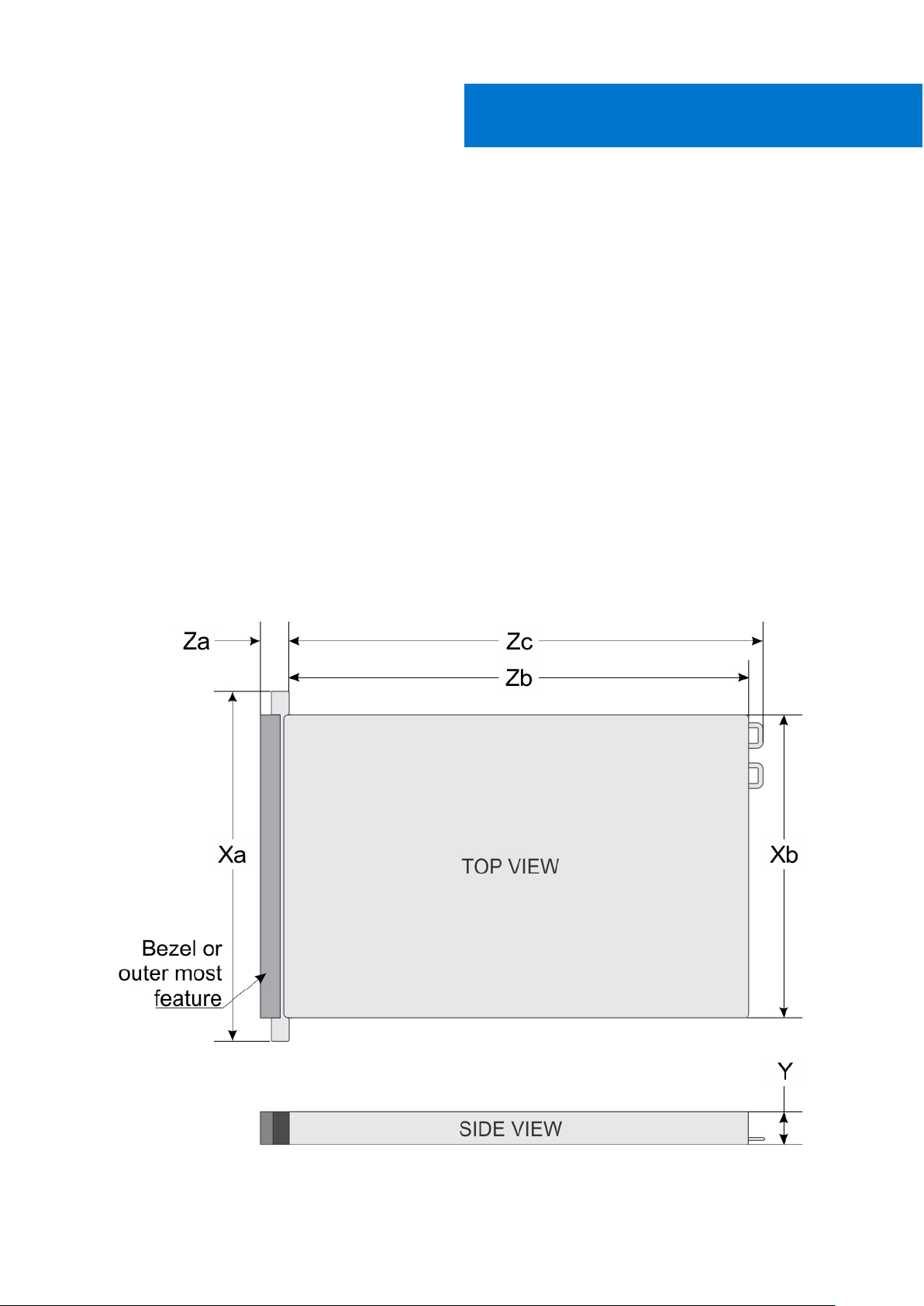
System dimensions
Figure 1. Dimensions of the Dell EMC PowerEdge R440 system
4 Technical specifications
Page 5
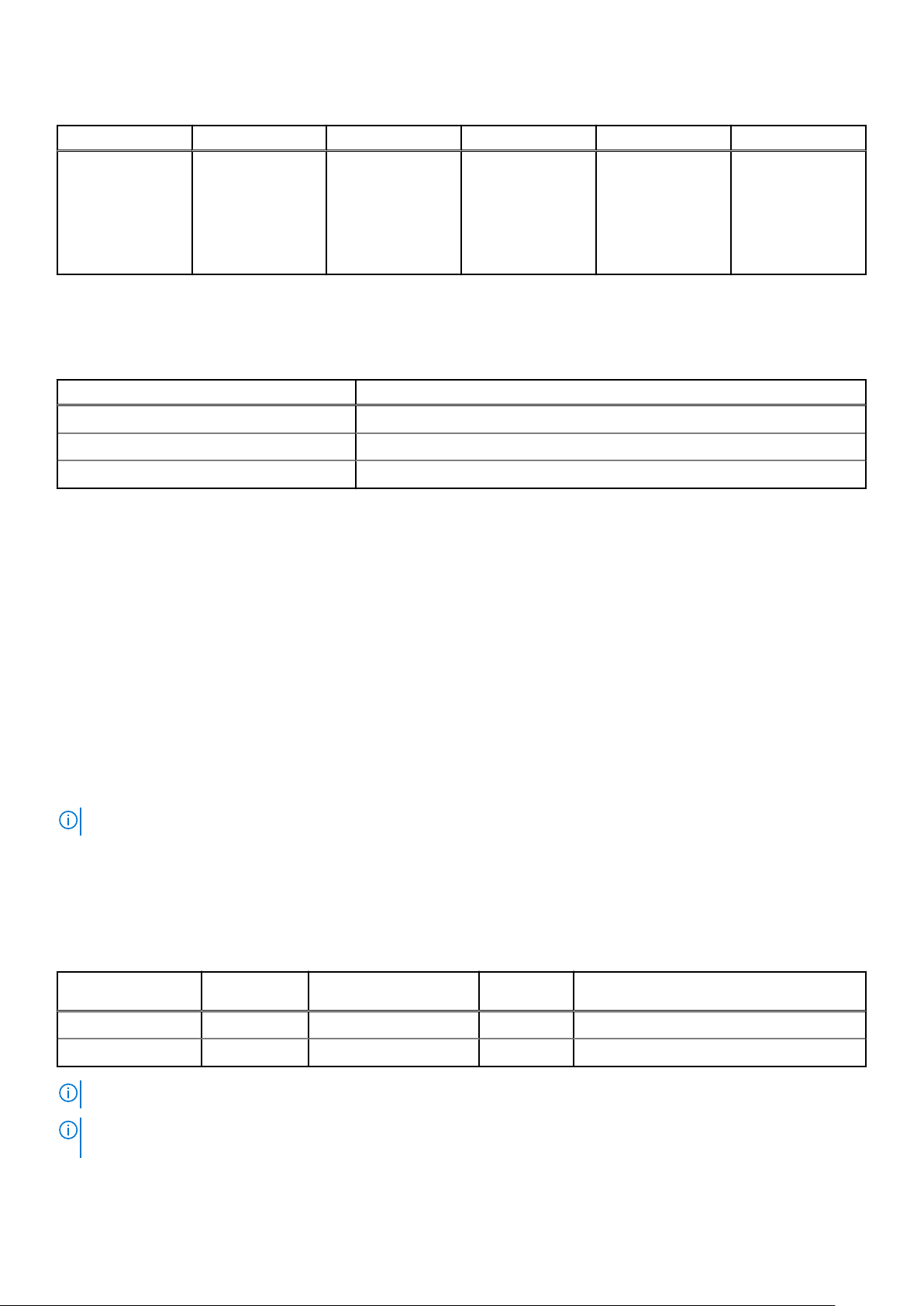
Table 1. Dimensions of the Dell EMC PowerEdge R440 system
Xa Xb Y Za Zb Zc
482.0 mm (18.97
inches)
434.0 mm (17.08
inches)
42.8 mm (1.68
inches)
35.84 mm (1.41
inches) (with
bezel)
22 mm (0.87
inches) (without
bezel)
x4 and x10 =
657.25 mm (25.87
inches)
x8 = 606.47 (23.87
inches)
x4 and x10 =
692.62 (27.26
inches)
x8 = 641.85 mm
(25.26 inches)
Chassis weight
Table 2. Dell EMC PowerEdge R440 system Chassis weight
System Maximum weight (with all drives/SSDs)
4 x 3.5-inch drive system 17.64 Kg (38.90 lb)
8 x 2.5-inch drive system 16.04 Kg (35.36 lb)
10 x 2.5-inch drive system 16.81 Kg (37.07 lb)
Processor specifications
The Dell EMC PowerEdge R440 system supports up to two Intel Xeon Scalable Processor, up to 22 cores per processor.
Supported operating systems
The Dell EMC PowerEdge R440 system supports the following operating systems:
● Canonical Ubuntu LTS
● Citrix XenServer
● Microsoft Windows Server with Hyper-V
● Red Hat Enterprise Linux
● SUSE Linux Enterprise Server
● VMware ESXi
NOTE: For more information, go to www.dell.com/ossupport.
PSU specifications
The Dell EMC PowerEdge R440 system supports the following AC power supply units (PSU).
Table 3. PSU specifications
PSU Class Heat dissipation
(maximum)
550 W AC Platinum 2559 BTU/hr 50/60 Hz 100–240 V AC, autoranging
450 W AC Bronze 1871 BTU/hr 50/60 Hz 100–240 V AC, autoranging
Frequency Voltage
NOTE: Heat dissipation is calculated using the PSU wattage rating.
NOTE: This system is also designed to connect to the IT power systems with a phase-to-phase voltage not exceeding 230
V.
Technical specifications 5
Page 6
System battery
The Dell EMC PowerEdge R440 system supports CR 2032 3.0-V lithium coin cell system battery.
Expansion bus specifications
The Dell EMC PowerEdge R440 system supports PCI express (PCIe) generation three expansion cards, which must be installed
on the system board using expansion card risers.
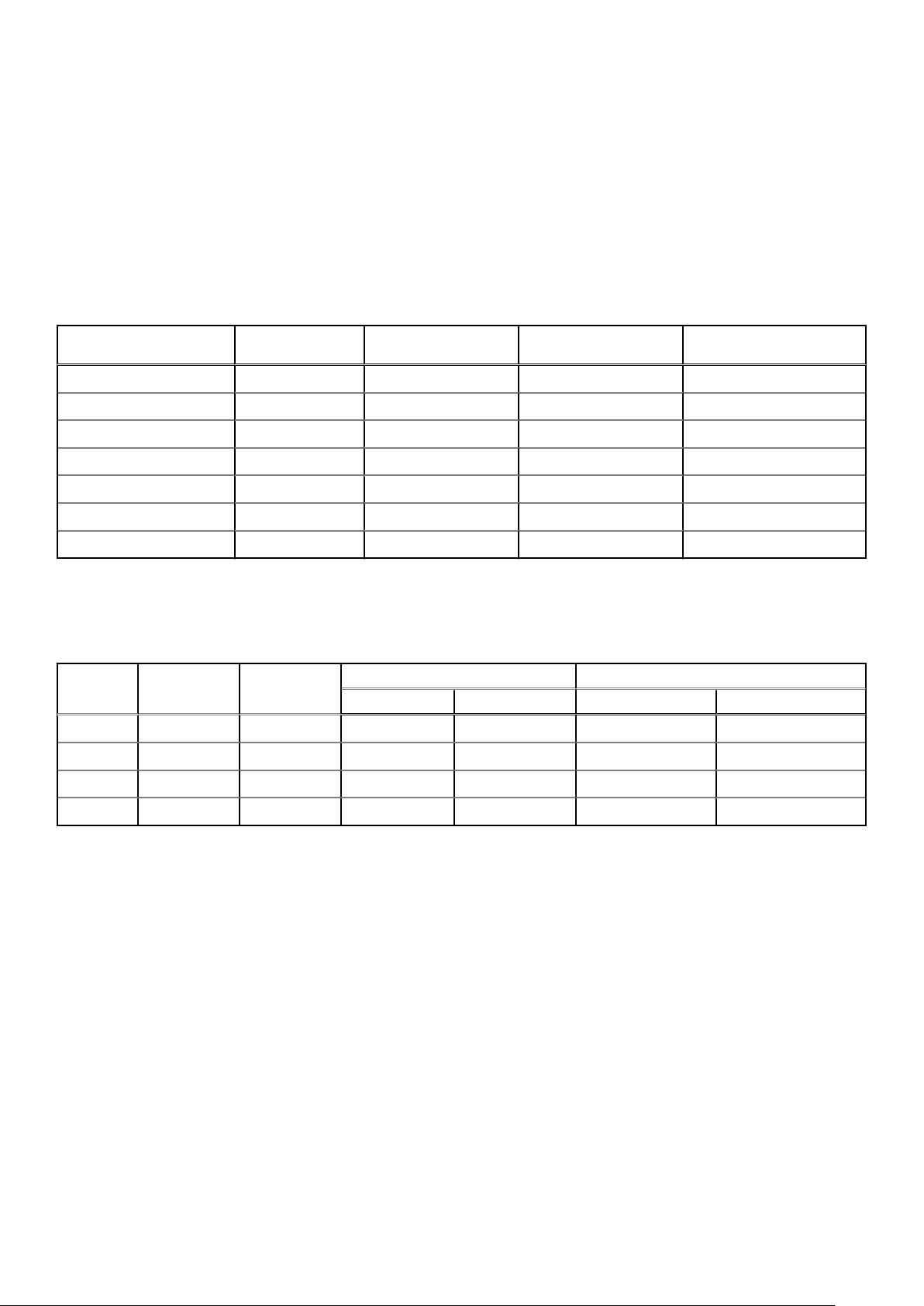
Table 4. Expansion card riser configurations
Expansion card riser PCIe slots on the
riser
LOM riser Slot 1 Mezz type Mezz type x8
Right riser Slot 2 Low Profile Half Length x16
Right riser Slot 2 Full Height Half Length x16
PCIe passive bridge Slot-integrated Low Profile Half Length x8
Internal riser Slot-integrated Low Profile Half Length x8
Left riser Slot 2 Low Profile Half Length x16
Left riser Slot 3 Low Profile Half Length x16
Height Length Link
Memory specifications
Table 5. Memory specifications
DIMM
type
RDIMM Single rank 8 GB 8 GB 80 GB 16 GB 128 GB
RDIMM Dual rank 16 GB 16 GB 160 GB 32 GB 256 GB
RDIMM Dual rank 32 GB 32 GB 320 GB 64 GB 512 GB
DIMM rank
DIMM
capacity
Minimum RAM Maximum RAM Minimum RAM Maximum RAM
Single processor Dual processors
LRDIMM Quad rank 64 GB 64 GB 640 GB 128 GB 1024 GB
Storage controller specifications
The Dell EMC PowerEdge R440 system supports:
● Internal controllers: PowerEdge Expandable RAID Controller (PERC) H330, H730p, H740p, HBA330, Software RAID
(SWRAID) S140
● External PERC (RAID): H840
● External HBAs (non-RAID): 12 Gbps SAS HBA
● Boot Optimized Storage Subsystem (BOSS): HWRAID 2 x M.2 SSDs 120GB, 240 GB with 6Gbps
○ x8 connector using PCIe gen 2.0 x2 lanes, available only in the low-profile and half-height form factor
Drive specifications
Drives
The Dell EMC PowerEdge R440 system supports:
6
Technical specifications
Page 7
● Up to 4 x 3.5-inch drives with hard drive adapter, internal, hot swappable SAS, SATA, or Nearline SAS drives
● Up to 8 x 2.5-inch drives or 10 x 2.5-inch drives with hard drive adapter, internal, hot swappable SAS, SATA, or Nearline SAS
drives
● Up to 4 x 3.5-inch drives or 8 x 2.5-inch drives or 10 x 2.5-inch drives with hard drive adapter, internal, hot swappable SATA
SSDs
● 10 x 2.5-inch drives with up to 4 NVMe PCIe drives
Drives are supplied in hot swappable drive carriers that fit in the drive slots.
CAUTION: Before attempting to remove or install a drive while the system is running, see the documentation for
the storage controller card to ensure that the host adapter is configured correctly.
CAUTION: Do not turn off or restart your system while a drive is being formatted. Doing so can cause a drive
failure.
When you format a drive, allow enough time for the formatting to complete. Be aware that high-capacity drives can take a long
time to format.
Ports and connectors specifications
USB ports
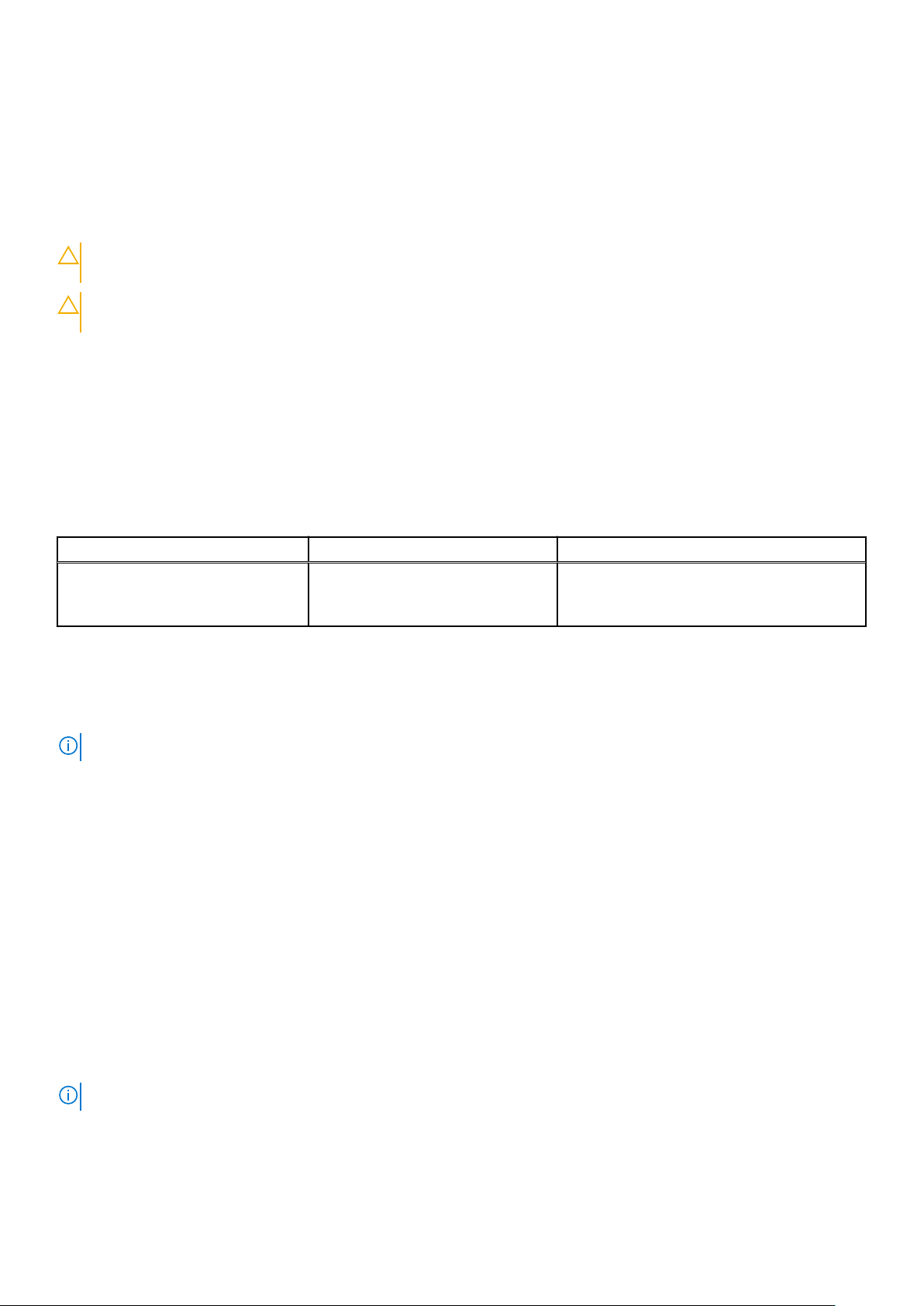
Table 6. Dell EMC PowerEdge R440 system USB specifications
Front panel Back panel Internal USB
● One USB 2.0-compliant port
● One iDRAC Direct (Micro-AB
USB) port
● Two USB 3.0-compliant port ● One internal USB 3.0 port
NIC ports
The Dell EMC PowerEdge R440 system supports two Network Interface Controller (NIC) ports on the back panel, which have
two 1 Gbps configuration.
NOTE: You can install up to five PCIe add-on NIC cards.
Serial connector
The serial connector connects a serial device to the system. The Dell EMC PowerEdge R440 system supports one serial
connector on the back panel, which is a 9-pin connector, Data Terminal Equipment (DTE), 16550-compliant.
VGA ports
The Video Graphic Array (VGA) port enables you to connect the system to a VGA display. The Dell EMC PowerEdge R440
system supports two 15-pin VGA ports.
Internal Dual SD Module
The Dell EMC PowerEdge R440 system supports two optional flash memory card slots with an internal dual MicroSD module.
The IDSDM or vFlash module combines the IDSDM or vFlash features into a single module.
NOTE: One card slot is dedicated for redundancy.
Technical specifications 7
Page 8
Video specifications
The Dell EMC PowerEdge R440 system supports Matrox G200eW3 graphics card with 16 MB capacity.
Table 7. Supported video resolution options
Resolution Refresh rate (Hz) Color depth (bits)
640x480 60,70 8, 16, 32
800x600 60,75, 85 8, 16, 32
1024x768 60,75, 85 8, 16, 32
1152x864 60,75, 85 8, 16, 32
1280x1024 60,75 8, 16, 32
1440x900 60 8, 16, 32
1920x1200 60 8, 16, 32
Environmental specifications
NOTE: For additional information about environmental certifications, please refer to the Product Environmental Datasheet
located with the Manuals & Documents on www.dell.com/poweredgemanuals
Table 8. Temperature specifications
Temperature Specifications
Storage –40°C to 65°C (–40°F to 149°F)
Continuous operation (for altitude less than 950 m or
3117 ft)
Fresh air For information about fresh air, see the Expanded Operating
Maximum temperature gradient (operating and
storage)
10°C to 35°C (50°F to 95°F) with no direct sunlight on the
equipment.
Temperature section.
20°C/h (68°F/h)
Table 9. Relative humidity specifications
Relative humidity Specifications
Storage 5% to 95% RH with 33°C (91°F) maximum dew point. Atmosphere
must be non-condensing at all times.
Operating 10% to 80% relative humidity with 29°C (84.2°F) maximum dew
point.
Table 10. Maximum vibration specifications
Maximum vibration Specifications
Operating 0.26 G
Storage 1.88 G
at 5 Hz to 350 Hz (all operation orientations).
rms
at 10 Hz to 500 Hz for 15 min (all six sides tested).
rms
Table 11. Maximum shock specifications
Maximum shock Specifications
Operating Six consecutively executed shock pulses in the positive and negative x,
y, and z axes of 6 G for up to 11 ms.
8 Technical specifications
Page 9
Table 11. Maximum shock specifications (continued)
Maximum shock Specifications
Storage Six consecutively executed shock pulses in the positive and negative x,
y, and z axes (one pulse on each side of the system) of 71 G for up to
2 ms.
Table 12. Maximum altitude specifications
Maximum altitude Specifications
Operating
Storage 12,000 m (39,370 ft)
30482000 m (10,0006560 ft)
Table 13. Operating temperature derating specifications
Operating temperature derating Specifications
Up to 35°C (95°F) Maximum temperature is reduced by 1°C/300 m (1°F/547 ft) above
950 m (3,117 ft).
35°C to 40°C (95°F to 104°F) Maximum temperature is reduced by 1°C/175 m (1°F/319 ft) above
950 m (3,117 ft).
40°C to 45°C (104°F to 113°F) Maximum temperature is reduced by 1°C/125 m (1°F/228 ft) above
950 m (3,117 ft).
Standard operating temperature
Table 14. Standard operating temperature specifications
Standard operating temperature Specifications
Continuous operation (for altitude less than 950 m or
3117 ft)
10°C to 35°C (50°F to 95°F) with no direct sunlight on the
equipment.
Expanded operating temperature
Table 15. Expanded operating temperature specifications
Expanded operating temperature Specifications
Continuous operation 5°C to 40°C at 5% to 85% RH with 29°C dew point.
NOTE: Outside the standard operating temperature (10°C to
40°C), the system can operate continuously in temperatures as low
as 5°C and as high as 40°C.
For temperatures between 35°C and 40°C, de-rate maximum
allowable temperature by 1°C per 175 m above 950 m (1°F per 319
ft).
≤ 1% of annual operating hours –5°C to 45°C at 5% to 90% RH with 29°C dew point.
NOTE: Outside the standard operating temperature (10°C to
40°C), the system can operate down to –5°C or up to 45°C for a
maximum of 1% of its annual operating hours.
For temperatures between 40°C and 45°C, de-rate maximum
allowable temperature by 1°C per 125 m above 950 m (1°F per 228
ft).
NOTE: When operating in the expanded temperature range, system performance may be impacted.
Technical specifications 9
Page 10
NOTE: When operating in the expanded temperature range, ambient temperature warnings may be reported on the bezel's
LCD panel and in the System Event Log.
Expanded operating temperature restrictions
● Do not perform a cold startup below 5°C.
● The operating temperature specified is for a maximum altitude of 3048 m (10,000 ft).
● 105 W/4C, 115 W/6C, 130 W/8C, 140 W/14C or higher wattage processor (TDP>140 W) are not supported.
● Redundant power supply configuration is required.
Non-Dell qualified peripheral cards and/or peripheral cards greater than 25 W are not supported.
●
● NVMe drives are not supported.
● Apache Pass DIMM and NVDIMM are not supported.
Thermal restriction matrix
Table 16. Thermal restriction matrix for Dell EMC PowerEdge R440 system
Storage configuration 10x 2.5-inch
Processor
number
Intel Xeon Gold
6152
Intel Xeon Gold
6140
Intel Xeon Gold
6138
Intel Xeon Gold
6130
Intel Xeon
Platinum 8153
Intel Xeon Gold
6132
Intel Xeon Gold
6134
Intel Xeon Gold
6126
TDP (W) Core count Ambient support = 35°C
140 22 Yes Yes Yes Yes
18 Yes Yes Yes Yes
125 20 Yes Yes Yes Yes
16 Yes Yes Yes Yes
16 Yes Yes Yes Yes
140 14 No
130 8 No
125 12 Yes Yes Yes Yes
with NVMe
drive
C30
C30
10x 2.5-inch
drive
Yes Yes Yes
Yes Yes Yes
8x 2.5-inch
drive
4x 3.5-inch
drive
Intel Xeon Gold
6128
Intel Xeon Gold
5122
Intel Xeon
Platinum 8156
Intel Xeon Gold
5120
Intel Xeon Gold
5118
10 Technical specifications
115 6 No
105 4 No
105 4 No
105 14 Yes Yes Yes Yes
105 12 Yes Yes Yes Yes
Yes Yes Yes
C30
Yes Yes Yes
C30
Yes Yes Yes
C30
Page 11
Table 16. Thermal restriction matrix for Dell EMC PowerEdge R440 system (continued)
Storage configuration 10x 2.5-inch
Intel Xeon Gold
5115
Intel Xeon Silver
4116
Intel Xeon Silver
4114
Intel Xeon Silver
4110
Intel Xeon Silver
4108
Intel Xeon
Bronze 3106
Intel Xeon
Bronze 3104
Intel Xeon Silver
4112
85 10 Yes Yes Yes Yes
85 12 Yes Yes Yes Yes
85 10 Yes Yes Yes Yes
85 8 Yes Yes Yes Yes
85 8 Yes Yes Yes Yes
85 8 Yes Yes Yes Yes
85 6 Yes Yes Yes Yes
85 4 Yes Yes Yes Yes
with NVMe
drive
10x 2.5-inch
drive
8x 2.5-inch
drive
Particulate and gaseous contamination specifications
4x 3.5-inch
drive
The following table defines the limitations that help avoid any equipment damage or failure from particulates and gaseous
contamination. If the levels of particulates or gaseous pollution exceed the specified limitations and result in equipment damage
or failure, you may need to rectify the environmental conditions. Re-mediation of environmental conditions is the responsibility
of the customer.
Table 17. Particulate contamination specifications
Particulate contamination Specifications
Air filtration Data center air filtration as defined by ISO Class 8 per ISO 14644-1
with a 95% upper confidence limit.
NOTE: This condition applies to data center environments only. Air
filtration requirements do not apply to IT equipment designed to be
used outside a data center, in environments such as an office or
factory floor.
NOTE: Air entering the data center must have MERV11 or MERV13
filtration.
Conductive dust Air must be free of conductive dust, zinc whiskers, or other
conductive particles.
NOTE: This condition applies to data center and non-data center
environments.
Corrosive dust
● Air must be free of corrosive dust.
● Residual dust present in the air must have a deliquescent point less
than 60% relative humidity.
NOTE: This condition applies to data center and non-data center
environments.
Technical specifications 11
Page 12
Table 18. Gaseous contamination specifications
Gaseous contamination Specifications
Copper coupon corrosion rate <300 Å/month per Class G1 as defined by ANSI/ISA71.04-1985.
Silver coupon corrosion rate <200 Å/month as defined by AHSRAE TC9.9.
NOTE: Maximum corrosive contaminant levels measured at ≤50% relative humidity.
12 Technical specifications
 Loading...