

Page 1

A PRACTICAL GUIDE FOR MOVING TO 25GBE
IN YOUR DATA CENTER NETWORK
A Dell Technologies Networking white paper
Page 2

1. Table of contents
Contents
1. Table of contents..........................................................................................................................................................................................................................................................2
2. Introduction....................................................................................................................................................................................................................................................................3
3. Changes and Challenges in the Data Center Environment...............................................................................................................................................................................3
4. Quick primer on 25GbE..............................................................................................................................................................................................................................................4
5. Moving to a 25GbE Infrastructure..........................................................................................................................................................................................................................5
5.1 Inventory your infrastructure...........................................................................................................................................................................................................................5
5.1 .1 Platforms...............................................................................................................................................................................................................................................................5
5.1.2 Virtualization.........................................................................................................................................................................................................................................................6
5.1.3 Cloud applications...............................................................................................................................................................................................................................................6
5.1.4 Management........................................................................................................................................................................................................................................................6
5.2 Evaluate and Select 25GbE switches............................................................................................................................................................................................................7
5.2.1 Top-of-Rack Switches.......................................................................................................................................................................................................................................7
5.2.2 Management.......................................................................................................................................................................................................................................................8
5.3 Start the migration.............................................................................................................................................................................................................................................8
5.3.1 Dening the plan.................................................................................................................................................................................................................................................8
5.3.2 Training with new 25GbE switches................................................................................................................................................................................................................8
5.3.3 Integrating with existing management tools..............................................................................................................................................................................................9
5.3.4 Running a pilot....................................................................................................................................................................................................................................................9
5.3.5 Continuing the migration.................................................................................................................................................................................................................................9
5.3.6 Reviewing lessons learned................................................................................................................................................................................................................................
6. Dell EMC PowerSwitch 25GbE switches and their benets...................................................................................................................................................................9
7. Summary.......................................................................................................................................................................................................................................................10
Page 3

2. Introduction
The data center landscape for many organizations is constantly changing with the introduction
of new technologies and economic drivers. Several technologies have been at the forefront of
the planning and implementation eorts of many IT professionals that contribute to increases
in network bandwidth and performance. Virtualization continues to be a major technology
being implemented in data centers to help maximize usage of hardware resources in computing,
storage and networking environments. Technologies like cloud computing and the Internet of
Things (IoT) rely heavily on available network resources in order to fulll their operations. On
the economic side, uctuations in the economy and tighter restrictions on spending has led to
additional constraints on IT organizations such as showing a measurable return on investment
(ROI) and combating dwindling space, power, and cooling resources in data centers.
This paper provides a brief overview of key changes occurring within data centers and the
challenges they present to IT organizations. It then takes a closer look at 25 Gigabit Ethernet
(25GbE) technology and how it can help overcome some of these challenges and provides some
practical guidelines on introducing it into your data center. Finally, the paper will discuss some
of Dell EMC’s PowerSwitch 25GbE solutions and their benets.
This paper is intended to help CIOs, IT and network directors, and managers gain a better
perspective when planning for a shift to 25GbE within their data center infrastructure, realize the
importance of a high-performance network infrastructure, and understand the types of 25GbE
solutions that are available to help ensure an eective and ecient network environment.
3. Changes and challenges in the data center environment
Virtualization technology is pervasive within many data centers and is fundamentally changing
the way people utilize computing resources. A common type of virtualization called server
virtualization allows users to run multiple virtual machines on a single physical server, thereby
sharing the resources of that single computer across multiple environments. The main incentive
for organizations to use this type of technology is to make better use of the commonly
underutilized servers which now feature multiple processors, and extensive memory. By
consolidating multiple servers into a single physical server and optimizing the resources of that
one server, IT organizations can reduce the number of physical servers within their data centers
and increase resource utilizations
App App App
OS OS OS
Virtualization
Hardware
Figure 1: Server virtualization
(Figure 1).
There are additional virtualization technologies
gaining acceptance in data centers, including
desktop virtualization, storage virtualization, and
even network virtualization. In each case,
implementation of these technologies helps IT
managers utilize the resources of specic platforms
to their fullest extent. However, an often-unseen
impact to the network from the implementation of
virtualization services is the increased number of
network connections within a virtualized device (e.g.,
server) and between dierent virtualized devices.
Dell Technologies and 25G migration
3
There are additional virtualization technologies gaining acceptance in data centers, including
desktop virtualization, storage virtualization, and even network virtualization. In each case,
implementation of these technologies helps IT managers utilize the resources of specic
platforms to their fullest extent. However, an often-unseen impact to the network from the
implementation of virtualization services is the increased number of network connections within
a virtualized device (e.g., server) and between dierent virtualized devices.
Cloud computing is a growing practice within data centers where the delivery of computing
services like servers, storage, networking, and even applications are delivered from
remote platforms from across the Internet, rather than locally. There are many types
Page 4
of cloud computing, including private cloud, public cloud, and a rapidly growing oering
called hybrid cloud that combines the best of both private and public cloud features. IoT is
another growing trend across enterprises where a multitude of devices contain embedded
technology whereby they can communicate information across a network without human
interaction. Some examples include smart devices located in homes like thermostats, in cars
with onboard sensors, and in healthcare with smart personal medical devices. In all of these
cases, with cloud computing and IoT, their functions are based on continuously sending and
receiving large amounts of information across a network environment. The key challenge is
that most of the applications for these cases are expecting near real-time response rates
across that network connection.
In addition to implementing new technologies, many IT organizations are tasked with
decreasing their CAPEX and OPEX expenditures and resources. IT departments are taking
a hard look at making their data centers more ecient and simplifying operational and
maintenance activities across the board. The push behind these mandated reductions vary
from changing economic conditions to government requirements for green initiatives. The
rst step for many IT departments is taking inventory of expensive stand-alone systems (such
as networking or storage devices) and then investigate how smaller, denser and
converged platforms might help reduce costs, footprint and management. At the same time,
organizations are assessing their Local Area Network (LAN) and Storage Area Networks
(SAN) infrastructures and evaluating how they can consolidate the two into one multifunctional network.
In the next section, we will take a high-level look at a promising technology called 25 Gigabit
Ethernet that has proven capable of reducing many of the data center challenges we’ve just
discussed.
4. Quick primer on 25GbE
From its introduction in the 1970s, Ethernet technology has been in continuous evolution,
driven by the demand for faster rates of data transmission on LANs. Starting at 10Mbps, we
have watched Ethernet technology move to Fast Ethernet (100Mbps) to Gigabit Ethernet
(1000Mbps) and 100Gbps Ethernet and beyond.
In 2014, the 25G Ethernet Consortium released a specication that enabled data center
networks to run over a 25 Gigabit per second (Gbps) Ethernet Link protocol. Then, in 2016,
the Institute of Electrical and Electronics Engineers (IEEE) and IEEE Standards Association
(IEEE-SA) published the IEEE 802.3by 25 Gigabit Ethernet standard to address growing
server I/O connectivity demands above existing 10GbE. This standard denes a single lane
25Gbs PHYs, similar to 10GbE technology, for operation over electrical backplanes, copper
twin axial cables and multimode ber. Technologies like 40GbE and 100GbE require 4 lanes (4
x 10GbE and 4 x 25GbE) to achieve their connectivity.
This single-lane concept is critical because existing switch ASIC’s have a limited number of
I/O pins. This becomes important when comparing I/O pin and bandwidth maximization
across 10GbE, 25GbE, 40GbE and 100GbE port speeds, where the ASIC I/O lanes can run
from 10Gb/s to 25Gb/s. For example, let’s look at these measurements when utilizing a
switch ASIC than can handle 128 I/O’s and 3.2Tbps in Table 1.
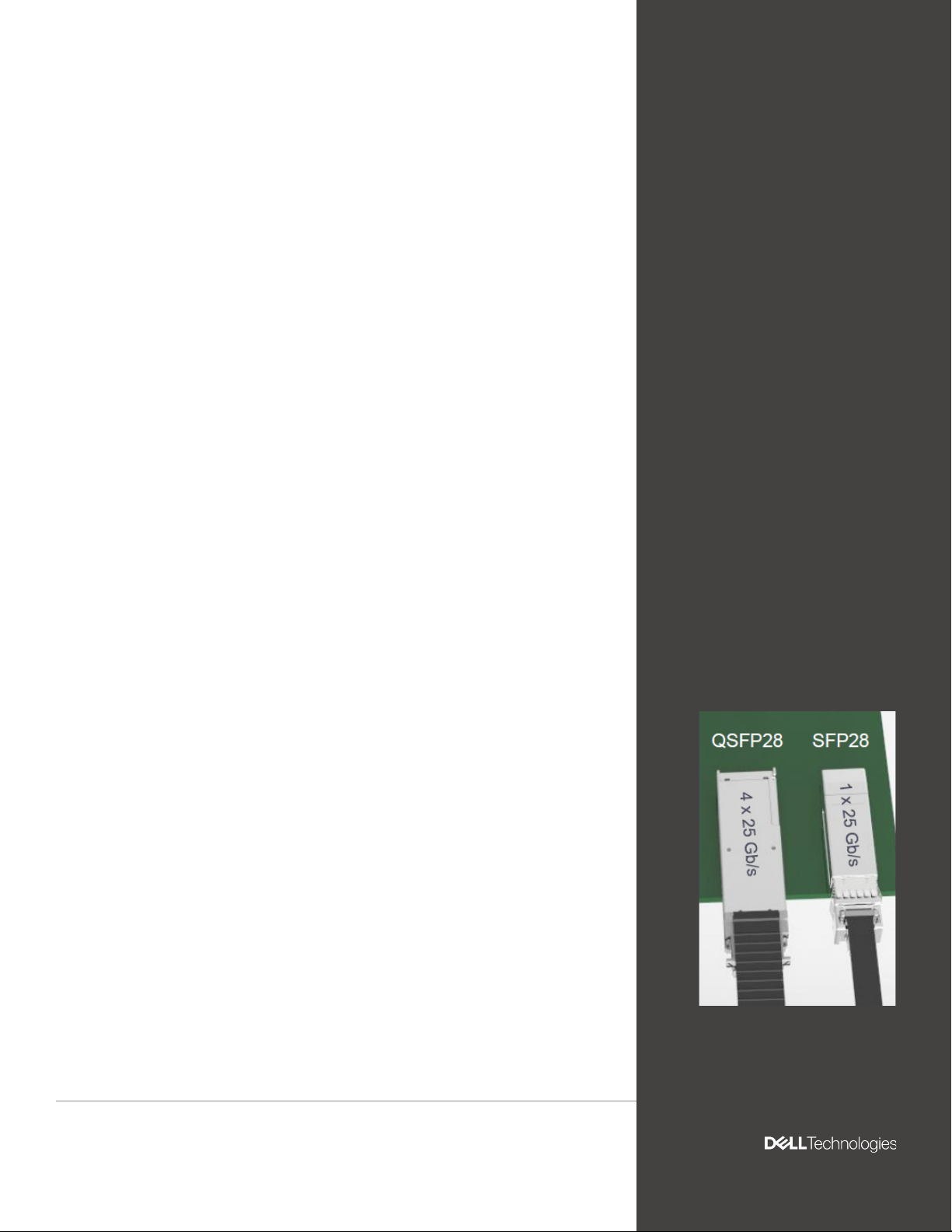
Most switches today oer two types of 25GbE interface form factors: (1) QSFP28 that can
support 4 x 25Gbps and (2) SFP28 that can support 1 x 25Gbps, as seen in Figure 2.
Another compelling factor for 25GbE is that it can run over an existing ber optic cable plant
designed for 10GbE so a customer will not have to replace their cabling infrastructure when
transitioning.
Figure 2: 25GbE form factors
4
Page 5

Port speed Lanes/port
10GbE 1
25GbE 1
40GbE 4
100GbE 4
Lane speed
(Gb/s)
10 128 1280
25 128 3200
10 32 1280
25 32 3200
Table 1: Switch ASIC I/O maximization
Usable ports
Total BW
(Gbps)
Figure 3
The next section of this paper will cover some important considerations when moving your
data center infrastructure to 25GbE and how you may want to manage the migration.
5. Moving to a 25GbE infrastructure
This section outlines some simple steps to follow when migrating to 25GbE within your data
center. It starts with taking a good look at your current data center infrastructure, then goes
into a discussion on the various types of 25GbE switches available on the market today and
wraps up with some important considerations to help ensure a successful migration.
At the end of the exercise, if you nd you have a growing amount of server or storage devices
with embedded 25G I/O, or nd the extent of virtualization or cloud usage at the high end of
the spectrum, it might be time for you to consider making a migration to 25GbE.
For this paper, we will assume you are running a 10GbE infrastructure connecting servers
and storage platforms to a 10GbE ToR switch within your data center. You may or may not be
running a data center fabric core that is running at 40GbE or possibly 100GbE.
5.1 Inventory your infrastructure
The rst step of moving to a 25GbE infrastructure involves looking at the equipment you are
currently running within your data center. For this exercise, we’ll organize the inventory activities
into four main categories: (1) platforms, (2) virtualization, (3) cloud applications and
(4) management.
5.1.1 Platforms
Both the technology and processing capabilities embedded in today’s server and storage
platforms are advancing quickly. It’s not uncommon to nd organizations utilizing servers with
multi-core processors and all-ash storage devices which can overwhelm 10GbE I/O interfaces.
As a result, some manufacturers are now shipping servers and Internet SCSI (iSCSI) storage
platforms that include 25GbE I/O natively.
Dell Technologies and 25G migration
5
The rst step of your inventory should be to list the current platforms that you are using within
your data center and their respective network I/O ports, as seen in Table 2. This will help you
to better understand what you’re running today, if there are I/O bottlenecks, and how you will
handle the migration to 25GbE. For this discussion, we’ll limit storage devices to ones with
iSCSI ports.
Platform Type Network I/O port speed
Servers Web, email, application, other 1GbE, 10GbE, 25GbE
Storage Direct attached, iSCSI SAN iSCSI – 1GbE, 10GbE, 25GbE
Table 2: Platforms to inventory
Page 6

5.1.2 Virtualization
IT departments everywhere are implementing server and storage virtualization to better
leverage server processors and increase eciency. It’s probably a safe assumption that you’ve
been implementing virtualization within your data center for a while now.
The next step in compiling your inventory will be to list out the types and breadth of
virtualization being implemented within your data center, as seen in Table 3. This will help you
better understand how much of an impact virtualization and resulting virtual connections
may have on your current network infrastructure. The key types of virtualization in most
organizations include server, storage, network, and desktop virtualization.
Platform Virtualization type Network I/O port speed
Servers VMware, Microsoft, others #VM’s (10/100/1000+)
Storage
Desktop
Network
Table 3: Types of virtualization to inventory
Software-dened storage
(SDS), hyper-converged SDS
Remote server-based VDI,
local client-based VDI
VMware NSX, Cisco ACI,
Nuage Networks, others
#VM’s (10/100/1000+)
# Virtual desktops
(10/100/1000+)
# of logical switches, routers,
rewalls, load balancers, and
VPN’s (10/100/1000+)
5.1.3 Cloud applications
Many organizations are moving toward cloud-based services across many functions to take
advantage of the cost-savings from both a CAPEX and OPEX perspective. Using cloud storage
provides IT managers with a simple and scalable way to store, access and share data across the
Internet. The current trend involves a hybrid cloud solution that incorporates the best of private
cloud and public cloud technologies.
This section of your inventory involves listing out the types of cloud-based applications your
organizations uses that will impact your data center network, as seen in Table 4. Basically,
cloud applications can be broken down to ones that provide a service to departments such as
Human Resources and ones that involve the storage of data critical to your organization’s daily
functions.
Function Cloud applications Extent of cloud use
Services
Data storage
ADP, SAP, Oracle, Linked-In,
SQL, Salesforce.com, CRM
File storage, block storage,
object storage, backup,
restore
Table 4: Types of cloud applications to inventory
# of employees, customers,
etc.
# of bytes of data per type
of storage
5.1.4 Management
The nal part of your inventory should be to take a look at the types of device and network
management tools that are being used within your data center. While there may be a variety
of embedded device management tools in place for servers or storage devices, how are
you managing your current switching environment? Do you have multiple or a single version
network operating system? Are you able to manage all of your switching devices under one
console-based network management tool? What type of enterprise management system are
you using to keep track of all devices including servers, storage, and networking platforms?
There may be opportunities to implement management tools that can cover a wider spectrum
of platforms that will help simplify operations and maintenance activities.
6
Page 7

Platform Embedded Management Console-based Management
Server Server management tool(s)
Storage Storage management tool(s)
Cross-platform management
tool(s)
Networking Network management tool(s)
Table 5: Management tools to inventory
After completing this inventory, you should have a better understanding of the I/O connectors,
bandwidth requirements, and management tools within your data center. If several of these
areas show potential bottlenecks, redundant networks, or complex management tools, then it’s
an opportune time to evaluate the capabilities of the leading 10GbE switches.
5.2 Evaluate and select 25GbE switches
The next step of your move to a 25GbE infrastructure involves looking at the various switches
available, comparing their features and making a selection. Fortunately, 25GbE technology, price,
and performance are now within reach for organizations of all sizes through several oerings.
This section will provide some details on types of switches and features to look for.
5.2.1 Top-of-Rack switches
If your data center uses a rack-based environment for their servers, there are several 25GbE
Top of Rack (ToR) Ethernet aggregation switches available. These high-performance switches
help aggregate many 25GbE interconnects within the rack while also providing a 100GbE
uplink to the data center fabric.
When looking for a ToR switch, be sure to choose one that provides port density, oversubscription
values, CPU processing and OS choice to insure maximum network performance for your data
center environment. Some key attributes to look for during the evaluation include (see Table 6):
Category Feature Benet
1RU high density TOR switch with
• 48 to 128 ports of 25GbE (both
native and breakout) that are
Physical
Redundancy
Switching fabric
bandwidth
Software
Open Networking
Service and support Global service and support
backward compatible with
10GbE
• 2 to 6 ports of 100GbE that
are backward compatible with
40GbE
• Hot swappable redundant
power supplies
• Hot swappable redundant fans
From 3.6 to 6.4Tbps (full-duplex)
non-blocking switching fabric
Scalable L2 and L3 Ethernet
switching with QoS and a full
complement of IPv4 and IPv6
features
Automated conguration and
provisioning capabilities including
VM-awareness
Support of the Open Networking
Install Environment (ONIE) and
choice of disaggregated network
operating systems.
Table 6: Types of ToR switches to consider
Conserve rack space while
enabling denser footprints and
simplifying migration
Optimize data center network
eciency and availability
Delivers line-rate L2 and L3
forwarding capacity with ultra-low
latency to maximize network
performance
Optimizing network exibility and
eciency
Simplify the management of
network environments
Implement the network operating
system that best meets your needs
Ensure rapid response
when needed
Dell Technologies and 25G migration
7
Page 8

Management
It is critical when looking at 25GbE switches to closely evaluate the type of management tools
that are available (see Table 7). With a goal of simplifying management within your data center,
you should be looking to run all of your networking devices on one operating system. Another
good capability to look for is using a single embedded network management utility across your
networking devices and a single console view across all of your enterprise platforms.
5.3 Start the migration
Once you have analyzed your data center and evaluated 25GbE switches that t your
organization’s needs, it’s time to map out your migration. This section will walk you through
several steps that will help ensure a successful and smooth migration.
Category Feature Benet
Embedded
Console-based
Enterprise-wide
Common management
functionality and common
user interface across all
switching products
Integrated web-based
console that functions as a
single window to all network
management functions
System management console
with an easy-to-use interface
that can monitor the health
of all enterprise platform
devices (servers, storage,
networking), update drivers
and rmware on servers
Makes operating the
network easier and protects
training investments
Allows the quick and ecient
deployment and management
of all network switches
Single place to go for a
high-level view of your data
center and simplify and
automate essential hardware
management tasks
Table 7: Key switch management features
5.3.1 Dening the plan
An ongoing challenge for many IT managers is how to implement new technology into their data
centers with minimum disruption of daily services. To help ensure a smooth migration you should
develop a plan that documents the key objectives, team members, evaluation and selection
of the 25GbE switches. It’s also important to identify the critical platforms to be migrated, and
develop a migration schedule.
Deployment of 25GbE within your data center should include backward compatibility with
existing switches, storage, and servers in the data center that are running 10GbE I/O’s. While
many 10GbE switches use the Small Form-Factor Pluggable (SPF+) connectors and ber
cabling mentioned previously, today’s 25GbE switches oer connectors that are backward
compatible with 10GbE switch connectors. This will allow you to keep costs down while
implementing an easy migration path to 10GbE.
It is highly recommended that you enlist the aid of a recognized end-to-end systems provider like
Dell Technologies or one of its certied partners to help you through this planning process.
5.3.2 Training with new 25GbE switches
After the migration plan is completed and you’ve chosen your 25GbE switches, it’s important
to have key team members responsible for their installation and operations to be thoroughly
trained. This training will help members become familiar with the new switches and their
respective management tools. Most switch manufacturers including Dell Technologies provide
detailed training courses both on-site and at separate facilities to help train customers on key
features and how to properly install, migrate, and operate their switches in the customer’s data
center environment.
8
Page 9

5.3.3 Integrating with existing management tools
As in most data centers, you’ve already implemented one or more management tools to help
your IT sta manage not only the network switches, but the server and storage platforms as
well. Now is a good time to take a close look at the management tools accompanying the new
25GbE switches and to determine how they can integrate or possibly replace your existing
management tools. Do your current tools provide extensions or application programming
interfaces (APIs) for multi-vendor environments? If not, do the new management tools
provide this so that you can simplify your management and operations tasks within the data
center? In some cases new 25GbE switches oer Linux-based operating systems that enable
use of common management tools across both servers and networking devices.
5.3.4 Running a pilot
It’s a good idea to pick a smaller subset of critical platforms or perhaps a specic non-critical
application as a pilot. This pilot activity will give you a chance to “practice” the upgrade from
10GbE to 25GbE switches in a controlled environment.
5.3.5 Continuing the migration
Once you’re satised with the overall upgrade and ongoing operations, you will be ready for upgrading the
next set of platforms in your plan. Based on your schedule and resources, you can conduct this migration
at a speed that ts into your business plans and budget. As with running the pilot, it’s recommended you
move over sections at a time to help minimize large scale migration issues should they occur.
5.3.6 Reviewing lessons learned
While it’s good business practice to hold a lessons learned session after the migration is
completed, it might be helpful if you held a “mini” lessons-learned session after the initial pilot
is completed. This will help make the follow-on migrations go smoother. Be sure to pull in all
team players to the meeting and also include some IS folks to get a perspective on application
and end user performance impacts with the migration.
6. Dell EMC PowerSwitch 25GbE switches and their benets
Now that we’ve taken a closer look at 25GbE switch solutions, this section will give a brief overview
of Dell Technologies’ 25GbE switching solutions. These solutions from Dell Technologies help provide
a cost-eective and user-friendly path to a 25GbE infrastructure throughout your data center.
By integrating Dell EMC PowerSwitch 25GbE solutions you start the move towards optimizing
your data center with a 25GbE infrastructure that will help increase performance, reduce cost
and simplify management.
Increase performance
Dell Technologies’ high density 25GbE switches will help to aggregate 25GbE trac and to
take advantage of embedded 25GbE I/O’s shipping in Dell Technologies 14G servers and
upcoming iSCSI and SAN storage. They will help stay ahead of increasing I/O connectivity and
bandwidth demands from virtualization sprawl, cloud infrastructure and new storage caching
functionality in servers. You will also be able to manage an easier migration from existing
10GbE to 2.5X the throughput with Dell EMC PowerSwitch 25GbE open networking switches.
Reduce costs
By incorporating Dell EMC PowerSwitch 25GbE and 100GbE switches into your data center you
can immediately start to take advantage of the cost-eective features as discussed previously
in this paper using a single-lane 25GbE PHY. You can also reduce the number of switches and
cables – along with space, power and cooling when deploying 25GbE networks. In addition,
25GbE technology will empower your organization to cost-eective scale network bandwidth in
support of next-generation server and storage solutions in data center environments.
Dell Technologies and 25G migration
9
Page 10
Features
S5200-ON
Series
Z9332F-ON Z9264F-ON MX Series
Best for
Conguration
Port
congurations
Switching
capacity
Low cost xed form
factor top-of-rack
switch oering
multiple options
of 25GbE SFP28
ports for in-rack
server and storage
connections and
100GbE uplink ports
1RU/2RU xed 2RU modular 2RU xed port 1RU xed port
• S5212F-ON12x25GbE ports
• S5224F-ON24x25GbE ports
• S5248F-ON48x25GbE ports
• S5296F-ON96x25GbE ports
• S5232F-ON32x100GbE
ports
• S5212F-ON and
S5224F-ON=
2.16Tbps
• S5248F-ON=
4Tbps
• S5296F-ON and
S5232F-ON=
6.4tbps
State-of-theart, high density
PowerSwitch
100/400GbE
switch for
demanding
environments
with 4X the
throughput,
2X the price/
performance and
double the power
eciency of
100Gbe platforms
• 16x40GbE
module
• 8x100GbE
module
• 4x100GbE
CXP +
4x100GbE
QSFP28
• 6.4Tbps • 12.8Tbps • M9116n=6.4Tbps
State-ofthe-art, high
density access/
aggregation
open networking
switch for Web
2.0, enterprise,
and Tier1/Tier2
cloud service
provider data
center networks
with intensive
compute and
storage trac
requirements
• 64x100GbE
or 64x50GbE
or 128x25GbE
Rack-based
modular chassis
for PowerEdge MX
kinetic infrastructure,
designed to support new
processor technologies,
new storage types
and fabric advances,
providing the foundation
for software-dened
environments
• MX9116n-16x25GbE
• MX7116n- 16x25GbE
• MX5108n-8x25GbE
• MXG610s - 16x32G
FC server facing
ports
• MX5108n=960Gbps
• MSG610s=1024 Gbps
Operating
system
Open
Networking
Dell EMC
Networking OS10
Supports ONIE and
select 3rd party OS
Dell EMC
Networking OS9
Supports ONIE
and select 3rd
party OS
Dell EMC
Networking OS10
Supports ONIE
and select 3rd
party OS
Dell EMC Networking
OS10
Supports ONIE and
select 3rd party OS
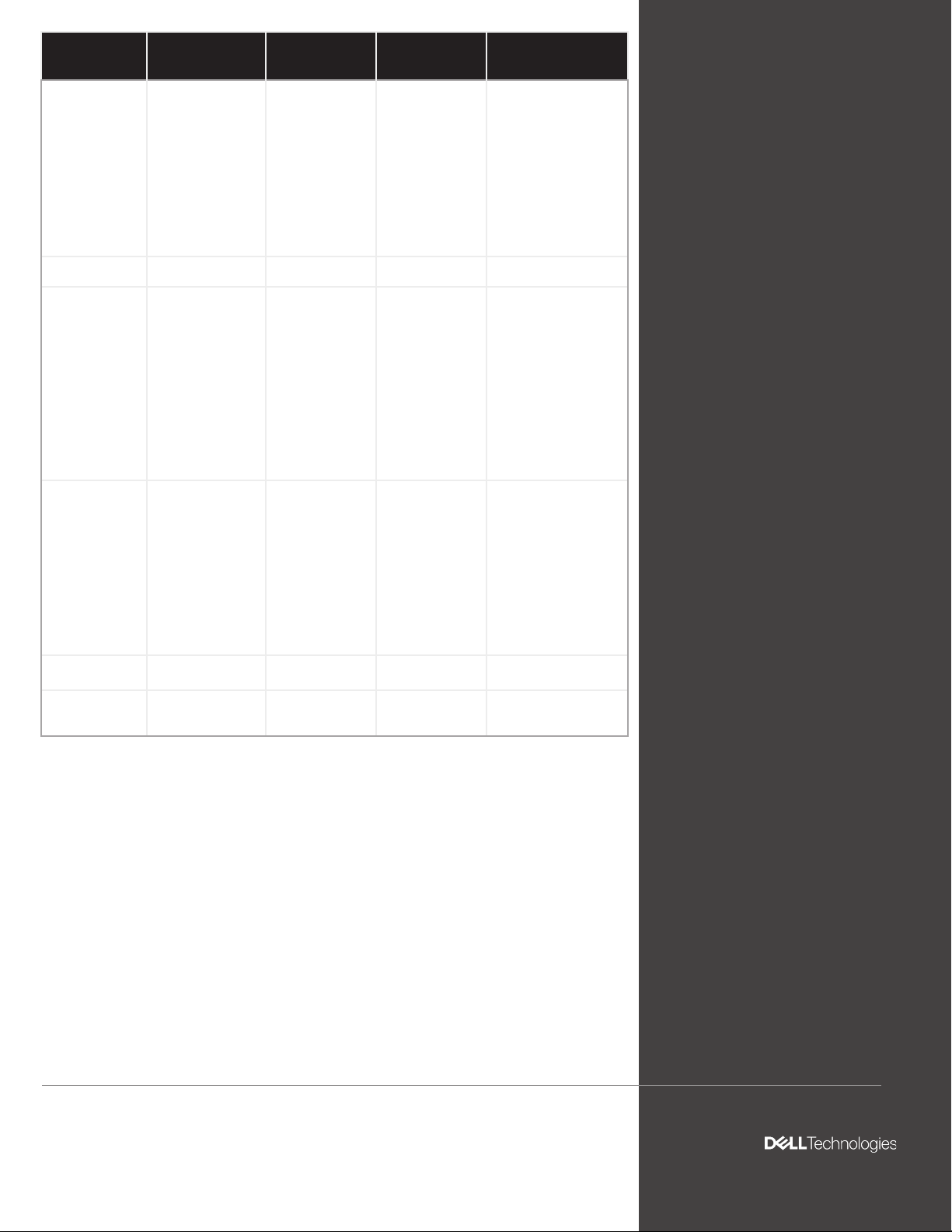
Table 8: Dell EMC PowerSwitch 25GbE switches
Simplify management
Dell EMC open networking switches use either Dell EMC Networking OS9 or OS10 network
operating systems based on the customer’s unique needs with a command line interface
(CLI) that is compatible with industry standard CLI language. You can manage all Dell EMC
PowerSwitches with embedded Dell EMC OpenManage Network Manager (OMNM) and,
more importantly you can gain a single inventory and management view across all of Dell
EMC’s server, storage and networking products using console-based Dell EMC OpenManage
Essentials (OME).
10
Page 11
Summary
IIt’s safe to assume that data center landscapes will continue to change from the constant
inux of new technologies and economic drivers. Virtualization has taken a strong foothold in
data centers and its use will continue to grow due to the great savings it presents. Increased
performance, higher densities, cloud and convergence technologies will allow IT managers to
do more with less. Ethernet will expand to become the standard highway running through the
data center providing on-ramps and o-ramps for increasing network trac both within and
between servers and storage platforms.
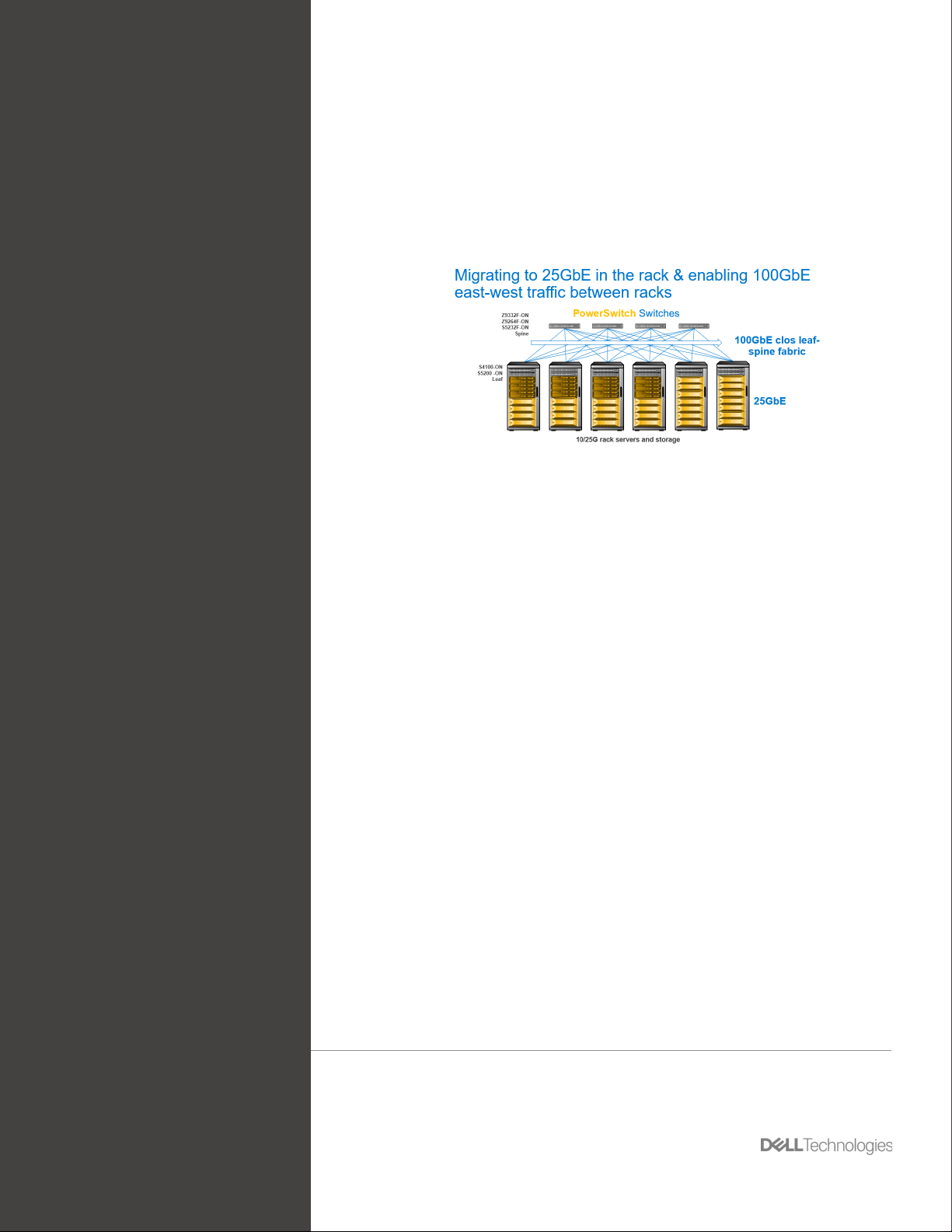
Figure 4: Dell EMC PowerSwitch 25GbE Switching Solutions
Fortunately, improvements in 25GbE technology, price and performance is attainable by
organizations of all sizes. The technology is proving to be a promising solution for many of the
demanding challenges in today’s data center. Now is the time for you to take a closer look
at the systems within your data center environment, understand what the connectivity and
convergence opportunities are, and start your careful migration toward a 25GbE infrastructure.
There are a variety of choices to choose from based on your unique environment. When
looking at 25GbE solutions, seek solution providers that can oer a wide selection of products,
has products that help ease the 10 to 25GbE migration, and most importantly has the
experience and services to provide an end-to-end solution.
At Dell Technologies, technology has always been about enabling potential for our customers.
Our strategy is to help customers realize an optimized enterprise environment with an endto-end approach that delivers superior performance and eciency. Contact Dell Technologies
to learn more about our expansive, unmatched portfolio of 25GbE networking hardware,
software and services that will help accelerate positive results for your organization.
The information in this publication is provided “as is.” Dell Inc. makes no representations or warranties of any kind with respect to the information
in this publication, and specically disclaims implied warranties of merchantability or tness for a particular purpose. Use, copying, and
distribution of any software described in this publication requires an applicable software license.
Copyright © 2020 Dell Inc. or its subsidiaries. All Rights Reserved. Dell, EMC, and other trademarks are trademarks of Dell Inc. or its subsidiaries.
Other trademarks may be the property of their respective owners. Dell believes the information in this document is accurate as of its publication
date. The information is subject to change without notice.
Dell Technologies Networking White Paper - 25G Migration
v1.3 | September 2020
Dell Technologies and 25G migration
11
 Loading...