

Page 1

DELL™ OPTIPLEX™ 790 TECHNICAL GUIDEBOOK - V 2.0
TM
DELL
TM
OPTIPLEX 790
TECHNICAL GUIDEBOOK
INSIDE THE OPTIPLEX 790
1
Page 2

TABLE OF CONTENTS
DELL™ OPTIPLEX™ 790 TECHNICAL GUIDEBOOK - V 2.0
OV E RV I EW
Mini Tower Computer (MT) View 3-4
Desktop Computer (DT) View 5-6
Small Form Factor Computer (SFF) View 7-8
Ultra Small Form Factor Computer (USFF) View
MA R KE T IN G S Y ST E M C O N FI G UR A TI O NS
Operating System, Chipset 11
Processor 12
Memory 13
Drives and Removable Storage, System Expansion Slots 14-15
Graphics/Video Controller 16
External Ports/Connectors 16
Communications—Network Adapter (NIC), Wireless 17
9-10
Audio and Speakers, Keyboard and Mouse 17
Security, Service, Environmental, All-in-One Stands & Mounts, and Support, Software 18
DE T AI L ED EN G IN E ER I NG S P E CI F I C A TI O N S
System Dimensions (Physical) 19
System Expansion Slots 19
System Level Environmental and Operating Conditions 20
Power 21-22
Audio 23
Communications 24-27
Graphics/Video Controller 28-29
Hard Drives 30-38
Optical Drive 39-40
Media Card Reader
41
BIOS Defaults 42
Chassis Enclosure and Ventilation Requirements 43
Environmental Attributes
Acoustic Noise Emission Information 45-48
44
2
Page 3
DELL™ OPTIPLEX™ 790 TECHNICAL GUIDEBOOK - V 2.0
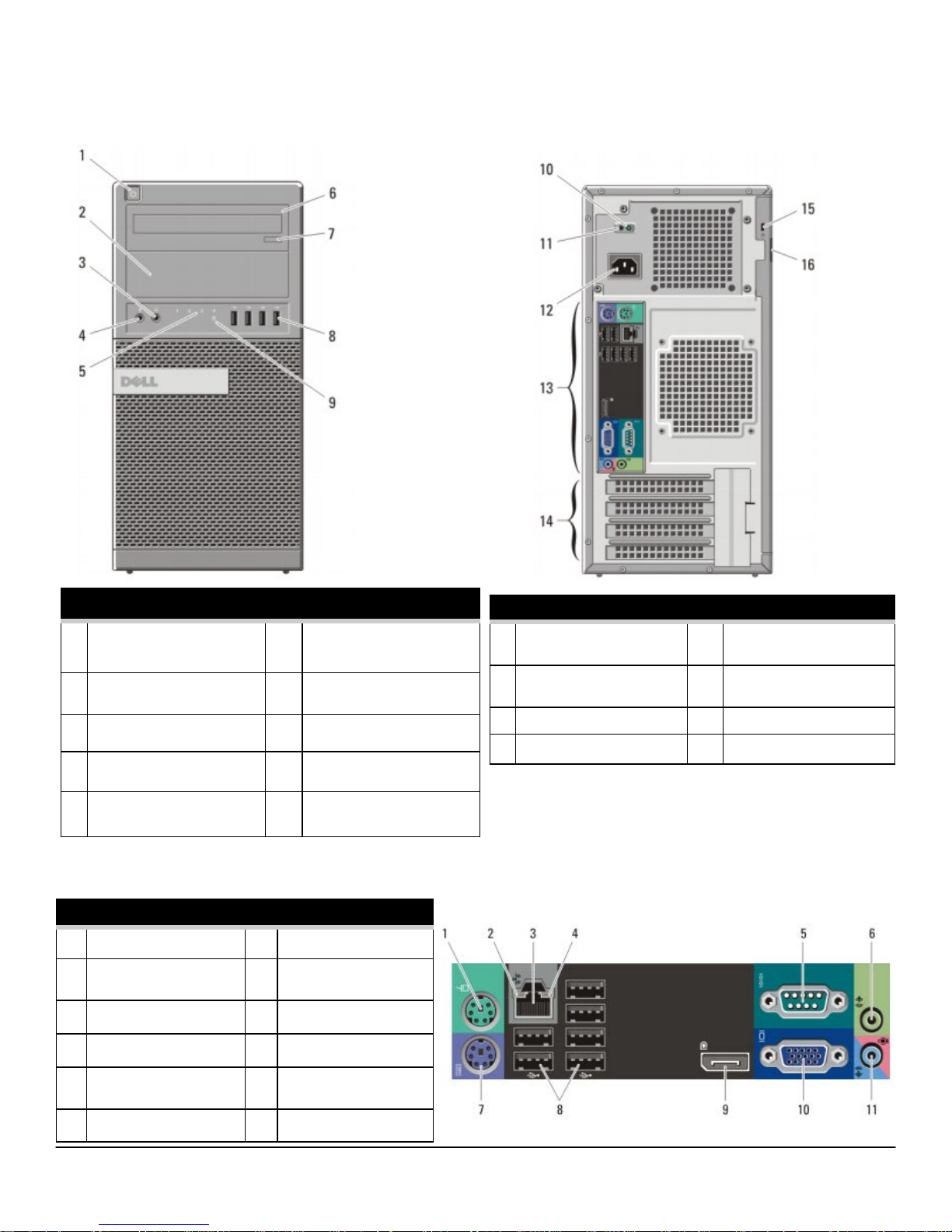
MI N I T OW ER CO M P U TE R ( MT) VI EW
FRONT VIEW
1
Power Button, Power
6 Optical Drive (optional)
Light
2 Optical Drive Bay
(optional)
3
Headphone Connector
4
Microphone Connector
5
Diagnostic Lights (4)
BACK PANEL CONNECTORS
1 Mouse Connector 7 Keyboard Connector
2 Link Integrity Light 8 USB Connectors (6)
3 Network Connector 9 Display Port Connector
4 Network Activity Light 10 VGA Connector
7 Optical Drive Eject Button
8 USB 2.0 Connectors (4)
9
Drive Activity Light
BACK VIEW
10 Power Supply Diagnostic
Light
11 Power Supply Diagnostic
Button
12 Power Connector 16 Padlock Ring
13 Back Panel Connectors
14 Expansion card slots(4)
15 Security cable slot
5 Serial connector 11 Line-in/Microphone
connector
6 Line-out Connector
3
Page 4
DELL™ OPTIPLEX™ 790 TECHNICAL GUIDEBOOK - V 2.0
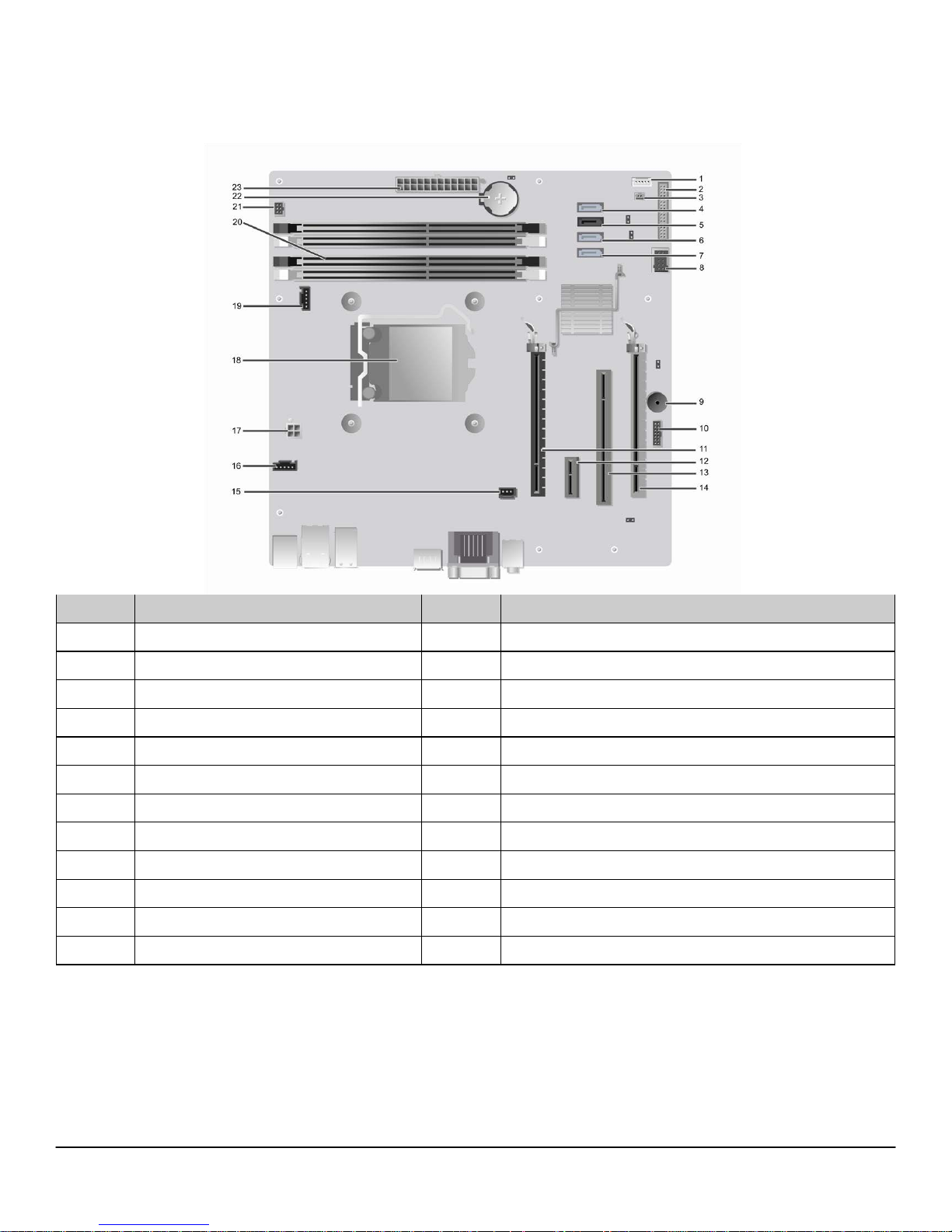
MI N I T OW ER CO M P U TE R ( MT) VI EW
Number Name Number Name
1 Internal speaker connector(INT_SPKR) 13 PCI connector(SLOT3)
2 Front IO connector(FRONTPANEL) 14 PCI-e 4x connector(SLOT4)
3 Thermal sensor connector(THRM_2) 15 Intrusion switch connector(INTRUDER)
4 SATA 0 connector(SATA0) 16 System fan connector(FAN_HDD)
5 SATA 1 connector(SATA1) 17 P2 power connector(12V_PWRCONN)
6 SATA 2 connector(SATA2) 18 Processor connector(N/A)
7 SATA 3 connector(SATA3) 19 CPU fan connector(FAN_CPU)
8 Internal USB connector(INT_USB) 20 Memory connectors(DIMM1, DIMM2, DIMM3, DIMM4)
9 Buzzer(BEEP) 21 Power switch connector(PWR_SW)
10 LPC debug connector(LPC_DEBUG) 22 Battery connector(BATTERY)
11 PCI-e 16x connector(SLOT1) 23 P1 power connector(POWER)
12 PCI-e 1x connector(SLOT2)
4
Page 5
DELL™ OPTIPLEX™ 790 TECHNICAL GUIDEBOOK - V 2.0
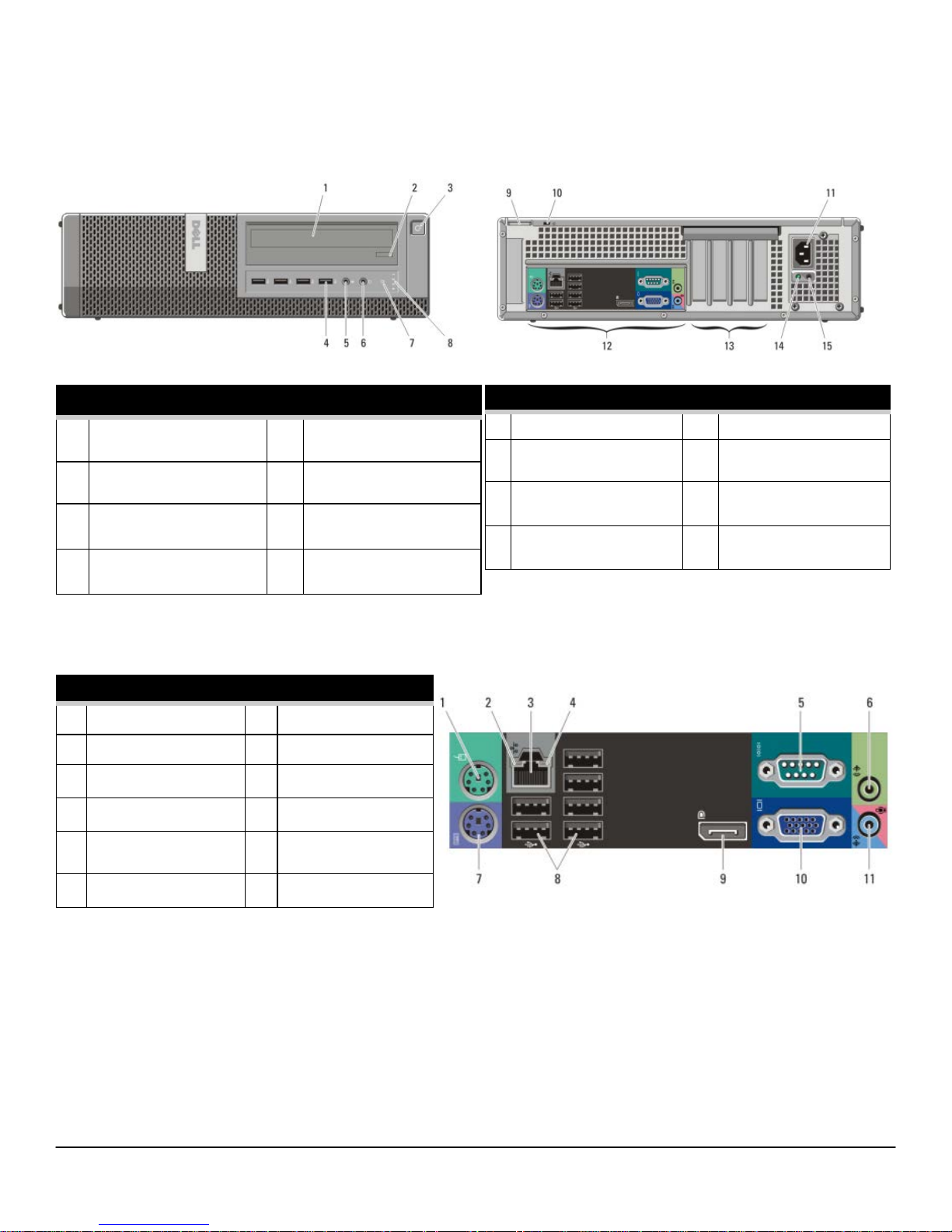
DE S KT OP CO M PU TER ( D T) VI EW
FRONT VIEW
1 Optical Drive 5
2 Optical Drive Eject Button 6
3
Power Button, Power
Microphone Connector
Headphone Connector
7
Drive Activity Light
Light
4 USB Connectors (4) 8
BACK PANEL CONNECTORS
1 Mouse Connector 7 Keyboard Connector
2 Link Integrity Light 8 USB Connectors (6)
3 Network Connector 9 Display Port Connector
4 Network Activity Light 10 VGA Connector
5 Serial connector 11 Line-in/Microphone
6 Line-out Connector
Diagnostic Lights (4)
connector
BACK VIEW
9 Padlock Ring 13 Expansion card slots(4)
10 Security cable slot 14 Power Supply Diagnostic
Light
11 Power Connector 15 Power Supply Diagnostic
Button
12 Back Panel Connectors
5
Page 6
DELL™ OPTIPLEX™ 790 TECHNICAL GUIDEBOOK - V 2.0
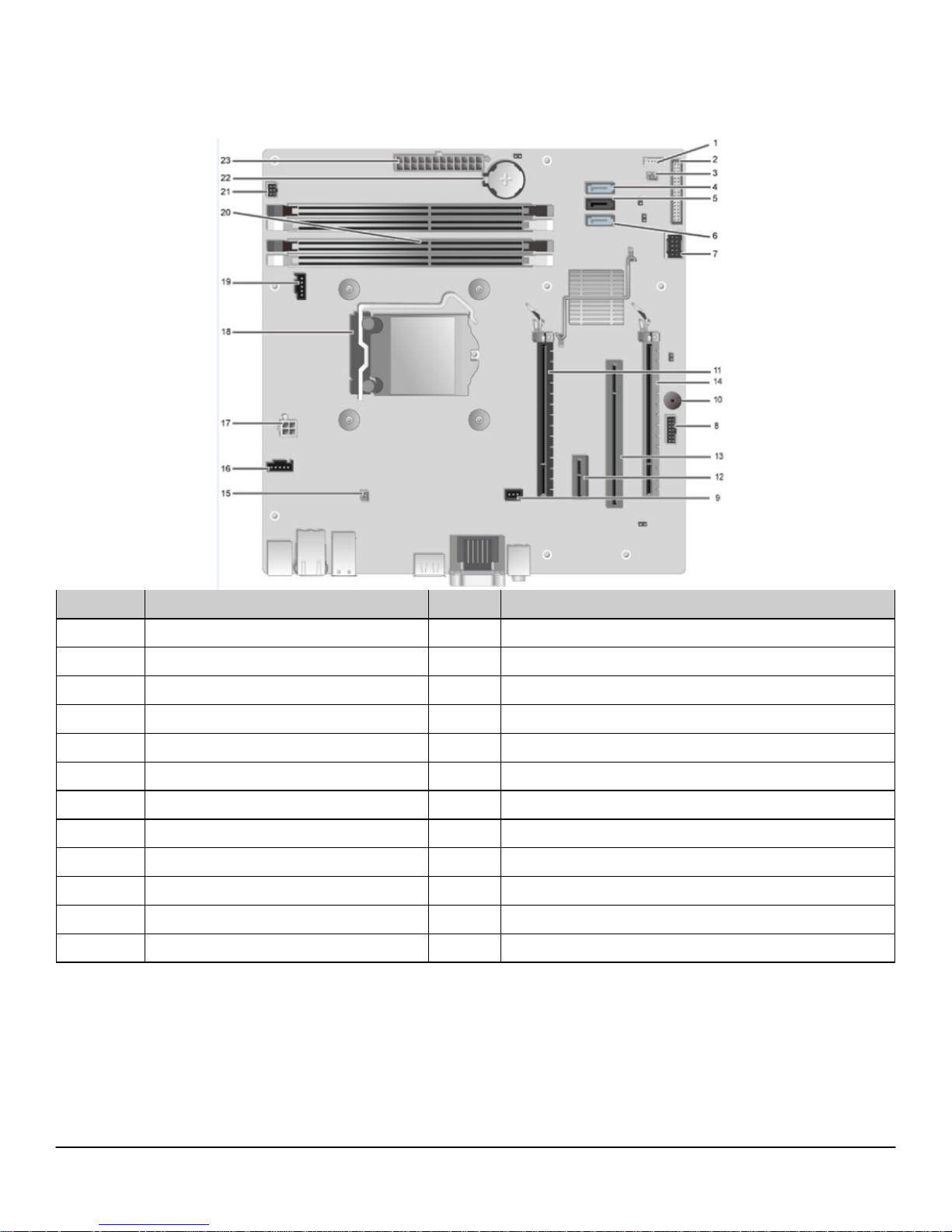
DE S KT OP CO M PU TER ( D T) VI EW
Number Name Number Name
1 Internal speaker connector(INT_SPKR) 13 PCI connector(SLOT3)
2 Front IO connector(FRONTPANEL) 14 PCI-e 4x connector(SLOT4)
3 Thermal sensor connector(THRM_2) 15 Thermal sensor connector(THRM_1)
4 SATA 0 connector(SATA0) 16 System fan connector(FAN_HDD)
5 SATA 1 connector(SATA1) 17 P2 power connector(12V_PWRCONN)
6 SATA 2 connector(SATA2) 18 Processor connector(N/A)
7 Internal USB connector(INT_USB) 19 CPU fan connector(FAN_CPU)
8 LPC debug connector(LPC_DEBUG) 20 Memory connectors(DIMM1, DIMM2, DIMM3, DIMM4)
9 Intrusion switch connector (INTRUDER) 21 Power switch connector(PWR_SW)
10 Buzzer(BEEP) 22 Battery connector(BATTERY)
11 PCI-e 16x connector(SLOT1) 23 P1 power connector(POWER)
12 PCI-e 1x connector(SLOT2)
6
Page 7
DELL™ OPTIPLEX™ 790 TECHNICAL GUIDEBOOK - V 2.0
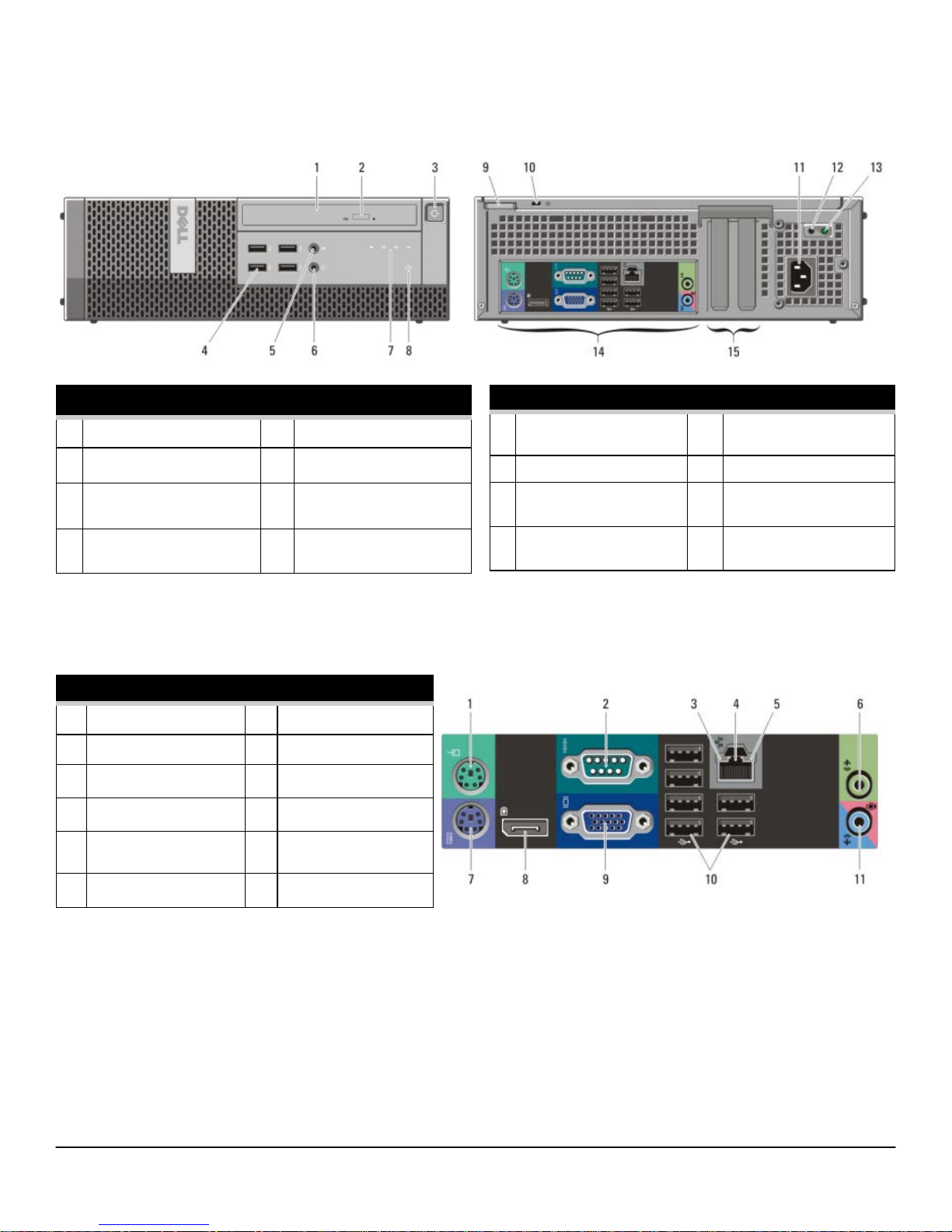
SM A LL FO R M FA C TO R C O M PU T ER (S FF ) V I EW
FRONT VIEW
1 Optical Drive 5
2 Optical Drive Eject Button 6
3
Power Button, Power
Microphone Connector
Headphone Connector
7
Diagnostic Lights (4)
Light
4 USB 2.0 Connectors (4) 8
BACK PANEL CONNECTORS
1 Mouse Connector 7 Keyboard Connector
2 Serial connector 8 Display Port Connector
3 Link Integrity Light 9 VGA Connector
4 Network Connector 10 USB Connectors (6)
5 Network Activity Light 11 Line-in/Microphone
6 Line-out Connector
Drive Activity Light
connector
BACK VIEW
9 Padlock Ring 13 Power Supply Diagnostic
Light
10 Security cable slot 14 Back Panel Connectors
11 Power Connector 15 Expansion card slots(2)
12 Power Supply Diagnostic
Button
7
Page 8
DELL™ OPTIPLEX™ 790 TECHNICAL GUIDEBOOK - V 2.0
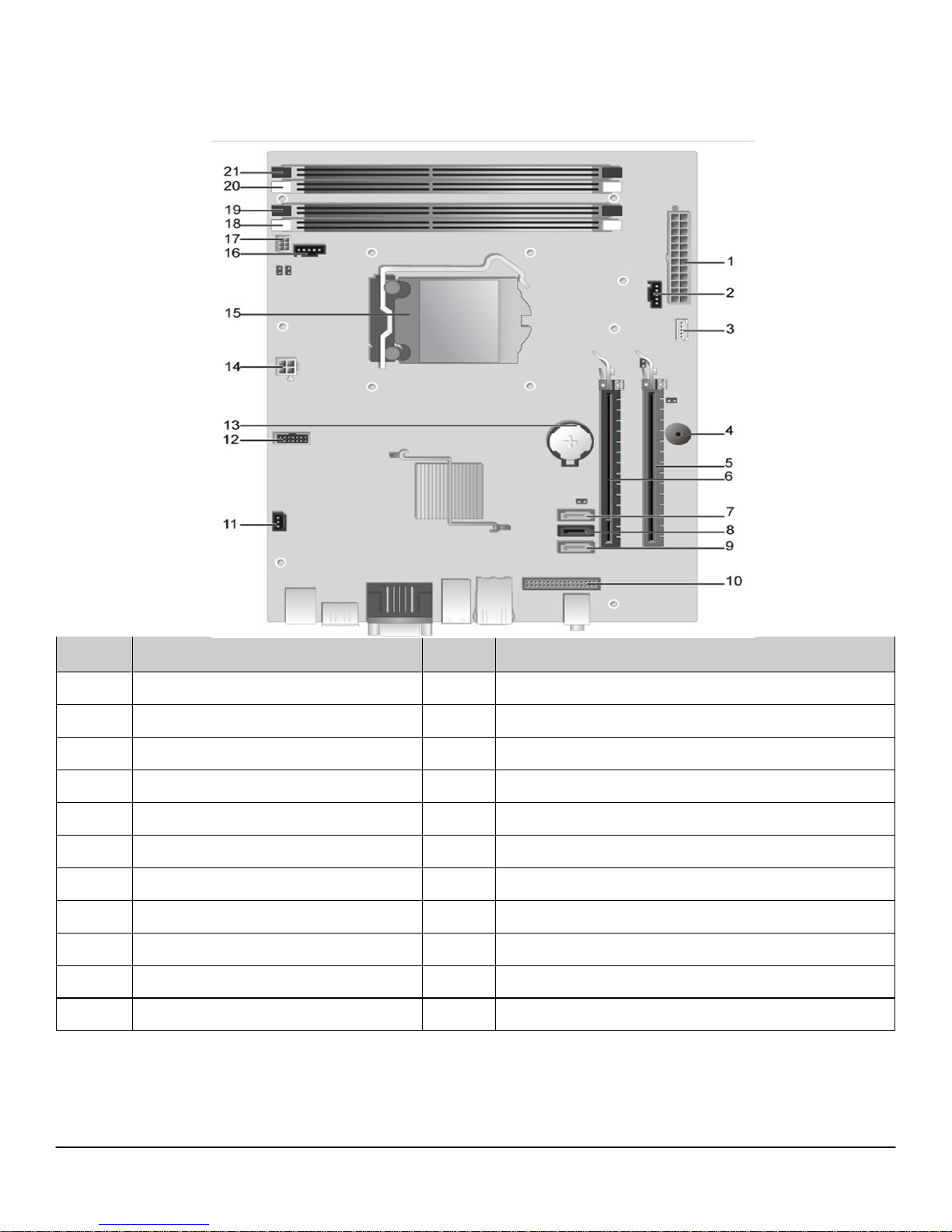
SM A LL FO R M FA C TO R C O M PU T ER (S FF ) V I EW
Number Name Number Name
1 P1 power connector(POWER) 12 LPC debug connector(LPC_DEBUG)
2 System fan connector(FAN_HDD) 13 Battery connector(BATTERY)
3 Internal speaker connector(INT_SPKR) 14 P2 power connector(12V_PWRCONN)
4 Buzzer(BEEP) 15 Processor connector(N/A)
5 PCI-e 4x connector(SLOT2) 16 CPU fan connector(FAN_CPU)
6 PCI-e 16x connector(SLOT1) 17 Power switch connector(PWR_SW)
7 SATA 2 connector(SATA2) 18 Memory connector(DIMM3)
8 SATA 1 connector(SATA1) 19 Memory connector(DIMM1)
9 SATA 0 connector(SATA0) 20 Memory connector(DIMM4)
10 Front IO connector(FRONTPANEL) 21 Memory connector(DIMM2)
11 Intrusion switch connector(INTRUDER)
8
Page 9
DELL™ OPTIPLEX™ 790 TECHNICAL GUIDEBOOK - V 2.0
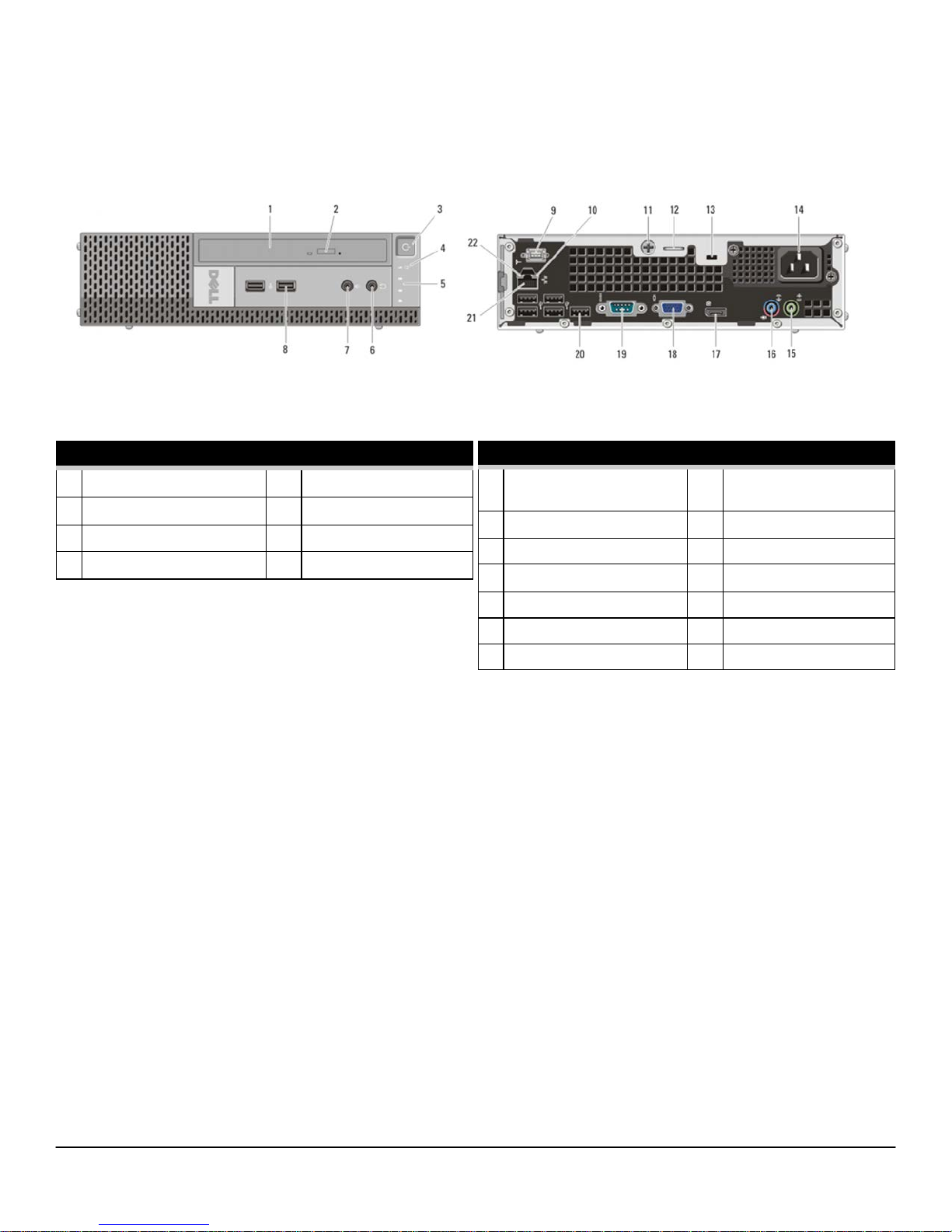
UL T RA S M AL L F O RM FA CT OR CO MPU TER ( U SF F) VI EW
FRONT VIEW
1 Optical Drive
2 Optical Drive Eject Button 6 Headphone Connector
3 Power Button, Power Light 7 Microphone Connector
4 Drive Activity Light 8 USB Connectors (2)
5
Diagnostic Lights (4)
BACK VIEW
9 Wi-Fi Antenna (optional) 16 Line-in/ Microphone
Connector
10 Network Activity Light 17 Display Port Connector
11 Captive Thumbscrew 18 VGA Connector
12 Padlock Ring 19 Serial Connector
13 Security Cable Slot 20 USB Connectors (5)
14 Power Connector 21 Network Connector
15 Line-Out Connector 22 Link Integrity Light
9
Page 10
DELL™ OPTIPLEX™ 790 TECHNICAL GUIDEBOOK - V 2.0
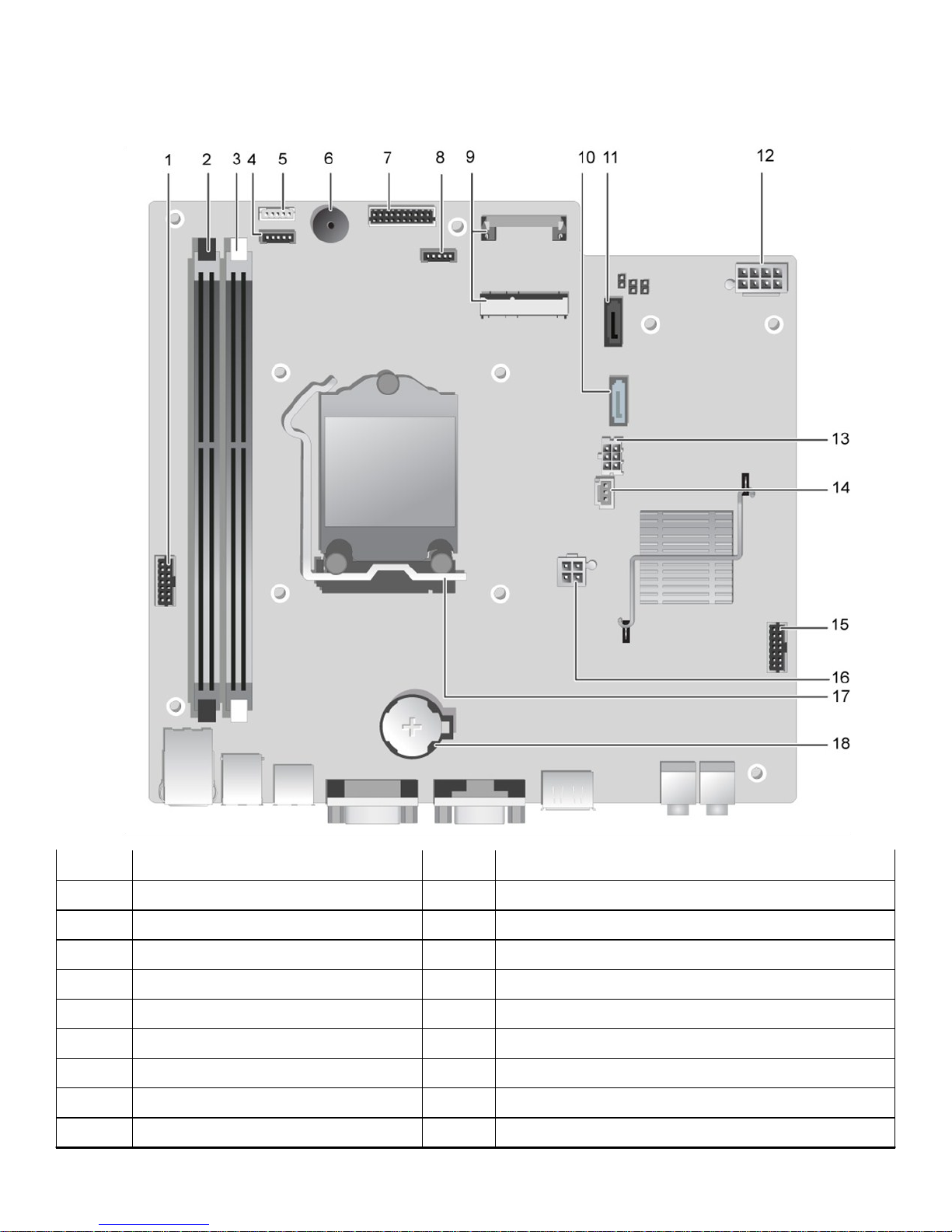
SM A LL FO R M FA C TO R C O M PU T ER (U SF F ) V IE W
Number Name Number Name
1 Front panel connector(FRONTPANEL) 10 SATA 1 connector(SATA_1)
2 Memory connector(DIMM_2) 11 SATA 0 connector(SATA_0)
3 Memory connector(DIMM_1) 12 P1 power connector(POWER1)
4 CPU fan connector(FAN_CPU) 13 HDD-ODD power connector (HDD_ODD_POWER)
5 Internal speaker connector(INT_SPKR) 14 Intrusion switch connector(INTRUDER)
6 Buzzer(BEEP) 15 LPC debug connector(LPC_DEBUG)
7 Front IO connector(F_USB_AUDIO) 16 P2 power connector(12V_PWRCONN)
8 System fan connector(FAN_HDD) 17 Processor connector(N/A)
9 Mini-PCI socket(PCIE_MINICARD) 18 Battery connector(BATTERY)
10
Page 11
DELL™ OPTIPLEX™ 790 TECHNICAL GUIDEBOOK - V 2.0
MARKETING SYSTEM CON FI GURATIONS
NO T E: Of f er i n gs ma y va r y b y co u nt r y. F or m or e i n fo r m a t io n re ga r d in g t he c on f i g u ra t io n of yo u r co m p ut e r, cl i c k
S t a rt > H el p a n d S up p or t a n d s e l e c t t he op t i on to vi ew in f o rm a ti o n a b ou t y o u r co m pu t e r.
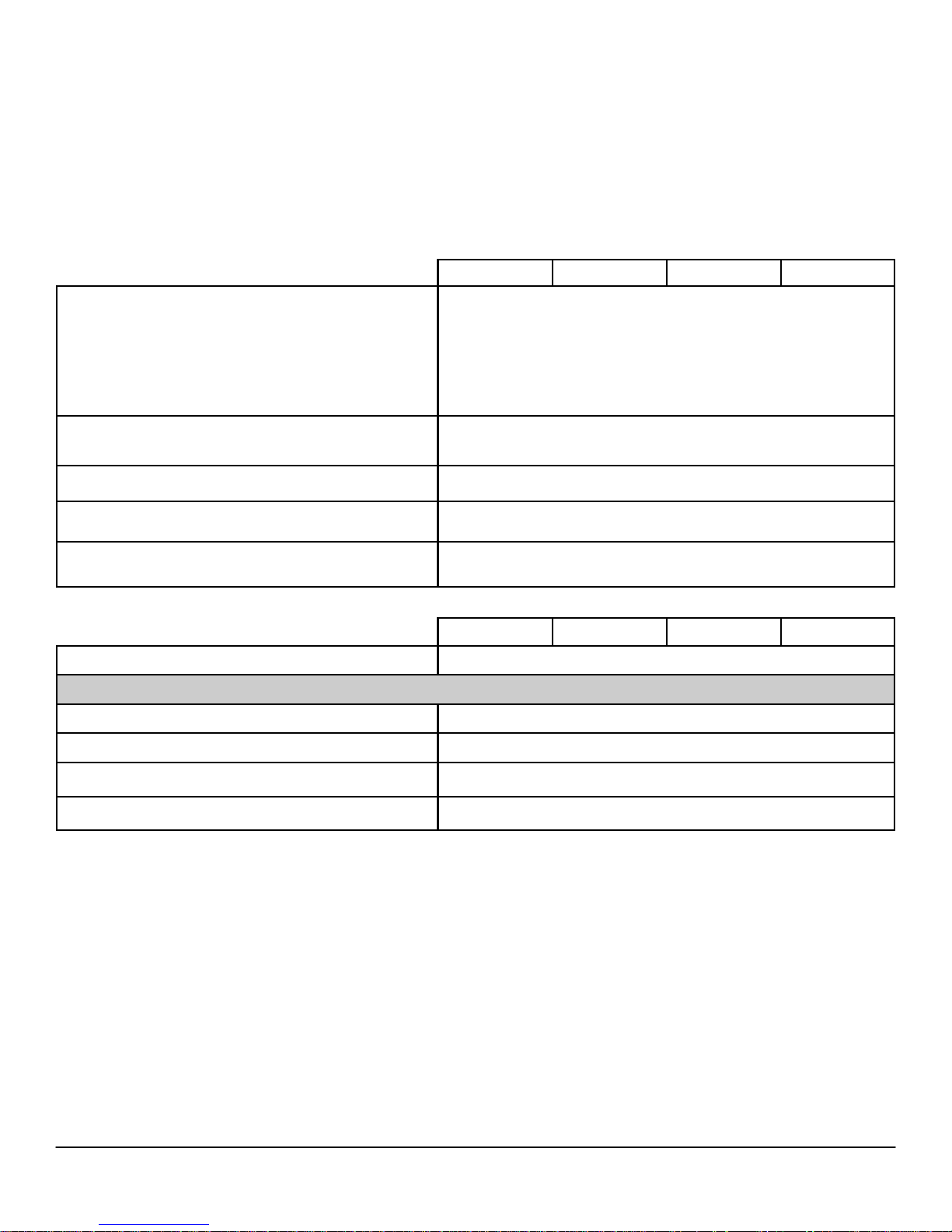
OP E RA TIN G S YS T EM
Windows 7® operating system
Windows Vista® operating system
Windows XP® operating system Basic Driver support only via Dell.com
Other
OS Media Support Optional
MT DT SFF USFF
Microsoft® Windows 7® Home Basic (32 and 64 bit) (select countries),
Microsoft® Windows 7® Home Basic SP1 (32 and 64 bit) (select coun-
tries),
Microsoft® Windows 7® Home Premium (32 and 64 bit),
Microsoft® Windows 7® Professional (32 and 64 bit),
Microsoft® Windows 7® Ultimate (32 and 64 bit),
Microsoft® Windows 7 Starter SP1(32 bits),
Microsoft® Windows 7 Starter SP1 w/MUI (32 bits)
Windows Vista® Home Basic SP2 (32 bits),
Windows Vista® Business SP2 (32 and 64 bit),
Windows Vista® Ultimate SP2 (32 bit)
FreeDOS for (N-series),
Ubuntu® Linux version 10.10 (China only)
CH I PS E T
Chipset
Non-volatile memory on chipset
BIOS Configuration SPI (Serial Peripheral Interface) 64Mbit (8MB) and 16Mbit(2MB)located at SPI_FLASH on chipset
TPM 1.2 Security Device (Trusted Platform Module)
1
18KB located at TPM1.2 on chipset
MT DT SFF USFF
Intel Q65 Express Chipset
Non-TPM Available in select countries
NIC EEPROM
LOM configuration contained within SPI_FLASH – no dedicated LOM
EEPROM
11
Page 12
DELL™ OPTIPLEX™ 790 TECHNICAL GUIDEBOOK - V 2.0
PR O CE SS O R
NOTE: Global Standard Products (GSP) are a subset of Dell’s relationship products that are managed for availability and synchronized transitions on a worldwide basis. They ensure the same platform is available for purchase globally. This allows customers to
reduce the number of configurations managed on a worldwide basis, thereby reducing their costs. They also enable companies to
implement global IT standards by locking in specific product configurations worldwide. The following GSP processors identified below
will be made available to Dell customers.
NOTE: Processor numbers are not a measure of performance. Processor availability subject to change and may vary by region/
country.
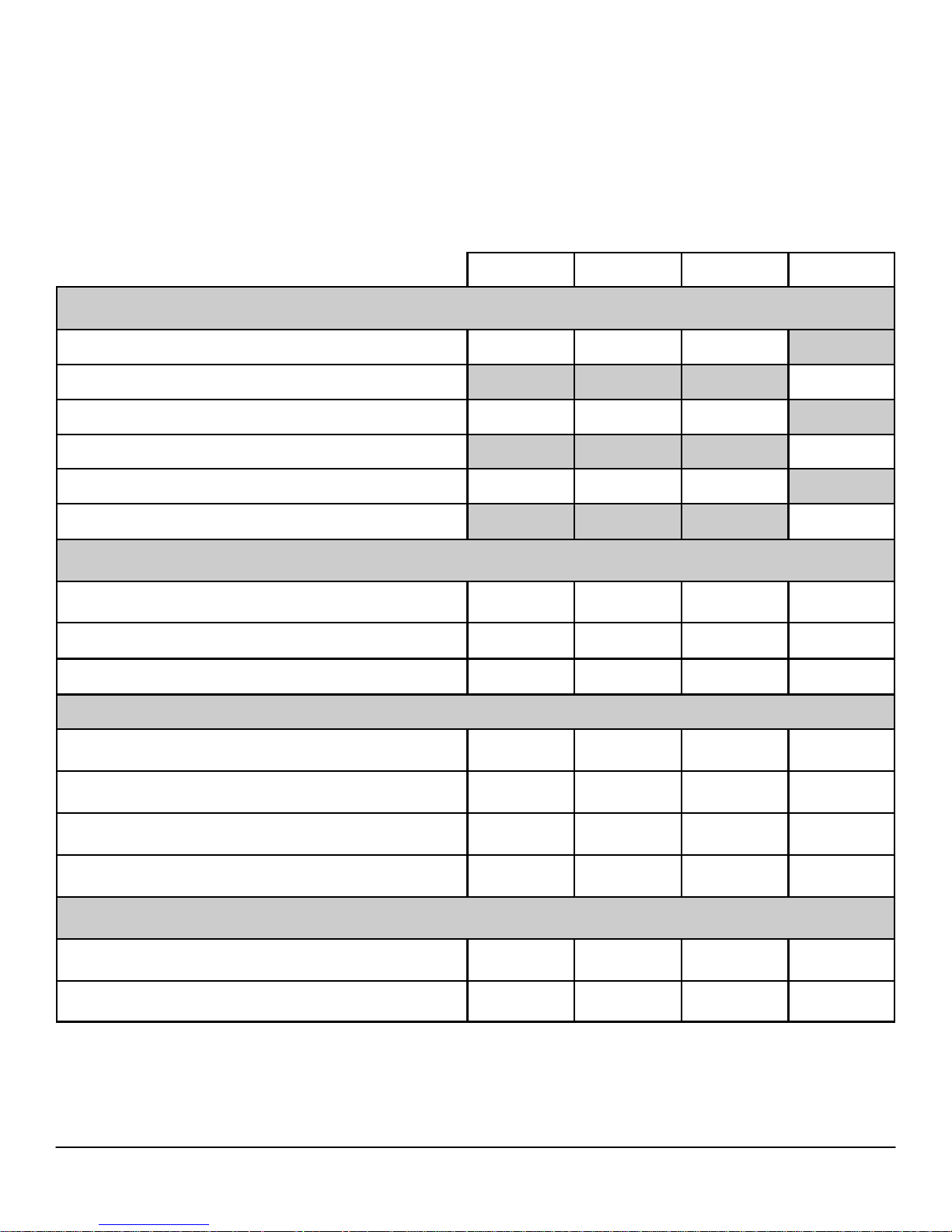
Intel® Quad Core Processors
Intel® Core™ i7 2600 / 3.40GHz, 8M, VT-x, VT-d, TXT (vPro™), 95W X-GSP X-GSP X-GSP
Intel® Core™ i7 2600S / 2.80GHz, 8M, VT-x, VT-d, TXT (vPro™), 65W X-GSP
Intel® Core™ i5 2500 / 3.30GHz, 6M, VT-x, VT-d, TXT (vPro™), 95W X-GSP X-GSP X-GSP
Intel® Core™ i5 2500S / 2.70GHz, 6M, VT-x, VT-d, TXT (vPro™), 65W X-GSP
Intel® Core™ i5 2400 / 3.10GHz, 6M, VT-x, VT-d, TXT (vPro™), 95W X-GSP X-GSP X-GSP
Intel® Core™ i5 2400S / 2.50GHz, 6M, VT-x, VT-d, TXT (vPro™), 65W X-GSP
Intel® Dual Core Processors
Intel® Core™ i3 2120 / 3.30GHz, 3M, VT-x, 65W X X X X
Intel® Core™ i3 2100 / 3.10GHz, 3M, VT-x, 65W X X X X
Intel® Core™ i3 2130 / 3.40GHz, 3M, VT-x, 65W (after Oct 2011) X X X X
Intel® Pentium Processors
MT DT SFF USFF
IPP G850 SANDY BRIDGE Q-0 3MB 2c FCLGA 2.9GHz 65W HD
GRAPHICS 2000 QS
IPP G840 SANDY BRIDGE Q-0 3MB 2c FCLGA 2.8GHZ 65W HD
GRAPHICS 2000 QS
IPP G630 SANDY BRIDGE Q-0 3MB 2c FCLGA 2.7GHZ 65W HD
GRAPHICS 2000 QS (after Oct 2011)
IPP G620 SANDY BRIDGE Q-0 3MB 2c FCLGA 2.6GHZ 65W HD
GRAPHICS 2000 QS
Intel® Celeron Processors (After October 2011)
ICPG530 SANDY BRIDGE Q-02MB 2c FCLGA 2.4GHZ 65W HD
GRAPHICS QS
IPP G440 SANDY BRIDGE Q-0 2MB 1.6GHZ 35W FCLGA11AQC X X X X
X X X X
X X X X
X X X X
X X X X
X X X X
12
Page 13
DELL™ OPTIPLEX™ 790 TECHNICAL GUIDEBOOK - V 2.0
ME MOR Y
NOTE: Memory modules should be installed in pairs of matched memory size, speed, and technology. If the memory modules are not installed in matched pairs, the computer will continue to operate, but with a slight reduction in performance. The entire 16-GB memory range
is available to 64-bit operating systems.
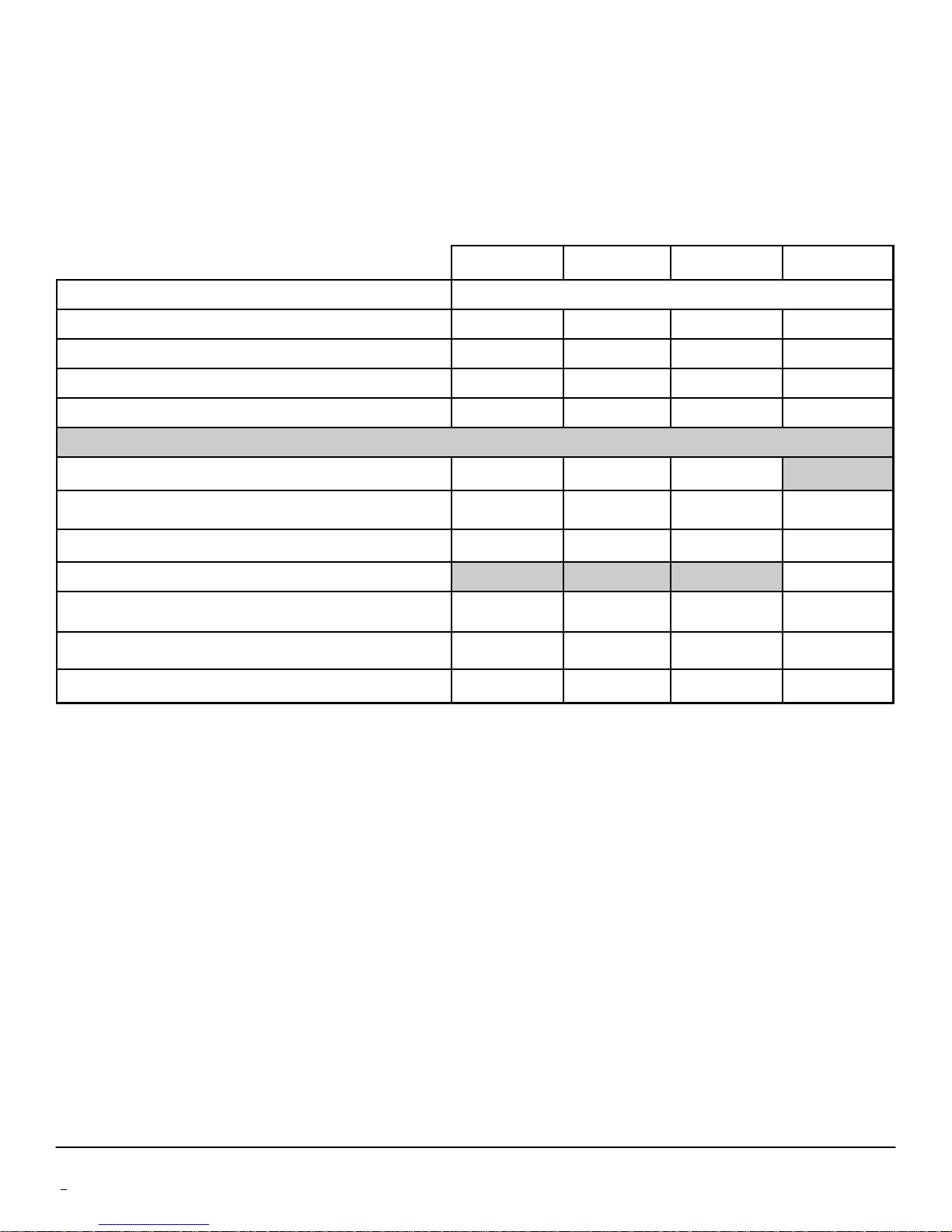
Type: DDR3 Synch DRAM Non-ECC Memory
DIMM Slots
DIMM Capacities
Minimum Memory
Maximum System Memory
MT DT SFF USFF
1333MHz
4 4 4 2
Up to 4GB Up to 4GB Up to 4GB Up to 4GB
1GB 1GB 1GB 1GB
1
16GB
16GB1 16GB1 8GB1
Memory configurations
16GB
8GB
4GB
4GB
1
DDR3, 1333MHz, (4 DIMM) X X X
1
DDR3, 1333MHz, (2 DIMM) X X X X
1
DDR3, 1333MHz, (2 DIMM) X X X X
1
DDR3, 1333MHz, (1 DIMM) X
3GB DDR3, 1333MHz, (2 DIMM) X X X X
2GB DDR3, 1333MHz, (1 DIMM) X X X X
1GB DDR3, 1333MHz, (1 DIMM) X X X X
1
The total amount of available memory will be less than 4GB. The amount less depends on the actual system configuration. To fully utilize 4GB or
more of memory requires a 64-bit enabled processor and 64-bit operating system.
13
Page 14

DELL™ OPTIPLEX™ 790 TECHNICAL GUIDEBOOK - V 2.0
DR I VE S A ND RE M OV AB L E S TO R A G E
MT DT SFF USFF
Bays:
5.25-inch bay (External Optical) 2 1 1 (slim-line) 1 (slim-line)
Hard Drives Supported (Internal and External) 2 1 1 1
Optical Drives Supported 2 1 1 1
Interface:
SATA 2.0 3 2 2 1
SATA 3.0 1 1 1 1
3.5” Hard Drives:
1
1TB
SATA 7200 RPM HDD X X X
500GB
320GB
250GB
1
SATA 7200 RPM HDD X X X
1
SATA 7200 RPM HDD X X X
1
SATA 7200 RPM HDD X X X
2.5” Hard Drives:
500GB
500GB
1
SATA 7200 RPM HDD X X X X
1
SATA 7200 RPM Hybrid HDD X X X X
320GB1 with and without FIPS Full DISK EnCRYPTION SATA
HDD (available after May19, 2011)
250GB
128GB
1
SATA 7200 RPM HDD X X X X
1
SATA Solid State Drive HDD X X X X
X X X X
14
Page 15
DELL™ OPTIPLEX™ 790 TECHNICAL GUIDEBOOK - V 2.0
DR I VE S A ND RE M OV AB L E S TO R A G E
MT DT SFF USFF
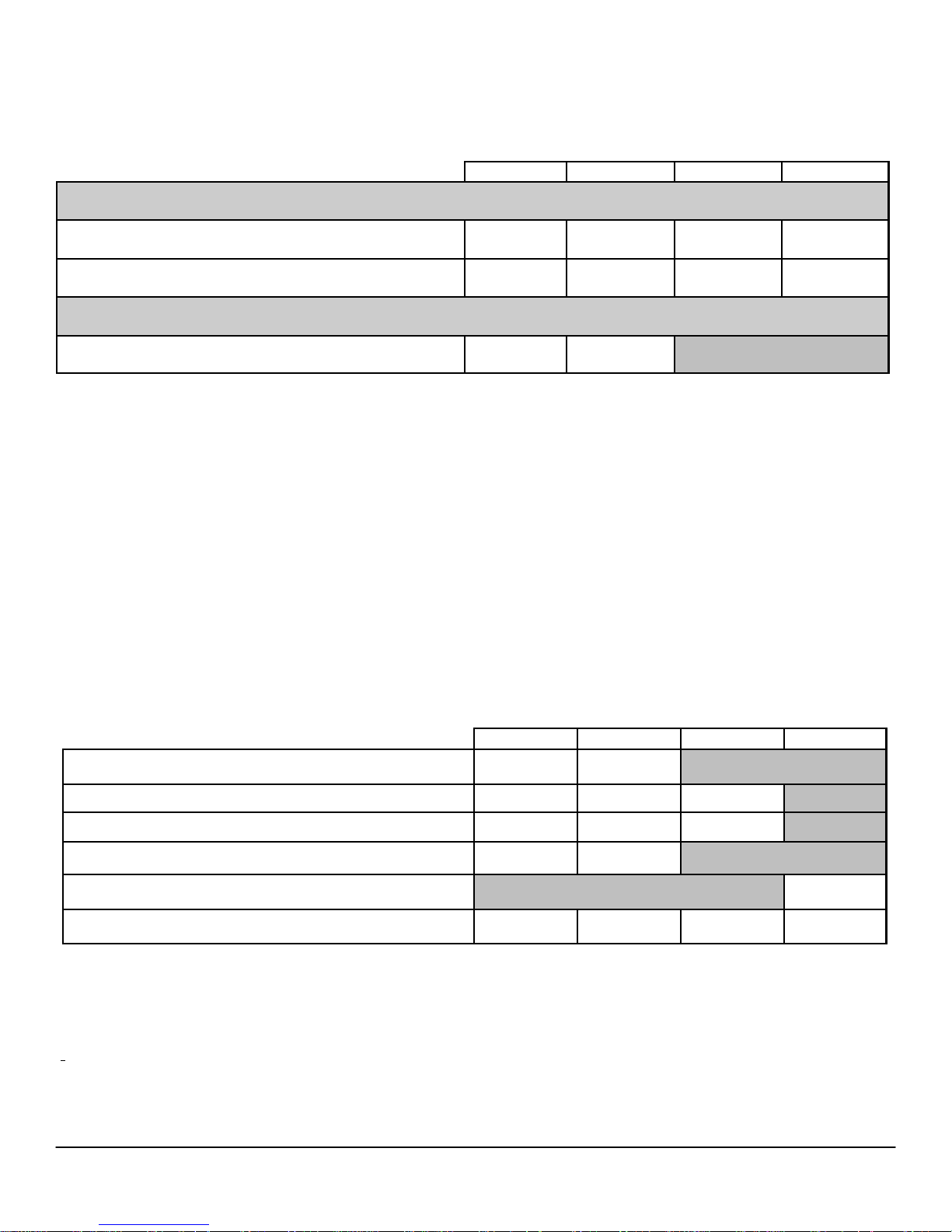
Optical Drive: (SFF/USFF require slim-line optical drive)
DVD+/-RW2
DVD-ROM3
SATA
1.5Gbit/s
SATA
1.5Gbit/s
SATA
1.5Gbit/s
SATA
1.5Gbit/s
SATA
1.5Gbit/s
SATA
1.5Gbit/s
SATA
1.5Gbit/s
SATA
1.5Gbit/s
Media Card Reader:
Dell 19 in 1 Media Card Reader X X
NO T E: De l l 1 9 i n 1 M e d ia Ca r d R e ad e r i s su p p or t ed vi a a F 5 to F 3 b r a c ke t on t h e M T a n d D T
SY S TE M E XP A NS IO N S L O TS
NO T E: Se e De ta i l ed E ng i ne e ri n g S p ec i f i c a ti o ns fo r sup p o r t ed vo l t a g e , m ax im u m w a tt a g e an d ca r d di me n si o ns .
NO T E: Add i n ca rd l o c at io n a n d pr i or i t y : P C I : 13 94 ; P CI e x1 6: GF X , US B 3 . 0, S e ri a l , P a r al l el / S e r ia l , NI C ,
W i r el e ss ; PC I e x4 : GFX , US B 3 .0 , S er i al , Pa r a l l e l/ S er i al , N IC , Wi r el e s s; P C I e x 1 : U S B 3 . 0 , S e ri a l , P a ra l le l /
S e r ia l , N I C, Wi re l es s
MT DT SFF USFF
PCI Slot(s): number of 1 1
PCIe x16 Slot: number of
1 1 1
PCIe x16 (wired x4)Slot: number of 1 1 1
PCIe x1 Slot: number of
miniPCIe connector: number of
1 1
1
Serial ATA (SATA) 4 3 3 2
1
For hard drives, GB means 1 billion bytes; actual capacity varies with preloaded material and operating environment and will be less.
2
Discs burned with this drive may not be compatible with some existing drives and players; using DVD+R media provides maximum compatibility.
3
DVD-ROM drives may have write-capable hardware that has been disabled via firmware modifications.
15
Page 16
DELL™ OPTIPLEX™ 790 TECHNICAL GUIDEBOOK - V 2.0
GR A PH IC S /V I DE O C ON T R O LL E R
NO T E: M T su p p or t s f u ll h e ig h t c a rd , D T s u pp o r ts l o w p ro f i l e ca r d . S FF su p p o r ts l ow p r o fi l e c ar d .
Intel HD Graphics [with Celeron/Pentium class CPU-GPU combo]
Intel HD Graphics 2000[with iCore Dual/Quad core class CPUGPU combo]
Enhanced Graphic/Video Options
1GB AMD RADEON HD 6450 with DP and DVI Optional card
512MB AMD RADEON HD 6350 with dual DVI or dual VGA
(adapters convert to dual DVI or dual VGA)
MT DT SFF USFF
Integrated on CPU
Optional card
EX T ER NA L P O RT S / C ON N E C TO R S
NO T E: M T su p p or t s f u ll h e ig h t c a rd , D T s u pp o r ts l o w p ro f i l e ca r d . SF F s u p p o rt s lo w p ro f i l e ca r d.
See chassis diagrams section for port/connector locations
USB 2.0 (1 internal on MT and DT) 4 Front, 6 Rear
Serial 1 Rear
Parallel/2nd Serial via optional PCIex1 card
MT DT SFF USFF
Optional FH
card
2 Front, 5
Rear
2nd Parallel via optional PCIex1 card (after August 2011) Optional LP card
Network Connector (RJ-45) 1 Rear
PS/2 2 Rear
1394 Controller via optional PCI card
USB 3.0 via optional PCIex1 card
Video:
VGA 1 Rear
DisplayPort 1 Rear
Audio:
Line in for microphone 1 Front
Line in for microphone or stereo 1 Rear
Line out for headphones or speakers 1 Front, 1 Rear
Optional FH
card
Optional FH
card
Optional LP
card
Optional LP card
16
Page 17
DELL™ OPTIPLEX™ 790 TECHNICAL GUIDEBOOK - V 2.0
CO M MU NIC AT I ON S - N ET W OR K A DA P TE R ( NIC )
NO T E: M T su p p or t s f u ll h e ig h t c a rd , D T s u pp o r ts l o w p ro f i l e ca r d . SF F s u p p o rt s lo w p ro f i l e ca r d.
Intel® 82579LM Gigabit1 Ethernet LAN 10/100/1000 (Remote
Wake Up, PXE support and Intel Active Management Technolo-
gy support)
Broadcom NetXtreme 10/100/1000 PCIe Gigabit Networking
Card
1
This term does not connote an actual operating speed of 1 Gb/sec. For high speed transmission, connection to a Gigabit Ethernet server and network
infrastructure is required.
CO M MU NIC AT I ON S – W IRE LE S S
Dell Wireless 1520 PCIe WLAN card (802.11n) Optional via add-in card
Dell Wireless 1520 half miniPCIe WLAN card (802.11n)
MT DT SFF USFF
Integrated on system board
Optional via add-in card
MT DT SFF USFF
Optional
AU D IO A N D S PE A KE RS
Realtek ALC269Q High Definition Audio Codec Integrated on system board
Internal Dell Business Audio Speaker Optional
Dell AX210 2.0 Desktop Speakers Optional
Dell AX510/AX510PA Flat Panel Soundbar Speakers Optional
MT DT SFF USFF
KE Y BO ARD A N D MO U SE
Dell USB Entry Keyboard with optional palmrest Standard
Dell Multimedia Pro Keyboard Optional
Dell Smartcard Keyboard Optional
Dell USB Optical Mouse Standard
Dell Laser Mouse Optional
MT DT SFF USFF
17
Page 18
DELL™ OPTIPLEX™ 790 TECHNICAL GUIDEBOOK - V 2.0
SE C UR ITY
Trusted Platform Module (TPM) 1.2
1
Integrated on system board
MT DT SFF USFF
Chassis Intrusion Switch Optional
Dell Smartcard Keyboard Optional
Chassis lock slot and loop support Standard
Dell Data Protection | Hardware Encryption Engine Optional. Available in Q3 2011
1
TPM is not available in all countries. Depending on your country regulations, No-TPM system boards will be made available.
SO F TW ARE
Dell Client Manager Available via Dell.com
Dell Data Protection/Access (DDPA) Standard
Norton 2010 Internet Security 30 Day Trial or Optional Subscription
McAfee 10 SecurityCenter 30 Day Trial or Optional Subscription
Dell Data Protection | Encryption (DDPE) Optional. Available in Q3 2011
MT DT SFF USFF
EN V IR ONM ENT AL
NO T E: F o r mo r e de t ai ls o n D e ll E n vi ro nm en ta l fe a tu re s , p l e as e to go t o E n v iro n me nt al A t tr ib ut es s e ct io n. Se e
yo u r sp ec i c re gi on f or a va il ab il it y .
Sustainable packaging X
BFR/PVC—free limited congurations
MT DT SFF USFF
X X
MultiPack packaging Optional, US only
Energy Ecient Power Supply Optional Standard
ALL -IN- ONE S T AN DS AN D M O UN T S
Small Form Factor AIO Stand
Ultra Small Form Factor AIO Stand
Ultra Small Form Factor Wall Mount / Desk Mount
MT DT SFF USFF
Optional
Optional
Optional
SE R VI C E AN D S U PP OR T
NO T E: Fo r mo r e d et a il s o n D e l l Se r v i c e P l an s pl ea s e t o g o t o : ww w . d el l .c o m/ s e rv i c e / se r vi c e_ p l a n s
3 Year Warranty
ProSupport Optional
1
For a copy of our guarantees or limited warranties, please write Dell USA L.P., Attn: Warranties, One Dell Way, Round Rock, TX 78682. For more
information, visit www.dell.com/warranty.
2
Service may be provided by third-party. Technician will be dispatched if necessary following phone-based troubleshooting. Subject to parts availabil-
ity, geographical restrictions and terms of service contract. Service timing dependent upon time of day call placed to Dell. U.S. only.
1
Next Business Day On-site2 (3-3-3) Standard
MT DT SFF USFF
18
Page 19
DELL™ OPTIPLEX™ 790 TECHNICAL GUIDEBOOK - V 2.0
DETAILED ENGINE ERING SPECIFICATIONS
SY S TE M D IM E NS I O N S ( P H YS I CA L)
NO T E: S ys t e m W ei g ht a n d S h i p p in g We i gh t i s b a se d o n a t y p ic a l co n fi gu r at i o n a n d m a y v a r y b as e d on P C
co n fi g u ra t i o n . A t y p ic a l co nf i g ur a ti o n in cl u d es : int e g ra te d gr a ph i cs , o n e ha r d dr iv e , on e op t ic al dr i v e, an d
o n e d i sk e t te dr i ve .
Chassis Volume (liters)
Chassis Weight (pounds/kilograms)
Chassis Dimensions: (HxWxD)
Height (inches/centimeters) 14.17 / 36 14.17 / 36 11.42 / 29 9.32 / 23.67
Width (inches/centimeters) 6.89 / 17.5 4.02 / 10.2 3.65 / 9.26 2.56 / 6.5
Depth (inches/centimeters) 16.42 / 41.7 16.14 / 41 12.28/31.2 9.44 / 24
Shipping Weight (pounds/kilograms - includes packaging materials)
Packaging Parameters (HxWxD)
Height (inches/centimeters) 21.31/54.13 21.31 / 54.13 19.25/48.90 19.13/48.59
Width (inches/centimeters) 18.75/47.63 18.75/47.63 15.81/40.16 14.38/36.53
Depth (inches/centimeters) 14.09 / 35.79 10.84/27.53 10.19/25.88 9.63/24.46
MT DT SFF USFF
26.27 15.06 8.38 3.70
19.55 / 8.87 16.67 / 7.56 12.57 / 5.70 7.20 / 3.27
23.45 / 10.64 20.03 / 9.09 15.2 / 6.89 9.56/ 4.34
SY S TE M E XP A NS IO N S L O TS
PCI Slot (Voltage supported 3.3V/5V/12V/-12V)
Height (inches/centimeters) 4.376 / 11.115 2.731 /6.89
MT DT SFF USFF
1 1
Length (inches/centimeters) 6.6 / 16.765 6.6/16.765
Maximum Wattage 25W 25W
PCIex16 Slot (BLUE) (Voltage supported 3.3V/12V)
Height (inches/centimeters) 4.376 / 11.115 2.731 /6.89 2.731 /6.89
Length (inches/centimeters) 6.6/ 16.765 6.6 /16.765 6.6 /16.765
Maximum Wattage 35W 35W 35W
PCIex16 wired as x4 Slot (BLACK) (Voltage supported 3.3/12V)
Height (inches/centimeters) 4.376 / 11.115 2.731 /6.89 2.731 /6.89
Length (inches/centimeters) 6.6 / 16.765 6.6 /16.765 6.6/16.765
Maximum Wattage 25W 25W 25W
PCIe x1 Slot (Voltage supported 3.3V/12V)
Height (inches/centimeters) 4.376 / 11.115 2.731 / 6.89
Length (inches/centimeters) 4.5 / 11.44 4.5 / 11.44
Maximum Wattage 10W 10W
Mini PCIe x1 Slot
* Card length can be longer than standard Half-Length Card but cannot be a Full-Length Card.
1 1 1
1 1 1
1 1
1
19
Page 20
DELL™ OPTIPLEX™ 790 TECHNICAL GUIDEBOOK - V 2.0
SY S TE M L EV E L E NV IR O N M EN T AL A N D O PE R A T IN G C ON DIT IO N S
Temperature
Operating 10° to 35° C (50° to 95° F)
Non-Operating (Storage) -40° to 65° C (-40° to -149° F)
Relative Humidity
Maximum vibration
Operating 0.25 G at 3 to 200 Hz at 0.5 octave/min
Non-Operating 0.5 G at 3 to 200 Hz at 1 octave/min
Maximum Shock
Operating
Non-Operating
Maximum Altitude
Operating –15.2 to 3048 m (–50 to 10,000 ft)
Non-Operating –15.2 to 10,668 m (–50 to 35,000 ft)
MT DT SFF USFF
20% to 80% (non-condensing)
Bottom half-sine pulse with a change in velocity of
50.8 cm/sec (20 inches/sec)
27-G faired square wave with a velocity change of
508 cm/sec (200 inches/sec)
20
Page 21
DELL™ OPTIPLEX™ 790 TECHNICAL GUIDEBOOK - V 2.0
PO W ER
NO T E: T h e se fo r m f a c t or s u t il i ze a m o re e f f i c i en t A c t i v e P o w e r F a c to r C or r e ct i on ( A P FC ) po w er su p pl y. D e l l
re c om m en d s o n l y Un i ve r sa l Po w er Su p p l i es (U P S) ba s e d o n S in e Wa ve o ut p ut fo r A P FC P SU s , n o t a n ap p ro x i m a t io n o f a S i n e W a ve , S q ua r e W av e , o r q u as i -S qu a re W av e. If yo u ha v e q ue s t io n s, pl e as e c o n t a ct t h e m a nu -
Power Supply Watt-
age
AC input Voltage
Range
APFC EPA
265W
90 –
264Vac
MT
265W High
Efficiency
90 –
264Vac
250W
90 –
264Vac
DT
APFC EPA
250W High
Efficiency
90 –
264Vac
APFC EPA
240W
90 –
264Vac
SFF
240W High
Efficiency
90 –
264Vac
USFF
EPA
200W High
Efficiency
90 – 264Vac
AC input current (low
ac range/high AC
5.0A / 2.5A 5.0A / 2.5A 4.4A / 2.2A 4.4A / 2.2A 4.0A / 2.0A 4.0A / 2.0A 2.9A / 1.45A
range)
AC input Frequency
AC holdup time (80%
load)
Average Efficiency
(Energy Star 5.0 Com-
pliant)
Typical Efficiency
(Active PFC)
47HZ /
63HZ
16MSEC 16MSEC 16MSEC 16MSEC 16MSEC 16MSEC 16 ms
65% 65% 65% N/A
47HZ /
63HZ
87 – 90 –
87% @ 20
– 50 –
100% load
47HZ /
63HZ
47HZ /
63HZ
87 – 90 –
87% @ 20
– 50 –
100% load
47HZ /
63HZ
47HZ /
63HZ
87 – 90 –
87% @ 20
– 50 –
100% load
47 – 63 Hz
87 – 90 –
87% @ 20 –
50 – 100%
load
DC parameters
+3.3v output 10.0A 10.0A 7.0 A 7.0 A 3.5A 3.5A N/A
+5.0v output 13A 13A 15A 15A 11A 11A N/A
+12VA -
12.5 A &
+12VB - 6.0
+12.0v output
12VA/17A;
12VB/9A
12VA/17A;
12VB/9A
17.8A 17.8A 17A 17A
Note: +12VB
Rated at
0.4A when in
Standby
Mode.
+5.0v auxiliary output 4.0A 4.0A 4.0 4.0 4.0A 4.0A N/A
-12.0v output 0.5A 0.5A 0.5A 0.5A 0.5A 0.5A 0.1 A
Max total power 265W 265W 255W 255W 235W 235W 200W
Max combined +3.3v /
+5.0v power
90W 90W 90W 90W 60W 60W N/A
Max combined 12.0v
power (note: only if
240W 240W N/A N/A N/A N/A 200W
more than one 12v rail)
BTUs/h (based on PSU
max wattage)
Power Supply Fan
904 BTU 904 BTU 853 BTU 853 BTU 819 BTU 819 BTU 682 BTU
80*25mm 80*25mm
80*20/25mm 80*20/25m
m
60*25mm 60*25mm N/A
Compliance:
1watt requirement Yes Yes Yes Yes Yes Yes Yes
Blue Angel Compliant Yes Yes Yes Yes Yes Yes Yes
Climate Savers /
80Plus Compliant
FEMP (CECP) Standby
Power Compliant
No Yes No Yes No Yes Yes
Yes Yes Yes Yes Yes Yes Yes
A
21
Page 22

DELL™ OPTIPLEX™ 790 TECHNICAL GUIDEBOOK - V 2.0
PO W ER
NO T E: T h e se fo r m f a c t or s u t il i ze a m o re e f f i c i en t A c t i v e P o w e r F a c to r C or r e ct i on ( A P FC ) po w er su p pl y. D e l l
re c om m en d s o n l y Un i ve r sa l Po w er Su p p l i es (U P S) ba s e d o n S in e Wa ve o ut p ut fo r A P FC P SU s , n o t a n ap p ro x i m a t io n o f a S i n e W a ve , S q ua r e W av e , o r q u as i -S qu a re W av e. If yo u ha v e q ue s t io n s, pl e as e c o n t a ct t h e m a nu -
fa c tu r e t o c o n f i rm th e o u tp u t t yp e .
3.0v CMOS battery (Type and estimated battery life)
Brand Type Voltage Composition Life
PANASONIC CR-2302L/BE 3V Lithium Continuous Discharge Under 15 kΩ Load to 2.5V End-
Voltage.
20℃±2℃.1183Hrs. or Longer.1133Hrs.or Longer after 12
months.
MITSUBISHI CR2302 3V Lithium Continuous Discharge Under 15 kΩ Load to 2.0V End-
Voltage.
20℃±2℃.1000Hrs. or Longer.970Hrs.or Longer after 12
months.
0℃±2℃. 910Hrs. or Longer.890Hrs.or Longer after 12
months.
22
Page 23
DELL™ OPTIPLEX™ 790 TECHNICAL GUIDEBOOK - V 2.0
AU D IO
INTEGRATED REALTEK ALC269Q HIGH DEFINITION AUDIO
High Definition Stereo support
Number of channels
Number of Bits / Audio resolution
Sampling rate (recording/playback)
Signal to Noise Ratio
Analog Audio
Dolby Digital
THX
Digital out (S/PDIF)
Audio Jack Impedance
Microphone 40K ohm~60K ohm
Line-In 40K ohm~60K ohm
Line-Out 100~150 ohm
Headphone 1~4 ohm
Internal Speaker Power Rating
MT DT SFF USFF
X X X X
2
16, 20, and 24-bit resolution
Support 44.1K/48K/96K/192 kHz sample rates
98 dB DAC outputs, 90 dB for ADC inputs
X X X X
2Watt (peak) / 1Watt (average)
CO M MU NIC AT I ON S - N ET W OR K A DA P TE R ( NIC )
NO T E: M T su p p or t s f u ll h e ig h t c a rd , D T s u pp o r ts l o w p ro f i l e ca r d . SF F s u p p o rt s lo w p ro f i l e ca r d.
INTEGRATED INTEL® 82579 GIGABIT1
ETHERNET LAN 10/100/1000
External Connector Type
Data Rates supported
Controller Details
Controller bus architecture
Integrated memory N/A
Data transfer mode (example Bus-Master DMA) N/A
Power consumption (full operation per data rate connection speed) 711mW (Max.)
Power consumption (standby operation) 227mW (Max.)
IEEE standards compliance (example 802.1P)
Hardware Certifications (example FCC, B, GS mark…)
Boot ROM Support
Network Transfer Mode (example Full Duplex, Half Duplex)
Network Transfer Rate (example 10BASE-T (half-duplex) 10 Mbps
10BASE-T (full-duplex) 20 Mbps
100BASE-TX (half-duplex) 100 Mbps
100BASE-TX (full-duplex) 200 Mbps
1000BASE-T (full-duplex) 2000 Mbps
MT DT SFF USFF
RJ45
10/100/1000 Mbps
PCIe-based interface for S0 state, SMBus for Sx
low power state
802.3
N/A
EEPROM (located in SPI)
10 Mb (full/half-duplex)
100 Mb (full/half-duplex)
1000 Mb (full-duplex)
23
Page 24
DELL™ OPTIPLEX™ 790 TECHNICAL GUIDEBOOK - V 2.0
CO M MU NIC AT I ON S - N ET W OR K A DA P TE R ( NIC ) ( C O NT . )
INTEGRATED INTEL® 82579 GIGABIT1
ETHERNET LAN 10/100/1000 (CONT.)
MT DT SFF USFF
Environmental
Operating temperature 0° C to 85° C (32° F to 185° F)
Operating humidity 20% to 80% (non-condensing)
Operating System Driver Support
Manageability (examples WOL, PXE)
Management Capabilities Alerting
1
This term does not connote an actual operating speed of 1 Gb/sec. For high speed transmission, connection to a Gigabit Ethernet server and network
infrastructure is required.
Windows XP, Windows Vista SP2,Windows 7
WOL, PXE 2.1
Intel® Standard Manageability
CO M MU NIC AT I ON S – I NT E GR A TE D L A N
NO T E: M T su p p or t s f u ll h e ig h t c a rd , D T s u pp o r ts l o w p ro f i l e ca r d . SF F s u p p o rt s lo w p ro f i l e ca r d.
Broadcom NetXtreme 10/100/1000 PCIe Gigabit
1
Networking Card
MT DT SFF USFF
Connector Type
Data Rates supported
10/100/1000 Mbps Half/Full duplex
RJ45
Controller Details
Controller bus architecture (example PCIe 1.0a x1) PCIe c1.0a x1
Integrated memory 64KBytes RX, 8KBytes TX
Data transfer mode (example Bus-Master DMA) Bus-Master DMA
Power consumption (full operation per data rate connection speed) 2.84W (860mA @ +3.3V)
Power consumption (standby operation) Less than 300mW
IEEE standards compliance (example 802.1P)
Hardware Certifications (example FCC, B, GS mark…)
Boot ROM Support
Network Transfer Mode (example Full Duplex, Half Duplex)
Network Transfer Rate (example 10BASE-T (half-duplex) 10 Mbps
10BASE-T (full-duplex) 20 Mbps
100BASE-TX (half-duplex) 100 Mbps
100BASE-TX (full-duplex) 200 Mbps
1000BASE-T (full-duplex) 2000 Mbps
1
This term does not connote an actual operating speed of 1 Gb/sec. For high speed transmission, connection to a Gigabit Ethernet server and network
infrastructure is required.
802.3, 802.2, 802.3x, 802.1p
FCC B, VCCI B, CE
No
Full Duplex/Half Duplex
10BASE-T (full-duplex) 20 Mbps Max*
100BASE-TX (half-duplex) 100 Mbps Max*
100BASE-TX (full-duplex) 200 MbpsMax*
1000BASE-T (full-duplex) 2000 Mbps Max*
* Depends on the system environment.
24
Page 25
DELL™ OPTIPLEX™ 790 TECHNICAL GUIDEBOOK - V 2.0
CO M MU NIC AT I ON S – I NT E GR A TE D L A N (C ON T .)
BROADCOM NETXTREME 10/100/1000
PCIE GIGABIT1 NETWORKING CARD (CONT.)
Environmental
Operating temperature 0° C to 55° C (32° F - 131° F)
Operating humidity 5% ~ 85% (non-condensing)
Operating System Driver Support
Manageability (examples WOL, PXE)
Management Capabilities Alerting (example ASF 2.0)
1
This term does not connote an actual operating speed of 1 Gb/sec. For high speed transmission, connection to a Gigabit Ethernet server and network
infrastructure is required.
MT DT SFF USFF
Windows® 7, Windows® XP, Windows Vista®
Ultimate, Windows Vista® Business 32 bit/64 bit,
Windows Vista Home Basic, Linux
WOL, PXE2.1, ACPI
None
25
Page 26
DELL™ OPTIPLEX™ 790 TECHNICAL GUIDEBOOK - V 2.0
CO M MU NIC AT I ON S – W IRE LE S S
NO T E: Na t i ve Di s pl a yP o rt on s y s t em i s no t su pp o r te d w it h op t io n al wi r el e s s c ar d on th e D T an d S FF c ha s si s .
DELL WIRELESS 1520 PCIE MINI PCIE WLAN C ARD
(802.11N)
External Connector Type Custom WLAN Antenna Connector
MT SFF USFF DT
Controller Details
Controller bus architecture
WLAN standards supported 802.11a, 802.11b, 802.11g, 802.11n
802.11b Data Rates supported 11, 5.5, 2, 1 Mbps
802.11a Data Rates supported 54, 48, 36, 24, 18, 12, 9, 6 Mbps
802.11g Data Rates supported 54, 48, 36, 24, 18, 12, 9, 6 Mbps
802.11n Data Rates supported
Encryption
Operating temperature 0 to +70 °C
Operating humidity Max Operating Humidity 85 %
Operating System Driver Support
Electrically compatible with the PCI Express Base Specification
v1.1 (x1 lane) and PCIe v1.0a.
300, 270, 243, 240, 180, 150, 144, 135, 130, 120, 117, 115.5,
90, 86.667, 72.2, 65, 60, 57.8, 45, 43.3, 30, 28.9, 21.7, 15, 14.4,
7.2 Mbps
WEP 64-bit and 128-bit,
TKIP, AES-CCMP 128-bit
Windows 7, Windows XP 32/64, Vista 32/64
CO M MU NIC AT I ON S – U SB 3. 0 A D D- IN CA RD
NO T E: M T su p po rts fu ll h ei gh t (F H)
USB 3.0 PORT PCIE ADD-IN CARD
Connector Type PCI Express Gen. 2.0 X1
Controller Details
Controller bus architecture (example PCIe 1.0a x1) PCI Express one lane (x1)
Chipset NEC µPD720200
IO Ports 2 * USB3.0 port
Power Consumption Under 30 mA
Connector USB 3.0 A Type
Full height USB3.0 add-in card Optional
Half height USB3.0 add-in card
OS Support Win XP, Win Vista and Win 7
an d D T an d SF F su pp or ts l ow p ro l e (L P) c ar ds .
ca r ds
MT DT SFF USFF
Optional
26
Page 27
DELL™ OPTIPLEX™ 790 TECHNICAL GUIDEBOOK - V 2.0
COMMUNICATIONS – SERIAL / PARALLEL PORT PCIE ADD-IN CARD
NO T E: M T su p p or t s f u ll h e ig h t ( F H) ca r d s an d DT a n d S FF s up p or t s l o w pr o f i l e ( L P) c ar d s.
Serial / Parallel port PCIE add-in card
Connector Type RS-232 and IEEE1284
Data Rates supported
Controller Details
Controller bus architecture (example PCIe 1.0a x1) PCI Express one lane (x1)
Driver Support
Full height Serial / Parallel add-in card
Environment
Operation Temperature 0 to 60°C (32 to 140°F)
Operation Humidity 5 to 95% RH
Storage Temperature -20 to 85°C (-4 to 185°F)
COMMUNICATIONS – SERIAL PORT PCIE ADD-IN CARD
NO T E: M T su p p or t s f u ll h e ig h t ( F H) ca r d s an d DT a n d S FF s up p or t s l o w pr o f i l e ( L P) c ar d s.
MT DT SFF USFF
50bps ~115.2Kbps(Serial)&Maximum 1.8MBp(Parallel)
Microsoft Client XP/Vista/7 (X86/X64)
Microsoft Server 2000/2003/2008 (X86/X64)
Microsoft Embedded XP Embedded/POS Ready 2009/
Embedded System 2009
Linux Linux 2.4.x/2.6.x
DOS DOS
Optional
Low Profile Parallel port PCIE add-in card MT DT SFF USFF
Connector Type
Data Rates supported
Controller Details
Controller bus architecture (example PCIe 1.0a x1) PCI Express one lane (x1)
Microsoft Client XP/Vista/7 (X86/X64)
Microsoft Server 2000/2003/2008 (X86/X64)
Driver Support
Half height Serial add-in card
Environment
Operation Temperature 0 to 60°C (32 to 140°F)
Operation Humidity 5 to 95% RH
Storage Temperature -20 to 85°C (-4 to 185°F)
Microsoft Embedded XP Embedded/POS Ready
2009/ Embedded System 2009
IEEE1284
Maximum 1.8MBp
Linux Linux 2.4.x/2.6.x
DOS DOS
Optional
27
Page 28
DELL™ OPTIPLEX™ 790 TECHNICAL GUIDEBOOK - V 2.0
GR A PH IC S /V I DE O C ON T R O LL E R
NO T E: M T su p p or t s f u ll h e ig h t c a rd , D T s u pp o r ts l o w p ro f i l e ca r d . SF F s u p p o rt s lo w p ro f i l e ca r d.
Onboard Graphics.
1. Intel HD Graphics [with Celeron/Pentium class CPU-GPU
combo]
2. Intel HD Graphics 2000 [with iCore Dual/Quad core class
CPU-GPU combo]
MT DT SFF USFF
Bus Type
GPU core clock
Frame Buffer Memory (onboard and shared) Size and Speed
Overlay Planes
Maximum Color Depth
Maximum Vertical Refresh Rate
Multiple Display Support
Operating Systems Graphics/ Video API Support
Supported Resolutions and Max Refresh Rates (Hz) (Note: Analog and/
or digital)
External Connectors
DisplayPort
Bus Type
Integrated
Gen6 Core Intel® HD Graphics /HD Graphics 2000
@ 850MHz
Depends on available system memory(Up to 1.7GB
with 4GB system Memory)
Yes
32 bit
75 Hz
Yes
OpenGL 3.0/DirectX 10.1
Up to 2560x1600 @ 60Hz (DP)
Up to 1920x1200 @ 60Hz (DVI & HDMI)
Up to 2048x1536 @ 75Hz (VGA only)
VGA, DisplayPort
DDPC
Maximum supported resolution
Maximum power consumption
External connectors
DisplayPort Audio Support
1
Up to 1.7 GB of system memory may be allocated to support integrated graphics, depending on operating system, system memory size and other
factors.
2
DVI and VGA can be used concurrently for multi-monitor display in DOS. The DisplayPort controller does not support multi-monitor display in DOS
Up to 2560x1600 @ 60Hz
N/A
DisplayPort
Yes
28
Page 29
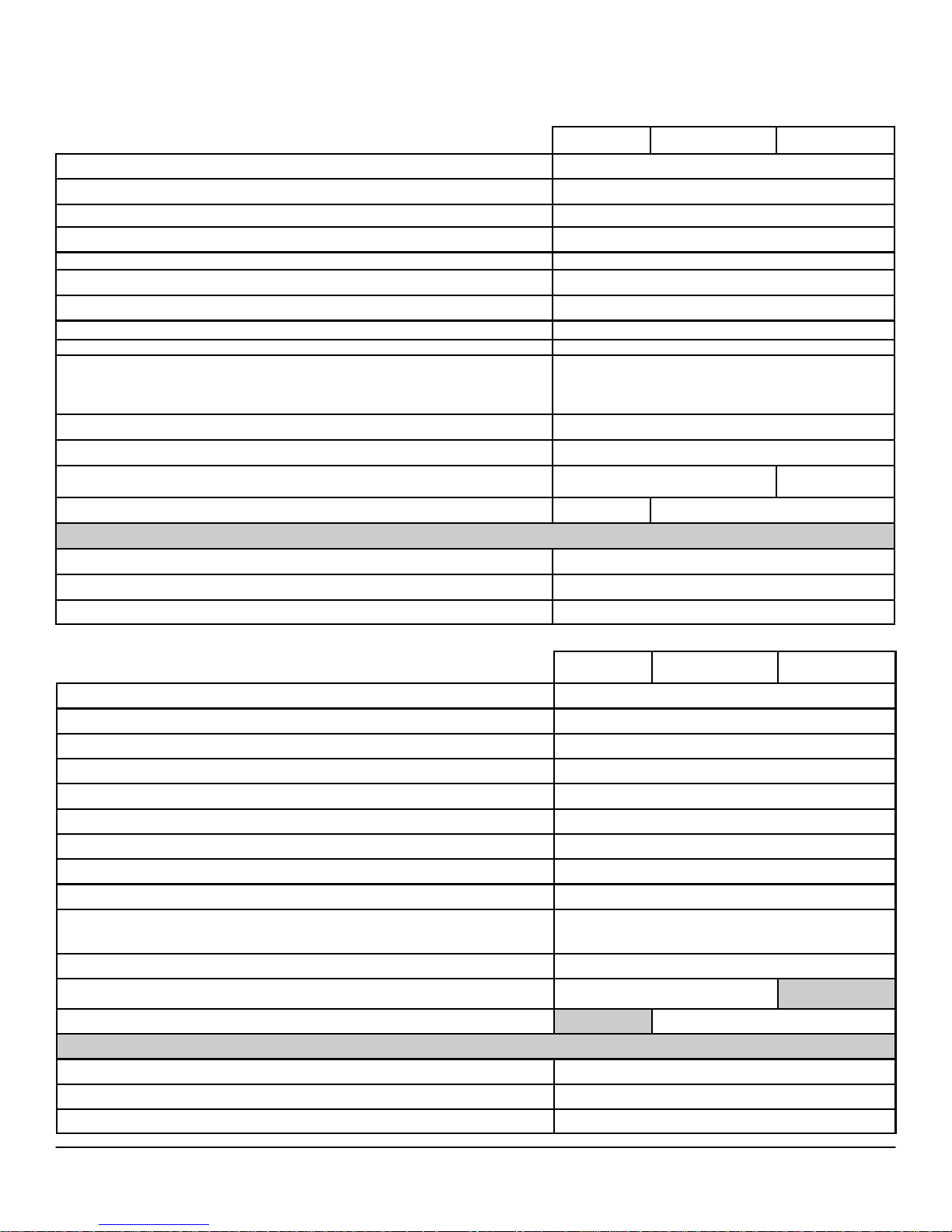
DELL™ OPTIPLEX™ 790 TECHNICAL GUIDEBOOK - V 2.0
GR A PH IC S /V I DE O C ON T R O LL E R (CO NT . )
1GB AMD RADEON™ HD6450
Bus Type (example integrated or PCIe x16)
GPU core clock
Frame Buffer Memory (onboard and shared) Size and Speed
Maximum power consumption
Overlay Planes
Maximum Color Depth
Maximum Vertical Refresh Rate
Multiple Display Support
Operating Systems Graphics/ Video API Support
Supported Resolutions and Max Refresh Rates (Hz) (Note: Analog and/or digital)
External connectors
DisplayPort Audio Support
Dimensions of full height card inches/centimeters (L x H)
Dimensions of low profile card inches/centimeters (L x H)
Environmental Operating Conditions (Non-Condensing):
Operating Temperature Range 10°-50° C
Relative Humidity Range 5-90% RH
Altitude Range 0-20,000 ft.
MT DT SFF
PCIEx16
625Mhz
800Mhz
20W
Yes
32-bit
85Hz
Yes
DX11 and OpenGL3
Dual-Link DVI Max: 2560 x 1600/32bpp @ 75Hz
DispalyPort Max: 2560 x 1600/32bpp @ 75Hz
VGA Max : 1920x1440/32bpp @ 75Hz
Min : 640x480/8bpp @ 60Hz
1 DVI-I and 1 DisplayPort
Yes
6.6 x 4.7 / 16.764 x 12.0
6.6 x 3.35 / 16.764 x 8.5
512MB AMD RADEON™ HD6350
Bus Type (example integrated or PCIe x16)
GPU core clock
Frame Buffer Memory (onboard and shared) Size and Speed
Maximum power consumption
Overlay Planes
Maximum Color Depth
Maximum Vertical Refresh Rate
Multiple Display Support
Operating Systems Graphics/ Video API Support
Supported Resolutions and Max Refresh Rates (Hz) (Note: Analog and/or digital)
External connectors
Dimensions of full height card inches/centimeters (L x H)
Dimensions of low profile card inches/centimeters (L x H)
Environmental Operating Conditions (Non-Condensing):
Operating Temperature Range 10°-50° C
Relative Humidity Range 5-90% RH
Altitude Range 0-20,000 ft.
MT DT SFF
PCIEx16
650Mhz
800Mhz
20W
Yes
32-bit
85Hz
Yes
DX11 and OpenGL3
DVI Max : 1920x1200/32bpp @ 75Hz
VGA Max: 1920x1440/32bpp @ 75Hz
Min : 640x480/8bpp @ 60Hz
1 DMS59 (DVI x2 or VGA x2)
6.6 x 2.731 / 16.764 x 6.936
6.6 x 2.731 / 16.764 x 6.936
29
Page 30

DELL™ OPTIPLEX™ 790 TECHNICAL GUIDEBOOK - V 2.0
HA R D DRI VE S
3.5” 1TB SATA 7200 RPM HDD
Capacity (bytes) 1,000,204,886,016
Dimensions inches (W x D x H) 5.87 x 4 x 1
Interface type and Maximum speed
Up to 6Gb/s (SATA 3.0)
Up to 3Gb/s (SATA 2.0)
Internal buffer size 32 MB
Average Seek Time 8.5 ms
Rotational Speed 7200 rpm
Logical Blocks 1,953,525,168
Power Source
Power Consumption (reference only) Idle 5.0W, Active 10.0W(running IOmeter utility)
Spin Up Current (reference only) 5V (1A) ,12V (2A)
Environmental Operating Conditions (Non-Condensing):
Temperature Range 5
0
C to 60
0
C
Relative Humidity Range 20% to 80% non-condensing
Maximum Wet Bulb Temperature 290C
Altitude Range -50 ft to 10000 ft
Environmental Non-Operating Conditions (Non-Condensing):
Temperature Range -40
0
C to 65
0
C
Relative Humidity Range 10% to 90% non-condensing
Maximum Wet Bulb Temperature 380C
Altitude Range -50 ft to 35000 ft
1
For hard drives, GB means 1 billion bytes ; actual capacity varies with preloaded material and operating environment and will be less.
30
Page 31

DELL™ OPTIPLEX™ 790 TECHNICAL GUIDEBOOK - V 2.0
HA R D DRI VE S ( C ON T .)
3.5” 500GB SATA 7200 RPM HDD
Capacity (bytes)
Dimensions inches (W x D x H)
Interface type and Maximum speed
Internal buffer size
Average Seek Time
Rotational Speed
Logical Blocks
500,107,862,016
Up to 6Gb/s (SATA 3.0)
Up to 3Gb/s (SATA 2.0)
5.87 x 4 x 1
16 MB
8.5 ms
7200 rpm
976,773,168
Power Source
Power Consumption (reference only) Idle 5.0W, Active 10.0W(running IOmeter utility)
Spin Up Current (reference only) 5V (1A) ,12V (2A)
Environmental Operating Conditions (Non-Condensing):
Temperature Range 5
0
C to 60
0
C
Relative Humidity Range 20% to 80% non-condensing
Maximum Wet Bulb Temperature 290C
Altitude Range -50 ft to 10000 ft
Environmental Non-Operating Conditions (Non-Condensing):
Temperature Range -40
0
C to 65
0
C
Relative Humidity Range 10% to 90% non-condensing
Maximum Wet Bulb Temperature 380C
Altitude Range -50 ft to 35000 ft
1
For hard drives, GB means 1 billion bytes ; actual capacity varies with preloaded material and operating environment and will be less.
31
Page 32

DELL™ OPTIPLEX™ 790 TECHNICAL GUIDEBOOK - V 2.0
HA R D DRI VE S (C O NT .)
3.5” 320GB SATA 7200 RPM HDD
Capacity (bytes) 320,072,933,376
Dimensions inches (W x D x H) 5.87 x 4 x 1
Interface type and Maximum speed
Up to 6Gb/s (SATA 3.0)
Up to 3Gb/s (SATA 2.0)
Internal buffer size 16 MB
Average Seek Time 8.5 ms
Rotational Speed 7200 rpm
Logical Blocks 625,142,448
Power Source
Power Consumption (reference only) Idle 5.0W, Active 10.0W(running IOmeter utility)
Spin Up Current (reference only) 5V (1A) ,12V (2A)
Environmental Operating Conditions (Non-Condensing):
Temperature Range 5
0
C to 60
0
C
Relative Humidity Range 20% to 80% non-condensing
Maximum Wet Bulb Temperature 290C
Altitude Range -50 ft to 10000 ft
Environmental Non-Operating Conditions (Non-Condensing):
Temperature Range -40
0
C to 65
0
C
Relative Humidity Range 10% to 90% non-condensing
Maximum Wet Bulb Temperature 380C
Altitude Range -50 ft to 35000 ft
1
For hard drives, GB means 1 billion bytes ; actual capacity varies with preloaded material and operating environment and will be less.
32
Page 33

DELL™ OPTIPLEX™ 790 TECHNICAL GUIDEBOOK - V 2.0
HA R D DRI VE S (C O NT .)
3.5” 250GB SATA 7200 RPM HDD
Capacity (bytes) 250,059,350,016
Dimensions inches (W x D x H) 5.87 x 4 x 1
Interface type and Maximum speed
Up to 6Gb/s (SATA 3.0)
Up to 3Gb/s (SATA 2.0)
Internal buffer size 8 MB
Average Seek Time 8.5 ms
Rotational Speed 7200 rpm
Logical Blocks 488,397,168
Power Source
Power Consumption (reference only) Idle 5.0W, Active 10.0W(running IOmeter utility)
Spin Up Current (reference only) 5V (1A) ,12V (2A)
Environmental Operating Conditions (Non-Condensing):
Temperature Range 5
0
C to 60
0
C
Relative Humidity Range 20% to 80% non-condensing
Maximum Wet Bulb Temperature 290C
Altitude Range -50 ft to 10000 ft
Environmental Non-Operating Conditions (Non-Condensing):
Temperature Range -40
0
C to 65
0
C
Relative Humidity Range 10% to 90% non-condensing
Maximum Wet Bulb Temperature 380C
Altitude Range -50 ft to 35000 ft
1
For hard drives, GB means 1 billion bytes ; actual capacity varies with preloaded material and operating environment and will be less.
33
Page 34

DELL™ OPTIPLEX™ 790 TECHNICAL GUIDEBOOK - V 2.0
HA R D DRI VE S ( C ON T .)
2.5” 500GB SATA 7200 RPM HDD
Capacity (bytes)
Dimensions inches (W x D x H)
Interface type and Maximum speed
Internal buffer size
Average Seek Time
Rotational Speed
Logical Blocks
500,107,862,016
Approximately (3.93 x 2.75 x 0.374 inches)
Up to 3Gb/s
16 MB
12 ms (Read)
7200 rpm
976,773,168
Power Source
Power Consumption (reference only) Idle 0.7W, Active 3.25W
Spin Up Current (reference only) 5V (1A)
Environmental Operating Conditions (Non-Condensing):
Temperature Range
50C to 60
0
C
Relative Humidity Range
Maximum Wet Bulb Temperature
Altitude Range
20% to 80% non-condensing
0
29
C
-50 ft to 10000 ft
Environmental Non-Operating Conditions (Non-Condensing):
0
-40
Temperature Range
Relative Humidity Range
10% to 90% non-condensing
C to 65
Maximum Wet Bulb Temperature
Altitude Range
1
For hard drives, GB means 1 billion bytes ; actual capacity varies with preloaded material and operating environment and will be less.
-50 ft to 35000 ft
38
0
C
0
C
34
Page 35

DELL™ OPTIPLEX™ 790 TECHNICAL GUIDEBOOK - V 2.0
HA R D DRI VE S ( C ON T .)
2.5” 500GB SATA 7200 RPM HYBRID HDD
Capacity (bytes)
Dimensions inches (W x D x H)
Interface type and Maximum speed
Internal buffer size
Average Seek Time
Rotational Speed
Logical Blocks
500,107,862,016
Approximately (3.93 x 2.75 x 0.374 inches)
Up to 3Gb/s
16 MB
12 ms (Read)
7200 rpm
976,773,168
Power Source
Power Consumption (reference only) Idle 0.8W, Active 3.25W
Spin Up Current (reference only) 5V (1A)
Environmental Operating Conditions (Non-Condensing):
Temperature Range
50C to 60
0
C
Relative Humidity Range
Maximum Wet Bulb Temperature
Altitude Range
20% to 80% non-condensing
0
29
C
-50 ft to 10000 ft
Environmental Non-Operating Conditions (Non-Condensing):
0
-40
Temperature Range
Relative Humidity Range
10% to 90% non-condensing
C to 65
Maximum Wet Bulb Temperature
Altitude Range
1
For hard drives, GB means 1 billion bytes ; actual capacity varies with preloaded material and operating environment and will be less.
-50 ft to 35000 ft
38
0
C
0
C
35
Page 36

DELL™ OPTIPLEX™ 790 TECHNICAL GUIDEBOOK - V 2.0
HA R D DRI VE S ( C ON T .)
2.5” 320GB WITH AND WITHOUT FIPS FULL DISK ENCRYPTION SATA HDD
Capacity (bytes)
320,072,933,376
Dimensions inches (W x D x H) 5.87 x 4 x 1 (includes sled)
Interface type and Maximum speed Up to 3Gb/s
Internal buffer size 16 MB
Average Seek Time 8.5 ms
Rotational Speed 7200 rpm
Logical Blocks 625,142,448
Power Source
Power Consumption (reference only) Idle 0.7W, Active 3.25W
Spin Up Current (reference only) 5V (1A)
Environmental Operating Conditions (Non-Condensing):
Temperature Range 5
0
C to 60
0
C
Relative Humidity Range 20% to 80% non-condensing
Maximum Wet Bulb Temperature 290C
Altitude Range -50 ft to 10000 ft
Environmental Non-Operating Conditions (Non-Condensing):
Temperature Range -40
0
C to 65
0
C
Relative Humidity Range 10% to 90% non-condensing
Maximum Wet Bulb Temperature 380C
Altitude Range -50 ft to 35000 ft
1
For hard drives, GB means 1 billion bytes ; actual capacity varies with preloaded material and operating environment and will be less.
36
Page 37

DELL™ OPTIPLEX™ 790 TECHNICAL GUIDEBOOK - V 2.0
HA R D DRI VE S ( C ON T .)
2.5” 250GB SATA 7200 RPM HDD
Capacity (bytes)
Dimensions inches (W x D x H)
Interface type and Maximum speed
Internal buffer size
Average Seek Time
Rotational Speed
Logical Blocks
250,059,350,016
Approximately (3.93 x 2.75 x 0.374 inches)
Up to 3Gb/s
16 MB
12 ms (Read)
7200 rpm
488,397,168
Power Source
Power Consumption (reference only) Idle 0.7W, Active 3.25W
Spin Up Current (reference only) 5V (1A)
Environmental Operating Conditions (Non-Condensing):
Temperature Range
50C to 60
0
C
Relative Humidity Range
Maximum Wet Bulb Temperature
Altitude Range
10% to 90% non-condensing
0
29
C
-50 ft to 10000 ft
Environmental Non-Operating Conditions (Non-Condensing):
0
-40
Temperature Range
Relative Humidity Range
10% to 90% non-condensing
C to 65
Maximum Wet Bulb Temperature
Altitude Range
1
For hard drives, GB means 1 billion bytes ; actual capacity varies with preloaded material and operating environment and will be less.
-50 ft to 35000 ft
38
0
C
0
C
37
Page 38

DELL™ OPTIPLEX™ 790 TECHNICAL GUIDEBOOK - V 2.0
HA R D DRI VE S ( C ON T .)
2.5” 128GB1 SATA SOLID STATE DRIVE
Capacity (bytes) 128,035,676,160
Dimensions inches (W x D x H) 3.94 x 2.75 x 0.374
Interface type and Maximum speed
Up to 6Gb/s (SATA 3.0)
Up to 3Gb/s (SATA 2.0)
MTBF 1M hours
Average Seek Time n/a
Logical Blocks 250,069,680
Power Source
Power Consumption (reference only) Idle 1W, Active 1.25W
Spin Up Current (reference only) 5V (1000mA)
Environmental Operating Conditions (Non-Condensing):
Temperature Range 0°C to 70°C
Relative Humidity Range 10 to 90%
Maximum Wet Bulb Temperature 29°C
Altitude Range -200 to 5,000 m
Op Shock (@0.5ms) 1,500G
Environmental Non-Operating Conditions (Non-Condensing):
Temperature Range -55°C to 95°C
Relative Humidity Range 5 to 95%
Maximum Wet Bulb Temperature 38°C
Altitude Range -200 to 10,600 m
1
For hard drives, GB means 1 billion bytes ; actual capacity varies with preloaded material and operating environment and will be less.
38
Page 39
DELL™ OPTIPLEX™ 790 TECHNICAL GUIDEBOOK - V 2.0
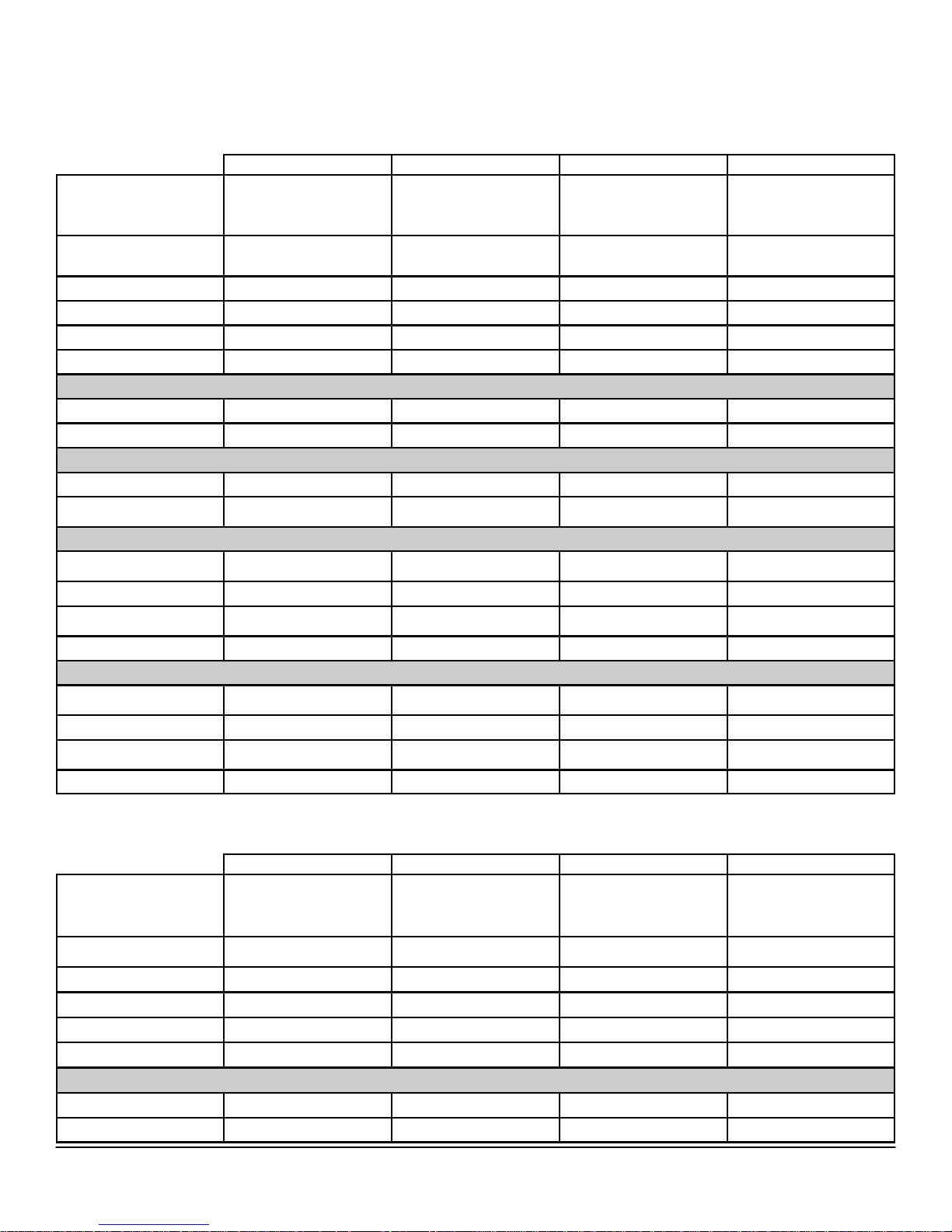
OP T IC A L DR I VE S
DVD +/- RW1
External Dimensions
inches/centimeters
(Without Bezel – W x H x
D)
Weight (max) pounds/
kilograms
Interface type and speed
Disc Capacity
Internal buffer size
Access Times (typical)
Maximum Data Transfer Rates
Writes 16x DVD/48x CD 16x DVD/48x CD 8x DVD/ 24x CD 8x DVD / 24x CD
Reads 16x DVD/48x CD 16x DVD/48x CD 8x DVD/ 24x CD 8x DVD/ 24x CD
Power Source
DC Power Requirements 12V, 5V 12V, 5V 5V 5V
DC Current
Environmental Operating Conditions (Non-Condensing):
Operating Temperature
Range
Relative Humidity Range 20% to 80% RH 20% to 80% RH 20% to 80% RH 20% to 80% RH
Maximum Wet Bulb Tem-
perature
Altitude Range -200 to 3048 -200 to 3048 -200 to 3048 -200 to 3048
Environmental Non-Operating Conditions (Non-Condensing):
Operating Temperature
Range
Relative Humidity Range 5% to 95% RH 5% to 95% RH 5% to 95% RH 5% to 95% RH
Maximum Wet Bulb Tem-
perature
Altitude Range -200 to 10600m -200 to 10600m -200 to 10600m -200 to 10600m
148.2mm(6in)/42mm (2in)/
1200mA (12V)/ 900mA
MT DT SFF USFF
190.5 (max)
800g 800g 170g 170g
SATA 1.5Gbit/s SATA 1.5Gbit/s SATA 1.5Gbit/s SATA 1.5Gbit/s
Standard Standard Standard Standard
supplier dependent supplier dependent supplier dependent supplier dependent
supplier dependent supplier dependent supplier dependent supplier dependent
(5V)
5C to 50C 5C to 50C 5C to 50C 5C to 50C
29C 29C 29C 29C
-40C to 65C -40C to 65C -40C to 65C -40C to 65C
38C 38C 38C 38C
148.2mm(6in)/42mm (2in)/
190.5 (max)
1200mA (12V)/ 900mA
(5V)
128.0 mm (5.04)/ 12.7mm
(0.5 in)/ 126.1mm (4.97in)
1000mA 1000mA
128.0 mm (5.04)/ 12.7mm
(0.5 in)/ 126.1mm (4.97in)
1
Discs burned with this drive may not be compatible with some existing drives and players; using DVD+R media provides maximum compatibility.
DVD-ROM
External Dimensions
inches/centimeters
(Without Bezel – W x H x
D)
Weight (max) pounds/
kilograms
Interface type and speed
Disc Capacity
Internal buffer size
Access Times (typical)
Maximum Data Transfer Rates
Writes N/A N/A N/A N/A
Reads 16x DVD/48x CD 16x DVD/48x CD 8x DVD/ 24x CD 8x DVD/ 24x CD
148.2mm(6in)/42mm (2in)/
MT DT SFF USFF
190.5 (max)
750g 750g 165g 165g
SATA 1.5Gbit/s SATA 1.5Gbit/s SATA 1.5Gbit/s SATA 1.5Gbit/s
Standard Standard Standard Standard
supplier dependent supplier dependent supplier dependent supplier dependent
supplier dependent supplier dependent supplier dependent supplier dependent
148.2mm(6in)/42mm (2in)/
190.5 (max)
128.0 mm (5.04)/ 12.7mm
(0.5 in)/ 126.1mm (4.97in)
128.0 mm (5.04)/ 12.7mm
(0.5 in)/ 126.1mm (4.97in)
39
Page 40
DELL™ OPTIPLEX™ 790 TECHNICAL GUIDEBOOK - V 2.0
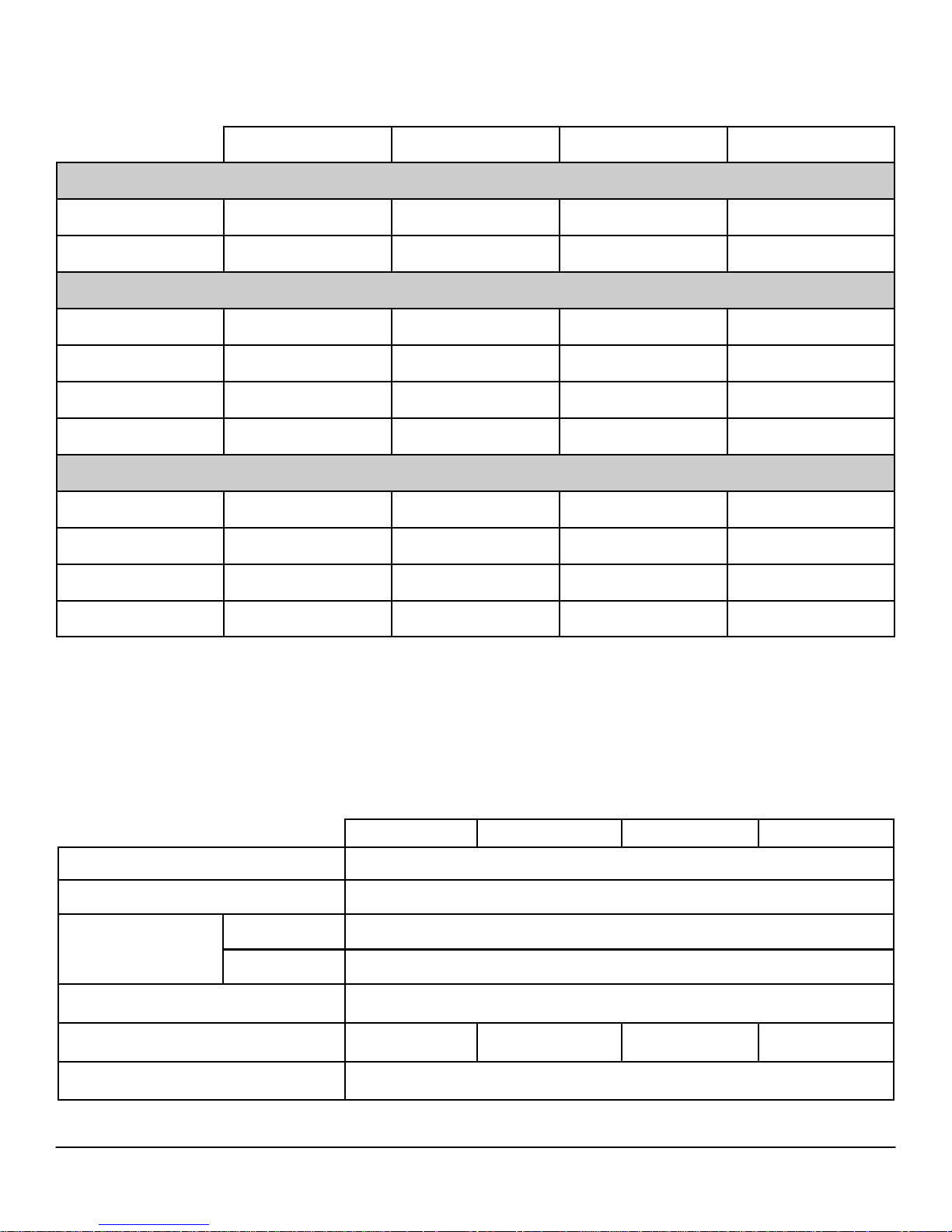
OP T IC A L DR I VE S ( CO N T. )
DVD-ROM (CONT.)
Power Source
DC Power Requirements 12V, 5V 12V, 5V 5V 5V
DC Current
Environmental Operating Conditions (Non-Condensing):
Operating Temperature
Range
Relative Humidity Range 20% to 80% RH 20% to 80% RH 20% to 80% RH 20% to 80% RH
Maximum Wet Bulb Tem-
perature
Altitude Range -200 to 3048m -200 to 3048m -200 to 3048m -200 to 3048m
Environmental Non-Operating Conditions (Non-Condensing):
Operating Temperature
Range
Relative Humidity Range 5% to 95% RH 5% to 95% RH 5% to 95% RH 5% to 95% RH
Maximum Wet Bulb Tem-
perature
1200mA (12V)/ 900mA
MT DT SFF USFF
(5V)
5C to 50C 5C to 50C 5C to 50C 5C to 50C
29C 29C 29C 29C
-40C to 65C -40C to 65C -40C to 65C -40C to 65C
38C 38C 38C 38C
1200mA (12V)/ 900mA
(5V)
800mA 800mA
Altitude Range -200 to 10600m -200 to 10600m -200 to 10600m -200 to 10600m
SE C URI TY
DELL DATA PROTECTION | ENCRYPTION ENGINE
Controller bus architecture PCI Express one lane (x1)
Chip STM7007
Operational
Power consumption
typical
Idle typical 40mW
Connector PCI Express Gen 2.0 X1
Form factor
MT DT SFF USFF
411mW
Full height
PEX
Half height
PEX
Half height
PEX
OS Support Win XP, Win Vista and Win 7
40
Page 41
DELL™ OPTIPLEX™ 790 TECHNICAL GUIDEBOOK - V 2.0
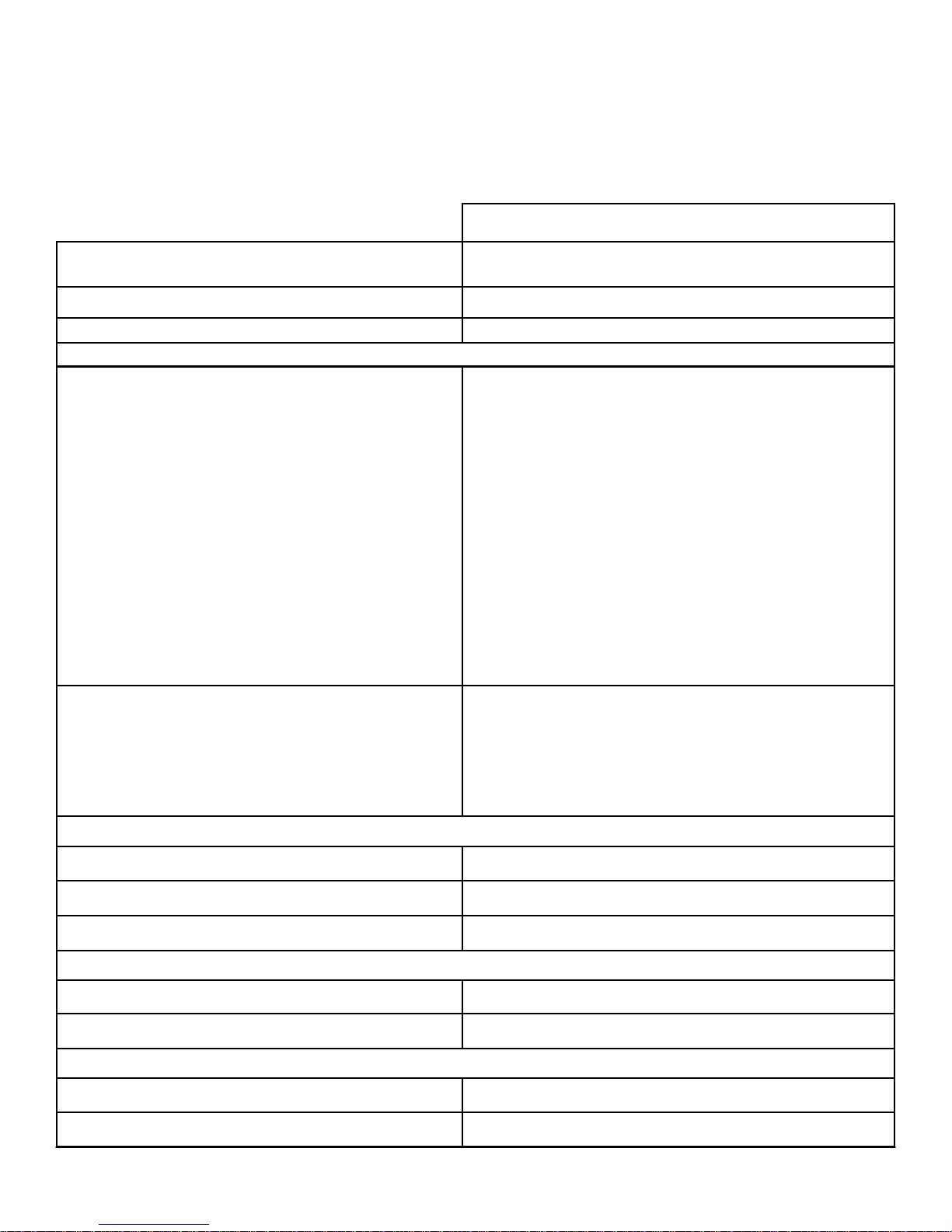
ME D IA CA R D R EA D ER (M C R)
NOTE: Dell 19 in 1 Media Card Reader (MCR) is supported via a F5 to F3 bay converter on the MT and DT and may require a slim line optical drive
depending on selectable configuration. MCR is not available on the SFF and USFF chassis.
19 IN 1 MEDIA CARD READER
External Dimensions inches/(centimeters)
(With Bezel – W x H)
3.99/(10.13cm)/1.0/(2.54cm)
MT/DT
Weight (max) pounds/kilograms ~155g
Interface type and speed
USB 2.0, 480Mb/s
Media Supported ( maximum capacity supported will vary by Flash Media Types)
CF I
CF II
Micro Drive (MD)
Secure Digital (SD)
SDHC
Mini Secure Digital (mini-SD)
Micro Secure Digital (Micro-SD)(with adapter)
Multi Media Card (MMC)
RS Multi Media Card (RS-MMC)
Media Supported
Multi Media Card plus (MMC plus)
RS Multi Media Card plus (RS-MMC plus)
Multi Media Card Micro(MMC Micro) (with adapter)
Memory Stick (MS)
Memory Stick Pro(MS Pro)
Memory Stick Pro Duo (MS Pro Duo)
Memory Stick Duo (MS-Duo)
Memory Stick Micro(MS Micro)(M2) (with adapter)
Smart Media (SM)
xD
Compact Flash type I/II Version 4.0
Smart Media (SM) Specification 2003
Multi Media Card (MMC) Specification 4.2
Support Specification Versions:
Secure Digital (SD) 2.0
Memory Stick Pro (MS-PRO) Specification 1.02
Memory Stick (MS) Specification 1.43
xD Specification 1.2
Power Source
Max Power Requirements 12V, 5V
Supply Voltage Range 4.75V ~ 5.25V
Power Consumption: Standby less than 0.5mA @ 5.0VDC
Environmental Operating Conditions (Non-Condensing):
Operating Temperature Range 5C to 50C
Relative Humidity Range 10% to 90% RH
Environmental Non-Operating Conditions (Non-Condensing):
Operating Temperature Range -40C to 65C
Relative Humidity Range 5% to 95% RH
41
Page 42
DELL™ OPTIPLEX™ 790 TECHNICAL GUIDEBOOK - V 2.0
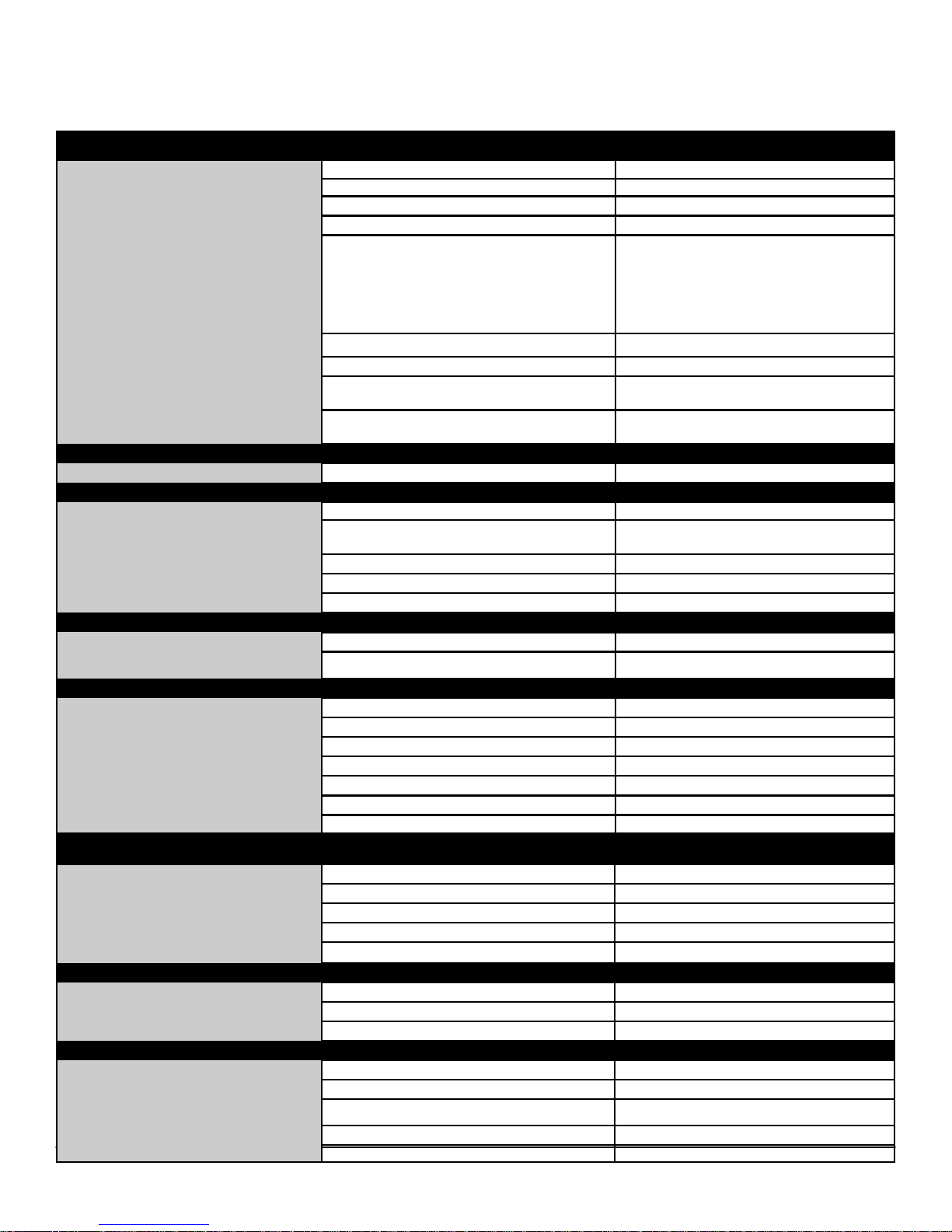
BI O S D E F AU L TS
System Configuration
Integrated NIC: Enable
USB Controller: Enable or disable
Serial Port: COM1
SATA Operation: AHCI
USB Controller:
SMART Reporting: Disable
Diskette Drive: Enable
Enable or disable the integrated USB
Controller for:
●Boot support
●Rear Dual USB Ports
●Front USB Ports
●Rear Quad USB Ports
Video
Performance
Virtualization Support
Security
SATA-0 Password: Not set
Miscellaneous Devices: Enables or disables the Wi-Fi Radio
Enable (SATA-0, SATA-1, SATA-2, SATA
Drives:
Primary Video: Auto
Multiple Core Support: All
Intel® SpeedStep™: Enable
C States Control: Disable
Limit CPUID Value: Enable
HyperThread control: Enable
Virtualization: Enable
VT for Direct I/O: Disable
Administrator Password: Not set
System Password: Not set
Password Changes: Enable
TPM Security: Disable
CPU XD Support: Enable
Computrace®: Deactivate
-3)
Power Management
Maintenance
Fast Boot: Thorough
AC Recovery: Power Off
Auto On Time: Disable
Deep Sleep Control: Disable
Fan Control Override: Disable
Wake on LAN: Disable
Service Tag: Set by the factory
Asset Tag: Optional User Entry
SERR Message: Enable
Numlock LED: Enable
USB Emulation: Enable
Keyboard Errors: Enable
POST HotKeys: Enable
42
Page 43
DELL™ OPTIPLEX™ 790 TECHNICAL GUIDEBOOK - V 2.0
CH A SS IS EN C LO S U R E & V E NT ILA TI O N R EQ UIR EM E N TS
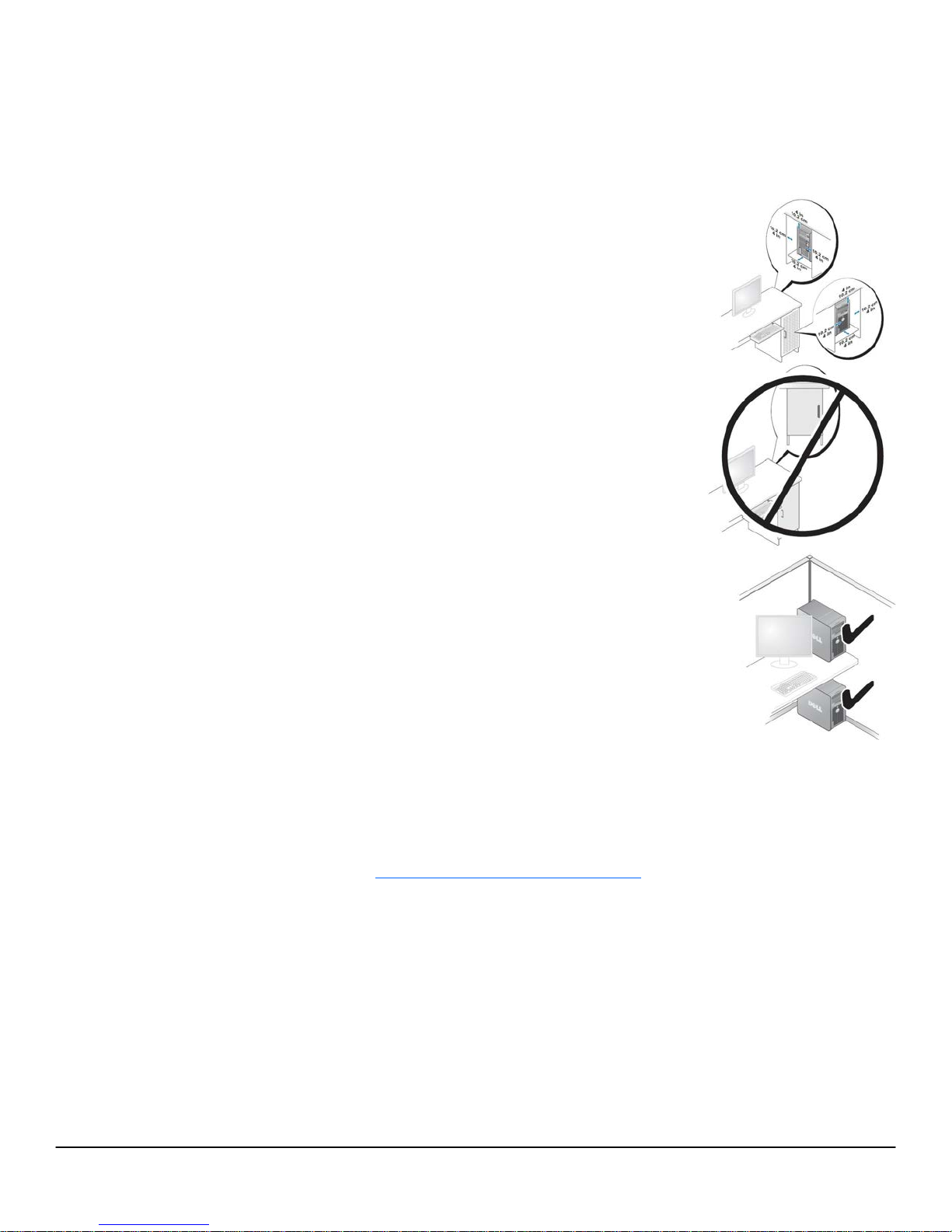
ENCLOSURE VENTILATION
If your enclosure has doors, they need to be of a type that allows at least 30% airflow through
the enclosure (front and back).
ENCLOSURE MINIMUM CLEARANCE
Leave a 10.2 cm (4 in.) minimum clearance on all vented sides of the computer to permit the
airflow required for proper ventilation.
RECOMMENDED ENCLOSURE
Do not install your computer in an enclosure that does not allow airflow. This restricts the
airflow and impacts your computer’s performance, possibly causing it to overheat.
OPEN DESK MINIMUM CLEARANCE
If your computer is installed in a corner, on a desk, or under a desk, leave at least 5.1 cm (2 in.)
clearance from the back of the computer to the wall to permit the airflow required for proper
ventilation.
REG ULA TOR Y C OMPLIA NC E A ND ENVI RO NME NTA L
Product related conformity assessment and regulatory authorizations including Product Safety, Electromagnetic Compatibility (EMC),
Ergonomics, and Communication Devices relevant to this product may be viewed at www.dell.com/regulatory_compliance. The
Regulatory Datasheet for this product is located at http://www.dell.com/regulatory_compliance.
Details of Dell's environmental stewardship program to conserve product energy consumption, reduce or eliminate materials for
disposal, prolong product life span and provide effective and convenient equipment recovery solutions may be viewed at
www.dell.com/environment. Product related conformity assessment, regulatory authorizations, and information encompassing
Environmental, Energy Consumption, Noise Emissions, Product Materials Information, Packaging, Batteries, and Recycling relevant
to this product may be viewed by clicking the Design for Environment link on the webpage.
43
Page 44

DELL™ OPTIPLEX™ 790 TECHNICAL GUIDEBOOK - V 2.0
Reduce energy consumption, save money Notes
Energy ecient design: Allowing you compute more, and consume less. The OptiPlex 790 is 5.0 En-
ergy Star® rated (containing a 80 PLUS® Gold certied power supply) which means it uses energyecient power supplies, operates eciently in multiple modes (O, Sleep and Idle), and has advanced
power-management features enabled. This level of eciency helps you save money and energy associated with the use of your product.
Compare energy consumption with energy savings calculator: www.dell.com/energy All congs
Take control of your energy consumption: Includes Energy Smart Power Management Settings which
allows you to congure your computer to ensure the greatest energy saving in Inactive mode.
Reduce, Re-use, Recycle
Recycle responsibly and invest in peace of mind: Protect your company's sensitive data and recycle
responsibly with the Dell Asset Recovery & Recycling Service. Find out how: http://content.dell.com/
us/en/enterprise/services-asset-recovery-services.aspx?redirect=2
Protect developing countries from e-waste exports: Because responsible recycling matters to you, it
matters to us. In 2009, Dell was the rst in the industry to ban the export of nonworking electronics or
electronic waste (e-waste) to developing countries. Learn more: http://content.dell.com/us/en/corp/
d/corp-comm/e-waste.aspx
Eco-responsible packaging
Molded paper pulp packaging cushions (where available): Making it easier to choose products with
eco-responsible packaging, this product is cradled in our innovative molded paper pulp packaging. We
know that responsible sourcing is important to you, so our pulp is made with 100% news print or recycled cardboard that is sourced near manufacturing operations to the reduce carbon footprint of shipping.
Recycled milk jug packaging cushions (where available): Making it easier to choose products with ecoresponsible packaging, this product is cradled in our innovative recylced milk jug HDPE packaging. We
know that responsible sourcing is important to you, so our cushions are made with 100% recycled material that is sourced near manufacturing operations to the reduce carbon footprint of shipping.
All E-Star Selected congs
All Energy
Smart Selected
congs
All congs
All congs
SFF congs
only - regional
disclaimer:
only available
in US, Canada
and Malaysia
MT and DT
congs only regional disclaimer: only
available in US,
Canada and
Malaysia
Recycled packaging: Helping you to avoid sending unnecessary waste to landlls, this products ships
with expanded polyethylene cushion packaging material which has a high percentage of recycled
content (20% in APJ, 25% in EMEA and 65% in Americas). Using recycled materials encourages waste
reduction and the conservation of resources.
Shipped in recycled materials: To help you reduce waste and reuse potentially useful materials, this
product's box packaging is made with at least 25% recycled post consumer cardboard
Reduce packaging waste: Dell is implementing a plan to simplify and revolutionize computer packaging that will result in the elimination of approximately 20 million pounds of packaging materials from
2008 through 2012. Find out more: http://content.dell.com/us/en/corp/d/corp-comm/earth-
Eco- Partic-
ipation
products-packaging.aspx. This product is also oered in a multipack conguration upon request.
Environmentally Preferable Ingredients
Finding better ingredients: Making it easy for you to reduce your environmental impact, all OptiPlex
790 enclosure plastics are built with a minimum of 10% Post Consumer Recycled Content. It also has
reduced levels of environmentally sensitive materials such as mercury and arsenic
Meets or exceeds world-wide environmental standards: WW EU RoHS (Lead free), China RoHS and
REACH compliant.
EPEAT US/Canada/France , Energy Star, TCO, Blue Angel
Learn more about Eco-Labels at http://content.dell.com/us/en/corp/d/corp-comm/dell-greenproduct-certications.aspx
USFF and regional congs
not shipping
HDPE or Molded Paper cush-
All congs
All congs.
Multipack is
available in the
US
All congs
44
Page 45
DELL™ OPTIPLEX™ 790 TECHNICAL GUIDEBOOK - V 2.0
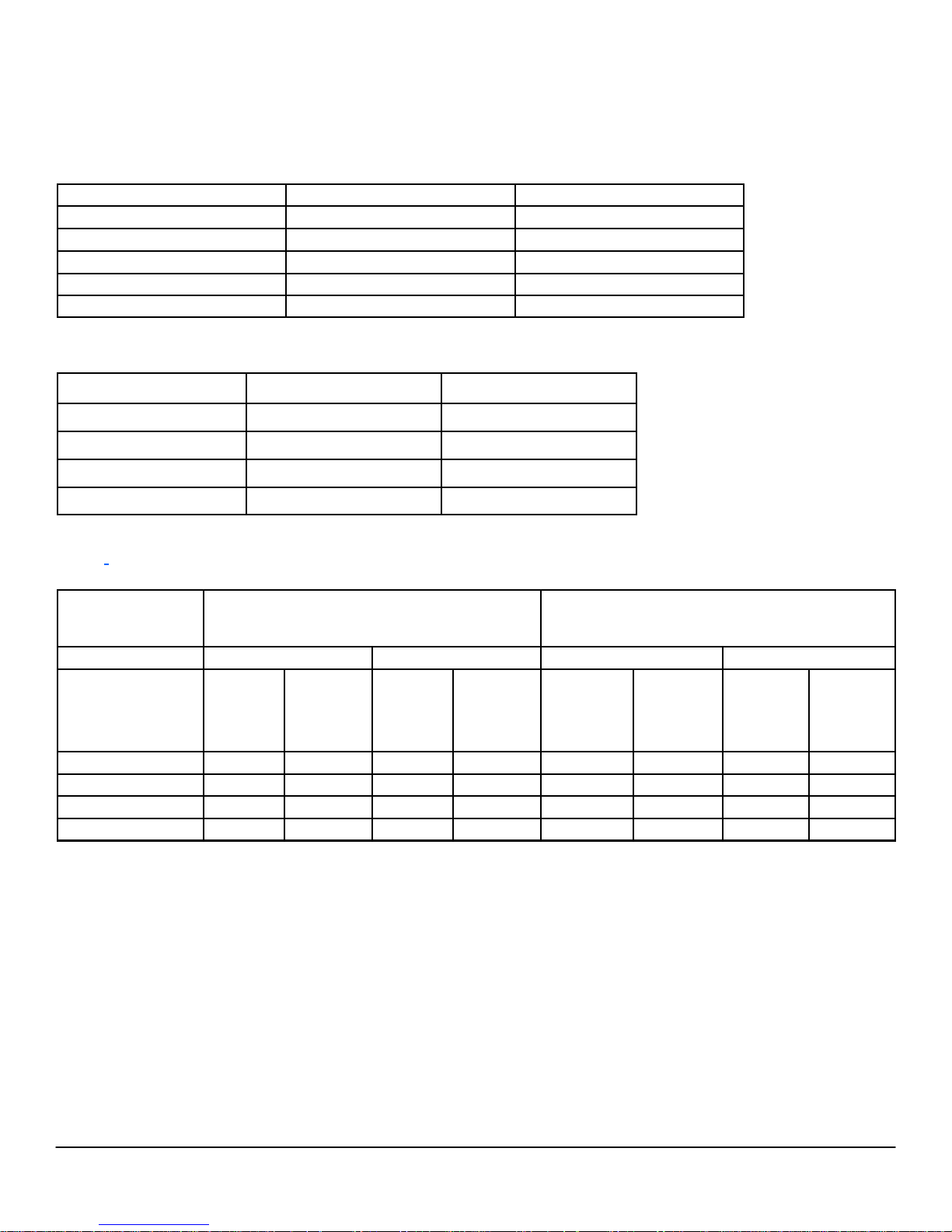
ACO UST IC NOI SE EMI SS ION IN FOR MAT ION
OPTIPLEX 790 MT
Component
CPU Intel l3,3.3GHZ,2c SNB 65W
Typical Configuration High-end Configuration
Intel I5,3.1GHZ ,4c SNB 95W
Memory 2G DDR3 1333MHz 2G DDR3 1333MHz(x2)
HDD (#, capacity) 250G 7200RPM SATA2 500G 7200RPM SATA2(x2)
RMSD 16X DVD+/-RW SATA HH 16X DVD+/-RW SATA HH
Graphics Adapter Intel® HD Graphics Family AMD Radeon HD6350
The Declared Noise Emission in accordance with ISO 9296 for the Dell OptiPlex 780 MT is as follows:
(all values L
Operating Mode
Idle
HDD Operating
90% CPU
ODD Operating
expressed in bels; 1 bel=10 decibels, re 10
WAd
Typical Configuration
Declared Sound Power (L
3.7 3.9
3.9 3.9
3.8 4.0
5.1 5.1
The Declared A-weighted Sound Pressure Level in decibels (re 2x10
measured in accordance with ISO 7779 7.6.1, 7.6.2, and C.15.2 and declared in accordance with ISO 9296 for this product is as
1
follows
:
Operating Mode
Typical Configuration Declared Sound Pressure
(LpA)
-12
Watts)
High-end Configuration
)
Declared Sound Power (L
WAd
)
WAd
-5
Pa), at Operator, Bystander, and Desk Side Positions are
High-end Configuration Declared Sound Pressure
(LpA)
Idle
HDD Operating
90% CPU
ODD Operating
1
All tests are conducted according to ISO 7779 and declared according to ISO 9296 except 90% CPU. For this mode, the system CPU was stressed
at 90% utilization with no other peripheral device actively seeking. This test mode is not specified in ISO 7779, but was measured using the same
microphone distances and measurement techniques defined for the other reported operating modes.
2
Declared Sound Power rounded to nearest tenth of a bel per ISO 9296 section 4.4.2
Table-Top Floor-Standing Table-Top Floor- Standing
Operator
Position
(LpA)
Bystander
Position
(LpA)
Operator
Position
(LpA)
Bystander
Position
(LpA)
Operator
Position
(LpA)
Bystander
Position
(LpA)
Operator
Position
(LpA)
Bystand-
tion (LpA)
26.5 24.2 21.0 21.2 26.8 24.3 20.9 21.4
26.7 24.9 21.1 20.9 26.8 23.9 21.8 21.4
26.7 24.8 21.6 21.3 30.0 26.3 22.4 22.0
39.7 35.8 36.6 36.1 40.7 36.0 35.4 33.5
er Posi-
45
Page 46
DELL™ OPTIPLEX™ 790 TECHNICAL GUIDEBOOK - V 2.0
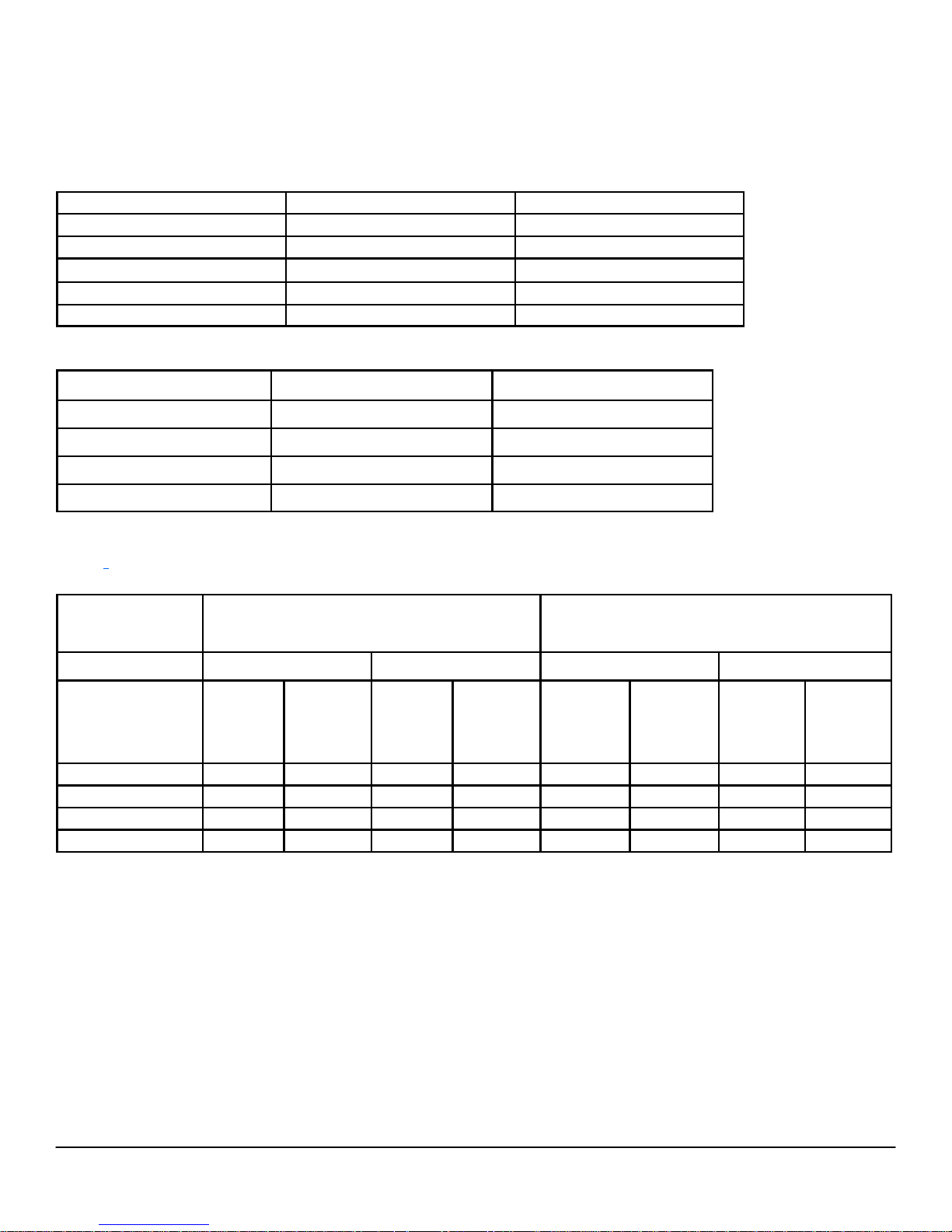
ACO UST IC NOI SE EMI SS ION IN FOR MAT ION
OPTIPLEX 790 DT
Component
Typical Configuration High-end Configuration
CPU Intel l3,3.3GHZ,2c SNB 65W Intel I5,3.1GHZ ,4c SNB 95W
Memory 2G DDR3 1333MHz 2G DDR3 1333MHz(x2)
HDD (#, capacity) 250G 7200RPM SATA2 500G 7200RPM SATA2
RMSD 16X DVD+/-RW SATA HH 16X DVD+/-RW SATA HH
Graphics Adapter Intel® HD Graphics Family AMD Radeon HD6350
The Declared Noise Emission in accordance with ISO 9296 for the Dell OptiPlex 780 DT is as follows:
(all values L
Operating Mode
Idle
HDD Operating
90% CPU
ODD Operating
expressed in bels; 1 bel=10 decibels, re 10
WAd
Typical Configuration
Declared Sound Power (L
3.7 3.7
3.6 3.8
4.1 4.4
5.1 5.1
The Declared A-weighted Sound Pressure Level in decibels (re 2x10
measured in accordance with ISO 7779 7.6.1, 7.6.2, and C.15.2 and declared in accordance with ISO 9296 for this product is as
1
follows
:
Operating Mode
Typical Configuration Declared Sound Pressure
(LpA)
-12
Watts)
WAd
)
High-end Configuration
Declared Sound Power (L
-5
Pa), at Operator, Bystander, and Desk Side Positions are
WAd
)
High-end Configuration Declared Sound Pressure
(LpA)
Idle
HDD Operating
90% CPU
ODD Operating
1
All tests are conducted according to ISO 7779 and declared according to ISO 9296 except 90% CPU. For this mode, the system CPU was stressed
at 90% utilization with no other peripheral device actively seeking. This test mode is not specified in ISO 7779, but was measured using the same
microphone distances and measurement techniques defined for the other reported operating modes.
2
Declared Sound Power rounded to nearest tenth of a bel per ISO 9296 section 4.4.2
Table-Top Floor-Standing Table-Top Floor- Standing
Operator
Position
(LpA)
Bystander
Position
(LpA)
Operator
Position
(LpA)
Bystander
Position
(LpA)
Operator
Position
(LpA)
Bystander
Position
(LpA)
Operator
Position
(LpA)
Bystand-
tion (LpA)
24.6 20.7 20.5 19.5 24.9 22.5 21.0 20.9
24.9 21.2 20.7 19.8 24.2 21.8 21.0 20.9
29.4 24.1 20.8 21.3 33.4 30.7 27.1 26.2
42.2 36.8 35.1 34.7 41.2 37.2 35.5 33.5
er Posi-
46
Page 47
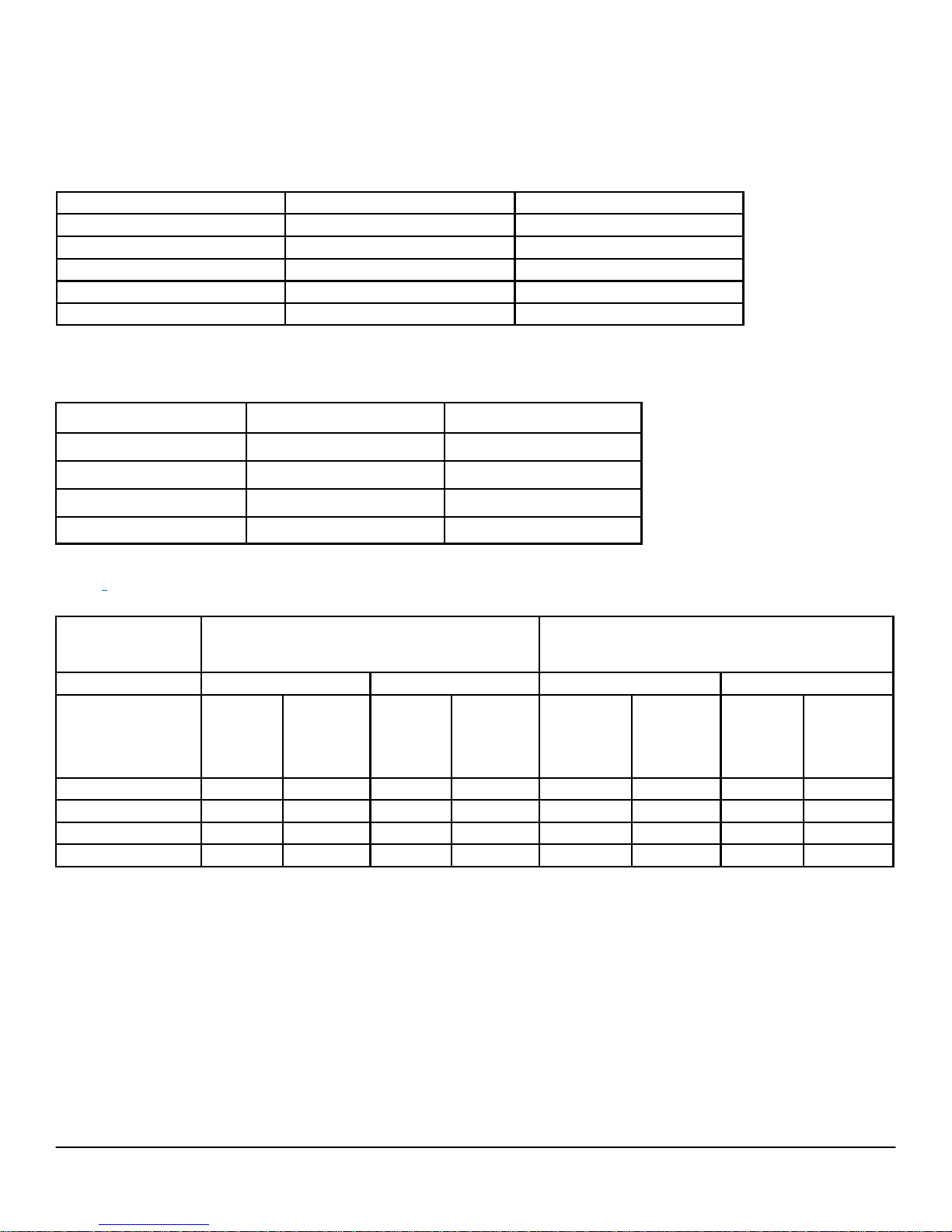
DELL™ OPTIPLEX™ 790 TECHNICAL GUIDEBOOK - V 2.0
ACO UST IC NOI SE EMI SS ION IN FOR MAT ION
OPTIPLEX 790 SFF
Component
Typical Configuration High-end Configuration
CPU Intel l3,3.3GHZ,2c SNB,65W Intel I5,3.1GHZ ,4c SNB 95W
Memory 2G DDR3 1333MHz 2G DDR3 1333MHz(x2)
HDD (#, capacity) 250G 7200RPM SATA2 500G 7200RPM SATA2
RMSD 16X DVD+/-RW SATA HH 16X DVD+/-RW SATA HH
Graphics Adapter Intel® HD Graphics Family AMD Radeon HD6350
The Declared Noise Emission in accordance with ISO 9296 for the Dell OptiPlex 780 SFF is as follows:
(all values L
Operating Mode
Idle
HDD Operating
90% CPU
ODD Operating
expressed in bels; 1 bel=10 decibels, re 10
WAd
Typical Configuration
Declared Sound Power (L
3.6 3.9
3.6 4.0
3.9 4.3
4.6 4.6
The Declared A-weighted Sound Pressure Level in decibels (re 2x10
measured in accordance with ISO 7779 7.6.1, 7.6.2, and C.15.2 and declared in accordance with ISO 9296 for this product is as
1
follows
:
Operating Mode
Typical Configuration Declared Sound Pressure
(LpA)
WAd
-12
Watts)
)
High-end Configuration
Declared Sound Power (L
-5
Pa), at Operator, Bystander, and Desk Side Positions are
)
WAd
High-end Configuration Declared Sound Pressure
(LpA)
Idle
HDD Operating
90% CPU
ODD Operating
1
All tests are conducted according to ISO 7779 and declared according to ISO 9296 except 90% CPU. For this mode, the system CPU was stressed
at 90% utilization with no other peripheral device actively seeking. This test mode is not specified in ISO 7779, but was measured using the same
microphone distances and measurement techniques defined for the other reported operating modes.
2
Declared Sound Power rounded to nearest tenth of a bel per ISO 9296 section 4.4.2
Table-Top Floor-Standing Table-Top Floor- Standing
Operator
Position
(LpA)
Bystander
Position
(LpA)
Operator
Position
(LpA)
Bystander
Position
(LpA)
Operator
Position
(LpA)
Bystander
Position
(LpA)
Operator
Position
(LpA)
Bystander
Position
25.3 21.6 19.6 18.6 29.4 25.8 22.1 21.4
24.7 20.5 20.6 19.9 29.3 25.4 22.7 20.6
28.9 24.2 21.0 21.0 32.9 28.1 27.5 26.5
36.9 30.6 29.5 27.7 38.0 32.4 33.2 29.6
(LpA)
47
Page 48
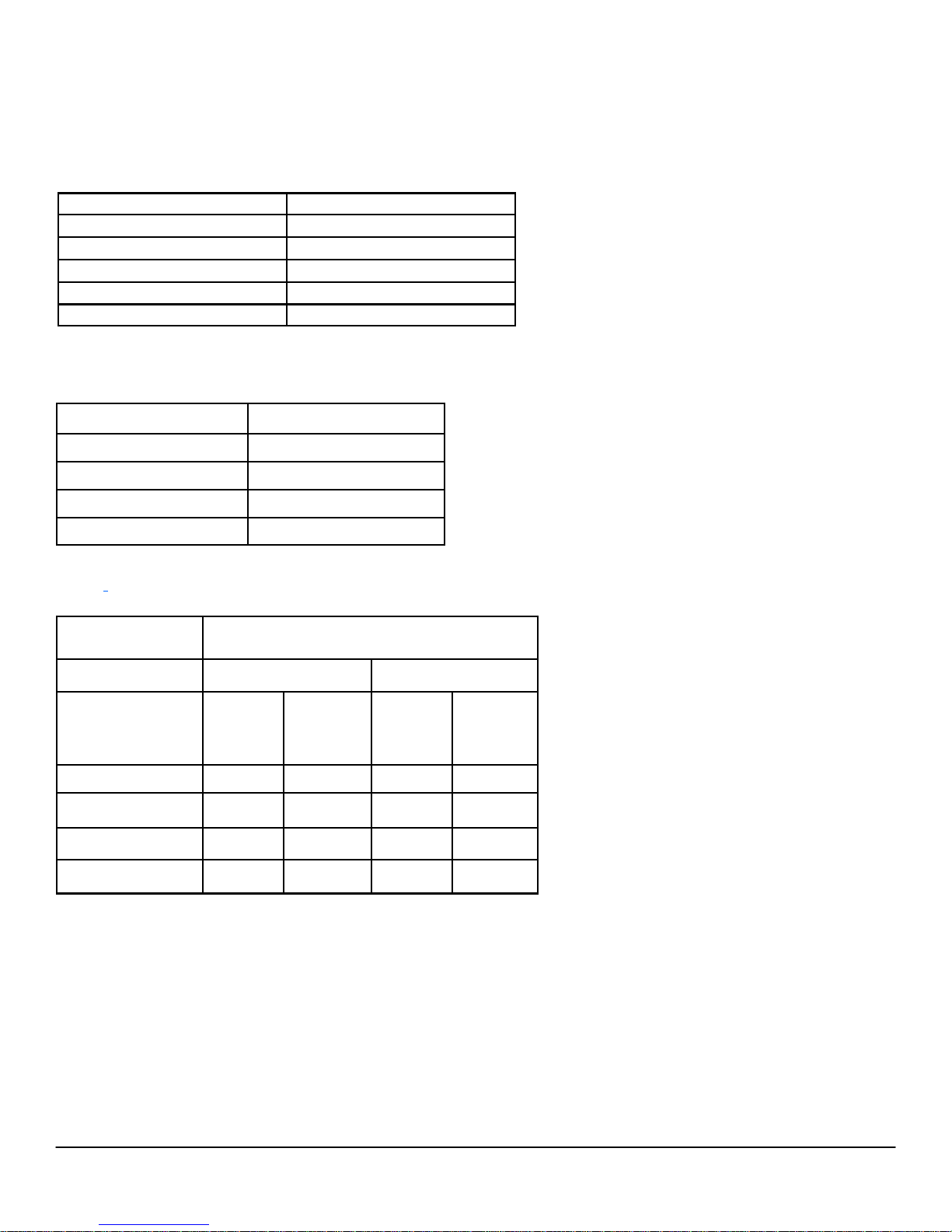
DELL™ OPTIPLEX™ 790 TECHNICAL GUIDEBOOK - V 2.0
ACO UST IC NOI SE EMI SS ION IN FOR MAT ION
OPTIPLEX 790 USFF
Component
Typical Configuration
CPU Intel l3,3.3GHZ,2c SNB 65W
Memory 1G DDR3 1333MHz
HDD (#, capacity) 250G 7200RPM SATA2
RMSD 8X 12.7 SATA DVDRW
Graphics Adapter Intel® HD Graphics Family
The Declared Noise Emission in accordance with ISO 9296 for the Dell Optiplex 780 USFF is as follows:
(all values L
Operating Mode
Idle
HDD Operating
90% CPU
ODD Operating
expressed in bels; 1 bel=10 decibels, re 10
WAd
Typical Configuration
Declared Sound Power (L
3.7
3.7
4.3
4.7
The Declared A-weighted Sound Pressure Level in decibels (re 2x10
measured in accordance with ISO 7779 7.6.1, 7.6.2, and C.15.2 and declared in accordance with ISO 9296 for this product is as
1
follows
:
Operating Mode
Typical Configuration Declared Sound
Pressure (LpA)
WAd
-12
Watts)
)
-5
Pa), at Operator, Bystander, and Desk Side Positions are
Idle
Table-Top Floor-Standing
Operator
Position
(LpA)
Bystander
Position
(LpA)
Operator
Position
(LpA)
Bystande
r Position
29.8 27.5 22.3 21.6
(LpA)
HDD Operating 30.8 29.2 21.9 21.5
90% CPU 36.3 34.9 26.4 25.0
ODD Operating 39.3 34.7 31.6 29.3
1
All tests are conducted according to ISO 7779 and declared according to ISO 9296 except 90% CPU. For this mode, the system CPU was stressed
at 90% utilization with no other peripheral device actively seeking. This test mode is not specified in ISO 7779, but was measured using the same
microphone distances and measurement techniques defined for the other reported operating modes.
2
Declared Sound Power rounded to nearest tenth of a bel per ISO 9296 section 4.4.2
48
 Loading...