

Page 1
Dell
TM
Digital Jukebox
CAUTION: Before you set up and operate your device, read
and follow the safety instructions in the Owner’s Manual.
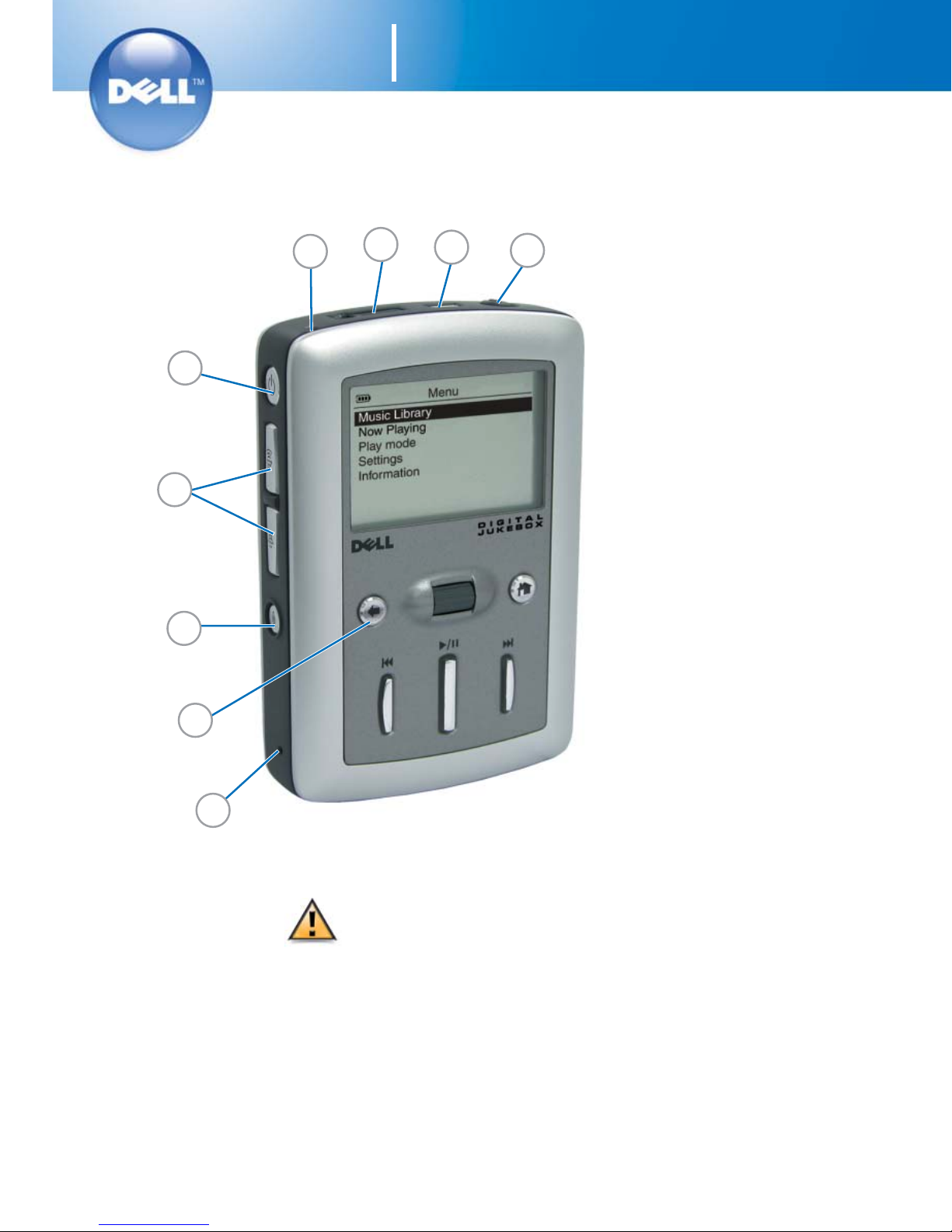
1. reset button
2. back button
3. recording button
4. volume buttons
5. power button
6. integrated microphone
7. headphone connector
8. USB 2.0/1.1 connector
9. button lock switch
0N2971A01
1
2
7
8
9
3
4
5
6
Getting Started
1
Page 2
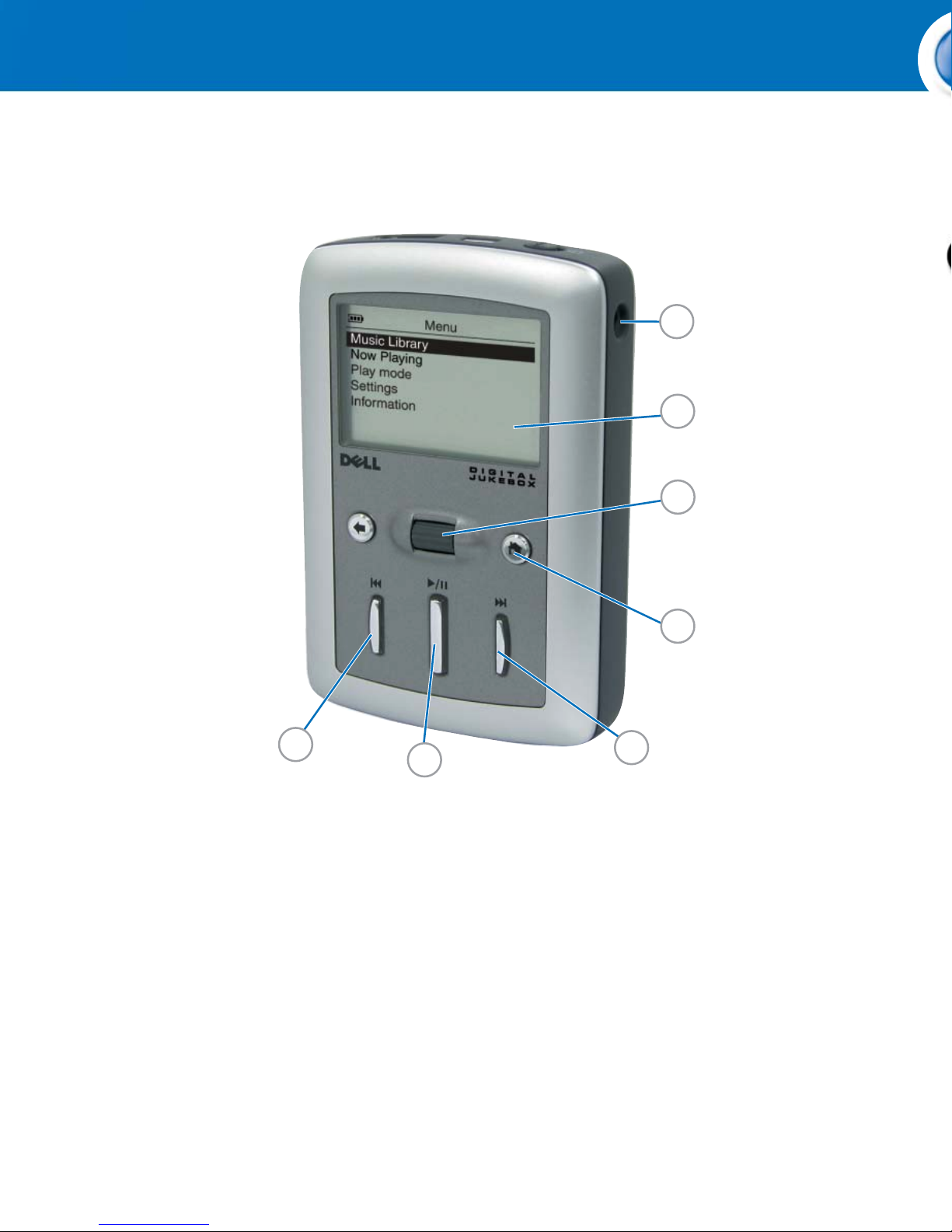
10. DC adapter connector
11. LCD screen
12. scroll dial/select
13. Home button
14. forward/skip forward button
15. play/pause button
16. reverse/skip back button
1. Plug the DC adapter into the
2. After the battery is charged,
0N2971A01
12
11
10
15
16
13
14
2
Page 3
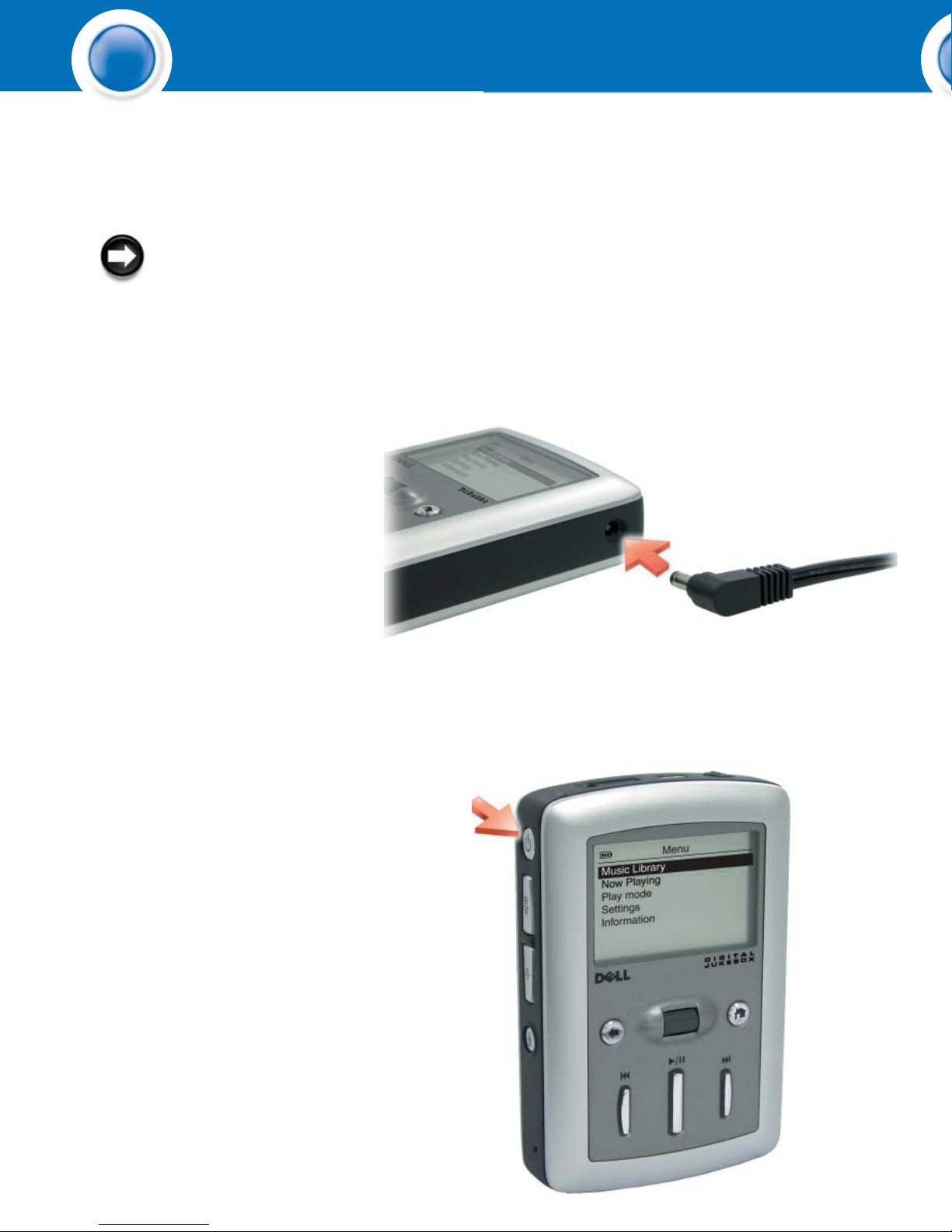
NOTICE: Do not use
your Dell DJ
TM
until you
have charged the battery
for at least 6 hours.
1. Plug the DC adapter into the
wall outlet. Then connect
the DC adapter to the Dell
DJ as shown and charge your
device for at least 6 hours.
2. After the battery is charged,
press and hold the power
button for 2 seconds.
0N2971A01
Charge the Battery and Turn On the Device Install Software
1
3
Page 4

NOTICE: Ensure that your device is not connected to your computer
during the software installation process.
NOTICE: Close all other applications while installing the software.
1. Insert the Dell DJ Software and DocumentationCD into your CD drive.
The CD runs automatically, and the installation process begins.
If the CD does not run automatically:
a Using Windows
®
Explorer®or the My Computer icon, navigate to the
drive where you loaded the Dell DJ Software and Documentation CD.
b Double-click start.exe.
2. When the Dell Digital Jukebox installation screen appears, click OK to start
the software installation process. Follow the instructions on the screen and
click OK, Next or Yes when prompted.
The software may determine that you have a newer version of MusicMatch
already on your computer. If so, you will be asked whether or not you would
like to continue installing MusicMatch from the CD. Make your selection to
proceed.
If you select "Yes," the installation process will continue.
If you select "No" you will be asked if you would like to install the MusicMatch
plug-in for the Dell DJ. You must select "Yes" and install the plug-in, if you
intend to use MusicMatch with your Dell DJ.
3. After the software installation is complete, a message appears asking if you
want to restart your computer now or later. Select Yes to restart your computer
immediately or No if you will restart you computer later.
NOTE: The software is not enabled until after you restart your computer.
2
4
Page 5

NOTICE: After the software installation
is complete and your computer has been
re-booted, you can connect your Dell DJ
to your computer.
Connect your device to your computer using the
USB cable provided to transfer data files or audio
tracks.
To connect the device to your computer:
1. Connect the smaller end of the USB cable to
the USB connector on your device.
2. Connect the larger end of the USB cable to the
USB connector on your computer.
Using MusicMatch
1. Start MusicMatch by clicking Start All Programs MusicMatch
MusicMatch Jukebox. The MusicMatch main window appears.
2. Click View Portable Device Manager.
3. With the Portable Device Manager (PDM) open, you can transfer tracks or playlists in a
drag-and-drop or copy-and-paste operation from your computer's MusicMatch Jukebox
playlists onto the Dell DJ.
4. To drag-and-drop, locate and click the track or playlist that you want to copy, then drag it to
Dell DJ or one of its playlists.
5. To copy-and-paste, locate and right-click the track or playlist that you want to copy, then click
Copy. Right-click Dell Digital Jukebox or one of its playlists, then click Paste.
Using Dell DJ Explorer
1. Connect the Dell DJ to your computer using the included USB cable.
2. Select Start All Programs Dell Dell DJ Explorer Dell DJ Explorer.
or
3. Open Microsoft Windows Explorer, then double-click Dell DJ Explorer.
4. With Dell DJ Explorer open, click Folders in the Dell DJ Explorer toolbar.
5. Click Dell DJ Explorer in the left window to expand its contents.
6. Click Dell Digital Jukebox beneath Dell DJ Explorer in the left window to expand its
contents.
7. Click Music Library beneath Dell Digital Jukebox in the left window to expand its contents.
8. Using Dell DJ Explorer, locate the track, file or folder you want to copy.
9. To drag-and-drop, locate the track, file or folder that you want to copy, and drag it to the
folder in which you want to place the track, file or folder.
10.To copy-and-paste, right-click the track, file or folder you want to copy and click Copy.
Locate and right-click the folder in which you want to place the copy, and then click Paste.
A copy of the track, file or folder is placed in the selected folder.
Connect Your Device Transfer Music Play Digital Music
4
5
Page 6

Using MusicMatch
NOTE: MusicMatch®has the capability to 'rip' or convert music CDs to digital music files
on your computer. Refer to the MusicMatch Help tutorial to create digital music files
from your music CDs.
1. Start MusicMatch by clicking Start All Programs MusicMatch
MusicMatch Jukebox. The MusicMatch main window appears.
2. Click View Portable Device Manager.
3. With the Portable Device Manager (PDM) open, you can transfer tracks or playlists in a
drag-and-drop or copy-and-paste operation from your computer's MusicMatch Jukebox
playlists onto the Dell DJ.
4. To drag-and-drop, locate and click the track or playlist that you want to copy, then drag it to
Dell DJ or one of its playlists.
5. To copy-and-paste, locate and right-click the track or playlist that you want to copy, then click
Copy. Right-click Dell Digital Jukebox or one of its playlists, then click Paste.
Using Dell DJ Explorer
NOTE: When transferring music tracks to your Dell DJ, be sure to transfer them to the
Music Library folder of your Dell DJ. If you transfer music files from your PC to the Data
Library folder of your Dell DJ, these music tracks will not be playable on your Dell DJ.
They are stored on your Dell DJ as data files.
1. Connect the Dell DJ to your computer using the included USB cable.
2. Select Start All Programs Dell Dell DJ Explorer Dell DJ Explorer.
or
3. Open Microsoft Windows Explorer, then double-click Dell DJ Explorer.
4. With Dell DJ Explorer open, click Folders in the Dell DJ Explorer toolbar.
5. Click Dell DJ Explorer in the left window to expand its contents.
6. Click Dell Digital Jukebox beneath Dell DJ Explorer in the left window to expand its
contents.
7. Click Music Library beneath Dell Digital Jukebox in the left window to expand its contents.
8. Using Dell DJ Explorer, locate the track, file or folder you want to copy.
9. To drag-and-drop, locate the track, file or folder that you want to copy, and drag it to the
folder in which you want to place the track, file or folder.
10.To copy-and-paste, right-click the track, file or folder you want to copy and click Copy.
Locate and right-click the folder in which you want to place the copy, and then click Paste.
A copy of the track, file or folder is placed in the selected folder.
4
6
Page 7

The Dell DJ can play tracks in MP3, WMA or
WAV file formats. The Dell DJ comes with a few
sample MP3 tracks already loaded into the Music
Library.
To play all music tracks:
1.Press the Home button on your Dell DJ.
2. Scroll-select Music Library.
3. Scroll-select Play All Music Tracks.
NOTE: Scroll-select means to rotate and
then press the scroll dial.
All tracks are added to the Selected Music list.
Playback starts after all music tracks have been
queued.
NOTE: In addition to playing digital music,
you can also use your Dell DJ as a digital
recording device and as a data storage
device.
Be sure to check the Owner's Manual to
learn about using these features.
Also, be sure to periodically check
support.dell.com for software and
documentation updates for your Dell DJ.
53
7
Page 8

Finding Information
• Dell Owner’s Manual Details on setting up,
configuring, and using your device.
• MusicMatch Help Click
Start
All Programs
MusicMatch. Click
Help in MusicMatch.
• support.dell.com Up-to-date information on
your device including the latest software
downloads, latest versions of the Owner's
Manual, Getting Started placemats and
answers to the most Frequently Asked
Questions
Information in this document is subject to change without notice.
© 2003-2004 Dell Inc. All rights reserved.
Reproduction in any manner whatsoever without the written permission of Dell Inc. is
strictly forbidden.
Dell, Dell DJ and the DELL logo are trademarks of Dell Inc.; MusicMatch is a
registered trademark of MusicMatch Inc.; Microsoft and Windows are registered
trademarks of Microsoft Corporation. Dell disclaims proprietary interest in the marks
and names of others.
February 2004
8
0N2971A01
 Loading...