

Page 1
1
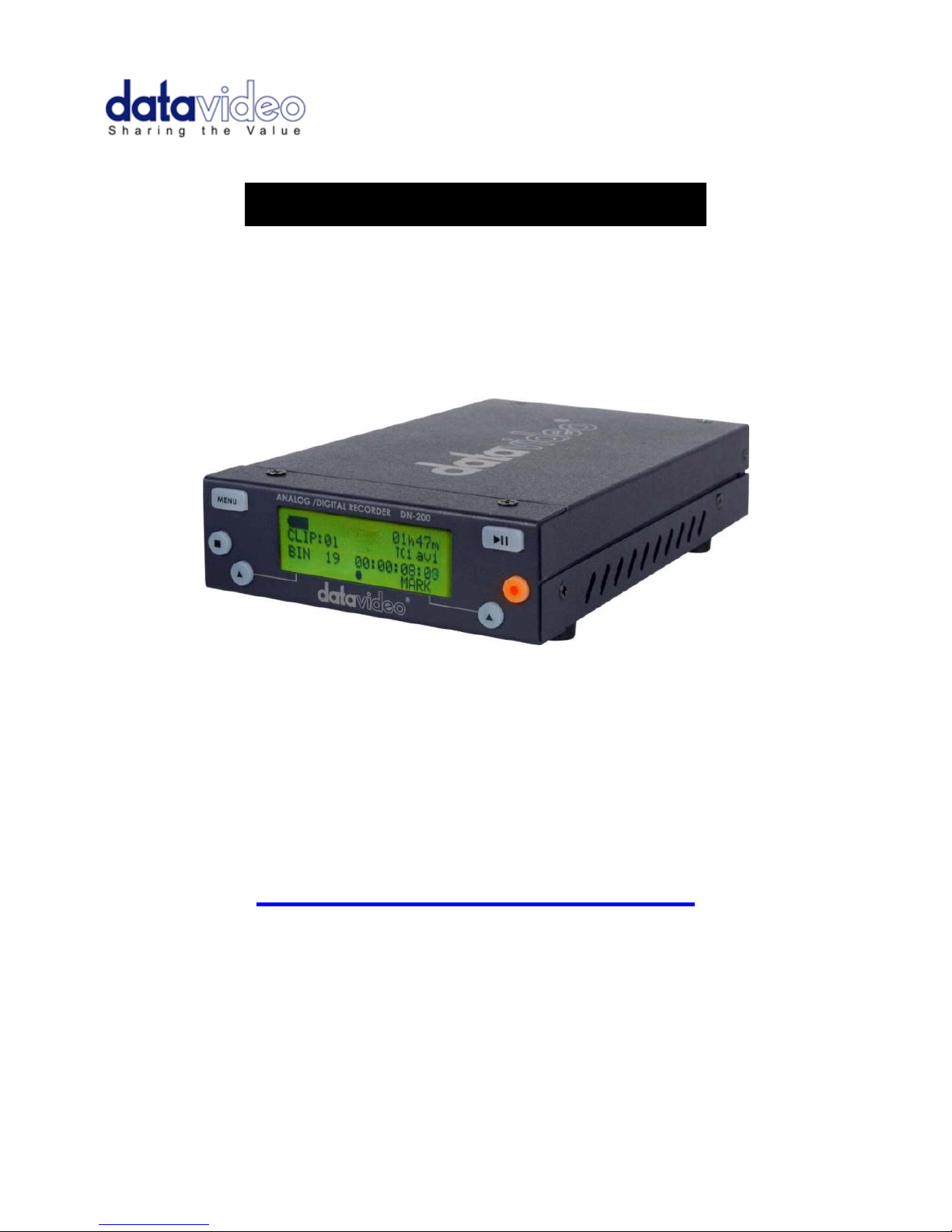
.ANALOGUE / DIGITAL RECORDER.
DN-200
Instruction Manual
www.datavideo-tek.com
Rev 300410
Page 2

2
Contents
Warnings and Precautions ............................................................................... 4
Warranty ............................................................................................................. 5
Standard Warranty ..................................................................................................................... 5
Two Year Warranty ..................................................................................................................... 5
Disposal ...................................................................................................................................... 5
Packing List ................................................................................................................................ 5
Product Overview .............................................................................................. 6
Features ..................................................................................................................................... 6
Connections & Controls ................................................................................... 7
Front Panel ................................................................................................................................. 7
DN-200 Clip Status Display Explained ....................................................................................... 7
Rear Panel Connections ............................................................................................................. 8
Powering On ............................................................................................................................... 8
DN-200 Menus ................................................................................................... 9
Main Menu Options .................................................................................................................... 9
Record Setup Options .............................................................................................................. 10
Play Setup Options ................................................................................................................... 10
System Setup Options .............................................................................................................. 11
DN-200 General Setup Notes .......................................................................... 12
Set the signal type .................................................................................................................... 12
Set HDD partition to 1 or 2 ....................................................................................................... 12
Choose a file operating system, FAT32 or NTFS .................................................................... 12
Set the HDD volume ID ............................................................................................................ 12
Select which time code to display ............................................................................................ 12
Empty the current or all bins ..................................................................................................... 12
Normal Recording ........................................................................................... 13
Select the video source ............................................................................................................ 13
Set the file type ......................................................................................................................... 13
Synchronize to tape motion ...................................................................................................... 13
Select the audio sampling rate in DV mode ............................................................................. 13
Set the record date (optional) ................................................................................................... 13
Before starting to Record.......................................................................................................... 13
Starting the Record Process .................................................................................................... 13
Pausing the Record Process .................................................................................................... 14
Marking the Recording ............................................................................................................. 14
Stop a recording before powering down ................................................................................... 14
Power on auto record ..................................................................................... 14
Time Lapse Recording .................................................................................... 14
Using Record Pre-trigger ................................................................................ 14
Page 3

3
DN-200 GPI Trigger connection and operation ............................................. 15
GPI Trigger cabling and circuit ................................................................................................. 15
SET GPI TRIGGER MODE ...................................................................................................... 15
PULSE trigger Record process ................................................................................................ 15
LEVEL trigger Record process ................................................................................................. 15
PULSE trigger Playback process ............................................................................................. 15
LEVEL trigger Playback process .............................................................................................. 15
Playback ........................................................................................................... 16
Set up loop play ........................................................................................................................ 16
Power on auto play ................................................................................................................... 16
Play out ..................................................................................................................................... 16
Pause and Go To Mark ............................................................................................................ 16
Connection to a Computer in AV HDD Mode ............................................... 17
Preparation ............................................................................................................................... 17
MAKE MEDIA FILES ................................................................................................................ 17
Operating File System limitations ............................................................................................. 17
File Organization ...................................................................................................................... 17
Updating DN-200 Firmware ............................................................................ 18
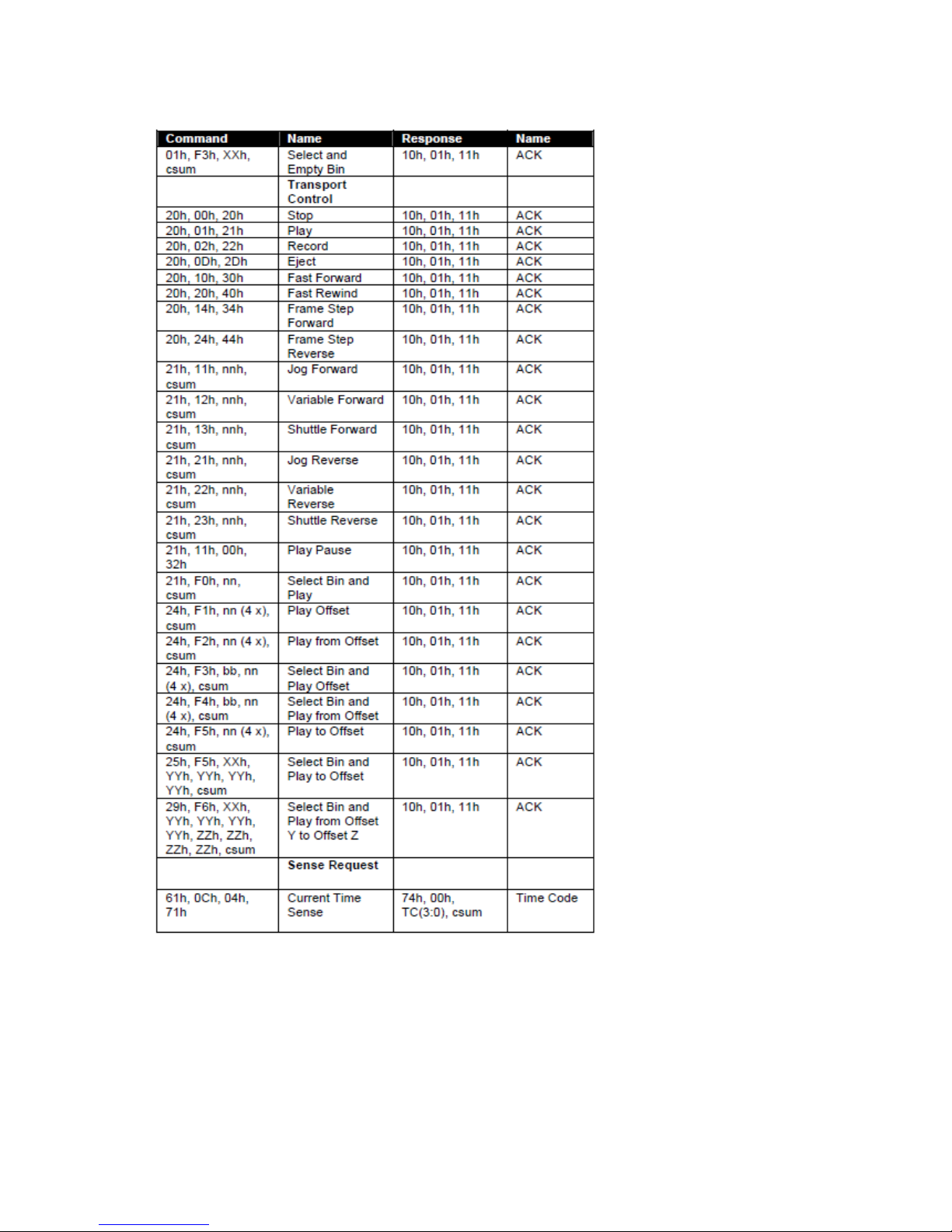
DN-200 RS-232 Controller Command Set ...................................................... 19
Connector Pin Assignment ....................................................................................................... 19
System Control ......................................................................................................................... 20
Sense Request ......................................................................................................................... 20
Transport Control ...................................................................................................................... 21
Service and Support ....................................................................................... 23
Page 4

4
Warnings and Precautions
1. Read all of these warnings and save them for later reference.
2. Follow all warnings and instructions marked on this unit.
3. Unplug this unit from the wall outlet before cleaning. Do not use liquid or aerosol cleaners.
Use a slightly damp cloth for cleaning.
4. Do not use this unit in or near water.
5. Do not place this unit on an unstable surface, cart, stand, or table. The unit may fall, causing
serious damage.
6. Any slots and openings on the case top, back, and bottom are provided for ventilation. To
ensure safe and reliable operation of this unit, and to protect it from overheating, do not block
or cover these openings. Do not place this unit on a bed, sofa, rug, or similar surface, as the
ventilation openings may become blocked. This unit should never be placed near or over a
heat source or radiator. This unit should not be placed in a built-in installation unless proper
ventilation is provided.
7. This product should only be operated from the type of power source indicated on the marking
label of the AC adapter. If you are not sure of the type of power available, consult your
Datavideo dealer or your local power company.
8. Do not allow anything to rest on the power cord. Do not locate this unit where the power cord
will be walked on, rolled over, damaged or otherwise stressed.
9. If an extension cord must be used with this unit, make sure that the total of the ampere ratings
on the products plugged into the extension cord do not exceed the extension cord’s ratin g.
10. Make sure that the total amperes of all the units that are plugged into a single wall outlet do
not exceed 15 amperes.
11. Never push objects of any kind into this unit through the case ventilation slots, as they may
touch dangerous voltage points or short out parts that could result in risk of fire or electric
shock. Never spill liquid of any kind onto or into this unit.
12. Except as specifically explained elsewhere in this manual, do not attempt to service this
product yourself. Opening or removing covers that are marked “Do Not Remove” may expose
you to dangerous voltage points or other risks, and will void your warranty. Refer all service
issues to qualified service personnel.
13. Unplug this product from the wall outlet and refer to qualified service personnel under the
following conditions:
a. When the power cord is damaged or frayed;
b. When liquid has spilled into the unit;
c. When the product has been exposed to rain or water;
d. When the product does not operate normally under normal operating conditions.
Adjust only those controls that are covered by the operating instructions in this
manual; improper adjustment of other controls may result in damage to the unit and
may often require extensive work by a qualified technician to restore the unit to
normal operation;
e. When the product has been dropped or the case has been damaged;
f. When the product exhibits a distinct change in performance, indicating a need for
service.
Page 5
5
Warranty
Standard Warranty
Datavideo equipment is guaranteed against any manufacturing defects for one year from the
date of purchase.
The original purchase invoice or other documentary evidence should be supplied at the time
of any request for repair under warranty.
Damage caused by accident, misuse, unauthorized repairs, sand, grit or water is not covered
by this warranty.
All mail or transportation costs including insurance are at the expense of the owner.
All other claims of any nature are not covered.
Cables & batteries are not covered under warranty.
Warranty only valid within the country or region of purchase.
Your statutory rights are not affected.
Two Y ear Warranty
All Datavideo products purchased after 01-Oct.-2008 qualify for a free one year extension to the
standard Warranty, providing the product is registered with Datavideo within 30 days of
purchase. For information on how to register please visit www.datavideo-tek.com
or contact
your local Datavideo office or authorized Distributors
Certain parts with limited lifetime expectancy such as LCD Panels, DVD Drives, Hard Drives are
only covered for the first 10,000 hours, or 1 year (whichever comes first).
Any second year warranty claims must be made to your local Datavideo office or one of its authorized
Distributors before the extended warranty expires.
Disposal
For EU Customers only - WEEE Marking
This symbol on the product indicates that it should not be treated as household
waste. It must be handed over to the applicable take-back scheme for the recycling
of waste electrical and electronic equipment. For more detailed information about
the recycling of this product, please contact your local Datavideo office.
Packing List
Item No. Description Quantity
1 Instruction Manual 1
2 DN-200 Recorder 1
3 12V DC 1A PSU 1
4 3.5mm Jack to RCA Breakout cable 1
Page 6

6
Product Overview
The DN-200 is a small and portable video recorder/player capable of very long record times. A builtin, large capacity hard drive (HDD) stores the video. It can record up to 23 hours of video depending
on the recording format, drive settings and hard drive size. The DN-200 HDD can have one or two
partitions. A second 6GB partition can be set up. The recorder will have no affect on this partition so
the user is free to name it, format it, store any type of data on it with complete confidence that the
recorder will not alter it. The unit can easily be set up for FAT32 or NTFS; PAL, NTSC or HDV frame
rates too.
This unit is capable of recording from digital or analogue sources using IEEE-1394 or Composite and
RCA stereo connections. It can also be set up to record PAL or NTSC Time Lapse sequences at a
variety of standard or triggered intervals. Set it up to buffer live video and when you press record
within 8 seconds of an event you can be confident that you have recorded that must have shot.
Once recorded Drag and Drop these video files directly to the time-line of your Non-Linear Editing
program using popular DV file wrappers such as Microsoft AVI type 2, Canopus AVI, QuickTime
MOV, MXF OP1A as well as HDV M2T. With this many useful features the DN-200 is ideal for a
variety applications within broadcast, education, animation, science, medical, construction and
security, etc.
Features
Small, easy to carry, high capacity hard drive recorder
Input Video Connections:
Composite video (BNC) and RCA stereo audio (PAL or NTSC)
IEEE-1394 supports DV,HDV including embedded external Time Code Input
Output Connections:
Composite video (BNC) and RCA stereo audio (PAL or NTSC) via breakout cable
IEEE-1394 in playback can supply DV,HDV signals
IEEE-1394 connection in AVHDD Mode also supports PC and Mac FW400 connections
Supports DV AVI, DV MOV, DV MXF-OP1A and M2T file formats directly, QuickTime HDV
and MXF-OP1A through a quick utility program
Set audio sampling rate to match 48KHz (16bit) or 32KHz (12bit)
Time-lapse single frame recording at standard intervals
Manually triggered single frame recording. Useful in model animation recordings
8 second pre-record buffer, useful in recording unexpected events especially in science
research, outdoor recording, Health & Safety or security applications
Loop Playback of video in a selected bin
Auto record or Playback to or from current video bin when powered on
Backlit LCD panel showing a comprehensive layout of the recorders status
Allocate a second 6GB HDD partition as a dedicated area for other files
Built-in 2.5" 320GB SATA HDD, allows up to 23 hours of video to be recorded*
RS-232 and GPI interfaces for simple update, trigger and control
*
subject to HDD size, partitioning chosen, available HDD space and video data rate
Page 7
7
Connections & Controls
Front Panel
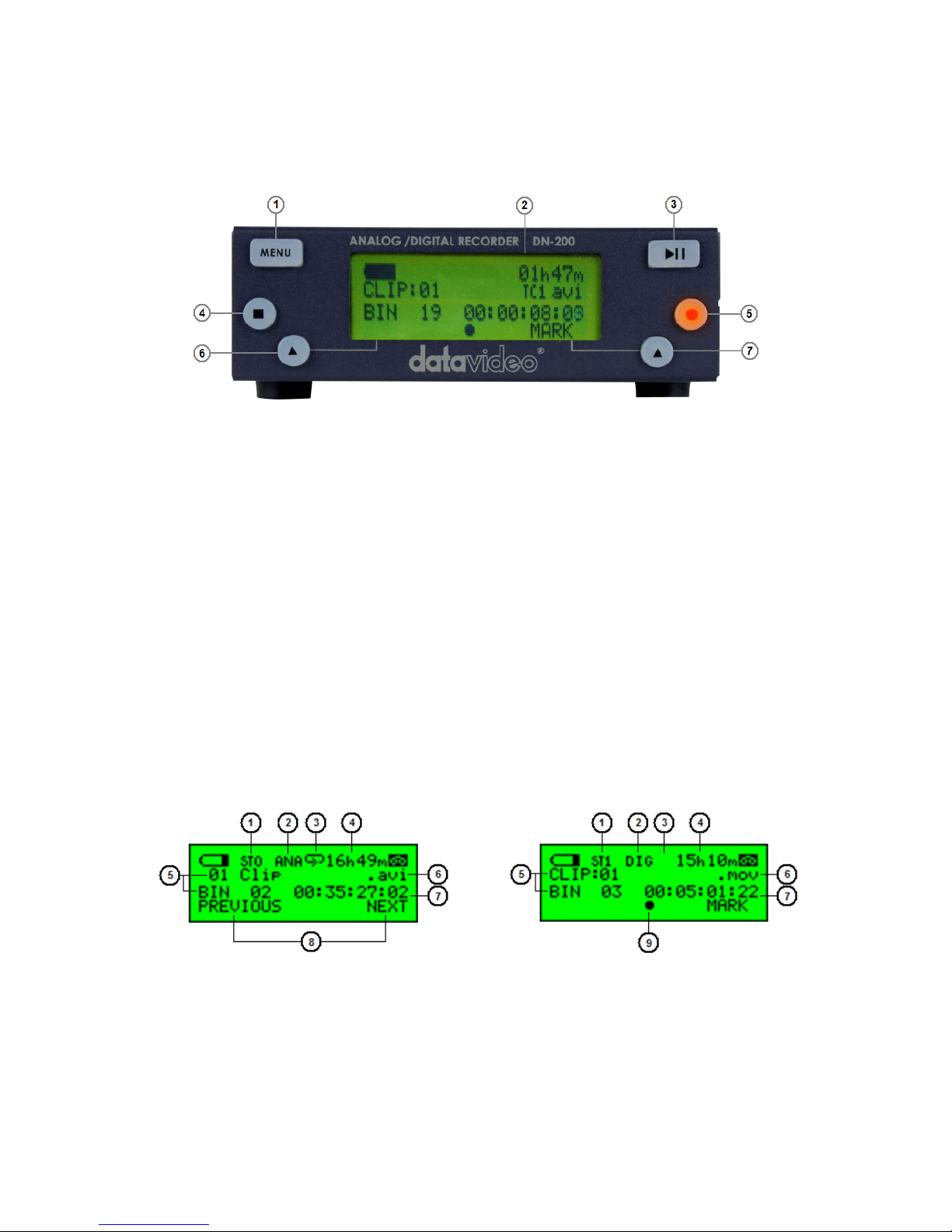
1. Menu Button - Calls up the menu display which is navigated using buttons 6 & 7.
2. Display Panel - Displays the status and set up of the DN-200 unit or if the Menu
Button is pressed the DN-200 Menu options.
3. Play / Pause Button - Starts playback of a track, or pauses playback of a track with
the current status shown on the Display Panel. Also Starts / Pauses a recording when
the unit is in Record mode.
4. Stop Button - Stops playback or record.
5. Record Button - Puts the DN-200 into Record Mode. To start recording press the
Record Button and the Play Button simultaneously. The unit will not record if no
video signal is present.
6. Navigation Button – Used to navigate the menus and confirm set up choices.
7. Navigation Button – Used to navigate the menus and confirm set up choices.
DN-200 Clip Status Display Explained
1. Sync to Tape Indicator OFF=ST0 and ON=ST1
2. Analogue / Digital Source indicator
3. Loop Playback indicator
4. Remaining Recording Space in Hours and Minutes
5. Current Bin and Clip
6. File type indicator
7. Current Time Code or total length of clip
8. Menu options
9. Record, Pause, FFWD, REV and Playback indication
Page 8
8
Rear Panel Connections
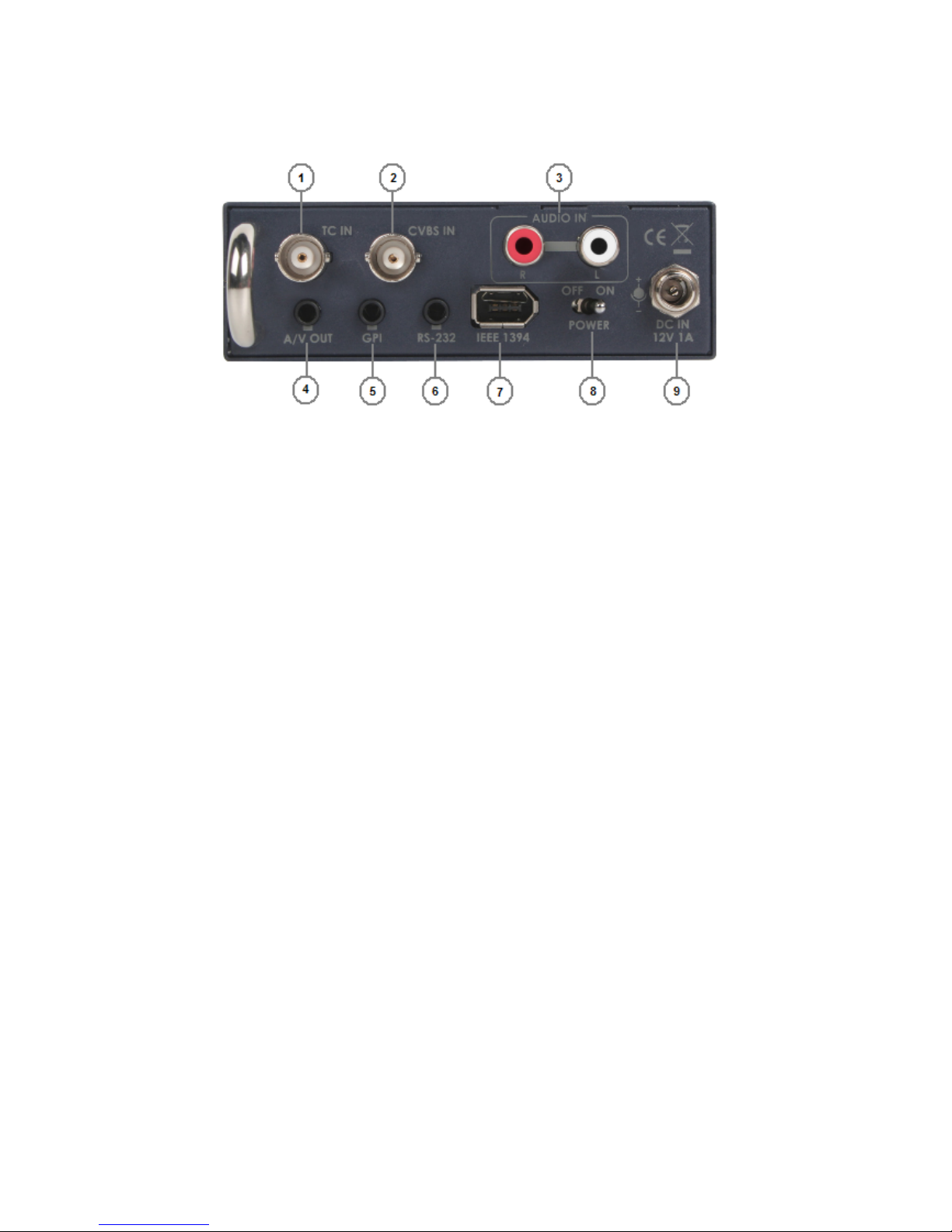
1. TC IN – This BNC connection allows the unit to record External Time Code
from a source Camera or Deck.
2. CVBS IN – This BNC connection allows the unit to accept an analogue
Composite NTSC or PAL video input.
3. AUDIO IN – These RCA L & R channel inputs allow line level analogue audio
to be recorded to the same clip as input 2 above.
4. A/V OUT – Allows output of Composite video and analogue L & R channel
audio via a breakout cable from a 3.5mm jack connection.
5. GPI socket – Can be used for simple external control. The DN-200 can
accept pulse or level trigger inputs, these can trigger record, playback and
pause commands.
6. RS-232 Socket – The DN-200 can be controlled via RS-232 from external
devices. See Page 19.
7. 6 Pin IEEE-1394 In/Out Port – supports DV25 / HDV M2T input sources or
output a DV25 signal to a monitor or supports Firewire 400 communication
with a PC/Mac for file transfer.
8. Power On/Off Switch.
9. DC In Socket. Connect the supplied 12V 1A PSU to this socket. The
connection can be secured by screwing the outer fastening ring of the DC In
plug to the socket.
Powering On
Connect the DN-200’s own power supply to the rear DC In socket. Ensure the power supply unit is
connected to a suitable mains socket. Switch the power ON/OFF switch to the ON position.
The LCD display panel will show “FOR AVHDD MODE PLEASE PRESS MENU”, ignore this message
and after a few seconds the Clip Status Display will be shown. The DN-200 is now ready for use as a
recorder or playback device.
Page 9
9
DN-200 Menus
The DN-200 is a menu driven unit; there are several menus which are used to set up the unit. The
menu settings are non-volatile (settings are stored even when the unit is switched off). So general
settings, such as date and file type, may only need to be set once. We will look at specific set ups in
more detail later on in this manual, but here is an overview of the available menu options.
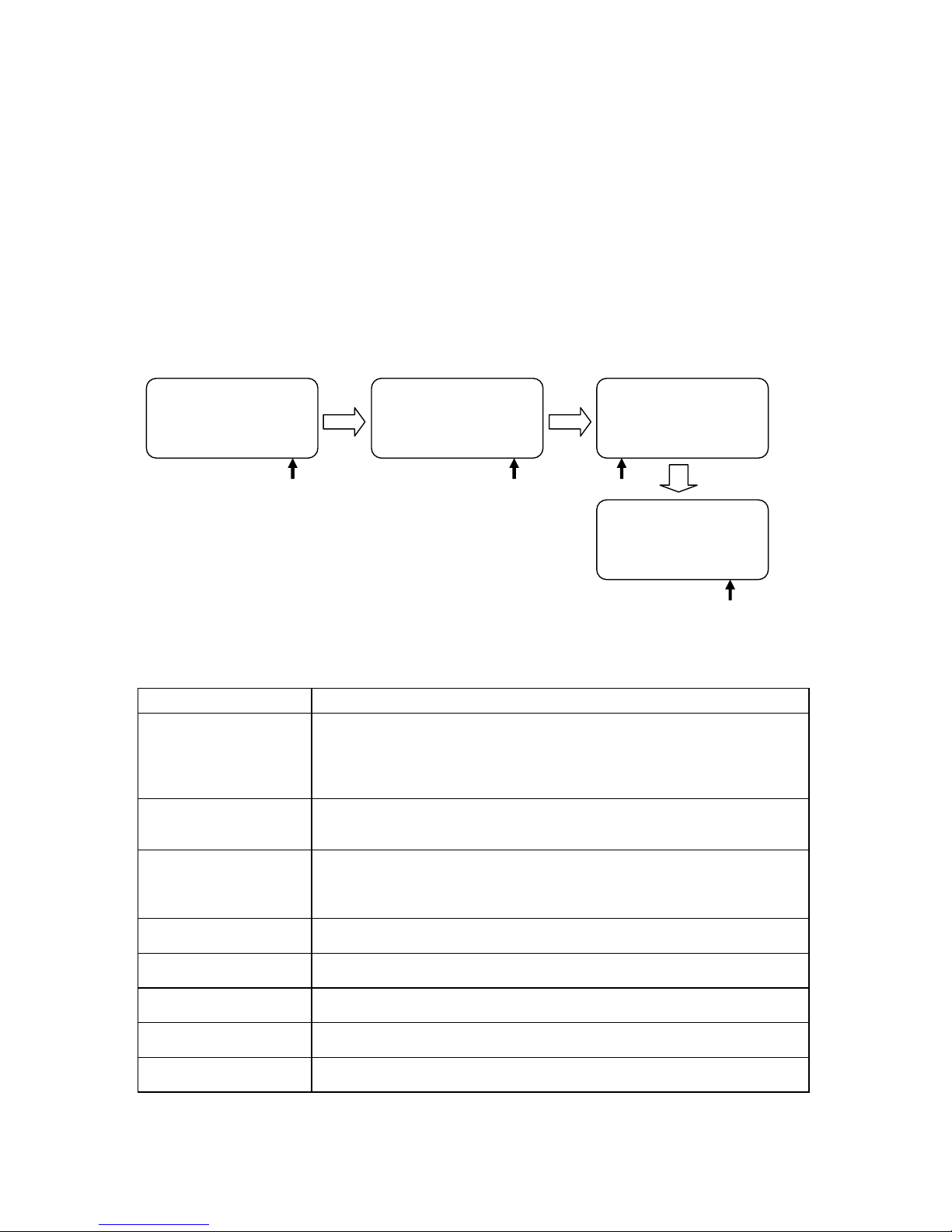
Pressing the Navigation Button labelled NEXT will display the next menu option. If all menu options
have been displayed and next is selected then the unit loops back to the first menu option once more.
Pressing the Navigation Button labelled ENTER will select the displayed menu option. The next level
of menu options or a specific setting choice will then be displayed. Pressing the MENU Button will
allow exit of the current menu or setting.
Example menu selection:
Main Menu Options
There are 8 initial main menu level options and they are:
Menu Option Action taken
MAKE MEDIA FILES
Prepares the content to be seen by the computer in the AVHDD mode.
The operating system environment needs to be previously set to either
FAT32 or NTFS. This action is taken once before connecting to a
computer in AVHDD mode and is done for all the recorded content.
EMPTY THIS BIN
Empties or erases the content within the selected bin, this action cannot
be undone once selected.
SELECT SOURCE
The signal to be recorded can be chosen to come either from the IEEE1394 input (DIG) as a digital signal or come from the BNC and RCA inputs
as NTSC or PAL analogue signals (ANA).
EMPTY ALL BINS
Empties or erases the content in ALL of the bins. This action cannot be
undone once selected.
RECORD SETUP
Enters the Record Setup Menu group detailed on page 10
PLAY SETUP
Enters the Play Setup Menu group detailed on page 10
SYSTEM SETUP
Enters the System Setup Menu group detailed on page 11
FIRMWARE REVISION
Displays the current firmware revision for the DN-200
Table 1 Main Menu
menu = exit
SELECT SOURCE
ANA DIG*
menu = exit
SELECT SOURCE
ENTER NEXT
menu = exit
EMPTY THIS BIN ?
ENTER NEXT
menu = exit
MAKE MEDIA FILES
ENTER NEXT
Page 10
10
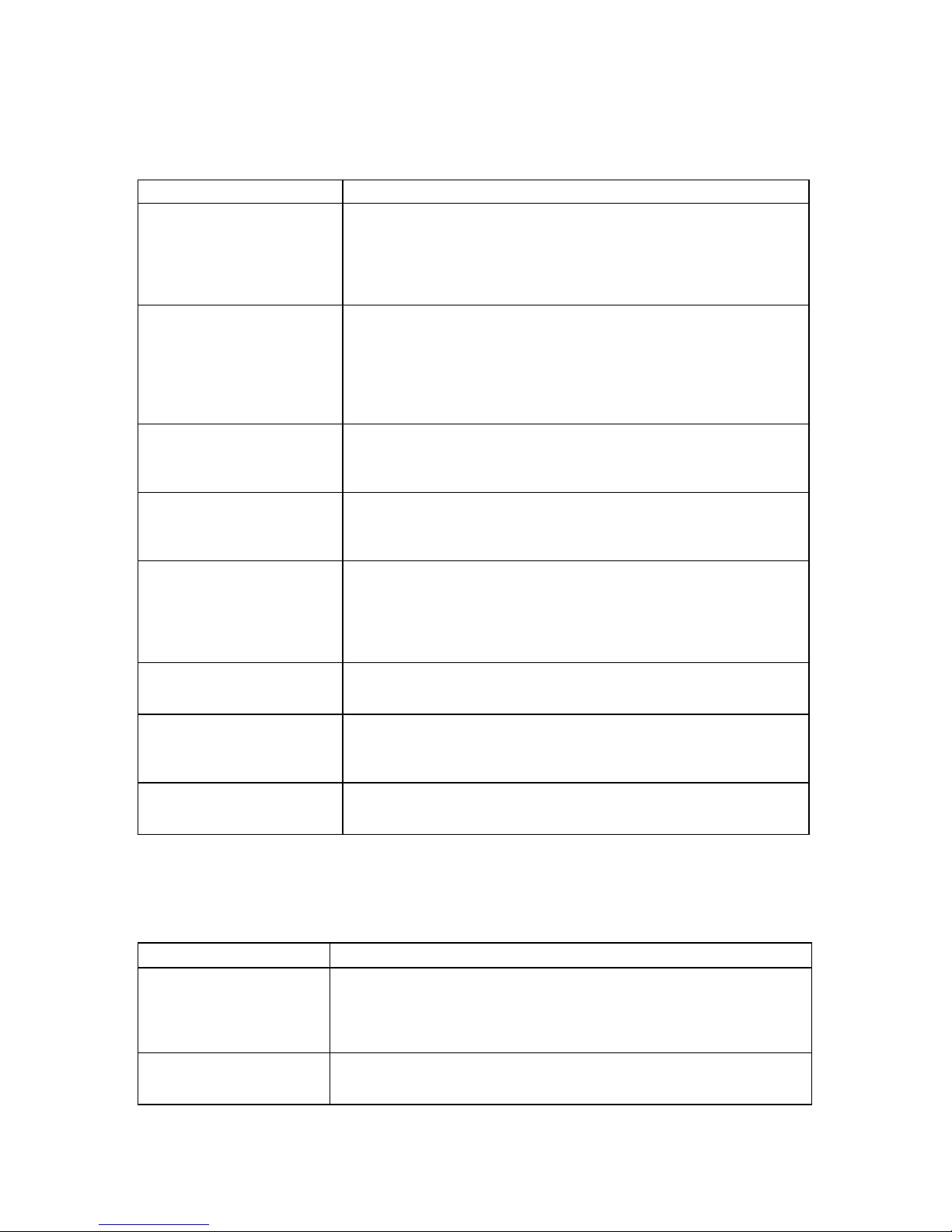
Record Setup Options
Entered from the Main Menu, this set of options enable various record related parameters and modes
to be setup.
Menu Option Action taken
SET RECORD FILE TYPE
Where the choice of file type is made for all un-recorded bins. File
types cannot be mixed within a bin. Choices are .mov, 2 types of .avi,
.mxf and for HDV .m2t only. Note that the current type chosen will be
marked with an asterisk as well as being indicated on the 2nd line of
the Clip Status Display, see Page 7.
SYNCtoTAPE CONTROL
ST1, where the recorder will look to the time code changing to
indicate the need to record. If the time code pauses then the
recording is paused. With this setting turned off, ST0, the record
process will continue regardless of the time code behaviour. Note
that the current selection will be marked with an asterisk as well as
being indicated on the top line of the Clip Status Display, see Page 7.
SET RECORD DATE
This option always modifies the date attribute of the created file when
the source is analogue. When the source is digital if the date in the
digital stream is invalid then the unit will use this date instead.
RECORD PRE-TRIGGER
When enabled, the last 8 seconds of video before the record trigger
is captured ahead of the video following the trigger. Note that the
video in the pre trigger buffer is lost when the unit is power cycled.
SET DEFAULT DV AUDIO
When the audio source is analogue, this option sets the audio
sampling frequency to 48KHz or 32KHz. When the source is digital,
this option helps the recorder match the incoming audio sampling
frequency. Note that the current selection will be marked with an
asterisk.
SET ASPECT RATIO
When the source is analogue, this option sets the 16:9 or 4:3 aspect
ratio flag in the stream to be recorded.
TIMELAPSE RECORD
Allows the recording of NTSC or PAL video at slower than real time
through a choice of 6 options. Note that the current selection will be
marked with an asterisk.
PWR ON AUTO RECORD
When enabled, the recorder will go directly into record mode in the
last bin selected once power is applied.
Table 2 Record Setup Menu
Play Setup Options
Entered from the Main Menu, this set of options enable various record related parameters and modes
to be setup.
Menu Option Action taken
SET LOOP PLAY
When enabled the DN-200 will loop play all clips in the current bin, the
playback will continuously loop until stopped. Note that the chosen
mode is indicated by an asterisk as well as the presence or absence of
the loop play icon on the top line of the Clip Status Display, see page 7.
PWR ON AUTO PLAY
When enabled, the recorder will go directly into a play mode in the last
bin selected once power is applied.
Table 3 Play Setup Menu
Page 11
11
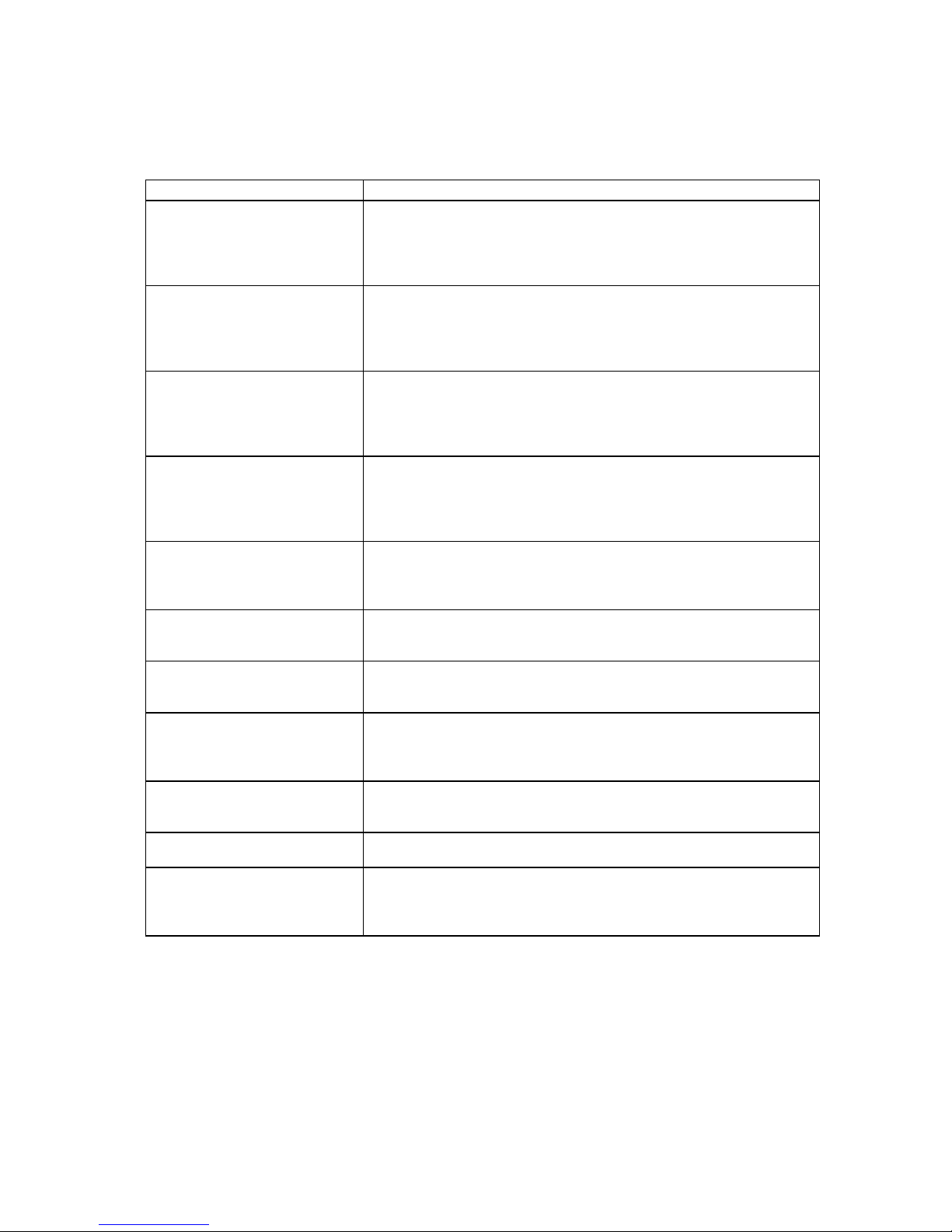
System Setup Options
Entered from the Main Menu, this set of options enable various record related parameters and modes
to be setup.
Menu Option Action taken
SET SIGNAL TYPE
Where the recorder is set to operate with one of three signal types,
NTSC, PAL or HDV. Note: Changing between signal types will
erase the content in all bins and the DN-200 will restart. Backup any
content first. The current selection will be marked with an asterisk.
SET FAT32 / NTFS
This option will set up the file system type seen by the computer in
AVHDD mode as either NTFS or FAT32. Note: Changing between
types will erase the content in all bins and the DN-200 will restart.
Backup any content first. The current selection will be marked with
an asterisk.
MODIFY HDD VOLUME ID
When connecting as an HDD the DN-200 volume name is shown as
Mediapac_xx. This option sets the xx value between 0 and 99. A
useful feature when connecting multiple units at the same time from
a multi-shoot.
SETUP HDD PARTITION
The DN-200 HDD can have one or two partitions. A second 6GB
partition can be set up. The recorder will have no affect on this
partition so the user is free to name it, format it, store any type of
data on it with complete confidence that the recorder will not alter it.
SET TIMECODE DISPLAY
During recording and playback, this option allows display of either
the Internal or the External time code. Note that the current
selection will be marked with an asterisk.
SET REMOTE CONTROL
This option either enables or disables the remote control capability.
Note that the current selection will be marked with an asterisk.
TOTAL SPACE
Displays the video capacity of the DN-200 hard drive in Hours,
Minutes, Seconds and Frames HH:MM:SS:FF.
UPGRADE FIRMWARE
Allows the user to update the firmware of the recorder, provided a
proper file has been copied on to the DN-200 hard drive in AVHDD
mode.
SET GPI TRIGGER MODE
The GPI socket can be used for simple trigger control. The DN-200
can accept Pulse or Level inputs on this socket, which will trigger
record, playback and pause commands. See Page 15
SET FACTORY DEFAULT
Recall FACTORY DEFAULT to be loaded into current setup
NTSC SETUP LEVEL
The setup level is set to 7.5 or 0 IRE. 7.5 IRE is most commonly
used in the U.S.A. and Canada and 0 IRE in far eastern countries
such as Japan. Not used in PAL or HDV modes.
Table 4 System Setup Menu
Page 12

12
DN-200 General Setup Notes
Before using your DN-200 for the first time, there are a few basic operational settings that must be
chosen. These are found under the System Setup option in the menu tree (see Table 4 on the
previous page).
Set the signal type
WARNING: Changing between signal types will erase the content in all bins. Backup any content first.
Select between NTSC, PAL or HDV. If the standard chosen is NTSC, then a choice of NTSC SETUP
LEVEL is also given. This allows the IRE Black level to be set to 0 or 7.5 for NTSC. 7.5 IRE is most
commonly used in the U.S.A. and Canada and 0 IRE in far eastern countries such as Japan.
Set HDD partition to 1 or 2
WARNING: Changing SETUP HDD PARTITION will erase all content. Backup any content first.
The HDD storage space can be broken into 2 partitions; the second partition reserves 6GB and is not
seen or used by the recorder. The second partition will appear as a second drive to the computer and
the user is then free to use this drive to store any data including stills, text documents, spreadsheets,
metadata and/or finished work. The DN-200 is guaranteed not to overwrite data in this second
partition. Deleting all bins will also not erase any data in this second partition. The recorder will show
a total record capacity less approximately 30 minutes record time once the second partition is
created.
Choose a file operating system, FAT32 or NTFS
This option will set up the file system type seen by the computer in AVHDD mode. NTFS does not
have the same 2GB file size limitation imposed by the FAT32 file system. An NTFS recorded clip
stays as one file no matter what its length. This choice should only be made once before making any
media files. Note: Some editing systems cannot handle NTFS files larger than 40GB.
Set the HDD volume ID
When connecting as an HDD the DN-200 vo lume name is shown as Mediapac_xx. If your application
calls for multiple DN-200s to be connected to the computer, it becomes helpful to have a unique
volume name for each DN-200. This option allows xx to be set between 00 and 99.
Select which time code to display
With DV, whilst recording or playing, the time code displayed can be either externally or internally
generated. If the input signal is analogue and no time code is supplied then the External Time Code
generated by the DN-200 is in the dropped-frame format. The internal time code referred to here is
the absolute frame number of the recording in the selected bin and is in the non-dropped-frame
format. The absolute frame number starts from 00:00:00:00 in each bin. When the content is
changed to files, the time code presented to the editing system starts with the External value of the
first frame of the content; if this value is invalid then 00:00:00:00 is substituted. For HDV, the time
code displayed is always the External time code.
Empty the current or all bins
The DN-200 is primarily a capture device, as opposed to an archiving device, and it is best to start out
with a fresh DN-200 on eac h project just remember to backup any existing content to computer first.
Emptying (erasing) ALL bins will not only clear the DN-200 but it will also conveniently reset the file
system.
Page 13

13
Normal Recording
A few parameters must be set properly for standard recording and they are mostly grouped in the
menu RECORD SETUP.
Select the video source
For any recordings use SELECT SOURCE in the Main menu. Recordings can be made from the
analogue BNC composite connection (ANA) or the IEEE-1394/DV/HDV port (DIG).
Note: The breakout AVOUT port, Composite and RCA audio from 3.5mm jack connection, is always
live, regardless of the SD input signal source, ANA or DIG. When the source is analogue, the signal is
also converted to DV digital and output on the IEEE-1394 port.
Note: In a HDV set up, both input and output is sent through the same IEEE-1394 port and the
analogue connections are made redundant.
Set the file type
Should you wish to connect the DN-200, in AVHDD mode, to your computer and drag and drop your
video content to it as files. The choices for file types are Microsoft .avi (Type II), Canopus .avi, both
commonly used in PCs, QuickTime .mov format used in Macs and .mxf (OP1A) for use with other
systems such as Avid. In HDV mode, the only file type supplied is .m2t and this may need conversion
before being edited, depending on your computer’s specifications and its editing software.
Note: The file format started within one bin will apply to all subsequent recordings within that bin and
can only be changed after the bin content is erased or emptied.
Synchronize to tape motion
DN-200 recording sessions can be synchronized to the camera’s record button by turning Sync to
Tape ON (ST1 is shown on the Clip Status Display, see page 7). Whenever the tape deck in the
camera is rolling, so will the time code. The DN-200 recognizes this information and will record along
with the deck. When the deck stops, the DN-200 will pause the recording. To record continuously
without regard for tape or deck motion, switch Sync To Tape off (ST0 is shown). Some cameras
control the DN-200 directly through the IEEE-1394 interface and in these cases use ST0 and let the
camera do the work.
Select the audio sampling rate in DV mode
This option will set the audio sampling rate to 32KHz or 48KHz when the video source is analogue.
When the video source is digital this setting will be used to match the audio portion of the digital
stream. If the audio sampling rate is incorrect and does not match then the first two frames of data will
be discarded as the DN-200 resets itself.
Note: Only one type of audio sampling rate can be used within a bin.
Set the record date (optional)
The date attribute of the created file is set to this value when the source is analogue. Each file
representing a clip gets it own date. If the source is digital then the record date from the digital stream
is used. If that date is not valid then the current record date set by this option is used instead.
Before starting to Record
Select an empty Bin by pressing the PREVIOUS or NEXT keys when looking at the Clip Status
Display (see page 7). An empty Bin will display 00:00:00:00.
Starting the Record Process
Common ways of starting to record with the DN-200 are:
1) Manually, by holding the Record button down and then pressing the Play button.
2) Automatically, the camera or device connected to the IEEE-1394 port controls the record action.
A third way is to issue a record command via the Remote Serial interface or RS-232 port. The DN-200
RS-232 command protocol is listed in this manual from page 19 onwards.
Page 14

14
Pausing the Record Process
The DN-200 will automatically pause recording if time code is not moving and ST1 (Sync to Tape) is
displayed. When the video source is digital this time code is embedded in the data stream and it is
always recorded. However, when the video source is analogue, the time code used is the SMPTE
longitudinal time code supplied on the BNC connection. To cause the recording to pause, that time
code must be valid but not moving. If SMPTE time code is not present at all then a DN-200 generated
time code is substituted starting at 00:00:00:00 for each bin and incrementing from there in a
dropped-frame manner (NTSC only). In this case, ST1 (Sync to Tape) has no meaning. It is also
possible to pause a recording by pressing the PLAY key, in this mode, recording is resumed by
pressing the PLAY key once more and a new clip is created within the same bin.
Warning: If power is interrupted whilst the recording is paused, all clip numbers added during the
current record session will be lost. No content however will be lost. Future firmware upgrades may fix
this behaviour.
Note: If power is interrupted while recording, up to two seconds of the last video may be lost.
Marking the Recording
Whilst recording the right hand navigation button is labelled MARK. Pressing this key whilst recording
will start a new clip within the current bin, no frames are lost in doing this. Each time a recording is
Marked a new clip is created. A single recording can be marked up 97 times within the current bin.
Note: Recording is started in an empty bin. A clip is automatically started at the beginning of
recording to the bin. A clip can never be inserted in between other clips already in the bin. Marking or
Pausing a recording forces clip numbers to be incremented, each clip is written to the current bin.
Note: The minimum length of a clip is 2 seconds.
Stop a recording before powering down
It is best to stop a recording session by pressing the Stop key before turning the DN-200’s power off,
otherwise the whole recording or part of it may be lost.
Power on auto record
When this option is enabled and the unit is powered on the DN-200 will attempt to begin recording
immediately to a chosen bin using the latest stored settings for source, file type etc.
Time Lapse Recording
In this option a recording can be set up to capture using one of six time lapse settings.
These are: 1 frame per second 1 frame per 2 seconds 1 frame per 5 seconds
every 4
th
frame every other frame or 1 frame per trigger
Note: When power is interrupted and then restored the unit will need to be restarted within a new bin.
Note: A new clip is created only at the beginning of a time lapse recording. Frames are appended.
Note: This option is currently not available with HDV sources.
Using Record Pre-trigger
When this option is enabled the DN-200 is always in a record-ready mode when it is not playing. In
this mode it is continuously storing live data in its internal buffer which is 8 seconds in length. In this
manner, when a recording is started the last 8 seconds of history prior to the trigger is then captured
to disk and video after the trigger is appended after it.
Note: This mode is not saved when power is interrupted and the 8 second buffer is flushed.
Page 15

15
DN-200 GPI Trigger connection and operation
GPI Trigger cabling and circuit
The DN-200 GPI circuit runs on less than 5V DC. This current is supplied by the DN-200 GPI port.
You will need a pre-manufactured GPI trigger cable or, you could make your own GPI trigger using a
3.5mm stereo jack connected by 2 core cabling to a simple ‘contact on closure’ button or similar
trigger. Wiring from Tip and sleeve on the 3.5mm stereo jack should show roughly 3.28V DC when
plugged into the DN-200 GPI port. Jack Tip is positive(+), jack sleeve is negative(-) and ring is not
used.
SET GPI TRIGGER MODE
In the DN-200 SYSTEM SETUP menu use the option labelled SET GPI TRIGGER MODE. You can
then make a choice between the PULSE or LEVEL trigger. The selected choice is marked with an
asterisk.
PULSE trigger Record process
Using the Clip Status Display and navigation buttons select an empty DN-200 bin. Make sure the
source device is connected and working and the target file type on the DN-200 has been chosen.
Press and hold in the Record button on the front panel and then press the Play button. This should
start the record process. The button on the connected GPI cabling is then pressed forcing the unit into
record pause mode. The unit is then ready to activate record on the next press of the contact closure
button. Each time the DN-200 starts recording a new clip will be added to the bin. Press the stop
button on the front panel of the DN-200 to end recording to the bin.
LEVEL trigger Record process
Using the Clip Status Display and navigation buttons select an empty DN-200 bin. Make sure the
source device is connected and working and the target file type on the DN-200 has been chosen.
Press and hold in the Record button on the front panel and then press the Play button. This should
start the record process. The button on the connected GPI cabling is then pressed forcing the unit into
record pause mode for the length of the press. However, when the button is released the recording
process starts again. Each time the DN-200 starts recording a new clip will be added to the bin. Press
the stop button on the front panel of the DN-200 to end recording to the bin.
The contact closure button may be working in the opposite way to the type of action you want to
perform. A mechanical change to the GPI contact closure trigger should fix this. IE when pressed
down the circuit is broken and recording starts. When released the contact is made causing the pause
action.
Note: You may a have a couple of seconds footage at the beginning of the bin that you may wish to
remove later once the footage is transferred to a computer for editing.
PULSE trigger Playback process
Using the Clip Status Display and navigation buttons select a pre-recorded DN-200 bin. Make sure
the output device/monitor is connected and working with the DN-200. Press in the Play button on the
DN-200 front panel. This should start the playback. The button on the connected GPI cabling is then
pressed forcing the unit into play pause mode. The unit is then ready to playback from this point on
the next press of the contact closure button. Press the stop button on the front panel of the DN-200 to
end playback of the bin.
LEVEL trigger Playback process
Using the Clip Status Display and navigation buttons select a pre-recorded DN-200 bin. Make sure
the output device/monitor is connected and working with the DN-200. Press in the Play button on the
DN-200 front panel. This should start the playback. The button on the connected GPI cabling is then
pressed forcing the unit into play pause mode for the length of the press. However, when the button is
released the playback starts again. Press the stop button on the front panel of the DN-200 to end
playback of the bin.
Page 16

16
Playback
Set up loop play
When loop play is enabled and the last frame of the last clip is reached the DN-200 will start over
playing from the first frame of the first clip seamlessly.
Power on auto play
When this option is enabled at power up the DN-200 will begin playing back immediately from the first
clip of the last selected bin.
Play out
Play out mode can be entered by one of three ways, the most common is to press the PLAY button;
the other two are by issuing a PLAY command through the IEEE-1394 interface or the serial port
interface if it is enabled.
When playing, the time displayed is controlled by the TC DISPLAY FORMAT option. When play back
is stopped, the time displayed is the time code of the last frame displayed.
When entering play back the soft keys will be fast reverse FREV and fast forward FFWD respectively.
Repeatedly pressing either soft key will cause the play function to go repeatedly faster in the chosen
direction up to 32x speed. A speed other than 1x is displayed in the bottom line.
Also whilst playing out pressing the Menu button will give an alternate set of soft keys; SLOW and
FAST. These keys, while keeping the same current play direction, will extend the control of the speed
down to the slow motion range of 1/32x. The menu button will toggle between the two sets of keys.
If play back is entered after a recording, the play back will start at the beginning of the first clip of the
current bin. For example, a record session starts with clip 1, during the record the Make key is used to
create clips 2 and 3. Play back will start at clip 1. This will remain until another bin is selected or
power is turned off.
Pause and Go To Mark
While playing, pressing the PLAY key will pause the image. Pressing Play again will return to 1x play
in the forward direction.
While in the play-pause mode, the soft keys will be l< and >l. These keys allow direct access to the
marks that are the starting and end frames of each clip. Counting the end frame of the last clip, there
will always be one more mark than there are clips. In this mode, the clip number display will be
substituted with a mark number display.
Again, pressing the Menu key will present an alternate set of soft keys, these will be <ll and ll> for
frame stepping reverse and forward respectively. Holding either key down for more than 2 se conds
will cause a rapid stepping.
Page 17

17
Connection to a Computer in AV HDD Mode
The AV HDD mode is where the DN-200 appears to the computer as a Hard Disk Drive (HDD) and
not as a video device. The connection to the computer is via the IEEE-1394 connector. The AVHDD
mode is entered by pressing the Menu key within the 5 seconds just after the DN-200 is powered on.
When connecting as an HDD the DN-200 volume name is shown as Mediapac_xx.
Note: Care must be taken when connecting the 6pin IEEE-1394 cable in the DN-200 when the other
end is already connected to the computer. Do not attempt to insert the connector backwards as DC
power from the computer is present on the cable and can damage the sensitive receiver circuits in the
DN-200. Note: No software drivers are necessary for the computer to recognize the DN-200 as an
HDD.
Preparation
Prior to using the DN-200 in the AV HDD mode and seeing your video as files instead of clips the
MAKING MEDIA FILES menu process must be undertaken.
MAKE MEDIA FILES
This menu operation prepares the recorded content to be seen by a computer by building preselected file wrappers around the recorded content and emulating the computer’s operating fil e
system. There are two choices available, FAT32 and NTFS and they are chosen within SYSTEM
SETUP MENU under the SETUP FAT32 / NTFS option.
Operating File System limitations
The FAT32 format is compatible with both Macs and PCs. However, this format limits the size of a file
to a maximum of 2GB, in DV that translates to approximately 9+ minutes of video. A clip that lasts
longer than 9min is broken into multiple files, each 2GB long, with the last one making up the
remaining time.
If this sequence of 2GB files are placed in the correct order and end to end on an editing time line no
frames are lost at the joins. In addition, FAT32 has a clip boundary that has a limit of 2 seconds so the
beginning of a clip other than the first in a bin is most likely to contain the end of the previous clip, up
to 2 seconds' worth. Conversely the end of a clip is most likely to be found in the first file of the next
clip. For an accurate correlation of clip numbers between the VTR and the HDD mode, it is best to
keep each clip longer than 2 seconds and to have fewer than 97 clips pe r bin.
The NTFS format is fully compatible with PCs and is read compatible with Macs. Its main advantage
is that it does not impose a file size limitation to the DN-200 resulting in one file per clip. NTFS’ clip
boundary is frame accurate and therefore has perfect correlation with clip numbers in the VTR mode.
Note: Some NLEs cannot accept file sizes greater than 40GB, make sure your NLE is not one
of them if you plan on shooting one continuous take greater then 3 hours and using NTFS.
File Organization
After the media conversion is made, all bins that contained video will appear to the computer as
folders named BINxx where xx represents the BIN number ranging from 01 to 99. Inside each folder,
each clip will be represented as a file with an extension name .avi, .mov e.g. depending on the type
chosen prior to recording. Each file will be named BxxCnnyy where xx again represents the bin
number; nn represents the Clip number ranging from 01 to 97. The number yy is the number of the
spilt file caused by the FAT32 limitation
Page 18

18
Updating DN-200 Firmware
From time to time Datavideo may release new firmware to either add new features or to fix reported
bugs in the current DN-200 firmware. Customers can update the DN-200 firmware themselves if they
wish or they can contact their local dealer or reseller for assistance should they prefer this method.
This page describes the firmware update process, it should take approximately 15 minutes total
time to complete.
Once started the update process should not be interrupted in any way as this could result in a
non-responsive unit.
As well as a working DN-200 you will need:
The latest Firmware update for the DN-200.
This can be obtained from your local Datavideo office.
The DN-200 power supply.
A 6 pin IEEE-1394 cable.
A PC or Mac computer.
The AV HDD mode is where the DN-200 appears to the computer as a Hard Disk Drive (HDD) and
not as a video device. The connection to the computer is done via the IEEE-1394 connector. The
AVHDD mode is entered by pressing the Menu key within the 5 seconds just after the DN-200 is
powered on. When connecting as an HDD the DN-200 volume name is shown as Mediapac_xx.
Note: Care must be taken when connecting the 6pin IEEE-1394 cable in the DN-200 when the other
end is already connected to the computer. Do not attempt to insert the connector backwards as DC
power from the computer is present on the cable and can damage the sensitive receiver circuits in the
DN-200. Note: No software drivers are necessary for the computer to recognize the DN-200 as an
HDD.
To update the DN-200’s firmware:
1. Take a DN-200 that has been set to the FAT32 file system and has been taken through
the MAKE MEDIA FILES process and connect it to your computer in AVHDD mode as
described above.
2. Copy the firmware update file to the root directory level, where all bin folders usually
appear, and rename it flash.bin.
3. Next, dis-mount or eject the DN-200 from the computer and power cycle the unit.
4. Once re-started enter the SYSTEM SETUP menu and select the UPDATE FIRMWARE
option.
5. Follow the display screen instructions.*
6. The unit will re-start itself once the process is complete.
*WARNING: Once the ERASE FLASH option has been selected, DO NOT turn power off until the
firmware has been updated. If the update is prematurely ended the reco rder will be made inoperable.
Page 19
19
DN-200 RS-232 Controller Command Set
Rev 3.1 July 29, 2006
Communication Format:
Mode: No synchronization
Character Length: 1 start bit + 8 data bits + 1 parity bit + 1 stop bit
Data Rate: 38,400 Baud
Parity: Odd
Command Format:
CMD1, CMD2, Data bytes …., Checksum byte
A Command is made up of two address bytes, CMD1 and CMD2, a variable number of Data bytes
(Data from 0 up to 15) and a Checksum byte. The Checksum byte is the modulo 256 sum of all
preceding bytes.
The most significant nibble of the CMD1 byte represents the command group. The least significant
nibble represents the number of Data bytes to follow the CMD2 byte.
Command Protocol:
CMD1, CMD2, Data bytes …., Checksum byte
Response: ACK
Other than the sense command, the unit will respond to all commands affirmatively by sending a three
byte acknowledgement (ACK) if the Checksum is valid. If the Checksum is not valid, the DN-200 will
ignore the command. Most commands will be responded to within 8 msec. However, a PLAY
command from an idle state will result in response delay of up to 700 msec. During this busy time, all
commands will be ignored.
Summary List of Commands
Command Name Response Name
System Control
00h, 11h, 11h Device Type Request 12h, 11h, 00h, 00h, 23h Device Type
00h, F1h, F1h Next Bin 10h, 01h, 11h ACK
00h, F2h, F2h Previous Bin 10h, 01h, 11h ACK
00h, F4h, F4h Disable Loop Play 10h, 01h, 11h ACK
00h, F5h, F5h Enable Loop Play 10h, 01h, 11h ACK
01h, F0h, XXh, csum Select Bin 10h, 01h, 11h ACK
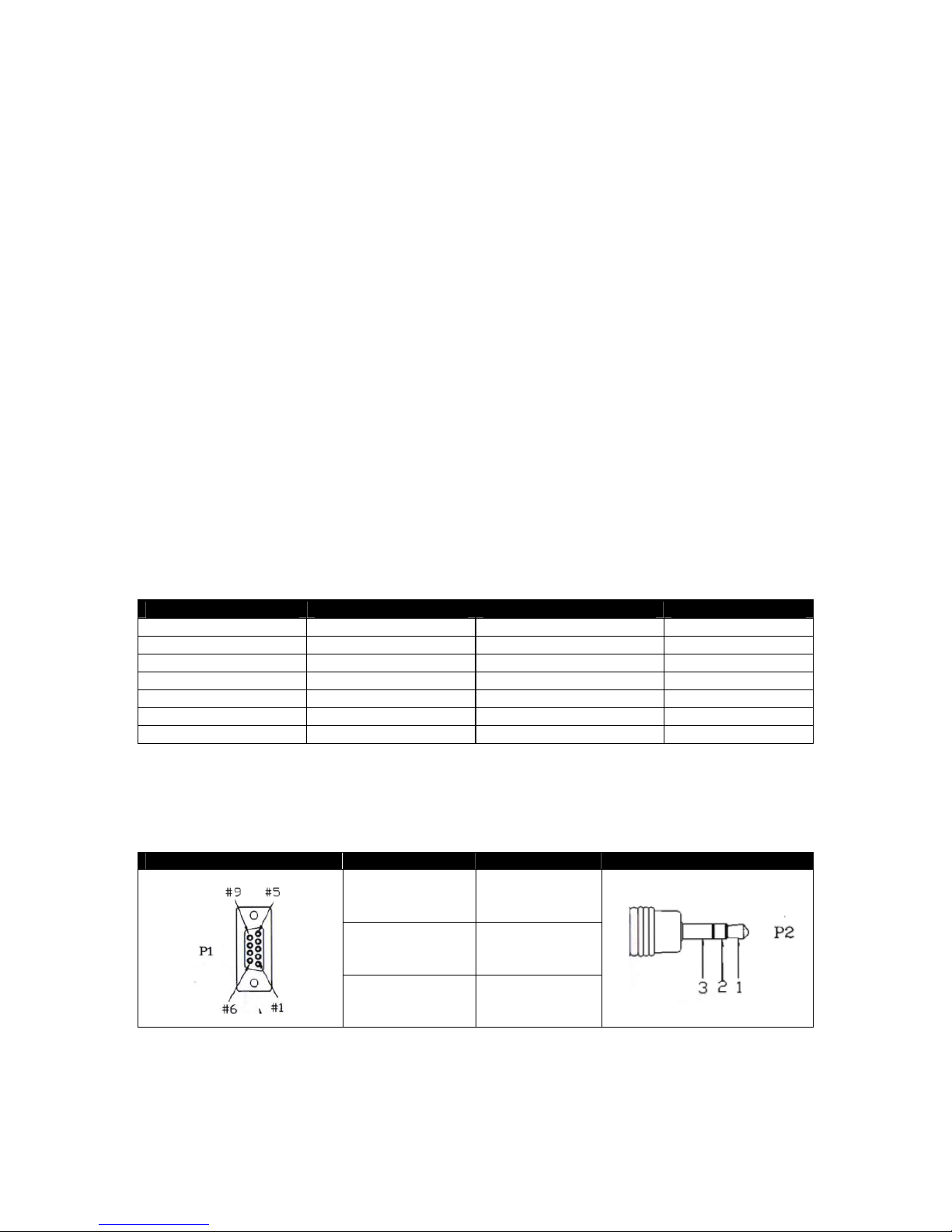
Connector Pin Assignment
Interface : 9 pin D-Sub female to 3.5mm Jack
The pin assignment of the Controller and DN-200 is shown in the following table:
9 Pin D-Sub Controller (P1) DN-200 (P2) 3.5mm Jack
Pin 2 (Rx) 2 Jack Ring
Pin 3 (Tx) 1 Jack Tip
Pin 5 (GND) 3 Jack Sleeve
Page 20
20
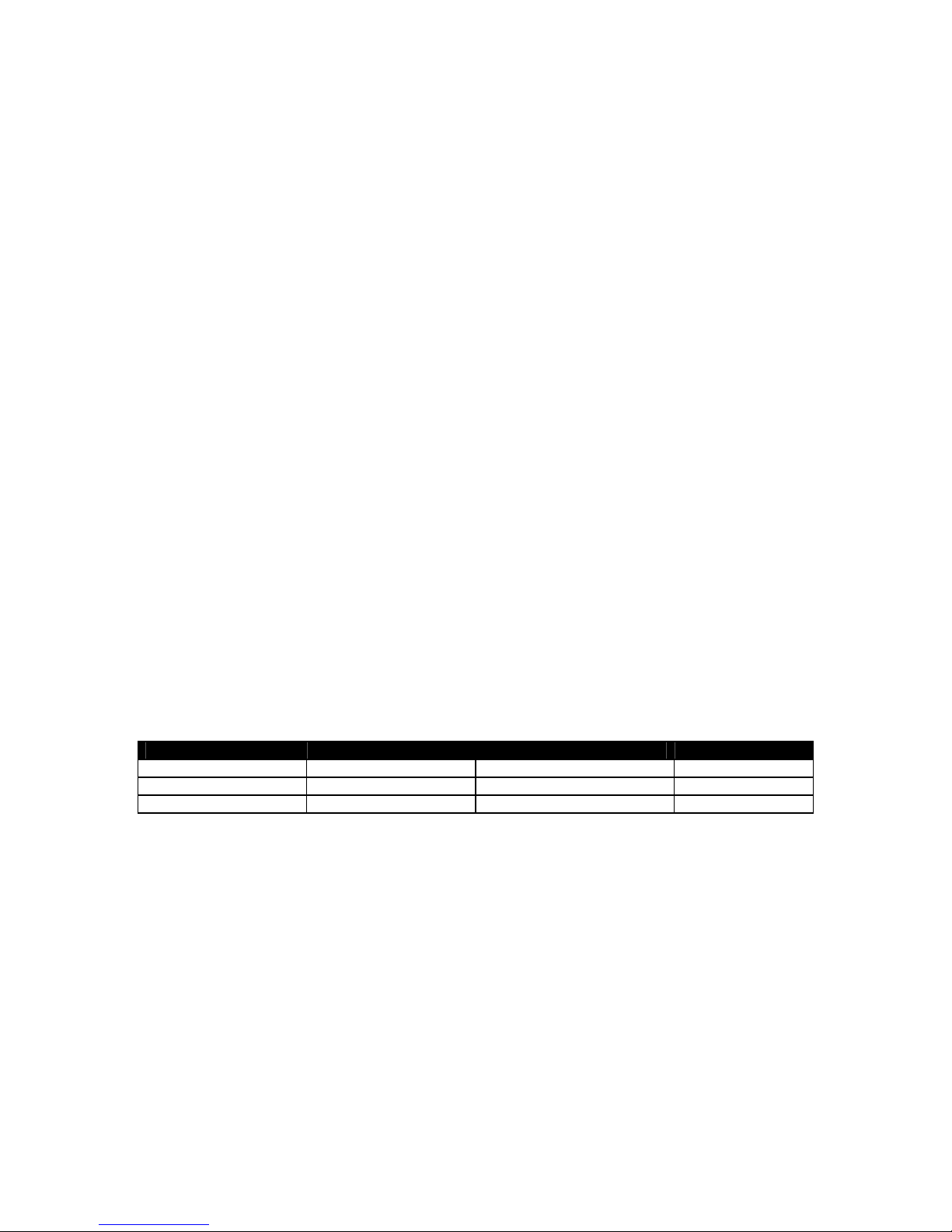
System Control
00h, 11h Device Type request
The response is 00, 00 indicating Quick Capture
00h, F1h Next Bin
When this command is issued from the Idle state the next bin is selected. If the present bin is 99 then
the next bin is 1.
00h, F2h Previous Bin
When this command is issued from the Idle state the previous bin is selected. If the present bin is 1
then the next bin is 99.
00h, F4h Disable Loop Play
When this command is issued from the Idle state the Loop Play feature is disabled. Loop Play is
where the the last play command is repeated from its beginning when the end is reached.
00h, F4h Enable Loop Play
When this command is issued from the Idle state the Loop Play feature is enabled. Loop Play is
where the the last play command is repeated from its beginning when the end is reached.
01h, F0h, XXh Select Bin XX
When this command is issued from the Idle state bin XX is selected. XX varies between 1 and 99.
Illegal bins are ignored.
01h, F3h, XXh Select and Empty Bin XX
When this command is issued from the Idle state bin XX is selected and all of its content is
permanently deleted. XX varies between 1 and 99. Illegal bins are ignored.
Sense Request
61h, 0Ch, 04h Current Time Sense
Requests the Time code data. The unit responds with 4 bytes indicating the present time code in
Binary-Coded-Decimal. The first byte holds the frame number, the second byte holds the seconds,
the third the minutes and the fourth the hour. In the play state, the time code returned is the time
associated with the current frame being played, in the record state, the time code returned represents
the elapsed time recorded in the present bin.
Command Name Response Name
61h, 20h, OL, csum Status Sense 7Lh, 20h, Stat(L), csum Status
61h, F0h, 04h, 55h Current Frame Offset 74h, 00h, FO(3:0), csum Frame Offset
61h, F1h, 01h, 53h Current Bin 61h, 00h, nn, csum Bin Number
24h, F1h, nn Play Offset nn
Frame Offset number nn is played. The number nn is made up of 4 binary encoded bytes and sent
out with the least significant byte first. This command may be issued from the idle state or any other
Play state. Note: Frame Offset are represented in absolute frame numbers where the first frame of
the bin is 0.
24h, F2h, nn Play from Offset nn
Content of the present bin is played at 1x speed starting at Frame Offset nn. This command may be
issued from the Idle state or any other Play state.
24h, F3h, bb, nn Select Bin and Play Offset
Bin number bb is selected and Frame Offset number nn is played. This command may be issued from
the idle state or any other Play state.
24h, F4h, bb, nn Select Bin and Play from Offset
Content of the bin number bb is played at 1x speed starting at Frame Offset nn. This command may
be issued from the idle state or any other Play state.
Page 21

21
24h, F5h, nn Play to Offset nn
Content of the present bin is played at 1x speed starting from present Frame Offset until Frame Offset
nn at which point it pauses. Frame Offset nn is 4 bytes and starts with the LSB. This command may
be issued from the idle state or any other Play state.
25h, F5h, bb, nn Select Bin and Play to Offset
Content of the bin number bb is played at 1x speed starting at Frame Offset 0 to Frame Offset nn then
pause. Frame Offset nn is 4 bytes and starts with the LSB. This command may be issued from the
idle state or any other Play state.
29h, F5h, bb, nn, ee Select Bin and Play from Offset to Offset
Content of the bin number bb is played at 1x speed starting at Frame Offset nn to Frame Offset ee
then pause. Frame Offsets nn and ee are 4 bytes and start with the LSB. This
Transport Control
20h, 00h, Stop
The unit enters the idle state. In the A2D, the outputs reflect the video source as selected by the Front
Panel.
20h, 01h Play
Content of the present bin is played at 1x speed. This command may be issued from the idle state or
any other Play state.
20h 02h Record
The video is recorded from the selected source onto the current Bin. This command may be issued
only from the idle state.
20h, 10h Fast Forward
A play state where video is played at the highest speed of 32x in the forward direction.
20h, 20h Fast Rewind
A play state where video is played at the highest speed of 32x in the reverse direction.
NOTE: When receiving one of the following commands (JOG, VARIABLE or SHUTTLE ), the unit will
play forward or backward according to the speed data.
The first data byte may only be a maximum of 80:
Play Speed=10(nn/32-2)
Note that setting nn to 0 will result in pausing the unit.
21h, 11h, nnh Jog Forward
21h, 12h, nnh Variable Forward
21h, 13h, nnh Shuttle Forward
A Play state where video is played at the commanded play speed as described above in the forward
direction. Note: Setting the speed to 0 causes the play to pause.
21h, 21h, nnh Jog Reverse
21h, 22h, nnh Variable Reverse
21h, 23h, nnh Shuttle Reverse
A Play state where video is played at the commanded play speed as described above in the reverse
direction. Note: Setting the speed to 0 causes the play to pause.
21h, F0h, nnh Select Bin and Play
Content of the bin number nn is played at 1x speed from the beginning. This command may be issued
from the idle state or any other Play state
Page 22
22
Page 23
23
Service and Support
It is our goal to make your products ownership a satisfying experience. Our supporting staff is
available to assist you in setting up and operating your system. Please refer to our web site
www.datavideo-tek.com for answers to common questions, support requests or contact your local
office below.
Datavideo Global Website: www.datavideo-tek.com
Datavideo Corporation
Tel: +1 562 696 2324 Fax: +1 562-698-6930 E-Mail: [email protected]
Datavideo Technologies Europe BV
Tel: +31-30-261-96-56 Fax: +31-30 261-96-57 E-Mail: [email protected]
Datavideo UK Limited
Datavideo Technologies Co., Ltd
Tel: +886 2 8227 2888 Fax: +886-2-8227-2777 E-mail: [email protected]
Datavideo Technologies China Co., Ltd
Tel: +86 21-5603 6599 Fax:+86 21-5603 6770 E-mail: service@d atavideo.cn
Datavideo Technologies (S) PTE Ltd
Datavideo HK Ltd
Tel: +852 2833 1981 Fax: +852-2833-9916 E-mail: [email protected]
All the trademarks are the properties of their respective owners.
Datavideo Technologies Co., Ltd. All rights reserved 2018.
P/N: G082060404E1
 Loading...