

Page 1

Release Note:
th
1. 28
June, 2007 Official released for model number changed from
C328R User Manual
C328 to C328R.
Rm 802, Nan Fung Ctr, Castle Peak Rd, Tsuen Wan NT, Hong Kong
Tel: (852) 2498 6248 Fax (852) 2414 3050
Email: [email protected]
http://www.comedia.com.hk
Page 2

C328R USER MANUAL
General Description
The C328R is VGA camera module performs as a JPEG compressed still camera and can be attached to
a wireless or PDA host. Users can send out a snapshot command from the host in order to capture a full
resolution single-frame still picture. The picture is then compressed by the JPEG engine and transferred
to the host thru serial port.
UART
VGA Image
Sensor
C32 ule
8R camera mod
OV528
Compression
Engine
EEPROM
(Program)
Host
Features
z Small in size, 20x28mm
z VGA resolution, down sample to QVGA or CIF
z 3.3V operation
z Low power consumption 60mA
z User friendly commands to control the module
z UART interface of up to 115.2Kbps
z Auto detect baud rate and make connection to the host
z Power saving mode
z Various lens options
System Configuration
1. Camera Sensor
The C328R module uses OmniVision VGA color digital CameraChips with an 8-bit YCbCr
interface.
2. OV528 Serial Bridge
The OV528 Serial Bridge is a JPEG CODEC embedded controller chip that can compress and
transfer image data from CameraChips to external device. The camera interface synchronizes
with input video data and performs down sampling, clamping and windowing functions with
desired resolution, as well as color conversion that is requested by the user through serial bus
host commands.
The JPEG CODEC can achieve higher compression ratio and better image quality for various
image resolutions.
3. Program EEPROM
A serial type program memory is built-in for C328R to provide a set of user-friendly command
interfacing to external host.
Figure 1 – System block diagram
C328R JPEG Compression Module 2 2007.6.28
Page 3
C328R USER MANUAL
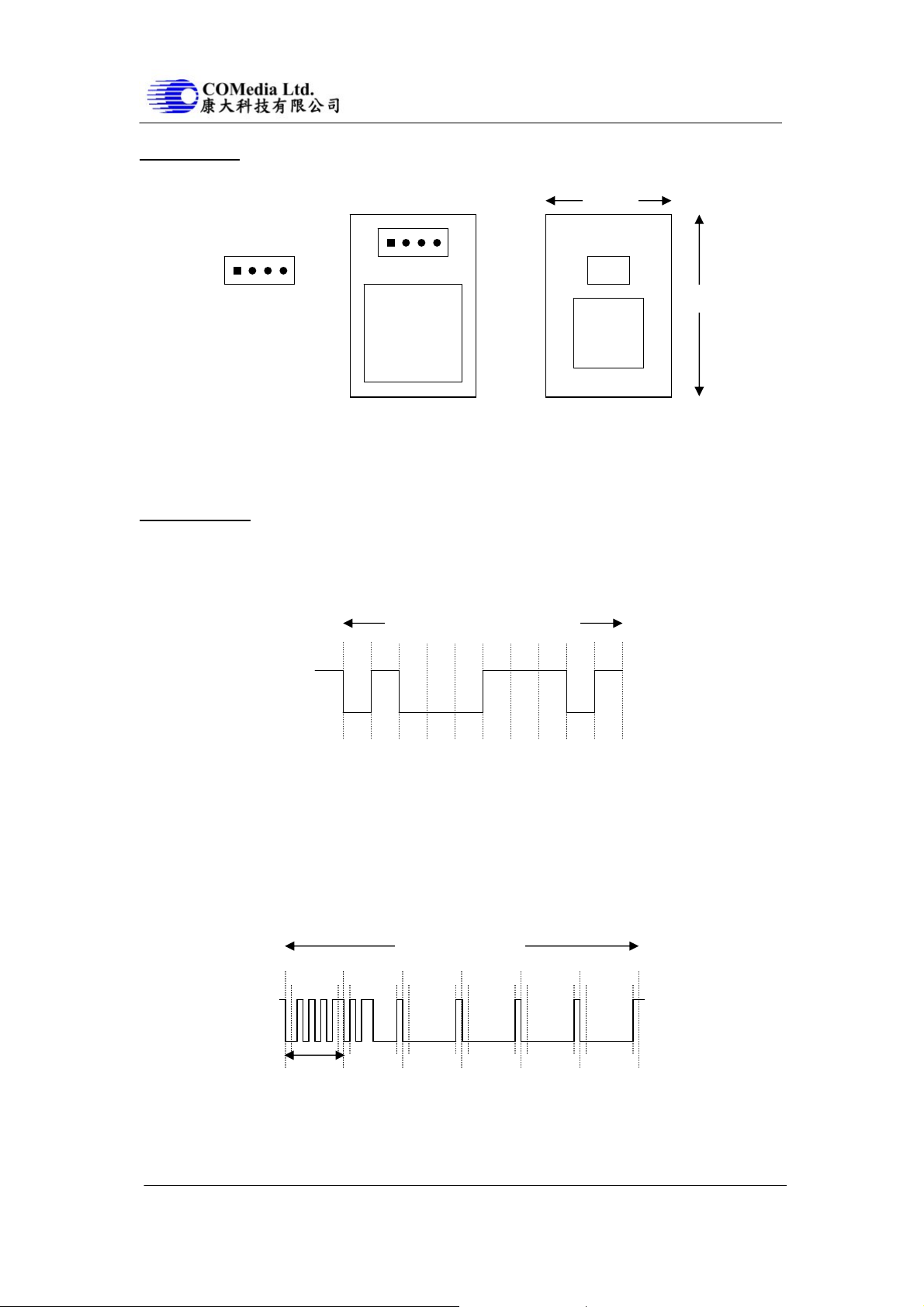
Board Layout
20mm
RS-232
RS-232
J1
3.3V Tx Rx GND
J1
EEPROM
28mm
OV76xx
Top View
OV528
Bottom View
Figure 2 – C328R board layout and serial interface pin assignment
Serial Interface
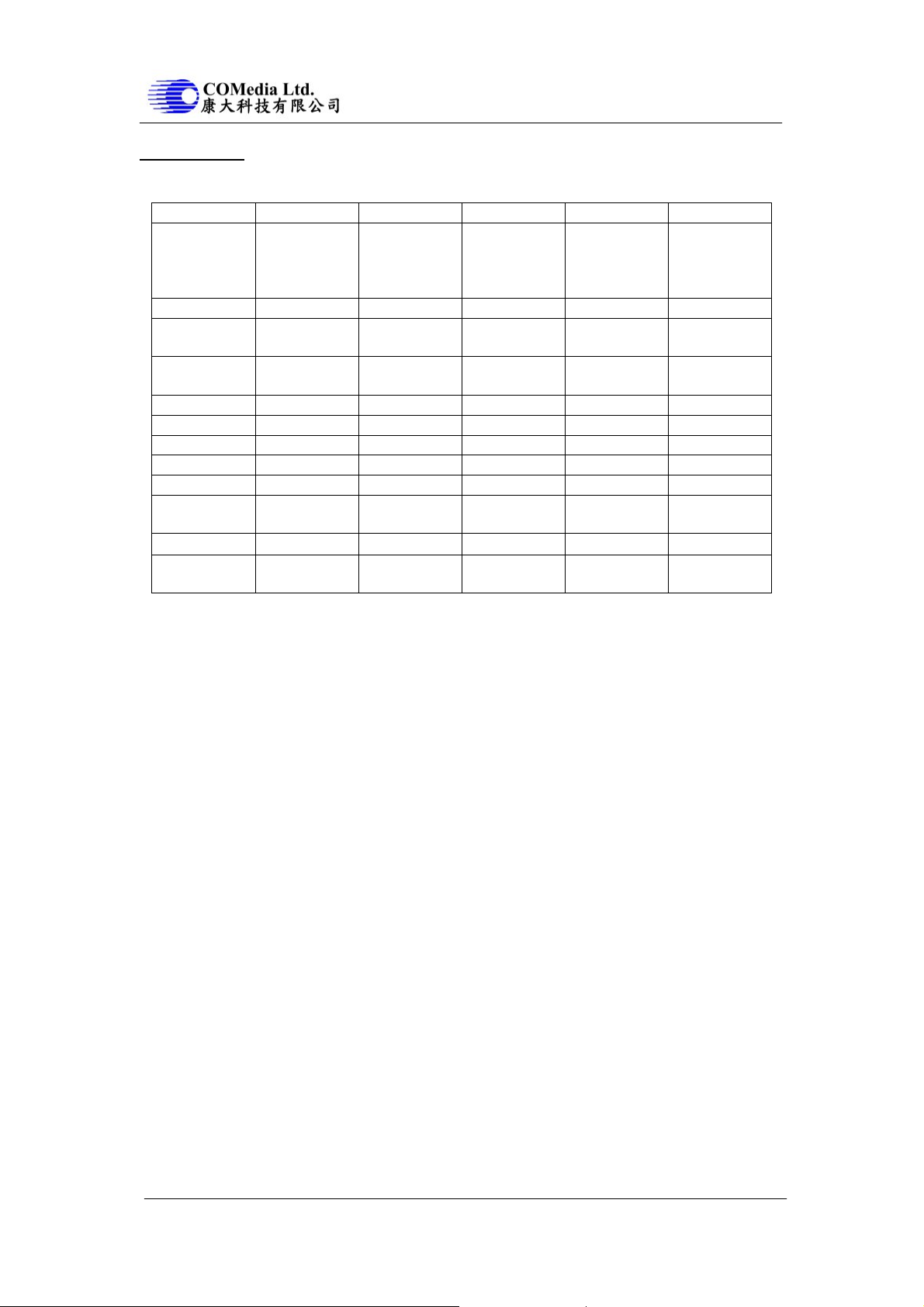
1. Single Byte Timing Diagram
A single byte RS-232 transmission consists of the start bit, 8-bit contents and the stop bit. A start
bit is always 0, while a stop bit is always 1. LSB is sent out first and is right after the start bit.
Single Byte Transmission
Start
Bit 0
Bit 1
Bit 2
Bit 3
Bit 4
Bit 5
Bit 6
Bit 7
Stop
Figure 3 – RS-232 single byte timing diagram
2. Command Timing Diagram
A single command consists of 6 continuous single byte RS-232 transmissions. The following is
an example of SYNC (AA0D00000000h) command.
SYNC Command
00h00h00h00hAAh 0Dh
Single
Byte
Figure 4 – RS-232 SYNC command tim i ng di ag ram
C328R JPEG Compression Module 3 2007.6.28
Page 4
C328R USER MANUAL
Command Set
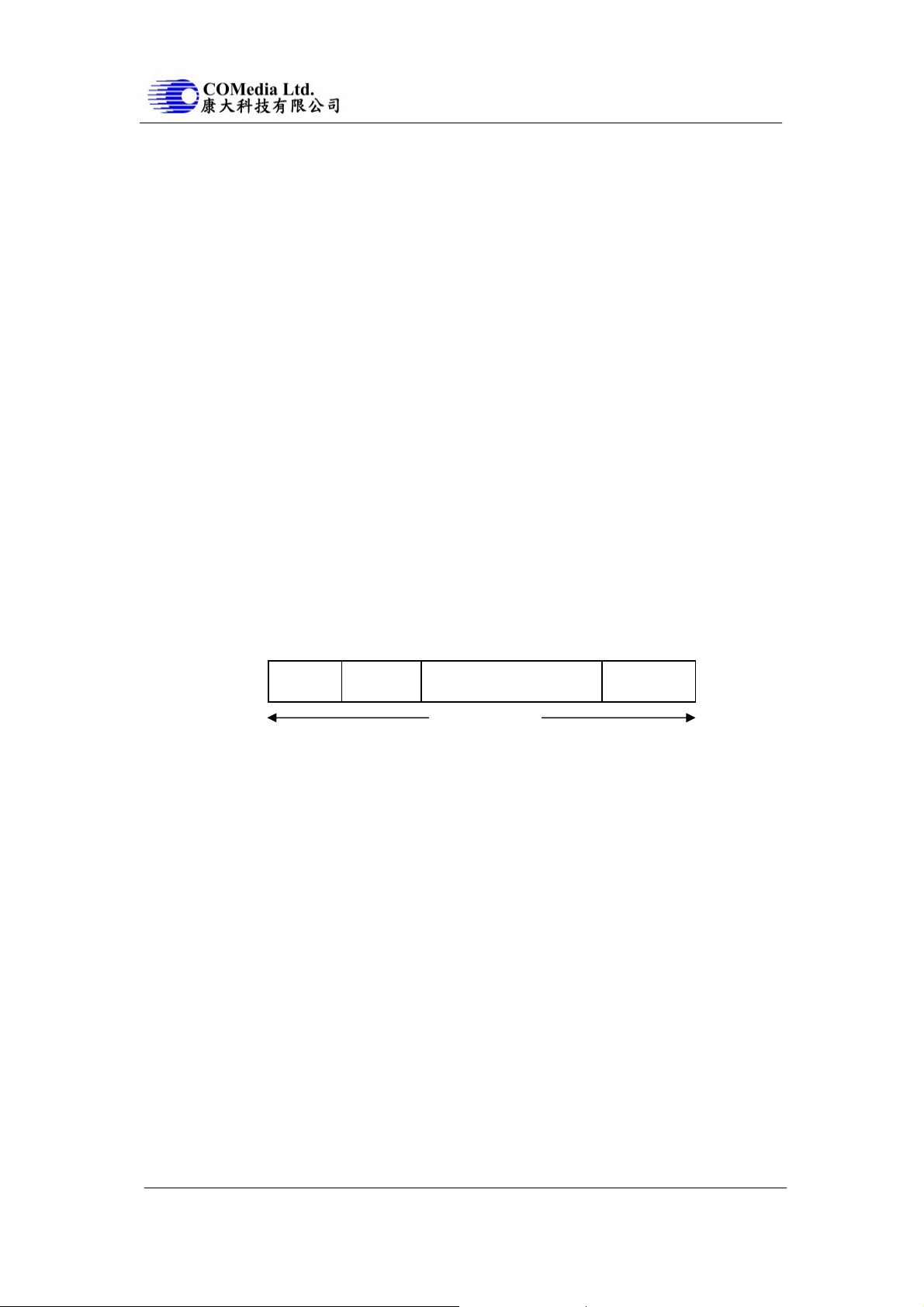
The C328R module supports total 11 commands for interfacing to host as following:
Command ID Number Parameter1 Parameter2 Parameter3 Parameter4
Initial AA01h 00h Color Type RAW
Resolution
(Still image
only)
Get Picture AA04h Picture Type 00h 00h 00h
Snapshot AA05h Snapshot Type Skip Frame
Low Byte
Set Package
Size
Set Baudrate AA07h 1st Divider 2nd Divider 00h 00h
Reset AA08h Reset Type 00h 00h xxh*
Power Off AA09h 00h 00h 00h 00h
Data AA0Ah Data Type Length Byte 0 Length Byte 1 Length Byte 2
SYNC AA0Dh 00h 00h 00h 00h
ACK AA0Eh Command ID ACK counter 00h / Package
NAK AA0Fh 00h NAK counter Error Number 00h
Light
Frequency
* If the parameter is 0xFF, the command is a special Reset command and the firmware responds to it
immediately.
1. Initial (AA01h)
The host issues this command to configure the preview image size and color type. After receiving
this command, the module will send out an ACK command to the host if the configuration
success. Otherwise, an NACK command will be sent out.
1.1 Color Type
C328R can support 6 different color types as follow:
2-bit Gray Scale 01h
4-bit Gray Scale 02h
8-bit Gray Scale 03h
12-bit Color 05h
16-bit Color 06h
JPEG 07h
1.2 Preview Resolution
80x60 01h
160x120 03h
1.3 JPEG Resolution
Since the Embedded JPEG Code can support only multiple of 16, the JPEG preview mod e can
support following image sizes. It is different from normal preview mode.
80x64 01h
160x128 03h
320x240 05h
640x480 07h
AA06h 08h Package Size
Low Byte
AA13h Frequency
Type
00h 00h 00h
Skip Frame
High Byte
Package Size
High Byte
ID Byte 0
JPEG
Resolution
00h
00h
00h / Package
ID Byte 1
C328R JPEG Compression Module 4 2007.6.28
Page 5
C328R USER MANUAL
2. Get Picture (AA04h)
The host gets a picture from C328R by sending this command.
2.1 Picture Type
Snapshot Picture 01h
Preview Picture 02h
JPEG Preview Picture 05h
3. Snapshot (AA05h)
C328R keeps a single frame of JPEG still picture data in the buffer after receiving this command.
3.1 Snapshot Type
Compressed Picture 00h
Uncompressed Picture 01h
3.2 Skip Frame Counter
The number of dropped frames can be defined before compression occurs. “0” keeps the current
frame, “1” captures the next frame, and so forth.
4. Set Package Size (AA06h)
The host issues this command to change the size of data package which is used to transmit JPEG
image data from the C328R to the host. This command should be issued before sending Snapshot
command or Get Picture command to C328R. It is noted that the size of the last package varies
for different image.
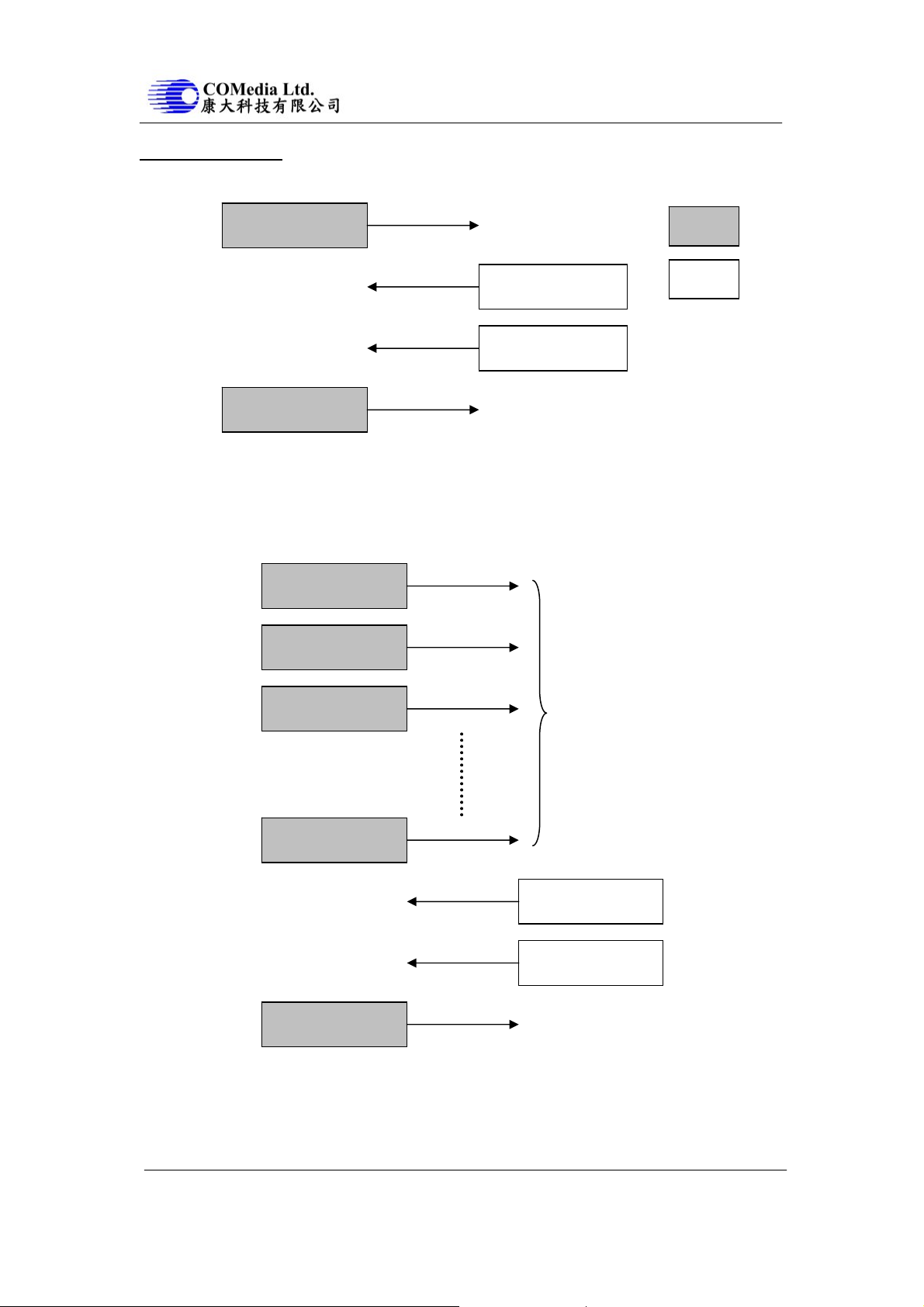
4.1 Package Size
The default size is 64 bytes and the maximum size is 512 bytes.
Byte0
ID
(2 bytes)
Data Size
(2 bytes)
Image Data
(Package size - 6 bytes)
Verify Code
(2 bytes)
ByteN
Package Size
ID -> Package ID, starts from zero for an image
Data Size -> Size of image data in the package
Verify Code -> Error detection code, equals to the lower byte of sum of the whole
package data except the verify code field. The higher byte of this
always zero. i.e. verify code = lowbyte(sum(byte[0] to byte[N-2]))
Note: As the transmission of uncompressed image is not in package mode, it is not necessary to
set the package size for uncompressed image.
code is
C328R JPEG Compression Module 5 2007.6.28
Page 6

C328R USER MANUAL
5. Set Baudrate (AA07h)
Set the C328R baud rate by issuing this command. As the module can auto-detect the baud rate
of the incoming command, host can make connection with one of the follo wing baud rate in the
table. The module will keep using the detected baud rate until physically power off
5.1 Baudrate Divider
Baudrate = 14.7456MHz / 2 x (2nd Divider + 1) / 2 x (1st Divider + 1)
Baudrate 1
st
Divider 2nd Divider Baudrate 1st Divider 2nd Divider
7200 bps ffh 01h 28800 bps 3fh 01h
9600 bps bfh 01h 38400 bps 2fh 01h
14400 bps 7fh 01h 57600 bps 1fh 01h
19200 bps 5fh 01h 115200 bps 0fh 01h
6. Reset (AA08h)
The host reset C328R by issuing this command.
6.1 Reset Type
“00h” resets the whole system. C328R will reboot and reset all registers and state machines.
“01h” resets state machines only.
7. Power Off (AA09h)
C328R will go into sleep mode after receiving this command. SYNC command (AA0Dh) must
be sent to wake up C328R for certain period until receiving ACK command from C328R.
8. Data (AA0Ah)
C328R issues this command for telling the host the type and the size of the image data which is
ready for transmitting out to the host.
8.1 Data Type
Snapshot Picture 01h
Preview Picture 02h
JPEG Preview Picture 05h
8.2 Length
These three bytes represent the length of data of the Snapshot Picture, Preview Picture or JPEG
Preview Picture.
9. SYNC (AA0Dh)
Either the host or the C328R can issue this command to make connectio n. An ACK command
must be sent out after receiving this command.
C328R JPEG Compression Module 6 2007.6.28
Page 7

C328R USER MANUAL
10. ACK (AA0Eh)
This command indicates the success of last operation. After receiving any valid command, ACK
command must be sent out except when getting preview data. The host can issue this command
to request image data package with desired package ID after receiving Data command from
C328R. The host should send this command with package ID F0F0h after receiving a package to
end the package transfer. Note that the field “command ID” should be 00h when request image
data package.
10.1 Command ID
The command with that ID is acknowledged by this command.
10.2 ACK Counter
No use.
10.3 Package ID
For acknowledging Data command, these two bytes represent the requested package ID. While
for acknowledging other commands, these two bytes are set to 00h.
11. NAK (AA0Fh)
This command indicates corrupted transmission or unsupported features.
11.1 NAK Counter
No use.
11.2 Error Number
Picture Type Error 01h Parameter Error 0bh
Picture Up Scale 02h Send Register Timeout 0ch
Picture Scale Error 03h Command ID Error 0dh
Unexpected Reply 04h Picture Not Ready 0fh
Send Picture Timeout 05h Transfer Package Number Error 10h
Unexpected Command 06h Set Transfer Package Size Wrong 11h
SRAM JPEG Type Error 07h Command Header Error F0h
SRAM JPEG Size Error 08h Command Length Error F1h
Picture Format Error 09h Send Picture Error F5h
Picture Size Error 0ah Send Command Error ffh
12. Light Frequency (AA13h)
The host issues this command to change the light frequency of the C328R.
12.1 Light Frequency Type
50Hz 00h
60Hz 01h
C328R JPEG Compression Module 7 2007.6.28
Page 8
C328R USER MANUAL
Command Protocol
1. SYNC Command
SYNC
(AA 0D 00 00 00 00)
Host
ACK
(AA 0E 0D xx 00 00)
SYNC
(AA 0D 00 00 00 00)
ACK
(AA 0E 0D xx 00 00)
C328R
2. Make Connection with C328R
Send the SYNC command (at 14400bps) until receiving ACK command from C328R (usually an
ACK command is receive after sending 25 times of SYNC command). This must be done after
power up.
SYNC
(AA 0D 00 00 00 00)
SYNC
(AA 0D 00 00 00 00)
SYNC
(AA 0D 00 00 00 00)
Max. 60 times
SYNC
(AA 0D 00 00 00 00)
ACK
(AA 0E 0D xx 00 00)
SYNC
(AA 0D 00 00 00 00)
ACK
(AA 0E 0D xx 00 00)
C328R JPEG Compression Module 8 2007.6.28
Page 9
C328R USER MANUAL
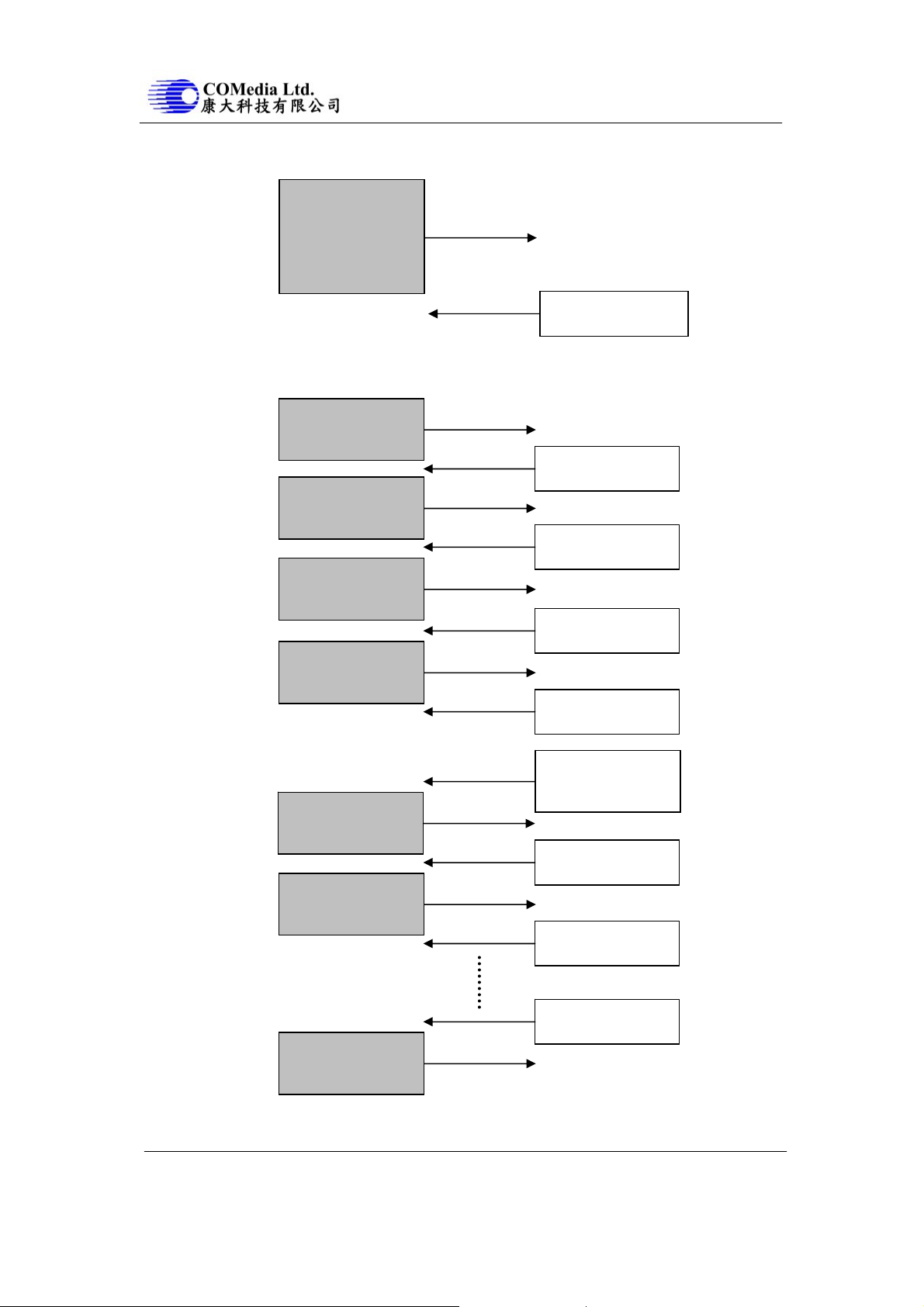
3. Initial, Get Picture, Snapshot, Set Package Size, Set Baudrate, Reset and Power Off Command
SYNC
Get Picture
Snapshot
Set Package Size
Set Baudrate
Reset
Power Off
ACK
4. Getting a Snapshot for RS232
Make sure connection is made before the following communication.
4.1 JPEG Snapshot Picture (eg. 640x480 resolution)
Initial
JPEG preview, VGA
(AA 01 00 07 yy 07)
Set Package Size
512 bytes size
(AA 06 08 00 02 00)
Snapshot
compressed picture
(AA 05 00 00 00 00)
Get Picture
ACK
(AA 0E 01 xx 00 00)
ACK
(AA 0E 06 xx 00 00)
ACK
(AA 0E 05 xx 00 00)
snapshot picture
(AA 04 01 00 00 00)
ACK
(AA 0E 04 xx 00 00)
Data
snapshot picture
ACK
(AA 0A 01 ~~ ~~ ~~)
package ID: 0000h
(AA 0E 00 00 00 00)
ACK
Image Data Package
512 bytes, ID: 0000h
package ID: 0001h
(AA 0E 00 00 01 00)
ACK
package ID: F0F0h
(AA 0E 00 00 F0 F0)
Image Data Package
512 bytes, ID: 0001h
The Last Image Data
Package
Note:
xx, yy: Don’t care
~~: Image size returned by C328R
C328R JPEG Compression Module 9 2007.6.28
Page 10
C328R USER MANUAL
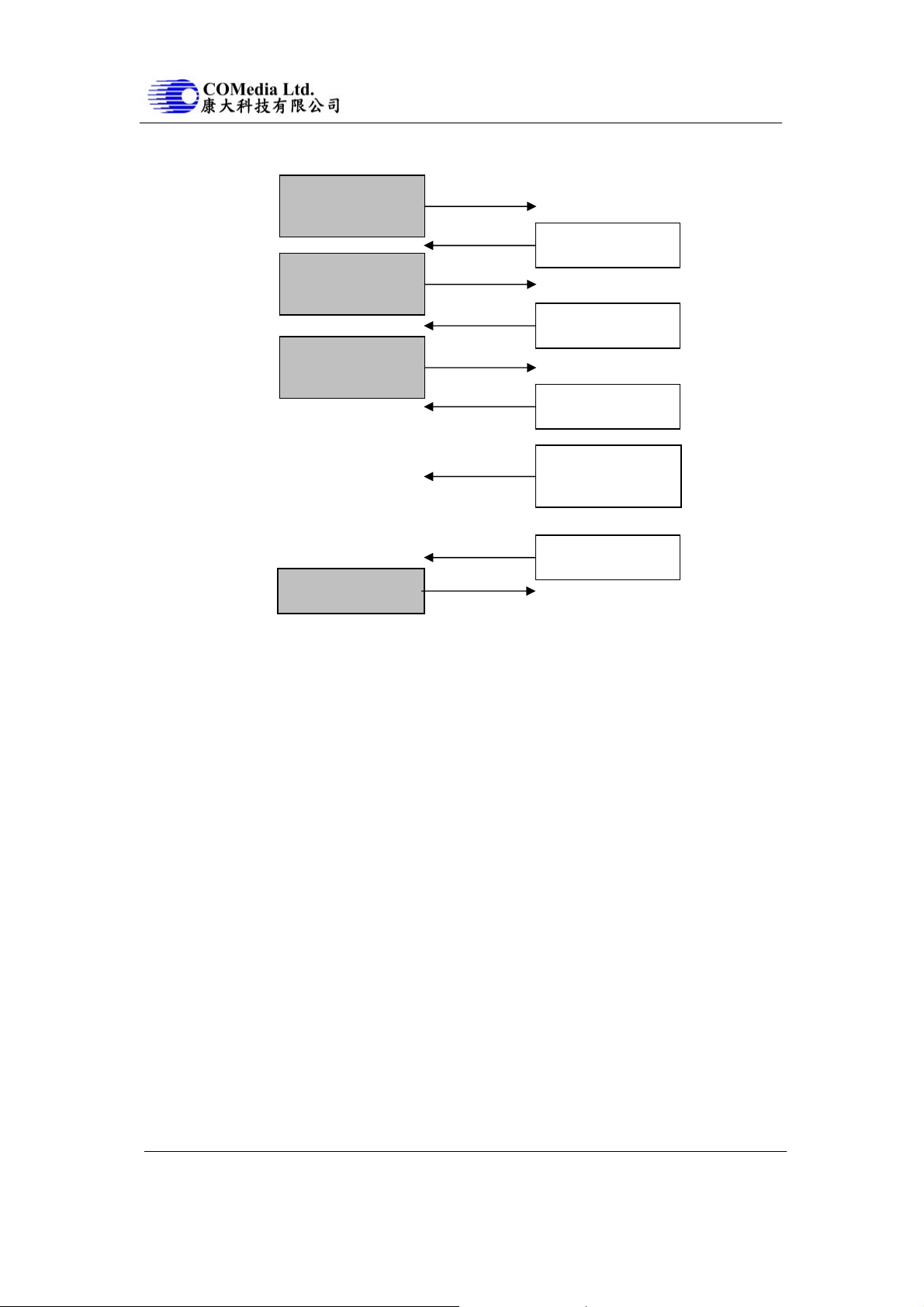
4.2 Snapshot Picture (uncompressed snapshot picture)
Initial
preview, VGA
(AA 01 00 06 07 zz)
Snapshot
uncompressed picture
(AA 05 01 00 00 00)
Get Picture
ACK
(AA 0E 01 xx 00 00)
ACK
(AA 0E 05 xx 00 00)
snapshot picture
(AA 04 01 00 00 00)
ACK
(AA 0E 04 xx 00 00)
Data
snapshot picture
(AA 0A 01 ~~ ~~ ~~)
Image Data
ACK
(AA 0E 0A xx 00 00)
whole picture
Note:
xx, zz : Don’t care
Image size returned by C328R
~~:
C328R JPEG Compression Module 10 2007.6.28
Page 11
C328R USER MANUAL
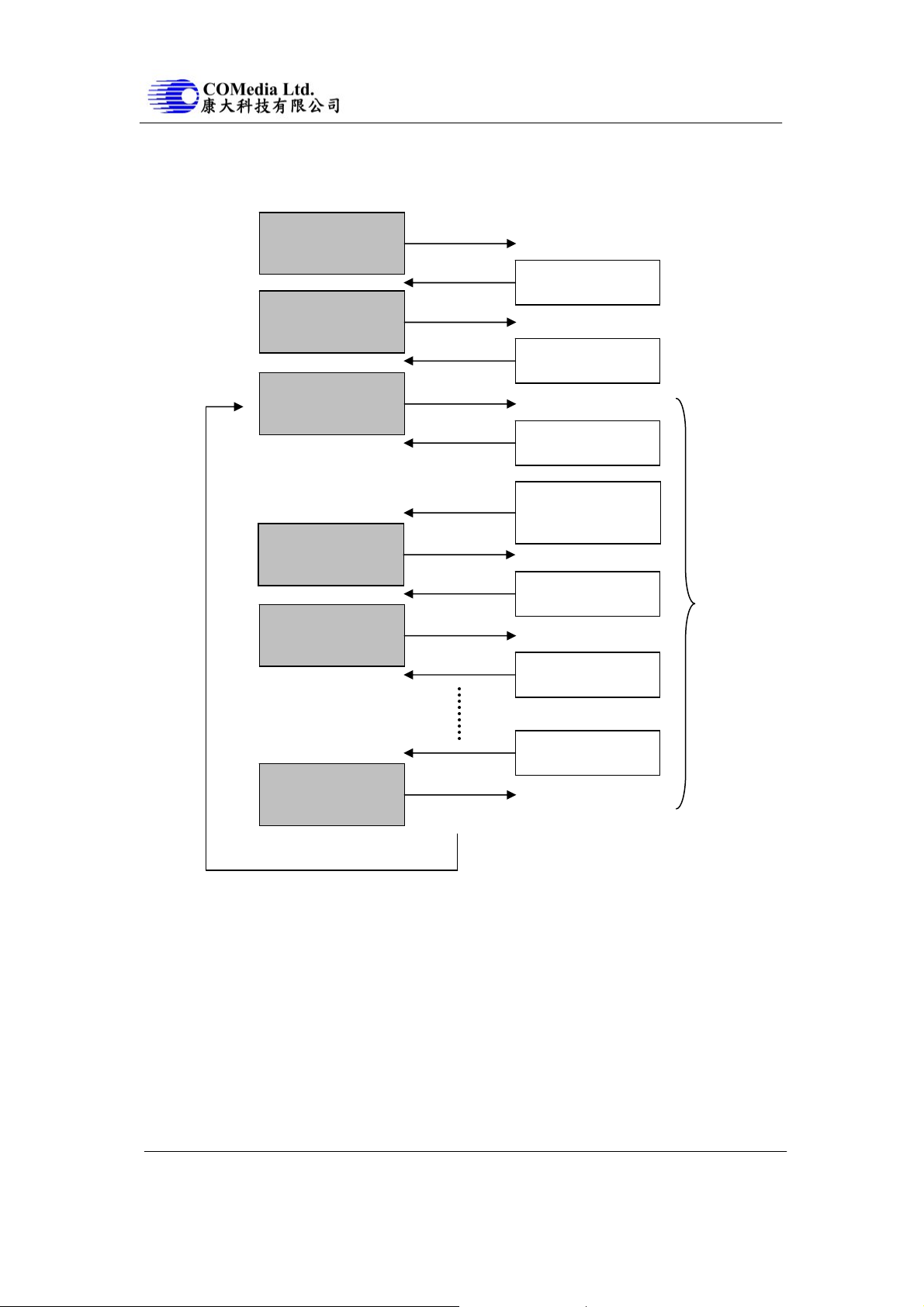
5. Getting JPEG preview pictures (video) for RS232
Make sure connection is made before the following communication.
5.1 JPEG Preview Picture
Initial
JPEG preview, VGA
(AA 01 00 07 yy 07)
Set Package Size
512 bytes size
(AA 06 08 00 02 00)
Get Picture
ACK
(AA 0E 01 xx 00 00)
ACK
(AA 0E 06 xx 00 00)
JPEG preview picture
(AA 04 05 00 00 00)
ACK
ACK
(AA 0E 04 xx 00 00)
Data
JPEG preview picture
(AA 0A 05 ~~ ~~ ~~)
package ID: 0000h
(AA 0E 00 00 00 00)
ACK
Image Data Package
512 bytes, ID: 0000h
1 frame
package ID: 0001h
(AA 0E 00 00 01 00)
Image Data Package
512 bytes, ID: 0001h
The Last Image Data
ACK
package ID: F0F0h
(AA 0E 00 00 F0 F0)
Package
Note:
xx, yy: Don’t care
~~:
Image size returned by C328R
C328R JPEG Compression Module 11 2007.6.28
Page 12

C328R USER MANUAL
5.2 Preview Picture (uncompressed pre vie w picture)
Initial
preview, VGA
(AA 01 00 06 07 zz)
Get Picture
ACK
(AA 0E 01 xx 00 00)
preview picture
(AA 04 02 00 00 00)
ACK
(AA 0E 0A xx 00 00)
ACK
(AA 0E 04 xx 00 00)
Data
preview picture
(AA 0A 02 ~~ ~~ ~~)
Image Data
whole picture
Note:
1 frame
xx, zz: Don’t care
~~:
Image size returned by C328R
C328R JPEG Compression Module 12 2007.6.28
Page 13

C328R USER MANUAL
FAQ
Q: What is the power range of the camera module?
A: The range is +3.0V - +3.6V.
Q: I want to establish the connection between a PC and the camera module. Is there any
configuration should be done?
A: To connection with a PC, a RS-232 transceiver set-up should be used as a communication
interface.
Q: I have sent an SYNC command to camera, but it has no response. How can I synchronize
with the module?
A: Users should send the SYNC commands one by one continuously until receiving the ACK
and SYNC commands from the module. Normally, 25-60 SYNC commands are required.
After that, users should reply with an ACK command.
Q: What is the baud rate to synchronize with the camera? Will the baud rate change after
SYNC?
A: C328 supports 7200, 9600, 14400, 19200, 28800, 38400, 57600 and 115200bps. Users can
synchronize with the camera at one of the baud rate above. Once synchronizing with camera
successfully, the baud rate will not be changed until users change it with the “Set Baud rate”
command.
Q: When will the baud rate be changed after receiving the “Set Baud rate” command?
A: The baud rate will be changed after the module reply with the ACK command. Users must
use the new baud rate after this.
Q: After sending “Getpicture” command to the camera, what will the users receive?
A: After sending "Getpicture" command to the module, users will receive an "ACK", a "Data"
command, "AA 0A 01 XX YY ZZ" telling you the image size, and then the first package of
image data. .
Q: How to use the image size returned? Also, how many packages must be received to get the
captured image?
A: Users can use the image size to calculate the number of packages will be received
according to the package size set. The equation is shown in the following:
Number of package = Image size / (Package size – 6)
Q: According to the flow diagram, the ACK command for the first package is
AA 0E 00 00 00 00 and that for the second one AA 0E 00 00 01 00.
Is the third one AA 0E 00 00 02 00 or AA 0E 00 00 01 01?
A: For the third package, it should be AA 0E 00 00 02 00. Those for the other package are
shown in the following:
AA 0E 00 00 L'L H'H.
L'L is the low byte of package ID
H'H is the high byte of package ID
i.e. ID = H'H L'L in hex
Q: After synchronization, I got the first picture with too low to too high luminance. What’s
wrong with it?
A: After synchronization, the camera needs a little time for AEC and AGC to be stable. Users
should wait for 1-2 seconds before capturing the first picture.
Q: What are the formats of the uncompressed pictures?
A: The formats are shown in the following:
2-bit Gray Scale: 2-bit for Y only
4-bit Gray Scale: 4-bit for Y only
8-bit Gray Scale: 8-bit for Y only
12-bit Color: 444 (RGB)
16-bit Color: 565 (RGB)
C328R JPEG Compression Module 13 2007.6.28
 Loading...