

Page 1

unprocess your food
PAGE TITLE
EASY
TOASTER
Instruction manual
page title ∙ bydash.com ∙ 1
MODEL DEZT001
Page 2

TABLE OF CONTENTS
2 ∙ table of contents
Page 3

TABLE OF CONTENTS
EASY
TOASTER
Important Safeguards ......................................... 4-5
Parts & Features ................................................. 6-7
Using Your Toaster .............................................. 8-9
Maintenance .................................................. 10-11
Tips & Tricks ........................................................ 12
Recipe Ideas ....................................................... 13
Customer Support ................................................ 14
Warranty .............................................................. 15
table of contents ∙ 3
Page 4

IMPORTANT SAFEGUARDS
PLEASE READ AND SAVE THIS
INSTRUCTION & CARE MANUAL
When using electrical appliances, basic safety precautions should be
followed, including:
• Read all instructions.
• Warning: hot surfaces. Do not
touch sides of Easy Toaster
while appliance is in use. Use
handles or knobs.
• To prevent the risk of re,
electric shock, or personal
injury, do not place the cord,
plug, or unit near or in water or
other liquids.
• Never leave appliance
unattended when in use.
• This appliance is not intended
for use by persons (including
children) with reduced physical,
sensory, or mental capabilities,
or lack of experience and
knowledge unless they are
provided with supervision and
instruction concerning use
of the appliance by a person
responsible for their safety.
• Do not use appliance outdoors
or for commercial purposes.
• Do not place wet foods inside
the Easy Toaster.
• Allow Easy Toaster to cool
completely before moving,
cleaning, or disassembling.
• Do not use the appliance if
any of the parts are damaged.
Refrain from using attachments
that are not recommended by
the appliance manufacturer, as
this may result in re, electric
shock or personal injury.
• Do not let the cord touch hot
surfaces or hang over the edge
of tables or counters. Extension
cords are not recommended
for use with this appliance.
However, if an extension cord
must be used, make sure the
electrical rating of the wire
is compatible with the Easy
Toaster.
• Never insert oversized foods,
metal foil packages, aluminum
foil, or utensils in the appliance
as this may result in re, electric
shock or personal injury.
• Do not place utensils, ngers,
or other foreign objects inside
the Easy Toaster.
• To disconnect, turn any control
to “off”, then remove plug from
wall outlet.
4 ∙ important safeguards
Page 5

IMPORTANT SAFEGUARDS
• Do not use appliance for other
than intended use.
• Improper use of the Easy
Toaster can result in property
damage or even in personal
injury.
• Do not attempt to dislodge
food when the Easy Toaster
is on. Unplug and allow the
appliance to cool down
completely before proceeding.
• Do not place appliance on or
near a hot gas burner, hot
electric burner, or in a heated
oven.
• Close supervison is necessary
when appliance is used by or
near children.
• Do not operate any appliance
with a damaged cord or
plug or after the appliance
malfunctions of has been
damaged in any manner.
Return appliance to the nearest
authorized service facility
for examination, repair, or
adjustment
• Do not place Easy Toaster near
curtains, drapes, plastic, walls,
or other ammable materials
when in use as this will result
in re.
• Always be sure to unplug the
appliance from outlet prior
to assembly, disassembly,
cleaning, and storage.
• StoreBound shall not accept
liability for damages caused by
improper use of the appliance.
• A short power supply cord
is to be provided to reduce
risks resulting from becoming
entangled in or tripping over a
longer cord.
• If an extension cord is used,
the marked electrical rating of
extension cord should be at
least as great as the electrical
rating of the appliance. The
longer cord should be arranged
so that it will not drape over the
counter top or table top where
it can be pulled on by children
or tripped over
• This appliance has a polarized
plug (one blade is wider than
the other). To reduce the risk
of electric shock, this plug will
t in a polarized outlet only
one way.If the plug does not
completely t in the outlet,
reverse the plug. If it still does
not t, contact a qualied
electrician. Do not modify the
plug in any way.
SAVE THESE INSTRUCTIONS
important safeguards ∙ 5
Page 6

PARTS & FEATURES
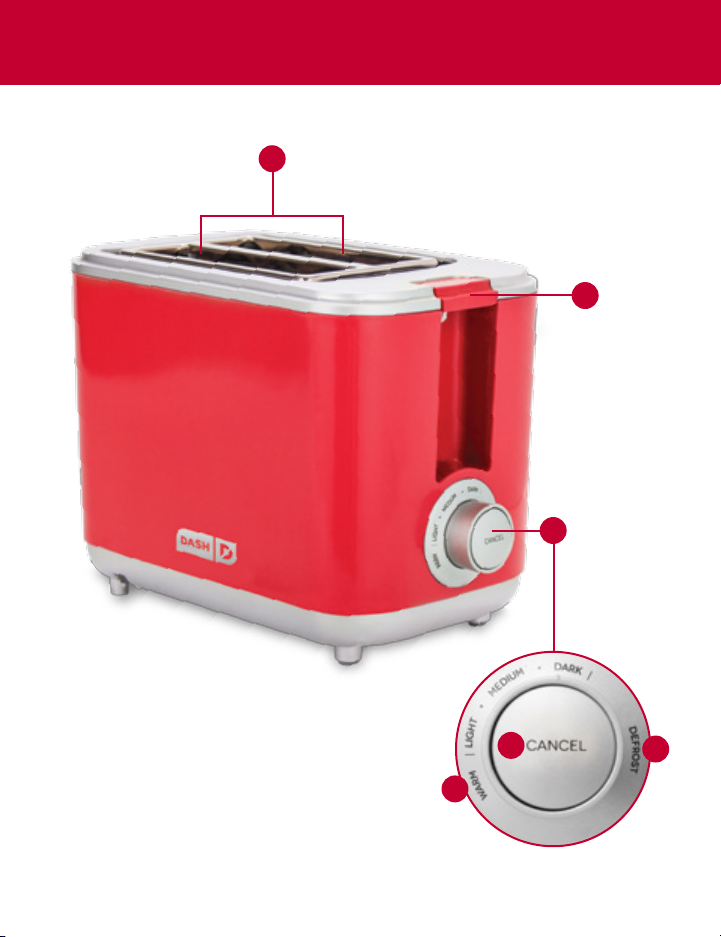
1. Toasting Slots
2. Toast Lift Lever
3. Control Dial
4. Warm
5. Cancel Button
6. Defrost
6 ∙ parts & features
Page 7
PARTS & FEATURES
1
2
3
5
4
parts & features ∙ 7
6
Page 8

USING YOUR TOASTER
Make sure the Easy Toaster and all of its components are clean prior to use.
BEFORE FIRST USE
• Remove all packaging material and stickers from your Easy Toaster.
• Clean the appliance and all of its components prior to assembly and use.
• Make sure loose objects have not fallen inside the Toaster.
• In order to eliminate any manufacturing residues, turn on the
Toaster without bread and set the Control Dial to Medium. The
appliance may give off some smoke which is perfectly normal.
GETTING STARTED
Note: Never stick your bare hands in the Toaster to remove food.
1. Place the Easy Toaster on a clean and stable surface. Make sure that no
liquids or ammable objects are near the appliance or cord. Plug in the
Toaster.
2. Place the bread slices in the Toasting Slots. Depending on desired
results, adjust the Control Dial to Warm, Defrost, or preferred browning
level.
3. Press the
Toast Lift Lever down until it locks into place to start the
heating process. You can stop the toasting process at any time by
simply pressing the Cancel Button. If the Lever doesn’t lock, check if the
appliance is plugged in. The Toast Lift Lever will not click into place if
the Toaster is not plugged in.
4. Always unplug the appliance after use and let it cool down before
cleaning or storing.
8 ∙ using your toaster
Page 9

Type Description
USING YOUR TOASTER
DEFROST
WARM
CONTROL DIAL
Three heating levels give you precise toasting results. Simply select your
desired browning level from the chart below.
Thoroughly toasts frozen bread with an extended
toasting cycle.
Warms already toasted bread or lightly toasts bread
that is not browned enough.
Light Medium Dark
using your toaster ∙ 9
Page 10

MAINTENANCE
DO NOT SUBMERGE the unit in water. Instead, use a damp cloth to wipe
down the surface of the Toaster.
• Before cleaning your Toaster, unplug the appliance and let it cool down
completely.
• Do not use abrasive scrubbers, sponges, or chemical cleaners to clean
your appliance as this may damage it. Instead, use a damp cloth to wipe
down the surface of your Easy Toaster.
• When not in use, store your Toaster in a clean, dry place.
10 ∙ maintenance
Page 11

PAGE TITLE
page title ∙ 11
Page 12

TIPS & TRICKS
• If the bread is too small to be removed from the Toasting Slot, gently
push the Toast Lift Lever up and then remove the toasted bread. If you
still cannot carefully take out the bread, unplug your Toaster and use thin
heat-resistant tongs to remove the bread from the Toasting Slot.
• Do NOT touch the metal parts as they will be hot!
• For pop tarts or frozen wafes, toast as directed.
• ONLY toast food that is meant to be toasted in a slot toaster.
• If the Toaster jams, the bread might be too thick. Remove the
bread from the Toaster and slice it thinner.
12 ∙ tips & tricks
Page 13

RECIPE IDEAS
Lox Bagel
toasted bagel, light cream cheese, lox,
red onion, capers, dill
Bruschetta
toasted baguette, diced tomatoes, fresh
basil, minced garlic, olive oil, sea salt
Strawberry Nutella
toasted bread, Nutella, sliced strawberries
Avocado Toast
toasted baguette, mashed avocado, diced
tomato, onion, salt, pepper, drizzle of
olive oil
recipe ideas ∙ 13
Page 14

CUSTOMER SUPPORT
For product support, warranty, and maintenance related questions, please
contact StoreBound directly at: 1-800-898-6970 from 7AM - 7PM PST,
Monday - Friday, or by email [email protected].
REPAIRS
DANGER! Risk of electric shock! The Dash Go Easy Toaster is an electrical
appliance. Do not attempt to repair the appliance yourself under any
circumstances.
Contact Customer Support regarding repairs to the device.
TECHNICAL SPECIFICATIONS
Model Number DEZT001
Voltage 120V ~ 60Hz
Power Rating 750 W
Stock#: DET_20150605_V2
14 ∙ Customer Support
Page 15

WARRANTY
STOREBOUND, LLC – 1 YEAR LIMITED WARRANTY
Your StoreBound product is warranted to be free from defects in
material and workmanship for a period of one (1) year from the date of
the original purchase when utilized for normal and intended household
use. Should any defect covered by the terms of the limited warranty be
discovered within one (1) year, StoreBound, LLC will repair or replace the
defective part. To process a warranty claim, contact Customer Support at
1-800-898-6970 for further assistance and instruction. A Customer
Support agent will conduct troubleshooting in an attempt to x
any minor problems. If troubleshooting fails to x the problem, a return
authorization will be issued. Proof of purchase indicating date
and place of purchase is required and should accompany the
return. You must also include your full name, shipping address, and
telephone number. We are unable to ship returns to a PO Box.
StoreBound will not be responsible for delays or unprocessed
claims resulting from a purchaser’s failure to provide any or all of the
necessary information. Freight costs must be prepaid by the purchaser.
Send all inquiries to: [email protected]
There are no express warranties except as listed above.
REPAIR OR REPLACEMENT AS PROVIDED UNDER THIS WARRANTY IS THE
EXCLUSIVE REMEDY OF THE CUSTOMER. STOREBOUND SHALL NOT BE LIABLE
FOR ANY INCIDENTAL OR CONSEQUENTIAL DAMAGES OR FOR BREACH
OF ANY EXPRESS OR IMPLIED WARRANTY ON THIS PRODUCT EXCEPT TO
THE EXTENT PROHIBITED BY APPLICABLE LAW. ANY IMPLIED WARRANTY
OF MERCHANTABILITY OR FITNESS FOR A PARTICULAR PURPOSE ON THIS
PRODUCT IS LIMITED IN DURATION TO THE DURATION OF THIS WARRANTY.
Some states do not allow the exclusion or limitation of incidental or
consequential damages, or limitations on how long an implied warranty lasts.
Therefore, the above exclusions or limitations may not apply to you. This
warranty gives you specic legal rights and you may also have other rights,
which vary from state to state.
warranty ∙ 15
Page 16

unprocess your food
For more information, please visit bydash.com
Customer Support 1-800-898-6970
 Loading...